
Per-Device PSK (iPSK, DPSK, MPSK) चा वापर करून WiFi SSID ची संख्या कशी कमी करावी
हा अधिकृत तांत्रिक संदर्भ मार्गदर्शक स्पष्ट करतो की IT टीम्स प्रति-डिव्हाइस PSK (xPSK) चा वापर करून एकाच SSID मध्ये एकाधिक विशिष्ट उद्देशांसाठी तयार केलेले नेटवर्क्स एकत्र करून SSID बीकन ओव्हरहेडमुळे होणारी WiFi परफॉर्मन्सची घसरण कशी दूर करू शकतात. यामध्ये Cisco iPSK, HPE Aruba MPSK, Ruckus DPSK, Juniper Mist PPSK, आणि Ubiquiti UniFi PPSK मधील व्हेंडर लँडस्केपचा समावेश आहे, ज्यामध्ये डायनॅमिक VLAN असाइनमेंट, IoT ऑनबोर्डिंग आणि PCI DSS अनुपालनावर व्यावहारिक अंमलबजावणीचे मार्गदर्शन आहे. हॉस्पिटॅलिटी, रिटेल, स्टेडियम आणि सार्वजनिक क्षेत्रातील संस्थांमधील वेन्यू ऑपरेटर्सना यामध्ये कृतीयोग्य आर्किटेक्चर मार्गदर्शन आणि वास्तविक जगातील व्यावहारिक उदाहरणे मिळतील.
हे मार्गदर्शक ऐका
पॉडकास्ट ट्रान्सक्रिप्ट पहा
आमच्या मुख्य मालिकेचा भाग: Enterprise WiFi Security Guide →

कार्यकारी सारांश
वेन्यू ऑपरेटर्सना WiFi स्पेक्ट्रम गर्दीच्या वाढत्या संकटाचा सामना करावा लागत आहे. जेव्हा तुम्ही गेस्ट, कर्मचारी, पॉइंट-ऑफ-सेल आणि IoT ट्रॅफिक विभाजित करण्यासाठी नवीन SSID ब्रॉडकास्ट करता, तेव्हा तुम्ही मॅनेजमेंट फ्रेम ओव्हरहेडसह मौल्यवान एअरटाइम वापरता. सहा SSIDs ब्रॉडकास्ट करणारे नेटवर्क प्रत्यक्ष डेटाचा एकही पॅकेट ट्रान्समिट होण्यापूर्वी केवळ बीकन्सवर उपलब्ध एअरटाइमचा जवळजवळ २०% वापर करू शकते. यामुळे वेन्यूमधील प्रत्येक युझरसाठी परफॉर्मन्स खालावतो.
यावर उपाय म्हणजे प्रति-डिव्हाइस Pre-Shared Keys (xPSK) चा वापर करून एकाच ब्रॉडकास्ट नेटवर्कमध्ये एकाधिक विशिष्ट उद्देशांसाठी तयार केलेले SSIDs एकत्र करणे. प्रत्येक डिव्हाइस किंवा युझर ग्रुपला एक युनिक पासफ्रेज देऊन, IT टीम्स ट्रॅफिकला विशिष्ट VLANs मध्ये डायनॅमिकली वळवू शकतात आणि रोल-बेस्ड ॲक्सेस कंट्रोल पॉलिसी लागू करू शकतात - हे सर्व एकाच SSID वर. हा दृष्टिकोन गेस्ट डिव्हाइसेसवर सर्टिफिकेट मॅनेजमेंट किंवा RADIUS सप्लिकंट कॉन्फिगरेशनचा मोठा भार न घेता 802.1X एंटरप्राइझ ऑथेंटिकेशनचे सेगमेंटेशन फायदे प्रदान करतो.
हा मार्गदर्शक xPSK (ज्यामध्ये Cisco iPSK, HPE Aruba MPSK, Ruckus DPSK, Juniper Mist PPSK, आणि Ubiquiti UniFi PPSK समाविष्ट आहेत) साठी आर्किटेक्चरल केसचे तपशील देतो, डायनॅमिक VLAN असाइनमेंटचे मूळ मेकॅनिक्स स्पष्ट करतो आणि हॉस्पिटॅलिटी, रिटेल, आरोग्य सेवा, आणि वाहतूक क्षेत्रांमधील एंटरप्राइझ वातावरणात अंमलबजावणीसाठी एक व्यावहारिक रोडमॅप प्रदान करतो.
तांत्रिक सखोल विश्लेषण
SSID च्या वाढत्या संख्येचा छुपा खर्च
अनेकदा खराब कव्हरेज किंवा क्षमतेमुळे उद्भवणाऱ्या परफॉर्मन्सच्या समस्या प्रत्यक्षात SSID गर्दीचा परिणाम असतात. प्रत्येक सक्षम केलेले SSID दर १०० मिलिसेकंदांनी एक बीकन फ्रेम ब्रॉडकास्ट करते. जरी एक बीकन लहान असला, तरी हे मॅनेजमेंट ट्रॅफिक सर्वात कमी बेसिक डेटा रेटवर - सामान्यतः १ किंवा २ Mbps वर - ट्रान्समिट केले जाते जेणेकरून सेलच्या टोकावरील सर्व डिव्हाइसेस ते प्राप्त करू शकतील. याचा अर्थ बीकन्स त्यांच्या पेलोडच्या तुलनेत विसंगतपणे जास्त काळ चॅनेल व्यापतात.
जेव्हा एखादा वेन्यू Guest WiFi, कर्मचारी BYOD, टिल्स, IoT सेन्सर्स आणि कंत्राटदारांसाठी स्वतंत्र नेटवर्क ब्रॉडकास्ट करतो, तेव्हा एअरटाइमचा वापर वेगाने वाढतो. जर एखादा ॲक्सेस पॉइंट सहा SSIDs ब्रॉडकास्ट करत असेल आणि क्लायंट डिव्हाइस एकाच चॅनेलवर चार ॲक्सेस पॉइंट्स ऐकू शकत असेल, तर त्या चॅनेलला प्रति सेकंद २४० बीकन फ्रेम्स वाहून न्याव्या लागतील. हा ओव्हरहेड प्रत्यक्ष डेटा वाहून नेणारा एअरटाइम वापरतो, ज्यामुळे लेटन्सी वाढते आणि संपूर्ण नेटवर्कमधील थ्रूपुट कमी होतो. इंडस्ट्रीमधील एकमत स्पष्ट आहे: प्रति रेडिओ तीनपेक्षा जास्त SSIDs ब्रॉडकास्ट करू नका, आणि आदर्शपणे त्याहूनही कमी असावेत.
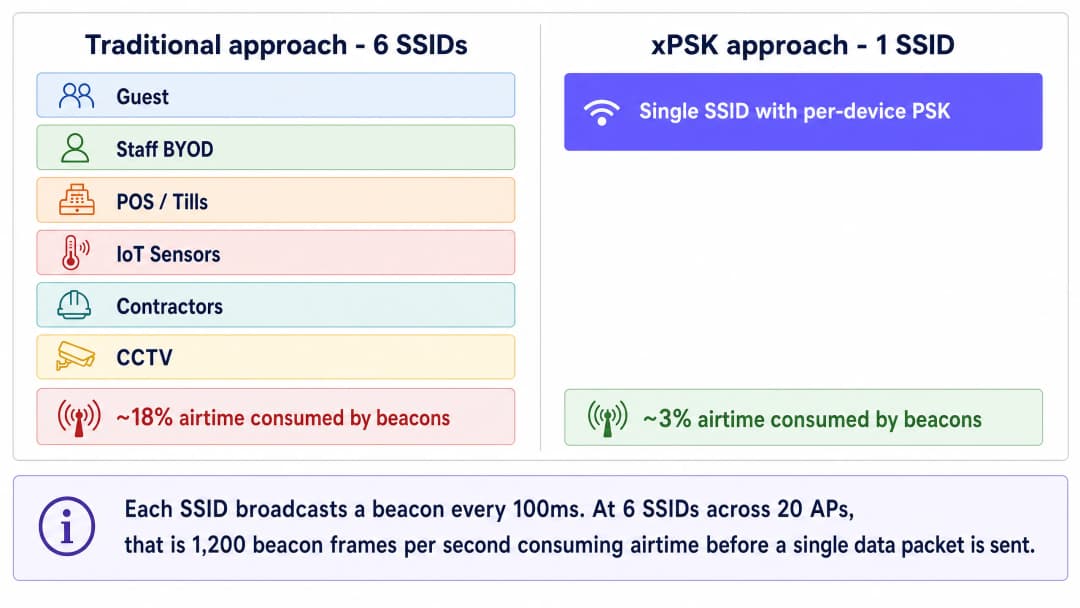
xPSK आर्किटेक्चर
प्रति-डिव्हाइस Pre-Shared Key तंत्रज्ञान - ज्याला एकत्रितपणे xPSK म्हटले जाते - पासफ्रेजला SSID पासून वेगळे करून ही समस्या सोडवते. संपूर्ण नेटवर्कसाठी एका सामायिक पासवर्डऐवजी, वायरलेस कंट्रोलर किंवा क्लाउड मॅनेजमेंट प्लॅटफॉर्म युनिक कीजचा डेटाबेस राखतो. जेव्हा एखादे डिव्हाइस ॲक्सेस पॉइंटशी जोडले जाते, तेव्हा ते मानक WPA2 किंवा WPA3 ४-वे हँडशेक दरम्यान त्याची नियुक्त केलेली की सादर करते. कंट्रोलर की प्रमाणित करतो आणि ती एका आयडेंटिटी रेकॉर्डशी मॅप करतो, ज्यामुळे विशिष्ट पॉलिसी ट्रिगर होतात: डायनॅमिक VLAN असाइनमेंट, बँडविड्थ थ्रॉटलिंग किंवा फायरवॉल नियम.
क्लायंट डिव्हाइसच्या दृष्टीकोनातून, कनेक्शन प्रक्रिया मानक होम नेटवर्कमध्ये सामील होण्यासारखीच असते. यामध्ये इन्स्टॉल करण्यासाठी कोणतीही सर्टिफिकेट्स नसतात, कोणतेही क्लिष्ट सप्लिकंट कॉन्फिगरेशन्स नसतात आणि सुरुवातीच्या जोडणीसाठी कोणत्याही कॅप्टिव्ह पोर्टलची आवश्यकता नसते. यामुळे xPSK हे हेडलेस IoT डिव्हाइसेस, स्मार्ट टीव्ही आणि गेस्ट BYOD परिस्थितींसाठी आदर्श बनते जिथे 802.1X अव्यवहार्य आहे.
VLAN स्टीयरिंग मेकॅनिझम Access-Accept मेसेजमध्ये परत आलेल्या तीन मानक IETF RADIUS ॲट्रिब्युट्सवर अवलंबून असते: Tunnel-Type (ॲट्रिब्युट ६४, VLAN साठी व्हॅल्यू १३), Tunnel-Medium-Type (ॲट्रिब्युट ६५, IEEE-802 साठी व्हॅल्यू ६), आणि Tunnel-Private-Group-ID (ॲट्रिब्युट ८१, ज्यामध्ये VLAN ID स्ट्रिंग असते). जेव्हा ॲक्सेस पॉइंटला हे ॲट्रिब्युट्स मिळतात, तेव्हा तो डिव्हाइसच्या ट्रॅफिकला निर्दिष्ट VLAN सह डायनॅमिकली टॅग करतो, ज्यामुळे ते कोणत्या फिजिकल पोर्ट किंवा ॲक्सेस पॉइंटद्वारे कनेक्ट झाले आहे याकडे दुर्लक्ष करून योग्य नेटवर्क सेगमेंटमध्ये ठेवले जाते.
व्हेंडर अंमलबजावणी एका दृष्टीक्षेपात
जरी मूळ संकल्पना एकसारखी असली, तरी हार्डवेअर व्हेंडर्स वेगवेगळी संज्ञा वापरतात आणि स्केल आणि इंटिग्रेशनचे विविध स्तर ऑफर करतात.

Cisco Meraki (iPSK): आयडेंटिटी PSK हे Cisco ISE किंवा Meraki च्या मूळ क्लाउड RADIUS सह घट्टपणे इंटिग्रेट होते. तुम्ही Meraki डॅशबोर्डमध्ये थेट कीज व्यवस्थापित करून स्वतंत्र RADIUS सर्व्हरशिवाय ते चालवू शकता, किंवा पूर्ण डायनॅमिक प्रोफाइलिंग आणि Microsoft Entra ID किंवा Okta सह इंटिग्रेशनसह ISE द्वारे हजारो युनिक कीजपर्यंत स्केल करू शकता.
HPE Aruba (MPSK): मल्टी Pre-Shared Key कोणत्याही बाह्य सर्व्हरशिवाय ॲक्सेस पॉइंटवर स्थानिक पातळीवर २४ कीजपर्यंत (MPSK-Local) सपोर्ट करते. मोठ्या उपयोजनांसाठी, ClearPass सह पेअर केल्याने स्केल मर्यादा पूर्णपणे काढून टाकली जाते आणि VLAN असाइनमेंटच्या वर रोल-बेस्ड ॲक्सेस कंट्रोल जोडला जातो.
Ruckus (DPSK): डायनॅमिक PSK ही एक प्रगत, पेटंट केलेली अंमलबजावणी आहे जी एका दशकाहून अधिक काळ बाजारात आहे. हे प्रति SSID १०,००० पर्यंत युनिक कीजला सपोर्ट करते आणि ऑटोमेटेड प्रोव्हिजनिंगसाठी मजबूत API सपोर्ट आहे, ज्यामुळे ते मोठ्या हॉस्पिटॅलिटी उपयोजनांसाठी योग्य बनते.
Juniper Mist (PPSK/MPSK): प्रायव्हेट PSK हे Mist च्या AI-चालित क्लाउड प्लॅटफॉर्मसह इंटिग्रेट होते, जे डायनॅमिक रोल आणि VLAN असाइनमेंटसह प्रति संस्था ५,००० कीजपर्यंत सपोर्ट करते. कीज CSV द्वारे इम्पोर्ट केल्या जाऊ शकतात किंवा API द्वारे प्रोव्हिजन केल्या जाऊ शकतात.
Ubiquiti UniFi (PPSK): प्रायव्हेट Pre-Shared Key हे कोणत्याही अतिरिक्त लायसन्सिंगशिवाय UniFi नेटवर्क कंट्रोलरमध्ये अंगभूत आहे. आधीच UniFi इन्फ्रास्ट्रक्चर चालवत असलेल्या लहान वेन्यूसाठी हा सर्वात सुलभ प्रवेश बिंदू आहे.
Extreme Networks (PPSK): Extreme चे ExtremeCloud IQ प्लॅटफॉर्म प्रति-की VLAN असाइनमेंटसह PPSK ला सपोर्ट करते, जे शिक्षण आणि सार्वजनिक क्षेत्रातील उपयोजनांसाठी योग्य आहे.
Fortinet (MPSK): FortiGate आणि FortiAP प्रति-की VLAN स्टीयरिंगसह MPSK ला सपोर्ट करतात, जे RADIUS बॅकएंड म्हणून FortiAuthenticator सह इंटिग्रेट होते.
त्याऐवजी 802.1X कधी वापरावे
xPSK हे 802.1X साठी सार्वत्रिक पर्याय नाही. MDM प्लॅटफॉर्मद्वारे व्यवस्थापित केलेल्या कॉर्पोरेट मालकीच्या डिव्हाइसेससाठी, जिथे Microsoft Entra ID किंवा Okta द्वारे सर्टिफिकेट्स सायलेंटली पुश केली जाऊ शकतात, तिथे EAP-TLS (Extensible Authentication Protocol - Transport Layer Security) सह 802.1X हा सर्वात सुरक्षित पर्याय आहे. हे प्रति-सेशन एन्क्रिप्शन कीज, म्युच्युअल ऑथेंटिकेशन आणि सर्टिफिकेट-बेस्ड आयडेंटिटी प्रदान करते जी पासफ्रेजइतकी सहज शेअर किंवा चोरी केली जाऊ शकत नाही.
यासाठी 802.1X वापरा: व्यवस्थापित कॉर्पोरेट लॅपटॉप आणि टॅब्लेट, Microsoft Intune किंवा Jamf मध्ये नोंदणीकृत डिव्हाइसेस, आणि अशी कोणतीही परिस्थिती जिथे तुम्ही प्रत्येक डिव्हाइसवर सप्लिकंट कॉन्फिगरेशनची हमी देऊ शकता.
यासाठी xPSK वापरा: गेस्ट BYOD, IoT आणि हेडलेस डिव्हाइसेस, जुन्या ऑपरेटिंग सिस्टमवर चालणारे पॉइंट-ऑफ-सेल टर्मिनल्स, कंत्राटदार डिव्हाइसेस, आणि अशी कोणतीही परिस्थिती जिथे सर्टिफिकेट उपयोजन अव्यवहार्य आहे.
एंटरप्राइझ WiFi सुरक्षा मानकांच्या विस्तृत माहितीसाठी, आमचे Enterprise WiFi Security: A Complete Guide for 2026 पहा.
तुमच्या विशिष्ट सेटअपबद्दल काही प्रश्न आहेत का?
आमची टीम ८०,००० हून अधिक वेन्यूजमधील वेन्यू ऑपरेटर्स, IT मॅनेजर्स आणि नेटवर्क इंजिनिअर्ससोबत काम करते. २० मिनिटांचा कॉल बुक करा आणि तुमच्यासारख्या इतरांनी ही समस्या कशी सोडवली हे आम्ही तुम्हाला दाखवू.
अंमलबजावणी मार्गदर्शक
पायरी १: तुमची सेगमेंटेशन स्ट्रॅटेजी निश्चित करा
तुमचा वायरलेस कंट्रोलर कॉन्फिगर करण्यापूर्वी, तुमच्या आवश्यक नेटवर्क सेगमेंटचा नकाशा तयार करा. एका सामान्य हॉस्पिटॅलिटी किंवा रिटेल वातावरणात किमान चार आयसोलेटेड झोन आवश्यक असतात:
| झोन | VLAN | ॲक्सेस पॉलिसी | सामान्य डिव्हाइसेस |
|---|---|---|---|
| गेस्ट | २० | केवळ इंटरनेट, क्लायंट आयसोलेशन | वैयक्तिक फोन, टॅब्लेट, लॅपटॉप |
| कर्मचारी BYOD | १० | इंटरनेट + विशिष्ट अंतर्गत ॲप्स | कर्मचाऱ्यांचे वैयक्तिक डिव्हाइसेस |
| IoT आणि सुविधा | ३० | केवळ व्हेंडर क्लाउडसाठी प्रतिबंधित आउटबाउंड | थर्मोस्टॅट्स, सेन्सर्स, डिजिटल सायनज |
| POS आणि सुरक्षित ऑपरेशन्स | ४० | PCI DSS सुसंगत, आयसोलेटेड | पेमेंट टर्मिनल्स, टिल्स |
उपयोजनापूर्वी तुमच्या सर्व वेन्यूमध्ये हे VLAN IDs प्रमाणित करा. वेगवेगळ्या साइट्सवर विसंगत VLAN नंबरिंग असणे हे अयशस्वी मल्टी-साइट रोलआउट्सचे सर्वात सामान्य कारणांपैकी एक आहे.
पायरी २: RADIUS इन्फ्रास्ट्रक्चर कॉन्फिगर करा
एंटरप्राइझ उपयोजनांना की लाइफसायकल व्यवस्थापित करण्यासाठी आणि डायनॅमिक VLAN ॲट्रिब्युट्स पास करण्यासाठी केंद्रीय RADIUS सर्व्हरची आवश्यकता असते. यशस्वी ऑथेंटिकेशनवर खालील ॲट्रिब्युट्स परत करण्यासाठी तुमचा RADIUS सर्व्हर कॉन्फिगर करा:
Tunnel-Type(६४):VLAN(१३) वर सेट कराTunnel-Medium-Type(६५):IEEE-802(६) वर सेट कराTunnel-Private-Group-ID(८१): नियुक्त केलेल्या VLAN ID वर सेट करा (उदा., POS साठी "४०")
प्रत्येक डिव्हाइस ग्रुपसाठी स्वतंत्र ऑथरायझेशन प्रोफाइल्स तयार करा. उदाहरणार्थ, "POS_Devices" नावाचे प्रोफाइल VLAN ४० परत करते. "IoT_Sensors" नावाचे प्रोफाइल VLAN ३० परत करते. प्रत्येक प्रोफाइल ऑथेंटिकेशन दरम्यान सादर केलेल्या युनिक की द्वारे ट्रिगर केले जाते.
पायरी ३: सिंगल SSID उपयोजित करा
तुमच्या वायरलेस कंट्रोलरवर एक नवीन SSID तयार करा. सिक्युरिटी टाईप WPA2-Personal (किंवा तुमच्या विशिष्ट xPSK अंमलबजावणीद्वारे सपोर्ट असल्यास WPA3-Transition) म्हणून कॉन्फिगर करा आणि व्हेंडर-विशिष्ट xPSK वैशिष्ट्य सक्षम करा. नवीन SSID प्रमाणित झाल्यानंतर सर्व जुने SSIDs अक्षम करा.
हेडलेस IoT डिव्हाइसेसना त्यांची ओळख म्हणून त्यांचा MAC ॲड्रेस वापरून ऑथेंटिकेट करण्याची परवानगी देण्यासाठी MAC Authentication Bypass (MAB) योग्यरित्या कॉन्फिगर केले असल्याची खात्री करा, त्यांना योग्य PSK आणि VLAN शी मॅप करा.
पायरी ४: की वितरण स्वयंचलित करा
xPSK उपयोजनाचे यश विना-अडथळा की वितरणावर अवलंबून असते. Guest WiFi साठी, की जनरेशन तुमच्या प्रॉपर्टी मॅनेजमेंट सिस्टम किंवा CRM सह इंटिग्रेट करा. Purple चे आयडेंटिटी-बेस्ड नेटवर्क प्लॅटफॉर्म ही प्रक्रिया स्वयंचलित करू शकते, बुकिंग केल्यावर एक युनिक की जनरेट करू शकते आणि ती ईमेल किंवा SMS द्वारे पाठवू शकते, आणि नंतर चेकआउटच्या वेळी ती स्वयंचलितपणे रद्द करू शकते.
IoT डिव्हाइसेससाठी, IT टीम्स नेटवर्कशी कनेक्ट होण्यापूर्वी प्रत्येक डिव्हाइसचा MAC ॲड्रेस विशिष्ट की आणि VLAN रोलशी जोडून, CSV इम्पोर्ट किंवा API इंटिग्रेशनद्वारे मोठ्या प्रमाणात कीज आधीच प्रोव्हिजन करू शकतात.
सर्वोत्तम पद्धती
पहिल्या दिवसापासून MAC रँडमायझेशनसाठी नियोजन करा. आधुनिक ऑपरेटिंग सिस्टम्स (iOS १४ आणि नंतरच्या, Android १० आणि नंतरच्या, Windows ११) डीफॉल्टनुसार MAC ॲड्रेसेस रँडमाइज करतात. जर तुमची xPSK अंमलबजावणी पॉलिसी लागू करण्यासाठी MAC ॲड्रेस ट्रॅक करण्यावर अवलंबून असेल, तर तुम्ही युझर्सना तुमच्या नेटवर्कसाठी "Private Wi-Fi Address" अक्षम करणे आवश्यक केले पाहिजे, किंवा असा व्हेंडर सोल्यूशन वापरावा जो आयडेंटिटीला MAC ॲड्रेसऐवजी की शी जोडतो.
की लाइफसायकल मॅनेजमेंट सक्तीने लागू करा. कीज कालबाह्य झाल्या पाहिजेत. गेस्ट कीज त्यांच्या चेकआउट तारखेशी जोडा. कर्मचाऱ्यांच्या कीज दरवर्षी किंवा ते नोकरी सोडताना बदला. जुन्या कीज कालांतराने जमा होतात आणि सुरक्षेसाठी मोठा धोका बनतात. नेटवर्क लाइव्ह होण्यापूर्वी रिव्होकेशन (रद्द करणे) वर्कफ्लो तयार करा, नंतर नाही.
एक फॉलबॅक VLAN ठेवा. तुमच्या ॲक्सेस पॉइंट्सवर एक क्रिटिकल VLAN कॉन्फिगर करा. जर RADIUS सर्व्हरशी संपर्क तुटला, तर डिव्हाइसेस अशा प्रतिबंधित VLAN वर फॉलओव्हर झाले पाहिजेत जे अंतर्गत सिस्टम्स उघड्या न पाडता मूलभूत इंटरनेट कनेक्टिव्हिटी प्रदान करते. हे RADIUS आउटेजमुळे संपूर्ण वेन्यूचे नेटवर्क ठप्प होण्यापासून रोखते.
WPA3 सक्तीने लागू करण्यापूर्वी सुसंगततेचे ऑडिट करा. जरी WPA3 हे भविष्य असले, तरी अनेक जुनी IoT डिव्हाइसेस त्याला सपोर्ट करत नाहीत. WPA3-Transition मोड सक्षम करण्यापूर्वी तुमच्या विशिष्ट xPSK अंमलबजावणीची कसून चाचणी घ्या, कारण काही व्हेंडर्सना xPSK कार्यक्षमतेसाठी केवळ WPA2 ची आवश्यकता असते.
की फॉरमॅट प्रमाणित करा. १६ ते २४ कॅरेक्टरच्या अल्फान्यूमेरिक कीज वापरा. काही जुन्या डिव्हाइसेसना ३२ कॅरेक्टर्सपेक्षा जास्त लांब असलेल्या किंवा क्लिष्ट विशेष कॅरेक्टर्स असलेल्या कीज वापरण्यात अडचण येते. सुसंगततेमुळे ऑथेंटिकेशनच्या अशा समस्या टळतात ज्यांचे निदान करणे कठीण असते.
डायनॅमिक VLAN सेगमेंटेशनच्या विस्तृत माहितीसाठी, आमचा Dynamic VLAN Assignment with RADIUS वरील मार्गदर्शक पहा.
ट्रबलबूटिंग आणि जोखीम कमी करणे
डिव्हाइस कनेक्ट होते परंतु चुकीच्या VLAN वर जाते. वायरलेस कंट्रोलरवर "AAA Override" किंवा डायनॅमिक VLAN असाइनमेंट सक्षम असल्याची खात्री करा. Access-Accept मेसेजमध्ये Tunnel-Private-Group-ID ॲट्रिब्युट योग्यरित्या पाठवले जात आहे याची खात्री करण्यासाठी RADIUS लॉग्स तपासा. RADIUS एक्सचेंजवरील पॅकेट कॅप्चर हे ॲट्रिब्युट्स उपस्थित आहेत की नाही याची पुष्टी करेल.
ऑथेंटिकेशन पूर्णपणे अपयशी ठरते. की ची लांबी आणि कॅरेक्टर सेट तपासा. कंट्रोलर आणि RADIUS सर्व्हरमधील RADIUS सामायिक गुपित (shared secret) जुळत असल्याची खात्री करा. RADIUS सर्व्हरकडे ॲक्सेस पॉइंटचा IP ॲड्रेस वैध क्लायंट म्हणून नोंदणीकृत असल्याची पुष्टी करा.
DHCP अपयश VLAN असाइनमेंटनंतर. डायनॅमिक VLAN असाइनमेंटनंतर, डिव्हाइसला नवीन सबनेटसाठी IP ॲड्रेस मिळणे आवश्यक आहे. DHCP सर्व्हर सर्व डायनॅमिक VLANs साठी कॉन्फिगर केला असल्याची आणि DHCP सेंट्रलाइज्ड असल्यास लेयर ३ स्विचवर IP हेल्पर ॲड्रेसेस जागेवर असल्याची खात्री करा.
MAC रँडमायझेशनमुळे ऑथेंटिकेशन खंडित होते. जर डिव्हाइसेस काही काळानंतर पुन्हा ऑथेंटिकेट होण्यास अपयशी ठरत असतील, तर MAC रँडमायझेशन हे बहुधा सर्वात मोठे कारण आहे. प्री-रजिस्ट्रेशन वर्कफ्लो लागू करा किंवा युझर्सना तुमच्या SSID साठी प्रायव्हेट ॲड्रेस वैशिष्ट्य अक्षम करणे आवश्यक करा.
ROI आणि व्यावसायिक प्रभाव
एकाधिक SSIDs एकाच xPSK नेटवर्कमध्ये एकत्र केल्याने तीन आयामांमध्ये मोजता येण्याजोगा व्यावसायिक फायदा मिळतो.
परफॉर्मन्स. बीकन ओव्हरहेडमधून १५ ते २०% वायरलेस एअरटाइम परत मिळवल्याने सर्व युझर्ससाठी ॲप्लिकेशन परफॉर्मन्स आणि थ्रूपुट त्वरित सुधारतो. यामुळे सध्याच्या ॲक्सेस पॉइंट्सचे उपयुक्त आयुष्य वाढते आणि महागड्या हार्डवेअर अपग्रेड्स लांबणीवर पडतात. ४० ॲक्सेस पॉइंट्स असलेल्या २०० खोल्यांच्या हॉटेलमध्ये, पाच अतिरिक्त SSIDs काढून टाकल्याने आठ अतिरिक्त ॲक्सेस पॉइंट्सच्या क्षमतेइतकी जागा परत मिळू शकते.
सुरक्षा आणि अनुपालन. जेव्हा एखादा कंत्राटदार काम सोडून जातो, तेव्हा संपूर्ण वेन्यूमध्ये सामायिक केलेला पासवर्ड बदलण्याची गरज xPSK मुळे उरत नाही. हे प्रत्येक पॉइंट-ऑफ-सेल टर्मिनलवर 802.1X सर्टिफिकेट्स उपयोजित करण्याचा मोठा IT ओव्हरहेड न घेता PCI DSS अनुपालनासाठी आवश्यक असलेले तपशीलवार ऑडिट ट्रेल्स प्रदान करते. प्रत्येक डिव्हाइसकडे युनिक क्रेडेंशियल असते, त्यामुळे एखादी की तडजोड झाल्यास केवळ त्याच डिव्हाइसवर परिणाम होतो.
ऑपरेशनल कार्यक्षमता. तुमच्या PMS किंवा आयडेंटिटी प्रोव्हाइडरसह API इंटिग्रेशनद्वारे स्वयंचलित की प्रोव्हिजनिंग आणि रिव्होकेशन नियमित ॲक्सेस बदलांसाठी मॅन्युअल IT हस्तक्षेपाची आवश्यकता काढून टाकते. ८०,००० पेक्षा जास्त लाइव्ह वेन्यूमध्ये उपयोजित केलेले Purple चे प्लॅटफॉर्म, वरून पूर्ण WiFi Analytics आणि रिपोर्टिंगसह हा ऑर्केस्ट्रेशन लेयर प्रदान करते.
संबंधित आर्किटेक्चर मार्गदर्शनासाठी, आमचे OpenWrt Custom Firmware Integration with Purple WiFi आणि WiFi Network Segmentation with VLANs and SSIDs वरील मार्गदर्शक पहा.
महत्वाच्या व्याख्या
Beacon frame
ॲक्सेस पॉइंटद्वारे SSID ची उपस्थिती, क्षमता आणि पॅरामीटर्स घोषित करण्यासाठी वेळोवेळी (डीफॉल्टनुसार दर १००ms नी) ब्रॉडकास्ट केली जाणारी IEEE 802.11 मॅनेजमेंट फ्रेम.
जेव्हा IT टीम्स खूप जास्त SSIDs तयार करतात,通 बीकन फ्रेम्सचे प्रचंड प्रमाण सर्वात कमी डेटा रेटवर मौल्यवान एअरटाइम वापरते, ज्यामुळे कोणताही युझर डेटा पाठवण्यापूर्वी नेटवर्कमध्ये गर्दी होते. SSID संख्या कमी करण्यासाठी हा प्राथमिक परफॉर्मन्स युक्तिवाद आहे.
xPSK
प्रति-डिव्हाइस किंवा प्रायव्हेट Pre-Shared Keys साठीची एक व्यापक संज्ञा, जिथे एकाच ब्रॉडकास्ट SSID वर ऑथेंटिकेट करण्यासाठी एकाधिक युनिक पासवर्ड्स वापरले जाऊ शकतात, ज्यातील प्रत्येक की विशिष्ट नेटवर्क पॉलिसीशी मॅप केलेली असते.
एकाधिक विशिष्ट उद्देशांसाठी तयार केलेले SSIDs एकाच नेटवर्कमध्ये एकत्र करण्यासाठी वापरले जाते, ज्यामुळे तपशीलवार VLAN सेगमेंटेशन आणि ॲक्सेस कंट्रोल राखून बीकन ओव्हरहेड कमी होतो.
Dynamic VLAN assignment
युझर किंवा डिव्हाइस ज्या फिजिकल पोर्ट किंवा SSID शी कनेक्ट झाले आहेत त्याऐवजी ऑथेंटिकेशनच्या क्षणी त्यांच्या ओळखीच्या आधारे त्यांना विशिष्ट व्हर्च्युअल LAN (VLAN) मध्ये ठेवण्याची प्रक्रिया.
हे एकाच SSID ला गेस्ट्स, कर्मचारी आणि IoT डिव्हाइसेसना सेवा देण्याची परवानगी देते, स्वतंत्र नेटवर्क्स ब्रॉडकास्ट न करता त्यांचे ट्रॅफिक बॅकएंडवर पूर्णपणे आयसोलेटेड ठेवते.
RADIUS
Remote Authentication Dial-In User Service. नेटवर्क ॲक्सेससाठी केंद्रीकृत ऑथेंटिकेशन, ऑथरायझेशन आणि अकाउंटिंग (AAA) व्यवस्थापन प्रदान करणारा एक नेटवर्किंग प्रोटोकॉल.
xPSK उपयोजनामध्ये, RADIUS सर्व्हर की डेटाबेस धरून ठेवतो आणि Access-Accept मेसेजमधील विशिष्ट Tunnel ॲट्रिब्युट्सद्वारे कनेक्ट होणाऱ्या डिव्हाइसला कोणते VLAN नियुक्त करायचे याचे निर्देश ॲक्सेस पॉइंटला देतो.
Tunnel-Private-Group-ID
IETF RADIUS ॲट्रिब्युट ८१. डायनॅमिक VLAN असाइनमेंट दरम्यान RADIUS सर्व्हरकडून वायरलेस कंट्रोलरकडे VLAN ID स्ट्रिंग (उदा., '२०') पास करण्यासाठी वापरले जाणारे विशिष्ट ॲट्रिब्युट.
या ॲट्रिब्युटशिवाय, डायनॅमिक VLAN स्टीयरिंग कार्य करू शकत नाही आणि सर्व डिव्हाइसेस डीफॉल्ट नेटिव्ह VLAN वर जातात, ज्यामुळे xPSK सेगमेंटेशनचा उद्देशच नष्ट होतो.
MAC Authentication Bypass (MAB)
जेव्हा डिव्हाइसमध्ये मानक 802.1X ऑथेंटिकेशन करण्याची क्षमता नसते, तेव्हा डिव्हाइसचा MAC ॲड्रेस त्याची ओळख क्रेडेंशियल म्हणून वापरणारे तंत्रज्ञान.
स्मार्ट थर्मोस्टॅट्स, डिजिटल सायनज आणि CCTV कॅमेरे यांसारख्या हेडलेस IoT डिव्हाइसेसना एंटरप्राइझ xPSK नेटवर्कवर ऑनबोर्ड करण्यासाठी आवश्यक.
802.1X
पोर्ट-बेस्ड नेटवर्क ॲक्सेस कंट्रोलसाठी एक IEEE मानक जे LAN किंवा WLAN शी जोडू इच्छिणाऱ्या डिव्हाइसेसना ऑथेंटिकेशन मेकॅनिझम प्रदान करते, सामान्यतः EAP (Extensible Authentication Protocol) आणि RADIUS सर्व्हरचा वापर करून.
MDM-व्यवस्थापित सर्टिफिकेट्स असलेल्या कॉर्पोरेट लॅपटॉपसाठी अत्यंत सुरक्षित असले तरी, 802.1X हे सहसा गेस्ट BYOD किंवा IoT डिव्हाइसेससाठी खूप क्लिष्ट असते, ज्यामुळे त्या वापराच्या प्रकरणांसाठी xPSK हा पसंतीचा पर्याय बनतो.
Airtime overhead
प्रत्यक्ष युझर डेटा पेलोड्सऐवजी मॅनेजमेंट आणि कंट्रोल फ्रेम्स (जसे की बीकन्स, प्रोब रिस्पॉन्स आणि असोसिएशन फ्रेम्स) द्वारे वापरली जाणारी वायरलेस स्पेक्ट्रम क्षमतेची टक्केवारी.
SSIDs ची संख्या कमी केल्याने थेट एअरटाइम ओव्हरहेड कमी होतो, ज्यामुळे सर्व कनेक्ट केलेल्या डिव्हाइसेससाठी नेटवर्कचा वेग आणि विश्वासार्हता त्वरित सुधारते.
MPSK-Local
HPE Aruba ची प्रति-डिव्हाइस PSK ची अंमलबजावणी जी बाह्य RADIUS सर्व्हर किंवा ClearPass पॉलिसी इंजिनची आवश्यकता नसताना थेट ॲक्सेस पॉइंटवर २४ पर्यंत युनिक कीज स्टोअर करते.
लहान वेन्यू किंवा पायलट उपयोजनांसाठी योग्य. एंटरप्राइझ स्केलसाठी, ClearPass सह MPSK २४-की मर्यादा काढून टाकते आणि रोल-बेस्ड ॲक्सेस कंट्रोल जोडते.
सोडवलेली उदाहरणे
२०० खोल्यांचे एक हॉटेल सध्या पाच SSIDs ब्रॉडकास्ट करत आहे: Hotel_Guest, Hotel_Staff, Hotel_IoT, Hotel_Events, आणि Hotel_POS. अलीकडेच बँडविड्थ अपग्रेड करूनही गेस्ट्स संथ WiFi ची तक्रार करत आहेत. IT मॅनेजरला PCI DSS अंतर्गत POS टर्मिनल्ससाठी आवश्यक असलेल्या कडक आयसोलेशनशी तडजोड न करता परफॉर्मन्स सुधारायचा आहे.
पायरी १: RF पर्यावरणाचे ऑडिट करा. ५ GHz बँडवर पाच SSIDs मधील बीकन ओव्हरहेड उपलब्ध एअरटाइमचा १५-१८% वापर करत असल्याची पुष्टी करण्यासाठी वायरलेस कंट्रोलरचा एअरटाइम युटिलायझेशन रिपोर्ट वापरा.
पायरी २: VLAN सेगमेंटेशन मॉडेल डिझाइन करा. कर्मचाऱ्यांसाठी VLAN १०, गेस्ट्ससाठी VLAN २०, IoT साठी VLAN ३०, आणि POS साठी VLAN ४० नियुक्त करा. हे IDs सर्व प्रॉपर्टीजमध्ये प्रमाणित करा.
पायरी ३: RADIUS सर्व्हर कॉन्फिगर करा. चार ऑथरायझेशन प्रोफाइल्स तयार करा, ज्यातील प्रत्येक योग्य Tunnel-Private-Group-ID ॲट्रिब्युट परत करेल. POS डिव्हाइसेससाठी, हे प्रोफाइल ट्रॅफिकला केवळ पेमेंट गेटवे IP रेंजपुरते मर्यादित करणारे ACL देखील परत करते.
पायरी ४: iPSK (Cisco Meraki) किंवा DPSK (Ruckus) सक्षम करून WPA2-Personal चा वापर करून 'Hotel_Secure' नावाचे एकच SSID उपयोजित करा.
पायरी ५: API द्वारे प्रॉपर्टी मॅनेजमेंट सिस्टमशी इंटिग्रेट करा. PMS चेक-इनच्या वेळी एक युनिक २०-कॅरेक्टरची अल्फान्यूमेरिक की जनरेट करते आणि ती SMS द्वारे गेस्टला पाठवते. चेकआउटच्या वेळी ही की स्वयंचलितपणे रद्द केली जाते.
पायरी ६: IoT आणि POS डिव्हाइसेस आधीच प्रोव्हिजन करा. मायग्रेशनच्या दिवसापूर्वी डिव्हाइसचे MAC ॲड्रेसेस आणि आधीच नियुक्त केलेल्या कीज RADIUS डेटाबेसमध्ये मोठ्या प्रमाणात इम्पोर्ट करा.
पायरी ७: कमी ट्रॅफिक असलेल्या मेंटेनन्स विंडो दरम्यान जुने SSIDs अक्षम करा. बीकन ओव्हरहेड १६% वरून अंदाजे ३% वर घसरतो, ज्यामुळे युझर डेटासाठी एअरटाइम त्वरित मोकळा होतो.
एका राष्ट्रीय रिटेल चेनला ५० स्टोअर्समध्ये ५०० हेडलेस IoT डिव्हाइसेस (स्मार्ट शेल्फ डिस्प्ले, तापमान सेन्सर्स, CCTV कॅमेरे) कनेक्ट करायचे आहेत. हे डिव्हाइसेस 802.1X सप्लिकंट्सना सपोर्ट करत नाहीत आणि त्यांच्याकडे कॅप्टिव्ह पोर्टल ऑथेंटिकेशनसाठी वेब ब्राउझर नाही. सुरक्षा टीमची अशी आवश्यकता आहे की IoT ट्रॅफिक POS नेटवर्कपासून पूर्णपणे आयसोलेटेड असावे.
पायरी १: प्रत्येक स्टोअरमधील नेटवर्क इन्फ्रास्ट्रक्चरवर एक समर्पित IoT VLAN (VLAN ३०) तयार करा. केवळ विशिष्ट व्हेंडर क्लाउड IP रेंजसाठी आउटबाउंड ट्रॅफिकला परवानगी देण्यासाठी फायरवॉल नियम कॉन्फगिअर करा.
पायरी २: व्हेंडरचे MPSK किंवा iPSK वैशिष्ट्य वापरून सध्याच्या कॉर्पोरेट SSID वर xPSK सक्षम करा.
पायरी ३: डिव्हाइस मॅनेजमेंट प्लॅटफॉर्मवरून सर्व ५०० IoT डिव्हाइसेसचे MAC ॲड्रेसेस एक्सपोर्ट करा.
पायरी ४: प्रत्येक डिव्हाइससाठी एक युनिक २०-कॅरेक्टरची अल्फान्यूमेरिक की जनरेट करण्यासाठी आणि RADIUS डेटाबेसमध्ये ती VLAN ३० शी जोडण्यासाठी पायथन स्क्रिप्ट किंवा RADIUS सर्व्हरचे बल्क इम्पोर्ट टूल वापरा.
पायरी ५: SSID वर MAC Authentication Bypass (MAB) कॉन्फिगर करा. जेव्हा एखादे डिव्हाइस कनेक्ट होते, तेव्हा ॲक्सेस पॉइंट त्याचा MAC ॲड्रेस RADIUS सर्व्हरकडे पाठवतो. सर्व्हर MAC ला आधीच प्रोव्हिजन केलेल्या कीशी जुळवतो, ते प्रमाणित करतो आणि IoT VLAN असाइनमेंट परत करतो.
पायरी ६: एखादे डिव्हाइस तडजोड झाल्यास किंवा बंद केल्यास, केवळ त्याची विशिष्ट की रद्द करा. इतर कोणत्याही डिव्हाइसवर परिणाम होत नाही आणि संपूर्ण मालमत्तेमध्ये पासवर्ड बदलण्याची आवश्यकता नसते.
सराव प्रश्न
Q1. स्टेडियमच्या IT डायरेक्टरला फूड व्हेंडर्ससाठी नवीन POS सिस्टम उपयोजित करायची आहे. ते आधीच 'Stadium_Fan_WiFi' आणि 'Stadium_Staff' ब्रॉडकास्ट करत आहेत. त्यांनी PCI DSS अनुपालन सुनिश्चित करण्यासाठी 'Stadium_POS' नावाचे तिसरे SSID तयार करावे का?
टीप: स्टेडियमच्या दाट RF वातावरणावर नवीन SSID जोडण्याच्या प्रभावाचा विचार करा, आणि लॉजिकल आयसोलेशनसाठी फिजिकल की ब्रॉडकास्ट आयसोलेशनची आवश्यकता आहे का याचा विचार करा.
नमुना उत्तर पहा
नाही. हाय-डेन्सिटी स्टेडियम वातावरणात तिसरे SSID जोडल्याने नाहक बीकन ओव्हरहेड वाढतो आणि सर्व उपस्थितांसाठी परफॉर्मन्स खालावतो. त्याऐवजी, त्यांनी सध्याच्या 'Stadium_Staff' SSID वर xPSK सक्षम केले पाहिजे. POS टर्मिनल्सना युनिक कीज देऊन, RADIUS सर्व्हर POS ट्रॅफिकला समर्पित, कडक फायरवॉल असलेल्या PCI-सुसंगत VLAN (VLAN ४०) मध्ये डायनॅमिकली वळवू शकतो, ज्यामुळे अतिरिक्त एअरटाइम न वापरता लॉजिकल आयसोलेशन साध्य होते. PCI DSS ला कार्डधारक डेटा वातावरणाचे आयसोलेशन आवश्यक आहे, जे योग्य फायरवॉल नियमांसह VLAN-बेस्ड सेगमेंटेशनद्वारे पूर्ण होते.
Q2. xPSK उपयोजनादरम्यान, एक कंत्राटदार त्यांच्या नियुक्त केलेल्या पासफ्रेजचा वापर करून त्यांचा लॅपटॉप कनेक्ट करतो. ते ॲक्सेस पॉइंटशी यशस्वीरित्या जोडले जातात, परंतु त्यांना अपेक्षित १०.०.५०.x रेंज (Contractor VLAN) ऐवजी १९२.१६८.१.x रेंज (डीफॉल्ट नेटिव्ह VLAN) मधील IP ॲड्रेस मिळतो. सर्वात संभाव्य कॉन्फिगरेशन त्रुटी कोणती आहे?
टीप: ट्रॅफिकला कसे टॅग करायचे हे ॲक्सेस पॉइंटला सांगण्यासाठी आवश्यक असलेल्या विशिष्ट RADIUS ॲट्रिब्युट्सचा विचार करा, आणि कंट्रोलर त्यावर प्रक्रिया करण्यासाठी कॉन्फिगर केला आहे की नाही याचा विचार करा.
नमुना उत्तर पहा
सर्वात संभाव्य त्रुटी दोन गोष्टींपैकी एक आहे: एकतर RADIUS सर्व्हर Access-Accept मेसेजमध्ये योग्य Tunnel ॲट्रिब्युट्स पाठवत नाही, किंवा वायरलेस कंट्रोलरवर 'AAA Override' (डायनॅमिक VLAN असाइनमेंट) सक्षम नाही. RADIUS सर्व्हरने Tunnel-Type (ॲट्रिब्युट ६४, व्हॅल्यू १३), Tunnel-Medium-Type (ॲट्रिब्युट ६५, व्हॅल्यू ६), आणि Tunnel-Private-Group-ID (ॲट्रिब्युट ८१, ज्यामध्ये VLAN ID स्ट्रिंग '५०' आहे) पाठवणे आवश्यक आहे. RADIUS एक्सचेंजवरील पॅकेट कॅप्चर हे ॲट्रिब्युट्स Access-Accept पॅकेटमध्ये उपस्थित आहेत की नाही याची पुष्टी करेल.
Q3. एक युनिव्हर्सिटी उत्तरदायित्व सुधारण्यासाठी ओपन गेस्ट नेटवर्कवरून xPSK मॉडेलवर स्थलांतरित होत आहे. त्यांच्या लक्षात आले की आधी यशस्वीरित्या कनेक्ट झालेले परत येणारे गेस्ट्स काही दिवसांनंतर अचानक ऑथेंटिकेट होण्यास अपयशी ठरत आहेत, जरी त्यांच्या कीज कालबाह्य झालेल्या नाहीत. स्मार्टफोनचे कोणते आधुनिक वैशिष्ट्य याला कारणीभूत असण्याची शक्यता आहे?
टीप: iOS १४ आणि Android १० मध्ये सादर केलेल्या प्रायव्हसी वैशिष्ट्यांचा विचार करा जी डिव्हाइसेस स्वतःची ओळख नेटवर्कला कशी करून देतात यावर परिणाम करतात.
नमुना उत्तर पहा
ही समस्या MAC Address Randomisation (iOS वर 'Private WiFi Address' म्हणून ओळखले जाते) मुळे उद्भवली आहे. जर युनिव्हर्सिटीची xPSK अंमलबजावणी ओळखीला पासफ्रेजशी जोडण्यासाठी MAC ॲड्रेस ट्रॅक करण्यावर अवलंबून असेल, तर फोन त्याचा MAC ॲड्रेस बदलतो तेव्हा ऑथेंटिकेशन अपयशी ठरेल. यावर उपाय म्हणजे युझर्सना युनिव्हर्सिटी नेटवर्कसाठी प्रायव्हेट ॲड्रेस वैशिष्ट्य अक्षम करण्याचे निर्देश देणे (जे iOS आणि Android वर प्रति-SSID कायम राहते), किंवा अशी व्हेंडर अंमलबजावणी वापरणे जी PSK ला स्थिर MAC ॲड्रेसशी कडकपणे जोडत नाही, तर ओळखीसाठी केवळ सादर केलेल्या कीवर अवलंबून असते.
या मालिकेमध्ये पुढे वाचा
कर्मचारी WiFi साठी बँडविड्थ व्यवस्थापित करणे: शेपिंग, QoS आणि ट्रॅफिक कमी करणे
हे मार्गदर्शक व्यावसायिक ठिकाणी कर्मचारी WiFi साठी बँडविड्थ व्यवस्थापित करण्याच्या व्यावहारिक पद्धतींचे तपशील देते. यामध्ये ट्रॅफिक शेपिंग, QoS अंमलबजावणी आणि पायाभूत सुविधांमध्ये सुधारणा न करता Purple Shield तैनात केल्याने नेटवर्क लोड कसा कमी होतो याचा समावेश आहे.
Legacy NAC कडून Cloud-Native NAC वर स्थलांतरित करण्यासाठीची चेकलिस्ट
हे अधिकृत तांत्रिक संदर्भ मार्गदर्शक Legacy Network Access Control (NAC) कडून cloud-native आर्किटेक्चरवर स्थलांतरित करण्यासाठी तीन टप्प्यांची रचनाबद्ध चेकलिस्ट प्रदान करते. हे IT व्यवस्थापक आणि नेटवर्क आर्किटेक्ट्सना ठिकाणांच्या कामकाजात कोणताही व्यत्यय न आणता ओळख एकत्रीकरण, पॉलिसी समानता आणि अनुपालन हाताळण्यासाठी व्यावहारिक धोरणांसह सुसज्ज करते.
निरंतर ट्रस्ट मॉनिटरिंगसाठी पोस्ट-ॲडमिशन NAC कसे लागू करावे
हे मार्गदर्शक हॉस्पिटॅलिटी, रिटेल, हेल्थकेअर आणि सार्वजनिक-क्षेत्रातील वातावरणासह कॉर्पोरेट ठिकाणांवर निरंतर ट्रस्ट मॉनिटरिंगसह पोस्ट-ॲडमिशन नेटवर्क ॲक्सेस कंट्रोल (NAC) लागू करण्यासाठी एक अधिकृत तांत्रिक आराखडा प्रदान करते. यामध्ये RADIUS CoA, बिहेवियरल बेसलाइनिंग आणि टेलिमेट्री इंटिग्रेशनचा वापर करून स्टॅटिक प्री-ॲडमिशन तपासण्यांपासून डायनॅमिक, सेशन-अवेअर अंमलबजावणीपर्यंतच्या आर्किटेक्चरल बदलाचे तपशील दिले आहेत. IT आर्किटेक्ट आणि नेटवर्क ऑपरेशन्स टीम्सना यामध्ये प्रत्यक्ष उपयोजन मार्गदर्शन, रिअल-वर्ल्ड केस स्टडीज, कंप्लायन्स अलाइनमेंट नोट्स आणि मोजता येण्याजोगे ROI फ्रेम्स मिळतील.
तुमच्या विशिष्ट सेटअपबद्दल काही प्रश्न आहेत का?
आमची टीम ८०,००० हून अधिक वेन्यूजमधील वेन्यू ऑपरेटर्स, IT मॅनेजर्स आणि नेटवर्क इंजिनिअर्ससोबत काम करते. २० मिनिटांचा कॉल बुक करा आणि तुमच्यासारख्या इतरांनी ही समस्या कशी सोडवली हे आम्ही तुम्हाला दाखवू.