
Come ridurre il numero di SSID WiFi utilizzando PSK per singolo dispositivo (iPSK, DPSK, MPSK)
Questa guida di riferimento tecnico autorevole spiega come i team IT possono eliminare il degrado delle prestazioni WiFi causato dall'overhead dei beacon SSID collassando più reti dedicate in un unico SSID utilizzando PSK per singolo dispositivo (xPSK). Copre il panorama dei vendor tra cui Cisco iPSK, HPE Aruba MPSK, Ruckus DPSK, Juniper Mist PPSK e Ubiquiti UniFi PPSK, con indicazioni pratiche di implementazione su assegnazione dinamica di VLAN, onboarding IoT e conformità PCI-DSS. I gestori di location nei settori hospitality, retail, stadi e organizzazioni del settore pubblico troveranno linee guida di architettura attuabili ed esempi pratici reali.
Video overview
Ascolta questa guida
Visualizza trascrizione del podcast
Parte della nostra serie principale: Guida alla sicurezza del WiFi aziendale →

Sintesi per la direzione
I gestori delle sedi affrontano una crescente crisi di congestione dello spettro WiFi. Ogni volta che si trasmette un nuovo SSID per segmentare il traffico di ospiti, personale, punti vendita e IoT, si consuma tempo di trasmissione prezioso a causa del sovraccarico dei frame di gestione. Una rete che trasmette sei SSID può consumare quasi il 20% del tempo di trasmissione disponibile solo per i beacon prima che venga trasmesso un singolo pacchetto di dati effettivi. Questo degrada le prestazioni per ogni utente nella sede.
La soluzione consiste nel raggruppare più SSID dedicati in un'unica rete di trasmissione utilizzando chiavi pre-condivise per dispositivo (xPSK). Assegnando una passphrase univoca a ciascun dispositivo o gruppo di utenti, i team IT possono indirizzare dinamicamente il traffico verso VLAN specifiche e applicare criteri di controllo degli accessi basati sui ruoli - il tutto su un unico SSID. Questo approccio offre i vantaggi di segmentazione dell'autenticazione enterprise 802.1X senza il pesante onere della gestione dei certificati o della configurazione del supplicant RADIUS sui dispositivi degli ospiti.
Questa guida illustra in dettaglio i vantaggi architetturali di xPSK (inclusi Cisco iPSK, HPE Aruba MPSK, Ruckus DPSK, Juniper Mist PPSK e Ubiquiti UniFi PPSK), spiega i meccanismi alla base dell'assegnazione dinamica delle VLAN e fornisce una roadmap pratica per l'implementazione in ambienti enterprise nei settori Hospitality, Retail, Healthcare e Transport.
Approfondimento tecnico
Il costo nascosto della proliferazione di SSID
I problemi di prestazioni spesso attribuiti a una scarsa copertura o capacità sono frequentemente il risultato della congestione degli SSID. Ogni SSID abilitato trasmette un frame beacon ogni 100 millisecondi. Sebbene un singolo beacon sia di piccole dimensioni, questo traffico di gestione viene trasmesso alla velocità di trasmissione dati di base più bassa - in genere 1 o 2 Mbps - per garantire che tutti i dispositivi al limite della cella possano riceverlo. Ciò significa che i beacon occupano il canale per un tempo sproporzionatamente lungo rispetto al loro carico utile.
Quando una sede trasmette reti separate per Guest WiFi, BYOD del personale, casse, sensori IoT e appaltatori, il consumo di tempo di trasmissione aumenta rapidamente. Se un access point trasmette sei SSID e un dispositivo client può rilevare quattro access points sullo stesso canale, quel canale deve trasportare 240 frame beacon al secondo. Questo sovraccarico consuma tempo di trasmissione che dovrebbe trasportare dati effettivi, aumentando la latenza e riducendo la velocità di trasmissione in tutta la rete. Il consenso del settore è chiaro: non trasmettere più di tre SSID per radio, e idealmente ancora meno.
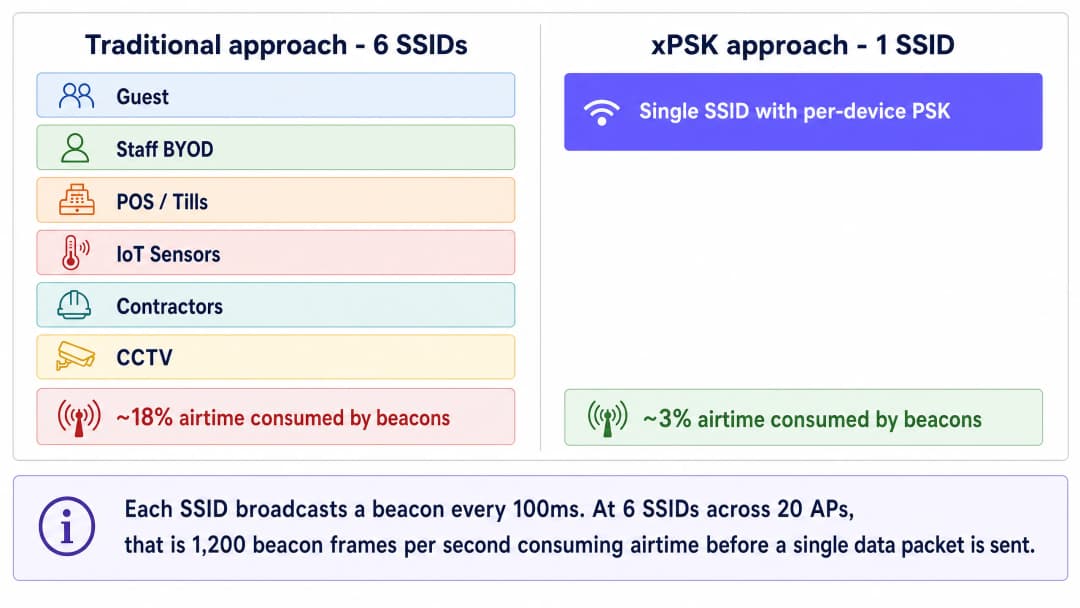
L'architettura xPSK
La tecnologia Pre-Shared Key per singolo dispositivo - denominata collettivamente xPSK - risolve questo problema disaccoppiando la passphrase dal SSID. Invece di un'unica password condivisa per l'intera rete, il controller wireless o la piattaforma di gestione cloud mantiene un database di chiavi uniche. Quando un dispositivo si associa all'access point, presenta la chiave assegnata durante il handshake standard a 4 vie WPA2 o WPA3. Il controller convalida la chiave e la associa a un record di identità, il quale attiva policy specifiche: assegnazione dinamica della VLAN, limitazione della larghezza di banda o regole del firewall.
Dal punto di vista del dispositivo client, il processo di connessione è identico a quello di una rete domestica standard. Non ci sono certificati da installare, né complesse configurazioni supplicant, né Captive Portals richiesti per l'associazione iniziale. Questo rende la tecnologia xPSK ideale per i dispositivi IoT headless, le smart TV e gli scenari guest BYOD in cui lo standard 802.1X non è pratico.
Il meccanismo di VLAN steering si basa su tre attributi RADIUS standard IETF restituiti nel messaggio di Access-Accept: Tunnel-Type (Attributo 64, valore 13 per VLAN), Tunnel-Medium-Type (Attributo 65, valore 6 per IEEE-802) e Tunnel-Private-Group-ID (Attributo 81, contenente la stringa dell'ID della VLAN). Quando l'access point riceve questi attributi, tagga dinamicamente il traffico del dispositivo con la VLAN specificata, inserendolo nel segmento di rete corretto indipendentemente dalla porta fisica o dall'access point a cui è connesso.
Panoramica delle implementazioni dei vendor
Sebbene il concetto di base sia uniforme, i vendor di hardware utilizzano terminologie diverse e offrono vari livelli di scalabilità e integrazione.

Cisco Meraki (iPSK): La funzione Identity PSK si integra strettamente con Cisco ISE o con il RADIUS cloud nativo di Meraki. È possibile eseguirla senza un server RADIUS separato gestendo le chiavi direttamente nella dashboard Meraki, oppure scalarla a migliaia di chiavi uniche tramite ISE con profilazione dinamica completa e integrazione con Microsoft Entra ID o Okta.
HPE Aruba (MPSK): La tecnologia Multi Pre-Shared Key supporta fino a 24 chiavi localmente sull'access point (MPSK-Local) senza alcun server esterno. Per implementazioni più grandi, l'associazione con ClearPass rimuove completamente il limite di scalabilità e aggiunge il controllo degli accessi basato sui ruoli oltre all'assegnazione della VLAN.
Ruckus (DPSK): La funzione Dynamic PSK è un'implementazione matura e brevettata sul mercato da oltre un decennio. Supporta fino a 10.000 chiavi uniche per SSID e offre un solido supporto API per il provisioning automatizzato, rendendola ideale per grandi implementazioni nel settore hospitality.
Juniper Mist (PPSK/MPSK): La funzione Private PSK si integra con la piattaforma cloud guidata dall'IA di Mist, supportando fino a 5.000 chiavi per organizzazione con assegnazione dinamica di ruoli e VLAN. Le chiavi possono essere importate tramite CSV o predisposte tramite API.
Ubiquiti UniFi (PPSK): La Private Pre-Shared Key è integrata nel controller UniFi Network senza costi aggiuntivi di licenza. Rappresenta il punto di ingresso più accessibile per le sedi più piccole che utilizzano già l'infrastruttura UniFi.
Extreme Networks (PPSK): La piattaforma ExtremeCloud IQ di Extreme supporta PPSK con assegnazione VLAN per singola chiave, ideale per installazioni nel settore dell'istruzione e pubblico.
Fortinet (MPSK): FortiGate e FortiAP supportano MPSK con instradamento VLAN per singola chiave, integrandoli con FortiAuthenticator come backend RADIUS.
Quando utilizzare invece 802.1X
La tecnologia xPSK non sostituisce universalmente lo standard 802.1X. Per i dispositivi aziendali gestiti da una piattaforma MDM, in cui i certificati possono essere distribuiti in background tramite Microsoft Entra ID o Okta, lo standard 802.1X con EAP-TLS (Extensible Authentication Protocol - Transport Layer Security) rimane l'opzione più sicura. Garantisce chiavi di crittografia per sessione, autenticazione reciproca e un'identità basata su certificati che non può essere condivisa o sottratta facilmente come una passphrase.
Utilizza 802.1X per: laptop e tablet aziendali gestiti, dispositivi registrati in Microsoft Intune o Jamf e qualsiasi scenario in cui sia possibile garantire la configurazione del richiedente su ogni dispositivo.
Utilizza xPSK per: BYOD degli ospiti, IoT e dispositivi headless, terminali POS con sistemi operativi legacy, dispositivi di collaboratori esterni e qualsiasi scenario in cui l'implementazione dei certificati non sia praticabile.
Per una panoramica più ampia sugli standard di sicurezza WiFi aziendali, consulta la nostra Enterprise WiFi Security: A Complete Guide for 2026.
Hai domande sulla tua configurazione specifica?
Il nostro team collabora con gestori di sedi, responsabili IT e ingegneri di rete in 80.000 sedi. Prenota una chiamata di 20 minuti e ti mostreremo come altri professionisti come te hanno risolto il problema.
Guida all'implementazione
Passaggio 1: Definisci la tua strategia di segmentazione
Prima di configurare il controller wireless, mappa i segmenti di rete necessari. Un tipico ambiente retail o del settore hospitality richiede almeno quattro zone isolate:
| Zona | VLAN | Criterio di Accesso | Dispositivi Tipici |
|---|---|---|---|
| Ospiti | 20 | Solo Internet, isolamento dei client | Telefoni personali, tablet, laptop |
| BYOD Personale | 10 | Internet + app interne specifiche | Dispositivi personali del personale |
| IoT e Servizi | 30 | Traffico in uscita limitato solo al cloud del fornitore | Termostati, sensori, segnaletica digitale |
| POS e Operazioni Sicure | 40 | Conforme a PCI-DSS, isolata | Terminali di pagamento, casse |
Standardizza questi ID VLAN in tutte le tue sedi prima dell'implementazione. Un'assegnazione incoerente dei numeri VLAN tra i diversi siti è una delle cause più comuni di insuccesso nei rollout multi-sito.
Passaggio 2: Configura l'infrastruttura RADIUS
Le installazioni aziendali richiedono un server RADIUS centrale per gestire il ciclo di vita delle chiavi e trasmettere gli attributi dinamici delle VLAN. Configura il tuo server RADIUS in modo che restituisca i seguenti attributi al momento dell'autenticazione corretta:
Tunnel-Type(64): Impostato suVLAN(13)Tunnel-Medium-Type(65): Impostato suIEEE-802(6)Tunnel-Private-Group-ID(81): Impostato sull'ID VLAN assegnato (ad es. "40" per i POS)
Creare profili di autorizzazione separati per ciascun gruppo di dispositivi. Ad esempio, un profilo denominato "POS_Devices" restituisce la VLAN 40. Un profilo denominato "IoT_Sensors" restituisce la VLAN 30. Ciascun profilo viene attivato dalla chiave univoca presentata durante l'autenticazione.
Step 3: Distribuire l'unico SSID
Creare un nuovo SSID sul controller wireless. Configurare il tipo di sicurezza come WPA2-Personal (o WPA3-Transition se supportato dalla specifica implementazione xPSK) e abilitare la funzionalità xPSK specifica del fornitore. Disattivare tutti i vecchi SSID una volta convalidato il nuovo SSID.
Assicurarsi che il MAC Authentication Bypass (MAB) sia configurato correttamente per consentire ai dispositivi IoT headless di autenticarsi utilizzando il proprio indirizzo MAC come identità, mappandoli alla chiave PSK e alla VLAN appropriate.
Step 4: Automatizzare la distribuzione delle chiavi
Il successo di una distribuzione xPSK dipende da una distribuzione delle chiavi senza attriti. Per il Guest WiFi, integrare la generazione delle chiavi con il proprio Property Management System o CRM. La piattaforma di rete basata sull'identità di Purple può automatizzare questo processo, generando una chiave univoca al momento della prenotazione e inviandola tramite e-mail o SMS, per poi revocarla automaticamente al momento del checkout.
Per i dispositivi IoT, i team IT possono pre-configurare le chiavi in blocco tramite importazione CSV o integrazione API, associando l'indirizzo MAC di ciascun dispositivo a una chiave specifica e a un ruolo VLAN prima che si connetta alla rete.
Best practices
Pianifica per la randomizzazione dei MAC fin dal primo giorno. I sistemi operativi moderni (iOS 14 e successivi, Android 10 e successivi, Windows 11) randomizzano gli indirizzi MAC per impostazione predefinita. Se la tua implementazione xPSK si affida al tracciamento dell'indirizzo MAC per l'applicazione delle policy, devi richiedere agli utenti di disabilitare l'opzione "Indirizzo WiFi privato" per la tua rete, oppure utilizzare una soluzione del fornitore che associ l'identità alla chiave anziché all'indirizzo MAC.
Applica la gestione del ciclo di vita delle chiavi. Le chiavi devono scadere. Associa le chiavi degli ospiti alla loro data di check-out. Ruota le chiavi del personale annualmente o al momento delle dimissioni. Le chiavi obsolete si accumulano nel tempo e diventano una seria minaccia per la sicurezza. Crea il flusso di lavoro di revoca prima di andare online, non dopo.
Mantieni una VLAN di fallback. Configura una VLAN critica sui tuoi punti di accesso. Se il server RADIUS diventa irraggiungibile, i dispositivi dovrebbero eseguire il failover su una VLAN limitata che fornisce una connettività internet di base senza esporre i sistemi interni. Questo evita che un'interruzione di RADIUS metta fuori servizio l'intera rete della struttura.
Verifica la compatibilità WPA3 prima di imporla. Sebbene il WPA3 rappresenti il futuro, molti dispositivi IoT legacy non lo supportano. Testa a fondo la tua specifica implementazione xPSK prima di abilitare la modalità di transizione WPA3, poiché alcuni fornitori richiedono solo il WPA2 per la funzionalità xPSK.
Standardizza il formato delle chiavi. Utilizza chiavi alfanumeriche da 16 a 24 caratteri. Alcuni dispositivi legacy hanno difficoltà con chiavi più lunghe di 32 caratteri o chiavi contenenti caratteri speciali complessi. La coerenza previene errori di autenticazione difficili da diagnosticare.
Per una panoramica più ampia sulla segmentazione dinamica delle VLAN, consulta la nostra guida su Assegnazione dinamica delle VLAN con RADIUS.
Risoluzione dei problemi e mitigazione del rischio
Il dispositivo si connette ma finisce sulla VLAN errata. Verifica che il controller wireless abbia abilitato l'opzione "AAA Override" o l'assegnazione dinamica della VLAN. Controlla i log di RADIUS per confermare che l'attributo Tunnel-Private-Group-ID venga inviato correttamente nel messaggio di Access-Accept. Un'acquisizione dei pacchetti sullo scambio RADIUS confermerà se gli attributi sono presenti.
L'autenticazione fallisce completamente. Controlla la lunghezza della chiave e il set di caratteri. Verifica che il segreto condiviso RADIUS corrisponda tra il controller e il server RADIUS. Conferma che il server RADIUS abbia l'indirizzo IP del punto di accesso registrato come client valido.
Errore DHCP dopo l'assegnazione della VLAN. Dopo l'assegnazione dinamica della VLAN, il dispositivo deve ottenere un indirizzo IP per la nuova sottorete. Assicurati che il server DHCP sia configurato per tutte le VLAN dinamiche e che gli indirizzi IP helper siano configurati sullo switch Layer 3 se il DHCP è centralizzato.
La randomizzazione dei MAC interrompe l'autenticazione. Se i dispositivi non riescono a ripetere l'autenticazione dopo un certo periodo di tempo, la causa più probabile è la randomizzazione dei MAC. Implementa un flusso di lavoro di preregistrazione o richiedi agli utenti di disattivare la funzione dell'indirizzo privato per il tuo SSID.
ROI e impatto aziendale
La riduzione di molteplici SSID in un'unica rete xPSK offre un valore aziendale misurabile in tre dimensioni.
Prestazioni. Il recupero dal 15% al 20% del tempo di trasmissione wireless dall'overhead dei beacon migliora immediatamente le prestazioni delle applicazioni e la velocità di trasmissione per tutti gli utenti. Questo estende la vita utile degli access point esistenti e ritarda i costosi aggiornamenti hardware. In un hotel di 200 camere con 40 access point, l'eliminazione di cinque SSID ridondanti può recuperare l'equivalente della capacità di otto access point aggiuntivi.
Sicurezza e conformità. xPSK elimina la necessità di modificare una password condivisa in tutta la struttura quando un singolo collaboratore esterno se ne va. Fornisce i log di controllo dettagliati richiesti per la conformità PCI-DSS senza il massiccio overhead IT derivante dalla distribuzione di certificati 802.1X a ogni terminale POS. Ogni dispositivo ha una credenziale univoca, quindi una chiave compromessa influisce solo su quel dispositivo.
Efficienza operativa. Il provisioning e la revoca automatizzati delle chiavi tramite l'integrazione API con il tuo PMS o provider di identità eliminano l'intervento manuale dell'IT per le modifiche di accesso ordinarie. La piattaforma Purple, distribuita in oltre 80.000 sedi attive, fornisce questo livello di orchestrazione con funzioni complete di WiFi Analytics e reportistica integrate.
Per indicazioni sull'architettura correlate, consulta le nostre guide su OpenWrt Custom Firmware Integration with Purple WiFi e WiFi Network Segmentation with VLANs and SSIDs.
Definizioni chiave
Frame Beacon
Un frame di gestione IEEE 802.11 trasmesso periodicamente (di default ogni 100 ms) da un access point per annunciare la presenza, le funzionalità e i parametri di un SSID.
Quando i team IT creano troppi SSID, il volume spropositato di frame beacon consuma prezioso tempo di trasmissione radio alla velocità di trasmissione dati più bassa, causando congestione della rete prima ancora che vengano inviati i dati degli utenti. Questo è il principale argomento prestazionale a favore della riduzione del numero di SSID.
xPSK
Un termine ombrello per indicare chiavi pre-condivise private o per singolo dispositivo, in cui è possibile utilizzare più password univoche per l'autenticazione su un unico SSID trasmesso, con ciascuna chiave mappata su politiche di rete specifiche.
Utilizzato per accorpare più SSID dedicati in uno solo, riducendo l'overhead dei beacon e mantenendo al contempo una segmentazione VLAN e un controllo degli accessi granulari.
Assegnazione dinamica della VLAN
Il processo di inserimento di un utente o dispositivo in una specifica VLAN in base alla sua identità al momento dell'autenticazione, anziché in base alla porta fisica o all'SSID a cui si è connesso.
Consente a un singolo SSID di servire ospiti, personale e dispositivi IoT, mantenendo il loro traffico completamente isolato nel backend senza dover trasmettere reti separate.
RADIUS
Remote Authentication Dial-In User Service. Un protocollo di rete che fornisce la gestione centralizzata di autenticazione, autorizzazione e tracciamento (AAA) per l'accesso alla rete.
In una distribuzione xPSK, il server RADIUS contiene il database delle chiavi e indica all'access point quale VLAN assegnare al dispositivo che si connette tramite attributi Tunnel specifici nel messaggio Access-Accept.
Tunnel-Private-Group-ID
Attributo IETF RADIUS 81. L'attributo specifico utilizzato per passare la stringa dell'ID VLAN (ad es. '20') dal server RADIUS al controller wireless durante l'assegnazione dinamica della VLAN.
Senza questo attributo, l'instradamento dinamico della VLAN non può funzionare e tutti i dispositivi finiscono sulla VLAN nativa predefinita, vanificando lo scopo della segmentazione xPSK.
MAC Authentication Bypass (MAB)
Una tecnica che utilizza l'indirizzo MAC di un dispositivo come credenziale di identità quando il dispositivo non ha la capacità di eseguire l'autenticazione standard 802.1X.
Essenziale per l'onboarding di dispositivi IoT privi di interfaccia utente come termostati intelligenti, segnaletica digitale e telecamere TVCC su una rete xPSK aziendale.
802.1X
Uno standard IEEE per il controllo dell'accesso alla rete basato su porte che fornisce un meccanismo di autenticazione ai dispositivi che desiderano connettersi a una LAN o WLAN, utilizzando tipicamente l'EAP (Extensible Authentication Protocol) e un server RADIUS.
Sebbene sia altamente sicuro per i laptop aziendali con certificati gestiti tramite MDM, lo standard 802.1X è spesso troppo complesso per i dispositivi IoT o per i dispositivi personali (BYOD) degli ospiti, rendendo l'approccio xPSK l'alternativa preferita per questi casi d'uso.
Airtime overhead
La percentuale di capacità dello spettro wireless consumata dai frame di gestione e controllo (come beacon, probe response e frame di associazione) anziché dai payload di dati effettivi degli utenti.
La riduzione del numero di SSID riduce direttamente l'airtime overhead, migliorando immediatamente la velocità e l'affidabilità della rete per tutti i dispositivi connessi.
MPSK-Local
L'implementazione di HPE Aruba del PSK per dispositivo che memorizza fino a 24 chiavi univoche direttamente sull'access point senza richiedere un server RADIUS esterno o il motore di policy ClearPass.
Adatto per piccole sedi o implementazioni pilota. Per la scalabilità enterprise, l'MPSK con ClearPass rimuove il limite di 24 chiavi e aggiunge il controllo degli accessi basato sui ruoli.
Esempi pratici
Un hotel da 200 camere trasmette attualmente cinque SSID: Hotel_Guest, Hotel_Staff, Hotel_IoT, Hotel_Events e Hotel_POS. Gli ospiti segnalano un WiFi lento nonostante un recente aggiornamento della larghezza di banda. Il responsabile IT deve migliorare le prestazioni senza compromettere il rigoroso isolamento richiesto per i terminali POS ai sensi dello standard PCI-DSS.
Passo 1: Controllare l'ambiente RF. Utilizzare il report sull'utilizzo del tempo di trasmissione del controller wireless per confermare che l'overhead dei beacon dei cinque SSID consuma il 15-18% del tempo di trasmissione disponibile sulla banda a 5 GHz.
Passo 2: Progettare il modello di segmentazione VLAN. Assegnare la VLAN 10 allo Staff, la VLAN 20 ai Guest, la VLAN 30 all'IoT e la VLAN 40 al POS. Standardizzare questi ID su tutte le proprietà.
Passo 3: Configurare il server RADIUS. Creare quattro profili di autorizzazione, ciascuno dei quali restituisce l'attributo Tunnel-Private-Group-ID appropriato. Per i dispositivi POS, il profilo restituisce anche una ACL che limita il traffico solo all'intervallo IP del gateway di pagamento.
Passo 4: Distribuire un singolo SSID denominato 'Hotel_Secure' utilizzando WPA2-Personal con iPSK (Cisco Meraki) o DPSK (Ruckus) abilitato.
Passo 5: Integrare con il Property Management System tramite API. Il PMS genera una chiave alfanumerica univoca di 20 caratteri al check-in e la consegna all'ospite tramite SMS. La chiave viene revocata automaticamente al checkout.
Passo 6: Pre-configurare i dispositivi IoT e POS. Importare in blocco gli indirizzi MAC dei dispositivi e le chiavi pre-assegnate nel database RADIUS prima del giorno della migrazione.
Passo 7: Disabilitare i vecchi SSID durante una finestra di manutenzione a basso traffico. L'overhead dei beacon scende dal 16% a circa il 3%, recuperando immediatamente tempo di trasmissione per i dati degli utenti.
Una catena di vendita al dettaglio nazionale deve connettere 500 dispositivi IoT headless (display intelligenti per scaffali, sensori di temperatura, telecamere CCTV) in 50 negozi. Questi dispositivi non supportano i supplicant 802.1X e non dispongono di un browser web per l'autenticazione tramite Captive Portal. Il team di sicurezza richiede che il traffico IoT sia rigorosamente isolato dalla rete POS.
Passo 1: Creare una VLAN IoT dedicata (VLAN 30) sull'infrastruttura di rete in ogni punto vendita. Configurare le regole del firewall per consentire solo il traffico in uscita verso intervalli IP cloud specifici del fornitore.
Passo 2: Abilitare xPSK sull'SSID aziendale esistente utilizzando la funzione MPSK o iPSK del fornitore.
Passo 3: Esportare gli indirizzi MAC di tutti i 500 dispositivi IoT dalla piattaforma di gestione dei dispositivi.
Passo 4: Utilizzare uno script Python o lo strumento di importazione di massa del server RADIUS per generare una chiave alfanumerica univoca di 20 caratteri per ciascun dispositivo e associarla alla VLAN 30 nel database RADIUS.
Passo 5: Configurare il MAC Authentication Bypass (MAB) sull'SSID. Quando un dispositivo si connette, l'access point invia il suo indirizzo MAC al server RADIUS. Il server associa il MAC alla chiave preconfigurata, lo convalida e restituisce l'assegnazione della VLAN IoT.
Passo 6: Se un dispositivo viene compromesso o rimosso dal servizio, revocare solo la sua chiave specifica. Nessun altro dispositivo viene influenzato e non è necessario alcun cambio di password nell'intera infrastruttura.
Domande di esercitazione
Q1. Un direttore IT di uno stadio vuole implementare un nuovo sistema POS per i venditori di cibo. Trasmettono già "Stadium_Fan_WiFi" e "Stadium_Staff". Dovrebbero creare un terzo SSID denominato "Stadium_POS" per garantire la conformità PCI-DSS?
Suggerimento: Considera l'impatto dell'aggiunta di un nuovo SSID sull'ambiente RF ad alta densità di uno stadio, e se l'isolamento logico richiede un isolamento fisico o di trasmissione.
Visualizza risposta modello
No. L'aggiunta di un terzo SSID in un ambiente ad alta densità come uno stadio aumenta inutilmente l'overhead dei beacon e riduce le prestazioni per tutti i partecipanti. Dovrebbero invece abilitare l'xPSK sull'SSID "Stadium_Staff" esistente. Assegnando chiavi univoche ai terminali POS, il server RADIUS può indirizzare dinamicamente il traffico POS in una VLAN dedicata e rigorosamente protetta da firewall conforme a PCI (VLAN 40), ottenendo l'isolamento logico senza consumare ulteriore airtime. La conformità PCI-DSS richiede l'isolamento dell'ambiente dei dati dei titolari di carta, che viene soddisfatto dalla segmentazione basata su VLAN con regole di firewall appropriate.
Q2. Durante un'implementazione xPSK, un appaltatore collega il proprio laptop utilizzando la passphrase assegnata. Si associa correttamente all'access point, ma riceve un indirizzo IP nell'intervallo 192.168.1.x (la VLAN nativa predefinita) anziché nell'intervallo 10.0.50.x previsto (la VLAN dell'appaltatore). Qual è l'errore di configurazione più probabile?
Suggerimento: Pensa agli attributi RADIUS specifici richiesti per indicare all'access point come taggare il traffico, e se il controller è configurato per elaborarli.
Visualizza risposta modello
L'errore più probabile è dovuto a uno di questi due fattori: o il server RADIUS non invia gli attributi Tunnel corretti nel messaggio Access-Accept, oppure il controller wireless non ha abilitato l'opzione "AAA Override" (assegnazione dinamica della VLAN). Il server RADIUS deve inviare Tunnel-Type (Attributo 64, valore 13), Tunnel-Medium-Type (Attributo 65, valore 6) e Tunnel-Private-Group-ID (Attributo 81, contenente la stringa dell'ID VLAN "50"). Una cattura dei pacchetti sullo scambio RADIUS confermerà se gli attributi sono presenti nel pacchetto Access-Accept.
Q3. Un'università sta passando da una rete ospiti aperta a un modello xPSK per migliorare la tracciabilità degli accessi. Notano che gli ospiti abituali che in precedenza si erano connessi con successo non riescono improvvisamente ad autenticarsi qualche giorno dopo, anche se le loro chiavi non sono scadute. Quale moderna funzionalità degli smartphone sta probabilmente causando questo problema?
Suggerimento: Considera le funzioni di privacy introdotte in iOS 14 e Android 10 che influenzano il modo in cui i dispositivi si identificano sulle reti.
Visualizza risposta modello
Il problema è causato dalla randomizzazione dell'indirizzo MAC (nota come "Indirizzo WiFi privato" su iOS). Se l'implementazione xPSK dell'università si basa sul tracciamento dell'indirizzo MAC per associare l'identità alla passphrase, l'autenticazione fallirà quando il telefono cambierà il proprio indirizzo MAC. La soluzione consiste nell'istruire gli utenti a disattivare la funzione dell'indirizzo privato per la rete dell'università (che persiste per ciascun SSID su iOS e Android), oppure nell'utilizzare un'implementazione del fornitore che non associ strettamente il PSK a un indirizzo MAC statico, basandosi invece esclusivamente sulla chiave presentata per l'identificazione.
Continua a leggere questa serie
Gestione della larghezza di banda per il WiFi del personale: Shaping, QoS e riduzione del traffico
Questa guida illustra in dettaglio i metodi pratici per gestire la larghezza di banda per il WiFi del personale in ambienti aziendali. Copre la configurazione del traffic shaping, l'implementazione del QoS e come la distribuzione di Purple Shield riduca il carico di rete senza richiedere aggiornamenti dell'infrastruttura.
La checklist per migrare da NAC legacy a NAC cloud-native
Questa guida di riferimento tecnico autorevole fornisce una checklist strutturata in tre fasi per migrare da un Network Access Control (NAC) legacy a un'architettura cloud-native. Offre ai responsabili IT e agli architetti di rete strategie pratiche per gestire l'integrazione dell'identità, la parità delle policy e la conformità senza interrompere le attività delle sedi.
Come implementare il NAC Post-Admission per il monitoraggio continuo della fiducia
Questa guida fornisce un piano tecnico autorevole per l'implementazione del Network Access Control (NAC) Post-Admission con monitoraggio continuo della fiducia in ambienti aziendali, inclusi hospitality, retail, sanità e settore pubblico. Dettaglia il passaggio architetturale dai controlli statici pre-admission a un'applicazione dinamica e sensibile alla sessione utilizzando RADIUS CoA, baselining comportamentale e integrazione della telemetria. Gli architetti IT e i team delle operazioni di rete troveranno linee guida pratiche per la distribuzione, casi di studio reali, note di conformità e framework ROI misurabili.
Hai domande sulla tua configurazione specifica?
Il nostro team collabora con gestori di sedi, responsabili IT e ingegneri di rete in 80.000 sedi. Prenota una chiamata di 20 minuti e ti mostreremo come altri professionisti come te hanno risolto il problema.