
Comment réduire le nombre de SSIDs WiFi grâce au PSK par appareil (iPSK, DPSK, MPSK)
Ce guide de référence technique faisant autorité explique comment les équipes informatiques peuvent éliminer la dégradation des performances WiFi causée par la surcharge des balises SSID en regroupant plusieurs réseaux dédiés en un seul SSID à l'aide du PSK par appareil (xPSK). Il couvre le paysage des constructeurs à travers Cisco iPSK, HPE Aruba MPSK, Ruckus DPSK, Juniper Mist PPSK et Ubiquiti UniFi PPSK, avec des conseils pratiques de mise en œuvre sur l'attribution dynamique de VLAN, l'intégration de l'IoT et la conformité PCI DSS. Les exploitants de sites dans l'hôtellerie, le commerce de détail, les stades et les organisations du secteur public y trouveront des conseils d'architecture exploitables et des exemples concrets.
Écouter ce guide
Voir la transcription du podcast
Fait partie de notre série principale : Enterprise WiFi Security Guide →

Executive summary
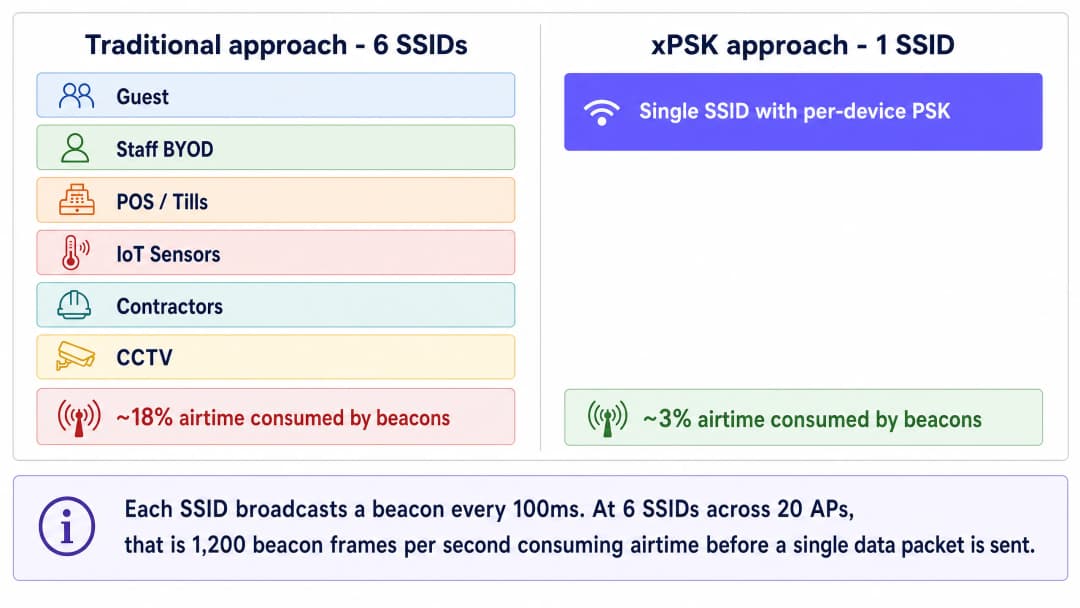
Venue operators face a growing crisis of WiFi spectrum congestion. Every time you broadcast a new SSID to segment guest, staff, point-of-sale, and IoT traffic, you consume valuable airtime with management frame overhead. A network broadcasting six SSIDs can consume nearly 20% of available airtime on beacons alone before a single packet of actual data is transmitted. This degrades performance for every user in the venue.
The solution is to collapse multiple purpose-built SSIDs into a single broadcast network using per-device Pre-Shared Keys (xPSK). By assigning a unique passphrase to each device or user group, IT teams can dynamically steer traffic into specific VLANs and apply role-based access control policies - all on a single SSID. This approach delivers the segmentation benefits of 802.1X enterprise authentication without the heavy burden of certificate management or RADIUS supplicant configuration on guest devices.
This guide details the architectural case for xPSK (including Cisco iPSK, HPE Aruba MPSK, Ruckus DPSK, Juniper Mist PPSK, and Ubiquiti UniFi PPSK), explains the underlying mechanics of dynamic VLAN assignment, and provides a practical roadmap for implementation in enterprise environments across Hospitality, Retail, Healthcare, and Transport verticals.
Technical deep-dive
The hidden cost of SSID sprawl
The performance problems often blamed on poor coverage or capacity are frequently the result of SSID congestion. Every enabled SSID broadcasts a beacon frame every 100 milliseconds. While a single beacon is small, this management traffic is transmitted at the lowest basic data rate - typically 1 or 2 Mbps - to ensure all devices at the cell edge can receive it. This means beacons occupy the channel for a disproportionately long time relative to their payload.
When a venue broadcasts separate networks for Guest WiFi, staff BYOD, tills, IoT sensors, and contractors, the airtime consumption compounds rapidly. If an access point broadcasts six SSIDs and a client device can hear four access points on the same channel, that channel must carry 240 beacon frames per second. This overhead consumes airtime that should carry actual data, increasing latency and reducing throughput across the entire network. The industry consensus is clear: broadcast no more than three SSIDs per radio, and ideally fewer.
The xPSK architecture
Per-device Pre-Shared Key technology - collectively referred to as xPSK - solves this problem by decoupling the passphrase from the SSID. Instead of one shared password for the entire network, the wireless controller or cloud management platform maintains a database of unique keys. When a device associates with the access point, it presents its assigned key during the standard WPA2 or WPA3 4-way handshake. The controller validates the key and maps it to an identity record, which triggers specific policies: dynamic VLAN assignment, bandwidth throttling, or firewall rules.
From the client device's perspective, the connection process is identical to joining a standard home network. There are no certificates to install, no complex supplicant configurations, and no captive portals required for initial association. This makes xPSK ideal for headless IoT devices, smart TVs, and guest BYOD scenarios where 802.1X is impractical.
The VLAN steering mechanism relies on three standard IETF RADIUS attributes returned in the Access-Accept message: Tunnel-Type (Attribute 64, value 13 for VLAN), Tunnel-Medium-Type (Attribute 65, value 6 for IEEE-802), and Tunnel-Private-Group-ID (Attribute 81, containing the VLAN ID string). When the access point receives these attributes, it dynamically tags the device's traffic with the specified VLAN, placing it into the correct network segment regardless of which physical port or access point it connected through.
Vendor implementations at a glance
While the underlying concept is uniform, hardware vendors use different terminology and offer varying levels of scale and integration.

Cisco Meraki (iPSK): Identity PSK integrates tightly with Cisco ISE or Meraki's native cloud RADIUS. You can run it without a separate RADIUS server by managing keys directly in the Meraki dashboard, or scale to thousands of unique keys via ISE with full dynamic profiling and integration with Microsoft Entra ID or Okta.
HPE Aruba (MPSK): Multi Pre-Shared Key supports up to 24 keys locally on the access point (MPSK-Local) without any external server. For larger deployments, pairing with ClearPass removes the scale limit entirely and adds role-based access control on top of VLAN assignment.
Ruckus (DPSK): Dynamic PSK is a mature, patented implementation that has been in the market for over a decade. It supports up to 10,000 unique keys per SSID and has strong API support for automated provisioning, making it well-suited for large hospitality deployments.
Juniper Mist (PPSK/MPSK): Private PSK integrates with Mist's AI-driven cloud platform, supporting up to 5,000 keys per organisation with dynamic role and VLAN assignment. Keys can be imported via CSV or provisioned via API.
Ubiquiti UniFi (PPSK): Private Pre-Shared Key is built into the UniFi Network controller with no additional licensing. It is the most accessible entry point for smaller venues already running UniFi infrastructure.
Extreme Networks (PPSK): Extreme's ExtremeCloud IQ platform supports PPSK with per-key VLAN assignment, suitable for education and public-sector deployments.
Fortinet (MPSK): FortiGate and FortiAP support MPSK with per-key VLAN steering, integrating with FortiAuthenticator as the RADIUS backend.
When to use 802.1X instead
xPSK is not a universal replacement for 802.1X. For corporate-owned devices managed by an MDM platform, where certificates can be pushed silently via Microsoft Entra ID or Okta, 802.1X with EAP-TLS (Extensible Authentication Protocol - Transport Layer Security) remains the most secure option. It provides per-session encryption keys, mutual authentication, and certificate-based identity that cannot be shared or stolen as easily as a passphrase.
Use 802.1X for: managed corporate laptops and tablets, devices enrolled in Microsoft Intune or Jamf, and any scenario where you can guarantee supplicant configuration on every device.
Use xPSK for: guest BYOD, IoT and headless devices, point-of-sale terminals running legacy operating systems, contractor devices, and any scenario where certificate deployment is impractical.
For a broader treatment of enterprise WiFi security standards, see our Enterprise WiFi Security: A Complete Guide for 2026.
Vous avez des questions sur votre configuration spécifique ?
Notre équipe collabore avec des exploitants de sites, des responsables informatiques et des ingénieurs réseau au sein de 80 000 sites. Réservez un appel de 20 minutes et nous vous montrerons comment d'autres professionnels comme vous ont résolu ce problème.
Implementation guide
Step 1: Define your segmentation strategy
Before configuring your wireless controller, map out your required network segments. A typical hospitality or retail environment requires at least four isolated zones:
| Zone | VLAN | Access Policy | Typical Devices |
|---|---|---|---|
| Guest | 20 | Internet only, client isolation | Personal phones, tablets, laptops |
| Staff BYOD | 10 | Internet + specific internal apps | Staff personal devices |
| IoT and Facilities | 30 | Restricted outbound to vendor cloud only | Thermostats, sensors, digital signage |
| POS and Secure Ops | 40 | PCI DSS compliant, isolated | Payment terminals, tills |
Standardise these VLAN IDs across all your venues before deployment. Inconsistent VLAN numbering across sites is one of the most common causes of failed multi-site rollouts.
Step 2: Configure the RADIUS infrastructure
Enterprise deployments require a central RADIUS server to manage the key lifecycle and pass dynamic VLAN attributes. Configure your RADIUS server to return the following attributes upon successful authentication:
Tunnel-Type(64): Set toVLAN(13)Tunnel-Medium-Type(65): Set toIEEE-802(6)Tunnel-Private-Group-ID(81): Set to the assigned VLAN ID (e.g., "40" for POS)
Create separate authorization profiles for each device group. For example, a profile named "POS_Devices" returns VLAN 40. A profile named "IoT_Sensors" returns VLAN 30. Each profile is triggered by the unique key presented during authentication.
Step 3: Deploy the single SSID
Create a new SSID on your wireless controller. Configure the security type as WPA2-Personal (or WPA3-Transition if supported by your specific xPSK implementation) and enable the vendor-specific xPSK feature. Disable all legacy SSIDs once the new SSID is validated.
Ensure that MAC Authentication Bypass (MAB) is configured correctly to allow headless IoT devices to authenticate using their MAC address as the identity, mapping them to the appropriate PSK and VLAN.
Step 4: Automate key distribution
The success of an xPSK deployment depends on frictionless key distribution. For Guest WiFi, integrate key generation with your Property Management System or CRM. Purple's identity-based network platform can automate this process, generating a unique key upon booking and delivering it via email or SMS, then revoking it automatically at checkout.
For IoT devices, IT teams can pre-provision keys in bulk via CSV import or API integration, associating each device's MAC address with a specific key and VLAN role before it connects to the network.
Best practices
Plan for MAC randomisation from day one. Modern operating systems (iOS 14 and later, Android 10 and later, Windows 11) randomise MAC addresses by default. If your xPSK implementation relies on MAC address tracking for policy enforcement, you must require users to disable "Private Wi-Fi Address" for your network, or use a vendor solution that binds the identity to the key rather than the MAC address.
Enforce key lifecycle management. Keys must expire. Tie guest keys to their checkout date. Rotate staff keys annually or upon departure. Stale keys accumulate over time and become a significant security liability. Build the revocation workflow before you go live, not after.
Maintain a fallback VLAN. Configure a critical VLAN on your access points. If the RADIUS server becomes unreachable, devices should fail over to a restricted VLAN that provides basic internet connectivity without exposing internal systems. This prevents a RADIUS outage from taking down the entire venue network.
Audit WPA3 compatibility before forcing it. While WPA3 is the future, many legacy IoT devices do not support it. Test your specific xPSK implementation thoroughly before enabling WPA3-Transition mode, as some vendors require WPA2-only for xPSK functionality.
Standardise key format. Use 16 to 24 character alphanumeric keys. Some legacy devices struggle with keys longer than 32 characters or keys containing complex special characters. Consistency prevents hard-to-diagnose authentication failures.
For a broader treatment of dynamic VLAN segmentation, see our guide on Dynamic VLAN Assignment with RADIUS.
Troubleshooting and risk mitigation
Device connects but lands on the wrong VLAN. Verify that the wireless controller has "AAA Override" or dynamic VLAN assignment enabled. Check the RADIUS logs to confirm that the Tunnel-Private-Group-ID attribute is being sent correctly in the Access-Accept message. A packet capture on the RADIUS exchange will confirm whether the attributes are present.
Authentication fails entirely. Check the key length and character set. Verify that the RADIUS shared secret matches between the controller and the RADIUS server. Confirm that the RADIUS server has the access point's IP address registered as a valid client.
DHCP failure after VLAN assignment. After dynamic VLAN assignment, the device must obtain an IP address for the new subnet. Ensure the DHCP server is configured for all dynamic VLANs and that IP helper addresses are in place on the Layer 3 switch if DHCP is centralised.
MAC randomisation breaks authentication. If devices are failing to re-authenticate after a period of time, MAC randomisation is the most likely cause. Implement a pre-registration workflow or require users to disable the private address feature for your SSID.
ROI and business impact
Collapsing multiple SSIDs into a single xPSK network delivers measurable business value across three dimensions.
Performance. Reclaiming 15 to 20% of wireless airtime from beacon overhead immediately improves application performance and throughput for all users. This extends the usable life of existing access points and delays costly hardware refreshes. In a 200-room hotel with 40 access points, eliminating five redundant SSIDs can recover the equivalent of eight additional access points worth of capacity.
Security and compliance. xPSK eliminates the need to change a shared password across the entire venue when a single contractor leaves. It provides the granular audit trails required for PCI DSS compliance without the massive IT overhead of deploying 802.1X certificates to every point-of-sale terminal. Each device has a unique credential, so a compromised key affects only that device.
Operational efficiency. Automated key provisioning and revocation via API integration with your PMS or identity provider eliminates manual IT intervention for routine access changes. Purple's platform, deployed across 80,000+ live venues, provides this orchestration layer with full WiFi Analytics and reporting on top.
For related architecture guidance, see our guides on OpenWrt Custom Firmware Integration with Purple WiFi and WiFi Network Segmentation with VLANs and SSIDs.
Définitions clés
Trame balise (Beacon frame)
Une trame de gestion IEEE 802.11 diffusée périodiquement (toutes les 100 ms par défaut) par un point d'accès pour annoncer la présence, les capacités et les paramètres d'un SSID.
Lorsque les équipes IT créent trop de SSIDs, le volume important de trames balises consomme une bande passante précieuse au débit de données le plus bas, provoquant une congestion du réseau avant même que les données utilisateur ne soient envoyées. C'est le principal argument de performance pour réduire le nombre de SSIDs.
xPSK
Un terme générique pour désigner les clés pré-partagées par appareil ou privées, où plusieurs mots de passe uniques peuvent être utilisés pour s'authentifier sur un seul SSID diffusé, chaque clé étant associée à des politiques réseau spécifiques.
Utilisé pour regrouper plusieurs SSIDs dédiés en un seul, réduisant ainsi la surcharge des trames balises tout en maintenant une segmentation VLAN granulaire et un contrôle d'accès.
Attribution dynamique de VLAN
Le processus consistant à placer un utilisateur ou un appareil dans un réseau local virtuel (VLAN) spécifique en fonction de son identité au moment de l'authentification, plutôt qu'en fonction du port physique ou du SSID auquel il s'est connecté.
Cela permet à un seul SSID de desservir les invités, le personnel et les appareils IoT, en gardant leur trafic complètement isolé sur le backend sans diffuser de réseaux distincts.
RADIUS
Remote Authentication Dial-In User Service. Un protocole réseau fournissant une gestion centralisée de l'authentification, de l'autorisation et de la comptabilité (AAA) pour l'accès au réseau.
Dans un déploiement xPSK, le serveur RADIUS détient la base de données des clés et indique au point d'accès quel VLAN attribuer à l'appareil qui se connecte via des attributs Tunnel spécifiques dans le message Access-Accept.
Tunnel-Private-Group-ID
Attribut IETF RADIUS 81. L'attribut spécifique utilisé pour transmettre la chaîne d'ID de VLAN (par exemple, '20') du serveur RADIUS au contrôleur sans fil lors de l'attribution dynamique de VLAN.
Sans cet attribut, l'aiguillage dynamique des VLAN ne peut pas fonctionner et tous les appareils se retrouvent sur le VLAN natif par défaut, ce qui annule l'intérêt de la segmentation xPSK.
MAC Authentication Bypass (MAB)
Une technique qui utilise l'adresse MAC d'un appareil comme identifiant d'authentification lorsque l'appareil n'a pas la capacité d'effectuer une authentification 802.1X standard.
Essentiel pour l'intégration d'appareils IoT sans écran ni interface utilisateur (headless) tels que les thermostats intelligents, l'affichage dynamique et les caméras de vidéosurveillance sur un réseau d'entreprise xPSK.
802.1X
Une norme IEEE pour le contrôle d'accès réseau basé sur les ports qui fournit un mécanisme d'authentification aux appareils souhaitant se connecter à un LAN ou WLAN, utilisant généralement EAP (Extensible Authentication Protocol) et un serveur RADIUS.
Bien que très sécurisé pour les ordinateurs portables d'entreprise dotés de certificats gérés par MDM, le 802.1X est souvent trop complexe pour les appareils IoT ou les équipements personnels des invités, faisant de l'xPSK l'alternative privilégiée pour ces cas d'usage.
Surcharge de bande passante (Airtime overhead)
Le pourcentage de capacité du spectre sans fil consommé par les trames de gestion et de contrôle (telles que les balises, les réponses aux sondes et les trames d'association) plutôt que par les données utilisateur réelles.
La réduction du nombre de SSIDs réduit directement la surcharge de bande passante, améliorant immédiatement la vitesse et la fiabilité du réseau pour tous les appareils connectés.
MPSK-Local
L'implémentation par HPE Aruba du PSK par appareil qui stocke jusqu'à 24 clés uniques directement sur le point d'accès sans nécessiter de serveur RADIUS externe ou de moteur de politique ClearPass.
Adapté aux petits sites ou aux déploiements pilotes. Pour une échelle d'entreprise, le MPSK avec ClearPass supprime la limite de 24 clés et ajoute un contrôle d'accès basé sur les rôles.
Exemples concrets
Un hôtel de 200 chambres diffuse actuellement cinq SSID : Hotel_Guest, Hotel_Staff, Hotel_IoT, Hotel_Events et Hotel_POS. Les clients signalent un WiFi lent malgré une récente mise à niveau de la bande passante. Le responsable informatique doit améliorer les performances sans compromettre l'isolation stricte requise pour les terminaux POS dans le cadre de la norme PCI DSS.
Étape 1 : Auditer l'environnement RF. Utiliser le rapport d'utilisation du temps d'antenne du contrôleur sans fil pour confirmer que la surcharge des balises (beacons) des cinq SSID consomme 15 à 18 % du temps d'antenne disponible sur la bande 5 GHz.
Étape 2 : Concevoir le modèle de segmentation VLAN. Attribuer le VLAN 10 au personnel (Staff), le VLAN 20 aux clients (Guests), le VLAN 30 à l'IoT et le VLAN 40 au POS. Standardiser ces identifiants sur l'ensemble des établissements.
Étape 3 : Configurer le serveur RADIUS. Créer quatre profils d'autorisation, chacun renvoyant l'attribut Tunnel-Private-Group-ID approprié. Pour les appareils POS, le profil renvoie également une ACL limitant le trafic exclusivement à la plage d'adresses IP de la passerelle de paiement.
Étape 4 : Déployer un SSID unique nommé « Hotel_Secure » en utilisant le protocole WPA2-Personal avec iPSK (Cisco Meraki) ou DPSK (Ruckus) activé.
Étape 5 : Intégrer avec le système de gestion hôtelière (PMS) via une API. Le PMS génère une clé alphanumérique unique de 20 caractères lors de l'enregistrement et l'envoie au client par SMS. La clé est automatiquement révoquée au moment du départ.
Étape 6 : Pré-provisionner les appareils IoT et POS. Importer en masse les adresses MAC des appareils et les clés pré-attribuées dans la base de données RADIUS avant le jour de la migration.
Étape 7 : Désactiver les anciens SSID pendant une fenêtre de maintenance à faible trafic. La surcharge des balises passe de 16 % à environ 3 %, libérant immédiatement du temps d'antenne pour les données des utilisateurs.
Une chaîne de vente au détail nationale doit connecter 500 appareils IoT sans écran (écrans d'étagères intelligents, capteurs de température, caméras de vidéosurveillance) répartis dans 50 magasins. Ces appareils ne prennent pas en charge les demandeurs (supplicants) 802.1X et ne disposent pas de navigateur web pour l'authentification par Captive Portal. L'équipe de sécurité exige que le trafic IoT soit strictement isolé du réseau POS.
Étape 1 : Créer un VLAN IoT dédié (VLAN 30) sur l'infrastructure réseau de chaque magasin. Configurer les règles de pare-feu pour autoriser uniquement le trafic sortant vers les plages d'adresses IP cloud spécifiques aux fournisseurs.
Étape 2 : Activer le xPSK sur le SSID d'entreprise existant en utilisant la fonctionnalité MPSK ou iPSK du fournisseur.
Étape 3 : Exporter les adresses MAC des 500 appareils IoT à partir de la plateforme de gestion des appareils.
Étape 4 : Utiliser un script Python ou l'outil d'importation en masse du serveur RADIUS pour générer une clé alphanumérique unique de 20 caractères pour chaque appareil et l'associer au VLAN 30 dans la base de données RADIUS.
Étape 5 : Configurer le contournement de l'authentification MAC (MAB) sur le SSID. Lorsqu'un appareil se connecte, le point d'accès envoie son adresse MAC au serveur RADIUS. Le serveur associe la MAC à la clé pré-provisionnée, la valide et renvoie l'attribution du VLAN IoT.
Étape 6 : Si un appareil est compromis ou mis hors service, révoquer uniquement sa clé spécifique. Aucun autre appareil n'est affecté et aucun changement de mot de passe n'est requis sur l'ensemble du parc.
Questions d'entraînement
Q1. Le directeur informatique d'un stade souhaite déployer un nouveau système POS pour les vendeurs de nourriture. Ils diffusent déjà 'Stadium_Fan_WiFi' et 'Stadium_Staff'. Doivent-ils créer un troisième SSID nommé 'Stadium_POS' pour garantir la conformité PCI DSS ?
Conseil : Considérez l'impact de l'ajout d'un nouveau SSID sur l'environnement RF dense d'un stade, et déterminez si l'isolation logique nécessite une isolation physique ou de diffusion.
Voir la réponse type
Non. L'ajout d'un troisième SSID dans un environnement de stade à haute densité augmente inutilement la surcharge des balises (beacons) et dégrade les performances pour tous les participants. Au lieu de cela, ils devraient activer xPSK sur le SSID 'Stadium_Staff' existant. En attribuant des clés uniques aux terminaux POS, le serveur RADIUS peut orienter dynamiquement le trafic POS vers un VLAN dédié et strictement pare-feu, conforme à la norme PCI (VLAN 40), réalisant ainsi une isolation logique sans consommer de temps d'antenne supplémentaire. La norme PCI DSS exige l'isolation de l'environnement des données des titulaires de cartes, ce que satisfait la segmentation par VLAN avec des règles de pare-feu appropriées.
Q2. Lors d'un déploiement xPSK, un prestataire connecte son ordinateur portable à l'aide de la phrase secrète qui lui a été attribuée. Il s'associe avec succès au point d'accès, mais reçoit une adresse IP dans la plage 192.168.1.x (le VLAN natif par défaut) au lieu de la plage 10.0.50.x attendue (le VLAN prestataire). Quelle est l'erreur de configuration la plus probable ?
Conseil : Pensez aux attributs RADIUS spécifiques requis pour indiquer au point d'accès comment étiqueter le trafic, et si le contrôleur est configuré pour les traiter.
Voir la réponse type
L'erreur la plus probable est l'une de ces deux choses : soit le serveur RADIUS n'envoie pas les bons attributs Tunnel dans le message Access-Accept, soit le contrôleur sans fil n'a pas activé l'option 'AAA Override' (attribution dynamique de VLAN). Le serveur RADIUS doit envoyer Tunnel-Type (Attribut 64, valeur 13), Tunnel-Medium-Type (Attribut 65, valeur 6) et Tunnel-Private-Group-ID (Attribut 81, contenant la chaîne d'ID de VLAN '50'). Une capture de paquets sur l'échange RADIUS confirmera si les attributs sont présents dans le paquet Access-Accept.
Q3. Une université migre d'un réseau invité ouvert vers un modèle xPSK pour améliorer la responsabilisation. Elle constate que les invités de retour, qui s'étaient connectés avec succès auparavant, échouent soudainement à s'authentifier quelques jours plus tard, bien que leurs clés n'aient pas expiré. Quelle fonctionnalité moderne des smartphones est probablement à l'origine de cela ?
Conseil : Prenez en compte les fonctionnalités de confidentialité introduites dans iOS 14 et Android 10 qui affectent la manière dont les appareils s'identifient auprès des réseaux.
Voir la réponse type
Le problème est causé par la randomisation des adresses MAC (connue sous le nom d'« Adresse WiFi privée » sur iOS). Si l'implémentation xPSK de l'université repose sur le suivi de l'adresse MAC pour associer l'identité à la phrase secrète, l'authentification échouera lorsque le téléphone changera d'adresse MAC. La solution consiste à demander aux utilisateurs de désactiver la fonctionnalité d'adresse privée pour le réseau de l'université (qui persiste par SSID sur iOS et Android), ou d'utiliser une implémentation de fournisseur qui ne lie pas strictement la PSK à une adresse MAC statique, mais repose uniquement sur la clé présentée pour l'identité.
Continuer la lecture de cette série
PPSK WPA3 : comparaison des fonctionnalités et des modèles de déploiement
Ce guide de référence technique compare le PPSK et le WPA3-SAE, en expliquant leurs différences architecturales et leurs modèles de déploiement pour les environnements multi-locataires. Il fournit des conseils pratiques aux responsables informatiques et aux promoteurs immobiliers pour mettre en œuvre des réseaux WiFi sécurisés et isolés grâce aux solutions basées sur l'identité de Purple.
Gestion de la bande passante pour le WiFi du personnel : lissage, QoS et réduction du trafic
Ce guide détaille les méthodes pratiques pour gérer la bande passante du WiFi du personnel dans les établissements d'entreprise. Il aborde le lissage du trafic, la mise en œuvre de la QoS et la manière dont le déploiement de Purple Shield réduit la charge réseau sans nécessiter de mise à niveau de l'infrastructure.
La checklist pour migrer d'un NAC hérité vers un NAC cloud-native
Ce guide de référence technique faisant autorité fournit une checklist structurée en trois phases pour migrer d'un contrôle d'accès réseau (NAC) hérité vers une architecture cloud-native. Il apporte aux responsables informatiques et aux architectes réseau des stratégies concrètes pour gérer l'intégration d'identité, la parité des politiques et la conformité sans perturber l'exploitation des sites.
Vous avez des questions sur votre configuration spécifique ?
Notre équipe collabore avec des exploitants de sites, des responsables informatiques et des ingénieurs réseau au sein de 80 000 sites. Réservez un appel de 20 minutes et nous vous montrerons comment d'autres professionnels comme vous ont résolu ce problème.