
बारीक स्तरावर नेटवर्क ऍक्सेस नियंत्रणासाठी RADIUS पॉलिसी कॉन्फिगर करणे
हे मार्गदर्शक IT व्यवस्थापक, नेटवर्क आर्किटेक्ट आणि वेन्यू ऑपरेशन्स डायरेक्टर्सना बारीक स्तरावर नेटवर्क ऍक्सेस नियंत्रण मिळवण्यासाठी RADIUS पॉलिसी कॉन्फिगर करण्यासाठी संपूर्ण तांत्रिक आराखडा प्रदान करते. यामध्ये 802.1X आर्किटेक्चर, डायनॅमिक VLAN असाइनमेंट, EAP पद्धत निवड आणि टप्प्याटप्प्याने उपयोजन धोरणे समाविष्ट आहेत. हॉस्पिटॅलिटी आणि रिटेल क्षेत्रातील प्रत्यक्ष अंमलबजावणीचे प्रसंग हे तंत्र कसे मोजण्यायोग्य अनुपालन, सुरक्षा आणि ऑपरेशनल ROI प्रदान करतात हे दर्शवतात.
Video overview
हे मार्गदर्शक ऐका
पॉडकास्ट ट्रान्सक्रिप्ट पहा
आमच्या मुख्य मालिकेचा भाग: एंटरप्राइज WiFi सुरक्षा मार्गदर्शिका →

कार्यकारी सारांश (Executive Summary)
मोठ्या रिटेल संकुलांपासून ते दाट गर्दीच्या स्टेडियम्सपर्यंत - एंटरप्राइझ ठिकाणांसाठी, नेटवर्क सुरक्षा आणि वापरकर्त्याचा अनुभव एकमेकांशी खोलवर जोडलेले आहेत. सूक्ष्म नेटवर्क प्रवेश नियंत्रणासाठी RADIUS पॉलिसी कॉन्फिगर करणे ट्रॅफिकचे डायनॅमिक विभाजन करण्यासाठी आवश्यक यंत्रणा प्रदान करते, ज्यामुळे कॉर्पोरेट मालमत्ता अतिथी नेटवर्क्स आणि असुरक्षित IoT उपकरणांपासून वेगळी राहते. हे आता पर्यायी अपग्रेड राहिलेले नाही; तर PCI-DSS आणि GDPR यांसारख्या अनुपालन नियमांमुळे ही एक मूलभूत गरज बनली आहे.
हे मार्गदर्शक RADIUS-आधारित प्रवेश नियंत्रण तैनात करण्यासाठी सखोल तांत्रिक ब्ल्यूप्रिंट प्रदान करते. आम्ही IEEE 802.1X प्रमाणीकरणाचे आर्किटेक्चर, व्हेंडर-स्पेसिफिक ॲट्रिब्युट्स (VSAs) द्वारे डायनॅमिक VLAN असाइनमेंटची यंत्रणा आणि Active Directory, Entra ID आणि Purple च्या OpenRoaming आयडेंटिटी प्रोव्हाइडरसह आयडेंटिटी प्रोव्हाइडर्सचे एकत्रीकरण तपासणार आहोत. मूळ प्री-शेअर्ड कीज (PSKs) च्या पलीकडे जाऊन संदर्भ-जागरूक पॉलिसी अंमलबजावणीकडे वळल्याने, IT लीडर्स जोखीम कमी करू शकतात, ऑपरेशन्स सुलभ करू शकतात आणि अतिथी WiFi ला खर्चाच्या केंद्रातून धोरणात्मक मालमत्तेमध्ये रूपांतरित करण्यासाठी Purple सारख्या प्लॅटफॉर्मचा लाभ घेऊ शकतात. हे प्रामुख्याने कृती करण्यायोग्य, व्हेंडर-न्यूट्रल धोरणांवर लक्ष केंद्रित करते जे मोजता येण्याजोगे ROI आणि ऑपरेशनल लवचिकता प्रदान करतात.
तांत्रिक सखोल विश्लेषण (Technical Deep-Dive)
कॉन्टेक्स्ट-अवेअर ॲक्सेसची रचना (Architecture of Context-Aware Access)
मुळात, बारीक-सारीक नेटवर्क ॲक्सेस कंट्रोलसाठी RADIUS पॉलिसी कॉन्फिगर करणे हे IEEE 802.1X मानकावर अवलंबून असते. हे फ्रेमवर्क पोर्ट-आधारित नेटवर्क ॲक्सेस कंट्रोल सुलभ करते, ज्यामुळे केवळ प्रमाणित आणि अधिकृत डिव्हाइसेसनाच विशिष्ट नेटवर्क सेगमेंटमध्ये प्रवेश मिळतो. या रचनेमध्ये तीन मुख्य घटक असतात: सप्लिकंट (क्लायंट डिव्हाइस), ऑथेंटिकेटर (वायरलेस ॲक्सेस पॉइंट किंवा स्विच), आणि ऑथेंटिकेशन सर्व्हर (RADIUS).
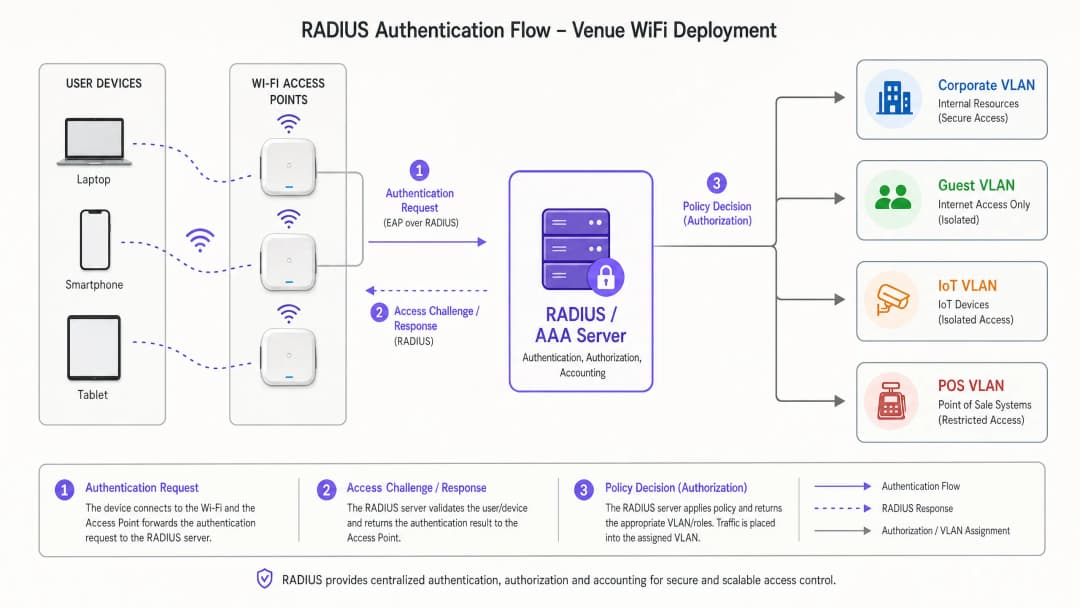
जेव्हा एखादे डिव्हाइस कनेक्ट होते, तेव्हा ऑथेंटिकेटर Extensible Authentication Protocol (EAP) संदेश एन्कॅप्स्युलेट करतो आणि ते RADIUS सर्व्हरकडे पाठवतो. RADIUS सर्व्हर Active Directory, LDAP, किंवा क्लाउड-आधारित आयडेंटिटी प्रोव्हायडर सारख्या आयडेंटिटी स्टोअरच्या आधारे क्रेडेंशियल्सचे मूल्यांकन करतो. सर्वात महत्त्वाचे म्हणजे, आधुनिक RADIUS अंमलबजावणी केवळ Access-Accept किंवा Access-Reject संदेश पाठवत नाही. ती व्हेंडर-विशिष्ट ॲट्रिब्युट्स (VSAs) परत पाठवते जी वापरकर्त्याचा नेटवर्क संदर्भ निश्चित करतात: जसे की VLAN असाइनमेंट, Access Control List (ACL) ॲप्लिकेशन, आणि बँडविड्थ थ्रॉटलिंग पॅरामीटर्स.
एंटरप्राइज उपयोजनांसाठी, WiFi Frequencies: A Guide to WiFi Frequencies in 2026 समजून घेणे आवश्यक आहे, कारण फिजिकल लेयरची वैशिष्ट्ये थेट हाय-डेन्सिटी वातावरणातील ऑथेंटिकेशन हँडशेकच्या कामगिरीवर परिणाम करतात.
डायनॅमिक VLAN असाइनमेंट आणि मायक्रो-सेगमेंटेशन (Dynamic VLAN Assignment and Micro-Segmentation)
RADIUS पॉलिसींचा सर्वात प्रभावी वापर म्हणजे डायनॅमिक VLAN असाइनमेंट. वेगवेगळ्या वापरकर्ता गटांसाठी मल्टिपल SSIDs ब्रॉडकास्ट करण्याऐवजी - ज्यामुळे बीकन ओव्हरहेडमुळे RF कामगिरी खालावते - एकच 802.1X-सक्षम SSID सर्व कॉर्पोरेट वापरकर्त्यांना सेवा देऊ शकतो. RADIUS सर्व्हर वापरकर्त्याच्या ग्रुप मेंबरशिप आणि कॉन्टेक्स्ट्युअल घटकांच्या आधारे योग्य VLAN ठरवतो.
उदाहरणार्थ, जेव्हा फायनान्स टीममधील एखादा सदस्य ऑथेंटिकेट करतो, तेव्हा RADIUS सर्व्हर ॲक्सेस पॉइंटला त्यांचे ट्रॅफिक VLAN 10 वर ठेवण्याचे निर्देश देतो. जेव्हा एखादे IoT डिव्हाइस MAC Authentication Bypass (MAB) द्वारे ऑथेंटिकेट होते, तेव्हा ते कडक ACLs सह एका वेगळ्या VLAN 40 वर ठेवले जाते. हा दृष्टिकोन RF वातावरण सुलभ करताना हल्ल्याचा धोका (attack surface) लक्षणीयरीत्या कमी करतो. विशिष्ट व्हेंडर अंमलबजावणीसाठी, How to Configure NAC Policies for VLAN Steering in Cisco Meraki पहा.

EAP पद्धतींची निवड (Selection of EAP Methods)
EAP पद्धतींच्या निवडीचा सुरक्षितता आणि ऑपरेशनल गुंतागुंत या दोन्हीवर लक्षणीय परिणाम होतो. खालील तक्ता मुख्य पर्यायांचा संक्षेप सादर करतो:
| EAP Method | Authentication Mechanism | Recommended Use Case | Security Level |
|---|---|---|---|
| EAP-TLS | परस्पर प्रमाणपत्र-आधारित | MDM सह कॉर्पोरेट व्यवस्थापित डिव्हाइसेस | सर्वोच्च |
| PEAP-MSCHAPv2 | सर्व्हर प्रमाणपत्र + युझरनेम/पासवर्ड | BYOD, कर्मचारी डिव्हाइसेस | उच्च |
| EAP-TTLS | सर्व्हर प्रमाणपत्र + अंतर्गत क्रेडेंशियल्स | मिश्रित वातावरण | उच्च |
| MAB | क्रेडेंशियल म्हणून MAC ॲड्रेस | हेडलेस IoT, जुने डिव्हाइसेस | कमी (कडक ACLs सह वापरा) |
LEAP आणि EAP-MD5 सारख्या जुन्या प्रोटोकॉल्सचा वापर पूर्णपणे टाळा; ते क्रिप्टोग्राफीच्या दृष्टीने कमकुवत आहेत आणि कोणत्याही आधुनिक उपयोजनात दिसू नयेत.
तुमच्या विशिष्ट सेटअपबद्दल काही प्रश्न आहेत का?
आमची टीम ८०,००० हून अधिक वेन्यूजमधील वेन्यू ऑपरेटर्स, IT मॅनेजर्स आणि नेटवर्क इंजिनिअर्ससोबत काम करते. २० मिनिटांचा कॉल बुक करा आणि तुमच्यासारख्या इतरांनी ही समस्या कशी सोडवली हे आम्ही तुम्हाला दाखवू.
अंमलबजावणी मार्गदर्शक
एक मजबूत RADIUS इन्फ्रास्ट्रक्चर उपयोजित करण्यासाठी काळजीपूर्वक नियोजन आणि टप्प्याटप्प्याने अंमलबजावणी करणे आवश्यक आहे. खालील पायऱ्या नेटवर्क ॲक्सेस कंट्रोलवर बारीक लक्ष ठेवण्यासाठी RADIUS पॉलिसी कॉन्फिगर करण्यासाठी विक्रेता-तटस्थ दृष्टिकोन दर्शवतात.
पायरी 1: ओळख स्त्रोत एकत्रीकरण (Identity Source Integration)
कोणत्याही पॉलिसीचा पाया स्वच्छ, सुव्यवस्थित ओळख निर्देशिका (identity directory) हा असतो. ऑन-प्रिमाइसेस Active Directory वापरत असो किंवा Microsoft Entra ID किंवा Okta सारखे क्लाउड-नेटिव्ह सोल्यूशन्स, निर्देशिका गट थेट तुमच्या इच्छित नेटवर्क सेगमेंटमध्ये मॅप केलेले असावेत.
- विद्यमान गटांचे ऑडिट करा: युझर गट लॉजिकल आणि शक्य तिथे परस्पर अनन्य (mutually exclusive) असल्याची खात्री करा. जुनी खाती काढून टाका आणि ओव्हरलॅप होणारे गट एकत्रित करा.
- ॲक्सेस स्तर परिभाषित करा: स्पष्ट स्तर स्थापित करा - एक्झिक्युटिव्ह, कर्मचारी, कंत्राटदार, अतिथी, IoT - प्रत्येकाचे दस्तऐवजीकरण केलेले प्रवेश अधिकार असावेत.
- ओळख प्रदाता म्हणून Purple समाकलित करा: सार्वजनिक-दर्शनी नेटवर्कसाठी, Purple हे Connect परवान्यांतर्गत OpenRoaming सारख्या सेवांसाठी विनामूल्य ओळख प्रदाता म्हणून कार्य करते. हे सार्वजनिक Guest WiFi प्रवेश आणि सुरक्षित ऑथेंटिकेशन फ्रेमवर्कमधील अंतर अखंडपणे मिटवते, ज्यामुळे परत येणाऱ्या युझर्ससाठी पारंपारिक Captive Portals ची आवश्यकता उरत नाही.
पायरी 2: पॉलिसी कॉन्फिगरेशन आणि ॲट्रिब्यूट मॅपिंग
केवळ क्रेडेंशियल्सऐवजी एकाधिक संदर्भित घटकांच्या आधारे येणाऱ्या विनंत्यांचे मूल्यांकन करण्यासाठी RADIUS सर्व्हर कॉन्फिगर करा.
- ऑथेंटिकेशन प्रोटोकॉल: कॉर्पोरेट डिव्हाइसेससाठी EAP-TLS अनिवार्य करा. BYOD साठी PEAP-MSCHAPv2 उपयोजित करा. कमकुवत पद्धतींचा प्रयत्न करणाऱ्या कनेक्शन्सना नाकारून RADIUS पॉलिसींद्वारे हे लागू करा.
- अटींचे जुळणी (Condition matching):
NAS-IP-Address(ऑथेंटिकेटरचा IP),Called-Station-Id(SSID), आणि दिवसाची वेळ यांचे मूल्यांकन करणाऱ्या पॉलिसी तयार करा. कंत्राटदाराचे पहाटे 02:00 वाजताचे ॲक्सेस प्रोफाइल त्यांच्या सकाळी 09:00 वाजताच्या प्रोफाइलपेक्षा पूर्णपणे भिन्न असावे. - अंमलबजावणी प्रोफाइल (Enforcement profiles): परत पाठवले जाणारे RADIUS ॲट्रिब्यूट्स परिभाषित करा. मानक VLAN असाइनमेंट ॲट्रिब्यूट्स हे आहेत:
Tunnel-Type=VLAN,Tunnel-Medium-Type=802, आणिTunnel-Private-Group-Id=[VLAN_ID].
पायरी 3: टप्प्याटप्प्याने रोलआउट आणि मॉनिटरिंग
संपूर्ण एंटरप्राइझमध्ये एकाच वेळी 802.1X अंमलबजावणी कधीही उपयोजित करू नका.
- मॉनिटर मोड: मॉनिटर किंवा ऑडिट मोडमध्ये पॉलिसी उपयोजित करा जिथे ऑथेंटिकेशन अपयश लॉग केले जाते परंतु प्रवेश मंजूर केला जातो. हे अंमलबजावणी सुरू होण्यापूर्वी चुकीचे कॉन्फिगर केलेले सप्लिकंट्स आणि जुने डिव्हाइसेस ओळखते. २. लक्ष्यित अंमलबजावणी: प्रत्येक ठिकाण किंवा प्रत्येक विभागानुसार अंमलबजावणी सक्षम करा, व्याप्ती वाढवण्यापूर्वी समस्यांचे निवारण करा. ३. अनालिटिक्स एकत्रीकरण: ऑथेंटिकेशन यश दर, सत्र कालावधी आणि रोमिंग वर्तन यांचे निरीक्षण करण्यासाठी Purple च्या WiFi Analytics सारख्या प्लॅटफॉर्मचा लाभ घ्या. कव्हरेजमधील त्रुटी आणि ऑथेंटिकेशनमधील अडथळे ओळखण्यासाठी हा डेटा अत्यंत महत्त्वाचा आहे.
सर्वोत्तम पद्धती
बारीक-सारीक नेटवर्क ॲक्सेस नियंत्रणासाठी RADIUS पॉलिसी कॉन्फिगर करताना, उद्योग मानकांचे पालन केल्याने दीर्घकालीन स्थिरता आणि सुरक्षा सुनिश्चित होते.
प्रमाणपत्र-आधारित ऑथेंटिकेशन (EAP-TLS): शक्य तिथे सर्वत्र EAP-TLS उपयोजित करा. हे क्रेडेंशियल चोरी आणि पासवर्ड विसरण्याच्या भीतीशी संबंधित धोके पूर्णपणे दूर करते. Mobile Device Management (MDM) प्लॅटफॉर्म मोठ्या प्रमाणावर प्रमाणपत्र प्रोव्हिजनिंग स्वयंचलित करू शकतात.
MAC रँडमायझेशनचे दुष्परिणाम कमी करणे: आधुनिक मोबाईल ऑपरेटिंग सिस्टीम वापरकर्त्याच्या गोपनीयतेचे रक्षण करण्यासाठी MAC ॲड्रेस रँडमायझेशनचा वापर करतात. Guest WiFi उपयोजनांसाठी, तुमची Captive Portal आणि RADIUS अकाऊंटिंग सिस्टम बदलणारे MAC ॲड्रेस सुरळीतपणे हाताळत असल्याची खात्री करा - उदाहरणार्थ, सुरुवातीच्या ऑनबोर्डिंग दरम्यान तयार केलेल्या सत्र टोकन्सवर किंवा सतत असणाऱ्या डिव्हाइस प्रोफाईल्सवर अवलंबून राहून.
रिडंडन्सी आणि फेलओव्हर: RADIUS हा एक महत्त्वपूर्ण पायाभूत घटक आहे. भौगोलिकदृष्ट्या विविध ठिकाणी अत्यंत उपलब्ध क्लस्टर्समध्ये RADIUS सर्व्हर उपयोजित करा. प्रायमरी आणि सेकंडरी सर्व्हर IPs सह ऑथेंटिकेटर्स कॉन्फिगर करा आणि फेलओव्हर दरम्यान ऑथेंटिकेशनमधील विलंब कमी करण्यासाठी आक्रमक टाईमआउट आणि रिट्राय व्हॅल्यूज स्थापित करा.
संदर्भाधीन डेटाचा लाभ घ्या: पॉलिसीच्या निर्णयांमध्ये स्थान डेटा समाविष्ट करा. एखाद्या कंत्राटदाराला इंजिनिअरिंग ब्लॉकमधील AP शी कनेक्ट असताना अंतर्गत संसाधनांमध्ये प्रवेश दिला जाऊ शकतो, परंतु कॅफेटेरियामध्ये कनेक्ट करताना केवळ इंटरनेट-पुरता प्रवेश मर्यादित केला जाऊ शकतो. BLE Low Energy Explained for Enterprise मध्ये चर्चा केलेले तंत्रज्ञान अचूक पोझिशनिंग डेटासह या स्थान संदर्भाला अधिक बळकट करू शकते.
त्रुटी निवारण आणि जोखीम कमी करणे
802.1X उपयोजनांच्या जटिलतेमुळे विशिष्ट बिघाड पद्धती उद्भवू शकतात. अपटाइम राखण्यासाठी सक्रियपणे जोखीम कमी करणे आवश्यक आहे.
सामान्य बिघाड पद्धती
| बिघाड पद्धत | मूळ कारण | निवारण |
|---|---|---|
| मोठ्या प्रमाणावर ऑथेंटिकेशन अपयशी होणे | कालबाह्य झालेला RADIUS सर्व्हर किंवा रूट CA प्रमाणपत्र | ९०/६०/३० दिवसांवर स्वयंचलित अलर्टसह प्रमाणपत्र लाइफसायकल व्यवस्थापन |
| वैयक्तिक डिव्हाइस अपयशी होणे | सप्लिकंट चुकीचे कॉन्फिगरेशन किंवा गहाळ रूट CA | योग्य ट्रस्ट स्टोअरसह MDM-पुश केलेले वायरलेस प्रोफाइल |
| EAP टाईमआउट | केंद्रित RADIUS साठी उच्च WAN लेटन्सी | WAN मार्ग ऑप्टिमाइझ करा; वितरित RADIUS किंवा RADIUS प्रॉक्सीचा विचार करा |
| IoT डिव्हाइस अपयशी होणे | डिव्हाइस 802.1X ला सपोर्ट करत नाही | कठोर VLAN आयसोलेशन आणि ACLs सह MAB उपयोजित करा |
वितरित उपक्रमांसाठी, SD WAN vs MPLS: 2026 Enterprise Network Guide मध्ये चर्चा केलेली आर्किटेक्चर बहुविध साइट्सवर केंद्रित AAA सेवांसाठी कमी-लेटन्सी कनेक्टिव्हिटी सुनिश्चित करण्यासाठी थेट संबंधित आहे.
ROI आणि व्यावसायिक प्रभाव
बारीक पातळीवर नेटवर्क ऍक्सेस नियंत्रणासाठी RADIUS पॉलिसी कॉन्फिगर करण्यासाठी आवश्यक असणाऱ्या इंजिनिअरिंग प्रयत्नांमध्ये गुंतवणूक केल्यास, अनेक पातळ्यांवर लक्षणीय आणि मोजता येणारा परतावा मिळतो.
कमी झालेला ऑपरेशनल ओव्हरहेड: डायनॅमिक VLAN असाइनमेंटसह एकाच 802.1X नेटवर्कमध्ये अनेक SSIDs एकत्रित केल्यामुळे RF इंटरफेरन्स कमी होतो, उपलब्ध एअरटाइम सुधारतो आणि चालू असलेले व्यवस्थापन सुलभ होते. एकदा स्थिर 802.1X डिप्लॉयमेंट कार्यान्वित झाल्यावर, WiFi कनेक्टिव्हिटीशी संबंधित हेल्पडेस्क तिकिटांमध्ये लक्षणीय घट झाल्याचे टीम्स नोंदवतात.
सुधारित कंप्लायन्स स्थिती: Retail आणि Healthcare सारख्या क्षेत्रांसाठी, कडक नेटवर्क सेगमेंटेशन ही एक नियामक आवश्यकता आहे - अनुक्रमे PCI-DSS आणि HIPAA. RADIUS पॉलिसी कंप्लायन्स ऑडिट यशस्वीरीत्या पूर्ण करण्यासाठी आणि मोठा आर्थिक दंड टाळण्यासाठी आवश्यक असलेले पडताळणीयोग्य, ऑडिट करण्यायोग्य नियंत्रणे प्रदान करतात. सार्वजनिक क्षेत्रातील संस्थांसाठी, डेटा पृथक्करणाशी संबंधित GDPR दायित्वांचे अशाच प्रकारे निराकरण केले जाते.
उत्कृष्ट युझर अनुभव: अखंड, सुरक्षित ऑथेंटिकेशन - विशेषतः EAP-TLS किंवा OpenRoaming द्वारे - परत येणाऱ्या कॉर्पोरेट युझर्स आणि व्हीआयपी पाहुण्यांसाठी Captive Portal मधील अडथळे दूर करते. Hospitality आणि Transport ठिकाणांवर, याचा थेट परिणाम समाधान मेट्रिक्स आणि पुन्हा येणाऱ्यांच्या प्रमाणावर होतो.
महत्वाच्या व्याख्या
RADIUS (Remote Authentication Dial-In User Service)
एक नेटवर्किंग प्रोटोकॉल जो नेटवर्क सेवा कनेक्ट करणाऱ्या आणि वापरणाऱ्या वापरकर्त्यांसाठी केंद्रीकृत Authentication, Authorisation, आणि Accounting (AAA) व्यवस्थापन प्रदान करतो. RFC 2865 मध्ये व्याख्या केलेले.
एंटरप्राइझ नेटवर्क ॲक्सेस कंट्रोलसाठी मुख्य इंजिन, जे नेटवर्कवर कोणाला प्रवेश मिळतो, ते कशामध्ये प्रवेश करू शकतात हे निर्धारित करते आणि ऑडिट उद्देशांसाठी या उपक्रमांची नोंद ठेवते.
IEEE 802.1X
पोर्ट-आधारित नेटवर्क ॲक्सेस कंट्रोल (PNAC) साठी एक IEEE मानक. हे LAN किंवा WLAN ला जोडू इच्छिणाऱ्या डिव्हाइसेसना ऑथेंटिकेशन यंत्रणा प्रदान करते, जोपर्यंत ऑथेंटिकेशन पूर्ण होत नाही तोपर्यंत सर्व ट्रॅफिक ब्लॉक करते.
असे मानक जे डिव्हाइसला नेटवर्कवर कोणताही डेटा ट्रॅफिक पाठवण्याची परवानगी देण्यापूर्वी त्याची ओळख सिद्ध करण्यास भाग पाडते. अंमलबजावणीची यंत्रणा जी RADIUS पॉलिसींना कृतीयोग्य बनवते.
EAP (Extensible Authentication Protocol)
वायरलेस नेटवर्क्स आणि पॉइंट-टू-पॉइंट कनेक्शन्समध्ये वारंवार वापरले जाणारे ऑथेंटिकेशन फ्रेमवर्क. हे EAP-TLS किंवा PEAP सारख्या ऑथेंटिकेशन पद्धतींसाठी (EAP पद्धती) ट्रान्सपोर्ट लेयर प्रदान करते.
क्लायंट आणि RADIUS सर्व्हर दरम्यान वास्तविक ऑथेंटिकेशन क्रेडेन्शियल्स वाहून नेणारा लिफाफा. EAP पद्धतीची निवड ऑथेंटिकेशन देवाणघेवाणीची सुरक्षा पातळी निर्धारित करते.
VSA (Vendor-Specific Attribute)
RADIUS संदेशातील असे गुणधर्म जे विक्रेत्यांना मूळ RADIUS RFC मध्ये परिभाषित न केलेल्या विस्तारित गुणधर्मांचे समर्थन करण्यास अनुमती देतात. RADIUS सर्व्हरकडून ऑथेंटिकेटरकडे नेटवर्क पॉलिसी निर्देश पोहोचवण्यासाठी वापरले जाते.
अशी यंत्रणा ज्याद्वारे RADIUS नेटवर्क हार्डवेअरला एखाद्या वापरकर्त्याला विशिष्ट VLAN वर नियुक्त करण्याचे, फायरवॉल भूमिका लागू करण्याचे किंवा बँडविड्थ मर्यादा लागू करण्याचे निर्देश देते. VSA शिवाय, RADIUS केवळ प्रवेशाची परवानगी देऊ शकतो किंवा नाकारू शकतो.
Dynamic VLAN Assignment
अशी प्रक्रिया जिथे RADIUS सर्व्हर ॲक्सेस पॉइंट किंवा स्विचला वापरकर्त्याच्या ओळखीवर, गट सदस्यत्वावर किंवा संदर्भातील गुणधर्मांवर आधारित त्यांचे ट्रॅफिक विशिष्ट व्हर्च्युअल LAN वर ठेवण्याचे निर्देश देतो.
नेटवर्क मायक्रो-सेगमेंटेशनसाठी मुख्य तंत्र. एकाच भौतिक पायाभूत सुविधांना एकाधिक SSIDs ब्रॉडकास्ट न करता एकाधिक भिन्न वापरकर्ता गटांना सुरक्षितपणे सपोर्ट करण्याची अनुमती देते.
Supplicant
एंड-युझर डिव्हाइसवरील (लॅपटॉप, स्मार्टफोन, IoT डिव्हाइस) सॉफ्टवेअर क्लायंट जो नेटवर्क ऑथेंटिकेटरसह 802.1X ऑथेंटिकेशन एक्सचेंज सुरू करतो आणि त्याची वाटाघाटी करतो.
आधुनिक ऑपरेटिंग सिस्टम्स (Windows, macOS, iOS, Android) मध्ये अंगभूत असते. चुकीचे कॉन्फिगर केलेले सप्लिकंट्स - विशेषतः चुकीचे सर्टिफिकेट ट्रस्ट सेटिंग्ज - हे 802.1X कनेक्टिव्हिटी समस्यांचे सर्वात सामान्य स्त्रोत आहेत.
Authenticator
नेटवर्क डिव्हाइस (वायरलेस ॲक्सेस पॉइंट किंवा इथरनेट स्विच) जे 802.1X डिप्लॉयमेंटमध्ये अंमलबजावणी पॉइंट म्हणून काम करते. हे सप्लिकंट आणि RADIUS सर्व्हर दरम्यान EAP संदेश रिले करते आणि पॉलिसी निर्णयाची अंमलबजावणी करते.
दारपाल. जोपर्यंत RADIUS सर्व्हर Access-Accept संदेश परत करत नाही तोपर्यंत ऑथेंटिकेटर पोर्ट किंवा वायरलेस असोसिएशनमधील सर्व ट्रॅफिक ब्लॉक करतो, ज्या क्षणी तो परत आलेले VSA लागू करतो.
MAB (MAC Authentication Bypass)
एक पर्यायी ऑथेंटिकेशन पद्धत जिथे नेटवर्क डिव्हाइसचा MAC पत्ता त्याचे क्रेडेन्शियल म्हणून RADIUS सर्व्हरकडे सबमिट केला जातो. जे डिव्हाइसेस 802.1X सप्लिकंट्सना सपोर्ट करत नाहीत त्यांच्यासाठी वापरले जाते.
जुने आणि स्क्रीन नसलेल्या IoT डिव्हाइसेससाठी आवश्यक असलेले कार्यात्मक साधन, परंतु क्रिप्टोग्राफिक ऑथेंटिकेशनपेक्षा मूळतः कमी सुरक्षित आहे. हे नेहमी कठोर VLAN आयसोलेशन आणि ACL सह जोडले जावे.
EAP-TLS (EAP Transport Layer Security)
एक सर्टिफिकेट-आधारित EAP पद्धत जी X.509 सर्टिफिकेट्स वापरून क्लायंट आणि RADIUS सर्व्हर दरम्यान परस्पर ऑथेंटिकेशन प्रदान करते. उपलब्ध सर्वात सुरक्षित EAP पद्धत मानली जाते.
कॉर्पोरेट-व्यवस्थापित डिव्हाइसेससाठी शिफारस केलेली ऑथेंटिकेशन पद्धत. पासवर्ड-आधारित क्रेडेन्शियल जोखीम पूर्णपणे दूर करते. सर्टिफिकेट प्रोव्हिजनिंगसाठी PKI इन्फ्रास्ट्रक्चर आणि MDM आवश्यक आहे.
सोडवलेली उदाहरणे
एका मोठ्या कॉन्फरन्स सेंटरला इव्हेंट कर्मचारी, प्रदर्शक आणि सामान्य उपस्थितांसाठी सुरक्षित, विभागलेला WiFi ऍक्सेस प्रदान करायचा आहे. ते सध्या तीन वेगळे SSID प्रसारित करत आहेत, ज्यामुळे अत्यंत गर्दी असलेल्या प्रदर्शन हॉलमध्ये लक्षणीय को-चॅनल हस्तक्षेप आणि खराब कामगिरी होत आहे.
हे ठिकाण 'Conference_Secure' नावाच्या एकाच, 802.1X-सक्षम SSID वर स्थलांतरित होते. ते त्यांच्या इव्हेंट व्यवस्थापन डेटाबेससह एकत्रित केलेले RADIUS सर्व्हर लागू करतात.
१. इव्हेंट कर्मचारी PEAP-MSCHAPv2 द्वारे त्यांचे कॉर्पोरेट क्रेडेंशियल वापरून प्रमाणीकरण करतात. RADIUS पॉलिसी त्यांच्या Active Directory ग्रुपशी जुळते आणि Tunnel-Private-Group-Id=10 (कर्मचारी VLAN) परत करते, ज्यामुळे अंतर्गत AV व्यवस्थापन प्रणालींमध्ये प्रवेश मिळतो. २. प्रदर्शकांना त्यांच्या स्टँड बुकिंगशी जोडलेले अनन्य, मर्यादित वेळेचे क्रेडेंशियल दिले जातात. प्रमाणीकरण केल्यावर, RADIUS सर्व्हर Tunnel-Private-Group-Id=20 (प्रदर्शक VLAN) परत करतो, ज्यामध्ये विशिष्ट प्रेझेंटेशन सर्व्हर्स आणि इंटरनेट एक्झिटमध्ये प्रवेश करण्याची परवानगी देणारे ACL असतात. ३. सामान्य उपस्थित विपणन डेटा संकलन, संमती व्यवस्थापन आणि मूलभूत इंटरनेट ऍक्सेससाठी Purple सह एकत्रित केलेल्या Captive Portal सह स्वतंत्र ओपन SSID वापरतात.
याचा परिणाम म्हणजे व्यवस्थापन फ्रेम ओव्हरहेडमध्ये ४०% घट, प्रदर्शन हॉलमध्ये मोजण्यायोग्य सुधारित थ्रुपुट आणि अनुपालन उद्देशांसाठी एक स्पष्ट ऑडिट मार्ग आहे.
एका रिटेल साखळीला ५०० ठिकाणांवरील हजारो वायरलेस पॉइंट ऑफ सेल (POS) टर्मिनल्स सुरक्षित करणे आवश्यक आहे. ते सध्या WPA2-PSK वापरत आहेत आणि IT ला ५०० साइट्सवर प्री-शेअर्ड की फिरवण्याच्या ऑपरेशनल जोखमीबद्दल, तसेच PCI DSS ऑडिट निष्कर्षांबद्दल काळजी वाटत आहे.
IT टीम एक केंद्रीकृत RADIUS इन्फ्रास्ट्रक्चर तैनात करते आणि EAP-TLS प्रमाणीकरणासाठी POS टर्मिनल्स कॉन्फिगर करते.
१. एक MDM सोल्यूशन प्रोव्हिजनिंग दरम्यान प्रत्येक POS टर्मिनलवर एक अनन्य क्लायंट प्रमाणपत्र पाठवते. २. प्रत्येक स्टोअरमधील वायरलेस ऍक्सेस पॉईंट्स SD-WAN फॅब्रिकवर केंद्रीय RADIUS सर्व्हरकडे प्रमाणीकरण विनंत्या फॉरवर्ड करण्यासाठी कॉन्फिगर केले जातात. ३. RADIUS पॉलिसी अंतर्गत PKI विरुद्ध क्लायंट प्रमाणपत्राची पडताळणी करते आणि डिव्हाइसला वेगळ्या POS VLAN (VLAN ५०) वर ठेवण्यासाठी ऍट्रिब्युट्स परत करते, ज्यामुळे PCI DSS नेटवर्क विभाजनाच्या आवश्यकता पूर्ण होतात. ४. एक प्रमाणपत्र पुनरावृत्ती सूची (CRL) राखली जाते, ज्यामुळे IT ला हरवलेले किंवा चोरीला गेलेले टर्मिनल त्याचे प्रमाणपत्र रद्द करून त्वरित क्वारंटाईन करण्याची परवानगी मिळते - इतर कोणत्याही डिव्हाइसवर परिणाम न करता.
सराव प्रश्न
Q1. एका हॉस्पिटलला तीन वॉर्ड्समध्ये नवीन वायरलेस इन्फ्युजन पंप्स तैनात करायचे आहेत. हे डिवाइसेस 802.1X सप्लिकंट्सना सपोर्ट करत नाहीत. CISO ची अशी आवश्यकता आहे की हे डिवाइसेस कॉर्पोरेट नेटवर्कपासून पूर्णपणे वेगळे असावेत आणि केवळ 10.5.1.20 येथील विशिष्ट क्लिनिकल मॅनेजमेंट सर्व्हरशी संवाद साधू शकतील. आपण नेटवर्क ॲक्सेस कंट्रोल पॉलिसी कशी कॉन्फिगर कराल?
टीप: ACL परिभाषित करताना 802.1X क्षमता नसलेली डिव्हाइसेस कशी ओळखली जाऊ शकतात आणि किमान विशेषाधिकाराच्या सिद्धांताचा विचार करा.
नमुना उत्तर पहा
MAC Authentication Bypass (MAB) लागू करा. प्रोव्हिजनिंग प्रक्रियेदरम्यान RADIUS डेटाबेसमध्ये सर्व इन्फ्युजन पंप्सचे MAC ॲड्रेस रजिस्टर करा. या MAC ॲड्रेसेसशी जुळणारी एक विशिष्ट RADIUS पॉलिसी तयार करा आणि त्यांना आयसोलेटेड IoT VLAN (उदा. VLAN 60) मध्ये असाइन करणारे VSAs रिटर्न करा. आवश्यक क्लिनिकल मॅनेजमेंट पोर्ट्सवर केवळ 10.5.1.20 कडे जाणार्या आउटबाउंड ट्रॅफिकला परवानगी देणारे आणि इतर सर्व इंटर-VLAN आणि इंटरनेट ट्रॅफिक ब्लॉक करणारे कडक ACLs या VLAN वर लागू करा. याव्यतिरिक्त, स्पूफिंग हल्ले रोखण्यासाठी IoT VLAN वर DHCP स्नूपिंग आणि डायनॅमिक ARP इन्स्पेक्शन कॉन्फिगर करा.
Q2. नुकत्याच झालेल्या एका अधिग्रहणानंतर (acquisition), आता एका एंटरप्राइझकडे दोन वेगळे Active Directory डोमेन्स आहेत: corp.acme.com आणि corp.legacy.com. त्यांना लेगसी डोमेनचे मायग्रेशन न करता, दोन्ही संस्थांमधील सर्व कर्मचाऱ्यांनी एकच 'ACME_Corporate' SSID वापरावा असे वाटते. RADIUS यामध्ये कशी मदत करू शकतो?
टीप: आयडेंटिटी रेल्मवर आधारित RADIUS ऑथेंटिकेशन राउटिंग कसे हाताळते आणि पॉलिसी सर्व्हर्स विविध बॅकएंड डिरेक्टरीजमध्ये रिक्वेस्ट कशा प्रॉक्सी करू शकतात याचा विचार करा.
नमुना उत्तर पहा
वापरकर्त्याच्या EAP आयडेंटिटीमध्ये प्रदान केलेल्या रेल्म सफिक्सचे (उदा. user@corp.acme.com विरुद्ध user@corp.legacy.com) मूल्यांकन करण्यासाठी RADIUS इन्फ्रास्ट्रक्चर कॉन्फिगर करा (Cisco ISE, Aruba ClearPass किंवा RADIUS प्रॉक्सीसारखा पॉलिसी सर्व्हर वापरून). रेल्मच्या आधारावर योग्य बॅकएंड Active Directory डोमेनकडे ऑथेंटिकेशन रिक्वेस्ट्स फॉरवर्ड करणाऱ्या राउटिंग पॉलिसीज तयार करा. बॅकएंड डोमेन कोणतेही असले तरी सुसंगत VLAN VSAs रिटर्न करणारे मानकीकृत एन्फोर्समेंट प्रोफाइल्स डिफाइन करा, जेणेकरून दोन्ही संस्थांमधील वापरकर्त्यांना योग्य नेटवर्क प्लेसमेंट मिळेल. हा दृष्टिकोन युनिफाइड वापरकर्ता अनुभव कायम ठेवत त्रासदायक डिरेक्टरी मायग्रेशन टाळतो.
Q3. आपण 60,000 आसनक्षमता असलेल्या स्टेडियमसाठी WiFi डिझाइन करत आहात. क्लायंटच्या सध्याच्या डिझाइनमध्ये वेगवेगळ्या कर्मचारी कार्यांसाठी 8 स्वतंत्र SSIDs निर्दिष्ट केले आहेत: तिकीट विक्री, सुरक्षा, सवलत (concessions), वैद्यकीय, मीडिया, ऑपरेशन्स, VIP आणि मेंटेनन्स. आपली शिफारस काय आहे आणि का?
टीप: हाय-डेन्सिटी RF एनव्हायर्नमेंटमध्ये वायरलेस परफॉर्मन्सवर मॅनेजमेंट फ्रेम ओव्हरहेडच्या होणाऱ्या परिणामाचा विचार करा.
नमुना उत्तर पहा
8 SSIDs ब्रॉडकास्ट न करण्याचा ठाम सल्ला द्या. हाय-डेन्सिटी एनव्हायर्नमेंटमध्ये, प्रत्येक SSID नियमित अंतराने प्रत्येक ॲक्सेस पॉइंटवर बीकन फ्रेम्स जनरेट करतो, ज्यामुळे लक्षणीय एअरटाइम वापरला जातो आणि वास्तविक डेटा ट्रॅफिकसाठी उपलब्ध असलेली क्षमता कमी होते. सर्व कर्मचारी कार्यांना एकाच 802.1X-इनेबल्ड SSID वर एकत्रित करण्याची शिफारस केली जाते. बॅकएंडवर ट्रॅफिकचे वर्गीकरण करण्यासाठी RADIUS डायनॅमिक VLAN असाइनमेंटचा वापर करा - जेव्हा तिकीट देणारे डिव्हाइस ऑथेंटिकेट होते, तेव्हा RADIUS त्याला तिकीट VLAN वर ठेवते; जेव्हा वैद्यकीय डिव्हाइस ऑथेंटिकेट होते, तेव्हा ते योग्य ACLs सह वैद्यकीय VLAN वर जाते. हे फिजिकल RF एनव्हायर्नमेंट ऑप्टिमाइझ करत आवश्यक लॉजिकल सेपरेशन प्रदान करते. Captive Portal असलेला एक स्वतंत्र ओपन SSID सामान्य जनतेच्या ॲक्सेससाठी वापरला जाऊ शकतो.
या मालिकेमध्ये पुढे वाचा
PPSK WPA3: वैशिष्ट्ये आणि उपयोजन मॉडेल्सची तुलना
हे तांत्रिक संदर्भ मार्गदर्शक PPSK आणि WPA3-SAE ची तुलना करते, मल्टी-टेनंट वातावरणासाठी त्यांचे आर्किटेक्चरल फरक आणि उपयोजन मॉडेल्स स्पष्ट करते. हे IT व्यवस्थापक आणि मालमत्ता विकासकांसाठी Purple च्या ओळख-आधारित उपायांचा वापर करून सुरक्षित, स्वतंत्र WiFi नेटवर्क मिळवण्याबाबत व्यावहारिक मार्गदर्शन प्रदान करते.
कर्मचारी WiFi साठी बँडविड्थ व्यवस्थापित करणे: शेपिंग, QoS आणि ट्रॅफिक कमी करणे
हे मार्गदर्शक व्यावसायिक ठिकाणी कर्मचारी WiFi साठी बँडविड्थ व्यवस्थापित करण्याच्या व्यावहारिक पद्धतींचे तपशील देते. यामध्ये ट्रॅफिक शेपिंग, QoS अंमलबजावणी आणि पायाभूत सुविधांमध्ये सुधारणा न करता Purple Shield तैनात केल्याने नेटवर्क लोड कसा कमी होतो याचा समावेश आहे.
Per-Device PSK (iPSK, DPSK, MPSK) चा वापर करून WiFi SSID ची संख्या कशी कमी करावी
हा अधिकृत तांत्रिक संदर्भ मार्गदर्शक स्पष्ट करतो की IT टीम्स प्रति-डिव्हाइस PSK (xPSK) चा वापर करून एकाच SSID मध्ये एकाधिक विशिष्ट उद्देशांसाठी तयार केलेले नेटवर्क्स एकत्र करून SSID बीकन ओव्हरहेडमुळे होणारी WiFi परफॉर्मन्सची घसरण कशी दूर करू शकतात. यामध्ये Cisco iPSK, HPE Aruba MPSK, Ruckus DPSK, Juniper Mist PPSK, आणि Ubiquiti UniFi PPSK मधील व्हेंडर लँडस्केपचा समावेश आहे, ज्यामध्ये डायनॅमिक VLAN असाइनमेंट, IoT ऑनबोर्डिंग आणि PCI DSS अनुपालनावर व्यावहारिक अंमलबजावणीचे मार्गदर्शन आहे. हॉस्पिटॅलिटी, रिटेल, स्टेडियम आणि सार्वजनिक क्षेत्रातील संस्थांमधील वेन्यू ऑपरेटर्सना यामध्ये कृतीयोग्य आर्किटेक्चर मार्गदर्शन आणि वास्तविक जगातील व्यावहारिक उदाहरणे मिळतील.
तुमच्या विशिष्ट सेटअपबद्दल काही प्रश्न आहेत का?
आमची टीम ८०,००० हून अधिक वेन्यूजमधील वेन्यू ऑपरेटर्स, IT मॅनेजर्स आणि नेटवर्क इंजिनिअर्ससोबत काम करते. २० मिनिटांचा कॉल बुक करा आणि तुमच्यासारख्या इतरांनी ही समस्या कशी सोडवली हे आम्ही तुम्हाला दाखवू.