
कर्मचारी WiFi वरील हाय लेटन्सी आणि जिटरचे निवारण करणे
हे अधिकृत तांत्रिक संदर्भ मार्गदर्शक एंटरप्राइझ कर्मचारी WiFi नेटवर्कवरील हाय लेटन्सी आणि जिटरच्या मूळ कारणांचे परीक्षण करते, जे नेटवर्क आर्किटेक्ट्स आणि IT मार्गदर्शकांना Microsoft Teams आणि Zoom सारख्या रिअल - टाइम ॲप्लिकेशन्सवर परिणाम करणाऱ्या कार्यक्षमता घसरणीचे निदान आणि निराकरण करण्यासाठी महत्त्वपूर्ण धोरणे प्रदान करते. यामध्ये RF पर्यावरण ऑप्टिमायझेशन, एंड - टू - एंड QoS अंमलबजावणी, रोमिंग मेकॅनिक्स आणि क्लायंट मॅनेजमेंट तंत्रांचा समावेश आहे. वेन्यू ऑपरेटर्स आणि IT टीम्सना त्यांची वायरलेस इन्फ्रास्ट्रक्चर अखंड कर्मचारी मोबिलिटी आणि सहकार्याला सपोर्ट करते हे सुनिश्चित करण्यासाठी ठोस अंमलबजावणी मार्गदर्शन, वास्तविक - जगातील केस स्टडीज आणि मोजण्यायोग्य बेंचमार्क मिळतील.
Video overview
हे मार्गदर्शक ऐका
पॉडकास्ट ट्रान्सक्रिप्ट पहा
आमच्या मुख्य मालिकेचा भाग: एंटरप्राइज WiFi सुरक्षा मार्गदर्शिका →
कार्यकारी सारांश (Executive Summary)
एंटरप्राइज ठिकाणांसाठी - अगदी विस्तृत retail फ्लोअर्सपासून ते गर्दीच्या स्टेडियम्स आणि hospitality प्रॉपर्टीजपर्यंत - कर्मचाऱ्यांचे WiFi कार्यप्रदर्शन हे केवळ एक सुविधा नसून अत्यंत महत्त्वपूर्णOperational गरज आहे. जेव्हा वन-वे लेटन्सी ५०ms पेक्षा जास्त होते किंवा जिटर २०ms च्या वर जाते, तेव्हा Microsoft Teams आणि Zoom यांसह रिअल-टाइम कम्युनिकेशन प्लॅटफॉर्म्सचे कार्यप्रदर्शन स्पष्टपणे खालावते: ऑडिओ रोबोटिक होतो, व्हिडिओ गोठतो (freezes) आणि कॉल्स कट होतात. हे मार्गदर्शक नेटवर्क आर्किटेक्ट्स आणि आयटी डायरेक्टर्सना कॉर्पोरेट WLANs वर high latency WiFi ची मूळ कारणे शोधण्यासाठी, त्यांचे निदान करण्यासाठी आणि ती सोडवण्यासाठी आवश्यक असलेली तांत्रिक खोली आणि कृतीयोग्य धोरणे प्रदान करते. RF इंटरफेरन्स दूर करून, एंड-टू-एंड Quality of Service लागू करून आणि IEEE 802.11r/k/v नुसार रोमिंग पॅरामीटर्स ट्यून करून, संस्था एक मजबूत वायरलेस अनुभव देऊ शकतात जो कर्मचाऱ्यांच्या अखंड गतिशीलतेला (mobility) मदत करतो. ही गुंतवणूक थेट मोजता येण्याजोगी आहे: हेल्पडेस्क तिकिटांमध्ये घट, सुधारित operational थ्रुपुट आणि व्यवसायासोबत स्केल होणारी नेटवर्क इन्फ्रास्ट्रक्चर.
तांत्रिक सखोल विश्लेषण (Technical Deep Dive)
लेटन्सी आणि जिटर: मुख्य फरक
लेटन्सी म्हणजे डेटा पॅकेटला स्त्रोतापासून (source) अंतिम स्थानापर्यंत (destination) प्रवास करण्यासाठी लागणारा वेळ. जिटर म्हणजे सलग पॅकेट्समधील त्या विलंबातील (delay) फरक होय. 802.11 नेटवर्कच्या संदर्भात, हे दोन्ही मोजमाप वायरलेस ट्रान्समिशनच्या हाफ-डुप्लेक्स स्वरूपामुळे आणि Carrier Sense Multiple Access with Collision Avoidance (CSMA/CA) प्रोटोकॉलमुळे - ज्याद्वारे डिव्हाइसेस एअरटाइमसाठी स्पर्धा करतात - मोठ्या प्रमाणावर प्रभावित होतात.

व्हॉइस आणि व्हिडिओ कोडेक्स हे फिक्स जिटर बफर्ससह डिझाइन केलेले असतात. जेव्हा जिटर बफर क्षमतेपेक्षा जास्त होते - सामान्यतः एंटरप्राइज-ग्रेड VoIP साठी २० - ३०ms - तेव्हा पॅकेट्स नाकारले जातात, ज्यामुळे खराब झालेल्या कॉलचे संकेत देणारा तो विशिष्ट तुटक किंवा रोबोटिक ऑडिओ तयार होतो. याउलट, हाय लेटन्सीमुळे संभाषणांमध्ये ओव्हरलॅप्स होतात, ज्यामुळे रिअल-टाइम संवाद कठीण होतो. ITU-T G.114 ची शिफारस स्वीकार्य व्हॉइस गुणवत्तेसाठी जास्तीत जास्त १५०ms वन-वे विलंब निर्दिष्ट करते, ज्यामध्ये एंटरप्राइज डिप्लॉयमेंट्सचे लक्ष्य ५०ms असते.
| मेट्रिक | सर्वोत्तम | स्वीकार्य | खालावलेले |
|---|---|---|---|
| वन-वे लेटन्सी | < २०ms | २० - ५०ms | > ५०ms |
| जिटर | < ५ms | ५ - २०ms | > २०ms |
| पॅकेट लॉस | < ०.१% | ०.१ - १% | > १% |
मूळ कारण १: RF वातावरण आणि को-चॅनेल इंटरफेरन्स
Co-channel interference (CCI) हे दाट एंटरप्राइझ डेप्लॉयमेंट्समध्ये लेटन्सी वाढण्याचे मुख्य RF कारण आहे. जेव्हा एकाधिक ॲक्सेस पॉइंट्स (APs) एकाच चॅनेलवर कार्य करतात, तेव्हा ते CSMA/CA अंतर्गत एअरटाइम शेअर करतात. प्रत्येक AP ला तोपर्यंत ट्रान्समिशन पुढे ढकलावे लागते जोपर्यंत त्याला हे समजत नाही की त्याच चॅनेलवरील दुसर्या AP चे ट्रान्समिशन पूर्ण झाले आहे, ज्यामुळे ट्रॅफिक प्रभावीपणे सिरीयलाइज होते आणि क्युइंगचा विलंब वाढतो. तीन नॉन-ओव्हरलॅपिंग 2.4GHz चॅनेलवर 20 APs असलेल्या रिटेल स्टोअरमध्ये, प्रत्येक चॅनेल सहा किंवा सात APs द्वारे शेअर केला जाऊ शकतो - ही रचना लोड अंतर्गत लक्षणीय लेटन्सी निर्माण करेल.
5GHz बँड, त्याच्या विस्तीर्ण चॅनेल प्लॅनसह (अनेक नियामक क्षेत्रांमध्ये 802.11ac/ax अंतर्गत 25 पर्यंत नॉन-ओव्हरलॅपिंग 20MHz चॅनेल), चॅनेल पुन्हा वापरण्याच्या नियोजनासाठी लक्षणीय उच्च क्षमता प्रदान करतो. संपूर्ण फ्रिक्वेन्सीचे स्वरूप समजून घेणे आवश्यक आहे; Wi Fi Frequencies: A Guide to Wi-Fi Frequencies in 2026 हे मार्गदर्शक फ्रिक्वेन्सी नियोजनाच्या निर्णयांसाठी सर्वसमावेशक संदर्भ प्रदान करते.
Adjacent Channel Interference (ACI) हा दुसरा धोका निर्माण करतो. ACI तेव्हा उद्भवते जेव्हा चॅनेल्स पुरेसे वेगळे नसतात, ज्यामुळे अंशतः ओव्हरलॅप होतो जो फ्रेम्स खराब करतो आणि पुन्हा ट्रान्समिशन करण्यास भाग पाडतो - प्रत्येक पुन्हा केलेले ट्रान्समिशन थेट लेटन्सी वाढवते.
मूळ कारण २: जुने डेटा दर आणि एअरटाइमची अकार्यक्षमता
मानक 802.11 BSS मध्ये, सर्व संबंधित क्लायंटना ट्रान्समिशनच्या संधी दिल्या जातात. 1 Mbps वेगाने ट्रान्समिशन करणारा क्लायंट समान पेलोड पाठवण्यासाठी 100 Mbps वेगाने ट्रान्समिशन करणाऱ्या क्लायंटपेक्षा जवळजवळ 100 पट जास्त काळ चॅनेल व्यापतो. एअरटाइमचा हा असमान वापर - जुन्या उपकरणांमुळे किंवा कव्हरेजच्या टोकावर असलेल्या क्लायंटमुळे होतो - AP वरील इतर सर्व क्लायंटसाठी क्युइंगचा विलंब वाढवतो. 5GHz बँडवर 12 Mbps पेक्षा कमी आणि 2.4GHz वर 5.5 Mbps पेक्षा कमी डेटा दर अकार्यक्षम (disable) केल्याने क्लायंटना अधिक कार्यक्षम मॉड्युलेशन वापरण्यास भाग पडते, ज्यामुळे प्रति-फ्रेम एअरटाइम कमी होतो आणि एकूण लेटन्सी सुधारते.
मूळ कारण ३: QoS चे चुकीचे कॉन्फिगरेशन
Quality of Service शिवाय, मोठ्या प्रमाणातील फाईल ट्रान्सफरला अगदी Teams कॉल सारखेच वागवले जाते. WiFi मल्टीमीडिया (WMM), जे 802.11e QoS अंमलबजावणी आहे, चार ॲक्सेस श्रेणी परिभाषित करते: Voice (AC_VO), Video (AC_VI), Best Effort (AC_BE), आणि Background (AC_BK). प्रत्येक श्रेणीमध्ये भिन्न कॉन्टेंशन विंडो पॅरामीटर्स असतात जे ती एअरटाइमसाठी किती आक्रमकपणे स्पर्धा करते हे ठरवतात. व्हॉईस ट्रॅफिक लहान कॉन्टेंशन विंडो आणि लहान Arbitration Inter-Frame Space (AIFS) वापरते, ज्यामुळे त्याला मोठ्या प्रमाणातील डेटापेक्षा सांख्यिकीय प्राधान्य मिळते.
एक अत्यंत महत्त्वाचा अंमलबजावणीचा तपशील ज्याकडे अनेक डेप्लॉयमेंट्स दुर्लक्ष करतात तो म्हणजे वायर्ड इन्फ्रास्ट्रक्चरवरील ट्रस्ट बाउंड्री. WMM वायरलेस डोमेनमध्ये लेयर २ वर कार्य करते. संपूर्ण प्रवासात (end-to-end) QoS राखण्यासाठी, APs आणि वायरलेस LAN कंट्रोलर्सना जोडणारे स्विच पोर्ट्स वायरलेस इन्फ्रास्ट्रक्चरद्वारे लागू केलेल्या DSCP मार्किंग्सवर विश्वास ठेवण्यासाठी कॉन्फिगर केलेले असणे आवश्यक आहे. याशिवाय, पहिल्या वायर्ड हॉपवर पॅकेट्स पुन्हा Best Effort मध्ये वर्गीकृत केले जातात, ज्यामुळे वायरलेस QoS कॉन्फिगरेशन AP च्या पलीकडे कुचकामी ठरते.
ज्या healthcare वातावरणात VoWLAN द्वारे क्लिनिकल संवादाला सुरक्षेच्या दृष्टीने अत्यंत महत्त्व असते, तिथे ही एंड-टू-एंड QoS साखळी अनिवार्य आहे.
मूळ कारण ४: रोमिंगमधील विलंब (Latency) आणि ऑथेंटिकेशन ओव्हरहेड
कर्मचारी सतत फिरते असणाऱ्या वातावरणात, कॉलच्या गुणवत्तेत बिघाड होण्याचे सर्वात मुख्य कारण म्हणजे रोमिंगमुळे होणारा विलंब. जेव्हा एखादा क्लायंट APs दरम्यान बदल करतो, तेव्हा त्या प्रक्रियेत: संभाव्य APs शोधण्यासाठी ॲक्टिव्ह किंवा पॅसिव्ह स्कॅनिंग, ऑथेंटिकेशन आणि री-असोसिएशन यांचा समावेश होतो. 802.1X सह WPA3-Enterprise अंतर्गत, ऑथेंटिकेशन टप्प्यासाठी पूर्ण RADIUS एक्सचेंज आवश्यक असते, ज्यासाठी RADIUS सर्व्हरचा प्रतिसाद वेळ आणि नेटवर्क टोपोलॉजीनुसार ३०० - ८००ms लागू शकतात. हा विलंब थेट कॉल ड्रॉपच्या स्वरूपात जाणवतो.
IEEE 802.11r (Fast BSS Transition) क्लायंटला रोमिंग करण्यापूर्वी लक्ष्यित AP सोबत Pairwise Transient Key ची पूर्व-चर्चा करण्याची परवानगी देऊन यावर तोडगा काढतो, ज्यासाठी WLC द्वारे वितरित केलेल्या कॅश केलेल्या PMK-R1 की चा वापर केला जातो. यामुळे ऑथेंटिकेशनचा टप्पा फक्त दोन-फ्रेम एक्सचेंजवर मर्यादित होतो, ज्यामुळे एकूण रोमिंग वेळ ५०ms पेक्षा कमी होतो. कर्मचाऱ्यांची मोठ्या प्रमाणावर हालचाल असणाऱ्या वातावरणासाठी - जसे की transport हब, हॉस्पिटल वॉर्ड्स, वेअरहाउस फ्लोअर्स - 802.11r हा ऐच्छिक नसून; एक मूलभूत गरज आहे.
IEEE 802.11k (Neighbourhood Report) क्लायंटला शेजारील रिपोर्ट प्रदान करते, ज्यामुळे संभाव्य APs शोधण्यासाठी प्रत्येक शक्य चॅनेल स्कॅन करण्याची गरज उरत नाही. IEEE 802.11v (BSS Transition Management) नेटवर्कला क्लायंटला अधिक चांगल्या APs ची सक्रियपणे शिफारस करण्याची परवानगी देते, ज्यामुळे स्टिकी क्लायंटच्या समस्येचे निवारण होते. रोमिंग आर्किटेक्चरच्या सर्वसमावेशक विश्लेषणासाठी, Resolving Roaming Issues in Corporate WLANs पहा.
तुमच्या विशिष्ट सेटअपबद्दल काही प्रश्न आहेत का?
आमची टीम ८०,००० हून अधिक वेन्यूजमधील वेन्यू ऑपरेटर्स, IT मॅनेजर्स आणि नेटवर्क इंजिनिअर्ससोबत काम करते. २० मिनिटांचा कॉल बुक करा आणि तुमच्यासारख्या इतरांनी ही समस्या कशी सोडवली हे आम्ही तुम्हाला दाखवू.
अंमलबजावणी मार्गदर्शिका
पायरी १: RF ऑडिट आणि चॅनेल प्लॅनिंग
इंटरफेरन्सचे स्त्रोत शोधण्यासाठी स्पेक्ट्रम ॲनालायझरचा वापर करून सर्वसमावेशक वायरलेस साइट सर्वेक्षणाने सुरुवात करा, ज्यामध्ये ब्लूटूथ, DECT फोन आणि मायक्रोवेव्ह ओव्हन यांसारख्या नॉन-WiFi स्त्रोतांचा समावेश आहे. AP प्लेसमेंट, ट्रान्समिट पॉवर लेव्हल्स आणि चॅनेल असाइनमेंट्स दस्तऐवजीकरण करा. ५०% पेक्षा जास्त सातत्यपूर्ण चॅनेल वापर असलेले APs ओळखा - हे तुमचे प्राथमिक लेटन्सी हॉटस्पॉट आहेत. पर्याप्त कव्हरेज राखण्यासाठी आवश्यक असलेल्या किमान पातळीवर AP ट्रान्समिट पॉवर कमी करा (व्हॉइस ॲप्लिकेशन्ससाठी सेलच्या काठावर -६७ dBm RSSI). यामुळे प्रत्येक AP चे CCI फूटप्रिंट कमी होते, ज्यामुळे अधिक घनतेने चॅनेलचा पुन्हा वापर करणे शक्य होते. WLC वर स्वयंचलित RF व्यवस्थापन सक्षम करा, परंतु कामाच्या वेळेत चॅनेल बदल रोखण्यासाठी वेळेचे निर्बंध कॉन्फिगर करा, ज्यामुळे कनेक्टिव्हिटीमध्ये किरकोळ व्यत्यय येऊ शकतो.
पायरी २: डेटा रेट ऑप्टिमायझेशन
5GHz बँडवर, १२ Mbps च्या खालील सर्व अनिवार्य आणि समर्थित दर अक्षम करा. 2.4GHz बँडवर, ५.५ Mbps च्या खालील दर अक्षम करा. हे क्लायंटला उच्च दरांवर जोडण्यास भाग पाडते, ज्यामुळे प्रति-फ्रेम एअरटाइम वापर कमी होतो. कोणत्याही एका क्लायंटला चॅनेलवर मक्तेदारी मिळवण्यापासून रोखण्यासाठी Airtime Fairness सक्षम करा.
पायरी ३: एंड-टू-एंड QoS अंमलबजावणी
सर्व कॉर्पोरेट SSIDs वर WMM सक्षम करा. DSCP-to-WMM मॅपिंग कॉन्फिगर करा: DSCP EF (46) ते AC_VO, DSCP AF41 (34) ते AC_VI. वायर्ड इन्फ्रास्ट्रक्चरवर, APs आणि WLCs जोडणारे स्विच पोर्ट्स mls qos trust dscp (Cisco IOS सिंटॅक्स) किंवा समतुल्य वापरून कॉन्फिगर करा. व्हॉइस ट्रॅफिक योग्य DSCP मार्किंगसह येत असल्याची खात्री करण्यासाठी WAN राउटरवर पॅकेट कॅप्चर वापरून QoS चेन सत्यापित करा.
प्रमाणबाहेर एअरटाइम वापरणारे बँडविड्थ-इंटेन्सिव्ह ॲप्लिकेशन्स ओळखण्यासाठी Guest WiFi चा वापर करा आणि व्हॉइस आणि व्हिडिओ ट्रॅफिकचे रक्षण करण्यासाठी रेट लिमिटिंग किंवा ट्रॅफिक शेपिंग पॉलिसी लागू करा.
पायरी ४: रोमिंग ऑप्टिमायझेशन
स्टाफ SSID वर 802.11r, 802.11k, आणि 802.11v सक्षम करा. लक्षात ठेवा की काही लेगसी क्लायंट्स या मानकांना सपोर्ट करणार नाहीत; डिप्लॉयमेंटपूर्वी कसून चाचणी करा. स्टिकी क्लायंट्सची समस्या सोडवण्यासाठी, -75 dBm पेक्षा कमी RSSI असलेले क्लायंट डिस्कनेक्ट करण्यासाठी WLC कॉन्फिगर करा. क्लायंट्स दूरच्या APs शी कनेक्ट होण्यापासून रोखण्यासाठी असोसिएशनसाठी किमान RSSI थ्रेशोल्ड -80 dBm वर सेट करा.
सर्वोत्तम पद्धती
सुरक्षा आणि कामगिरी: स्टाफ SSID साठी 802.1X सह WPA3-Enterprise डिप्लॉय करा. जरी 802.1X मुळे सुरुवातीला ऑथेंटिकेशन ओव्हरहेड येत असले, तरी 802.11r रोमिंग दरम्यान हे दूर करते. RADIUS सर्व्हर रेडंडन्सी आणि sub-100ms रिस्पॉन्स टाईमसह डिप्लॉय केले असल्याची खात्री करा. GDPR आणि PCI-DSS चे पालन करण्यासाठी स्टाफ आणि Guest WiFi ट्रॅफिक VLANs आणि स्वतंत्र SSIDs वापरून लॉजिकली वेगळे करणे आवश्यक आहे.
नेटवर्क सेगमेंटेशन: स्टाफ आणि गेस्ट नेटवर्क्स दरम्यान कडक पृथक्करण ठेवा. गेस्ट ट्रॅफिक Captive Portal ऑथेंटिकेशनसह समर्पित SSID वर आयसोलेट केलेले असावे, जेणेकरून गेस्ट डिव्हाइसेस स्टाफच्या नेटवर्क कामगिरीवर परिणाम करणार नाहीत. हे विशेषतः Hospitality प्रॉपर्टीजसाठी संबंधित आहे जिथे गेस्ट WiFi ची घनता अत्यंत जास्त असू शकते.
मॉनिटरिंग आणि बेसलायनिंग: ऑफ-पीक अवर्स दरम्यान बेसलाईन लेटन्सी आणि जिटर मोजमाप स्थापित करा. चॅनेलचा वापर ५०% पेक्षा जास्त झाल्यास किंवा क्लायंट RSSI -70 dBm च्या खाली गेल्यास अलर्ट करण्यासाठी SNMP ट्रॅप्स किंवा स्ट्रीमिंग टेलिमेट्री कॉन्फिगर करा. सक्रिय मॉनिटरिंग रिॲक्टिव्ह ट्रबलशूटिंग टाळते.
कामाच्या ठिकाणी सर्वसमावेशक कनेक्टिव्हिटी स्ट्रॅटेजीसाठी, Office Wi Fi: Optimize Your Modern Office Wi-Fi Network हे एंटरप्राइझ WLAN डिझाइनवर पूरक मार्गदर्शन प्रदान करते.
ट्रबलशूटिंग आणि जोखीम कमी करणे
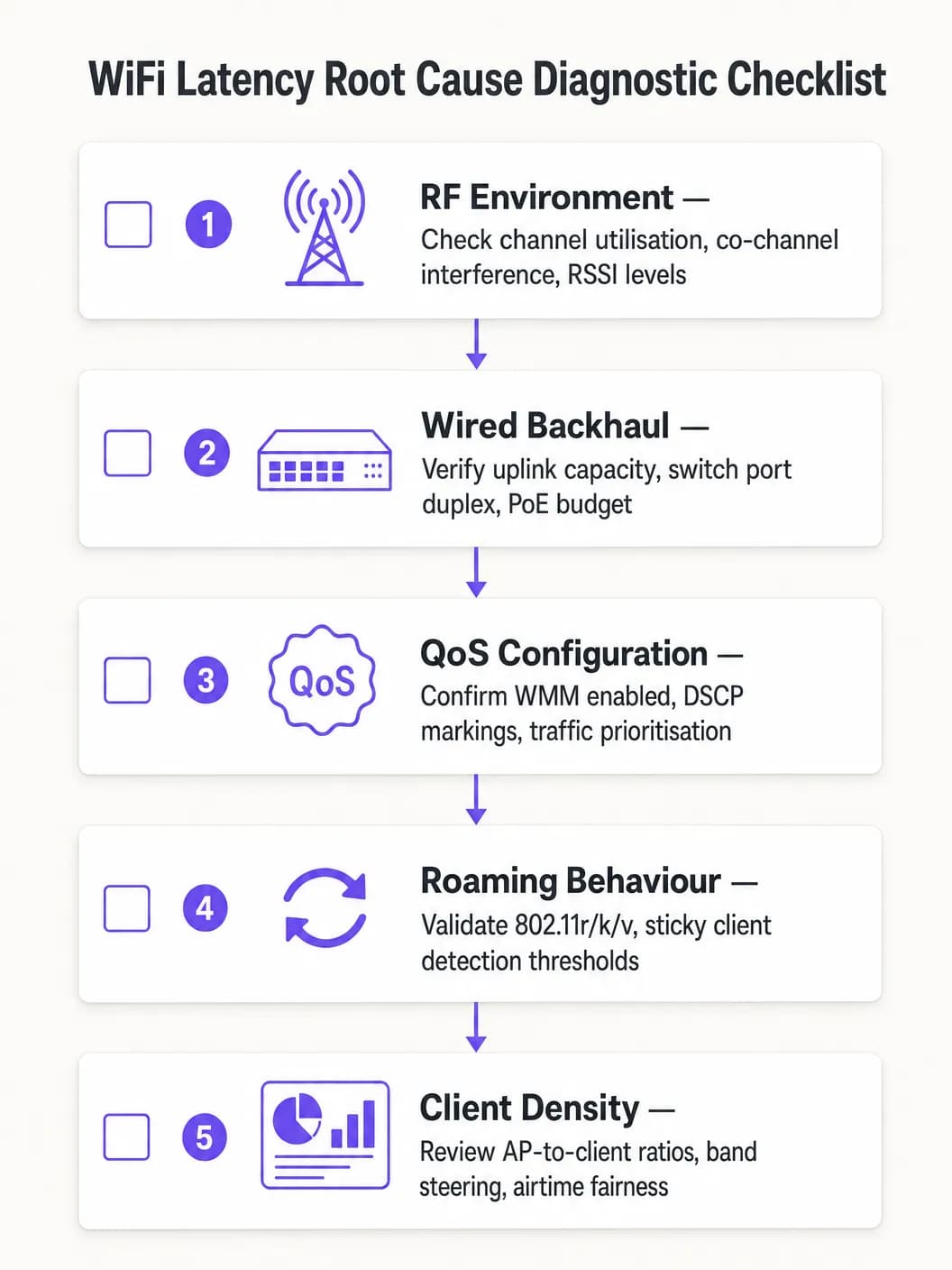
मूळ कारण चुकीचे शोधणे टाळण्यासाठी एका पद्धतशीर डायग्नोस्टिक दृष्टिकोनाचे अनुसरण करा:
- डोमेन आयसोलेट करा: प्रभावित क्लायंटवरून लोकल डिफॉल्ट गेटवेला पिंग करा. लेटन्सी कमी असल्यास, वायरलेस नेटवर्क पुरेशा प्रमाणात कामगिरी करत आहे आणि समस्या वायर्ड किंवा WAN डोमेनमध्ये आहे. लेटन्सी जास्त असल्यास, वायरलेस डायग्नोस्टिक्ससह पुढे जा.
- चॅनेल वापराचे परीक्षण करा (Examine Channel Utilisation): जास्त वापर (>५०%) CCI किंवा क्षमता मर्यादा दर्शवतो. कमी वापरासोबत जास्त लॅटन्सी असणे म्हणजे QoS किंवा रोमिंगच्या समस्या दर्शवते.
- क्लायंट असोसिएशनचे पुनरावलोकन करा (Review Client Association): कमी डेटा दराने किंवा कमकुवत RSSI सह जोडलेले क्लायंट शोधा. हे बहुधा एअरटाइम अकार्यक्षमतेचे कारण असू शकतात किंवा त्यांना खराब कव्हरेजचा सामना करावा लागत असू शकतो.
- एंड-टू-एंड QoS सत्यापित करा: WAN इंटरफेसवर पॅकेट कॅप्चर करा आणि व्हॉइस ट्रॅफिकवरील DSCP मार्किंग सत्यापित करा.
- रोमिंगची चाचणी घ्या: रोमिंग ट्रान्झिशनची वेळ मोजण्यासाठी WiFi डायग्नोस्टिक टूल वापरा. १००ms पेक्षा जास्त वेळ असणे हे ८०२.११r योग्यरित्या कार्य करत नसल्याचे दर्शवते.
सामान्य बिघाड प्रकार (Common Failure Modes):
| लक्षण | संभाव्य कारण | उपाय |
|---|---|---|
| पीक अवर्स दरम्यान लॅटन्सी वाढणे | CCI / जास्त चॅनेल वापर | AP पॉवर कमी करा, 5GHz वर मायग्रेट करा |
| हालचाल करताना ऑडिओ खंडित होणे | स्लो रोमिंग / ८०२.११r चा अभाव | ८०२.११r सक्षम करा, RSSI थ्रेशोल्ड ट्यून करा |
| सतत हाय लॅटन्सी, कमी वापर | गहाळ झालेली QoS ट्रस्ट बाउंड्री | स्विच पोर्ट्सवर DSCP ट्रस्ट कॉन्फिगर करा |
| अधूनमधून पॅकेट गळती (Packet loss) | ACI / चॅनेल ओव्हरलॅप | चॅनेल प्लॅन दुरुस्त करा, चॅनेलचे अंतर वाढवा |
ROI आणि व्यावसायिक प्रभाव
WiFi लॅटन्सी ऑप्टिमायझेशनचे व्यावसायिक मूल्य अगदी स्पष्ट आहे. वेअरहाऊस किंवा लॉजिस्टिक ऑपरेशनमध्ये, स्कॅनर लॅटन्सी १५०ms वरून २०ms पेक्षा कमी केल्याने पिक-अँड-पॅक थ्रूपुट १० - १५% वाढू शकते, ज्याचा थेट परिणाम परिचालन खर्चावर होतो. कॉर्पोरेट वातावरणात, खंडित होणारे Teams कॉल्स काढून टाकल्याने IT हेल्पडेस्क तिकिटे कमी होतात - ज्यांचे निवारण करण्यासाठी साधारणपणे प्रति तिकीट £२५ - £५० खर्च येतो - आणि यामुळे कार्यकारी अधिकारी व कर्मचाऱ्यांची उत्पादकता सुधारते.
क्लिनिकल संवादासाठी VoWLAN तैनात करणाऱ्या Healthcare संस्थांसाठी, जोखीम कमी करण्याचे मूल्य आणखी जास्त आहे: क्लिनिकल सेटिंगमध्ये अविश्वसनीय संवाद रुग्णांच्या सुरक्षिततेवर परिणाम करतो, ज्याच्या तुलनेत नेटवर्क ऑप्टिमायझेशनचा खर्च नगण्य आहे.
या KPIs च्या आधारे यशाचे मूल्यांकन करा: व्हॉइस ट्रॅफिकसाठी सरासरी वन-वे लॅटन्सी, जिटर मोजमाप, रोमिंग ट्रान्झिशनची वेळ, चॅनेल वापराची टक्केवारी आणि WiFi कामगिरीशी संबंधित हेल्पडेस्क तिकिटांची संख्या. सुधारणा मोजण्यासाठी आणि चालू गुंतवणुकीसाठी व्यावसायिक केस तयार करण्यासाठी ऑप्टिमायझेशनपूर्वीचे आणि नंतरचे बेसलाईन स्थापित करा.
महत्वाच्या व्याख्या
लेटन्सी (Latency)
डेटा पॅकेटला स्त्रोतापासून डेस्टिनेशनपर्यंत प्रवास करण्यासाठी लागणारा वन-वे वेळ विलंब, जो मिलिसेकंदमध्ये मोजला जातो.
उच्च लेटन्सीमुळे व्हॉइस कॉल आणि व्हिडिओ कॉन्फरन्सिंगमध्ये संभाषण विलंब होतो. ITU-T G.114 मानकानुसार जास्तीत जास्त स्वीकार्य वन-वे लेटन्सी 150ms निश्चित केली आहे, ज्यामध्ये 50ms हे एंटरप्राइझचे उद्दिष्ट आहे.
Jitter
पॅकेट पोहोचण्याच्या वेळेतील सांख्यिकीय तफावत, जी पॅकेट्सच्या संपूर्ण प्रवाहात लेटन्सीमधील विसंगती दर्शवते.
उच्च jitter मुळे आवाज तुटक किंवा रोबोटिक येतो कारण रिसिव्हिंग ॲप्लिकेशनचा jitter बफर ओव्हरव्हेल्म होतो आणि पॅकेट्स बाद केले जातात. एंटरप्राइझ व्हॉइस ॲप्लिकेशन्ससाठी target jitter 20ms पेक्षा कमी असावे.
CSMA/CA (Carrier Sense Multiple Access with Collision Avoidance)
802.11 WiFi नेटवर्कमध्ये वापरला जाणारा मीडियम ॲक्सेस प्रोटोकॉल, जेथे डिव्हाइसेस ट्रान्समिट करण्यापूर्वी चॅनेलच्या ॲक्टिव्हिटीचा अंदाज घेतात आणि चॅनेल व्यस्त असल्यास यादृच्छिकपणे मागे हटतात (back off).
CSMA/CA च्या हाफ-डुप्लेक्स स्वरूपामुळे दिलेल्या चॅनेलवर एका वेळी फक्त एकच डिव्हाइस ट्रान्समिट करू शकते. गर्दीच्या वातावरणात, ही स्पर्धा यंत्रणा हे बदलत्या लेटन्सीचे मुख्य कारण असते.
Co-Channel Interference (CCI)
जेव्हा एकाधिक ॲक्सेस पॉइंट्स किंवा क्लायंट्स एकमेकांच्या रेंजमध्ये एकाच फ्रिक्वेन्सी चॅनेलवर ट्रान्समिट करतात तेव्हा निर्माण होणारे इंटरफेरन्स.
CCI मुळे APs ला ट्रान्समिशन पुढे ढकलणे भाग पडते, ज्यामुळे क्यूइंग विलंब वाढतो. दाट एंटरप्राइझ डिप्लॉयमेंट्समध्ये उच्च लेटन्सीचे हे प्राथमिक RF कारण आहे आणि काळजीपूर्वक चॅनेलचे नियोजन आणि पॉवर मॅनेजमेंटद्वारे हे कमी केले जाते.
WMM (WiFi Multimedia)
वायरलेस नेटवर्कसाठी 802.11e QoS अंमलबजावणी, जी वेगवेगळ्या स्पर्धा पॅरामीटर्ससह चार ॲक्सेस कॅटेगरी (व्हॉइस, व्हिडिओ, बेस्ट एफर्ट, बॅकग्राउंड) परिभाषित करते.
WMM ही अशी यंत्रणा आहे जी वायरलेस मीडियावर बल्क डेटाच्या तुलनेत व्हॉइस आणि व्हिडिओ ट्रॅफिकला सांख्यिकीय प्राधान्य देते. रिअल-टाइम ट्रॅफिक वाहून नेणाऱ्या सर्व SSIDs वर हे सक्षम केलेले असावे.
802.11r (Fast BSS Transition)
एक IEEE मानक जे क्लायंटला रोमिंग करण्यापूर्वी टारगेट AP सह सुरक्षा क्रेडेंशियल्सची पूर्व-सहानुभूती साधण्याची परवानगी देते, ज्यामुळे हँडऑफ दरम्यान पूर्ण RADIUS री-ऑथेंटिकेशनची आवश्यकता उरत नाही.
802.11r शिवाय, WPA2 / WPA3-Enterprise अंतर्गत रोमिंगसाठी 300 - 800ms वेळ लागू शकतो, ज्यामुळे ऐकू येणारा कॉल ड्रॉपआउट होतो. 802.11r सह, रोमिंग 50ms पेक्षा कमी वेळेत पूर्ण होते.
Sticky Client
एक वायरलेस डिव्हाइस जे सिग्नल खराब झाल्यावरही एखाद्या AP शी जोडलेले राहते, जरी जवळच अधिक चांगला सिग्नल असणारा दुसरा AP उपलब्ध असला तरीही.
सिग्नलच्या खराब गुणवत्तेमुळे Sticky clients ला उच्च लेटन्सीचा सामना करावा लागतो आणि ते कमी डेटा दरांवर जास्त प्रमाणात एअरटाइम वापरतात. या क्लायंट्सना रोमिंग करण्यास भाग पाडण्यासाठी WLC-side RSSI थ्रेशोल्ड अंमलबजावणी आवश्यक आहे.
Airtime Fairness
एक वायरलेस शेड्युलिंग यंत्रणा जी ट्रान्समिशनच्या समान संधींच्या संख्येऐवजी सर्व संबंधित क्लायंट्सना समान ट्रान्समिशन वेळ वाटप करते.
Airtime fairness शिवाय, एकटा संथ क्लायंट चॅनेलवर मक्तेदारी मिळवू शकतो, ज्यामुळे AP वरील इतर सर्व क्लायंट्ससाठी लेटन्सी वाढते. Airtime fairness सक्षम केल्याने हाय-स्पीड क्लायंट्सचे जुन्या किंवा दूरच्या डिव्हाइसेसच्या प्रभावापासून रक्षण होते.
DSCP (Differentiated Services Code Point)
QoS हेतूंसाठी नेटवर्क ट्रॅफिकचे वर्गीकरण आणि प्राधान्य देण्यासाठी IP हेडरमधील ६-बिट फील्ड.
व्हॉइस ट्रॅफिकसाठी DSCP EF (46) वापरला जातो; व्हिडिओसाठी DSCP AF41 (34) वापरला जातो. वायरलेस क्लायंटपासून ते WAN पर्यंत एंड-टू-एंड QoS राखण्यासाठी वायर्ड स्विचेसद्वारे या मार्किंग्सवर विश्वास ठेवला पाहिजे.
सोडवलेली उदाहरणे
एक १,२०० प्रतिनिधींचे कॉन्फरन्स सेंटर असे नोंदवते की प्रदर्शन हॉल दरम्यान फिरताना मोबाइल डिव्हाइस वापरणाऱ्या कर्मचाऱ्यांना Zoom कॉल्स खंडित होण्याचा अनुभव येतो. संपूर्ण वेन्यूमध्ये सिग्नलची ताकद सातत्याने -६५ dBm च्या वर असते आणि वायरलेस कंट्रोलर कोणतीही उघड त्रुटी दर्शवत नाही. ही समस्या अधूनमधून उद्भवते आणि कर्मचाऱ्यांच्या हालचालींशी संबंधित आहे.
रोमिंग इव्हेंट दरम्यान वायरलेस पॅकेट कॅप्चरने उघड केले की प्रत्येक AP ट्रान्झिशनवर RADIUS सर्व्हरसह संपूर्ण 802.1X री - ऑथेंटिकेशनमुळे क्लायंटना रोमिंग प्रक्रिया पूर्ण करण्यासाठी ४८० - ६५०ms लागत होते. RADIUS सर्व्हर ऑफ - साइटवर स्थित होता, ज्यामुळे प्रत्येक ऑथेंटिकेशन एक्सचेंजमध्ये अंदाजे ८०ms ची राउंड - ट्रिप WAN लेटन्सी जोडली जात होती.
निराकरणामध्ये तीन टप्प्यांचा समावेश होता: पहिला, रोम दरम्यान संपूर्ण RADIUS री - ऑथेंटिकेशन काढून टाकण्यासाठी कर्मचारी SSID वर 802.11r (Fast BSS Transition) सक्षम करणे. दुसरा, प्रारंभिक असोसिएशनसाठी ऑथेंटिकेशन लेटन्सी कमी करण्यासाठी स्थानिक RADIUS प्रॉक्सी किंवा कॅश तैनात करणे. तिसरा, क्लायंटना शेजारील अहवाल प्रदान करण्यासाठी 802.11k सक्षम करणे, ज्यामुळे स्कॅनिंगचा टप्पा २००ms+ वरून ३०ms पेक्षा कमी झाला. अंमलबजावणीनंतर मोजलेला रोमिंग वेळ ३५ - ४५ms इतका होता, ज्यामुळे कर्मचारी हालचाली दरम्यान सर्व कॉल ड्रॉप्सचे पूर्णपणे निवारण झाले.
८५ स्टोअर्स असलेली एक राष्ट्रीय रिटेल साखळी नोंदवते की वेअरहाऊसच्या मजल्यावरील इन्व्हेंटरी मॅनेजमेंट स्कॅनर्सना पीक ट्रेडिंग तासांदरम्यान गंभीर लेटन्सी (१५० - २००ms) चा अनुभव येतो, अगदी अलीकडील AP हार्डवेअर रिफ्रेश असूनही. सिग्नलची ताकद मजबूत आहे आणि WLC डॅशबोर्ड कोणतेही अलार्म दाखवत नाही. ही समस्या सकाळी १० ते दुपारी २ च्या दरम्यान सर्वात जास्त असते.
WLC RF डॅशबोर्डच्या विश्लेषणाने उघड केले की पीक अवर्स दरम्यान २.४GHz बँडवरील चॅनेलचा वापर ७५% पेक्षा जास्त होता. स्टोअरमध्ये १८ AP तैनात केले होते, जे सर्व चॅनेल १, ६ आणि ११ वर २.४GHz बँडवर कार्यरत होते - याचा अर्थ प्रति चॅनेल सहा AP एअरटाइमसाठी स्पर्धा करत होते. याव्यतिरिक्त, स्कॅनर डिव्हाइसेस ही जुनी 802.11n डिव्हाइसेस होती जी ६ Mbps इतक्या कमी डेटा रेटवर कार्यरत होती.
निवारण योजना: सह - चॅनेल स्पर्धा कमी करण्यासाठी विस्तीर्ण चॅनेल योजनेचा फायदा घेत, स्कॅनर SSID ला केवळ ५GHz बँडवर स्थलांतरित करणे. ५GHz SSID वर १२ Mbps पेक्षा कमी डेटा रेट अक्षम करणे. WMM सक्षम करणे आणि स्कॅनर ट्रॅफिक (UDP, पोर्ट ९१००) ला WLC वर DSCP AF41 (व्हिडिओ क्लास) म्हणून चिन्हांकित करण्यासाठी कॉन्फिगर करणे. DSCP वर विश्वास ठेवण्यासाठी स्विच पोर्ट्स कॉन्फिगर करणे. अंमलबजावणीनंतर पीक अवर्स दरम्यान मोजलेली लेटन्सी ८ - १२ms होती.
सराव प्रश्न
Q1. तुम्ही 450 खाटांच्या रुग्णालयासाठी नेटवर्क आर्किटेक्ट आहात जे तीन मजल्यांवर वैद्यकीय कर्मचाऱ्यांसाठी VoWLAN हँडसेट्स तैनात करत आहे. UAT दरम्यान, परिचारिका तक्रार करतात की वॉर्डांच्या दरम्यान फिरताना साधारण अर्ध्या सेकंदासाठी कॉल ड्रॉप होतात. संपूर्ण इमारतीमध्ये सिग्नलची ताकद सातत्याने -62 ते -68 dBm आहे. WLC कोणतीही त्रुटी दर्शवत नाही आणि चॅनेलचा वापर 35% पेक्षा कमी आहे. सर्वात संभाव्य मूळ कारण काय आहे आणि तुमचे शिफारस केलेले निराकरण काय आहे?
टीप: WPA2-Enterprise ऑथेंटिकेशन अंतर्गत जेव्हा एखादा क्लायंट एका AP वरून दुसऱ्या AP कडे जातो तेव्हा नेटवर्क लेयरवर काय होते याचा विचार करा. सिग्नल स्ट्रेंथ आणि चॅनेलचा वापर दोन्ही निरोगी आहेत, त्यामुळे ही समस्या RF शी संबंधित नाही.
नमुना उत्तर पहा
याचे मुख्य कारण म्हणजे प्रत्येक AP संक्रमणादरम्यान पूर्ण 802.1X री-ऑथेंटिकेशनमुळे येणारा रोमिंग लेटन्सी (roaming latency) आहे. निरोगी RSSI आणि कमी चॅनेल वापरासह, RF वातावरणामध्ये कोणतीही अडचण नाही. अर्ध्या सेकंदाचा ड्रॉपआउट हा रोमिंग दरम्यान होणाऱ्या RADIUS ऑथेंटिकेशन एक्सचेंजचे वैशिष्ट्य आहे. यावर शिफारस केलेला उपाय म्हणजे VoWLAN SSID वर IEEE 802.11r (Fast BSS Transition) सक्षम करणे, जे रोमिंग होण्यापूर्वी लक्ष्यित AP सह PMK-R1 की चे पूर्व-वाटाघाटी करते, ज्यामुळे संक्रमण वेळ 50ms पेक्षा कमी होतो. याव्यतिरिक्त, क्लायंटना शेजारील रिपोर्ट प्रदान करण्यासाठी आणि स्कॅनिंग वेळ कमी करण्यासाठी 802.11k सक्षम करा आणि RADIUS सर्व्हरचा प्रतिसाद वेळ 100ms पेक्षा कमी असल्याची खात्री करा. पूर्ण उपयोजनापूर्वी सर्व हँडसेट मॉडेल्सची 802.11r सुसंगततेसाठी चाचणी घ्या.
Q2. एका मोठ्या रिटेल वितरण केंद्राकडे 20,000 स्क्वेअर फूट वेअरहाऊस फ्लोअरवर 40 APs तैनात आहेत, जे सर्व चॅनेल 1, 6, आणि 11 वापरून 2.4GHz बँडवर कार्यरत आहेत. वेअरहाऊस कर्मचाऱ्यांद्वारे वापरल्या जाणाऱ्या बारकोड स्कॅनरना पीक शिफ्टच्या वेळेत 120 - 180ms लेटन्सीचा सामना करावा लागत आहे, ज्यामुळे इन्व्हेंटरी मॅनेजमेंट सिस्टीम टाईम आऊट होत आहे. संपूर्ण परिसरात सिग्नलची ताकद मजबूत आहे. प्राथमिक आर्किटेक्चरल समस्या काय आहे आणि सुधारणा धोरण काय आहे?
टीप: प्रत्येक चॅनेल किती APs शेअर करत आहेत याची गणना करा. नॉन-ओव्हरलॅपिंग चॅनेलच्या उपलब्धतेच्या बाबतीत 2.4GHz बँडच्या मूलभूत मर्यादेचा विचार करा.
नमुना उत्तर पहा
प्राथमिक समस्या गंभीर Co-Channel Interference (CCI) ही आहे. केवळ तीन नॉन-ओव्हरलॅपिंग चॅनेल शेअर करणाऱ्या 40 APs सह, अंदाजे 13 - 14 APs प्रत्येक चॅनेलवर एअरटाइमसाठी स्पर्धा करत आहेत. CSMA/CA अंतर्गत, यामुळे तीव्र स्पर्धा आणि क्युइंग विलंब (queuing delay) निर्माण होतो, ज्यामुळे 120 - 180ms लेटन्सी दिसून येते. सुधारणा धोरण खालीलप्रमाणे आहे: (1) स्कॅनर SSID पूर्णपणे 5GHz बँडवर स्थलांतरित करा, जे बहुतांश नियामक क्षेत्रांमध्ये 25 पर्यंत नॉन-ओव्हरलॅपिंग 20MHz चॅनेल प्रदान करते, ज्यामुळे प्रति-चॅनेल AP घनता लक्षणीयरीत्या कमी होते. (2) प्रति-फ्रेम एअरटाइम वापर कमी करण्यासाठी 12 Mbps पेक्षा कमी डेटा दर अक्षम करा. (3) WMM सक्षम करा आणि स्कॅनर UDP ट्रॅफिकला बल्क डेटा ट्रॅफिकपासून सुरक्षित ठेवण्यासाठी DSCP AF41 म्हणून चिन्हांकित करा. (4) DSCP मार्किंग्जवर विश्वास ठेवण्यासाठी स्विच पोर्ट्स कॉन्फिगर करा. (5) प्रत्येक AP चा CCI फूटप्रिंट कमी करण्यासाठी AP ट्रान्समिट पॉवर कमी करा.
Q3. तुमच्या नेटवर्क टीमने सर्व कॉर्पोरेट SSIDs वर WMM लागू केले आहे आणि वायरलेस कंट्रोलरवर Teams व्हॉइस ट्रॅफिकसाठी DSCP EF मार्किंग्ज कॉन्फिगर केले आहेत. तथापि, WAN फायरवॉलवर घेतलेल्या पॅकेट कॅप्चरमध्ये Teams व्हॉइस ट्रॅफिक DSCP 0 (Best Effort) सह पोहोचत असल्याचे दिसून येते. कॉल गुणवत्तेच्या समस्यांसाठी हेल्पडेस्क तिकिटे कमी झालेली नाहीत. काय करायचे राहिले आहे आणि तुम्ही त्याचे निराकरण कसे कराल?
टीप: QoS केवळ तेव्हाच प्रभावी ठरतो जेव्हा तो एंड-टू-एंड राखला जातो. AP आणि WAN फायरवॉल दरम्यान पॅकेट्स वायर्ड नेटवर्क इन्फ्रास्ट्रक्चरमधून जात असताना DSCP मार्किंग्जचे काय होते याचा विचार करा.
नमुना उत्तर पहा
वायर्ड नेटवर्क इन्फ्रास्ट्रक्चर हे वायरलेस कंट्रोलरद्वारे लागू केलेल्या DSCP मार्किंग्जवर विश्वास ठेवण्यासाठी कॉन्फिगर केलेले नाही. जेव्हा पॅकेट्स AP सोडतात आणि ॲक्सेस लेयर स्विचेसमधून जातात, तेव्हा स्विच पोर्ट्स सर्व ट्रॅफिकला पुन्हा DSCP 0 (Best Effort) वर सेट करत असतात कारण ते येणाऱ्या DSCP मूल्यांवर विश्वास ठेवण्यासाठी कॉन्फिगर केलेले नसतात. याचे निराकरण म्हणजे APs आणि WLC शी जोडणाऱ्या सर्व स्विच पोर्ट्सना DSCP ट्रस्टसह कॉन्फिगर करणे (उदा. Cisco iOS मध्ये 'mls qos trust dscp', किंवा इतर वेंडर प्लॅटफॉर्मवरील समतुल्य). याव्यतिरिक्त, वितरण आणि कोअर लेयर स्विचेस त्यांच्या QoS पॉलिसींमध्ये DSCP मार्किंग्जचा आदर करण्यासाठी कॉन्फिगर केले आहेत याची पडताळणी करा. ट्रस्ट बाउंड्री कॉन्फिगरेशन लागू केल्यानंतर, Teams व्हॉइस ट्रॅफिक आता DSCP EF (46) सह पोहोचत असल्याची पुष्टी करण्यासाठी WAN फायरवॉलवर पुन्हा कॅप्चर करा.
या मालिकेमध्ये पुढे वाचा
20MHz vs 40MHz vs 80MHz: आपण कोणती Channel Width वापरली पाहिजे?
ही मार्गदर्शिका हॉस्पिटॅलिटी, रिटेल, इव्हेंट्स आणि सार्वजनिक क्षेत्रातील वातावरणात एंटरप्राइझ डिप्लॉयमेंटमध्ये योग्य WiFi channel width - 20MHz, 40MHz, किंवा 80MHz - निवडण्यासाठी IT व्यवस्थापक, नेटवर्क आर्किटेक्ट्स आणि व्हेन्यू ऑपरेशन्स डायरेक्टर्ससाठी एक निश्चित, विक्रेता-तटस्थ तांत्रिक संदर्भ प्रदान करते. यामध्ये अंतर्निहित IEEE 802.11 मेकॅनिक्स, रिअल-वर्ल्ड कॅपेसिटी ट्रेड-ऑफ आणि स्टेप बाय स्टेप डिप्लॉयमेंट मार्गदर्शनाचा समावेश आहे जेणेकरून टीम्सना या तिमाहीत योग्य निर्णय घेण्यास मदत होईल. channel width निवडणे हा कोणत्याही वायरलेस LAN डिझाइनमधील सर्वोच्च-लाभकारक निर्णयांपैकी एक आहे, ज्याचा थेट परिणाम थ्रुपुट, इंटरफेरियन्स, क्लायंट डेन्सिटी सपोर्ट आणि अतिथी-अनुकूल सेवांच्या विश्वासार्हतेवर होतो.
5GHz DFS WiFi Channels: एंटरप्राइजमध्ये कधी वापरावे आणि कधी टाळावे
5GHz DFS WiFi चॅनेल्स कसे काम करतात, रडार हस्तक्षेपाचे धोके, CAC प्रतीक्षा वेळ, हवामान रडार चॅनेल्स आणि एंटरप्राइझ चॅनेल नियोजनाच्या सर्वोत्तम पद्धतींबद्दल जाणून घ्या.
DNS Filtering नेटवर्क Bandwidth चा वापर कसा कमी करते
हा मार्गदर्शक सविस्तर माहिती देतो की एंटरप्राइझ WiFi नेटवर्कवर DNS filtering लागू केल्याने जाहिराती, ट्रॅकिंग आणि टेलिमेट्री रहदारी Bandwidth वापरण्यापूर्वीच कशी ब्लॉक होते. IT व्यवस्थापक आणि वेन्यू ऑपरेटर्ससाठी, याचा अर्थ ISP खर्चात त्वरित घट, सुधारित नेटवर्क कार्यप्रदर्शन आणि वर्धित सुरक्षा स्थिती असा होतो.
तुमच्या विशिष्ट सेटअपबद्दल काही प्रश्न आहेत का?
आमची टीम ८०,००० हून अधिक वेन्यूजमधील वेन्यू ऑपरेटर्स, IT मॅनेजर्स आणि नेटवर्क इंजिनिअर्ससोबत काम करते. २० मिनिटांचा कॉल बुक करा आणि तुमच्यासारख्या इतरांनी ही समस्या कशी सोडवली हे आम्ही तुम्हाला दाखवू.