
Fixing High Latency and Jitter on Staff WiFi
This authoritative technical reference guide examines the root causes of high latency and jitter on enterprise staff WiFi networks, providing network architects and IT directors with actionable strategies to diagnose and resolve performance degradation affecting real-world applications such as Microsoft Teams and Zoom. It covers RF environment optimization, end-to-end QoS implementation, roaming mechanics, and client management techniques. Venue operators and IT teams will find concrete implementation guidance, real-world case studies, and measurable benchmarks to ensure their wireless infrastructure supports seamless staff mobility and collaboration.
Video overview
Listen to this guide
View podcast transcript
Part of our core series: Enterprise WiFi Security Guide →
Executive Summary
For enterprise venues - from expansive retail floors to high-density stadiums and hospitality properties - staff WiFi performance is a critical operational dependency, not merely an amenity. When one-way latency exceeds 50ms or jitter climbs past 20ms, the performance of real-time communication platforms, including Microsoft Teams and Zoom, visibly degrades: audio becomes robotic, video freezes, and calls drop. This guide provides network architects and IT directors with the technical depth and actionable strategies required to identify, diagnose, and resolve the root causes of high latency WiFi on corporate WLANs. By addressing RF interference, implementing end-to-end Quality of Service, and tuning roaming parameters to align with IEEE 802.11r/k/v, organizations can deliver a robust wireless experience that supports seamless staff mobility. This investment is directly measurable: fewer helpdesk tickets, improved operational throughput, and a network infrastructure that scales with the business.
Technical Deep Dive
Latency and Jitter: The Key Differences
Latency is the time required for a data packet to travel from source to destination. Jitter is the variance in that delay between consecutive packets. In the context of 802.11 networks, both metrics are heavily influenced by the half-duplex nature of wireless transmission and the Carrier Sense Multiple Access with Collision Avoidance (CSMA/CA) protocol - the mechanism by which devices compete for airtime.

Voice and video codecs are designed with fixed jitter buffers. When jitter exceeds the buffer depth - typically 20 - 30ms for enterprise-grade VoIP - packets are discarded, producing the distinctive choppy or robotic audio that signals a degraded call. Conversely, high latency causes conversational overlaps that make real-time collaboration difficult. The ITU-T G.114 recommendation specifies a maximum 150ms one-way delay for acceptable voice quality, with enterprise deployments targeting 50ms.
| Metric | Optimal | Acceptable | Degraded |
|---|---|---|---|
| One-Way Latency | < 20ms | 20–50ms | > 50ms |
| Jitter | < 5ms | 5–20ms | > 20ms |
| Packet Loss | < 0.1% | 0.1–1% | > 1% |
Root Cause 1: RF Environment and Co-Channel Interference
Co-channel interference (CCI) is the primary RF cause of increased latency in dense enterprise deployments. When multiple access points (APs) operate on the same channel, they share airtime under CSMA/CA. Each AP must defer transmission until it detects that another AP on the same channel has finished transmitting, effectively serializing traffic and increasing queuing delay. In a retail store with 20 APs on three non-overlapping 2.4GHz channels, each channel may be shared by six or seven APs - a configuration that will introduce significant latency under load.
The 5GHz band, with its wider channel plan (up to 25 non-overlapping 20MHz channels under 802.11ac/ax in many regulatory domains), offers significantly higher capacity for channel reuse planning. Understanding the full frequency landscape is essential; the guide WiFi Frequencies: A Guide to WiFi Frequencies in 2026 provides a comprehensive reference for frequency planning decisions.
Adjacent Channel Interference (ACI) presents a secondary risk. ACI occurs when channels are not sufficiently separated, causing partial overlap that corrupts frames and forces retransmissions - each retransmission directly increasing observed latency.
Root Cause 2: Legacy Data Rates and Airtime Inefficiency
In a standard 802.11 BSS, all associated clients are allocated transmission opportunities. A client transmitting at 1 Mbps occupies the channel for nearly 100 times longer than a client transmitting at 100 Mbps to send the same payload. This unequal airtime consumption - caused by legacy devices or clients at the edge of coverage - increases queuing delay for all other clients on the AP. Disabling data rates below 12 Mbps on the 5GHz band and below 5.5 Mbps on 2.4GHz forces clients to use more efficient modulation, reducing per-frame airtime and improving overall latency.
Root Cause 3: QoS Misconfiguration
Without Quality of Service, a bulk file transfer is treated exactly like a Teams call. WiFi Multimedia (WMM), which is the 802.11e QoS implementation, defines four access categories: Voice (AC_VO), Video (AC_VI), Best Effort (AC_BE), and Background (AC_BK). Each category has different contention window parameters that determine how aggressively it competes for airtime. Voice traffic uses a smaller contention window and shorter Arbitration Inter-Frame Space (AIFS), giving it statistical priority over bulk data.
A critical implementation detail that many deployments overlook is the trust boundary on the wired infrastructure. WMM operates at Layer 2 within the wireless domain. To maintain QoS end-to-end, the switch ports connecting APs and wireless LAN controllers must be configured to trust the DSCP markings applied by the wireless infrastructure. Without this, packets are reclassified to Best Effort at the first wired hop, rendering the wireless QoS configuration ineffective beyond the AP.
For healthcare environments where clinical communication over VoWLAN is safety-critical, this end-to-end QoS chain is non-negotiable.
Root Cause 4: Roaming Latency and Authentication Overhead
In mobile staff environments, the most operationally disruptive cause of call quality degradation is roaming-induced latency. When a client transitions between APs, the process includes: active or passive scanning to discover potential APs, authentication, and re-association. Under WPA3-Enterprise with 802.1X, the authentication phase requires a full RADIUS exchange, which can take 300-800ms depending on RADIUS server response times and network topology. This delay is directly experienced as call dropouts.
IEEE 802.11r (Fast BSS Transition) resolves this by allowing the client to pre-negotiate the Pairwise Transient Key with the target AP prior to roaming, utilizing cached PMK-R1 keys distributed by the WLC. This reduces the authentication phase to a two-frame exchange, bringing total roaming time down to under 50ms. For environments with significant staff mobility - transport hubs, hospital wards, warehouse floors - 802.11r is not optional; it is a baseline requirement.
IEEE 802.11k (Neighbor Report) provides clients with a Neighbor Report, eliminating the need to scan every possible channel to discover potential APs. IEEE 802.11v (BSS Transition Management) allows the network to actively suggest better APs to clients, resolving the sticky client issue. For a comprehensive breakdown of roaming architectures, see Resolving Roaming Issues in Corporate WLANs.
Got questions about your specific setup?
Our team works with venue operators, IT managers, and network engineers across 80,000 venues. Book a 20-minute call and we will show you how others like you solved it.
Implementation Guide
Step 1: RF Audit and Channel Planning
Begin with a comprehensive wireless site survey utilizing a spectrum analyzer to identify sources of interference, including non-WiFi sources such as Bluetooth, DECT phones, and microwave ovens. Document AP placement, transmit power levels, and channel assignments. Identify APs with consistent channel utilization exceeding 50% - these are your primary latency hotspots. Reduce AP transmit power to the minimum level required to maintain adequate coverage (-67 dBm RSSI at cell edge for voice applications). This reduces the CCI footprint of each AP, allowing for denser channel reuse. Enable automatic RF management on the WLC, but configure time restrictions to prevent channel changes during business hours, which can cause brief connectivity disruptions.
Step 2: Data Rate Optimization
On the 5GHz band, disable all mandatory and supported rates below 12 Mbps. On the 2.4GHz band, disable rates below 5.5 Mbps. This forces clients to associate at higher rates, reducing per-frame airtime consumption. Enable Airtime Fairness to prevent any single client from monopolizing the channel.
Step 3: End-to-End QoS Implementation
Enable WMM on all corporate SSIDs. Configure DSCP-to-WMM mapping: DSCP EF (46) to AC_VO, DSCP AF41 (34) to AC_VI. On the wired infrastructure, configure switch ports connecting APs and WLCs with mls qos trust dscp (Cisco IOS syntax) or equivalent. Verify the QoS chain using packet captures on the WAN router to confirm that voice traffic is arriving with the correct DSCP markings.
Use Guest WiFi to identify bandwidth-intensive applications consuming disproportionate airtime, and apply rate limiting or traffic shaping policies to protect voice and video traffic.
Step 4: Roaming Optimization
Enable 802.11r, 802.11k, and 802.11v on the staff SSID. Note that some legacy clients may not support these standards; test thoroughly before deployment. To resolve sticky clients, configure the WLC to disconnect clients with RSSI below -75 dBm. Set the minimum RSSI threshold for association to -80 dBm to prevent clients from connecting to distant APs.
Best Practices
Security and Performance: Deploy WPA3-Enterprise with 802.1X for the staff SSID. Although 802.1X introduces initial authentication overhead, 802.11r eliminates this during roaming. Ensure RADIUS servers are deployed with redundancy and sub-100ms response times. Compliance with CCPA and PCI-DSS necessitates that staff and Guest WiFi traffic be logically segregated using VLANs and separate SSIDs.
Network Segmentation: Maintain strict separation between staff and guest networks. Guest traffic should be isolated on a dedicated SSID with Captive Portal authentication, ensuring guest devices do not impact staff network performance. This is particularly relevant for Hospitality properties where guest WiFi density can be extremely high.
Monitoring and Baselining: Establish baseline latency and jitter measurements during off-peak hours. Configure SNMP traps or streaming telemetry to alert when channel utilization exceeds 50% or client RSSI drops below -70 dBm. Proactive monitoring prevents reactive troubleshooting.
For a comprehensive workplace connectivity strategy, Office Wi Fi: Optimize Your Modern Office Wi-Fi Network provides complementary guidance on enterprise WLAN design.
Troubleshooting and Risk Mitigation
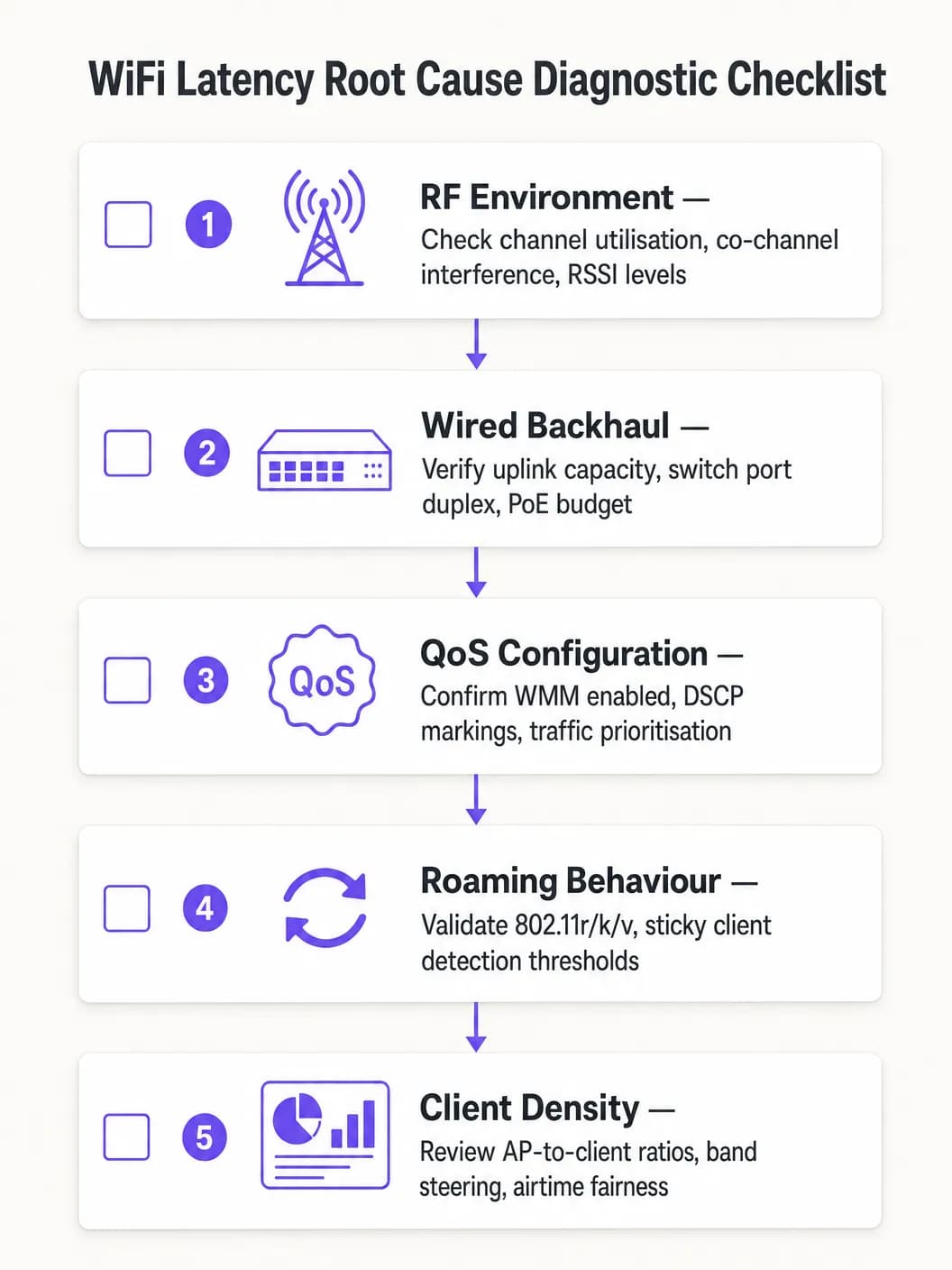
Follow a structured diagnostic approach to avoid misdiagnosing the root cause:
- Isolate the Domain: Ping the local default gateway from an affected client. If latency is low, the wireless network is performing adequately and the issue lies in the wired or WAN domain. If latency is high, proceed with wireless diagnostics.
- Examine Channel Utilization: High utilization (>50%) indicates CCI or capacity constraints. Low utilization paired with high latency points to QoS or roaming issues.
- Review Client Association: Identify clients associated at low data rates or with weak RSSI. These are likely causing airtime inefficiency or experiencing poor coverage.
- Validate End-to-End QoS: Capture packets at the WAN interface and verify DSCP markings on voice traffic.
- Test Roaming: Use a WiFi diagnostic tool to measure roaming transition times. Anything above 100ms indicates 802.11r is not functioning correctly.
Common Failure Modes:
| Symptom | Potential Cause | Resolution |
|---|---|---|
| Latency spikes during peak hours | CCI / High channel utilization | Reduce AP power, migrate to 5GHz |
| Audio dropouts while moving | Slow roaming / Lack of 802.11r | Enable 802.11r, tune RSSI thresholds |
| Constant high latency, low utilization | Missing QoS trust boundary | Configure DSCP trust on switch ports |
| Intermittent packet loss | ACI / Channel overlap | Rectify channel plan, increase channel separation |
ROI and Business Impact
The business case for WiFi latency optimization is straightforward. In a warehouse or logistics operation, reducing scanner latency from 150ms to under 20ms can increase pick-and-pack throughput by 10-15%, directly impacting operating costs. In a corporate environment, eliminating dropped Teams calls reduces IT helpdesk tickets - which typically cost $30-$60 per ticket to resolve - and improves executive and employee productivity.
For Healthcare organizations deploying VoWLAN for clinical communication, the value of risk mitigation is even higher: unreliable communication in a clinical setting creates patient safety implications against which the cost of network optimization is negligible.
Measure success based on these KPIs: average one-way latency for voice traffic, jitter measurements, roaming transition times, channel utilization percentage, and the number of helpdesk tickets related to WiFi performance. Establish pre- and post-optimization baselines to measure improvement and build the business case for ongoing investment.
Key Definitions
Latency
The one-way time delay for a data packet to travel from source to destination, measured in milliseconds.
High latency causes conversational delay in voice calls and video conferencing. The ITU-T G.114 standard specifies a maximum acceptable one-way latency of 150ms, with 50ms as the enterprise target.
Jitter
The statistical variation in packet arrival times, representing the inconsistency of latency across a stream of packets.
High jitter causes choppy or robotic audio as the receiving application's jitter buffer is overwhelmed and packets are discarded. Target jitter below 20ms for enterprise voice applications.
CSMA/CA (Carrier Sense Multiple Access with Collision Avoidance)
The medium access protocol used in 802.11 WiFi networks, where devices listen for channel activity before transmitting and back off randomly if the channel is busy.
The half-duplex nature of CSMA/CA means only one device can transmit at a time on a given channel. In dense environments, this contention mechanism is the primary source of variable latency.
Co-Channel Interference (CCI)
Interference caused when multiple Access Points or clients transmit on the same frequency channel within range of each other.
CCI forces APs to defer transmission, increasing queuing delay. It is the primary RF cause of high latency in dense enterprise deployments and is mitigated through careful channel planning and power management.
WMM (WiFi Multimedia)
The 802.11e QoS implementation for wireless networks, defining four Access Categories (Voice, Video, Best Effort, Background) with differentiated contention parameters.
WMM is the mechanism that gives voice and video traffic statistical priority over bulk data on the wireless medium. It must be enabled on all SSIDs carrying real-time traffic.
802.11r (Fast BSS Transition)
An IEEE standard that allows a client to pre-negotiate security credentials with a target AP before roaming, eliminating the need for a full RADIUS re-authentication during the handoff.
Without 802.11r, roaming under WPA2/WPA3-Enterprise can take 300 - 800ms, causing audible call dropouts. With 802.11r, roaming completes in under 50ms.
Sticky Client
A wireless device that remains associated to an AP with a degraded signal, even when a closer AP with a stronger signal is available.
Sticky clients experience high latency due to poor signal quality and consume disproportionate airtime at low data rates. WLC-side RSSI threshold enforcement is required to force these clients to roam.
Airtime Fairness
A wireless scheduling mechanism that allocates equal transmission time to all associated clients, rather than equal numbers of transmission opportunities.
Without airtime fairness, a single slow client can monopolize the channel, increasing latency for all other clients on the AP. Enabling airtime fairness protects high-speed clients from the impact of legacy or distant devices.
DSCP (Differentiated Services Code Point)
A 6-bit field in the IP header used to classify and prioritize network traffic for QoS purposes.
DSCP EF (46) is used for voice traffic; DSCP AF41 (34) for video. These markings must be trusted by wired switches to maintain QoS end-to-end from the wireless client to the WAN.
Worked Examples
A 1,200-delegate convention center reports that staff using mobile devices experience dropped Zoom calls when moving between exhibition halls. Signal strength is consistently above -65 dBm throughout the venue, and the wireless controller shows no obvious errors. The issue is intermittent and correlates with staff movement.
A wireless packet capture during a roaming event revealed that clients were taking 480 - 650ms to complete the roaming process due to full 802.1X re-authentication with the RADIUS server at each AP transition. The RADIUS server was located off-site, adding approximately 80ms of round-trip WAN latency to each authentication exchange.
The resolution involved three steps: First, enable 802.11r (Fast BSS Transition) on the staff SSID to eliminate full RADIUS re-authentication during roams. Second, deploy a local RADIUS proxy or cache to reduce authentication latency for initial associations. Third, enable 802.11k to provide clients with neighbor reports, reducing the scanning phase from 200ms+ to under 30ms. Post-implementation roaming times measured at 35 - 45ms, eliminating all call dropouts during staff movement.
A national retail chain with 85 stores reports that inventory management scanners on the warehouse floor experience severe latency (150 - 200ms) during peak trading hours, despite a recent AP hardware refresh. Signal strength is strong, and the WLC dashboard shows no alarms. The issue is worst between 10 AM and 2 PM.
Analysis of the WLC RF dashboard revealed channel utilization on the 2.4GHz band exceeding 75% during peak hours. The store had 18 APs deployed, all operating on the 2.4GHz band across channels 1, 6, and 11 - meaning six APs per channel were competing for airtime. Additionally, the scanner devices were legacy 802.11n devices operating at data rates as low as 6 Mbps.
The remediation plan: Migrate the scanner SSID exclusively to the 5GHz band, leveraging the wider channel plan to reduce co-channel contention. Disable data rates below 12 Mbps on the 5GHz SSID. Enable WMM and configure the scanner traffic (UDP, port 9100) to be marked as DSCP AF41 (Video class) at the WLC. Configure switch ports to trust DSCP. Post-implementation latency measured at 8 - 12ms during peak hours.
Practice Questions
Q1. You are the network architect for a 450-bed hospital deploying VoWLAN handsets for clinical staff across three floors. During UAT, nurses report that calls drop for approximately half a second when moving between wards. Signal strength throughout the building is consistently -62 to -68 dBm. The WLC shows no errors and channel utilization is below 35%. What is the most likely root cause and what is your recommended resolution?
Hint: Consider what happens at the network layer when a client moves from one AP to another under WPA2-Enterprise authentication. Signal strength and channel utilization are both healthy, so the issue is not RF-related.
View model answer
The root cause is roaming latency caused by full 802.1X re-authentication at each AP transition. With healthy RSSI and low channel utilization, the RF environment is not the issue. The half-second dropout is characteristic of a RADIUS authentication exchange occurring during the roam. The recommended resolution is to enable IEEE 802.11r (Fast BSS Transition) on the VoWLAN SSID, which pre-negotiates the PMK-R1 key with the target AP before the roam occurs, reducing transition time to under 50ms. Additionally, enable 802.11k to provide clients with neighbor reports and reduce scanning time, and verify that the RADIUS server response time is below 100ms. Test all handset models for 802.11r compatibility before full deployment.
Q2. A large retail distribution center has 40 APs deployed across a 20,000 sq ft warehouse floor, all operating on the 2.4GHz band using channels 1, 6, and 11. Barcode scanners used by warehouse operatives are experiencing 120 - 180ms latency during peak shift hours, causing the inventory management system to time out. Signal strength is strong throughout. What is the primary architectural problem and what is the remediation strategy?
Hint: Calculate how many APs are sharing each channel. Consider the fundamental limitation of the 2.4GHz band in terms of non-overlapping channel availability.
View model answer
The primary problem is severe Co-Channel Interference (CCI). With 40 APs sharing only three non-overlapping channels, approximately 13 - 14 APs are competing for airtime on each channel. Under CSMA/CA, this creates extreme contention and queuing delay, producing the observed 120 - 180ms latency. The remediation strategy is: (1) Migrate the scanner SSID exclusively to the 5GHz band, which provides up to 25 non-overlapping 20MHz channels in most regulatory domains, dramatically reducing per-channel AP density. (2) Disable data rates below 12 Mbps to reduce per-frame airtime consumption. (3) Enable WMM and mark scanner UDP traffic as DSCP AF41 to protect it from bulk data traffic. (4) Configure switch ports to trust DSCP markings. (5) Reduce AP transmit power to minimize the CCI footprint of each AP.
Q3. Your network team has implemented WMM on all corporate SSIDs and configured DSCP EF markings for Teams voice traffic at the wireless controller. However, a packet capture taken at the WAN firewall shows Teams voice traffic arriving with DSCP 0 (Best Effort). Helpdesk tickets for call quality issues have not reduced. What has been missed and how do you resolve it?
Hint: QoS is only effective if it is maintained end-to-end. Consider what happens to DSCP markings as packets traverse the wired network infrastructure between the AP and the WAN firewall.
View model answer
The wired network infrastructure is not configured to trust the DSCP markings applied by the wireless controller. When packets leave the AP and traverse the access layer switches, the switch ports are re-marking all traffic to DSCP 0 (Best Effort) because they are not configured to trust incoming DSCP values. The resolution is to configure all switch ports connecting to APs and the WLC with DSCP trust (e.g., 'mls qos trust dscp' in Cisco iOS, or equivalent in other vendor platforms). Additionally, verify that distribution and core layer switches are configured to honor DSCP markings in their QoS policies. After implementing the trust boundary configuration, re-capture at the WAN firewall to confirm that Teams voice traffic is now arriving with DSCP EF (46).
Continue reading in this series
20MHz vs 40MHz vs 80MHz: Which Channel Width Should You Use?
This guide provides a definitive, vendor-neutral technical reference for IT managers, network architects, and venue operations directors on selecting the correct WiFi channel width - 20MHz, 40MHz, or 80MHz - across enterprise deployments in hospitality, retail, events, and public-sector environments. It covers the underlying IEEE 802.11 mechanics, real-world capacity trade-offs, and step-by-step deployment guidance to help teams make the right call this quarter. Understanding channel width selection is one of the highest-leverage decisions in any wireless LAN design, directly impacting throughput, interference, client density support, and the reliability of guest-facing services.
5GHz DFS WiFi Channels: When to Use & Avoid in Enterprise
Learn how 5GHz DFS WiFi channels work, radar interference risks, CAC wait times, weather radar channels, and enterprise channel planning best practices.
How DNS Filtering Reduces Network Bandwidth Consumption
This guide details how implementing DNS filtering on enterprise WiFi networks blocks advertising, tracking, and telemetry traffic before it consumes bandwidth. For IT managers and venue operators, this translates to immediate reductions in ISP costs, improved network performance, and enhanced security posture.
Got questions about your specific setup?
Our team works with venue operators, IT managers, and network engineers across 80,000 venues. Book a 20-minute call and we will show you how others like you solved it.