
Fehlerbehebung bei hoher Latenz und Jitter im Mitarbeiter WiFi
Dieses maßgebliche technische Referenzhandbuch untersucht die Ursachen für hohe Latenzen und Jitter in geschäftlichen Mitarbeiter WiFi Netzwerken und bietet Netzwerkarchitekten sowie IT-Leitern umsetzbare Strategien zur Diagnose und Behebung von Leistungsverlusten, die Echtzeitanwendungen wie Microsoft Teams und Zoom beeinträchtigen. Es deckt die Optimierung der RF-Umgebung, die durchgängige QoS-Implementierung, Roaming-Mechanismen und Techniken zur Client-Verwaltung ab. Betreiber von Veranstaltungsorten und IT-Teams finden hier konkrete Implementierungsleitfäden, reale Fallstudien und messbare Benchmarks, um sicherzustellen, dass ihre drahtlose Infrastruktur eine nahtlose Mobilität und Zusammenarbeit der Mitarbeiter unterstützt.
Diesen Leitfaden anhören
Podcast-Transkript ansehen
Management Summary
Für Unternehmensstandorte - von weitläufigen Einzelhandelsflächen bis hin zu hochfrequentierten Stadien und Gastronomiebetrieben - ist die Performance des Mitarbeiter-WiFi eine kritische betriebliche Voraussetzung und nicht nur eine Annehmlichkeit. Wenn die One-Way-Latenz 50 ms überschreitet oder der Jitter über 20 ms steigt, verschlechtert sich die Leistung von Echtzeit-Kommunikationsplattformen wie Microsoft Teams und Zoom zusehends: Der Ton wird roboterhaft, das Video friert ein und Anrufe brechen ab. Dieser Leitfaden bietet Netzwerkarchitekten und IT-Leitern das technische Hintergrundwissen und die praktischen Strategien, die erforderlich sind, um die Ursachen von hoher WiFi Latenz in Unternehmens-WLANs zu identifizieren, zu diagnostizieren und zu beheben. Durch die Reduzierung von RF-Interferenzen, die Implementierung von durchgängigem Quality of Service und die Abstimmung von Roaming-Parametern auf IEEE 802.11r/k/v können Unternehmen eine robuste drahtlose Umgebung bereitstellen, die eine nahtlose Mobilität der Mitarbeiter unterstützt. Diese Investition ist direkt messbar: weniger Helpdesk-Tickets, verbesserter betrieblicher Durchsatz und eine Netzwerkinfrastruktur, die mit dem Unternehmen skaliert.
Technischer Deep Dive
Latenz und Jitter: Die wichtigsten Unterschiede
Latenz ist die Zeit, die ein Datenpaket benötigt, um von der Quelle zum Ziel zu gelangen. Jitter ist die Abweichung dieser Verzögerung zwischen aufeinanderfolgenden Paketen. Im Kontext von 802.11-Netzwerken werden beide Metriken stark durch die Halbduplex-Natur der drahtlosen Übertragung und das CSMA/CA-Protokoll (Carrier Sense Multiple Access with Collision Avoidance) beeinflusst - den Mechanismus, mit dem Geräte um Sendezeit konkurrieren.

Sprach- und Videocodecs sind mit festen Jitter-Buffern ausgestattet. Wenn der Jitter die Tiefe des Puffers überschreitet - typischerweise 20 bis 30 ms bei VoIP der Enterprise-Klasse -, werden Pakete verworfen. Dies führt zu dem charakteristischen abgehackten oder roboterhaften Ton, der einen beeinträchtigten Anruf signalisiert. Umgekehrt führt eine hohe Latenz zu Gesprächsüberschneidungen, die eine Zusammenarbeit in Echtzeit erschweren. Die Empfehlung ITU-T G.114 legt eine maximale One-Way-Verzögerung von 150 ms für eine akzeptable Sprachqualität fest, wobei Bereitstellungen in Unternehmen einen Wert von 50 ms anstreben.
| Metrik | Optimal | Akzeptabel | Beeinträchtigt |
|---|---|---|---|
| One-Way-Latenz | < 20ms | 20–50ms | > 50ms |
| Jitter | < 5ms | 5–20ms | > 20ms |
| Paketverlust | < 0.1% | 0.1–1% | > 1% |
Hauptursache 1: RF-Umgebung und Co-Channel-Interferenzen
Co-channel interference (CCI) ist die primäre HF-Ursache für erhöhte Latenzzeiten in dichten Enterprise-Bereitstellungen. Wenn mehrere Access Points (APs) auf demselben Kanal betrieben werden, teilen sie sich die Sendezeit unter CSMA/CA. Jeder AP muss die Übertragung verzögern, bis er erkennt, dass ein anderer AP auf demselben Kanal die Übertragung beendet hat, was den Datenverkehr effektiv serialisiert und die Warteschlangenverzögerung erhöht. In einem Einzelhandelsgeschäft mit 20 APs auf drei nicht überlappenden 2,4-GHz-Kanälen kann jeder Kanal von sechs oder sieben APs gemeinsam genutzt werden - eine Konfiguration, die unter Last erhebliche Latenzen verursacht.
Das 5-GHz-Band bietet mit seinem breiteren Kanalplan (bis zu 25 nicht überlappende 20-MHz-Kanäle unter 802.11ac/ax in vielen Regulierungsbereichen) eine deutlich höhere Kapazität für die Kanalwiederholungsplanung. Das Verständnis der gesamten Frequenzlandschaft ist von entscheidender Bedeutung; der Leitfaden Wi Fi Frequencies: A Guide to Wi-Fi Frequencies in 2026 bietet eine umfassende Referenz für Entscheidungen zur Frequenzplanung.
Adjacent Channel Interference (ACI) stellt ein sekundäres Risiko dar. ACI tritt auf, wenn Kanäle nicht ausreichend voneinander getrennt sind, was zu teilweisen Überlappungen führt, die Frames beschädigen und erneute Übertragungen erzwingen - wobei jede erneute Übertragung die beobachtete Latenz direkt erhöht.
Hauptursache 2: Veraltete Datenraten und Sendezeit-Ineffizienz
In einem Standard-802.11-BSS werden allen assoziierten Clients Übertragungsmöglichkeiten zugewiesen. Ein Client, der mit 1 Mbps überträgt, belegt den Kanal fast 100-mal länger als ein Client, der mit 100 Mbps überträgt, um dieselbe Nutzlast zu senden. Dieser ungleiche Sendezeitverbrauch - verursacht durch ältere Geräte oder Clients am Rande der Netzabdeckung - erhöht die Warteschlangenverzögerung für alle anderen Clients am AP. Die Deaktivierung von Datenraten unter 12 Mbps auf dem 5-GHz-Band und unter 5,5 Mbps auf 2,4 GHz zwingt Clients zur Nutzung einer effizienteren Modulation, was die Sendezeit pro Frame reduziert und die Gesamtlatenz verbessert.
Hauptursache 3: QoS-Fehlkonfiguration
Ohne Quality of Service wird eine große Dateiübertragung genau wie ein Teams-Anruf behandelt. WiFi Multimedia (WMM), die QoS-Implementierung nach 802.11e, definiert vier Zugriffskategorien: Voice (AC_VO), Video (AC_VI), Best Effort (AC_BE) und Background (AC_BK). Jede Kategorie verfügt über unterschiedliche Parameter für das Konfliktfenster (Contention Window), die bestimmen, wie aggressiv sie um Sendezeit konkurriert. Sprachverkehr verwendet ein kleineres Konfliktfenster und einen kürzeren Arbitration Inter-Frame Space (AIFS), was ihm eine statistische Priorität gegenüber Massendaten verschafft.
Ein kritisches Implementierungsdetail, das bei vielen Bereitstellungen übersehen wird, ist die Vertrauensgrenze (Trust Boundary) auf der kabelgebundenen Infrastruktur. WMM arbeitet auf Layer 2 innerhalb der Wireless-Domäne. Um eine durchgängige QoS zu gewährleisten, müssen die Switch-Ports, die APs und Wireless LAN Controller verbinden, so konfiguriert sein, dass sie den von der Wireless-Infrastruktur angewendeten DSCP-Markierungen vertrauen. Ohne dies werden Pakete beim ersten kabelgebundenen Hop wieder als Best Effort eingestuft, was die Wireless-QoS-Konfiguration über den AP hinaus wirkungslos macht.
Für Gesundheitswesen Umgebungen, in denen die klinische Kommunikation über VoWLAN sicherheitskritisch ist, ist diese durchgehende QoS-Kette unverzichtbar.
Ursache 4: Roaming-Latenz und Authentifizierungs-Overhead
In mobilen Arbeitsumgebungen ist die durch Roaming verursachte Latenz die betrieblich störendste Ursache für eine Verschlechterung der Sprachqualität. Wenn ein Client zwischen APs wechselt, umfasst der Prozess: aktives oder passives Scannen zur Erkennung potenzieller APs, Authentifizierung und Reassoziierung. Unter WPA3-Enterprise mit 802.1X erfordert die Authentifizierungsphase einen vollständigen RADIUS-Austausch, der je nach Antwortzeit des RADIUS-Servers und der Netzwerktopologie 300 - 800 ms dauern kann. Diese Verzögerung wird direkt als Gesprächsabbruch wahrgenommen.
IEEE 802.11r (Fast BSS Transition) löst dies, indem es dem Client ermöglicht, den Pairwise Transient Key vor dem Roaming mit dem Ziel-AP auszuhandeln, wobei vom WLC verteilte, zwischengespeicherte PMK-R1-Schlüssel verwendet werden. Dies reduziert die Authentifizierungsphase auf einen Austausch von zwei Frames, wodurch die gesamte Roaming-Zeit auf unter 50 ms sinkt. Für Umgebungen mit hoher Mitarbeitermobilität - Transport Hubs, Krankenhausstationen, Lagerhallen - ist 802.11r nicht optional; es ist eine Grundvoraussetzung.
IEEE 802.11k (Neighbourhood Report) stellt Clients einen Nachbarschaftsbericht zur Verfügung, wodurch das Scannen aller verfügbaren Kanäle zur Erkennung potenzieller APs entfällt. IEEE 802.11v (BSS Transition Management) ermöglicht es dem Netzwerk, Clients aktiv bessere APs vorzuschlagen, was das Problem der klebrigen Clients löst. Eine umfassende Aufschlüsselung der Roaming-Architekturen finden Sie unter Behebung von Roaming-Problemen in Corporate WLANs .
Haben Sie Fragen zu Ihrem spezifischen Setup?
Unser Team arbeitet mit Standortbetreibern, IT-Managern und Netzwerktechnikern an über 80.000 Standorten zusammen. Buchen Sie ein 20-minütiges Gespräch und wir zeigen Ihnen, wie andere diese Herausforderungen gelöst haben.
Implementierungshandbuch
Schritt 1: RF-Audit und Kanalplanung
Beginnen Sie mit einer umfassenden drahtlosen Standortvermessung unter Verwendung eines Spektrumanalysators, um Störquellen zu identifizieren, einschließlich Nicht-WiFi-Quellen wie Bluetooth, DECT-Telefonen und Mikrowellen. Dokumentieren Sie die AP-Platzierung, die Sendeleistungspegel und die Kanalzuweisungen. Identifizieren Sie APs mit einer konsistenten Kanalauslastung von über 50 % - dies sind Ihre primären Latenz-Hotspots. Reduzieren Sie die AP-Sendeleistung auf das Minimum, das erforderlich ist, um eine angemessene Abdeckung aufrechtzuerhalten (-67 dBm RSSI am Zellenrand für Sprachanwendungen). Dies reduziert den CCI-Fußabdruck jedes APs und ermöglicht eine dichtere Kanalwiederverwendung. Aktivieren Sie die automatische RF-Verwaltung auf dem WLC, konfigurieren Sie jedoch Zeitbeschränkungen, um Kanalwechsel während der Geschäftszeiten zu verhindern, die kurze Verbindungsunterbrechungen verursachen können.
Schritt 2: Optimierung der Datenrate
Deaktivieren Sie im 5GHz-Band alle obligatorischen und unterstützten Raten unter 12 Mbps. Deaktivieren Sie im 2.4GHz-Band Raten unter 5.5 Mbps. Dies zwingt Clients, sich mit höheren Raten zu verbinden, was den Airtime-Verbrauch pro Frame reduziert. Aktivieren Sie Airtime Fairness, um zu verhindern, dass ein einzelner Client den Kanal monopolisiert.
Schritt 3: End-to-End QoS-Implementierung
Aktivieren Sie WMM auf allen Corporate SSIDs. Konfigurieren Sie das DSCP-zu-WMM-Mapping: DSCP EF (46) auf AC_VO, DSCP AF41 (34) auf AC_VI. Konfigurieren Sie auf der kabelgebundenen Infrastruktur die Switch-Ports, die APs und WLCs verbinden, mit mls qos trust dscp (Cisco IOS-Syntax) oder einer Entsprechung. Überprüfen Sie die QoS-Kette mithilfe von Paket-Captures auf dem WAN-Router, um sicherzustellen, dass der Sprachverkehr mit den korrekten DSCP-Markierungen eingeht.
Nutzen Sie Guest WiFi , um bandbreitenintensive Anwendungen zu identifizieren, die überproportional viel Airtime verbrauchen, und wenden Sie Rate-Limiting- oder Traffic-Shaping-Richtlinien an, um den Sprach- und Videoverkehr zu schützen.
Schritt 4: Roaming-Optimierung
Aktivieren Sie 802.11r, 802.11k und 802.11v auf der Mitarbeiter-SSID. Beachten Sie, dass einige ältere Clients diese Standards möglicherweise nicht unterstützen; testen Sie dies vor der Bereitstellung gründlich. Um klebrige Clients (Sticky Clients) zu vermeiden, konfigurieren Sie den WLC so, dass er Verbindungen zu Clients mit einem RSSI-Wert unter -75 dBm trennt. Legen Sie den minimalen RSSI-Schwellenwert für die Zuordnung auf -80 dBm fest, um zu verhindern, dass sich Clients mit weit entfernten APs verbinden.
Best Practices
Sicherheit und Leistung: Stellen Sie WPA3-Enterprise mit 802.1X für die Mitarbeiter-SSID bereit. Obwohl 802.1X einen anfänglichen Authentifizierungs-Overhead verursacht, eliminiert 802.11r diesen während des Roamings. Stellen Sie sicher, dass RADIUS-Server mit Redundanz und Antwortzeiten von unter 100 ms bereitgestellt werden. Die Einhaltung von GDPR und PCI-DSS erfordert, dass der Mitarbeiter- und Guest WiFi -Verkehr mithilfe von VLANs und separaten SSIDs logisch getrennt wird.
Netzwerksegmentierung: Halten Sie eine strikte Trennung zwischen Mitarbeiter- und Gästenetzwerken ein. Der Gästeverkehr sollte auf einer dedizierten SSID mit Captive Portal-Authentifizierung isoliert werden, um sicherzustellen, dass Gastgeräte die Leistung des Mitarbeiternetzwerks nicht beeinträchtigen. Dies ist besonders relevant für Hospitality -Umgebungen, in denen die Dichte des Guest WiFi extrem hoch sein kann.
Überwachung und Baseline-Erstellung: Erstellen Sie in verkehrsarmen Zeiten Baseline-Messungen für Latenz und Jitter. Konfigurieren Sie SNMP-Traps oder Streaming-Telemetry, um Alarm zu schlagen, wenn die Kanalbelegung 50 % überschreitet oder der Client-RSSI unter -70 dBm fällt. Proaktive Überwachung verhindert reaktive Fehlerbehebung.
Für eine umfassende Konnektivitätsstrategie am Arbeitsplatz bietet Office Wi Fi: Optimize Your Modern Office Wi-Fi Network ergänzende Ratschläge zur WLAN-Planung in Unternehmen.
Fehlerbehebung und Risikominderung
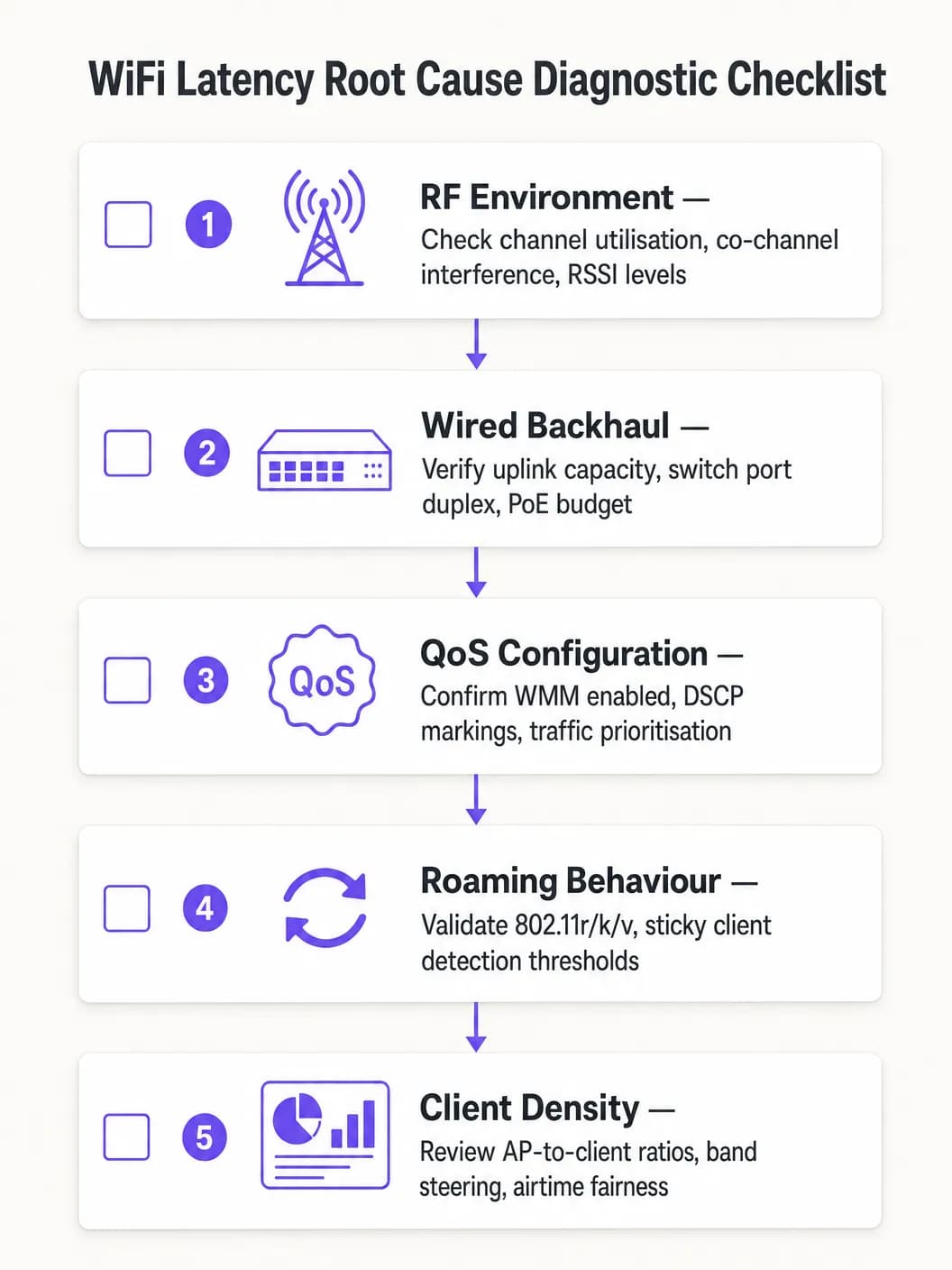
Gehen Sie bei der Diagnose strukturiert vor, um eine Fehlinterpretation der Ursache zu vermeiden:
- Isolieren Sie die Domäne: Pingen Sie das lokale Standard-Gateway von einem betroffenen Client aus an. Wenn die Latenz niedrig ist, arbeitet das drahtlose Netzwerk einwandfrei und das Problem liegt im kabelgebundenen oder WAN-Bereich. Wenn die Latenz hoch ist, fahren Sie mit der Wireless-Diagnose fort.2. Kanalauslastung prüfen: Eine hohe Auslastung (>50 %) weist auf CCI oder Kapazitätsengpässe hin. Eine geringe Auslastung gepaart mit hoher Latenz deutet auf QoS- oder Roaming-Probleme hin.
- Client-Assoziierung prüfen: Identifizieren Sie Clients, die mit niedrigen Datenraten oder schwachem RSSI verbunden sind. Diese verursachen wahrscheinlich Ineffizienzen bei der Sendezeit oder haben eine schlechte Abdeckung.
- End-to-End QoS validieren: Erfassen Sie Pakete an der WAN-Schnittstelle und überprüfen Sie die DSCP-Markierungen im Sprachverkehr.
- Roaming testen: Verwenden Sie ein WiFi-Diagnosetool, um die Roaming-Übergangszeiten zu messen. Alles über 100 ms weist darauf hin, dass 802.11r nicht korrekt funktioniert.
Häufige Fehlermuster:
| Symptom | Mögliche Ursache | Lösung |
|---|---|---|
| Latenzspitzen während der Stoßzeiten | CCI / Hohe Kanalauslastung | AP-Leistung reduzieren, auf 5GHz migrieren |
| Audioaussetzer bei Bewegung | Langsames Roaming / Fehlendes 802.11r | 802.11r aktivieren, RSSI-Schwellenwerte anpassen |
| Konstant hohe Latenz, geringe Auslastung | Fehlende QoS-Vertrauensgrenze | DSCP-Vertrauensstellung auf Switch-Ports konfigurieren |
| Intermittierender Paketverlust | ACI / Kanalüberlappung | Kanalplan korrigieren, Kanalabstand vergrößern |
ROI und geschäftliche Auswirkungen
Der Business Case für die Optimierung der WiFi-Latenz ist eindeutig. In einem Lager- oder Logistikbetrieb kann die Reduzierung der Scanner-Latenz von 150 ms auf unter 20 ms den Durchsatz beim Kommissionieren und Verpacken um 10 - 15 % steigern, was sich direkt auf die Betriebskosten auswirkt. In einer Unternehmensumgebung verringert die Vermeidung von abgebrochenen Teams-Anrufen die Anzahl der IT-Helpdesk-Tickets - deren Behebung in der Regel 25 - 50 £ pro Ticket kostet - und steigert die Produktivität von Führungskräften und Mitarbeitern.
Für Healthcare -Organisationen, die VoWLAN für die klinische Kommunikation einsetzen, ist der Wert der Risikominderung noch höher: Unzuverlässige Kommunikation in einer klinischen Umgebung birgt Risiken für die Patientensicherheit, gegenüber denen die Kosten für die Netzwerkoptimierung vernachlässigbar sind.
Messen Sie den Erfolg anhand dieser KPIs: durchschnittliche Einweg-Latenz für Sprachverkehr, Jitter-Messungen, Roaming-Übergangszeiten, prozentuale Kanalauslastung und die Anzahl der Helpdesk-Tickets im Zusammenhang mit der WiFi-Leistung. Erstellen Sie Baselines vor und nach der Optimierung, um Verbesserungen zu messen und den Business Case für laufende Investitionen aufzubauen.
Schlüsseldefinitionen
Latenz
Die Einweg-Zeitverzögerung, die ein Datenpaket benötigt, um von der Quelle zum Ziel zu gelangen, gemessen in Millisekunden.
Hohe Latenz verursacht Gesprächsverzögerungen bei Sprachanrufen und Videokonferenzen. Der Standard ITU-T G.114 legt eine maximal akzeptable Einweg-Latenz von 150 ms fest, wobei 50 ms das Ziel für Unternehmen sind.
Jitter
Die statistische Abweichung bei den Ankunftszeiten von Paketen, die die Inkonsistenz der Latenz über einen Paketstrom hinweg darstellt.
Hoher Jitter führt zu abgehacktem oder roboterhaftem Ton, da der Jitter-Buffer der empfangenden Anwendung überlastet wird und Pakete verworfen werden. Das Jitter-Ziel liegt bei unter 20 ms für Sprachanwendungen in Unternehmen.
CSMA/CA (Carrier Sense Multiple Access with Collision Avoidance)
Das in 802.11 WiFi-Netzwerken verwendete Medienzugriffsprotokoll, bei dem Geräte vor dem Senden auf Kanalaktivität prüfen und sich zufällig zurückziehen, wenn der Kanal belegt ist.
Die Halbduplex-Natur von CSMA/CA bedeutet, dass auf einem bestimmten Kanal immer nur ein Gerät zurzeit senden kann. In dichten Umgebungen ist dieser Konfliktmechanismus die Hauptursache für variable Latenzen.
Co-Channel Interference (CCI)
Interferenzen, die entstehen, wenn mehrere Access Points oder Clients auf demselben Frequenzkanal in Reichweite voneinander senden.
CCI zwingt APs dazu, Übertragungen zu verzögern, was die Warteschlangenverzögerung erhöht. Es ist die primäre HF-Ursache für hohe Latenzen in dichten Unternehmensnetzwerken und wird durch sorgfältige Kanalplanung und Leistungssteuerung minimiert.
WMM (Wi-Fi Multimedia)
Die 802.11e QoS-Implementierung für drahtlose Netzwerke, die vier Zugriffskategorien (Voice, Video, Best Effort, Background) mit differenzierten Konfliktparametern definiert.
WMM ist der Mechanismus, der Sprach- und Videodatenverkehr auf dem drahtlosen Medium eine statistische Priorität gegenüber Massendaten einräumt. Es muss auf allen SSIDs aktiviert sein, die Echtzeit-Datenverkehr übertragen.
802.11r (Fast BSS Transition)
Ein IEEE-Standard, der es einem Client ermöglicht, Sicherheitsanmeldeinformationen mit einem Ziel-AP vor dem Roaming auszuhandeln, wodurch eine vollständige RADIUS-Reauthentifizierung während der Übergabe entfällt.
Ohne 802.11r kann das Roaming unter WPA2/WPA3-Enterprise 300 - 800 ms dauern, was zu hörbaren Gesprächsunterbrechungen führt. Mit 802.11r ist das Roaming in unter 50 ms abgeschlossen.
Sticky Client
Ein drahtloses Gerät, das mit einem AP mit schlechtem Signal verbunden bleibt, selbst wenn ein näherer AP mit einem stärkeren Signal verfügbar ist.
Sticky Clients weisen aufgrund schlechter Signalqualität eine hohe Latenz auf und verbrauchen überproportional viel Sendezeit bei niedrigen Datenraten. Eine WLC-seitige RSSI-Schwellenwert-Erzwingung ist erforderlich, um diese Clients zum Roaming zu zwingen.
Airtime Fairness
Ein drahtloser Planungsmechanismus, der allen verbundenen Clients die gleiche Sendezeit zuweist, anstatt die gleiche Anzahl von Übertragungsmöglichkeiten.
Ohne Airtime Fairness kann ein einzelner langsamer Client den Kanal monopolisieren, was die Latenz für alle anderen Clients am AP erhöht. Die Aktivierung von Airtime Fairness schützt schnelle Clients vor den Auswirkungen älterer oder entfernter Geräte.
DSCP (Differentiated Services Code Point)
Ein 6-Bit-Feld im IP-Header, das zur Klassifizierung und Priorisierung von Netzwerkverkehr für QoS-Zwecke verwendet wird.
DSCP EF (46) wird für Sprachdatenverkehr verwendet; DSCP AF41 (34) für Videodatenverkehr. Diesen Markierungen muss von kabelgebundenen Switches vertraut werden, um QoS durchgängig vom WiFi-Client bis zum WAN aufrechtzuerhalten.
Ausgearbeitete Beispiele
Ein Konferenzzentrum mit 1.200 Delegierten meldet, dass Mitarbeiter bei der Nutzung mobiler Geräte abgebrochene Zoom-Anrufe erleben, wenn sie sich zwischen den Ausstellungshallen bewegen. Die Signalstärke liegt im gesamten Veranstaltungsort konstant über -65 dBm, und der Wireless-Controller zeigt keine offensichtlichen Fehler an. Das Problem tritt zeitweise auf und korreliert mit den Bewegungen der Mitarbeiter.
Eine Erfassung von drahtlosen Datenpaketen während eines Roaming-Vorgangs ergab, dass Clients 480 bis 650 ms benötigten, um den Roaming-Prozess abzuschließen, da bei jedem AP-Wechsel eine vollständige 802.1X-Re-Authentifizierung mit dem RADIUS-Server durchgeführt wurde. Der RADIUS-Server befand sich außerhalb des Standorts, was jedem Authentifizierungsaustausch etwa 80 ms an Round-Trip-WAN-Latenz hinzufügte. Die Lösung umfasste drei Schritte: Erstens, die Aktivierung von 802.11r (Fast BSS Transition) auf der Mitarbeiter-SSID, um die vollständige RADIUS-Re-Authentifizierung während des Roamings zu eliminieren. Zweitens, die Bereitstellung eines lokalen RADIUS-Proxys oder -Caches, um die Authentifizierungslatenz bei der Erstverbindung zu reduzieren. Drittens, die Aktivierung von 802.11k, um den Clients Nachbarberichte zur Verfügung zu stellen, was die Scan-Phase von über 200 ms auf unter 30 ms verkürzt. Die nach der Implementierung gemessenen Roaming-Zeiten lagen bei 35 bis 45 ms, wodurch alle Anrufabbrüche während der Mitarbeiterbewegungen beseitigt wurden.
Eine nationale Einzelhandelskette mit 85 Filialen meldet, dass Inventarscanner auf der Lagerfläche während der Stoßzeiten starke Latenzen (150 bis 200 ms) aufweisen, trotz einer kürzlichen Aktualisierung der AP-Hardware. Die Signalstärke ist stark, und das WLC-Dashboard zeigt keine Alarme. Das Problem ist zwischen 10:00 Uhr und 14:00 Uhr am schlimmsten.
Die Analyse des WLC-RF-Dashboards ergab eine Kanalauslastung im 2,4-GHz-Band von über 75 % während der Stoßzeiten. In der Filiale waren 18 APs installiert, die alle im 2,4-GHz-Band auf den Kanälen 1, 6 und 11 betrieben wurden - was bedeutete, dass sechs APs pro Kanal um Sendezeit konkurrierten. Zudem handelte es sich bei den Scannern um ältere 802.11n-Geräte, die mit Datenraten von nur 6 Mbps arbeiteten. Der Behebungsplan: Migration der Scanner-SSID ausschließlich auf das 5-GHz-Band unter Nutzung des breiteren Kanalplans, um Co-Kanal-Interferenzen zu reduzieren. Deaktivierung von Datenraten unter 12 Mbps auf der 5-GHz-SSID. Aktivierung von WMM und Konfiguration des Scanner-Verkehrs (UDP, Port 9100) zur Kennzeichnung als DSCP AF41 (Video-Klasse) am WLC. Konfiguration der Switch-Ports, um DSCP zu vertrauen. Die nach der Implementierung gemessene Latenz lag in den Stoßzeiten bei 8 bis 12 ms.
Übungsfragen
Q1. Sie sind der Netzwerkarchitekt für ein Krankenhaus mit 450 Betten, das VoWLAN-Handgeräte für das klinische Personal auf drei Etagen einsetzt. Während des UAT berichten Pflegekräfte, dass Anrufe beim Wechsel zwischen Stationen für etwa eine halbe Sekunde abbrechen. Die Signalstärke im gesamten Gebäude liegt konstant bei -62 bis -68 dBm. Der WLC zeigt keine Fehler an und die Kanalauslastung liegt unter 35%. Was ist die wahrscheinlichste Ursache und was ist Ihre empfohlene Lösung?
Hinweis: Überlegen Sie, was auf der Netzwerkschicht passiert, wenn ein Client unter WPA2-Enterprise-Authentifizierung von einem AP zu einem anderen wechselt. Signalstärke und Kanalauslastung sind beide im grünen Bereich, das Problem ist also nicht HF-bedingt.
Musterlösung anzeigen
Die Ursache ist eine Roaming-Latenz, die durch eine vollständige 802.1X-Re-Authentifizierung bei jedem AP-Wechsel verursacht wird. Bei gutem RSSI und geringer Kanalauslastung ist die HF-Umgebung nicht das Problem. Der halbsekündige Ausfall ist typisch für einen RADIUS-Authentifizierungsaustausch während des Roamings. Die empfohlene Lösung besteht darin, IEEE 802.11r (Fast BSS Transition) auf der VoWLAN-SSID zu aktivieren. Dies verhandelt den PMK-R1-Schlüssel vor dem Wechsel mit dem Ziel-AP, wodurch die Übergangszeit auf unter 50 ms reduziert wird. Aktivieren Sie zusätzlich 802.11k, um Clients mit Nachbarschaftsberichten zu versorgen und die Scan-Zeit zu verkürzen, und überprüfen Sie, ob die Antwortzeit des RADIUS-Servers unter 100 ms liegt. Testen Sie alle Handset-Modelle vor der vollständigen Bereitstellung auf 802.11r-Kompatibilität.
Q2. Ein großes Einzelhandels-Vertriebszentrum hat 40 APs auf einer 20.000 Quadratfuß großen Lagerfläche im Einsatz, die alle im 2.4GHz-Band auf den Kanälen 1, 6 und 11 arbeiten. Barcodescanner, die von den Lagermitarbeitern verwendet werden, weisen während der Hauptschichtzeiten eine Latenz von 120 - 180 ms auf, was zu Timeouts im Bestandsverwaltungssystem führt. Die Signalstärke ist überall stark. Was ist das primäre Architekturproblem und wie sieht die Behebungsstrategie aus?
Hinweis: Berechnen Sie, wie viele APs sich jeden Kanal teilen. Berücksichtigen Sie die grundlegende Einschränkung des 2.4GHz-Bands hinsichtlich der Verfügbarkeit überlappungsfreier Kanäle.
Musterlösung anzeigen
Das primäre Problem ist eine schwere Co-Channel-Interferenz (CCI). Da sich 40 APs nur drei überlappungsfreie Kanäle teilen, konkurrieren etwa 13 - 14 APs auf jedem Kanal um Sendezeit. Unter CSMA/CA führt dies zu extremen Konflikten und Warteschlangenverzögerungen, was die beobachtete Latenz von 120 - 180 ms verursacht. Die Behebungsstrategie lautet: (1) Migrieren Sie die Scanner-SSID ausschließlich auf das 5GHz-Band, das in den meisten Regulierungsbereichen bis zu 25 überlappungsfreie 20MHz-Kanäle bietet und so die AP-Dichte pro Kanal drastisch reduziert. (2) Deaktivieren Sie Datenraten unter 12 Mbps, um den Sendezeitverbrauch pro Frame zu verringern. (3) Aktivieren Sie WMM und kennzeichnen Sie den Scanner-UDP-Verkehr als DSCP AF41, um ihn vor normalem Datenverkehr zu schützen. (4) Konfigurieren Sie die Switch-Ports so, dass sie DSCP-Kennzeichnungen vertrauen. (5) Reduzieren Sie die AP-Sendeleistung, um den CCI-Fußabdruck jedes APs zu minimieren.
Q3. Ihr Netzwerkteam hat WMM auf allen Unternehmens-SSIDs implementiert und DSCP EF-Kennzeichnungen für den Teams-Sprachverkehr am Wireless-Controller konfiguriert. Eine an der WAN-Firewall durchgeführte Paketerfassung zeigt jedoch, dass der Teams-Sprachverkehr mit DSCP 0 (Best Effort) ankommt. Die Helpdesk-Tickets für Probleme mit der Anrufqualität haben sich nicht verringert. Was wurde übersehen und wie lösen Sie das Problem?
Hinweis: QoS ist nur wirksam, wenn es End-to-End aufrechterhalten wird. Überlegen Sie, was mit DSCP-Kennzeichnungen geschieht, wenn Pakete die kabelgebundene Netzwerkinfrastruktur zwischen dem AP und der WAN-Firewall durchqueren.
Musterlösung anzeigen
Die kabelgebundene Netzwerkinfrastruktur ist nicht so konfiguriert, dass sie den vom Wireless-Controller angewendeten DSCP-Kennzeichnungen vertraut. Wenn Pakete den AP verlassen und die Access-Layer-Switches durchqueren, markieren die Switch-Ports den gesamten Datenverkehr wieder auf DSCP 0 (Best Effort) um, da sie nicht für das Vertrauen in eingehende DSCP-Werte konfiguriert sind. Die Lösung besteht darin, alle Switch-Ports, die mit APs und dem WLC verbunden sind, mit DSCP-Vertrauen zu konfigurieren (z. B. 'mls qos trust dscp' in Cisco iOS oder das Äquivalent auf Plattformen anderer Hersteller). Überprüfen Sie außerdem, ob die Switches auf Distribution- und Core-Ebene so konfiguriert sind, dass sie DSCP-Kennzeichnungen in ihren QoS-Richtlinien berücksichtigen. Führen Sie nach der Konfiguration der Vertrauensgrenze eine erneute Erfassung an der WAN-Firewall durch, um zu bestätigen, dass der Teams-Sprachverkehr nun mit DSCP EF (46) ankommt.
Weiterlesen in dieser Reihe
Verständnis von RSSI und Signalstärke für eine optimale Kanalplanung
Dieser Leitfaden bietet einen umfassenden technischen Einblick in RSSI, Signal-Rausch-Verhältnis (SNR) und HF-Ausbreitungsprinzipien für eine optimale Kanalplanung. Er bietet IT-Managern, Netzwerkarchitekten und Leitern des Standortbetriebs umsetzbare Strategien zur Reduzierung von Co-Kanal- und Nachbarkanal-Interferenzen, zur Optimierung der AP-Platzierung und zur Nutzung von Analysen für messbare geschäftliche Auswirkungen in den Bereichen Gastgewerbe, Einzelhandel und im öffentlichen Sektor.
20MHz vs 40MHz vs 80MHz: Welches Channel Width sollten Sie nutzen?
Dieser Leitfaden bietet IT-Managern, Netzwerkarchitekten und Leitern des Standortbetriebs eine definitive, herstellerunabhängige technische Referenz zur Auswahl der richtigen WiFi-Kanalbreite – 20MHz, 40MHz oder 80MHz – bei Enterprise-Implementierungen in den Bereichen Hotellerie, Einzelhandel, Events und im öffentlichen Sektor. Er behandelt die zugrunde liegenden IEEE 802.11-Mechanismen, Kapazitätskompromisse in der Praxis und eine schrittweise Anleitung für das Deployment, um Teams bei der richtigen Entscheidung in diesem Quartal zu unterstützen. Die Wahl der richtigen Kanalbreite ist eine der wirkungsvollsten Entscheidungen bei jedem WLAN-Design, da sie sich direkt auf den Durchsatz, Interferenzen, die Client-Dichte und die Zuverlässigkeit von Services für Gäste auswirkt.
WiFi 6 vs. WiFi 5: Löst es Kanalinterferenzen?
Dieser Leitfaden bietet einen technischen Deep-Dive darüber, wie WiFi 6 (802.11ax) Kanalinterferenzen in High-Density-Unternehmensumgebungen durch OFDMA und BSS Coloring bewältigt. Er stattet IT-Manager, Netzwerkarchitekten und CTOs mit praxisnahen Bereitstellungsstrategien, realen Fallstudien aus dem Gastgewerbe und dem Gesundheitswesen sowie einem Framework zur Bewertung des ROI von Infrastruktur-Upgrades an Standorten aus, an denen die Wireless-Performance geschäftskritisch ist.
Haben Sie Fragen zu Ihrem spezifischen Setup?
Unser Team arbeitet mit Standortbetreibern, IT-Managern und Netzwerktechnikern an über 80.000 Standorten zusammen. Buchen Sie ein 20-minütiges Gespräch und wir zeigen Ihnen, wie andere diese Herausforderungen gelöst haben.