
DNS Filtering नेटवर्क Bandwidth चा वापर कसा कमी करते
हा मार्गदर्शक सविस्तर माहिती देतो की एंटरप्राइझ WiFi नेटवर्कवर DNS filtering लागू केल्याने जाहिराती, ट्रॅकिंग आणि टेलिमेट्री रहदारी Bandwidth वापरण्यापूर्वीच कशी ब्लॉक होते. IT व्यवस्थापक आणि वेन्यू ऑपरेटर्ससाठी, याचा अर्थ ISP खर्चात त्वरित घट, सुधारित नेटवर्क कार्यप्रदर्शन आणि वर्धित सुरक्षा स्थिती असा होतो.
Video overview
हे मार्गदर्शक ऐका
पॉडकास्ट ट्रान्सक्रिप्ट पहा
आमच्या मुख्य मालिकेचा भाग: Enterprise WiFi Security Guide →
कार्यकारी सारांश (Executive Summary)
हाय - डेन्सिटी वातावरणात - जसे की हॉस्पिटॅलिटी, रिटेल, ट्रान्सपोर्ट, आणि मोठ्या प्रमाणावरील ठिकाणे - कार्यरत असणाऱ्या एंटरप्राइझ IT मॅनेजर्स आणि नेटवर्क आर्किटेक्ट्ससाठी बँडविड्थ व्यवस्थापन हे एक सततचे ऑपरेशनल आव्हान आहे. ISP कनेक्शन्स आणि ॲक्सेस पॉइंट डेन्सिटीमध्ये सतत अपग्रेड करूनही, उपलब्ध थ्रूपुटचा मोठा हिस्सा अनेकदा युझरने सुरू न केलेल्या ट्रॅफिकद्वारे वापरला जातो. जाहिरात नेटवर्क, टेलिमेट्री बीकन्स, ट्रॅकिंग पिक्सेल्स आणि बॅकग्राउंड OS अपडेट्स नेटवर्कच्या कार्यक्षमतेवर गुपचूप परिणाम करतात आणि पायाभूत सुविधांचा खर्च कृत्रिमरित्या वाढवतात.
हा तांत्रिक संदर्भ मार्गदर्शक नेटवर्क एजवर DNS फिल्टरिंग लागू केल्याने या अकार्यक्षमतेवर थेट कसा तोडगा निघतो याचे सविस्तर वर्णन करतो. ज्ञात जाहिरात, ट्रॅकिंग आणि मालवेअर डोमेन्ससाठीचे रिझोल्यूशन रिक्वेस्ट्स रोखून आणि ब्लॉक करून, नेटवर्क ऑपरेटर्स अनावश्यक TCP कनेक्शन्स स्थापित होण्यापासून रोखू शकतात. हा दृष्टिकोन हाय - डेन्सिटी वातावरणात नेटवर्क बँडविड्थचा वापर ३५% पर्यंत कमी करतो, ज्यामुळे सुरक्षेचे धोके कमी करण्यासोबतच एंड - युझरचा अनुभव देखील सुधारतो. आम्ही वरिष्ठ IT व्यावसायिकांसाठी उपयुक्त मार्गदर्शन प्रदान करत, DNS फिल्टरिंगचे तांत्रिक आर्किटेक्चर, डिप्लॉयमेंट मॉडेल्स आणि मोजण्यायोग्य ROI चा सखोल अभ्यास करणार आहोत.
तांत्रिक सखोल विश्लेषण (Technical Deep - Dive)
DNS रिझोल्यूशन आणि बँडविड्थ वाया जाण्याचे तंत्र
डोमेन नेम सिस्टम (DNS) हे सर्व इंटरनेट ट्रॅफिकसाठी मूलभूत राउटिंग लेयर म्हणून काम करते. जेव्हा एखादे क्लायंट डिव्हाइस guest WiFi नेटवर्कशी कनेक्ट होते, तेव्हा कोणतेही HTTP/HTTPS कनेक्शन स्थापित करण्यापूर्वी ते सर्वात आधी होस्टनेमला IP ॲड्रेसमध्ये रिझॉल्व्ह करण्यासाठी DNS क्वेरी करते.
आधुनिक वेब आणि मोबाईल ॲप्लिकेशन्समध्ये, एका सिंगल युझर ॲक्शनमुळे (जसे की न्यूज वेबसाइट लोड करणे किंवा सोशल मीडिया ॲप उघडणे) दुय्यम आणि तृतीयक DNS क्वेरींची मालिका सुरू होते. या क्वेरी जाहिरात सर्व्हर, ॲनालिटिक्स प्लॅटफॉर्म आणि टेलिमेट्री एंडपॉइंट्सकडे निर्देशित केल्या जातात.

जेव्हा या क्वेरी यशस्वीरित्या रिझॉल्व्ह होतात, तेव्हा डिव्हाइस कनेक्शन स्थापित करते आणि पेलोड डाउनलोड करते - जे अनेकदा जाहिरातींसाठीच्या हेवी मीडिया फाइल्स किंवा टेलिमेट्रीसाठी सतत येणारे डेटा स्ट्रीम्स असतात. हे ट्रॅफिक मौल्यवान बँडविड्थ, ॲक्सेस पॉइंट्स (APs) वरील रेडिओ एअरटाइम आणि गेटवे राउटरवरील कॉन्करंट कनेक्शन मर्यादा वापरून टाकते.
DNS फिल्टरिंग बँडविड्थ कशी परत मिळवून देते
DNS filtering ही प्रक्रिया रिझोल्यूशन टप्प्यावरच रोखते. जेव्हा एखादे डिव्हाइस डोमेन क्वेरी करते, तेव्हा DNS resolver मॅनटेन केलेल्या ब्लॉकलिस्ट (किंवा थ्रेट इंटेलिजन्स फीड) विरुद्ध होस्टनेम तपासतो. जर ते डोमेन जाहिरात नेटवर्क, ट्रॅकर किंवा ज्ञात दुर्भावनापूर्ण संस्था म्हणून चिन्हांकित केले असेल, तर resolver वास्तविक IP पत्त्याऐवजी एक रिक्त प्रतिसाद (जसे की 0.0.0.0 किंवा NXDOMAIN) परत करतो.
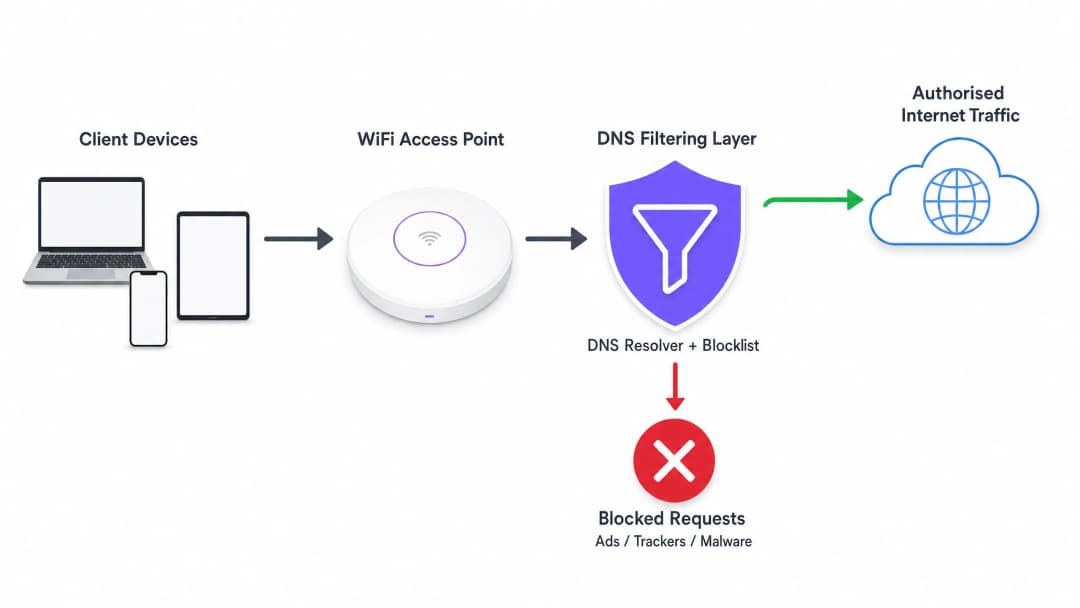
येथे सर्वात महत्त्वाची कार्यक्षमता वाढवणारी गोष्ट म्हणजे TCP हँडशेक होण्यापूर्वीच ट्रान्झॅक्शन समाप्त केले जाते. कोणतेही TLS निगोशिएशन होत नाही आणि कोणताही पेलोड डाउनलोड केला जात नाही. जाहिराती किंवा ट्रॅकिंग स्क्रिप्ट्सद्वारे वापरली जाणारी bandwidth पूर्णपणे वाचवली जाते.
Deployment Architectures
एंटरप्राइझ वातावरणात DNS filtering तैनात करण्यासाठी तीन प्राथमिक आर्किटेक्चरल मॉडेल्स आहेत:
- Cloud-based Resolvers: स्थानिक DHCP सर्व्हर क्लायंट डिव्हाइसेसना क्लाउड-आधारित DNS filtering सेवेचे (जसे की Cisco Umbrella, Cloudflare Gateway) IP पत्ते नियुक्त करण्यासाठी कॉन्फिगर केला जातो. हे सर्वात कमी अडथळ्यांचे डिप्लॉयमेंट आहे, ज्यासाठी ऑन-प्रिमाइसेस हार्डवेअरमध्ये कोणत्याही बदलांची आवश्यकता नसते. तथापि, हे पूर्णपणे क्लाउड प्रदाताच्या लेटन्सीवर अवलंबून असते.
- On-premises Appliances: स्थानिक नेटवर्क इन्फ्रास्ट्रक्चरमध्ये एक समर्पित DNS resolver (फिजिकल किंवा व्हर्च्युअल अप्लायन्स) तैनात केला जातो. हे DNS रिझोल्यूशनसाठी सर्वात कमी लेटन्सी प्रदान करते आणि सर्व DNS क्वेरी लॉग ऑन-साइट राहतील याची खात्री करते, ज्यामुळे डेटा सार्वभौमत्व नियमांचे पालन करणे सोपे होऊ शकते.
- एकीकृत WiFi व्यवस्थापन प्लॅटफॉर्म (Integrated WiFi Management Platforms): मल्टी-व्हेन्यू ऑपरेटर्ससाठी, सर्वात कार्यक्षम मॉडेल म्हणजे थेट नेटवर्क व्यवस्थापन किंवा Captive Portal लेयरवर DNS filtering समाकलित करणे. सर्वसमावेशक WiFi analytics ऑफर करणारे प्लॅटफॉर्म्स सहसा पॉलिसी-आधारित DNS filtering समाविष्ट करतात जे प्रति-SSID, प्रति-व्हेन्यू किंवा प्रति-वापरकर्ता गट लागू केले जाऊ शकतात.
तुमच्या विशिष्ट सेटअपबद्दल काही प्रश्न आहेत का?
आमची टीम ८०,००० हून अधिक वेन्यूजमधील वेन्यू ऑपरेटर्स, IT मॅनेजर्स आणि नेटवर्क इंजिनिअर्ससोबत काम करते. २० मिनिटांचा कॉल बुक करा आणि तुमच्यासारख्या इतरांनी ही समस्या कशी सोडवली हे आम्ही तुम्हाला दाखवू.
अंमलबजावणी मार्गदर्शक (Implementation Guide)
वैध वापरकर्ता ट्रॅफिकमध्ये व्यत्यय आणणे किंवा आवश्यक सेवा खंडित करणे टाळण्यासाठी DNS filtering तैनात करताना पद्धतशीर दृष्टिकोनाची आवश्यकता असते.
पायरी 1: बेसलाइन स्थापित करा (Establish a Baseline)
कोणतेही ब्लॉकिंग नियम लागू करण्यापूर्वी, सर्व क्वेरी लॉग करण्यासाठी तुमचे वर्तमान DNS resolvers कॉन्फिगर करा. सर्व व्हेन्यूवरील ट्रॅफिकचे प्रातिनिधिक नमुने कॅप्चर करण्यासाठी हे ऑडिट मोडमध्ये किमान 14 दिवस चालवा. शीर्ष-क्वेरी केलेल्या डोमेन्सची ओळख पटवण्यासाठी या लॉगचे विश्लेषण करा आणि ज्ञात जाहिरात नेटवर्क्स आणि ट्रॅकर्सच्या दिशेने निर्देशित केलेल्या क्वेरींच्या टक्केवारीची गणना करा. डिप्लॉयमेंट नंतरच्या ROI मोजण्यासाठी ही बेसलाइन आवश्यक आहे.
पायरी 2: नेटवर्क सेगमेंटनुसार फिल्टरिंग पॉलिसी परिभाषित करा
एंटरप्राइझ वातावरणात मोनोलिथिक फिल्टरिंग पॉलिसी क्वचितच प्रभावी ठरतात. तुम्ही नेटवर्कच्या उद्देशावर आधारित तुमच्या पॉलिसींचे वर्गीकरण केले पाहिजे:
- Guest WiFi: बँडविड्थची जास्तीत जास्त बचत करण्यासाठी आणि ठिकाणाच्या प्रतिष्ठेचे रक्षण करण्यासाठी जाहिरात नेटवर्क, ट्रॅकर्स, प्रौढ सामग्री आणि ज्ञात मालवेअर डोमेन्सवर आक्रमक ब्लॉकिंग लागू करा.
- कर्मचारी/कॉर्पोरेट नेटवर्क: मध्यम फिल्टरिंग लागू करा. मालवेअर आणि फिशिंग डोमेन्स ब्लॉक केले पाहिजेत, परंतु अत्यंत आक्रमक जाहिरात ब्लॉकिंगमुळे मार्केटिंग टीम्स किंवा विशिष्ट SaaS ॲप्लिकेशन्सच्या कामात अडथळा येऊ शकतो. सुरक्षा आणि ॲक्सेस यामध्ये संतुलन राखण्याच्या मार्गदर्शनासाठी Secure BYOD Policies for Staff WiFi Networks चे पुनरावलोकन करा.
- IoT/ऑपरेशनल नेटवर्क: कठोर अलाव-लिस्टिंग (बाय डीफॉल्ट डिनाय) लागू करा. IoT डिव्हाइसेस (जसे की स्मार्ट थर्मोस्टॅट्स, पॉइंट-ऑफ-सेल टर्मिनल्स) केवळ त्यांच्या ऑपरेशनसाठी आवश्यक असलेल्या विशिष्ट डोमेन्सचेच रिझोल्यूशन करण्यास सक्षम असावेत.
पायरी ३: ब्लॉकलिस्ट निवडा आणि चाचणी करा
तुमच्या DNS फिल्टरिंगची प्रभावीता पूर्णपणे तुमच्या ब्लॉकलिस्टच्या गुणवत्तेवर अवलंबून असते. एकाच स्त्रोतावर अवलंबून राहणे जोखमीचे आहे. व्यावसायिक थ्रेट इंटेलिजन्स फीड्सना नामांकित कम्युनिटी-मेंटेन केलेल्या लिस्ट्स (जसे की OISD) सोबत एकत्रित करा.
सर्वात महत्त्वाचे म्हणजे, निवडलेल्या ब्लॉकलिस्ट्स प्रथम 'ड्राय-रन' किंवा मॉनिटरिंग मोडमध्ये चालवा. कोणतेही फॉल्स पॉझिटिव्ह्स - म्हणजेच ब्लॉक केले जाऊ शकणारे वैध डोमेन्स - ओळखण्यासाठी लॉग्सचे विश्लेषण करा. उदाहरणार्थ, एखाद्या मोठ्या CDN ला ब्लॉक केल्याने अनपेक्षितपणे महत्त्वपूर्ण व्यावसायिक ॲप्लिकेशन्सचे रेंडरिंग खंडित होऊ शकते.
पायरी ४: DNS over HTTPS (DoH) चे निराकरण करा
आधुनिक ब्राउझर (Chrome, Firefox, Edge) अधिकाधिक प्रमाणात DNS over HTTPS (DoH) चा डीफॉल्ट म्हणून वापर करतात, जे DNS क्वेरींना एन्क्रिप्ट करते आणि त्यांना थेट क्लाउड रिझोल्व्हर्सकडे (जसे की Google किंवा Cloudflare) पाठवण्यासाठी तुमच्या स्थानिक नेटवर्कच्या DHCP-असाइन केलेल्या DNS सर्व्हर्सना बायपास करते. जर DoH सक्रिय असेल, तर तुमचे DNS फिल्टरिंग बायपास होते.
हे कमी करण्यासाठी, तुम्ही पोर्ट ४४३ वरील ज्ञात DoH प्रदात्यांकडील आउटबाउंड ट्रॅफिक ब्लॉक करण्यासाठी तुमचे एज फायरवॉल्स कॉन्फिगर केले पाहिजेत, ज्यामुळे ब्राउझर स्थानिक, अन-एन्क्रिप्टेड DNS रिझोल्व्हर्सचा वापर करण्यास भाग पडतील जिथे तुमची फिल्टरिंग धोरणे लागू केली आहेत.
सर्वोत्तम पद्धती
- ब्लॉकलिस्ट अपडेट्स स्वयंचलित करा: धोक्याचे स्वरूप आणि जाहिरात देणारे डोमेन्स दररोज बदलतात. तुमचे DNS फिल्टरिंग सोल्यूशन तुमच्या निवडलेल्या थ्रेट इंटेलिजन्स फीड्समधून दर २४ तासांनी किमान एकदा तरी स्वयंचलितपणे अपडेट्स घेत असल्याची खात्री करा.
- स्थानिक कॅश लागू करा: लेटन्सी कमी करण्यासाठी, तुमचा स्थानिक DNS रिझोल्व्हर वारंवार विचारल्या जाणाऱ्या क्वेरी कॅश करत असल्याची खात्री करा. तुम्ही क्लाउड-आधारित फिल्टरिंग सेवा वापरत असलात तरीही, स्थानिक कॅशिंग फॉरवर्डर सामान्य विनंत्यांसाठी लागणारा राउंड-ट्रिप वेळ कमी करतो.
- एक ॲक्सेसिबल अलाव-लिस्ट तयार ठेवा: फॉल्स पॉझिटिव्ह्स येतीलच. जेव्हा एखादी वैध सेवा अनपेक्षितपणे ब्लॉक केली जाते, तेव्हा IT सपोर्ट टीमसाठी अलाव-लिस्टमध्ये विशिष्ट डोमेन्स जोडण्यासाठी एक स्पष्ट आणि जलद प्रक्रिया स्थापित करा.
- अनुपालन (Compliance) सुनिश्चित करा: DNS क्वेरी लॉग्समध्ये वापरकर्त्याच्या ब्राउझिंग वर्तनाबद्दल माहिती असते, जी GDPR किंवा CCPA सारख्या नियमांच्या अधीन असू शकते. तुमचे लॉगिंगचे मार्ग तुमच्या संस्थेच्या गोपनीयता धोरणाशी सुसंगत असल्याची खात्री करा. सुरक्षित रेकॉर्ड ठेवण्याबद्दल अधिक जाणून घेण्यासाठी, Explain What is Audit Trail for IT Security in 2026 पहा.
त्रुटी निवारण आणि जोखीम कमी करणे
अयशस्वी होण्याची सामान्य कारणे
१. Captive Portal बिघाड: आक्रमक DNS फिल्टरिंगमुळे काहीवेळा डिव्हाइस OS च्या Captive Portal डिटेक्ट करण्यासाठी आवश्यक असणारे डोमेन्स ब्लॉक होऊ शकतात (उदा. captive.apple.com). हे आवश्यक डोमेन्स स्पष्टपणे अलाउ-लिस्टमध्ये जोडल्याची खात्री करा.
२. अॅप्लिकेशन नीट न चालणे: काही मोबाईल अॅप्लिकेशन्स त्यांचे टेलिमेट्री किंवा जाहिरात देणारे डोमेन्स पोहोचण्याबाहेर असल्यास लोड होण्यात अयशस्वी होतात किंवा क्रॅश होतात. तुमच्या कर्मचाऱ्यांनी किंवा पाहुण्यांनी वापरलेले एखादे महत्त्वाचे अॅप चालत नसल्यास, त्या डिव्हाइसेसवरून ब्लॉक झालेल्या क्वेरीजसाठी DNS लॉग तपासा आणि त्यानुसार अलाउ-लिस्टमध्ये बदल करा.
३. परफॉर्मन्सच्या मर्यादा: जर ऑन-प्रिमाइसेस अप्लायन्स तैनात करत असाल, तर ते तुमच्या नेटवर्कच्या कमाल क्वीरीज-पर-सेकंड (QPS) हाताळण्यासाठी पुरेशा प्रमाणात सक्षम असल्याची खात्री करा. अपुरा स्रोत असलेला DNS रिझॉल्व्हर लक्षणीय विलंब (latency) वाढवेल, ज्यामुळे जाहिरातींपेक्षा युझर अनुभवावर अधिक वाईट परिणाम होईल.
ROI आणि व्यावसायिक प्रभाव
DNS फिल्टरिंग लागू केल्याने तीन प्रमुख क्षेत्रांमध्ये मोजण्यायोग्य फायदे मिळतात:
१. बँडविड्थच्या वापरात घट: १५% ते ३५% अनावश्यक ट्रॅफिक काढून टाकून, संस्था अनेकदा महागड्या ISP सर्किट अपग्रेड्स पुढे ढकलू शकतात. मीटर कनेक्शन किंवा सॅटेलाइट बॅकहॉल असलेल्या वातावरणात, खर्चाची बचत त्वरित आणि लक्षणीय होते. २. सुधारित नेटवर्क परफॉर्मन्स: पार्श्वभूमीतील ट्रॅफिकद्वारे वापरले जाणारे कॉन्करंट कनेक्शन्स आणि रेडिओ एअरटाइमचे प्रमाण कमी केल्याने वैध युझरच्या कामासाठी थ्रूपुट आणि लॅटन्सीमध्ये थेट सुधारणा होते. यामुळे 'स्लो WiFi' शी संबंधित हेल्पडेस्क तिकीट्स कमी होतात आणि युझर समाधानाचा स्कोअर वाढतो. ३. उत्कृष्ट सुरक्षा स्थिती: DNS लेयरवर मालवेअर कमांड-अँड-कंट्रोल (C2) डोमेन्स आणि फिशिंग साइट्स ब्लॉक केल्याने पाहुण्यांच्या किंवा कर्मचाऱ्यांच्या नेटवर्कवरील तडजोड झालेल्या डिव्हाइसेसमधून उद्भवणाऱ्या यशस्वी सायबर हल्ल्यांचा धोका लक्षणीयरीत्या कमी होतो.
जसजसे सार्वजनिक क्षेत्र आणि स्मार्ट सिटी उपक्रम विस्तारत आहेत - जसे की आमच्या अलीकडील घोषणेमध्ये सांगितले आहे, Purple appoints Iain Fox as VP Growth - Public Sector to drive digital inclusion and smart city innovation - डिजिटल समावेशकता आणि स्मार्ट सिटी नवोपक्रम चालवण्यासाठी कार्यक्षम बँडविड्थचा वापर करणे मोठ्या प्रमाणावर न्याय्य, उच्च-परफॉर्मन्स कनेक्टिव्हिटी देण्यासाठी महत्त्वपूर्ण ठरते. याव्यतिरिक्त, Purple launches Offline Maps Mode for seamless, secure navigation in WiFi hotspots सारखी वैशिष्ट्ये हे दर्शवतात की नेटवर्क संसाधने ऑप्टिमाइझ केल्याने एकूण युझरचा प्रवास कसा सुधारू शकतो.
महत्वाच्या व्याख्या
DNS Resolution
मानवाला वाचता येण्याजोग्या डोमेन नावाचे (उदा. example.com) मशीनला वाचता येण्याजोग्या IP पत्त्यामध्ये रूपांतरित करण्याची प्रक्रिया.
जवळपास सर्व नेटवर्क ट्रॅफिकसाठी ही पहिली पायरी आहे; नको असलेली कनेक्शन्स ब्लॉक करण्यासाठी ती येथेच रोखणे हा सर्वात कार्यक्षम मार्ग आहे.
DNS over HTTPS (DoH)
HTTPS प्रोटोकॉलद्वारे रिमोट DNS रिझोल्यूशन करण्याची आणि क्वेरी एनक्रिप्ट करण्याची एक प्रणाली.
DoH स्थानिक नेटवर्क प्रशासकांना DNS विनंत्या पाहण्यापासून किंवा फिल्टर करण्यापासून प्रतिबंधित करते, ज्यामुळे ते कमी करण्यासाठी विशिष्ट फायरवॉल नियमांची आवश्यकता असते.
Telemetry Traffic
ऑपरेटिंग सिस्टम किंवा ॲप्लिकेशन्सद्वारे त्यांच्या विक्रेत्यांना पाठवलेले स्वयंचलित संप्रेषण, जे वापर डेटा, निदान किंवा स्थितीचा अहवाल देते.
वैयक्तिकरित्या लहान असले तरी, सार्वजनिक WiFi नेटवर्कवरील शेकडो उपकरणांमधून येणारे एकूण टेलिमेट्री ट्रॅफिक लक्षणीय Bandwidth वापरते.
NXDOMAIN
विनंती केलेले डोमेन नाव अस्तित्वात नाही हे दर्शवणारा DNS प्रतिसाद.
DNS फिल्टर अनेकदा ब्लॉक केलेल्या डोमेनसाठी NXDOMAIN प्रतिसाद परत करतात, ज्यामुळे क्लायंटचा कनेक्शनचा प्रयत्न त्वरित संपुष्टात येतो.
Threat Intelligence Feed
माहित असलेले मालवेअर डोमेन्स, आयपी आणि यूआरएल बद्दल माहिती देणारा सातत्याने अपडेट होणारा डेटाचा प्रवाह.
नवीन ओळखल्या गेलेल्या मालवेअर आणि फिशिंग इन्फ्रास्ट्रक्चरपासून नेटवर्कचे संरक्षण करण्यासाठी DNS ब्लॉकलिस्ट डायनॅमिकपणे अपडेट करण्यासाठी वापरले जाते.
False Positive
DNS फिल्टरिंगमध्ये, जेव्हा एखादे कायदेशीर, आवश्यक डोमेन चुकीच्या श्रेणीमध्ये समाविष्ट केले जाते आणि ब्लॉक केले जाते.
False positives मुळे ॲप्लिकेशन बंद पडतात आणि युझर्सच्या तक्रारींचे निवारण करण्यासाठी त्वरित ॲलो-लिस्टिंग प्रक्रियेची आवश्यकता असते.
Allow-List (Default Deny)
अशी सुरक्षा रचना जिथे सर्व ट्रॅफिक डीफॉल्टनुसार ब्लॉक केले जाते आणि केवळ स्पष्टपणे मंजूर केलेल्या डोमेन्सनाच रिझॉल्व्ह करण्याची परवानगी दिली जाते.
अत्यंत सुरक्षित किंवा कार्यात्मक नेटवर्क्ससाठी (उदा. IoT किंवा POS सिस्टीम्स) सर्वोत्तम सराव जिथे आवश्यक डोमेन्स आधीपासूनच माहित असतात आणि मर्यादित असतात.
Captive Portal Detection
ज्याद्वारे ऑपरेटिंग सिस्टीम आपण एखाद्या Captive Portal च्या मागे आहोत की नाही हे ठरवते ती यंत्रणा, सहसा एखाद्या विशिष्ट व्हेंडर डोमेनपर्यंत पोहोचण्याचा प्रयत्न करून.
जर DNS फिल्टरिंगने या विशिष्ट डोमेन्सना ब्लॉक केले, तर डिव्हाइसेसवर WiFi लॉगिन पेज दिसणार नाही, ज्यामुळे युझर्स कनेक्ट होऊ शकणार नाहीत.
सोडवलेली उदाहरणे
एका ४०० खोल्यांच्या हॉटेलमध्ये संध्याकाळच्या गर्दीच्या वेळी (संध्याकाळी ७ ते रात्री १०) गंभीर नेटवर्क कोंडी होत आहे. १Gbps चे ISP कनेक्शन पूर्णपणे संपृक्त झाले आहे आणि अतिथी संथ व्हिडिओ स्ट्रीमिंगबद्दल तक्रार करत आहेत. सर्किट २Gbps वर अपग्रेड करण्यासाठी दरमहा अतिरिक्त £१,५०० खर्च येईल. हे सोडवण्यासाठी IT संचालक DNS filtering चा कसा वापर करू शकतात?
१. क्लाउड-आधारित DNS filtering सोल्यूशन तैनात करा आणि गेस्ट VLAN ला नवीन रिझोल्व्हर्स नियुक्त करण्यासाठी कोर राउटरची DHCP व्याप्ती कॉन्फिगर करा. २. जाहिरात नेटवर्क, ट्रॅकिंग पिक्सेल आणि ओळखल्या गेलेल्या Bandwidth-भारी टेलिमेट्री एंडपॉइंट्सना लक्ष्य करणारी सर्वसमावेशक ब्लॉकलिस्ट सक्षम करा. ३. सर्व अतिथी उपकरणे फिल्टर केलेले रिझोल्व्हर्स वापरत असल्याची खात्री करण्यासाठी आउटबाउंड DoH (DNS over HTTPS) ट्रॅफिक ब्लॉक करण्यासाठी एज फायरवॉल कॉन्फिगर करा. ४. पुढील संध्याकाळच्या गर्दीच्या वेळेत Bandwidth च्या वापराचे निरीक्षण करा.
एक मोठी रिटेल साखळी ५० ठिकाणांवर मोफत गेस्ट WiFi ऑफर करते. त्यांच्या लक्षात आले आहे की Android उपकरणांमधून मोठ्या प्रमाणात पार्श्वभूमी ट्रॅफिक येत आहे, प्रामुख्याने Google Play Services टेलिमेट्री, जी त्याच WAN लिंकचा सामायिक वापर करणाऱ्या इन-स्टोअर पॉईंट-ऑफ-सेल (POS) टॅब्लेटच्या कार्यक्षमतेवर परिणाम करत आहे.
१. केंद्रीय WiFi व्यवस्थापन प्लॅटफॉर्मद्वारे पॉलिसी-आधारित DNS filtering लागू करा. २. दोन भिन्न धोरणे तयार करा: एक गेस्ट SSID साठी आणि एक POS SSID साठी. ३. गेस्ट SSID धोरणावर, मानक जाहिरात आणि मालवेअर ब्लॉकिंग लागू करा, तसेच बिगर-आवश्यक OS टेलिमेट्री डोमेन मर्यादित करण्यासाठी किंवा ब्लॉक करण्यासाठी विशिष्ट नियम लागू करा. ४. POS SSID धोरणावर, पेमेंट गेटवे, इन्व्हेंटरी मॅनेजमेंट सिस्टम आणि आवश्यक MDM (मोबाईल डिव्हाइस मॅनेजमेंट) एंडपॉइंट्ससाठी केवळ DNS रिझोल्यूशनला अनुमती देणारी कठोर अनुमती-सूची लागू करा.
सराव प्रश्न
Q1. तुम्ही युनिव्हर्सिटी कॅम्पस नेटवर्कवर DNS फिल्टरिंग तैनात करत आहात. पायलट टप्प्यादरम्यान, विद्यार्थी तक्रार करतात की ते कॅम्पस WiFi च्या लॉगिन पेजवर पोहोचू शकत नाहीत. याचे सर्वात संभाव्य कारण काय आहे आणि तुम्ही याचे निवारण कसे कराल?
टीप: ऑपरेटिंग सिस्टीम्स त्यांना लॉगिन स्क्रीन दाखवण्याची गरज आहे की नाही हे कसे ठरवतात याचा विचार करा.
नमुना उत्तर पहा
DNS फिल्टर बहुधा Apple, Android आणि Windows द्वारे Captive Portal शोधण्यासाठी वापरल्या जाणाऱ्या विशिष्ट डोमेन्सना (उदा. captive.apple.com, connectivitycheck.gstatic.com) ब्लॉक करत आहे. याचे निवारण म्हणजे हे व्हेंडर-विशिष्ट Captive Portal डोमेन्स ताबडतोब जागतिक ॲलो-लिस्टमध्ये जोडणे होय.
Q2. स्टेडियमच्या आयटी संचालकांना सामन्यांच्या दिवसांत बँडविड्थ वाचवण्यासाठी DNS फिल्टरिंग लागू करायचे आहे. तथापि, सर्व DNS क्वेरी क्लाउड प्रोव्हायडरकडे पाठवल्यामुळे होणाऱ्या विलंबाबाबत (लेटन्सी) ते चिंतेत आहेत. तुम्ही कोणत्या आर्किटेक्चरल दृष्टिकोनाची शिफारस कराल?
टीप: DNS रिझोल्युशन प्रक्रिया प्रत्यक्षात कुठे घडते याचा विचार करा.
नमुना उत्तर पहा
On-Premises DNS Appliance किंवा स्थानिक कॅशिंग फॉरवर्डर तैनात करण्याची शिफारस करा. हे सुरुवातीचे DNS रिझोल्युशन स्टेडियमच्या पायाभूत सुविधांवर स्थानिक पातळीवर ठेवते, ज्यामुळे सब-मिलिसेकंद प्रतिसाद वेळ मिळतो, तर स्थानिक ब्लॉकलिस्ट असिंक्रोनस पद्धतीने अपडेट करण्यासाठी क्लाउड-आधारित थ्रेट इंटेलिजन्स फीडचा वापर सुरूच राहतो.
Q3. DNS फिल्टरिंग लागू केल्यानंतर, डॅशबोर्ड DNS क्वेरींमध्ये २५% घट दर्शवतो, परंतु एकूण WAN बँडविड्थचा वापर केवळ ५% ने कमी झाला आहे. या विसंगतीचे सर्वात संभाव्य कारण काय आहे?
टीप: कोणता प्रोटोकॉल स्थानिक DNS रिझॉल्व्हर्सना पूर्णपणे बायपास करतो?
नमुना उत्तर पहा
क्लायंट डिव्हाइसेस (विशेषतः आधुनिक ब्राउझर) स्थानिक DNS रिझॉल्व्हर्सना बायपास करण्यासाठी बहुधा DNS over HTTPS (DoH) चा वापर करत आहेत. काही बॅकग्राउंड OS ट्रॅफिक स्थानिक फिल्टरद्वारे पकडले जात असले तरी (२५% क्वेरी घट), मोठे ब्राउझर ट्रॅफिक एन्क्रिप्टेड आहे आणि फिल्टरला बायपास करत आहे. ब्राउझरना स्थानिक रिझॉल्व्हर वापरण्यास भाग पाडण्यासाठी फायरवॉल आउटबाउंड DoH ट्रॅफिक ब्लॉक करण्यासाठी कॉन्फिगर केली पाहिजे.
या मालिकेमध्ये पुढे वाचा
Cyber Essentials आणि Staff WiFi: तुमच्या वायरलेस नेटवर्कवरील पाच नियंत्रणे यशस्वीपणे पार पाडणे
तुम्ही Cyber Essentials च्या पाच नियंत्रणांपैकी प्रत्येक नियंत्रण तुमच्या staff WiFi शी जुळवू शकाल आणि मूल्यांकनकर्त्यांना आढळणाऱ्या त्रुटी दूर करू शकाल. त्यानंतर तुम्ही प्रत्येक डिव्हाइस क्लाससाठी 802.1X, iPSK आणि वेगळे केलेले WPA2-PSK नेटवर्क यापैकी योग्य पर्याय निवडू शकता. शेवटी, तुम्हाला Cyber Essentials Plus ऑडिटसाठी ॲक्सेस पॉइंट्स, कंट्रोलर्स आणि BYOD कसे तयार करायचे हे समजेल.
HPE Aruba Central प्रेझेन्स ॲनालिटिक्स: सेटअप, एक्स्पोर्ट्स आणि मर्यादा
तुम्ही प्रति साइट Aruba Central presence analytics सक्षम करू शकाल, ग्राउंड-ट्रुथ काउंटच्या तुलनेत RSSI थ्रेशोल्ड आणि ड्वेल बाउंड्रीज कॅलिब्रेट करू शकाल, आणि Central REST API द्वारे साइट-स्तरीय एकत्रित डेटा एक्सपोर्ट करू शकाल. तसेच, मूळ presence analytics कुठे मर्यादित पडते आणि तुमच्या अस्तित्वात असलेल्या Aruba ॲक्सेस पॉइंट्सवर Purple सारखा हार्डवेअर-अग्नॉस्टिक प्लॅटफॉर्म लेयर कधी आवश्यक ठरतो, हे देखील तुम्हाला समजेल.
CIPA compliance: venue operators साठी compliance checklist
तुमचे WiFi CIPA च्या बंधनात येते की नाही हे तुम्ही ठरवू शकाल, त्यानंतर नेटवर्कचे वर्गीकरण करू शकाल, Purple Shield द्वारे DNS रूट करू शकाल आणि बायपास मार्ग बंद करू शकाल. Form 486 किंवा Form 479 प्रमाणपत्रासाठी कोणते पुरावे ठेवावे हे देखील तुम्हाला समजेल. ही checklist प्रत्येक आवश्यकतेला एक मालक नियुक्त करते, जेणेकरून तुमच्या पुढील फंडिंग वर्षाच्या प्रमाणपत्रात काहीही सुटणार नाही.
तुमच्या विशिष्ट सेटअपबद्दल काही प्रश्न आहेत का?
आमची टीम ८०,००० हून अधिक वेन्यूजमधील वेन्यू ऑपरेटर्स, IT मॅनेजर्स आणि नेटवर्क इंजिनिअर्ससोबत काम करते. २० मिनिटांचा कॉल बुक करा आणि तुमच्यासारख्या इतरांनी ही समस्या कशी सोडवली हे आम्ही तुम्हाला दाखवू.