
How DNS Filtering Reduces Network Bandwidth Consumption
This guide details how implementing DNS filtering on enterprise WiFi networks blocks advertising, tracking, and telemetry traffic before it consumes bandwidth. For IT managers and venue operators, this translates to immediate reductions in ISP costs, improved network performance, and enhanced security posture.
Video overview
Listen to this guide
View podcast transcript
Part of our core series: Enterprise WiFi Security Guide →
Executive Summary
Bandwidth management is an ongoing operational challenge for enterprise IT managers and network architects operating high-density environments - such as hospitality, retail, transport, and large-scale venues. Despite continuous upgrades to ISP connections and access point density, a significant portion of available throughput is often consumed by non-user-initiated traffic. Advertising networks, telemetry beacons, tracking pixels, and background OS updates silently degrade network performance and artificially inflate infrastructure costs.
This technical reference guide details how implementing DNS filtering at the network edge directly addresses these inefficiencies. By intercepting and blocking resolution requests for known advertising, tracking, and malicious domains, network operators can prevent unnecessary TCP connections from being established. This approach reduces network bandwidth consumption in high-density environments by up to 35%, which improves the end-user experience alongside mitigating security risks. We will explore the technical architecture, deployment models, and measurable ROI of DNS filtering, providing actionable guidance for senior IT professionals.
Technical Deep-Dive
Mechanics of DNS Resolution and Bandwidth Waste
The Domain Name System (DNS) serves as a fundamental routing layer for all internet traffic. When a client device connects to a guest WiFi network, the first thing it does before establishing any HTTP/HTTPS connection is perform a DNS query to resolve a hostname to an IP address.
In modern web and mobile applications, a single user action (such as loading a news website or opening a social media app) triggers a cascade of secondary and tertiary DNS queries. These queries are directed towards ad servers, analytics platforms, and telemetry endpoints.

When these queries are successfully resolved, the device establishes a connection and downloads the payload - which is often heavy media files for advertisements or continuous data streams for telemetry. This traffic consumes valuable bandwidth, radio airtime on access points (APs), and concurrent connection limits on gateway routers.
How DNS Filtering Reclaims Bandwidth
DNS filtering intercepts this process at the resolution stage. When a device queries a domain, the DNS resolver checks the hostname against a maintained blocklist (or threat intelligence feed). If the domain is flagged as an ad network, tracker, or known malicious entity, the resolver returns a null response (such as 0.0.0.0 or NXDOMAIN) instead of the actual IP address.
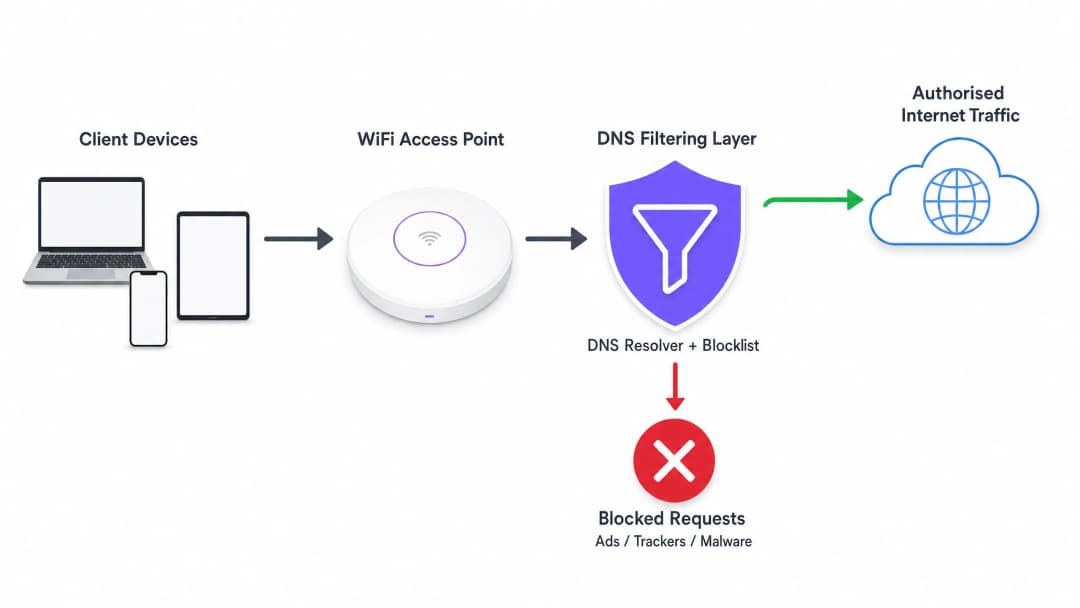
The most critical efficiency gain here is that the transaction is terminated before a TCP handshake even occurs. No TLS negotiation takes place, and no payload is downloaded. The bandwidth that would have been consumed by advertisements or tracking scripts is completely conserved.
Deployment Architectures
There are three primary architectural models for deploying DNS filtering in enterprise environments:
- Cloud-based Resolvers: The local DHCP server is configured to assign the IP addresses of a cloud-based DNS filtering service (such as Cisco Umbrella, Cloudflare Gateway) to client devices. This is the lowest-friction deployment, requiring no on-premises hardware changes. However, it relies entirely on the latency of the cloud provider.
- On-premises Appliances: A dedicated DNS resolver (physical or virtual appliance) is deployed within the local network infrastructure. This provides the lowest latency for DNS resolution and ensures that all DNS query logs remain on-site, which can simplify compliance with data sovereignty regulations.
- Integrated WiFi Management Platforms: For multi-venue operators, the most efficient model is integrating DNS filtering directly at the network management or Captive Portal layer. Platforms that offer comprehensive WiFi analytics often include policy-based DNS filtering that can be applied per-SSID, per-venue, or per-user group.
Got questions about your specific setup?
Our team works with venue operators, IT managers, and network engineers across 80,000 venues. Book a 20-minute call and we will show you how others like you solved it.
Implementation Guide
Deploying DNS filtering requires a structured approach to avoid disrupting legitimate user traffic or breaking essential services.
Step 1: Establish a Baseline
Before applying any blocking rules, configure your current DNS resolvers to log all queries. Run this in an audit mode for at least 14 days to capture a representative sample of traffic across all venues. Analyse these logs to identify the top-queried domains and calculate the percentage of queries directed towards known ad networks and trackers. This baseline is essential for measuring post-deployment ROI.
Step 2: Define Filtering Policies by Network Segment
Monolithic filtering policies are rarely effective in an enterprise environment. You must segment your policies based on the purpose of the network:
- Guest WiFi: Apply aggressive blocking of ad networks, trackers, adult content, and known malware domains to maximise bandwidth savings and protect the venue's reputation.
- Staff/Corporate Networks: Apply moderate filtering. While malware and phishing domains should be blocked, overly aggressive ad blocking can interfere with marketing teams or specific SaaS applications. Review Secure BYOD Policies for Staff WiFi Networks for guidance on balancing security and access.
- IoT/Operational Networks: Apply strict allow-listing (default deny). IoT devices (such as smart thermostats, point-of-sale terminals) should only be able to resolve specific domains necessary for their operation.
Step 3: Select and Test Blocklists
The effectiveness of your DNS filtering is entirely dependent on the quality of your blocklists. Relying on a single source is risky. Combine commercial threat intelligence feeds with reputable community-maintained lists (such as OISD).
Most importantly, run the selected blocklists in a 'dry-run' or monitoring mode first. Analyse the logs to identify any false positives - legitimate domains that might be blocked. For example, blocking a major CDN could inadvertently break the rendering of critical business applications.
Step 4: Address DNS over HTTPS (DoH)
Modern browsers (Chrome, Firefox, Edge) increasingly default to DNS over HTTPS (DoH), which encrypts DNS queries and bypasses your local network's DHCP-assigned DNS servers to send them directly to cloud resolvers (such as Google or Cloudflare). If DoH is active, your DNS filtering is bypassed.
To mitigate this, you must configure your edge firewalls to block outbound traffic to known DoH providers on port 443, forcing browsers to fall back to local, unencrypted DNS resolvers where your filtering policies are applied.
Best Practices
- Automate Blocklist Updates: The threat landscape and ad-serving domains change daily. Ensure your DNS filtering solution automatically pulls updates from your chosen threat intelligence feeds at least every 24 hours.
- Implement a Local Cache: To minimise latency, ensure your local DNS resolver caches frequent queries. Even if you use a cloud-based filtering service, a local caching forwarder reduces round-trip times for common requests.
- Maintain an Accessible Allow-list: False positives will happen. When a legitimate service is inadvertently blocked, establish a clear, rapid process for the IT support team to add specific domains to an allow-list.
- Ensure Compliance: DNS query logs contain information about user browsing behaviour, which may be subject to regulations like GDPR or CCPA. Ensure your logging practices align with your organisation's privacy policy. To learn more about maintaining secure records, see Explain What is Audit Trail for IT Security in 2026.
Troubleshooting and Risk Mitigation
Common Failure Modes
- Captive Portal Breakage: Aggressive DNS filtering can sometimes block domains required for device OS Captive Portal detection (such as
captive.apple.com). Ensure these essential domains are explicitly allow-listed. - Application Malfunction: Some mobile applications will fail to load or crash if their telemetry or ad-serving domains are unreachable. If a critical app used by your staff or guests fails, review the DNS logs for blocked queries originating from those devices and adjust the allow-list accordingly.
- Performance Bottlenecks: If deploying an on-premises appliance, ensure it is adequately provisioned to handle your network's peak queries-per-second (QPS). An under-resourced DNS resolver will introduce significant latency, degrading the user experience far more than advertisements would.
ROI and Business Impact
Implementing DNS filtering delivers measurable returns across three key areas:
- Reduced Bandwidth Consumption: By eliminating 15% to 35% of non-essential traffic, organisations can often defer costly ISP circuit upgrades. In environments with metered connections or satellite backhaul, the cost savings are immediate and significant.
- Improved Network Performance: Reducing the volume of concurrent connections and radio airtime consumed by background traffic directly improves throughput and latency for legitimate user activity. This translates to fewer helpdesk tickets related to 'slow WiFi' and higher user satisfaction scores.
- Enhanced Security Posture: Blocking malware command-and-control (C2) domains and phishing sites at the DNS layer significantly reduces the risk of successful breaches originating from compromised devices on the guest or staff networks.
As public sector and smart city initiatives expand - as championed in our recent announcement, Purple appoints Iain Fox as VP Growth - Public Sector to drive digital inclusion and smart city innovation - efficient bandwidth utilisation becomes critical for delivering equitable, high-performance connectivity at scale. Additionally, features like Purple launches Offline Maps Mode for seamless, secure navigation in WiFi hotspots demonstrate how optimising network resources can enhance the overall user journey.
Key Definitions
DNS Resolution
The process of translating a human-readable domain name (e.g., example.com) into a machine-readable IP address.
This is the prerequisite step for almost all network traffic; intercepting it here is the most efficient way to block unwanted connections.
DNS over HTTPS (DoH)
A protocol for performing remote DNS resolution via the HTTPS protocol, encrypting the query.
DoH prevents local network administrators from seeing or filtering DNS requests, requiring specific firewall rules to mitigate.
Telemetry Traffic
Automated communications sent by operating systems or applications to their vendors, reporting usage data, diagnostics, or status.
While individually small, the aggregate telemetry traffic from hundreds of devices on a public WiFi network consumes significant bandwidth.
NXDOMAIN
A DNS response indicating that the requested domain name does not exist.
DNS filters often return an NXDOMAIN response for blocked domains, immediately terminating the client's connection attempt.
Threat Intelligence Feed
A continuously updated stream of data providing information on known malicious domains, IPs, and URLs.
Used to dynamically update DNS blocklists to protect networks from newly identified malware and phishing infrastructure.
False Positive
In DNS filtering, when a legitimate, necessary domain is incorrectly categorised and blocked.
False positives cause application breakage and require a rapid allow-listing process to resolve user complaints.
Allow-List (Default Deny)
A security posture where all traffic is blocked by default, and only explicitly approved domains are permitted to resolve.
Best practice for highly secure or operational networks (like IoT or POS systems) where the required domains are known and finite.
Captive Portal Detection
The mechanism by which an OS determines if it is behind a Captive Portal, usually by attempting to reach a specific vendor domain.
If DNS filtering blocks these specific domains, devices will fail to display the WiFi login page, preventing users from connecting.
Worked Examples
A 400-room hotel is experiencing severe network congestion during the evening peak (7 PM - 10 PM). The 1Gbps ISP connection is saturated, and guests are complaining about slow video streaming. Upgrading the circuit to 2Gbps will cost an additional £1,500 per month. How can the IT Director use DNS filtering to address this?
- Deploy a cloud-based DNS filtering solution and configure the core router's DHCP scope to assign the new resolvers to the Guest VLAN.
- Enable a comprehensive blocklist targeting ad networks, tracking pixels, and known bandwidth-heavy telemetry endpoints.
- Configure the edge firewall to block outbound DoH (DNS over HTTPS) traffic to ensure all guest devices use the filtered resolvers.
- Monitor the bandwidth utilisation during the next evening peak.
A large retail chain offers free Guest WiFi across 50 locations. They have noticed a high volume of background traffic originating from Android devices, primarily Google Play Services telemetry, which is degrading the performance of the in-store point-of-sale (POS) tablets sharing the same WAN link.
- Implement policy-based DNS filtering via the central WiFi management platform.
- Create two distinct policies: one for the Guest SSID and one for the POS SSID.
- On the Guest SSID policy, apply standard ad and malware blocking, plus specific rules to rate-limit or block non-essential OS telemetry domains.
- On the POS SSID policy, implement a strict allow-list, only permitting DNS resolution for the payment gateway, inventory management system, and essential MDM (Mobile Device Management) endpoints.
Practice Questions
Q1. You are deploying DNS filtering across a university campus network. During the pilot phase, students report that they cannot access the login page for the campus WiFi. What is the most likely cause, and how do you resolve it?
Hint: Think about how operating systems determine if they need to display a login screen.
View model answer
The DNS filter is likely blocking the specific domains used by Apple, Android, and Windows for Captive Portal detection (e.g., captive.apple.com, connectivitycheck.gstatic.com). The resolution is to immediately add these vendor-specific Captive Portal domains to the global allow-list.
Q2. A stadium IT director wants to implement DNS filtering to save bandwidth during game days. However, they are concerned about the latency introduced by routing all DNS queries to a cloud provider. What architectural approach should you recommend?
Hint: Consider where the DNS resolution process physically takes place.
View model answer
Recommend deploying an On-Premises DNS Appliance or a local caching forwarder. This keeps the initial DNS resolution local to the stadium infrastructure, providing sub-millisecond response times, while still utilising cloud-based threat intelligence feeds to update the local blocklists asynchronously.
Q3. After implementing DNS filtering, the dashboard shows a 25% reduction in DNS queries, but the overall WAN bandwidth utilisation has only dropped by 5%. What is the most likely reason for this discrepancy?
Hint: What protocol bypasses local DNS resolvers entirely?
View model answer
Client devices (specifically modern browsers) are likely using DNS over HTTPS (DoH) to bypass the local DNS resolvers. While some background OS traffic is being caught by the local filter (the 25% query reduction), the heavy browser traffic is encrypted and bypassing the filter. The firewall must be configured to block outbound DoH traffic to force browsers to fall back to the local resolver.
Continue reading in this series
Cyber Essentials and Staff WiFi: Passing the Five Controls on Your Wireless Network
You will be able to map each of the five Cyber Essentials controls to your staff WiFi and close the gaps assessors find. You can then choose between 802.1X, iPSK and a segregated WPA2-PSK network for each device class. Finally, you will know how to prepare access points, controllers and BYOD for a Cyber Essentials Plus audit.
HPE Aruba Central presence analytics: setup, exports and limits
You will be able to enable Aruba Central presence analytics per site, calibrate the RSSI threshold and dwell boundaries against a ground-truth count, and export site-level aggregates through the Central REST API. You will also know where native presence analytics stops and when a hardware-agnostic platform layer such as Purple earns its place on your existing Aruba access points.
CIPA compliance: compliance checklist for venue operators
You will be able to decide whether CIPA binds your WiFi, then segment networks, route DNS through Purple Shield and close bypass routes. You will also know what evidence to keep for Form 486 or Form 479 certification. The checklist assigns every requirement an owner, so your next funding year certification has nothing missing.
Got questions about your specific setup?
Our team works with venue operators, IT managers, and network engineers across 80,000 venues. Book a 20-minute call and we will show you how others like you solved it.