मुख्य मजकुराकडे जा

Designing Secure Staff WiFi Networks Separated from Guest Traffic

नेटवर्क आर्किटेक्ट्स आणि IT लीडर्ससाठी सुरक्षित, उच्च-कार्यक्षमता असलेले स्टाफ WiFi नेटवर्क डिझाइन करण्यावरील एक अधिकृत तांत्रिक संदर्भ मार्गदर्शिका. यामध्ये अनुपालन आवश्यकता (PCI DSS, GDPR) पूर्ण करण्यासाठी आणि लॅटरल मूव्हमेंटच्या सुरक्षा जोखमी दूर करण्यासाठी VLANs, 802.1X ऑथेंटिकेशन आणि WPA3-Enterprise चा वापर करून सार्वजनिक गेस्ट नेटवर्कपासून ऑपरेशनल ट्रॅफिकचे लॉजिकल आणि फिजिकल सेगमेंटेशन तपशीलवार स्पष्ट केले आहे.

📖 9 मिनिट वाचन📝 2,107 शब्द🔧 3 सोडवलेली उदाहरणे3 सराव प्रश्न📚 8 महत्वाच्या व्याख्या

हे मार्गदर्शक ऐका

पॉडकास्ट ट्रान्सक्रिप्ट पहा
Designing Secure Staff WiFi Networks Separated from Guest Traffic A Purple Enterprise WiFi Intelligence Briefing [INTRODUCTION — approximately 1 minute] Welcome to the Purple Enterprise WiFi Intelligence series. I'm your host, and today we're tackling one of the most consequential decisions an IT team makes when deploying wireless infrastructure in a venue: how to design a staff WiFi network that is genuinely, architecturally separated from the guest network — not just logically distinct on paper, but properly segmented, authenticated, and enforced. Now, I know this sounds like it should be straightforward. Two SSIDs, two passwords, job done. But if you're the IT manager at a hotel group, a retail estate, a stadium, or a public-sector venue, you'll know that the reality is considerably more complex — and the stakes are considerably higher. A poorly designed staff network is not just an inconvenience. It is a compliance liability, a security vulnerability, and a direct risk to the operational systems your business depends on every single day. In this briefing, we'll cover the architecture, the authentication standards, the compliance requirements, the implementation sequence, and the real-world outcomes you should expect when you get this right. Let's get into it. [TECHNICAL DEEP-DIVE — approximately 5 minutes] Let's start with the foundational question: what actually separates a staff WiFi network from a guest WiFi network? The answer is three things: trust level, access scope, and accountability. Your staff network needs to carry traffic to internal systems — your property management system, your ERP, your point-of-sale infrastructure, your back-office file shares, your HR systems. Your guest WiFi carries internet traffic only. The moment you conflate those two, you've created a lateral movement risk that any competent threat actor will exploit. So the first architectural principle is network segmentation using VLANs — Virtual Local Area Networks. In a properly designed deployment, your staff SSID maps to a dedicated VLAN — let's call it VLAN 10 — with access to internal resources behind a defined firewall policy. Your guest SSID maps to VLAN 20, which routes directly to the internet with no access to internal systems whatsoever. Your IoT devices — door locks, HVAC sensors, CCTV, building management systems — sit on VLAN 30, isolated from both. This is not optional architecture. It is the baseline. Under PCI DSS requirements — specifically Requirement 1.3 — if your staff network carries any traffic that touches cardholder data, and in hospitality and retail it almost certainly does, you are required to segment that traffic from untrusted networks. Failure to do so is a direct audit finding. Under GDPR, if your guest network is collecting personal data through a captive portal, that data must be handled in a system that is architecturally isolated from your operational infrastructure. These are not aspirational standards. They are legal obligations. Now let's talk about authentication, because this is where most organisations make their most costly mistake. Using a shared pre-shared key — a single WiFi password for all staff — is operationally convenient and architecturally catastrophic. When a member of staff leaves, you either change the password for everyone, or you accept that a former employee still has network access. Neither option is acceptable at scale. I've seen organisations with hundreds of staff members who haven't changed their WiFi password in three years, because the operational disruption of doing so is too significant. That is a security incident waiting to happen. The correct approach is IEEE 802.1X authentication, implemented via a RADIUS server. Here's how it works in practice. When a staff device attempts to connect to the staff SSID, the access point acts as an authenticator — it doesn't grant access directly. Instead, it forwards the authentication request to a RADIUS server, which validates the credentials against your directory service — typically Active Directory or LDAP. Only once the RADIUS server returns an Access-Accept message does the access point allow the device onto the network. The critical advantage here is per-user accountability. Every authentication event is logged with a username, a timestamp, a device MAC address, and a session duration. This is your audit trail. This is what you present to your compliance auditor. This is what your incident response team uses when they need to trace a security event back to a specific device. On top of 802.1X, you need to choose your encryption protocol. The current enterprise standard is WPA2-Enterprise, which uses AES-CCMP 128-bit encryption. It is robust, widely supported, and appropriate for most deployments today. However, if you are deploying new infrastructure in 2025 or beyond, you should be specifying WPA3-Enterprise. WPA3 introduces Simultaneous Authentication of Equals — SAE — which eliminates the vulnerability to offline dictionary attacks that affects WPA2. It also mandates 192-bit encryption in its highest-security mode, aligned with the CNSA suite used by government and defence organisations. For organisations handling sensitive data — healthcare records, financial transactions, personal data under GDPR — WPA3-Enterprise is no longer aspirational. It is the responsible baseline. Now, one architectural consideration that is frequently overlooked: certificate-based authentication versus credential-based authentication. In a credential-based deployment, staff authenticate with a username and password. This is simpler to deploy but introduces the risk of credential theft — phishing, shoulder surfing, password reuse. In a certificate-based deployment using EAP-TLS, each device is provisioned with a unique digital certificate, and authentication is based on that certificate rather than a password. There is nothing to phish. There is nothing to share. The certificate is bound to the device. For organisations with a managed device fleet — where you control the endpoint through an MDM platform — certificate-based authentication is the gold standard. Let me also address bandwidth management, because this is where staff WiFi deployments frequently underperform in practice. The typical failure mode is this: a hotel or retail estate deploys a shared wireless infrastructure, and during peak operational periods — check-in rush, a large conference, a busy trading day — the staff network becomes congested because bandwidth is not allocated or prioritised. Front-desk staff cannot process check-ins. Restaurant staff cannot pull up reservations. The operational impact is immediate and measurable. The solution is Quality of Service configuration — QoS — combined with bandwidth reservation policies. Your network management platform should allow you to define minimum guaranteed bandwidth allocations per SSID or per VLAN, and to prioritise traffic classes. Voice and video traffic — used by staff on softphone applications or video conferencing — should be classified as high priority. Bulk data transfers — software updates, backup jobs — should be rate-limited and scheduled for off-peak hours. [IMPLEMENTATION RECOMMENDATIONS AND PITFALLS — approximately 2 minutes] Let me give you the implementation sequence we recommend to clients, and the pitfalls to avoid at each stage. Stage one: design your VLAN architecture before you touch a single access point. Map out which systems each VLAN needs to reach, define your firewall policies, and get sign-off from your security team. The most expensive mistakes in WiFi deployments happen when the network is built first and the security architecture is bolted on afterwards. Stage two: deploy your RADIUS infrastructure. If you are running Microsoft Active Directory, Network Policy Server — NPS — is your RADIUS implementation. For cloud-first organisations, consider cloud RADIUS services that integrate directly with Azure Active Directory or Okta. Critically, ensure your RADIUS infrastructure is redundant. A single RADIUS server failure will lock every staff member off the network simultaneously. That is a business-stopping event. Stage three: configure your SSIDs and map them to VLANs on your wireless controller. Enable 802.1X on your staff SSID. Test authentication with a small pilot group before rolling out to the full estate. Stage four: implement your QoS policies and bandwidth allocation rules. Baseline your network utilisation during a normal operational day, then configure your policies against that baseline. Stage five: deploy your monitoring and alerting. You need visibility into authentication failures, rogue access points, unusual traffic patterns, and bandwidth saturation events. Your network management platform should be generating alerts before your staff notice a problem, not after. Now the pitfalls. First: do not underestimate the complexity of certificate deployment at scale. Provisioning certificates to hundreds of devices requires an MDM platform and a well-tested enrolment workflow. Build this into your project timeline — it typically adds four to six weeks to a large deployment. Second: do not neglect the roaming configuration. In large venues — hotels, stadiums, conference centres — staff devices will roam between access points continuously. Ensure your wireless controller is configured for fast BSS transition — that's 802.11r — to minimise authentication latency during roaming. A two-second re-authentication delay every time a staff member walks between floors is unacceptable in an operational environment. Third: do not treat your staff network as a static deployment. Staff roles change, operational patterns change, threat landscapes change. Build a quarterly review cycle into your network management process. [RAPID-FIRE Q&A — approximately 1 minute] Let me run through the questions we hear most frequently from clients. "Can we use a single SSID for staff and management?" Technically yes, but separate them with role-based access control at the RADIUS level. Management devices should have access to a different set of resources than front-line staff devices. "Do we need WPA3 if we already have WPA2-Enterprise?" If your hardware supports it, yes. The migration cost is minimal compared to the security uplift, and you will need it for future compliance requirements. "How do we handle BYOD — bring your own device?" Treat BYOD staff devices as semi-trusted. Use a separate VLAN with more restrictive firewall policies, and require certificate or credential-based 802.1X authentication. Do not put BYOD devices on the same VLAN as managed corporate devices. "What about guest WiFi analytics — does separating the networks affect that?" Not at all. Your guest network can still run a full captive portal with first-party data capture and analytics through a platform like Purple. The segmentation is transparent to the guest experience. In fact, proper segmentation is what makes your guest WiFi analytics data trustworthy — it's isolated from operational noise. [SUMMARY AND NEXT STEPS — approximately 1 minute] Let me bring this together. A well-designed staff WiFi network, properly separated from guest traffic, is not a cost centre. It is operational infrastructure that directly enables your staff to deliver service, process transactions, and communicate effectively — while protecting your business from the compliance and security risks that come with a flat, unsegmented network. The three things to take away from this briefing: One — segment your network from day one using VLANs. Staff, guest, and IoT on separate logical networks, with a firewall enforcing the boundaries between them. Two — replace shared pre-shared keys with IEEE 802.1X authentication. Per-user accountability is not optional at enterprise scale. Three — specify WPA3-Enterprise for any new infrastructure deployment. The security uplift is significant and the cost delta is minimal. Your immediate next steps: audit your current staff WiFi architecture against these standards. If you are running a shared pre-shared key, that is your highest priority remediation. If you are on WPA2-Enterprise and your hardware supports WPA3, plan your migration. And if you do not have centralised visibility into your wireless estate, that is the capability gap that will cost you the most when something goes wrong. For more detailed implementation guidance, architecture templates, and case studies from Purple's enterprise deployments, visit purple.ai. Thank you for listening.

header_image.png

कार्यकारी सारांश

हॉस्पिटॅलिटी, रिटेल, हेल्थकेअर आणि सार्वजनिक क्षेत्रांमधील एंटरप्राइझ व्हेन्यू ऑपरेटर्स, IT मॅनेजर्स आणि नेटवर्क आर्किटेक्ट्ससाठी, वायरलेस कनेक्टिव्हिटी ही एक मिशन-क्रिटिकल उपयुक्तता आहे. तथापि, एक सामान्य आणि धोकादायक आर्किटेक्चरल त्रुटी म्हणजे सार्वजनिक Guest WiFi आणि खाजगी स्टाफ नेटवर्कचे एकत्रीकरण करणे. एक सपाट, अन-सेगमेंटेड नेटवर्क आर्किटेक्चर लॅटरल मूव्हमेंटला अनुमती देते, ज्यामुळे प्रॉपर्टी मॅनेजमेंट सिस्टम्स (PMS), पॉइंट ऑफ सेल (POS) टर्मिनल्स आणि इलेक्ट्रॉनिक हेल्थ रेकॉर्ड्स (EHR) यांसारख्या गंभीर बॅक-ऑफिस सिस्टम्स असुरक्षित गेस्ट डिव्हाइसेसच्या संपर्कात येतात.

ही तांत्रिक संदर्भ मार्गदर्शिका सार्वजनिक गेस्ट ट्रॅफिकपासून काटेकोरपणे सेगमेंट केलेल्या सुरक्षित स्टाफ WiFi नेटवर्कची रचना आणि उपयोजन करण्यासाठी विक्रेता-तटस्थ, एंटरप्राइझ-ग्रेड फ्रेमवर्कची रूपरेषा सांगते. व्हर्च्युअल लोकल एरिया नेटवर्क (VLANs), IEEE 802.1X ऑथेंटिकेशन आणि WPA3-Enterprise लागू करून, संस्था लॅटरल मूव्हमेंटचे धोके दूर करू शकतात, नियामक अनुपालन (PCI DSS, GDPR) सुनिश्चित करू शकतात आणि ऑपरेशनल थ्रूपुटची हमी देऊ शकतात. ही मार्गदर्शिका IT टीम्सना या तिमाहीत त्यांचे वायरलेस इस्टेट सुरक्षित करण्यात मदत करण्यासाठी कृतीयोग्य डिप्लॉयमेंट सीक्वेन्स, ट्रबलशूटिंग स्टेप्स आणि वास्तविक जगातील केस स्टडीज प्रदान करते.

सुरक्षित स्टाफ नेटवर्क डिझाइन करण्यावरील आमचे सोबती तांत्रिक ब्रीफिंग ऐका:


तांत्रिक सखोल विश्लेषण

लॉजिकल आणि फिजिकल नेटवर्क सेगमेंटेशन

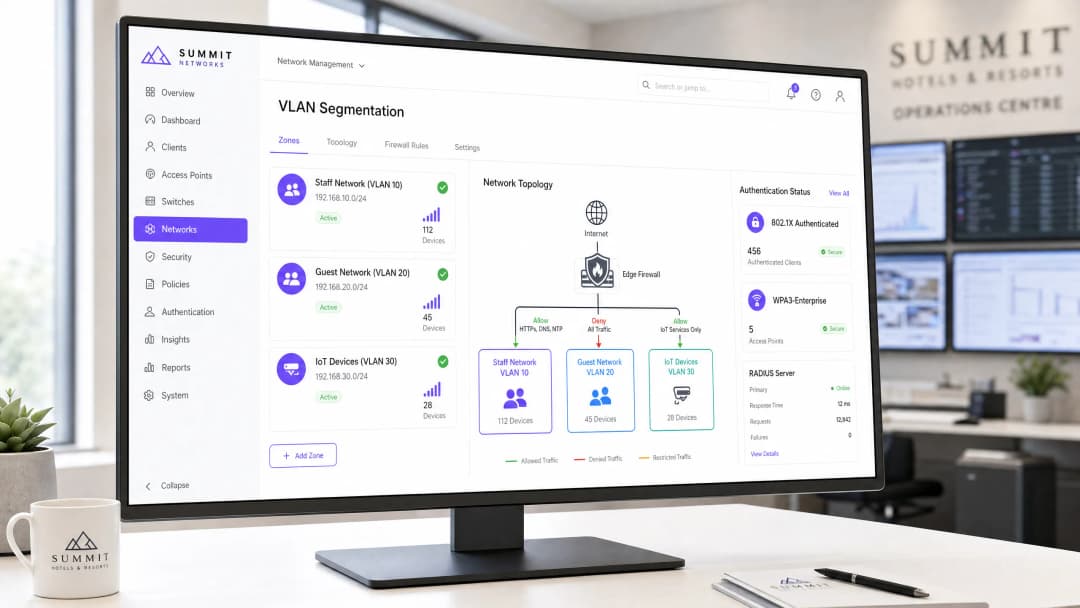
स्टाफ आणि गेस्ट ट्रॅफिक वेगळे करण्यासाठी मूलभूत सुरक्षा नियंत्रण म्हणजे नेटवर्क सेगमेंटेशन. एंटरप्राइझ वायरलेस वातावरणात, ॲक्सेस पॉइंट (AP) लेयरवर स्वतंत्र Service Set Identifiers (SSIDs) चे आयसोलेटेड व्हर्च्युअल लोकल एरिया नेटवर्क (VLANs) मध्ये मॅपिंग करून लॉजिकल सेगमेंटेशन साध्य केले जाते [1]. हे सुनिश्चित करते की गेस्ट डिव्हाइसेस आणि स्टाफ हार्डवेअर पूर्णपणे स्वतंत्र ब्रॉडकास्ट डोमेनमध्ये राहतील, ज्यामुळे त्यांच्या दरम्यान थेट पॅकेट ट्रान्समिशन रोखले जाते.

+---------------------------------------------------------------------------------+
|                                    Internet                                     |
+---------------------------------------------------------------------------------+
                                         |
                                         v
+---------------------------------------------------------------------------------+
|                        Edge Firewall / Next-Gen Firewall                        |
+---------------------------------------------------------------------------------+
          |                              |                              |
          | (VLAN 10: Allow PMS/ERP)     | (VLAN 20: Deny Internal)     | (VLAN 30: Restricted)
          v                              v                              v
+--------------------+         +--------------------+         +--------------------+
|   Staff Network    |         |   Guest Network    |         | IoT/Building Sys.  |
|      VLAN 10       |         |      VLAN 20       |         |      VLAN 30       |
+--------------------+         +--------------------+         +--------------------+
          |                              |                              |
          +------------------------------+------------------------------+
                                         |
                                         v
+---------------------------------------------------------------------------------+
|                  Wireless Controller / Cloud Management Platform                 |
+---------------------------------------------------------------------------------+

architecture_overview.png

पूर्ण आयसोलेशन लागू करण्यासाठी, या VLANs च्या सीमेवर लेयर ३ स्टेटफुल फायरवॉल किंवा नेक्स्ट-जनरेशन फायरवॉल (NGFW) असणे आवश्यक आहे [2]. फायरवॉल Zero-Trust पोश्चर लागू करते, गेस्ट VLAN ला एक प्रतिकूल, असुरक्षित झोन म्हणून मानते. खालील तक्ता अनिवार्य फायरवॉल ॲक्सेस कंट्रोल लिस्ट (ACL) पॉलिसींची रूपरेषा दर्शवतो:

सोर्स VLAN डेस्टिनेशन VLAN प्रोटोकॉल / पोर्ट्स कृती आर्किटेक्चरल समर्थन
VLAN 10 (Staff) VLAN 20 (Guest) कोणतेही DENY स्टाफ डिव्हाइसेसना अनमॅनेज्ड, संभाव्य तडजोड केलेल्या गेस्ट हार्डवेअरशी संवाद साधण्यापासून रोखते.
VLAN 20 (Guest) VLAN 10 (Staff) कोणतेही DENY गेस्ट डिव्हाइसेसना स्टाफ सिस्टम्स स्कॅन करण्यापासून किंवा त्यांच्याशी कनेक्शन सुरू करण्यापासून रोखते.
VLAN 20 (Guest) WAN (इंटरनेट) HTTP/S, DNS, NTP ALLOW गेस्ट ट्रॅफिकला केवळ आउटबाउंड इंटरनेट ॲक्सेसपुरते मर्यादित करते.
VLAN 30 (IoT) VLAN 10 & 20 कोणतेही DENY असुरक्षित IoT हार्डवेअर (उदा. स्मार्ट थर्मोस्टॅट्स, CCTV) पिव्होट पॉइंट्स म्हणून वापरले जाण्यापासून रोखते [3].
VLAN 10 (Staff) अंतर्गत सर्व्हर्स HTTPS, SSH, SQL ALLOW स्टाफचा ॲक्सेस केवळ अधिकृत ऑपरेशनल ॲप्लिकेशन्सपुरता (उदा. PMS, ERP) मर्यादित करतो.

एंटरप्राइझ ऑथेंटिकेशन आणि एन्क्रिप्शन मानके

जर त्या VLANs चे एंट्री पॉइंट्स कमकुवतपणे सुरक्षित असतील, तर स्वतंत्र VLANs डिप्लॉय करणे कुचकामी ठरते. अनेक संस्था त्यांच्या स्टाफ WiFi ला प्री-शेअर्ड की (WPA2-PSK) द्वारे सुरक्षित करण्याची गंभीर चूक करतात. PSK-आधारित नेटवर्क सर्व डिव्हाइसेससाठी एकच, शेअर्ड पासवर्ड वापरतात. यामुळे गंभीर ऑपरेशनल आणि सुरक्षा दायित्वे निर्माण होतात: जर एखादा कर्मचारी सोडून गेला, तर संपूर्ण इस्टेटमधील प्रत्येक डिव्हाइसवर पासवर्ड बदलणे आवश्यक आहे, अन्यथा माजी कर्मचाऱ्याकडे नेटवर्क ॲक्सेस कायम राहतो.

स्टाफ वायरलेस सुरक्षेसाठी एंटरप्राइझ मानक म्हणजे WPA3-Enterprise सह एकत्रित केलेले IEEE 802.1X ऑथेंटिकेशन आहे [4]. हे आर्किटेक्चर ऑथेंटिकेशनला शेअर्ड पासवर्डवरून वैयक्तिक, डिरेक्टरी-लिंकed क्रेडेंशियल्स किंवा डिजिटल प्रमाणपत्रे, जे एका केंद्रीय RADIUS (Remote Authentication Dial-In User Service) सर्व्हरद्वारे प्रमाणित केले जातात.

authentication_comparison.png

1. क्रेडेंशियल-आधारित प्रमाणीकरण (PEAP-MSCHAPv2)

या डिप्लॉयमेंटमध्ये, कर्मचारी उपकरणे त्यांच्या वैयक्तिक कॉर्पोरेट डिरेक्टरी क्रेडेंशियल्सचा (उदा. Active Directory, LDAP, Okta, किंवा Microsoft Entra ID) वापर करून प्रमाणित होतात [5].

  • हँडशेक: AP हा ऑथेंटिकेटर म्हणून काम करतो, जो क्लायंटचे क्रेडेंशियल्स Extensible Authentication Protocol (EAP) टनेलमध्ये एन्कॅप्स्युलेट करून RADIUS सर्व्हरकडे फॉरवर्ड करतो.
  • सुरक्षा वाढ: सामायिक पासवर्डची आवश्यकता काढून टाकते. जेव्हा एखाद्या कर्मचाऱ्याला ऑफबोर्ड केले जाते आणि केंद्रीय डिरेक्टरीमध्ये निष्क्रिय केले जाते, तेव्हा त्यांचा नेटवर्क ॲक्सेस त्वरित समाप्त केला जातो.

2. प्रमाणपत्र-आधारित प्रमाणीकरण (EAP-TLS)

व्यवस्थापित कॉर्पोरेट उपकरणांच्या ताफ्यासाठी, EAP-TLS हे वायरलेस सुरक्षेचे सुवर्ण मानक मानले जाते [6].

  • हँडशेक: पासवर्डऐवजी, प्रमाणीकरण असममित क्रिप्टोग्राफीवर अवलंबून असते. क्लायंट डिव्हाइस संस्थेच्या Public Key Infrastructure (PKI) किंवा Mobile Device Management (MDM) प्लॅटफॉर्मद्वारे जारी केलेले एक युनिक डिजिटल प्रमाणपत्र सादर करते.
  • सुरक्षा वाढ: क्रेडेंशियल हार्वेस्टिंग, फिशिंग आणि शोल्डर-सर्फिंगपासून सुरक्षित. प्रमाणीकरण हे विशिष्ट भौतिक उपकरणाशी क्रिप्टोग्राफिकली जोडलेले असते.

3. WPA3-Enterprise विरुद्ध WPA2-Enterprise

WPA2-Enterprise हे दोन दशकांपासून मानक राहिले असले तरी, आधुनिक डिप्लॉयमेंट्समध्ये WPA3-Enterprise अनिवार्य असणे आवश्यक आहे. WPA3 मध्ये Simultaneous Authentication of Equals (SAE) समाविष्ट आहे, जे WPA2 च्या 4-way हँडशेकची जागा घेते आणि ऑफलाइन डिक्शनरी हल्ले पूर्णपणे काढून टाकते [7]. WPA3 मध्ये Protected Management Frames (PMF) देखील अनिवार्य आहे, जे हल्लेखोरांना कर्मचाऱ्यांची उपकरणे डिस्कनेक्ट करण्यासाठी डी-ऑथेंटिकेशन फ्रेम्स इंजेक्ट करण्यापासून किंवा फसव्या AP "evil twin" हल्ले करण्यापासून रोखते.


अंमलबजावणी मार्गदर्शक

टप्पा १: VLAN आणि सबनेट प्रोव्हिजनिंग

  1. IP सबनेट परिभाषित करा: प्रत्येक नेटवर्क सेगमेंटसाठी नॉन-ओव्हरलॅपिंग CIDR ब्लॉक्सचे वाटप करा. उदाहरणार्थ:
    • Staff (VLAN 10): 10.10.10.0/24 (254 होस्ट)
    • Guest (VLAN 20): 172.16.0.0/20 (4,094 होस्ट - उच्च-घनता अतिथी समवर्तीतेसाठी आकाराचे)
    • IoT (VLAN 30): 10.10.30.0/24 (254 होस्ट)
  2. कोर स्विचेस कॉन्फिगर करा: तुमच्या कोर आणि डिस्ट्रिब्युशन स्विचेसवर VLAN प्रोव्हिजन करा. तुमच्या Access Points शी जोडणारे स्विचपोर्ट्स हे 802.1Q ट्रंक पोर्ट्स म्हणून कॉन्फिगर केले असल्याची खात्री करा, जे VLAN 10, 20, आणि 30 वाहून नेतील, तसेच AP मॅनेजमेंट ट्रॅफिकसाठी एक समर्पित, नॉन-डिफॉल्ट नेटिव्ह VLAN (उदा. VLAN 99) असेल.

टप्पा २: RADIUS सर्व्हर आणि डिरेक्टरी इंटिग्रेशन

  1. RADIUS डिप्लॉय करा: रिडंडंट RADIUS सर्व्हर सेट अप करा. ऑन-प्रिमाइसेस Active Directory साठी, Microsoft Network Policy Server (NPS) डिप्लॉय करा. क्लाउड-फर्स्ट वातावरणासाठी, Microsoft Entra ID किंवा Okta सोबत इंटिग्रेट केलेले Cloud RADIUS सोल्यूशन डिप्लॉय करा [5].
  2. नेटवर्क ॲक्सेस सर्व्हर्स (NAS) नोंदणीकृत करा: सर्व वायरलेस कंट्रोलर्स किंवा स्टँडअलोन AP चे IP पत्ते RADIUS क्लायंट म्हणून जोडा, आणि एक मजबूत, यादृच्छिकपणे तयार केलेला सामायिक गुप्त कोड कॉन्फिगर करा.
  3. कनेक्शन विनंती आणि नेटवर्क पॉलिसी कॉन्फिगर करा:
    • Staff SSID कडून येणाऱ्या कनेक्शन विनंत्यांशी जुळणारी पॉलिसी तयार करा.
    • विशिष्ट Active Directory सुरक्षा ग्रुपपुरता (उदा. GG-WiFi-Staff) प्रवेश मर्यादित करा.
    • परवानगी असलेला EAP प्रकार म्हणून PEAP-MSCHAPv2 किंवा EAP-TLS लागू करा.

टप्पा ३: वायरलेस कंट्रोलर आणि SSID कॉन्फिगरेशन

  1. Staff SSID तयार करा: SSID कॉन्फिगर करा (उदा. Corporate-Staff).
    • सुरक्षा प्रकार: WPA3-Enterprise (किंवा जुनी उपकरणे असल्यास WPA2/WPA3 ट्रान्झिशन मोड).
    • प्रमाणीकरण: तुमच्या RADIUS सर्व्हर ग्रुपला लक्ष्य करणारे 802.1X.
    • VLAN मॅपिंग: SSID थेट VLAN 10 शी मॅप करा.
  2. Guest SSID तयार करा: SSID कॉन्फिगर करा (उदा. Guest-WiFi).
    • सुरक्षा प्रकार: पासवर्डशिवाय अतिथी ट्रॅफिक एन्क्रिप्ट करण्यासाठी OWE (Opportunistic Wireless Encryption) सह ओपन [8].
    • VLAN मॅपिंग: SSID थेट VLAN 20 शी मॅप करा.
    • पोर्टल रिडायरेक्शन: डेटा कॅप्चर आणि WiFi Analytics साठी अप्रमाणित HTTP/S ट्रॅफिक तुमच्या Captive Portal प्लॅटफॉर्मवर (उदा. Purple) रिडायरेक्ट करा.
  3. क्लायंट आयसोलेशन सक्षम करा: Guest SSID वर, AP लेयरवर Client-to-Client Isolation (ज्याला काहीवेळा Local Proxy ARP किंवा Station Isolation म्हटले जाते) स्पष्टपणे सक्षम करा. हे कनेक्ट केलेल्या अतिथींना त्याच अतिथी VLAN वरील इतर उपकरणे शोधण्यापासून किंवा त्यांच्यावर हल्ला करण्यापासून रोखते.

टप्पा ४: Quality of Service (QoS) आणि बँडविड्थ वाटप

अतिथी ट्रॅफिकमुळे इंटरनेट गेटवे ओव्हरलोड होण्यापासून आणि कर्मचाऱ्यांच्या कामकाजात व्यत्यय येण्यापासून रोखण्यासाठी, तुमच्या WAN एज आणि वायरलेस कंट्रोलरवर कडक Quality of Service पॉलिसी कॉन्फिगर करा [9]:

  1. बँडविड्थ रिझर्व्हेशन: VLAN 10 (Staff) साठी किमान हमी दिलेला बँडविड्थ पूल वाटप करा. उदाहरणार्थ, तुमच्या एकूण WAN क्षमतेच्या 20% केवळ कर्मचाऱ्यांच्या ट्रॅफिकसाठी राखीव ठेवा.
  2. रेट लिमिटिंग: Captive Portal मॅनेजमेंट प्लेनचा वापर करून Guest VLAN वर प्रति-वापरकर्ता बँडविड्थ मर्यादा (उदा. प्रति अतिथी डिव्हाइस कमाल 5 Mbps डाउनलोड / 1 Mbps अपलोड) लागू करा.
  3. ट्रॅफिक प्राधान्यीकरण (802.11e / WMM): कर्मचाऱ्यांच्या व्हॉइस (VoIP) आणि व्हिडिओ ट्रॅफिकचे Voice (AC_VO) किंवा Video (AC_VI) वर्ग म्हणून वर्गीकरण करा, तर अतिथी ट्रॅफिक Background (AC_BK) किंवा Best Effort (AC_BE) क्यूमध्ये ठेवा.

सर्वोत्तम पद्धती आणि उद्योग मानके

PCI DSS अनुपालन (आवश्यकता 1.3 आणि 11.4)

क्रेडिट कार्ड व्यवहारांवर प्रक्रिया करणाऱ्या रिटेल, हॉस्पिटॅलिटी आणि स्टेडियमच्या ठिकाणांसाठी, पेमेंट कार्ड इंडस्ट्री डेटा सिक्युरिटी स्टँडर्ड (PCI DSS) अंतर्गत नेटवर्क सुरक्षित करणे ही एक कडक कायदेशीर आवश्यकता आहे [10].

  • आवश्यकता 1.3: एक औपचारिक फायरवॉल कॉन्फिगरेशन लागू करा जे Cardholder Data Environment (CDE) आणि अतिथी WiFi सह इतर नेटवर्कमधील ट्रॅफिक मर्यादित करते.
  • आवश्यकता 11.4: रेडिओ फ्रिक्वेन्सी स्पेक्ट्रमचे सक्रियपणे स्कॅन करण्यासाठी, फसव्या AP किंवा "evil twin" नेटवर्कचा शोध घेण्यासाठी आणि त्यांना स्वयंचलितपणे ब्लॉक करण्यासाठी वायरलेस इंट्रूजन प्रिव्हेंशन सिस्टम (WIPS) लागू करा, जे प्रयत्न करत आहेततुमच्या स्टाफ SSID ची नक्कल करणे.

GDPR आणि गोपनीयता अनुपालन

वापरकर्त्याचा डेटा गोळा करणारे गेस्ट नेटवर्क चालवताना, जनरल डेटा प्रोटेक्शन रेग्युलेशन (GDPR) चे अनुपालन करणे अनिवार्य आहे [11].

  • अनबंडल केलेली संमती (Unbundled Consent): Captive Portal स्प्लॅश पेजने नेटवर्क ॲक्सेससाठीची संमती आणि मार्केटिंग संवादांसाठीची संमती एकमेकांपासून वेगळी ठेवली पाहिजे.
  • डेटा आयसोलेशन (Data Isolation): Guest WiFi स्प्लॅश पेजद्वारे गोळा केलेला कोणताही वैयक्तिक डेटा सुरक्षितपणे एका वेगळ्या, एन्क्रिप्टेड डेटाबेसमध्ये (जसे की Purple चे ISO 27001-प्रमाणित प्लॅटफॉर्म) संग्रहित केला गेला पाहिजे आणि तो स्टाफ नेटवर्कशी जोडलेल्या कोणत्याही स्थानिक सर्व्हरवर नसावा.

ट्रबलशूटिंग आणि जोखीम निवारण

802.1X रोलआउट दरम्यान IT टीम्सना वारंवार डिप्लॉयमेंटच्या समस्या भेडसावतात. खालील तक्त्यामध्ये सामान्य बिघाड मोड, निदानात्मक निर्देशक आणि त्वरित निवारण उपायांचे तपशील दिले आहेत:

समस्या / लक्षण मूळ कारण निदानात्मक पायरी निवारण
RADIUS टाइमआउट / "सर्व्हर अनरीचेबल" UDP पोर्ट्स ब्लॉक केलेले असणे, किंवा चुकीचे शेअर्ड सिक्रेट कॉन्फिगर केलेले असणे. कनेक्शनच्या प्रयत्नादरम्यान RADIUS सर्व्हरवर tcpdump port 1812 रन करा. फायरवॉल पॉलिसी APs आणि RADIUS दरम्यान UDP पोर्ट्स 1812 (प्रमाणीकरण) आणि 1813 (अकाउंटिंग) ला अनुमती देतात याची पडताळणी करा. शेअर्ड सिक्रेट्स पुन्हा तपासा.
क्लायंटवर "सर्टिफिकेट अनट्रस्टेड" एरर क्लायंट डिव्हाइस RADIUS सर्व्हरच्या SSL सर्टिफिकेटवर विश्वास ठेवत नाही. क्लायंट-साइड WiFi लॉग्स तपासा किंवा RADIUS सर्टिफिकेट सेल्फ-साइन केलेले आहे का ते तपासा. RADIUS सर्व्हरवर व्यावसायिक सर्टिफिकेट ऑथॉरिटी (CA) कडून सार्वजनिक, विश्वसनीय SSL सर्टिफिकेट डिप्लॉय करा, किंवा MDM द्वारे स्टाफ डिव्हाइसेसवर खाजगी CA रूट सर्टिफिकेट पुश करा.
स्टाफ फिरत असताना वारंवार डिस्कनेक्ट होणे फास्ट रोमिंग (802.11r) अक्षम किंवा चुकीचे कॉन्फिगर केलेले असणे. AP ट्रान्झिशन दरम्यान जास्त री-ऑथेंटिकेशन वेळेसाठी (>500ms) वायरलेस कंट्रोलर लॉग्सचे निरीक्षण करा. डिव्हाइसेसना क्रेडेंशियल्स कॅश करण्याची आणि अखंडपणे रोमिंग करण्याची अनुमती देण्यासाठी स्टाफ SSID वर 802.11r (फास्ट BSS ट्रान्झिशन) आणि 802.11k/v सक्षम करा.
स्टाफचे PMS/ERP ॲप्लिकेशन्स संथ चालणे गेस्ट ट्रॅफिक सामायिक इंटरनेट लीज्ड लाइन पूर्णपणे व्यापत आहे. पीक गेस्ट अवर्स दरम्यान फायरवॉलवरील WAN इंटरफेस युटिलायझेशन आलेख तपासा. WAN फायरवॉलवर कडक QoS बँडविड्थ रिझर्व्हेशन पॉलिसी लागू करा. गेस्ट Captive Portal वर प्रति-डिव्हाइस रेट मर्यादा लागू करा.

ROI आणि व्यावसायिक प्रभाव

एक विभागलेले, सुरक्षित स्टाफ WiFi नेटवर्क डिझाइन आणि डिप्लॉय करणे हा केवळ एक तांत्रिक सराव नाही—ती एक धोरणात्मक व्यावसायिक गुंतवणूक आहे. कार्यकारी नेतृत्व किंवा CFOs समोर हा उपक्रम सादर करताना, या मुख्य व्यावसायिक परिणामांवर लक्ष केंद्रित करा:

१. जोखीम निवारण आणि दायित्व कमी करणे

कॉर्पोरेट नेटवर्कमध्ये अनधिकृतपणे प्रवेश करणाऱ्या तडजोड केलेल्या गेस्ट डिव्हाइसमुळे होणाऱ्या एकाच डेटा ब्रीचमुळे लाखो रुपयांचा नियामक दंड, फॉरेन्सिक ऑडिट आणि ब्रँडचे नुकसान होऊ शकते. रिटेल आणि हॉस्पिटॅलिटी ऑपरेटर्ससाठी, कडक PCI DSS अनुपालन राखल्याने कार्ड-प्रोसेसिंग क्षमतेचे होणारे मोठे नुकसान टळते.

२. कार्यात्मक कार्यक्षमता आणि स्टाफची उत्पादकता

गर्दीच्या ठिकाणी जसे की स्टेडियम्स या हॉटेल्स मध्ये, फ्रंट-लाइन स्टाफ ऑपरेशन्ससाठी (उदा. मोबाईल चेक-इन, डिजिटल हाऊसकीपिंग, टेबल-साइड ऑर्डरिंग) मोबाईल डिव्हाइसेसवर अवलंबून असतो. QoS लागू करून आणि स्टाफसाठी बँडविड्थ आरक्षित करून, तुम्ही कार्यात्मक डाउनटाइम काढून टाकता, ज्यामुळे रेस्टॉरंट्समधील टेबल टर्नओव्हर थेट वाढतो, गेस्ट चेक-इनच्या रांगा कमी होतात आणि स्टाफचे समाधान सुधारते.

३. विश्वासार्ह विश्लेषण आणि मार्केटिंग ROI

स्टाफ डिव्हाइसेसना गेस्ट नेटवर्कपासून वेगळे करून, तुम्ही तुमचा मार्केटिंग डेटा स्वच्छ ठेवता. दररोज कनेक्ट होणारे स्टाफ डिव्हाइसेस फूटफॉल ॲनालिटिक्स, ड्वेल टाईम्स आणि रिटर्न-व्हिजिटर मेट्रिक्स बिघडू शकतात. योग्य वर्गीकरण हे सुनिश्चित करते की तुमचे WiFi Analytics प्लॅटफॉर्म शुद्ध, प्रदूषणमुक्त गेस्ट बिहेव्हियर डेटा कॅप्चर करेल, ज्यामुळे मार्केटिंग टीम्सना थेट बुकिंग आणि ग्राहकांची निष्ठा वाढवणारे अत्यंत लक्ष्यित, उच्च-रूपांतरण (high-conversion) मोहिमा राबवणे शक्य होते.


संदर्भ

  1. IEEE 802.1Q Standard for Local and Metropolitan Area Networks: Bridges and Bridged Networks. https://standards.ieee.org
  2. NIST Special Publication 800-162: Guide to Attribute-Based Access Control (ABAC) Definition and Considerations. https://csrc.nist.gov
  3. OWASP Top 10 IoT Vulnerabilities and Mitigation Framework. https://owasp.org
  4. Wi-Fi Alliance: WPA3 Security Specification. https://www.wi-fi.org
  5. Microsoft TechNet: Deploying 802.1X Wireless Access with NPS. https://learn.microsoft.com
  6. IETF RFC 5216: The EAP-TLS Authentication Protocol. https://datatracker.ietf.org
  7. IETF RFC 7664: Simultaneous Authentication of Equals (SAE) Cryptographic Handshake. https://datatracker.ietf.org
  8. IETF RFC 8110: Opportunistic Wireless Encryption (OWE). https://datatracker.ietf.org
  9. IEEE 802.11e Quality of Service Enhancements. https://standards.ieee.org
  10. PCI Security Standards Council: Payment Card Industry Data Security Standard (PCI DSS) v4.0. https://www.pcisecuritystandards.org
  11. European Data Protection Board (EDPB): Guidelines 05/2020 on Consent under Regulation 2016/679. https://edpb.europa.eu

महत्वाच्या व्याख्या

VLAN (Virtual Local Area Network)

A logical subnetwork that groups together a collection of devices on one or more physical local area networks, isolating their traffic broadcast domains.

Used to separate guest devices from staff hardware on the same physical switches and access points.

IEEE 802.1X

An IEEE standard for port-based Network Access Control (NAC) that provides an authentication mechanism to devices wishing to attach to a LAN or WLAN.

The standard protocol used to enforce per-user credential or certificate authentication on enterprise staff WiFi networks.

RADIUS (Remote Authentication Dial-In User Service)

A networking protocol that provides centralised Authentication, Authorization, and Accounting (AAA) management for users who connect and use a network service.

The server (e.g., Microsoft NPS or Cloud RADIUS) that validates staff credentials against Active Directory before allowing network access.

WPA3-Enterprise

The latest generation of Wi-Fi Protected Access security for enterprise networks, mandating 192-bit cryptographic strength and Protected Management Frames.

The required wireless security protocol for new staff networks, eliminating offline dictionary attacks and rogue AP deauthentication exploits.

Client Isolation

A security setting on wireless access points that prevents connected wireless clients from communicating directly with each other.

Mandatory configuration on guest networks to block lateral attacks and malware spreading between guest devices.

EAP-TLS (Extensible Authentication Protocol - Transport Layer Security)

An EAP type that uses digital certificates for mutual authentication between the client and the RADIUS server, eliminating the need for passwords.

The highest-security authentication method for corporate-managed device fleets, deployed via MDM platforms.

WIPS (Wireless Intrusion Prevention System)

A security device or software capability that monitors the radio spectrum for the presence of unauthorised access points and automatically takes countermeasures.

Required for PCI DSS compliance to detect and mitigate rogue APs or 'evil twin' attacks in retail and hospitality environments.

Airtime Fairness

A wireless scheduling feature that allocates equal transmission time (airtime) to each wireless client, rather than equal packet counts.

Prevents slow, legacy guest devices from hogging wireless channel capacity and dragging down the performance of fast staff devices.

सोडवलेली उदाहरणे

A 250-room luxury hotel running a shared, unsegmented network is preparing for a PCI DSS audit. The hotel uses mobile tablets for front-desk check-in, a PMS server on-premises, and offers free guest WiFi. How should the network architect redesign the wireless infrastructure to ensure compliance and security?

  1. Physical & Logical Segmentation: Create VLAN 10 for Staff (PMS & tablets), VLAN 20 for Guest WiFi, and VLAN 30 for IoT (smart TVs, thermostats). Configure the switchports connecting to the APs as 802.1Q trunks.
  2. Authentication Hardening: Replace the shared WPA2-PSK on the staff network with WPA3-Enterprise (802.1X). Integrate the wireless controller with the hotel's Active Directory via NPS (RADIUS). Provision the front-desk tablets with WPA3-Enterprise credentials or EAP-TLS certificates via MDM.
  3. Firewall Access Control: Deploy a stateful firewall. Write rules to allow VLAN 10 to access the PMS server IP over HTTPS/SQL ports, but deny all traffic from VLAN 20 (Guest) to VLAN 10 and VLAN 30. Enable Client Isolation on VLAN 20.
  4. Compliance Validation: Enable WIPS on the wireless controller to monitor and alert on rogue APs, satisfying PCI DSS Requirement 11.4.
परीक्षकाचे भाष्य: This solution directly addresses the core vulnerabilities of a flat network. By introducing VLAN trunking and stateful firewall rules, the Cardholder Data Environment (CDE) is completely isolated, reducing the scope of the PCI audit. Shifting to 802.1X eliminates the risk of compromised shared keys, while Client Isolation on the guest network prevents guest-to-guest attacks.

A high-density retail chain with 50 stores wants to deploy guest WiFi to capture customer analytics while ensuring that store-operational handheld scanners (used for inventory and stock management) do not suffer from wireless congestion or dropouts during peak trading hours. How should the IT team design the SSID and QoS architecture?

  1. SSID Separation: Deploy two SSIDs across all stores: Retail-Operations (VLAN 10) and Guest-Free-WiFi (VLAN 20).
  2. 802.1X Authentication: Secure Retail-Operations using WPA3-Enterprise. Authenticate the handheld scanners using certificate-based EAP-TLS, pre-provisioned via the chain's MDM platform. Configure the guest SSID with an open network behind a captive portal managed by Purple.
  3. Quality of Service (QoS) & WMM: On the wireless controller, enable Wi-Fi Multi-Media (WMM). Map the Retail-Operations traffic to the Video (AC_VI) or Voice (AC_VO) access categories, ensuring priority over guest traffic. Map Guest-Free-WiFi to Best Effort (AC_BE).
  4. Bandwidth Rate Limiting: On the WAN edge firewall, configure a traffic-shaping policy. Guarantee a minimum of 15 Mbps symmetrical bandwidth for VLAN 10 at each store. On the Purple captive portal platform, enforce a per-user rate limit of 3 Mbps download and 1 Mbps upload for guest devices on VLAN 20.
परीक्षकाचे भाष्य: In retail, operational uptime directly impacts revenue. This design uses WMM to prioritise operational packets over the air, preventing RF-level congestion from guest video streaming. Combining this with WAN-level bandwidth reservation guarantees that even if the guest network is heavily utilised, inventory scanners maintain low-latency connections to back-end databases.

A municipal public-sector conference centre frequently hosts large events with up to 5,000 concurrent guest users. The IT director notices that during events, administrative staff on the same physical network experience severe latency on corporate video calls and file transfers. How can this be resolved without purchasing additional physical internet lines?

  1. VLAN Segmentation: Verify that admin staff sit on VLAN 100 and guests sit on VLAN 200.
  2. WAN-Edge Traffic Shaping: On the primary internet gateway (e.g., a 1 Gbps symmetrical leased line), configure a Class-Based Weighted Fair Queueing (CBWFQ) policy. Define a class for VLAN 100 with a guaranteed bandwidth of 200 Mbps and a priority queue for real-time voice/video traffic.
  3. Dynamic Bandwidth Allocation: Configure a policy on the firewall that dynamically limits the total bandwidth allocated to VLAN 200 (Guest) to a maximum of 80% of total WAN capacity (800 Mbps) during business hours, leaving 200 Mbps always available for staff.
  4. Wireless Airtime Fairness: On the wireless access points, enable Airtime Fairness. This prevents slow legacy guest devices (e.g., older 802.11n smartphones) from monopolising the wireless channels and dragging down the throughput of modern staff devices.
परीक्षकाचे भाष्य: This scenario highlights the importance of combining wireless-level and WAN-level controls. Airtime Fairness ensures that the wireless medium itself is shared equitably, preventing slow clients from causing channel congestion. Meanwhile, WAN-edge traffic shaping guarantees that the physical internet pipe is never saturated by guest traffic, preserving high-quality real-time communications for staff.

सराव प्रश्न

Q1. A hotel group is deploying a new staff WiFi network. The network architect suggests using WPA2-Personal (PSK) with a strong password because it is easier for staff to enter on their devices. As the Senior Technical Content Strategist, write a decision-forcing scenario exercise that demonstrates why this approach is a security risk and what the recommended alternative is.

टीप: Consider what happens when a disgruntled employee is terminated or leaves the company.

नमुना उत्तर पहा

Recommended Approach: Reject the WPA2-Personal (PSK) proposal and mandate WPA3-Enterprise (802.1X) authentication.

Reasoning: Using WPA2-PSK creates a massive security blind spot. If a staff member leaves the company, they still know the shared password. To maintain security, the IT team would have to change the password on every single staff device (laptops, PMS tablets, VoIP phones) across the hotel. In practice, this operational overhead is so high that passwords are rarely changed, leaving the network vulnerable to unauthorized access by former employees.

By deploying WPA3-Enterprise with 802.1X, each employee authenticates using their individual corporate directory credentials (e.g., Active Directory). When an employee is offboarded, their account is disabled in Active Directory, and their network access is revoked instantly and automatically, without affecting any other staff devices.

Q2. During a network audit of a retail chain, the auditor notes that the guest WiFi network and the POS payment terminals sit on different IP subnets but are connected to the same physical Layer 3 switch without any ACLs configured. The IT manager argues that because they are on different subnets, they are secure. Create a scenario-based exercise to evaluate this setup against PCI DSS requirements.

टीप: Does an IP subnet boundary block traffic by default on a Layer 3 switch?

नमुना उत्तर पहा

Recommended Approach: The current setup is non-compliant and highly insecure. The IT team must implement strict VLAN segmentation and stateful firewall rules to isolate the POS network from the guest network.

Reasoning: IP subnets only define logical groupings; they do not enforce security boundaries. On a standard Layer 3 switch, routing between subnets is enabled by default. This means any device on the guest subnet can route traffic directly to the POS subnet simply by sending packets to the switch's gateway IP. An attacker on the guest WiFi could easily scan, discover, and attempt to exploit vulnerabilities on the POS payment terminals, violating PCI DSS Requirement 1.3.

To remediate this, the POS terminals must be placed on a dedicated VLAN (e.g., VLAN 40) and the guest WiFi on VLAN 20. A stateful firewall must sit between these VLANs, with an explicit rule configured to DENY all traffic originating from VLAN 20 (Guest) destined for VLAN 40 (POS). Additionally, Client Isolation must be enabled on the guest SSID to prevent lateral attacks within the guest network itself.

Q3. A conference centre is hosting a major tech summit with 3,000 attendees. The administrative staff, who share the same internet connection, report that they cannot access their cloud-based ticketing system or make clear VoIP calls due to extreme network slowness. Explain how to design a traffic management strategy to resolve this issue without upgrading the physical internet bandwidth.

टीप: Think about over-the-air channel congestion and WAN-link saturation.

नमुना उत्तर पहा

Recommended Approach: Implement a multi-layered traffic management strategy combining wireless-level QoS, WAN-edge bandwidth reservation, and per-user rate limiting.

Reasoning: The slowness is caused by two bottlenecks: over-the-air channel congestion (RF saturation) and WAN-link saturation. To resolve this without upgrading the physical line:

  1. WAN Bandwidth Reservation: On the edge firewall, configure Class-Based Weighted Fair Queueing (CBWFQ). Reserve a minimum guaranteed pool of 150 Mbps symmetrical bandwidth exclusively for the staff VLAN (VLAN 10), ensuring it can never be starved by guest traffic.
  2. Per-User Rate Limiting: On the captive portal platform (e.g., Purple), configure a traffic-shaping profile that limits each guest connection to a maximum of 3 Mbps download and 1 Mbps upload. This prevents a small number of high-bandwidth guest users (e.g., streaming 4K video) from saturating the WAN link.
  3. Wireless Quality of Service (QoS): Enable Wi-Fi Multi-Media (WMM) on the access points. Map staff VoIP and ticketing traffic to high-priority queues (AC_VO and AC_VI), while mapping all guest traffic to the Best Effort (AC_BE) or Background (AC_BK) queues.
  4. Airtime Fairness: Enable Airtime Fairness on all APs to ensure that slow legacy devices do not monopolise wireless channel transmission time, preserving channel capacity for fast staff devices.

या मालिकेमध्ये पुढे वाचा

Managing BYOD (Bring Your Own Device) Security on Staff Networks

An authoritative, technical reference guide for enterprise IT managers and network architects on securing Bring Your Own Device (BYOD) access on staff networks. This guide outlines the exact network architecture, authentication protocols, and MDM integration workflows required to mitigate data leakages and maintain regulatory compliance across high-footfall venues.

मार्गदर्शिका वाचा →

Mitigating Rogue Access Points on Enterprise Networks

This technical reference guide details the architecture, deployment, and operational procedures for mitigating rogue access points on enterprise networks using Wireless Intrusion Prevention Systems (WIPS) and Wireless Intrusion Detection Systems (WIDS). It provides actionable frameworks for IT security administrators to detect, classify, and neutralise unauthorised APs across complex physical environments including hospitality, retail, healthcare, and public-sector venues. The guide covers threat classification, automated containment mechanisms, compliance implications (PCI DSS, GDPR, HIPAA), and measurable business outcomes.

मार्गदर्शिका वाचा →

802.1X Authentication Explained for Corporate Networks

हे अधिकृत मार्गदर्शक IT नेते आणि नेटवर्क आर्किटेक्ट्सना कॉर्पोरेट नेटवर्क्ससाठी 802.1X authentication चे सखोल तांत्रिक विश्लेषण प्रदान करते. यात आर्किटेक्चर, EAP पद्धती, डिप्लॉयमेंट रणनीती आणि जोखीम कमी करणे समाविष्ट आहे, ज्यामुळे मल्टी-साइट वातावरणात सुरक्षित, compliant WiFi ऍक्सेस सुनिश्चित होतो.

मार्गदर्शिका वाचा →