
Entwurf sicherer WiFi Netzwerke für Mitarbeiter getrennt vom Gast-Traffic
Ein maßgeblicher technischer Leitfaden für Netzwerkarchitekten und IT-Leiter zur Konzeption sicherer, leistungsstarker WiFi Netzwerke für Mitarbeiter. Er beschreibt die logische und physische Segmentierung des betrieblichen Datenverkehrs von öffentlichen Gastnetzwerken mittels VLANs, 802.1X-Authentifizierung und WPA3-Enterprise, um Compliance-Vorgaben (PCI-DSS, GDPR) zu erfüllen und Sicherheitsrisiken durch laterale Bewegungen zu eliminieren.
Diesen Leitfaden anhören
Podcast-Transkript ansehen
Teil unserer Kernserie: Guest WiFi Guide →
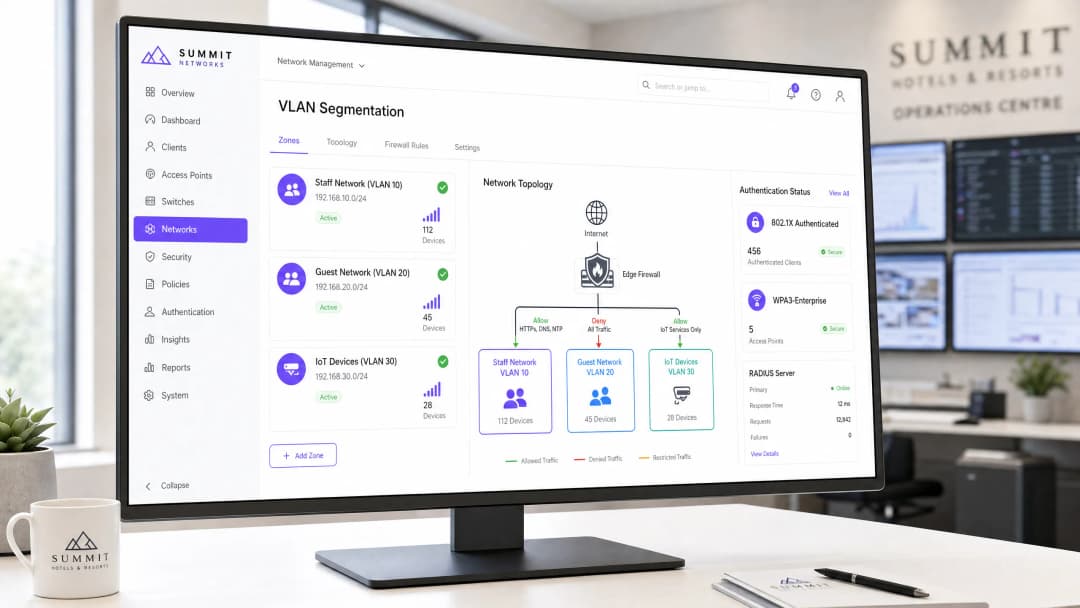
In Unternehmen, Hotellerie, Einzelhandel und im Gesundheitswesen müssen kabellose Netzwerke zwei gegensätzliche Gruppen unterstützen: öffentliche Besucher, die einen reibungslosen Internetzugang benötigen, und interne Mitarbeiter, die auf sensible Unternehmensdatenbanken, Point-of-Sale-Systeme (POS) und interne Betriebswerkzeuge zugreifen.
Wenn Gastgeräte mit der Hardware des Unternehmens kommunizieren können oder der Internetverkehr von Gästen nicht isoliert wird, entstehen schwerwiegende Sicherheitsrisiken, darunter Paket-Interzeption, Malware-Verbreitung und Verstöße gegen regulatorische Vorgaben (wie PCI-DSS 4.0 und GDPR).
Dieser Leitfaden beschreibt Netzwerkdesignmuster für Unternehmen zur Trennung von Mitarbeiter- und Gast-WiFi-Netzwerken durch VLAN-Tagging, 802.1X-Zertifikatsauthentifizierung, Firewall-Zugriffskontrolllisten (ACLs) und Layer 2-Client-Isolierung.
Sicherheitsarchitektur: Kern-Mitarbeiter- vs. Gast-Netzwerksegmentierung
Die Netzwerksegmentierung in Unternehmen basiert auf der Trennung des Datenverkehrs auf der physischen Ebene, der Sicherungsschicht und der Vermittlungsschicht:
| Architekturschicht | Gast-WiFi-Netzwerkdesign | Internes Mitarbeiter-WiFi-Netzwerkdesign |
|---|---|---|
| Authentifizierung | Captive Portal mit SMS, E-Mail oder Social Login | 802.1X EAP-TLS mit Unternehmenszertifikaten oder SAML SSO |
| VLAN-Zuweisung | Isoliertes Gast-VLAN (z. B. VLAN 50) | Unternehmenseigene VLANs (z. B. Management, Mitarbeiter, POS) |
| Layer 2-Richtlinie | Client-Isolierung aktiviert (keine Peer-to-Peer-Kommunikation) | Peer-Erkennung aktiviert für Drucker, Server und Zusammenarbeit |
| Routing & Firewall | Direktes Outbound-NAT ins Internet; RFC 1918 interne Subnetze blockiert | Zugriff auf interne Server, ERP und Datenbanken über Stateful-Firewall-Regeln gestattet |
| DNS-Konfiguration | Inhaltsgefiltertes öffentliches DNS (Protective DNS / CIPA-konform) | Internes Active Directory / Split-Horizon-Unternehmens-DNS |
1. VLAN-Tagging und 802.1Q-Trunking
Mischen Sie niemals Gast- und Unternehmensverkehr in einem flachen Subnetz. Die Wireless Access Points müssen Multi-SSID-Tagging unter Verwendung von IEEE 802.1Q-Trunks zurück zu verwalteten Distribution-Switches unterstützen:
- Unternehmens-SSID: Wird dem Unternehmens-VLAN zugeordnet. Pakete passieren interne Firewalls, um Domänencontroller und Geschäftsanwendungen zu erreichen.
- Gast-SSID: Wird einem isolierten DMZ- oder Gast-VLAN zugeordnet. Der Datenverkehr wird direkt an eine Edge-Firewall oder ein dediziertes Internet-Gateway geleitet, wodurch interne Server-Subnetze vollständig umgangen werden.
2. Obligatorische Firewall-Zugriffskontrolllisten (ACLs)
Implementieren Sie auf dem Layer-3-Standard-Gateway für das Gastnetzwerk explizite Egress-Firewall-Regeln:
- RFC 1918-Bereiche verwerfen: Blockieren Sie den gesamten Datenverkehr, der aus dem Gast-Subnetz stammt und auf
10.0.0.0/8,172.16.0.0/12und192.168.0.0/16abzielt. - Client Isolation erzwingen: Aktivieren Sie die Layer 2 Client Isolation auf der Gäste-SSID innerhalb der Firmware des Wireless Access Points. Dies verwirft ARP-Abfragen (Address Resolution Protocol) und verhindert, dass Gäste-Geräte andere mit demselben AP verbundene Gäste-Geräte scannen oder mit ihnen kommunizieren.
- Zugriff auf DNS-Ports einschränken: Verhindern Sie, dass Gäste die Inhaltsfilterung des Unternehmens umgehen, indem Sie ausgehenden UDP/TCP-Datenverkehr auf Port 53 und Port 853 an das dafür vorgesehene schützende DNS-Gateway weiterleiten.
Haben Sie Fragen zu Ihrem spezifischen Setup?
Unser Team arbeitet mit Standortbetreibern, IT-Managern und Netzwerktechnikern an über 80.000 Standorten zusammen. Buchen Sie ein 20-minütiges Gespräch und wir zeigen Ihnen, wie andere diese Herausforderungen gelöst haben.
Mitarbeiter-Authentifizierung: Migration von gemeinsam genutzten Passwörtern zu 802.1X EAP-TLS
Während bei Gäste-Netzwerken ein einfacher Onboarding-Prozess im Vordergrund steht, müssen Mitarbeiter-Netzwerke eine identitätsbasierte Zugriffskontrolle erzwingen. Die Verwendung eines gemeinsam genutzten WPA2-PSK-Passworts für Mitarbeiter führt zu schwerwiegenden betrieblichen Sicherheitslücken, wenn Mitarbeiter das Unternehmen verlassen.
Modernes Wireless-Design für Mitarbeiter nutzt 802.1X EAP-TLS:
- Jedes geschäftliche Laptop oder Smartphone wird mit einem kryptografischen Gerätezertifikat ausgestattet, das über MDM-Plattformen (Mobile Device Management) wie Microsoft Intune, Jamf oder Kandji bereitgestellt wird.
- Die Authentifizierung erfolgt über einen RADIUS-Server (oder Cloud RADIUS).
- Wenn das Arbeitsverhältnis eines Mitarbeiters beendet wird, führt die Deaktivierung seines Verzeichniskontos in Microsoft Entra ID oder Google Workspace automatisch dazu, dass sein Wireless-Zugriff in Echtzeit ungültig wird - ohne Auswirkungen auf andere Mitarbeiter.
Compliance- und Audit-Aspekte
- PCI-DSS 4.0 Anforderung 1.2: Zahlungskartenumgebungen (POS-Terminals) müssen vollständig von Gäste-WiFi-Netzwerken isoliert sein. Firewalls müssen nicht-routbare Grenzen zwischen Karteninhaber-Datenumgebungen (CDE) und dem Gäste-Datenverkehr erzwingen.
- GDPR / Datenschutz: Über ein Captive Portal erfasste Registrierungsdaten von Gästen müssen in DSGVO-konformen Marketing-Datenbanken mit expliziten Opt-In-Verfahren gespeichert und von den Protokollen der Mitarbeiter getrennt werden.
Häufig gestellte Fragen
Können Mitarbeiter und Gäste dieselben physischen Access Points nutzen?
Ja. Enterprise Access Points unterstützen mehrere virtuelle BSSIDs (SSIDs), die über eine einzige Antenne übertragen werden. Jede SSID ist ihrem eigenen 802.1Q VLAN-Tag zugeordnet. So kann die physische Hardware sicher gemeinsam genutzt werden, während gleichzeitig eine absolute kryptografische und logische Trennung gewährleistet bleibt.
Warum ist eine Client Isolation erforderlich, wenn sich der Gäste-Datenverkehr bereits in einem separaten VLAN befindet?
Die VLAN-Segmentierung isoliert das Gäste-Netzwerk vom internen Unternehmensnetzwerk. Ohne Layer 2 Client Isolation auf dem Access Point könnte jedoch ein infiziertes Gäste-Gerät ein anderes Besuchergerät scannen, ausspähen oder angreifen, das mit demselben Gäste-WiFi-Netzwerk verbunden ist. Die Client Isolation sorgt dafür, dass Besucher nur mit dem externen Internet-Gateway kommunizieren können.
Schlüsseldefinitionen
VLAN (Virtual Local Area Network)
Ein logisches Teilnetzwerk, das eine Gruppe von Geräten in einem oder mehreren physischen lokalen Netzwerken zusammenfasst und deren Datenverkehr-Broadcast-Domänen isoliert.
Wird verwendet, um Gastgeräte von Mitarbeiter-Hardware auf denselben physischen Switches und Access Points zu trennen.
IEEE 802.1X
Ein IEEE-Standard für portbasierte Netzwerkzugriffskontrolle (NAC), der einen Authentifizierungsmechanismus für Geräte bereitstellt, die eine Verbindung zu einem LAN oder WLAN herstellen möchten.
Das Standardprotokoll zur Durchsetzung der benutzerbezogenen Anmeldeinformations- oder Zertifikatsauthentifizierung in WiFi Netzwerken von Unternehmensmitarbeitern.
RADIUS (Remote Authentication Dial-In User Service)
Ein Netzwerkprotokoll, das eine zentrale Verwaltung von Authentifizierung, Autorisierung und Accounting (AAA) für Benutzer bietet, die eine Verbindung zu einem Netzwerkdienst herstellen und diesen nutzen.
Der Server (z. B. Microsoft NPS oder Cloud RADIUS), der die Anmeldedaten der Mitarbeiter mit dem Active Directory abgleicht, bevor der Netzwerkzugriff gewährt wird.
WPA3-Enterprise
Die neueste Generation der Wi-Fi Protected Access-Sicherheit für Unternehmensnetzwerke, die eine 192-Bit-Verschlüsselungsstärke und Protected Management Frames vorschreibt.
Das erforderliche drahtlose Sicherheitsprotokoll für neue Mitarbeiternetzwerke, das Offline-Wörterbuchangriffe und Deauthentifizierungs-Exploits durch Rogue APs eliminiert.
Client Isolation
Eine Sicherheitseinstellung auf Wireless Access Points, die verhindert, dass verbundene Wireless-Clients direkt miteinander kommunizieren.
Zwingend erforderliche Konfiguration in Gastnetzwerken, um laterale Angriffe und die Verbreitung von Malware zwischen Gastgeräten zu blockieren.
EAP-TLS (Extensible Authentication Protocol - Transport Layer Security)
Ein EAP-Typ, der digitale Zertifikate für die gegenseitige Authentifizierung zwischen dem Client und dem RADIUS-Server verwendet, wodurch Passwörter überflüssig werden.
Die Authentifizierungsmethode mit der höchsten Sicherheit für vom Unternehmen verwaltete Geräteflotten, die über MDM-Plattformen bereitgestellt wird.
WIPS (Wireless Intrusion Prevention System)
Ein Sicherheitsgerät oder eine Softwarefunktion, die das Funkspektrum auf das Vorhandensein unbefugter Access Points überwacht und automatisch Gegenmaßnahmen ergreift.
Erforderlich für die PCI-DSS-Konformität, um Rogue APs oder "Evil Twin"-Angriffe in Einzelhandels- und Gastronomieumgebungen zu erkennen und abzuwehren.
Airtime Fairness
Eine Scheduling-Funktion für Drahtlosnetzwerke, die jedem Wireless-Client die gleiche Übertragungszeit (Sendezeit) zuweist, anstatt der gleichen Paketanzahl.
Verhindert, dass langsame, ältere Gastgeräte die Kapazität der Funkkanäle blockieren und die Leistung schneller Mitarbeitergeräte beeinträchtigen.
Ausgearbeitete Beispiele
Ein Luxushotel mit 250 Zimmern, das ein gemeinsames, unsegmentiertes Netzwerk betreibt, bereitet sich auf ein PCI-DSS-Audit vor. Das Hotel nutzt mobile Tablets für den Check-in an der Rezeption, einen PMS-Server vor Ort und bietet kostenloses Guest WiFi an. Wie sollte der Netzwerkarchitekt die Wireless-Infrastruktur umgestalten, um Compliance und Sicherheit zu gewährleisten?
- Physische und logische Segmentierung: Erstellen Sie VLAN 10 für Mitarbeiter (PMS & Tablets), VLAN 20 für Guest WiFi und VLAN 30 für IoT (Smart-TVs, Thermostate). Konfigurieren Sie die Switchports, die mit den APs verbunden sind, als 802.1Q-Trunks.
- Härtung der Authentifizierung: Ersetzen Sie das gemeinsam genutzte WPA2-PSK im Mitarbeiternetzwerk durch WPA3-Enterprise (802.1X). Integrieren Sie den Wireless-Controller über NPS (RADIUS) in das Active Directory des Hotels. Bereitstellen der Rezeptionstablets mit WPA3-Enterprise-Zugangsdaten oder EAP-TLS-Zertifikaten über MDM.
- Firewall-Zugriffskontrolle: Implementieren Sie eine Stateful Firewall. Erstellen Sie Regeln, um VLAN 10 den Zugriff auf die IP des PMS-Servers über HTTPS/SQL-Ports zu erlauben, aber blockieren Sie jeglichen Datenverkehr von VLAN 20 (Gast) zu VLAN 10 und VLAN 30. Aktivieren Sie die Client-Isolierung auf VLAN 20.
- Validierung der Compliance: Aktivieren Sie WIPS auf dem Wireless-Controller, um unbefugte APs zu überwachen und zu melden, wodurch die PCI-DSS-Anforderung 11.4 erfüllt wird.
Eine hochfrequentierte Einzelhandelskette mit 50 Filialen möchte Guest WiFi einführen, um Kundenanalysen zu erfassen, und gleichzeitig sicherstellen, dass die betrieblichen Handscanner (für Inventar und Bestandsverwaltung) während der Hauptgeschäftszeiten nicht unter Netzwerküberlastung oder Verbindungsabbrüchen leiden. Wie sollte das IT-Team die SSID- und QoS-Architektur konzipieren?
- SSID-Trennung: Richten Sie zwei SSIDs in allen Filialen ein:
Retail-Operations(VLAN 10) undGuest-Free-WiFi(VLAN 20). - 802.1X Authentifizierung: Sichern Sie
Retail-Operationsmittels WPA3-Enterprise. Authentifizieren Sie die Handscanner mit zertifikatsbasiertem EAP-TLS, das über die MDM-Plattform der Kette vorab bereitgestellt wird. Konfigurieren Sie die Gast-SSID als offenes Netzwerk hinter einem Captive Portal, das von Purple verwaltet wird. - Quality of Service (QoS) & WMM: Aktivieren Sie auf dem Wireless-Controller Wi-Fi Multi-Media (WMM). Ordnen Sie den Datenverkehr von
Retail-Operationsden Zugriffsklassen Video (AC_VI) oder Voice (AC_VO) zu, um Priorität vor dem Gast-Traffic zu garantieren. Ordnen SieGuest-Free-WiFidem Best Effort (AC_BE) zu. - Bandbreitenbegrenzung: Konfigurieren Sie auf der WAN-Edge-Firewall eine Traffic-Shaping-Richtlinie. Garantieren Sie eine symmetrische Mindestbandbreite von 15 Mbps für VLAN 10 in jeder Filiale. Erzwingen Sie auf der Purple Captive Portal-Plattform ein Limit pro Benutzer von 3 Mbps Download und 1 Mbps Upload für Gastgeräte im VLAN 20.
Ein kommunales Konferenzzentrum des öffentlichen Sektors beherbergt häufig Großveranstaltungen mit bis zu 5.000 gleichzeitigen Gastbenutzern. Der IT-Leiter stellt fest, dass während dieser Veranstaltungen die administrativen Mitarbeiter im selben physischen Netzwerk unter schwerwiegenden Latenzzeiten bei geschäftlichen Videoanrufen und Dateiübertragungen leiden. Wie kann dies gelöst werden, ohne zusätzliche physische Internetleitungen zu erwerben?
- VLAN-Segmentierung: Überprüfen Sie, ob administrative Mitarbeiter sich im VLAN 100 und Gäste im VLAN 200 befinden.
- WAN-Edge Traffic Shaping: Konfigurieren Sie auf dem primären Internet-Gateway (z. B. einer symmetrischen 1 Gbit/s-Standleitung) eine CBWFQ-Richtlinie (Class-Based Weighted Fair Queueing). Definieren Sie eine Klasse für VLAN 100 mit einer garantierten Bandbreite von 200 Mbit/s und einer Prioritätswarteschlange für Echtzeit-Sprach- und Videoverkehr.
- Dynamische Bandbreitenzuweisung: Konfigurieren Sie eine Richtlinie auf der Firewall, die die für VLAN 200 (Gast) zugewiesene Gesamtbandbreite während der Geschäftszeiten dynamisch auf maximal 80 % der gesamten WAN-Kapazität (800 Mbit/s) beschränkt, sodass für die Mitarbeiter immer 200 Mbit/s verfügbar bleiben.
- Wireless Airtime Fairness: Aktivieren Sie Airtime Fairness auf den Wireless Access Points. Dies verhindert, dass langsame, ältere Gastgeräte (z. B. ältere 802.11n-Smartphones) die Funkkanäle monopolisieren und den Durchsatz moderner Mitarbeitergeräte beeinträchtigen.
Übungsfragen
Q1. Eine Hotelgruppe führt ein neues Mitarbeiter-WiFi-Netzwerk ein. Der Netzwerkarchitekt schlägt vor, WPA2-Personal (PSK) mit einem starken Passwort zu verwenden, da dies für die Mitarbeiter auf ihren Geräten einfacher einzugeben ist. Schreiben Sie als Senior Technical Content Strategist ein entscheidungsforderndes Szenario, das aufzeigt, warum dieser Ansatz ein Sicherheitsrisiko darstellt und welches die empfohlene Alternative ist.
Hinweis: Überlegen Sie, was passiert, wenn ein unzufriedener Mitarbeiter entlassen wird oder das Unternehmen verlässt.
Musterlösung anzeigen
Empfohlener Ansatz: Den WPA2-Personal (PSK) Vorschlag ablehnen und eine WPA3-Enterprise (802.1X) Authentifizierung vorschreiben.
Begründung: Die Verwendung von WPA2-PSK schafft ein massives Sicherheitsrisiko. Wenn ein Mitarbeiter das Unternehmen verlässt, kennt er immer noch das gemeinsame Passwort. Um die Sicherheit aufrechtzuerhalten, müsste das IT-Team das Passwort auf jedem einzelnen Mitarbeitergerät (Laptops, PMS-Tablets, VoIP-Telefone) im gesamten Hotel ändern. In der Praxis ist dieser operative Aufwand so hoch, dass Passwörter selten geändert werden, wodurch das Netzwerk anfällig für unbefugten Zugriff durch ehemalige Mitarbeiter bleibt.
Durch den Einsatz von WPA3-Enterprise mit 802.1X authentifiziert sich jeder Mitarbeiter mit seinen individuellen Zugangsdaten aus dem Unternehmensverzeichnis (z. B. Active Directory). Wenn ein Mitarbeiter ausscheidet, wird sein Konto im Active Directory deaktiviert und sein Netzwerkzugriff wird sofort und automatisch gesperrt, ohne dass andere Geräte der Mitarbeiter beeinträchtigt werden.
Q2. Bei einem Netzwerkaudit einer Einzelhandelskette stellt der Auditor fest, dass sich das Gast-WiFi-Netzwerk und die POS-Zahlungsterminals in unterschiedlichen IP-Subnetzen befinden, aber an denselben physischen Layer-3-Switch ohne konfigurierte ACLs angeschlossen sind. Der IT-Leiter argumentiert, dass sie sicher sind, weil sie sich in verschiedenen Subnetzen befinden. Erstellen Sie eine szenariobasierte Übung, um dieses Setup im Hinblick auf die PCI-DSS-Anforderungen zu bewerten.
Hinweis: Blockiert eine IP-Subnetzgrenze standardmäßig den Datenverkehr auf einem Layer-3-Switch?
Musterlösung anzeigen
Empfohlener Ansatz: Das aktuelle Setup ist nicht richtlinienkonform und hochgradig unsicher. Das IT-Team muss eine strikte VLAN-Segmentierung und Stateful-Firewall-Regeln implementieren, um das POS-Netzwerk vom Gastnetzwerk zu isolieren.
Begründung: IP-Subnetze definieren nur logische Gruppierungen; sie erzwingen keine Sicherheitsgrenzen. Auf einem Standard-Layer-3-Switch ist das Routing zwischen Subnetzen standardmäßig aktiviert. Dies bedeutet, dass jedes Gerät im Gast-Subnetz Datenverkehr direkt an das POS-Subnetz leiten kann, indem es einfach Pakete an die Gateway-IP des Switches sendet. Ein Angreifer im Gast-WiFi könnte leicht Schwachstellen auf den POS-Zahlungsterminals scannen, entdecken und versuchen, diese auszunutzen, was gegen die PCI-DSS-Anforderung 1.3 verstoßen würde.
Zur Behebung müssen die POS-Terminals in ein dediziertes VLAN (z. B. VLAN 40) und das Gast-WiFi in VLAN 20 verschoben werden. Eine Stateful-Firewall muss zwischen diesen VLANs platziert werden, mit einer expliziten Regel, die jeglichen Datenverkehr blockiert (DENY), der von VLAN 20 (Gast) ausgeht und für VLAN 40 (POS) bestimmt ist. Zusätzlich muss die Client-Isolierung auf der Gast-SSID aktiviert werden, um laterale Angriffe innerhalb des Gastnetzwerks selbst zu verhindern.
Q3. In einem Konferenzzentrum findet ein großer Technologie-Gipfel mit 3.000 Teilnehmern statt. Die Verwaltungsmitarbeiter, die dieselbe Internetverbindung nutzen, berichten, dass sie aufgrund der extremen Netzwerklangsamkeit nicht auf ihr cloudbasiertes Ticket-System zugreifen oder klare VoIP-Anrufe tätigen können. Erklären Sie, wie eine Traffic-Management-Strategie konzipiert werden kann, um dieses Problem zu lösen, ohne die physische Internet-Bandbreite zu erhöhen.
Hinweis: Denken Sie an die Überlastung von Kanälen über die Luft und an die Auslastung von WAN-Verbindungen.
Musterlösung anzeigen
Empfohlener Ansatz: Implementieren Sie eine mehrschichtige Traffic-Management-Strategie, die QoS auf Wireless-Ebene, Bandbreitenreservierung am WAN-Edge und Ratenbegrenzung pro Benutzer kombiniert.
Begründung: Die Verlangsamung wird durch zwei Engpässe verursacht: Überlastung des Funkkanals (RF-Sättigung) und Sättigung der WAN-Anbindung. Um dies ohne ein Upgrade der physischen Leitung zu beheben:
- WAN-Bandbreitenreservierung: Konfigurieren Sie auf der Edge-Firewall Class-Based Weighted Fair Queueing (CBWFQ). Reservieren Sie einen garantierten Mindestpool von 150 Mbps symmetrischer Bandbreite exklusiv für das Mitarbeiter-VLAN (VLAN 10), um sicherzustellen, dass dieses niemals durch Gast-Traffic blockiert werden kann.
- Ratenbegrenzung pro Benutzer: Konfigurieren Sie auf der Captive Portal-Plattform (z. B. Purple) ein Traffic-Shaping-Profil, das jede Gastverbindung auf maximal 3 Mbps Download und 1 Mbps Upload begrenzt. Dies verhindert, dass eine kleine Anzahl von Gästen mit hoher Bandbreitennutzung (z. B. 4K-Videostreaming) die WAN-Leitung überlastet.
- Wireless Quality of Service (QoS): Aktivieren Sie Wi-Fi Multi-Media (WMM) auf den Access Points. Weisen Sie dem VoIP- und Ticketing-Traffic der Mitarbeiter hochpriorisierte Warteschlangen zu (AC_VO und AC_VI), während der gesamte Gast-Traffic den Warteschlangen Best Effort (AC_BE) oder Background (AC_BK) zugewiesen wird.
- Airtime Fairness: Aktivieren Sie Airtime Fairness auf allen APs, um sicherzustellen, dass langsame ältere Geräte die Übertragungszeit auf den Wireless-Kanälen nicht monopolisieren, sodass die Kanalkapazität für schnelle Geräte der Mitarbeiter erhalten bleibt.
Weiterlesen in dieser Reihe
Wie Mitarbeiter-WiFi Ihnen hilft, ISO/IEC 27001 zu erfüllen: Zuordnung von Annex A Controls auf Ihr drahtloses Netzwerk
Sie werden in der Lage sein zu entscheiden, ob Ihr Mitarbeiter-WiFi 12 ISO/IEC 27001:2022 Annex A Controls belegen kann, einschließlich A.5.15, A.8.5 und A.8.22. Zudem erfahren Sie, wie Sie einen gemeinsam genutzten WPA2-PSK-Schlüssel durch IEEE 802.1X und dynamische VLANs ersetzen. Schließlich können Sie die RADIUS-Protokolle, Segmentierungstests und Lieferantennachweise zusammenstellen, die ein Auditor in Phase 2 akzeptiert.
DFS Radar-Ereignisse auf Cisco Meraki, HPE Aruba und Ruckus: Eine Diagnose-Checkliste für Kanalwechsel
Finden Sie heraus, ob ein DFS Radar-Ereignisse Ihren 5GHz-Ausfall auf Cisco Meraki, HPE Aruba oder Ruckus verursacht hat. Unterscheiden Sie echte Radarsignale von Fehlalarmen und Planungsbewegungen. Entscheiden Sie dann, welche Kanäle auf welchen APs ausgeschlossen werden sollen, ohne die von Ihrem Standort benötigte Kapazität zu opfern.
Planung einer Migration von WiFi 6 auf WiFi 7 Access Points nach dem Vertriebsende von Cisco Meraki WiFi 6
Diese technische Referenz bietet Betreibern mit mehreren Standorten einen Entscheidungsrahmen für die Migration von Cisco Meraki WiFi 6 auf WiFi 7 vor dem letzten Bestelldatum am 31. Dezember 2026. Sie kombiniert die Bestands- und Backhaul-Planung mit den Prüfungen im Meraki Dashboard, um die Kontinuität der Authentifizierung und der Standortanalyse von Purple bei jedem Austausch von Access Points zu sichern.
Haben Sie Fragen zu Ihrem spezifischen Setup?
Unser Team arbeitet mit Standortbetreibern, IT-Managern und Netzwerktechnikern an über 80.000 Standorten zusammen. Buchen Sie ein 20-minütiges Gespräch und wir zeigen Ihnen, wie andere diese Herausforderungen gelöst haben.