
एंटरप्राइझ डिप्लॉयमेंट्समधील को-चॅनल इंटरफेरन्सचे (CCI) निवारण करणे
हे तांत्रिक संदर्भ मार्गदर्शक नेटवर्क आर्किटेक्ट्स आणि आयटी डायरेक्टर्सना हाय-डेन्सिटी एंटरप्राइझ वातावरणात को-चॅनल इंटरफेरन्स शोधण्यासाठी, कमी करण्यासाठी आणि त्यांचे निवारण करण्यासाठी कृतीयोग्य धोरणे प्रदान करते. यामध्ये RF डिझाइन तत्त्वे, चॅनल अलोकेशन धोरणे, ट्रान्समिट पॉवर ऑप्टिमायझेशन आणि हॉटेल्स, रिटेल चेन्स, स्टेडियम्स आणि सार्वजनिक-क्षेत्रातील सुविधांसह जटिल ठिकाणांवर सर्वोत्तम वायरलेस कार्यक्षमता राखण्यासाठी अॅनालिटिक्स प्लॅटफॉर्मचा कसा फायदा घ्यावा हे समाविष्ट आहे. मोठ्या प्रमाणावर एंटरप्राइझ-दर्जाचे अतिथी WiFi आणि ऑपरेशनल कनेक्टिव्हिटी प्रदान करण्यासाठी CCI निवारणावर प्रभुत्व मिळवणे ही एक पूर्वअट आहे.
हे मार्गदर्शक ऐका
पॉडकास्ट ट्रान्सक्रिप्ट पहा
आमच्या मुख्य मालिकेचा भाग: Guest WiFi Guide →

मुख्य कार्यकारी सारांश
उच्च-घनता असलेल्या वायरलेस उपयोजनांमध्ये को-चॅनेल इंटरफेरन्स (CCI) हे सर्वात व्यापक आणि चुकीच्या पद्धतीने समजले जाणारे आव्हान राहिले आहे. Retail, Hospitality, Healthcare, आणि Transport वातावरणात इन्फ्रास्ट्रक्चर व्यवस्थापित करणाऱ्या CTO आणि नेटवर्क आर्किटेक्ट्ससाठी, CCI केवळ एक तांत्रिक मॅट्रिक म्हणून समोर येत नाही, तर वापरकर्त्याचा खालावलेला अनुभव, कमी थ्रुपुट आणि शेवटी व्यवसायाच्या नफ्यावर नकारात्मक परिणाम म्हणून समोर येतो. पाहुण्यांचे समाधान गुण घसरतात, मोबाईल पॉइंट-ऑफ-सेल सिस्टीम मंदावतात आणि क्लिनिकल वर्कफ्लो विस्कळीत होतात - या सर्वांचे मूळ योग्यरित्या इंजिनिअर न केलेल्या चॅनेल प्लॅनमध्ये असते.
हे मार्गदर्शक को-चॅनेल इंटरफेरन्स ओळखण्यासाठी, कमी करण्यासाठी आणि त्याचे निराकरण करण्यासाठी एक व्यापक तांत्रिक फ्रेमवर्क प्रदान करते. सैद्धांतिक RF डिझाइनच्या पलीकडे जाऊन, आम्ही व्यावहारिक अंमलबजावणी धोरणे, IEEE 802.11 मानकांशी सुसंगत असलेले वेंडर-न्यूट्रल सर्वोत्तम पद्धती आणि नेटवर्कचे आरोग्य इष्टतम राखण्यासाठी WiFi Analytics च्या महत्त्वपूर्ण भूमिकेचा शोध घेतो. तुम्ही 400 खोल्यांच्या हॉटेलमध्ये Guest WiFi उपयोजित करत असाल किंवा कॉर्पोरेट कॅम्पस ऑप्टिमाइझ करत असाल, एंटरप्राइझ-दर्जाची कनेक्टिव्हिटी प्रदान करण्यासाठी CCI निराकरणावर प्रभुत्व मिळवणे आवश्यक आहे.
सखोल तांत्रिक माहिती
को-चॅनेल इंटरफेरन्स समजून घेणे
जेव्हा दोन किंवा अधिक ॲक्सेस पॉइंट्स (APs) एकाच फ्रिक्वेन्सी चॅनेलवर काम करतात आणि त्यांचे कव्हरेज क्षेत्र लक्षणीयरीत्या ओव्हरलॅप होते तेव्हा को-चॅनेल इंटरफेरन्स उद्भवतो. ॲडजेसंट-चॅनेल इंटरफेरन्सच्या विपरीत, जे ओव्हरलॅपिंग फ्रिक्वेन्सी बँड्समुळे होते, CCI उपकरणांना समान माध्यम शेअर करण्यास भाग पाडते. WiFi हे Carrier Sense Multiple Access with Collision Avoidance (CSMA/CA) वापरणारे हाफ-डुप्लेक्स माध्यम म्हणून काम करते. जेव्हा एकाधिक APs आणि त्यांचे संबंधित क्लायंट्स चॅनेल शेअर करतात, तेव्हा त्यांना डेटा ट्रान्समिट करण्यापूर्वी चॅनेल मोकळा होण्याची वाट पाहावी लागते. ही संघर्ष यंत्रणा - जी कोलिजन टाळण्यासाठी डिझाइन केली आहे - घनतेने भरलेल्या उपयोजनांमध्ये अडथळा ठरते. एकाच चॅनेलवरील प्रत्येक अतिरिक्त AP संघर्ष डोमेन वाढवतो, ज्यामुळे प्रभावी थ्रुपुट वेगाने कमी होते.
IEEE 802.11 मानक प्रति चॅनेल APs ची कमाल मर्यादा निश्चित करत नाही, म्हणजेच चॅनेल रियूज व्यवस्थापनाची संपूर्ण जबाबदारी नेटवर्क आर्किटेक्टवर असते. प्रत्यक्षात, 2.4 GHz बँडमधील 20 MHz चॅनेल कार्यप्रदर्शन लक्षणीयरित्या खालावण्यापूर्वी कदाचित दोन किंवा तीन सह-स्थित APs चे समर्थन करू शकते. त्या मर्यादेपलीकडे, नेटवर्क प्रत्यक्षात CSMA/CA प्रोटोकॉलद्वारेच मंदावले जाते.
2.4 GHz विरुद्ध 5 GHz आव्हाने
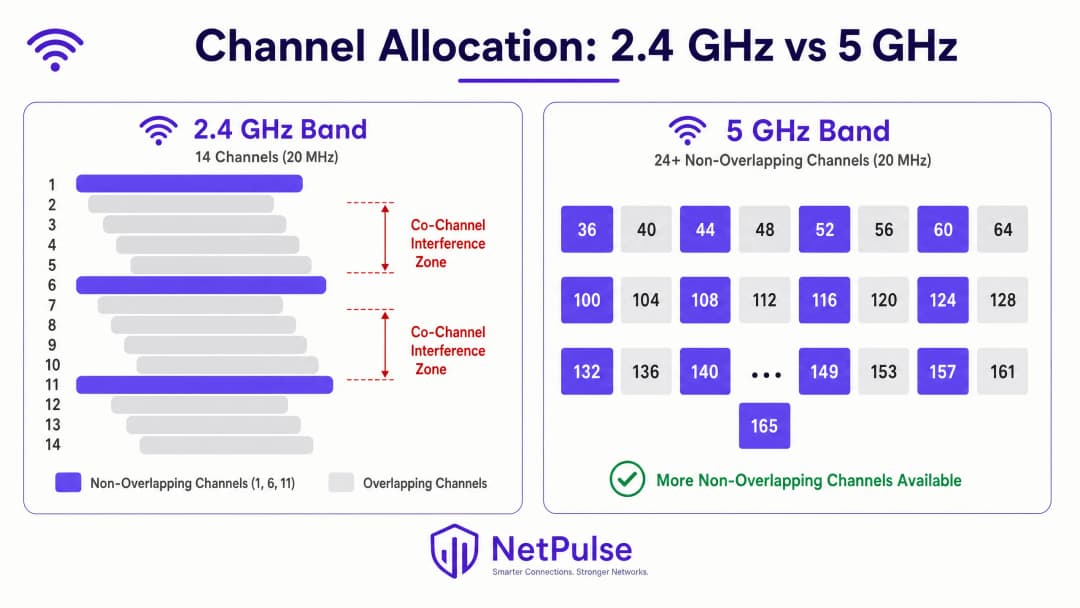
मर्यादित स्पेक्ट्रममुळे 2.4 GHz बँडमध्ये CCI होण्याचा धोका जास्त असतो. बहुतेक नियामक क्षेत्रांमध्ये, 20 MHz चॅनल विड्थ वापरणारे फक्त तीन नॉन - ओव्हरलॅपिंग चॅनेल्स (1, 6, आणि 11) असतात. हाय - डेन्सिटी डिप्लॉयमेंट्समध्ये - जसे की रिटेल स्टोअर फ्लोअर्स, हॉटेल कॉन्फरन्स विंग्स, किंवा स्टेडियम कॉन्कोर्सेस - ओव्हरलॅपिंग न करता या तीन चॅनेल्सचा पुन्हा वापर करणे हे एक गणिताचे आव्हान आहे जे केवळ AP प्लेसमेंटद्वारे सोडवले जाऊ शकत नाही.
5 GHz बँड प्रादेशिक Dynamic Frequency Selection (DFS) नियमांवर अवलंबून, 24 किंवा त्याहून अधिक नॉन - ओव्हरलॅपिंग 20 MHz चॅनेल्स प्रदान करून महत्त्वपूर्ण दिलासा देतो. तथापि, उच्च पीक डेटा दर मिळवण्यासाठी रुंद चॅनेल्स - 40 MHz, 80 MHz, किंवा 160 MHz - वापरण्याचा मोह अनेकदा पुन्हा CCI ला कारणीभूत ठरतो. 80 MHz चॅनल विड्थवर, 5 GHz बँडमधील नॉन - ओव्हरलॅपिंग चॅनेल्सची संख्या 24 वरून केवळ सहावर घसरते. एंटरप्राइझ डिप्लॉयमेंट्ससाठी, चॅनेलचा जास्तीत जास्त पुनरुपयोग करण्यासाठी आणि इंटरफेरियन्स कमी करण्यासाठी 2.4 GHz मध्ये 20 MHz चॅनेल्स आणि 5 GHz मध्ये 20 MHz किंवा 40 MHz चॅनेल्सवर प्रमाणित राहणे ही एक मूलभूत सर्वोत्तम पद्धत आहे. आधुनिक स्पेक्ट्रम वापराविषयी अधिक जाणून घेण्यासाठी, Wi-Fi Frequencies: A Guide to Wi-Fi Frequencies in 2026 चे पुनरावलोकन करा.
WiFi 6E (IEEE 802.11ax) आणि WiFi 7 (IEEE 802.11be) द्वारे सादर केलेला 6 GHz बँड, आणखी 59 पर्यंत नॉन - ओव्हरलॅपिंग 20 MHz चॅनेल्स प्रदान करतो, जो हाय - डेन्सिटी डिप्लॉयमेंट्ससाठी एक क्रांतिकारी संधी देतो. तथापि, 6 GHz च्या वापरासाठी AP आणि क्लायंट हार्डवेअर दोन्ही अपग्रेड करणे आवश्यक आहे, ज्यामुळे ही जुन्या इन्फ्रास्ट्रक्चरसाठी त्वरित दुरुस्ती नसून मध्यम - मुदतीची गुंतवणूक बनते.
अंमलबजावणी मार्गदर्शक
पायरी 1: सर्वसमावेशक RF साइट सर्व्हे करा
कॉन्फिगरेशनमध्ये कोणतेही बदल करण्यापूर्वी, एक बेसलाइन स्थापित करा. एक ॲक्टिव्ह आणि पॅसिव्ह RF साइट सर्व्हे अत्यंत महत्त्वाचा आहे. पॅसिव्ह सर्व्हे नेटवर्कशी कनेक्ट न होता अस्तित्वात असलेले RF वातावरण - सिग्नल स्ट्रेंथ, नॉइझ फ्लोअर, चॅनेल युटिलायझेशन आणि इंटरफेरियन्सचे स्त्रोत कॅप्चर करतात. ॲक्टिव्ह सर्व्हे प्रत्यक्ष थ्रूपुट आणि रोमिंग बिहेवियर मोजतात. हे केवळ एकदाच करण्याचे काम नाही; वातावरण बदलत राहते. हॉस्पिटॅलिटीच्या ठिकाणांमधील तात्पुरत्या वास्तू, रिटेलमधील हंगामी इन्व्हेंटरीतील बदल, किंवा हेल्थकेअरमधील नवीन उपकरणे हे सर्व RF प्रोपोगेशनमध्ये लक्षणीय बदल करू शकतात.
Ekahau, NetSpot, किंवा व्हेंडर - स्पेसिफिक सर्व्हे ॲप्लिकेशन्स सारखी टूल्स इंटरफेरियन्स झोन्स, कव्हरेज गॅप्स आणि चॅनेल कॉन्फ्लिक्ट्स ओळखण्यासाठी आवश्यक व्हिज्युअलायझेशन प्रदान करतात. साइट सर्व्हेचे निकाल थेट AP प्लेसमेंट, चॅनेल असाइनमेंट आणि ट्रान्समिट पॉवर सेटिंग्ज निश्चित करण्यासाठी वापरले पाहिजेत.
पायरी 2: ट्रान्समिट पॉवर (Tx Power) ऑप्टिमाइझ करा
एक सामान्य गैरसमज असा आहे की AP ट्रान्समिट पॉवर वाढवल्याने कव्हरेज सुधारते आणि कनेक्टिव्हिटीच्या समस्या सुटतात. प्रत्यक्षात, यामुळे CCI अधिक बिघडते. जर AP चा सिग्नल आवश्यकतेपेक्षा जास्त पुढे पोहोचला, तर तो शेजारील सेल्समध्ये हस्तक्षेप निर्माण करतो आणि एक असममित RF वातावरण तयार करतो.
क्लायंट क्षमता जुळवणे: मोबाईल डिव्हाइस (स्मार्टफोन, टॅब्लेट) सहसा 10–15 dBm वर ट्रान्समिट करतात. जर AP 25 dBm वर ट्रान्समिट करत असेल, तर क्लायंटला AP चा आवाज स्पष्टपणे ऐकू येतो, परंतु AP ला क्लायंटचा आवाज ऐकण्यासाठी संघर्ष करावा लागतो - हीच क्लासिक हिडन नोड समस्या आहे. यामुळे रिट्रान्समिशन होते, प्रभावी थ्रूपुट कमी होते आणि चॅनेलचा वापर वाढतो.
पॉवर ट्यूनिंग मार्गदर्शक तत्त्वे:
| बँड | शिफारस केलेली Tx पॉवर | तर्क |
|---|---|---|
| 2.4 GHz | 10–14 dBm | स्मार्टफोनच्या Tx क्षमतेशी जुळवा; सेलचा आकार कमी करा |
| 5 GHz | 14–17 dBm | उच्च फ्रिक्वेन्सीवर पाथ लॉस भरून काढण्यासाठी थोडी जास्त |
| 6 GHz | 17–20 dBm | उच्च पाथ लॉससाठी थोडी जास्त पॉवर आवश्यक |
बँड स्टीयरिंगला प्रोत्साहन देण्यासाठी, 2.4 GHz पॉवर सामान्यत: 5 GHz पेक्षा 3-6 dB कमी असावी, ज्यामुळे सक्षम क्लायंट कमी गर्दी असलेल्या 5 GHz बँडकडे वळवले जातील.
पायरी ३: डायनॅमिक रेडिओ व्यवस्थापन लागू करा
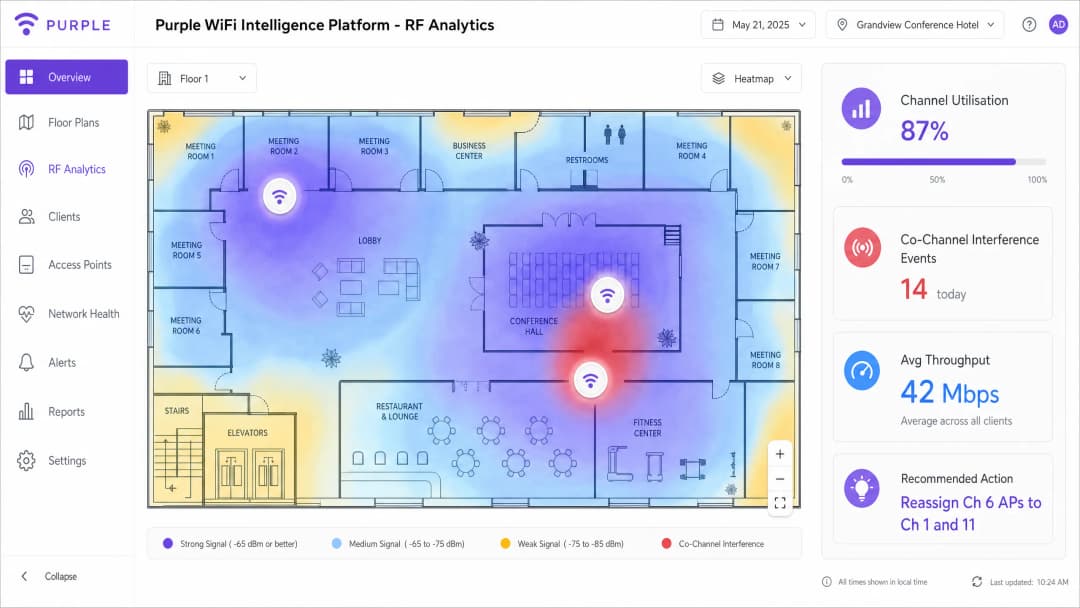
आधुनिक एंटरप्राइझ WLAN कंट्रोलर्समध्ये डायनॅमिक रेडिओ व्यवस्थापन अल्गोरिदम असतात - Cisco चे Radio Resource Management (RRM), Aruba चे Adaptive Radio Management (ARM) आणि Juniper Mist, Extreme Networks आणि इतरांकडील समतुल्य प्रणाली. या प्रणाली सातत्याने RF वातावरणावर लक्ष ठेवतात आणि CCI कमी करण्यासाठी चॅनेलचे वाटप आणि ट्रान्समिट पॉवर डायनॅमिकपणे समायोजित करतात.
तथापि, या प्रणालींना काळजीपूर्वक ट्यूनिंग करावे लागते. स्टेडियम किंवा ट्रान्सपोर्ट हबसारख्या हाय डेन्सिटी वातावरणात पूर्णपणे डीफॉल्ट ऑटोमेटेड सेटिंग्जवर अवलंबून राहिल्याने अनेकदा अस्थिरता निर्माण होते. मुख्य ट्यूनिंग पॅरामीटर्समध्ये हे समाविष्ट आहे:
- चॅनेल बदल मर्यादा (Channel Change Threshold): चॅनेल बदल ट्रिगर करण्यासाठी आवश्यक असलेल्या हस्तक्षेपाची पातळी. जर ही खूप कमी सेट केली असेल, तर तात्पुरत्या हस्तक्षेपामुळे (मायक्रोवेव्ह ओव्हन, ब्लूटूथ डिव्हाइस) प्रणाली सतत चॅनेल बदलेल, ज्यामुळे क्लायंटचे कनेक्शन खंडित होईल.
- पॉवर बदलण्याचा कालावधी (Power Change Interval): प्रणाली किती वेळा ट्रान्समिट पॉवर समायोजित करते. स्थिर वातावरणात, कमी वारंवार होणाऱ्या समायोजनांमुळे क्लायंटला होणारा त्रास कमी होतो.
- किमान आणि कमाल पॉवर मर्यादा (Minimum and Maximum Power Bounds): कठोर मर्यादा ज्या अल्गोरिदमला तुमच्या डिझाइन पॅरामीटर्सच्या बाहेर पॉवर लेव्हल सेट करण्यापासून रोखतात.
पायरी ४: लेगसी बेसिक डेटा रेट्स निष्क्रिय करा
जर तुमच्या 2.4 GHz रेडिओमध्ये अजूनही 1, 2, 5.5 आणि 11 Mbps हे मूलभूत (अनिवार्य) दर म्हणून सक्षम असतील, तर मॅनेजमेंट फ्रेम्स - बीकन्स, प्रोब रिस्पॉन्स आणि ॲकनॉलेजमेंट - या कमी दरांवर ट्रान्समिट केल्या जातात. 1 Mbps चा एक सिंगल बीकॉन 11 Mbps च्या त्याच बीकॉनपेक्षा 10 पट जास्त एअरटाइम वापरतो. शेकडो AP आणि हजारो क्लायंट्समध्ये, हा ओव्हरहेड लक्षणीय असतो.
12 Mbps पेक्षा कमी दर अक्षम केल्याने सर्व मॅनेजमेंट आणि डेटा फ्रेम्सना अधिक कार्यक्षम मॉड्युलेशन वापरण्यास भाग पाडले जाते. यामुळे AP च्या कव्हरेज सेलचा विस्तार प्रभावीपणे मर्यादित होतो, कारण केवळ 12 Mbps किंवा त्याहून अधिक वेग मिळवण्याइतपत जवळ असलेले क्लायंट्सच कनेक्ट होऊ शकतात. यामुळे प्रत्येक AP च्या CCI फूटप्रिंटला कमी करण्यासाठी एक नैसर्गिक यंत्रणा तयार होते.
पायरी 5: अखंड रोमिंगसाठी 802.11k/v/r लागू करा
स्टिकी क्लायंट्स - म्हणजेच जवळच्या AP कडे रोबोटिक पद्धतीने स्विच न होणारे डिव्हाइसेस - हे CCI चे मुख्य कारण आहेत. कमी डेटा रेटवर दूरच्या AP शी कनेक्ट असलेला क्लायंट प्रमाणाबाहेर एअरटाईम वापरतो, ज्यामुळे त्या चॅनेलवरील इतर सर्व क्लायंट्सच्या कामगिरीवर परिणाम होतो.
- 802.11k (Radio Resource Measurement): क्लायंट्सना शेजारच्या APs चा अहवाल प्रदान करते, ज्यामुळे त्यांना जवळच्या APs आणि त्यांच्या सिग्नलच्या क्षमतेबद्दल माहिती मिळते.
- 802.11v (BSS Transition Management): नेटवर्कला क्लायंट्सना रोमिंगचे पर्याय पाठवण्याची परवानगी देते, ज्यामुळे त्यांना अधिक चांगल्या AP कडे स्थलांतरित होण्यासाठी प्रभावीपणे विनंती केली जाते.
- 802.11r (Fast BSS Transition): लक्ष्यित APs सह क्लायंट्सना आधीच प्रमाणित (pre-authenticate) करून रोमिंगमधील विलंब कमी करते, जे व्हॉईस आणि व्हिडिओ ॲप्लिकेशन्ससाठी अत्यंत महत्त्वाचे आहे.
हे प्रोटोकॉल्स एकत्रितपणे कार्य करून क्लायंट्स नेहमी इष्टतम AP शी कनेक्ट राहतील याची खात्री करतात, ज्यामुळे प्रति-क्लायंट एअरटाईमचा वापर कमी होतो आणि CCI चे दुष्परिणाम कमी होतात.
तुमच्या विशिष्ट सेटअपबद्दल काही प्रश्न आहेत का?
आमची टीम ८०,००० हून अधिक वेन्यूजमधील वेन्यू ऑपरेटर्स, IT मॅनेजर्स आणि नेटवर्क इंजिनिअर्ससोबत काम करते. २० मिनिटांचा कॉल बुक करा आणि तुमच्यासारख्या इतरांनी ही समस्या कशी सोडवली हे आम्ही तुम्हाला दाखवू.
सर्वोत्तम पद्धती
कमी दर्जाचे बेसिक डेटा रेट्स अक्षम करणे: जुने डेटा रेट्स (1, 2, 5.5, आणि 11 Mbps) अक्षम केल्याने क्लायंट्सना अधिक कार्यक्षम मॉड्युलेशन स्कीम्स वापरण्यास भाग पाडले जाते. यामुळे मॅनेजमेंट फ्रेम्स आणि डेटा ट्रान्समिशनसाठी आवश्यक असलेला एअरटाईम कमी होतो, ज्यामुळे AP च्या कव्हरेज सेलचा आकार प्रभावीपणे मर्यादित होतो. कोणत्याही आधुनिक एंटरप्राइझ उपयोजनासाठी हे एक मूलभूत ऑप्टिमायझेशन आहे, ज्याची सविस्तर चर्चा Office Wi Fi: Optimise Your Modern Office Wi-Fi Network मध्ये केली आहे.
DFS चॅनेल्सचा वापर करणे: 5 GHz बँडमध्ये, उपलब्ध नॉन-ओव्हरलॅपिंग स्पेक्ट्रमचा विस्तार करण्यासाठी Dynamic Frequency Selection (DFS) चॅनेल्स (बहुतेक रेग्युलेटरी डोमेन्समध्ये 52 ते 144) वापरा. तुमचे APs आणि क्लायंट डिव्हाइसेस DFS ला सपोर्ट करतात याची खात्री करा आणि चॅनेल बदलण्यास भाग पाडू शकणाऱ्या रडार इव्हेंट्सचे निरीक्षण करा. ज्या वातावरणात रडार इव्हेंट्स वारंवार होतात (विमानतळ किंवा लष्करी तळांच्या जवळ), तिथे नॉन-DFS चॅनेल्सपुरता वापर मर्यादित ठेवण्याचा विचार करा.
धोरणात्मक AP प्लेसमेंट: लांब कॉरिडॉर किंवा हॉलवेजमध्ये APs ठेवणे टाळा जेथे RF सिग्नल कोणत्याही अडथळ्याशिवाय पसरतात, ज्यामुळे हॉलवे इफेक्ट निर्माण होतो. त्याऐवजी, युजर्स जिथे एकत्र येतात अशा खोल्यांमध्ये किंवा विशिष्ट कव्हरेज क्षेत्रांमध्ये APs स्थापित करा. सेलच्या मर्यादा स्थापित करण्यासाठी इमारतीची प्रत्यक्ष रचना - भिंती, मजले, रॅकिंग - यांचा नैसर्गिक RF ॲटेन्युएटर म्हणून वापर करा.
लोकेशन सेवांसाठी BLE चा विचार: WiFi सोबत लोकेशन-बेस्ड सेवा उपयोजित करत असल्यास, Bluetooth Low Energy तुमच्या वायरलेस इन्फ्रास्ट्रक्चरशी कशा प्रकारे संवाद साधते हे समजून घ्या. BLE बीकन्स आणि WiFi रेडिओमधील हस्तक्षेप रोखण्यासाठी सविस्तर एकत्रीकरण धोरणांसाठी BLE Low Energy Explained for Enterprise पहा.अतिथी आणि कॉर्पोरेट ट्रॅफिकचे वर्गीकरण करणे: VLANs आणि स्वतंत्र SSIDs चा वापर करून Guest WiFi ट्रॅफिक कॉर्पोरेट इन्फ्रास्ट्रक्चरपासून योग्यरित्या वेगळे केले असल्याची खात्री करा. प्रति AP प्रसारित होणाऱ्या SSIDs ची संख्या कमी ठेवल्याने (आदर्शपणे तीनपेक्षा जास्त नाही) मॅनेजमेंट फ्रेम ओव्हरहेड कमी होते आणि चॅनेलची एकूण कार्यक्षमता सुधारते.
त्रुटी निवारण आणि जोखीम कमी करणे
स्टिकी क्लायंटच्या समस्या
जे क्लायंट जवळच्या आणि मजबूत सिग्नल असलेल्या AP कडे रोम करण्यास नकार देतात, ते CCI मध्ये लक्षणीय भर घालतात. स्टिकी क्लायंट जितका जास्त लांब जाईल, तितका त्याचा डेटा रेट कमी होतो, ज्यामुळे तेवढाच डेटा ट्रान्सफर करण्यासाठी हवेतील अधिक वेळ (airtime) वापरला जातो. 802.11k/v सक्षम करण्याव्यतिरिक्त, आपल्या सेल ओव्हरलॅप टक्केवारीचे पुनरावलोकन करा. अखंड रोमिंगसाठी सेल्स साधारणपणे १५ ते २०% ओव्हरलॅप झाले पाहिजेत. जास्त ओव्हरलॅप असल्यामुळे जोपर्यंत सिग्नलची गुणवत्ता पूर्णपणे खराब होत नाही, तोपर्यंत क्लायंटला रोम करण्याची फारशी गरज वाटत नाही.
रोग (Rogue) ॲक्सेस पॉइंट्स
कर्मचाऱ्यांनी किंवा अतिथींनी आणलेले अनधिकृत APs - जसे की इथरनेट पोर्ट्समध्ये जोडलेले ग्राहक-दर्जाचे राउटर - काळजीपूर्वक तयार केलेल्या चॅनेल प्लॅनचे नुकसान करू शकतात. अनधिकृत APs शोधण्यासाठी आणि त्यांचे दमन करण्यासाठी सातत्याने वायरलेस इंट्रूजन प्रिव्हेंशन सिस्टम्स (WIPS) लागू करा. तुमचे नेटवर्क ॲक्सेस कंट्रोल (NAC) उपाय मजबूत असल्याची खात्री करा आणि तुमच्या NAC इन्फ्रास्ट्रक्चरच्या आधुनिकीकरणावरील संसाधनांचे पुनरावलोकन करण्याचा विचार करा: La lista de verificación para migrar de NAC heredado a NAC nativo de la nube किंवा A Lista de Verificação para Migrar de NAC Legado para NAC Nativo da Nuvem.
नॉन-WiFi हस्तक्षेपाचे स्रोत
सर्वच हस्तक्षेप इतर APs मुळे होत नाहीत. मायक्रोवेव्ह ओव्हन, ब्लूटूथ डिव्हाइसेस, बेबी मॉनिटर्स आणि DECT फोन्स हे सर्व २.४ GHz बँडमध्ये कार्यरत असतात. स्पेक्ट्रम विश्लेषक (Spectrum analysers) या नॉन-802.11 हस्तक्षेपाच्या स्रोतांचा अचूक शोध घेऊ शकतात, ज्यांना RRM अल्गोरिदम चुकीच्या पद्धतीने WiFi हस्तक्षेप समजून अयोग्य प्रतिक्रिया देऊ शकतात. हे स्रोत शोधून ते काढून टाकणे किंवा त्यांचे ठिकाण बदलणे हे सहसा चॅनेल बदलण्यापेक्षा अधिक प्रभावी ठरते.
सामान्य बिघाड प्रकार
| बिघाड प्रकार | मूळ कारण | निवारण उपाय |
|---|---|---|
| उच्च रिट्राय रेट (>१०%) | CCI किंवा हिडन नोड | Tx पॉवर कमी करा; चॅनेल प्लॅनचे पुनरावलोकन करा |
| मजबूत सिग्नल असूनही कमी थ्रुपुट | प्रति AP जास्त क्लायंट्स; CCI | नवीन APs जोडा; चॅनेल विड्थ कमी करा |
| वारंवार बदलणारे चॅनेल्स | RRM थ्रेशोल्ड खूप कमी असणे | हस्तक्षेप थ्रेशोल्ड वाढवा |
| क्लायंट रोमिंग करत नाहीत | 802.11k/v नसणे; जास्त सेल ओव्हरलॅप | 802.11k/v सक्षम करा; Tx पॉवर समायोजित करा |
| ५ GHz वर मधूनमधून येणारे अडथळे | DFS रडार इव्हेंट | DFS इव्हेंट्सचे निरीक्षण करा; नॉन-DFS चॅनेल्सचा विचार करा |
ROI आणि व्यावसायिक प्रभाव
\nCCI चे निवारण केल्याने मोजण्यायोग्य आणि परिमाणवाचक परतावा मिळतो. रिटेल वातावरणात, विश्वासार्ह कनेक्टिव्हिटीमुळे अखंड मोबाईल पॉइंट-ऑफ-सेल व्यवहार, रिअल-टाइम इन्व्हेंटरी शोध आणि डिजिटल साईनचे अपडेट्स शक्य होतात. पीक ट्रेडिंग दरम्यान एका सिंगल POS आउटेजमुळे गमावलेल्या विक्रीमुळे आणि ऑपरेशनल व्यत्ययामुळे हजारो पौंडांचे नुकसान होऊ शकते. हॉस्पिटॅलिटीमध्ये, नेटवर्क कार्यक्षमता थेट TripAdvisor आणि Google सारख्या प्लॅटफॉर्मवरील अतिथींच्या पुनरावलोकन गुणांवर परिणाम करते, जिथे कनेक्टिव्हिटी ही अतिथींच्या समाधानासाठी सतत पहिल्या तीन घटकांपैकी एक असते.
चॅनेलचा वापर, प्रति AP क्लायंटची संख्या, पुन्हा प्रयत्न करण्याचे दर (retry rates) आणि हस्तक्षेप (interference) इव्हेंट्सवर सतत लक्ष ठेवण्यासाठी WiFi Analytics चा वापर करून, IT टीम्स रिॲक्टिव्ह ट्रबलशूटिंगमधून प्रोॲक्टिव्ह नेटवर्क मॅनेजमेंटमध्ये बदल करू शकतात. निवारणानंतर ट्रॅक करायचे प्रमुख कामगिरी निर्देशक (KPIs) खालीलप्रमाणे आहेत:
- चॅनेल वापर (Channel Utilisation): विश्वासार्ह कामगिरीसाठी ५०% पेक्षा कमी ठेवण्याचे लक्ष्य ठेवा; ७०% पेक्षा जास्त असणे क्षमतेच्या समस्या दर्शवते.
- पुन्हा प्रयत्न करण्याचा दर (Retry Rate): ५% पेक्षा कमी ठेवण्याचे लक्ष्य ठेवा; १०% पेक्षा जास्त असणे गंभीर हस्तक्षेप किंवा कव्हरेजच्या समस्या दर्शवते.
- सरासरी क्लायंट थ्रूपुट (Average Client Throughput): सुधारणेचे प्रमाण मोजण्यासाठी बदलांच्या आधी आणि नंतरची बेसलाईन.
- सपोर्ट तिकीट व्हॉल्यूम: निवारणाच्या ३० दिवसांच्या आत WiFi शी संबंधित तिकिटे मोजण्यायोग्य प्रमाणात कमी झाली पाहिजेत.
प्रोफेशनल RF साईट सर्व्हे आणि चॅनेल प्लॅन निवारणामधील गुंतवणूक साधारणपणे कमी झालेला IT सपोर्ट ओव्हरहेड आणि सुधारित ऑपरेशनल सातत्य याद्वारे एक ते दोन तिमाहीत वसूल होते.
महत्वाच्या व्याख्या
Co-Channel Interference (CCI)
जेव्हा अनेक ॲक्सेस पॉइंट्स आणि क्लायंट एकाच फ्रिक्वेन्सी चॅनेलवर कार्यरत असतात, तेव्हा यामुळे उद्भवणारा हस्तक्षेप, ज्यामुळे त्यांना CSMA/CA द्वारे एअरटाइम शेअर करण्यास आणि ट्रान्समिट करण्यापूर्वी चॅनेल मोकळा होण्याची वाट पाहण्यास भाग पाडले जाते. एकाच चॅनेलवरील AP च्या संख्येनुसार CCI वाढत जाते.
दाट नेटवर्क सेटअपमध्ये कामगिरी खालावण्याचे हे प्राथमिक कारण आहे. बर्याचदा अंतिम युजर्स आणि गैर-तांत्रिक भागधारकांद्वारे याचे चुकीचे निदान 'इंटरनेट स्पीड' किंवा 'बँडविड्थ' ची समस्या म्हणून केले जाते.
Adjacent-Channel Interference (ACI)
ओव्हरलॅपिंग फ्रिक्वेन्सी बँड्समुळे होणारा हस्तक्षेप - उदाहरणार्थ, 2.4 GHz बँडमध्ये एकाच वेळी चॅनेल 1 आणि 3 वापरणे. CCI च्या विपरीत, ACI हे चॅनेल शेअरिंगऐवजी स्पेक्ट्रल ओव्हरलॅपमुळे होते.
नॉन-ओव्हरलॅपिंग चॅनेल्सचे (2.4 GHz मध्ये 1, 6, 11) काटेकोरपणे पालन करून हे सहज टाळता येऊ शकते. चांगल्या प्रकारे व्यवस्थापित केलेल्या एंटरप्राइझ नेटवर्क्समध्ये ACI कमी आढळते परंतु अनधिकृत AP असलेल्या वातावरणात हे वारंवार दिसून येते.
Carrier Sense Multiple Access with Collision Avoidance (CSMA/CA)
RF माध्यमामध्ये ॲक्सेस व्यवस्थापित करण्यासाठी WiFi वापरत असलेला प्रोटोकॉल. डिव्हाइसेसनी डेटा ट्रान्समिट करण्यापूर्वी चॅनेल मोकळा आहे की नाही हे तपासणे आवश्यक आहे आणि एकाच वेळी होणारे ट्रान्समिशन टाळण्यासाठी रँडम बॅकऑफ टाइमर्स वापरणे आवश्यक आहे.
CCI मुळे थ्रूटपुट का पूर्णपणे खराब होते हे समजून घेण्यासाठी CSMA/CA समजून घेणे मूलभूत आहे. हा एक सुविहित, शिस्तबद्ध प्रोटोकॉल आहे जो जड गर्दीच्या प्रसंगी अपयशी ठरतो - एका चॅनेलवर जेवढी जास्त डिव्हाइसेस असतील, तेवढी प्रत्येकाला जास्त वेळ वाट पाहावी लागते.
Dynamic Frequency Selection (DFS)
एक नियामक यंत्रणा जी WiFi डिव्हाइसेसना 5 GHz बँडमधील रडार सिस्टम्ससोबत स्पेक्ट्रम शेअर करण्याची अनुमती देते. APs नी रडार सिग्नलवर लक्ष ठेवले पाहिजे आणि रडार आढळल्यास 10 सेकंदांच्या आत चॅनेल रिकामा केला पाहिजे.
5 GHz बँडमध्ये अतिरिक्त नॉन-ओव्हरलॅपिंग चॅनेल्स अनलॉक करण्यासाठी एंटरप्राइझ सेटअपसाठी हे अत्यंत आवश्यक आहे. यासाठी काळजीपूर्वक देखरेख आवश्यक आहे; योग्यरित्या व्यवस्थापन न केल्यास अनपेक्षित DFS इव्हेंट्समुळे क्लायंटचे कनेक्शन खंडित होऊ शकते.
Hidden Node Problem
जेव्हा दोन क्लायंट डिव्हाइसेस AP चे सिग्नल ऐकू शकतात परंतु एकमेकांचे सिग्नल ऐकू शकत नाहीत, तेव्हा ते एकाच वेळी ट्रान्समिट करतात आणि AP च्या ठिकाणी टक्करांची समस्या उद्भवते. यामुळे हाय रिट्राय रेट आणि कमी थ्रूटपुट अशी स्थिती निर्माण होते.
बऱ्याचदा क्लायंट डिव्हाइसेसच्या तुलनेत APs अत्यंत जास्त पॉवर लेव्हल्सवर ट्रान्समिट करत असल्यामुळे हे घडते. AP Tx पॉवर आणि क्लायंट Tx क्षमता जुळवून हे कमी केले जाऊ शकते.
Radio Resource Management (RRM)
एंटरप्राइझ WLAN कंट्रोलर्समधील स्वयंचलित प्रणाली ज्या सततच्या RF मॉनिटरिंगच्या आधारे चॅनेल असाइनमेंट्स आणि ट्रान्समिट पॉवर डायनॅमिकपणे ॲडजस्ट करतात. उदाहरणांमध्ये Cisco RRM आणि Aruba ARM समाविष्ट आहेत.
डायनॅमिक वातावरणात उपयुक्त परंतु यासाठी काळजीपूर्वक थ्रेशोल्ड ट्यूनिंग आवश्यक आहे. डीफॉल्ट सेटिंग्ज उच्च घनतेच्या ठिकाणांसाठी क्वचितच इष्टतम असतात आणि अत्यंत आक्रमक असल्यास अस्थिरता निर्माण करू शकतात.
Airtime Fairness
एक WLAN वैशिष्ट्य जे सर्व संबंधित क्लायंट्सना त्यांच्या डेटा रेटचा विचार न करता समान ट्रान्समिशन वेळ वाटप करते. हे संथ (जुने किंवा लांबचे) क्लायंट्स जलद क्लायंट्सच्या बदल्यात चॅनेलवर मक्तेदारी मिळवण्यापासून रोखते.
मिश्र-डिव्हाइस वातावरणात अत्यंत आवश्यक (उदा. आधुनिक स्मार्टफोन आणि जुने IoT सेन्सर दोन्ही असलेले हॉटेल). Airtime Fairness नसल्यास, एकच संथ क्लायंट चॅनेलवरील इतर सर्व क्लायंटसाठी प्रभावी थ्रूटपुट अर्धा करू शकतो.
BSS Transition Management (802.11v)
एक IEEE 802.11 प्रोटोकॉल जो WLAN कंट्रोलरला क्लायंट डिव्हाइसेसना रोमिंगच्या सूचना पाठविण्याची परवानगी देतो, ज्यामुळे त्यांना दुसऱ्या (जवळच्या किंवा कमी गर्दी असलेल्या) AP शी जोडण्याची शिफारस केली जाते.
रोमिंग प्रोटोकॉलच्या 802.11k/v/r सूटचा भाग. नेटवर्कला क्लायंटच्या रोमिंग निर्णयांवर प्रभाव पाडण्याची यंत्रणा देऊन स्टिकी क्लायंटच्या समस्येचे थेट निराकरण करते.
चॅनेल वापर (Channel Utilisation)
दिलेला RF चॅनेल ट्रान्समिशनद्वारे (८०२.११ आणि नॉन-८०२.११ दोन्ही) व्यापलेल्या वेळेची टक्केवारी. CCI चे निदान करण्यासाठी एक महत्त्वाचा मॅट्रिक.
विश्वसनीय कामगिरीसाठी ५०% च्या खालील लक्ष्य ठेवा. ७०% च्या वरील प्रमाण चॅनल प्लॅन दुरुस्ती किंवा कमी केलेल्या सेल आकारांसह अतिरिक्त AP डेन्सिटीची आवश्यकता असलेली क्षमता समस्या दर्शवते.
सोडवलेली उदाहरणे
एका मोठ्या टेक समिट दरम्यान ४०० खोल्यांच्या लक्झरी हॉटेलला कॉन्फरन्स सेंटरमध्ये गंभीर कनेक्टिव्हिटी समस्या येत आहेत. ८०० उपस्थितांनी दाट AP प्लेसमेंट असूनही संथ गती आणि वारंवार डिस्कनेक्ट होत असल्याची तक्रार केली आहे. आयटी टीमने आधीच सर्व AP रीबूट करण्याचा प्रयत्न केला आहे.
पायरी १: चॅनल युटिलायझेशन आणि इंटरफेरन्स लेव्हल्सचा बेसलाइन तयार करण्यासाठी लॅपटॉप-आधारित टूल (Ekahau, Metageek Chanalyzer) वापरून त्वरित स्पेक्ट्रम विश्लेषण करा. विश्लेषणावरून असे दिसून आले आहे की २.४ GHz चॅनल युटिलायझेशन ९४% वर आहे आणि सर्व AP वर ८० MHz चॅनल विड्थमुळे ५ GHz वर लक्षणीय CCI आहे.
पायरी २: हाय-डेन्सिटी कॉन्फरन्स एरियामधील प्रत्येक दुसऱ्या AP वरील २.४ GHz रेडिओ बंद करा. मर्यादित जागेत ८०० डिव्हाइसेससह, २.४ GHz बँड सॅच्युरेशनच्या पलीकडे गेला आहे. तीन चॅनेल्सवर स्पर्धा करणाऱ्या AP ची संख्या कमी केल्याने चॅनलवरील गर्दी लगेच कमी होते.
पायरी ३: सर्व कॉन्फरन्स सेंटर AP वर ५ GHz चॅनल विड्थ ८० MHz वरून २० MHz पर्यंत कमी करा. यामुळे उपलब्ध नॉन-ओव्हरलॅपिंग चॅनेल्स अंदाजे ६ वरून २४ पर्यंत वाढतात, ज्यामुळे प्रत्येक AP एका विशिष्ट चॅनलवर काम करू शकतो.
पायरी ४: सेलचे आकार कमी करण्यासाठी आणि क्लायंटला दूरच्या AP ऐवजी सर्वात जवळच्या AP शी जोडण्यास प्रोत्साहित करण्यासाठी AP ट्रान्समिट पॉवर १२ dBm (२.४ GHz) आणि १५ dBm (५ GHz) पर्यंत कमी करा.
पायरी ५: सर्व रेडिओवर १२ Mbps पेक्षा कमी असलेले बेसिक डेटा रेट्स बंद करा.
पायरी ६: बदलानंतर स्पेक्ट्रम विश्लेषणासह पडताळणी करा. चॅनल युटिलायझेशन ६०% च्या खाली आणि रिट्राय रेट्स ८% च्या खाली घसरले पाहिजेत.
एका राष्ट्रीय रिटेल चेनने मोठ्या वेअरहाऊस-स्टाईल स्टोअरमधील प्रत्येक पॅसेजच्या मध्यभागी AP तैनात केले आहेत. कर्मचाऱ्यांनी हँडहेल्ड स्कॅनरवर खराब रोमिंग आणि लोडिंग बे जवळ सतत कनेक्टिव्हिटी ड्रॉप होत असल्याची तक्रार केली आहे.
पायरी १: कव्हरेजचे दृश्यमान चित्र मिळवण्यासाठी आणि हॉलवे इफेक्ट ओळखण्यासाठी पॅसिव्ह RF सर्व्हे करा. हा सर्व्हे पुष्टी करतो की ६०-मीटर पॅसेजच्या विरुद्ध टोकाला असलेले AP एकाच चॅनलवर आहेत आणि एकमेकांमध्ये अडथळा आणत आहेत.
पायरी २: AP ला स्टॅगर्ड डिप्लॉयमेंट पॅटर्नमध्ये स्थानांतरित करा, त्यांना पॅसेजच्या मध्यभागी ठेवण्याऐवजी रॅकिंगच्या वर स्थापित करा. हे मेटल रॅकिंगचा वापर नैसर्गिक RF अॅटेन्युएटर म्हणून करते, ज्यामुळे प्रत्येक पॅसेज सेक्शनसाठी स्वतंत्र कव्हरेज सेल्स तयार होतात.
पायरी ३: RF ऊर्जेला खाली केंद्रित करण्यासाठी आणि शेजारील सेल्समध्ये क्षैतिज प्रसार मर्यादित करण्यासाठी लोडिंग बे जवळील विशिष्ट AP वर डायरेक्शनल अँटेना (डाउनटिल्ट पॅच अँटेना) लागू करा.
पायरी ४: लोडिंग बे उपकरणांमधील (फोर्कलिफ्ट्स, धातूचे दरवाजे) तात्पुरत्या इंटरफेरन्सवर कमी आक्रमकपणे प्रतिक्रिया देण्यासाठी RRM प्रोफाइल्स समायोजित करा.
पायरी ५: हँडहेल्ड स्कॅनरच्या रोमिंग निर्णयांना मदत करण्यासाठी WLAN कंट्रोलरवर ८०२.११k आणि ८०२.११v सक्षम करा.
पायरी ६: हँडहेल्ड स्कॅनरसह फ्लोअरवर फिरून आणि WLAN कंट्रोलरमधील असोसिएशन इव्हेंट्सचे निरीक्षण करून रोमिंग कार्यक्षमतेची पडताळणी करा.
सराव प्रश्न
Q1. तुम्ही ५०० जागा असलेल्या नवीन हाय-डेन्सिटी युनिव्हर्सिटी लेक्चर थिएटरसाठी WiFi नेटवर्क डिझाइन करत आहात. आर्किटेक्ट सौंदर्यविषयक कारणांमुळे सर्व APs मेटल-मेश ड्रॉप सीलिंगच्या वर लपवण्याचा आग्रह धरत आहेत. विद्यापीठाला रिमोट लेक्चर्ससाठी विश्वसनीय ४K व्हिडिओ स्ट्रीमिंग आवश्यक आहे. RF परफॉर्मन्सशी तडजोड न करता तुम्ही या आर्किटेक्चरल समस्येचे निवारण कसे कराल?
टीप: RF प्रोपॅगेशनवर मेटल मेशचा होणारा परिणाम, त्यामुळे लागणारी Tx पॉवर आणि यातून निर्माण होणारी असिमेट्रिक कव्हरेजची समस्या विचारात घ्या.
नमुना उत्तर पहा
मेटल मेश RF सिग्नलला गंभीरपणे कमी करेल, मेशच्या घनतेवर अवलंबून संभाव्यतः १० ते २० dB पर्यंत. याची भरपाई करण्यासाठी, APs ला जास्तीत जास्त पॉवरवर ट्रान्समिट करावे लागेल, ज्यामुळे लगतच्या जागांमध्ये CCI वाढेल आणि मेशमधून परत ट्रान्समिट करण्याचा प्रयत्न करणाऱ्या क्लायंटसाठी मोठी हिडन नोड समस्या निर्माण होईल. शिफारस केलेला दृष्टीकोन असा आहे की सीलिंग टाइलच्या खाली माउंट केलेल्या एक्सटर्नल डायरेक्शनल अँटेना (डाऊनटिल्ट पॅच अँटेना) सह APs वापरण्याबाबत चर्चा करणे, ज्यामध्ये AP मुख्य भाग मेशच्या वर लपवलेला असेल. पर्यायाने, सीलिंगच्या खाली फ्लश माउंट करता येतील असे सौंदर्यदृष्ट्या डिझाइन केलेले APs (उदा. लो-प्रोफाइल एन्क्लोजर असलेले Cisco Meraki किंवा Aruba) सुचवा. जर आर्किटेक्ट मेटल मेशबाबत ठाम असेल, तर एक्सटर्नल अँटेना पोर्ट्स असलेले APs सुचवा आणि अँटेना केबल्स मेशमधून सीलिंगच्या खालील माउंटिंग पॉइंट्सपर्यंत पोहोचवा. ४K स्ट्रीमिंगची विश्वसनीयता ही घोषित आवश्यकता असताना कोणत्याही परिस्थितीत सौंदर्यशास्त्रासाठी RF डिझाइनशी तडजोड केली जाऊ नये.
Q2. एक रिटेल क्लायंट त्यांचे POS टॅब्लेट अशा नवीन मॉडेलमध्ये अपग्रेड करत आहे जे केवळ २.४ GHz WiFi ला सपोर्ट करते. ते सध्या एका मध्यम आकाराच्या स्टोअरमध्ये ३० APs सह योग्यरित्या व्यवस्थापित केलेले ड्युअल-बँड नेटवर्क चालवत आहेत. इतर उपकरणांसाठी एकंदरीत नेटवर्क कामगिरी खराब न करता नवीन टॅब्लेट सामावून घेण्यासाठी तुम्ही कोणते बदल कराल?
टीप: बँड स्टीयरिंग, बेसिक डेटा रेट आणि आधीच मर्यादित असलेल्या बँडमध्ये फक्त २.४ GHz उपकरणांचा समावेश करण्याच्या प्रभावावर लक्ष केंद्रित करा.
नमुना उत्तर पहा
प्रथम, सर्व सक्षम उपकरणांना (स्मार्टफोन, आधुनिक लॅपटॉप) ५ GHz बँडवर पाठवण्यासाठी बँड स्टीयरिंग आक्रमकपणे सक्षम करा, ज्यामुळे POS टॅब्लेटसाठी २.४ GHz वरील एअरटाइम रिकामा होईल. दुसरे, २.४ GHz चॅनल प्लॅनचे ऑडिट करा जेणेकरून कोणत्याही विचलनाशिवाय चॅनेल १, ६ आणि ११ चे काटेकोरपणे पालन केले जाईल. तिसरे, POS टॅब्लेटला अधिक कार्यक्षमतेने ट्रान्समिट करण्यासाठी भाग पाडण्यासाठी २.४ GHz बँडवर १२ Mbps पेक्षा कमी बेसिक डेटा रेट अक्षम करा, ज्यामुळे प्रति ट्रान्झॅक्शन त्यांचा एअरटाइम वापर कमी होईल. चौथे, डेन्सिटी खूप जास्त असल्यास निवडक APs वरील २.४ GHz रेडिओ अक्षम करण्याचा विचार करा - दाट ५ GHz कव्हरेज राखून कमी परंतु मोठे २.४ GHz सेल्स तयार करा. शेवटी, डिप्लॉयमेंटनंतर २.४ GHz चॅनेलच्या वापराचे निरीक्षण करा आणि POS कामगिरीवर परिणाम होण्यापूर्वी बिघाड शोधण्यासाठी ६०% वर अलर्ट थ्रेशोल्ड सेट करा.
Q3. नवीन WLAN कंट्रोलर डिप्लॉय केल्यानंतर, ऑटोमेटेड रेडिओ रिसोर्स मॅनेजमेंट (RRM) वैशिष्ट्य दर १५-२० मिनिटांनी सतत चॅनेल बदलत आहे, ज्यामुळे VoIP वापरकर्त्यांचे कनेक्शन थोड्या वेळासाठी तुटत आहे आणि ऑपरेशन्स टीमकडून तक्रारी येत आहेत. IT मॅनेजरला RRM पूर्णपणे अक्षम करायचे आहे. तुमची शिफारस काय आहे?
टीप: डायनॅमिक वातावरणात RRM स्थैर्य आणि ऑटोमेटेड चॅनल मॅनेजमेंटच्या दीर्घकालीन फायद्यांमधील ट्रेड-ऑफचा विचार करा.
नमुना उत्तर पहा
RRM पूर्णपणे निष्क्रिय करणे शिफारसीय नाही. स्वयंचलित चॅनेल व्यवस्थापनाशिवाय, RF वातावरण बदलल्यामुळे (नवीन उपकरणे, हंगामी बदल, रोग APs) नेटवर्क हळूहळू खराब होईल. योग्य दृष्टीकोन म्हणजे वैशिष्ट्य निष्क्रिय करण्याऐवजी RRM थ्रेशोल्ड ट्यून करणे. चॅनेल बदल ट्रिगर करण्यासाठी आवश्यक असलेले इंटरफेयरेन्स थ्रेशोल्ड वाढवा - अल्गोरिदम सध्या तात्पुरत्या इंटरफेयरेन्सला प्रतिसाद देत आहे ज्यासाठी चॅनेल बदलण्याची आवश्यकता नाही. चॅनेल बदलांमधील किमान वेळ कमीत कमी 60 मिनिटांपर्यंत वाढवा. चॅनेल बदलांसाठी शेड्यूल केलेल्या मेंटेनन्स विंडोची अंमलबजावणी करण्याचा विचार करा, स्वयंचलित बदल ऑफ-पीक तासांपुरते (उदा. 02:00–04:00) मर्यादित करा. वारंवार ट्रिगर होण्यास कारणीभूत असलेल्या विशिष्ट इंटरफेयरेन्स स्त्रोताचा शोध घेण्यासाठी सर्व RRM-ट्रिगर केलेल्या बदलांसाठी इव्हेंट लॉगिंग सक्षम करा. एकदा मूळ कारण शोधले की (बऱ्याचदा मायक्रोवेव्ह किंवा DECT फोनसारखा नॉन-WiFi इंटरफेयरेन्स स्त्रोत असतो), त्याचे थेट निवारण करा.
या मालिकेमध्ये पुढे वाचा
उत्कृष्ट चॅनेल प्लॅनिंगसाठी RSSI आणि सिग्नल स्ट्रेंथ समजून घेणे
हे मार्गदर्शक उत्कृष्ट चॅनेल प्लॅनिंगसाठी RSSI, सिग्नल - टू - नॉईज रेशो (SNR) आणि RF प्रोपॅगेशन सिद्धांतांचा सखोल तांत्रिक अभ्यास प्रदान करते. हे IT मॅनेजर्स, नेटवर्क आर्किटेक्ट्स आणि व्हेन्यू ऑपरेशन्स डायरेक्टर्सना को - चॅनेल आणि ॲडजेसेंट चॅनेल इंटरफेरन्स कमी करण्यासाठी, AP प्लेसमेंट सुधारण्यासाठी आणि हॉस्पिटॅलिटी, रिटेल आणि सार्वजनिक क्षेत्रातील वातावरणात मोजता येण्याजोग्या व्यावसायिक प्रभावासाठी ॲनालिटिक्सचा लाभ घेण्यासाठी कृतीयोग्य धोरणे प्रदान करते.
WiFi 6 विरुद्ध WiFi 5: हे चॅनेल इंटरफेरन्स सोडवते का?
हे मार्गदर्शक WiFi 6 (802.11ax) हे OFDMA आणि BSS Coloring द्वारे हाय-डेन्सिटी एंटरप्राइझ वातावरणात चॅनेल इंटरफेरन्सचे निवारण कसे करते याचे तांत्रिक सखोल विश्लेषण प्रदान करते. हे IT व्यवस्थापक, network architects, आणि CTOs ना व्यावहारिक अंमलबजावणी धोरणे, हॉस्पिटॅलिटी आणि हेल्थकेअरमधील वास्तविक केस स्टडीज आणि ज्या ठिकाणी वायरलेस कामगिरी व्यवसायासाठी अत्यंत महत्त्वाची आहे अशा ठिकाणी इन्फ्रास्ट्रक्चर अपग्रेडच्या ROI चे मूल्यमापन करण्यासाठी एक फ्रेमवर्क प्रदान करते.
उच्च-घनता असलेल्या ठिकाणांसाठी सर्वोत्तम WiFi चॅनेल्स
स्टेडियम, क्रीडांगणे आणि मोठ्या सार्वजनिक ठिकाणांसारख्या उच्च-घनता असलेल्या वातावरणात WiFi चॅनेल्स निवडण्यासाठी आणि ऑप्टिमाइझ करण्यासाठी एक निश्चित तांत्रिक संदर्भ. यामध्ये RF फिजिक्स, 5 GHz आणि 6 GHz बँड्समधील चॅनेलचा पुनर्वापर करण्याच्या रणनीती आणि IT लीडर्ससाठी प्रत्यक्ष अंमलबजावणीचे मार्गदर्शन समाविष्ट आहे.
तुमच्या विशिष्ट सेटअपबद्दल काही प्रश्न आहेत का?
आमची टीम ८०,००० हून अधिक वेन्यूजमधील वेन्यू ऑपरेटर्स, IT मॅनेजर्स आणि नेटवर्क इंजिनिअर्ससोबत काम करते. २० मिनिटांचा कॉल बुक करा आणि तुमच्यासारख्या इतरांनी ही समस्या कशी सोडवली हे आम्ही तुम्हाला दाखवू.