
Resolving Co-Channel Interference in Enterprise Deployments
This technical reference guide equips network architects and IT directors with actionable strategies to identify, mitigate, and resolve co-channel interference in high-density enterprise environments. It covers RF design principles, channel allocation strategies, transmit power optimisation, and how to leverage analytics platforms to maintain optimal wireless performance across complex venues including hotels, retail chains, stadiums, and public-sector facilities. Mastering CCI resolution is a prerequisite for delivering enterprise-grade guest WiFi and operational connectivity at scale.
Video overview
Listen to this guide
View podcast transcript
Part of our core series: Guest WiFi Guide →

Executive Summary
Co-channel interference (CCI) remains one of the most pervasive and misunderstood challenges in high-density wireless deployments. For CTOs and network architects managing infrastructure across Retail, Hospitality, Healthcare, and Transport environments, CCI manifests not merely as a technical metric, but as degraded user experience, reduced throughput, and ultimately, a negative impact on the business's bottom line. Guest satisfaction scores drop, mobile point-of-sale systems stall, and clinical workflows are disrupted - all tracing back to a channel plan that was never properly engineered.
This guide provides a comprehensive technical framework for identifying, mitigating, and resolving co-channel interference. Moving beyond theoretical RF design, we explore practical implementation strategies, vendor-neutral best practices aligned with IEEE 802.11 standards, and the critical role of WiFi Analytics in maintaining optimal network health. Whether you are deploying Guest WiFi in a 400-room hotel or optimising a corporate campus, mastering CCI resolution is essential for delivering enterprise-grade connectivity.
Technical Deep-Dive
Understanding Co-Channel Interference
Co-channel interference occurs when two or more access points (APs) operate on the same frequency channel and their coverage areas overlap significantly. Unlike adjacent-channel interference, which is caused by overlapping frequency bands, CCI forces devices to share the same medium. WiFi operates as a half-duplex medium utilising Carrier Sense Multiple Access with Collision Avoidance (CSMA/CA). When multiple APs and their associated clients share a channel, they must wait for the channel to be clear before transmitting data. This contention mechanism - designed to prevent collisions - becomes a bottleneck in dense deployments. Each additional AP on the same channel adds to the contention domain, exponentially reducing effective throughput.
The IEEE 802.11 standard does not dictate a maximum number of APs per channel, meaning channel reuse management falls entirely on the network architect. In practice, a 20 MHz channel in the 2.4 GHz band might support perhaps two or three co-located APs before performance degrades noticeably. Beyond that limit, the network is effectively throttled by the CSMA/CA protocol itself.
2.4 GHz vs. 5 GHz Challenges
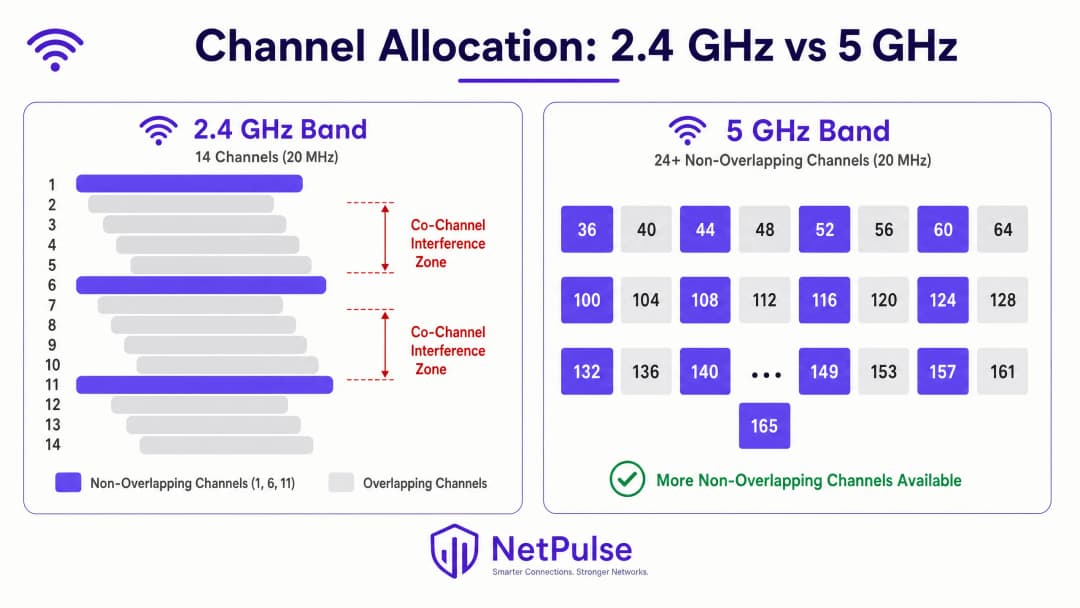
The 2.4 GHz band is highly susceptible to CCI due to its limited spectrum. In most regulatory domains, there are only three non-overlapping channels (1, 6, and 11) using a 20 MHz channel width. In high-density deployments - such as retail store floors, hotel conference wings, or stadium concourses - reusing these three channels without causing overlap is a mathematical challenge that cannot be solved by AP placement alone.
The 5 GHz band offers significant relief, providing up to 24 or more non-overlapping 20 MHz channels, depending on regional Dynamic Frequency Selection (DFS) regulations. However, the temptation to use wider channels - 40 MHz, 80 MHz, or 160 MHz - to achieve higher peak data rates often reintroduces CCI. At an 80 MHz channel width, the number of non-overlapping channels in the 5 GHz band drops from 24 to just six. For enterprise deployments, standardising on 20 MHz channels in 2.4 GHz and 20 MHz or 40 MHz channels in 5 GHz remains a fundamental best practice to maximise channel reuse and minimise interference. To learn more about modern spectrum utilisation, review WiFi Frequencies: A Guide to WiFi Frequencies in 2026.
The 6 GHz band, introduced by Wi-Fi 6E (IEEE 802.11ax) and Wi-Fi 7 (IEEE 802.11be), provides up to an additional 59 non-overlapping 20 MHz channels, offering a transformative opportunity for high-density deployments. However, 6 GHz adoption requires upgrades to both AP and client hardware, making it a medium-term investment rather than an immediate fix for legacy infrastructure.
Implementation Guide
Step 1: Conduct a Comprehensive RF Site Survey
Before making any configuration changes, establish a baseline. An active and passive RF site survey is critical. Passive surveys capture the existing RF environment - signal strength, noise floor, channel utilisation, and interference sources - without connecting to the network. Active surveys measure actual throughput and roaming behaviour. This is not a one-off task; environments evolve. Temporary structures in hospitality venues, seasonal inventory shifts in retail, or new equipment in healthcare settings can all alter RF propagation significantly.
Tools like Ekahau, NetSpot, or vendor-specific survey applications provide the necessary visualisations to identify interference zones, coverage gaps, and channel conflicts. The results of a site survey should directly inform AP placement, channel assignment, and transmit power settings.
Step 2: Optimise Transmit Power (Tx Power)
A common misconception is that increasing AP transmit power improves coverage and resolves connectivity issues. In reality, it exacerbates CCI. If an AP's signal reaches further than necessary, it creates interference in neighbouring cells and creates an asymmetrical RF environment.
Matching Client Capabilities: Mobile devices (smartphones, tablets) typically transmit at 10-15 dBm. If an AP transmits at 25 dBm, the client hears the AP clearly, but the AP struggles to hear the client - this is the classic hidden node problem. This results in retransmissions, reduced effective throughput, and increased channel utilisation.
Power Tuning Guidelines:
| Band | Recommended Tx Power | Rationale |
|---|---|---|
| 2.4 GHz | 10-14 dBm | Match smartphone Tx capabilities; minimise cell size |
| 5 GHz | 14-17 dBm | Slightly higher to compensate for path loss at higher frequencies |
| 6 GHz | 17-20 dBm | Slightly higher power required for high path loss |
To encourage band steering, 2.4 GHz power should typically be 3-6 dB lower than 5 GHz, pushing capable clients to the less congested 5 GHz band.
Step 3: Implement Dynamic Radio Management
Modern enterprise WLAN controllers feature dynamic radio management algorithms - Cisco's Radio Resource Management (RRM), Aruba's Adaptive Radio Management (ARM), and equivalent systems from Juniper Mist, Extreme Networks, and others. These systems continuously monitor the RF environment and dynamically adjust channel assignments and transmit power to mitigate CCI.
However, these systems require careful tuning. Relying entirely on default automated settings in high-density environments like stadiums or transport hubs often leads to instability. Key tuning parameters include:
- Channel Change Threshold: The level of interference required to trigger a channel change. If set too low, the system will continuously change channels in response to transient interference (microwave ovens, Bluetooth devices), causing client disconnections.
- Power Change Interval: How often the system adjusts transmit power. In stable environments, less frequent adjustments minimise disruption to clients.
- Minimum and Maximum Power Bounds: Hard limits that prevent the algorithm from setting power levels outside your design parameters.
Step 4: Disable Legacy Basic Data Rates
If your 2.4 GHz radio still has 1, 2, 5.5, and 11 Mbps enabled as basic (mandatory) rates, management frames - beacons, probe responses, and acknowledgements - are transmitted at these lower rates. A single beacon at 1 Mbps consumes 10 times more airtime than the same beacon at 11 Mbps. Across hundreds of APs and thousands of clients, this overhead is significant.
Disabling rates below 12 Mbps forces all management and data frames to use more efficient modulation. This effectively shrinks the AP's coverage cell, as only clients close enough to achieve speeds of 12 Mbps or better can associate. This creates a natural mechanism to reduce the CCI footprint of each AP.
Step 5: Implement 802.11k/v/r for Seamless Roaming
Sticky clients - devices that refuse to roam to a closer AP - are a major cause of CCI. A client associated with a distant AP at a low data rate consumes disproportionate airtime, degrading performance for all other clients on that channel.
- 802.11k (Radio Resource Measurement): Provides clients with a neighbour report, informing them of nearby APs and their signal strength.
- 802.11v (BSS Transition Management): Allows the network to send roaming suggestions to clients, effectively requesting them to transition to a better AP.
- 802.11r (Fast BSS Transition): Reduces roaming latency by pre-authenticating clients with target APs, which is critical for voice and video applications.
These protocols work together to ensure clients are always associated with the optimal AP, reducing per-client airtime consumption and mitigating CCI.
Got questions about your specific setup?
Our team works with venue operators, IT managers, and network engineers across 80,000 venues. Book a 20-minute call and we will show you how others like you solved it.
Best Practices
Disabling Low Basic Data Rates: Disabling legacy data rates (1, 2, 5.5, and 11 Mbps) forces clients to use more efficient modulation schemes. This reduces the airtime required for management frames and data transmission, effectively shrinking the AP's coverage cell. This is a fundamental optimisation for any modern enterprise deployment, discussed in detail in Office WiFi: Optimise Your Modern Office WiFi Network.
Utilising DFS Channels: In the 5 GHz band, use Dynamic Frequency Selection (DFS) channels (52-144 in most regulatory domains) to expand the available non-overlapping spectrum. Ensure your APs and client devices support DFS, and monitor radar events that could force channel changes. In environments where radar events are frequent (near airports or military installations), consider restricting use to non-DFS channels.
Strategic AP Placement: Avoid placing APs in long hallways where RF signals propagate unobstructed, creating the hallway effect. Instead, position APs within rooms or specific coverage areas where users gather. Use the physical structure of the building - walls, floors, racking - as natural RF attenuators to establish cell boundaries.
BLE Considerations for Location Services: If deploying location-based services alongside WiFi, understand how Bluetooth Low Energy interacts with your wireless infrastructure. For detailed integration strategies to prevent interference between BLE beacons and WiFi radios, see BLE Low Energy Explained for Enterprise.
Segmenting Guest and Corporate Traffic: Ensure Guest WiFi traffic is properly segmented from corporate infrastructure using VLANs and separate SSIDs. Minimising the number of SSIDs broadcast per AP (ideally no more than three) reduces management frame overhead and improves overall channel efficiency.
Troubleshooting and Risk Mitigation
Sticky Client Issues
Clients that refuse to roam to a closer AP with a stronger signal contribute significantly to CCI. The further a sticky client drifts, the lower its data rate drops, consuming more airtime to transmit the same amount of data. In addition to enabling 802.11k/v, review your cell overlap percentage. Cells should overlap by approximately 15-20% for seamless roaming. Excessive overlap gives clients little incentive to roam until signal quality degrades severely.
Rogue Access Points
Unauthorised APs brought in by employees or guests - consumer-grade routers plugged into ethernet ports - can destroy a carefully designed channel plan. Implement continuous Wireless Intrusion Prevention Systems (WIPS) to detect and suppress rogue APs. Ensure your Network Access Control (NAC) measures are robust, and consider modernising your NAC infrastructure.
Non-WiFi Interference Sources
Not all interference comes from other APs. Microwave ovens, Bluetooth devices, baby monitors, and DECT phones all operate in the 2.4 GHz band. Spectrum analysers can pinpoint these non-802.11 interference sources, which RRM algorithms might otherwise misinterpret as WiFi interference and respond to inappropriately. Identifying and removing or relocating these sources is often more effective than shifting channels.
Common Failure Modes
| Failure Mode | Root Cause | Mitigation |
|---|---|---|
| High Retry Rate (>10%) | CCI or Hidden Node | Reduce Tx Power; Review Channel Plan |
| Low Throughput Despite Strong Signal | Excessive Clients per AP; CCI | Add APs; Reduce Channel Width |
| Constant Channel Changes | RRM Threshold Too Low | Increase Interference Threshold |
| Clients Not Roaming | No 802.11k/v; Excessive Cell Overlap | Enable 802.11k/v; Adjust Tx Power |
| Intermittent Drops on 5 GHz | DFS Radar Event | Monitor DFS Events; Consider Non-DFS Channels |
ROI and Business Impact
Resolving CCI provides measurable and quantifiable returns. In retail environments, reliable connectivity enables seamless mobile point-of-sale transactions, real-time inventory lookups, and digital signage updates. A single POS outage during peak trading can cost thousands of pounds due to lost sales and operational disruption. In hospitality, network performance directly influences guest review scores on platforms like TripAdvisor and Google, where connectivity is consistently among the top three factors for guest satisfaction.
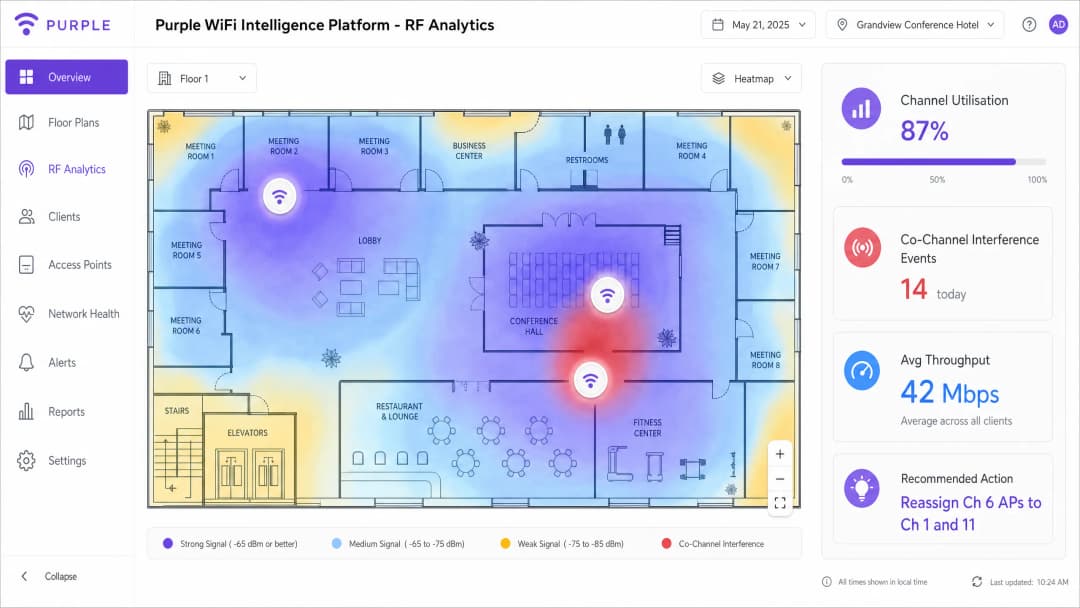
By using WiFi Analytics to continuously monitor channel utilisation, client counts per AP, retry rates, and interference events, IT teams can transition from reactive troubleshooting to proactive network management. Key performance indicators (KPIs) to track post-remediation include:
- Channel Utilisation: Aim for under 50% for reliable performance; over 70% indicates capacity issues.
- Retry Rate: Aim for under 5%; over 10% indicates significant interference or coverage issues.
- Average Client Throughput: Baseline before and after changes to quantify improvement.
- Support Ticket Volume: WiFi-related tickets should measurably decrease within 30 days of remediation.
An investment in a professional RF site survey and channel plan remediation typically pays back within one to two quarters through reduced IT support overhead and improved operational continuity.
Key Definitions
Co-Channel Interference (CCI)
Interference caused when multiple access points and clients operate on the same frequency channel, forcing them to share airtime via CSMA/CA and wait for the channel to clear before transmitting. CCI scales with the number of APs on the same channel.
The primary cause of degraded performance in dense deployments. Often misdiagnosed as an 'internet speed' or 'bandwidth' issue by end-users and non-technical stakeholders.
Adjacent-Channel Interference (ACI)
Interference caused by overlapping frequency bands - for example, using channels 1 and 3 simultaneously in the 2.4 GHz band. Unlike CCI, ACI is caused by spectral overlap rather than channel sharing.
Easily avoided by adhering strictly to non-overlapping channels (1, 6, 11 in 2.4 GHz). ACI is less common in well-managed enterprise networks but frequently seen in environments with rogue APs.
Carrier Sense Multiple Access with Collision Avoidance (CSMA/CA)
The protocol WiFi uses to manage access to the RF medium. Devices must listen for a clear channel before transmitting, and use random backoff timers to avoid simultaneous transmissions.
Understanding CSMA/CA is fundamental to understanding why CCI destroys throughput. It is a polite, orderly protocol that fails under heavy contention - the more devices sharing a channel, the longer each must wait.
Dynamic Frequency Selection (DFS)
A regulatory mechanism that allows WiFi devices to share spectrum with radar systems in the 5 GHz band. APs must monitor for radar signals and vacate the channel within 10 seconds if detected.
Crucial for enterprise deployments to unlock additional non-overlapping channels in the 5 GHz band. Requires careful monitoring; unexpected DFS events can cause client disconnects if not managed properly.
Hidden Node Problem
Occurs when two client devices can hear the AP but cannot hear each other, leading them to transmit simultaneously and cause collisions at the AP. Results in high retry rates and reduced throughput.
Often caused by APs transmitting at significantly higher power levels than client devices. Mitigated by matching AP Tx power to client Tx capability.
Radio Resource Management (RRM)
Automated systems within enterprise WLAN controllers that dynamically adjust channel assignments and transmit power based on continuous RF monitoring. Examples include Cisco RRM and Aruba ARM.
Useful in dynamic environments but requires careful threshold tuning. Default settings are rarely optimal for high-density venues and can cause instability if too aggressive.
Airtime Fairness
A WLAN feature that allocates equal transmission time to all associated clients, regardless of their data rate. Prevents slower (legacy or distant) clients from monopolising the channel at the expense of faster clients.
Critical in mixed-device environments (e.g., a hotel with both modern smartphones and legacy IoT sensors). Without airtime fairness, a single slow client can halve the effective throughput for all other clients on the channel.
BSS Transition Management (802.11v)
An IEEE 802.11 protocol that allows a WLAN controller to send roaming suggestions to client devices, recommending they associate with a different (closer or less congested) AP.
Part of the 802.11k/v/r suite of roaming protocols. Directly addresses the sticky client problem by giving the network a mechanism to influence client roaming decisions.
Channel Utilisation
The percentage of time a given RF channel is occupied by transmissions (both 802.11 and non-802.11). A key metric for diagnosing CCI.
Target below 50% for reliable performance. Above 70% indicates a capacity problem requiring channel plan remediation or additional AP density with reduced cell sizes.
Worked Examples
A 400-room luxury hotel is experiencing severe connectivity issues in the conference centre during a major tech summit. 800 attendees report slow speeds and frequent disconnects despite dense AP placement. The IT team has already tried rebooting all APs.
Step 1: Conduct an immediate spectrum analysis using a laptop-based tool (Ekahau, Metageek Chanalyzer) to baseline channel utilisation and interference levels. The analysis reveals 2.4 GHz channel utilisation at 94% and significant CCI on 5 GHz due to 80 MHz channel widths across all APs.
Step 2: Disable 2.4 GHz radios on every other AP in the high-density conference area. With 800 devices in a confined space, the 2.4 GHz band is beyond saturation. Reducing the number of competing APs on three channels immediately reduces contention.
Step 3: Reduce 5 GHz channel widths from 80 MHz to 20 MHz across all conference centre APs. This increases available non-overlapping channels from approximately 6 to 24, allowing each AP to operate on a unique channel.
Step 4: Lower AP transmit power to 12 dBm (2.4 GHz) and 15 dBm (5 GHz) to shrink cell sizes and encourage clients to associate with the nearest AP rather than a distant one.
Step 5: Disable basic data rates below 12 Mbps on all radios.
Step 6: Validate with a post-change spectrum analysis. Channel utilisation should drop below 60% and retry rates below 8%.
A national retail chain has deployed APs down the centre of every aisle in a large warehouse-style store. Staff report poor roaming on handheld scanners and persistent connectivity drops near the loading bay.
Step 1: Conduct a passive RF survey to visualise coverage and identify the hallway effect. The survey confirms that APs at opposite ends of 60-metre aisles are on the same channel and interfering with each other.
Step 2: Relocate APs to a staggered deployment pattern, positioning them above the racking rather than in the aisle centre. This uses the metal racking as a natural RF attenuator, creating distinct coverage cells per aisle section.
Step 3: Implement directional antennas (downtilt patch antennas) on specific APs near the loading bay to focus RF energy downward and limit horizontal propagation into adjacent cells.
Step 4: Adjust RRM profiles to react less aggressively to transient interference from loading bay equipment (forklifts, metal doors).
Step 5: Enable 802.11k and 802.11v on the WLAN controller to assist handheld scanner roaming decisions.
Step 6: Validate roaming performance by walking the floor with a handheld scanner and monitoring association events in the WLAN controller.
Practice Questions
Q1. You are designing the WiFi network for a new high-density university lecture theatre with 500 seats. The architect insists on hiding all APs above a metal-mesh drop ceiling for aesthetic reasons. The university requires reliable 4K video streaming for remote lectures. How do you address the architectural constraint without compromising RF performance?
Hint: Consider the impact of metal mesh on RF propagation, the resulting requirement for Tx power, and the asymmetric coverage problem this creates.
View model answer
The metal mesh will severely attenuate the RF signal, potentially by 10-20 dB depending on mesh density. To compensate, APs would need to transmit at maximum power, which increases CCI in adjacent spaces and creates a significant hidden node problem for clients trying to transmit back through the mesh. The recommended approach is to negotiate the use of APs with external directional antennas (downtilt patch antennas) mounted below the ceiling tile, with the AP body concealed above the mesh. Alternatively, specify aesthetically designed APs (e.g., Cisco Meraki or Aruba with low-profile enclosures) that can be mounted flush below the ceiling. If the architect is immovable on the metal mesh, specify APs with external antenna ports and route antenna cables through the mesh to below-ceiling mounting points. Under no circumstances should RF design be compromised for aesthetics when 4K streaming reliability is a stated requirement.
Q2. A retail client is upgrading their POS tablets to a new model that only supports 2.4 GHz WiFi. They currently operate a well-managed dual-band network with 30 APs in a medium-sized store. What changes should you make to accommodate the new tablets without degrading overall network performance for other devices?
Hint: Focus on band steering, basic data rates, and the impact of adding 2.4 GHz-only devices to an already constrained band.
View model answer
First, ensure band steering is aggressively enabled to push all capable devices (smartphones, modern laptops) to the 5 GHz band, clearing airtime on 2.4 GHz for the POS tablets. Second, audit the 2.4 GHz channel plan to ensure strict adherence to channels 1, 6, and 11 with no deviations. Third, disable basic data rates below 12 Mbps on the 2.4 GHz band to force the POS tablets to transmit more efficiently, reducing their airtime consumption per transaction. Fourth, consider disabling 2.4 GHz radios on select APs if the density is too high - creating fewer, larger 2.4 GHz cells while maintaining dense 5 GHz coverage. Finally, monitor 2.4 GHz channel utilisation post-deployment and set an alert threshold at 60% to catch degradation before it impacts POS performance.
Q3. After deploying a new WLAN controller, the automated Radio Resource Management feature is constantly changing channels every 15-20 minutes, causing brief disconnects for VoIP users and complaints from the operations team. The IT manager wants to disable RRM entirely. What is your recommendation?
Hint: Consider the trade-off between RRM stability and the long-term benefit of automated channel management in a dynamic environment.
View model answer
Disabling RRM entirely is not recommended. Without automated channel management, the network will gradually degrade as the RF environment changes (new equipment, seasonal changes, rogue APs). The correct approach is to tune the RRM thresholds rather than disable the feature. Increase the interference threshold required to trigger a channel change - the algorithm is currently reacting to transient interference that does not warrant a channel change. Extend the minimum time between channel changes to at least 60 minutes. Consider implementing a scheduled maintenance window for channel changes, restricting automated changes to off-peak hours (e.g., 02:00-04:00). Enable event logging for all RRM-triggered changes to identify the specific interference source causing the frequent triggers. Once the root cause is identified (often a non-WiFi interference source like a microwave or DECT phone), address it directly.
Continue reading in this series
Understanding RSSI and Signal Strength for Optimal Channel Planning
This guide provides a comprehensive technical deep-dive into RSSI, Signal-to-Noise Ratio (SNR), and RF propagation principles for optimal channel planning. It equips IT managers, network architects, and venue operations directors with actionable strategies to mitigate Co-Channel and Adjacent Channel Interference, optimise AP placement, and leverage analytics for measurable business impact across hospitality, retail, and public-sector environments.
WiFi 6 vs WiFi 5: Does it Solve Channel Interference?
This guide provides a technical deep-dive into how WiFi 6 (802.11ax) addresses channel interference in high-density enterprise environments through OFDMA and BSS Coloring. It equips IT managers, network architects, and CTOs with actionable deployment strategies, real-world case studies from hospitality and healthcare, and a framework for evaluating the ROI of infrastructure upgrades in venues where wireless performance is business-critical.
Best WiFi Channels for High-Density Venues
A definitive technical reference for selecting and optimising WiFi channels in high-density environments like stadiums, arenas, and large public venues. It covers RF physics, channel reuse strategies across 5 GHz and 6 GHz bands, and actionable deployment guidance for IT leaders.
Got questions about your specific setup?
Our team works with venue operators, IT managers, and network engineers across 80,000 venues. Book a 20-minute call and we will show you how others like you solved it.