
कर्मचारी बाहेर पडल्यावर WiFi ॲक्सेस कसा रद्द करावा
ही मार्गदर्शिका IT आणि स्थळ ऑपरेशन्स टीम्सना उर्वरित कर्मचाऱ्यांच्या कामात व्यत्यय न आणता, एखादा कर्मचारी बाहेर पडल्यावर स्टाफ WiFi ॲक्सेस कसा काढून टाकावा हे दाखवते. हे सर्टिफिकेट-आधारित 802.1X, ओळख-विशिष्ट iPSK आणि SCIM-संचालित डीप्रॉव्हिजनिंगची तुलना करते, आणि त्यानंतर एकाच दिवसात लागू करता येईल अशी रनबुक, चाचणी पद्धत आणि ऑडिट पुरावा मॉडेल प्रदान करते.
Video overview
हे मार्गदर्शक ऐका
पॉडकास्ट ट्रान्सक्रिप्ट पहा
आमच्या मुख्य मालिकेचा भाग: एंटरप्राइज WiFi सुरक्षा मार्गदर्शिका →
कार्यकारी सारांश
जेव्हा एखादा कर्मचारी संस्था सोडतो, तेव्हा त्यांचा भौतिक ॲक्सेस रद्द करणे सोपे असते. पण त्यांचा WiFi ॲक्सेस रद्द करणे अनेकदा सोपे नसते. जर तुमचे नेटवर्क सामायिक WPA2 पासवर्डवर अवलंबून असेल, तर जाणारा कर्मचारी क्रेडेंशियल्स माहित असतानाच बाहेर पडतो. त्यांचा ॲक्सेस काढून टाकनेचा एकमेव मार्ग म्हणजे संपूर्ण नेटवर्कचा पासवर्ड बदलणे, ज्यामुळे कामकाजात अडथळा येतो आणि सर्व डिव्हाइसेसवर मॅन्युअली अपडेट करावे लागते. ही एक गंभीर सुरक्षा त्रुटी आहे आणि PCI-DSS आणि ISO 27001 सारख्या मानकांनुसार अनुपालनाचे अपयश आहे.
ही मार्गदर्शिका सामायिक पासवर्ड कसा टाळावा आणि प्रति-वापरकर्ता WiFi रद्द करण्याची प्रक्रिया कशी लागू करावी हे स्पष्ट करते. आम्ही तीन विश्वसनीय मॉडेल्सची तपासणी करतो: सर्टिफिकेट रद्द करण्यासह 802.1X EAP-TLS, प्रति-ओळख की (key) हटवण्यासह Identity Pre-Shared Key (iPSK), आणि SCIM-चालित डीप्रोविझनिंग. नेटवर्क ॲक्सेस थेट तुमच्या ओळख प्रदात्याशी—जसे की Microsoft Entra ID, Okta, किंवा Google Workspace—जोडून, तुम्ही खाते निष्क्रिय होताच ॲक्सेस रद्द करण्याची प्रक्रिया स्वयंचलित करू शकता, ज्यामुळे मूल्यमापनकर्त्याला अपेक्षित असलेला अचूक ऑडिट ट्रेल तयार होतो.
या विषयावरील आमचे तांत्रिक ब्रीफिंग पॉडकास्ट ऐका:
तांत्रिक सखोल विश्लेषण
सामायिक पासवर्डची समस्या
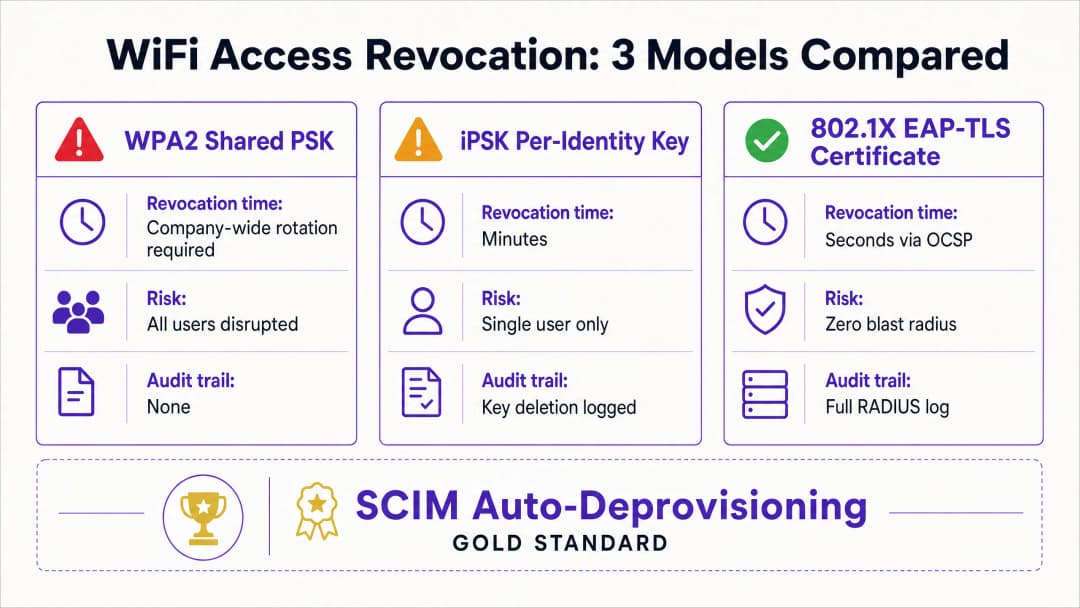
सामायिक WPA2-Personal पासवर्डमध्ये ओळख संदर्भाचा अभाव असतो. नेटवर्क सध्याचा कर्मचारी आणि माजी कर्मचारी यांच्यात फरक करू शकत नाही. परिणामी, ॲक्सेस रद्द करण्यासाठी कंपनी-व्यापी पासवर्ड बदलणे आवश्यक असते. यामुळे कर्मचारी नोकरी सोडणे आणि पासवर्ड बदलणे यामधील काळात सुरक्षेची त्रुटी निर्माण होते.
मॉडेल १: 802.1X EAP-TLS सर्टिफिकेट रद्द करणे
WiFi सुरक्षेसाठी एंटरप्राइझ मानक EAP-TLS चा वापर करणारे 802.1X आहे. या मॉडेलमध्ये, प्रत्येक डिव्हाइसला सर्टिफिकेट ऑथॉरिटी (CA) कडून एक अद्वितीय डिजिटल सर्टिफिकेट मिळते. जेव्हा एखादे डिव्हाइस कनेक्ट होते, तेव्हा RADIUS सर्वर सर्टिफिकेटचे क्रिप्टोग्राफिक पद्धतीने प्रमाणीकरण करतो.
ॲक्सेस रद्द करण्यासाठी, तुम्ही CA वर सर्टिफिकेट रद्द करता. RADIUS सर्वर Online Certificate Status Protocol (OCSP) चा वापर करून रिअल-टाइममध्ये सर्टिफिकेट रद्द करण्याच्या स्थितीची तपासणी करतो. जर OCSP रिस्पॉन्डर 'Revoked' स्थिती दर्शवत असेल, तर RADIUS सर्वर Access-Reject संदेश पाठवतो. सक्रिय सत्रांसाठी (active sessions), सर्वर कनेक्शन त्वरित समाप्त करण्यासाठी Change of Authorisation (CoA) जारी करतो. ही प्रक्रिया उर्वरित नेटवर्कवर कोणताही परिणाम न करता केवळ एका वापरकर्त्याचा ॲक्सेस रद्द करते.
मॉडेल २: iPSK प्रति-ओळख की (key) हटवणे
मिश्रित डिव्हाइस प्रकार असलेल्या वातावरणासाठी, ज्यामध्ये 802.1X सर्टिफिकेटला सपोर्ट न करणाऱ्या हेडलेस हार्डवेअरचाही समावेश आहे, Identity Pre-Shared Key (iPSK) हा सर्वात योग्य उपाय आहे. iPSK एकाच SSID वर प्रत्येक वैयक्तिक वापरकर्त्याला किंवा डिव्हाइसला एक अद्वितीय पासवर्ड प्रदान करते.
RADIUS सर्वर प्रत्येक अद्वितीय की (key) ला एका विशिष्ट ओळखीशी मॅप करतो. जेव्हा एखादा कर्मचारी नोकरी सोडतो, तेव्हा IT विभाग फक्त RADIUS डेटाबेसमधून त्यांची विशिष्ट की हटवतो. याचा प्रभाव पूर्णपणे केवळ त्याच एका वापरकर्त्यापुरता मर्यादित राहतो. हा दृष्टिकोन एका क्रेडेंशियलच्या सुलभतेसह एंटरप्राइझ नेटवर्क की वैयक्तिक सुरक्षा प्रदान करतो.
मॉडेल ३: SCIM ऑटो-डीप्रोविझनिंग
System for Cross-domain Identity Management (SCIM) हे एक खुले मानक आहे जे वापरकर्त्याच्या ओळखीच्या माहितीची देवाणघेवाण स्वयंचलित करते. SCIM तुमच्या ओळख प्रदात्यामध्ये और तुमच्या WiFi व्यवस्थापन प्लॅटफॉर्मसारख्या डाउनस्ट्रीम सिस्टम्समध्ये जोडणारा दुवा म्हणून काम करते.
जेव्हा HR विभाग Microsoft Entra ID, Okta, किंवा Google Workspace मध्ये नोकरी सोडणाऱ्या कर्मचाऱ्याला निष्क्रिय करतो, तो SCIM द्वारे Purple ला डीप्रोविझनिंग इव्हेंट पाठवला जातो. Purple पुढील प्रमाणीकरणाच्या वेळी वापरकर्त्याचे WiFi क्रेडेंशियल्स—मग ते सर्टिफिकेट असो किंवा iPSK—त्वरित रद्द करते. हे एक क्लोज्ड-लूप सिस्टम तयार करते जिथे ओळख जीवनचक्र बदल स्वयंचलितपणे नेटवर्क ॲक्सेस धोरणे लागू करतात.
तुमच्या विशिष्ट सेटअपबद्दल काही प्रश्न आहेत का?
आमची टीम ८०,००० हून अधिक वेन्यूजमधील वेन्यू ऑपरेटर्स, IT मॅनेजर्स आणि नेटवर्क इंजिनिअर्ससोबत काम करते. २० मिनिटांचा कॉल बुक करा आणि तुमच्यासारख्या इतरांनी ही समस्या कशी सोडवली हे आम्ही तुम्हाला दाखवू.
अंमलबजावणी मार्गदर्शिका
प्रति-वापरकर्ता ॲक्सेस रद्द करण्याची प्रक्रिया लागू करण्यासाठी तुमच्या ओळख प्रदाता, RADIUS सर्वर आणि WiFi हार्डवेअरमध्ये समन्वय आवश्यक आहे. Purple हे Cisco Meraki, HPE Aruba, Ruckus, Juniper Mist, Ubiquiti UniFi, Cambium, Extreme, आणि Fortinet च्या हार्डवेअरशी समाकलित (integrate) होते.
पायरी १: ओळखीला सत्याचा एकमेव स्रोत म्हणून स्थापित करा
तुमचा ओळख प्रदाता वापरकर्त्याच्या स्थितीसाठी सत्याचा एकमेव स्रोत असल्याची खात्री करा. सर्व ऑनबोर्डिंग और ऑफबोर्डिंग प्रक्रिया Microsoft Entra ID, Okta, किंवा Google Workspace मध्ये सुरू आणि समाप्त झाल्या पाहिजेत.
पायरी २: योग्य प्रमाणीकरण प्रोटोकॉल निवडा
तुमच्याकडे सर्व कॉर्पोरेट डिव्हाइसेसवर सर्टिफिकेट पाठवण्यास सक्षम असलेले प्रगत मोबाईल डिव्हाइस व्यवस्थापन (MDM) सेटअप असल्यास, 802.1X EAP-TLS निवडा. तुम्हाला व्यवस्थापित न केलेल्या डिव्हाइसेस, पॉइंट-ऑफ-सेल टर्मिनल्स किंवा IoT हार्डवेअरच्या विस्तृत श्रेणीला सपोर्ट करायचा असल्यास, iPSK निवडा.
पायरी ३: SCIM एकत्रीकरण कॉन्फिगर करा
तुमचा ओळख प्रदाता आणि Purple दरम्यान SCIM कनेक्शन कॉन्फिगर करा. वापरकर्ता स्थिति गुणधर्म (user status attribute) मॅप करा जेणेकरून डिरेक्टरीमधील 'disabled' स्थिती Purple मध्ये ॲक्सेस रद्द करण्याचा इव्हेंट ट्रिगर करेल.
पायरी ४: RADIUS टाइमर ट्यून करा
जर EAP-TLS वापरत असाल, तर तुमच्या RADIUS सर्वरचा OCSP कॅश Time-To-Live (TTL) योग्य प्रकारे कॉन्फिगर करा. लहान TTL (उदा. १५ मिनिटे) रद्द केलेले सर्टिफिकेट वैध राहण्याचा कालावधी कमी करून सुरक्षा वाढवतो, परंतु यामुळे CA वरील लोड वाढतो.
सर्वोत्तम पद्धती
उद्योग मानकांनुसार, संस्थांनी नेटवर्क ॲक्सेसवर कडक नियंत्रण ठेवले पाहिजे. सुरक्षित स्थिती राखण्यासाठी या पद्धती लागू करा:
- SCIM सह स्वयंचलित करा: मॅन्युअली ॲक्सेस रद्द करण्यामध्ये मानवी चुकीची शक्यता असते. तुमचा WiFi प्लॅटफॉर्म थेट तुमच्या ओळख प्रदात्याशी जोडून ही प्रक्रिया स्वयंचलित करा.
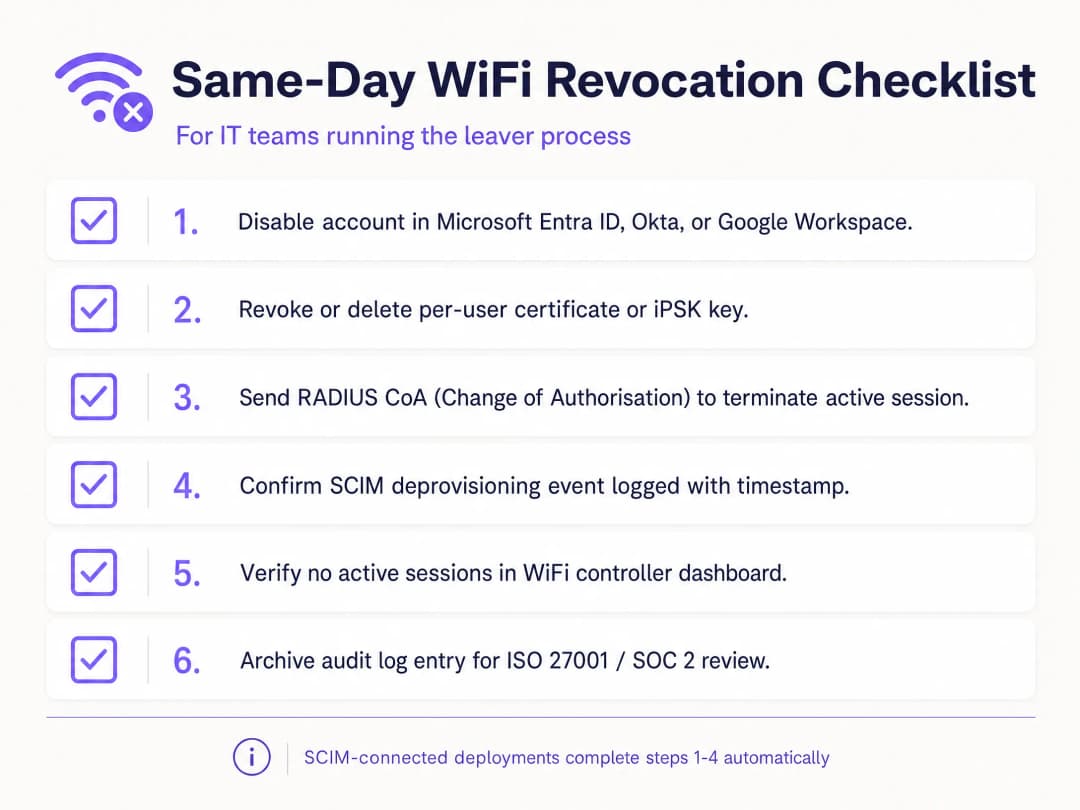
- RADIUS CoA लागू करा: क्रेडेंशियल्स रद्द केल्याने नवीन कनेक्शन्स रोखली जातात परंतु सक्रिय सत्रे (active sessions) समाप्त होत नाहीत. तुमचे सिस्टम डिव्हाइस त्वरित डिस्कनेक्ट करण्यासाठी Change of Authorisation कमांड पाठवत असल्याची खात्री करा.
- अतिथी आणि कर्मचारी ट्रॅफिक वेगळे करा: कर्मचाऱ्यांचे डिव्हाइसेस कधीही Guest WiFi नेटवर्कवर ठेवू नका. अलगाव राखण्यासाठी स्वतंत्र VLANs आणि SSIDs वापरा.
- ऑडिट लॉग्स: सर्व डीप्रोविझनिंग इव्हेंट्सचे अपरिवर्तनीय लॉग्स ठेवा. ISO 27001 मूल्यमापनकर्त्यांना सेवा समाप्तीनंतर त्वरित ॲक्सेस काढून टाकल्याचा पुरावा आवश्यक असतो.
त्रुटी निवारण आणि जोखीम कमी करणे
WiFi ॲक्सेस रद्द करण्यामधील सर्वात सामान्य अपयश म्हणजे विस्कळीत प्रक्रिया. जर IT विभाग डिरेक्टरीमध्ये खाते निष्क्रिय करतो परंतु स्वतंत्र RADIUS डेटाबेस अपडेट करण्यात अपयशी ठरतो, तर नोकरी सोडणाऱ्या कर्मचाऱ्याकडे ॲक्सेस तसाच राहतो. SCIM एकत्रीकरण ही जोखीम पूर्णपणे कमी करते.
दुसरी जोखीम म्हणजे सर्टिफिकेट कॅशिंग. जर एखादा RADIUS सर्वर २४ तासांसाठी 'Good' OCSP प्रतिसाद कॅश करत असेल, तर रद्द केलेले डिव्हाइस कॅश संपेपर्यंत प्रमाणित होत राहू शकते. कार्यप्रदर्शन आणि सुरक्षा आवश्यकतांमध्ये संतुलन राखण्यासाठी तुमच्या OCSP कॅश सेटिंग्ज ट्यून करा.
सामायिक डिव्हाइसेससाठी, जसे की अनेक शिफ्ट कर्मचाऱ्यांद्वारे वापरले जाणारे रिटेल टॅब्लेट, डिव्हाइस प्रमाणीकरण कोणत्याही वैयक्तिक कर्मचाऱ्याच्या ओळखीशी जोडू नका. एखाद्या व्यक्तीने नोकरी सोडल्यामुळे हार्डवेअरचा महत्त्वाचा भाग ऑफलाइन होण्यापासून वाचवण्यासाठी सेवा खाती (service accounts) किंवा डिव्हाइस-विशिष्ट सर्टिफिकेट्सचा वापर करा.
ROI आणि व्यावसायिक प्रभाव
प्रति-वापरकर्ता WiFi ॲक्सेस रद्द करण्याच्या पद्धतीकडे वळल्याने मोजता येण्याजोगे व्यावसायिक मूल्य मिळते. हे कंपनी-व्यापी पासवर्ड बदलण्याच्या समन्वयामध्ये खर्च होणारे IT सपोर्टचे तास वाचवते. हे माजी कर्मचाऱ्यामुळे उद्भवणाऱ्या डेटा उल्लंघनाची (data breach) जोखीम कमी करते, ज्यामुळे संस्था नियामक दंड आणि प्रतिष्ठेच्या नुकसानीपासून वाचते.
याशिवाय, हे ISO 27001 आणि SOC 2 मूल्यमापन सुरळीतपणे पार पाडण्यासाठी आवश्यक असलेला स्पष्ट ऑडिट ट्रेल प्रदान करता. जॉइनर-मूवर-लीव्हर प्रक्रिया स्वयंचलित करून, IT टीम्स मॅन्युअल क्रेडेंशियल व्यवस्थापनाऐवजी धोरणात्मक उपक्रमांवर लक्ष केंद्रित करू शकतात. तुमचे नेटवर्क सुरक्षित करण्याबद्दल अधिक तपशीलांसाठी, आमचे Enterprise WiFi Security: A Complete Guide for 2026 वाचा.
महत्वाच्या व्याख्या
IEEE 802.1X
एक नेटवर्क ॲक्सेस-कंट्रोल फ्रेमवर्क जे नेटवर्क ॲक्सेसला अनुमती द्यायची की नाही हे ठरवण्यासाठी डिव्हाइस, नेटवर्क ऑथेंटिकेटर आणि बॅक-एंड ऑथेंटिकेशन सर्व्हिसचा वापर करते.
जेव्हा सामायिक पासफ्रेजवर विश्वास ठेवण्याऐवजी स्टाफ WiFi ला व्यक्ती किंवा व्यवस्थापित डिव्हाइसेसचे प्रमाणीकरण करण्याची आवश्यकता असते, तेव्हा हे वापरा.
EAP-TLS
एक Extensible Authentication Protocol पद्धत जी परस्पर प्रमाणीकरणासाठी TLS सर्टिफिकेट्स वापरते आणि प्रमाणीकरण देवाणघेवाणी दरम्यान कीईंग मटेरियल मिळवते.
व्यवस्थापित डिव्हाइसेससाठी हे तेव्हा वापरा जेव्हा सर्टिफिकेट लाइफसायकल आणि RADIUS प्रमाणीकरण वैयक्तिक निलंबनास (revocation) समर्थन देऊ शकते.
RADIUS
नेटवर्क उपकरणे आणि प्रमाणीकरण सेवा यांच्यात प्रमाणीकरण, अधिकृतता आणि अकाउंटिंग निर्णय वाहून नेण्यासाठी सामान्यतः वापरला जाणारा एक प्रोटोकॉल आणि सर्व्हिस मॉडेल.
802.1X आणि काही iPSK उपयोजनांची चाचणी करताना हा बॅक-एंड निर्णय बिंदू आहे जो तुम्हाला समजून घेणे आवश्यक आहे.
Certificate revocation
एखाद्या सर्टिफिकेटची प्रमाणीकरण करण्याची अधिकृतता त्याच्या नियोजित समाप्ती तारखेपूर्वीच काढून घेणे.
जेव्हा बाहेर पडणाऱ्या कर्मचाऱ्याचे सर्टिफिकेट समाप्ती तारखेपर्यंत वैध राहण्याऐवजी पुढील WiFi प्रमाणीकरणाच्या वेळीच अयशस्वी होणे आवश्यक असते, तेव्हा हे महत्त्वाचे ठरते.
iPSK
आयडेंटिटी प्री-शेअर्ड की. सामायिक केलेल्या SSID वर एक व्यक्ती, डिव्हाइस किंवा जबाबदार ग्रुपला नियुक्त केलेली एक विशिष्ट WiFi की.
जेव्हा EAP-TLS एखाद्या डिव्हाइससाठी योग्य नसते, तेव्हा हे एक व्यावहारिक लक्ष्यित-काढून टाकण्याचे मॉडेल प्रदान करते.
SCIM
सिस्टम फॉर क्रॉस-डोमेन आयडेंटिटी मॅनेजमेंट. सिस्टीम्समधील ओळख डेटा प्रोव्हिजन आणि व्यवस्थापित करण्यासाठी एक HTTP - आधारित मानक.
हे आयडेंटिटी प्रोव्हायडरमधील खाते-निष्क्रिय इव्हेंटला WiFi ॲक्सेस-स्टेटस बदलाशी जोडते.
ओळख प्रदाता
कर्मचारी, कंत्राटदार आणि इतर कर्मचार्यांच्या ओळखीचे खाते राखणारी आणि त्यांचे प्रमाणीकरण किंवा पुष्टी करणारी प्रणाली.
तुमच्या जॉइनर - मूव्हर - लीव्हर प्रक्रियेमध्ये ते बंद करण्याच्या इव्हेंटचे अधिकृत स्त्रोत असले पाहिजे.
सक्रिय सत्र
एक डिव्हाइस ज्याने आधीच प्रमाणीकरण केले आहे आणि सध्या त्याला नेटवर्क प्रवेश आहे.
क्रेडेन्शियल रद्द केल्यानंतर तुमच्या जोखीम धोरणाला स्वतंत्रपणे डिस्कनेक्ट करण्याची आवश्यकता आहे की नाही ते ठरवा.
WPA3 Enterprise
WPA3 सुरक्षेची एंटरप्राइझ शाखा, जी आधुनिक सुरक्षा प्रोटोकॉल वापरते आणि WiFi CERTIFIED WPA3 नेटवर्कसाठी प्रोटेक्टेड मॅनेजमेंट फ्रेम्सची आवश्यकता असते.
हे WiFi सुरक्षा सुधारते, परंतु वैयक्तिक ऑफबोर्डिंगसाठी अजूनही ओळख - बद्ध क्रेडेन्शियल मॉडेल आवश्यक आहे.
VLAN
एक लॉजिकल नेटवर्क सेगमेंट जे नेटवर्क डिझाइननुसार लेअर २ किंवा लेअर ३ वर ट्रॅफिक वेगळे करते.
जेव्हा एखाद्या कर्मचाऱ्याची WiFi ओळख कर्मचारी, कंत्राटदार किंवा इतर नेटवर्क भूमिकेशी मॅप केली जाते तेव्हा हे महत्त्वाचे असते.
सोडवलेली उदाहरणे
एक २०० खोल्यांच्या हॉटेलमध्ये फ्रंट डेस्क, हाऊसकीपिंग आणि मेंटेनन्सद्वारे सामायिक केलेला एकच स्टाफ WiFi SSID आहे. बाहेर पडणाऱ्या कर्मचाऱ्याला सामायिक केलेला WPA2 पासफ्रेज माहित आहे, आणि हॉटेल अनियोजित रोटेशनद्वारे आधीच व्यापलेल्या खोल्यांमधील कामकाजात व्यत्यय आणू शकत नाही.
सामायिक केलेल्या पासफ्रेजसाठी एक अपवाद रेकॉर्ड तयार करा, त्यानंतर व्यवस्थापित फ्रंट-डेस्क डिव्हाइसेसना EAP-TLS सह 802.1X वर स्थलांतरित करा आणि जे डिव्हाइसेस सर्टिफिकेट्स वापरू शकत नाहीत त्यांच्यासाठी विशिष्ट मालकीचे iPSKs जारी करा. तात्काळ बाहेर पडणाऱ्या कर्मचाऱ्यासाठी, सामायिक केलेला पासफ्रेज रोटेट करा कारण तो अद्याप एक सामान्य गुपित आहे. त्यानंतरच्या प्रत्येक बाहेर पडणाऱ्या कर्मचाऱ्यासाठी, त्याची ओळख निष्क्रिय करा, सर्टिफिकेट किंवा iPSK काढून टाका, नवीन जॉइनिंगची चाचणी घ्या आणि इव्हेंट चेन राखून ठेवा. याचे मोजमाप केलेले ऑपरेटिंग निकाल म्हणजे प्रत्येक ऑफबोर्डिंग इव्हेंटसाठी एक लक्ष्यित क्रेडेंशियल काढणे, एक नाकारलेली चाचणी आणि एक जबाबदार ऑडिट रेकॉर्ड होय.
एक राष्ट्रीय किरकोळ विक्रेता स्टोअर्स, वितरण ठिकाणे आणि स्टेडियम पॉप-अप ऑपरेशनमध्ये स्टाफ WiFi चालवतो. HR द्वारे Microsoft Entra ID मधील खाती निष्क्रिय केली जातात, परंतु स्टोअर टीम्स सध्या बाहेर पडणाऱ्या कर्मचाऱ्यांसाठी स्वतंत्र नेटवर्क तिकिटे उघडतात.
WiFi ॲक्सेस रेकॉर्डशी Entra ID टिकाऊ ओळख मॅप करा आणि निष्क्रिय केलेली स्थिती ॲक्सेस सर्व्हिसमध्ये पाठवण्यासाठी SCIM वापरा. ओळख-प्रदाता (आयडेंटिटी-प्रोव्हायडर) निष्क्रियतेला अधिकृत ट्रिगर म्हणून ठेवा. अयशस्वी सिंक्रोनाइझेशनसाठी एक अपवाद मार्ग परिभाषित करा, एका ऑपरेशनल मालकाची नियुक्ती करा आणि रोलआउट करण्यापूर्वी एका स्टोअर ग्रुपमध्ये नियंत्रित निष्क्रिय-आणि-प्रमाणीकरण (disable-and-authenticate) चाचणी चालवा. याचा मोजता येणारा परिणाम म्हणजे एकच आयडेंटिटी इव्हेंट जो WiFi स्थिती बदल आणि रेकॉर्ड केलेले नाकारलेले नवीन प्रमाणीकरण तयार करतो, ज्यामुळे सामान्य मार्ग म्हणून स्थानिक तिकिटाची जागा घेतली जाते.
एका कॉन्फरन्स सेंटरला सोमवारच्या उद्घाटनासाठी कायमस्वरूपी कर्मचारी आणि स्थळावरील डिव्हाइसेस कनेक्ट ठेवताना, वीकेंडच्या इव्हेंटनंतर कंत्राटदाराचा स्टाफ WiFi ॲक्सेस काढून टाकण्याची आवश्यकता आहे.
कंत्राटदाराला एक iPSK जारी करा जे कंत्राटदाराच्या आयडेंटिटी रेकॉर्डशी जोडलेले असेल, कोणत्याही सामान्य इव्हेंट-टीम पासवर्डशी नाही. काम संपल्यानंतर, फक्त तेच iPSK डिलीट करा, लाइव्ह सेशन बंद करायचे की नाही ते ठरवा, आणि नंतर काढून टाकलेल्या की (key) सह नवीन जॉइनची चाचणी घ्या. अधिकृत ऑफबोर्डिंग विनंती, की डिलीशन आणि अयशस्वी चाचणी एकत्र ठेवा. याचा परिणाम म्हणजे कायमस्वरूपी कर्मचाऱ्यांसाठी कोणताही क्रेडेंशियल बदल होणार नाही आणि त्यांच्या डिव्हाइसेसचे कोणतेही रीकॉन्फिगरेशन करावे लागणार नाही.
या मालिकेमध्ये पुढे वाचा
पासवर्डशिवाय WiFi वापरण्याचे अनुपालन फायदे: HIPAA, PCI, ISO 27001
तुम्ही हे ठरवू शकाल की स्टाफ नेटवर्क सामायिक पासवर्डवरून EAP-TLS सह 802.1X वर स्थलांतरित केल्याने PCI DSS 4.0, HIPAA आणि ISO 27001:2022 अंतर्गत तुमचे ऑडिट मधील त्रुटींचे अंतर भरून निघेल की नाही. हे कोणत्या नियंत्रणांची पूर्तता करते, कोणत्या नियंत्रणांची पूर्तता करत नाही आणि प्रत्यक्ष ऑडिट कामापूर्वी कोणते पुरावे गोळा करायचे हे तुम्हाला समजेल.
सुरक्षित BYOD WiFi: Passpoint प्रमाणपत्र ऑनबोर्डिंग विरुद्ध xPSK (iPSK)
झिरो-टच Passpoint EAP-TLS प्रमाणपत्रे विरुद्ध व्हेंडर-विशिष्ट xPSK (iPSK/easyPSK, DPSK, PPSK, MPSK) चा वापर करून व्यवस्थापित नसलेली कर्मचारी आणि विद्यार्थ्यांची उपकरणे (BYOD) सुरक्षित करण्यासाठी IT टीम्ससाठी एक सर्वसमावेशक तांत्रिक मार्गदर्शक.
WPA2 Personal vs Enterprise: फरक काय आहे आणि तुम्ही कोणते वापरले पाहिजे?
हे तांत्रिक संदर्भ मार्गदर्शक enterprise WiFi वातावरणातील WPA2 Personal आणि WPA2 Enterprise सुरक्षा प्रोटोकॉलची सर्वसमावेशक तुलना प्रदान करते. हे नेटवर्क आर्किटेक्ट्स आणि IT नेत्यांना माहितीपूर्ण उपयोजन निर्णय घेण्यास मदत करण्यासाठी प्रत्येक मानकांचे आर्किटेक्चरल फरक, उपयोजन पद्धती आणि सुरक्षा परिणाम स्पष्ट करते.
तुमच्या विशिष्ट सेटअपबद्दल काही प्रश्न आहेत का?
आमची टीम ८०,००० हून अधिक वेन्यूजमधील वेन्यू ऑपरेटर्स, IT मॅनेजर्स आणि नेटवर्क इंजिनिअर्ससोबत काम करते. २० मिनिटांचा कॉल बुक करा आणि तुमच्यासारख्या इतरांनी ही समस्या कशी सोडवली हे आम्ही तुम्हाला दाखवू.