跳至主要内容

如何在员工离职时撤销其 WiFi 访问权限

本指南详细介绍了如何在员工离职时撤销其 WiFi 访问权限,用基于用户的 802.1X 证书或 iPSK 取代不安全的共享密码。它涵盖了通过 SCIM 进行的自动停用,以满足 ISO 27001 和 SOC 2 审计要求。

📖 5 分钟阅读📝 1,063 🔧 2 应用实例3 练习题📚 8 关键定义

收听本指南

查看播客转录
Welcome to the Purple Technical Briefing. I'm your host, and today we're tackling one of the most common gaps in enterprise offboarding: what actually happens to WiFi access when an employee leaves? It sounds straightforward. Someone hands in their badge, HR closes their account, and you move on. But if your network still runs on a shared WPA2 password, that person walked out the door still knowing the password. And unless you rotate it for everyone, they can reconnect from the car park. That's the problem we're solving today. We'll cover the three credible models for per-user WiFi revocation, walk through a same-day revocation checklist, and explain exactly what an ISO 27001 or SOC 2 auditor expects to see in your logs. Let's get into it. Section one: why shared passwords are the wrong tool for the job. WPA2-Personal, the standard home-router setup, uses a single pre-shared key. Everyone on the network knows the same password. When one person leaves, that password is still valid on their phone, their laptop, any device they ever connected. The only way to revoke their access is to change the password for the entire network and redistribute it to every remaining user and device. In a hotel with 200 staff, that means updating every point-of-sale terminal, every back-office PC, every manager's phone. In a retail chain with 50 stores, it means a coordinated rollout across every site. The operational cost is high, the disruption is real, and the window between the leaver's last day and the completed rotation is a genuine security gap. PCI DSS, the payment card industry standard, requires you to change shared credentials whenever personnel with knowledge of them leave. So if your tills are on the same network as your staff WiFi, a leaver triggers a compliance obligation, not just a best-practice recommendation. The root cause is simple: a shared password has no identity attached to it. The network cannot distinguish between a current employee and a former one. To fix that, you need per-user credentials. Section two: the three models that actually work. Model one is 802.1X with EAP-TLS certificate-based authentication. This is the gold standard for enterprise WiFi security. In this model, each user or device holds a unique digital certificate issued by your Certificate Authority, or CA. When they connect to the WiFi, the RADIUS server validates that certificate cryptographically. The certificate is tied to an identity, not a password. To revoke access, you revoke the certificate at the CA level. The RADIUS server checks revocation status in real time using OCSP, the Online Certificate Status Protocol. When you mark a certificate as revoked, the next time that device tries to authenticate, the RADIUS server queries the OCSP responder, gets back a revoked response, and sends an Access-Reject to the access point. The device is off the network within seconds of the next authentication attempt. For active sessions, you use RADIUS Change of Authorisation, or CoA, to terminate the existing session immediately. Combined, OCSP and CoA mean you can revoke WiFi access for a leaver in under a minute, with a full audit trail in your RADIUS logs. The challenge with EAP-TLS is the PKI overhead. You need a Certificate Authority, a mechanism to issue certificates to devices, typically via an MDM like Microsoft Intune, and a process to revoke them. For organisations with a mature MDM and identity infrastructure, this is the right answer. For smaller teams or environments with IoT devices that cannot support certificate authentication, you need a different approach. Model two is iPSK, Identity Pre-Shared Key. Cisco calls it iPSK, Ruckus calls it DPSK, Aruba calls it MPSK, but the concept is the same: every user or device gets a unique password, even though they all connect to the same SSID. The RADIUS server maps each unique key to a specific identity and, optionally, to a specific VLAN. When you delete that key from the RADIUS database, the device can no longer authenticate. The blast radius of a leaver is exactly one person. Everyone else's keys remain valid. iPSK is particularly well-suited to environments with mixed device types. IoT devices, point-of-sale terminals, and legacy hardware that cannot support 802.1X certificates can all use iPSK. It is also simpler to operate than a full PKI deployment, making it the right choice for mid-market organisations that need per-user revocation without the infrastructure overhead. The revocation time for iPSK is typically a few minutes, not seconds. The key deletion propagates to the RADIUS server, but active sessions may persist until the device re-authenticates or until you send a CoA packet to force disconnection. Model three is SCIM-driven deprovisioning. SCIM stands for System for Cross-domain Identity Management. It is an open standard, defined in RFC 7643 and RFC 7644, that allows your identity provider to push user lifecycle events to downstream systems in real time. Here is how it works in practice. Your identity provider, whether that is Microsoft Entra ID, Okta, or Google Workspace, is the authoritative source of truth for user accounts. When HR disables a leaver's account in the identity provider, SCIM sends a request to every connected system, including your WiFi management platform. Purple connects to your identity provider via SCIM. The moment you disable a user in Entra ID, Okta, or Google Workspace, Purple receives the SCIM event and revokes their WiFi credentials at the next authentication. The event is logged with a timestamp, the user's identity, and the action taken. That log entry is exactly what an ISO 27001 auditor needs to see. SCIM does not replace 802.1X or iPSK. It sits above them. SCIM handles the identity lifecycle; the authentication protocol handles the network enforcement. The combination of SCIM plus 802.1X gives you automatic, real-time revocation with a full audit trail and zero manual steps. Section three: the same-day revocation checklist. When a leaver's last day arrives, here is the sequence your IT team should follow. Step one: disable the account in your identity provider. This is the trigger for everything else. In Microsoft Entra ID, set the account to disabled. In Okta, deactivate the user. In Google Workspace, suspend the account. Step two: if you are running SCIM, verify the deprovisioning event fired. Check your SCIM logs or your WiFi management platform for the corresponding event. If SCIM is not in place, manually revoke the certificate in your CA or delete the iPSK key from your RADIUS database. Step three: send a RADIUS CoA to terminate any active WiFi session. Most enterprise RADIUS servers, and platforms like Purple, can do this automatically on a deprovisioning event. If you are doing it manually, use your RADIUS server's CoA interface to disconnect the user's device by MAC address or session ID. Step four: confirm no active sessions remain. Check your WiFi controller dashboard. On Cisco Meraki, HPE Aruba, Ruckus, Juniper Mist, Ubiquiti UniFi, Cambium, Extreme, or Fortinet, you should be able to search by username or device and confirm zero active associations. Step five: archive the audit log entry. Export or flag the RADIUS authentication log, the SCIM event log, and the CoA log for the relevant user and date. Store these in your ITSM or security information and event management platform. ISO 27001 Annex A control A.9.2.6 requires you to remove or adjust access rights of all employees and contractors upon termination. Your log is the evidence. Step six: if you are running WPA2 shared PSK and none of the above applies, rotate the password. Coordinate the rollout across all sites and devices before the leaver's last day if possible, or immediately after. Section four: what the auditor expects. ISO 27001 and SOC 2 both require you to demonstrate that access is removed promptly when employment ends. For WiFi specifically, auditors look for four things. First, a documented offboarding procedure that explicitly includes network access. Second, evidence that the procedure was followed for a sample of leavers, typically ten to twenty-five individuals selected from the past twelve months. Third, a log showing the timestamp of account disable and the timestamp of WiFi access revocation, with the gap between them clearly visible. Fourth, confirmation that no former employee accounts show active WiFi sessions. If you are running WPA2 shared PSK, you cannot produce evidence for items three and four. There is no per-user log. The best you can do is show the password rotation date and argue that it was completed before or on the leaver's last day. Auditors increasingly push back on this. If you are running 802.1X with SCIM, the log is automatic. Purple records every SCIM deprovisioning event with a UTC timestamp, the identity provider source, the user's unique identifier, and the resulting action. That is a clean, auditable record. Section five: implementation pitfalls and how to avoid them. The most common mistake is assuming that disabling an account in the identity provider is sufficient. It is not, unless your WiFi platform is connected to that identity provider via SCIM or a similar real-time integration. Without that connection, the WiFi system has no way of knowing the account was disabled. The second pitfall is certificate caching. Even with OCSP, RADIUS servers cache good responses for a configurable period, typically 15 to 60 minutes. If you revoke a certificate and the RADIUS server has a cached good response, the device may continue to authenticate until the cache expires. Set your OCSP cache TTL to 15 minutes or less for high-security environments. The third pitfall is forgetting active sessions. Revoking credentials prevents new authentications but does not terminate an existing WiFi session. Always send a RADIUS CoA after revoking credentials to disconnect the device immediately. The fourth pitfall is IoT and shared devices. A device registered to a leaver's identity may be a shared workstation or a piece of operational hardware. Before revoking, confirm the device is personal, not shared. If it is shared, re-register it under a service account before revoking the leaver's credentials. Section six: rapid-fire questions. Question: how fast can certificate-based WiFi access be revoked? With OCSP and RADIUS CoA, under 60 seconds from the moment you revoke the certificate at the CA. The OCSP check happens at the next authentication attempt. The CoA terminates the active session immediately. Question: does SCIM work with all WiFi hardware? SCIM operates at the identity management layer, not the hardware layer. Purple is hardware-agnostic and works with Cisco Meraki, HPE Aruba, Ruckus, Juniper Mist, Ubiquiti UniFi, Cambium, Extreme, and Fortinet. The SCIM integration is with Purple, not with the access points directly. Question: what if we have no MDM and cannot deploy certificates? iPSK is your answer. It gives you per-user revocation without requiring certificate infrastructure. Purple can manage iPSK keys and connect to your identity provider to automate the lifecycle. Summary and next steps. The core message is this: if you cannot revoke WiFi access for one person without affecting everyone else, you have a shared-credential problem. The fix is per-user credentials, either certificates via 802.1X EAP-TLS or unique keys via iPSK, combined with SCIM-driven deprovisioning to automate the revocation the moment HR acts. Purple connects to Microsoft Entra ID, Okta, and Google Workspace via SCIM, runs across 80,000 live venues, and logs every deprovisioning event for audit. If you are preparing for ISO 27001 or SOC 2, or simply want to close the leaver gap before it becomes an incident, that is where to start. For the full technical breakdown of certificate revocation and OCSP, see our guide on OCSP and certificate revocation for WiFi authentication. For the broader joiner-mover-leaver automation picture, see our enterprise WiFi security guide. Thank you for listening to the Purple Technical Briefing.

📚 核心系列的一部分:企业 WiFi 安全与认证:完整指南

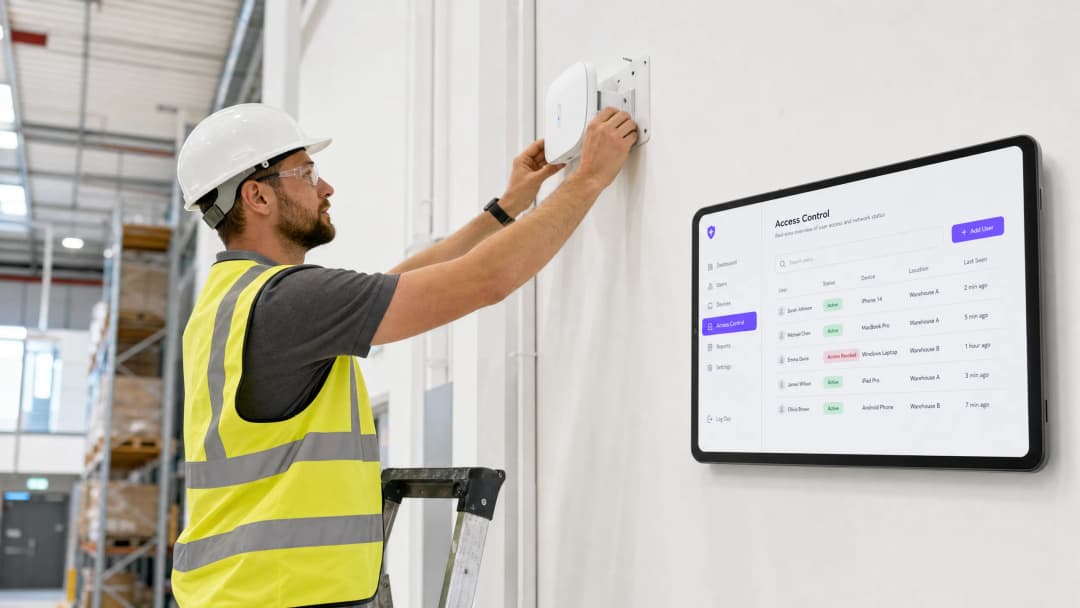
header_image.png

执行摘要

当员工离职时,撤销其物理访问权限非常简单。但撤销其 WiFi 访问权限通常并非易事。如果您的网络依赖于共享的 WPA2 密码,离职员工在走出大门时仍然知道该凭据。移除其访问权限的唯一方法是更改整个网络的密码,这会中断业务运营并迫使所有设备进行手动更新。在 PCI DSS 和 ISO 27001 等标准下,这是一个关键漏洞,也是合规性失败的表现。

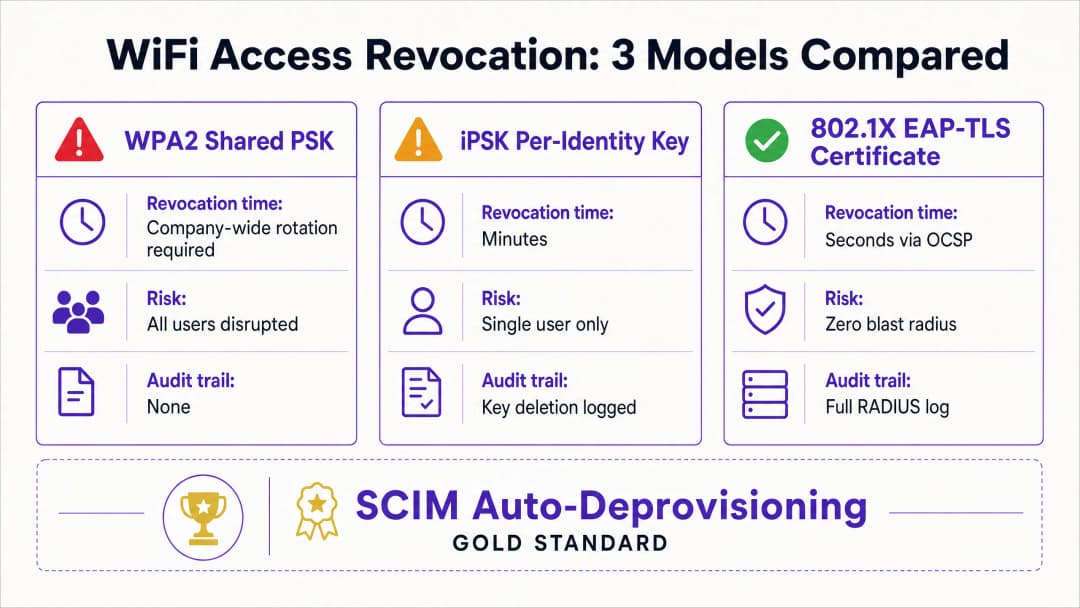
本指南介绍了如何摆脱共享密码并实现基于用户的 WiFi 撤销。我们研究了三种可靠的模型:带有证书撤销的 802.1X EAP-TLS、带有基于身份密钥删除的身份预共享密钥 (iPSK) 以及 SCIM 驱动的自动停用。通过将网络访问直接与您的身份提供商(例如 Microsoft Entra ID、Okta 或 Google Workspace)绑定,您可以在帐户停用的瞬间自动执行撤销,从而生成评估人员所期望的精确审计轨迹。

收听我们关于该主题的技术简报播客:

技术深度解析

共享密码的问题

共享的 WPA2-Personal 密码缺乏身份上下文。网络无法区分在职员工和离职员工。因此,撤销访问权限需要进行公司范围内的密码轮换。这在员工离职和密码轮换完成之间留下了一个漏洞窗口。

模型 1:802.1X EAP-TLS 证书撤销

企业 WiFi 安全标准是使用 EAP-TLS 的 802.1X。在这种模型中,每台设备都会从证书颁发机构 (CA) 接收一个唯一的数字证书。当设备连接时,RADIUS 服务器会对证书进行加密验证。

要撤销访问权限,您只需在 CA 处撤销该证书。RADIUS 服务器使用联机证书状态协议 (OCSP) 实时检查撤销状态。如果 OCSP 响应器返回“已撤销”状态,RADIUS 服务器将发送 Access-Reject(拒绝访问)消息。对于活动会话,服务器会发出授权变更 (CoA) 以立即终止连接。此过程将撤销操作隔离到单个用户,对网络的其余部分零影响。

模型 2:iPSK 基于身份的密钥删除

对于拥有混合设备类型(包括无法支持 802.1X 证书的无头硬件)的环境,身份预共享密钥 (iPSK) 是最佳解决方案。iPSK 为单个 SSID 上的每个独立用户或设备分配一个唯一的密码。

RADIUS 服务器将每个唯一的密钥映射到特定的身份。当员工离职时,IT 人员只需从 RADIUS 数据库中删除其特定的密钥。影响范围完全控制在该单一用户内。这种方法既提供了企业级网络的独立安全性,又保留了标准密码的简便性。

revocation_models_comparison.png

模型 3:SCIM 自动停用

跨域身份管理系统 (SCIM) 是一个开放标准,可自动交换用户身份信息。SCIM 充当您的身份提供商与下游系统(如您的 WiFi 管理平台)之间的连接纽带。

当 HR 在 Microsoft Entra ID、Okta 或 Google Workspace 中停用离职员工时,SCIM 会向 Purple 推送一个停用事件。Purple 会在下一次身份验证时立即撤销该用户的 WiFi 凭据(无论是证书还是 iPSK)。这创建了一个闭环系统,其中身份生命周期的变化会自动执行网络访问策略。

实施指南

部署基于用户的撤销需要您的身份提供商、RADIUS 服务器和 WiFi 硬件之间的协调。Purple 与来自 Cisco Meraki、HPE Aruba、Ruckus、Juniper Mist、Ubiquiti UniFi、Cambium、Extreme 和 Fortinet 的硬件集成。

步骤 1:确立身份作为唯一事实源

确保您的身份提供商是用户状态的唯一事实源。所有入职和离职流程都必须在 Microsoft Entra ID、Okta 或 Google Workspace 中开始和结束。

步骤 2:选择正确的认证协议

如果您拥有成熟的移动设备管理 (MDM) 部署,能够向所有公司设备推送证书,请选择 802.1X EAP-TLS。如果您需要支持广泛的非托管设备、销售点 (POS) 终端或物联网 (IoT) 硬件,请选择 iPSK。

步骤 3:配置 SCIM 集成

在您的身份提供商和 Purple 之间配置 SCIM 连接。映射用户状态属性,以便目录中的“已禁用”状态触发 Purple 中的撤销事件。

步骤 4:调整 RADIUS 定时器

如果使用 EAP-TLS,请适当配置 RADIUS 服务器的 OCSP 缓存生存时间 (TTL)。较短的 TTL(例如 15 分钟)通过缩短已撤销证书保持有效的时间窗口来提高安全性,但会增加 CA 的负载。

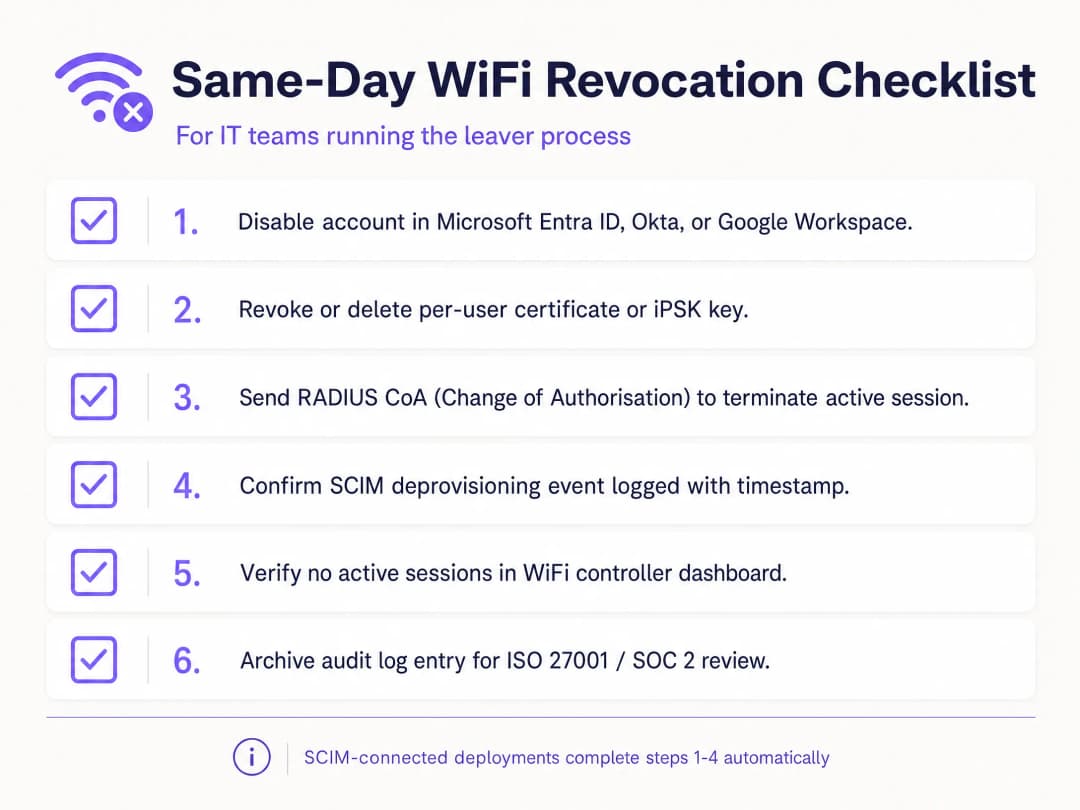
offboarding_checklist.png

最佳实践

根据行业标准,组织必须严格控制网络访问。实施以下实践以保持安全态势:

  1. 使用 SCIM 实现自动化: 手动撤销容易出现人为错误。通过将您的 WiFi 平台直接链接到您的身份提供商来自动执行该过程。
  2. 强制执行 RADIUS CoA: 撤销凭据可防止新连接ns,但不会中断活动会话。确保您的系统发送“授权变更”(Change of Authorisation)命令以立即断开设备连接。
  3. 隔离访客与员工流量: 切勿将员工设备接入 访客 WiFi 网络。使用独立的 VLAN 和 SSID 以保持隔离。
  4. 审计日志: 保留所有注销事件的不可篡改日志。ISO 27001 评估员需要证据证明在终止合作时已及时撤销访问权限。

故障排除与风险缓解

WiFi 权限撤销中最常见的失败模式是流程脱节。如果 IT 在目录中禁用了账户,但未能更新独立的 RADIUS 数据库,离职人员仍将保留访问权限。SCIM 集成可以完全消除这一风险。

另一个风险是证书缓存。如果 RADIUS 服务器将“良好”(Good)的 OCSP 响应缓存 24 小时,则已被撤销的设备可以继续进行身份验证,直到缓存过期。请调整您的 OCSP 缓存设置,以平衡性能与安全需求。

对于共享设备(例如由多名轮班员工共用的零售平板电脑),请勿将设备身份验证与单个员工的身份绑定。使用服务账户或设备专用证书,以防止因个人离职而导致关键硬件设备下线。

投资回报率(ROI)与业务影响

转向基于用户的 WiFi 权限撤销可带来可衡量的业务价值。它消除了 IT 支持在协调公司范围内密码轮换上所花费的时间。它降低了前员工引发数据泄露的风险,从而保护企业免受监管罚款和声誉损失。

此外,它还提供了顺利通过 ISO 27001 和 SOC 2 评估所需的清晰审计追踪。通过自动执行入职-异动-离职(joiner-mover-leaver)流程,IT 团队可以专注于战略性计划,而不是手动凭据管理。有关保护网络安全的更多详细信息,请阅读我们的 企业 WiFi 安全:2026 年完整指南

关键定义

802.1X

An IEEE standard for port-based network access control that provides an authentication mechanism to devices wishing to attach to a LAN or WLAN.

The foundation of enterprise WiFi security, requiring devices to authenticate against a RADIUS server before gaining network access.

EAP-TLS

Extensible Authentication Protocol - Transport Layer Security. A highly secure authentication method that uses digital certificates on both the client and server.

Considered the gold standard for WiFi authentication because it eliminates passwords entirely, relying instead on cryptographic certificates.

iPSK

Identity Pre-Shared Key. A security method that assigns a unique WiFi password to every individual user or device on a single network name.

The ideal solution for environments that need per-user revocation but have devices (like IoT or gaming consoles) that cannot support 802.1X certificates.

SCIM

System for Cross-domain Identity Management. An open standard for automating the exchange of user identity information between identity domains.

Used to automatically push a 'user disabled' event from an identity provider to the WiFi system, triggering immediate access revocation.

RADIUS

Remote Authentication Dial-In User Service. A networking protocol that provides centralized Authentication, Authorization, and Accounting management.

The server that validates the WiFi credentials and checks the revocation status before allowing a device onto the network.

OCSP

Online Certificate Status Protocol. An internet protocol used for obtaining the revocation status of an X.509 digital certificate.

The real-time check the RADIUS server performs to ensure a connecting device's certificate has not been revoked since it was issued.

CoA

Change of Authorisation. A RADIUS feature that allows the server to dynamically change the authorization attributes of an active session.

Used to instantly disconnect a device from the WiFi network the moment its credentials are revoked, rather than waiting for the session to naturally expire.

WPA2-Personal

WiFi Protected Access 2. A security certification program that uses a single, shared password for all users on the network.

The standard to move away from in enterprise environments, as it requires changing the password for everyone just to revoke access for one leaver.

应用实例

A 200-room hotel needs to revoke WiFi access for a departing shift manager. The hotel uses a mix of corporate laptops and headless point-of-sale terminals, all currently sharing a single WPA2 password. How should they secure the offboarding process?

The hotel should migrate from the shared WPA2 password to iPSK. By integrating Purple with their identity provider via SCIM, they can assign a unique iPSK to every staff member and device. When the shift manager leaves, HR disables their account in Microsoft Entra ID. SCIM pushes this event to Purple, which instantly deletes the manager's specific iPSK. The point-of-sale terminals and other staff devices remain connected without interruption.

考官评语: This approach perfectly balances security with operational reality in hospitality. Implementing full 802.1X EAP-TLS would be too complex for the headless POS terminals. iPSK provides the necessary per-user revocation capability without requiring certificate management, while SCIM automates the audit trail.

A public-sector organisation running 802.1X EAP-TLS revokes a contractor's certificate at 9:00 AM, but the contractor's laptop remains connected to the WiFi until 10:00 AM. Why did this happen and how can it be fixed?

The delay occurred because the RADIUS server had a cached 'Good' OCSP response for the contractor's certificate, and the system did not send a RADIUS Change of Authorisation (CoA) command. To fix this, the organisation must reduce the OCSP cache TTL on the RADIUS server to 15 minutes and configure the system to automatically send a CoA disconnect message to the access point the moment a certificate is revoked.

考官评语: This highlights a critical distinction: revoking a credential prevents future authentications, but CoA is required to terminate an active session. The solution addresses both the cache timing and the active session termination.

练习题

Q1. You are auditing a retail chain's offboarding process. They use a single shared WPA2 password for their staff WiFi. They state that they rotate the password 'quarterly'. Does this meet ISO 27001 requirements for access revocation?

提示:Consider the time gap between an employee leaving and the next quarterly rotation.

查看标准答案

No, this does not meet ISO 27001 requirements. ISO 27001 Annex A control A.9.2.6 requires prompt removal of access rights upon termination. A quarterly rotation leaves a vulnerability window of up to three months where a former employee retains valid credentials. The chain must move to per-user credentials (iPSK or 802.1X) to enable immediate revocation.

Q2. A hospital needs to secure its medical IoT devices on the WiFi network. These devices cannot support 802.1X certificates. How can they achieve per-device revocation?

提示:What protocol provides unique passwords on a single SSID?

查看标准答案

The hospital should deploy Identity Pre-Shared Key (iPSK). This allows each medical IoT device to have its own unique WPA2 password. If a device is decommissioned or compromised, IT can delete that specific key from the RADIUS server, revoking its access without affecting any other devices on the network.

Q3. Your organisation uses SCIM to connect Google Workspace to Purple. An employee is terminated and their Google account is suspended. Do you need to manually delete their WiFi certificate?

提示:Consider the role of SCIM in the identity lifecycle.

查看标准答案

No manual action is required. Suspending the account in Google Workspace triggers a SCIM deprovisioning event. Purple receives this event and automatically revokes the user's WiFi credentials and logs the action, providing a complete audit trail.