
कर्मचारी WiFi कॅप्टिव्ह पोर्टल: कर्मचाऱ्यांना ऑनबोर्ड करणे आणि त्यांचे प्रमाणीकरण करणे
IT नेत्यांसाठी कर्मचारी WiFi कॅप्टिव्ह पोर्टल्स डिझाइन आणि तैनात करण्याबाबत एक व्यापक तांत्रिक संदर्भ. हे मार्गदर्शक ऑपरेशनल कार्यक्षमता वाढवण्यासाठी आणि सुरक्षेचे धोके कमी करण्यासाठी EAP-TLS प्रमाणीकरण, BYOD ऑनबोर्डिंग, VLAN वर्गीकरण (segmentation) आणि बँडविड्थ व्यवस्थापन कव्हर करते.
हे मार्गदर्शक ऐका
पॉडकास्ट ट्रान्सक्रिप्ट पहा
आमच्या मुख्य मालिकेचा भाग: Captive Portal Guide →
कार्यकारी सारांश
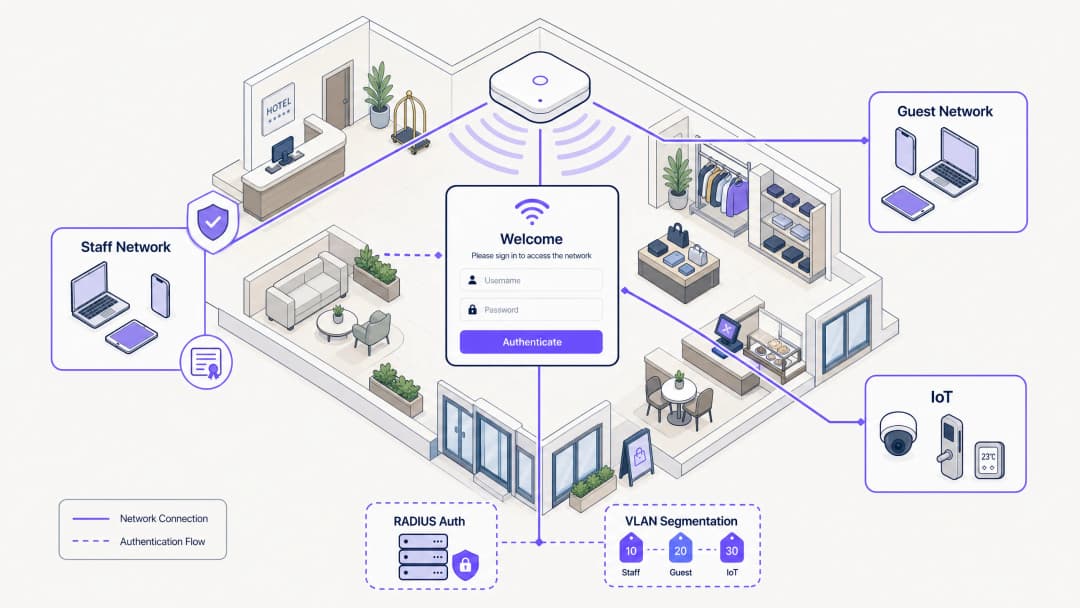
हॉस्पिटॅलिटी, रिटेल आणि मोठ्या सार्वजनिक ठिकाणांमधील IT व्यवस्थापक आणि नेटवर्क आर्किटेक्ट्ससाठी, कर्मचाऱ्यांच्या उपकरणांसाठी नेटवर्क ॲक्सेस व्यवस्थापित करणे लक्षणीय सुरक्षा आणि ऑपरेशनल आव्हाने उभी करते. सामायिक केलेल्या Pre-Shared Keys (PSKs) वर अवलंबून राहणे हे मूलभूतपणे असुरक्षित आहे आणि यामुळे ऑपरेशनल भार वाढतो, ज्यामुळे माजी कर्मचारी आणि अनमॅनेज्ड उपकरणांना अनिश्चित काळासाठी नेटवर्क ॲक्सेस मिळतो. हे मार्गदर्शक तुमच्या ओळख प्रदात्याशी (identity provider) समाकलित केलेल्या कॅप्टिव्ह पोर्टल प्रवाहाचा वापर करून कर्मचारी WiFi ऑनबोर्ड करण्यासाठी एक व्यावहारिक आणि सुरक्षित दृष्टिकोन दर्शवते. या आर्किटेक्चरचा लाभ घेऊन, तुम्ही अनमॅनेज्ड BYOD उपकरणांना सुरक्षितपणे 802.1X नेटवर्कवर आणू शकता, स्वीकार्य वापर धोरणे (acceptable use policies) लागू करू शकता आणि पूर्ण Mobile Device Management (MDM) नोंदणीच्या त्रासाशिवाय अनुपालन राखू शकता. आधीच गेस्ट WiFi आणि WiFi Analytics वापरणाऱ्या ठिकाणांसाठी, कर्मचारी उपकरणांपर्यंत सुरक्षित ऑनबोर्डिंगचा विस्तार करणे एक युनिफाइड आणि मजबूत नेटवर्क व्यवस्थापन धोरण प्रदान करते.
हे मार्गदर्शक ऐका
तांत्रिक सखोल विश्लेषण
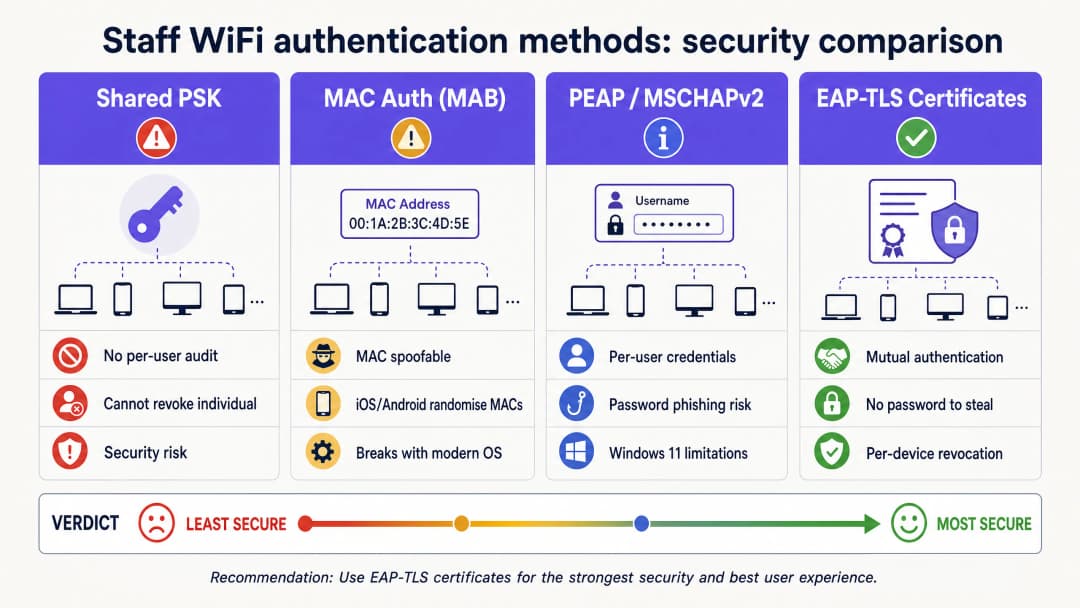
सुरक्षित कर्मचारी ऑनबोर्डिंगचा पाया म्हणजे जुन्या प्रमाणीकरण पद्धतींकडून EAP-TLS (Extensible Authentication Protocol-Transport Layer Security) कडे संक्रमण करणे. EAP-TLS हे सुरक्षित WiFi प्रमाणीकरणासाठीचे उद्योग मानक आहे, जे पासवर्डऐवजी डिजिटल प्रमाणपत्रांवर अवलंबून असते. कर्मचारी नेटवर्कमधील आव्हान, विशेषतः BYOD वातावरणात, ही प्रमाणपत्रे अनमॅनेज्ड उपकरणांना वितरित करणे हे आहे.
स्व-सेवा ऑनबोर्डिंग प्रवाह
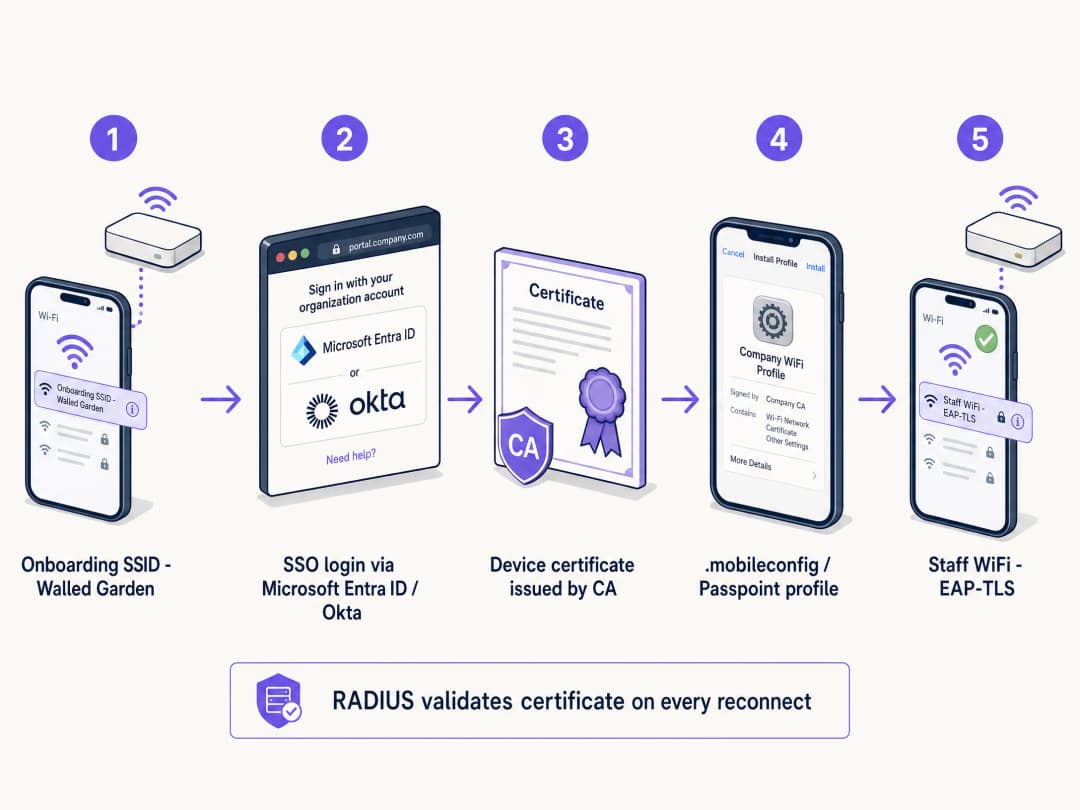
हे साध्य करण्यासाठी, ठिकाणे स्व-सेवा ऑनबोर्डिंग पोर्टल तैनात करतात. सुरक्षित क्रेडेंशियल वितरण सुनिश्चित करण्यासाठी ही प्रक्रिया एका संरचित मार्गाचे अनुसरण करते:
- प्रारंभिक कनेक्शन: वापरकर्ता त्यांचे वैयक्तिक उपकरण एका समर्पित ओपन प्रोव्हिजनिंग SSID शी जोडतो. हे नेटवर्क एका वॉल गार्डन (walled garden) सारखे काम करते, जे ऑनबोर्डिंग पोर्टल आणि ओळख प्रदाता (IdP) व्यतिरिक्त इतर सर्व गोष्टींचा ॲक्सेस मर्यादित करते.
- प्रमाणीकरण: वापरकर्त्याला कॅप्टिव्ह पोर्टलवर रिडायरेक्ट केले जाते, जिथे ते त्यांच्या कॉर्पोरेट क्रेडेंशियल्सचा वापर करून प्रमाणीकरण करतात. यामध्ये Microsoft Entra ID, Okta, किंवा Google Workspace सारख्या IdPs सह SAML किंवा SCIM समाकलन समाविष्ट आहे.
- प्रमाणपत्र निर्मिती: यशस्वी प्रमाणीकरणानंतर, सिस्टम एक अद्वितीय, उपकरण-विशिष्ट क्लायंट प्रमाणपत्र तयार करते.
- प्रोफाइल इन्स्टॉलेशन: उपकरणावर एक कॉन्फिगरेशन प्रोफाइल पाठवले जाते. या प्रोफाइलमध्ये क्लायंट प्रमाणपत्र, रूट CA प्रमाणपत्र आणि सुरक्षित 802.1X SSID साठी नेटवर्क कॉन्फिगरेशन सेटिंग्ज असतात.
- सुरक्षित कनेक्शन: उपकरण प्रोव्हिजनिंग SSID वरून स्वयंचलितपणे डिस्कनेक्ट होते आणि EAP-TLS प्रमाणीकरणासाठी नवीन स्थापित प्रमाणपत्र वापरून सुरक्षित कॉर्पोरेट SSID शी कनेक्ट होते.
कर्मचारी नेटवर्कमध्ये सामायिक केलेले PSKs का अयशस्वी ठरतात
ऐतिहासिकदृष्ट्या, ठिकाणे कर्मचाऱ्यांच्या ॲक्सेससाठी Pre-Shared Keys (PSKs) वर अवलंबून राहिली आहेत. आधुनिक एंटरप्राइझ वातावरणात हा दृष्टिकोन मूलभूतपणे सदोष आहे. PSKs एकदा सामायिक केल्यावर सुरक्षेचा धोका निर्माण करतात. ते वैयक्तिक जबाबदारी ऑफर करत नाहीत आणि एखादे उपकरण हरवल्यास किंवा कर्मचारी सोडून गेल्यास, संपूर्ण नेटवर्कवर पासवर्ड बदलणे आवश्यक असते. ८० कर्मचारी असलेल्या २०० खोल्यांच्या हॉटेलमध्ये, सामायिक केलेला पासवर्ड अंदाजे ८० लोक, त्यांचे जोडीदार आणि किमान तीन माजी कर्मचाऱ्यांसह सामायिक केला जाण्याची शक्यता असते. हे सुरक्षित नेटवर्क नाही; हे एक उघडे दार आहे.
तुमच्या विशिष्ट सेटअपबद्दल काही प्रश्न आहेत का?
आमची टीम ८०,००० हून अधिक वेन्यूजमधील वेन्यू ऑपरेटर्स, IT मॅनेजर्स आणि नेटवर्क इंजिनिअर्ससोबत काम करते. २० मिनिटांचा कॉल बुक करा आणि तुमच्यासारख्या इतरांनी ही समस्या कशी सोडवली हे आम्ही तुम्हाला दाखवू.
अंमलबजावणी मार्गदर्शक
सुरक्षित कर्मचारी WiFi कॅप्टिव्ह पोर्टल तैनात करण्यासाठी काळजीपूर्वक नियोजन आणि अंमलबजावणी आवश्यक आहे. हॉस्पिटॅलिटी, रिटेल किंवा स्टेडियम वातावरणात यशस्वी रोलआउटसाठी या चरणांचे अनुसरण करा.
पायरी १: ॲक्सेस धोरणे आणि वर्गीकरण (Segmentation) परिभाषित करा
तांत्रिक पायाभूत सुविधा कॉन्फिगर करण्यापूर्वी, कर्मचारी उपकरणांना कशाचा ॲक्सेस असावा हे स्पष्टपणे परिभाषित करा. BYOD उपकरणे अनमॅनेज्ड असतात; त्यांच्या ऑपरेटिंग सिस्टम अपडेट्स, अँटीव्हायरस स्थिती किंवा स्थापित ॲप्लिकेशन्सवर तुमचे कोणतेही नियंत्रण नसते. त्यामुळे, त्यांच्याकडे अविश्वासू उपकरणे म्हणून पाहिले पाहिजे.
कर्मचारी उपकरणांना एका समर्पित VLAN मध्ये ठेवा. या VLAN ने इंटरनेट ॲक्सेस प्रदान केला पाहिजे आणि कर्मचाऱ्याच्या भूमिकेसाठी आवश्यक असलेल्या विशिष्ट अंतर्गत ॲप्लिकेशन्सपुरताच ॲक्सेस मर्यादित केला पाहिजे, जसे की रिटेल पॉइंट ऑफ सेल (POS) वेब इंटरफेस किंवा हॉस्पिटॅलिटी हाउसकीपिंग ॲप्लिकेशन. BYOD उपकरणांना कधीही कॉर्पोरेट सर्व्हर्स किंवा मॅनेज्ड उपकरणांसारख्याच VLAN वर ठेवू नका. बॅक-ऑफ-हाउस नेटवर्क सुरक्षित करण्याबद्दल अधिक वाचण्यासाठी, आमचे रिटेल कर्मचारी WiFi धोरणे: बॅक-ऑफ-हाउस नेटवर्क सुरक्षित करणे वरील मार्गदर्शक किंवा पोर्तुगीज आवृत्ती Políticas de WiFi para Colaboradores no Retalho: Proteger as Redes Back-of-House पहा.
पायरी २: RADIUS सर्व्हर आणि IdP समाकलन कॉन्फिगर करा
तुमचा RADIUS सर्व्हर हा 802.1X प्रमाणीकरण प्रक्रियेचा मुख्य भाग आहे. तो EAP-TLS ला सपोर्ट करण्यासाठी आणि तुमच्या ओळख प्रदात्याशी समाकलित करण्यासाठी कॉन्फिगर केला पाहिजे.
तुमचा RADIUS सर्व्हर SAML किंवा LDAP द्वारे तुमच्या IdP शी कनेक्ट करा. हे सुनिश्चित करते की केवळ सक्रिय कर्मचारीच प्रमाणीकरण करू शकतात आणि प्रमाणपत्रे प्राप्त करू शकतात. जेव्हा एखाद्या कर्मचाऱ्याला Microsoft Entra ID किंवा Okta मध्ये डीप्रोव्हिजन (deprovision) केले जाते, तेव्हा RADIUS सर्व्हर पुढील कनेक्शनच्या प्रयत्नात त्यांचे क्रेडेंशियल्स किंवा प्रमाणपत्रे स्वीकारणे बंद करेल. क्लायंट प्रमाणपत्रे जारी करण्यासाठी अंतर्गत CA स्थापित करा किंवा क्लाउड-होस्ट केलेल्या PKI चा लाभ घ्या. RADIUS सर्व्हरने या CA वर विश्वास ठेवला पाहिजे.
पायरी ३: ऑनबोर्डिंग पोर्टल डिझाइन करा आणि AUP लागू करा
ऑनबोर्डिंग पोर्टल हा वापरकर्त्याचा सिस्टमशी संवादाचा पहिला बिंदू आहे. ते अंतर्ज्ञानी (intuitive) आणि स्पष्टपणे ब्रँडेड असले पाहिजे. पोर्टल स्क्रीनवर टप्प्याटप्प्याने सूचना प्रदान करा. वापरकर्त्यांना नेमके कशावर क्लिक करायचे आहे आणि पुढे काय अपेक्षित आहे हे माहित असणे आवश्यक आहे.
कॅप्टिव्ह पोर्टल हे अनिवार्य स्वीकार्य वापर धोरण (AUP) स्वीकृती लागू करण्यासाठी एक नैसर्गिक बिंदू आहे. कर्मचारी स्टाफ नेटवर्कमध्ये प्रवेश करण्यापूर्वी, पोर्टल धोरण सादर करते आणि स्पष्ट स्वीकृतीची आवश्यकता असते. हे धोरण स्वीकृतीची वेळ-नोंद केलेली (time-stamped), ऑडिट करण्यायोग्य नोंद तयार करते, जी GDPR आणि PCI-DSS अनुपालनासाठी महत्त्वपूर्ण आहे.
सर्वोत्तम पद्धती
सुरक्षित आणि व्यवस्थापित करण्यायोग्य उपयोजन सुनिश्चित करण्यासाठी, या उद्योग सर्वोत्तम पद्धतींचे अनुसरण करा.
अल्पायुषी (Short-Lived) प्रमाणपत्रे लागू करा
BYOD उपकरणे अनमॅनेज्ड असल्यामुळे, तडजोड केलेली (compromised) उपकरणे नेटवर्कवर राहण्याचा धोका जास्त असतो. अल्पायुषी प्रमाणपत्रे जारी करून हा धोका कमी करा. तीन वर्षांसाठी वैध असलेली प्रमाणपत्रे जारी करण्याऐवजी, ९० दिवसांसाठी वैध असलेली प्रमाणपत्रे जारी करा. जेव्हा प्रमाणपत्राची मुदत संपते, तेव्हा वापरकर्त्याने ऑनबोर्डिंग पोर्टलद्वारे पुन्हा प्रमाणीकरण करणे आवश्यक आहे. हे नैसर्गिकरित्या नेटवर्कमधून जुनी उपकरणे काढून टाकते आणि केवळ सक्रिय कर्मचाऱ्यांनाच ॲक्सेस राहील याची खात्री करते.
Passpoint (Hotspot 2.0) चा लाभ घ्या
अखंड ऑनबोर्डिंग अनुभवासाठी, विशेषतः Android उपकरणांवर, Passpoint चा लाभ घ्या. Passpoint उपकरणांना स्वयंचलितपणे सुरक्षित नेटवर्क शोधण्याची आणि प्रमाणीकरण करण्याची परवानगी देते, ज्यासाठी वापरकर्त्याला मॅन्युअली SSID निवडण्याची किंवा प्रारंभिक सेटअपनंतर कॅप्टिव्ह पोर्टलशी संवाद साधण्याची आवश्यकता नसते. यामुळे घर्षण लक्षणीयरीत्या कमी होते आणि वापरकर्त्याचा अनुभव सुधारतो.
बँडविड्थ व्यवस्थापनासाठी Purple Shield वापरा
उच्च-घनतेच्या कर्मचारी वातावरणात, स्टाफ नेटवर्कवरील बँडविड्थचा वाद हा एक खरा ऑपरेशनल प्रश्न असतो. Purple Shield DNS पातळीवर कार्य करते, जाहिरात पेलोड्स, ट्रॅकिंग स्क्रिप्ट्स आणि मालवेअर डोमेन्स उपकरणापर्यंत पोहोचण्यापर्यंत ब्लॉक करते. याचा व्यावहारिक परिणाम म्हणजे संपूर्ण नेटवर्कवरील एकूण डाउनलोड केलेल्या डेटामध्ये ४०% पर्यंत घट होते. कर्मचारी उपकरणांसाठी, याचा अर्थ जलद पेज लोड गती, उपकरणाचा कमी बॅटरी वापर आणि ऑपरेशनल ट्रॅफिकसाठी अधिक उपलब्ध बँडविड्थ असा होतो.
त्रुटी निवारण आणि शमन
चांगल्या प्रकारे डिझाइन केलेल्या सिस्टमसह देखील समस्या उद्भवू शकतात. जलद निराकरणासाठी सामान्य बिघाड मोड समजून घेणे महत्त्वपूर्ण आहे.
Walled Garden कॉन्फिगरेशन
प्रोव्हिजनिंग SSID घट्टपणे नियंत्रित केले पाहिजे. जर Walled Garden खूप खुले असेल, तर वापरकर्ते सुरक्षित ऑनबोर्डिंग प्रक्रिया पूर्णपणे बायपास करून इंटरनेट ॲक्सेससाठी प्रोव्हिजनिंग नेटवर्कशी कनेक्ट राहू शकतात. प्रोव्हिजनिंग SSID केवळ ऑनबोर्डिंग पोर्टल, IdP प्रमाणीकरण एंडपॉइंट्स आणि आवश्यक प्रमाणपत्र डाउनलोड सर्व्हर्सना ॲक्सेस देईल याची खात्री करा. इतर सर्व ट्रॅफिक ब्लॉक केले पाहिजे.
Android फ्रॅगमेंटेशन
Apple iOS उपकरणे कॉन्फिगरेशन प्रोफाइल अतिशय सुसंगतपणे हाताळतात. तथापि, Android अत्यंत फ्रॅगमेंटेड आहे. विविध उत्पादक आणि OS आवृत्त्या WiFi प्रोफाइल आणि प्रमाणपत्र स्थापना वेगवेगळ्या प्रकारे हाताळतात. हे कमी करण्यासाठी, तुमचे ऑनबोर्डिंग सोल्यूशन स्पष्ट, OS-विशिष्ट सूचना प्रदान करत असल्याची खात्री करा आणि शक्य असेल तेव्हा Passpoint चा लाभ घ्या.
ROI आणि एंटरप्राइझ प्रभाव
सुरक्षित कर्मचारी WiFi कॅप्टिव्ह पोर्टल लागू केल्याने सुधारित सुरक्षा, कमी झालेला IT ओव्हरहेड आणि वर्धित कर्मचारी उत्पादकतेद्वारे गुंतवणुकीवर स्पष्ट परतावा (ROI) मिळतो.
वापरकर्त्यांना स्वतः ऑनबोर्ड होण्यासाठी सक्षम करून, IT हेल्प डेस्कला WiFi पासवर्ड आणि कनेक्टिव्हिटी समस्यांशी संबंधित सपोर्ट तिकिटांमध्ये नाट्यमय घट दिसते. PSK वरून EAP-TLS कडे जाण्यामुळे अनधिकृत नेटवर्क ॲक्सेस आणि डेटा उल्लंघनाचा धोका लक्षणीयरीत्या कमी होतो. PCI-DSS आणि GDPR सारख्या मानकांचे अनुपालन राखण्यासाठी हे महत्त्वपूर्ण आहे. कर्मचारी त्यांच्या वैयक्तिक उपकरणांना आवश्यक साधनांमध्ये प्रवेश करण्यासाठी द्रुत आणि सुरक्षितपणे कनेक्ट करू शकतात, ज्यामुळे रिटेल, आरोग्य सेवा, हॉस्पिटॅलिटी आणि वाहतूक क्षेत्रांमध्ये एकूण कार्यक्षमता आणि समाधान सुधारते.
महत्वाच्या व्याख्या
कॅप्टिव्ह पोर्टल
एक वेब पेज जे सार्वजनिक-ॲक्सेस किंवा कॉर्पोरेट नेटवर्कच्या वापरकर्त्याला ॲक्सेस मिळण्यापूर्वी पाहणे आणि संवाद साधणे बंधनकारक असते.
ओळख पडताळणी, AUP स्वीकृती आणि प्रमाणपत्र प्रोव्हिजनिंगसाठी प्रवेशद्वार म्हणून कर्मचारी नेटवर्कमध्ये वापरले जाते.
EAP-TLS
Extensible Authentication Protocol-Transport Layer Security. एक 802.1X प्रमाणीकरण पद्धत जी क्लायंट आणि सर्व्हर दोन्हीवर डिजिटल प्रमाणपत्रे वापरते.
सर्वात सुरक्षित WiFi प्रमाणीकरण पद्धत, जी पासवर्डची आवश्यकता दूर करते आणि क्रेडेंशियल चोरीला प्रतिबंध करते.
RADIUS
Remote Authentication Dial-In User Service. एक नेटवर्किंग प्रोटोकॉल जो केंद्रीकृत प्रमाणीकरण, अधिकृतता आणि अकाउंटिंग व्यवस्थापन प्रदान करतो.
मुख्य सर्व्हर जो नेटवर्क ॲक्सेस देण्यापूर्वी ओळख प्रदात्याविरुद्ध उपकरणाच्या प्रमाणपत्रांची पडताळणी करतो.
VLAN Segmentation
ट्रॅफिक वेगळे करण्यासाठी भौतिक नेटवर्कला एकाधिक लॉजिकल नेटवर्कमध्ये विभाजित करण्याची पद्धत.
अविश्वासू BYOD कर्मचारी उपकरणांना संवेदनशील कॉर्पोरेट सर्व्हर्स आणि POS सिस्टम्सपासून वेगळे ठेवण्यासाठी आवश्यक.
Passpoint (Hotspot 2.0)
एक उद्योग मानक जे मॅन्युअल SSID निवड किंवा प्रारंभिक सेटअपनंतर कॅप्टिव्ह पोर्टल संवादाची आवश्यकता नसताना अखंड आणि सुरक्षित WiFi ऑनबोर्डिंग आणि रोमिंग सक्षम करते.
कर्मचारी ऑनबोर्डिंगसाठी वापरकर्ता अनुभव सुधारते, विशेषतः Android उपकरणांवर.
Walled Garden
एक प्रतिबंधित नेटवर्क वातावरण जे विशिष्ट वेब सामग्री आणि सेवांवर वापरकर्त्याच्या प्रवेशावर नियंत्रण ठेवते.
कर्मचारी केवळ ऑनबोर्डिंग पोर्टल आणि IdP मध्ये प्रवेश करू शकतात याची खात्री करण्यासाठी प्रोव्हिजनिंग SSID वर वापरले जाते, ज्यामुळे त्यांना सुरक्षा सेटअप बायपास करण्यापासून रोखले जाते.
SCIM
System for Cross-domain Identity Management. ओळख डोमेन्स दरम्यान वापरकर्ता ओळख माहितीची देवाणघेवाण स्वयंचलित करण्यासाठी एक मुक्त मानक.
जेव्हा एखादा कर्मचारी कंपनी सोडतो आणि IdP मध्ये अक्षम केला जातो तेव्हा नेटवर्क ॲक्सेसचे स्वयंचलित डीप्रोव्हिजनिंग सक्षम करते.
iPSK
Identity Pre-Shared Key. एक सुरक्षा वैशिष्ट्य जे प्रत्येक वैयक्तिक वापरकर्त्याला किंवा उपकरणाला एक अद्वितीय WiFi पासवर्ड नियुक्त करते.
हेडलेस उपकरणे किंवा प्रमाणपत्र स्थापित करू न शकणाऱ्या कंत्राटदारांसाठी 802.1X चा पर्याय म्हणून वापरले जाते.
सोडवलेली उदाहरणे
एका २०० खोल्यांच्या हॉटेलला ८० हाउसकीपिंग आणि मेंटेनन्स कर्मचाऱ्यांना WiFi ॲक्सेस प्रदान करणे आवश्यक आहे जे क्लाउड-आधारित प्रॉपर्टी मॅनेजमेंट सिस्टम (PMS) मध्ये प्रवेश करण्यासाठी त्यांचे वैयक्तिक स्मार्टफोन वापरतात. हॉटेल सध्या एकच WPA2 पासवर्ड वापरत आहे जो तीन वर्षांत बदलला गेला नाही. IT व्यवस्थापकाने वैयक्तिक उपकरणांसाठी MDM सॉफ्टवेअर खरेदी न करता हे नेटवर्क कसे सुरक्षित करावे?
- एक नवीन ओपन प्रोव्हिजनिंग SSID (उदा. 'Hotel-Staff-Onboard') तयार करा ज्यामध्ये कडक walled garden असेल जे केवळ कॅप्टिव्ह पोर्टल आणि Microsoft Entra ID ला ॲक्सेस देईल.
- Entra ID द्वारे SSO लॉगिन आवश्यक करण्यासाठी आणि कर्मचाऱ्यांचे स्वीकार्य वापर धोरण (AUP) प्रदर्शित करण्यासाठी कॅप्टिव्ह पोर्टल कॉन्फिगर करा.
- यशस्वी लॉगिन आणि AUP स्वीकृतीनंतर, ९० दिवसांचे उपकरण-विशिष्ट EAP-TLS प्रमाणपत्र तयार करा.
- सुरक्षित 802.1X SSID (उदा. 'Hotel-Staff-Secure') शी स्वयंचलितपणे कनेक्ट होण्यासाठी कर्मचाऱ्याच्या फोनवर कॉन्फिगरेशन प्रोफाइल पाठवा.
- कनेक्ट केलेल्या उपकरणांना समर्पित BYOD VLAN वर नियुक्त करण्यासाठी RADIUS सर्व्हर कॉन्फिगर करा जे केवळ इंटरनेट आणि क्लाउड PMS कडे मार्गस्थ (route) करते, कॉर्पोरेट सर्व्हर VLAN चा ॲक्सेस ब्लॉक करते.
एका मोठ्या रिटेल साखळीला Black Friday विक्रीदरम्यान गंभीर पॉइंट-ऑफ-सेल (POS) कनेक्टिव्हिटी समस्यांचा सामना करावा लागतो कारण कर्मचारी सुट्टीच्या वेळी स्टाफ नेटवर्कशी कनेक्ट केलेल्या त्यांच्या वैयक्तिक फोनवर व्हिडिओ स्ट्रीमिंग करत असतात. वैयक्तिक उपकरणांवर बंदी न घालता नेटवर्क आर्किटेक्ट याचे निराकरण कसे करू शकतो?
- जाहिरात पेलोड्स आणि ट्रॅकिंग स्क्रिप्ट्स DNS पातळीवर ब्लॉक करण्यासाठी स्टाफ नेटवर्कवर Purple Shield लागू करा, ज्यामुळे वाया जाणारी ४०% पर्यंत बँडविड्थ त्वरित परत मिळते.
- सामान्य वेब ब्राउझिंग आणि व्हिडिओ स्ट्रीमिंगपेक्षा POS आणि इन्व्हेंटरी ॲप्लिकेशन ट्रॅफिकला प्राधान्य देण्यासाठी वायरलेस कंट्रोलरवर Quality of Service (QoS) धोरणे लागू करा.
- कोणत्याही एका वैयक्तिक उपकरणासाठी उपलब्ध असलेल्या कमाल बँडविड्थची मर्यादा निश्चित करण्यासाठी BYOD VLAN वर रेट लिमिटिंग लागू करा.
सराव प्रश्न
Q1. एका स्टेडियम ऑपरेशन्स डायरेक्टरला सर्व ५०० सामन्याच्या दिवसाच्या इव्हेंट कर्मचाऱ्यांना 'त्यांना द्रुतपणे ऑनलाइन येणे सोपे जावे' म्हणून एकच WiFi पासवर्ड जारी करायचा आहे. या दृष्टिकोनाचा प्राथमिक सुरक्षेचा धोका काय आहे आणि शिफारस केलेला पर्याय कोणता आहे?
टीप: सामन्याच्या दिवशी काम करणारा कर्मचारी पुढील कार्यक्रमासाठी परत न आल्यास काय होईल याचा विचार करा.
नमुना उत्तर पहा
प्राथमिक धोका म्हणजे वैयक्तिकरित्या ॲक्सेस रद्द करण्याची असमर्थता. जेव्हा एखादा कर्मचारी सोडून जातो, तेव्हा तो पासवर्ड स्वतःकडे ठेवतो, ज्यामुळे त्याला ऑपरेशनल नेटवर्कवर अनिश्चित काळासाठी ॲक्सेस मिळतो. शिफारस केलेला पर्याय म्हणजे कॅप्टिव्ह पोर्टल ऑनबोर्डिंग प्रवाह जो त्यांच्या ओळखीशी जोडलेली उपकरण-विशिष्ट EAP-TLS प्रमाणपत्रे जारी करतो, ज्यामुळे IT ला प्रति उपकरण किंवा समाप्तीनंतर स्वयंचलितपणे ॲक्सेस रद्द करण्याची परवानगी मिळते.
Q2. तुमचे RADIUS सर्व्हर लॉग दर्शवतात की अनेक Android उपकरणे कॅप्टिव्ह पोर्टलवर प्रमाणीकरण केल्यानंतर प्रमाणपत्र स्थापना प्रक्रिया पूर्ण करण्यात अयशस्वी ठरत आहेत. याचे सर्वात संभाव्य कारण काय आहे आणि ते कसे कमी केले जाऊ शकते?
टीप: मोबाईल ऑपरेटिंग सिस्टम कॉन्फिगरेशन प्रोफाइल कशा प्रकारे हाताळतात यातील फरक विचारात घ्या.
नमुना उत्तर पहा
सर्वात संभाव्य कारण म्हणजे Android OS फ्रॅगमेंटेशन, कारण भिन्न उत्पादक प्रमाणपत्र स्थापना वेगवेगळ्या प्रकारे हाताळतात. कॅप्टिव्ह पोर्टलवर स्पष्ट, OS-विशिष्ट सूचना प्रदान करून, समर्पित ऑनबोर्डिंग ॲपचा वापर करून किंवा अधिक अखंड आणि प्रमाणित ऑनबोर्डिंग अनुभवासाठी Passpoint (Hotspot 2.0) चा लाभ घेऊन हे कमी केले जाऊ शकते.
Q3. एका हॉस्पिटलची IT टीम कर्मचाऱ्यांचे BYOD नेटवर्क डिझाइन करत आहे. कर्मचारी रुग्णांच्या डेटावर द्रुतपणे प्रवेश करू शकतील याची खात्री करण्यासाठी ते BYOD उपकरणांना हॉस्पिटलच्या इलेक्ट्रॉनिक हेल्थ रेकॉर्ड (EHR) सर्व्हर्ससारख्याच VLAN वर ठेवण्याची योजना आखत आहेत. हे सुरक्षित डिझाइन आहे का? का किंवा का नाही?
टीप: अनमॅनेज्ड BYOD उपकरणांच्या विश्वासाच्या पातळीचा विचार करा.
नमुना उत्तर पहा
नाही, हे सुरक्षित डिझाइन नाही. BYOD उपकरणे अनमॅनेज्ड असतात, याचा अर्थ IT टीम त्यांची सुरक्षा स्थिती, OS अपडेट्स किंवा स्थापित ॲप्लिकेशन्स नियंत्रित करत नाही. त्यांच्याकडे अविश्वासू म्हणून पाहिले पाहिजे. त्यांना संवेदनशील EHR सर्व्हर्ससारख्याच VLAN वर ठेवल्याने लॅटरल मूव्हमेंटचा (lateral movement) मोठा धोका निर्माण होतो. BYOD उपकरणांना समर्पित, वर्गीकृत (segmented) VLAN वर ठेवले पाहिजे ज्यामध्ये कडक फायरवॉल नियम असतील जे केवळ आवश्यक वेब इंटरफेसपुरताच ॲक्सेस मर्यादित करतील, थेट सर्व्हर ॲक्सेस कधीही देऊ नये.
या मालिकेमध्ये पुढे वाचा
Ubiquiti UniFi guest portal redirection होत नाही: कारणे आणि उपाय
ही मार्गदर्शिका guest state, redirect, pre-authorisation route आणि controller authorisation यांचा अनुक्रमे मागोवा घेऊन UniFi guest portal redirect बिघाड वेगळा करते. हे वेन्यू IT टीम्सना guest-network विरुद्ध Hotspot गोंधळ, बाह्य portal हँड-ऑफ, सद्य UniFi OS खाते आवश्यकता आणि DNS आयसोलेशन चाचणीचे निराकरण करण्यासाठी एक विश्वसनीय पद्धत प्रदान करते.
Cisco Meraki splash page काम करत नाही: एक ट्रबलशूटिंग फ्लोचार्ट
हा प्रॅक्टिकल मार्गदर्शक Cisco Meraki splash फ्लो नेमका कुठे अयशस्वी झाला आहे ते शोधून काढतो: client authorisation, HTTP redirect initiation, walled-garden reachability किंवा RADIUS sign-on. हा व्हेन्यू IT टीम्सना एक नियंत्रित पुरावा मार्ग प्रदान करतो, जेणेकरून ते थेट सुरू असलेल्या नेटवर्कवर मोठे बदल न करता Guest WiFi पूर्ववत करू शकतील.
Enterprise Guest WiFi सेटअप मार्गदर्शक: VLAN विभागणी, सुरक्षा आणि Captive Portals
हे तांत्रिक मार्गदर्शक IT टीम्सना VLAN विभागणी, फायरवॉल पॉलिसी आणि captive portal चा वापर करून Guest WiFi एक नियंत्रित इंटरनेट - ऍक्सेस सेवा म्हणून कसे सेट करावे हे दर्शवते. हे मार्गदर्शक कर्मचारी, पेमेंट आणि ऑपरेशनल सिस्टम्सच्या सुरक्षिततेची सीमा कमकुवत न करता Purple चे नोंदणी फॉर्म्स आणि ऑनबोर्डिंग नियंत्रणे पाहुण्यांना एक सुयोग्य अनुभव कसा देतात हे देखील स्पष्ट करते.
तुमच्या विशिष्ट सेटअपबद्दल काही प्रश्न आहेत का?
आमची टीम ८०,००० हून अधिक वेन्यूजमधील वेन्यू ऑपरेटर्स, IT मॅनेजर्स आणि नेटवर्क इंजिनिअर्ससोबत काम करते. २० मिनिटांचा कॉल बुक करा आणि तुमच्यासारख्या इतरांनी ही समस्या कशी सोडवली हे आम्ही तुम्हाला दाखवू.