
स्टाफ WiFi कैप्टिव पोर्टल: कर्मचारियों को ऑनबोर्ड और प्रमाणित करना
स्टाफ WiFi कैप्टिव पोर्टल को डिज़ाइन और तैनात करने पर IT लीडर्स के लिए एक व्यापक तकनीकी संदर्भ। यह गाइड परिचालन दक्षता बढ़ाने और सुरक्षा जोखिमों को कम करने के लिए EAP-TLS प्रमाणीकरण, BYOD ऑनबोर्डिंग, VLAN सेगमेंटेशन और बैंडविड्थ प्रबंधन को कवर करती है।
इस गाइड को सुनें
पॉडकास्ट ट्रांसक्रिप्ट देखें
हमारी मुख्य श्रृंखला का हिस्सा: Captive Portal Guide →
कार्यकारी सारांश
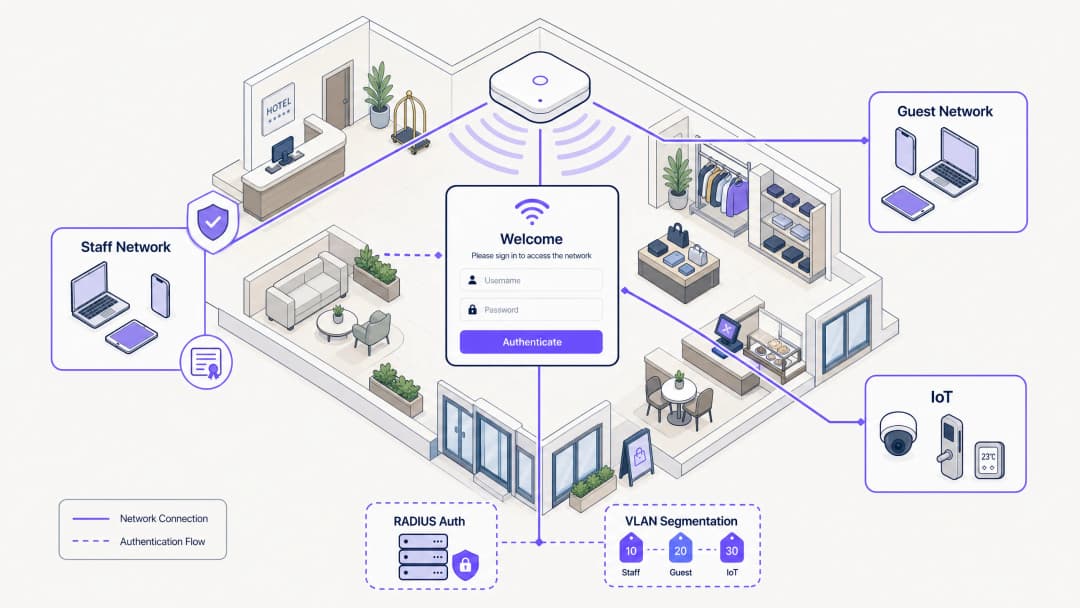
आतिथ्य, रिटेल और बड़े सार्वजनिक स्थलों में IT प्रबंधकों और नेटवर्क आर्किटेक्ट्स के लिए, कर्मचारी उपकरणों के लिए नेटवर्क एक्सेस प्रबंधित करना महत्वपूर्ण सुरक्षा और परिचालन चुनौतियां पेश करता है। साझा प्री-शेयर्ड कीज़ (PSKs) पर भरोसा करना मौलिक रूप से असुरक्षित है और एक परिचालन बोझ पैदा करता है, जिससे पूर्व कर्मचारियों और अप्रबंधित उपकरणों को अनिश्चित काल तक नेटवर्क एक्सेस बनाए रखने की अनुमति मिलती है। यह गाइड आपके पहचान प्रदाता के साथ एकीकृत कैप्टिव पोर्टल फ्लो का उपयोग करके स्टाफ WiFi को ऑनबोर्ड करने के लिए एक व्यावहारिक और सुरक्षित दृष्टिकोण की रूपरेखा तैयार करती है। इस आर्किटेक्चर का लाभ उठाकर, आप अप्रबंधित BYOD उपकरणों को सुरक्षित रूप से 802.1X नेटवर्क पर ला सकते हैं, स्वीकार्य उपयोग नीतियों को लागू कर सकते हैं, और अनुपालन बनाए रख सकते हैं, वह भी पूर्ण मोबाइल डिवाइस प्रबंधन (MDM) नामांकन की परेशानी के बिना। उन स्थलों के लिए जो पहले से ही गेस्ट WiFi और WiFi एनालिटिक्स का उपयोग कर रहे हैं, कर्मचारी उपकरणों तक सुरक्षित ऑनबोर्डिंग का विस्तार करना एक एकीकृत और मजबूत नेटवर्क प्रबंधन रणनीति प्रदान करता है।
इस गाइड को सुनें
तकनीकी गहन विश्लेषण
सुरक्षित कर्मचारी ऑनबोर्डिंग की नींव विरासत प्रमाणीकरण विधियों से EAP-TLS (एक्स्टेंसिबल ऑथेंटिकेशन प्रोटोकॉल-ट्रांसपोर्ट लेयर सिक्योरिटी) में संक्रमण है। EAP-TLS सुरक्षित WiFi प्रमाणीकरण के लिए उद्योग मानक है, जो पासवर्ड के बजाय डिजिटल प्रमाणपत्रों पर निर्भर करता है। कर्मचारी नेटवर्कों के साथ चुनौती, विशेष रूप से BYOD वातावरण में, इन प्रमाणपत्रों को अप्रबंधित उपकरणों में वितरित करना है।
स्व-सेवा ऑनबोर्डिंग फ्लो
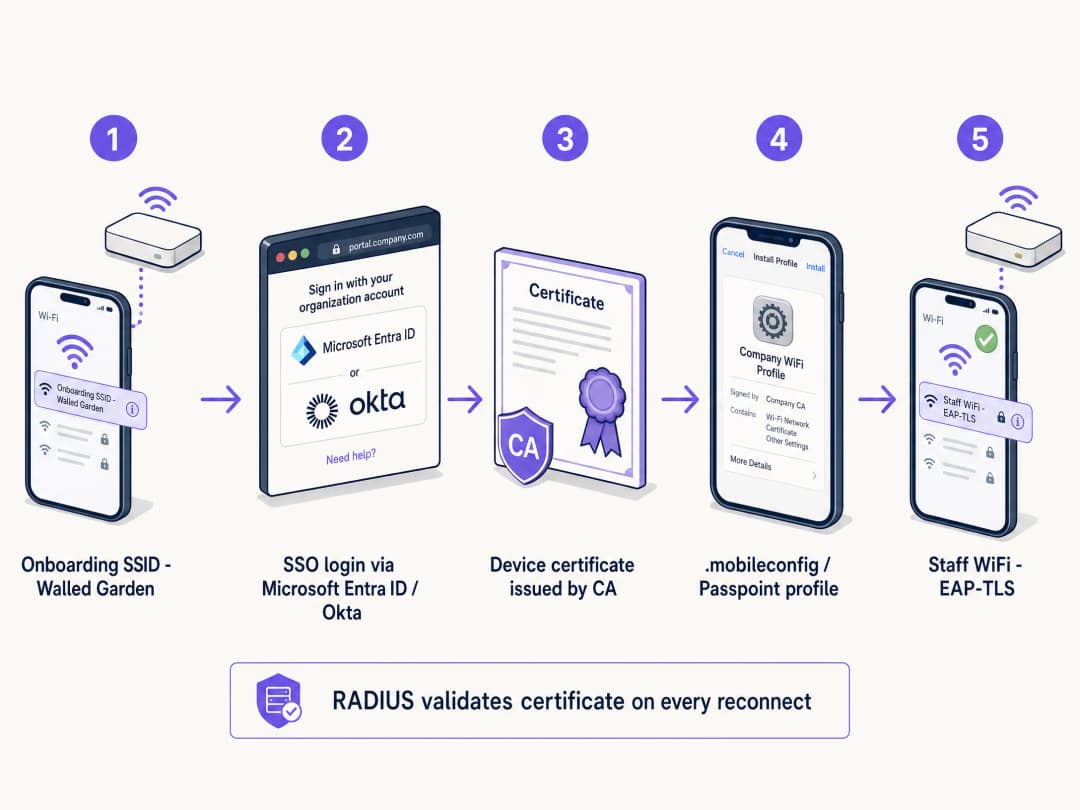
इसे प्राप्त करने के लिए, स्थल एक स्व-सेवा ऑनबोर्डिंग पोर्टल तैनात करते हैं। यह प्रक्रिया सुरक्षित क्रेडेंशियल वितरण सुनिश्चित करने के लिए एक संरचित पथ का अनुसरण करती:
- प्रारंभिक कनेक्शन: उपयोगकर्ता अपने व्यक्तिगत उपकरण को एक समर्पित ओपन प्रोविजनिंग SSID से जोड़ता है। यह नेटवर्क एक वॉल्ड गार्डन के रूप में कार्य करता है, जो ऑनबोर्डिंग पोर्टल और पहचान प्रदाता (IdP) को छोड़कर बाकी सभी चीज़ों तक पहुंच को प्रतिबंधित करता है।
- प्रमाणीकरण: उपयोगकर्ता को कैप्टिव पोर्टल पर रीडायरेक्ट किया जाता है, जहां वे अपने कॉर्पोरेट क्रेडेंशियल्स का उपयोग करके प्रमाणित होते हैं। इसमें Microsoft Entra ID, Okta, या Google Workspace जैसे IdPs के साथ SAML या SCIM एकीकरण शामिल है।
- प्रमाणपत्र निर्माण: सफल प्रमाणीकरण पर, सिस्टम एक अद्वितीय, उपकरण-विशिष्ट क्लाइंट प्रमाणपत्र उत्पन्न करता है।
- प्रोफ़ाइल इंस्टॉलेशन: डिवाइस पर एक कॉन्फ़िगरेशन प्रोफ़ाइल भेजी जाती है। इस प्रोफ़ाइल में क्लाइंट प्रमाणपत्र, रूट CA प्रमाणपत्र और सुरक्षित 802.1X SSID के लिए नेटवर्क कॉन्फ़िगरेशन सेटिंग्स शामिल होती हैं।
- सुरक्षित कनेक्शन: डिवाइस प्रोविजनिंग SSID से स्वचालित रूप से डिस्कनेक्ट हो जाता है और EAP-TLS प्रमाणीकरण के लिए नए स्थापित प्रमाणपत्र का उपयोग करके सुरक्षित कॉर्पोरेट SSID से जुड़ जाता है।
कर्मचारी नेटवर्कों में साझा PSKs क्यों विफल होते हैं
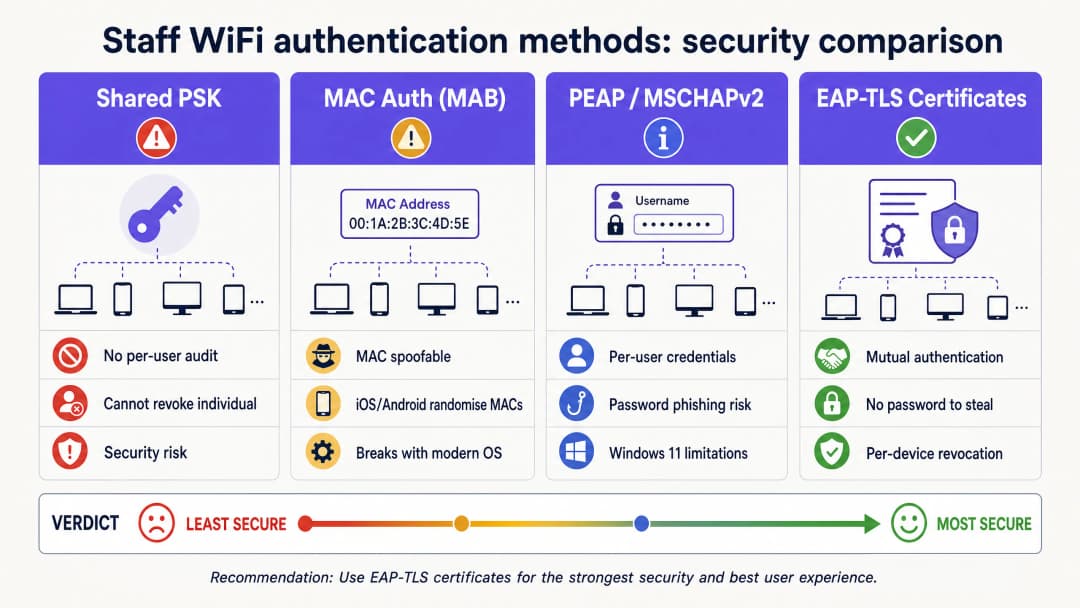
ऐतिहासिक रूप से, स्थलों ने कर्मचारी पहुंच के लिए प्री-शेयर्ड कीज़ (PSKs) पर भरोसा किया है। आधुनिक उद्यम वातावरण में यह दृष्टिकोण मौलिक रूप से त्रुटिपूर्ण है। PSKs, एक बार साझा होने के बाद, सुरक्षा जोखिम पैदा करते हैं। वे व्यक्तिगत जवाबदेही की पेशकश नहीं करते हैं, और यदि कोई उपकरण खो जाता है या कोई कर्मचारी छोड़ देता है, तो पूरे नेटवर्क में पासवर्ड बदलना आवश्यक होता है। 80 कर्मचारियों वाले 200 कमरों के होटल में, एक साझा पासवर्ड लगभग 80 लोगों, उनके भागीदारों और कम से कम तीन पूर्व कर्मचारियों के साथ साझा किया गया होगा। वह एक सुरक्षित नेटवर्क नहीं है; यह एक खुला दरवाजा है।
अपने विशिष्ट सेटअप को लेकर कोई सवाल हैं?
हमारी टीम 80,000 से अधिक वेन्यू में वेन्यू ऑपरेटरों, IT मैनेजरों और नेटवर्क इंजीनियरों के साथ काम करती है। 20 मिनट का कॉल बुक करें और हम आपको दिखाएंगे कि आपके जैसे अन्य लोगों ने इसे कैसे हल किया।
कार्यान्वयन गाइड
एक सुरक्षित कर्मचारी WiFi कैप्टिव पोर्टल को तैनात करने के लिए सावधानीपूर्वक योजना और निष्पादन की आवश्यकता होती है। आतिथ्य, रिटेल या स्टेडियम के वातावरण में सफल रोलआउट के लिए इन चरणों का पालन करें।
चरण 1: एक्सेस नीतियां और सेगमेंटेशन परिभाषित करें
तकनीकी बुनियादी ढांचे को कॉन्फ़िगर करने से पहले, स्पष्ट रूप से परिभाषित करें कि कर्मचारी उपकरणों को किस तक पहुंच की अनुमति दी जानी चाहिए। BYOD उपकरण अप्रबंधित हैं; आपका उनके ऑपरेटिंग सिस्टम अपडेट, एंटीवायरस स्थिति या इंस्टॉल किए गए एप्लिकेशन पर कोई नियंत्रण नहीं है। इसलिए, उन्हें अविश्वसनीय उपकरणों के रूप में माना जाना चाहिए।
कर्मचारी उपकरणों को एक समर्पित VLAN में रखें। यह VLAN इंटरनेट एक्सेस प्रदान करना चाहिए और केवल कर्मचारी की भूमिका के लिए आवश्यक विशिष्ट आंतरिक अनुप्रयोगों तक पहुंच को प्रतिबंधित करना चाहिए, जैसे कि रिटेल पॉइंट ऑफ सेल (POS) वेब इंटरफ़ेस या आतिथ्य हाउसकीपिंग एप्लिकेशन। BYOD उपकरणों को कभी भी कॉर्पोरेट सर्वर या प्रबंधित उपकरणों के समान VLAN पर न रखें। बैक-ऑफ-हाउस नेटवर्क को सुरक्षित करने के बारे में अधिक पढ़ने के लिए, हमारी गाइड रिटेल स्टाफ WiFi नीतियां: बैक-ऑफ-हाउस नेटवर्क को सुरक्षित करना या पुर्तगाली संस्करण Políticas de WiFi para Colaboradores no Retalho: Proteger as Redes Back-of-House देखें।
चरण 2: RADIUS सर्वर और IdP एकीकरण कॉन्फ़िगर करें
आपका RADIUS सर्वर 802.1X प्रमाणीकरण प्रक्रिया का दिल है। इसे EAP-TLS का समर्थन करने और आपके पहचान प्रदाता के साथ एकीकृत करने के लिए कॉन्फ़िगर किया जाना चाहिए।
अपने RADIUS सर्वर को SAML या LDAP के माध्यम से अपने IdP से कनेक्ट करें। यह सुनिश्चित करता है कि केवल सक्रिय कर्मचारी ही प्रमाणित हो सकते हैं और प्रमाणपत्र प्राप्त कर सकते हैं। जब किसी कर्मचारी को Microsoft Entra ID या Okta में डीप्रोविज़निंग किया जाता है, तो RADIUS सर्वर अगले कनेक्शन प्रयास पर उनके क्रेडेंशियल्स या प्रमाणपत्रों को स्वीकार करना बंद कर देगा। क्लाइंट प्रमाणपत्र जारी करने के लिए एक आंतरिक CA स्थापित करें या क्लाउड-होस्टेड PKI का लाभ उठाएं। RADIUS सर्वर को इस CA पर भरोसा करना चाहिए।
चरण 3: ऑनबोर्डिंग पोर्टल डिज़ाइन करें और AUP लागू करें
ऑनबोर्डिंग पोर्टल सिस्टम के साथ उपयोगकर्ता की बातचीत का पहला बिंदु है। यह सहज और स्पष्ट रूप से ब्रांडेड होना चाहिए। पोर्टल स्क्रीन पर चरण-दर-चरण निर्देश प्रदान करें। उपयोगकर्ताओं को यह जानने की आवश्यकता है कि वास्तव में कहां क्लिक करना है और आगे क्या उम्मीद करनी है।
कैप्टिव पोर्टल अनिवार्य स्वीकार्य उपयोग नीति (AUP) स्वीकृति के लिए एक स्वाभाविक प्रवर्तन बिंदु है। कर्मचारियों द्वारा स्टाफ नेटवर्क तक पहुँचने से पहले, पोर्टल नीति प्रस्तुत करता है और स्पष्ट पावती की आवश्यकता होती है। यह नीति स्वीकृति का एक टाइम-स्टैम्प और ऑडिट योग्य रिकॉर्ड बनाता है, जो GDPR और PCI-DSS अनुपालन के लिए महत्वपूर्ण है।
सर्वोत्तम प्रथाएं
एक सुरक्षित और प्रबंधनीय परिनियोजन सुनिश्चित करने के लिए, इन उद्योग सर्वोत्तम प्रथाओं का पालन करें।
अल्पकालिक प्रमाणपत्र लागू करें
चूंकि BYOD उपकरण अप्रबंधित हैं, इसलिए नेटवर्क पर समझौता किए गए उपकरणों के बने रहने का अधिक जोखिम होता है। अल्पकालिक प्रमाणपत्र जारी करके इस जोखिम को कम करें। तीन साल के लिए वैध प्रमाणपत्र जारी करने के बजाय, 90 दिनों के लिए वैध प्रमाणपत्र जारी करें। जब प्रमाणपत्र समाप्त हो जाता है, तो उपयोगकर्ता को ऑनबोर्डिंग पोर्टल के माध्यम से फिर से प्रमाणित होना होगा। यह स्वाभाविक रूप से नेटवर्क से पुराने उपकरणों को हटा देता है और यह सुनिश्चित करता है कि केवल सक्रिय कर्मचारियों की ही पहुंच बनी रहे।
Passpoint (Hotspot 2.0) का लाभ उठाएं
एक सहज ऑनबोर्डिंग अनुभव के लिए, विशेष रूप से Android उपकरणों पर, Passpoint का लाभ उठाएं। Passpoint उपकरणों को प्रारंभिक सेटअप के बाद उपयोगकर्ता को मैन्युअल रूप से SSID का चयन करने या कैप्टिव पोर्टल के साथ बातचीत करने की आवश्यकता के बिना सुरक्षित नेटवर्क का स्वचालित रूप से पता लगाने और प्रमाणित करने की अनुमति देता है। यह घर्षण को काफी कम करता है और उपयोगकर्ता अनुभव में सुधार करता है।
बैंडविड्थ प्रबंधन के लिए Purple Shield का उपयोग करें
उच्च घनत्व वाले कर्मचारी वातावरण में, स्टाफ नेटवर्क पर बैंडविड्थ का टकराव एक वास्तविक परिचालन समस्या है। Purple Shield DNS स्तर पर काम करता है, जो विज्ञापन पेलोड, ट्रैकिंग स्क्रिप्ट और मैलवेयर डोमेन को डिवाइस तक पहुंचने से पहले ही ब्लॉक कर देता है। इसका व्यावहारिक प्रभाव पूरे नेटवर्क में कुल डाउनलोड किए गए डेटा में 40% तक की कमी है। कर्मचारी उपकरणों के लिए, इसका अर्थ है तेज़ पेज लोड गति, डिवाइस की बैटरी खपत में कमी, और परिचालन ट्रैफ़िक के लिए अधिक उपलब्ध बैंडविड्थ।
समस्या निवारण और शमन
अच्छी तरह से डिज़ाइन की गई प्रणालियों के साथ भी समस्याएं उत्पन्न हो सकती हैं। त्वरित समाधान के लिए सामान्य विफलता मोड को समझना महत्वपूर्ण है।
वॉल्ड गार्डन कॉन्फ़िगरेशन
प्रोविजनिंग SSID को कड़ाई से नियंत्रित किया जाना चाहिए। यदि वॉल्ड गार्डन बहुत अधिक खुला है, तो उपयोगकर्ता सुरक्षित ऑनबोर्डिंग प्रक्रिया को पूरी तरह से दरकिनार करते हुए, इंटरनेट एक्सेस के लिए प्रोविजनिंग नेटवर्क से जुड़े रह सकते हैं। सुनिश्चित करें कि प्रोविजनिंग SSID केवल ऑनबोर्डिंग पोर्टल, IdP प्रमाणीकरण एंडपॉइंट और आवश्यक प्रमाणपत्र डाउनलोड सर्वर तक पहुंच की अनुमति देता है। अन्य सभी ट्रैफ़िक को ब्लॉक किया जाना चाहिए।
Android फ़्रेग्मेंटेशन
Apple iOS उपकरण कॉन्फ़िगरेशन प्रोफ़ाइल को बहुत सुसंगत रूप से संभालते हैं। हालाँकि, Android अत्यधिक खंडित है। विभिन्न निर्माता और OS संस्करण WiFi प्रोफ़ाइल और प्रमाणपत्र इंस्टॉलेशन को अलग-अलग तरीके से संभालते हैं। इसे कम करने के लिए, सुनिश्चित करें कि आपका ऑनबोर्डिंग समाधान स्पष्ट, OS-विशिष्ट निर्देश प्रदान करता है, और जब भी संभव हो Passpoint का लाभ उठाएं।
ROI और उद्यम प्रभाव
एक सुरक्षित स्टाफ WiFi कैप्टिव पोर्टल को लागू करना बेहतर सुरक्षा, कम IT ओवरहेड और बढ़ी हुई कर्मचारी उत्पादकता के माध्यम से निवेश पर एक स्पष्ट रिटर्न प्रदान करता है।
उपयोगकर्ताओं को स्वयं ऑनबोर्ड करने के लिए सशक्त बनाकर, IT हेल्प डेस्क WiFi पासवर्ड और कनेक्टिविटी समस्याओं से संबंधित समर्थन टिकटों में भारी कमी देखते हैं। PSK से EAP-TLS पर जाना अनधिकृत नेटवर्क पहुंच और डेटा उल्लंघनों के जोखिम को काफी कम करता है। यह PCI-DSS और GDPR जैसे मानकों के अनुपालन को बनाए रखने के लिए महत्वपूर्ण है। कर्मचारी अपनी ज़रूरत के उपकरणों तक पहुँचने के लिए अपने व्यक्तिगत उपकरणों को जल्दी और सुरक्षित रूप से कनेक्ट कर सकते हैं, जिससे रिटेल, स्वास्थ्य सेवा, आतिथ्य, और परिवहन क्षेत्रों में समग्र दक्षता और संतुष्टि में सुधार होता है।
मुख्य परिभाषाएं
कैप्टिव पोर्टल
एक वेब पेज जिसे सार्वजनिक-पहुंच या कॉर्पोरेट नेटवर्क के उपयोगकर्ता को पहुंच प्रदान करने से पहले देखने और बातचीत करने के लिए बाध्य किया जाता है।
पहचान सत्यापन, AUP स्वीकृति और प्रमाणपत्र प्रोविजनिंग के लिए प्रवेश द्वार के रूप में स्टाफ नेटवर्क में उपयोग किया जाता है।
EAP-TLS
एक्स्टेंसिबल ऑथेंटिकेशन प्रोटोकॉल-ट्रांसपोर्ट लेयर सिक्योरिटी। एक 802.1X प्रमाणीकरण विधि जो क्लाइंट और सर्वर दोनों पर डिजिटल प्रमाणपत्रों का उपयोग करती है।
सबसे सुरक्षित WiFi प्रमाणीकरण विधि, पासवर्ड की आवश्यकता को समाप्त करती है और क्रेडेंशियल चोरी को रोकती है।
RADIUS
रिमोट ऑथेंटिकेशन डायल-इन यूजर सर्विस। एक नेटवर्किंग प्रोटोकॉल जो केंद्रीकृत प्रमाणीकरण, प्राधिकरण और लेखा प्रबंधन प्रदान करता है।
मुख्य सर्वर जो नेटवर्क एक्सेस प्रदान करने से पहले पहचान प्रदाता के खिलाफ डिवाइस प्रमाणपत्रों को मान्य करता है।
VLAN सेगमेंटेशन
ट्रैफ़िक को अलग करने के लिए एक भौतिक नेटवर्क को कई तार्किक नेटवर्कों में विभाजित करने का अभ्यास।
अविश्वसनीय BYOD स्टाफ उपकरणों को संवेदनशील कॉर्पोरेट सर्वर और POS सिस्टम से अलग रखने के लिए आवश्यक है।
Passpoint (Hotspot 2.0)
एक उद्योग मानक जो प्रारंभिक सेटअप के बाद मैन्युअल SSID चयन या कैप्टिव पोर्टल इंटरैक्शन की आवश्यकता के बिना निर्बाध और सुरक्षित WiFi ऑनबोर्डिंग और रोमिंग सक्षम बनाता है।
स्टाफ ऑनबोर्डिंग के लिए उपयोगकर्ता अनुभव में सुधार करता है, विशेष रूप से Android उपकरणों पर।
वॉल्ड गार्डन
एक प्रतिबंधित नेटवर्क वातावरण जो विशिष्ट वेब सामग्री और सेवाओं तक उपयोगकर्ता की पहुंच को नियंत्रित करता है।
प्रोविजनिंग SSID पर यह सुनिश्चित करने के लिए उपयोग किया जाता है कि कर्मचारी केवल ऑनबोर्डिंग पोर्टल और IdP तक पहुंच सकें, जिससे उन्हें सुरक्षा सेटअप को बायपास करने से रोका जा सके।
SCIM
सिस्टम फॉर क्रॉस-डोमेन आइडेंटिटी मैनेजमेंट। पहचान डोमेन के बीच उपयोगकर्ता पहचान जानकारी के आदान-प्रदान को स्वचालित करने के लिए एक खुला मानक।
जब कोई कर्मचारी कंपनी छोड़ देता है और IdP में अक्षम हो जाता है, तो नेटवर्क एक्सेस के स्वचालित डीप्रोविज़निंग को सक्षम बनाता है।
iPSK
आइडेंटिटी प्री-शेयर्ड की। एक सुरक्षा विशेषता जो प्रत्येक व्यक्तिगत उपयोगकर्ता या उपकरण को एक अद्वितीय WiFi पासवर्ड प्रदान करती है।
हेडलेस उपकरणों या ठेकेदारों के लिए 802.1X के विकल्प के रूप में उपयोग किया जाता है जो प्रमाणपत्र स्थापित नहीं कर सकते हैं।
हल किए गए उदाहरण
एक 200 कमरों वाले होटल को 80 हाउसकीपिंग और रखरखाव कर्मचारियों को WiFi एक्सेस प्रदान करने की आवश्यकता है जो क्लाउड-आधारित प्रॉपर्टी मैनेजमेंट सिस्टम (PMS) तक पहुँचने के लिए अपने व्यक्तिगत स्मार्टफोन का उपयोग करते हैं। होटल वर्तमान में एक एकल WPA2 पासवर्ड का उपयोग करता है जिसे तीन वर्षों से बदला नहीं गया है। IT प्रबंधक को व्यक्तिगत उपकरणों के लिए MDM सॉफ़्टवेयर खरीदे बिना इस नेटवर्क को कैसे सुरक्षित करना चाहिए?
- एक सख्त वॉल्ड गार्डन के साथ एक नया ओपन प्रोविजनिंग SSID (जैसे, 'Hotel-Staff-Onboard') बनाएं जो केवल कैप्टिव पोर्टल और Microsoft Entra ID तक पहुंच की अनुमति देता है।
- Microsoft Entra ID के माध्यम से SSO लॉगिन की आवश्यकता के लिए एक कैप्टिव पोर्टल कॉन्फ़िगर करें और स्टाफ स्वीकार्य उपयोग नीति (AUP) प्रदर्शित करें।
- सफल लॉगिन और AUP स्वीकृति पर, 90-दिवसीय उपकरण-विशिष्ट EAP-TLS प्रमाणपत्र उत्पन्न करें।
- सुरक्षित 802.1X SSID (जैसे, 'Hotel-Staff-Secure') से स्वचालित रूप से कनेक्ट करने के लिए स्टाफ सदस्य के फोन पर कॉन्फ़िगरेशन प्रोफ़ाइल भेजें।
- कनेक्टेड उपकरणों को एक समर्पित BYOD VLAN में असाइन करने के लिए RADIUS सर्वर को कॉन्फ़िगर करें जो केवल इंटरनेट और क्लाउड PMS पर रूट करता है, कॉर्पोरेट सर्वर VLAN तक पहुंच को ब्लॉक करता है।
एक बड़ी रिटेल श्रृंखला को ब्लैक फ्राइडे की बिक्री के दौरान गंभीर पॉइंट-ऑफ-सेल (POS) कनेक्टिविटी समस्याओं का सामना करना पड़ता है क्योंकि स्टाफ सदस्य ब्रेक के दौरान स्टाफ नेटवर्क से जुड़े अपने व्यक्तिगत फोन पर वीडियो स्ट्रीमिंग कर रहे होते हैं। नेटवर्क आर्किटेक्ट व्यक्तिगत उपकरणों पर प्रतिबंध लगाए बिना इसे कैसे हल कर सकता है?
- DNS स्तर पर विज्ञापन पेलोड और ट्रैकिंग स्क्रिप्ट को ब्लॉक करने के लिए स्टाफ नेटवर्क पर Purple Shield लागू करें, जिससे तुरंत 40% तक बर्बाद बैंडविड्थ वापस मिल जाएगी।
- सामान्य वेब ब्राउज़िंग और वीडियो स्ट्रीमिंग पर POS और इन्वेंट्री एप्लिकेशन ट्रैफ़िक को प्राथमिकता देने के लिए वायरलेस कंट्रोलर पर क्वालिटी ऑफ़ सर्विस (QoS) नीतियां लागू करें।
- किसी भी एकल व्यक्तिगत उपकरण के लिए उपलब्ध अधिकतम बैंडविड्थ को सीमित करने के लिए BYOD VLAN पर दर सीमित करना लागू करें।
अभ्यास प्रश्न
Q1. एक स्टेडियम संचालन निदेशक सभी 500 मैच-डे इवेंट स्टाफ को एक एकल WiFi पासवर्ड जारी करना चाहता है ताकि उनके लिए 'जल्दी से ऑनलाइन होना आसान' हो सके। इस दृष्टिकोण का प्राथमिक सुरक्षा जोखिम क्या है, और अनुशंसित विकल्प क्या है?
संकेत: विचार करें कि क्या होता है जब मैच के दिन का स्टाफ सदस्य अगले कार्यक्रम के लिए वापस नहीं आता है।
मॉडल उत्तर देखें
प्राथमिक जोखिम व्यक्तियों के लिए पहुंच को रद्द करने में असमर्थता है। जब कोई स्टाफ सदस्य छोड़ता है, तो वे पासवर्ड बनाए रखते हैं, जिससे उन्हें परिचालन नेटवर्क तक अनिश्चितकालीन पहुंच मिलती है। अनुशंसित विकल्प एक कैप्टिव पोर्टल ऑनबोर्डिंग फ्लो है जो उनकी पहचान से जुड़े उपकरण-विशिष्ट EAP-TLS प्रमाणपत्र जारी करता है, जिससे IT प्रति उपकरण या समाप्ति पर स्वचालित रूप से पहुंच रद्द कर सकता है।
Q2. आपके RADIUS सर्वर लॉग दिखाते हैं कि कई Android उपकरण कैप्टिव पोर्टल पर प्रमाणित होने के बाद प्रमाणपत्र स्थापना प्रक्रिया को पूरा करने में विफल हो रहे हैं। सबसे संभावित कारण क्या है, और इसे कैसे कम किया जा सकता है?
संकेत: मोबाइल ऑपरेटिंग सिस्टम कॉन्फ़िगरेशन प्रोफ़ाइल को कैसे संभालते हैं, इसमें अंतर पर विचार करें।
मॉडल उत्तर देखें
सबसे संभावित कारण Android OS फ़्रेग्मेंटेशन है, क्योंकि विभिन्न निर्माता प्रमाणपत्र स्थापना को अलग-अलग तरीके से संभालते हैं। इसे कैप्टिव पोर्टल पर स्पष्ट, OS-विशिष्ट निर्देश प्रदान करके, एक समर्पित ऑनबोर्डिंग ऐप का उपयोग करके, या अधिक सहज और मानकीकृत ऑनबोर्डिंग अनुभव के लिए Passpoint (Hotspot 2.0) का लाभ उठाकर कम किया जा सकता है।
Q3. एक अस्पताल की IT टीम स्टाफ BYOD नेटवर्क डिज़ाइन कर रही है। वे BYOD उपकरणों को अस्पताल के इलेक्ट्रॉनिक स्वास्थ्य रिकॉर्ड (EHR) सर्वर के समान VLAN पर रखने की योजना बना रहे हैं ताकि यह सुनिश्चित हो सके कि कर्मचारी रोगी डेटा तक जल्दी पहुँच सकें। क्या यह एक सुरक्षित डिज़ाइन है? क्यों या क्यों नहीं?
संकेत: अप्रबंधित BYOD उपकरणों के विश्वास स्तर पर विचार करें।
मॉडल उत्तर देखें
नहीं, यह एक सुरक्षित डिज़ाइन नहीं है। BYOD उपकरण अप्रबंधित हैं, जिसका अर्थ है कि IT टीम उनकी सुरक्षा स्थिति, OS अपडेट या इंस्टॉल किए गए अनुप्रयोगों को नियंत्रित नहीं करती है। उन्हें अविश्वसनीय माना जाना चाहिए। उन्हें संवेदनशील EHR सर्वर के समान VLAN पर रखने से एक महत्वपूर्ण पार्श्व आंदोलन जोखिम पैदा होता है। BYOD उपकरणों को एक समर्पित, खंडित VLAN पर रखा जाना चाहिए जिसमें सख्त फ़ायरवॉल नियम हों जो केवल आवश्यक वेब इंटरफेस तक पहुंच को सीमित करते हैं, कभी भी सीधे सर्वर तक पहुंच नहीं देते हैं।
इस श्रृंखला में आगे पढ़ें
Ubiquiti UniFi गेस्ट पोर्टल रीडायरेक्ट नहीं हो रहा: कारण और समाधान
यह गाइड अतिथि स्थिति, रीडायरेक्ट, प्री-ऑथराइजेशन रूट और कंट्रोलर ऑथराइजेशन का क्रमवार पालन करके UniFi guest portal रीडायरेक्ट विफलता का पता लगाती है। यह वेन्यू IT टीमों को guest-network बनाम Hotspot के भ्रम, बाहरी पोर्टल हैंड-ऑफ़, वर्तमान UniFi OS अकाउंट आवश्यकताओं और DNS आइसोलेशन परीक्षण को हल करने के लिए एक विश्वसनीय तरीका प्रदान करती है।
Cisco Meraki splash page नहीं चल रहा है: एक ट्रबलशूटिंग फ्लोचार्ट
यह व्यावहारिक डे-टू गाइड यह पहचानती है कि Cisco Meraki splash फ्लो कहाँ विफल हुआ है: क्लाइंट ऑथराइजेशन, HTTP रीडायरेक्ट की शुरुआत, walled-garden रीचैबिलिटी या RADIUS साइन-ऑन। यह वेन्यू IT टीमों को एक नियंत्रित साक्ष्य पथ प्रदान करता है, ताकि वे लाइव एस्टेट में बड़े बदलाव किए बिना Guest WiFi को बहाल कर सकें।
एंटरप्राइज गेस्ट WiFi सेटअप गाइड: VLAN सेगमेंटेशन, सुरक्षा, और Captive Portals
यह तकनीकी गाइड IT टीमों को दिखाती है कि VLAN Segmentation, फ़ायरवॉल पॉलिसी और एक Captive Portal का उपयोग करके Guest WiFi को एक नियंत्रित इंटरनेट-एक्सेस सेवा के रूप में कैसे सेट किया जाए। यह यह भी बताती है कि कैसे Purple के रजिस्ट्रेशन फॉर्म और ऑनबोर्डिंग नियंत्रण स्टाफ, भुगतान और परिचालन प्रणालियों के चारों ओर की सीमा को कमजोर किए बिना एक आनुपातिक विज़िटर अनुभव का समर्थन करते हैं।
अपने विशिष्ट सेटअप को लेकर कोई सवाल हैं?
हमारी टीम 80,000 से अधिक वेन्यू में वेन्यू ऑपरेटरों, IT मैनेजरों और नेटवर्क इंजीनियरों के साथ काम करती है। 20 मिनट का कॉल बुक करें और हम आपको दिखाएंगे कि आपके जैसे अन्य लोगों ने इसे कैसे हल किया।