WiFi Security Hardening and Posture Advisor
Model your wireless network authentication standards, VLAN segmentation strategy, and visitor onboarding controls to calculate posture scores and generate controller configurations.
Compliance Framework Readiness
Recommended Security Action Checklist
- Maintain quarterly certificate rotation schedules and verify client isolation firewall enforcement.
Upgrade your venue wireless architecture
Purple secures enterprise networks by delivering automated guest WiFi authentication, zero trust identity integration, and continuous cloud access compliance.
কীভাবে WiFi নিরাপত্তা উন্নত করা যায় সে সম্পর্কিত বেশিরভাগ পরামর্শ এখনও ভুল প্রশ্ন দিয়ে শুরু হয়। সেখানে জিজ্ঞাসা করা হয়, "আপনার WiFi পাসওয়ার্ড কতটা শক্তিশালী?" একটি এন্টারপ্রাইজ, হোটেল, রিটেইল এস্টেট, হাসপাতাল বা বহু-ভাড়াটিয়া বিশিষ্ট ভবনে এটি আর মূল সমস্যা নয়।
সমস্যাটি হলো শেয়ারড ট্রাস্ট। যদি কর্মী, গেস্ট, ঠিকাদার, কিওস্ক, টিভি, সেন্সর, ক্যাশ রেজিস্টার এবং ট্যাবলেট সবই একই ক্রেডেনশিয়াল মডেলের ওপর নির্ভর করে, তবে একটি দুর্বল পয়েন্টের কারণে যতটা ক্ষতি হওয়া উচিত তার চেয়ে অনেক বেশি প্রকাশ পেয়ে যেতে পারে। একটি দীর্ঘ পাসওয়ার্ড বেসিক এনক্রিপশনে সাহায্য করে। এটি আপনাকে আইডেন্টিটি, অ্যাকাউন্টেবিলিটি, রিভোকেশন বা কনটেইনমেন্ট প্রদান করে না।
আধুনিক WiFi নিরাপত্তা কোনো একটি গোপন তথ্য অনুমান করা কঠিন করার বিষয় নয়, বরং এটি নিশ্চিত করার বিষয় যে কোনো একটি একক গোপন তথ্য যেন শুরুতেই ব্যাপক অ্যাক্সেস প্রদান করতে না পারে। এর অর্থ হলো ওয়্যারলেসকে কেবল একটি RF সার্ভিস হিসেবে নয়, বরং একটি আইডেন্টিটি এবং পলিসি লেয়ার হিসেবে বিবেচনা করা।
আপনার WiFi সিকিউরিটি মডেল নতুন করে ভাবা
অনেক এন্টারপ্রাইজ WiFi স্থাপনের সবচেয়ে দুর্বল অংশ রেডিও, সাইফার বা অ্যাক্সেস পয়েন্ট নয়। এটি হলো সম্পর্কহীন ব্যবহারকারী এবং ডিভাইসগুলোর বড় গ্রুপকে একই ট্রাস্ট মডেল শেয়ার করতে দেওয়ার সিদ্ধান্ত।
একটি শেয়ার্ড WiFi পাসওয়ার্ড কাগজে-কলমে কার্যকর মনে হতে পারে। বাস্তবে, এটি অপারেশনাল ঋণ তৈরি করে। কর্মীরা চ্যাটে এটি অন্যদের কাছে পাঠিয়ে দেয়। ঠিকাদাররা কাজ শেষ হওয়ার পরেও এটি নিজেদের কাছে রেখে দেয়। ফ্রন্ট ডেস্ক টিম সারাদিন এটি সবাইকে বিলিয়ে দেয়। সুবিধা দলগুলো প্রিন্টার, ডিসপ্লে এবং সেন্সরগুলোকে একই ক্রেডেনশিয়ালের সাথে সংযুক্ত করে কারণ এটি দ্রুত হয়। এর পরে, অ্যাক্সেস প্রত্যাহার করতে সাধারণত সবার জন্য পাসওয়ার্ড পরিবর্তন করতে হয়, এবং তারপর এর উপর নির্ভরশীল প্রতিটি ডিভাইসে যে ঝামেলা তৈরি হয় তা সামাল দিতে হয়।
হোটেল, ক্যাম্পাস, রিটেল এস্টেট, হাসপাতাল, স্টেডিয়াম এবং মাল্টি-ট্যানেন্ট বিল্ডিংয়ের ক্ষেত্রে এই মডেলটি দ্রুত ভেঙে পড়ে।
পাসওয়ার্ড কেন আর যথেষ্ট নয়
মূল সমস্যাটি পাসওয়ার্ডের শক্তি নয়। এটি হলো অনেক ব্যবহারকারী বা ডিভাইস একই সিক্রেট দিয়ে প্রমাণীকরণ করার পর ব্যক্তিগত জবাবদিহিতা এবং নিয়ন্ত্রণের অভাব।
এন্টারপ্রাইজ পরিবেশে ওয়্যারলেস আক্রমণ প্রায়শই এমন একটি ডিভাইস দিয়ে শুরু হয় যা ঠিক যেভাবে চাওয়া হয়েছিল সেভাবেই সংযুক্ত হয়েছিল। একটি ম্যানেজড ল্যাপটপ ফিশিংয়ের মাধ্যমে ম্যালওয়্যার দ্বারা আক্রান্ত হয়। একজন ঠিকাদারের ডিভাইসের অনুমোদনের মেয়াদ প্রয়োজনের চেয়ে বেশি সময় ধরে সক্রিয় থাকে। দুর্বল নিরাপত্তাবিশিষ্ট একটি IoT এন্ডপয়েন্ট এমন একটি নেটওয়ার্কে প্রবেশ করে যা তাকে অতিরিক্ত অ্যাক্সেস দিয়ে দেয়। প্রতিটি ক্ষেত্রে, প্রাথমিক WiFi সংযোগটি বৈধ হতে পারে। কিন্তু বিপদটি আসে সংযোগ পাওয়ার পর সেই ডিভাইসটি কী ভূমিকা পালন করছে তা থেকে।
শেয়ার করা ক্রেডেনশিয়াল বিপদের পরিধিকে আরও বাড়িয়ে দেয়।
একটি শেয়ার্ড কী-এর ক্ষেত্রে, কোনো নির্দিষ্ট ব্যক্তি বা এন্ডপয়েন্টের সাথে কার্যকলাপকে লিঙ্ক করার কোনো পরিষ্কার উপায় থাকে না, অন্যদের প্রভাবিত না করে কোনো একটি পক্ষকে বাতিল করার কোনো সুনির্দিষ্ট উপায় থাকে না এবং ভূমিকা বা রোল অনুযায়ী অ্যাক্সেস দেওয়ার কোনো শক্তিশালী ভিত্তি থাকে না। এটি এমন পরিবেশের জন্য একেবারেই অনুপযুক্ত যেখানে কর্মী, গেস্ট, বাসিন্দা, ভাড়াটে, পয়েন্ট-অফ-সেল সিস্টেম, সাইনেজ, মেডিকেল ডিভাইস, ক্যামেরা এবং বিল্ডিং সিস্টেম সকলেরই ভিন্ন ভিন্ন স্তরের ট্রাস্টের প্রয়োজন হয়।
একটি আরও ভালো মডেল দেখতে কেমন হয়
একটি আরও শক্তিশালী WiFi সিকিউরিটি মডেল পাসওয়ার্ডের পরিবর্তে প্রতিটি পরিচয়ের ভিত্তিতে অ্যাক্সেস প্রদান করে।
এর অর্থ হল প্রতিটি ব্যবহারকারী বা ডিভাইস নিজস্ব শর্তে অথেন্টিকেট করে, পলিসিগুলো মূল্যায়ন করে কে বা কী সংযোগ করছে এবং নেটওয়ার্ক সেই সেশনটিকে অ্যাক্সেসের সঠিক স্তরে স্থাপন করে। বাস্তবে, প্রবেশের সিদ্ধান্তগুলোতে পরিচয়, ডিভাইসের ধরন, অবস্থান, মালিকানা, ভৌগোলিক অবস্থান এবং ব্যবসায়িক ভূমিকা প্রতিফলিত হওয়া উচিত।
কর্মীদের জন্য, অ্যাক্সেস 802.1X, সার্টিফিকেট-ভিত্তিক প্রমাণীকরণ বা SSO-ব্যাকড অনবোর্ডিংয়ের মাধ্যমে কর্পোরেট আইডেন্টিটি সিস্টেম অনুসরণ করা উচিত। অতিথিদের জন্য, অ্যাক্সেস সহজলভ্য হতে হবে কিন্তু অভ্যন্তরীণ পরিষেবা থেকে কঠোরভাবে বিচ্ছিন্ন থাকতে হবে। ভাড়াটে এবং তৃতীয় পক্ষের জন্য, অ্যাক্সেসের পরিধি কেবল তাদের নিজস্ব রিসোর্সের মধ্যে সীমাবদ্ধ থাকা উচিত, অন্য কিছুতে নয়। যেসব ডিভাইস আধুনিক পদ্ধতি সমর্থন করতে পারে না, সেগুলোর জন্য ব্যাকআপ হিসেবে প্রতি ডিভাইসে একটি নির্দিষ্ট ক্রেডেনশিয়াল এবং অত্যন্ত সীমিত পূর্ব-পশ্চিম পরিধির একটি সীমাবদ্ধ সেগমেন্ট ব্যবহার করা উচিত।
একটি SSID এখনও সার্ভিস সেটগুলো সংগঠিত করতে সহায়তা করতে পারে, তবে এটিতে সুরক্ষা ডিজাইনের সম্পূর্ণ বোঝা থাকা উচিত নয়। পরিবর্তে, প্রধান নিয়ন্ত্রণ পয়েন্টগুলো হল আইডেন্টিটি স্টোর, পলিসি ইঞ্জিন, সার্টিফিকেট লাইফসাইকেল এবং সেগমেন্টেশন নিয়মগুলো যা নির্ধারণ করে যে একটি সেশন কোথায় যাওয়ার অনুমতি পাবে।
নতুন লক্ষ্য অবস্থা
কাঙ্ক্ষিত লক্ষ্যটি স্পষ্ট। পরিবেশ যেখানেই অনুমতি দেয়, সেখান থেকেই শেয়ার করা পাসওয়ার্ড সরিয়ে ফেলুন।
পরিপক্ক মোতায়েনের ক্ষেত্রে, কর্মীদের WiFi একটি ডিরেক্টরি বা আইডেন্টিটি প্রোভাইডারের বিপরীতে 802.1X ব্যবহার করে। অতিথি অ্যাক্সেস শুধুমাত্র যেখানে প্রয়োজন সেখানে Captive Portal অনবোর্ডিং ব্যবহার করে, অথবা যেখানে সমর্থিত সেখানে Passpoint ব্যবহার করে, যাতে ব্যবহারকারীরা একটি অভ্যন্তরীণ নেটওয়ার্কের ক্ষতি না করে বা একটি স্ট্যাটিক শেয়ার করা পাসওয়ার্ডের উপর নির্ভর না করে সংযুক্ত হতে পারে। মাল্টি-টেন্যান্ট পরিবেশগুলি একটি পাসওয়ার্ড জানার কারণে ব্যবহারকারীদের বিশ্বাস করার পরিবর্তে শুরু থেকেই তাদের এবং ডিভাইসগুলিকে সঠিক পলিসি ডোমেনের সাথে যুক্ত করে।
এখানে কিছু আপস করতে হয়। আইডেন্টিটি-ভিত্তিক অ্যাক্সেসের জন্য পরিকল্পনা, PKI বা সার্টিফিকেট ম্যানেজমেন্ট, RADIUS ডিজাইন এবং জটিল লেগ্যাসি এন্ডপয়েন্টগুলোর সাপোর্টের প্রয়োজন হয়। তবে এই শ্রম এমন কিছু অর্জন করে যা একটি স্ট্রংগার PSK কখনো করতে পারবে না - যেমন স্পষ্ট অ্যাট্রিবিউশন, নিয়ন্ত্রিত অনবোর্ডিং, সিলেক্টিভ রিভোকেশন এবং কোনো ডিভাইস কম্প্রোমাইজড হলে তা কনটেইনমেন্ট করা।
ফাউন্ডেশনাল নেটওয়ার্ক হার্ডেনিং প্রয়োগ করা
আপনি প্রমাণীকরণ আধুনিকীকরণ করার আগে, অবকাঠামো সুরক্ষিত করুন। প্রচুর সংস্থা চমৎকার WiFi এনক্রিপশন সক্ষম করে এবং তবুও দুর্বল ডিফল্ট এবং অবহেলিত ম্যানেজমেন্ট সেটিংসের মাধ্যমে কন্ট্রোল প্লেন উন্মুক্ত রেখে দেয়।
UK-তে, পাবলিক নির্দেশিকা প্রাথমিক বিষয়গুলির ওপর স্পষ্ট ধারণা দেয়। NCSC শেয়ারড বা ডিফল্ট WiFi ক্রেডেন্সিয়াল থেকে সরে আসার এবং WPA3 Personal বা যেখানে WPA3 উপলব্ধ নেই সেখানে WPA2 Personal ব্যবহার করার সুপারিশ করে, কারণ এনক্রিপশন ট্রানজিটে থাকা ডেটা সুরক্ষিত রাখে। FTC-ও উল্লেখ করেছে যে WPA3 হল নতুন এবং সেরা বিকল্প, যেখানে WPA2 ব্যাকআপ হিসেবে কাজ করে। অ্যাডমিনিস্ট্রেটরদের জন্য, ব্যবহারিক মাইলফলক হল রাউটারটিকে একটি ম্যানেজড সিকিউরিটি ডিভাইস হিসেবে বিবেচনা করা: ডিফল্ট অ্যাডমিন ইউজারনেম, পাসওয়ার্ড এবং SSID পরিবর্তন করা, রিমোট ম্যানেজমেন্ট, WPS এবং UPnP নিষ্ক্রিয় করা এবং এখানে উল্লিখিত FTC রাউটার সিকিউরিটি নির্দেশিকায় বর্ণিত নিয়ম অনুযায়ী ফার্মওয়্যার আপডেট রাখা।
ম্যানেজমেন্ট প্লেন দিয়ে শুরু করুন
কোনো আক্রমণকারী যদি রাউটার, কন্ট্রোলার বা অ্যাক্সেস পয়েন্ট পরিচালনা করতে পারেন, তবে আপনার SSID সেটিংস খুব একটা কাজে আসবে না।
এটিকে একটি হার্ডেনিং বেসলাইন হিসেবে ব্যবহার করুন:
- ডিফল্ট অ্যাডমিনিস্ট্রেটর ক্রেডেনশিয়াল পরিবর্তন করুন। রাউটার, AP বা কন্ট্রোলারে ফ্যাক্টরি ইউজারনেম বা পাসওয়ার্ড রেখে দেবেন না।
- ডিফল্ট SSIDs রিমেম করুন। ডিফল্ট নামকরণ প্রায়শই ভেন্ডর বা ডিপ্লয়মেন্ট প্যাটার্ন প্রকাশ করে যা প্রচার করার কোনো প্রয়োজন নেই।
- নির্দিষ্ট অপারেশনাল প্রয়োজন না থাকলে রিমোট ম্যানেজমেন্ট নিষ্ক্রিয় করুন। যদি আপনার এটির প্রয়োজন হয়, তবে আপনার ম্যানেজমেন্ট নেটওয়ার্ক এবং অ্যাক্সেস কন্ট্রোলের মাধ্যমে এটিকে কঠোরভাবে সীমিত করুন।
- WPS নিষ্ক্রিয় করুন। এটি এমন একটি সুবিধার সমস্যার সমাধান করে যা এন্টারপ্রাইজ পরিবেশে আপনার থাকার কথা নয়।
- UPnP নিষ্ক্রিয় করুন। সার্ভিসের স্বয়ংক্রিয় এক্সপোজার হলো সর্বনিম্ন প্রিভিলেজের ঠিক বিপরীত।
- লোকাল অ্যাডমিন অ্যাকাউন্টগুলো রিভিউ করুন। পুরোনো ব্রেক-গ্লাস ব্যবহারকারীদের সরিয়ে দিন এবং বছরের পর বছর ধরে স্পর্শ করা হয়নি এমন ক্রেডেনশিয়ালগুলো রোটেট করুন।
প্যাচিং হলো সবচেয়ে উচ্চ-মূল্যের নিয়ন্ত্রণগুলির একটি
যুক্তরাজ্যের সংস্থাগুলোর জন্য, ফার্মওয়্যার প্যাচিং এবং ডিভাইসের পরিচ্ছন্নতা অত্যন্ত মূল্যবান অপারেশনাল নিয়ন্ত্রণের মধ্যে অন্যতম, কারণ আপোসকৃত রাউটার এবং অ্যাক্সেস পয়েন্টগুলো প্রায়শই পরিচিত দুর্বলতার মাধ্যমে শোষিত হতে পারে। NCSC-এর Cyber Essentials স্কিমের অধীনে ইন্টারনেট-সংযুক্ত ডিভাইস এবং সিকিউরিটি সফটওয়্যার আপ টু ডেট রাখা প্রয়োজন, এবং WiFi সিকিউরিটি অপারেশনের এই ওভারভিউতে রাউটারের ডিফল্ট পাসওয়ার্ডকে একটি সাধারণ অ্যাটাক পাথ হিসেবে সিকিউরিটি গাইডেন্সেও হাইলাইট করা হয়েছে।
একটি বাস্তবসম্মত প্যাচিং চক্র দেখতে এইরকম হয়:
- প্রতিটি AP, কন্ট্রোলার, ওয়্যারলেস গেটওয়ে এবং এজ রাউটারের তালিকা তৈরি করুন
- সাপোর্ট স্ট্যাটাস চেক করুন যাতে আপনি লাইফ-এন্ড হওয়া হার্ডওয়্যার সুরক্ষিত করার চেষ্টা না করেন
- একটি মেইনটেন্যান্স উইন্ডোর মধ্যে বর্তমান ফার্মওয়্যার প্রয়োগ করুন
- আপগ্রেডের পরে কনফিগারের স্থায়িত্ব যাচাই করুন
- পরিবর্তনের পরে সংযুক্ত ডিভাইসের তালিকা পর্যালোচনা করুন যাতে কোনো পরিবর্তন বা অপ্রত্যাশিত কিছু ধরা পড়ে
ব্যবহারিক নিয়ম: আপনি যদি কেবল WiFi পাসওয়ার্ড পরিবর্তন করেন কিন্তু অ্যাডমিন ডিফল্ট, WPS বা রিমোট ম্যানেজমেন্ট অপরিবর্তিত রাখেন, তবে আপনি নেটওয়ার্কটিকে সুরক্ষিত করেননি। আপনি কেবল একটি দৃশ্যমান সেটিং পরিবর্তন করেছেন।
যা কাজ করে না
কিছু পরামর্শ টিকে থাকে কারণ সেগুলি শুনতে ভালো লাগে, কিন্তু তার মানে এই নয় যে সেগুলি কার্যকর।
একটি হিডেন SSID সাধারণত এর প্রচলিত উদাহরণ। এটি কোনো অর্থপূর্ণ সিকিউরিটি তৈরি করে না। এটি বরং সাপোর্ট ফ্রিকশন, অদ্ভুত ক্লায়েন্ট আচরণ এবং সুরক্ষার একটি মিথ্যা ধারণা তৈরি করে। আপনি যদি একটি বড় এনভায়রনমেন্টে WiFi সিকিউরিটি উন্নত করার চেষ্টা করেন, তবে গোপন করার কৌশলের পেছনে অপারেশনাল শ্রম ব্যয় করবেন না। এটি আইডেন্টিটি, সেগমেন্টেশন এবং ম্যানেজমেন্ট হাইজিনের পেছনে ব্যয় করুন।
ভিত্তিগত সুরক্ষা জোরদার করার বিষয়টি সহজভাবে বোঝার উপায় হলো:
| ক্ষেত্র | যা কাজ করে | যা কাজ করে না |
|---|---|---|
| অ্যাডমিনিস্ট্রেশন | ইউনিক অ্যাডমিন ক্রেডেন্সিয়াল, সীমিত ম্যানেজমেন্ট অ্যাক্সেস | ফ্যাক্টরি ডিফল্ট সেটিংস |
| ডিভাইস সিকিউরিটি | চলতি ফার্মওয়্যার এবং সমর্থিত হার্ডওয়্যার | লাইফ সাইকেল শেষ হওয়া AP গুলিকে যথাস্থানে রেখে দেওয়া |
| সুবিধাজনক বৈশিষ্ট্যসমূহ | WPS এবং UPnP নিষ্ক্রিয় রাখা | এন্টারপ্রাইজ সেটিংসে কনজিউমার ডিফল্ট সেটিংস রাখা |
| ভিজিবিলিটি | ম্যানেজড ইনভেন্টরি এবং কনফিগারেশন পর্যালোচনা | WLAN কন্ট্রোলার সম্পূর্ণ তথ্য প্রদান করবে - এই আশা করে বসে থাকা |
মৌলিক হার্ডেনিং প্রতিটি ওয়্যারলেস ঝুঁকি সমাধান করবে না। তবে এটি সাধারণ ব্যর্থতাগুলো দূর করে যা আক্রমণকারীরা এখনও কাজে লাগায়।
এন্টারপ্রাইজ-গ্রেড অথেন্টিকেশনে আপগ্রেড করা
এন্টারপ্রাইজ, গেস্ট এবং মাল্টি-টেন্যান্ট পরিবেশে সবচেয়ে বড় WiFi সুরক্ষা ভুল হল একটি শেয়ার্ড পাসওয়ার্ডকে একটি গ্রহণযোগ্য কন্ট্রোল প্লেন হিসেবে বিবেচনা করা। এটি ইস্যু করা সহজ, ফরোয়ার্ড করা সহজ এবং স্টাফ, ঠিকাদার, বাসিন্দা, ভাড়াটে এবং আনম্যানেজড ডিভাইসগুলোর মধ্যে ছড়িয়ে পড়ার পরে এটি পরিচালনা করা কঠিন।
বৃহত্তর পরিবেশের জন্য, ব্যবহারিক আপগ্রেড হল 802.1X সহ WPA2-Enterprise বা WPA3-Enterprise। এটি একটি শেয়ার্ড সিক্রেট থেকে অ্যাক্সেসকে একটি পরিচয় ভিত্তিক সিদ্ধান্তে স্থানান্তরিত করে। নেটওয়ার্ক মূল্যায়ন করতে পারে ব্যবহারকারী কে, কোন ডিভাইসটি সংযোগ করছে এবং সেই মুহূর্তে কোন পলিসি প্রয়োগ করা উচিত।
অপারেশনাল দিক থেকে 802.1X কেন গুরুত্বপূর্ণ
শেয়ারড-পাসওয়ার্ড WiFi সাধারণ অপারেশনাল চাপের মুখে ভেঙে পড়ে। অফবোর্ডিং তখন কেবল একটি পাসওয়ার্ড রিসেট করার কাজে পরিণত হয়। তদন্তে স্পষ্ট অ্যাট্রিবিউশনের অভাব থাকে। ঠিকাদার এবং স্বল্পমেয়াদী ব্যবহারকারীরা শেষ পর্যন্ত স্থায়ী কর্মীদের মতো একই অ্যাক্সেস মডেলের আওতায় চলে আসেন কারণ একটি বাস্তব অ্যাক্সেস পলিসির চেয়ে একটি পাসফ্রেজ পরিচালনা করা সহজ।
802.1X প্রতিটি সেশনকে একটি পরিচয় প্রদান করে এই সমস্যার সমাধান করে। এই প্রক্রিয়ার তিনটি অংশ রয়েছে:
- The supplicant (অনুরোধকারী), যা ক্লায়েন্ট ডিভাইস
- The authenticator (প্রমাণীকরণকারী), সাধারণত অ্যাক্সেস পয়েন্ট বা সুইচ পোর্ট
- The authentication server (প্রমাণীকরণ সার্ভার), সাধারণত RADIUS
আপনি যদি সেই তৃতীয় ভূমিকাটি সহজ ভাষায় বুঝতে চান, তবে একটি RADIUS সার্ভার কী কাজ করে তার এই ওভারভিউটি একটি দরকারী সূচনা পয়েন্ট হতে পারে।
এই মডেলটি এমন এন্টারপ্রাইজ নিয়ন্ত্রণগুলিকে সমর্থন করে যা PSKs সঠিকভাবে বা একেবারেই পরিচালনা করতে পারে না।
শক্তিশালী এনক্রিপশনের বাইরে আপনি যা লাভ করবেন
এনক্রিপশন গুরুত্বপূর্ণ, তবে মূল উন্নতিটি আসে প্রশাসনিক নিয়ন্ত্রণের মাধ্যমে।
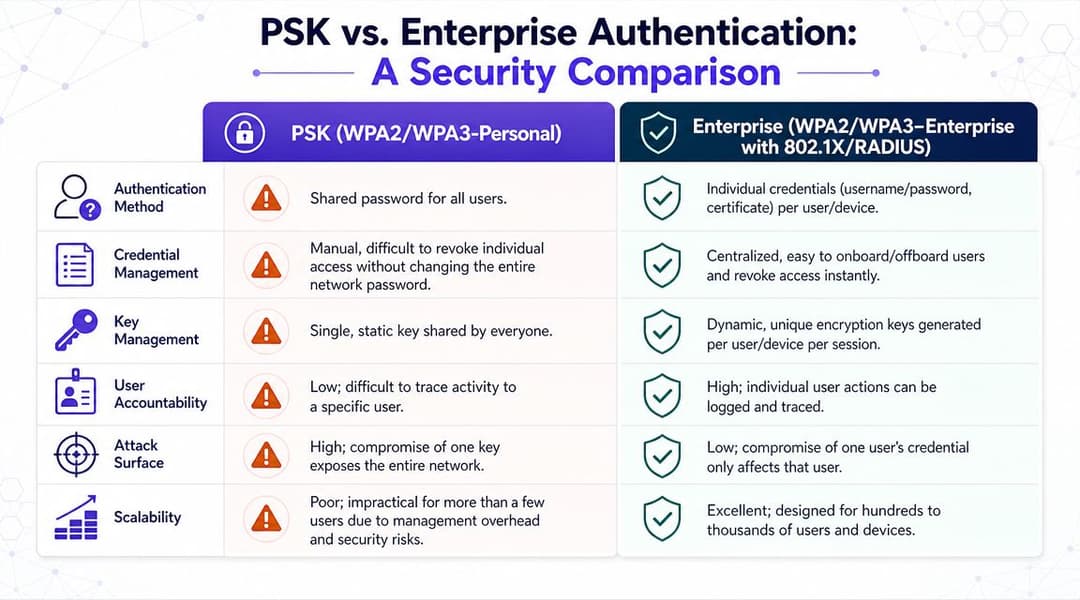
একটি ব্যবহারিক তুলনা পার্থক্যটি স্পষ্ট করে তোলে:
| প্রয়োজনীয়তা | শেয়ার্ড পাসওয়ার্ড মডেল | এন্টারপ্রাইজ অথেন্টিকেশন মডেল |
|---|---|---|
| একজন ইউজারকে বাদ দেওয়া | পুরো পাসওয়ার্ড পরিবর্তন করুন, তারপর আবার সবাইকে বিতরণ করুন | নির্দিষ্ট অ্যাকাউন্ট বা সার্টিফিকেট নিষ্ক্রিয় করুন |
| কার্যকলাপ তদন্ত করা | সুনির্দিষ্টভাবে চিহ্নিত করা কঠিন | ইভেন্টগুলিকে একজন ইউজার বা ডিভাইস আইডেন্টিটির সাথে সংযুক্ত করুন |
| রোল-ভিত্তিক অ্যাক্সেস প্রয়োগ করা | অপরিণত এবং ম্যানুয়াল | পলিসি সিদ্ধান্তের সাথে বিল্ট-ইন |
| বিদায়ী কর্মী এবং কন্ট্রাক্টরদের পরিচালনা করা | ভুল হওয়ার প্রবণতা থাকে | কেন্দ্রীয়ভাবে বাতিলকরণ |
| মিশ্র এস্টেট রক্ষা করা | বড় পরিসরের জন্য দুর্বল | স্টাফ, BYOD এবং ম্যানেজড ডিভাইসের জন্য উপযুক্ত |
সবচেয়ে শক্তিশালী ডেপ্লয়মেন্ট প্যাটার্ন সাধারণত সহজ ও সোজা হয়:
- SSID-এ এন্টারপ্রাইজ অথেন্টিকেশন সক্রিয় করুন
- কর্মীদের জন্য একটি সেন্ট্রাল আইডেন্টিটি সোর্স ব্যবহার করুন
- লেগ্যাসি সাইফার নিষ্ক্রিয় করুন
- অথেন্টিকেটেড ইউজার এবং ডিভাইসের ধরনগুলোকে সঠিক নেটওয়ার্ক পলিসির সাথে ম্যাপ করুন
- অথেন্টিকেশন পাথ নিয়মিত অডিট করুন
যেখানে ডেপ্লয়মেন্ট সাধারণত থমকে যায়
জটিলতাই হলো সাধারণ আপত্তি, এবং এটি একটি যুক্তিযুক্ত আপত্তি।
একটি PSK আইডেন্টিটি ডিজাইনকে এড়িয়ে চলে। 802.1X আইডেন্টিটি স্টোর, সার্টিফিকেট লাইফসাইকেল, ডিভাইস অনবোর্ডিং, গেস্ট অ্যাক্সেস, ফলব্যাক পদ্ধতি এবং পুরানো হার্ডওয়্যারের জন্য ব্যতিক্রম হ্যান্ডলিং সম্পর্কে সিদ্ধান্ত নিতে বাধ্য করে। সেই পরিকল্পনার জন্য সময় লাগে, কিন্তু এটি পরে বারবার ঘটা সমস্যার একটি দীর্ঘ তালিকা দূর করে।
এন্টারপ্রাইজ WiFi পরিচালনা করা সহজ হয়ে ওঠে যখন অ্যাক্সেস এমন আইডেন্টিটির সাথে যুক্ত থাকে যা আপনি ইতিমধ্যে অন্য কোথাও পরিচালনা করছেন।
সামঞ্জস্যতা হলো দ্বিতীয় সমস্যা। ল্যাপটপ এবং ফোনগুলো সাধারণত সার্টিফিকেট-ভিত্তিক অ্যাক্সেস বা ডিরেক্টরি-ব্যাকড অথেন্টিকেশনের সাথে ভালোভাবে কাজ করে। প্রিন্টার, স্ক্যানার, মেডিকেল ডিভাইস, OT সিস্টেম এবং পুরানো IoT ইকুইপমেন্টগুলো প্রায়শই তা করে না। একটি পরিপক্ক ডিজাইন শুরুতেই সেটিকে বিবেচনায় নেয়। আধুনিক ব্যবহারকারীর অ্যাক্সেস 802.1X-এ রাখুন, ব্যতিক্রমগুলোকে আলাদা করুন এবং কয়েকটি সীমিত ডিভাইসের কারণে পুরো এস্টেটের জন্য পলিসি নির্ধারণ করা এড়িয়ে চলুন।
মাল্টি-টেন্যান্ট এবং বড় পাবলিক ভেন্যুগুলোতে, গেস্ট অ্যাক্সেসের জন্য বিশেষ ব্যবস্থার প্রয়োজন। কর্মী এবং ভাড়াটে ব্যবহারকারীদের এমন আইডেন্টিটি দিয়ে প্রমাণীকরণ করা উচিত যা আপনি প্রত্যাহার এবং অডিট করতে পারেন। অতিথিদের একটি আলাদা অনবোর্ডিং প্রবাহ ব্যবহার করা উচিত, আদর্শভাবে Captive Portal রেজিস্ট্রেশন, ফেডারেটেড সাইন-ইন বা Passpoint-এর মাধ্যমে যেখানে পরিবেশ এটি সমর্থন করে। এটি পাসওয়ার্ড শেয়ারিং কমায়, সাপোর্ট ওভারহেড হ্রাস করে এবং সাইটজুড়ে ধারাবাহিকভাবে অ্যাক্সেস নীতি কার্যকর করা সহজ করে তোলে।
বাস্তবে কী বেছে নেবেন
অধিকাংশ প্রতিষ্ঠানের জন্য, এই ক্রমটি কার্যকর হয়:
- স্টাফ ডিভাইসগুলি 802.1X সহ WPA2-Enterprise বা WPA3-Enterprise ব্যবহার করে
- কর্পোরেট-ম্যানেজড এন্ডপয়েন্টগুলি সার্টিফিকেট-ভিত্তিক প্রমাণীকরণ পছন্দ করে
- BYOD ব্যবহারকারীরা পলিসি সীমাবদ্ধতা সহ নিয়ন্ত্রিত আইডেন্টিটি ওয়ার্কফ্লোর মাধ্যমে প্রমাণীকরণ করে
- গেস্টরা একটি পৃথক অ্যাক্সেস ফ্লো ব্যবহার করে এবং স্টাফ ট্রাস্ট মডেলের বাইরে থাকে
- লেগ্যাসি এন্ডপয়েন্টগুলি কঠোর স্কোপ এবং স্পষ্ট মালিকানার সাথে ব্যতিক্রমী হ্যান্ডলিং পায়
লক্ষ্য যদি এন্টারপ্রাইজ স্কেলে WiFi সিকিউরিটি উন্নত করা হয়, তবে একটি উন্নত শেয়ারড পাসওয়ার্ডের পরিবর্তে আইডেন্টিটিকে কেন্দ্র করে এটি তৈরি করুন। কার্যক্ষেত্রে এর অর্থ হলো ওয়ার্কফোর্স অ্যাক্সেসের জন্য 802.1X, উপযুক্ত ক্ষেত্রে SSO বা ফেডারেটেড আইডেন্টিটি, হাই-ভলিউম গেস্ট এনভায়রনমেন্টের জন্য Passpoint, এবং পাসওয়ার্ড বিতরণের ওপর ভিত্তি করে তৈরি নেটওয়ার্কের পরিবর্তে নিয়ন্ত্রিত ব্যতিক্রমের একটি সংক্ষিপ্ত তালিকা ব্যবহার করা।
একটি নিরাপদ সেগমেন্টেড নেটওয়ার্ক আর্কিটেকচার ডিজাইন করা
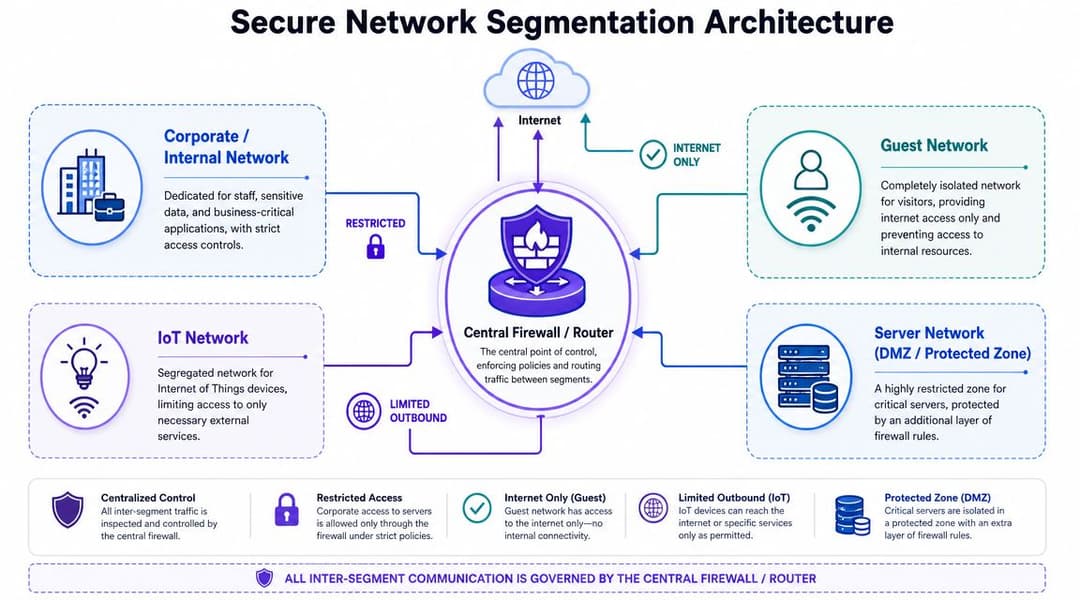
অথেনটিকেশন যদি এই প্রশ্নের উত্তর দেয় যে "কারা প্রবেশাধিকার পাবে", তবে সেগমেন্টেশন উত্তর দেয় যে "তারা শেষ পর্যন্ত কোথায় গিয়ে পৌঁছাবে"।
একটি ফ্ল্যাট ওয়্যারলেস নেটওয়ার্ক কোনো লেন, কোনো ব্যারিয়ার এবং কোন যানটি কোন গন্তব্যে পৌঁছাতে পারে সে সম্পর্কে কোনো নিয়ম ছাড়া হাইওয়ে চালানোর মতো। এটি ট্রাফিক সচল রাখতে পারে। তবে এটি কোনো দুর্ঘটনা ভালোভাবে মোকাবিলা করতে পারবে না।
সুবিধার ভিত্তিতে নয়, বিশ্বাসের ভিত্তিতে সেগমেন্ট করুন
অতিথি অ্যাক্সেসকে প্রায়শই একটি সাধারণ পাসওয়ার্ড সমস্যা হিসাবে বিবেচনা করা হয়, তবে আরও শক্তিশালী ডিজাইন হলো অতিথি WiFi-কে একটি পৃথক সাবনেট বা নেটওয়ার্কে বিভক্ত করা এবং এটিকে সংবেদনশীল রিসোর্স থেকে আলাদা করা, যেমনটি Ekahau-এর সুরক্ষিত WiFi ডিজাইনের নির্দেশিকায় আলোচনা করা হয়েছে। SSID হাইড করার মতো বাহ্যিক বিষয়গুলির চেয়ে এটি অনেক বেশি গুরুত্বপূর্ণ।
বড় পরিবেশের জন্য সবচেয়ে পরিচ্ছন্ন সেগমেন্টেশন মডেলে সাধারণত নিম্নলিখিত ক্ষেত্রগুলির জন্য আলাদা জোন অন্তর্ভুক্ত থাকে:
- কর্পোরেট কর্মী
- অতিথিবৃন্দ (Guests)
- IoT এবং অপারেশনাল ডিভাইস
- সুরক্ষিত সার্ভার বা অ্যাপ্লিকেশন জোন
- প্রয়োজন অনুযায়ী টেন্যান্ট-নির্দিষ্ট বা সাইট-নির্দিষ্ট নেটওয়ার্ক
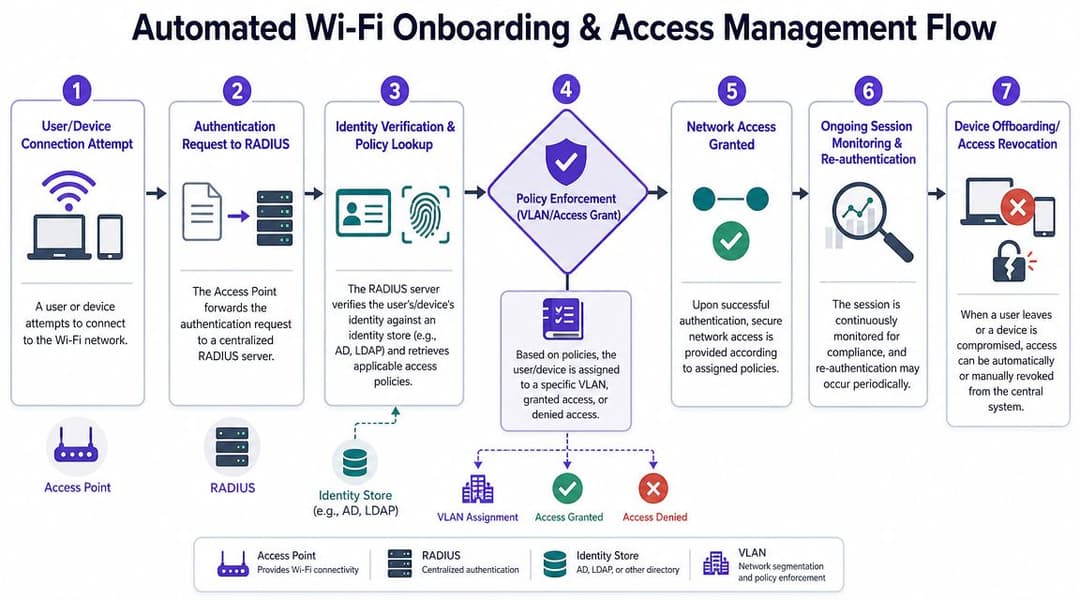
প্রতিটি জোনের নিজস্ব VLAN বা সমমানের পলিসি বাউন্ডারি থাকা উচিত এবং জোনগুলোর মধ্যকার ট্রাফিক অবশ্যই একটি ফায়ারওয়াল বা পলিসি ইঞ্জিনের মধ্য দিয়ে যাওয়া উচিত। সব ওয়্যারলেস কন্ট্রোলার এটিকে সমানভাবে কার্যকর করে না, তাই আপনার স্ট্যাকে পলিসি কোথায় অবস্থান করছে তা পরীক্ষা করুন।
একটি ব্লুপ্রিন্ট যা বাস্তব ভেন্যুতে কাজ করে
এমন সেগমেন্টেশন নিয়ম ব্যবহার করুন যা প্রকৃত ব্যবসায়িক কার্যক্রমকে প্রতিফলিত করে।
হসপিটালিটি এবং অবসর
হোটেল, বার, স্টেডিয়াম এবং অনুষ্ঠানের জায়গাগুলিতে সাধারণত অন্তত এই বিভাজনগুলির প্রয়োজন হয়:
- ব্যাক-অফিস সিস্টেমে কোনো রুট ছাড়াই গেস্ট ইন্টারনেট অ্যাক্সেস
- হ্যান্ডহেল্ড, PMS ক্লায়েন্ট এবং অভ্যন্তরীণ অ্যাপ্লিকেশনের জন্য স্টাফ অপারেশনস
- কঠোরভাবে সীমিত ইস্ট-ওয়েস্ট ট্রাফিক সহ POS এবং পেমেন্ট পরিবেশ
- IPTV, থার্মোস্ট্যাট, সাইনেজ, লক বা ক্যামেরার মতো বিল্ডিং সিস্টেম এবং IoT
হসপিটালিটি সেক্টরে সাধারণ ব্যর্থতা হলো সুবিধাকে অগ্রাধিকার দিয়ে ডিজাইন করা। কেউ "সবকিছুর" জন্য একটি SSID চায়। এক সপ্তাহের জন্য সাপোর্ট হয়তো সহজ হয়। কিন্তু বছরের পর বছর ধরে ঝুঁকি বেড়ে যায়।
রিটেল এবং শপিং সেন্টার
রিটেল এস্টেটগুলিতে সাধারণত আলাদা করার প্রয়োজন হয়:
- স্টোর স্টাফদের ডিভাইস
- গ্রাহকদের গেস্ট অ্যাক্সেস
- POS এবং পেমেন্ট টার্মিনাল
- ডিজিটাল সাইনেজ এবং সেন্সর
- ল্যান্ডলর্ড বা সেন্টার-ম্যানেজমেন্ট সিস্টেম
প্রধান বিষয় হলো একটি স্টোর, একটি কিয়স্ক বা একটি ভুল কনফিগার করা ভেন্ডর ডিভাইস যাতে অন্য কোনো অপারেশনাল ডোমেনে প্রবেশের মাধ্যম না হয়ে ওঠে তা প্রতিরোধ করা।
মাল্টি-টেন্যান্ট প্রোপার্টি
আবাসিক, BTR, স্টুডেন্ট হাউজিং এবং মিশ্র-ব্যবহারের সম্পত্তিতে, ওয়্যারলেস ডিজাইন প্রায়শই ব্যর্থ হয় কারণ অপারেটররা ঘরোয়া প্রত্যাশার সাথে এন্টারপ্রাইজ ঝুঁকিকে গুলিয়ে ফেলে। ভাড়াটেরা সহজ কানেক্টিভিটি চায়। অপারেটরদের কঠোর আইসোলেশন প্রয়োজন।
একটি কার্যকর মডেল হলো:
| নেটওয়ার্ক ক্লাস | অ্যাক্সেস মডেল | অনুমোদিত অ্যাক্সেসের পরিধি |
|---|---|---|
| টেন্যান্ট অ্যাক্সেস | টেন্যান্ট-নির্দিষ্ট আইডেন্টিটি বা প্রোফাইল | ইন্টারনেট এবং অনুমোদিত রেসিডেন্ট সার্ভিসসমূহ |
| বিল্ডিং অপারেশন | ম্যানেজড ডিভাইস আইডেন্টিটি | শুধুমাত্র প্রয়োজনীয় ইন্টারনাল সিস্টেমসমূহ | আলাদা গেস্ট পাথ | শুধুমাত্র ইন্টারনেট |
| কন্ট্রাক্টর অ্যাক্সেস | সময়-সীমিত পলিসি | শুধুমাত্র নির্দিষ্ট অ্যাপ বা সাপোর্ট সার্ভিসসমূহ |
VLAN ডায়াগ্রামের চেয়ে ফায়ারওয়াল নিয়ম বেশি গুরুত্বপূর্ণ
টিমগুলি প্রায়শই VLAN ডিজাইন করেই মনে করে কাজ শেষ। এটি আসলে কাজের অর্ধেক মাত্র।
আপনার ফায়ারওয়াল নিয়মের এই ধরণের প্রশ্নের উত্তর দেওয়া উচিত:
- একটি গেস্ট ডিভাইস কি ইন্টারনেট পথ ছাড়া অন্য কিছুতে পৌঁছাতে পারে?
- একটি IoT ডিভাইস কি ব্যবহারকারী নেটওয়ার্কগুলোতে সেশন শুরু করতে পারে?
- স্টাফ ডিভাইসগুলো কি কেবল অনুমোদিত পোর্ট এবং সার্ভিসের মাধ্যমে সুরক্ষিত অ্যাপ্লিকেশনগুলোতে পৌঁছাতে পারে?
- একটি ভাড়াটে নেটওয়ার্ক কি কখনো অন্য কোনো ভাড়াটে নেটওয়ার্ক দেখতে পারে?
- অনবোর্ডিং সিস্টেমগুলো কি ব্যাপকভাবে এক্সপোজ না করে আইডেন্টিটি সার্ভিসগুলোর সাথে কথা বলতে পারে?
নীতি কঠোরভাবে প্রয়োগ না করে তা অনুমান করে নিলে সেগমেন্টেশন ব্যর্থ হয়।
একটি ভালো আর্কিটেকচার কখনোই ধরে নেয় না যে ডিভাইসগুলো ঠিকঠাক আচরণ করবে। এটি ধরে নেয় যে কিছু ডিভাইস তা করবে না, এবং সেই অনুযায়ী ক্ষতির পরিমাণ সীমিত করে। এই কারণেই ক্ষণস্থায়ী ব্যবহারকারী, আনম্যানেজড ডিভাইস বা মিশ্র ট্রাস্ট লেভেলের যেকোনো এনভায়রনমেন্টে WiFi সিকিউরিটি কীভাবে উন্নত করা যায় তার মূল চাবিকাঠি হলো সেগমেন্টেশন।
নিরাপদ অনবোর্ডিং এবং অ্যাক্সেস ম্যানেজমেন্ট স্বয়ংক্রিয় করা
একবার যখন আপনার স্টাফ টার্নওভার, BYOD, ঠিকাদার, গেস্ট এবং একাধিক সাইট জুড়ে লেগ্যাসি ডিভাইস ছড়িয়ে থাকে, তখন ম্যানুয়াল WiFi অ্যাডমিনিস্ট্রেশন আর কার্যকর থাকে না। মানুষ চলে যায়। ডিভাইস পরিবর্তন করা হয়। অস্থায়ী অ্যাক্সেস স্থায়ী হয়ে যায় কারণ কেউ এটি অপসারণ করতে মনে রাখে না।
অটোমেশন পরিচয়, প্রমাণীকরণ এবং নেটওয়ার্ক পলিসিকে সংযুক্ত করে এই সমস্যার সমাধান করে।
কর্মীদের অ্যাক্সেস আইডেন্টিটি লাইফসাইকেল অনুসরণ করা উচিত
যখন একজন কর্মী যোগদান করেন, তখন তাদের WiFi অ্যাক্সেস একই আইডেন্টিটি প্রক্রিয়ার অংশ হিসাবে উপস্থিত হওয়া উচিত যা তাদের ব্যবসায়িক অ্যাকাউন্টগুলো তৈরি করে। যখন তারা দল পরিবর্তন করেন, তখন পলিসি আপডেট হওয়া উচিত। যখন তারা চলে যান, তখন পুরানো পাসওয়ার্ড বা বাসি MAC এন্ট্রি না খুঁজে অ্যাক্সেস বন্ধ হয়ে যাওয়া উচিত।
এই কারণেই পরিপক্ক ডেপ্লয়মেন্টগুলো ওয়্যারলেস অ্যাক্সেসকে সেই একই আইডেন্টিটি প্রোভাইডারদের সাথে যুক্ত করে যা ইতিমধ্যেই প্রতিষ্ঠানে ব্যবহৃত হচ্ছে, যেমন Entra ID, Google Workspace বা Okta। এর ফলে একটি সহজ অনবোর্ডিং পথ তৈরি হয়, ম্যানুয়াল ব্যতিক্রম কমে যায় এবং কেন্দ্রীয়ভাবে অ্যাক্সেস বাতিল করার সুবিধা পাওয়া যায়।
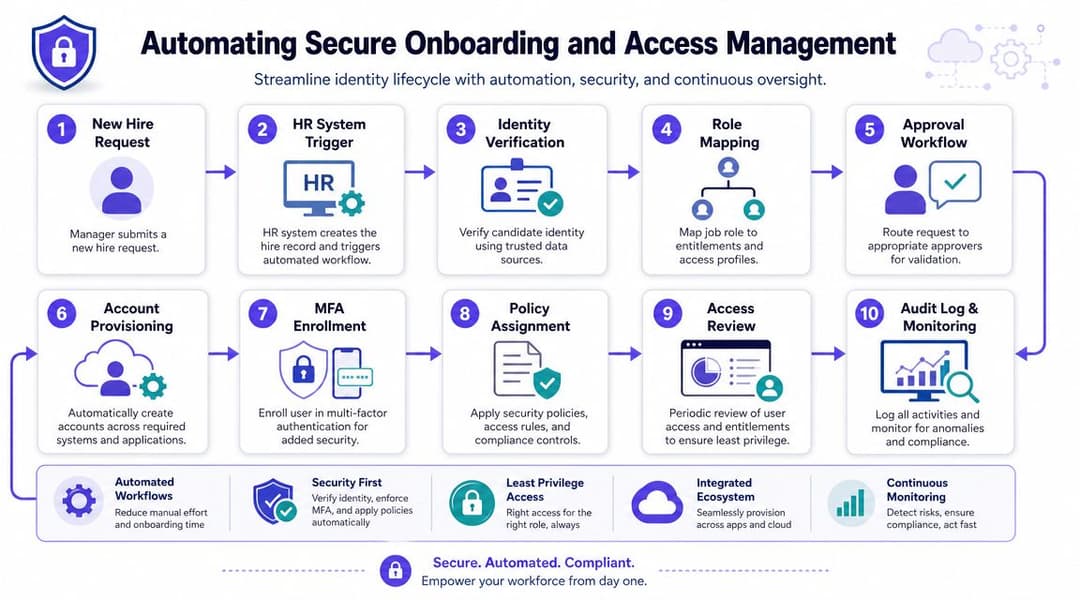
আপনি যদি পলিসি এনফোর্সমেন্ট এবং আইডেন্টিটি-ড্রিভেন অ্যাডমিশনের ক্ষেত্রে অর্কেস্ট্রেশন অপশনগুলো মূল্যায়ন করেন, তবে এই নেটওয়ার্ক অ্যাক্সেস কন্ট্রোল সলিউশনগুলো শুধুমাত্র রেডিও নয়, বরং ওয়্যারলেসের চারপাশে আপনার প্রয়োজনীয় বিস্তৃত কন্ট্রোল লেয়ার প্রদর্শন করে।
ভিন্ন ব্যবহারকারী গোষ্ঠীর জন্য ভিন্ন অনবোর্ডিং পাথ প্রয়োজন
একটি একক ওয়ার্কফ্লো সাধারণত সবার ক্ষেত্রে প্রযোজ্য হয় না। পৃথক বিশ্বাসের স্তরের জন্য পৃথক পদ্ধতি ব্যবহার করুন।
- পরিচালিত কর্মী ডিভাইসে ন্যূনতম ব্যবহারকারী ঝঞ্ঝাট সহ সার্টিফিকেট-ভিত্তিক বা ডিরেক্টরি-ব্যাকড প্রমাণীকরণ ব্যবহার করা উচিত।
- BYOD ব্যবহারকারীদের একটি নিয়ন্ত্রিত তালিকাভুক্তি প্রবাহের প্রয়োজন যা সীমাবদ্ধ নীতি এবং স্পষ্ট মেয়াদোত্তীর্ণ বা পর্যালোচনার শর্তাবলী প্রয়োগ করে।
- অতিথিদের স্টাফ ট্রাস্ট ডোমেনে যোগ না দিয়েই সহজ অ্যাক্সেস প্রয়োজন।
- লেগ্যাসি ডিভাইসের জন্য কঠোরভাবে সীমাবদ্ধ সুবিধার সাথে এক্সেপশন হ্যান্ডলিং প্রয়োজন।
এটি এমন একটি ক্ষেত্র যেখানে একটি নির্দিষ্ট প্ল্যাটফর্ম মোতায়েনকে সহজ করতে পারে। Purple WPA2/3-Enterprise অ্যাক্সেস, SSO-ব্যাকড প্রমাণীকরণ, Passpoint/OpenRoaming এবং লেগ্যাসি ডিভাইসের জন্য iPSK সমর্থন করে, যা স্থানীয় RADIUS এবং Captive Portal ওয়ার্কফ্লোর চারপাশে সবকিছু তৈরি না করেই শেয়ার করা পাসওয়ার্ড প্রতিস্থাপন করার চেষ্টা করা পরিবেশের সাথে ভালোভাবে খাপ খায়।
Passpoint এবং পাসওয়ার্ডহীন গেস্ট অ্যাক্সেস
ঐতিহ্যগত গেস্ট WiFi প্রায়শই ব্যবহারকারীদের একটি Captive Portal এবং একটি শেয়ার করা পাসওয়ার্ড ব্যবহার করতে বাধ্য করে, তারপর তাদের একটি আইসোলেটেড ইন্টারনেট পাথে ছেড়ে দেয়। এটি কাজ করতে পারে, তবে এটি জটিল এবং প্রতিষ্ঠানগুলোকে এখনও "গেস্ট পাসওয়ার্ড"-এর মতো চিন্তাভাবনায় অভ্যস্ত করে তোলে।
একটি আরও ভালো মডেল হলো Passpoint বা সম্পর্কিত রোমিং ফ্রেমওয়ার্কের মাধ্যমে পাসওয়ার্ডহীন অনবোর্ডিং, যেখানে আইডেন্টিটি বিনিময়টি পরিষ্কারভাবে ঘটে এবং সেশনের শুরু থেকেই ট্রাফিক এনক্রিপ্ট করা থাকে। এটি নিরাপত্তা এবং ব্যবহারকারীর অভিজ্ঞতা উভয়ই উন্নত করে। এটি হোটেলগুলোর ফ্রন্ট-ডেস্কের কাজ, রিটেল টিমগুলোর ওপর চাপ এবং স্বাস্থ্যসেবা ওয়েটিং এরিয়া বা পরিবহন হাবগুলোর জটিলতাও কমিয়ে দেয়।
ভালো অনবোর্ডিং ব্যবহারকারীর যাত্রা থেকে শেয়ার্ড সিক্রেট দূর করে এবং অ্যাডমিন টিম থেকে ম্যানুয়াল ক্লিন-আপের ঝামেলা সরিয়ে দেয়।
স্ট্যান্ডার্ডকে দুর্বল না করে ব্যতিক্রমগুলি পরিচালনা করুন
সব ডিভাইস 802.1X সমর্থন করতে পারে না। প্রিন্টার, স্পেশালিস্ট স্ক্যানার, স্মার্ট টিভি, সাইনেজ প্লেয়ার এবং কিছু অপারেশনাল ডিভাইস এখনও পিছিয়ে রয়েছে। তার মানে এই নয় যে আপনি পুরো এস্টেটের জন্য একটি পাসওয়ার্ড ব্যবহারে ফিরে যাবেন।
ঐসব ডিভাইসের জন্য, প্রতি ডিভাইসের ভিত্তিতে iPSK এর মতো পদ্ধতি ব্যবহার করুন, তারপর প্রতিটি ক্রেডেনশিয়ালকে সঠিক সেগমেন্টের সাথে সংযুক্ত করুন এবং এটি কতটুকু অ্যাক্সেস করতে পারবে তা সীমিত করুন। যদি একটি ডিভাইস ম্যালওয়্যার দ্বারা আক্রান্ত হয়, তবে আপনি কেবল সেই একটি ডিভাইসের অ্যাক্সেস বাতিল করবেন। আপনাকে সম্পূর্ণ নেটওয়ার্ক পরিবর্তন করতে হবে না।
এখানে অটোমেশন গুরুত্বপূর্ণ কারণ স্কেলিং সবকিছু বদলে দেয়। সামান্য কিছু ব্যতিক্রম নিজে হাতে পরিচালনা করা সম্ভব। কিন্তু বিভিন্ন সম্পত্তি, ভেন্যু বা ক্যাম্পাস জুড়ে শত শত ব্যতিক্রমী ঘটনা ঘটলে স্প্রেডশীটগুলো নিরাপত্তার ক্ষেত্রে ঘাটতি তৈরি করতে শুরু করে।
সক্রিয় মনিটরিং এবং ইনসিডেন্ট রেসপন্স প্রতিষ্ঠা করা
WiFi সিকিউরিটি ডিজাইনের চেয়ে অপারেশনের ক্ষেত্রে বেশি ব্যর্থ হয়।
একটি এন্টারপ্রাইজ 802.1X মোতায়েন করতে পারে, কর্মীদের থেকে অতিথিদের আলাদা করতে পারে এবং শেয়ার করা পাসওয়ার্ডগুলিকে পরিচয়-ভিত্তিক অ্যাক্সেস দিয়ে প্রতিস্থাপন করতে পারে, কিন্তু তারপরেও নিয়ন্ত্রণ হারাতে পারে কারণ কেউ পরিবর্তনের দিকে নজর রাখছে না। একটি সার্টিফিকেটের মেয়াদ শেষ হয়ে যায়। একটি ইভেন্টের পরেও একটি অস্থায়ী SSID সক্রিয় থাকে। একজন ভাড়াটে একটি শেয়ার করা জায়গায় একটি আনম্যানেজড AP যোগ করে। একটি পলিসি পরিবর্তনের কারণে ডিভাইসগুলি ভুল সেগমেন্টে চলে যায়। বড় ভেন্যু এবং মাল্টি-টেন্যান্ট এস্টেটগুলিতে, এই ধরনের ব্যর্থতাগুলি সাধারণ কারণ ওয়্যারলেস ক্রমাগত পরিবর্তিত হয়।
ক্রমাগত কী মনিটর করতে হবে
শুধুমাত্র আপটাইম নয়, বরং অ্যাক্সেস কন্ট্রোল এবং পলিসি এনফোর্সমেন্টের সাথে যুক্ত সংকেত দিয়ে শুরু করুন।
মনোযোগ দিন:
- RADIUS, আইডেন্টিটি প্রোভাইডার বা ক্লাউড NAC প্ল্যাটফর্ম থেকে Authentication-এর সাফল্য এবং ব্যর্থতা
- কন্ট্রোলার, AP, সুইচ এবং গেটওয়েতে অ্যাডমিনিস্ট্রেটিভ লগইন এবং কনফিগারেশন পরিবর্তন
- অনুমোদিত পরিবর্তনের সময়ের বাইরে তৈরি করা নতুন SSID, পলিসি অবজেক্ট বা ব্যতিক্রমী নিয়মসমূহ
- ক্লায়েন্ট অ্যাসাইনমেন্ট প্যাটার্ন যা ব্যবহারকারী বা ডিভাইসগুলিকে ভুল রোল, VLAN বা পলিসি গ্রুপে প্রবেশ করা দেখায়
- বিভিন্ন সাইট ও প্রপার্টি জুড়ে AP হেলথ, ফার্মওয়্যার স্ট্যাটাস এবং কন্ট্রোলার সিঙ্ক স্টেট
Authentication ব্যর্থতার পেছনের কারণ জানা প্রয়োজন। হঠাত করে ব্যর্থতার হার বৃদ্ধি পাওয়ার পেছনে সার্টিফিকেট রিনিউয়ালের পর সাপোর্ট সংক্রান্ত কোনো সমস্যা অথবা SSO-এর সাথে যুক্ত অনবোর্ডিংয়ের কোনো ত্রুটি থাকতে পারে। এটি ক্রেডেনশিয়াল অপব্যবহার, ডিভাইস ক্লোনিং বা একটি সম্পূর্ণ ইউজার গ্রুপকে প্রভাবিতকারী ভুল পলিসির প্রাথমিক প্রমাণও হতে পারে।
বিষয়টি খুব সহজ। কে অ্যাক্সেস পাচ্ছে, কীভাবে পাচ্ছে এবং তার পরে তারা কোথায় গিয়ে পৌঁছাচ্ছে তা নির্ধারণকারী নিয়ন্ত্রণগুলি পর্যবেক্ষণ করুন।
রোগ AP সনাক্তকরণ একটি রুটিন নিয়ন্ত্রণ
Rogue APs এখনও একটি সুপরিকল্পিত ওয়্যারলেস পরিবেশে সবচেয়ে সহজ কিছু নিরাপত্তা ফাঁক তৈরি করে। এগুলো সবসময় ক্ষতিকারক হয় না। বাস্তবে, অনেকগুলোই আসে সুবিধার স্বার্থে। কোনো কর্মী হয়তো ডেড স্পট ঠিক করতে একটি কম দামি রাউটার প্লাগ ইন করলেন। কোনো ঠিকাদার অনুষ্ঠানের পর একটি ব্রিজ ফেলে গেলেন। অথবা কোনো ভাড়াটে একটি শেয়ার্ড বিল্ডিংয়ে কনজিউমার গিয়ার ইনস্টল করে আপনার অথেন্টিকেশন এবং সেগমেন্টেশন পলিসির বাইরে একটি অনিয়ন্ত্রিত পথ তৈরি করলেন।
এই কারণেই নিয়মিত RF এবং ইনফ্রাস্ট্রাকচার পরীক্ষা সাধারণ অপারেশনের অংশ হওয়া উচিত, বার্ষিক অডিটের নয়। কনফিগারেশন রিভিউ, সুইচ-পোর্ট পরীক্ষা এবং সমস্যাযুক্ত এলাকায় ফিজিক্যাল ওয়াাকথ্রু করার পাশাপাশি রৌগ অ্যাক্সেস পয়েন্ট এবং সিগন্যাল অ্যানোমালির জন্য WiFi স্ক্যান চালান।
একটি rogue AP অত্যন্ত ঝুঁকিপূর্ণ কারণ এটি আপনি অন্য কোথাও যে পরিচয় এবং নীতি নির্ধারণ করেছিলেন তা সম্পূর্ণ এড়িয়ে যায়।
একটি WiFi-নির্দিষ্ট রেসপন্স প্লেবুক তৈরি করুন
সাধারণ SOC রানবুকগুলি যথেষ্ট নয়। তারবিহীন ঘটনার জন্য এমন পদক্ষেপের প্রয়োজন যা ওয়্যারলেস ফেইলিওর মোডের সাথে সামঞ্জস্যপূর্ণ হয়।
একটি সহজ প্লেবুক কাঠামো ব্যবহার করুন:
ঘটনাটি চিহ্নিত করুন
সমস্যাটি কোনো রোগ AP, সার্টিফিকেট ত্রুটি, পলিসি ড্রিপ্ট, অস্বাভাবিক অথেনটিকেশন অ্যাক্টিভিটি, নাকি কোনো ওয়্যারলেস সেগমেন্ট থেকে সন্দেহজনক ল্যাটারাল মুভমেন্ট তা নিশ্চিত করুন।এক্সপোজার নিয়ন্ত্রণ করুন
SSID নিষ্ক্রিয় করুন, ক্রেডেনশিয়াল রিভোক করুন, এন্ডপয়েন্ট কোয়ারেন্টাইন করুন, সুইচ পোর্ট রিমুভ করুন অথবা কন্ট্রোলার থেকে AP ব্লক করুন।প্রমাণ সংরক্ষণ করুন
কন্ট্রোলার লগ, RADIUS ট্রানজ্যাকশন, আইডেন্টিটি-প্রোভাইডার ইভেন্ট, কনফিগারেশন স্ন্যাপশট এবং পরিবর্তনের রেকর্ড রাখুন।অ্যাক্সেস পাথ ট্রেস করুন
কোন আইডেন্টিটি অথেনটিকেট করেছে, কোন পলিসি প্রয়োগ করা হয়েছে, কোন সেগমেন্ট বরাদ্দ করা হয়েছে এবং ডিভাইসটি কোথায় পৌঁছাতে পেরেছে তা নির্ধারণ করুন।কন্ট্রোল গ্যাপ দূর করুন
মূল কারণটি দূর করুন। যদি কোনো অস্থায়ী অনবোর্ডিং পাথের মেয়াদ শেষ হওয়ার তারিখ না থাকে, তবে তা যুক্ত করুন। যদি কোনো টেন্যান্ট পোর্ট আনম্যানেজড গিয়ারের অনুমতি দেয়, তবে পোর্ট পলিসি আরও কঠোর করুন।
এন্টারপ্রাইজ এবং গেস্ট পরিবেশে, প্রতিক্রিয়া জানানোর গতি অত্যন্ত গুরুত্বপূর্ণ কারণ একটি দুর্বল ব্যতিক্রম একসাথে অনেক ব্যবহারকারীকে প্রভাবিত করতে পারে। একটি ভুল কনফিগার করা স্টাফ SSID অভ্যন্তরীণ অ্যাক্সেসকে ব্যাপকভাবে উন্মুক্ত করে দিতে পারে। একটি গেস্ট পলিসি ত্রুটি সম্পূর্ণ ভেন্যুতে আইসোলেশন ভেঙে দিতে পারে। একটি শেয়ার্ড-পাসওয়ার্ড মডেল কন্টেনমেন্ট বা নিয়ন্ত্রণ করা কঠিন করে তোলে কারণ সেখানে বাতিল করার মতো কোনো একক আইডেন্টিটি থাকে না। আইডেন্টিটি-ভিত্তিক অ্যাক্সেস টিমকে একটি পরিষ্কার প্রতিক্রিয়া জানানোর পথ দেয়।
মানুষ যা ভুলে যায় তা অডিট করুন
সবচেয়ে মূল্যবান পরীক্ষাগুলি প্রায়শই অপারেশনাল রক্ষণাবেক্ষণের অংশ হয়:
| অডিট আইটেম | এটি কেন গুরুত্বপূর্ণ |
|---|---|
| লেগ্যাসি সাইফার পর্যালোচনা | পুরানো সেটিংস মাইগ্রেশনের পরেও থেকে যায় এবং নতুন পলিসি স্ট্যান্ডার্ডকে দুর্বল করে দেয় |
| গেস্ট পাথ যাচাইকরণ | গেস্ট ট্রাফিক প্রায়শই ডিজাইনের তুলনায় কম আইসোলেটেড থাকে |
| Authentication-server সেটিংস | এখানে ত্রুটি থাকলে নিশ্চয়তা বিঘ্নিত হয় |
| AP ইনভেন্টরি সমন্বয় | সময়ের সাথে সাথে অজানা বা প্রতিস্থাপিত হার্ডওয়্যার দেখা যায় |
| ব্যতিক্রমী ডিভাইস পর্যালোচনা | অস্থায়ী অনুমতিগুলো প্রায়শই স্থায়ী হয়ে যায় |
WiFi মনিটরিংকে অ্যাক্সেস কন্ট্রোল অপারেশনের অংশ হিসেবে বিবেচনা করুন। এন্টারপ্রাইজ, গেস্ট এবং মাল্টি-টেন্যান্ট পরিবেশে, টিমগুলো এভাবেই আইডেন্টিটি, সেগমেন্টেশন এবং ব্যতিক্রমী পরিস্থিতি পরিচালনাকে ডিজাইনের সাথে সামঞ্জস্যপূর্ণ রাখে।
আপনার WiFi সিকিউরিটি অ্যাকশন চেকলিস্ট
শেয়ার্ড পাসওয়ার্ড এখনও অনেক বেশি WiFi রোলআউটে আধিপত্য বিস্তার করে আছে। এন্টারপ্রাইজ, গেস্ট এবং মাল্টি-টেন্যান্ট পরিবেশে, সেই মডেলটিই হলো সমস্যা। এর ব্যবহারিক সমাধান হলো বিস্তৃত শেয়ার্ড অ্যাক্সেসের পরিবর্তে আইডেন্টিটি, পলিসি এবং দ্রুত অ্যাক্সেস প্রত্যাহারের ব্যবস্থা করা।
ডিজাইন ডায়াগ্রামে দেখানো পরিবেশ নয়, বরং আপনি যে পরিবেশ পরিচালনা করছেন তা যাচাই করতে নিচের চেকলিস্টগুলো ব্যবহার করুন।
হসপিটালিটি এবং অতিথি-ভারী ভেন্যু
- পলিসি লেয়ারে গেস্ট এবং স্টাফ অ্যাক্সেস আলাদা করুন। স্টাফ ডিভাইস, POS, PMS এবং ব্যাক-অফিস সিস্টেমগুলোর আলাদাভাবে অথেনটিকেট হওয়া উচিত এবং আলাদা নেটওয়ার্ক সেগমেন্টে ল্যান্ড করা উচিত।
- প্রিন্ট করা শেয়ার্ড পাসওয়ার্ড ব্যবহার বন্ধ করুন। ক্যাপটিভ অনবোর্ডিং, উপযুক্ত ক্ষেত্রে SSO, সমর্থিত জার্নির জন্য Passpoint/OpenRoaming এবং কর্মীদের জন্য আইডেন্টিটি-ভিত্তিক অ্যাক্সেস ব্যবহার করুন।
- রুম এবং ভেন্যু ডিভাইসগুলো আইসোলেট করুন। টিভি, সাইনেজ, থার্মোস্ট্যাট, লক এবং অন্যান্য IoT সিস্টেমের জন্য কঠোরভাবে স্কোপ করা অ্যাক্সেসের প্রয়োজন, কোনো ব্যাপক লোকাল ভিজিবিলিটি নয়।
- অস্থায়ী অ্যাক্সেসে মেয়াদ শেষ হওয়ার তারিখ এবং মালিকানা যুক্ত করুন। ইভেন্ট নেটওয়ার্ক, কনফারেন্সের পরিবর্তন এবং ঠিকাদারদের অ্যাক্সেসের জন্য একজন নির্দিষ্ট মালিক এবং একটি স্বয়ংক্রিয় শেষ হওয়ার তারিখ থাকা উচিত।
- ব্যবহারকারীর দিক থেকে পরীক্ষা করুন। গেস্ট হিসেবে সংযুক্ত হন এবং কী কী অ্যাক্সেস করা যাচ্ছে তা যাচাই করুন। স্টাফ, ঠিকাদার এবং রুম ডিভাইসের জন্যও একই কাজ করুন।
কর্পোরেট এবং ক্যাম্পাস IT
- ওয়ার্কফোর্স অ্যাক্সেসের জন্য WPA2-Enterprise বা WPA3-Enterprise-এর সাথে 802.1X ব্যবহার করুন।
- WiFi অ্যাক্সেসকে আইডেন্টিটি লাইফসাইকেল প্রক্রিয়ার সাথে সংযুক্ত করুন। নতুন যোগদানকারীরা দ্রুত সঠিক অ্যাক্সেস পাবেন। চলে যাওয়া ব্যবহারকারীরা দ্রুত তা হারাবেন।
- ম্যানেজড এন্ডপয়েন্টগুলির জন্য সার্টিফিকেট-ভিত্তিক অথেন্টিকেশনকে অগ্রাধিকার দিন। এটি ফিশিং-এর ঝুঁকি কমায় এবং শেয়ার্ড সিক্রেট রোটেট করার সাপোর্টের ঝামেলা এড়ায়।
- BYOD-কে ম্যানেজড অ্যাক্সেস থেকে আলাদা রাখুন। বিভিন্ন ডিভাইস ট্রাস্ট লেভেলের ফলে বিভিন্ন পলিসি, বিভিন্ন VLAN বা রোল এবং বিভিন্ন গন্তব্য হওয়া উচিত।
- পুরানো প্রোটোকল এবং সাইফার এক্সেপশনগুলি সরিয়ে ফেলুন। যদি কোনো লেগাসি ডিভাইসের জন্য এখনও দুর্বল সেটিংসের প্রয়োজন হয়, তবে মূল এস্টেট দুর্বল করার পরিবর্তে এটিকে একটি কন্টেইনড পাথে সরিয়ে নিন।
মাল্টি-ট্যানেন্ট প্রোপার্টি এবং আবাসিক কার্যক্রম
- প্রতিটি টেন্যান্টকে ডিজাইন অনুযায়ী আলাদা রাখুন। একটি ফ্ল্যাট, অফিস বা আবাসিক নেটওয়ার্কের সাথে অন্যটির কোনো ল্যাটারাল অ্যাক্সেস থাকা উচিত নয়।
- বিল্ডিং অপারেশনকে টেন্যান্ট অ্যাক্সেস থেকে আলাদা করুন। ক্যামেরা, লিফট, অ্যাক্সেস কন্ট্রোল, মিটারিং এবং প্ল্যান্ট সিস্টেমের জন্য নিজস্ব প্রমাণিত পাথ এবং সীমিত অ্যাডমিনিস্ট্রেশন মডেলের প্রয়োজন।
- যেসব হার্ডওয়্যার আধুনিক ইউজার অথেন্টিকেশন ব্যবহার করতে পারে না, সেগুলির জন্য প্রতি-ডিভাইস ক্রেডেনশিয়াল ইস্যু করুন। এটি টিমকে সুনির্দিষ্ট কোনো কিছু বাতিল এবং অডিট করার সুবিধা দেয়।
- কন্ট্রাক্টরের অ্যাক্সেস সময় এবং গন্তব্য দ্বারা সীমিত করুন। রক্ষণাবেক্ষণ সরবরাহকারীদের খুব কমই ব্রড নেটওয়ার্ক অ্যাক্সেসের প্রয়োজন হয়, এবং সাধারণত খুব বেশি সময়ের জন্য সেটির প্রয়োজন হয় না।
- আনম্যানেজড এবং পরিত্যক্ত ইক্যুইপমেন্ট পর্যালোচনা করুন। টেন্যান্টদের ইনস্টল করা গিয়ার, প্রতিস্থাপিত AP এবং ভুলে যাওয়া সুইচগুলি ঝুঁকির প্রোফাইল দ্রুত পরিবর্তন করে দেয়।
যেকোনো পরিবেশের জন্য সর্বজনীন পরীক্ষা
- সমস্ত ডিফল্ট অ্যাডমিন ক্রেডেনশিয়াল পরিবর্তন করুন
- সক্রিয়ভাবে ব্যবহার না করা WPS, UPnP এবং রিমোট ম্যানেজমেন্ট নিষ্ক্রিয় করুন
- AP, কন্ট্রোলার, গেটওয়ে এবং RADIUS অবকাঠামো সমর্থিত সফটওয়্যারে রাখুন
- রোগ (rogue) অ্যাক্সেস পয়েন্ট এবং অননুমোদিত SSID স্ক্যান করুন
- বরাদ্দকৃত নীতি, সেগমেন্ট এবং অ্যাক্সেসযোগ্য রিসোর্সগুলো ডিজাইনের সাথে মিলছে কিনা তা যাচাই করুন
- প্রতি মাসে ব্যতিক্রমগুলো পর্যালোচনা করুন। অস্থায়ী ছাড়ের মাধ্যমেই দুর্বল নিয়ন্ত্রণ স্থায়ী হয়ে ওঠে
যদি ২০২৬ সালে WiFi নিরাপত্তা উন্নত করার লক্ষ্য থাকে, তবে কার অ্যাক্সেস আছে, কীভাবে সেই অ্যাক্সেস অথেন্টিকেট করা হচ্ছে এবং এটি কত দ্রুত বাতিল করা যেতে পারে তা দিয়ে শুরু করুন। এখনও এজ লেভেলে পাসওয়ার্ডের শক্তি গুরুত্ব রাখে। তবে বড় ধরনের এস্টেটের ক্ষেত্রে, আইডেন্টিটি, সেগমেন্টেশন এবং নিয়ন্ত্রিত অনবোর্ডিং আরও বেশি গুরুত্বপূর্ণ হয়ে ওঠে।
আপনি যদি অতিথি, কর্মী বা ভাড়াটেদের জন্য শেয়ার করা পাসওয়ার্ডগুলিকে পরিচয়-ভিত্তিক WiFi অ্যাক্সেস দিয়ে প্রতিস্থাপন করতে চান, তবে মূল্যায়নের জন্য Purple একটি বিকল্প হতে পারে। এটি এন্টারপ্রাইজ প্রমাণীকরণ, SSO-ভিত্তিক অনবোর্ডিং, Passpoint/OpenRoaming এবং লেগ্যাসি হার্ডওয়্যারের জন্য প্রতি-ডিভাইস অ্যাক্সেস মডেল সমর্থন করে, যা বড় ভেন্যু এবং বিস্তৃত এস্টেটকে ব্যাপক শেয়ার করা ক্রিডেনশিয়ালের উপর নির্ভর না করে WiFi নিরাপত্তা আধুনিকীকরণ করতে সাহায্য করতে পারে।