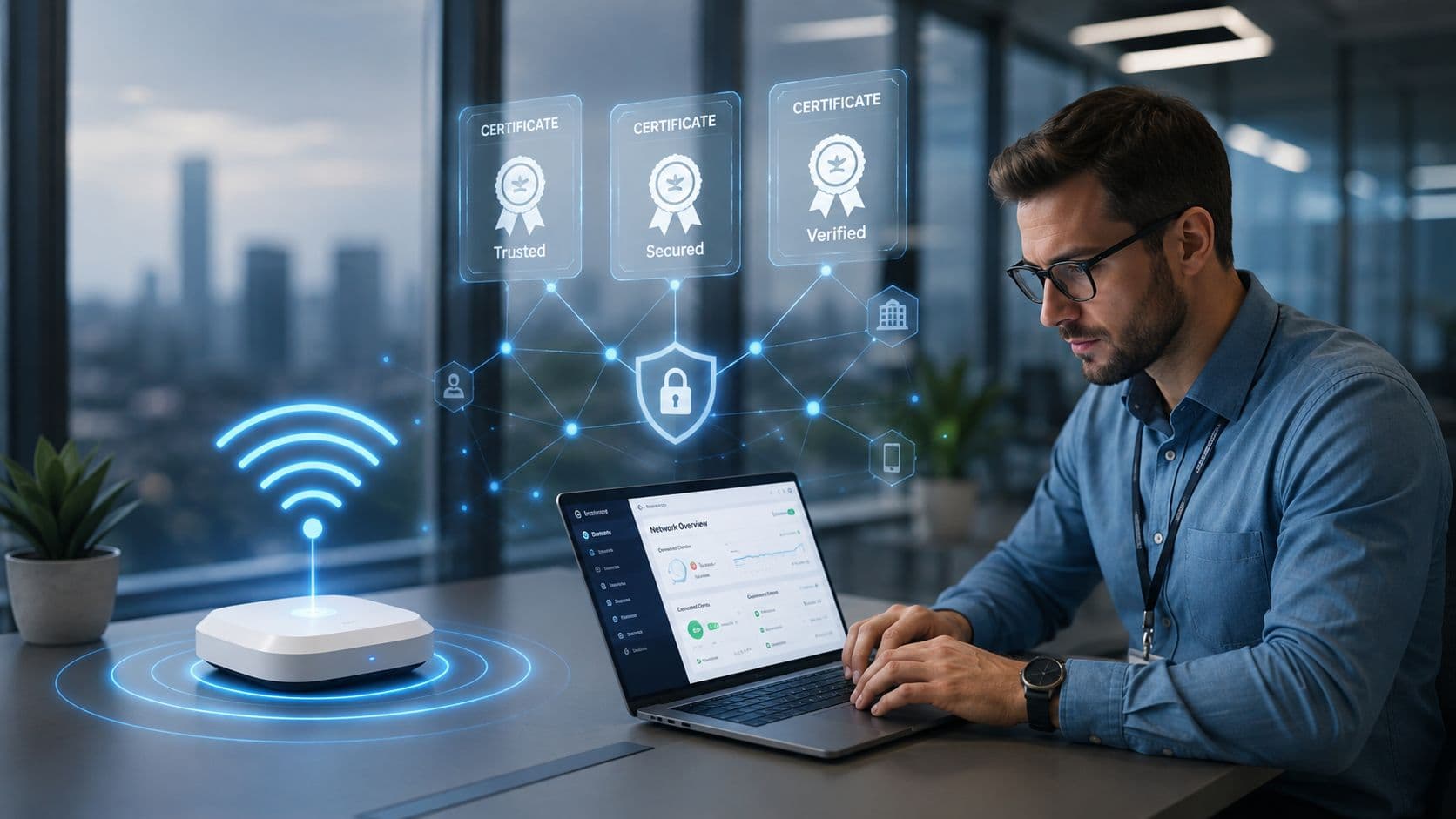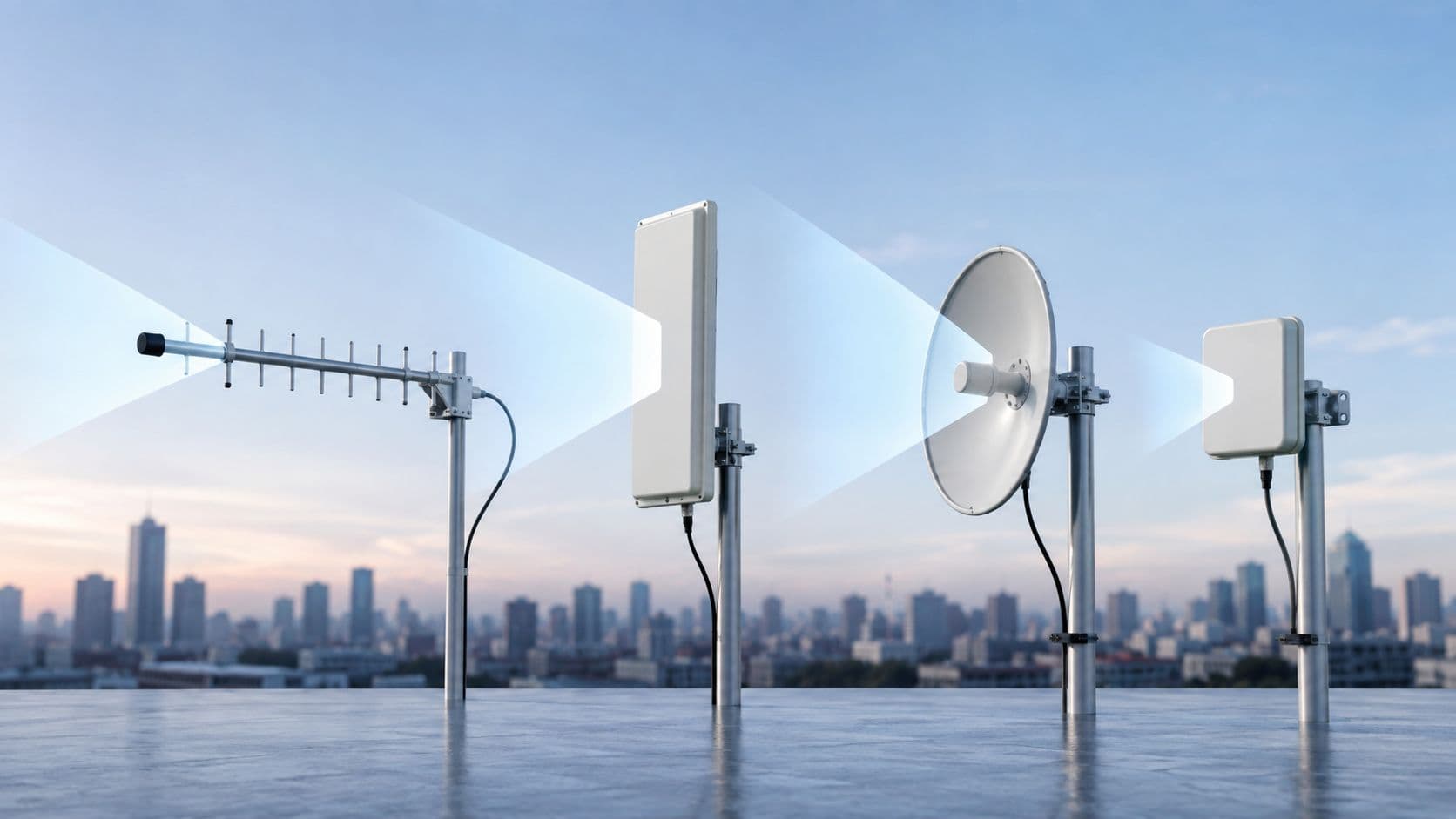
আপনি সম্ভবত একটি পরিচিত সমস্যার মুখোমুখি হচ্ছেন। একটি হোটেল প্রপার্টি রিপোর্ট করছে যে চেক-ইন ট্যাবলেটগুলি ধীরগতির। অন্যটি বলছে কার্ড পেমেন্ট টার্মিনালগুলি সাময়িকভাবে সংযোগ হারিয়ে ফেলেছে। প্রধান কার্যালয় প্রতিটি সাইট জুড়ে সামঞ্জস্যপূর্ণ রিপোর্টিং চায়, এবং আপনার দূরবর্তী কর্মীদের প্রতি সোমবার সকালে একটি সাপোর্ট কিউ তৈরি না করেই ক্লাউড সরঞ্জামগুলিতে নিরাপদ অ্যাক্সেস প্রয়োজন।
এখানেই WAN কম্পিউটার সংজ্ঞা একটি ক্লাসরুমের শব্দ হিসেবে সীমাবদ্ধ না থেকে একটি অপারেশনাল সমস্যা হয়ে ওঠে। আপনি যদি একাধিক হোটেল, রিটেল সাইট, ক্লিনিক বা অফিস পরিচালনা করেন, তবে আপনার কেবল একটি "নেটওয়ার্ক"-এর প্রয়োজন নেই। নিরাপত্তা বা ব্যবহারকারীর অভিজ্ঞতার সাথে আপস না করে পৃথক স্থান, মানুষ এবং সিস্টেমগুলিকে একটি সংগঠিত পরিবেশ হিসাবে কাজ করার জন্য আপনার একটি উপায় প্রয়োজন।
২০২৬ সালে WAN কী?
সকাল ৭টায়, একটি হোটেল কনফারেন্সের অতিথিদের চেক-আউট করছে, অন্যটি প্রাতঃরাশের পেমেন্ট প্রসেস করছে এবং প্রধান কার্যালয় রাতের রিপোর্ট সংগ্রহ করছে। যদি তিনটি সাইটই একই বুকিং সিস্টেম, আইডেন্টিটি প্ল্যাটফর্ম এবং ক্লাউড অ্যাপের উপর নির্ভর করে, তবে তাদের মধ্যকার নেটওয়ার্কটিকে কেবল দূরত্ব অতিক্রম করার চেয়েও বেশি কিছু করতে হবে। এটিকে ব্যবসাটিকে সমন্বিত রাখতে হবে।
একটি Wide Area Network, বা WAN হলো এমন একটি নেটওয়ার্ক যা পৃথক অবস্থান, দূরবর্তী ব্যবহারকারী এবং বাহ্যিক পরিষেবাগুলিকে সংযুক্ত করে যাতে তারা একটি একক সংস্থার অংশ হিসাবে কাজ করতে পারে। একটি স্থানীয় নেটওয়ার্ক একটি সাইটের ভেতরের ট্রাফিক পরিচালনা করে। একটি WAN সাইটগুলির মধ্যে এবং ক্লাউড সফটওয়্যার, ডেটা সেন্টার, পেমেন্ট পরিষেবা এবং কেন্দ্রীয় ব্যবস্থাপনা সরঞ্জামগুলির মতো শেয়ার্ড প্ল্যাটফর্মগুলিতে ট্রাফিক পরিচালনা করে।
একটি সহজ তুলনা সাহায্য করতে পারে। একটি LAN একটি হোটেল ভবনের ভেতরের করিডোর, লিফট এবং ওয়ারিংয়ের মতো কাজ করে। একটি WAN সেই হোটেলটিকে আপনার অন্যান্য প্রপার্টি, আপনার প্রধান কার্যালয় এবং আপনার কর্মীরা প্রতিদিন যে পরিষেবাগুলির উপর নির্ভর করে তার সাথে সংযোগকারী সড়ক ব্যবস্থার মতো কাজ করে। ভবনটি সুসংগঠিত হলেও রাস্তা অবরুদ্ধ থাকলে ব্যবসা ধীর হয়ে যায়।
এই কারণেই পাঠ্যপুস্তকের সংজ্ঞা আপনাকে কেবল অর্ধেক পথ নিয়ে যায়। ২০২৬ সালে, WAN কেবল শহর বা দেশ জুড়ে বিস্তৃত নেটওয়ার্কের জন্য একটি প্রযুক্তিগত লেবেল নয়। এটি হলো বিতরণকৃত সংস্থাগুলির জন্য অপারেটিং ফ্যাব্রিক। একটি হোটেল গ্রুপ, রিটেল চেইন বা কেয়ার প্রোভাইডারের জন্য, এটি নির্ধারণ করে যে সাইটগুলি নির্ভরযোগ্যভাবে কেন্দ্রীয় অ্যাপ্লিকেশনগুলিতে পৌঁছাতে পারে কিনা, দূরবর্তী কর্মীরা নিরাপদে লগ ইন করতে পারে কিনা এবং ব্যস্ত ব্যবসার সময়ে ক্লাউড পরিষেবাগুলি ব্যবহারের জন্য যথেষ্ট দ্রুত মনে হয় কিনা।
হার্ডওয়্যার এখনও গুরুত্বপূর্ণ। রাউটারগুলি নির্ধারণ করে যে কীভাবে স্থানীয় ট্রাফিক একটি সাইট থেকে বের হয়ে বৃহত্তর নেটওয়ার্কে পৌঁছায়, এই কারণেই WAN পারফরম্যান্সের সমস্যাগুলি মূল্যায়ন করার সময় ব্যবসায়িক নেটওয়ার্কে রাউটারের ভূমিকা বোঝা সাহায্য করে।
কেন পুরানো সংজ্ঞাটি অপর্যাপ্ত
আপনি যদি কেবল "একটি WAN দূরবর্তী নেটওয়ার্কগুলিকে সংযুক্ত করে" এতেই থেমে যান, তবে আপনি অপারেশনগুলির জন্য গুরুত্বপূর্ণ প্রশ্নগুলি মিস করবেন:
- ব্যবহারকারীর অভিজ্ঞতা: রিসেপশন কর্মী, ফাইন্যান্স টিম এবং দূরবর্তী ম্যানেজাররা কি তাদের প্রয়োজনীয় সিস্টেমগুলিতে সামঞ্জস্যপূর্ণ অ্যাক্সেস পাবেন?
- নিরাপত্তা: শাখা সাইট এবং হোম কর্মীরা কি আক্রমণকারীদের মূল সিস্টেমে সহজে প্রবেশের সুযোগ না দিয়ে সংযোগ করতে পারেন?
- ক্লাউড পারফরম্যান্স: SaaS সরঞ্জাম, ভয়েস প্ল্যাটফর্ম এবং শেয়ার্ড ড্যাশবোর্ডগুলি কি প্রতিটি অবস্থান জুড়ে প্রতিক্রিয়াশীল থাকবে?
- স্থিতিস্থাপকতা: একটি সার্কিট ব্যর্থ হলে পেমেন্ট, রিপোর্টিং বা অতিথি পরিষেবাগুলির কী হবে?
একটি WAN ব্যবসায়িক ফলাফল নির্ধারণ করে।
বিশেষ করে আতিথেয়তা শিল্পে, এটি অনেক টিমের ধারণার চেয়েও বেশি দৈনন্দিন কার্যক্রমের পেছনে কাজ করে। প্রপার্টি ম্যানেজমেন্ট সিস্টেম, কার্ড পেমেন্ট, WiFi প্রশাসন, CCTV অ্যাক্সেস, টেলিফোনি এবং আইডেন্টিটি পরিষেবাগুলি প্রায়শই WAN লিঙ্কগুলির সঠিকভাবে কাজ করার উপর নির্ভর করে। তাই আধুনিক সংজ্ঞাটি ব্যবহারিক, একাডেমিক নয়। একটি WAN হলো আপনার নেটওয়ার্কের সেই অংশ যা অনেকগুলি অবস্থানকে একটি পরিচালিত ব্যবসার মতো আচরণ করতে দেয়, যেখানে নিরাপত্তা নিয়ন্ত্রণ, পারফরম্যান্স নীতি এবং ফেইলওভার পরিকল্পনাগুলি মানুষের কাজের পদ্ধতির সাথে বিল্ট-ইন থাকে।
WAN কম্পিউটার সংজ্ঞায়িত করা
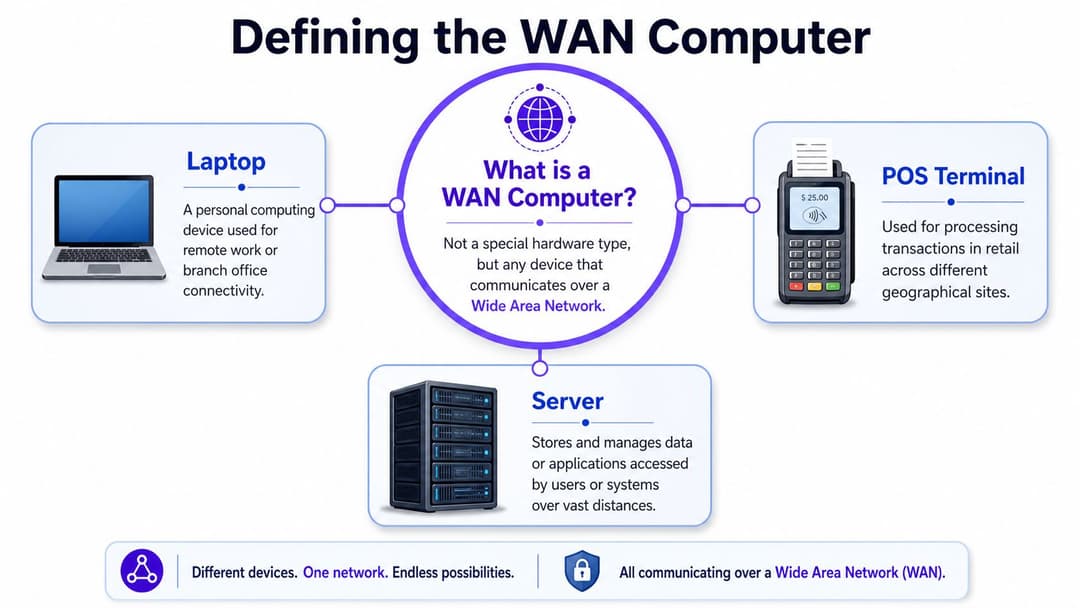
WAN কম্পিউটার সংজ্ঞা প্রায়শই এই ধারণার দিকে নিয়ে যায় যে WAN কম্পিউটার একটি বিশেষ ধরণের মেশিন। এটি তা নয়। একটি WAN কম্পিউটার হলো যেকোনো সাধারণ ডিভাইস যা একটি Wide Area Network-এর মাধ্যমে যোগাযোগ করে।
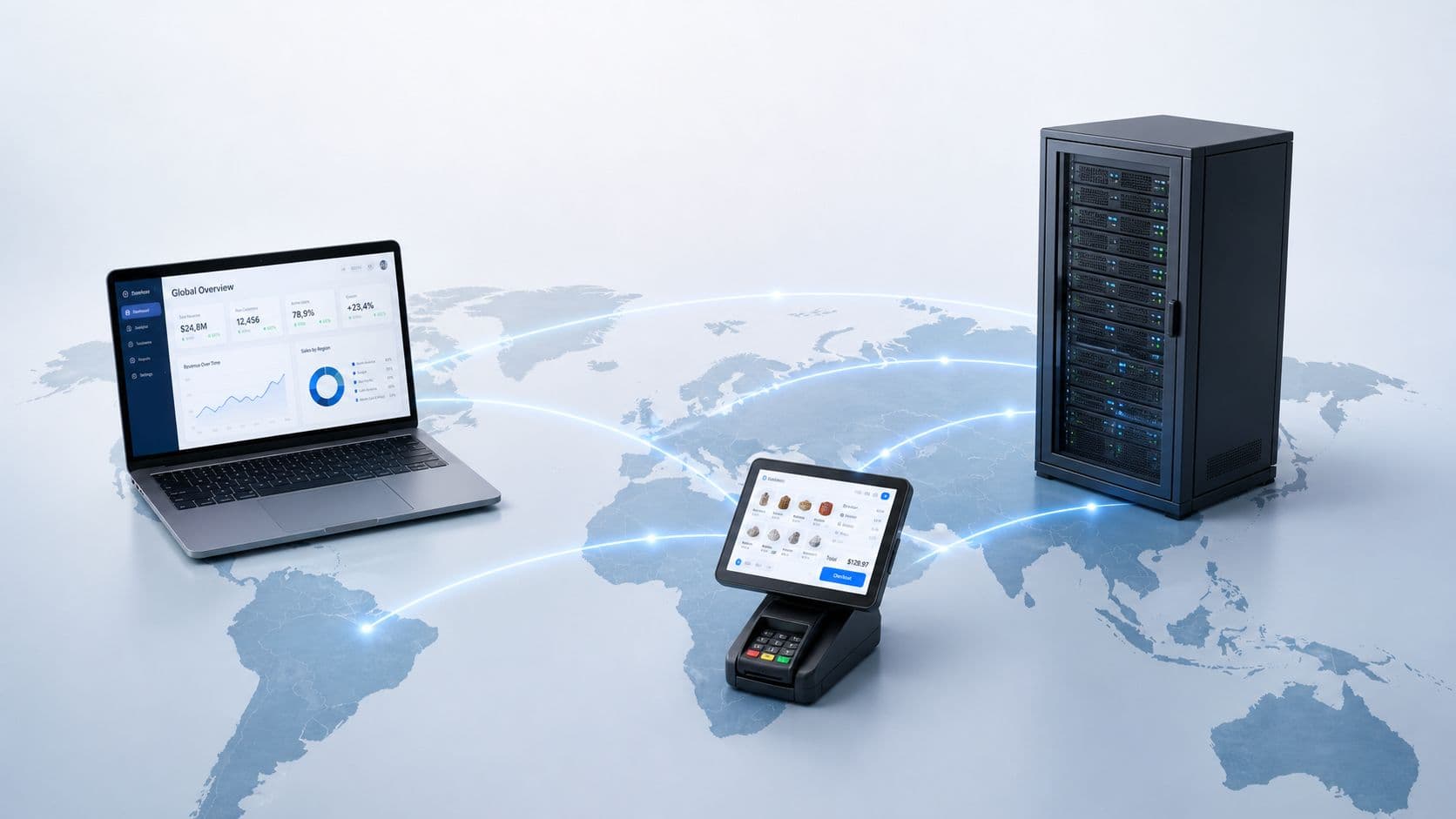
সেই ডিভাইসটি প্রধান কার্যালয়ের একটি ল্যাপটপ, হোটেলের বারে একটি পয়েন্ট-অফ-সেল টার্মিনাল, রিসেপশনে একটি চেক-ইন কিয়স্ক বা ডেটা সেন্টারের একটি সার্ভার হতে পারে। ডিভাইসটি নিজে একটি রাউটারের মতো "WAN হার্ডওয়্যার" নয়। এটি কীভাবে সংযুক্ত হয় এবং এর ট্রাফিক কোন নেটওয়ার্ক পাথ ব্যবহার করে তার কারণে এটি WAN কার্যক্রমের অংশ হয়ে ওঠে।
এটি সম্পর্কে চিন্তা করার একটি সহজ উপায়
একটি LAN হলো একটি ভবনের ভেতরের অভ্যন্তরীণ ফোন সিস্টেমের মতো। ডিভাইসগুলি একটি স্থানীয় সেটআপের মাধ্যমে একে অপরের সাথে কথা বলে যা আপনি নিবিড়ভাবে নিয়ন্ত্রণ করেন। একটি WAN হলো আরও বিস্তৃত ফোন নেটওয়ার্কের মতো যা পৃথক ভবন, দূরবর্তী কর্মী এবং বাইরের পরিষেবাগুলিকে সংযুক্ত করে।
এর অর্থ হলো একটি WAN কম্পিউটার কেবল একটি ডিভাইস যা সেই বৃহত্তর নেটওয়ার্ক পাথ ব্যবহার করছে।
এর চারপাশে সাধারণত যা থাকে:
- রাউটার: এগুলি স্থানীয় সাইট থেকে ট্রাফিককে বৃহত্তর নেটওয়ার্কে স্থানান্তরিত করে। আপনি যদি তাদের ভূমিকা সম্পর্কে জানতে চান, তবে Purple-এর নেটওয়ার্কে রাউটার সম্পর্কিত একটি ব্যবহারিক নির্দেশিকা রয়েছে।
- WAN লিঙ্ক: এগুলি ব্রডব্যান্ড, ফাইবার, VPN সংযোগ, সেলুলার লিঙ্ক, MPLS বা এগুলির মিশ্রণ হতে পারে।
- নিরাপত্তা নিয়ন্ত্রণ: ফায়ারওয়াল, আইডেন্টিটি চেক, সেগমেন্টেশন নীতি এবং এনক্রিপশন ট্রাফিক স্থানীয় সাইট থেকে বের হওয়ার সময় তা সুরক্ষিত করতে সহায়তা করে।
- কেন্দ্রীয় পরিষেবা: ক্লাউড অ্যাপ্লিকেশন, বুকিং সিস্টেম, শেয়ার্ড ফাইল প্ল্যাটফর্ম এবং ব্যবসায়িক সরঞ্জামগুলি প্রায়শই WAN ট্রাফিকের শেষ প্রান্তে থাকে।
ডিভাইসের জন্য কী পরিবর্তন হয়
একটি LAN-এ থাকা ডিভাইস সাধারণত কাছাকাছি থাকা রিসোর্সগুলির সাথে যোগাযোগ করে। একটি WAN ব্যবহারকারী ডিভাইস প্রায়শই এমন জিনিসগুলিতে পৌঁছায় যা দূরে, ভবনের বাইরে এবং কখনও আসিয় আপনার সরাসরি নিয়ন্ত্রণের বাইরে থাকে। এটি বিলম্ব, নির্ভরযোগ্যতা, দৃশ্যমানতা এবং নিরাপত্তার ক্ষেত্রে প্রত্যাশা পরিবর্তন করে।
উদাহরণস্বরূপ:
- একটি ফ্রন্ট-ডেস্ক পিসি থেকে স্থানীয় প্রিন্টারে প্রিন্ট করা একটি LAN-এর কাজ।
- সেই একই পিসি যখন একটি ক্লাউড-ভিত্তিক রিজার্ভেশন প্ল্যাটফর্ম খোলে, তখন সেটি WAN সংযোগ ব্যবহার করে।
- একটি শাখা অফিসের ল্যাপটপ যখন একটি কেন্দ্রীয় ফাইন্যান্স সার্ভারে পৌঁছায়, তখন সেটি WAN ব্যবহার করে।
- একটি পেমেন্ট টার্মিনাল যখন দূরবর্তী প্রসেসিং পরিষেবাতে লেনদেনের ডেটা পাঠায়, তখন সেটি WAN পাথ ব্যবহার করে।
মূল সংজ্ঞা: একটি WAN কম্পিউটার কোনো অনন্য ধরণের মেশিন নয়। এটি যেকোনো স্ট্যান্ডার্ড বা বিশেষায়িত ডিভাইস, যা পৃথক অবস্থানগুলিকে সংযুক্তকারী একটি নেটওয়ার্কের মাধ্যমে ডেটা পাঠায় এবং গ্রহণ করে।
এই পার্থক্যটি গুরুত্বপূর্ণ কারণ "কম্পিউটার"-এর ওপর চাপানো অনেক সাপোর্ট সমস্যা আসলে WAN-এর সমস্যা। ল্যাপটপটি হয়তো ঠিক থাকতে পারে। সমস্যাটি শাখা সার্কিট, VPN টানেল, রাউটিং নীতি বা ক্লাউড পাথে থাকতে পারে।
WAN বনাম LAN: আপনার ডিভাইস কীভাবে ভিন্ন আচরণ করে
আপনি যখন WAN এবং LAN-কে বিমূর্ত নেটওয়ার্কের ধরন হিসেবে তুলনা করা বন্ধ করে ব্যবহারকারী কী অনুভব করেন তা তুলনা করতে শুরু করবেন, তখন অনেক বিভ্রান্তি দূর হয়ে যাবে।
| বৈশিষ্ট্য | Local Area Network (LAN) | Wide Area Network (WAN) |
|---|---|---|
| ভৌগোলিক অবস্থান | একটি ভবন বা স্থানীয় সাইট | দূরত্ব জুড়ে একাধিক সাইট |
| নিয়ন্ত্রণ | সাধারণত একটি স্থানীয় IT টিম দ্বারা সম্পূর্ণরূপে নিয়ন্ত্রিত | অভ্যন্তরীণ IT, প্রোভাইডার এবং ক্লাউড পরিষেবাগুলির মধ্যে ভাগ করা |
| গতির অনুভূতি | সাধারণত স্থানীয় রিসোর্সগুলির জন্য দ্রুত এবং আরও সরাসরি | আরও পরিবর্তনশীল কারণ ট্রাফিক দূরে এবং আরও বেশি সিস্টেমের মধ্য দিয়ে ভ্রমণ করে |
| ব্যবের ধরণ | সুইচ, ক্যাবলিং, WiFi এবং স্থানীয় হার্ডওয়্যারের উপর দৃষ্টি নিবদ্ধ করা | অ্যাক্সেস সার্কিট, রাউটিং, নিরাপত্তা এবং মাল্টি-সাইট ব্যবস্থাপনা অন্তর্ভুক্ত |
| নিরাপত্তা মডেল | প্রায়শই স্থানীয় সেগমেন্টেশন এবং পেরিমিটার নিয়ন্ত্রণের চারপাশে নির্মিত | শাখা, ব্যবহারকারী এবং ক্লাউড অ্যাক্সেস জুড়ে স্তরযুক্ত নিরাপত্তা প্রয়োজন |
| ব্যবহারকারীর অভিজ্ঞতা | একটি সাইটের ভেতরে সামঞ্জস্যপূর্ণ | পাথের গুণমান, নীতি এবং লাস্ট-মাইল সংযোগের উপর নির্ভর করে |
AWS তার WAN কী সম্পর্কিত ব্যাখ্যায় উল্লেখ করেছে যে অনেক মৌলিক ব্যাখ্যাকারী কেবল LAN-টু-LAN সংজ্ঞাতেই থেমে যান এবং ক্লাউড-ফার্স্ট, মাল্টি-সাইট এবং রিমোট-অ্যাক্সেস আর্কিটেকচারের দিকে ব্যবহারিক রূপান্তরটি মিস করেন। ঠিক এই কারণেই একটি ডিভাইস যখন WAN সংযোগের উপর নির্ভর করে, তখন আপনার ব্যবহারকারীদের অভিজ্ঞতা পরিবর্তিত হয়।
ভৌগোলিক অবস্থান প্রত্যাশা পরিবর্তন করে
একটি ভবনের ভেতরে, একটি ডিভাইস সাধারণত কাছাকাছি সিস্টেমের সাথে যোগাযোগ করে। একটি WAN-এর মাধ্যমে, ট্রাফিক অ্যাপ্লিকেশনে পৌঁছানোর আগে একটি প্রোভাইডার নেটওয়ার্ক, একটি নিরাপত্তা স্ট্যাক এবং ক্লাউড অবকাঠামোর মধ্য দিয়ে যেতে পারে。
একটি হোটেলের ক্ষেত্রে, এর অর্থ হলো একজন রিসেপশনিস্ট দ্রুত একটি স্থানীয় ফাইল শেয়ার খুলতে পারেন তবে ব্যস্ত সময়ে একটি কেন্দ্রীয় বুকিং প্ল্যাটফর্ম ব্যবহার করার সময় বিলম্ব লক্ষ্য করতে পারেন। ডিভাইসটি পরিবর্তিত হয়নি। দূরত্ব এবং পাথের জটিলতা পরিবর্তিত হয়েছে।
নিরাপত্তা আরও স্তরযুক্ত হয়
একটি LAN-এ, টিমগুলি প্রায়শই "ভেতরের অংশ বিশ্বস্ত, বাইরের অংশ নয়" এই দৃষ্টিকোণ থেকে চিন্তা করে। ব্যবহারকারীরা যখন বাড়ি, আঞ্চলিক অফিস, পপ-আপ সাইট এবং মোবাইল ডিভাইস থেকে সংযোগ করেন, তখন সেই মডেলটি ভেঙে পড়ে।
একটি WAN-সংযুক্ত ডিভাইসের প্রায়শই প্রয়োজন হয়:
- আইডেন্টিটি চেক: ব্যবহারকারী কে তা নিশ্চিত করা
- ডিভাইস ট্রাস্ট: ডিভাইসটি নীতি মেনে চলে কিনা তা নিশ্চিত করা
- এনক্রিপ্ট করা পরিবহন: স্থানান্তরের সময় ডেটা সুরক্ষিত করা
- সেগমেন্টেশন: অতিথি, কর্মী, পেমেন্ট এবং অপারেশনাল ট্রাফিক আলাদা রাখা
মাল্টি-সাইট সংস্থাগুলির জন্য, একটি শাখা কেবল প্রধান কার্যালয় থেকে একটি এক্সটেনশন কেবল নয়। এটি সুরক্ষিত করার জন্য আরেকটি প্রান্ত (edge)।
ব্যবস্থাপনা কেন্দ্রীভূত হয়
LAN-এর সমস্যাগুলি প্রায়শই স্থানীয় হয়। WAN-এর সমস্যাগুলির জন্য সাধারণত আরও বিস্তৃত দৃষ্টিভঙ্গির প্রয়োজন হয়। ব্যবহারকারী, সাইট রাউটার, প্রোভাইডার সার্কিট, নিরাপত্তা স্তর এবং গন্তব্য অ্যাপ্লিকেশনের মধ্যে কী ঘটছে তা আপনাকে দেখতে হবে।
এটি একটি কারণ যার জন্য অনেক টিম কেন্দ্রীয় ড্যাশবোর্ড এবং নীতি-ভিত্তিক WAN ব্যবস্থাপনার দিকে এগিয়ে যাচ্ছে। আপনি যদি একটি সহজ তুলনা চান, তবে LAN এবং WAN-এর মধ্যে পার্থক্য সম্পর্কিত Purple-এর নিবন্ধটি ব্যবসায়িক পরিভাষায় মৌলিক বিষয়গুলি তুলে ধরেছে। LAN এবং WAN-এর মধ্যে পার্থক্য
যখন একটি ডিভাইস কেবল LAN ব্যবহার থেকে WAN-নির্ভর ব্যবহারে স্থানান্তরিত হয়, তখন ট্রাবলশুটিং "মেশিনটি কি কাজ করছে?" থেকে "পাথের কোন অংশটি ব্যর্থ হচ্ছে?"-এ পরিবর্তিত হয়।
সাধারণ WAN আর্কিটেকচার এবং উদাহরণ
বিশটি প্রপার্টি বিশিষ্ট একটি হোটেল গ্রুপ খুব কমই দীর্ঘ সময়ের জন্য এক ধরণের WAN চালায়। একটি সাইটে সম্পূর্ণ ফাইবার থাকতে পারে, অন্যটি 4G ব্যাকআপ সহ ব্রডব্যান্ডের উপর নির্ভর করতে পারে এবং প্রধান কার্যালয় এখনও কয়েকটি মূল অ্যাপ্লিকেশনের জন্য একটি পুরানো ব্যক্তিগত পরিষেবার উপর নির্ভর করতে পারে। এই মিশ্রণটি এখন স্বাভাবিক। মূল প্রশ্ন হলো প্রতিটি ডিজাইন কীভাবে আপটাইম, নিরাপত্তা এবং অতিথি ও কর্মীদের অভিজ্ঞতা পরিচালনা করে।
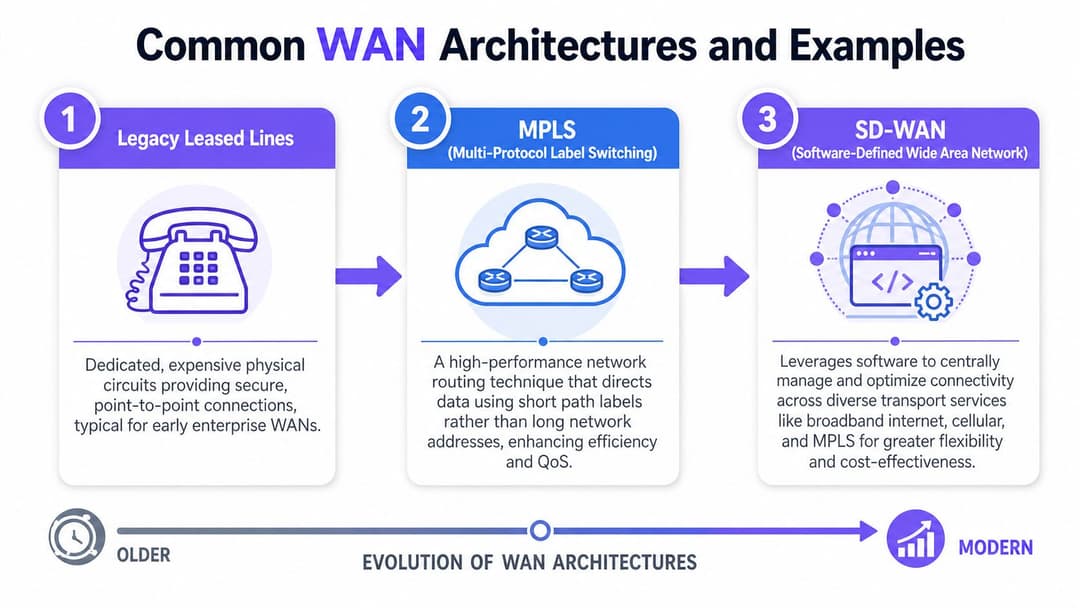
WAN আর্কিটেকচার নির্দিষ্ট, ব্যক্তিগত লিঙ্ক থেকে আরও নমনীয় ডিজাইনে স্থানান্তরিত হয়েছে যা একটি অপারেটিং মডেলের অধীনে কয়েকটি অ্যাক্সেসের ধরনকে একত্রিত করে। Redcentric-এর WAN-এর প্রয়োজনীয় নির্দেশিকা উল্লেখ করে যে ১৯৯০-এর দশকের শেষের দিকে MPLS-এর আবির্ভাব ঘটে এবং এটি ব্যাপকভাবে ব্যবহৃত হতে শুরু করে কারণ এটি সাইটগুলির মধ্যে নির্ভরযোগ্য, দক্ষ সংযোগ প্রদান করেছিল। একই নির্দেশিকা আরও ব্যাখ্যা করে যে কেন অনেক সংস্থা এখন একটি পরিবহন পদ্ধতির উপর নির্ভর করার পরিবর্তে ব্রডব্যান্ড, VPN এবং সেলুলার লিঙ্কগুলির মিশ্রণ ব্যবহার করে।
এই পরিবর্তনটি গুরুত্বপূর্ণ কারণ আধুনিক ট্রাফিক ভিন্ন।
কয়েক বছর আগে, অনেক ব্যবসা শাখার ট্রাফিক একটি কেন্দ্রীয় ডেটা সেন্টারে ফেরত পাঠাত। ২০২৬ সালে, একটি হোটেল প্রপার্টিকে একই সময়ে ক্লাউড PMS সরঞ্জাম, পেমেন্ট পরিষেবা, CCTV প্ল্যাটফর্ম, গেস্ট WiFi নিয়ন্ত্রণ এবং প্রধান কার্যালয়ের সিস্টেমে পৌঁছাতে হতে পারে। একটি WAN ডিজাইনকে কোনো বাধা তৈরি না করে বা নিরাপত্তা নীতি দুর্বল না করে সেই বিস্তারকে সমর্থন করতে হবে।
লিগ্যাসি লিজড লাইন
লিজড লাইন ছিল ঐতিহ্যবাহী ব্যক্তিগত-সড়ক পদ্ধতি। আপনি মূল অবস্থানগুলির মধ্যে ডেডিকেটেড সংযোগের জন্য অর্থ প্রদান করতেন এবং একটি নিয়ন্ত্রিত, অনুমানযোগ্য পথ পেতেন।
একটি হোটেল চেইনের জন্য, এটি তখন ভাল কাজ করত যখন গুরুত্বপূর্ণ সিস্টেমগুলি একটি কেন্দ্রীয় স্থানে থাকত। প্রতিটি প্রপার্টি প্রধান কার্যালয় বা ডেটা সেন্টারের সাথে সংযুক্ত থাকত এবং নেটওয়ার্ক টিম ঠিক জানত যে ট্রাফিক কোথায় যাবে। ট্রাবলশুটিং প্রায়শই সহজ ছিল কারণ পথটি সুনির্দিষ্টভাবে সংজ্ঞায়িত ছিল।
এর আপসটি ছিল ব্যয় এবং চপলতা (agility)।
একটি নতুন সাইট, একটি ব্যাকআপ পাথ বা ক্লাউড পরিষেবাগুলিতে সরাসরি অ্যাক্সেস যোগ করতে সময় এবং অর্থ লাগতে পারে। যদি ব্যবসাটি মৌসুমী সাইট খোলে, প্রপার্টি সংস্কার করে বা অ্যাপ্লিকেশন প্রোভাইডার পরিবর্তন করে, তবে WAN অপারেশনাল চাহিদার চেয়ে পিছিয়ে পড়তে পারে।
MPLS
MPLS একটি প্রোভাইডার-পরিচালিত নেটওয়ার্ক জুড়ে সংস্থাগুলিকে আরও ভাল ট্রাফিক নিয়ন্ত্রণ প্রদান করে প্রাইভেট-লিঙ্ক মডেলটিকে উন্নত করেছে। এটি এমন ব্যবসাগুলির কাছে জনপ্রিয় হয়ে উঠেছে যেগুলির ভয়েস, লেনদেন সিস্টেম এবং সাইট-টু-সাইট অ্যাপ্লিকেশন অ্যাক্সেসের জন্য স্থিতিশীল পারফরম্যান্সের প্রয়োজন ছিল।
একটি দরকারী তুলনা হলো এটি। যদি একটি LAN একটি হোটেলের ভেতরের করিডোরের মতো কাজ করে, তবে MPLS প্রপার্টিগুলির মধ্যে একটি পরিচালিত সড়ক নেটওয়ার্কের মতো কাজ করে। রাস্তাগুলি এখনও বাহ্যিক, তবে সেগুলি সাধারণ পাবলিক রুটের চেয়ে আরও সাবধানে সংগঠিত এবং অগ্রাধিকারপ্রাপ্ত।
এটি MPLS-কে হোটেল গ্রুপ, রিটেল চেইন এবং স্বাস্থ্যসেবা নেটওয়ার্কগুলির জন্য আকর্ষণীয় করে তুলেছে। একটি হোটেল ব্র্যান্ড কেবল স্ট্যান্ডার্ড ইন্টারনেট অ্যাক্সেসের চেয়ে আরও অনুমানযোগ্য অ্যাপ্লিকেশন আচরণের সাথে প্রপার্টি, আঞ্চলিক অফিস এবং প্রধান কার্যালয়কে সংযুক্ত করতে এটি ব্যবহার করতে পারে। রিটেলররা প্রায়শই এটি ক্যাশ রেজিস্টার, স্টক সিস্টেম এবং রিপোর্টিংয়ের জন্য ব্যবহার করতেন। স্বাস্থ্যসেবা প্রদানকারীরা এটি ব্যবহার করতেন যেখানে কেন্দ্রীয় রেকর্ডগুলিতে অ্যাক্সেসের জন্য আরও কঠোর নিয়ন্ত্রণের প্রয়োজন ছিল।
MPLS-এর এখনও একটি স্থান রয়েছে, বিশেষ করে যেখানে একটি ব্যবসা প্রোভাইডার-পরিচালিত সংযোগ এবং পরিচিত ট্রাফিক পাথকে মূল্য দেয়। এর সীমাবদ্ধতা হলো ক্লাউড-ফার্স্ট সংস্থাগুলির প্রায়শই MPLS-এর নিজস্বভাবে প্রদানের জন্য মূলত ডিজাইন করা নমনীয়তার চেয়ে বেশি নমনীয়তার প্রয়োজন হয়।
SD-WAN
SD-WAN ডিজাইনের প্রশ্নটি পরিবর্তন করে। একটি সার্কিট টাইপ দিয়ে শুরু করার পরিবর্তে, টিমগুলি অ্যাপ্লিকেশনের প্রয়োজনীয়তা দিয়ে শুরু করে এবং সমস্ত উপলব্ধ লিঙ্ক জুড়ে ট্রাফিক কীভাবে স্থানান্তরিত হওয়া উচিত তা চয়ন করে।
এটি বিতরণকৃত ব্যবসার জন্য আরও উপযুক্ত।
একটি SD-WAN প্ল্যাটফর্ম ফাইবার, ব্রডব্যান্ড, 4G বা 5G এবং এমনকি বিদ্যমান MPLS সংযোগগুলি একসাথে ব্যবহার করতে পারে। এটি নীতি প্রয়োগ করতে পারে যাতে নেটওয়ার্ক বিভিন্ন ট্রাফিকের ধরনকে ভিন্নভাবে বিবেচনা করে। একটি হোটেলে, গেস্ট ব্রাউজিংয়ের জন্য কার্ড পেমেন্ট, কর্মীদের ভয়েস কল বা বুকিং প্ল্যাটফর্মে অ্যাক্সেসের মতো একই পাথ বা অগ্রাধিকারের প্রয়োজন হয় নেই।
একটি ব্যবহারিক আতিথেয়তা সেটআপ এভাবে কাজ করতে পারে:
- অতিথিদের ইন্টারনেট ট্রাফিক একটি স্ট্যান্ডার্ড ইন্টারনেট ব্রেকআউট ব্যবহার করে।
- কর্মীদের অ্যাপ্লিকেশনগুলি আরও কঠোর নিয়ন্ত্রণের সাথে উচ্চ-অগ্রাধিকারের পাথ অনুসরণ করে।
- পেমেন্ট ট্রাফিক অতিথি এবং সাধারণ অফিস ট্রাফিক থেকে সেগমেন্টেড (আলাদা) থাকে।
- প্রাথমিক সার্কিট দুর্বল বা ব্যর্থ হলে একটি সেলুলার লিঙ্ক দায়িত্ব নেয়।
এই কারণেই SD-WAN প্রায়শই অনেক শাখা বিশিষ্ট ব্যবসার কাছে আকর্ষণীয় হয়। এটি IT টিমগুলিকে প্রতিটি সাইটের অ্যাক্সেস সার্কিট ভিন্ন হলেও নীতি সামঞ্জস্যপূর্ণ রাখতে সহায়তা করে। বিতরণকৃত সংস্থাগুলির জন্য SD-WAN ব্যবহারের ক্ষেত্রগুলি সম্পর্কিত Purple-এর নির্দেশিকা সেই মডেলটি কোথায় উপযুক্ত তার ব্যবহারিক উদাহরণ দেয়।
সাধারণ ব্যবসায়িক উদাহরণ
আর্কিটেকচারের নামগুলি দরকারী, তবে অপারেশনাল উপযুক্ততা বেশি গুরুত্বপূর্ণ। সেরা ডিজাইন হলো সেটি যা বিভিন্ন সাইট জুড়ে ব্যবসা কীভাবে কাজ করে তার সাথে মেলে।
| ব্যবসায়িক পরিবেশ | সাধারণ WAN প্রয়োজন | সম্ভাব্য ডিজাইন অগ্রাধিকার |
|---|---|---|
| মাল্টি-সাইট হোটেল গ্রুপ | শেয়ার্ড বুকিং, রিপোর্টিং, নিরাপদ কর্মী অ্যাক্সেস, অতিথি পরিষেবার ধারাবাহিকতা | সেগমেন্টেশন, স্থিতিস্থাপকতা, ক্লাউড অ্যাক্সেস |
| রিটেল চেইন | সামঞ্জস্যপূর্ণ ক্যাশ রেজিস্টার সংযোগ, ইনভেন্টরি সিঙ্ক, স্টোর অপারেশন | নির্ভরযোগ্যতা, কেন্দ্রীয় নীতি, দ্রুত ফেইলওভার |
| স্বাস্থ্যসেবা নেটওয়ার্ক | দূরবর্তী সাইট জুড়ে কেন্দ্রীয় রেকর্ডে নিরাপদ অ্যাক্সেস | নিরাপত্তা, অ্যাক্সেস নিয়ন্ত্রণ, অনুমানযোগ্য অ্যাপ্লিকেশন পাথ |
একজন নতুন IT ম্যানেজারের জন্য, ব্যবহারিক পরীক্ষাটি সহজ। জিজ্ঞাসা করুন যে সার্কিট ত্রুটির সময় কোন অ্যাপ্লিকেশনগুলি অবশ্যই চালু রাখতে হবে, কমপ্লায়েন্সের জন্য কোন ট্রাফিক আলাদা রাখতে হবে এবং কোন সাইটগুলিতে দুর্বল স্থানীয় অ্যাক্সেস বিকল্প রয়েছে। সেই উত্তরগুলি সাধারণত আপনাকে পণ্যের লেবেলের চেয়ে দ্রুত সঠিক WAN আর্কিটেকচারের দিকে পরিচালিত করবে।
নিরাপত্তা এবং পারফরম্যান্সের জন্য WAN-এর সর্বোত্তম অনুশীলন
একটি হোটেল গ্রুপের সঠিক ক্লাউড অ্যাপ, একটি সক্ষম কোর নেটওয়ার্ক এবং স্পষ্ট নিরাপত্তা নীতি থাকতে পারে, তবুও একটি প্রপার্টিতে দুর্বল স্থানীয় সার্কিট বা প্রান্তে (edge) দুর্বল নিয়ন্ত্রণ থাকলে তা কর্মী এবং অতিথিদের হতাশ করতে পারে। বিতরণকৃত সংস্থাগুলির জন্য ব্যবহারিক ক্ষেত্রে WAN ব্যবস্থাপনা এমনই দেখায়। কাজটি কেবল সাইটগুলিকে সংযুক্ত করা নয়। প্রতিটি অবস্থানের অ্যাক্সেস শর্ত ভিন্ন হলেও বুকিং সিস্টেমগুলিকে প্রতিক্রিয়াশীল রাখা, পেমেন্ট ট্রাফিক সুরক্ষিত রাখা এবং অতিথি পরিষেবাগুলিকে ব্যবহারযোগ্য রাখা এর কাজ।
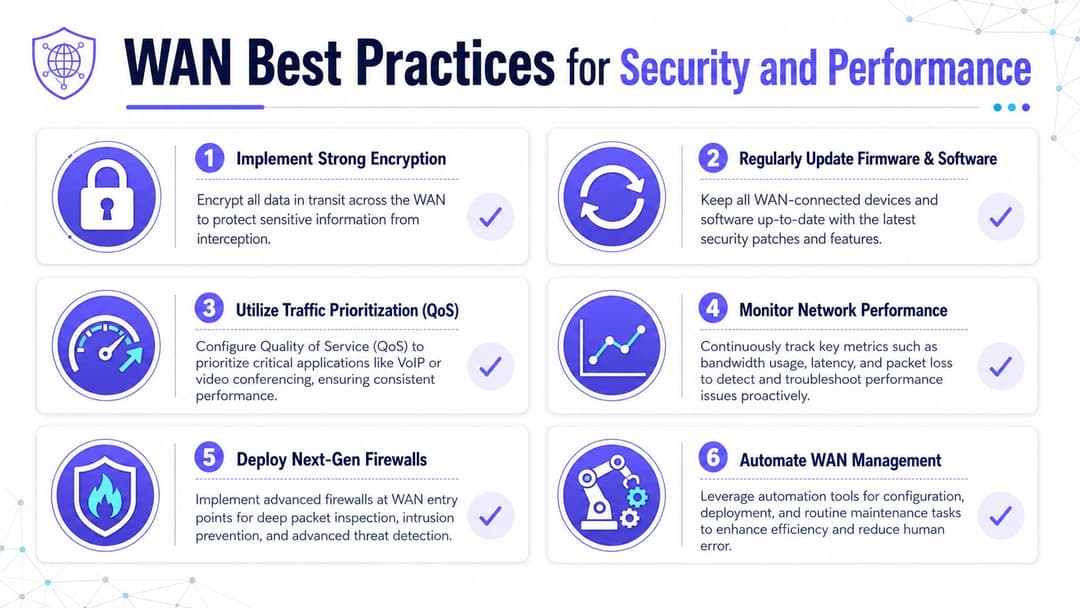
অ্যাক্সেসের গুণমান অবস্থান এবং সার্কিটের ধরণের উপর ভিত্তি করে তীব্রভাবে পরিবর্তিত হয়। Fortinet-এর WAN ওভারভিউ মৌলিক অপারেশনাল বাস্তবতা নির্দেশ করে। WAN পারফরম্যান্স কেবল বৃহত্তর নেটওয়ার্কের ডিজাইনের উপর নয়, প্রতিটি সাইটে উপলব্ধ লাস্ট মাইল সংযোগের উপর ব্যাপকভাবে নির্ভর করে।
শাখার প্রান্তের (branch edge) উপর ফোকাস করুন
অনেক WAN ঘটনা প্রপার্টি, স্টোর বা শাখায় শুরু হয়।
একটি কেন্দ্রীয় টিম সুস্থ কোর সিস্টেম দেখতে পারে যখন একটি সাইটের ব্যবহারকারীরা ধীরগতির ড্যাশবোর্ড, ড্রপড কল বা ব্যর্থ লগইনের সাথে লড়াই করে। একটি হোটেলে, এটি প্রায়শই স্থানীয় অ্যাক্সেস লাইন, অতিরিক্ত সাবস্ক্রাইব করা গেস্ট WiFi বা কর্মী এবং গেস্ট ট্রাফিকের মধ্যে দুর্বল পৃথকীকরণের কারণে ঘটে। বৃহত্তর WAN হয়তো ঠিক থাকতে পারে। শাখার প্রান্তেই (branch edge) অভিজ্ঞতা ভেঙে পড়ে।
একটি দরকারী ডিজাইন নিয়ম সহজ। এস্টেটের সবচেয়ে দ্রুততম সাইটের জন্য নয়, সবচেয়ে ধীরগতির বাস্তবসম্মত সাইটের জন্য পরিকল্পনা করুন।
এই মানসিকতা কেনাকাটা এবং নীতির সিদ্ধান্তগুলিকে পরিবর্তন করে। এটি টিমগুলিকে দুর্বল সার্কিটে অ্যাপ্লিকেশনগুলি কীভাবে আচরণ করে তা পরীক্ষা করতে, লোডের অধীনে ফেইলওভার কাজ করে কিনা তা নিশ্চিত করতে এবং প্রতিটি শাখার ফাইবার-গ্রেড পারফরম্যান্স রয়েছে বলে ধরে নেওয়া এড়াতে বাধ্য করে।
নিরাপত্তাকে আইডেন্টিটি-ফার্স্ট হিসেবে বিবেচনা করুন
ঐতিহ্যবাহী পেরিমিটার চিন্তাভাবনা আধুনিক WAN-এর সাথে খাপ খায় না কারণ ব্যবহারকারী, ডিভাইস এবং অ্যাপ্লিকেশনগুলি শাখা, বাড়ি, ক্লাউড প্ল্যাটফর্ম এবং তৃতীয় পক্ষের পরিবেশ জুড়ে ছড়িয়ে রয়েছে। একটি আরও ভাল মডেল পরীক্ষা করে যে কে অ্যাক্সেসের জন্য অনুরোধ করছে, তারা কোন ডিভাইস ব্যবহার করছে, তাদের ভূমিকা কী এবং অনুরোধটি নীতিমালার সাথে মেলে কিনা।
ব্যবহারিক ক্ষেত্রে, এর মধ্যে সাধারণত অন্তর্ভুক্ত থাকে:
- স্থানান্তরের সময় ট্রাফিক এনক্রিপ্ট করা
- অতিথি, কর্মী, IoT এবং পেমেন্ট সিস্টেম সেগমেন্ট করা
- ব্যাপক নেটওয়ার্ক ট্রাস্টের পরিবর্তে ভূমিকা-ভিত্তিক অ্যাক্সেস ব্যবহার করা
- নেটওয়ার্ক সফটওয়্যার এবং এজ ডিভাইসগুলি আপডেট রাখা
- অন-সাইট পাথের মতোই সতর্কতার সাথে দূরবর্তী অ্যাক্সেস পাথগুলি পর্যালোচনা করা
মাল্টি-সাইট ভেন্যুগুলির জন্য, এটি প্রযুক্তিগত স্তরের মতোই ব্যবসায়িক স্তরেও গুরুত্বপূর্ণ। একটি ফ্ল্যাট নেটওয়ার্ক গেস্ট WiFi সমস্যাকে কর্মীদের অপারেশনাল সমস্যায় পরিণত করতে পারে। দুর্বল অ্যাক্সেস নিয়ন্ত্রণ পেমেন্ট সিস্টেম বা অভ্যন্তরীণ সরঞ্জামগুলিকে ভুল ব্যবহারকারীদের কাছে উন্মুক্ত করতে পারে। Purple ভেন্যু জুড়ে পাসওয়ার্ডহীন অতিথি এবং কর্মীদের প্রমাণীকরণ পরিচালনা করে সেই বৃহত্তর আইডেন্টিটি মডেলে খাপ খাইয়ে নিতে পারে।
सबसे গুরুত্বপূর্ণ বিষয়গুলিকে অগ্রাধিকার দিন
একটি WAN সাইটগুলির মধ্যে একটি সড়ক ব্যবস্থার মতো কাজ করে। যদি প্রতিটি যানবাহনকে একইভাবে বিবেচনা করা হয়, তবে অ্যাম্বুলেন্সগুলি ডেলিভারি ভ্যান এবং পর্যটক ট্রাফিকের পিছনে আটকে যায়। নেটওয়ার্ক ট্রাফিকও একইভাবে আচরণ করে। রিজার্ভেশন, পেমেন্ট এবং আইডেন্টিটি পরিষেবাগুলি সফটওয়্যার আপডেট বা বিনোদনমূলক অতিথি ব্যবহারের সাথে সমান শর্তে প্রতিযোগিতা করা উচিত নয়।
একটি ব্যবহারিক নীতি মডেল হলো ট্রাফিক ক্লাসগুলিকে সংজ্ঞায়িত করা যেমন:
- গুরুত্বপূর্ণ অপারেশন: রিজার্ভেশন, PMS অ্যাক্সেস, পেমেন্ট ওয়ার্কফ্লো, কর্পোরেট আইডেন্টিটি
- রিয়েল-টাইম পরিষেবা: ভয়েস, ভিডিও, অভ্যন্তরীণ যোগাযোগ
- সাধারণ ব্যবসায়িক ট্রাফিক: ওয়েব অ্যাপস, রিপোর্টিং, অ্যাডমিন সরঞ্জাম
- নিম্ন-অগ্রাধিকারের ট্রাফিক: আপডেট, বাল্ক ট্রান্সফার, নীতি যেখানে পৃথকীকরণের অনুমতি দেয় সেখানে অতিথিদের বিনোদনমূলক ব্যবহার
ব্যবহারিক নিয়ম: যদি অতিথিদের স্ট্রিমিং চেক-ইন বা কার্ড পেমেন্টকে ধীর করে দিতে পারে, তবে WAN নীতিতে এখনও কাজ করার প্রয়োজন রয়েছে।
মাঝে মাঝে নয়, ক্রমাগত পর্যবেক্ষণ করুন
একটি মাসিক পর্যালোচনা প্রতি শুক্রবার বিকেলে দুর্বল হয়ে যাওয়া শাখা সার্কিট বা একটি অঞ্চলে একটি ক্লাউড অ্যাপকে ব্যাহতকারী নীতি পরিবর্তনকে ধরতে পারবে না। WAN অপারেশনগুলির জন্য পাথের স্বাস্থ্য, অ্যাপ্লিকেশনের প্রতিক্রিয়া, ফেইলওভার ইভেন্ট এবং প্রান্তের (edge) অবস্থার উপর চলমান দৃশ্যমানতা প্রয়োজন।
লক্ষ্য হলো দ্রুত রোগ নির্ণয় বা সমস্যা চিহ্নিতকরণ। আপনার টিমকে অনুমান ছাড়াই কয়েকটি মৌলিক প্রশ্নের উত্তর দিতে সক্ষম হতে হবে:
- সমস্যাটি কি স্থানীয় নাকি নেটওয়ার্ক-ব্যাপী?
- একটি অ্যাপ্লিকেশন প্রভাবিত হয়েছে নাকি সবগুলি?
- রুট কি পরিবর্তিত হয়েছে?
- ব্যাকআপ লিঙ্ক কি ব্যবহার করা হচ্ছে?
- কোনো নীতি পরিবর্তন কি প্রত্যাশিত ট্রাফিক প্রবাহকে ব্যাহত করেছে?
ভালো WAN ব্যবস্থাপনা সাধারণত বীরত্বপূর্ণ ট্রাবলশুটিংয়ের চেয়ে প্যাটার্নগুলি আগে থেকে ধরার বিষয়ে বেশি, যাতে ফ্রন্ট ডেস্ক কর্মী, স্টোর টিম বা অতিথিরা এর প্রভাব অনুভব করার আগেই তা সমাধান করা যায়।
WAN সম্পর্কে প্রায়শই জিজ্ঞাসিত প্রশ্নাবলী
লোকেরা যখন WAN-কে শাখা এবং ক্লাউড সিস্টেমের সাথে সংযুক্ত করে, তখন সাধারণত এর বিস্তৃত ধারণাটি বুঝতে পারে। অবশিষ্ট বিভ্রান্তি সাধারণত ছোট ব্যবহারিক প্রশ্নগুলির মধ্যে থাকে।
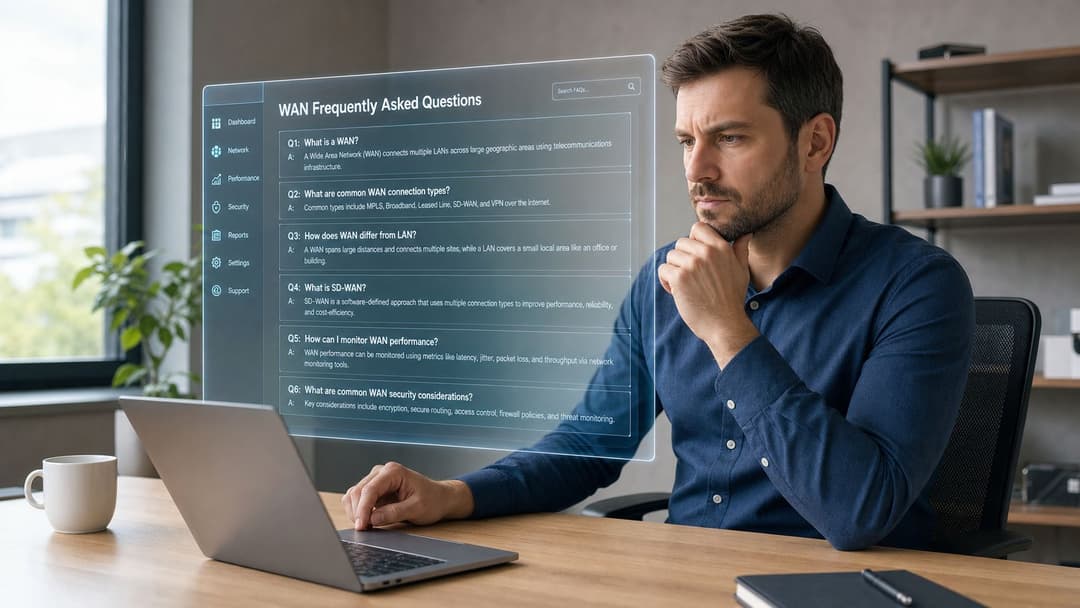
ইন্টারনেট কি একটি WAN?
হ্যাঁ, বিস্তৃত অর্থে, ইন্টারনেট একটি WAN কারণ এটি বিশাল ভৌগোলিক দূরত্ব জুড়ে নেটওয়ার্কগুলিকে সংযুক্ত করে। তবে ব্যবসায়িক নেটওয়ার্কিংয়ে, লোকেরা প্রায়শই "WAN" বলতে সেই সংগঠিত সংযোগকে বোঝায় যা সেই বৃহত্তর পরিবেশ জুড়ে তাদের নিজস্ব সাইট, ব্যবহারকারী এবং অ্যাপ্লিকেশনগুলিকে সংযুক্ত করে।
একটি ছোট ব্যবসার কি WAN প্রয়োজন?
সবসময় নয়। যদি আপনার পুরো ব্যবসাটি একটি সাইট থেকে চলে এবং বেশিরভাগ সিস্টেম স্থানীয় হয়, তবে আপনার কেবল একটি LAN এবং ইন্টারনেট অ্যাক্সেসের প্রয়োজন হতে পারে। একবার আপনি একটি দ্বিতীয় শাখা, দূরবর্তী কর্মী, ক্লাউড-নির্ভর ওয়ার্কফ্লো বা বিভিন্ন অবস্থান জুড়ে শেয়ার্ড কেন্দ্রীভূত সিস্টেম যুক্ত করলে, সেটআপটি সহজ হলেও WAN চিন্তাভাবনা গুরুত্বপূর্ণ হয়ে ওঠে।
WAN কম্পিউটার কি একটি নির্দিষ্ট ধরণের ডিভাইস?
না। এটি যেকোনো ডিভাইস যা একটি Wide Area Network জুড়ে যোগাযোগ করে। এটি একটি ল্যাপটপ, ক্যাশ রেজিস্টার, সার্ভার, ট্যাবলেট, কিয়স্ক, ক্যামেরা গেটওয়ে বা প্রিন্টার ম্যানেজমেন্ট সিস্টেম হতে পারে।
VPN কীভাবে WAN-এর সাথে সম্পর্কিত?
একটি VPN হলো বৃহত্তর নেটওয়ার্ক জুড়ে নিরাপদ সংযোগ তৈরি করার একটি উপায়। এটি প্রায়শই একটি WAN ডিজাইনের অংশ হয়, বিশেষ করে যখন ট্রাফিক পাবলিক ইন্টারনেট লিঙ্কের মাধ্যমে ভ্রমণ করে। VPN-কে একটি সুরক্ষিত টানেল এবং WAN-কে বৃহত্তর সংযোগ মডেল হিসাবে বিবেচনা করুন।
SD-WAN কি WAN-এর মতোই?
না। WAN হলো একটি বিস্তৃত বিভাগ। SD-WAN হলো সফটওয়্যার এবং কেন্দ্রীয় নীতির মাধ্যমে WAN সংযোগ পরিচালনা এবং অপ্টিমাইজ করার একটি আধুনিক উপায়।
ব্যবহারকারীদের কাছ থেকে সাধারণত কী কারণে WAN অভিযোগ আসে?
ব্যবহারকারীরা প্রায়শই লক্ষণটি বর্ণনা করেন, কারণটি নয়। তারা বলবে "সিস্টেমটি ধীরগতির" বা "অ্যাপ্লিকেশনটির টাইম আউট হচ্ছে"। মূল সমস্যাটি স্থানীয় সাইট সার্কিট, দুর্বল ট্রাফিক অগ্রাধিকার, একটি ব্যর্থ টানেল, একটি নিরাপত্তা নীতি দ্বন্দ্ব বা অ্যাপ্লিকেশন প্রোভাইডার নিজেই হতে পারে।
হোটেল এবং রিটেল গ্রুপগুলির জন্য সবচেয়ে গুরুত্বপূর্ণ কী?
সাধারণত তিনটি বিষয় সবচেয়ে গুরুত্বপূর্ণ:
- সাইট জুড়ে সামঞ্জস্যতা: কর্মীদের নতুন করে কাজের প্রক্রিয়া শিখতে হবে না কারণ একটি প্রপার্টি অন্যটির চেয়ে ভিন্ন আচরণ করে।
- সেগমেন্টেশন: অতিথি, কর্মী এবং অপারেশনাল ট্রাফিকের স্পষ্ট পৃথকীকরণ প্রয়োজন।
- স্থিতিস্থাপকতা: একটি ত্রুটিপূর্ণ লাইন বা প্রোভাইডারের সমস্যা মূল ক্রিয়াকলাপগুলিকে বন্ধ করবে না।
একটি ভালো WAN নিজের দিকে মনোযোগ আকর্ষণ করে না। কর্মীরা লগ ইন করেন, সিস্টেম সাড়া দেয়, অতিথিরা সংযুক্ত থাকেন এবং সাপোর্ট টিকিট কমে যায় কারণ নেটওয়ার্ক কার্যকরভাবে তার কাজ করছে।
আপনি যদি WAN ডিজাইন কীভাবে অতিথিদের অ্যাক্সেস, কর্মীদের প্রমাণীকরণ এবং মাল্টি-সাইট ক্রিয়াকলাপগুলিকে প্রভাবিত করে তা পর্যালোচনা করছেন, তবে Purple একবার দেখে নেওয়া মূল্যবান। Purple আতিথেয়তা, রিটেল, স্বাস্থ্যসেবা এবং অন্যান্য বিতরণকৃত পরিবেশের জন্য আইডেন্টিটি-ভিত্তিক নিয়ন্ত্রণের সাথে পাসওয়ার্ডহীন অতিথি এবং কর্মীদের নেটওয়ার্ক অ্যাক্সেস সরবরাহ করে, যা একটি আধুনিক এন্টারপ্রাইজ নেটওয়ার্কের পেছনের বৃহত্তর WAN এবং অ্যাক্সেস কৌশলকে পরিপূরক করতে পারে।