
কীভাবে WiFi অথেনটিকেশনের জন্য Azure Entra ID (Azure AD) সেট আপ করবেন
এই নির্ভরযোগ্য নির্দেশিকাটি এন্টারপ্রাইজ WiFi অথেনটিকেশনের জন্য 802.1X এর সাথে Azure Entra ID সংহতকরণের আর্কিটেকচার, বাস্তবায়নের পদক্ষেপ এবং ব্যবসায়িক প্রভাব বিস্তারিতভাবে বর্ণনা করে। এটি নেটওয়ার্ক আর্কিটেক্ট এবং IT ম্যানেজারদের বাস্তবসম্মত ডেপ্লয়মেন্ট স্ট্র্যাটেজি প্রদান করে, যা লেগাসি PSK-কে জিরো - ট্রাস্ট, সার্টিফিকেট - ভিত্তিক নেটওয়ার্ক অ্যাক্সেস দ্বারা প্রতিস্থাপন করে।
এই গাইডটি শুনুন
পডকাস্ট ট্রান্সক্রিপ্ট দেখুন
আমাদের মূল সিরিজের অংশ: Enterprise WiFi Security Guide →
কার্যনির্বাহী সংক্ষিপ্তসার (Executive Summary)
বৃহৎ hospitality ভেন্যু থেকে শুরু করে গতিশীল retail স্পেসের মতো জটিল পরিবেশ পরিচালনাকারী CTO এবং নেটওয়ার্ক স্থপতিদের জন্য - কর্পোরেট নেটওয়ার্ক সুরক্ষিত করা এখন আর কেবল শক্তিশালী পাসওয়ার্ডের বিষয় নয়। ঐতিহ্যবাহী প্রি-শেয়ার্ড কি (PSKs) এবং মৌলিক ক্রেডেনশিয়াল যাচাইকরণ মূলত আধুনিক জিরো-ট্রাস্ট আর্কিটেকচারের সাথে বেমানান।
এই নির্দেশিকাটি সরাসরি Azure Entra ID (পূর্বে Azure AD)-এর সাথে একীভূত 802.1X সার্টিফিকেট-ভিত্তিক WiFi অথেন্টিকেশন-এ স্থানান্তরের বিস্তারিত বর্ণনা করে। EAP-TLS (এক্সটেনসিবল অথেন্টিকেশন প্রোটোকল উইথ ট্রান্সপোর্ট লেয়ার সিকিউরিটি)-এ স্থানান্তরিত হওয়ার মাধ্যমে, এন্টারপ্রাইজগুলি ক্রেডেনশিয়াল চুরির সাথে সম্পর্কিত ঝুঁকিগুলি দূর করতে পারে, মোবাইল ডিভাইস ম্যানেজমেন্ট (MDM)-এর মাধ্যমে ডিভাইস তালিকাভুক্তি স্বয়ংক্রিয় করতে পারে এবং এটি নিশ্চিত করতে পারে যে কেবল অনুগত, পরিচালিত ডিভাইসগুলিই সংবেদনশীল কর্পোরেট VLAN-গুলিতে অ্যাক্সেস করতে পারে। আমরা টেকনিক্যাল আর্কিটেকচার, ডিপ্লয়মেন্টের ধাপগুলি এবং Purple-এর মতো প্ল্যাটফর্ম দ্বারা পরিচালিত গেস্ট নেটওয়ার্ক কৌশলগুলির সমান্তরালে এই এন্টারপ্রাইজ সিকিউরিটি পজিশন কীভাবে কাজ করে তা অন্বেষণ করব।
টেকনিক্যাল ডিপ ডাইভ (Technical Deep Dive)
ক্রেডেনশিয়াল থেকে ডিজিটাল সার্টিফিকেটে রূপান্তর
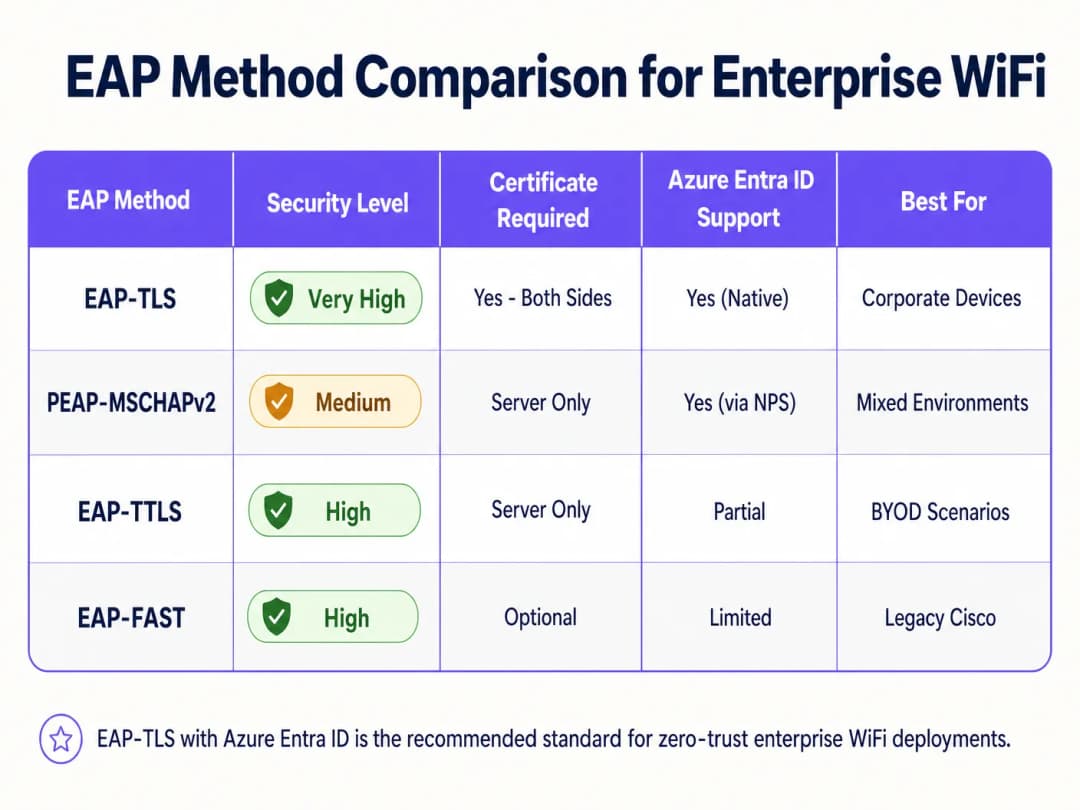
ঐতিহাসিকভাবে, এন্টারপ্রাইজ WiFi PEAP-MSCHAPv2-এর উপর নির্ভর করত, যার জন্য ব্যবহারকারীদের তাদের ডোমেন ক্রেডেনশিয়াল লিখতে হতো। তবে, অ্যাডভারসারি-ইন-দ্য-মিডল (AiTM) আক্রমণের প্রতি সংবেদনশীলতার কারণে, Microsoft সক্রিয়ভাবে ক্রেডেনশিয়াল-ভিত্তিক অথেন্টিকেশন বাতিল করছে। বর্তমান শিল্প মান হলো EAP-TLS, যা পারস্পরিক সার্টিফিকেট যাচাইকরণ ব্যবহার করে।
একটি EAP-TLS ডিপ্লয়মেন্টে, RADIUS সার্ভার এবং ক্লায়েন্ট ডিভাইস উভয়ই ডিজিটাল সার্টিফিকেট উপস্থাপন করে। যদি কোনও ডিভাইসে আপনার বিশ্বস্ত সার্টিফিকেট অথরিটি (CA) দ্বারা জারি করা বৈধ সার্টিফিকেট না থাকে, তবে ডিভাইসটি একটি IP অ্যাড্রেস পাওয়ার আগেই RADIUS সার্ভার সংযোগটি প্রত্যাখ্যান করে।
আর্কিটেকচারাল ব্রিজ: RADIUS এবং Entra ID
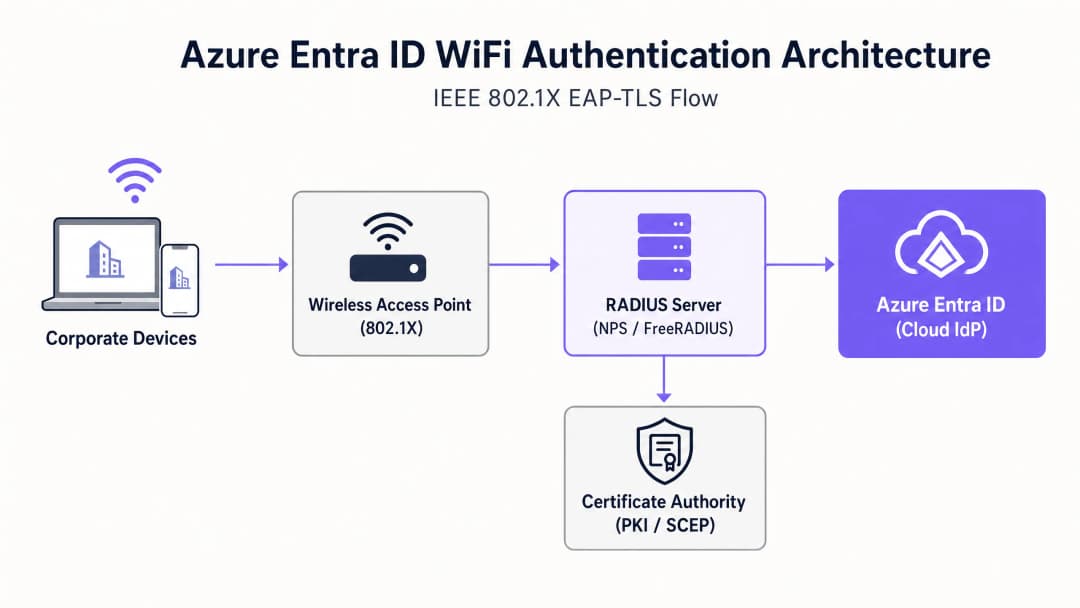
Azure Entra ID হলো একটি ক্লাউড আইডেন্টিটি প্রোভাইডার (IdP) যা SAML এবং OIDC-এর মতো আধুনিক প্রোটোকল ব্যবহার করে; এটি ওয়্যারলেস অ্যাক্সেস পয়েন্ট (WAPs) দ্বারা ব্যবহৃত RADIUS প্রোটোকল স্থানীয়ভাবে বোঝে না। এই ব্যবধানটি দূর করতে, নেটওয়ার্ক স্থপতিদের অবশ্যই এমন একটি RADIUS সার্ভার স্থাপন করতে হবে যা Entra ID-এর সাথে যোগাযোগ করতে সক্ষম। এটি সাধারণত এর মাধ্যমে অর্জিত হয়:
- ক্লাউড RADIUS সমাধান: বিশেষভাবে তৈরি প্ল্যাটফর্ম (যেমন SecureW2, SCEPman বা Portnox) যা API-এর মাধ্যমে সরাসরি Entra ID এবং Intune-এর সাথে একীভূত হয়।
- অন-প্রিমিসেস নেটওয়ার্ক পলিসি সার্ভার (NPS): Azure MFA এক্সটেনশন ব্যবহার করে, যদিও ক্লাউড-নেটিভ RADIUS-এর তুলনায় এটিকে ক্রমবর্ধমানভাবে একটি লেগ্যাসি পদ্ধতি হিসাবে বিবেচনা করা হয়।
আপনার নির্দিষ্ট সেটআপ নিয়ে কোনো প্রশ্ন আছে?
আমাদের টিম ৮০,০০০ ভেন্যুতে ভেন্যু অপারেটর, IT ম্যানেজার এবং নেটওয়ার্ক ইঞ্জিনিয়ারদের সাথে কাজ করে। একটি ২০ মিনিটের কল বুক করুন এবং আপনার মতো অন্যরা কীভাবে এর সমাধান করেছেন তা আমরা আপনাকে দেখাব।
Implementation Guide
WiFi অথেনটিকেশনের জন্য Azure Entra ID স্থাপন করার জন্য আইডেন্টিটি, ডিভাইস ম্যানেজমেন্ট এবং নেটওয়ার্ক ইনফ্রাস্ট্রাকচার টিমের মধ্যে সমন্বয় প্রয়োজন।
Step 1: Establish the Public Key Infrastructure (PKI)
ক্লায়েন্ট এবং সার্ভার সার্টিফিকেট ইস্যু করার জন্য আপনাকে একটি CA প্রতিষ্ঠা করতে হবে। ক্লাউড ফার্স্ট পরিবেশে, এটি সাধারণত Simple Certificate Enrolment Protocol (SCEP) এর মাধ্যমে Microsoft Intune এর সাথে একীভূত একটি ক্লাউড PKI।
Step 2: Configure the RADIUS Server
আপনার RADIUS ইনফ্রাস্ট্রাকচার স্থাপন করুন এবং এটিকে আপনার Entra ID টেন্যান্টের সাথে যুক্ত করুন। EAP হ্যান্ডশেকের সময় নিজের আইডেন্টিটি প্রমাণ করার জন্য RADIUS সার্ভারের নিজস্ব একটি সার্ভার সার্টিফিকেট প্রয়োজন - যা আপনার ক্লায়েন্ট ডিভাইস দ্বারা বিশ্বস্ত।
Step 3: Deploy MDM Profiles via Intune
ব্যবহারকারীদের ম্যানুয়ালি তাদের WiFi সেটিংস কনফিগার করার উপর নির্ভর করবেন না। একটি সম্পূর্ণ WiFi প্রোফাইল পুশ করতে Intune ব্যবহার করুন যার মধ্যে রয়েছে:
- বিশ্বস্ত রুট CA সার্টিফিকেট।
- ক্লায়েন্ট সার্টিফিকেটের জন্য অনুরোধ করতে ব্যবহৃত SCEP প্রোফাইল।
- WiFi কনফিগারেশন নিজেই, যা Evil Twin আক্রমণ প্রতিরোধ করতে SSID এবং RADIUS ইনফ্রাস্ট্রাকচারের সঠিক সার্ভার নামগুলি স্পষ্টভাবে সংজ্ঞায়িত করে।
Step 4: Configure the Wireless LAN Controller (WLC)
WPA2/WPA3-Enterprise (802.1X) ব্যবহার করতে আপনার অ্যাক্সেস পয়েন্ট বা WLC কনফিগার করুন। অথেনটিকেশন এবং অ্যাকাউন্টিং ট্রাফিক আপনার নতুন RADIUS সার্ভার IP অ্যাড্রেসগুলিতে নির্দেশ করুন, এবং শেয়ার্ড RADIUS সিক্রেট সেট করুন।
"802.1X কনফিগার করার সময়, নিশ্চিত করুন যে WLC-তে RADIUS টাইমআউট মানগুলি ক্লাউড সার্টিফিকেট যাচাইকরণের লেটেন্সির জন্য পর্যাপ্ত, যা সাধারণত ২ সেকেন্ড থেকে বাড়িয়ে ৫ সেকেন্ড করা হয়।" [1]
Best Practices
- কর্পোরেট এবং গেস্ট ট্রাফিক আলাদা করুন: কর্পোরেট ডিভাইসগুলির Entra ID এর সাথে যুক্ত 802.1X ব্যবহার করা উচিত। গেস্ট ডিভাইসগুলির একটি captive portal সহ একটি ওপেন SSID ব্যবহার করা উচিত। শক্তিশালী গেস্ট অ্যাক্সেস এবং অ্যানালিটিক্সের জন্য, একটি Guest WiFi সমাধান ব্যবহার করুন। এটি অবিশ্বাস্য ট্রাফিকের সম্পূর্ণ আইসোলেশন নিশ্চিত করে।
- সতর্কতার সাথে MAC Authentication Bypass (MAB) প্রয়োগ করুন: IoT ডিভাইস এবং লেগ্যাসি হার্ডওয়্যার - যেমন transport হাবগুলির পুরানো স্ক্যানার - প্রায়শই 802.1X সমর্থন করতে পারে না। এই ডিভাইসগুলিকে MAB বা একটি ডেডিকেটেড PSK ব্যবহার করে একটি পৃথক SSID-তে রাখুন এবং কঠোর ACL দিয়ে তাদের নেটওয়ার্ক অ্যাক্সেস সীমিত করুন।
- সার্টিফিকেট রিভোকেশনকে অগ্রাধিকার দিন: আপনার Certificate Revocation List (CRL) বা Online Certificate Status Protocol (OCSP) এন্ডপয়েন্টগুলি অত্যন্ত উপলব্ধ রয়েছে তা নিশ্চিত করুন। RADIUS সার্ভার যদি রিভোকেশন স্ট্যাটাস যাচাই করতে না পারে, তবে অথেনটিকেশন ব্যর্থ হবে।
Troubleshooting and Risk Mitigation
যখন ডেপ্লয়মেন্ট ব্যর্থ হয়, তখন ক্লাউড IdP-এর ত্রুটি খুব কমই থাকে। সাধারণ ব্যর্থতার কারণগুলির মধ্যে রয়েছে:
- ক্লক স্কিউ (Clock skew): EAP-TLS অত্যন্ত সময় সংবেদনশীল। নিশ্চিত করুন যে সমস্ত ইনফ্রাস্ট্রাকচার উপাদান - বিশেষ করে WLC এবং RADIUS সার্ভারগুলি - NTP-এর মাধ্যমে সিঙ্ক্রোনাইজ করা হয়েছে।
- Intune সিঙ্ক লেটেন্সি: নতুন ডিভাইসগুলি এনরোল করার সময়, SCEP সার্টিফিকেট ইস্যু করা এবং ডিভাইসের সংযোগ করার চেষ্টার মধ্যে একটি বিলম্ব হতে পারে। অনবোর্ডিংয়ের সময় এই বিলম্বের জন্য পরিকল্পনা রাখুন।
- RADIUS server name mismatch: Intune WiFi প্রোফাইলে ডিফাইন করা সার্ভার নেমটি যদি RADIUS সার্ভার সার্টিফিকেটের Common Name (CN) বা Subject Alternative Name (SAN) এর সাথে হুবহু না মেলে, তবে ক্ষতিকারক AP-র হাত থেকে রক্ষা পেতে ক্লায়েন্টরা কোনো সতর্কবার্তা ছাড়াই ডিসকানেক্ট হয়ে যাবে।
আপনার ইনফ্রাস্ট্রাকচার সুরক্ষিত করার আরও গভীর বিশ্লেষণের জন্য, কিভাবে রোবাস্ট DNS এবং সিকিউরিটি দিয়ে আপনার নেটওয়ার্ক সুরক্ষিত করবেন সংক্রান্ত আমাদের গাইডটি দেখুন।
ROI এবং ব্যবসায়িক প্রভাব
Azure Entra ID WiFi অথেন্টিকেশনে স্থানান্তরিত হওয়া উল্লেখযোগ্য সুবিধা প্রদান করে:
- হেল্পডেস্কের খরচ হ্রাস: পাসওয়ার্ড-ভিত্তিক অথেন্টিকেশন বাদ দিলে পাসওয়ার্ড লকআউট এবং WiFi ক্রেডেনশিয়াল রিনিউয়াল সম্পর্কিত সাপোর্ট টিকিট নাটকীয়ভাবে কমে যায়।
- দ্রুত কমপ্লায়েন্স অর্জন: EAP-TLS এমন ক্রিপ্টোগ্রাফিক প্রুফ অফ আইডেন্টিটি প্রদান করে যা PCI-DSS এবং ISO 27001 এর মতো ফ্রেমওয়ার্কগুলোর জন্য অত্যন্ত প্রয়োজনীয়, যা বিশেষ করে healthcare এবং রিটেল এনভায়রনমেন্টে অপরিহার্য।
- স্বয়ংক্রিয় অফবোর্ডিং: কোনো কর্মচারী চলে গেলে, Entra ID-তে তার অ্যাকাউন্টটি নিষ্ক্রিয় করার সাথে সাথে সমস্ত লোকেশনে তার নেটওয়ার্ক অ্যাক্সেস বাতিল হয়ে যায়, যা ইনসাইডার থ্রেট হ্রাস করে।
কর্পোরেট কোর নেটওয়ার্ক সুরক্ষিত করার মাধ্যমে, IT টিমগুলো রেভিনিউ জেনারেটিং উদ্যোগের ওপর ফোকাস করতে পারে, যেমন ভিজিটরদের আচরণ বুঝতে এবং এনগেজমেন্ট বাড়াতে WiFi Analytics ব্যবহার করা।
References
[1] Microsoft Learn. (2023). Secure WiFi access with Intune and EAP-TLS.
মূল সংজ্ঞাসমূহ
802.1X
পোর্ট - ভিত্তিক নেটওয়ার্ক অ্যাক্সেস নিয়ন্ত্রণের জন্য একটি IEEE স্ট্যান্ডার্ড, যেখানে LAN বা WLAN-এ অ্যাক্সেস পাওয়ার আগে ডিভাইসগুলোকে অথেনটিকেট করতে হয়।
এটি হলো অন্তর্নিহিত প্রোটোকল যা এন্টারপ্রাইজ WiFi-কে সুরক্ষিত করে, যা সাধারণ শেয়ার্ড পাসওয়ার্ডের বাইরে কাজ করে।
EAP-TLS
ট্রান্সপোর্ট লেয়ার সিকিউরিটি সহ এক্সটেনসিবল অথেনটিকেশন প্রোটোকল। একটি অথেনটিকেশন পদ্ধতি যার জন্য ক্লায়েন্ট এবং সার্ভার উভয়ের ক্ষেত্রেই ডিজিটাল সার্টিফিকেটের প্রয়োজন হয়।
WiFi অথেনটিকেশনের জন্য সবচেয়ে নিরাপদ পদ্ধতি হিসেবে বিবেচিত, যা ক্রেডেনশিয়াল চুরি এবং AiTM আক্রমণ প্রতিরোধ করে।
RADIUS
রিমোট অথেনটিকেশন ডায়াল-ইন ইউজার সার্ভিস। একটি নেটওয়ার্কিং প্রোটোকল যা সেন্ট্রালাইজড অথেনটিকেশন, অথরাইজেশন এবং অ্যাকাউন্টিং (AAA) প্রদান করে।
অথেনটিকেশন সার্ভারকে "আমি কি এই ডিভাইসটিকে নেটওয়ার্কে প্রবেশ করতে দেব?" জিজ্ঞেস করার জন্য আপনার অ্যাক্সেস পয়েন্টগুলো এই প্রোটোকলটি ব্যবহার করে।
SCEP
সিম্পল সার্টিফিকেট এনরোলমেন্ট প্রোটোকল। নেটওয়ার্ক ডিভাইসে নিরাপদে সার্টিফিকেট ইস্যু করার জন্য ব্যবহৃত একটি প্রোটোকল।
কর্পোরেট ল্যাপটপ এবং ফোনে নীরবে ক্লায়েন্ট সার্টিফিকেটের জন্য অনুরোধ এবং ইনস্টল করতে Intune-এর মতো MDM প্ল্যাটফর্মগুলো এটি ব্যবহার করে।
MAC Authentication Bypass (MAB)
ইউজারনেম বা সার্টিফিকেটের পরিবর্তে ডিভাইসের MAC অ্যাড্রেসের ওপর ভিত্তি করে নেটওয়ার্ক অ্যাক্সেস দেওয়ার একটি পদ্ধতি।
লেগাসি ডিভাইসগুলোর (যেমন পুরানো প্রিন্টার বা IoT সেন্সর) ব্যাকআপ হিসেবে ব্যবহৃত হয় যেগুলোতে 802.1X হ্যান্ডশেক করার জন্য প্রয়োজনীয় সফটওয়্যার নেই।
Evil Twin Attack
একটি প্রতারণামূলক অ্যাক্সেস পয়েন্ট যা ট্র্যাফিক ইন্টারসেপ্ট করতে বা ক্রেডেনশিয়াল চুরি করতে একটি বৈধ কর্পোরেট SSID-এর ছদ্মবেশ ধারণ করে।
EAP-TLS এটিকে প্রশমিত করে কারণ ক্লায়েন্ট ডিভাইসটিকে শুধুমাত্র বৈধ কর্পোরেট RADIUS সার্ভারের নির্দিষ্ট শংসাপত্রকে বিশ্বাস করার জন্য কনফিগার করা হয়।
Supplicant
এন্ডপয়েন্ট ডিভাইসের সফটওয়্যার ক্লায়েন্ট (যেমন, Windows WiFi ম্যানেজার) যা 802.1X প্রমাণীকরণ প্রক্রিয়া পরিচালনা করে।
আইটি টিমকে অবশ্যই MDM-এর মাধ্যমে supplicant কনফিগার করতে হবে যাতে এটি সুরক্ষিতভাবে আচরণ করে এবং ব্যবহারকারীদের যেন অবিশ্বস্ত সার্ভার শংসাপত্র গ্রহণ করার জন্য অনুরোধ না করে।
Conditional Access
Azure Entra ID নীতি যা অ্যাক্সেসের সিদ্ধান্ত নিতে সিগন্যাল (ব্যবহারকারী, অবস্থান, ডিভাইসের কমপ্লায়েন্স) মূল্যায়ন করে।
আধুনিক Cloud RADIUS সমাধানগুলি WiFi হ্যান্ডশেকের সময় Conditional Access পরীক্ষা করতে পারে, যদি Intune ডিভাইসটিকে নন-কমপ্লায়েন্ট হিসেবে ফ্ল্যাগ করে তবে নেটওয়ার্ক অ্যাক্সেস প্রত্যাখ্যান করে।
সমাধানকৃত উদাহরণসমূহ
একটি ৫০০-সাইটের রিটেইল চেইনের ইনভেন্টরি ম্যানেজমেন্টের জন্য ব্যবহৃত ব্যাক - অফ - হাউস iPad-গুলোর নিরাপত্তা নিশ্চিত করতে হবে। বর্তমানে, তারা সমস্ত স্টোর জুড়ে একটি একক শেয়ার্ড PSK ব্যবহার করে। কীভাবে তাদের Azure Entra ID অথেনটিকেশনে মাইগ্রেট করা উচিত?
১. সমস্ত iPad-কে Microsoft Intune-এ এনরোল করুন। ২. কর্পোরেট Entra ID টেন্যান্টের সাথে সংহত একটি Cloud RADIUS সমাধান ডেপ্লয় করুন। ৩. প্রতিটি iPad-এ একটি SCEP সার্টিফিকেট ডেপ্লয় করতে Intune কনফিগার করুন। ৪. Intune-এর মাধ্যমে একটি WiFi প্রোফাইল পুশ করুন যা Cloud RADIUS সার্ভারের সার্টিফিকেট যাচাই করে, EAP-TLS ব্যবহার করে 'Corporate-BOH' SSID-এর সাথে সংযোগ করার জন্য iPad-গুলোকে কনফিগার করে। ৫. ৫০০টি স্টোরের সবকটিতে Meraki/Aruba অ্যাক্সেস পয়েন্টগুলো আপডেট করুন যাতে সেগুলো 'Corporate-BOH' SSID-এর জন্য Cloud RADIUS IP অ্যাড্রেসগুলোকে নির্দেশ করে। ৬. পর্যায়ভিত্তিক রোলআউট: নতুন SSID সক্ষম করুন, Intune রিপোর্টিংয়ের মাধ্যমে iPad কানেক্টিভিটি যাচাই করুন, তারপর লেগাসি PSK SSID বন্ধ করে দিন।
একটি বিশ্ববিদ্যালয় ক্যাম্পাস অন - প্রেম Active Directory থেকে Azure Entra ID-তে মাইগ্রেট করছে। তাদের হাজার হাজার BYOD (Bring Your Own Device) শিক্ষার্থীর ল্যাপটপ রয়েছে যা বর্তমানে PEAP-MSCHAPv2 (ইউজারনেম এবং পাসওয়ার্ড) ব্যবহার করে সংযোগ করে। একটি ক্লাউড - ফার্স্ট Entra ID এনভায়রনমেন্টে তারা কীভাবে BYOD পরিচালনা করবে?
১. একটি অনবোর্ডিং পোর্টাল ডেপ্লয় করুন (যেমন, SecureW2 JoinNow বা অনুরূপ BYOD অনবোর্ডিং টুল)। ২. শিক্ষার্থীরা একটি ওপেন 'Onboarding' SSID-এর সাথে সংযোগ করবে, যা তাদের পোর্টালে রিডাইরেক্ট করবে। ৩. পোর্টালটি শিক্ষার্থীকে Azure Entra ID-এর বিপরীতে (তাদের বিশ্ববিদ্যালয়ের ইমেল এবং MFA ব্যবহার করে) অথেনটিকেট করতে অনুরোধ করবে। ৪. সফল অথেনটিকেশনের পর, পোর্টালটি একটি অনন্য ক্লায়েন্ট সার্টিফিকেট তৈরি করে এবং শিক্ষার্থীর ডিভাইসটিকে EAP-TLS-এর জন্য স্বয়ংক্রিয়ভাবে কনফিগার করে। ৫. ডিভাইসটি নতুন সার্টিফিকেট ব্যবহার করে স্বয়ংক্রিয়ভাবে সুরক্ষিত 'Edu-Secure' SSID-এর সাথে সংযুক্ত হবে।
অনুশীলনী প্রশ্নসমূহ
Q1. আপনার প্রতিষ্ঠান Azure Entra ID এবং Intune-এ স্থানান্তরিত হচ্ছে। আপনি বর্তমানে WiFi-এর জন্য PEAP-MSCHAPv2 ব্যবহার করছেন। সিকিউরিটি টিম নির্দেশ দিয়েছে যে WiFi প্রমাণীকরণ অবশ্যই ক্রেডেনশিয়াল চুরি প্রতিরোধী হতে হবে। আপনার কোন EAP পদ্ধতি স্থাপন করা উচিত?
ইঙ্গিত: কোন পদ্ধতিটি পাসওয়ার্ডের পরিবর্তে সম্পূর্ণরূপে শংসাপত্রের উপর নির্ভর করে?
মডেল উত্তর দেখুন
আপনার EAP-TLS স্থাপন করা উচিত। EAP-TLS পারস্পরিক শংসাপত্র প্রমাণীকরণ ব্যবহার করে, যার অর্থ ক্লায়েন্ট ডিভাইসটিকে অবশ্যই আপনার PKI দ্বারা জারি করা একটি বৈধ শংসাপত্র উপস্থাপন করতে হবে। যেহেতু এটি পাসওয়ার্ড ব্যবহার করে না, এটি ক্রেডেনশিয়াল চুরি এবং অ্যাডভারসারি-ইন-দ্য-মিডল আক্রমণের বিরুদ্ধে অত্যন্ত প্রতিরোধী।
Q2. Intune-এর মাধ্যমে EAP-TLS স্থাপন করার পরে, ব্যবহারকারীরা রিপোর্ট করছেন যে তারা WiFi-এর সাথে সংযোগ করতে পারছেন না। RADIUS লগগুলি দেখে আপনি 'Certificate Revocation Check Failed' দেখতে পাচ্ছেন। এর সবচেয়ে সম্ভাব্য কারণ কী?
ইঙ্গিত: একটি শংসাপত্র আপোস করা হয়েছে কিনা তা যাচাই করতে RADIUS সার্ভারকে কোন অবকাঠামোর সাথে যোগাযোগ করতে হবে?
মডেল উত্তর দেখুন
RADIUS সার্ভারটি আপনার Certificate Authority-এর Certificate Revocation List (CRL) বা OCSP এন্ডপয়েন্টে পৌঁছাতে পারছে না। নিশ্চিত করুন যে ফায়ারওয়ালগুলি RADIUS সার্ভারকে ক্লায়েন্ট শংসাপত্রে নির্দিষ্ট করা HTTP URL-গুলিতে আউটবাউন্ড অ্যাক্সেসের অনুমতি দেয়।
Q3. একটি হাসপাতালে ৫০টি লিগ্যাসি হার্ট-রেট মনিটর নেটওয়ার্কের সাথে সংযুক্ত করা প্রয়োজন। এই ডিভাইসগুলি কেবল WPA2-Personal (Pre-Shared Key) সমর্থন করে এবং Intune-এ নথিভুক্ত করা যায় না। কর্পোরেট ল্যাপটপের জন্য আপনার Entra ID 802.1X স্থাপনা বজায় রাখার পাশাপাশি আপনি কীভাবে সেগুলিকে সুরক্ষিত করবেন?
ইঙ্গিত: একই SSID-তে প্রমাণীকরণের ধরনগুলি মিশ্রিত করবেন না।
মডেল উত্তর দেখুন
মেডিকেল IoT ডিভাইসগুলির জন্য বিশেষভাবে একটি ডেডিকেটেড, পৃথক SSID তৈরি করুন। একটি শক্তিশালী, অনন্য Pre-Shared Key (অথবা আপনার নেটওয়ার্ক ভেন্ডর দ্বারা সমর্থিত হলে Identity PSK/iPSK) বা MAC Authentication Bypass (MAB) ব্যবহার করুন। অত্যন্ত গুরুত্বপূর্ণ বিষয় হলো, এই SSID-টিকে কঠোর অ্যাক্সেস কন্ট্রোল লিস্ট (ACLs) সহ একটি অত্যন্ত সীমাবদ্ধ VLAN-এ রাখুন যা কেবল মনিটরগুলিকে তাদের নির্দিষ্ট মেডিকেল সার্ভারের সাথে যোগাযোগ করার অনুমতি দেয় এবং অন্য সমস্ত ল্যাটারাল নেটওয়ার্ক অ্যাক্সেস ব্লক করে।
এই সিরিজে পড়া চালিয়ে যান
গেস্ট WiFi-এর জন্য RADIUS প্রমাণীকরণ কনফিগার করার বিষয়ে একজন নেটওয়ার্ক অ্যাডমিনিস্ট্রেটরের গাইড
গেস্ট WiFi-এর জন্য RADIUS প্রমাণীকরণ ব্যবহারের বিষয়ে নেটওয়ার্ক অ্যাডমিনিস্ট্রেটরদের জন্য একটি ব্যাপক প্রযুক্তিগত রেফারেন্স। এতে আর্কিটেকচার, ভেন্ডর-নিরপেক্ষ কনফিগারেশন ধাপ, নিরাপত্তা বিষয়ক সর্বোত্তম অনুশীলন এবং সাধারণ ডেপ্লয়মেন্ট ব্যর্থতার সমস্যা সমাধান অন্তর্ভুক্ত রয়েছে।
উচ্চশিক্ষায় নিরাপদ BYOD এবং 802.1X WiFi-এর জন্য SCEP বাস্তবায়ন করা
এই টেকনিক্যাল গাইডটিতে বিস্তারিত জানানো হয়েছে কীভাবে উচ্চশিক্ষা প্রতিষ্ঠানের IT টিমগুলো SCEP ব্যবহার করে হাজার হাজার BYOD ডিভাইসের জন্য 802.1X সার্টিফিকেট এনরোলমেন্ট স্বয়ংক্রিয় করতে পারে। ম্যানুয়াল অনবোর্ডিং সরিয়ে একটি নিরাপদ, জিরো-টাচ নেটওয়ার্ক অ্যাক্সেস মডেল চালু করার জন্য এর আর্কিটেকচার, সিকিউরিটি সুবিধা এবং বাস্তবসম্মত ডিপ্লয়মেন্ট ধাপগুলো এখানে আলোচনা করা হয়েছে।
Guest এবং Staff WiFi নেটওয়ার্কের জন্য RADIUS Authentication কনফিগার করা
এই টেকনিক্যাল রেফারেন্স গাইডটি এন্টারপ্রাইজ guest এবং staff WiFi নেটওয়ার্কের জন্য RADIUS authentication-এর আর্কিটেকচার, কনফিগারেশন এবং ডিপ্লয়মেন্টের রূপরেখা প্রদান করে। এটি নেটওয়ার্ক আর্কিটেক্ট এবং IT ম্যানেজারদের সুরক্ষিত, স্কেলযোগ্য ওয়্যারলেস অ্যাক্সেস কন্ট্রোল সিস্টেম তৈরি করার জন্য প্রয়োজনীয় সঠিক প্রোটোকল, সিকিউরিটি স্ট্যান্ডার্ড এবং ট্রাবলশুটিং মেথডোলজি প্রদান করে।
আপনার নির্দিষ্ট সেটআপ নিয়ে কোনো প্রশ্ন আছে?
আমাদের টিম ৮০,০০০ ভেন্যুতে ভেন্যু অপারেটর, IT ম্যানেজার এবং নেটওয়ার্ক ইঞ্জিনিয়ারদের সাথে কাজ করে। একটি ২০ মিনিটের কল বুক করুন এবং আপনার মতো অন্যরা কীভাবে এর সমাধান করেছেন তা আমরা আপনাকে দেখাব।