
WiFi ऑथेंटिकेशनसाठी Azure Entra ID (Azure AD) कसे सेट करावे
हा अधिकृत मार्गदर्शक एंटरप्राइझ WiFi ऑथेंटिकेशनसाठी Azure Entra ID ला 802.1X सोबत समाकलित करण्याचे आर्किटेक्चर, अंमलबजावणीचे टप्पे आणि व्यावसायिक प्रभावाचा तपशील देतो. हा नेटवर्क आर्किटेक्ट आणि IT व्यवस्थापकांना व्यावहारिक उपयोजन धोरणे प्रदान करतो, जे वारसा प्राप्त PSK ला झिरो-ट्रस्ट, प्रमाणपत्र-आधारित नेटवर्क प्रवेशासह पुनर्स्थित करते.
हे मार्गदर्शक ऐका
पॉडकास्ट ट्रान्सक्रिप्ट पहा
आमच्या मुख्य मालिकेचा भाग: Enterprise WiFi Security Guide →
कार्यकारी सारांश (Executive Summary)
मोठ्या हॉस्पिटॅलिटी ठिकाणांपासून ते डायनॅमिक रिटेल स्पेसपर्यंत - गुंतागुंतीच्या नेटवर्क वातावरणाचे व्यवस्थापन करणाऱ्या CTO आणि नेटवर्क आर्किटेक्टसाठी कॉर्पोरेट नेटवर्क सुरक्षित ठेवणे हे आता केवळ मजबूत पासवर्डपुरते मर्यादित राहिलेले नाही. पारंपारिक प्री-शेअर्ड की (PSKs) आणि मूलभूत क्रेडेंशियल प्रमाणीकरण हे आधुनिक झिरो-ट्रस्ट आर्किटेक्चरशी मूलभूतपणे विसंगत आहेत.
हे मार्गदर्शक Azure Entra ID (पूर्वीचे Azure AD) सोबत थेट समाकलित केलेल्या 802.1X प्रमाणपत्र-आधारित WiFi प्रमाणीकरण मधील बदलाचे सविस्तर वर्णन करते. EAP-TLS (एक्स्टेंसिबल ऑथेंटिकेशन प्रोटोकॉल विथ ट्रान्सपोर्ट लेयर सिक्युरिटी) कडे वळल्याने, उद्योग क्रेडेंशियल चोरीशी संबंधित धोके दूर करू शकतात, मोबाईल डिव्हाइस व्यवस्थापन (MDM) द्वारे डिव्हाइस नोंदणी स्वयंचलित करू शकतात आणि केवळ सुसंगत, व्यवस्थापित डिव्हाइसेस संवेदनशील कॉर्पोरेट VLANs मध्ये प्रवेश करू शकतील याची खात्री करू शकतात. आम्ही तांत्रिक आर्किटेक्चर, उपयोजन टप्पे आणि ही एंटरप्राइझ सुरक्षा स्थिती Purple सारख्या प्लॅटफॉर्मद्वारे व्यवस्थापित केलेल्या अतिथी नेटवर्क धोरणांच्या समांतर कशा प्रकारे कार्य करते याचा शोध घेणार आहोत.
तांत्रिक सखोल विश्लेषण (Technical Deep Dive)
क्रेडेंशियल्सकडून डिजिटल प्रमाणपत्रांकडे होणारा बदल
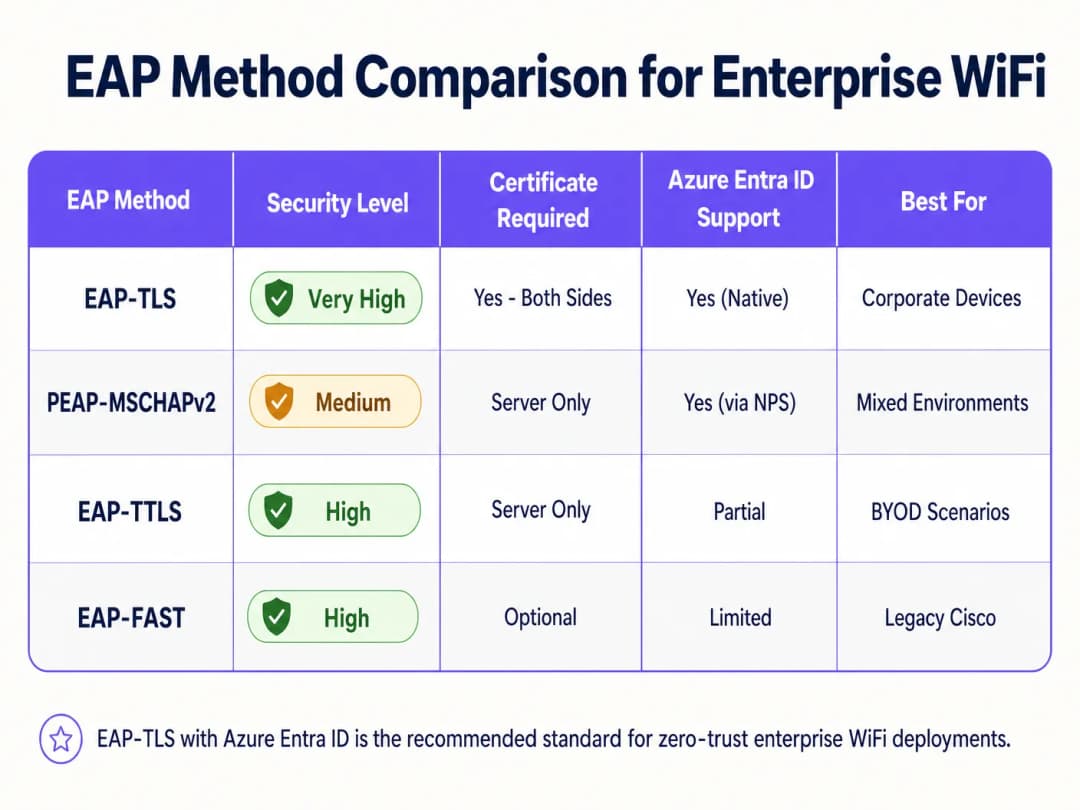
ऐतिहासिकदृष्ट्या, एंटरप्राइझ WiFi हे PEAP-MSCHAPv2 वर अवलंबून होते, ज्यामध्ये वापरकर्त्यांना त्यांचे डोमेन क्रेडेंशियल्स प्रविष्ट करावे लागत असत. तथापि, ॲडव्हर्सरी-इन-द-मिडल (AiTM) हल्ल्यांच्या असुरक्षिततेमुळे, Microsoft क्रेडेंशियल-आधारित प्रमाणीकरण सक्रियपणे बंद करत आहे. सध्याचा उद्योग मानक EAP-TLS आहे, जो परस्पर प्रमाणपत्र प्रमाणीकरण वापरतो.
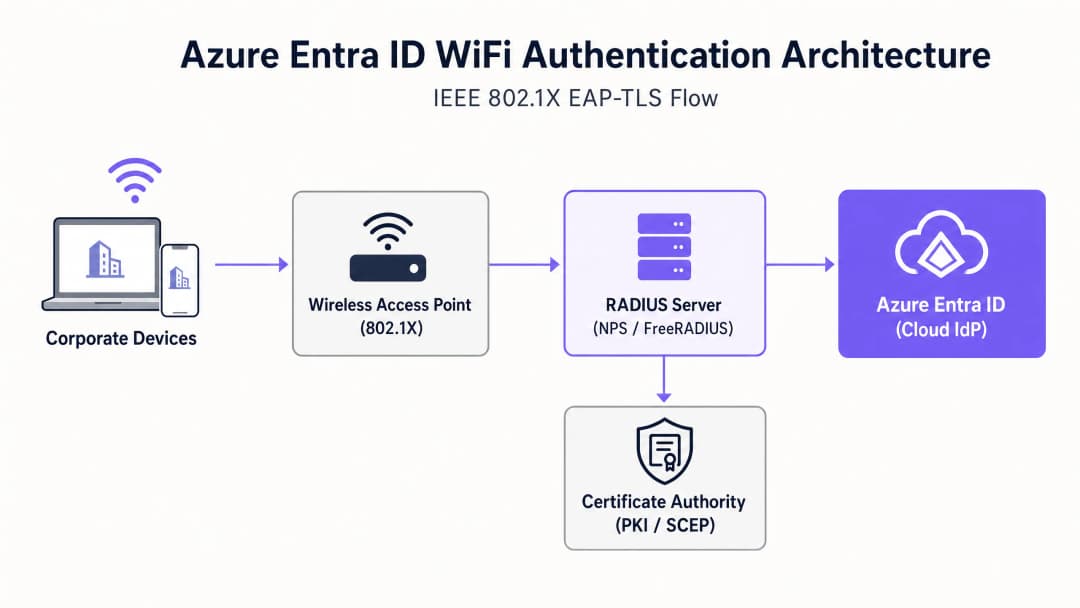
EAP-TLS उपयोजनामध्ये, RADIUS सर्व्हर आणि क्लायंट डिव्हाइस दोन्ही डिजिटल प्रमाणपत्रे सादर करतात. जर एखाद्या डिव्हाइसकडे तुमच्या विश्वसनीय प्रमाणपत्र प्राधिकरणाने (CA) जारी केलेले वैध प्रमाणपत्र नसेल, तर डिव्हाइसला IP पत्ता मिळण्यापूर्वीच RADIUS सर्व्हर कनेक्शन नाकारतो.
आर्किटेक्चरल ब्रिज: RADIUS आणि Entra ID
Azure Entra ID हा क्लाउड आयडेंटिटी प्रोव्हाइडर (IdP) आहे जो SAML आणि OIDC सारखे आधुनिक प्रोटोकॉल वापरतो; तो वायरलेस ॲक्सेस पॉइंट्स (WAPs) द्वारे वापरल्या जाणाऱ्या RADIUS प्रोटोकॉलला मूळतः सपोर्ट करत नाही. ही दरी सांधण्यासाठी, नेटवर्क आर्किटेक्ट्सना असा RADIUS सर्व्हर उपयोजित करावा लागेल जो Entra ID शी संवाद साधण्यास सक्षम असेल. हे सामान्यत: खालील गोष्टींद्वारे साध्य केले जाते:
- क्लाउड RADIUS सोल्यूशन्स: हे विशेष हेतूने तयार केलेले प्लॅटफॉर्म आहेत (जसे की SecureW2, SCEPman किंवा Portnox) जे APIs द्वारे थेट Entra ID आणि Intune सोबत समाकलित होतात.
- ऑन-प्रिमायसेस नेटवर्क पॉलिसी सर्व्हर (NPS): Azure MFA एक्स्टेंशन वापरणे, जरी क्लाउड-नेटिव्ह RADIUS च्या तुलनेत हे वाढत्या प्रमाणात जुने धोरण मानले जात आहे.
तुमच्या विशिष्ट सेटअपबद्दल काही प्रश्न आहेत का?
आमची टीम ८०,००० हून अधिक वेन्यूजमधील वेन्यू ऑपरेटर्स, IT मॅनेजर्स आणि नेटवर्क इंजिनिअर्ससोबत काम करते. २० मिनिटांचा कॉल बुक करा आणि तुमच्यासारख्या इतरांनी ही समस्या कशी सोडवली हे आम्ही तुम्हाला दाखवू.
अंमलबजावणी मार्गदर्शक (Implementation Guide)
WiFi ऑथेंटिकेशनसाठी Azure Entra ID तैनात करण्यासाठी आयडेंटिटी, डिव्हाइस मॅनेजमेंट आणि नेटवर्क इन्फ्रास्ट्रक्चर टीम्समध्ये समन्वय असणे आवश्यक आहे.
पायरी 1: पब्लिक की इन्फ्रास्ट्रक्चर (PKI) स्थापित करा
क्लायंट आणि सर्व्हर सर्टिफिकेट जारी करण्यासाठी तुम्हाला एक CA स्थापित करणे आवश्यक आहे. क्लाउड-फर्स्ट एन्व्हायरनमेंटमध्ये, हे सहसा Simple Certificate Enrolment Protocol (SCEP) द्वारे Microsoft Intune शी एकत्रित केलेले क्लाउड PKI असते.
पायरी 2: RADIUS सर्व्हर कॉन्फिगर करा
तुमचे RADIUS इन्फ्रास्ट्रक्चर तैनात करा आणि ते तुमच्या Entra ID टेनंटशी बाइंड करा. EAP हँडशेक दरम्यान आपली ओळख सिद्ध करण्यासाठी RADIUS सर्व्हरला स्वतःचे सर्व्हर सर्टिफिकेट - ज्यावर तुमच्या क्लायंट डिव्हाइसेसचा विश्वास असेल - आवश्यक आहे.
पायरी 3: Intune द्वारे MDM प्रोफाइल तैनात करा
वापरकर्त्यांनी त्यांच्या WiFi सेटिंग्ज मॅन्युअली कॉन्फिगर करण्यावर अवलंबून राहू नका. खालील गोष्टींचा समावेश असलेले संपूर्ण WiFi प्रोफाइल पुश करण्यासाठी Intune वापरा:
- ट्रस्टेड रूट CA सर्टिफिकेट.
- क्लायंट सर्टिफिकेटची विनंती करण्यासाठी वापरलेले SCEP प्रोफाइल.
- WiFi कॉन्फिगरेशन स्वतः, जे स्पष्टपणे SSID आणि RADIUS इन्फ्रास्ट्रक्चरची अचूक सर्व्हर नावे परिभाषित करते जेणेकरून इव्हिल ट्विन (Evil Twin) हल्ले रोखता येतील.
पायरी 4: वायरलेस LAN कंट्रोलर (WLC) कॉन्फिगर करा
WPA2/WPA3-Enterprise (802.1X) वापरण्यासाठी तुमचे ॲक्सेस पॉइंट्स किंवा WLC कॉन्फिगर करा. ऑथेंटिकेशन आणि अकाउंटिंग ट्रॅफिक तुमच्या नवीन RADIUS सर्व्हर IP ॲड्रेसकडे निर्देशित करा आणि शेअर केलेला RADIUS सिक्रेट सेट करा.
"802.1X कॉन्फिगर करताना, WLC वरील RADIUS टाईमआउट व्हॅल्यू क्लाउड सर्टिफिकेट व्हॅलिडेशनच्या लेटन्सीसाठी पुरेशा आहेत याची खात्री करा, ही व्हॅल्यू सहसा 2 सेकंदांवरून वाढवून 5 सेकंद केली जाते." [1]
सर्वोत्तम पद्धती (Best Practices)
- कॉर्पोरेट आणि गेस्ट ट्रॅफिक वेगळे करा: कॉर्पोरेट डिव्हाइसेसनी Entra ID शी बाइंड केलेले 802.1X वापरावे. गेस्ट डिव्हाइसेसनी captive portal सह ओपन SSID वापरावे. मजबूत गेस्ट ॲक्सेस आणि ॲनालिटिक्ससाठी, Guest WiFi सोल्यूशनचा वापर करा. हे अविश्वासू ट्रॅफिक पूर्णपणे वेगळे ठेवण्याची खात्री देते.
- मॅक ऑथेंटिकेशन बायपास (MAB) काळजीपूर्वक लागू करा: IoT डिव्हाइसेस आणि लेगसी हार्डवेअर - जसे की transport हबमधील जुने स्कॅनर्स - बऱ्याचदा 802.1X ला सपोर्ट करू शकत नाहीत. हे डिव्हाइसेस MAB किंवा डेडिकेटेड PSK वापरून वेगळ्या SSID वर ठेवा आणि कडक ACLs सह त्यांच्या नेटवर्क ॲक्सेसवर मर्यादा घाला.
- सर्टिफिकेट रिव्होकेशनला प्राधान्य द्या: तुमचे Certificate Revocation List (CRL) किंवा Online Certificate Status Protocol (OCSP) एंडपॉइंट्स उच्च उपलब्धतेमध्ये (highly available) असल्याची खात्री करा. जर RADIUS सर्व्हर रिव्होकेशन स्टेटस सत्यापित करू शकला नाही, तर ऑथेंटिकेशन अयशस्वी होईल.
ट्रबलशूटिंग आणि जोखीम कमी करणे
जेव्हा डिप्लॉयमेंट अयशस्वी होते, तेव्हा क्लाउड IdP चा दोष असण्याची शक्यता फार कमी असते. सामान्य बिघाडांच्या कारणांमध्ये पुढील गोष्टींचा समावेश होतो:
- क्लॉक स्क्यू (Clock skew): EAP-TLS वेळेच्या बाबतीत अत्यंत संवेदनशील आहे. सर्व इन्फ्रास्ट्रक्चर घटक - विशेषतः WLCs आणि RADIUS सर्व्हर्स - NTP द्वारे सिंक्रोनाइझ केलेले असल्याची खात्री करा.
- Intune सिंक लेटन्सी: नवीन डिव्हाइसेस नोंदणीकृत करताना, SCEP सर्टिफिकेट जारी होण्यात आणि डिव्हाइस कनेक्ट करण्याचा प्रयत्न करण्यात थोडा विलंब होऊ शकतो. ऑनबोर्डिंग दरम्यान या विलंबाचे नियोजन आधीच करा.
- RADIUS server name mismatch: जर Intune WiFi प्रोफाइलमध्ये परिभाषित केलेले सर्व्हरचे नाव RADIUS सर्व्हर प्रमाणपत्रावरील Common Name (CN) किंवा Subject Alternative Name (SAN) शी तंतोतंत जुळत नसेल, तर क्लायंट दुर्भावनापूर्ण APs पासून संरक्षण करण्यासाठी कोणतीही पूर्वसूचना न देता डिस्कनेक्ट होतील.
तुमच्या इन्फ्रास्ट्रक्चरच्या सुरक्षिततेचे सखोल विश्लेषण पाहण्यासाठी, आमचे how to protect your network with robust DNS and security हे मार्गदर्शन पहा.
ROI आणि व्यावसायिक प्रभाव
Azure Entra ID WiFi ऑथेंटिकेशनकडे स्थलांतरित केल्याने महत्त्वपूर्ण फायदे मिळतात:
- कमी झालेला हेल्पडेस्क खर्च: पासवर्ड-आधारित ऑथेंटिकेशन काढून टाकल्याने पासवर्ड लॉकआउट्स आणि WiFi क्रेडेंशियल नूतनीकरणाशी संबंधित सपोर्ट तिकिटांमध्ये कमालीची घट होते.
- वेगवान अनुपालन (Compliance): EAP-TLS हे PCI-DSS आणि ISO 27001 सारख्या फ्रेमवर्कसाठी आवश्यक असलेली ओळखीचा क्रिप्टोग्राफिक पुरावा प्रदान करते, जे healthcare आणि किरकोळ (retail) वातावरणात आवश्यक आहे.
- स्वयंचलित ऑफबोर्डिंग (Automated offboarding): जेव्हा एखादा कर्मचारी नोकरी सोडतो, तेव्हा Entra ID मधील त्याचे खाते निष्क्रिय केल्याने त्याचे सर्व ठिकाणांवरील नेटवर्क ॲक्सेस त्वरित रद्द होतो, ज्यामुळे अंतर्गत सुरक्षेचा धोका कमी होतो.
कॉर्पोरेट कोर नेटवर्क सुरक्षित करून, आयटी टीम्स महसूल वाढवणाऱ्या उपक्रमांवर लक्ष केंद्रित करू शकतात, जसे की अभ्यागतांच्या वर्तनाचा अभ्यास करण्यासाठी आणि प्रतिबद्धता वाढवण्यासाठी WiFi Analytics चा वापर करणे.
संदर्भ
[1] Microsoft Learn. (2023). Secure WiFi access with Intune and EAP-TLS.
महत्वाच्या व्याख्या
802.1X
पोर्ट-आधारित नेटवर्क प्रवेश नियंत्रणासाठी एक IEEE मानक, ज्यामध्ये डिव्हाइसेसना LAN किंवा WLAN चा प्रवेश मिळण्यापूर्वी ऑथेंटिकेट करणे आवश्यक असते.
हा अंतर्निहित प्रोटोकॉल आहे जो साध्या सामायिक पासवर्डच्या पलीकडे जाऊन, एंटरप्राइझ WiFi सुरक्षित करतो.
EAP-TLS
ट्रान्सपोर्ट लेयर सिक्युरिटीसह एक्स्टेंसिबल ऑथेंटिकेशन प्रोटोकॉल. एक ऑथेंटिकेशन पद्धत ज्यासाठी क्लायंट आणि सर्व्हर दोन्हीवर डिजिटल प्रमाणपत्रांची आवश्यकता असते.
WiFi ऑथेंटिकेशनसाठी सर्वात सुरक्षित पद्धत मानली जाते, जी क्रेडेंशियल चोरी आणि AiTM हल्ल्यांना प्रतिबंधित करते.
RADIUS
रिमोट ऑथेंटिकेशन डायल-इन युझर सर्व्हिस. एक नेटवर्किंग प्रोटोकॉल जो केंद्रीकृत ऑथेंटिकेशन, ऑथरायझेशन आणि अकाउंटिंग (AAA) प्रदान करतो.
तुमचे ॲक्सेस पॉइंट्स ऑथेंटिकेशन सर्व्हरला विचारण्यासाठी वापरत असलेला प्रोटोकॉल, "मी या डिव्हाइसला नेटवर्कवर येऊ देऊ का?"
SCEP
सिम्पल सर्टिफिकेट एनरोलमेंट प्रोटोकॉल. नेटवर्क डिव्हाइसेसना सुरक्षितपणे प्रमाणपत्रे जारी करण्यासाठी वापरला जाणारा प्रोटोकॉल.
कॉर्पोरेट लॅपटॉप आणि फोनवर क्लायंट प्रमाणपत्रे शांतपणे विनंती करण्यासाठी आणि स्थापित करण्यासाठी Intune सारख्या MDM प्लॅटफॉर्मद्वारे वापरले जाते.
MAC Authentication Bypass (MAB)
वापरकर्तानाव किंवा प्रमाणपत्राऐवजी डिव्हाइसच्या MAC पत्त्याच्या आधारे नेटवर्क प्रवेश मंजूर करण्याची एक पद्धत.
802.1X हँडशेक करण्यासाठी सॉफ्टवेअर नसलेल्या वारसा डिव्हाइसेससाठी (जसे की जुने प्रिंटर किंवा IoT सेन्सर्स) फॉलबॅक म्हणून वापरले जाते.
इव्हिल ट्विन अटॅक
ट्रॅफिक थांबवण्यासाठी किंवा क्रेडेंशियल चोरण्यासाठी कायदेशीर कॉर्पोरेट SSID चे सोंग घेणारा एक रॉग ऍक्सेस पॉइंट.
EAP-TLS हे धोके कमी करते कारण क्लायंट डिव्हाइस केवळ कायदेशीर कॉर्पोरेट RADIUS सर्व्हरच्या विशिष्ट प्रमाणपत्रावर विश्वास ठेवण्यासाठी कॉन्फिगर केलेले असते.
Supplicant
एंडपॉइंट डिव्हाइसवरील सॉफ्टवेअर क्लायंट (उदा. Windows WiFi व्यवस्थापक) जो 802.1X ऑथेंटिकेशन प्रक्रिया हाताळतो.
सप्लीकंट सुरक्षितपणे वर्तन करेल आणि युजर्सना अविश्वासू सर्व्हर प्रमाणपत्रे स्वीकारण्यास प्रवृत्त करणार नाही याची खात्री करण्यासाठी IT टीम्सनी MDM द्वारे सप्लीकंट कॉन्फिगर करणे आवश्यक आहे.
Conditional Access
Azure Entra ID पॉलिसी ज्या ऍक्सेसचे निर्णय घेण्यासाठी सिग्नल्स (युजर, स्थान, डिव्हाइस कंप्लायन्स) चे मूल्यांकन करतात.
आधुनिक क्लाउड RADIUS सोल्यूशन्स WiFi हँडशेक दरम्यान Conditional Access तपासू शकतात, जर Intune ने डिव्हाइसला नॉन-कंप्लायंट म्हणून चिन्हांकित केले तर नेटवर्क ऍक्सेस नाकारतात.
सोडवलेली उदाहरणे
५००-साइट रिटेल चेनला इन्व्हेंटरी व्यवस्थापनासाठी वापरले जाणारे बॅक-ऑफ-हाउस iPads सुरक्षित करणे आवश्यक आहे. सध्या, ते सर्व स्टोअरमध्ये एकच शेअर केलेला PSK वापरतात. त्यांनी Azure Entra ID ऑथेंटिकेशनवर कसे स्थलांतरित व्हावे?
१. सर्व iPads Microsoft Intune मध्ये नोंदणीकृत करा. २. कॉर्पोरेट Entra ID टेनंटसह समाकलित केलेले क्लाउड RADIUS सोल्यूशन उपयोजित करा. ३. प्रत्येक iPad वर SCEP प्रमाणपत्र उपयोजित करण्यासाठी Intune कॉन्फिगर करा. ४. Intune द्वारे एक WiFi प्रोफाइल पुश करा जे iPads ला EAP-TLS वापरून, क्लाउड RADIUS सर्व्हरच्या प्रमाणपत्राची पडताळणी करून 'Corporate-BOH' SSID शी कनेक्ट करण्यासाठी कॉन्फिगर करते. ५. सर्व ५०० स्टोअरमधील Meraki/Aruba ॲक्सेस पॉइंट्स 'Corporate-BOH' SSID साठी क्लाउड RADIUS IP पत्त्यांकडे निर्देशित करण्यासाठी अपडेट करा. ६. टप्प्याटप्प्याने रोलआउट: नवीन SSID सक्षम करा, Intune रिपोर्टिंगद्वारे iPad कनेक्टिव्हिटी सत्यापित करा, नंतर जुना PSK SSID बंद करा.
एक विद्यापीठ कॅम्पस ऑन-प्रिम Active Directory मधून Azure Entra ID वर स्थलांतरित होत आहे. त्यांच्याकडे हजारो BYOD (ब्रिंग युअर ओन डिव्हाइस) विद्यार्थ्यांचे लॅपटॉप आहेत जे सध्या PEAP-MSCHAPv2 (वापरकर्तानाव आणि पासवर्ड) वापरून कनेक्ट होतात. क्लाउड-फर्स्ट Entra ID वातावरणात ते BYOD कसे हाताळतील?
१. ऑनबोर्डिंग पोर्टल उपयोजित करा (उदा. SecureW2 JoinNow किंवा तत्सम BYOD ऑनबोर्डिंग टूल). २. विद्यार्थी एका खुल्या 'Onboarding' SSID शी कनेक्ट होतात, जे त्यांना पोर्टलवर रीडायरेक्ट करते. ३. पोर्टल विद्यार्थ्याला Azure Entra ID च्या विरूद्ध ऑथेंटिकेट करण्यास प्रवृत्त करते (त्यांच्या विद्यापीठाचा ईमेल आणि MFA वापरून). ४. यशस्वी ऑथेंटिकेशननंतर, पोर्टल एक अद्वितीय क्लायंट प्रमाणपत्र व्युत्पन्न करते आणि EAP-TLS साठी विद्यार्थ्याचे डिव्हाइस स्वयंचलितपणे कॉन्फिगर करते. ५. डिव्हाइस नवीन प्रमाणपत्र वापरून सुरक्षित 'Edu-Secure' SSID शी स्वयंचलितपणे कनेक्ट होते.
सराव प्रश्न
Q1. तुमची संस्था Azure Entra ID आणि Intune वर स्थलांतरित होत आहे. तुम्ही सध्या WiFi साठी PEAP-MSCHAPv2 वापरत आहात. सिक्युरिटी टीमने अनिवार्य केले आहे की WiFi ऑथेंटिकेशन हे क्रेडेंशियल चोरीला प्रतिबंध करणारे असावे. तुम्ही कोणती EAP पद्धत तैनात करावी?
टीप: कोणती पद्धत पासवर्डऐवजी पूर्णपणे प्रमाणपत्रांवर अवलंबून असते?
नमुना उत्तर पहा
तुम्ही EAP-TLS तैनात केले पाहिजे. EAP-TLS परस्पर प्रमाणपत्र ऑथेंटिकेशन (mutual certificate authentication) वापरते, ज्याचा अर्थ क्लायंट डिव्हाइसने तुमच्या PKI द्वारे जारी केलेले वैध प्रमाणपत्र सादर करणे आवश्यक आहे. हे पासवर्ड वापरत नसल्यामुळे, क्रेडेंशियल चोरी आणि ऍडव्हर्सरी-इन-द-मिडल हल्ल्यांना ते अत्यंत प्रतिरोधक आहे.
Q2. Intune द्वारे EAP-TLS तैनात केल्यानंतर, युजर्स तक्रार करतात की ते WiFi शी कनेक्ट करू शकत नाहीत. RADIUS लॉग पाहताना, तुम्हाला 'Certificate Revocation Check Failed' दिसते. याचे सर्वात संभाव्य कारण काय आहे?
टीप: प्रमाणपत्र तडजोड केलेले नाही ना हे तपासण्यासाठी RADIUS सर्व्हरने कोणत्या इन्फ्रास्ट्रक्चरशी संवाद साधला पाहिजे?
नमुना उत्तर पहा
RADIUS सर्व्हर तुमच्या सर्टिफिकेट ऑथॉरिटीच्या सर्टिफिकेट रिव्होकेशन लिस्ट (CRL) किंवा OCSP एंडपॉइंटपर्यंत पोहोचू शकत नाही. फायरफॉल्स RADIUS सर्व्हरला क्लायंट प्रमाणपत्रांमध्ये नमूद केलेल्या HTTP URLs वर आउटबाउंड ऍक्सेसची परवानगी देतात याची खात्री करा.
Q3. एका हॉस्पिटलला 50 जुने हार्ट-रेट मॉनिटर्स नेटवर्कशी कनेक्ट करायचे आहेत. हे डिव्हाइसेस केवळ WPA2-Personal (Pre-Shared Key) ला सपोर्ट करतात आणि Intune मध्ये नोंदणीकृत केले जाऊ शकत नाहीत. कॉर्पोरेट लॅपटॉपसाठी तुमचे Entra ID 802.1X डिप्लॉयमेंट कायम ठेवून तुम्ही त्यांना कसे सुरक्षित कराल?
टीप: एकाच SSID वर ऑथेंटिकेशन प्रकार मिक्स करू नका.
नमुना उत्तर पहा
विशेषतः वैद्यकीय IoT डिव्हाइसेससाठी एक समर्पित, स्वतंत्र SSID तयार करा. एक मजबूत, युनिक प्री-शेअर्ड की (किंवा तुमच्या नेटवर्क व्हेंडरद्वारे सपोर्ट असल्यास आयडेंटिटी PSK/iPSK) किंवा MAC ऑथेंटिकेशन बायपास (MAB) वापरा. मुख्य म्हणजे, हे SSID अत्यंत प्रतिबंधित VLAN वर ठेवा ज्यामध्ये कठोर ऍक्सेस कंट्रोल लिस्ट (ACLs) असतील, ज्या केवळ मॉनिटर्सना त्यांच्या विशिष्ट वैद्यकीय सर्व्हरशी संवाद साधण्याची परवानगी देतात आणि इतर सर्व लॅटरल नेटवर्क ऍक्सेस ब्लॉक करतात.
या मालिकेमध्ये पुढे वाचा
पाहुण्यांच्या WiFi साठी RADIUS प्रमाणीकरण कॉन्फिगर करण्यासाठी नेटवर्क ॲडमिनिस्ट्रेटरचे मार्गदर्शक
पाहुण्यांच्या WiFi साठी RADIUS प्रमाणीकरण उपयोजित करण्याबाबत नेटवर्क ॲडमिनिस्ट्रेटरसाठी एक सर्वसमावेशक तांत्रिक संदर्भ. यामध्ये आर्किटेक्चर, व्हेंडर-तटस्थ कॉन्फिगरेशन पायऱ्या, सुरक्षा सर्वोत्तम पद्धती आणि सामान्य उपयोजन त्रुटींचे ट्रबलशूटिंग समाविष्ट आहे.
उच्च शिक्षणामध्ये सुरक्षित BYOD आणि 802.1X WiFi साठी SCEP लागू करणे
हा तांत्रिक मार्गदर्शक दर्शवतो की उच्च शिक्षण आयटी टीम SCEP चा वापर करून हजारो BYOD उपकरणांसाठी 802.1X प्रमाणपत्र नोंदणी स्वयंचलित कशी करू शकतात. यामध्ये मॅन्युअल ऑनबोर्डिंगला सुरक्षित, झिरो-टच नेटवर्क ऍक्सेस मॉडेलसह बदलण्यासाठी आर्किटेक्चर, सुरक्षा फायदे आणि प्रत्यक्ष उपयोजन टप्पे समाविष्ट आहेत.
Guest आणि Staff WiFi नेटवर्क्ससाठी RADIUS Authentication कॉन्फिगर करणे
हे तांत्रिक संदर्भ मार्गदर्शक एंटरप्राइझ guest आणि staff WiFi नेटवर्क्ससाठी RADIUS authentication च्या आर्किटेक्चर, कॉन्फिगरेशन आणि डिप्लॉयमेंटची रूपरेषा स्पष्ट करते. हे नेटवर्क आर्किटेक्ट्स आणि IT मॅनेजर्सना सुरक्षित, स्केलेबल वायरलेस ॲक्सेस कंट्रोल सिस्टम्स तयार करण्यासाठी आवश्यक असलेले अचूक प्रोटोकॉल्स, सुरक्षा मानके आणि ट्रबलशूटिंग पद्धती प्रदान करते.
तुमच्या विशिष्ट सेटअपबद्दल काही प्रश्न आहेत का?
आमची टीम ८०,००० हून अधिक वेन्यूजमधील वेन्यू ऑपरेटर्स, IT मॅनेजर्स आणि नेटवर्क इंजिनिअर्ससोबत काम करते. २० मिनिटांचा कॉल बुक करा आणि तुमच्यासारख्या इतरांनी ही समस्या कशी सोडवली हे आम्ही तुम्हाला दाखवू.