
MAC Address Authentication म्हणजे काय? ते कधी वापरावे आणि कधी टाळावे
हे अधिकृत तांत्रिक संदर्भ मार्गदर्शक एंटरप्राइझ WiFi वातावरणातील MAC address authentication कव्हर करते - Layer 2 वर RADIUS-आधारित MAC authentication कसे कार्य करते, त्यामधील मूळ सुरक्षा त्रुटी (ज्यामध्ये MAC spoofing आणि OS-level MAC randomisation चा प्रभाव समाविष्ट आहे) आणि IoT आणि हेडलेस डिव्हाइसेस व्यवस्थापित करण्यासाठी ते एक वैध साधन म्हणून काम करत असलेले अचूक ऑपरेशनल संदर्भ. हे हॉस्पिटॅलिटी, रिटेल, हेल्थकेअर आणि सार्वजनिक क्षेत्रातील ठिकाणांवरील IT व्यवस्थापक आणि नेटवर्क आर्किटेक्ट्ससाठी प्रत्यक्ष अंमलबजावणी मार्गदर्शन प्रदान करते, ज्यामध्ये वास्तविक जगातील उदाहरणे, निर्णय फ्रेमवर्क आणि Purple च्या guest WiFi आणि अॅनालिटिक्स प्लॅटफॉर्मसाठी एकत्रीकरण संदर्भ समाविष्ट आहे.
हे मार्गदर्शक ऐका
पॉडकास्ट ट्रान्सक्रिप्ट पहा
आमच्या मुख्य मालिकेचा भाग: Enterprise WiFi Security Guide →
मुख्य सारांश (Executive Summary)
विस्तृत हॉटेल मालमत्ता आणि रिटेल साखळ्यांपासून ते स्टेडियम्स आणि सार्वजनिक क्षेत्रातील सुविधांपर्यंत - गुंतागुंतीच्या ठिकाणांचे व्यवस्थापन करणाऱ्या एंटरप्राइझ IT लीडर्ससाठी - अनमॅनेज्ड डिव्हाइसेसच्या वाढत्या संख्येसाठी नेटवर्क ॲक्सेस सुरक्षित करणे हे एक गंभीर ऑपरेशनल आव्हान आहे. स्वतंत्र सुरक्षा प्रोटोकॉल म्हणून MAC ॲड्रेस ऑथेंटिकेशनला मूलभूत मर्यादा असल्या तरी, IoT डिव्हाइसेस, लेगसी हार्डवेअर आणि हेडलेस सिस्टीम्स ज्या 802.1X किंवा Captive Portal ला सपोर्ट करू शकत नाहीत, त्यांच्यासाठी हा एक अपरिहार्य ऑनबोर्डिंग मार्ग आहे.
हे मार्गदर्शक RADIUS-आधारित MAC ऑथेंटिकेशनच्या आर्किटेक्चरचे विश्लेषण करते, त्याच्या मूळ सुरक्षा त्रुटींच्या तुलनेत त्याच्या ऑपरेशनल उपयुक्ततेचे मूल्यमापन करते. ऑपरेशन्स सुलभ करण्यासाठी MAC ऑथेंटिकेशन कधी वापरावे, जोखीम कमी करण्यासाठी ते कधी टाळावे आणि कनेक्टिव्हिटीचा बळी न देता मजबूत सुरक्षा राखण्यासाठी आधुनिक एंटरप्राइझ WiFi प्लॅटफॉर्म हे नियंत्रणे कसे एकत्रित करतात, हे आम्ही सविस्तरपणे सांगतो. मुख्य तत्त्व: MAC ऑथेंटिकेशन ही एक नेटवर्क ॲक्सेस कंट्रोल यंत्रणा आहे, सुरक्षा प्रोटोकॉल नाही. त्यानुसारच ते तैनात करा.
तांत्रिक सखोल विश्लेषण (Technical Deep-Dive)
MAC ॲड्रेस ऑथेंटिकेशन कसे कार्य करते
MAC (Media Access Control) ॲड्रेस ऑथेंटिकेशन OSI मॉडेलच्या Layer 2 वर कार्य करते. IEEE 802.1X च्या उलट - ज्यामध्ये PEAP यांसारख्या EAP पद्धती वापरून क्रेडेंशियल वाटाघाटी करण्यासाठी क्लायंट डिव्हाइसवर सप्लिकंट असणे आवश्यक असते - MAC ऑथेंटिकेशन पूर्णपणे डिव्हाइसच्या हार्डवेअर ॲड्रेसवर अवलंबून असते जो आयडेंटिफायर आणि क्रेडेंशियल अशा दोन्ही प्रकारे काम करतो.
ऑथेंटिकेशनचा प्रवाह खालीलप्रमाणे कार्य करतो: जेव्हा एखादे डिव्हाइस वायरलेस ॲक्सेस पॉईंट (AP) शी जोडण्याचा प्रयत्न करते, तेव्हा AP हा जोडणीचा प्रयत्न अडवतो आणि क्लायंटचा MAC ॲड्रेस (नेटवर्क इंटरफेस कार्ड (NIC) ला निर्मात्याद्वारे नियुक्त केलेला युनिक 48-बिट आयडेंटिफायर) मिळवतो. AP, RADIUS क्लायंट म्हणून काम करत, RADIUS सर्व्हरकडे Access-Request मेसेज पाठवतो. एका सामान्य अंमलबजावणीमध्ये, MAC ॲड्रेस युझरनेम आणि पासवर्ड दोन्ही म्हणून सबमिट केला जातो, जो सहसा डेलिमिटर्सशिवाय फॉरमॅट केलेला असतो (उदा. A4CF12388E7F), जरी वेंडरनुसार अंमलबजावणी भिन्न असू शकते. RADIUS सर्व्हर त्याच्या बॅकएंडला - सामान्यतः LDAP डिरेक्टरी किंवा डेडीकेटेड आयडेंटिटी स्टोअरला - हा MAC ॲड्रेस अलाउलिस्टवर अस्तित्वात आहे की नाही हे सत्यापित करण्यासाठी क्वेरी करतो. जुळणी यशस्वी झाल्यास, Access-Accept मेसेज परत पाठवला जातो, AP नेटवर्क ॲक्सेस मंजूर करतो आणि पर्यायीपणे एक विशिष्ट VLAN नियुक्त केला जाऊ शकतो. जुळणी अयशस्वी झाल्यास, Access-Reject परत पाठवला जातो आणि डिव्हाइसला एकतर जोडणी नाकारली जाते किंवा मर्यादित क्वारंटाईन VLAN मध्ये ठेवले जाते.

सुरक्षेच्या मर्यादा आणि त्रुटी
MAC authentication मधील मूलभूत त्रुटी म्हणजे IEEE 802.11 मॅनेजमेंट फ्रेम्समध्ये MAC ॲड्रेस क्लियरटेक्स्ट स्वरूपात ट्रान्समिट केले जातात. Wireshark, Kismet किंवा तत्सम मूळ पॅकेट विश्लेषण टूल असलेला कोणताही आक्रमणकर्ता कोणत्याही सक्रिय घुसखोरीशिवाय नेटवर्कवर संवाद साधणारे कायदेशीर MAC ॲड्रेस पॅसिव्हली कॅप्चर करू शकतो. एकदा कायदेशीर MAC ॲड्रेस ओळखला गेला की, आक्रमणकर्ता कॅप्चर केलेल्या ॲड्रेसशी जुळण्यासाठी स्वतःचे नेटवर्क कार्ड स्पूफ करण्यासाठी macchanger (Linux) किंवा अंगभूत ऑपरेटिंग सिस्टम युटिलिटीज सारखी टूल्स वापरू शकतो.
कारण RADIUS सर्व्हर कोणतीही क्रिप्टोग्राफिक चॅलेंज - रिस्पॉन्स प्रक्रिया करत नाही - ते केवळ स्ट्रिंग डेटाबेस एंट्रीशी जुळते की नाही हे तपासते - त्यामुळे स्पूफ केलेल्या डिव्हाइसला कायदेशीर डिव्हाइससारखेच नेटवर्क अधिकार दिले जातात. हा केवळ एक सैद्धांतिक हल्ला नाही; यासाठी कोणत्याही विशेष ज्ञानाची आवश्यकता नसते आणि हे कार्यान्वित करण्यासाठी दोन मिनिटांपेक्षा कमी वेळ लागतो.
याव्यतिरिक्त, MAC authentication डेटा पेलोडचे कोणतेही एन्क्रिप्शन प्रदान करत नाही. जोपर्यंत SSID WPA2-PSK, WPA3-SAE किंवा Opportunistic Wireless Encryption (OWE) द्वारे सुरक्षित केले जात नाही, तोपर्यंत सर्व ट्रॅफिक इंटरसेप्शनसाठी असुरक्षित राहते. त्यामुळे MAC authentication ला नेहमी नेटवर्क ॲक्सेस कंट्रोल (NAC) चा एक प्रकार समजले पाहिजे, सुरक्षा सीमा नाही.
MAC ॲड्रेस रँडमायझेशनच्या व्यापक वापरामुळे आणखी एक ऑपरेशनल गुंतागुंत निर्माण झाली आहे. Apple ने iOS 14 (2020) मध्ये प्रति-नेटवर्क रँडमायझ्ड MAC ॲड्रेस सुरू केले, तर Android ने Android 10 मध्ये हे लागू केले. Windows 11 डीफॉल्टनुसार रँडमायझेशन सक्षम करते. जेव्हा एखादे ग्राहक डिव्हाइस नेटवर्कशी कनेक्ट होते, तेव्हा ते त्याच्या हार्डवेअर-बर्न केलेल्या ॲड्रेसऐवजी रँडमायझ्ड, तात्पुरता MAC ॲड्रेस सादर करते. हे थेट अशा कोणत्याही सिस्टमला खंडित करते जी परत येणाऱ्या वापरकर्त्यांना ओळखण्यासाठी किंवा प्रमाणित करण्यासाठी MAC ॲड्रेसवर अवलंबून असते - ज्यामध्ये Guest WiFi नेटवर्कवरील Captive Portal ला बायपास करण्यासाठी वापरल्या जाणाऱ्या MAC कॅशिंगचा समावेश आहे.
तुमच्या विशिष्ट सेटअपबद्दल काही प्रश्न आहेत का?
आमची टीम ८०,००० हून अधिक वेन्यूजमधील वेन्यू ऑपरेटर्स, IT मॅनेजर्स आणि नेटवर्क इंजिनिअर्ससोबत काम करते. २० मिनिटांचा कॉल बुक करा आणि तुमच्यासारख्या इतरांनी ही समस्या कशी सोडवली हे आम्ही तुम्हाला दाखवू.
अंमलबजावणी मार्गदर्शक
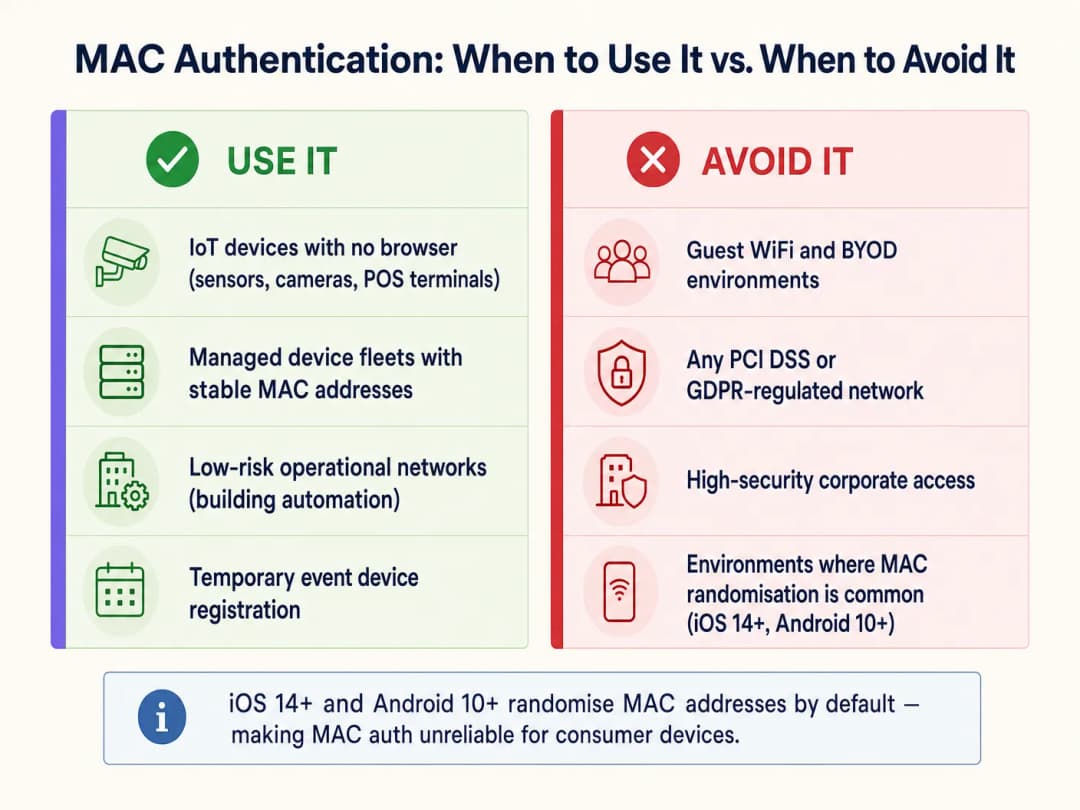
MAC Authentication कधी वापरावे
MAC authentication केवळ अशा डिव्हाइस वर्गांसाठी योग्य आहे ज्यांच्याकडे अधिक मजबूत पद्धतींद्वारे प्रमाणित करण्याची क्षमता नाही. प्राथमिक वापर प्रकरणे खालीलप्रमाणे आहेत:
| डिव्हाइस वर्ग | उदाहरणे | तर्कसंगतता |
|---|---|---|
| हेडलेस IoT डिव्हाइसेस | स्मार्ट टीव्ही, CCTV कॅमेरे, पर्यावरणीय सेन्सर्स | कोणतेही ब्राउझर किंवा सप्लिकंट क्षमता नाही |
| ऑपरेशनल तंत्रज्ञान (OT) | HVAC नियंत्रक, BMS, दरवाजा प्रवेश नियंत्रण पॅनेल | 802.1X सपोर्ट नसलेले जुने प्रोटोकॉल |
| लेगसी POS टर्मिनल्स | जुने किरकोळ पेमेंट टर्मिनल्स | केवळ WPA2-PSK; MAC फिल्टरिंग कमकुवत दुय्यम स्तर जोडते |
| व्यवस्थापित डिव्हाइस ताफा | प्रिंटर, VoIP फोन, बारकोड स्कॅनर | स्थिर, ज्ञात MAC ॲड्रेस; केंद्रीय प्रशासनाद्वारे व्यवस्थापित |
MAC ऑथेंटिकेशन कधी टाळावे
IT आर्किटेक्ट्सनी अनेक गंभीर संदर्भांमध्ये MAC ऑथेंटिकेशन सक्रियपणे टाळले पाहिजे:
Guest WiFi आणि BYOD नेटवर्क्स. आज व्हॅन्यू ऑपरेटर्सना भेडसावणारी ही सर्वात मोठी ऑपरेशनल समस्या आहे. मॉडर्न मोबाईल ऑपरेटिंग सिस्टम्स डीफॉल्टनुसार MAC ॲड्रेस रँडमाइज करतात. जर Guest WiFi तैनाती परत येणाऱ्या पाहुण्यांना अखंड री-ऑथेंटिकेशन देण्यासाठी MAC कॅशिंगवर अवलंबून असेल, तर ती बहुतांश आधुनिक उपकरणांसाठी अयशस्वी ठरेल. पाहुण्यांचे डिव्हाइस प्रत्येक भेटीदरम्यान एक नवीन रँडम MAC सादर करते, नेटवर्क त्यांच्याशी नवीन वापरकर्ता म्हणून वागते आणि त्यांना प्रत्येक वेळी captive portal मधून जाण्यास भाग पाडले जाते. यामुळे वापरकर्त्याचा अनुभव खराब होतो आणि WiFi Analytics प्लॅटफॉर्ममधील परत येणाऱ्या-भेट देणाऱ्यांच्या डेटाचा दर्जा घसरतो. यासाठी Passpoint (Hotspot 2.0) किंवा टिकून राहणाऱ्या सेशन टोकन्ससह सुरक्षित captive portal वापरणे हाच उपाय आहे.
उच्च-सुरक्षा कॉर्पोरेट नेटवर्क्स. संवेदनशील कॉर्पोरेट डेटा हाताळणाऱ्या कोणत्याही नेटवर्क सेगमेंटने किमान 802.1X सह EAP-TLS (प्रमाणपत्र-आधारित) किंवा PEAP-MSCHAPv2 वापरणे आवश्यक आहे. तपशीलवार तैनाती मार्गदर्शनासाठी, How to Set Up Enterprise WiFi on iOS and macOS with 802.1X पहा. MAC ऑथेंटिकेशन कॉर्पोरेट इन्फ्रास्ट्रक्चरवरील अंतर्गत धोके किंवा लक्ष्यित हल्ल्यांपासून कोणतेही महत्त्वपूर्ण संरक्षण प्रदान करत नाही.
PCI DSS द्वारे नियंत्रित वातावरण. PCI DSS v4.0 आवश्यकता 8 कार्डधारक डेटा वातावरणातील (CDE) सर्व सिस्टम्ससाठी मजबूत ऑथेंटिकेशन नियंत्रणे अनिवार्य करते. MAC ऑथेंटिकेशन हे मजबूत ऑथेंटिकेशनच्या व्याख्येत बसत नाही आणि पेमेंट डेटाला स्पर्श करणाऱ्या कोणत्याही सिस्टमसाठी प्राथमिक प्रवेश नियंत्रण म्हणून काम करू शकत नाही. VLAN सेगमेंटेशन MAC-ऑथेंटिकेटेड उपकरणांना CDE पासून वेगळे करू शकते, परंतु पेमेंट नेटवर्कने स्वतः 802.1X किंवा समतुल्य ऑथेंटिकेशन वापरणे आवश्यक आहे.
GDPR द्वारे नियंत्रित डेटा वातावरण. वैयक्तिक डेटा आयडेंटिफायर्स म्हणून MAC ॲड्रेस स्टोअर करण्यासाठी (जे ते GDPR च्या कलम 4 नुसार असू शकतात) कायदेशीर आधार आणि योग्य सुरक्षा उपायांची आवश्यकता असते. वैयक्तिक डेटावर प्रक्रिया करणाऱ्या नेटवर्क्सवर ऑथेंटिकेशन क्रेडेंशियल म्हणून MAC ॲड्रेस वापरल्याने सुरक्षा आणि अनुपालन (compliance) या दोन्हीचे धोके निर्माण होतात.
तैनातीसाठी सर्वोत्तम पद्धती
ज्या उपकरणांच्या श्रेणींसाठी MAC प्रमाणीकरण आवश्यक आहे, त्यांच्यासाठी ते लागू करताना खालील पुरवठादार-निरपेक्ष पद्धतींचे पालन करणे बंधनकारक आहे: VLAN विभागणी. MAC-प्रमाणित उपकरणांना कधीही कॉर्पोरेट युजर्स, सर्व्हर किंवा पेमेंट सिस्टम्सच्या समान VLAN वर ठेवू नका. त्यांना एका समर्पित IoT VLAN मध्ये नियुक्त करा ज्यामध्ये कडक फायरवॉल ACLs असतील, जे केवळ त्यांना आवश्यक असलेल्या विशिष्ट सेवांपुरता प्रवेश मर्यादित करतील. हे सर्वात महत्त्वाचे भरपाई देणारे नियंत्रण आहे. नेटवर्क-स्तरीय सुरक्षा आर्किटेक्चरवरील अधिक मार्गदर्शनासाठी, Access Point Security: Your 2026 Enterprise Guide आणि Protect Your Network with Strong DNS and Security पहा.
WPA2/WPA3 एन्क्रिप्शनसह एकत्र करा. वायरलेस पेलोड एन्क्रिप्ट करण्यासाठी SSID नेहमी WPA2-PSK किंवा WPA3-SAE सह कॉन्फिगर करा. MAC प्रमाणीकरण हे नेटवर्कमध्ये कोण सामील होऊ शकते हे नियंत्रित करते; तर एन्क्रिप्शन ते काय ट्रान्समिट करतात याचे संरक्षण करते.
डिव्हाइस प्रोफाइलिंग आणि विसंगती शोधणे. डिव्हाइस प्रोफाइलिंग समाविष्ट करणारे NAC सोल्यूशन्स तैनात करा. जर एखादे उपकरण नोंदणीकृत स्मार्ट टीव्हीच्या MAC पत्त्यासह प्रमाणीकृत होत असेल परंतु Windows वर्कस्टेशनचे ट्रॅफिक पॅटर्न (DNS क्वेरी, SMB ट्रॅफिक, HTTP ब्राउझिंग) दर्शवत असेल, तर सिस्टमने तपासा प्रलंबित असताना त्याला डायनॅमिकपणे क्वारंटाईन केले पाहिजे.
अनुमती यादी (Allowlist) लाइफसायकल व्यवस्थापन. MAC अनुमती यादीसाठी कडक लाइफसायकल राखा. बंद केलेली उपकरणे त्वरित काढून टाकली पाहिजेत. जुन्या नोंदी या स्पूफिंगसाठी थेट अटॅक व्हेक्टर ठरतात. शक्य तिथे ऑडिट प्रक्रिया स्वयंचलित करा, ज्यामध्ये 90 दिवसांपेक्षा जास्त काळ नेटवर्कवर न दिसलेल्या MAC नोंदी चिन्हांकित केल्या जातील.
प्रति उपकरण श्रेणी स्वतंत्र SSIDs. एकाच SSID वर IoT उपकरणे आणि युजर उपकरणांचे मिश्रण करणे टाळा. IoT, कॉर्पोरेट आणि अतिथी ट्रॅफिकसाठी समर्पित SSIDs वापरा, प्रत्येक योग्य सुरक्षा धोरणांसह स्वतःच्या VLAN शी मॅप केलेले असावे.
सर्वोत्तम पद्धती
खालील तक्ता उपकरणाची श्रेणी आणि अनुपालन संदर्भांनुसार शिफारस केलेल्या प्रमाणीकरण पद्धतीचा सारांश देतो:
| परिस्थिती | शिफारस केलेली प्रमाणीकरण पद्धत | MAC प्रमाणीकरण भूमिका |
|---|---|---|
| कॉर्पोरेट लॅपटॉप आणि स्मार्टफोन | 802.1X (EAP-TLS किंवा PEAP) | काहीही नाही |
| अतिथी स्मार्टफोन आणि टॅब्लेट | Captive Portal / Passpoint | काहीही नाही (MAC रँडमायझेशनमुळे हे अविश्वसनीय बनते) |
| हेडलेस IoT (कॅमेरा, सेन्सर) | MAC Auth + WPA2/3-PSK | प्राथमिक (एकमेव व्यवहार्य पर्याय) |
| जुने POS टर्मिनल्स | MAC Auth + WPA2-PSK + VLAN विलगीकरण | दुय्यम (भरपाई नियंत्रण) |
| वैद्यकीय उपकरणे (HIPAA) | शक्य तिथे 802.1X; नसल्यास MAC Auth + कडक VLAN | जास्तीत जास्त विभागणीसह शेवटचा पर्याय |
| इव्हेंट/तात्पुरती उपकरणे | वेळ-मर्यादित VLAN प्रवेशासह MAC Auth | अल्पकालीन, नियंत्रित तैनातीसाठी योग्य |
Transport हब्स आणि सार्वजनिक-क्षेत्रातील सुविधांसह अनेक क्षेत्रांमध्ये कार्यरत असलेल्या संस्थांसाठी, हा नियम सुसंगत राहतो: उपकरणाच्या श्रेणीचे ते समर्थन करत असलेल्या सर्वात मजबूत पद्धतीसह प्रमाणीकरण करा, आणि कमकुवत पद्धतींची भरपाई नेटवर्क-स्तरीय नियंत्रणांसह करा.
त्रुटी निवारण आणि जोखीम कमी करणे
लक्षण: MAC-प्रमाणित डिव्हाइसेस मधूनमधून कनेक्ट होण्यात अपयशी ठरतात.
मूळ कारण: डिव्हाइसचे NIC फर्मवेअर यादृच्छिक (randomised) किंवा स्थानिकरित्या व्यवस्थापित केलेले MAC पत्ते जनरेट करत असावे. डिव्हाइस त्याच्या बर्न-इन हार्डवेअर MAC वापरण्यासाठी कॉन्फिगर केले असल्याची खात्री करा. Access-Reject मेसेजसाठी RADIUS सर्व्हर लॉग तपासा आणि अलावलिस्ट फॉरमॅटसह क्रॉस-रेफरन्स करा (काही RADIUS सर्व्हर्स कोलन-विभाजित फॉरमॅट AA:BB:CC:DD:EE:FF ची अपेक्षा करतात; तर इतर कोणत्याही विलगकाशिवाय अपेक्षा करतात).
लक्षण: स्थिर पाऊलखुणा (footfall) असूनही परत येणाऱ्या अभ्यागतांचे मेट्रिक्स कमी होत आहेत. मूळ कारण: iOS 14+/Android 10+ डिव्हाइसेसवर MAC यादृच्छिकीकरण (randomisation). आधुनिक ग्राहक डिव्हाइसेससाठी MAC कॅशिंग यंत्रणा आता विश्वसनीय राहिलेली नाही. अचूक WiFi Analytics डेटा पुनर्संचयित करण्यासाठी सेशन-टोकन-आधारित री-ऑथेंटिकेशन किंवा Passpoint वर स्विच करा.
लक्षण: IoT VLAN वर अनपेक्षित डिव्हाइसेस दिसत आहेत. मूळ कारण: MAC स्पूफिंग किंवा अलीकडे ऑडिट न केलेली अलावलिस्ट. अपेक्षित डिव्हाइस वर्तन आणि वास्तविक ट्रॅफिक पॅटर्नमधील विसंगती शोधण्यासाठी डिव्हाइस प्रोफाइलिंग लागू करा. विसंगत सेशन कालावधी किंवा डेटा व्हॉल्यूमसाठी RADIUS अकाउंटिंग रेकॉर्डचे पुनरावलोकन करा.
लक्षण: पीक अवर्स दरम्यान RADIUS सर्व्हरच्या कामगिरीत घसरण. मूळ कारण: मोठ्या IoT ताफ्यातून मोठ्या प्रमाणात येणारे Access-Request मेसेज. 802.1X हाताळणाऱ्या मुख्य ऑथेंटिकेशन सर्व्हर्सचा लोड कमी करण्यासाठी RADIUS प्रॉक्सी कॅशिंग किंवा MAC ऑथेंटिकेशनसाठी समर्पित RADIUS इन्स्टन्स लागू करा.
-
ROI आणि व्यावसायिक प्रभाव
व्यापक ऐवजी धोरणात्मकपणे MAC ऑथेंटिकेशन लागू करण्याचा थेट प्रभाव ऑपरेशनल कार्यक्षमता आणि सुरक्षा स्थितीवर होतो. 2,000 पेक्षा जास्त इन-रूम IoT डिव्हाइसेस व्यवस्थापित करणाऱ्या मोठ्या हॉस्पिटॅलिटी व्हेन्यूसाठी, प्री-प्रोविझंड MAC अलावलिस्टद्वारे स्मार्ट टीव्ही, थर्मोस्टॅट्स आणि आयपी फोनचे स्वयंचलित ऑनबोर्डिंग मॅन्युअल प्रति-डिव्हाइस कॉन्फिगरेशनची आवश्यकता काढून टाकते, ज्यामुळे मॅन्युअल क्रेडेन्शियल्स एंट्रीच्या तुलनेत अंदाजे 60 - 70% सेटअप वेळ वाचतो. जेव्हा डिव्हाइसेस RADIUS ॲट्रिब्युट्सद्वारे योग्य VLAN कडे सातत्याने नियुक्त केले जातात, तेव्हा IoT कनेक्टिव्हिटीशी संबंधित सपोर्ट तिकिटे सामान्यतः 35 - 45% ने कमी होतात.
याउलट, गेस्ट नेटवर्कसाठी MAC ऑथेंटिकेशन वापरण्याचा प्रयत्न केल्यास स्पष्टपणे नकारात्मक परिणाम मिळतात. Captive Portal बायपाससाठी MAC कॅशिंगवर अवलंबून असणाऱ्या व्हेन्यूजमधील परत येणाऱ्या अभ्यागतांचा ओळख दर, जेथे बहुतांश वापरकर्ते आधुनिक iOS किंवा Android डिव्हाइसेस बाळगतात अशा नेटवर्कवर 70 - 80% वरून थेट 20% च्या खाली घसरल्याचे नोंदवले गेले आहे. याचा थेट फटका Guest WiFi Marketing & Analytics Platform च्या ROI ला बसतो, जिथे परत येणाऱ्या अभ्यागतांचा डेटा वैयक्तिकृत मार्केटिंग मोहिमा आणि लॉयल्टी एंगेजमेंटला चालना देतो.
व्यावसायिक बाजू स्पष्ट आहे: प्रत्येक डिव्हाइस श्रेणीसाठी योग्य ऑथेंटिकेशन यंत्रणेमध्ये गुंतवणूक करा. IoT डिव्हाइसेससाठी MAC ऑथेंटिकेशन ऑपरेशनल ओव्हरहेड कमी करते. गेस्ट डिव्हाइसेससाठी सुरक्षित Captive Portals आणि Passpoint हे ॲनालिटिक्सची अखंडता आणि अनुपालनाचे रक्षण करतात. या दोन्ही गोष्टींची कधीही गल्लत करू नये.
महत्वाच्या व्याख्या
MAC Address (Media Access Control Address)
नेटवर्क इंटरफेस कंट्रोलर (NIC) ला उत्पादकाद्वारे नियुक्त केलेला एक युनिक 48-बिट हार्डवेअर आयडेंटिफायर, जो साधारणपणे हेक्साडेसिमल अंकांच्या सहा जोड्यांद्वारे दर्शविला जातो (उदा. A4:CF:12:38:8E:7F).
MAC ऑथेंटिकेशनमध्ये RADIUS सर्व्हरकडे सबमिट केलेले युझरनेम आणि पासवर्ड अशा दोन्हीसाठी वापरले जाते. 802.11 मॅनेजमेंट फ्रेम्समधील याचे क्लिअरटेक्स्ट ट्रान्समिशन यामुळे हे सहजपणे कॅप्चर करणे शक्य होते.
RADIUS (Remote Authentication Dial-In User Service)
नेटवर्क सेवेशी कनेक्ट होणारे युझर्स आणि डिव्हाइसेससाठी सेंट्रलाइज्ड ऑथेंटिकेशन, ऑथोरायझेशन आणि अकाउंटिंग (AAA) मॅनेजमेंट प्रदान करणारा एक नेटवर्किंग प्रोटोकॉल.
MAC ऑथेंटिकेशनचा सर्व्हर-साइड घटक. हा ॲक्सेस पॉइंटकडून Access-Request मेसेजेस मिळवतो, MAC अलाऊलिस्ट तपासतो आणि Access-Accept किंवा Access-Reject रिस्पॉन्स देतो.
MAC Spoofing
नेटवर्कवरील दुसऱ्या डिव्हाइसचे सोंग घेण्यासाठी नेटवर्क इंटरफेसचा फॅक्टरी-असाइन केलेला MAC ॲड्रेस बदलण्याची कृती.
MAC ऑथेंटिकेशन विरुद्ध असणारा मुख्य अटॅक व्हेक्टर. यासाठी कोणत्याही तज्ज्ञ साधनांची किंवा ज्ञानाची आवश्यकता नसते - सामान्य OS युटिलिटीज किंवा मोफत उपलब्ध सॉफ्टवेअर (उदा. Linux वर macchanger) हे दोन मिनिटांपेक्षा कमी वेळात करू शकतात.
MAC Address Randomisation
आधुनिक ऑपरेटिंग सिस्टीम्समधील (iOS 14+, Android 10+, Windows 11) एक प्रायव्हसी फीचर जे WiFi शी कनेक्ट करताना डिव्हाइसचा हार्डवेअर-बर्न केलेला ॲड्रेस वापरण्याऐवजी, एक तात्पुरता, प्रति-नेटवर्क यादृच्छिक (random) MAC ॲड्रेस तयार करते.
गेस्ट नेटवर्कवरील आधुनिक कंझ्युमर डिव्हाइसेससाठी MAC ऑथेंटिकेशन आणि MAC कॅशिंग अपयशी ठरण्याचे कारण. याचा थेट परिणाम परत येणाऱ्या व्हिजिटरच्या ॲनालिटिक्सवर आणि अखंड रि-ऑथेंटिकेशन वर्कफ्लोवर होतो.
Headless Device
एक कॉम्प्युटिंग डिव्हाइस जे मॉनिटर, ग्राफिकल युझर इंटरफेस, कीबोर्ड किंवा इतर इनपुट पेरिफेरल्सशिवाय काम करते.
MAC ऑथेंटिकेशनचा मुख्य वैध वापर. Headless डिव्हाइसेस (स्मार्ट टीव्ही, आयपी कॅमेरे, सेन्सर) Captive Portal शी संवाद साधू शकत नाहीत किंवा 802.1X क्रेडेंशियल्स प्रविष्ट करू शकत नाहीत, ज्यामुळे MAC ऑथेंटिकेशन हा एकमेव व्यवहार्य ऑनबोर्डिंग मार्ग ठरतो.
VLAN Segmentation
एका फिजिकल नेटवर्कला लॉजिकली अनेक वेगवेगळ्या व्हर्च्युअल नेटवर्क्समध्ये (VLANs) विभागण्याची पद्धत, ज्यातील प्रत्येकाचे स्वतःचे ट्रॅफिक पॉलिसी आणि फायरवॉल नियम असतात.
MAC ऑथेंटिकेशन डिप्लॉयमेंटसाठी महत्त्वपूर्ण नुकसानभरपाई नियंत्रण. MAC-ऑथेंटिकेट केलेल्या डिव्हाइसेसना मर्यादित VLAN पुरते मर्यादित ठेवून, यशस्वी MAC spoofing हल्ल्याचा प्रभाव मर्यादित केला जातो.
IEEE 802.1X
पोर्ट-आधारित नेटवर्क ॲक्सेस कंट्रोलसाठी एक IEEE मानक जे एक्सटेन्सिबल ऑथेंटिकेशन प्रोटोकॉल (EAP) चा वापर करून क्रिप्टोग्राफिक ऑथेंटिकेशन प्रदान करते, ज्यासाठी क्लायंट डिव्हाइसवर सप्लिकंट, एक ऑथेंटिकेटर (AP) आणि ऑथेंटिकेशन सर्व्हर (RADIUS) ची आवश्यकता असते.
सर्व सक्षम डिव्हाइसेससाठी MAC ऑथेंटिकेशनचा सुरक्षित पर्याय. कॉर्पोरेट डिव्हाइसेस, मॅनेज्ड एंडपॉइंट्स आणि संवेदनशील डेटा हाताळणाऱ्या कोणत्याही डिव्हाइससाठी ही डीफॉल्ट ऑथेंटिकेशन पद्धत असावी.
Passpoint (Hotspot 2.0)
एक WiFi Alliance सर्टिफिकेशन प्रोग्राम (IEEE 802.11u वर आधारित) जो Captive Portal परस्परसंवादाची आवश्यकता न ठेवता, डिजिटल सर्टिफिकेट्स किंवा SIM क्रेडेंशियल्सचा वापर करून WiFi नेटवर्कवर स्वयंचलित, सुरक्षित ऑथेंटिकेशन सक्षम करतो.
गेस्ट नेटवर्कवर MAC कॅशिंगसाठी धोरणात्मक पर्याय. MAC ॲड्रेसवर अवलंबून न राहता परत येणाऱ्या युझर्ससाठी अखंड रि-ऑथेंटिकेशन प्रदान करते, ज्यामुळे MAC randomisation समस्येचे निराकरण होते.
Network Access Control (NAC)
एक सुरक्षा दृष्टिकोन जो नेटवर्क संसाधनांमध्ये प्रवेश करू इच्छिणाऱ्या डिव्हाइसेसवर पॉलिसी लागू करतो, ज्यामध्ये प्रवेश-पूर्व तपासणी (डिव्हाइस आरोग्य, ऑथेंटिकेशन) आणि प्रवेशोत्तर मॉनिटरिंग (ट्रॅफिक वर्तन, अॅनोमली डिटेक्शन) समाविष्ट आहे.
ज्या विस्तृत श्रेणी अंतर्गत MAC ऑथेंटिकेशन येते. MAC ऑथेंटिकेशन हा NAC चा एक मूलभूत प्रकार आहे; अर्थपूर्ण सुरक्षा मूल्यासाठी एंटरप्राइझ डिप्लॉयमेंटमध्ये यासोबत डिव्हाइस प्रोफाइलिंग आणि अॅनोमली डिटेक्शनचे स्तर जोडले पाहिजेत.
WPA3-SAE (Simultaneous Authentication of Equals)
WPA3 Personal मोडमध्ये वापरली जाणारी ऑथेंटिकेशन हँडशेक, जी WPA2 फोर-वे हँडशेकला अधिक सुरक्षित Dragonfly की एक्स्चेंजने बदलून ऑफलाइन डिक्शनरी हल्ल्यांना प्रतिबंध करते.
IoT SSIDs वर MAC ऑथेंटिकेशनसोबत वापरण्यासाठी शिफारस केलेले एन्क्रिप्शन मानक, जे हे सुनिश्चित करते की डिव्हाइसचा MAC spoof केला गेला असला तरीही, ट्रॅफिक डिक्रिप्ट करण्यासाठी आक्रमणकर्त्याला योग्य PSK ची आवश्यकता असेल.
सोडवलेली उदाहरणे
एक राष्ट्रीय रिटेल साखळी तिच्या स्टोअरमध्ये 500 नवीन डिजिटल सायनेज डिस्प्ले तैनात करत आहे. हे डिस्प्ले स्ट्रिप-डाऊन Linux OS वर चालतात जे 802.1X supplicants किंवा Captive Portal संवादांना सपोर्ट करत नाहीत. नेटवर्क आर्किटेक्टला कॉर्पोरेट किंवा गेस्ट नेटवर्कमध्ये व्यत्यय न आणता त्यांना सुरक्षितपणे कनेक्ट करणे आवश्यक आहे.
केवळ डिजिटल सायनेज ताफ्यासाठी एक समर्पित SSID तैनात करा, जे WPA3-SAE (किंवा डिस्प्ले हार्डवेअरद्वारे WPA3 सपोर्टेड नसल्यास WPA2-PSK) द्वारे सुरक्षित असेल. या SSID वर MAC address authentication सक्षम करा. डिव्हाइस खरेदीच्या मॅनिफेस्टवरून मिळवलेले सर्व 500 MAC Addresses केंद्रीय RADIUS सर्व्हरच्या अलोवलिस्ट (allowlist) मध्ये आधीच नोंदवून घ्या. सर्व ऑथेंटिकेट केलेल्या डिस्प्लेला समर्पित IoT VLAN (उदा. VLAN 50) वर नियुक्त करण्यासाठी RADIUS सर्व्हर कॉन्फिगर करा. VLAN 50 वर कडक फायरवॉल ACLs लागू करा जे केवळ विशिष्ट CMS क्लाउड एंडपॉइंट आणि NTP सर्व्हरला आउटबाउंड HTTPS ट्रॅफिकची परवानगी देतात. सर्व इनबाउंड कनेक्शन आणि इतर VLAN वरील सर्व लॅटरल ट्रॅफिक ब्लॉक करा. बंद केलेले डिस्प्ले काढून टाकण्यासाठी त्रैमासिक RADIUS अलोवलिस्ट ऑडिट शेड्यूल करा.
एक 400 खोल्यांचे हॉटेल नोंदवत आहे की परत येणाऱ्या पाहुण्यांना प्रत्येक भेटीदरम्यान Captive Portal मधून जाण्यास भाग पाडले जात आहे, जरी पोर्टल MAC address caching चा वापर करून 90 दिवसांसाठी डिव्हाइसेस लक्षात ठेवण्यासाठी कॉन्फिगर केले गेले आहे. गेस्ट WiFi नेटवर्क कोणत्याही समस्येशिवाय तीन वर्षांपासून अशा प्रकारे कार्यरत आहे, परंतु गेल्या 18 महिन्यांत तक्रारींमध्ये झपाट्याने वाढ झाली आहे.
याचे मूळ कारण MAC address randomisation आहे, जे iOS 14 (सप्टेंबर 2020) आणि Android 10 मध्ये डीफॉल्ट वर्तन म्हणून सादर केले गेले आहे. ही 18 महिन्यांची टाइमलाइन पाहुण्यांमध्ये या OS आवृत्त्यांच्या व्यापक वापराशी सुसंगत आहे. आधुनिक ग्राहकांच्या उपकरणांसाठी MAC caching यंत्रणा आता विश्वासार्ह राहिलेली नाही. तातडीची दुरुस्ती म्हणजे पुन्हा ऑथेंटिकेशन यंत्रणा म्हणून MAC caching काढून टाकणे आणि त्याऐवजी Captive Portal बॅकएंडमध्ये स्टोअर केलेले पर्सिस्टंट सेशन टोकन वापरणे, जे वापरकर्त्याच्या MAC Address ऐवजी त्यांच्या ईमेल पत्त्याशी किंवा लॉयल्टी खात्याशी जोडलेले असेल. मध्यम मुदतीचा उपाय म्हणजे Passpoint (Hotspot 2.0) क्रेडेंशियल तैनात करणे, जे MAC Address चा विचार न करता परत येणाऱ्या वापरकर्त्यांची ओळख पटवण्यासाठी क्रिप्टोग्राफिक प्रमाणपत्रांचा वापर करतात, ज्यामुळे Captive Portal संवादाशिवाय अखंड पुन्हा ऑथेंटिकेशन प्रदान केले जाते.
सराव प्रश्न
Q1. एका स्टेडियम ऑपरेशन्स डायरेक्टरला कन्सेशन वेंडर्ससाठी २०० वायरलेस पॉइंट-ऑफ-सेल (POS) टर्मिनल्स तैनात करायचे आहेत. हे टर्मिनल्स फक्त WPA2-PSK आणि MAC ऑथेंटिकेशनला सपोर्ट करतात. नेटवर्क व्यवस्थापन सोपे करण्यासाठी डायरेक्टरने त्यांना मुख्य कॉर्पोरेट SSID वर ठेवण्याची सूचना केली आहे. तुमची शिफारस काय आहे आणि त्याचे कंप्लायन्सवरील परिणाम काय आहेत?
टीप: PCI-DSS आवश्यकता ८ (मजबूत ऑथेंटिकेशन) आणि कार्डधारक डेटा वातावरणासाठी नेटवर्क सेगमेंटेशनच्या आवश्यकतांचा विचार करा.
नमुना उत्तर पहा
हा प्रस्ताव त्वरित नाकारा. POS टर्मिनल्स कॉर्पोरेट SSID वर ठेवल्याने PCI-DSS नेटवर्क सेगमेंटेशन आवश्यकतांचे उल्लंघन होते आणि यामुळे MAC-स्पूफिंग होऊ शकणाऱ्या डिव्हाइसमधून थेट कॉर्पोरेट नेटवर्कमध्ये जाण्याचा मार्ग मिळतो. योग्य आर्किटेक्चर पुढीलप्रमाणे आहे: POS टर्मिनल्ससाठी एक समर्पित SSID तयार करा, जो WPA2-PSK आणि MAC ऑथेंटिकेशनने सुरक्षित केलेला असेल आणि एका समर्पित POS VLAN शी मॅप केलेला असेल. असे फायरवॉल नियम लागू करा जे HTTPS (पोर्ट ४४३) वर पेमेंट गेटवे प्रोसेसरकडे जाणाऱ्या केवळ आउटबाउंड ट्रॅफिकला अनुमती देतात. POS VLAN आणि कॉर्पोरेट किंवा गेस्ट VLANs दरम्यानचे सर्व इंटर-VLAN राउटिंग ब्लॉक करा. PCI-DSS QSA ऑडिटसाठी या सेगमेंटेशनचे डॉक्युमेंटेशन करा. MAC ऑथेंटिकेशन एक बेसिक ऍक्सेस कंट्रोल लेयर प्रदान करते; VLAN आणि फायरवॉल नियम वास्तविक सुरक्षा सीमा प्रदान करतात.
Q2. तुमच्या रिटेल ठिकाणांवर येणाऱ्या ग्राहकांची संख्या स्थिर असतानाही, तुमच्या WiFi Analytics डॅशबोर्डवर असे दिसते आहे की परत येणाऱ्या ग्राहकांची ओळख पटवण्याचा दर गेल्या १२ महिन्यांत ७४% वरून १८% वर घसरला आहे. हे नेटवर्क परत येणाऱ्या ग्राहकांसाठी Captive Portal बायपास करण्यासाठी MAC ऍड्रेस कॅशिंगचा वापर करते. याचे मूळ कारण काय आहे आणि यावरील उपाय काय आहे?
टीप: प्रमुख मोबाईल OS अपडेट्सची टाइमलाइन आणि त्यांच्या प्रायव्हसी फीचर्सचा विचार करा.
नमुना उत्तर पहा
याचे मूळ कारण MAC ऍड्रेस रँडमायझेशन आहे. iOS 14 (सप्टेंबर २०२०) आणि Android 10 ने डिफॉल्ट प्रायव्हसी फीचर म्हणून प्रति-नेटवर्क रँडमाइज्ड MAC ऍड्रेस सुरू केले आहेत. जसे गेस्ट डिव्हाइसेस या OS व्हर्जनवर अपग्रेड झाले आहेत, तसे MAC कॅशिंग मेकॅनिझम हळूहळू अपयशी ठरले आहे, ज्यामुळे ऍनालिटिक्स प्लॅटफॉर्म परत येणाऱ्या ग्राहकांना नवीन युजर्स म्हणून गृहीत धरत आहे. त्वरित उपाय: MAC कॅशिंगला एका परसिस्टंट सेशन टोकन सिस्टमने बदला, जिथे Captive Portal युजरच्या ईमेल ऍड्रेस किंवा लॉयल्टी अकाउंटशी लिंक केलेले दीर्घकाळ टिकणारे कुकी किंवा टोकन स्टोअर करते, ज्यामुळे पोर्टलला MAC ऍड्रेसवर अवलंबून न राहता परत येणाऱ्या युजर्सची ओळख पटवणे शक्य होते. धोरणात्मक उपाय: Passpoint (Hotspot 2.0) तैनात करा जेणेकरून अखंड, सर्टिफिकेट-आधारित री-ऑथेंटिकेशन प्रदान करता येईल जे पूर्णपणे MAC ऍड्रेसपासून स्वतंत्र असेल.
Q3. एका हॉस्पिटल IT मॅनेजरला ५० लेगसी इन्फ्युजन पंप्स क्लिनिकल WiFi नेटवर्कशी कनेक्ट करायचे आहेत. हे पंप्स Captive Portal किंवा 802.1X सप्लिकंट्स हाताळू शकत नाहीत. मॅनेजर एकमेव ऍक्सेस कंट्रोल म्हणून MAC ऑथेंटिकेशनसह एक ओपन SSID तैनात करण्याची योजना आखत आहे. यामधील गंभीर सुरक्षा त्रुटी काय आहे आणि आर्किटेक्चर कसे दुरुस्त केले पाहिजे?
टीप: MAC ऑथेंटिकेशन ऍक्सेस नियंत्रित करते; ते ट्रान्झिटमधील डेटा सुरक्षित करत नाही. डेटा एन्क्रिप्शनसाठी HIPAA सुरक्षा नियमांच्या आवश्यकतांचा विचार करा.
नमुना उत्तर पहा
यामधील गंभीर त्रुटी म्हणजे वायरलेस एन्क्रिप्शनचा अभाव. एक ओपन SSID सर्व डेटा हवेतून स्पष्ट मजकुरात (क्लियरटेक्स्ट) ट्रान्समिट करतो. रेडिओ रेंजमधील कोणताही आक्रमणकर्ता स्टँडर्ड पॅकेट ऍनालायझर वापरून इन्फ्युजन पंप्समधील सर्व ट्रॅफिक - ज्यामध्ये रुग्णाचा डेटा, डोस कमांड्स आणि डिव्हाइस टेलिमेट्री समाविष्ट आहे - कॅप्चर करू शकतो. हे थेट HIPAA सुरक्षा नियमाचे (45 CFR § 164.312(e)(2)(ii) - ट्रान्झिटमधील ePHI चे एन्क्रिप्शन) उल्लंघन आहे. दुरुस्त केलेल्या आर्किटेक्चरमध्ये MAC ऑथेंटिकेशन व्यतिरिक्त SSID वर WPA2-PSK (किंवा WPA3-SAE) चा वापर करणे आवश्यक आहे, ज्यामुळे वायरलेस पेलोड एन्क्रिप्टेड राहील याची खात्री होते. हे पंप्स एका समर्पित क्लिनिकल डिव्हाइस VLAN वर ठेवले पाहिजेत आणि ते ज्या विशिष्ट क्लिनिकल इन्फॉर्मेशन सिस्टमशी संवाद साधतात, त्यापुरतेच ट्रॅफिक मर्यादित करणारे फायरवॉल नियम असावेत. PSK जटिल असावा, नेटवर्क व्यवस्थापन प्रणालीमध्ये सुरक्षित असावा आणि एका निश्चित वेळापत्रकानुसार बदलला जावा.
Q4. एक कॉन्फरन्स सेंटर IT टीम एकाच ऑथेंटिकेशन दृष्टिकोनासह व्यवस्थापन सुलभ करण्यासाठी - अतिथी नेटवर्क, एक्झिबिटर नेटवर्क आणि AV उपकरण नेटवर्कसह - सर्व SSID वर MAC ऑथेंटिकेशन तैनात करण्याची योजना आखत आहे. या प्रस्तावाचे मूल्यांकन करा.
टीप: प्रत्येक नेटवर्कवरील विविध डिव्हाइस क्लासेस आणि वापरकर्त्यांचे प्रकार आणि अतिथी नेटवर्कवर MAC रँडमायझेशनचा होणारा परिणाम विचारात घ्या.
नमुना उत्तर पहा
हा प्रस्ताव तीनपैकी दोन नेटवर्कसाठी अयोग्य आहे. AV उपकरण नेटवर्कसाठी (हेडलेस डिव्हाइसेस, स्थिर MAC पत्ते), MAC ऑथेंटिकेशन हा एक वैध आणि व्यावहारिक दृष्टिकोन आहे - याला WPA2/3 आणि समर्पित VLAN सह जोडा. एक्झिबिटर नेटवर्कसाठी (कॉर्पोरेट लॅपटॉप, टॅब्लेट), MAC ऑथेंटिकेशन अपुरे आहे; एक्झिबिटर्सची डिव्हाइसेस 802.1X ला सपोर्ट करतात आणि ती सुरक्षित प्रमाणपत्र किंवा क्रेडेंशियल-आधारित पद्धतीद्वारे ऑनबोर्ड केली जावीत. अतिथी नेटवर्कसाठी (ग्राहक स्मार्टफोन आणि टॅब्लेट), MAC रँडमायझेशनमुळे MAC ऑथेंटिकेशन सक्रियपणे प्रतिकूल ठरेल - हे बहुतांश आधुनिक डिव्हाइसेससाठी अयशस्वी होईल आणि अतिथींच्या अनुभवावर परिणाम करेल. अचूक आर्किटेक्चर तीन भिन्न ऑथेंटिकेशन पद्धती वापरते: AV उपकरणांसाठी MAC auth, एक्झिबिटर्ससाठी 802.1X किंवा सुरक्षित पोर्टल, आणि अतिथींसाठी सेशन-टोकन-आधारित रि-ऑथेंटिकेशनसह Captive Portal.
या मालिकेमध्ये पुढे वाचा
पाहुण्यांच्या WiFi साठी RADIUS प्रमाणीकरण कॉन्फिगर करण्यासाठी नेटवर्क ॲडमिनिस्ट्रेटरचे मार्गदर्शक
पाहुण्यांच्या WiFi साठी RADIUS प्रमाणीकरण उपयोजित करण्याबाबत नेटवर्क ॲडमिनिस्ट्रेटरसाठी एक सर्वसमावेशक तांत्रिक संदर्भ. यामध्ये आर्किटेक्चर, व्हेंडर-तटस्थ कॉन्फिगरेशन पायऱ्या, सुरक्षा सर्वोत्तम पद्धती आणि सामान्य उपयोजन त्रुटींचे ट्रबलशूटिंग समाविष्ट आहे.
उच्च शिक्षणामध्ये सुरक्षित BYOD आणि 802.1X WiFi साठी SCEP लागू करणे
हा तांत्रिक मार्गदर्शक दर्शवतो की उच्च शिक्षण आयटी टीम SCEP चा वापर करून हजारो BYOD उपकरणांसाठी 802.1X प्रमाणपत्र नोंदणी स्वयंचलित कशी करू शकतात. यामध्ये मॅन्युअल ऑनबोर्डिंगला सुरक्षित, झिरो-टच नेटवर्क ऍक्सेस मॉडेलसह बदलण्यासाठी आर्किटेक्चर, सुरक्षा फायदे आणि प्रत्यक्ष उपयोजन टप्पे समाविष्ट आहेत.
Guest आणि Staff WiFi नेटवर्क्ससाठी RADIUS Authentication कॉन्फिगर करणे
हे तांत्रिक संदर्भ मार्गदर्शक एंटरप्राइझ guest आणि staff WiFi नेटवर्क्ससाठी RADIUS authentication च्या आर्किटेक्चर, कॉन्फिगरेशन आणि डिप्लॉयमेंटची रूपरेषा स्पष्ट करते. हे नेटवर्क आर्किटेक्ट्स आणि IT मॅनेजर्सना सुरक्षित, स्केलेबल वायरलेस ॲक्सेस कंट्रोल सिस्टम्स तयार करण्यासाठी आवश्यक असलेले अचूक प्रोटोकॉल्स, सुरक्षा मानके आणि ट्रबलशूटिंग पद्धती प्रदान करते.
तुमच्या विशिष्ट सेटअपबद्दल काही प्रश्न आहेत का?
आमची टीम ८०,००० हून अधिक वेन्यूजमधील वेन्यू ऑपरेटर्स, IT मॅनेजर्स आणि नेटवर्क इंजिनिअर्ससोबत काम करते. २० मिनिटांचा कॉल बुक करा आणि तुमच्यासारख्या इतरांनी ही समस्या कशी सोडवली हे आम्ही तुम्हाला दाखवू.