
EAP-TLS सह Android डिव्हाइसेसवर Enterprise WiFi कसे सेट अप करावे
हे तांत्रिक संदर्भ मार्गदर्शक वरिष्ठ IT नेत्यांना Android डिव्हाइसेसवर 802.1X EAP-TLS ऑथेंटिकेशन तैनात करण्यासाठी सर्वसमावेशक आराखडा प्रदान करते. यामध्ये एंटरप्राइझ वायरलेस नेटवर्क्स सुरक्षित करण्यासाठी आवश्यक असलेले आर्किटेक्चरल मेकॅनिक्स, मॅन्युअल आणि MDM-चालित अंमलबजावणी धोरणे आणि ट्रबलशूटिंग पद्धती समाविष्ट आहेत.
Video overview
हे मार्गदर्शक ऐका
पॉडकास्ट ट्रान्सक्रिप्ट पहा
आमच्या मुख्य मालिकेचा भाग: Enterprise WiFi Security Guide →

कार्यकारी सारांश
क्रेडेन्शियल चोरी आणि अनधिकृत ऍक्सेसपासून कॉर्पोरेट वायरलेस नेटवर्क सुरक्षित करण्यासाठी शेअर केलेल्या पासवर्डच्या पलीकडे जाणे आवश्यक आहे. कॉर्पोरेट वातावरणातील Android डिव्हाइसेसच्या ताफ्यासाठी, 802.1X EAP-TLS (Extensible Authentication Protocol with Transport Layer Security) हा अंतिम सुरक्षा मानक आहे. परस्पर प्रमाणपत्र - आधारित ऑथेंटिकेशनचा वापर करून, EAP-TLS पासवर्डचा कंटाळा, फिशिंग आणि कमकुवत क्रेडेंशियलशी संबंधित धोके दूर करते.
हे तांत्रिक संदर्भ मार्गदर्शक नेटवर्क आर्किटेक्ट्स, IT व्यवस्थापक आणि CTOs ना Android डिव्हाइसेसवर EAP-TLS तैनात करण्यासाठी कृती करण्यायोग्य धोरणे प्रदान करते. Retail मधील पॉईंट-ऑफ-सेल टर्मिनल्स व्यवस्थापित करणे असो, Healthcare मधील क्लिनिकल डिव्हाइसेस असो, किंवा Hospitality मधील बॅक-ऑफ-हाउस ऑपरेशन्स असो, या डिप्लॉयमेंटमध्ये प्रभुत्व मिळवणे हे अंतिम वापरकर्त्यांसाठी एक अखंड कनेक्शन अनुभव प्रदान करत असतानाच मजबूत सुरक्षा अनुपालन (PCI-DSS, GDPR, ISO 27001) सुनिश्चित करते. आम्ही BYOD वातावरणासाठी मॅन्युअल कॉन्फिगरेशन आणि कॉर्पोरेट मालकीच्या ताफ्यासाठी झिरो-टच MDM प्रोव्हिजनिंग या दोन्ही गोष्टींचा समावेश करतो.
ब्रीफिंग ऐका
तांत्रिक सखोल विश्लेषण (Technical Deep-Dive)
802.1X आर्किटेक्चर आणि EAP-TLS मेकॅनिक्स
याच्या केंद्रस्थानी, 802.1X हे पोर्ट-आधारित नेटवर्क ऍक्सेस कंट्रोलसाठी एक IEEE मानक आहे. वायरलेस संदर्भात, ऍक्सेस पॉइंट ऑथेंटिकेटर म्हणून काम करतो, जो Android डिव्हाइस (सप्लिकंट) आणि RADIUS सर्व्हर (ऑथेंटिकेशन सर्व्हर) मधील संवादास सुलभ करतो.
PEAP किंवा TTLS च्या विपरीत, जे TLS मध्ये लेगसी पासवर्ड ऑथेंटिकेशन टनेल करतात, EAP-TLS पूर्णपणे X.509 प्रमाणपत्रांवर (certificates) अवलंबून असते. हे एक परस्पर ऑथेंटिकेशन पॅराडाइम तयार करते:
- नेटवर्क कायदेशीर असल्याचे सिद्ध करण्यासाठी RADIUS सर्व्हर त्याचे प्रमाणपत्र Android डिव्हाइसला सादर करतो.
- Android डिव्हाइस हे एक अधिकृत एंडपॉइंट असल्याचे सिद्ध करण्यासाठी त्याचे युनिक क्लायंट प्रमाणपत्र RADIUS सर्व्हरला सादर करते.

Android-विशिष्ट प्रमाणपत्र आवश्यकता
Android वर तैनात (deploy) करताना विशिष्ट मर्यादा येतात, विशेषतः Android 11 पासून. मॅन-इन-द-मिडल (MitM) हल्ल्यांचा धोका कमी करण्यासाठी, Google ने सर्व्हर प्रमाणपत्रांसाठी "डू नॉट व्हॅलिडेट" (Do not validate) हा पर्याय बंद केला आहे. परिणामी, Android डिव्हाइसेसकडे RADIUS सर्व्हरच्या प्रमाणपत्रावर स्वाक्षरी करणारे Root CA प्रमाणपत्र असणे अत्यावश्यक आहे.
शिवाय, RADIUS सर्व्हर प्रमाणपत्रात योग्य एक्सटेंडेड की युसेज (EKU) ऍट्रिब्युट असणे आवश्यक आहे - विशेषतः Server Authentication (OID 1.3.6.1.5.5.7.3.1). याशिवाय, Android सप्लिकंट सायलेंटली TLS हँडशेक ड्रॉप करेल.
क्लायंटच्या बाजूने, Android ला प्रायव्हेट की आणि प्रमाणपत्र एकत्र बंडल केलेले असणे आवश्यक आहे, सामान्यतः PKCS#12 फॉरमॅटमध्ये (.p12 किंवा .pfx).
Purple च्या इकोसिस्टमसह इंटिग्रेशन
EAP-TLS तुमच्या कॉर्पोरेट डिव्हाइसेस आणि ऑपरेशनल इन्फ्रास्ट्रक्चर सुरक्षित करत असताना, ठिकाणच्या ऑपरेटर्सनी अभ्यागतांच्या (visitor) ऍक्सेसचे देखील व्यवस्थापन केले पाहिजे. येथेच ड्युअल-SSID स्ट्रॅटेजी महत्त्वपूर्ण ठरते. तुमचे कॉर्पोरेट SSID 802.1X EAP-TLS वापरते, तर तुमचे पब्लिक SSID Purple च्या Guest WiFi प्लॅटफॉर्मचा लाभ घेते. हे पृथक्करण ऑपरेशनल सुरक्षिततेची खात्री देते आणि त्याच वेळी मार्केटिंग टीम्सना गेस्ट नेटवर्कवर WiFi Analytics वापरण्याची अनुमती देते. भौतिक इन्फ्रास्ट्रक्चर सुरक्षित करण्याबद्दल अधिक तपशिलांसाठी, Access Point Security: Your 2026 Enterprise Guide पहा.
तुमच्या विशिष्ट सेटअपबद्दल काही प्रश्न आहेत का?
आमची टीम ८०,००० हून अधिक वेन्यूजमधील वेन्यू ऑपरेटर्स, IT मॅनेजर्स आणि नेटवर्क इंजिनिअर्ससोबत काम करते. २० मिनिटांचा कॉल बुक करा आणि तुमच्यासारख्या इतरांनी ही समस्या कशी सोडवली हे आम्ही तुम्हाला दाखवू.
अंमलबजावणी मार्गदर्शक (Implementation Guide)
Android वर EAP-TLS डिप्लॉयमेंट लहान BYOD सेटअपसाठी मॅन्युअली किंवा एंटरप्राइझ स्केलसाठी मोबाईल डिव्हाइस मॅनेजमेंट (MDM) द्वारे केले जाऊ शकते.
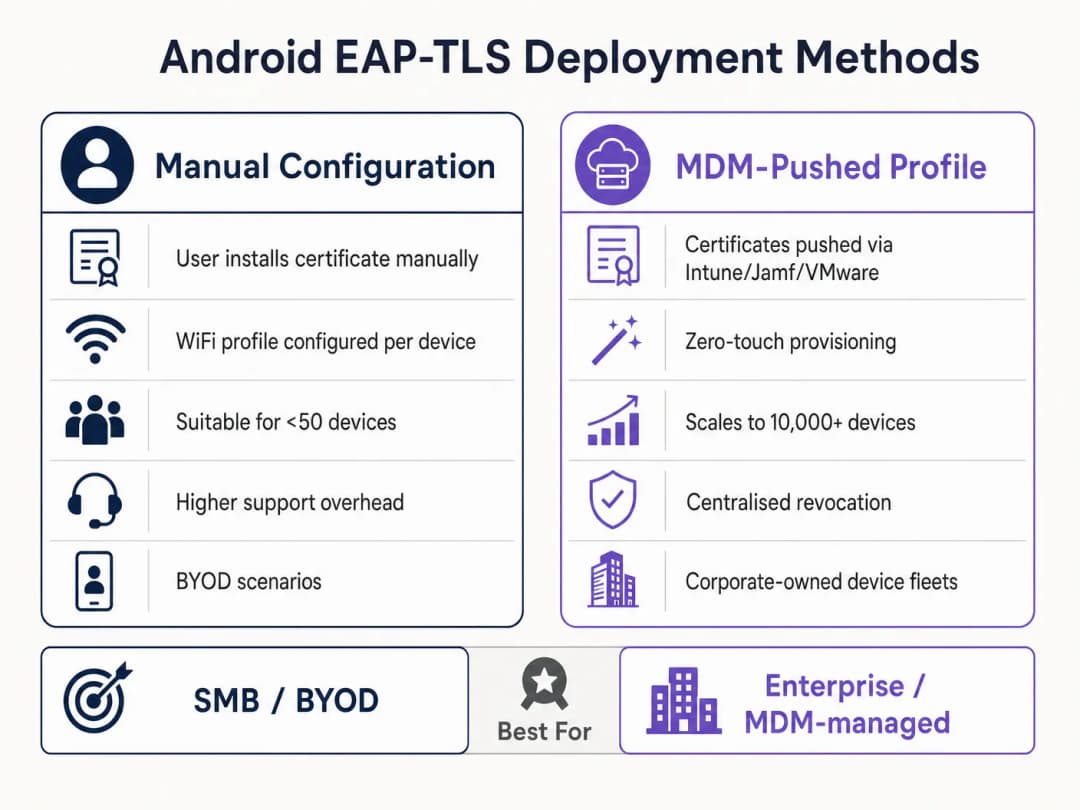
पद्धत १: मॅन्युअल कॉन्फिगरेशन (BYOD / लहान प्रमाणावर)
या पद्धतीसाठी अधिक सपोर्टची आवश्यकता असते आणि केवळ मर्यादित रोलआउट्स किंवा चाचणीसाठी याची शिफारस केली जाते.
- प्रमाणपत्र वितरण (Certificate Delivery): Android डिव्हाइसवर
.p12क्लायंट प्रमाणपत्र आणि Root CA.cerफाईल सुरक्षितपणे वितरित करा (उदा. सुरक्षित पोर्टल किंवा एन्क्रिप्टेड ईमेलद्वारे). - इंस्टॉलेशन:
- Settings > Security > Encryption & credentials > Install a certificate वर जा.
- Root CA ला "WiFi प्रमाणपत्र" म्हणून इंस्टॉल करा.
- विचारले असता एक्स्ट्रॅक्शन पासवर्ड देऊन
.p12फाइल इंस्टॉल करा.
- नेटवर्क कॉन्फिगरेशन:
- Settings > Network & internet > WiFi वर जा आणि "Add network" निवडा.
- SSID प्रविष्ट करा.
- Security ला WPA/WPA2/WPA3-Enterprise वर सेट करा.
- EAP पद्धत TLS वर सेट करा.
- CA certificate ला इंस्टॉल केलेल्या Root CA वर सेट करा.
- Online Certificate Status ला Request certificate status वर सेट करा.
- RADIUS सर्व्हरच्या प्रमाणपत्राच्या Subject Alternative Name (SAN) शी जुळण्यासाठी Domain सेट करा.
- इंस्टॉल केलेले क्लायंट प्रमाणपत्र निवडा.
- Identity प्रविष्ट करा (साधारणपणे वापरकर्त्याचे UPN किंवा डिव्हाइसचे MAC).
पद्धत २: MDM-Pushed Profiles (एंटरप्राइझ स्केल)
मोठ्या परिसरांसाठी, जसे की युनिव्हर्सिटी कॅम्पस किंवा Transport मधील लॉजिस्टिक हब, MDM अनिवार्य आहे. हे झिरो-टच प्रोव्हिजनिंग आणि लाइफसायकल व्यवस्थापन प्रदान करते.
- PKI एकत्रीकरण: SCEP किंवा NDES चा वापर करून तुमचे MDM (Intune, Workspace ONE, Jamf) तुमच्या Certificate Authority शी कनेक्ट करा.
- प्रमाणपत्र प्रोफाइल: डिव्हाइसच्या ट्रस्ट स्टोअरमध्ये Root CA पुश करण्यासाठी एक कॉन्फिगरेशन प्रोफाइल तयार करा. युनिक क्लायंट प्रमाणपत्राची स्वयंचलितपणे विनंती आणि इंस्टॉल करण्यासाठी दुसरे प्रोफाइल (SCEP) तयार करा.
- WiFi प्रोफाइल: तैनात केलेल्या प्रमाणपत्रांना लिंक करणारे WiFi कॉन्फिगरेशन प्रोफाइल तयार करा.
- सुरक्षा प्रकार (Security Type): WPA2/WPA3 Enterprise
- EAP प्रकार (EAP Type): EAP-TLS
- प्रमाणीकरण पद्धत (Authentication Method): Certificate
- सर्व्हर ट्रस्ट (Server Trust): Root CA आणि अचूक सर्व्हर डोमेन नाव निर्दिष्ट करा.
मायक्रोसॉफ्ट-विशिष्ट तपशीलवार सूचनांसाठी, आमचे मार्गदर्शक पहा: How to Use Microsoft Intune to Push WiFi Certificates to Devices.
सर्वोत्तम पद्धती
- WPA3-Enterprise लागू करा: जिथे हार्डवेअर याचे समर्थन करते, तिथे WPA3-Enterprise अनिवार्य करा. १९२-बिट सुरक्षा सुटसाठी स्पष्टपणे EAP-TLS आवश्यक आहे, ज्यामुळे सर्वोच्च क्रिप्टोग्राफिक मानके सुनिश्चित होतात.
- प्रमाणपत्र लाइफसायकल स्वयंचलित करा: क्लायंट प्रमाणपत्रे कालबाह्य होतात. जर तुम्ही मॅन्युअल नूतनीकरणावर अवलंबून असाल, तर तुम्हाला मोठ्या प्रमाणावर आऊटेजचा सामना करावा लागेल. मुदत संपण्याच्या ३० दिवस आधी प्रमाणपत्रे स्वयंचलितपणे नूतनीकरण करण्यासाठी SCEP/NDES लागू करा.
- मजबूत DNS लागू करा: Certificate Revocation List (CRL) तपासणी आणि OCSP साठी एजपासून विश्वसनीय DNS रिझोल्यूशन आवश्यक आहे. याबद्दल अधिक वाचा Protect Your Network with Strong DNS and Security मध्ये.
- VLAN विभागणी: RADIUS गुणधर्म जसे की
Tunnel-Private-Group-Idचा वापर करून प्रमाणपत्र गुणधर्मांवर आधारित (उदा. मॅनेजर टॅब्लेटला POS टर्मिनल्सपासून वेगळे करणे) विशिष्ट VLAN मध्ये EAP-TLS प्रमाणित सत्रांना मॅप करा.
त्रुटी निवारण आणि जोखीम कमी करणे
जेव्हा Android डिव्हाइसेस EAP-TLS द्वारे कनेक्ट होण्यास अपयशी ठरतात, तेव्हा ही समस्या सहसा प्रमाणपत्र साखळीत किंवा RADIUS कॉन्फिगरेशनमध्ये असते.
- लक्षण: Android ११+ डिव्हाइसेस लगेच डिस्कनेक्ट होतात किंवा वापरकर्त्याला कोणतीही सूचना न देता "Authentication error" दाखवतात.
- Root Cause: डिव्हाइस RADIUS सर्व्हर सर्टिफिकेटवर विश्वास ठेवत नाही. WiFi प्रोफाइलमधील "Domain" फील्ड सर्व्हर सर्टिफिकेटच्या SAN शी तंतोतंत जुळले पाहिजे आणि Root CA इन्स्टॉल केलेले असावे.
- Symptom: TLS हँडशेक दरम्यान कनेक्शन टाईम आऊट होते.
- Root Cause: क्लायंट सर्टिफिकेटचे रिव्होकेशन स्टेटस व्हेरीफाय करण्यासाठी RADIUS सर्व्हर CRL डिस्ट्रिब्युशन पॉईंटपर्यंत पोहोचू शकत नाही. तुमच्या RADIUS सर्व्हरला तुमच्या PKI च्या CRL एंडपॉईंट्ससाठी आउटबाउंड HTTP ऍक्सेस असल्याची खात्री करा.
- Symptom: Windows डिव्हाइसेस कनेक्ट होतात, पण Android डिव्हाइसेस अयशस्वी ठरतात.
- Root Cause: RADIUS सर्टिफिकेटमधून
Server AuthenticationEKU गहाळ आहे, किंवा Android सप्लिकंट सपोर्ट नसलेला सायफर सूट वापरण्याचा प्रयत्न करत आहे. TLS निगोशिएशन अयशस्वी झाल्याची माहिती तपासण्यासाठी RADIUS लॉग्स तपासा.
- Root Cause: RADIUS सर्टिफिकेटमधून
ROI आणि व्यावसायिक प्रभाव
EAP-TLS वर ट्रान्झिशन करण्यासाठी PKI आणि MDM इन्फ्रास्ट्रक्चरमध्ये सुरुवातीची गुंतवणूक आवश्यक आहे, परंतु वरिष्ठ IT लीडर्ससाठी रिटर्न ऑन इन्व्हेस्टमेंट (ROI) लक्षणीय आहे.
- मदत कक्ष (Helpdesk) खर्चात घट: IT हेल्पडेस्कच्या २० ते ३०% तिकिटे पासवर्ड रीसेट करण्याबाबत असतात. सर्टिफिकेट-आधारित ऑथेंटिकेशन नेटवर्क ऍक्सेससाठी पासवर्ड रोटेशन पॉलिसीज रद्द करते, ज्यामुळे सपोर्टचा ताण लक्षणीयरीत्या कमी होतो.
- जोखीम कमी करणे: EAP-TLS क्रेडेंशियल हार्वेस्टिंग आणि ऑफलाइन डिक्शनरी हल्ल्यांपासून सुरक्षा प्रदान करते. Healthcare सारख्या नियमन केलेल्या उद्योगांमध्ये, एका सिंगल डेटा लीकचा खर्च PKI डिप्लॉयमेंटच्या खर्चापेक्षा कितीतरी पटीने जास्त असतो.
- ऑपरेशन्सची निरंतरता: ऑटोमेटेड सर्टिफिकेट प्रोव्हिजनिंग हे सुनिश्चित करते की वेअरहाउस स्कॅनर्सपासून ते रिटेल POS सिस्टीम्सपर्यंतचे महत्त्वाचे ऑपरेशनल डिव्हाइसेस एक्स्पायर झालेल्या क्रेडेंशियल्समुळे नेटवर्कवरून कधीही डिस्कनेक्ट होणार नाहीत. जसे की Purple आपला विस्तार वाढवत आहे, ज्याची प्रचिती Purple Signals Higher Education Ambitions with Appointment of VP Education Tim Peers सारख्या अलीकडील धोरणात्मक निर्णयांवरून येते, अशा वेळी प्रगत ॲनालिटिक्स आणि एंगेजमेंटसाठी मजबूत मूलभूत कनेक्टिव्हिटी अत्यंत महत्त्वाची ठरते.
महत्वाच्या व्याख्या
802.1X
पोर्ट-आधारित नेटवर्क ऍक्सेस कंट्रोल (PNAC) साठीचा एक IEEE मानक जो LAN किंवा WLAN शी जोडण्याची इच्छा असलेल्या डिव्हाइसेसना ऑथेंटिकेशन यंत्रणा प्रदान करतो.
पायाभूत फ्रेमवर्क जे अनधिकृत डिव्हाइसेसना कॉर्पोरेट नेटवर्कमध्ये प्रवेश करण्यापासून प्रतिबंधित करते.
EAP-TLS
ट्रान्सपोर्ट लेयर सिक्युरिटीसह एक्सटेंसिबल ऑथेंटिकेशन प्रोटोकॉल. एक ऑथेंटिकेशन फ्रेमवर्क जे क्लायंट आणि सर्व्हर दरम्यान परस्पर ऑथेंटिकेशनसाठी X.509 प्रमाणपत्रे वापरते.
सर्वात सुरक्षित EAP प्रकार मानला जातो, तो पासवर्डवरील अवलंबित्व काढून टाकतो, ज्यामुळे तो उच्च-सुरक्षा वातावरणासाठी आवश्यक बनतो.
RADIUS
रिमोट ऑथेंटिकेशन डायल-इन युझर सर्व्हिस. एक नेटवर्किंग प्रोटोकॉल जो केंद्रीकृत ऑथेंटिकेशन, ऑथरायझेशन आणि अकाउंटिंग (AAA) व्यवस्थापन प्रदान करतो.
सर्व्हर घटक (उदा. Cisco ISE, Microsoft NPS) जो PKI च्या विरुद्ध Android डिव्हाइसच्या प्रमाणपत्राची पडताळणी करतो.
Supplicant
क्लायंट डिव्हाइस (या प्रकरणात, Android स्मार्टफोन किंवा टॅब्लेट) जे नेटवर्कमध्ये प्रवेशासाठी विनंती करत आहे.
सप्लिकंटच्या विशिष्ट OS मर्यादा समजून घेणे (जसे की Android 11 चे कडक प्रमाणीकरण) यशस्वी तैनातीसाठी महत्त्वाचे आहे.
Authenticator
नेटवर्क डिव्हाइस (WiFi ऍक्सेस पॉइंट) जे सप्लिकंट आणि RADIUS सर्व्हर दरम्यान ऑथेंटिकेशन प्रक्रिया सुलभ करते.
AP स्वतः निर्णय घेत नाही; तो केवळ RADIUS सर्व्हरच्या प्रतिसादावर आधारित पोर्ट नियंत्रण लागू करतो.
PKI
पब्लिक की इन्फ्रास्ट्रक्चर. डिजिटल प्रमाणपत्रे तयार करण्यासाठी, व्यवस्थापित करण्यासाठी, वितरित करण्यासाठी, वापरण्यासाठी, संग्रहित करण्यासाठी आणि रद्द करण्यासाठी आवश्यक असलेल्या भूमिका, धोरणे, हार्डवेअर, सॉफ्टवेअर आणि प्रक्रियांचा संच.
EAP-TLS चा कणा. मजबूत PKI शिवाय, प्रमाणपत्रावर आधारित ऑथेंटिकेशन अशक्य आहे.
SCEP
सिंपल सर्टिफिकेट एनरोलमेंट प्रोटोकॉल. डिजिटल प्रमाणपत्रे जारी करणे आणि रद्द करणे शक्य तितके स्केलेबल करण्यासाठी डिझाइन केलेला प्रोटोकॉल.
वापरकर्त्याच्या हस्तक्षेपाशिवाय Android उपकरणांवर क्लायंट प्रमाणपत्रे स्वयंचलितपणे प्रदान करण्यासाठी MDM प्लॅटफॉर्मद्वारे वापरले जाते.
SAN
Subject Alternative Name. X.509 चा एक विस्तार जो सुरक्षा प्रमाणपत्राशी विविध मूल्ये जोडण्याची परवानगी देतो.
Android 11+ साठी WiFi प्रोफाइलमधील 'Domain' फील्ड RADIUS सर्व्हरच्या प्रमाणपत्राच्या SAN शी जुळणे आवश्यक आहे.
सोडवलेली उदाहरणे
एका राष्ट्रीय रिटेल साखळीला 5,000 Android-आधारित पॉइंट-ऑफ-सेल (POS) टॅब्लेट तैनात करायचे आहेत. सुरक्षा टीमचे असे फर्मान आहे की या डिव्हाइसेसनी सामायिक केलेले पासवर्ड वापरू नयेत आणि ते क्रेडेंशियल फिशिंगपासून सुरक्षित असावेत. इन्फ्रास्ट्रक्चर टीमने या तैनातीकडे कशा प्रकारे पाहावे?
टीमने SCEP द्वारे त्यांच्या अंतर्गत Public Key Infrastructure (PKI) शी समाकलित केलेले Mobile Device Management (MDM) सोल्यूशन तैनात केले पाहिजे. MDM रूट CA प्रमाणपत्र असलेले कॉन्फिगरेशन प्रोफाइल पाठवेल, प्रत्येक POS टॅब्लेटसाठी स्वयंचलितपणे एक युनिक क्लायंट प्रमाणपत्र मागवेल आणि EAP-TLS वापरण्यासाठी WPA3-Enterprise WiFi प्रोफाइल कॉन्फिगर करेल. यशस्वी प्रमाणपत्र प्रमाणीकरणाच्या आधारे या डिव्हाइसेसना विलग केलेल्या POS VLAN मध्ये नियुक्त करण्यासाठी RADIUS सर्व्हर कॉन्फिगर केला जाईल.
एक हॉस्पिटल IT व्यवस्थापक वायरलेस नेटवर्क अपग्रेड करत आहे. अपग्रेड केल्यानंतर, जुने Android 9 डिव्हाइसेस EAP-TLS नेटवर्कशी यशस्वीरित्या कनेक्ट होतात, परंतु नवीन खरेदी केलेले Android 12 डिव्हाइसेस ट्रस्ट एरर दर्शवून ऑथेंटिकेट होण्यास अपयशी ठरतात.
IT व्यवस्थापकाने डिव्हाइसेसवर पाठवलेले WiFi कॉन्फिगरेशन प्रोफाइल अपडेट केले पाहिजे. Android 11+ कडक सर्व्हर प्रमाणपत्र प्रमाणीकरण लागू करते. MitM हल्ले रोखण्यासाठी प्रोफाइल अपडेट करून त्यामध्ये विश्वास ठेवण्यासारखे रूट CA प्रमाणपत्र स्पष्टपणे परिभाषित करणे आणि अचूक 'Domain' (RADIUS सर्व्हरच्या SAN शी जुळणारे) निर्दिष्ट करणे आवश्यक आहे.
सराव प्रश्न
Q1. तुमची संस्था PEAP-MSCHAPv2 वरून EAP-TLS वर स्थलांतरित होत आहे. पायलट टप्प्यादरम्यान, अनेक Android 13 उपकरणे कनेक्ट होण्यात अयशस्वी ठरतात. RADIUS लॉग दर्शवतात की TLS हँडशेक सुरू झाला आहे परंतु क्लायंट प्रमाणपत्र पाठवण्यापूर्वी क्लायंटद्वारे तो ड्रॉप केला जातो. सर्वात संभाव्य कॉन्फिगरेशन त्रुटी कोणती आहे?
टीप: सर्व्हरच्या ओळखीबाबत अलीकडील Android आवृत्तींमध्ये लागू केलेल्या कठोर प्रमाणीकरण आवश्यकतांचा विचार करा.
नमुना उत्तर पहा
सर्वात संभाव्य त्रुटी अशी आहे की Android 13 उपकरणांवर पुश केलेले WiFi प्रोफाइल 'Domain' प्रत्यय जुळणी योग्यरित्या निर्दिष्ट करत नाही किंवा Root CA प्रोफाइलमध्ये योग्यरित्या लिंक केलेले नाही. Android हे कनेक्शन ड्रॉप करते जेणेकरून मॅन-इन-द-मिडल हल्ला रोखता येईल कारण ते RADIUS सर्व्हरच्या प्रमाणपत्राचे प्रमाणीकरण करू शकत नाही.
Q2. तुम्ही एका मोठ्या स्टेडियमच्या डिप्लॉयमेंटसाठी आर्किटेक्चर डिझाइन करत आहात. क्लायंटला सर्व कर्मचारी उपकरणांसाठी EAP-TLS वापरायचे आहे. मानक WPA2-PSK नेटवर्कच्या तुलनेत कोणता विशिष्ट पायाभूत घटक वाढवावा लागेल आणि का?
टीप: कनेक्शन टप्प्यादरम्यान EAP-TLS मध्ये गुंतागुंतीच्या क्रिप्टोग्राफिक प्रक्रियांचा समावेश होतो.
नमुना उत्तर पहा
RADIUS सर्व्हरची पायाभूत रचना लक्षणीयरित्या वाढवावी लागेल. EAP-TLS ला पूर्ण परस्पर प्रमाणपत्र प्रमाणीकरण (असममित क्रिप्टोग्राफी) आवश्यक असते, ज्यासाठी मोठ्या प्रमाणात संगणकीय प्रक्रियेची आवश्यकता असते. स्टेडियमसारख्या वातावरणात जिथे हजारो उपकरणे एकाच वेळी रोमिंग किंवा ऑथेंटिकेट करू शकतात, तिथे कमी क्षमतेचे RADIUS डिप्लॉयमेंट ऑथेंटिकेशन टाईमआउट आणि कनेक्शन अयशस्वी होण्यास कारणीभूत ठरेल.
Q3. हरवलेल्या Android टॅब्लेटवर क्लायंट प्रमाणपत्र तडजोड केलेले (compromised) आहे. ही डिव्हाइस EAP-TLS द्वारे कनेक्ट होण्यापासून रोखण्यासाठी नेटवर्कची अचूक यंत्रणा कोणती आहे?
टीप: RADIUS सर्व्हरला प्रमाणपत्र त्याच्या कालबाह्यता तारखेपूर्वी वैध नाही हे कसे कळते?
नमुना उत्तर पहा
IT प्रशासक PKI मधील क्लायंट प्रमाणपत्र रद्द करतो. PKI त्याची प्रमाणपत्र रद्दीकरण सूची (CRL) किंवा OCSP रिस्पॉन्डर अपडेट करतो. जेव्हा हरवलेला टॅब्लेट कनेक्ट करण्याचा प्रयत्न करतो, तेव्हा RADIUS सर्व्हर CRL/OCSP विरुद्ध क्लायंट प्रमाणपत्र तपासतो. ते रद्द केल्याचे पाहून, RADIUS सर्व्हर ऑथेंटिकेशन विनंती नाकारतो.
या मालिकेमध्ये पुढे वाचा
पाहुण्यांच्या WiFi साठी RADIUS प्रमाणीकरण कॉन्फिगर करण्यासाठी नेटवर्क ॲडमिनिस्ट्रेटरचे मार्गदर्शक
पाहुण्यांच्या WiFi साठी RADIUS प्रमाणीकरण उपयोजित करण्याबाबत नेटवर्क ॲडमिनिस्ट्रेटरसाठी एक सर्वसमावेशक तांत्रिक संदर्भ. यामध्ये आर्किटेक्चर, व्हेंडर-तटस्थ कॉन्फिगरेशन पायऱ्या, सुरक्षा सर्वोत्तम पद्धती आणि सामान्य उपयोजन त्रुटींचे ट्रबलशूटिंग समाविष्ट आहे.
उच्च शिक्षणामध्ये सुरक्षित BYOD आणि 802.1X WiFi साठी SCEP लागू करणे
हा तांत्रिक मार्गदर्शक दर्शवतो की उच्च शिक्षण आयटी टीम SCEP चा वापर करून हजारो BYOD उपकरणांसाठी 802.1X प्रमाणपत्र नोंदणी स्वयंचलित कशी करू शकतात. यामध्ये मॅन्युअल ऑनबोर्डिंगला सुरक्षित, झिरो-टच नेटवर्क ऍक्सेस मॉडेलसह बदलण्यासाठी आर्किटेक्चर, सुरक्षा फायदे आणि प्रत्यक्ष उपयोजन टप्पे समाविष्ट आहेत.
Guest आणि Staff WiFi नेटवर्क्ससाठी RADIUS Authentication कॉन्फिगर करणे
हे तांत्रिक संदर्भ मार्गदर्शक एंटरप्राइझ guest आणि staff WiFi नेटवर्क्ससाठी RADIUS authentication च्या आर्किटेक्चर, कॉन्फिगरेशन आणि डिप्लॉयमेंटची रूपरेषा स्पष्ट करते. हे नेटवर्क आर्किटेक्ट्स आणि IT मॅनेजर्सना सुरक्षित, स्केलेबल वायरलेस ॲक्सेस कंट्रोल सिस्टम्स तयार करण्यासाठी आवश्यक असलेले अचूक प्रोटोकॉल्स, सुरक्षा मानके आणि ट्रबलशूटिंग पद्धती प्रदान करते.
तुमच्या विशिष्ट सेटअपबद्दल काही प्रश्न आहेत का?
आमची टीम ८०,००० हून अधिक वेन्यूजमधील वेन्यू ऑपरेटर्स, IT मॅनेजर्स आणि नेटवर्क इंजिनिअर्ससोबत काम करते. २० मिनिटांचा कॉल बुक करा आणि तुमच्यासारख्या इतरांनी ही समस्या कशी सोडवली हे आम्ही तुम्हाला दाखवू.