
Como configurar o WiFi corporativo em dispositivos Android com EAP-TLS
This technical reference guide provides senior IT leaders with a comprehensive blueprint for deploying 802.1X EAP-TLS authentication on Android devices. It covers the architectural mechanics, manual and MDM-driven implementation strategies, and troubleshooting methodologies necessary to secure enterprise wireless networks.
Ouça este guia
Ver transcrição do podcast

Resumo Executivo
Proteger redes sem fio corporativas contra roubo de credenciais e acesso não autorizado exige ir além das senhas compartilhadas. Para frotas de dispositivos Android em ambientes corporativos, o 802.1X EAP-TLS (Extensible Authentication Protocol com Transport Layer Security) representa o padrão definitivo de segurança. Ao aproveitar a autenticação mútua baseada em certificados, o EAP-TLS elimina os riscos associados à fadiga de senhas, phishing e credenciais fracas.
Este guia de referência técnica fornece a arquitetos de rede, gerentes de TI e CTOs estratégias práticas para a implantação do EAP-TLS em dispositivos Android. Seja gerenciando terminais de ponto de venda no Varejo , dispositivos clínicos na Saúde ou operações de retaguarda na Hospitalidade , dominar essa implantação garante uma conformidade de segurança robusta (PCI DSS, GDPR, ISO 27001) ao mesmo tempo em que oferece uma experiência de conexão perfeita para os usuários finais. Abordamos tanto a configuração manual para ambientes BYOD quanto o provisionamento MDM zero-touch para frotas de propriedade da empresa.
Ouça o Briefing
Aprofundamento Técnico
A Arquitetura 802.1X e a Mecânica do EAP-TLS
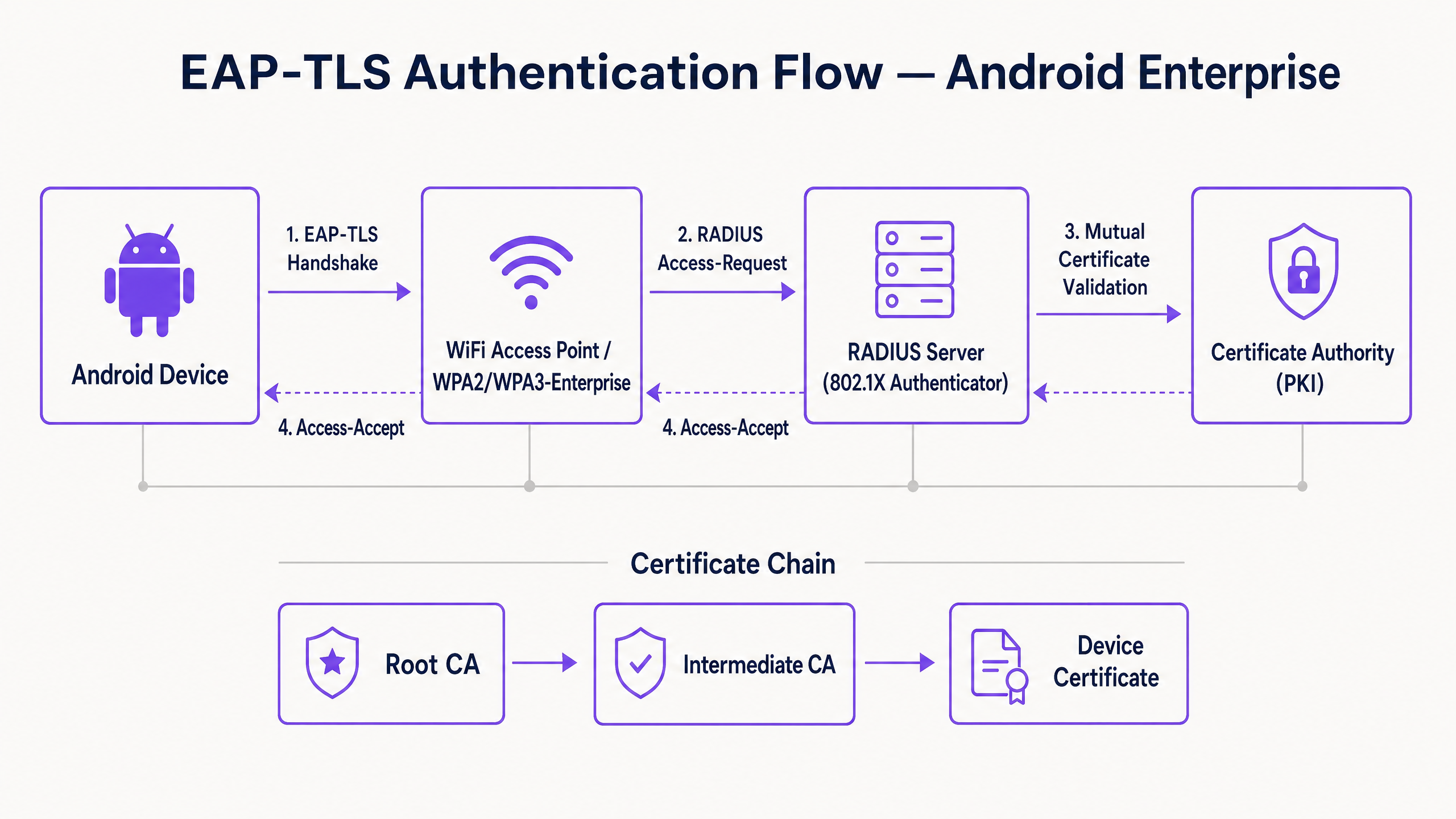
Em sua essência, o 802.1X é um padrão IEEE para controle de acesso à rede baseado em portas. Em um contexto sem fio, o ponto de acesso atua como o Autenticador, facilitando a comunicação entre o dispositivo Android (o Suplicante) e o servidor RADIUS (o Servidor de Autenticação).
Diferente do PEAP ou TTLS, que encapsulam a autenticação de senha legada dentro do TLS, o EAP-TLS depende inteiramente de certificados X.509. Isso cria um paradigma de autenticação mútua:
- O servidor RADIUS apresenta seu certificado ao dispositivo Android para provar que a rede é legítima.
- O dispositivo Android apresenta seu certificado de cliente exclusivo ao servidor RADIUS para provar que é um endpoint autorizado.
Requisitos de Certificado Específicos do Android
A implantação no Android introduz restrições específicas, principalmente a partir do Android 11. O Google descontinuou a opção "Não validar" para certificados de servidor a fim de mitigar ataques man-in-the-middle (MitM). Consequentemente, o dispositivo Android deve possuir o certificado da CA Raiz que assinou o certificado do servidor RADIUS.
Além disso, o certificado do servidor RADIUS deve conter os atributos corretos de Extended Key Usage (EKU) — especificamente Server Authentication (OID 1.3.6.1.5.5.7.3.1). Sem isso, o suplicante Android descartará silenciosamente o handshake TLS.
Para o lado do cliente, o Android exige que a chave privada e o certificado sejam agrupados, normalmente em um formato PKCS#12 (.p12 ou .pfx).
Integração com o Ecossistema da Purple
Embora o EAP-TLS proteja seus dispositivos corporativos e infraestrutura operacional, os operadores do local também devem gerenciar o acesso de visitantes. É aqui que uma estratégia de SSID duplo se torna crítica. Seu SSID corporativo utiliza 802.1X EAP-TLS, enquanto seu SSID público aproveita a plataforma Guest WiFi da Purple. Essa separação garante a segurança operacional ao mesmo tempo em que permite à equipe de marketing aproveitar o WiFi Analytics na rede de convidados. Para uma visão mais ampla sobre a segurança da infraestrutura física, consulte o Guia Corporativo 2026 de Segurança de Pontos de Acesso .
Guia de Implantação
A implantação do EAP-TLS no Android pode ser abordada manualmente para pequenas implantações BYOD ou via Mobile Device Management (MDM) para escala corporativa.
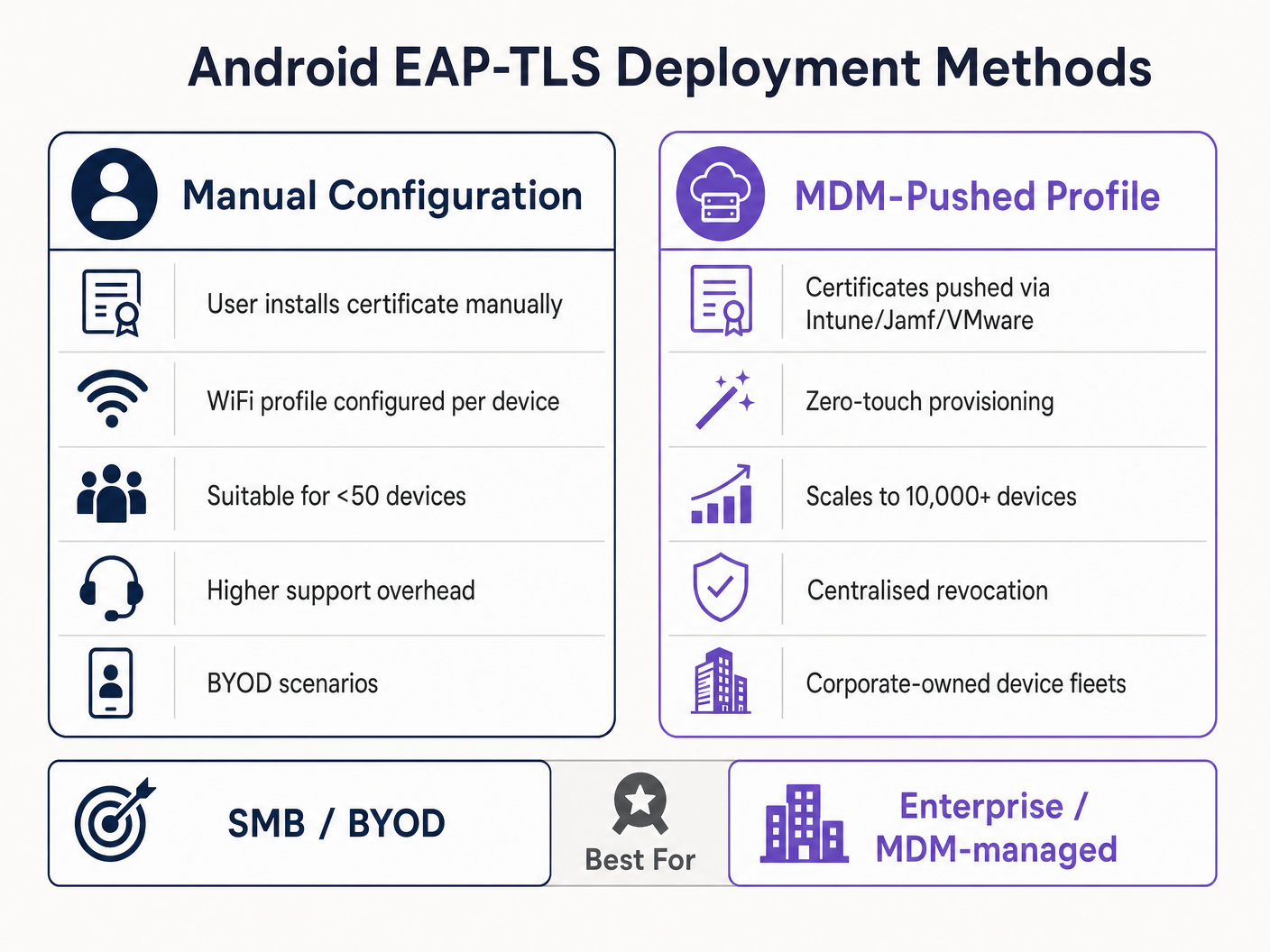
Método 1: Configuração Manual (BYOD / Pequena Escala)
Este método exige muito suporte e é recomendado apenas para implementações limitadas ou testes.
- Entrega de Certificado: Entregue com segurança o certificado de cliente
.p12e o arquivo.cerda CA Raiz ao dispositivo Android (por exemplo, via portal seguro ou e-mail criptografado). - Instalação:
- Navegue até Configurações > Segurança > Criptografia e credenciais > Instalar um certificado.
- Instale a CA Raiz como um "Certificado Wi-Fi".
- Instale o arquivo
.p12, fornecendo a senha de extração quando solicitado.
- Configuração de Rede:
- Vá para Configurações > Rede e internet > Wi-Fi e selecione "Adicionar rede".
- Insira o SSID.
- Defina a Segurança como WPA/WPA2/WPA3-Enterprise.
- Defina o método EAP como TLS.
- Defina o certificado da CA para a CA Raiz instalada.
- Defina o Status do Certificado Online como Solicitar status do certificado.
- Defina o Domínio para corresponder ao Subject Alternative Name (SAN) do certificado do servidor RADIUS.
- Selecione o certificado de Cliente instalado.
- Insira a Identidade (geralmente o UPN do usuário ou o MAC do dispositivo).
Método 2: Perfil Enviado por MDM (Escala Corporativa)
Para grandes propriedades, como um campus universitário ou um hub logístico em Transporte , o MDM é obrigatório. Isso fornece provisionamento zero-touch e gerenciamento de ciclo de vida.
- Integração PKI: Conecte seu MDM (Intune, Workspace ONE, Jamf) à sua Autoridade de Certificação usando SCEP ou NDES.
- Perfil de Certificado: Crie um perfil de configuração para enviar a CA Raiz para o armazenamento de confiança do dispositivo. Crie um segundo perfil (SCEP) para solicitar e instalar automaticamente o certificado de cliente exclusivo.
- Perfil de WiFi: Crie um perfil de configuração de Wi-Fi vinculando os certificados implantados.
- Tipo de Segurança: WPA2/WPA3 Enterprise
- Tipo de EAP: EAP-TLS
- Método de Autenticação: Certificado
- Confiança do Servidor: Especifique a CA Raiz e o nome de domínio exato do servidor.
Para instruções detalhadas específicas da Microsoft, consulte nosso guia: Como usar o Microsoft Intune para enviar certificados WiFi para dispositivos .
Melhores Práticas
- Impor WPA3-Enterprise: Onde o hardware suportar, exija o WPA3-Enterprise. O conjunto de segurança de 192 bits exige explicitamente o EAP-TLS, garantindo os mais altos padrões criptográficos.
- Automatizar o Ciclo de Vida dos Certificados: Certificados de cliente expiram. Se você depender de renovações manuais, enfrentará interrupções massivas. Implemente SCEP/NDES para renovar certificados automaticamente 30 dias antes da expiração.
- Implementar DNS Robusto: As verificações de Certificate Revocation List (CRL) e OCSP exigem uma resolução de DNS confiável a partir da borda. Leia mais em Proteja sua rede com DNS e segurança fortes .
- Segmentação de VLAN: Mapeie as sessões autenticadas por EAP-TLS para VLANs específicas com base nos atributos do certificado (por exemplo, separando terminais POS de tablets de gerentes) usando atributos RADIUS como
Tunnel-Private-Group-Id.
Solução de Problemas e Mitigação de Riscos
Quando dispositivos Android falham ao conectar via EAP-TLS, o problema quase sempre reside na cadeia de certificados ou na configuração do RADIUS.
- Sintoma: Dispositivos Android 11+ desconectam imediatamente ou mostram "Erro de autenticação" sem avisar o usuário.
- Causa Raiz: O dispositivo não confia no certificado do servidor RADIUS. O campo "Domínio" no perfil de WiFi deve corresponder exatamente ao SAN do certificado do servidor, e a CA Raiz deve estar instalada.
- Sintoma: A conexão atinge o tempo limite durante o handshake TLS.
- Causa Raiz: O servidor RADIUS não consegue alcançar o ponto de distribuição de CRL para verificar o status de revogação do certificado do cliente. Certifique-se de que seu servidor RADIUS tenha acesso HTTP de saída aos endpoints de CRL da sua PKI.
- Sintoma: Dispositivos Windows conectam, mas dispositivos Android falham.
- Causa Raiz: Falta do EKU
Server Authenticationno certificado RADIUS, ou o suplicante Android está tentando usar um conjunto de cifras não suportado. Verifique os logs do RADIUS em busca de falhas na negociação TLS.
- Causa Raiz: Falta do EKU
ROI e Impacto nos Negócios
A transição para o EAP-TLS exige investimento inicial em infraestrutura PKI e MDM, mas o retorno sobre o investimento é substancial para líderes seniores de TI.
- Redução de Custos de Helpdesk: Redefinições de senha representam de 20 a 30% dos chamados de helpdesk de TI. A autenticação baseada em certificados elimina políticas de rotação de senhas para acesso à rede, reduzindo drasticamente a sobrecarga de suporte.
- Mitigação de Riscos: O EAP-TLS fornece imunidade contra roubo de credenciais e ataques de dicionário offline. O custo de uma única violação em um setor regulamentado como a Saúde excede em muito o custo de implantação de uma PKI.
- Continuidade Operacional: O provisionamento automatizado de certificados garante que dispositivos operacionais críticos — de scanners de armazém a sistemas POS de varejo — nunca caiam da rede devido a credenciais expiradas. À medida que a Purple continua a expandir seu alcance, destacado por movimentos estratégicos recentes como Purple sinaliza ambições no ensino superior com a nomeação do VP de Educação Tim Peers , a conectividade fundamental robusta se torna o facilitador para análises avançadas e engajamento.
Definições principais
802.1X
An IEEE standard for port-based Network Access Control (PNAC) that provides an authentication mechanism to devices wishing to attach to a LAN or WLAN.
The foundational framework that prevents unauthorised devices from accessing the corporate network at the edge.
EAP-TLS
Extensible Authentication Protocol with Transport Layer Security. An authentication framework that uses X.509 certificates for mutual authentication between the client and the server.
Considered the most secure EAP type, it eliminates password reliance, making it essential for high-security environments.
RADIUS
Remote Authentication Dial-In User Service. A networking protocol that provides centralised Authentication, Authorization, and Accounting (AAA) management.
The server component (e.g., Cisco ISE, Microsoft NPS) that validates the Android device's certificate against the PKI.
Supplicant
The client device (in this case, the Android smartphone or tablet) that is requesting access to the network.
Understanding the supplicant's specific OS constraints (like Android 11's strict validation) is key to a successful deployment.
Authenticator
The network device (the WiFi Access Point) that facilitates the authentication process between the Supplicant and the RADIUS server.
The AP does not make the decision; it merely enforces the port control based on the RADIUS server's response.
PKI
Public Key Infrastructure. A set of roles, policies, hardware, software, and procedures needed to create, manage, distribute, use, store, and revoke digital certificates.
The backbone of EAP-TLS. Without a robust PKI, certificate-based authentication is impossible.
SCEP
Simple Certificate Enrollment Protocol. A protocol designed to make the issuing and revocation of digital certificates as scalable as possible.
Used by MDM platforms to automatically provision client certificates to Android devices without user intervention.
SAN
Subject Alternative Name. An extension to X.509 that allows various values to be associated with a security certificate.
Android 11+ requires the 'Domain' field in the WiFi profile to match the SAN of the RADIUS server's certificate.
Exemplos práticos
A national retail chain needs to deploy 5,000 Android-based point-of-sale (POS) tablets. The security team mandates that these devices must not use shared passwords and must be immune to credential phishing. How should the infrastructure team approach this deployment?
The team must deploy a Mobile Device Management (MDM) solution integrated with their internal Public Key Infrastructure (PKI) via SCEP. The MDM will push a configuration profile containing the Root CA certificate, automatically request a unique client certificate for each POS tablet, and configure the WPA3-Enterprise WiFi profile to use EAP-TLS. The RADIUS server will be configured to assign these devices to an isolated POS VLAN based on successful certificate validation.
A hospital IT manager is upgrading the wireless network. Following the upgrade, older Android 9 devices connect successfully to the EAP-TLS network, but newly procured Android 12 devices fail to authenticate, citing a trust error.
The IT manager must update the WiFi configuration profile pushed to the devices. Android 11+ enforces strict server certificate validation. The profile must be updated to explicitly define the Root CA certificate to trust and specify the exact 'Domain' (matching the RADIUS server's SAN) to prevent MitM attacks.
Questões práticas
Q1. Your organisation is migrating from PEAP-MSCHAPv2 to EAP-TLS. During the pilot phase, several Android 13 devices fail to connect. The RADIUS logs show that the TLS handshake is initiated but dropped by the client before the client certificate is sent. What is the most likely configuration error?
Dica: Consider the strict validation requirements introduced in recent Android versions regarding the server's identity.
Ver resposta modelo
The most likely error is that the WiFi profile pushed to the Android 13 devices does not correctly specify the 'Domain' suffix match, or the Root CA is not properly linked in the profile. Android drops the connection to prevent a Man-in-the-Middle attack because it cannot validate the RADIUS server's certificate.
Q2. You are designing the architecture for a large stadium deployment. The client wants to use EAP-TLS for all staff devices. What specific infrastructure component must be scaled up compared to a standard WPA2-PSK network, and why?
Dica: EAP-TLS involves complex cryptographic operations during the connection phase.
Ver resposta modelo
The RADIUS server infrastructure must be significantly scaled up. EAP-TLS requires full mutual certificate validation (asymmetric cryptography), which is computationally expensive. In a stadium environment with thousands of devices potentially roaming or authenticating simultaneously, an undersized RADIUS deployment will cause authentication timeouts and connection failures.
Q3. A client certificate is compromised on a lost Android tablet. What is the exact mechanism by which the network prevents this device from connecting via EAP-TLS?
Dica: How does the RADIUS server know the certificate is no longer valid before its expiration date?
Ver resposta modelo
The IT administrator revokes the client certificate in the PKI. The PKI updates its Certificate Revocation List (CRL) or OCSP responder. When the lost tablet attempts to connect, the RADIUS server checks the client certificate against the CRL/OCSP. Seeing it is revoked, the RADIUS server rejects the authentication request.
Continue a ler esta série
PSK por Dispositivo por Fabricante: Comparativo entre iPSK, DPSK, MPSK e PPSK (e Suporte a WPA3)
Uma comparação abrangente das implementações de PSK por dispositivo no Cisco Meraki, HPE Aruba, Ruckus, Juniper Mist, Extreme, Fortinet e Ubiquiti UniFi. Saiba como o WPA3-SAE impacta as estratégias de chaves por dispositivo e quando implantar modos de transição em vez de migrar para o 802.1X.
O Que É Autenticação por Endereço MAC? Quando Usar e Quando Evitar
Este guia de referência técnica abrangente aborda a autenticação por endereço MAC em ambientes de WiFi corporativos — como a autenticação MAC baseada em RADIUS funciona na Camada 2, suas vulnerabilidades de segurança inerentes (incluindo spoofing de MAC e o impacto da randomização de MAC em nível de OS), e os contextos operacionais precisos onde ela permanece uma ferramenta válida para gerenciar dispositivos IoT e sem interface. Ele fornece orientação de implantação acionável para gerentes de TI e arquitetos de rede em locais de hotelaria, varejo, saúde e setor público, com exemplos práticos do mundo real, estruturas de decisão e contexto de integração para a plataforma de guest WiFi e análise da Purple.
Como Configurar WiFi Corporativo em iOS e macOS com 802.1X
Este guia autorizado fornece aos líderes de TI sêniores passos acionáveis para implantar WiFi corporativo 802.1X em dispositivos iOS e macOS. Ele aborda autenticação baseada em certificado (EAP-TLS), perfis de configuração MDM e integração de arquitetura para proteger redes corporativas, ao mesmo tempo que suporta iniciativas BYOD.