
Comment configurer le WiFi d'entreprise sur les appareils Android avec EAP-TLS
This technical reference guide provides senior IT leaders with a comprehensive blueprint for deploying 802.1X EAP-TLS authentication on Android devices. It covers the architectural mechanics, manual and MDM-driven implementation strategies, and troubleshooting methodologies necessary to secure enterprise wireless networks.
Écouter ce guide
Voir la transcription du podcast

Résumé exécutif
Sécuriser les réseaux sans fil d'entreprise contre le vol d'identifiants et les accès non autorisés nécessite d'aller au-delà des mots de passe partagés. Pour les flottes d'appareils Android dans les environnements d'entreprise, le 802.1X EAP-TLS (Extensible Authentication Protocol with Transport Layer Security) représente la norme de sécurité de référence. En s'appuyant sur une authentification mutuelle basée sur des certificats, EAP-TLS élimine les risques associés à la fatigue des mots de passe, à l'hameçonnage et aux identifiants faibles.
Ce guide de référence technique fournit aux architectes réseau, aux responsables informatiques et aux directeurs techniques des stratégies concrètes pour déployer EAP-TLS sur les appareils Android. Qu'il s'agisse de gérer des terminaux de point de vente dans le secteur de la Vente au détail , des appareils cliniques dans la Santé ou des opérations d'arrière-guichet dans l' Hôtellerie , la maîtrise de ce déploiement garantit une solide conformité en matière de sécurité (PCI DSS, GDPR, ISO 27001) tout en offrant une expérience de connexion fluide aux utilisateurs finaux. Nous abordons à la fois la configuration manuelle pour les environnements BYOD et le provisionnement MDM « zero-touch » pour les flottes d'entreprise.
Écouter le briefing
Analyse technique approfondie
L'architecture 802.1X et la mécanique EAP-TLS
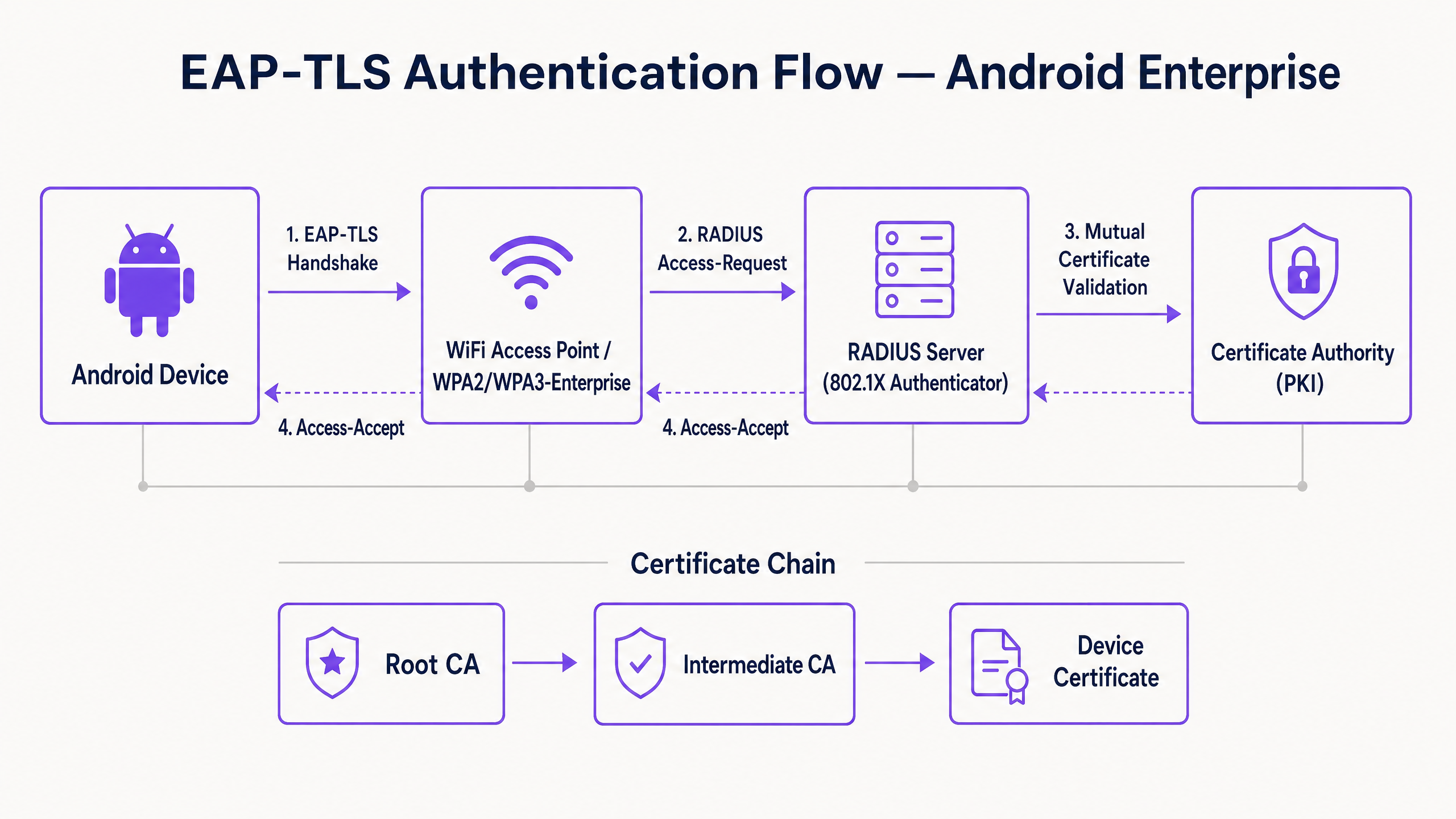
Fondamentalement, le 802.1X est une norme IEEE pour le contrôle d'accès réseau basé sur les ports. Dans un contexte sans fil, le point d'accès agit comme l'Authentificateur, facilitant la communication entre l'appareil Android (le Suppliant) et le serveur RADIUS (le Serveur d'authentification).
Contrairement à PEAP ou TTLS qui encapsulent l'authentification par mot de passe traditionnelle dans un tunnel TLS, EAP-TLS repose entièrement sur des certificats X.509. Cela crée un paradigme d'authentification mutuelle :
- Le serveur RADIUS présente son certificat à l'appareil Android pour prouver que le réseau est légitime.
- L'appareil Android présente son certificat client unique au serveur RADIUS pour prouver qu'il s'agit d'un point de terminaison autorisé.
Exigences en matière de certificats spécifiques à Android
Le déploiement sur Android introduit des contraintes spécifiques, en particulier à partir d'Android 11. Google a rendu obsolète l'option « Ne pas valider » pour les certificats de serveur afin d'atténuer les attaques de l'homme du milieu (MitM). Par conséquent, l'appareil Android doit posséder le certificat de l'autorité de certification (CA) racine qui a signé le certificat du serveur RADIUS.
De plus, le certificat du serveur RADIUS doit contenir les bons attributs d'utilisation étendue de la clé (EKU), en particulier Server Authentication (OID 1.3.6.1.5.5.7.3.1). Sans cela, le suppliant Android abandonnera silencieusement la poignée de main TLS.
Côté client, Android exige que la clé privée et le certificat soient regroupés, généralement au format PKCS#12 (.p12 ou .pfx).
Intégration avec l'écosystème Purple
Bien qu'EAP-TLS sécurise vos appareils d'entreprise et votre infrastructure opérationnelle, les exploitants de sites doivent également gérer l'accès des visiteurs. C'est là qu'une stratégie à double SSID devient essentielle. Votre SSID d'entreprise utilise le 802.1X EAP-TLS, tandis que votre SSID public s'appuie sur la plateforme WiFi invité de Purple. Cette séparation garantit la sécurité opérationnelle tout en permettant à l'équipe marketing d'exploiter les Analyses WiFi sur le réseau invité. Pour une vue plus large sur la sécurisation de l'infrastructure physique, consultez le guide Sécurité des points d'accès : Votre guide d'entreprise 2026 .
Guide de mise en œuvre
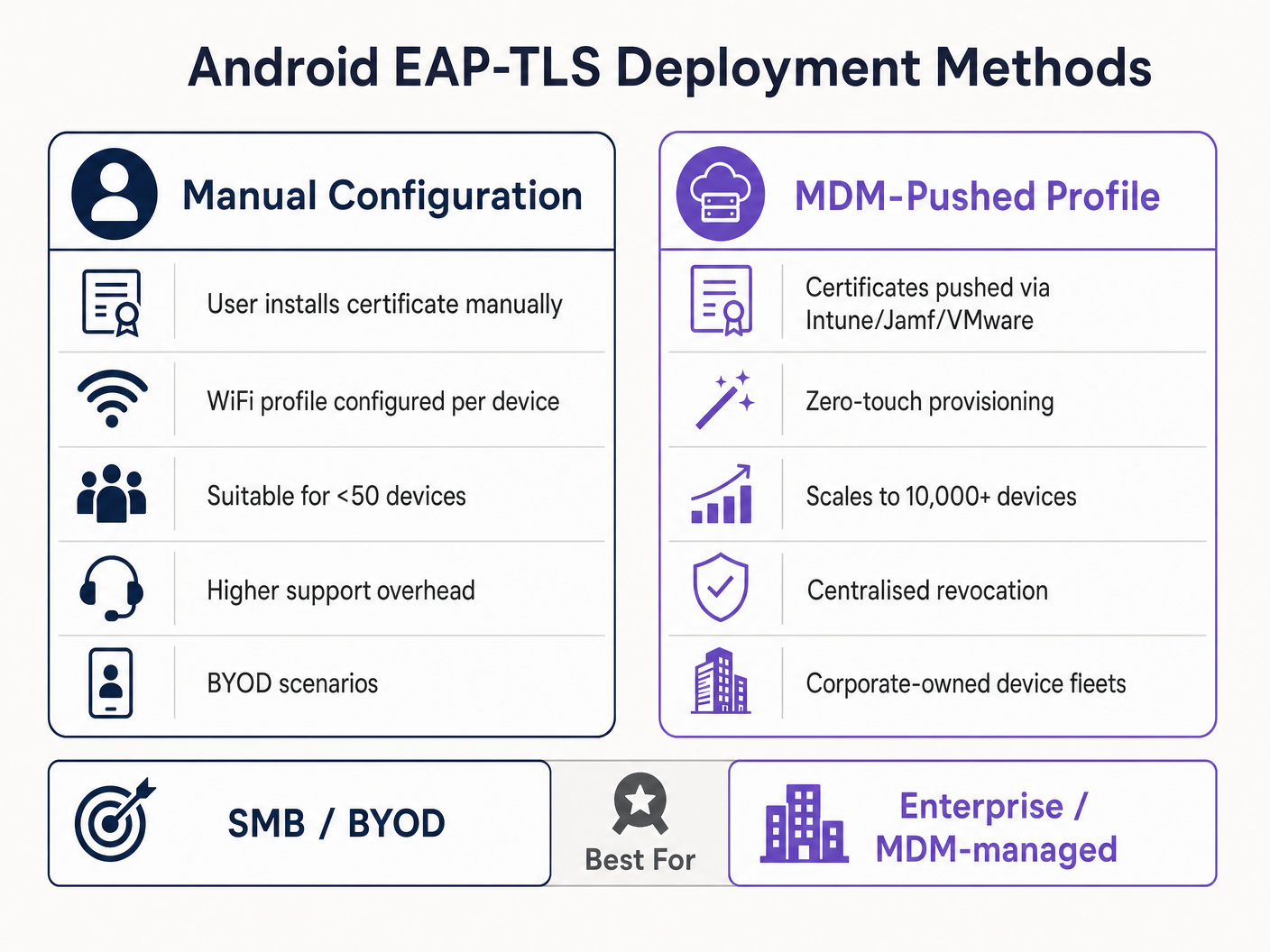
Le déploiement d'EAP-TLS sur Android peut être abordé manuellement pour les petits déploiements BYOD ou via la gestion des appareils mobiles (MDM) à l'échelle de l'entreprise.
Méthode 1 : Configuration manuelle (BYOD / Petite échelle)
Cette méthode nécessite une assistance importante et n'est recommandée que pour des déploiements limités ou des tests.
- Livraison des certificats : Transmettez de manière sécurisée le certificat client
.p12et le fichier.cerde l'autorité de certification (CA) racine à l'appareil Android (par ex., via un portail sécurisé ou un e-mail chiffré). - Installation :
- Accédez à Paramètres > Sécurité > Chiffrement et identifiants > Installer un certificat.
- Installez la CA racine en tant que « Certificat Wi-Fi ».
- Installez le fichier
.p12, en fournissant le mot de passe d'extraction lorsque vous y êtes invité.
- Configuration du réseau :
- Allez dans Paramètres > Réseau et Internet > Wi-Fi et sélectionnez « Ajouter un réseau ».
- Entrez le SSID.
- Définissez la Sécurité sur WPA/WPA2/WPA3-Enterprise.
- Définissez la méthode EAP sur TLS.
- Définissez le certificat CA sur la CA racine installée.
- Définissez le Statut du certificat en ligne sur Demander le statut du certificat.
- Définissez le Domaine pour qu'il corresponde au nom alternatif du sujet (SAN) du certificat du serveur RADIUS.
- Sélectionnez le certificat Client installé.
- Entrez l'Identité (généralement l'UPN de l'utilisateur ou l'adresse MAC de l'appareil).
Méthode 2 : Profil poussé par MDM (Échelle de l'entreprise)
Pour les grands parcs, tels qu'un campus universitaire ou un centre logistique dans le secteur du Transport , le MDM est obligatoire. Cela permet un provisionnement « zero-touch » et une gestion du cycle de vie.
- Intégration PKI : Connectez votre MDM (Intune, Workspace ONE, Jamf) à votre autorité de certification à l'aide de SCEP ou NDES.
- Profil de certificat : Créez un profil de configuration pour pousser la CA racine vers le magasin d'approbation de l'appareil. Créez un deuxième profil (SCEP) pour demander et installer automatiquement le certificat client unique.
- Profil WiFi : Créez un profil de configuration Wi-Fi reliant les certificats déployés.
- Type de sécurité : WPA2/WPA3 Enterprise
- Type EAP : EAP-TLS
- Méthode d'authentification : Certificat
- Approbation du serveur : Spécifiez la CA racine et le nom de domaine exact du serveur.
Pour des instructions détaillées spécifiques à Microsoft, consultez notre guide : Comment utiliser Microsoft Intune pour pousser des certificats WiFi sur les appareils .
Bonnes pratiques
- Appliquer le WPA3-Enterprise : Lorsque le matériel le permet, imposez le WPA3-Enterprise. La suite de sécurité 192 bits exige explicitement EAP-TLS, garantissant ainsi les normes cryptographiques les plus élevées.
- Automatiser le cycle de vie des certificats : Les certificats clients expirent. Si vous comptez sur des renouvellements manuels, vous ferez face à des pannes massives. Implémentez SCEP/NDES pour renouveler automatiquement les certificats 30 jours avant leur expiration.
- Mettre en œuvre un DNS robuste : Les vérifications de la liste de révocation de certificats (CRL) et l'OCSP nécessitent une résolution DNS fiable depuis la périphérie. Pour en savoir plus, lisez Protéger votre réseau avec un DNS et une sécurité renforcés .
- Segmentation VLAN : Mappez les sessions authentifiées EAP-TLS sur des VLAN spécifiques en fonction des attributs du certificat (par ex., pour séparer les terminaux de point de vente des tablettes des responsables) à l'aide d'attributs RADIUS tels que
Tunnel-Private-Group-Id.
Dépannage et atténuation des risques
Lorsque les appareils Android ne parviennent pas à se connecter via EAP-TLS, le problème réside presque toujours dans la chaîne de certificats ou la configuration RADIUS.
- Symptôme : Les appareils Android 11+ se déconnectent immédiatement ou affichent « Erreur d'authentification » sans avertir l'utilisateur.
- Cause principale : L'appareil ne fait pas confiance au certificat du serveur RADIUS. Le champ « Domaine » dans le profil WiFi doit correspondre exactement au SAN du certificat du serveur, et la CA racine doit être installée.
- Symptôme : La connexion expire pendant la poignée de main TLS.
- Cause principale : Le serveur RADIUS ne peut pas atteindre le point de distribution CRL pour vérifier le statut de révocation du certificat client. Assurez-vous que votre serveur RADIUS dispose d'un accès HTTP sortant vers les points de terminaison CRL de votre PKI.
- Symptôme : Les appareils Windows se connectent, mais les appareils Android échouent.
- Cause principale : L'EKU
Server Authenticationest manquant sur le certificat RADIUS, ou le suppliant Android tente d'utiliser une suite de chiffrement non prise en charge. Vérifiez les journaux RADIUS pour détecter les échecs de négociation TLS.
- Cause principale : L'EKU
ROI et impact commercial
La transition vers EAP-TLS nécessite un investissement initial dans l'infrastructure PKI et MDM, mais le retour sur investissement est substantiel pour les responsables informatiques de haut niveau.
- Réduction des coûts du centre d'assistance : Les réinitialisations de mots de passe représentent 20 à 30 % des tickets d'assistance informatique. L'authentification basée sur des certificats élimine les politiques de rotation des mots de passe pour l'accès au réseau, réduisant considérablement les frais d'assistance.
- Atténuation des risques : EAP-TLS offre une immunité contre la collecte d'identifiants et les attaques par dictionnaire hors ligne. Le coût d'une seule violation dans un secteur réglementé comme la Santé dépasse de loin le coût de déploiement d'une PKI.
- Continuité opérationnelle : Le provisionnement automatisé des certificats garantit que les appareils opérationnels critiques — des scanners d'entrepôt aux systèmes de point de vente au détail — ne se déconnectent jamais du réseau en raison d'identifiants expirés. Alors que Purple continue d'étendre sa portée, comme le soulignent les récentes décisions stratégiques telles que Purple affiche ses ambitions dans l'enseignement supérieur avec la nomination de Tim Peers au poste de VP Éducation , une connectivité de base robuste devient le catalyseur d'analyses et d'engagements avancés.
Définitions clés
802.1X
An IEEE standard for port-based Network Access Control (PNAC) that provides an authentication mechanism to devices wishing to attach to a LAN or WLAN.
The foundational framework that prevents unauthorised devices from accessing the corporate network at the edge.
EAP-TLS
Extensible Authentication Protocol with Transport Layer Security. An authentication framework that uses X.509 certificates for mutual authentication between the client and the server.
Considered the most secure EAP type, it eliminates password reliance, making it essential for high-security environments.
RADIUS
Remote Authentication Dial-In User Service. A networking protocol that provides centralised Authentication, Authorization, and Accounting (AAA) management.
The server component (e.g., Cisco ISE, Microsoft NPS) that validates the Android device's certificate against the PKI.
Supplicant
The client device (in this case, the Android smartphone or tablet) that is requesting access to the network.
Understanding the supplicant's specific OS constraints (like Android 11's strict validation) is key to a successful deployment.
Authenticator
The network device (the WiFi Access Point) that facilitates the authentication process between the Supplicant and the RADIUS server.
The AP does not make the decision; it merely enforces the port control based on the RADIUS server's response.
PKI
Public Key Infrastructure. A set of roles, policies, hardware, software, and procedures needed to create, manage, distribute, use, store, and revoke digital certificates.
The backbone of EAP-TLS. Without a robust PKI, certificate-based authentication is impossible.
SCEP
Simple Certificate Enrollment Protocol. A protocol designed to make the issuing and revocation of digital certificates as scalable as possible.
Used by MDM platforms to automatically provision client certificates to Android devices without user intervention.
SAN
Subject Alternative Name. An extension to X.509 that allows various values to be associated with a security certificate.
Android 11+ requires the 'Domain' field in the WiFi profile to match the SAN of the RADIUS server's certificate.
Exemples concrets
A national retail chain needs to deploy 5,000 Android-based point-of-sale (POS) tablets. The security team mandates that these devices must not use shared passwords and must be immune to credential phishing. How should the infrastructure team approach this deployment?
The team must deploy a Mobile Device Management (MDM) solution integrated with their internal Public Key Infrastructure (PKI) via SCEP. The MDM will push a configuration profile containing the Root CA certificate, automatically request a unique client certificate for each POS tablet, and configure the WPA3-Enterprise WiFi profile to use EAP-TLS. The RADIUS server will be configured to assign these devices to an isolated POS VLAN based on successful certificate validation.
A hospital IT manager is upgrading the wireless network. Following the upgrade, older Android 9 devices connect successfully to the EAP-TLS network, but newly procured Android 12 devices fail to authenticate, citing a trust error.
The IT manager must update the WiFi configuration profile pushed to the devices. Android 11+ enforces strict server certificate validation. The profile must be updated to explicitly define the Root CA certificate to trust and specify the exact 'Domain' (matching the RADIUS server's SAN) to prevent MitM attacks.
Questions d'entraînement
Q1. Your organisation is migrating from PEAP-MSCHAPv2 to EAP-TLS. During the pilot phase, several Android 13 devices fail to connect. The RADIUS logs show that the TLS handshake is initiated but dropped by the client before the client certificate is sent. What is the most likely configuration error?
Conseil : Consider the strict validation requirements introduced in recent Android versions regarding the server's identity.
Voir la réponse type
The most likely error is that the WiFi profile pushed to the Android 13 devices does not correctly specify the 'Domain' suffix match, or the Root CA is not properly linked in the profile. Android drops the connection to prevent a Man-in-the-Middle attack because it cannot validate the RADIUS server's certificate.
Q2. You are designing the architecture for a large stadium deployment. The client wants to use EAP-TLS for all staff devices. What specific infrastructure component must be scaled up compared to a standard WPA2-PSK network, and why?
Conseil : EAP-TLS involves complex cryptographic operations during the connection phase.
Voir la réponse type
The RADIUS server infrastructure must be significantly scaled up. EAP-TLS requires full mutual certificate validation (asymmetric cryptography), which is computationally expensive. In a stadium environment with thousands of devices potentially roaming or authenticating simultaneously, an undersized RADIUS deployment will cause authentication timeouts and connection failures.
Q3. A client certificate is compromised on a lost Android tablet. What is the exact mechanism by which the network prevents this device from connecting via EAP-TLS?
Conseil : How does the RADIUS server know the certificate is no longer valid before its expiration date?
Voir la réponse type
The IT administrator revokes the client certificate in the PKI. The PKI updates its Certificate Revocation List (CRL) or OCSP responder. When the lost tablet attempts to connect, the RADIUS server checks the client certificate against the CRL/OCSP. Seeing it is revoked, the RADIUS server rejects the authentication request.
Continuer la lecture de cette série
PSK par appareil par fournisseur : comparaison entre iPSK, DPSK, MPSK et PPSK (et support WPA3)
Une comparaison complète des implémentations PSK par appareil chez Cisco Meraki, HPE Aruba, Ruckus, Juniper Mist, Extreme, Fortinet et Ubiquiti UniFi. Découvrez comment le WPA3-SAE impacte les stratégies de clés par appareil et quand déployer des modes de transition plutôt que de passer au 802.1X.
Qu'est-ce que l'authentification par adresse MAC ? Quand l'utiliser et quand l'éviter
Ce guide de référence technique fait autorité sur l'authentification par adresse MAC dans les environnements WiFi d'entreprise – comment l'authentification MAC basée sur RADIUS fonctionne à la Couche 2, ses vulnérabilités de sécurité inhérentes (y compris l'usurpation d'adresse MAC et l'impact de la randomisation MAC au niveau du système d'exploitation), et les contextes opérationnels précis où elle reste un outil valide pour la gestion des appareils IoT et sans tête. Il fournit des conseils de déploiement exploitables pour les responsables informatiques et les architectes réseau dans les secteurs de l'hôtellerie, du commerce de détail, de la santé et des lieux publics, avec des exemples concrets, des cadres de décision et un contexte d'intégration pour la plateforme de WiFi invité et d'analyse de Purple.
Comment configurer le WiFi d'entreprise sur iOS et macOS avec 802.1X
This authoritative guide provides senior IT leaders with actionable steps for deploying 802.1X enterprise WiFi on iOS and macOS devices. It covers certificate-based authentication (EAP-TLS), MDM configuration profiles, and architecture integration to secure corporate networks while supporting BYOD initiatives.