
PSK par appareil par fournisseur : comparaison entre iPSK, DPSK, MPSK et PPSK (et support WPA3)
Une comparaison complète des implémentations PSK par appareil chez Cisco Meraki, HPE Aruba, Ruckus, Juniper Mist, Extreme, Fortinet et Ubiquiti UniFi. Découvrez comment le WPA3-SAE impacte les stratégies de clés par appareil et quand déployer des modes de transition plutôt que de passer au 802.1X.
Écouter ce guide
Voir la transcription du podcast
Résumé analytique
Le Pre-Shared Key (PSK) par appareil est la technologie de transition essentielle pour les réseaux d'entreprise qui ont besoin d'une visibilité par appareil sans la complexité d'une authentification 802.1X complète. Bien que les fournisseurs utilisent des noms différents - Cisco Meraki iPSK, HPE Aruba MPSK, Ruckus DPSK, Juniper Mist PPSK - l'objectif fondamental reste identique : attribuer un mot de passe unique à chaque appareil sur un seul SSID.
Cependant, le passage au WPA3 introduit une contrainte architecturale majeure. Le WPA3 remplace la traditionnelle négociation à quatre voies (four-way handshake) du WPA2 par l'authentification simultanée d'égaux (SAE). Le protocole SAE exige que le mot de passe soit connu à la fois par le point d'accès et par le client avant le début de l'échange, ce qui rompt le mécanisme standard de recherche basé sur RADIUS utilisé par la plupart des implémentations PSK par appareil. Ce guide détaille comment chaque grand fournisseur gère le PSK par appareil, comment ils stockent et recherchent les clés, et comment ils relèvent le défi du WPA3-SAE - des modes de transition WPA3 aux extensions propriétaires comme Ruckus DPSK3.
Analyse technique approfondie
L'architecture du PSK par appareil
Le WPA2-Personal traditionnel utilise une seule phrase secrète partagée pour l'ensemble d'un SSID. Chaque appareil utilise le même mot de passe, ce qui signifie que vous ne pouvez pas révoquer l'accès d'un appareil sans modifier le mot de passe de tout le monde. De plus, vous ne disposez d'aucune visibilité ni d'aucune application de politique par appareil.
Le PSK par appareil résout ce problème en attribuant un identifiant unique à chaque appareil ou utilisateur. Vous pouvez révoquer une clé sans toucher aux autres. Vous pouvez attribuer différents VLAN, politiques de bande passante ou calendriers d'accès par clé.
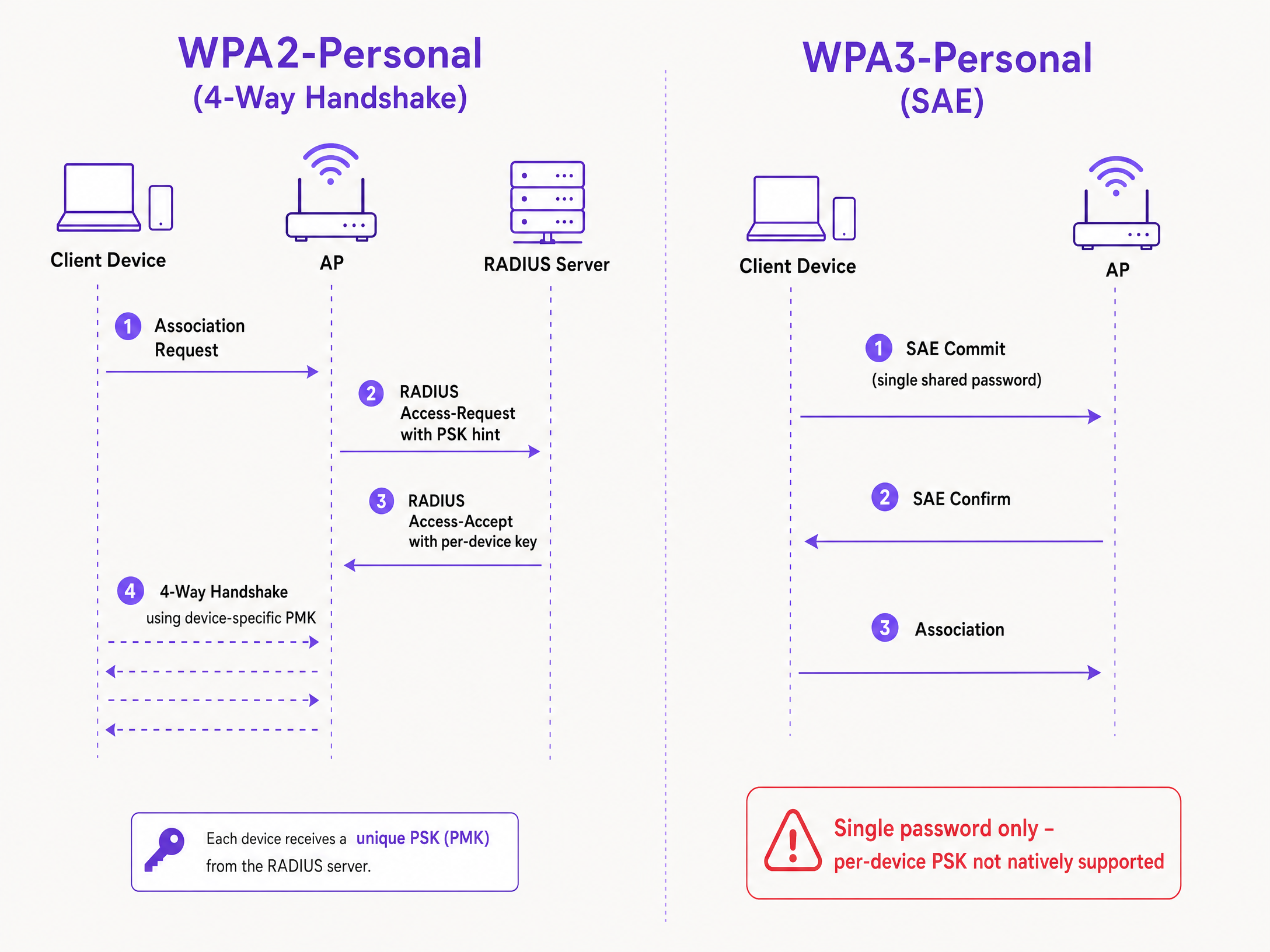
Le mécanisme technique repose sur la négociation à quatre voies du WPA2. Lorsqu'un client s'associe, le point d'accès envoie l'adresse MAC du client à un serveur RADIUS (ou à une base de données locale) dans un message Access-Request. Le serveur RADIUS renvoie un message Access-Accept contenant la clé spécifique à cet appareil. Le point d'accès effectue ensuite la négociation à quatre voies en utilisant cette clé spécifique pour dériver la clé maîtresse par paire (PMK).
Le défi du WPA3-SAE
Le WPA3-Personal remplace la négociation à quatre voies par le protocole SAE. Le SAE est un protocole basé sur Diffie-Hellman dans lequel les deux parties s'engagent sur un élément de mot de passe partagé dérivé de la phrase secrète avant que l'association ne soit finalisée.
La différence critique est que le mot de passe doit être connu des deux côtés avant le début de l'échange SAE. Il n'y a aucun moment dans le protocole où un serveur RADIUS peut injecter une clé différente par appareil. Le point d'accès et le client exécutent déjà un échange cryptographique basé sur une valeur partagée unique. Il s'agit d'une contrainte de protocole définie par la norme IEEE 802.11, et non d'une limitation du fournisseur.
Comparaison des implémentations des fournisseurs
Chaque grand fournisseur d'entreprise prend en charge le PSK par appareil, mais leurs implémentations et leur compatibilité avec le WPA3 varient.
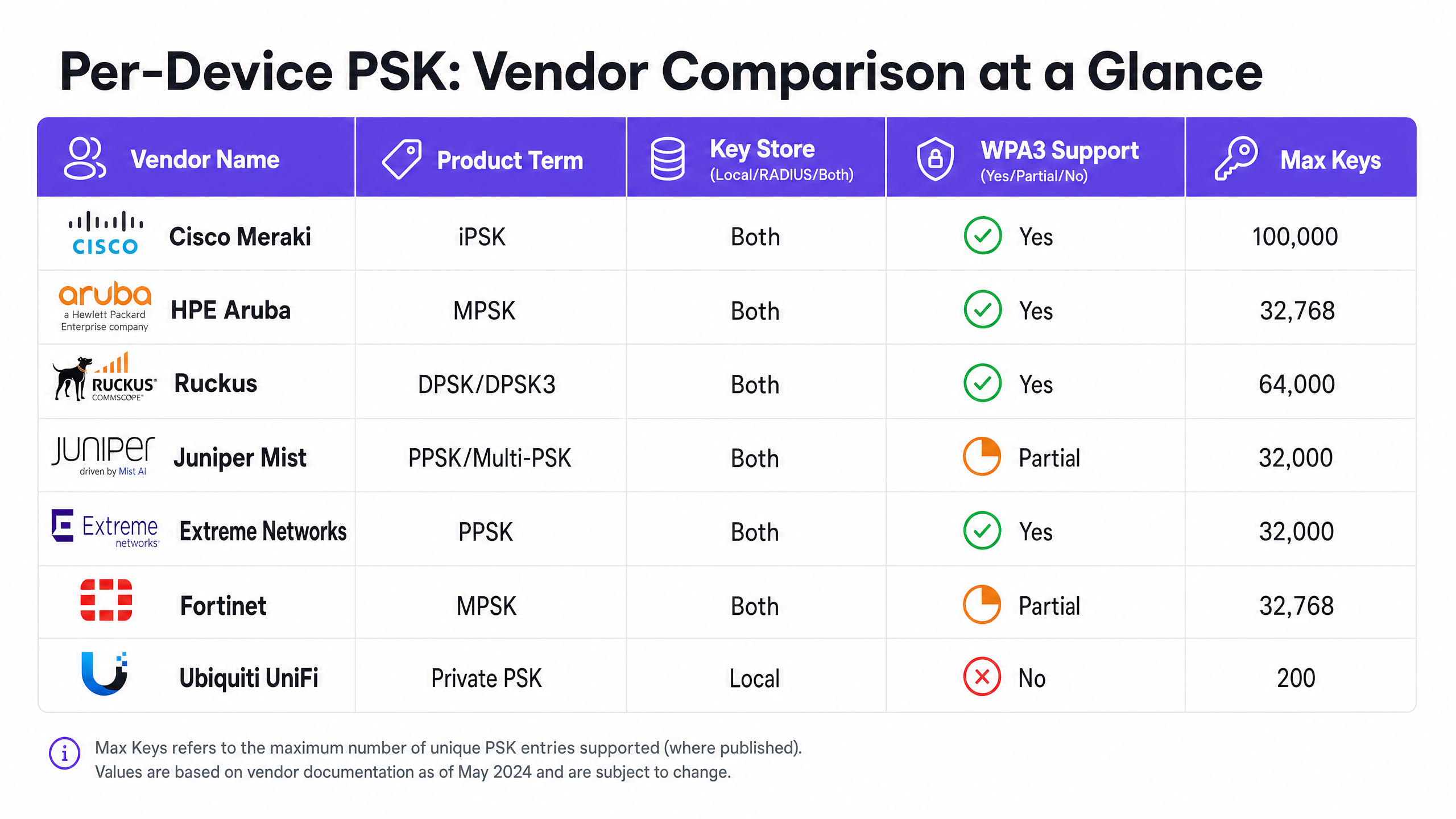
Cisco Meraki (iPSK) Cisco Meraki l'appelle Identity Pre-Shared Key (iPSK). Il prend en charge deux modes. Sans RADIUS, vous pouvez configurer jusqu'à cinq PSK uniques directement dans le tableau de bord Meraki. Avec RADIUS - généralement Cisco ISE - vous pouvez monter jusqu'à 100 000 clés. Le serveur RADIUS effectue la recherche et renvoie la clé par appareil. Pour le WPA3, Meraki s'appuie sur le mode de transition WPA3 (mode mixte WPA2/WPA3), où les clients WPA2 utilisent la négociation à quatre voies et reçoivent des clés par appareil, tandis que les clients WPA3 utilisent le SAE avec un mot de passe partagé unique.
HPE Aruba (MPSK) HPE Aruba l'appelle Multiple Pre-Shared Key (MPSK). Aruba prend en charge MPSK Local, où les clés sont stockées sur le contrôleur, et MPSK avec ClearPass, qui fait office de serveur RADIUS et de moteur de politiques. ClearPass peut stocker des dizaines de milliers de clés et attribuer des VLAN dynamiques. Tout comme Meraki, la prise en charge du WPA3 est actuellement gérée via le mode de transition.
Ruckus (DPSK et DPSK3) Ruckus l'appelle Dynamic Pre-Shared Key (DPSK). C'est l'une des implémentations les plus matures, disponible depuis les débuts de SmartZone. En mode RADIUS, elle s'intègre à Cloudpath. Ruckus se distingue par DPSK3, son extension WPA3. DPSK3 fonctionne en mode mixte WPA2/WPA3 et nécessite Cloudpath comme backend RADIUS. Il permet aux appareils compatibles WPA3 d'utiliser le SAE tandis que le système gère l'association des clés par appareil via l'intégration Cloudpath.
Juniper Mist (PPSK / Multi-PSK) Juniper Mist l'appelle Private Pre-Shared Key (PPSK) ou Multi-PSK. Mist stocke les clés dans la base de données cloud, avec une limite de 5 000 clés par site. Les clés peuvent être attribuées par utilisateur, par appareil ou par groupe. Mist s'intègre à son service Access Assurance, qui ajoute une recherche PSK basée sur RADIUS. Juniper prend en charge le WPA3 RADIUS PSK via Access Assurance, permettant à un seul SSID WPA3-Personal de desservir plusieurs phrases secrètes.
Extreme Networks (PPSK) Extreme Networks l'appelle Private Pre-Shared Key (PPSK) via ExtremeCloud IQ. Il prend en charge le stockage local des clés sur le point d'accès lui-même, ce qui est utile pour les sites distants, ainsi que la recherche basée sur RADIUS via le service RADIUS cloud d'ExtremeCloud IQ. Extreme prend en charge l'association d'adresses MAC (MAC binding) pour lier un PPSK à un appareil spécifique.
Fortinet (MPSK) Fortinet l'appelle Multiple Pre-Shared Key (MPSK), géré via FortiAP et le contrôleur sans fil FortiGate. Fortinet prend explicitement en charge les modes de sécurité WPA3-SAE et WPA3-SAE Transition dans ses profils MPSK. Vous pouvez créer un profil MPSK avec des clés WPA3-SAE, les attribuer à un VAP et activer l'attribution dynamique de VLAN.
Ubiquiti UniFi (Private PSK) Ubiquiti UniFi l'appelle Private Pre-Shared Keys. L'implémentation est locale uniquement ; les clés sont stockées dans le contrôleur UniFi Network. Vous pouvez attribuer différents VLANs par clé. Cependant, UniFi Private PSK fonctionne uniquement sur les réseaux WPA2 en 2,4 GHz et 5 GHz. WPA3 et 6 GHz ne sont pas pris en charge.
Guide d'implémentation
Lors du déploiement du PSK par appareil, suivez ces étapes pour garantir une architecture sécurisée et évolutive.
- Auditez votre parc d'appareils : Identifiez les appareils qui prennent en charge WPA3 et ceux qui dépendent de WPA2. Les appareils IoT existants nécessiteront probablement WPA2 dans un avenir prévisible.
- Sélectionnez la bonne stratégie SSID : Pour un environnement mixte, déployez une conception de SSID hybride. Maintenez un SSID WPA2-Personal avec PSK par appareil pour les appareils IoT existants et les invités. Déployez un SSID WPA3-Enterprise pour les appareils gérés du personnel.
- Implémentez le mode de transition avec prudence : Si vous utilisez le mode de transition WPA3 sur votre SSID invité principal, assurez-vous que vos points d'accès et serveurs RADIUS sont correctement configurés pour gérer les flux d'authentification mixtes.
- Intégrez la gestion des identités : Ne gérez pas les clés manuellement. Intégrez votre provisionnement de clés à votre flux de travail de gestion des appareils ou à un fournisseur d'identité comme Microsoft Entra ID ou Okta.
- Configurez des VLAN dynamiques : Associez chaque PSK par appareil à un VLAN spécifique pour imposer une segmentation du réseau. Cela est essentiel pour isoler les appareils IoT du trafic invité.
Bonnes pratiques
- Imposez une gestion du cycle de vie : Le PSK par appareil nécessite une gestion stricte du cycle de vie. Vous devez disposer d'un processus pour révoquer les clés lorsque les appareils sont mis hors service afin d'éviter la prolifération des clés.
- Utilisez le 802.1X pour les terminaux gérés : Pour les ordinateurs portables de l'entreprise et les appareils du personnel, passez au WPA3-Enterprise avec EAP-TLS. Cela offre une sécurité renforcée et une compatibilité native avec les modèles zero-trust.
- Testez les mises à niveau WPA3 : N'activez jamais WPA3 sur un SSID PSK par appareil existant sans effectuer de test sur un site pilote. Vérifiez les versions du firmware et la compatibilité du serveur RADIUS.
- Tirez parti de Purple pour l'identité : Intégrez Purple pour gérer la couche d'identité. Purple fonctionne comme une surcouche cloud, assurant l'authentification, la capture de données et la gestion du consentement, et transmet l'attribution de VLAN appropriée à votre matériel via RADIUS. Consultez Sécurité WiFi d'entreprise : un guide complet pour 2026 pour plus de détails.
Dépannage et atténuation des risques
- Échec de connexion des clients sur WPA3 : Si les appareils existants ne parviennent pas à se connecter à un SSID en mode de transition WPA3, cela est souvent dû à des pilotes sans fil incompatibles. Assurez-vous que les pilotes des clients sont mis à jour. Si le problème persiste, déplacez les appareils existants vers un SSID dédié uniquement à WPA2.
- Délais d'attente RADIUS dépassés : Si le point d'accès subit un dépassement de délai en attendant la clé par appareil du serveur RADIUS, vérifiez le chemin réseau et assurez-vous que le serveur RADIUS est dimensionné pour gérer la charge d'authentification.
- Échecs d'attribution de VLAN : Si un appareil se connecte mais reçoit une mauvaise adresse IP, vérifiez le mappage VLAN dans le message Access-Accept de RADIUS et assurez-vous que le VLAN existe sur le point d'accès et le port du commutateur.
ROI et impact commercial
L'implémentation du PSK par appareil génère une valeur commerciale mesurable en réduisant les tickets d'assistance et en améliorant la sécurité.
- Réduction de la charge du support technique : L'automatisation du provisionnement et de la révocation des clés élimine les réinitialisations manuelles de mots de passe.
- Amélioration de la posture de sécurité : L'isolation des appareils sur des VLAN distincts en fonction de leur clé unique réduit la zone d'impact d'un appareil compromis.
- Visibilité accrue : Les clés par appareil offrent une visibilité granulaire sur l'utilisation du réseau, vous permettant d'identifier les appareils gourmands en bande passante et d'optimiser la planification des capacités.
Définitions clés
Per-Device PSK
A security mechanism that assigns a unique Pre-Shared Key to each device or user on a single SSID, allowing for individual revocation and dynamic policy assignment.
Used when IT teams need per-device visibility and control without deploying full 802.1X authentication.
WPA3-SAE
Simultaneous Authentication of Equals. The secure key establishment protocol used in WPA3-Personal, replacing the WPA2 four-way handshake.
Relevant when upgrading to WPA3 or deploying 6 GHz networks, as it fundamentally changes how passwords are authenticated.
Transition Mode
A mixed-mode configuration where an SSID advertises support for both WPA2-PSK and WPA3-SAE, allowing legacy and modern clients to connect to the same network name.
The standard approach for migrating existing networks to WPA3 without stranding legacy devices.
MAC Binding
The process of associating a specific per-device PSK with the hardware MAC address of a specific device, preventing the key from being used on another device.
Used to prevent credential sharing and ensure strict access control for IoT devices.
Dynamic VLAN Assignment
The ability to assign a device to a specific Virtual LAN based on its authentication credentials (such as its per-device PSK), rather than the SSID it connects to.
Essential for network segmentation, allowing IT to isolate guest traffic from corporate traffic on the same access point.
iPSK
Identity Pre-Shared Key. Cisco Meraki's implementation of per-device PSK.
Encountered when managing Cisco Meraki wireless networks.
DPSK
Dynamic Pre-Shared Key. Ruckus's implementation of per-device PSK, with DPSK3 being the WPA3-compatible version.
Encountered when managing Ruckus wireless networks.
MPSK
Multiple Pre-Shared Key. The term used by HPE Aruba and Fortinet for their per-device PSK implementations.
Encountered when managing HPE Aruba or Fortinet wireless networks.
Exemples concrets
A 200-room hotel needs to provide secure Guest WiFi and isolate smart TVs in each room. They currently use a single WPA2-Personal password for all guests and devices.
Deploy per-device PSK using a RADIUS backend. Integrate Purple to capture guest data and issue a unique PSK to each guest upon registration. For the smart TVs, generate a unique PSK for each TV and map it to a dedicated IoT VLAN. Configure the guest PSKs to map to a separate Guest VLAN with client isolation enabled.
A university campus is upgrading to Wi-Fi 6E and must support WPA3 on the 6 GHz band, but they have thousands of legacy IoT devices that only support WPA2.
Implement a hybrid SSID design. Create a WPA3-Enterprise SSID for student and staff laptops and smartphones, using 802.1X for authentication. Create a separate WPA2-Personal SSID with per-device PSK on the 2.4 GHz and 5 GHz bands specifically for the legacy IoT devices.
Questions d'entraînement
Q1. You are deploying Wi-Fi 6E access points and need to support 6 GHz clients. Your existing 5 GHz network uses iPSK for IoT devices. Can you extend the iPSK configuration to the 6 GHz band?
Conseil : Consider the mandatory security protocols for the 6 GHz band.
Q2. A retail chain uses Aruba MPSK to assign unique keys to point-of-sale terminals. They want to upgrade their primary SSID to WPA3 for better security. What is the recommended approach?
Conseil : Aruba MPSK requires the WPA2 four-way handshake.
Voir la réponse type
Enable WPA3 transition mode (WPA2/WPA3 mixed mode) on the SSID. The point-of-sale terminals will continue to connect using WPA2 and MPSK, while newer devices can connect using WPA3-SAE with a shared password.
Q3. You manage a Ruckus network and want to deploy per-device PSK for WPA3 clients. What specific configuration is required?
Conseil : Consider the proprietary extension Ruckus offers and its backend requirements.
Voir la réponse type
You must deploy Ruckus DPSK3. This requires Wi-Fi 6 or newer access points running firmware 7.0 or later, configuring the SSID for WPA2/WPA3 mixed mode, and using Ruckus Cloudpath as the RADIUS server.
Continuer la lecture de cette série
Qu'est-ce que l'authentification par adresse MAC ? Quand l'utiliser et quand l'éviter
Ce guide de référence technique fait autorité sur l'authentification par adresse MAC dans les environnements WiFi d'entreprise – comment l'authentification MAC basée sur RADIUS fonctionne à la Couche 2, ses vulnérabilités de sécurité inhérentes (y compris l'usurpation d'adresse MAC et l'impact de la randomisation MAC au niveau du système d'exploitation), et les contextes opérationnels précis où elle reste un outil valide pour la gestion des appareils IoT et sans tête. Il fournit des conseils de déploiement exploitables pour les responsables informatiques et les architectes réseau dans les secteurs de l'hôtellerie, du commerce de détail, de la santé et des lieux publics, avec des exemples concrets, des cadres de décision et un contexte d'intégration pour la plateforme de WiFi invité et d'analyse de Purple.
Comment configurer le WiFi d'entreprise sur iOS et macOS avec 802.1X
This authoritative guide provides senior IT leaders with actionable steps for deploying 802.1X enterprise WiFi on iOS and macOS devices. It covers certificate-based authentication (EAP-TLS), MDM configuration profiles, and architecture integration to secure corporate networks while supporting BYOD initiatives.
Comment configurer le WiFi d'entreprise sur les appareils Android avec EAP-TLS
This technical reference guide provides senior IT leaders with a comprehensive blueprint for deploying 802.1X EAP-TLS authentication on Android devices. It covers the architectural mechanics, manual and MDM-driven implementation strategies, and troubleshooting methodologies necessary to secure enterprise wireless networks.