跳至主要內容

各廠商每裝置 PSK 比較:iPSK、DPSK、MPSK 與 PPSK(及 WPA3 支援)

全面比較 Cisco Meraki、HPE Aruba、Ruckus、Juniper Mist、Extreme、Fortinet 與 Ubiquiti UniFi 的每裝置 PSK 實作。了解 WPA3-SAE 如何影響每裝置金鑰策略,以及何時該部署過渡模式或轉移至 802.1X。

📖 6 分鐘閱讀📝 1,350 字數🔧 2 範例3 練習題📚 8 關鍵定義

收聽此指南

查看播客逐字稿
Per-Device PSK by Vendor: iPSK, DPSK, MPSK and PPSK Compared, and WPA3 Support. A Purple Technical Briefing. Introduction and Context. Welcome to the Purple technical briefing series. I'm going to walk you through one of the most practically important - and frequently misunderstood - topics in enterprise WiFi right now: per-device pre-shared keys. Specifically, we're going to compare how each of the major vendors implements this capability, what they call it, how it actually works under the hood, and - critically - what happens when you try to move to WPA3. If you're an IT manager, network architect, or venue operations director running WiFi across a hotel estate, a retail chain, a stadium, or a public-sector campus, this briefing is for you. You've probably already encountered the alphabet soup: iPSK, DPSK, MPSK, PPSK. They all refer to the same concept - giving each device or user its own unique password on a single SSID - but the implementations differ significantly, and those differences matter when you're planning your next infrastructure refresh. Let's start with the fundamentals, then work through each vendor, and finish with the WPA3 question that everyone is wrestling with right now. Technical Deep-Dive. So what is per-device PSK, and why does it exist? Traditional WPA2-Personal uses a single shared passphrase for an entire SSID. Everyone on your guest network uses the same password. That creates two problems. First, you can't revoke access for one device without changing the password for everyone. Second, you have no per-device visibility or policy enforcement. Per-device PSK solves both. Each device or user gets a unique credential. You can revoke one without touching the others. You can assign different VLANs, bandwidth policies, or access schedules per key. It's the middle ground between the simplicity of WPA2-Personal and the complexity of full 802.1X enterprise authentication. Now let's look at how each vendor implements this. Cisco Meraki calls it iPSK - Identity Pre-Shared Key. Meraki supports two modes. Without RADIUS, you configure up to five unique PSKs directly in the Meraki dashboard, each mapped to a VLAN. It's quick to set up and requires no external infrastructure. With RADIUS - typically Cisco ISE - you can scale to thousands of keys. The client associates, the AP sends the MAC address and a PSK hint to the RADIUS server, the server returns the correct per-device key, and the standard WPA2 four-way handshake completes using that key as the Pairwise Master Key. The key insight here is that the RADIUS server is doing the lookup, not the AP. The AP just facilitates the exchange. HPE Aruba calls it MPSK - Multiple Pre-Shared Key. Aruba Central and Aruba Instant support MPSK in two modes: MPSK Local, where keys are stored on the controller or AP cluster, and MPSK with ClearPass, Aruba's RADIUS and policy engine. ClearPass can hold tens of thousands of keys, assign dynamic VLANs, and apply role-based policies per key. The authentication flow is essentially the same as Meraki's RADIUS mode - MAC-based lookup returns the per-device key before the four-way handshake. Ruckus - now part of CommScope - calls it DPSK, Dynamic Pre-Shared Key. This is arguably the most mature implementation in the market. Ruckus DPSK has been available since the early SmartZone days. In local mode, the DPSK service runs on the controller and holds the key database. In RADIUS mode, it integrates with Cloudpath, Ruckus's own network access control platform. What makes Ruckus notable is DPSK3 - their WPA3 extension of DPSK, which we'll come back to shortly. DPSK3 is available on Wi-Fi 6, 6E, and 7 access points running firmware 7.0 or later, and it operates in WPA2 slash WPA3 mixed mode. Juniper Mist calls it PPSK - Private Pre-Shared Key - or sometimes Multi-PSK. Mist stores keys in the cloud, in the Mist organisation or site key database, with a limit of 5,000 keys per site. Keys can be assigned per user, per device, or per group. Mist also integrates with its Access Assurance service - the cloud-native NAC - which adds RADIUS-based PSK lookup. Critically, Juniper has announced WPA3 RADIUS PSK support through Access Assurance, allowing a single WPA3-Personal SSID to serve multiple passphrases. This is one of the more forward-looking implementations in the market. Extreme Networks - which acquired Aerohive - calls it PPSK, Private Pre-Shared Key, through ExtremeCloud IQ. Extreme's implementation supports local key storage on the AP itself, which is useful for branch or remote sites with limited connectivity. It also supports RADIUS-based lookup via ExtremeCloud IQ's cloud RADIUS service. MAC binding is available, which ties a PPSK to a specific device MAC address for additional security. Fortinet calls it MPSK, Multiple Pre-Shared Key, managed through FortiAP and the FortiGate wireless controller. Fortinet's implementation is notable because it explicitly supports WPA3-SAE and WPA3-SAE Transition security modes in its MPSK profiles - as of FortiAP firmware 8.0. You can create an MPSK profile with WPA3-SAE keys, assign them to a VAP, and enable dynamic VLAN assignment per key. This is one of the cleaner WPA3 MPSK implementations available today. Ubiquiti UniFi calls it Private Pre-Shared Keys, or Private PSK. UniFi's implementation is local only - keys are stored in the UniFi Network controller, not in an external RADIUS server. You can assign different VLANs per key and set client limits per key. The significant limitation: as of mid-2026, UniFi Private PSK only works on WPA2 networks on 2.4 GHz and 5 GHz. WPA3 and 6 GHz are not supported. For smaller deployments this is fine, but it's a constraint worth knowing before you commit to a UniFi estate at scale. Now, the WPA3 question. This is where it gets technically interesting. WPA2-Personal uses a four-way handshake. The client and AP derive a Pairwise Transient Key from a shared Pairwise Master Key, which itself is derived from the passphrase. Because the PMK derivation happens after the RADIUS lookup, the AP can substitute a per-device key at that point. The standard doesn't care - it just sees a valid PMK. WPA3-Personal replaces the four-way handshake with SAE - Simultaneous Authentication of Equals. SAE is a Diffie-Hellman-based protocol. Both sides commit to a shared password element derived from the passphrase before the association completes. The critical difference: the password must be known to both sides before the SAE exchange begins. There's no point in the protocol where a RADIUS server can inject a different key per device. The AP and client are already doing a cryptographic dance with a single shared value. This is why WPA3 currently only allows one key per SSID in its standard form. It's not a firmware limitation. It's a protocol constraint. The workarounds fall into three categories. First, WPA3 transition mode - also called WPA2 slash WPA3 mixed mode. The SSID advertises both WPA2-PSK and WPA3-SAE. WPA2 clients use the four-way handshake and can receive per-device keys via RADIUS. WPA3 clients use SAE with a single shared password. This is the most widely deployed approach today and is supported by Cisco Meraki, HPE Aruba, Ruckus, and others. Second, proprietary extensions. Ruckus DPSK3 is the clearest example. By running in WPA2 slash WPA3 mixed mode with Cloudpath as the RADIUS backend, DPSK3 allows WPA3-capable devices to use SAE while the system manages per-device key binding through the Cloudpath integration. Juniper's Access Assurance WPA3 RADIUS PSK takes a similar approach. Fortinet's MPSK with WPA3-SAE Transition mode lets you mix WPA2-Personal and WPA3-SAE keys in the same MPSK profile. Third, moving to 802.1X. For managed endpoints - corporate laptops, staff devices, anything you can push a certificate to - WPA3-Enterprise with EAP-TLS is the clean answer. It's fully compatible with WPA3 and 6 GHz, provides per-device identity, and integrates with Microsoft Entra ID, Okta, and Google Workspace. The trade-off is deployment complexity and the need for a certificate infrastructure. Implementation Recommendations and Pitfalls. So what should you actually do? If you're running a hotel estate with a mix of guest devices, IoT sensors, and staff devices, the pragmatic answer in 2026 is a hybrid SSID design. Keep a WPA2-Personal SSID with per-device PSK for legacy IoT and guest devices. Run a WPA3-Enterprise SSID for staff devices you control. Use transition mode on your primary guest SSID to support both WPA2 and WPA3 clients without fragmenting your SSID count. If you're on Ruckus and running Wi-Fi 6 or newer hardware, DPSK3 in WPA2 slash WPA3 mixed mode with Cloudpath is worth evaluating. It gives you the closest thing to native WPA3 per-device PSK available today. If you're on Fortinet, the MPSK profile with WPA3-SAE Transition is straightforward to configure and gives you a clean migration path. If you're on UniFi, be explicit with your stakeholders that Private PSK is WPA2-only. For venues deploying Wi-Fi 6E or Wi-Fi 7 with 6 GHz radios, you'll need a different authentication strategy for that band. The biggest pitfall we see is teams assuming that enabling WPA3 on an existing per-device PSK SSID will just work. It won't. Test in a pilot site first. Check your AP firmware versions - DPSK3 requires firmware 7.0 or later on Ruckus, for example. And check your RADIUS server compatibility - Ruckus DPSK3 in mixed mode requires Cloudpath specifically, not a generic RADIUS server. A second pitfall is key sprawl. Per-device PSK is excellent for accountability, but only if you have a process to revoke keys when devices are decommissioned. Without lifecycle management, you end up with thousands of orphaned keys and no audit trail. Integrate your key provisioning with your device management workflow from day one. Rapid-Fire Questions and Answers. Can I use per-device PSK on a 6 GHz SSID? No. 6 GHz mandates WPA3-only, and WPA3 doesn't natively support per-device PSK. Use 802.1X or a separate 2.4 slash 5 GHz SSID for devices that need per-device PSK. Does per-device PSK satisfy PCI DSS requirements? Per-device PSK on WPA2 can satisfy PCI DSS 4.0 network segmentation requirements if each key maps to an isolated VLAN. But PCI DSS strongly recommends 802.1X for cardholder data environments. Check with your QSA. What's the maximum number of keys per SSID? It varies significantly. Cisco Meraki with ISE supports very large deployments. Ruckus DPSK supports tens of thousands of keys. Juniper Mist caps at 5,000 per site. UniFi is effectively limited by controller memory. Always check vendor documentation for your specific firmware version. How does Purple fit into this? Purple sits as a cloud overlay on top of your existing hardware. We integrate with Cisco Meraki, HPE Aruba, Ruckus, Juniper Mist, Ubiquiti UniFi, Cambium, Extreme, and Fortinet. For Guest WiFi and Staff WiFi deployments, Purple handles the identity layer - authentication, data capture, consent management - and passes the appropriate VLAN or policy assignment back to your hardware via RADIUS or API. You keep your existing per-device PSK infrastructure; Purple adds the identity and analytics layer on top. Summary and Next Steps. Let's pull this together. Per-device PSK - whether you call it iPSK, DPSK, MPSK, or PPSK - is a mature, well-supported capability across all major enterprise WiFi vendors. The implementations differ in where keys are stored, how they scale, and how they integrate with RADIUS. WPA3's SAE protocol creates a genuine technical constraint for per-device PSK. The standard doesn't support it natively. The practical answers today are transition mode, proprietary extensions like DPSK3, or moving to 802.1X for devices that support it. The vendor-by-vendor summary: Cisco Meraki iPSK works well with ISE in RADIUS mode; WPA3 support is via transition mode. HPE Aruba MPSK with ClearPass is highly scalable; WPA3 MPSK is in active development. Ruckus DPSK3 is the most mature WPA3 per-device PSK solution available. Juniper Mist Access Assurance adds WPA3 RADIUS PSK. Fortinet MPSK explicitly supports WPA3-SAE in its MPSK profiles. Extreme PPSK is solid for local and RADIUS modes. UniFi Private PSK is WPA2-only and local-only. For your next steps: audit your current per-device PSK deployment, identify which devices are WPA3-capable, and design a hybrid SSID strategy that serves both. If you're planning a hardware refresh, prioritise Wi-Fi 6 or Wi-Fi 7 APs with confirmed DPSK3 or WPA3 MPSK support. If you want to understand how Purple integrates with your specific hardware vendor to add identity management and analytics on top of your per-device PSK deployment, visit purple.ai or speak to your account team. That's it for this briefing. Thanks for listening.

header_image.png

執行摘要

每裝置預共用金鑰 (PSK) 是企業網路不可或缺的過渡技術,適用於需要每裝置可視性但又不想承受完整 802.1X 驗證複雜度的場景。雖然各廠商的命名不同(例如 Cisco Meraki 的 iPSK、HPE Aruba 的 MPSK、Ruckus 的 DPSK、Juniper Mist 的 PPSK),但其根本目標完全相同:在單一 SSID 上為每台裝置分配唯一的密碼。

然而,向 WPA3 的轉移引入了重大的架構限制。WPA3 以同時對等驗證 (SAE) 取代了傳統的 WPA2 四向交握。SAE 要求在開始交換之前,無線基地台與用戶端都必須已知密碼,這打破了大多數每裝置 PSK 實作所使用的標準 RADIUS 查詢機制。本指南詳細介紹了各大廠商如何處理每裝置 PSK、如何儲存與查詢金鑰,以及如何應對 WPA3-SAE 的挑戰——從 WPA3 過渡模式到 Ruckus DPSK3 等專有擴充功能。

技術深度解析

每裝置 PSK 的架構

傳統的 WPA2-Personal 在整個 SSID 中使用單一共享密碼。每台裝置都使用相同的密碼,這意味著您無法在不更改所有人密碼的情況下撤銷單一裝置的存取權限。此外,您也無法獲得每裝置的可視性或進行策略執行。

每裝置 PSK 透過為每台裝置或使用者發放唯一的憑證來解決此問題。您可以撤銷單一金鑰而不影響其他金鑰。您可以為每個金鑰分配不同的 VLAN、頻寬策略或存取排程。

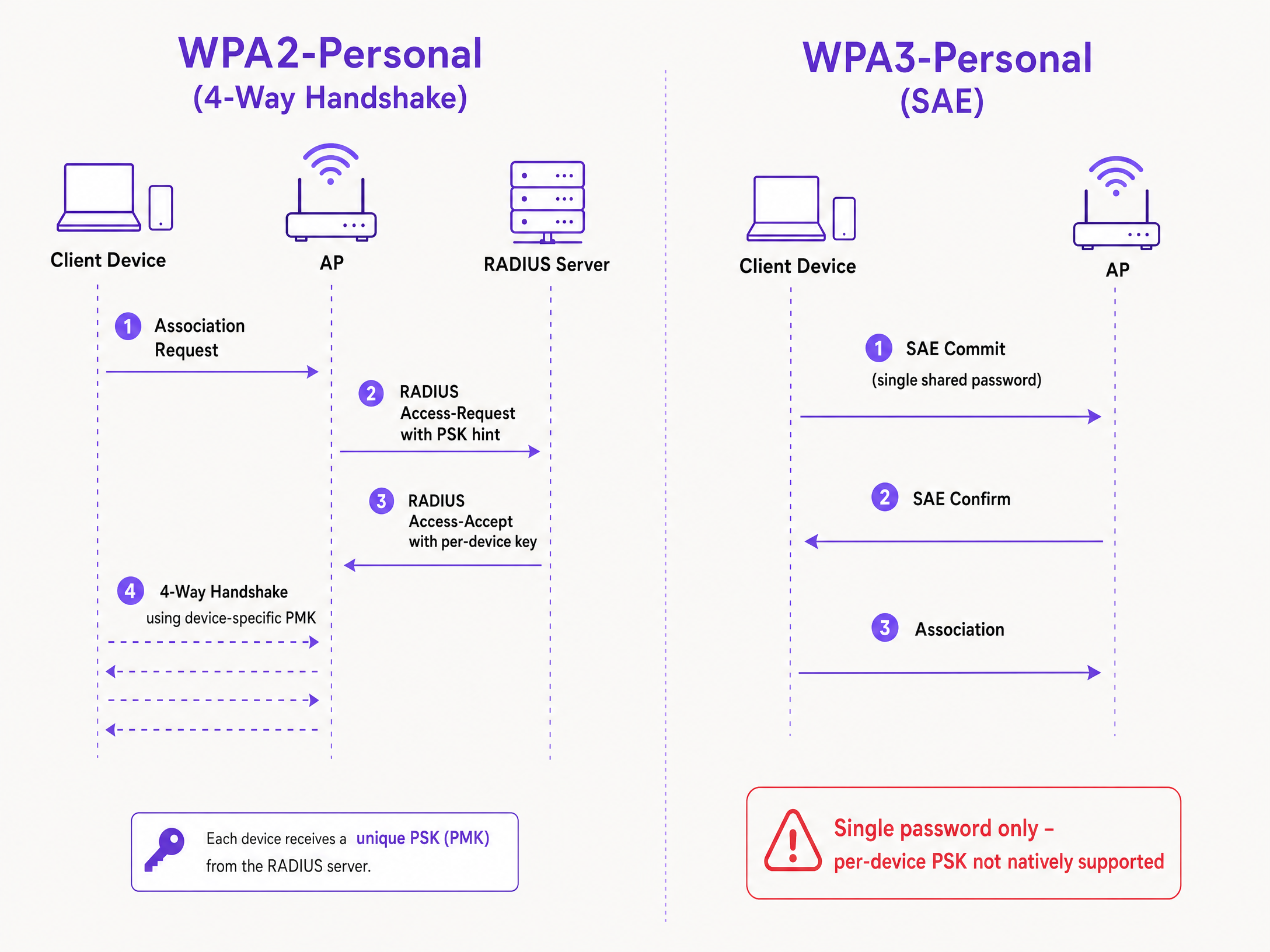
其技術機制依賴於 WPA2 四向交握。當用戶端進行關聯時,無線基地台會將用戶端的 MAC 位址以 Access-Request 訊息發送至 RADIUS 伺服器(或本機資料庫)。RADIUS 伺服器會回傳一個包含該裝置專屬金鑰的 Access-Accept 訊息。接著,無線基地台使用該特定金鑰完成四向交握,以衍生出成對主金鑰 (PMK)。
wpa2_vs_wpa3_psk_diagram.png

WPA3-SAE 的挑戰

WPA3-Personal 以 SAE 取代了四向交握。SAE 是一種基於 Diffie-Hellman 的協定,在關聯完成之前,雙方都會承諾使用從密碼衍生出的共享密碼元素。

關鍵區別在於,在 SAE 交換開始之前,雙方都必須已知密碼。在該協定中,RADIUS 伺服器無法在任何時間點為每台裝置注入不同的金鑰。無線基地台和用戶端已經在基於單一共享值執行密碼學交換。這是 IEEE 802.11 標準所定義的協定限制,而非廠商的限制。

各廠商實作比較

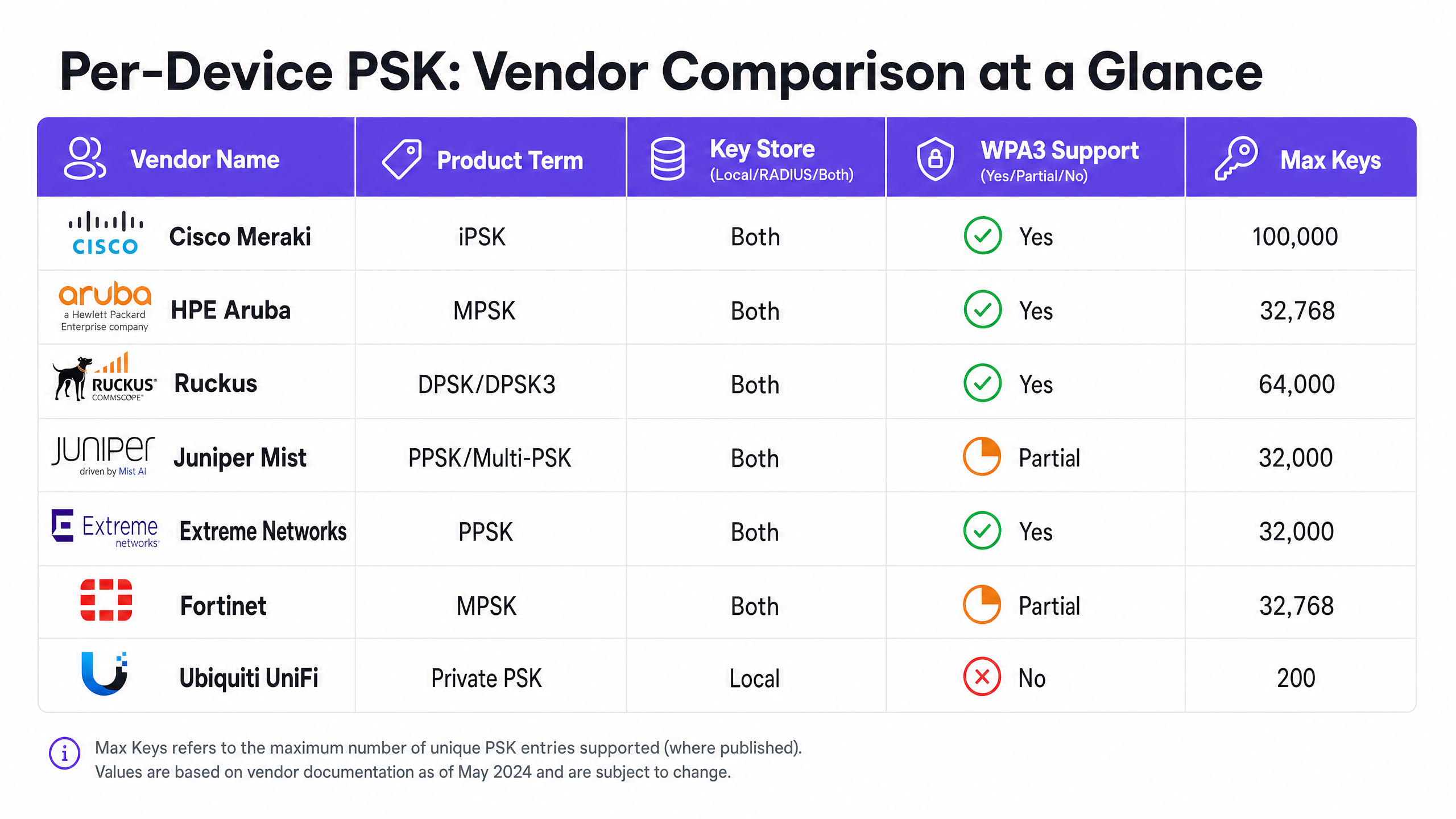
每個主要的企業級廠商都支援每裝置 PSK,但其實作方式和對 WPA3 的就緒程度各有不同。
vendor_comparison_chart.png

Cisco Meraki (iPSK) Cisco Meraki 稱之為身分預共用金鑰 (Identity Pre-Shared Key, iPSK)。它支援兩種模式。在沒有 RADIUS 的情況下,您可以直接在 Meraki 儀表板中設定最多五個唯一的 PSK。配合 RADIUS(通常為 Cisco ISE),您可以擴充至 100,000 個金鑰。RADIUS 伺服器會執行查詢並回傳每裝置金鑰。針對 WPA3,Meraki 依賴 WPA3 過渡模式(WPA2/WPA3 混合模式),其中 WPA2 用戶端使用四向交握並接收每裝置金鑰,而 WPA3 用戶端則使用具有單一共享密碼的 SAE。

HPE Aruba (MPSK) HPE Aruba 稱之為多重預共用金鑰 (Multiple Pre-Shared Key, MPSK)。Aruba 支援 MPSK Local(金鑰儲存在控制器上)以及搭配 ClearPass 的 MPSK(ClearPass 作為 RADIUS 和策略引擎)。ClearPass 可以容納數萬個金鑰並分配動態 VLAN。與 Meraki 類似,目前 WPA3 支援是透過過渡模式來處理。

Ruckus (DPSK 與 DPSK3) Ruckus 稱之為動態預共用金鑰 (Dynamic Pre-Shared Key, DPSK)。這是最成熟的實作之一,自早期的 SmartZone 時代起就已提供。在 RADIUS 模式下,它與 Cloudpath 整合。Ruckus 以其 WPA3 擴充功能 DPSK3 著稱。DPSK3 運作於 WPA2/WPA3 混合模式,並需要 Cloudpath 作為 RADIUS 後端。它允許支援 WPA3 的裝置使用 SAE,同時系統透過 Cloudpath 整合來管理每裝置金鑰綁定。

Juniper Mist (PPSK / Multi-PSK) Juniper Mist 稱之為私有預共用金鑰 (Private Pre-Shared Key, PPSK) 或 Multi-PSK。Mist 將金鑰儲存在雲端資料庫中,每個站點限制為 5,000 個金鑰。金鑰可以按使用者、按裝置或按群組進行分配。Mist 與其 Access Assurance 服務整合,該服務增加了基於 RADIUS 的 PSK 查詢。Juniper 透過 Access Assurance 支援 WPA3 RADIUS PSK,允許單一 WPA3-Personal SSID 提供多個密碼。

Extreme Networks (PPSK) Extreme Networks 透過 ExtremeCloud IQ 稱之為私有預共用金鑰 (Private Pre-Shared Key, PPSK)。它支援在無線基地台本機儲存金鑰(這對遠端站點非常有用),以及透過 ExtremeCloud IQ 的雲端 RADIUS 服務進行基於 RADIUS 的查詢。Extreme 支援 MAC 綁定,以將 PPSK 與特定裝置綁定。

Fortinet (MPSK) Fortinet 稱之為多重預共用金鑰 (Multiple Pre-Shared Key, MPSK),透過 FortiAP 和 FortiGate 無線控制器進行管理。Fortinet 在其 MPSK 設定檔中明確支援 WPA3-SAE 和 WPA3-SAE Transition 安全模式。您可以建立具有 WPA3-SAE 金鑰的 MPSK 設定檔,將其分配給 VAP,並啟用動態 VLAN 分配。

Ubiquiti UniFi (Private PSK) Ubiquiti UniFi 稱之為私有預共用金鑰 (Private Pre-Shared Keys)。此實作僅限本機;金鑰儲存在 UniFi Network 控制器中。您可以分配不同的 VLA每個金鑰的 Ns。然而,UniFi Private PSK 僅適用於 2.4 GHz 和 5 GHz 的 WPA2 網路。不支援 WPA3 和 6 GHz。

實作指南

部署每裝置 PSK (per-device PSK) 時,請遵循以下步驟以確保架構的安全性和可擴充性。

  1. 稽核您的裝置現況:識別哪些裝置支援 WPA3,哪些依賴 WPA2。在可預見的未來,舊型 IoT 裝置可能仍需要 WPA2。
  2. 選擇正確的 SSID 策略:針對混合環境,請部署混合 SSID 設計。為舊型 IoT 和訪客裝置保留啟用每裝置 PSK 的 WPA2-Personal SSID。為受控的員工裝置部署 WPA3-Enterprise SSID。
  3. 謹慎實作過渡模式:如果您在主要訪客 SSID 上使用 WPA3 過渡模式,請確保您的無線基地台和 RADIUS 伺服器已正確設定,以處理混合驗證流程。
  4. 整合身分識別管理:請勿手動管理金鑰。將您的金鑰佈署與裝置管理工作流程,或 Microsoft Entra ID、Okta 等身分識別提供者進行整合。
  5. 設定動態 VLAN:將每個每裝置 PSK 對應到特定的 VLAN,以實施網路分段。這對於將 IoT 裝置與訪客流量隔離至關重要。

最佳做法

  • 落實生命週期管理:每裝置 PSK 需要嚴格的生命週期管理。您必須建立一套流程,在裝置除役時撤銷金鑰,以防止金鑰濫用與擴散。
  • 針對受控端點使用 802.1X:針對企業筆記型電腦和員工裝置,請移轉至採用 EAP-TLS 的 WPA3-Enterprise。這能提供更強大的安全性,並與零信任模型原生相容。
  • 測試 WPA3 升級:在未於試點環境進行測試前,切勿在現有的每裝置 PSK SSID 上啟用 WPA3。請驗證韌體版本和 RADIUS 伺服器的相容性。
  • 利用 Purple 進行身分識別:整合 Purple 來處理身分識別層。Purple 作為雲端重疊網路,提供驗證、數據收集和同意管理,並透過 RADIUS 將適當的 VLAN 分配傳回您的硬體。欲了解更多詳情,請參閱 企業 WiFi 安全性:2026 年完整指南

疑難排解與風險緩釋

  • 用戶端無法連線至 WPA3:如果舊型裝置無法連線至 WPA3 過渡模式 SSID,通常是因為無線驅動程式不相容。請確保用戶端驅動程式已更新。如果問題仍然存在,請將舊型裝置移至專用的僅限 WPA2 SSID。
  • RADIUS 逾時:如果無線基地台在等待來自 RADIUS 伺服器的每裝置金鑰時逾時,請檢查網路路徑,並確保 RADIUS 伺服器已進行擴充以處理驗證負載。
  • VLAN 分配失敗:如果裝置已連線但取得錯誤的 IP 位址,請驗證 RADIUS Access-Accept 訊息中的 VLAN 對應,並確保該 VLAN 存在於無線基地台和交換器連接埠上。

投資報酬率 (ROI) 與業務影響

實作每裝置 PSK 可減少支援工單並提高安全性,從而帶來可衡量的商業價值。

  • 減輕服務台負擔:自動化金鑰佈署與撤銷,可免除手動重設密碼的工作。
  • 提升安全態勢:根據裝置的唯一金鑰將其隔離到不同的 VLAN,可減少裝置受駭時的波及範圍。
  • 增強可視性:每裝置金鑰提供對網路使用狀況的精細可視性,使您能夠識別佔用頻寬的裝置並最佳化容量規劃。

關鍵定義

Per-Device PSK

A security mechanism that assigns a unique Pre-Shared Key to each device or user on a single SSID, allowing for individual revocation and dynamic policy assignment.

Used when IT teams need per-device visibility and control without deploying full 802.1X authentication.

WPA3-SAE

Simultaneous Authentication of Equals. The secure key establishment protocol used in WPA3-Personal, replacing the WPA2 four-way handshake.

Relevant when upgrading to WPA3 or deploying 6 GHz networks, as it fundamentally changes how passwords are authenticated.

Transition Mode

A mixed-mode configuration where an SSID advertises support for both WPA2-PSK and WPA3-SAE, allowing legacy and modern clients to connect to the same network name.

The standard approach for migrating existing networks to WPA3 without stranding legacy devices.

MAC Binding

The process of associating a specific per-device PSK with the hardware MAC address of a specific device, preventing the key from being used on another device.

Used to prevent credential sharing and ensure strict access control for IoT devices.

Dynamic VLAN Assignment

The ability to assign a device to a specific Virtual LAN based on its authentication credentials (such as its per-device PSK), rather than the SSID it connects to.

Essential for network segmentation, allowing IT to isolate guest traffic from corporate traffic on the same access point.

iPSK

Identity Pre-Shared Key. Cisco Meraki's implementation of per-device PSK.

Encountered when managing Cisco Meraki wireless networks.

DPSK

Dynamic Pre-Shared Key. Ruckus's implementation of per-device PSK, with DPSK3 being the WPA3-compatible version.

Encountered when managing Ruckus wireless networks.

MPSK

Multiple Pre-Shared Key. The term used by HPE Aruba and Fortinet for their per-device PSK implementations.

Encountered when managing HPE Aruba or Fortinet wireless networks.

範例

A 200-room hotel needs to provide secure Guest WiFi and isolate smart TVs in each room. They currently use a single WPA2-Personal password for all guests and devices.

Deploy per-device PSK using a RADIUS backend. Integrate Purple to capture guest data and issue a unique PSK to each guest upon registration. For the smart TVs, generate a unique PSK for each TV and map it to a dedicated IoT VLAN. Configure the guest PSKs to map to a separate Guest VLAN with client isolation enabled.

考官評語: This approach secures the network by isolating the IoT devices from the guest traffic. Using Purple automates the guest key provisioning, reducing helpdesk tickets, while the dedicated IoT VLAN ensures the smart TVs cannot be accessed by guests.

A university campus is upgrading to Wi-Fi 6E and must support WPA3 on the 6 GHz band, but they have thousands of legacy IoT devices that only support WPA2.

Implement a hybrid SSID design. Create a WPA3-Enterprise SSID for student and staff laptops and smartphones, using 802.1X for authentication. Create a separate WPA2-Personal SSID with per-device PSK on the 2.4 GHz and 5 GHz bands specifically for the legacy IoT devices.

考官評語: This design satisfies the WPA3 requirement for the 6 GHz band while maintaining compatibility for legacy devices. It avoids the complexities of WPA3 transition mode and provides a clear migration path to 802.1X for managed endpoints.

練習題

Q1. You are deploying Wi-Fi 6E access points and need to support 6 GHz clients. Your existing 5 GHz network uses iPSK for IoT devices. Can you extend the iPSK configuration to the 6 GHz band?

提示:Consider the mandatory security protocols for the 6 GHz band.

查看標準答案

No. The 6 GHz band mandates WPA3, and WPA3-SAE does not natively support per-device PSK (iPSK). You must keep the IoT devices on a WPA2 2.4/5 GHz SSID or migrate them to 802.1X if supported.

Q2. A retail chain uses Aruba MPSK to assign unique keys to point-of-sale terminals. They want to upgrade their primary SSID to WPA3 for better security. What is the recommended approach?

提示:Aruba MPSK requires the WPA2 four-way handshake.

查看標準答案

Enable WPA3 transition mode (WPA2/WPA3 mixed mode) on the SSID. The point-of-sale terminals will continue to connect using WPA2 and MPSK, while newer devices can connect using WPA3-SAE with a shared password.

Q3. You manage a Ruckus network and want to deploy per-device PSK for WPA3 clients. What specific configuration is required?

提示:Consider the proprietary extension Ruckus offers and its backend requirements.

查看標準答案

You must deploy Ruckus DPSK3. This requires Wi-Fi 6 or newer access points running firmware 7.0 or later, configuring the SSID for WPA2/WPA3 mixed mode, and using Ruckus Cloudpath as the RADIUS server.