
PSK por dispositivo por proveedor: comparación de iPSK, DPSK, MPSK y PPSK (y soporte WPA3)
Una comparación exhaustiva de las implementaciones de PSK por dispositivo en Cisco Meraki, HPE Aruba, Ruckus, Juniper Mist, Extreme, Fortinet y Ubiquiti UniFi. Conozca cómo WPA3-SAE afecta las estrategias de claves por dispositivo y cuándo implementar modos de transición en lugar de migrar a 802.1X.
Video overview
Escucha esta guía
Ver transcripción del podcast
Parte de nuestra serie principal: Guía de seguridad de WiFi empresarial →
Resumen Ejecutivo
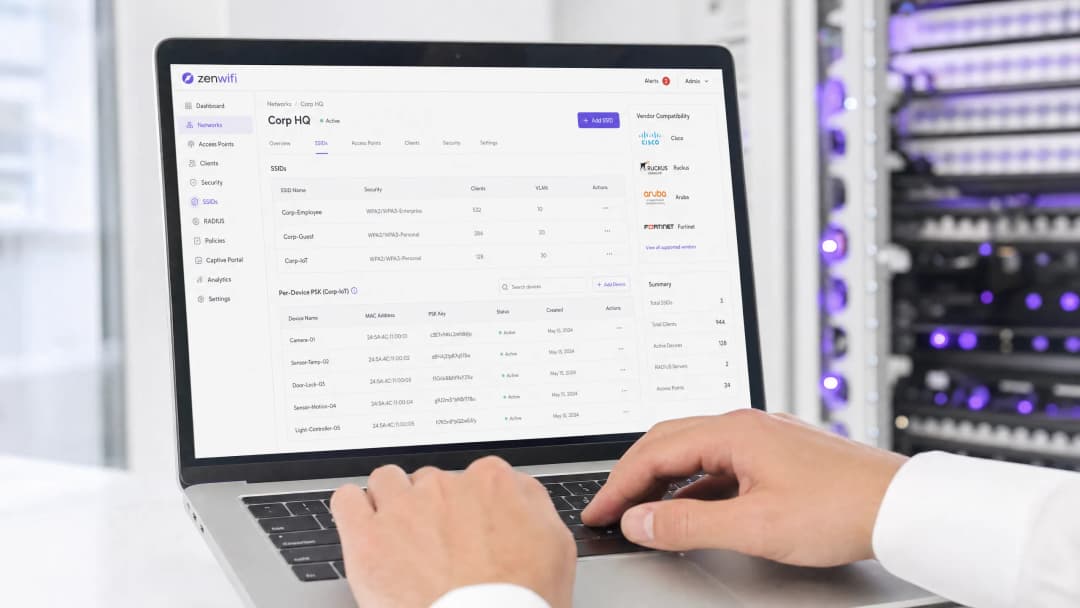
La Clave Precompartida (PSK) por dispositivo es la tecnología de transición esencial para las redes empresariales que necesitan visibilidad por dispositivo sin la complejidad de una autenticación 802.1X completa. Aunque los proveedores utilizan nombres diferentes (Cisco Meraki iPSK, HPE Aruba MPSK, Ruckus DPSK, Juniper Mist PPSK), el objetivo fundamental es idéntico: asignar una contraseña única a cada dispositivo en un solo SSID.
Sin embargo, la transición a WPA3 introduce una limitación arquitectónica importante. WPA3 sustituye el tradicional saludo de cuatro vías de WPA2 por la Autenticación Simultánea de Iguales (SAE). SAE requiere que tanto el punto de acceso como el cliente conozcan la contraseña antes de que comience el intercambio, lo que rompe el mecanismo estándar de búsqueda basado en RADIUS utilizado por la mayoría de las implementaciones de PSK por dispositivo. Esta guía detalla cómo maneja cada proveedor principal la PSK por dispositivo, cómo almacenan y buscan las claves, y cómo abordan el desafío de WPA3-SAE, desde los modos de transición de WPA3 hasta las extensiones propietarias como Ruckus DPSK3.
Análisis Técnico Detallado
La Arquitectura de PSK por Dispositivo
WPA2-Personal tradicional utiliza una única frase de contraseña compartida para todo un SSID. Cada dispositivo utiliza la misma contraseña, lo que significa que no se puede revocar el acceso de un dispositivo sin cambiar la contraseña de todos los demás. Además, no se tiene visibilidad por dispositivo ni aplicación de políticas.
La PSK por dispositivo resuelve esto emitiendo una credencial única para cada dispositivo o usuario. Se puede revocar una clave sin afectar a las demás. También se pueden asignar diferentes VLAN, políticas de ancho de banda o calendarios de acceso por clave.
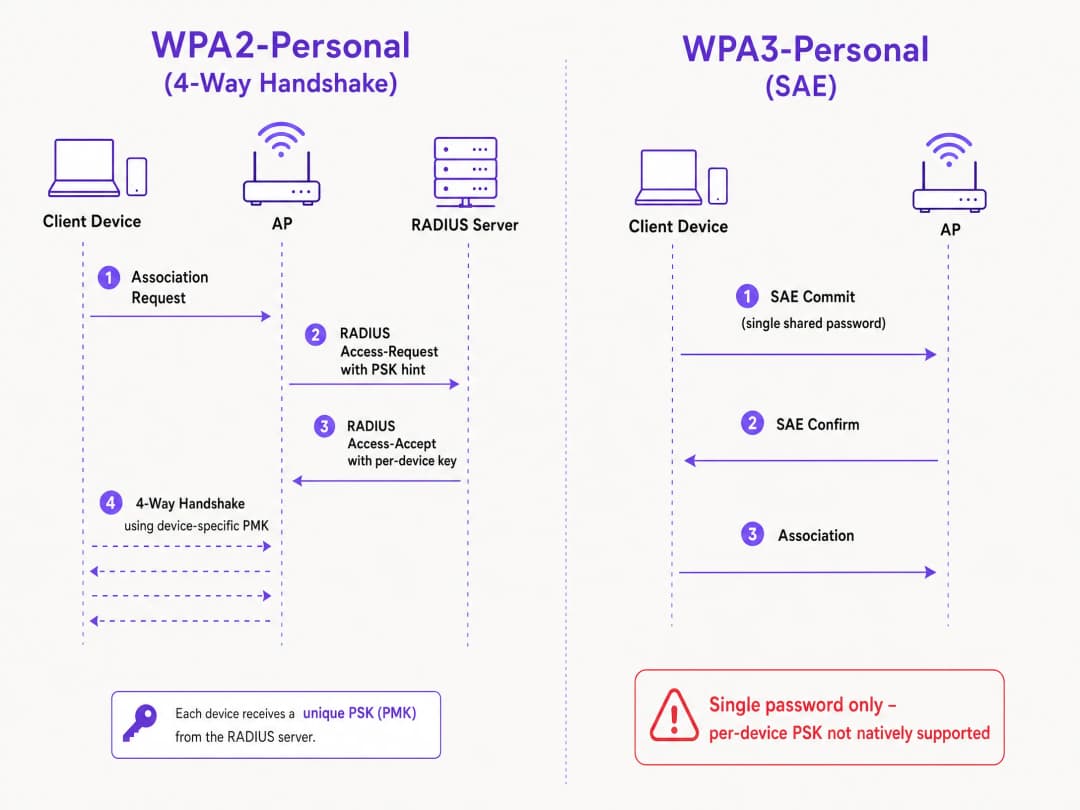
El mecanismo técnico se basa en el saludo de cuatro vías de WPA2. Cuando un cliente se asocia, el punto de acceso envía la dirección MAC del cliente a un servidor RADIUS (o a una base de datos local) en un mensaje Access-Request. El servidor RADIUS devuelve un mensaje Access-Accept que contiene la clave específica para ese dispositivo. Luego, el punto de acceso completa el saludo de cuatro vías utilizando esa clave específica para derivar la Clave Maestra por Pares (PMK).
El Desafío de WPA3-SAE
WPA3-Personal sustituye el saludo de cuatro vías por SAE. SAE es un protocolo basado en Diffie-Hellman en el que ambas partes se comprometen con un elemento de contraseña compartido derivado de la frase de contraseña antes de que se complete la asociación.
La diferencia crítica es que la contraseña debe ser conocida por ambas partes antes de que comience el intercambio SAE. No hay ningún punto en el protocolo donde un servidor RADIUS pueda inyectar una clave diferente por dispositivo. El punto de acceso y el cliente ya están ejecutando un intercambio criptográfico basado en un único valor compartido. Esta es una limitación del protocolo definida por el estándar IEEE 802.11, no una limitación del proveedor.
Comparación de Implementaciones de Proveedores
Cada uno de los principales proveedores empresariales es compatible con PSK por dispositivo, pero sus implementaciones y su preparación para WPA3 varían.
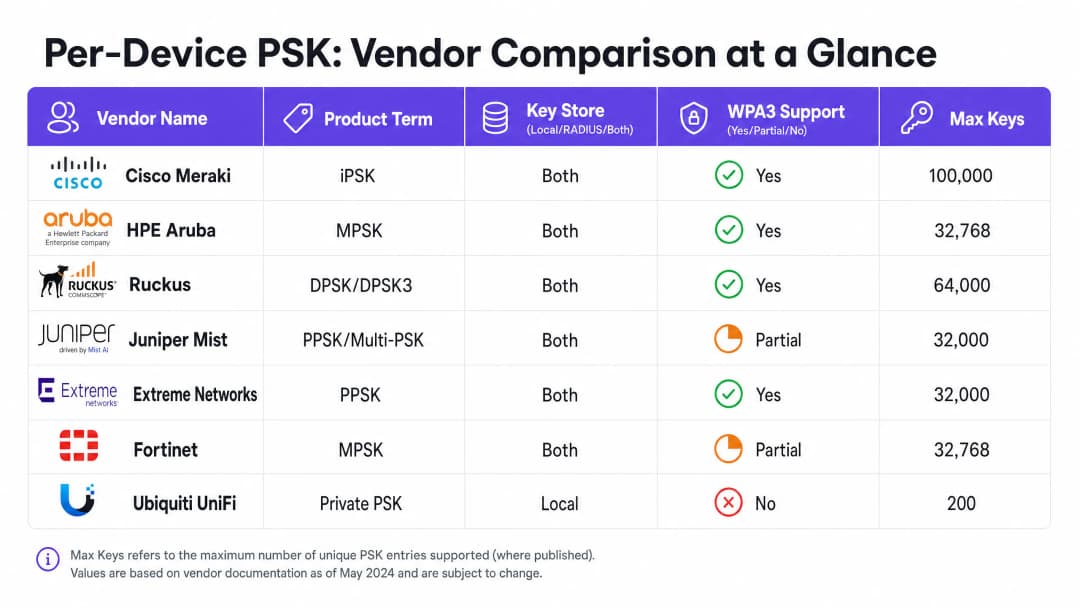
Cisco Meraki (iPSK) Cisco Meraki lo llama Identity Pre-Shared Key (iPSK). Admite dos modos. Sin RADIUS, puede configurar hasta cinco PSKs únicas directamente en el panel de Meraki. Con RADIUS - normalmente Cisco ISE - puede escalar hasta 100,000 claves. El servidor RADIUS realiza la búsqueda y devuelve la clave por dispositivo. Para WPA3, Meraki depende del modo de transición WPA3 (modo mixto WPA2/WPA3), donde los clientes WPA2 utilizan el saludo de cuatro vías y reciben claves por dispositivo, mientras que los clientes WPA3 utilizan SAE con una sola contraseña compartida.
HPE Aruba (MPSK) HPE Aruba lo llama Multiple Pre-Shared Key (MPSK). Aruba admite MPSK Local, donde las claves se almacenan en el controlador, y MPSK con ClearPass, que actúa como motor de políticas y RADIUS. ClearPass puede almacenar decenas de miles de claves y asignar VLANs dinámicas. Al igual que Meraki, el soporte de WPA3 se gestiona actualmente a través del modo de transición.
Ruckus (DPSK y DPSK3) Ruckus lo llama Dynamic Pre-Shared Key (DPSK). Es una de las implementaciones más maduras, disponible desde los inicios de SmartZone. En modo RADIUS, se integra con Cloudpath. Ruckus destaca por DPSK3, su extensión WPA3. DPSK3 opera en modo mixto WPA2/WPA3 y requiere Cloudpath como backend RADIUS. Permite que los dispositivos compatibles con WPA3 utilicen SAE mientras el sistema gestiona la vinculación de claves por dispositivo a través de la integración con Cloudpath.
Juniper Mist (PPSK / Multi-PSK) Juniper Mist lo llama Private Pre-Shared Key (PPSK) o Multi-PSK. Mist almacena las claves en la base de datos de la nube, con un límite de 5,000 claves por sitio. Las claves se pueden asignar por usuario, por dispositivo o por grupo. Mist se integra con su servicio Access Assurance, que añade la búsqueda de PSK basada en RADIUS. Juniper admite WPA3 RADIUS PSK a través de Access Assurance, lo que permite que un único SSID de WPA3-Personal sirva para múltiples contraseñas.
Extreme Networks (PPSK) Extreme Networks lo llama Private Pre-Shared Key (PPSK) a través de ExtremeCloud IQ. Admite el almacenamiento local de claves en el propio punto de acceso, lo cual es útil para sitios remotos, así como la búsqueda basada en RADIUS a través del servicio RADIUS en la nube de ExtremeCloud IQ. Extreme admite la vinculación de MAC para asociar una PPSK a un dispositivo específico.
Fortinet (MPSK) Fortinet lo llama Multiple Pre-Shared Key (MPSK), gestionado a través de FortiAP y el controlador inalámbrico FortiGate. Fortinet admite explícitamente los modos de seguridad WPA3-SAE y WPA3-SAE Transition en sus perfiles MPSK. Puede crear un perfil MPSK con claves WPA3-SAE, asignarlas a una VAP y habilitar la asignación dinámica de VLAN.
Ubiquiti UniFi (Private PSK) Ubiquiti UniFi lo denomina Private Pre-Shared Keys. La implementación es únicamente local; las claves se almacenan en el controlador de UniFi Network. Puede asignar diferentes VLANs por clave. Sin embargo, UniFi Private PSK solo funciona en redes WPA2 en 2.4 GHz y 5 GHz. WPA3 y 6 GHz no son compatibles.
¿Tiene preguntas sobre su configuración específica?
Nuestro equipo trabaja con gestores de espacios, responsables de TI e ingenieros de redes en 80 000 establecimientos. Reserve una llamada de 20 minutos y le mostraremos cómo lo resolvieron otros profesionales como usted.
Guía de implementación
Al implementar PSK por dispositivo, siga estos pasos para garantizar una arquitectura segura y escalable.
- Audite el panorama de sus dispositivos: Identifique qué dispositivos son compatibles con WPA3 y cuáles dependen de WPA2. Es probable que los dispositivos IoT heredados requieran WPA2 en el futuro previsible.
- Seleccione la estrategia de SSID adecuada: Para un entorno mixto, implemente un diseño de SSID híbrido. Mantenga un SSID WPA2-Personal con PSK por dispositivo para dispositivos de invitados e IoT heredados. Implemente un SSID WPA3-Enterprise para los dispositivos administrados del personal.
- Implemente el modo de transición con cuidado: Si utiliza el modo de transición WPA3 en su SSID de invitados principal, asegúrese de que sus puntos de acceso y servidores RADIUS estén configurados correctamente para manejar los flujos de autenticación mixtos.
- Integre la gestión de identidades: No gestione las claves de forma manual. Integre el aprovisionamiento de sus claves con su flujo de trabajo de gestión de dispositivos o con un proveedor de identidad como Microsoft Entra ID u Okta.
- Configure VLANs dinámicas: Asocie cada PSK por dispositivo a una VLAN específica para aplicar la segmentación de red. Esto es fundamental para aislar los dispositivos IoT del tráfico de invitados.
Mejores prácticas
- Aplique la gestión del ciclo de vida: El uso de PSK por dispositivo requiere una gestión estricta del ciclo de vida. Debe contar con un proceso para revocar las claves cuando los dispositivos se retiren del servicio para evitar la saturación de claves.
- Utilice 802.1X para endpoints administrados: Para las laptops corporativas y los dispositivos del personal, migre a WPA3-Enterprise con EAP-TLS. Esto proporciona una mayor seguridad y compatibilidad nativa con modelos de confianza cero.
- Pruebe las actualizaciones a WPA3: Nunca habilite WPA3 en un SSID de PSK por dispositivo existente sin realizar pruebas previas en un sitio piloto. Verifique las versiones de firmware y la compatibilidad del servidor RADIUS.
- Aproveche Purple para la identidad: Integre Purple para gestionar la capa de identidad. Purple funciona como una capa de superposición en la nube, proporcionando autenticación, captura de datos y gestión de consentimiento, y envía la asignación de VLAN adecuada de vuelta a su hardware a través de RADIUS. Consulte Seguridad de WiFi empresarial: Una guía completa para 2026 para obtener más detalles.
Resolución de problemas y mitigación de riesgos
- Clientes que no pueden conectarse a WPA3: Si los dispositivos heredados no logran conectarse a un SSID en modo de transición WPA3, a menudo se debe a controladores inalámbricos incompatibles. Asegúrese de que los controladores de los clientes estén actualizados. Si el problema persiste, mueva los dispositivos heredados a un SSID dedicado exclusivo para WPA2.
- Tiempos de espera de RADIUS agotados: Si el punto de acceso agota el tiempo de espera mientras espera la clave por dispositivo del servidor RADIUS, verifique la ruta de red y asegúrese de que el servidor RADIUS esté dimensionado correctamente para manejar la carga de autenticación.* Fallas de asignación de VLAN: Si un dispositivo se conecta pero recibe la dirección IP incorrecta, verifique el mapeo de VLAN en el mensaje RADIUS Access-Accept y asegúrese de que la VLAN exista en el punto de acceso y en el puerto del switch.
ROI e impacto empresarial
La implementación de PSK por dispositivo ofrece un valor empresarial medible al reducir los tickets de soporte y mejorar la seguridad.
- Menor carga para el soporte técnico: La automatización del aprovisionamiento y la revocación de claves elimina los restablecimientos manuales de contraseñas.
- Mayor postura de seguridad: El aislamiento de los dispositivos en VLANs independientes en función de su clave única reduce el radio de impacto de un dispositivo comprometido.
- Visibilidad mejorada: Las claves por dispositivo brindan una visibilidad detallada del uso de la red, lo que le permite identificar a los acaparadores de ancho de banda y optimizar la planificación de la capacidad.
Definiciones clave
PSK por dispositivo
Un mecanismo de seguridad que asigna una Pre-Shared Key única a cada dispositivo o usuario en un único SSID, lo que permite la revocación individual y la asignación dinámica de políticas.
Se utiliza cuando los equipos de TI necesitan visibilidad y control por dispositivo sin tener que implementar una autenticación 802.1X completa.
WPA3-SAE
Simultaneous Authentication of Equals. El protocolo seguro de establecimiento de claves utilizado en WPA3-Personal, que reemplaza el saludo de cuatro vías de WPA2.
Relevante al actualizar a WPA3 o al implementar redes de 6 GHz, ya que cambia fundamentalmente la forma en que se autentican las contraseñas.
Modo de transición
Una configuración de modo mixto en la que un SSID anuncia soporte tanto para WPA2-PSK como para WPA3-SAE, lo que permite que los clientes heredados y modernos se conecten al mismo nombre de red.
El enfoque estándar para migrar las redes existentes a WPA3 sin dejar incomunicados a los dispositivos heredados.
Asociación de MAC
El proceso de asociar una PSK por dispositivo específica con la dirección MAC de hardware de un dispositivo específico, evitando que la clave se use en otro dispositivo.
Se utiliza para evitar el uso compartido de credenciales y garantizar un control de acceso estricto para los dispositivos IoT.
Asignación dinámica de VLAN
La capacidad de asignar un dispositivo a una VLAN específica en función de sus credenciales de autenticación (como su PSK por dispositivo), en lugar del SSID al que se conecta.
Esencial para la segmentación de red, lo que permite a TI aislar el tráfico de invitados del tráfico corporativo en el mismo punto de acceso.
iPSK
Identity Pre-Shared Key. La implementación de Cisco Meraki de PSK por dispositivo.
Se encuentra al administrar redes inalámbricas Cisco Meraki.
DPSK
Dynamic Pre-Shared Key. La implementación de Ruckus de PSK por dispositivo, siendo DPSK3 la versión compatible con WPA3.
Se encuentra al administrar redes inalámbricas Ruckus.
MPSK
Multiple Pre-Shared Key. El término utilizado por HPE Aruba y Fortinet para sus implementaciones de PSK por dispositivo.
Se encuentra al administrar redes inalámbricas HPE Aruba o Fortinet.
Ejemplos resueltos
Un hotel de 200 habitaciones necesita proporcionar WiFi de invitados seguro y aislar las Smart TV en cada habitación. Actualmente utilizan una única contraseña WPA2-Personal para todos los huéspedes y dispositivos.
Implemente PSK por dispositivo utilizando un backend RADIUS. Integre Purple para capturar los datos de los huéspedes y emitir una PSK única a cada huésped al registrarse. Para las Smart TV, genere una PSK única para cada televisor y asóciela a una VLAN de IoT dedicada. Configure las PSK de los huéspedes para que se asocien a una VLAN de invitados independiente con el aislamiento de clientes activado.
El campus de una universidad se está actualizando a WiFi 6E y debe admitir WPA3 en la banda de 6 GHz, pero tienen miles de dispositivos IoT heredados que solo admiten WPA2.
Implemente un diseño de SSID híbrido. Cree un SSID WPA3-Enterprise para las laptops y smartphones de estudiantes y personal, utilizando 802.1X para la autenticación. Cree un SSID WPA2-Personal independiente con PSK por dispositivo en las bandas de 2.4 GHz y 5 GHz específicamente para los dispositivos IoT heredados.
Preguntas de práctica
Q1. Está implementando puntos de acceso WiFi 6E y necesita dar soporte a clientes de 6 GHz. Su red de 5 GHz existente utiliza iPSK para dispositivos IoT. ¿Puede extender la configuración de iPSK a la banda de 6 GHz?
Sugerencia: Considere los protocolos de seguridad obligatorios para la banda de 6 GHz.
Q2. Una cadena de tiendas de retail utiliza Aruba MPSK para asignar claves únicas a las terminales de punto de venta. Quieren actualizar su SSID principal a WPA3 para obtener una mejor seguridad. ¿Cuál es el enfoque recomendado?
Sugerencia: Aruba MPSK requiere el saludo de cuatro vías de WPA2.
Ver respuesta modelo
Habilite el modo de transición WPA3 (modo mixto WPA2/WPA3) en el SSID. Las terminales de punto de venta continuarán conectándose usando WPA2 y MPSK, mientras que los dispositivos más nuevos pueden conectarse usando WPA3-SAE con una contraseña compartida.
Q3. Usted administra una red Ruckus y desea implementar PSK por dispositivo para clientes WPA3. ¿Qué configuración específica se requiere?
Sugerencia: Considere la extensión propietaria que ofrece Ruckus y sus requisitos de backend.
Ver respuesta modelo
Debe implementar Ruckus DPSK3. Esto requiere puntos de acceso WiFi 6 o más nuevos con firmware 7.0 o posterior, configurar el SSID para el modo mixto WPA2/WPA3 y utilizar Ruckus Cloudpath como servidor RADIUS.
Continúe leyendo esta serie
Resolución de problemas de 802.1X en iOS y macOS: una lista de verificación de implementación para Intune, Jamf y Microsoft Entra ID
Use esta lista de verificación para diagnosticar por qué los iPhones, iPads y Macs fallan al conectarse a 802.1X en Intune o Jamf Pro. Cada falla se debe a una de cuatro causas: confianza en el servidor, certificado de identidad, modo de macOS o alcance de grupo de Microsoft Entra ID. Confirmará la causa mediante los registros de eapolclient y RADIUS, aplicará la solución y programará las futuras rotaciones de certificados.
Confianza en servidor de perfil de WiFi de Intune: nombres de servidor de certificado y lista de verificación de CA raíz para Microsoft Entra ID
Podrá configurar la parte de validación de servidor de un perfil de WiFi de Intune para que EAP-TLS y PEAP se conecten en Windows, Apple y Android. Hará coincidir los nombres de servidor de certificado con el certificado RADIUS, implementará la CA raíz correcta, alineará las asignaciones de grupos de Microsoft Entra ID y programará las renovaciones de certificados antes de que interrumpan las conexiones de forma silenciosa.
Resolución de problemas de Android 802.1X y EAP-TLS: una lista de verificación de implementación para Intune y Microsoft Entra ID
Podrá identificar con precisión por qué los teléfonos Android administrados fallan al usar EAP-TLS en su SSID de personal y solucionarlo en Intune. Relacione cada síntoma con las cuatro causas habituales: falta de CA o dominio, certificado de cliente en el perfil incorrecto, un valor de nombres de servidor RADIUS no coincidente o una raíz de confianza no entregada. Luego, aplique una lista de verificación de implementación que evite interrupciones repetidas.
¿Tiene preguntas sobre su configuración específica?
Nuestro equipo trabaja con gestores de espacios, responsables de TI e ingenieros de redes en 80 000 establecimientos. Reserve una llamada de 20 minutos y le mostraremos cómo lo resolvieron otros profesionales como usted.