
PSK por Dispositivo por Fabricante: Comparação de iPSK, DPSK, MPSK e PPSK (e Suporte WPA3)
Uma comparação abrangente de implementações de PSK por dispositivo entre Cisco Meraki, HPE Aruba, Ruckus, Juniper Mist, Extreme, Fortinet e Ubiquiti UniFi. Saiba como o WPA3-SAE afeta as estratégias de chaves por dispositivo e quando implementar modos de transição versus migrar para o 802.1X.
Video overview
Ouça este guia
Ver transcrição do podcast
Parte da nossa série principal: Enterprise WiFi Security Guide →
Resumo Executivo
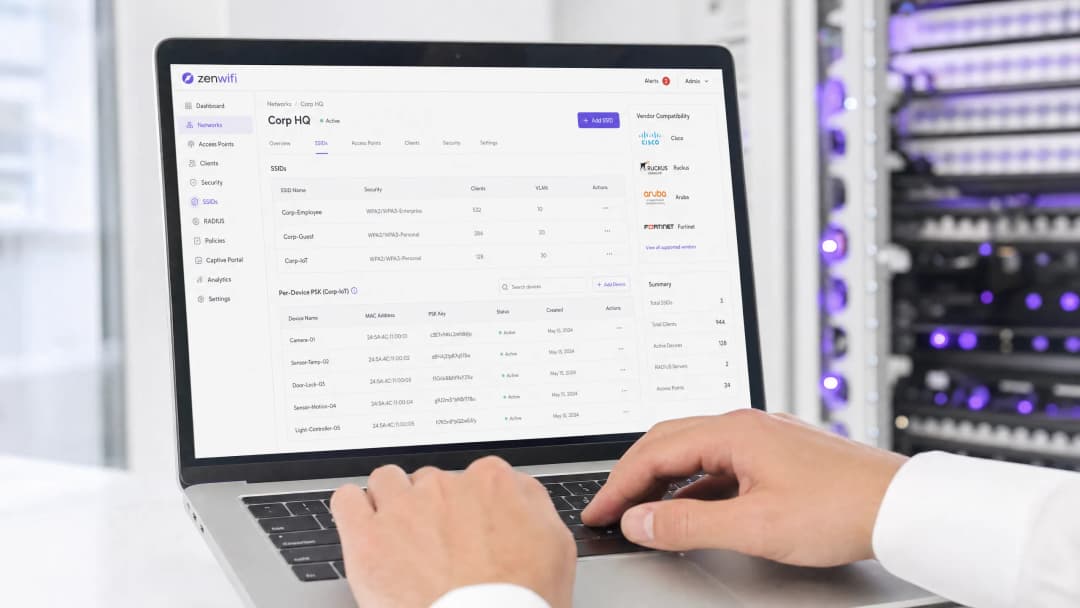
A Pre-Shared Key (PSK) por dispositivo é a tecnologia de transição essencial para redes empresariais que necessitam de visibilidade por dispositivo sem a complexidade de uma autenticação completa 802.1X. Embora os fabricantes utilizem designações diferentes - Cisco Meraki iPSK, HPE Aruba MPSK, Ruckus DPSK, Juniper Mist PPSK - o objetivo fundamental é idêntico: atribuir uma palavra-passe única a cada dispositivo num único SSID.
No entanto, a transição para o WPA3 introduz uma limitação arquitetural significativa. O WPA3 substitui o tradicional handshake de quatro vias do WPA2 pelo Simultaneous Authentication of Equals (SAE). O SAE exige que a palavra-passe seja conhecida tanto pelo ponto de acesso como pelo cliente antes de a troca iniciar, o que quebra o mecanismo padrão de pesquisa baseado em RADIUS utilizado pela maioria das implementações de PSK por dispositivo. Este guia detalha como cada principal fabricante gere a PSK por dispositivo, como armazenam e pesquisam chaves, e como abordam o desafio do WPA3-SAE - desde os modos de transição WPA3 até extensões proprietárias como o Ruckus DPSK3.
Análise Técnica Detalhada
A Arquitetura da PSK por Dispositivo
O WPA2-Personal tradicional utiliza uma única frase de passe partilhada para todo um SSID. Todos os dispositivos utilizam a mesma palavra-passe, o que significa que não é possível revogar o acesso de um dispositivo sem alterar a palavra-passe de todos os outros. Além disso, não dispõe de visibilidade ou aplicação de políticas por dispositivo.
A PSK por dispositivo resolve este problema ao emitir uma credencial única para cada dispositivo ou utilizador. Pode revogar uma chave sem afetar as restantes. Pode atribuir diferentes VLANs, políticas de largura de banda ou horários de acesso por chave.
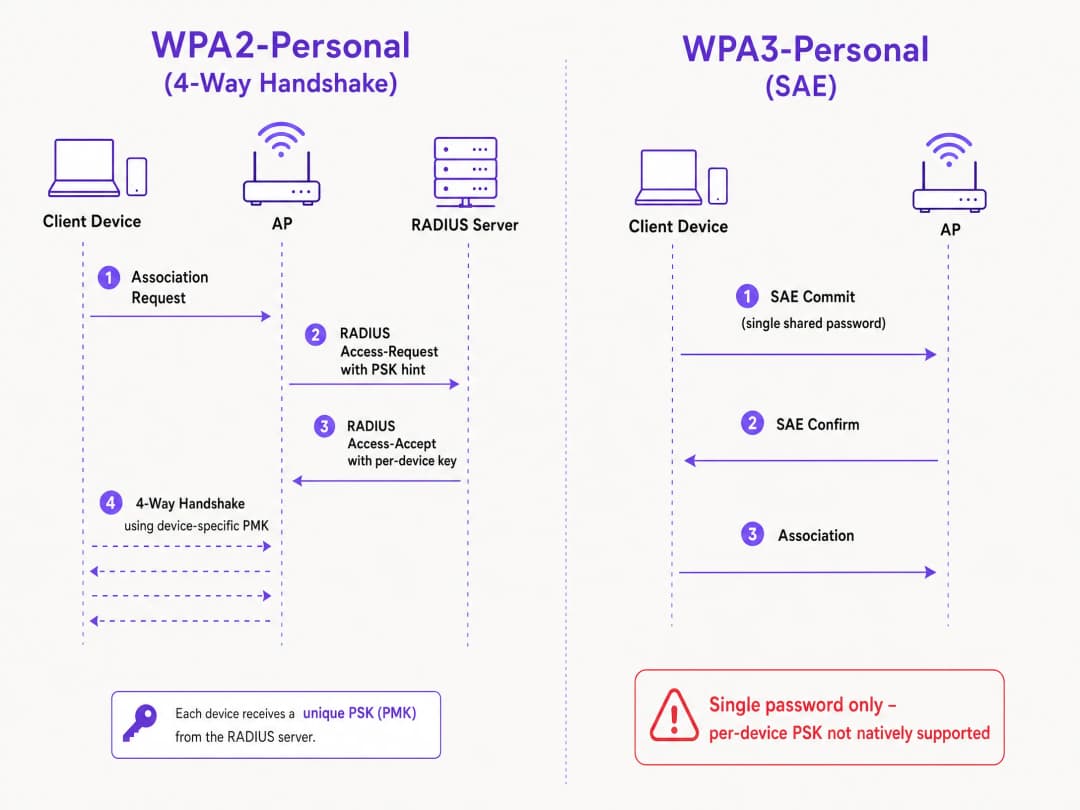
O mecanismo técnico baseia-se no handshake de quatro vias do WPA2. Quando um cliente se associa, o ponto de acesso envia o endereço MAC do cliente para um servidor RADIUS (ou uma base de dados local) numa mensagem de Access-Request. O servidor RADIUS devolve uma mensagem de Access-Accept que contém a chave específica para esse dispositivo. O ponto de acesso conclui então o handshake de quatro vias utilizando essa chave específica para derivar a Pairwise Master Key (PMK).
O Desafio do WPA3-SAE
O WPA3-Personal substitui o handshake de quatro vias pelo SAE. O SAE é um protocolo baseado em Diffie-Hellman onde ambas as partes se comprometem com um elemento de palavra-passe partilhado, derivado da frase de passe antes de a associação estar concluída.
A diferença crítica é que a palavra-passe tem de ser conhecida por ambas as partes antes do início da troca SAE. Não existe nenhum ponto no protocolo onde um servidor RADIUS possa injetar uma chave diferente por dispositivo. O ponto de acesso e o cliente já estão a executar uma troca criptográfica baseada num único valor partilhado. Trata-se de uma limitação do protocolo definida pela norma IEEE 802.11, e não de uma limitação do fabricante.
Comparativo de Implementações de Fabricantes
Todos os principais fabricantes empresariais suportam PSK por dispositivo, mas as suas implementações e prontidão para WPA3 variam.
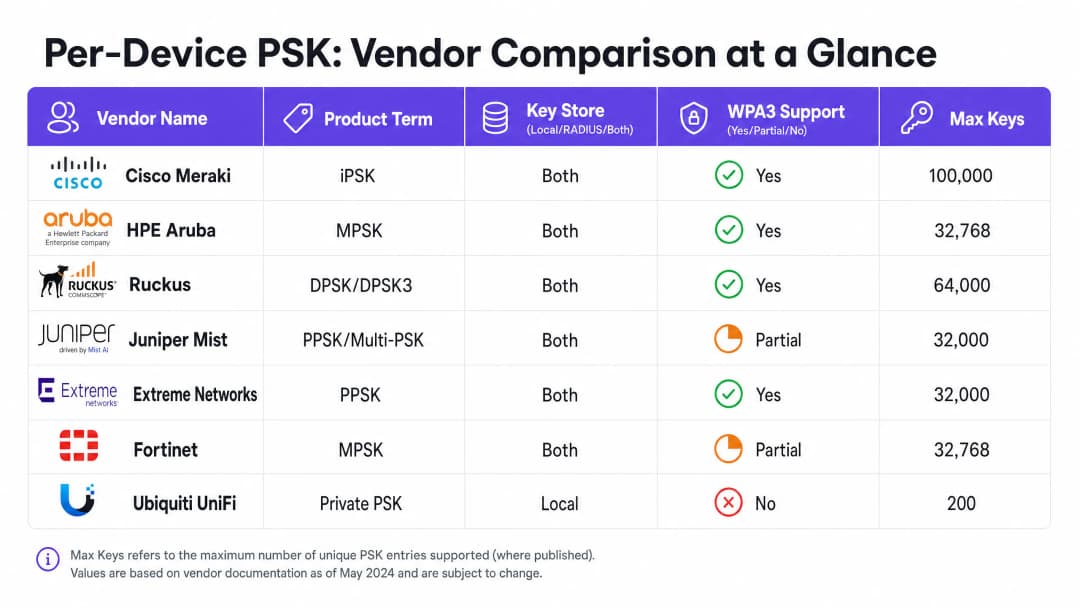
Cisco Meraki (iPSK) A Cisco Meraki chama-lhe Identity Pre-Shared Key (iPSK). Suporta dois modos. Sem RADIUS, pode configurar até cinco chaves PSK exclusivas diretamente no painel de controlo da Meraki. Com RADIUS - normalmente o Cisco ISE - pode expandir para 100.000 chaves. O servidor RADIUS realiza a consulta e devolve a chave por dispositivo. Para WPA3, a Meraki depende do modo de transição WPA3 (modo misto WPA2/WPA3), onde os clientes WPA2 utilizam o handshake de quatro vias e recebem chaves por dispositivo, enquanto os clientes WPA3 utilizam SAE com uma única palavra-passe partilhada.
HPE Aruba (MPSK) A HPE Aruba chama-lhe Multiple Pre-Shared Key (MPSK). A Aruba suporta MPSK Local, onde as chaves são armazenadas no controlador, e MPSK com ClearPass, que atua como RADIUS e motor de políticas. O ClearPass pode conter dezenas de milhares de chaves e atribuir VLANs dinâmicas. Tal como a Meraki, o suporte para WPA3 é atualmente gerido através do modo de transição.
Ruckus (DPSK e DPSK3) A Ruckus chama-lhe Dynamic Pre-Shared Key (DPSK). É uma das implementações mais maduras, disponível desde os primórdios do SmartZone. No modo RADIUS, integra-se com o Cloudpath. A Ruckus destaca-se pelo DPSK3, a sua extensão para WPA3. O DPSK3 opera no modo misto WPA2/WPA3 e requer o Cloudpath como infraestrutura RADIUS de backend. Permite que dispositivos compatíveis com WPA3 utilizem SAE enquanto o sistema gere a associação de chaves por dispositivo através da integração com o Cloudpath.
Juniper Mist (PPSK / Multi-PSK) A Juniper Mist chama-lhe Private Pre-Shared Key (PPSK) ou Multi-PSK. A Mist armazena as chaves na base de dados na nuvem, com um limite de 5.000 chaves por local. As chaves podem ser atribuídas por utilizador, por dispositivo ou por grupo. A Mist integra-se com o seu serviço Access Assurance, que adiciona a consulta de PSK baseada em RADIUS. A Juniper suporta WPA3 RADIUS PSK através do Access Assurance, permitindo que um único SSID WPA3-Personal sirva várias palavras-passe.
Extreme Networks (PPSK) A Extreme Networks chama-lhe Private Pre-Shared Key (PPSK) através do ExtremeCloud IQ. Suporta o armazenamento local de chaves no próprio ponto de acesso, o que é útil para locais remotos, bem como a consulta baseada em RADIUS através do serviço cloud RADIUS do ExtremeCloud IQ. A Extreme suporta a associação de MAC para vincular um PPSK a um dispositivo específico.
Fortinet (MPSK) A Fortinet chama-lhe Multiple Pre-Shared Key (MPSK), gerido através do FortiAP e do controlador sem fios FortiGate. A Fortinet suporta explicitamente os modos de segurança WPA3-SAE e WPA3-SAE Transition nos seus perfis MPSK. Pode criar um perfil MPSK com chaves WPA3-SAE, atribuí-las a um VAP e ativar a atribuição dinâmica de VLAN.
Ubiquiti UniFi (Private PSK) A Ubiquiti UniFi chama-lhe Private Pre-Shared Keys. A implementação é apenas local; as chaves são armazenadas no controlador UniFi Network. Pode atribuir diferentes VLANs por chave. No entanto, o Private PSK da UniFi apenas funciona em redes WPA2 de 2.4 GHz e 5 GHz. O WPA3 e os 6 GHz não são suportados.
Tem dúvidas sobre a sua configuração específica?
A nossa equipa trabalha com operadores de espaços, gestores de TI e engenheiros de rede em 80.000 espaços. Agende uma chamada de 20 minutos e mostraremos como outros profissionais na sua área o resolveram.
Guia de Implementação
Ao implementar o PSK por dispositivo, siga estes passos para garantir uma arquitetura segura e escalável.
- Audite o Panorama dos Seus Dispositivos: Identifique quais os dispositivos que suportam WPA3 e quais os que dependem do WPA2. Os dispositivos IoT antigos provavelmente necessitarão de WPA2 num futuro próximo.
- Selecione a Estratégia de SSID Correta: Para um ambiente misto, implemente um design de SSID híbrido. Mantenha um SSID WPA2-Personal com PSK por dispositivo para dispositivos IoT antigos e convidados. Implemente um SSID WPA3-Enterprise para dispositivos geridos de funcionários.
- Implemente o Modo de Transição com Cuidado: Se utilizar o modo de transição WPA3 no seu SSID principal de convidados, certifique-se de que os seus pontos de acesso e servidores RADIUS estão corretamente configurados para processar os fluxos de autenticação mistos.
- Integre a Gestão de Identidades: Não gira as chaves manualmente. Integre o seu aprovisionamento de chaves com o seu fluxo de trabalho de gestão de dispositivos ou com um fornecedor de identidade como o Microsoft Entra ID ou Okta.
- Configure VLANs Dinâmicas: Associe cada PSK por dispositivo a uma VLAN específica para impor a segmentação de rede. Isto é fundamental para isolar os dispositivos IoT do tráfego de convidados.
Boas Práticas
- Imponha a Gestão do Ciclo de Vida: O PSK por dispositivo exige uma gestão rigorosa do ciclo de vida. Deve ter um processo para revogar chaves quando os dispositivos são desativados para evitar a dispersão de chaves.
- Utilize 802.1X para Terminais Geridos: Para computadores portáteis corporativos e dispositivos de funcionários, mude para WPA3-Enterprise com EAP-TLS. Este oferece uma segurança mais forte e compatibilidade nativa com modelos de confiança zero.
- Teste as Atualizações para WPA3: Nunca ative o WPA3 num SSID de PSK por dispositivo existente sem testar num local piloto. Verifique as versões de firmware e a compatibilidade do servidor RADIUS.
- Aproveite a Purple para Identidade: Integre a Purple para gerir a camada de identidade. A Purple funciona como uma sobreposição na nuvem, fornecendo autenticação, recolha de dados e gestão de consentimento, e devolve a atribuição de VLAN adequada ao seu hardware através de RADIUS. Consulte Enterprise WiFi Security: A Complete Guide for 2026 para obter mais detalhes.
Resolução de Problemas e Mitigação de Riscos
- Falha de Ligação de Clientes no WPA3: Se os dispositivos antigos não se conseguirem ligar a um SSID em modo de transição WPA3, deve-se frequentemente a controladores sem fios incompatíveis. Certifique-se de que os controladores dos clientes estão atualizados. Se o problema persistir, mova os dispositivos antigos para um SSID dedicado apenas a WPA2.
- Excedido o Tempo Limite do RADIUS: Se o ponto de acesso exceder o tempo limite enquanto aguarda pela chave por dispositivo do servidor RADIUS, verifique o caminho de rede e certifique-se de que o servidor RADIUS está dimensionado para processar a carga de autenticação.
- Falhas de Atribuição de VLAN: Se um dispositivo se ligar mas receber o endereço IP errado, verifique o mapeamento de VLAN na mensagem RADIUS Access-Accept e certifique-se de que a VLAN existe no ponto de acesso e na porta do switch.
ROI e Impacto no Negócio
A implementação de PSK por dispositivo proporciona um valor comercial mensurável ao reduzir os pedidos de suporte e melhorar a segurança.
- Redução da Carga do Helpdesk: A automatização do aprovisionamento e da revogação de chaves elimina as reposições manuais de palavra-passe.
- Melhoria da Postura de Segurança: O isolamento de dispositivos em VLANs separadas com base na sua chave exclusiva reduz o raio de impacto de um dispositivo comprometido.
- Visibilidade Reforçada: As chaves por dispositivo oferecem uma visibilidade detalhada da utilização da rede, permitindo-lhe identificar os consumidores excessivos de largura de banda e otimizar o planeamento de capacidade.
Definições Principais
PSK por Dispositivo
Um mecanismo de segurança que atribui uma Pre-Shared Key única a cada dispositivo ou utilizador num único SSID, permitindo a revogação individual e a atribuição dinâmica de políticas.
Utilizado quando as equipas de TI precisam de visibilidade e controlo por dispositivo sem implementar a autenticação 802.1X completa.
WPA3-SAE
Simultaneous Authentication of Equals. O protocolo de estabelecimento de chave segura utilizado no WPA3-Personal, substituindo o handshake de quatro vias do WPA2.
Relevante ao atualizar para WPA3 ou ao implementar redes de 6 GHz, pois altera fundamentalmente a forma como as palavras-passe são autenticadas.
Modo de Transição
Uma configuração de modo misto onde um SSID anuncia suporte para WPA2-PSK e WPA3-SAE, permitindo que clientes legados e modernos se liguem ao mesmo nome de rede.
A abordagem padrão para migrar redes existentes para WPA3 sem isolar dispositivos legados.
Associação de MAC
O processo de associar uma PSK por dispositivo específica ao endereço MAC de hardware de um dispositivo específico, impedindo que a chave seja utilizada noutro dispositivo.
Utilizado para evitar a partilha de credenciais e garantir um controlo de acesso rigoroso para dispositivos IoT.
Atribuição Dinâmica de VLAN
A capacidade de atribuir um dispositivo a uma Virtual LAN específica com base nas suas credenciais de autenticação (como a sua PSK por dispositivo), em vez do SSID ao qual se liga.
Essencial para a segmentação de rede, permitindo que as TI isolem o tráfego de hóspedes do tráfego corporativo no mesmo ponto de acesso.
iPSK
Identity Pre-Shared Key. A implementação de PSK por dispositivo da Cisco Meraki.
Encontrado ao gerir redes sem fios Cisco Meraki.
DPSK
Dynamic Pre-Shared Key. A implementação de PSK por dispositivo da Ruckus, sendo o DPSK3 a versão compatível com WPA3.
Encontrado ao gerir redes sem fios Ruckus.
MPSK
Multiple Pre-Shared Key. O termo utilizado pela HPE Aruba e Fortinet para as suas implementações de PSK por dispositivo.
Encontrado ao gerir redes sem fios HPE Aruba ou Fortinet.
Exemplos Práticos
Um hotel com 200 quartos precisa de fornecer Guest WiFi seguro e isolar as smart TVs em cada quarto. Atualmente, utilizam uma única palavra-passe WPA2-Personal para todos os hóspedes e dispositivos.
Implemente PSK por dispositivo utilizando um backend RADIUS. Integre o Purple para recolher os dados dos hóspedes e emitir uma PSK exclusiva para cada hóspede após o registo. Para as smart TVs, gere uma PSK exclusiva para cada TV e associe-a a uma VLAN de IoT dedicada. Configure as PSK dos hóspedes para mapearem para uma VLAN de Guest separada com isolamento de clientes ativado.
Um campus universitário está a atualizar para WiFi 6E e deve suportar WPA3 na banda de 6 GHz, mas tem milhares de dispositivos IoT legados que apenas suportam WPA2.
Implemente um design de SSID híbrido. Crie um SSID WPA3-Enterprise para computadores portáteis e smartphones de estudantes e funcionários, utilizando 802.1X para autenticação. Crie um SSID WPA2-Personal separado com PSK por dispositivo nas bandas de 2.4 GHz e 5 GHz especificamente para os dispositivos IoT legados.
Perguntas de Prática
Q1. Está a implementar pontos de acesso WiFi 6E e precisa de suportar clientes de 6 GHz. A sua rede de 5 GHz existente utiliza iPSK para dispositivos IoT. Pode estender a configuração iPSK para a banda de 6 GHz?
Dica: Considere os protocolos de segurança obrigatórios para a banda de 6 GHz.
Q2. Uma cadeia de lojas utiliza Aruba MPSK para atribuir chaves exclusivas a terminais de ponto de venda. Querem atualizar o seu SSID principal para WPA3 para uma melhor segurança. Qual é a abordagem recomendada?
Dica: O Aruba MPSK requer o handshake de quatro vias do WPA2.
Ver resposta modelo
Ative o modo de transição WPA3 (modo misto WPA2/WPA3) no SSID. Os terminais de ponto de venda continuarão a ligar-se utilizando WPA2 e MPSK, enquanto os dispositivos mais recentes se podem ligar utilizando WPA3-SAE com uma palavra-passe partilhada.
Q3. Gere uma rede Ruckus e pretende implementar PSK por dispositivo para clientes WPA3. Que configuração específica é necessária?
Dica: Considere a extensão proprietária que a Ruckus oferece e os seus requisitos de backend.
Ver resposta modelo
Deve implementar Ruckus DPSK3. Isto requer pontos de acesso WiFi 6 ou mais recentes a executar o firmware 7.0 ou posterior, configurando o SSID para o modo misto WPA2/WPA3, e utilizando o Ruckus Cloudpath como servidor RADIUS.
Continue a ler esta série
Resolução de problemas de 802.1X em iOS e macOS: uma lista de verificação de implementação para Intune, Jamf e Microsoft Entra ID
Utilize esta lista de verificação para diagnosticar por que razão iPhones, iPads e Macs falham o 802.1X no Intune ou Jamf Pro. Cada falha corresponde a uma de quatro causas: fidedignidade do servidor, certificado de identidade, modo macOS ou âmbito do grupo do Microsoft Entra ID. Irá confirmar a causa a partir dos registos do eapolclient e RADIUS, aplicar a correção e preparar futuras rotações de certificados.
Fidedignidade do servidor do perfil WiFi do Intune: nomes de servidor de certificados e lista de verificação de CA raiz para Entra ID
Será capaz de configurar a metade da validação de servidor de um perfil WiFi do Intune para que o EAP-TLS e o PEAP se liguem no Windows, Apple e Android. Irá fazer corresponder os nomes dos servidores de certificados ao certificado RADIUS, implementar a CA raiz correta, alinhar as atribuições de grupos do Entra ID e programar as renovações de certificados antes que estas quebrem silenciosamente as ligações.
Resolução de problemas de Android 802.1X e EAP-TLS: uma lista de verificação de implementação para o Intune e Microsoft Entra ID
Será capaz de identificar com precisão o motivo pelo qual os telemóveis Android geridos falham o EAP-TLS no seu SSID de funcionários e corrigi-lo no Intune. Associe cada sintoma às quatro causas habituais - CA ou domínio em falta, certificado de cliente no perfil errado, um valor incorreto de nomes de servidores RADIUS ou uma raiz fidedigna não entregue. Em seguida, aplique uma lista de verificação de implementação que impeça a repetição de interrupções.
Tem dúvidas sobre a sua configuração específica?
A nossa equipa trabalha com operadores de espaços, gestores de TI e engenheiros de rede em 80.000 espaços. Agende uma chamada de 20 minutos e mostraremos como outros profissionais na sua área o resolveram.