
ভেন্ডর অনুযায়ী Per-Device PSK: iPSK, DPSK, MPSK এবং PPSK এর তুলনা (এবং WPA3 সাপোর্ট)
Cisco Meraki, HPE Aruba, Ruckus, Juniper Mist, Extreme, Fortinet এবং Ubiquiti UniFi এর মধ্যে per-device PSK ইমপ্লিমেন্টেশনের একটি বিস্তারিত তুলনা। জানুন কীভাবে WPA3-SAE per-device কী স্ট্র্যাটেজিকে প্রভাবিত করে এবং কখন ট্রানজিশন মোড ডিপ্লয় করতে হবে বনাম 802.1X এ চলে যেতে হবে।
Video overview
এই গাইডটি শুনুন
পডকাস্ট ট্রান্সক্রিপ্ট দেখুন
আমাদের মূল সিরিজের অংশ: Enterprise WiFi Security Guide →
Per-device PSK vendor matrix and architecture advisor
Compare vendor implementations of per-device Pre-Shared Keys (Cisco iPSK, Ruckus DPSK, Aruba MPSK, Extreme PPSK, UniFi PPSK), evaluate WPA3-SAE compatibility, and calculate your deployment architecture.
WPA3 Transition Mode supported. Pure WPA3-Personal SAE requires Cloud Auth profile.
Dynamic VLAN steering via RADIUS Tunnel-Private-Group-ID or Meraki Group Policies.
Cached on AP for re-associations. New device onboarding requires dashboard connectivity.
Architectural strengths for Cisco Meraki
- Zero-touch cloud dashboard configuration without on-premises hardware
- Native integration with Meraki Systems Manager MDM for automated key rotation
- Granular Meraki Group Policy assignment based on individual iPSK identity
এক্সিকিউটিভ সামারি
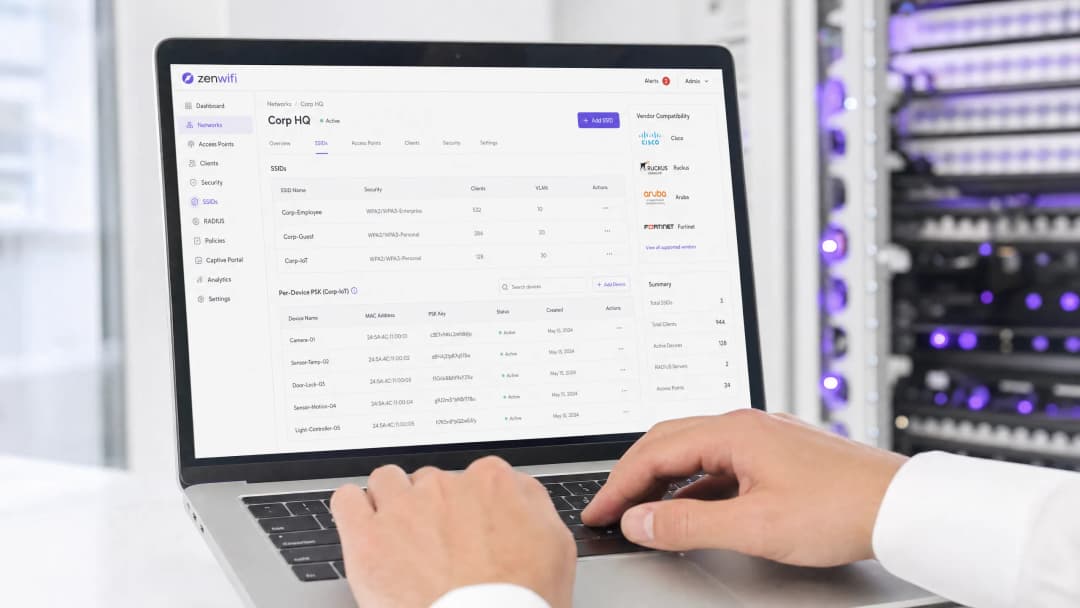
যেসব এন্টারপ্রাইজ নেটওয়ার্কের সম্পূর্ণ 802.1X অথেনটিকেশনের জটিলতা ছাড়াই ডিভাইস প্রতি ভিজিবিলিটি প্রয়োজন, তাদের জন্য প্রতি ডিভাইসে Pre-Shared Key (PSK) ব্যবহার করা একটি অপরিহার্য ট্রানজিশন প্রযুক্তি। বিভিন্ন ভেন্ডর যদিও ভিন্ন নাম ব্যবহার করে - Cisco Meraki iPSK, HPE Aruba MPSK, Ruckus DPSK, Juniper Mist PPSK - মূল লক্ষ্য কিন্তু একই: একটি একক SSID-এ প্রতিটি ডিভাইসের জন্য একটি ইউনিক পাসওয়ার্ড বরাদ্দ করা।
যাইহোক, WPA3-তে স্থানান্তরের ফলে একটি উল্লেখযোগ্য আর্কিটেকচারাল সীমাবদ্ধতা তৈরি হয়। WPA3 প্রচলিত WPA2 ফোর-ওয়ে হ্যান্ডশেককে Simultaneous Authentication of Equals (SAE) দিয়ে প্রতিস্থাপন করে। এক্সচেঞ্জ শুরু হওয়ার আগেই অ্যাক্সেস পয়েন্ট এবং ক্লায়েন্ট উভয়ের কাছে পাসওয়ার্ড জানা থাকা SAE-এর জন্য আবশ্যক, যা বেশিরভাগ প্রতি-ডিভাইস PSK ইমপ্লিমেন্টেশন দ্বারা ব্যবহৃত স্ট্যান্ডার্ড RADIUS-ভিত্তিক লুকআপ মেকানিজমকে ব্যাহত করে। এই গাইডে বিস্তারিত আলোচনা করা হয়েছে কীভাবে প্রতিটি প্রধান ভেন্ডর প্রতি-ডিভাইস PSK পরিচালনা করে, কীভাবে তারা কীগুলি সংরক্ষণ এবং লুকআপ করে এবং কীভাবে তারা WPA3-SAE চ্যালেঞ্জ মোকাবেলা করে - WPA3 ট্রানজিশন মোড থেকে শুরু করে Ruckus DPSK3 এর মতো মালিকানাধীন এক্সটেনশন পর্যন্ত।
টেকনিক্যাল ডিপ-ডাইভ
প্রতি-ডিভাইস PSK-এর আর্কিটেকচার
প্রচলিত WPA2-Personal একটি সম্পূর্ণ SSID-এর জন্য একটি একক শেয়ার্ড পাসফ্রেজ ব্যবহার করে। প্রতিটি ডিভাইস একই পাসওয়ার্ড ব্যবহার করে, যার অর্থ হল সবার জন্য পাসওয়ার্ড পরিবর্তন না করে আপনি একটি ডিভাইসের অ্যাক্সেস বাতিল করতে পারবেন না। তাছাড়া, আপনার কাছে কোনো প্রতি-ডিভাইস ভিজিবিলিটি বা পলিসি প্রয়োগের সুবিধা থাকে না।
প্রতি-ডিভাইস PSK প্রতিটি ডিভাইস বা ব্যবহারকারীকে একটি ইউনিক ক্রেডেনশিয়াল প্রদানের মাধ্যমে এই সমস্যার সমাধান করে। আপনি অন্যগুলিকে স্পর্শ না করেই একটি কী বাতিল করতে পারেন। আপনি প্রতি কী-তে আলাদা VLAN, ব্যান্ডউইথ পলিসি বা অ্যাক্সেস শিডিউল বরাদ্দ করতে পারেন।
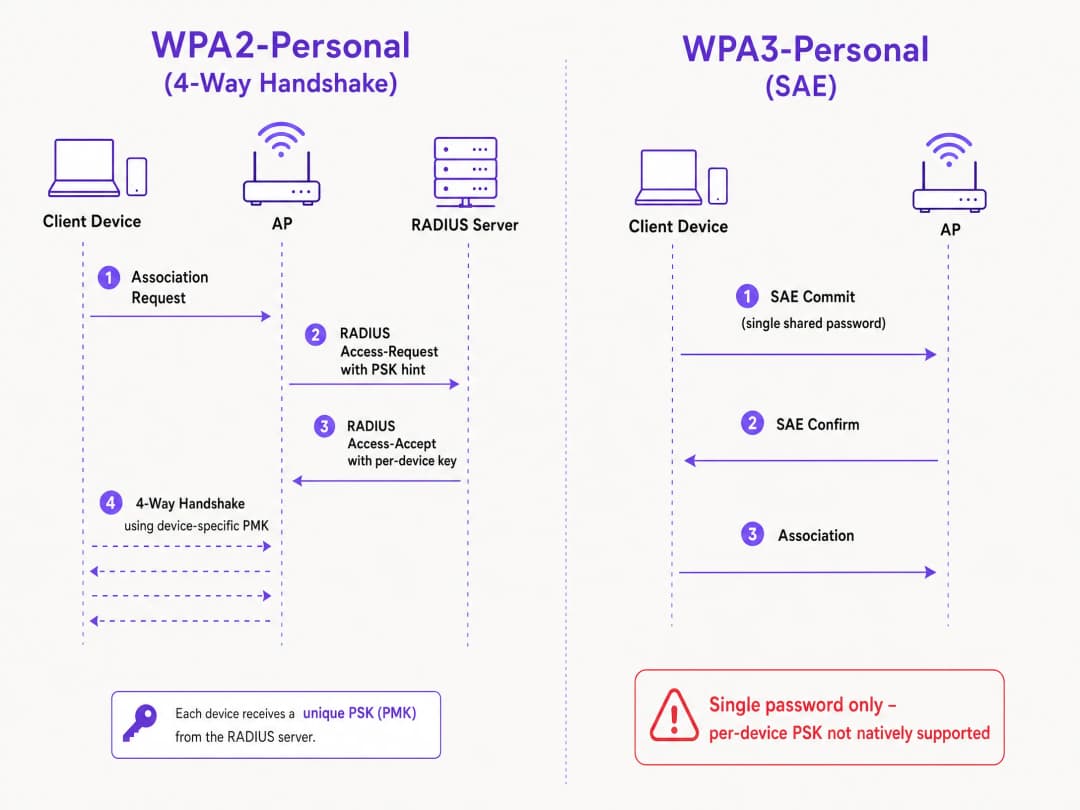
টেকনিক্যাল মেকানিজমটি WPA2 ফোর-ওয়ে হ্যান্ডশেকের উপর নির্ভর করে। যখন একটি ক্লায়েন্ট সংযুক্ত হয়, অ্যাক্সেস পয়েন্টটি একটি Access-Request মেসেজে ক্লায়েন্টের MAC অ্যাড্রেস একটি RADIUS সার্ভারে (বা একটি লোকাল ডেটাবেসে) পাঠায়। RADIUS সার্ভার একটি Access-Accept মেসেজ ফেরত পাঠায় যাতে সেই নির্দিষ্ট ডিভাইসের জন্য নির্দিষ্ট কী থাকে। অ্যাক্সেস পয়েন্টটি তখন Pairwise Master Key (PMK) পেতে সেই নির্দিষ্ট কী ব্যবহার করে ফোর-ওয়ে হ্যান্ডশেক সম্পন্ন করে।
WPA3-SAE চ্যালেঞ্জ
WPA3-Personal ফোর-ওয়ে হ্যান্ডশেককে SAE দিয়ে প্রতিস্থাপন করে। SAE হল একটি Diffie-Hellman-ভিত্তিক প্রোটোকল যেখানে অ্যাসোসিয়েশন সম্পন্ন হওয়ার আগে উভয় পক্ষই পাসফ্রেজ থেকে প্রাপ্ত একটি শেয়ার্ড পাসওয়ার্ড উপাদানে সম্মত হয়।
গুরুত্বপূর্ণ পার্থক্যটি হল, SAE এক্সচেঞ্জ শুরু হওয়ার আগেই উভয় পক্ষের কাছে পাসওয়ার্ডটি জানা থাকতে হবে। প্রোটোকলের এমন কোনো পর্যায় নেই যেখানে একটি RADIUS সার্ভার প্রতি ডিভাইসে একটি ভিন্ন কী ইনজেক্ট করতে পারে। অ্যাক্সেস পয়েন্ট এবং ক্লায়েন্ট ইতিমধ্যেই একটি একক শেয়ার্ড ভ্যালুর উপর ভিত্তি করে একটি ক্রিপ্টোগ্রাফিক এক্সচেঞ্জ সম্পাদন করছে। এটি IEEE 802.11 স্ট্যান্ডার্ড দ্বারা সংজ্ঞায়িত একটি প্রোটোকল সীমাবদ্ধতা, কোনো ভেন্ডর সীমাবদ্ধতা নয়।### বিভিন্ন ভেন্ডর ইমপ্লিমেন্টেশনের তুলনা
প্রতিটি প্রধান এন্টারপ্রাইজ ভেন্ডর প্রতি-ডিভাইস PSK সমর্থন করে, তবে তাদের ইমপ্লিমেন্টেশন এবং WPA3 প্রস্তুতি ভিন্ন ভিন্ন হয়।
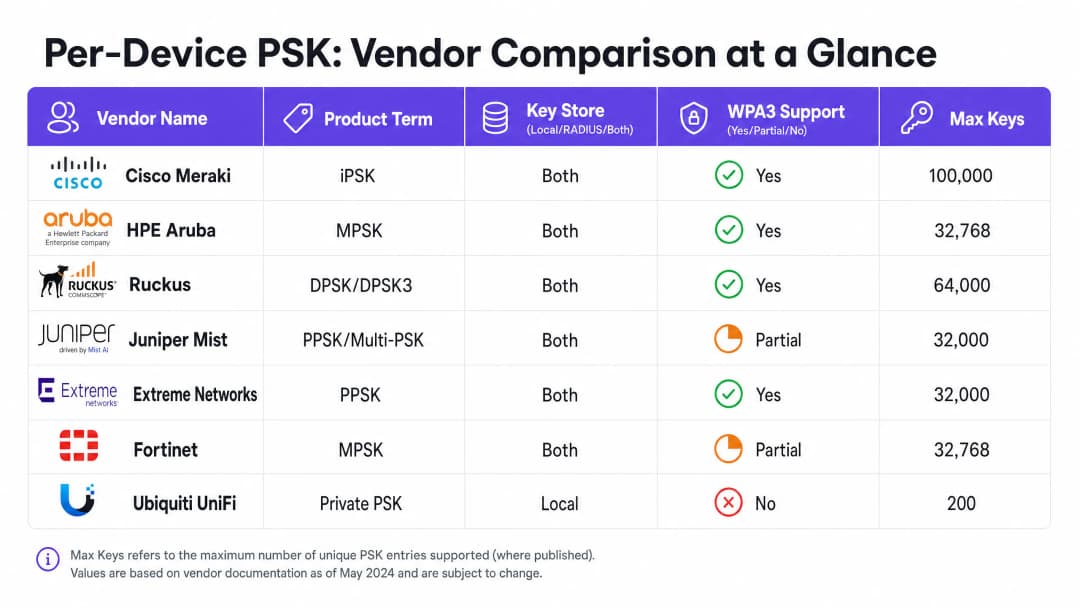
Cisco Meraki (iPSK) Cisco Meraki এটিকে Identity Pre-Shared Key (iPSK) বলে। এটি দুটি মোড সমর্থন করে। RADIUS ব্যতীত, আপনি সরাসরি Meraki ড্যাশবোর্ডে পাঁচটি পর্যন্ত অনন্য PSK কনফিগার করতে পারেন। RADIUS সহ - সাধারণত Cisco ISE - আপনি ১,০০,০০০ কী পর্যন্ত স্কেল করতে পারেন। RADIUS সার্ভার সন্ধান প্রক্রিয়া সম্পন্ন করে এবং প্রতি-ডিভাইস কী ফেরত দেয়। WPA3 এর জন্য, Meraki মূলত WPA3 ট্রানজিশন মোড (WPA2/WPA3 মিক্সড মোড) এর উপর নির্ভর করে, যেখানে WPA2 ক্লায়েন্টরা ফোর-ওয়ে হ্যান্ডশেক ব্যবহার করে এবং প্রতি-ডিভাইস কী পায়, অন্যদিকে WPA3 ক্লায়েন্টরা একটি একক শেয়ার্ড পাসওয়ার্ড সহ SAE ব্যবহার করে।
HPE Aruba (MPSK) HPE Aruba এটিকে Multiple Pre-Shared Key (MPSK) বলে। Aruba দুটি ক্ষেত্রে MPSK সমর্থন করে, একটি হলো MPSK Local যেখানে কীগুলি কন্ট্রোলারে সংরক্ষিত থাকে, এবং অন্যটি হলো ClearPass সহ MPSK যা RADIUS এবং পলিসি ইঞ্জিন হিসাবে কাজ করে। ClearPass হাজার হাজার কী ধারণ করতে পারে এবং ডাইনামিক VLANs বরাদ্দ করতে পারে। Meraki এর মতোই, বর্তমানে ট্রানজিশন মোডের মাধ্যমে WPA3 সমর্থন পরিচালনা করা হয়।
Ruckus (DPSK এবং DPSK3) Ruckus এটিকে Dynamic Pre-Shared Key (DPSK) বলে। এটি অন্যতম পরিপক্ক ইমপ্লিমেন্টেশন, যা প্রথমদিকের SmartZone এর সময় থেকেই উপলব্ধ রয়েছে। RADIUS মোডে, এটি Cloudpath এর সাথে ইন্টিগ্রেট করে। Ruckus তাদের WPA3 এক্সটেনশন DPSK3 এর জন্য বিশেষভাবে পরিচিত। DPSK3 মূলত WPA2/WPA3 মিক্সড মোডে কাজ করে এবং RADIUS ব্যাকএন্ড হিসাবে Cloudpath এর প্রয়োজন হয়। এটি WPA3-সক্ষম ডিভাইসগুলিকে SAE ব্যবহার করার অনুমতি দেয়, যখন সিস্টেমটি Cloudpath ইন্টিগ্রেশনের মাধ্যমে প্রতি-ডিভাইস কী বাইন্ডিং পরিচালনা করে।
Juniper Mist (PPSK / Multi-PSK) Juniper Mist এটিকে Private Pre-Shared Key (PPSK) বা Multi-PSK বলে। Mist কীগুলি ক্লাউড ডেটাবেসে সংরক্ষণ করে, যার সীমা প্রতি সাইটে ৫,০০০ কী। কীগুলি প্রতি ব্যবহারকারী, প্রতি ডিভাইস বা প্রতি গ্রুপে বরাদ্দ করা যেতে পারে। Mist এর Access Assurance পরিষেবার সাথে ইন্টিগ্রেট করে, যা RADIUS-ভিত্তিক PSK সন্ধান প্রক্রিয়া যোগ করে। Juniper মূলত Access Assurance এর মাধ্যমে WPA3 RADIUS PSK সমর্থন করে, যা একটি একক WPA3-Personal SSID-কে একাধিক পাসফ্রেজ পরিবেশন করার অনুমতি দেয়।
Extreme Networks (PPSK) Extreme Networks এটিকে ExtremeCloud IQ এর মাধ্যমে Private Pre-Shared Key (PPSK) বলে। এটি অ্যাক্সেস পয়েন্টেই লোকাল কী স্টোরেজ সমর্থন করে, যা রিমোট সাইটগুলির জন্য দরকারী, পাশাপাশি ExtremeCloud IQ এর ক্লাউড RADIUS পরিষেবার মাধ্যমে RADIUS-ভিত্তিক সন্ধান সুবিধাও দেয়। Extreme একটি নির্দিষ্ট ডিভাইসের সাথে PPSK লিঙ্ক করতে MAC বাইন্ডিং সমর্থন করে।
Fortinet (MPSK) Fortinet এটিকে Multiple Pre-Shared Key (MPSK) বলে, যা FortiAP এবং FortiGate ওয়্যারলেস কন্ট্রোলারের মাধ্যমে পরিচালিত হয়। Fortinet স্পষ্টভাবে তার MPSK প্রোফাইলগুলিতে WPA3-SAE এবং WPA3-SAE Transition সিকিউরিটি মোড সমর্থন করে। আপনি WPA3-SAE কীগুলির সাহায্যে একটি MPSK প্রোফাইল তৈরি করতে পারেন, সেগুলিকে একটি VAP তে বরাদ্দ করতে পারেন এবং ডাইনামিক VLAN অ্যাসাইনমেন্ট সক্ষম করতে পারেন।
Ubiquiti UniFi (Private PSK) Ubiquiti UniFi এটিকে Private Pre-Shared Keys বলে। এর বাস্তবায়ন শুধুমাত্র স্থানীয়ভাবে করা হয়; কীগুলি UniFi Network কন্ট্রোলারে সংরক্ষিত থাকে। আপনি প্রতিটি কী-এর জন্য আলাদা VLAN নির্ধারণ করতে পারেন। তবে, UniFi Private PSK শুধুমাত্র ২.৪ GHz এবং ৫ GHz ব্যান্ডে WPA2 নেটওয়ার্কে কাজ করে। WPA3 এবং ৬ GHz সমর্থিত নয়।
আপনার নির্দিষ্ট সেটআপ নিয়ে কোনো প্রশ্ন আছে?
আমাদের টিম ৮০,০০০ ভেন্যুতে ভেন্যু অপারেটর, IT ম্যানেজার এবং নেটওয়ার্ক ইঞ্জিনিয়ারদের সাথে কাজ করে। একটি ২০ মিনিটের কল বুক করুন এবং আপনার মতো অন্যরা কীভাবে এর সমাধান করেছেন তা আমরা আপনাকে দেখাব।
বাস্তবায়ন নির্দেশিকা
প্রতিটি ডিভাইসের জন্য পৃথক PSK প্রয়োগ করার সময়, একটি নিরাপদ এবং স্কেলযোগ্য আর্কিটেকচার নিশ্চিত করতে এই পদক্ষেপগুলি অনুসরণ করুন।
- আপনার ডিভাইস ল্যান্ডস্কেপ অডিট করুন: কোন ডিভাইসগুলি WPA3 সমর্থন করে এবং কোনগুলি WPA2-এর ওপর নির্ভর করে তা চিহ্নিত করুন। লিগ্যাসি IoT ডিভাইসগুলির জন্য আগামী দিনেও WPA2-এর প্রয়োজন হবে।
- সঠিক SSID কৌশল নির্বাচন করুন: একটি মিশ্র পরিবেশের জন্য, একটি হাইব্রিড SSID ডিজাইন ব্যবহার করুন। লিগ্যাসি IoT এবং গেস্ট ডিভাইসের জন্য প্রতি-ডিভাইস PSK সহ একটি WPA2-Personal SSID বজায় রাখুন। ম্যানেজড স্টাফ ডিভাইসের জন্য একটি WPA3-Enterprise SSID স্থাপন করুন।
- ট্রানজিশন মোড সাবধানে প্রয়োগ করুন: আপনি যদি আপনার প্রাথমিক গেস্ট SSID-এ WPA3 ট্রানজিশন মোড ব্যবহার করেন, তবে নিশ্চিত করুন যে আপনার অ্যাক্সেস পয়েন্ট এবং RADIUS সার্ভারগুলি মিশ্র প্রমাণীকরণ প্রবাহ পরিচালনা করার জন্য সঠিকভাবে কনফিগার করা হয়েছে।
- আইডেন্টিটি ম্যানেজমেন্ট সংহত করুন: ম্যানুয়ালি কী পরিচালনা করবেন না। আপনার ডিভাইস ম্যানেজমেন্ট ওয়ার্কফ্লো বা Microsoft Entra ID অথবা Okta-এর মতো আইডেন্টিটি প্রোভাইডারের সাথে আপনার কী প্রভিশনিং সংহত করুন।
- ডাইনামিক VLAN কনফিগার করুন: নেটওয়ার্ক সেগমেন্টেশন কার্যকর করতে প্রতিটি প্রতি-ডিভাইস PSK-কে একটি নির্দিষ্ট VLAN-এর সাথে ম্যাপ করুন। গেস্ট ট্রাফিক থেকে IoT ডিভাইসগুলিকে আলাদা করার জন্য এটি অত্যন্ত গুরুত্বপূর্ণ।
সেরা অনুশীলনসমূহ
- লাইফসাইকেল ম্যানেজমেন্ট প্রয়োগ করুন: প্রতি-ডিভাইস PSK-এর জন্য কঠোর লাইফসাইকেল ম্যানেজমেন্ট প্রয়োজন। কী-এর অনিয়ন্ত্রিত বিস্তার রোধ করতে ডিভাইসগুলি নিষ্ক্রিয় করার সময় কীগুলি বাতিল করার জন্য আপনার একটি প্রক্রিয়া থাকতে হবে।
- ম্যানেজড এন্ডপয়েন্টের জন্য 802.1X ব্যবহার করুন: কর্পোরেট ল্যাপটপ এবং স্টাফ ডিভাইসের জন্য, EAP-TLS সহ WPA3-Enterprise-এ স্থানান্তরিত হন। এটি আরও শক্তিশালী নিরাপত্তা এবং জিরো-ট্রাস্ট মডেলের সাথে নেটিভ সামঞ্জস্যতা প্রদান করে।
- WPA3 আপগ্রেড পরীক্ষা করুন: একটি পাইলট সাইটে পরীক্ষা না করে কোনো বিদ্যমান প্রতি-ডিভাইস PSK SSID-এ কখনই WPA3 সক্ষম করবেন না। ফার্মওয়্যার সংস্করণ এবং RADIUS সার্ভারের সামঞ্জস্যতা যাচাই করুন।
- আইডেন্টিটির জন্য Purple ব্যবহার করুন: আইডেন্টিটি লেয়ার পরিচালনা করতে Purple সংহত করুন। Purple একটি ক্লাউড ওভারলে হিসাবে কাজ করে, যা প্রমাণীকরণ, ডেটা ক্যাপচার এবং সম্মতি পরিচালনা প্রদান করে এবং RADIUS-এর মাধ্যমে আপনার হার্ডওয়্যারে উপযুক্ত VLAN অ্যাসাইনমেন্ট ফেরত পাঠায়। আরও বিস্তারিত তথ্যের জন্য Enterprise WiFi Security: A Complete Guide for 2026 দেখুন।
ট্রাবলশুটিং এবং ঝুঁকি হ্রাসকরণ
- WPA3-এ ক্লায়েন্ট সংযোগ করতে ব্যর্থ হচ্ছে: লিগ্যাসি ডিভাইসগুলি যদি একটি WPA3 ট্রানজিশন মোড SSID-এ সংযোগ করতে ব্যর্থ হয়, তবে এটি প্রায়শই অসঙ্গতিপূর্ণ ওয়্যারলেস ড্রাইভারের কারণে ঘটে। ক্লায়েন্ট ড্রাইভারগুলি আপডেট করা হয়েছে কিনা তা নিশ্চিত করুন। সমস্যাটি থেকে গেলে, লিগ্যাসি ডিভাইসগুলিকে একটি ডেডিকেটেড শুধুমাত্র WPA2 SSID-এ স্থানান্তরিত করুন।
- RADIUS টাইমআউট: RADIUS সার্ভার থেকে প্রতি-ডিভাইস কী-এর জন্য অপেক্ষা করার সময় যদি অ্যাক্সেস পয়েন্টের সংযোগ বিচ্ছিন্ন (টাইমআউট) হয়ে যায়, তবে নেটওয়ার্ক পাথ পরীক্ষা করুন এবং নিশ্চিত করুন যে RADIUS সার্ভারটি প্রমাণীকরণের চাপ পরিচালনা করার জন্য সঠিকভাবে স্কেল করা হয়েছে।* VLAN অ্যাসাইনমেন্টের ব্যর্থতা: যদি কোনো ডিভাইস সংযুক্ত হয় কিন্তু ভুল IP অ্যাড্রেস পায়, তাহলে RADIUS Access-Accept মেসেজে VLAN ম্যাপিং যাচাই করুন এবং অ্যাক্সেস পয়েন্ট ও সুইচ পোর্টে VLAN-এর অস্তিত্ব নিশ্চিত করুন।
ROI ও ব্যবসায়িক প্রভাব
প্রতিটি ডিভাইসের জন্য পৃথক PSK প্রয়োগ করা সাপোর্ট টিকিটের সংখ্যা কমিয়ে এবং নিরাপত্তা উন্নত করে পরিমাপযোগ্য ব্যবসায়িক মূল্য প্রদান করে।
- হেল্পডেস্কের কাজের চাপ হ্রাস: কী (key) প্রোভিশনিং এবং প্রত্যাহার স্বয়ংক্রিয় করার ফলে ম্যানুয়াল পাসওয়ার্ড রিসেট করার প্রয়োজন হয় না।
- উন্নত নিরাপত্তা ব্যবস্থা: ডিভাইসের নিজস্ব ইউনিক কী-এর ওপর ভিত্তি করে ডিভাইসগুলোকে পৃথক VLAN-এ আলাদা করার মাধ্যমে একটি আক্রান্ত ডিভাইসের ক্ষতির পরিধি হ্রাস পায়।
- উন্নত ভিজিবিলিটি: প্রতি-ডিভাইস কী নেটওয়ার্ক ব্যবহারের বিস্তারিত ভিজিবিলিটি প্রদান করে, যা আপনাকে ব্যান্ডউইথ অপচয়কারী ডিভাইস সনাক্ত করতে এবং ক্যাপাসিটি প্ল্যানিং অপ্টিমাইজ করতে সাহায্য করে।
মূল সংজ্ঞাসমূহ
Per-Device PSK
একটি সিকিউরিটি মেকানিজম যা একটি একক SSID-তে প্রতিটি ডিভাইস বা ব্যবহারকারীকে একটি ইউনিক Pre-Shared Key অ্যাসাইন করে, যা ব্যক্তিগত রিভোকেশন এবং ডাইনামিক পলিসি অ্যাসাইনমেন্টের সুবিধা দেয়।
ব্যবহৃত হয় যখন IT টিমের সম্পূর্ণ 802.1X অথেন্টিকেশন ডিপ্লয় না করেই প্রতিটি ডিভাইসের ভিজিবিলিটি এবং কন্ট্রোল প্রয়োজন হয়।
WPA3-SAE
Simultaneous Authentication of Equals. WPA3-Personal-এ ব্যবহৃত সুরক্ষিত কী এস্টাব্লিশমেন্ট প্রোটোকল, যা WPA2 ফোর-ওয়ে হ্যান্ডশেককে প্রতিস্থাপন করে।
WPA3-তে আপগ্রেড করার সময় বা ৬ GHz নেটওয়ার্ক ডিপ্লয় করার সময় প্রাসঙ্গিক, কারণ এটি পাসওয়ার্ড কীভাবে অথেন্টিকেট করা হয় তা মৌলিকভাবে পরিবর্তন করে।
Transition Mode
একটি মিক্সড-মোড কনফিগারেশন যেখানে একটি SSID একই সাথে WPA2-PSK এবং WPA3-SAE উভয়ের জন্য সাপোর্ট অ্যাডভার্টাইজ করে, যার ফলে লেগাসি এবং আধুনিক ক্লায়েন্ট একই নেটওয়ার্ক নামের সাথে সংযুক্ত হতে পারে।
লেগাসি ডিভাইসগুলোকে বিচ্ছিন্ন না করে বিদ্যমান নেটওয়ার্কগুলোকে WPA3-তে মাইগ্রেট করার আদর্শ পদ্ধতি।
MAC Binding
একটি নির্দিষ্ট per-device PSK-কে একটি নির্দিষ্ট ডিভাইসের হার্ডওয়্যার MAC অ্যাড্রেসের সাথে যুক্ত করার প্রক্রিয়া, যা কী-টি অন্য কোনো ডিভাইসে ব্যবহার করা প্রতিরোধ করে।
ক্রেডেনশিয়াল শেয়ারিং প্রতিরোধ করতে এবং IoT ডিভাইসের জন্য কঠোর অ্যাক্সেস কন্ট্রোল নিশ্চিত করতে ব্যবহৃত হয়।
Dynamic VLAN Assignment
ডিভাইসটি যে SSID-এর সাথে সংযুক্ত হচ্ছে তার পরিবর্তে তার অথেন্টিকেশন ক্রেডেনশিয়াল (যেমন এর per-device PSK) এর ওপর ভিত্তি করে সেটিকে একটি নির্দিষ্ট Virtual LAN-এ অ্যাসাইন করার ক্ষমতা।
নেটওয়ার্ক সেগমেন্টেশনের জন্য অপরিহার্য, যা IT টিমকে একই অ্যাক্সেস পয়েন্টে কর্পোরেট ট্রাফিক থেকে গেস্ট ট্রাফিক আলাদা করার অনুমতি দেয়।
iPSK
Identity Pre-Shared Key. Cisco Meraki এর per-device PSK ইমপ্লিমেন্টেশন।
Cisco Meraki ওয়ারলেস নেটওয়ার্ক ম্যানেজ করার সময় ব্যবহৃত হয়।
DPSK
Dynamic Pre-Shared Key. Ruckus এর per-device PSK ইমপ্লিমেন্টেশন, যার মধ্যে DPSK3 হলো WPA3-সামঞ্জস্যপূর্ণ সংস্করণ।
Ruckus ওয়ারলেস নেটওয়ার্ক ম্যানেজ করার সময় ব্যবহৃত হয়।
MPSK
Multiple Pre-Shared Key. HPE Aruba এবং Fortinet দ্বারা তাদের per-device PSK ইমপ্লিমেন্টেশনের জন্য ব্যবহৃত শব্দ।
HPE Aruba বা Fortinet ওয়ারলেস নেটওয়ার্ক ম্যানেজ করার সময় ব্যবহৃত হয়।
সমাধানকৃত উদাহরণসমূহ
একটি ২০০ রুমের হোটেলে সুরক্ষিত Guest WiFi প্রদান করা এবং প্রতিটি রুমের স্মার্ট টিভি আইসোলেট করা প্রয়োজন। তারা বর্তমানে সমস্ত গেস্ট এবং ডিভাইসের জন্য একটি মাত্র WPA2-Personal পাসওয়ার্ড ব্যবহার করে।
একটি RADIUS ব্যাকএন্ড ব্যবহার করে per-device PSK ডিপ্লয় করুন। গেস্ট ডেটা ক্যাপচার করতে এবং রেজিস্ট্রেশনের সময় প্রতিটি গেস্টকে একটি ইউনিক PSK ইস্যু করতে Purple ইন্টিগ্রেট করুন। স্মার্ট টিভিগুলোর জন্য, প্রতিটি টিভির জন্য একটি ইউনিক PSK জেনারেট করুন এবং এটি একটি ডেডিকেটেড IoT VLAN এর সাথে ম্যাপ করুন। গেস্ট PSK গুলোকে ক্লায়েন্ট আইসোলেশন সক্ষম করা একটি আলাদা Guest VLAN এর সাথে ম্যাপ করার জন্য কনফিগার করুন।
একটি ইউনিভার্সিটি ক্যাম্পাস WiFi 6E তে আপগ্রেড করছে এবং অবশ্যই ৬ GHz ব্যান্ডে WPA3 সাপোর্ট করতে হবে, কিন্তু তাদের হাজার হাজার লেগাসি IoT ডিভাইস রয়েছে যা শুধুমাত্র WPA2 সাপোর্ট করে।
একটি হাইব্রিড SSID ডিজাইন ইমপ্লিমেন্ট করুন। ছাত্র এবং স্টাফদের ল্যাপটপ ও স্মার্টফোনের জন্য একটি WPA3-Enterprise SSID তৈরি করুন, যেখানে অথেন্টিকেশনের জন্য 802.1X ব্যবহার করা হবে। লেগাসি IoT ডিভাইসগুলোর জন্য বিশেষভাবে ২.৪ GHz এবং ৫ GHz ব্যান্ডে per-device PSK সহ একটি আলাদা WPA2-Personal SSID তৈরি করুন।
অনুশীলনী প্রশ্নসমূহ
Q1. আপনি WiFi 6E অ্যাক্সেস পয়েন্ট ডিপ্লয় করছেন এবং ৬ GHz ক্লায়েন্টদের সাপোর্ট করা প্রয়োজন। আপনার বিদ্যমান ৫ GHz নেটওয়ার্কটি IoT ডিভাইসের জন্য iPSK ব্যবহার করে। আপনি কি iPSK কনফিগারেশনটি ৬ GHz ব্যান্ডে সম্প্রসারিত করতে পারেন?
ইঙ্গিত: ৬ GHz ব্যান্ডের জন্য বাধ্যতামূলক সিকিউরিটি প্রোটোকলগুলো বিবেচনা করুন।
Q2. একটি রিটেইল চেইন পয়েন্ট-অফ-সেল টার্মিনালগুলোতে অনন্য কী বরাদ্দ করতে Aruba MPSK ব্যবহার করে। তারা আরও ভালো সুরক্ষার জন্য তাদের প্রাথমিক SSID-টিকে WPA3-তে আপগ্রেড করতে চায়। এর জন্য প্রস্তাবিত পদ্ধতি কী?
ইঙ্গিত: Aruba MPSK-এর জন্য WPA2 ফোর-ওয়ে হ্যান্ডশেক প্রয়োজন।
মডেল উত্তর দেখুন
SSID-টিতে WPA3 ট্রানজিশন মোড (WPA2/WPA3 মিক্সড মোড) সক্ষম করুন। পয়েন্ট-অফ-সেল টার্মিনালগুলো WPA2 এবং MPSK ব্যবহার করে সংযোগ স্থাপন অব্যাহত রাখবে, যেখানে নতুন ডিভাইসগুলো একটি শেয়ার্ড পাসওয়ার্ড সহ WPA3-SAE ব্যবহার করে সংযোগ করতে পারবে।
Q3. আপনি একটি Ruckus নেটওয়ার্ক পরিচালনা করেন এবং WPA3 ক্লায়েন্টদের জন্য প্রতি-ডিভাইস PSK প্রয়োগ করতে চান। এর জন্য ঠিক কী কনফিগারেশন প্রয়োজন?
ইঙ্গিত: Ruckus যে প্রোপাইটরি এক্সটেনশন অফার করে এবং এর ব্যাকএন্ডের প্রয়োজনীয়তাগুলো বিবেচনা করুন।
মডেল উত্তর দেখুন
আপনাকে অবশ্যই Ruckus DPSK3 প্রয়োগ করতে হবে। এর জন্য 7.0 বা তার পরবর্তী সংস্করণের ফার্মওয়্যার চালিত WiFi 6 বা তার চেয়ে নতুন অ্যাক্সেস পয়েন্ট, WPA2/WPA3 মিক্সড মোডের জন্য SSID কনফিগার করা এবং RADIUS সার্ভার হিসেবে Ruckus Cloudpath ব্যবহার করা প্রয়োজন।
এই সিরিজে পড়া চালিয়ে যান
iOS এবং macOS 802.1X ট্রাবলশুটিং: Intune, Jamf এবং Entra ID-এর জন্য একটি ডিপ্লয়মেন্ট চেকলিস্ট
iPhones, iPads এবং Macs কেন Intune বা Jamf Pro-তে 802.1X ব্যর্থ হয় তা সনাক্ত করতে এই চেকলিস্টটি ব্যবহার করুন। প্রতিটি ব্যর্থতার পিছনে চারটি কারণের যেকোনো একটি থাকে: সার্ভার ট্রাস্ট, আইডেন্টিটি সার্টিফিকেট, macOS মোড বা Entra ID গ্রুপ স্কোপিং। আপনি eapolclient এবং RADIUS লগ থেকে এর কারণ নিশ্চিত করবেন, সমাধান প্রয়োগ করবেন এবং ভবিষ্যতের সার্টিফিকেট রোটেশন পরিচালনা করবেন।
Intune WiFi প্রোফাইল সার্ভার ট্রাস্ট: Microsoft Entra ID -এর জন্য সার্টিফিকেট সার্ভার নাম এবং রুট CA চেকলিস্ট
আপনি একটি Intune WiFi প্রোফাইলের সার্ভার ভ্যালিডেশন অংশটি কনফিগার করতে পারবেন যাতে Windows, Apple এবং Android -এ EAP-TLS এবং PEAP কানেক্ট হয়। আপনি RADIUS সার্টিফিকেটের সাথে সার্টিফিকেট সার্ভারের নাম মেলাতে পারবেন, সঠিক রুট CA ডেপ্লয় করতে পারবেন, Microsoft Entra ID গ্রুপ অ্যাসাইনমেন্ট অ্যালাইন করতে পারবেন এবং সার্টিফিকেট রিনিউয়াল কানেকশন বন্ধ করার আগেই সেটিকে প্রস্তুত করতে পারবেন।
Android 802.1X এবং EAP-TLS ট্রাবলশুটিং: Intune এবং Entra ID-এর জন্য একটি ডিপ্লয়মেন্ট চেকলিস্ট
আপনি সহজেই সনাক্ত করতে পারবেন কেন ম্যানেজড Android ফোনগুলো আপনার স্টাফ SSID-এ EAP-TLS সংযোগ করতে ব্যর্থ হচ্ছে এবং তা Intune-এ ঠিক করতে পারবেন। প্রতিটি লক্ষণকে চারটি সাধারণ কারণের সাথে মেলান - অনুপস্থিত CA বা ডোমেন, ভুল প্রোফাইলে থাকা ক্লায়েন্ট সার্টিফিকেট, একটি অমিল RADIUS সার্ভার নামের মান, অথবা একটি অপৌঁছানো ট্রাস্টেড রুট। তারপর একটি রোলআউট চেকলিস্ট প্রয়োগ করুন যা বারবার বিভ্রাট হওয়া বন্ধ করে।
আপনার নির্দিষ্ট সেটআপ নিয়ে কোনো প্রশ্ন আছে?
আমাদের টিম ৮০,০০০ ভেন্যুতে ভেন্যু অপারেটর, IT ম্যানেজার এবং নেটওয়ার্ক ইঞ্জিনিয়ারদের সাথে কাজ করে। একটি ২০ মিনিটের কল বুক করুন এবং আপনার মতো অন্যরা কীভাবে এর সমাধান করেছেন তা আমরা আপনাকে দেখাব।