
Was ist MAC-Address-Authentication? Wann Sie sie nutzen und wann Sie sie vermeiden sollten
Dieser maßgebliche technische Referenzleitfaden behandelt die MAC-Address-Authentication in Enterprise-WiFi-Umgebungen - wie RADIUS-basierte MAC-Authentifizierung auf Layer 2 funktioniert, ihre inhärenten Sicherheitsrisiken (einschließlich MAC-Spoofing und den Auswirkungen der OS-seitigen MAC-Randomisierung) und die genauen betrieblichen Kontexte, in denen sie ein probates Mittel zur Verwaltung von IoT- und Headless-Geräten bleibt. Er bietet IT-Managern und Netzwerkarchitekten in den Bereichen Hotellerie, Einzelhandel, Gesundheitswesen und im öffentlichen Sektor praxisnahe Bereitstellungsrichtlinien mit realen Praxisbeispielen, Entscheidungsrahmen und Integrationskontexten für das Guest-WiFi und die Analyseplattform von Purple.
Diesen Leitfaden anhören
Podcast-Transkript ansehen
Teil unserer Kernserie: Enterprise WiFi Security Guide →
Management-Zusammenfassung
Für IT-Entscheider in Unternehmen, die komplexe Standorte verwalten - von weitläufigen Hotelanlagen und Einzelhandelsketten bis hin zu Stadien und Einrichtungen des öffentlichen Sektors - ist die Sicherung des Netzwerkzugriffs für eine rasant wachsende Zahl nicht verwalteter Geräte eine kritische betriebliche Herausforderung. Obwohl die MAC-Adressen-Authentifizierung als eigenständiges Sicherheitsprotokoll grundlegende Einschränkungen aufweist, bleibt sie ein unverzichtbarer Onboarding-Mechanismus für IoT-Geräte, Legacy-Hardware und bildschirmlose Systeme, die kein 802.1X oder Captive Portals unterstützen.
Dieser Leitfaden analysiert die Architektur der RADIUS-basierten MAC-Authentifizierung und bewertet ihren betrieblichen Nutzen im Vergleich zu den inhärenten Sicherheitsrisiken. Wir erläutern im Detail, wann eine MAC-Authentifizierung zur Optimierung des Betriebs eingesetzt werden sollte, wann sie zur Risikominderung zu vermeiden ist und wie moderne Enterprise-WiFi-Plattformen diese Kontrollen integrieren, um eine robuste Sicherheit ohne Einbußen bei der Konnektivität zu gewährleisten. Das Kernprinzip lautet: Die MAC-Authentifizierung ist ein Mechanismus zur Netzwerkzugriffskontrolle, kein Sicherheitsprotokoll. Setzen Sie sie entsprechend ein.
Technischer Deep-Dive
Funktionsweise der MAC-Adressen-Authentifizierung
Die MAC-Adressen-Authentifizierung (Media Access Control) arbeitet auf Schicht 2 des OSI-Modells. Im Gegensatz zu IEEE 802.1X - das einen Supplicant auf dem Client-Gerät erfordert, um Anmeldeinformationen mithilfe von EAP-Methoden wie PEAP-MSCHAPv2 oder EAP-TLS auszuhandeln - verlässt sich die MAC-Authentifizierung vollständig auf die Hardware-Adresse des Geräts, die sowohl als Identifikator als auch als Anmeldeinformation dient.
Der Authentifizierungsablauf ist wie folgt: Wenn ein Gerät versucht, sich mit einem Wireless Access Point (AP) zu verbinden, fängt der AP die Verbindungsanfrage ab und extrahiert die MAC-Adresse des Clients (die eindeutige 48-Bit-Kennung, die der Netzwerkschnittstellenkarte (NIC) vom Hersteller zugewiesen wurde). Der AP, der als RADIUS-Client fungiert, leitet eine Access-Request-Nachricht an den RADIUS-Server weiter. In einer typischen Implementierung wird die MAC-Adresse sowohl als Benutzername als auch als Passwort übermittelt, in der Regel ohne Trennzeichen formatiert (z. B. A4CF12388E7F), wobei die Implementierungen der einzelnen Hersteller variieren. Der RADIUS-Server fragt sein Backend ab - in der Regel ein LDAP-Verzeichnis, Active Directory oder einen dedizierten Identitätsspeicher - um zu prüfen, ob die MAC-Adresse auf der Allowlist existiert. Wenn der Abgleich erfolgreich ist, wird eine Access-Accept-Nachricht zurückgegeben, der AP gewährt den Netzwerkzugriff und es kann optional ein bestimmtes VLAN zugewiesen werden. Schlägt der Abgleich fehl, wird ein Access-Reject zurückgegeben und dem Gerät wird entweder die Verbindung verweigert oder es wird in ein eingeschränktes Quarantäne-VLAN verschoben.

Sicherheitseinschränkungen und Schwachstellen
Der grundlegende Schwachpunkt der MAC-Authentifizierung besteht darin, dass MAC-Adressen unverschlüsselt in IEEE 802.11-Management-Frames übertragen werden. Jeder Angreifer mit einem einfachen Tool zur Paketanalyse - wie Wireshark, Kismet oder ähnlichen - kann legitime MAC-Adressen, die über das Netzwerk kommunizieren, ganz ohne aktiven Einbruch passiv abfangen. Sobald eine legitime MAC-Adresse identifiziert wurde, kann der Angreifer Tools wie macchanger (Linux) oder integrierte Betriebssystem-Dienstprogramme nutzen, um die eigene Netzwerkkarte so zu manipulieren, dass sie mit der erfassten Adresse übereinstimmt.
Da der RADIUS-Server keine kryptografische Challenge-Response-Abfrage durchführt - er prüft lediglich, ob die Zeichenfolge mit einem Datenbankeintrag übereinstimmt - erhält das gefälschte Gerät exakt dieselben Netzwerkrechte wie das legitime. Dies ist kein theoretischer Angriff - er erfordert kein Fachwissen und ist in weniger als zwei Minuten ausgeführt.
Darüber hinaus bietet die MAC-Authentifizierung keine Verschlüsselung der Nutzdaten. Sofern die SSID nicht mit WPA2-PSK, WPA3-SAE oder Opportunistic Wireless Encryption (OWE) gesichert ist, bleibt der gesamte Datenverkehr anfällig für Abhörversuche. Die MAC-Authentifizierung muss daher immer als eine Form der Netzwerkzugriffskontrolle (NAC) verstanden werden und nicht als Sicherheitsgrenze.
Eine weitere betriebliche Komplikation hat sich mit der flächendeckenden Einführung der MAC-Adressen-Randomisierung ergeben. Apple hat mit iOS 14 (2020) netzwerkspezifische, zufällige MAC-Adressen eingeführt, Android folgte mit Android 10. Windows 11 aktiviert die Randomisierung standardmäßig. Wenn sich ein Endgerät mit einem Netzwerk verbindet, präsentiert es eine zufällige, temporäre MAC-Adresse anstelle seiner hardwareseitig eingebrannten Adresse. Dies hebelt jedes System direkt aus, das auf die MAC-Adresse angewiesen ist, um wiederkehrende Benutzer zu identifizieren oder zu authentifizieren - einschließlich des MAC-Cachings, das zur Umgehung von Captive Portals in Guest WiFi-Netzwerken eingesetzt wird.
Haben Sie Fragen zu Ihrem spezifischen Setup?
Unser Team arbeitet mit Standortbetreibern, IT-Managern und Netzwerktechnikern an über 80.000 Standorten zusammen. Buchen Sie ein 20-minütiges Gespräch und wir zeigen Ihnen, wie andere diese Herausforderungen gelöst haben.
Implementierungshandbuch
Wann die MAC-Authentifizierung eingesetzt werden sollte
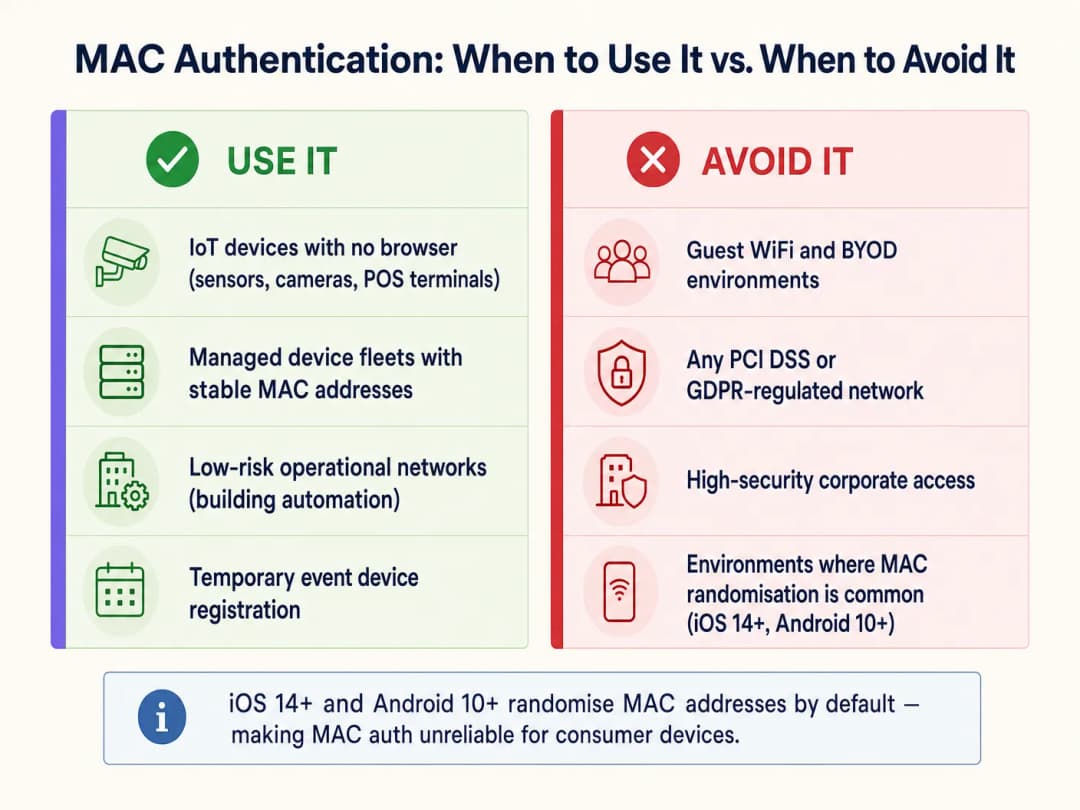
Die MAC-Authentifizierung eignet sich nur für Geräteklassen, die nicht in der Lage sind, sich über sicherere Methoden zu authentifizieren. Die primären Anwendungsfälle sind:
| Geräteklasse | Beispiele | Begründung |
|---|---|---|
| Headless-IoT-Geräte | Smart-TVs, CCTV-Kameras, Umgebungssensoren | Kein Browser oder Supplicant-Funktionalität vorhanden |
| Betriebstechnologie (OT) | HLK-Steuerungen, BMS, Türzugangskontrollpanels | Veraltete Protokolle ohne 802.1X-Unterstützung |
| Veraltete POS-Terminals | Ältere Kassensysteme im Einzelhandel | Nur WPA2-PSK; MAC-Filterung fügt eine schwache, sekundäre Ebene hinzu |
| Verwaltete Geräteflotten | Drucker, VoIP-Telefone, Barcodescanner | Stabile, bekannte MAC-Adressen; zentral verwaltet |
| Temporäre Event-Ausrüstung | AV-Geräte, Event-Tablets | Kurzfristige, kontrollierte Bereitstellung |
Wann Sie MAC-Authentifizierung vermeiden sollten
IT-Architekten müssen in mehreren kritischen Kontexten aktiv auf eine MAC-Authentifizierung verzichten:
Gast WiFi und BYOD-Netzwerke. Dies ist das operativ bedeutendste Problem, mit dem Betreiber von Veranstaltungsorten heute konfrontiert sind. Moderne mobile Betriebssysteme randomisieren MAC-Adressen standardmäßig. Wenn eine Gast WiFi-Bereitstellung auf MAC-Caching setzt, um wiederkehrenden Besuchern eine nahtlose erneute Authentifizierung zu ermöglichen, schlägt dies bei der Mehrheit der modernen Geräte fehl. Das Gerät des Besuchers präsentiert bei jedem Besuch eine neue zufällige MAC-Adresse, das Netzwerk behandelt es als neuen Benutzer und der Besucher wird jedes Mal gezwungen, das Captive Portal zu durchlaufen. Dies beeinträchtigt das Benutzererlebnis und verfälscht die Daten zu wiederkehrenden Besuchern in WiFi Analytics-Plattformen. Die Lösung besteht darin, Passpoint (Hotspot 2.0) oder ein sicheres Captive Portal mit persistenten Session-Tokens zu verwenden.
Unternehmensnetzwerke mit hohen Sicherheitsanforderungen. Jedes Netzwerksegment, das sensible Unternehmensdaten verarbeitet, muss mindestens 802.1X mit EAP-TLS (zertifikatsbasiert) oder PEAP-MSCHAPv2 verwenden. Detaillierte Bereitstellungsanweisungen finden Sie unter How to Set Up Enterprise WiFi on iOS and macOS with 802.1X. Die MAC-Authentifizierung bietet keinen wirksamen Schutz gegen Insider-Bedrohungen oder gezielte Angriffe auf die Unternehmensinfrastruktur.
Umgebungen, die PCI-DSS unterliegen. Die PCI-DSS-v4.0-Anforderung 8 verlangt starke Authentifizierungskontrollen für alle Systeme innerhalb der Karteninhaber-Datenumgebung (CDE). Die MAC-Authentifizierung entspricht nicht der Definition einer starken Authentifizierung und kann nicht als primäre Zugriffskontrolle für Systeme dienen, die mit Zahlungsdaten in Berührung kommen. Eine VLAN-Segmentierung kann MAC-authentifizierte Geräte von der CDE isolieren, das Zahlungsnetzwerk selbst muss jedoch 802.1X oder eine gleichwertige Authentifizierung verwenden.
Datenumgebungen, die der GDPR unterliegen. Die Speicherung von MAC-Adressen als personenbezogene Identifikatoren (was sie gemäß Artikel 4 der GDPR sein können) erfordert eine Rechtsgrundlage und angemessene Sicherheitsmaßnahmen. Die Verwendung von MAC-Adressen als Authentifizierungsdaten in Netzwerken, die personenbezogene Daten verarbeiten, birgt sowohl Sicherheits- als auch Compliance-Risiken.
Best Practices für die Bereitstellung
Bei der Implementierung der MAC-Authentifizierung für die entsprechenden Geräteklassen sind die folgenden herstellerunabhängigen Praktiken unverzichtbar: VLAN-Segmentierung. Platzieren Sie MAC-authentifizierte Geräte niemals im selben VLAN wie Unternehmensbenutzer, Server oder Zahlungssysteme. Weisen Sie sie einem dedizierten IoT-VLAN mit strengen Firewall-ACLs zu, die den Zugriff auf die spezifischen benötigten Dienste beschränken. Dies ist die wichtigste kompensatorische Kontrollmaßnahme überhaupt. Weitere Informationen zur Sicherheitsarchitektur auf Netzwerkebene finden Sie unter Access Point Security: Your 2026 Enterprise Guide und Protect Your Network with Strong DNS and Security.
Kombination mit WPA2/WPA3-Verschlüsselung. Konfigurieren Sie die SSID immer mit WPA2-PSK oder WPA3-SAE, um die drahtlose Payload zu verschlüsseln. Die MAC-Authentifizierung steuert, wer dem Netzwerk beitreten darf; die Verschlüsselung schützt die übertragenen Daten.
Geräte-Profiling und Anomalieerkennung. Setzen Sie NAC-Lösungen ein, die ein Geräte-Profiling beinhalten. Wenn sich ein Gerät mit der MAC-Adresse eines registrierten Smart-TVs authentifiziert, aber das Traffic-Muster einer Windows-Arbeitsstation aufweist (DNS-Abfragen, SMB-Traffic, HTTP-Browsing), sollte das System dieses automatisch unter Quarantäne stellen, bis eine Untersuchung abgeschlossen ist.
Lebenszyklus-Management für die Allowlist. Pflegen Sie einen strengen Lebenszyklus für die MAC-Allowlist. Ausgemusterte Geräte müssen umgehend entfernt werden. Veraltete Einträge sind ein direktes Einfallstor für Spoofing. Automatisieren Sie den Audit-Prozess nach Möglichkeit und markieren Sie MAC-Einträge, die seit mehr als 90 Tagen nicht mehr im Netzwerk aktiv waren.
Separate SSIDs pro Geräteklasse. Vermeiden Sie die Mischung von IoT-Geräten und Benutzergeräten auf derselben SSID. Verwenden Sie dedizierte SSIDs für IoT-, Unternehmens- und Gast-Traffic, die jeweils einem eigenen VLAN mit entsprechenden Sicherheitsrichtlinien zugewiesen sind.
Best Practices
Die folgende Tabelle fasst die empfohlene Authentifizierungsmethode nach Geräteklasse und Compliance-Kontext zusammen:
| Szenario | Empfohlene Authentifizierungsmethode | Rolle der MAC-Authentifizierung |
|---|---|---|
| Laptops und Smartphones von Unternehmen | 802.1X (EAP-TLS oder PEAP) | Keine |
| Gast-Smartphones und -Tablets | Captive Portal / Passpoint | Keine (MAC-Randomisierung macht sie unzuverlässig) |
| Headless IoT (Kameras, Sensoren) | MAC-Authentifizierung + WPA2/3-PSK | Primär (einzig praktikable Option) |
| Veraltete POS-Terminals | MAC-Authentifizierung + WPA2-PSK + VLAN-Isolierung | Sekundär (kompensatorische Kontrollmaßnahme) |
| Medizinische Geräte (HIPAA) | 802.1X wo möglich; ansonsten MAC-Authentifizierung + strenges VLAN | Letzter Ausweg mit maximaler Segmentierung |
| Event- / temporäre Geräte | MAC-Authentifizierung mit zeitlich begrenztem VLAN-Zugriff | Geeignet für kurzfristige, kontrollierte Bereitstellungen |
Für Unternehmen, die in verschiedenen Sektoren tätig sind - einschließlich Transport und Einrichtungen des öffentlichen Sektors - bleibt das Prinzip dasselbe: Authentifizieren Sie die Geräteklasse mit der stärksten Methode, die sie unterstützt, und kompensieren Sie schwächere Methoden durch Kontrollmaßnahmen auf Netzwerkebene.
Fehlerbehebung & Risikominderung
Symptom: MAC-authentifizierte Geräte verbinden sich nur sporadisch.
Fehlerursache: Die Firmware des Netzwerkadapters des Geräts generiert möglicherweise zufällige oder lokal verwaltete MAC-Adressen. Vergewissern Sie sich, dass das Gerät so konfiguriert ist, dass es seine werkseitige Hardware-MAC-Adresse verwendet. Überprüfen Sie die RADIUS-Server-Protokolle auf Access-Reject-Meldungen und gleichen Sie diese mit dem Format der Whitelist ab (einige RADIUS-Server erwarten ein durch Doppelpunkte getrenntes Format AA:BB:CC:DD:EE:FF, andere erwarten keine Trennzeichen).
Symptom: Die Kennzahlen für wiederkehrende Besucher sinken trotz stabiler Besucherzahlen. Fehlerursache: MAC-Randomisierung auf iOS 14+ und Android 10+ Geräten. Mechanismen zum MAC-Caching sind für moderne Endgeräte nicht mehr zuverlässig. Wechseln Sie zur sitzungstokenbasierten Re-Authentifizierung oder zu Passpoint, um präzise WiFi Analytics-Daten wiederherzustellen.
Symptom: Unerwartete Geräte erscheinen im IoT VLAN. Fehlerursache: MAC-Spoofing oder eine kürzlich nicht überprüfte Whitelist. Implementieren Sie ein Geräte-Profiling, um Abweichungen zwischen dem erwarteten Geräteverhalten und den tatsächlichen Datenverkehrsmustern zu erkennen. Überprüfen Sie die RADIUS-Accounting-Protokolle auf ungewöhnliche Sitzungsdauern oder Datenmengen.
Symptom: Leistungsabfall des RADIUS-Servers während der Stoßzeiten. Fehlerursache: Hohes Aufkommen an Access-Request-Meldungen von großen IoT-Gerätebeständen. Implementieren Sie ein RADIUS-Proxy-Caching oder eine dedizierte RADIUS-Instanz für die MAC-Authentifizierung, um die primären Authentifizierungsserver, die 802.1X verarbeiten, zu entlasten.
ROI & geschäftliche Auswirkungen
Der strategische - statt flächendeckende - Einsatz der MAC-Authentifizierung hat direkte Auswirkungen auf die betriebliche Effizienz und das Sicherheitsniveau. Für ein großes Hotel oder Veranstaltungszentrum, das mehr als 2.000 IoT-Geräte auf den Zimmern verwaltet, entfällt durch das automatisierte Onboarding von Smart-TVs, Thermostaten und IP-Telefonen über eine vorkonfigurierte MAC-Whitelist die manuelle Konfiguration pro Gerät. Dies verkürzt die Bereitstellungszeit im Vergleich zur manuellen Eingabe von Anmeldedaten um schätzungsweise 60 - 70 %. Support-Tickets im Zusammenhang mit der IoT-Konnektivität sinken in der Regel um 35 - 45 %, wenn Geräte über RADIUS-Attribute konsistent dem richtigen VLAN zugewiesen werden.
Umgekehrt führt der Versuch, die MAC-Authentifizierung für Gäste-Netzwerke zu nutzen, zu messbar negativen Ergebnissen. Standorte, die beim Captive Portal-Bypass auf MAC-Caching setzen, verzeichnen einen Rückgang der Erkennungsrate wiederkehrender Besucher von 70 - 80 % auf unter 20 % in Netzwerken, in denen die meisten Nutzer moderne iOS- oder Android-Geräte verwenden. Dies beeinträchtigt direkt den ROI einer Guest WiFi Marketing & Analytics Platform, bei der Daten über wiederkehrende Besucher die Grundlage für personalisierte Marketingkampagnen und Kundenbindungsprogramme bilden.
Die geschäftliche Logik ist eindeutig: Investieren Sie in den richtigen Authentifizierungsmechanismus für die jeweilige Geräteklasse. Die MAC-Authentifizierung für IoT-Geräte senkt den betrieblichen Aufwand. Sichere Captive Portale und Passpoint für Gäste-Geräte schützen die Integrität der Analysen und die Compliance. Beide Ansätze sollten niemals miteinander vermischt werden.
Schlüsseldefinitionen
MAC-Adresse (Media Access Control Address)
Eine eindeutige 48-Bit-Hardwarekennung, die einer Netzwerkschnittstellenkarte (NIC) vom Hersteller zugewiesen wird. Sie wird in der Regel als sechs Paare von Hexadezimalziffern dargestellt (z. B. A4:CF:12:38:8E:7F).
Wird bei der MAC-Authentifizierung sowohl als Benutzername als auch als Passwort an den RADIUS-Server übermittelt. Da die Übertragung im Klartext in 802.11-Management-Frames erfolgt, ist sie extrem leicht abzufangen.
RADIUS (Remote Authentication Dial-In User Service)
Ein Netzwerkprotokoll, das eine zentralisierte Verwaltung von Authentifizierung, Autorisierung und Abrechnung (AAA) für Benutzer und Geräte bereitstellt, die eine Verbindung zu einem Netzwerkdienst herstellen.
Die serverseitige Komponente der MAC-Authentifizierung. Sie empfängt Access-Request-Nachrichten vom Access Point, fragt die MAC-Erlaubnisliste ab und sendet Access-Accept- oder Access-Reject-Antworten zurück.
MAC-Spoofing
Der Vorgang des Änderns der werkseitig zugewiesenen MAC-Adresse einer Netzwerkschnittstelle, um sich als ein anderes Gerät im Netzwerk auszugeben.
Der primäre Angriffsvektor gegen die MAC-Authentifizierung. Erfordert keine speziellen Tools oder Fachkenntnisse - Standard-Betriebssystem-Dienstprogramme oder frei verfügbare Software (z. B. macchanger unter Linux) können dies in weniger als zwei Minuten erledigen.
MAC-Adressen-Randomisierung
Eine Datenschutzfunktion in modernen Betriebssystemen (iOS 14+, Android 10+, Windows 11), die bei der Verbindung mit dem WiFi eine temporäre, netzwerkspezifische zufällige MAC-Adresse generiert, anstatt die im Gerät fest eingebrannte Hardware-Adresse zu verwenden.
Der Grund, warum MAC-Authentifizierung und MAC-Caching bei modernen Endgeräten in Gastnetzwerken fehlschlagen. Dies wirkt sich direkt auf die Analysen wiederkehrender Besucher und nahtlose Re-Authentifizierungs-Workflows aus.
Headless-Gerät
Ein Computergerät, das ohne Monitor, grafische Benutzeroberfläche, Tastatur oder andere Eingabe-Peripheriegeräte betrieben wird.
Der primäre legitime Anwendungsfall für die MAC-Authentifizierung. Headless-Geräte (Smart-TVs, IP-Kameras, Sensoren) können nicht mit Captive Portals interagieren oder 802.1X-Anmeldedaten eingeben, was die MAC-Authentifizierung zur einzigen praktikablen Onboarding-Methode macht.
VLAN-Segmentierung
Die Praxis der logischen Aufteilung eines physischen Netzwerks in mehrere isolierte virtuelle Netzwerke (VLANs), jedes mit seinen eigenen Datenverkehrsrichtlinien und Firewall-Regeln.
Die entscheidende kompensierende Kontrollmaßnahme bei Implementierungen der MAC-Authentifizierung. Durch die Beschränkung von MAC-authentifizierten Geräten auf ein isoliertes VLAN wird der Schadensradius eines erfolgreichen MAC-Spoofing-Angriffs eingegrenzt.
IEEE 802.1X
Ein IEEE-Standard für portbasierte Netzwerkzugriffskontrolle, der eine kryptografische Authentifizierung unter Verwendung des Extensible Authentication Protocol (EAP) bietet. Erfordert einen Supplicant auf dem Client-Gerät, einen Authenticator (den AP) und einen Authentifizierungsserver (RADIUS).
Die sichere Alternative zur MAC-Authentifizierung für alle fähigen Geräte. Sollte die Standard-Authentifizierungsmethode für Unternehmensgeräte, verwaltete Endgeräte und alle Geräte sein, die sensible Daten verarbeiten.
Passpoint (Hotspot 2.0)
Ein Zertifizierungsprogramm der WiFi Alliance (basierend auf IEEE 802.11u), das eine automatische, sichere Authentifizierung bei WiFi-Netzwerken mithilfe digitaler Zertifikate oder SIM-Anmeldedaten ermöglicht, ohne dass eine Interaktion mit einem Captive Portal erforderlich ist.
Der strategische Ersatz für das MAC-Caching in Gastnetzwerken. Bietet eine nahtlose Re-Authentifizierung für wiederkehrende Benutzer, ohne auf MAC-Adressen angewiesen zu sein, und löst so das Problem der MAC-Randomisierung.
Network Access Control (NAC)
Ein Sicherheitsansatz, der Richtlinien für Geräte durchsetzt, die auf Netzwerkressourcen zugreifen wollen. Dies umfasst Prüfungen vor dem Netzzugang (Gerätestatus, Authentifizierung) und die Überwachung nach dem Netzzugang (Datenverkehrsverhalten, Anomalieerkennung).
Die übergeordnete Kategorie, unter die die MAC-Authentifizierung fällt. Die MAC-Authentifizierung ist eine grundlegende Form von NAC; Unternehmen sollten sie mit Geräte-Profiling und Anomalieerkennung kombinieren, um einen echten Sicherheitswert zu erzielen.
WPA3-SAE (Simultaneous Authentication of Equals)
Der Authentifizierungs-Handshake, der im WPA3-Personal-Modus verwendet wird. Er ersetzt den WPA2-Vier-Wege-Handshake durch einen sichereren Dragonfly-Schlüsselaustausch, der resistent gegen Offline-Wörterbuchangriffe ist.
Der empfohlene Verschlüsselungsstandard für die Kombination mit MAC-Authentifizierung auf IoT-SSIDs. Dadurch wird sichergestellt, dass ein Angreifer selbst bei einem Spoofing der MAC-Adresse des Geräts immer noch den korrekten PSK benötigt, um den Datenverkehr zu entschlüsseln.
Ausgearbeitete Beispiele
Eine nationale Einzelhandelskette führt 500 neue digitale Beschilderungsdisplays in ihren Filialen ein. Auf den Displays läuft ein abgespecktes Linux-Betriebssystem, das weder 802.1X-Supplicants noch Captive Portal-Interaktionen unterstützt. Der Netzwerkarchitekt muss sie sicher verbinden, ohne das Unternehmens- oder Gastnetzwerk zu beeinträchtigen.
Richten Sie eine dedizierte SSID ausschließlich für die digitalen Beschilderungsdisplays ein, die mit WPA3-SAE (oder WPA2-PSK, falls WPA3 von der Display-Hardware nicht unterstützt wird) gesichert ist. Aktivieren Sie die MAC-Address-Authentication für diese SSID. Registrieren Sie alle 500 MAC-Adressen, die aus der Gerätebeschaffungsliste stammen, vorab in der Allowlist des zentralen RADIUS-Servers. Konfigurieren Sie den RADIUS-Server so, dass er alle authentifizierten Displays einem dedizierten IoT-VLAN (z. B. VLAN 50) zuweist. Wenden Sie strenge Firewall-ACLs auf VLAN 50 an, die nur ausgehenden HTTPS-Datenverkehr zum spezifischen CMS-Cloud-Endpunkt und NTP-Server zulassen. Blockieren Sie alle eingehenden Verbindungen und den gesamten lateralen Datenverkehr zu anderen VLANs. Planen Sie eine vierteljährliche Überprüfung der RADIUS-Allowlist ein, um stillgelegte Display-Einträge zu entfernen.
Ein Hotel mit 400 Zimmern berichtet, dass wiederkehrende Gäste bei jedem Besuch gezwungen sind, das Captive Portal zu nutzen, obwohl das Portal so konfiguriert ist, dass es sich Geräte mithilfe von MAC-Adress-Caching 90 Tage lang merkt. Das Guest-WiFi-Netzwerk wurde drei Jahre lang ohne Probleme auf diese Weise betrieben, aber die Beschwerden haben in den letzten 18 Monaten stark zugenommen.
Die Ursache ist die MAC-Adress-Randomisierung, die als Standardverhalten in iOS 14 (September 2020) und Android 10 eingeführt wurde. Der Zeitraum von 18 Monaten deckt sich mit der breiten Akzeptanz dieser Betriebssystemversionen bei der Gästebasis. Der MAC-Caching-Mechanismus ist für moderne Verbrauchergeräte nicht mehr zuverlässig. Die sofortige Lösung besteht darin, das MAC-Caching als Re-Authentifizierungsmechanismus zu entfernen und durch ein dauerhaftes Sitzungs-Token zu ersetzen, das im Captive Portal-Backend gespeichert und mit der E-Mail-Adresse oder dem Treuekonto des Nutzers verknüpft wird, anstatt mit seiner MAC-Adresse. Die mittelfristige Lösung ist die Bereitstellung von Passpoint-Anmeldedaten (Hotspot 2.0), die kryptografische Zertifikate verwenden, um wiederkehrende Nutzer unabhängig von der MAC-Adresse zu identifizieren, was eine nahtlose Re-Authentifizierung ohne Interaktion mit dem Captive Portal ermöglicht.
Übungsfragen
Q1. Ein Leiter des Stadionbetriebs möchte 200 drahtlose Point-of-Sale (POS)-Terminals für Konzessionsverkäufer bereitstellen. Die Terminals unterstützen nur WPA2-PSK und MAC-Authentifizierung. Der Leiter schlägt vor, sie auf der Haupt-Unternehmens-SSID zu platzieren, um das Netzwerkmanagement zu vereinfachen. Was ist Ihre Empfehlung und was sind die Compliance-Implikationen?
Hinweis: Berücksichtigen Sie die PCI-DSS-Anforderung 8 (starke Authentifizierung) und die Anforderungen zur Netzwerksegmentierung für Umgebungen mit Karteninhaberdaten.
Musterlösung anzeigen
Lehnen Sie den Vorschlag sofort ab. Die Platzierung von POS-Terminals auf der Unternehmens-SSID verstößt gegen die PCI-DSS-Netzwerksegmentierungsanforderungen und schafft einen direkten Pfad von einem Gerät mit fälschbarer MAC-Adresse in das Unternehmensnetzwerk. Die korrekte Architektur ist: Erstellen Sie eine dedizierte SSID für POS-Terminals, gesichert mit WPA2-PSK und MAC-Authentifizierung, zugewiesen an ein dediziertes POS-VLAN. Wenden Sie Firewall-Regeln an, die nur ausgehenden Datenverkehr zum Zahlungsgateway-Prozessor über HTTPS (Port 443) zulassen. Blockieren Sie jegliches Inter-VLAN-Routing zwischen dem POS-VLAN und den Unternehmens- oder Gäste-VLANs. Dokumentieren Sie diese Segmentierung für das PCI-DSS-QSA-Audit. Die MAC-Authentifizierung bietet eine grundlegende Zugriffskontrollschicht; das VLAN und die Firewall-Regeln stellen die eigentliche Sicherheitsgrenze dar.
Q2. Ihr WiFi Analytics-Dashboard zeigt, dass die Identifikationsraten wiederkehrender Besucher in den letzten 12 Monaten von 74 % auf 18 % gesunken sind, obwohl die Besucherfrequenz an Ihren Einzelhandelsstandorten stabil geblieben ist. Das Netzwerk verwendet MAC-Adressen-Caching, um das Captive Portal für wiederkehrende Besucher zu umgehen. Was ist die Ursache und wie sieht der Lösungsweg aus?
Hinweis: Berücksichtigen Sie den Zeitplan für wichtige mobile Betriebssystem-Updates und deren Datenschutzfunktionen.
Musterlösung anzeigen
Die Ursache ist die MAC-Adressen-Randomisierung. iOS 14 (September 2020) und Android 10 haben netzwerkspezifische, randomisierte MAC-Adressen als Standard-Datenschutzfunktion eingeführt. Da die Basis der Gastgeräte auf diese Betriebssystemversionen aktualisiert wurde, ist der MAC-Caching-Mechanismus zunehmend gescheitert. Dies führt dazu, dass die Analyseplattform wiederkehrende Besucher als neue Benutzer behandelt. Sofortige Behebung: Ersetzen Sie das MAC-Caching durch ein persistentes Sitzungs-Token-System, bei dem das Captive Portal ein langlebiges Cookie oder Token speichert, das mit der E-Mail-Adresse oder dem Treuekonto des Benutzers verknüpft ist. So kann das Portal wiederkehrende Benutzer ohne Abhängigkeit von MAC-Adressen erkennen. Strategische Behebung: Implementieren Sie Passpoint (Hotspot 2.0), um eine nahtlose, zertifikatsbasierte Re-Authentifizierung bereitzustellen, die völlig unabhängig von MAC-Adressen ist.
Q3. Ein IT-Manager eines Krankenhauses muss 50 ältere Infusionspumpen mit dem klinischen WiFi-Netzwerk verbinden. Die Pumpen können keine Captive Portals oder 802.1X-Supplicants verarbeiten. Der Manager plant, eine offene SSID mit MAC-Authentifizierung als einzige Zugriffskontrolle bereitzustellen. Was ist die kritische Sicherheitslücke und wie sollte die Architektur korrigiert werden?
Hinweis: Die MAC-Authentifizierung steuert den Zugriff, schützt jedoch keine Daten bei der Übertragung. Berücksichtigen Sie die Anforderungen der HIPAA Security Rule zur Datenverschlüsselung.
Musterlösung anzeigen
Die kritische Sicherheitslücke ist das Fehlen einer drahtlosen Verschlüsselung. Eine offene SSID überträgt alle Daten im Klartext über die Luft. Jeder Angreifer in Funkreichweite kann den gesamten Datenverkehr der Infusionspumpen - einschließlich Patientendaten, Dosierungsbefehlen und Gerätetelemetrie - mit einem Standard-Paketanalysator abfangen. Dies ist ein direkter Verstoß gegen die HIPAA Security Rule (45 CFR § 164.312(e)(2)(ii) - Verschlüsselung von ePHI bei der Übertragung). Die korrigierte Architektur muss zusätzlich zur MAC-Authentifizierung WPA2-PSK (oder WPA3-SAE) auf der SSID verwenden, um sicherzustellen, dass die drahtlose Nutzlast verschlüsselt ist. Die Pumpen müssen in ein dediziertes VLAN für klinische Geräte platziert werden, wobei Firewall-Regeln den Datenverkehr auf das spezifische klinische Informationssystem beschränken, mit dem sie kommunizieren. Der PSK sollte komplex sein, im Netzwerkmanagementsystem gespeichert und nach einem festgelegten Zeitplan rotiert werden.
Q4. Das IT-Team eines Konferenzzentrums plant, die MAC-Authentifizierung über alle SSIDs hinweg zu implementieren - einschließlich des Gastnetzwerks, des Ausstellernetzwerks und des Netzwerks für AV-Geräte - um die Verwaltung durch einen einzigen Authentifizierungsansatz zu vereinfachen. Bewerten Sie diesen Vorschlag.
Hinweis: Berücksichtigen Sie die verschiedenen Geräteklassen und Benutzertypen in jedem Netzwerk sowie die Auswirkungen der MAC-Randomisierung auf das Gastnetzwerk.
Musterlösung anzeigen
Der Vorschlag ist für zwei der drei Netzwerke ungeeignet. Für das AV-Gerätenetzwerk (bildschirmlos betriebene Geräte, stabile MAC-Adressen) ist die MAC-Authentifizierung ein valider und praktischer Ansatz - kombiniert mit WPA2/3 und einem dedizierten VLAN. Für das Ausstellernetzwerk (Unternehmens-Laptops, Tablets) ist die MAC-Authentifizierung unzureichend; die Geräte der Aussteller unterstützen 802.1X und sollten über ein sicheres, zertifikats- oder anmeldedatenbasiertes Verfahren registriert werden. Für das Gastnetzwerk (Smarphones und Tablets von Endverbrauchern) ist die MAC-Authentifizierung aufgrund der MAC-Randomisierung absolut kontraproduktiv - sie wird bei der Mehrheit der modernen Geräte fehlschlagen und das Gasterlebnis beeinträchtigen. Die korrekte Architektur nutzt drei unterschiedliche Authentifizierungsmethoden: MAC-Authentifizierung für AV-Geräte, 802.1X oder ein sicheres Portal für Aussteller und ein Captive Portal mit sitzungstokenbasierter Re-Authentifizierung für Gäste.
Weiterlesen in dieser Reihe
Ein Leitfaden für Netzwerkadministratoren zur Konfiguration der RADIUS-Authentifizierung für Gäste-WiFi
Eine umfassende technische Referenz für Netzwerkadministratoren zur Bereitstellung der RADIUS-Authentifizierung für Gäste-WiFi. Behandelt die Architektur, herstellerunabhängige Konfigurationsschritte, Best Practices für die Sicherheit und die Behebung häufiger Bereitstellungsfehler.
Implementierung von SCEP für sicheres BYOD und 802.1X WiFi in der Hochschulbildung
Dieser technische Leitfaden beschreibt detailliert, wie IT-Teams an Hochschulen die 802.1X-Zertifikatsregistrierung für Tausende von BYOD-Geräten mithilfe von SCEP automatisieren können. Er behandelt die Architektur, die Sicherheitsvorteile und praktische Bereitstellungsschritte, um das manuelle Onboarding durch ein sicheres, kontaktloses Netzwerkzugriffsmodell zu ersetzen.
Konfigurieren von RADIUS-Authentifizierung für Gäste- und Mitarbeiter-WiFi-Netzwerke
Dieses technische Referenzhandbuch beschreibt die Architektur, Konfiguration und Bereitstellung der RADIUS-Authentifizierung für WiFi-Netzwerke von Unternehmen für Gäste und Mitarbeiter. Es bietet Netzwerkarchitekten und IT-Managern die genauen Protokolle, Sicherheitsstandards und Fehlerbehebungsmethoden, die für den Aufbau sicherer, skalierbarer drahtloser Zugriffskontrollsysteme erforderlich sind.
Haben Sie Fragen zu Ihrem spezifischen Setup?
Unser Team arbeitet mit Standortbetreibern, IT-Managern und Netzwerktechnikern an über 80.000 Standorten zusammen. Buchen Sie ein 20-minütiges Gespräch und wir zeigen Ihnen, wie andere diese Herausforderungen gelöst haben.