
What Is MAC Address Authentication? When to Use It and When to Avoid It
This authoritative technical reference guide covers MAC address authentication in enterprise WiFi environments - how RADIUS-based MAC authentication works at Layer 2, its inherent security vulnerabilities (including MAC spoofing and the impact of OS-level MAC randomization), and the precise operational contexts where it remains a valid tool for managing IoT and headless devices. It provides actionable deployment guidance for IT managers and network architects across hospitality, retail, healthcare, and public-sector venues, with real-world worked examples, decision frameworks, and integration context for Purple's guest WiFi and analytics platform.
Video overview
Listen to this guide
View podcast transcript
Part of our core series: Enterprise WiFi Security Guide →
Executive Summary
For enterprise IT leaders managing complex venues - from sprawling hotel properties and retail chains to stadiums and public-sector facilities - securing network access for a proliferation of unmanaged devices is a critical operational challenge. While MAC address authentication has fundamental limitations as a standalone security protocol, it remains an indispensable onboarding mechanism for IoT devices, legacy hardware, and headless systems that cannot support 802.1X or captive portals.
This guide dissects the architecture of RADIUS-based MAC authentication, evaluating its operational utility against its inherent security vulnerabilities. We detail when to deploy MAC authentication to streamline operations, when to avoid it to reduce risk, and how modern enterprise WiFi platforms integrate these controls to maintain robust security without sacrificing connectivity. The core principle: MAC authentication is a network access control mechanism, not a security protocol. Deploy it accordingly.
Technical Deep-Dive
How MAC Address Authentication Works
MAC (Media Access Control) address authentication operates at Layer 2 of the OSI model. Unlike IEEE 802.1X - which requires a supplicant on the client device to negotiate credentials using EAP methods such as PEAP-MSCHAPv2 or EAP-TLS - MAC authentication relies entirely on the device's hardware address serving as both the identifier and the credential.
The authentication flow works as follows: when a device attempts to associate with a wireless access point (AP), the AP intercepts the association request and extracts the client's MAC address (the unique 48-bit identifier assigned to the network interface card (NIC) by the manufacturer). The AP, acting as a RADIUS client, forwards an Access-Request message to the RADIUS server. In a typical implementation, the MAC address is submitted as both the username and the password, usually formatted without delimiters (e.g. A4CF12388E7F), though vendor implementations vary. The RADIUS server queries its backend - typically an LDAP directory, Active Directory, or a dedicated identity store - to verify whether the MAC address exists on the allowlist. If the match succeeds, an Access-Accept message is returned, the AP grants network access, and a specific VLAN can optionally be assigned. If the match fails, an Access-Reject is returned and the device is either refused association or placed in a restricted quarantine VLAN.

Security Limitations and Vulnerabilities
The fundamental flaw of MAC authentication is that MAC addresses are transmitted in cleartext within IEEE 802.11 management frames. Any attacker with a basic packet analysis tool - Wireshark, Kismet, or similar - can passively capture legitimate MAC addresses communicating on the network without any active intrusion. Once a legitimate MAC address has been identified, the attacker can use tools such as macchanger (Linux) or built-in operating system utilities to spoof their own network card to match the captured address.
Because the RADIUS server performs no cryptographic challenge-response - it simply checks whether the string matches a database entry - the spoofed device is granted exactly the same network privileges as the legitimate one. This is not a theoretical attack; it requires no specialist knowledge and takes under two minutes to execute.
Furthermore, MAC authentication provides no encryption of the data payload. Unless the SSID is secured with WPA2-PSK, WPA3-SAE, or Opportunistic Wireless Encryption (OWE), all traffic remains vulnerable to interception. MAC authentication must therefore always be understood as a form of network access control (NAC), not a security boundary.
A further operational complication has emerged with the widespread adoption of MAC address randomization. Apple introduced per-network randomized MAC addresses in iOS 14 (2020), with Android following in Android 10. Windows 11 enables randomization by default. When a consumer device connects to a network, it presents a randomized, ephemeral MAC address rather than its hardware-burned address. This directly breaks any system that relies on the MAC address to identify or authenticate returning users - including MAC caching used to bypass captive portals on Guest WiFi networks.
Got questions about your specific setup?
Our team works with venue operators, IT managers, and network engineers across 80,000 venues. Book a 20-minute call and we will show you how others like you solved it.
Implementation Guide
When to Use MAC Authentication
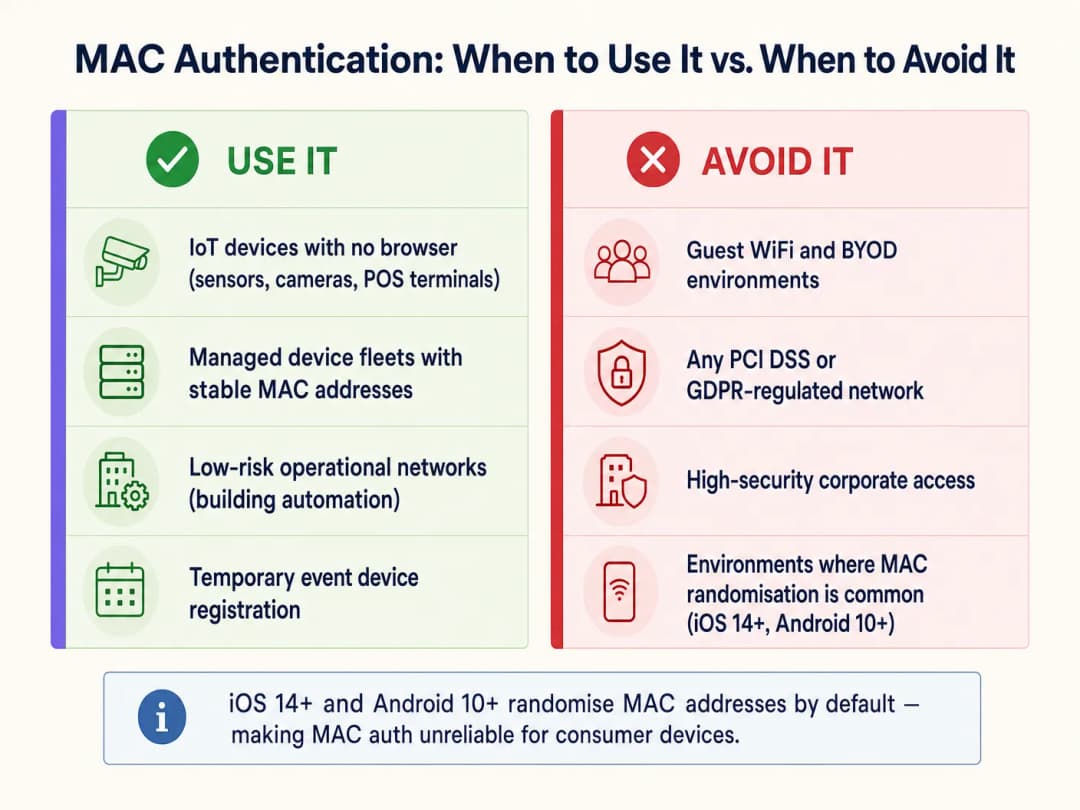
MAC authentication is appropriate only for device classes that lack the capability to authenticate through stronger methods. The primary use cases are:
| Device Class | Examples | Rationale |
|---|---|---|
| Headless IoT devices | Smart TVs, CCTV cameras, environmental sensors | No browser or supplicant capability |
| Operational technology (OT) | HVAC controllers, BMS, door access control panels | Legacy protocols with no 802.1X support |
| Legacy POS terminals | Older retail payment terminals | WPA2-PSK only; MAC filtering adds a weak secondary layer |
| Managed device fleets | Printers, VoIP phones, barcode scanners | Stable, known MAC addresses; centrally administered |
| Temporary event equipment | AV equipment, event tablets | Short-term, controlled deployment |
When to Avoid MAC Authentication
IT architects must actively avoid MAC authentication in several critical contexts:
Guest WiFi and BYOD networks. This is the most operationally significant issue facing venue operators today. Modern mobile operating systems randomize MAC addresses by default. If a Guest WiFi deployment relies on MAC caching to give returning visitors seamless re-authentication, it will fail for the majority of modern devices. The visitor's device presents a new random MAC on each visit, the network treats them as a new user, and they are forced through the captive portal every time. This degrades the user experience and corrupts returning-visitor data in WiFi Analytics platforms. The solution is to use Passpoint (Hotspot 2.0) or a secure captive portal with persistent session tokens.
High-security corporate networks. Any network segment handling sensitive corporate data must use, at minimum, 802.1X with EAP-TLS (certificate-based) or PEAP-MSCHAPv2. For detailed deployment guidance, see How to Set Up Enterprise WiFi on iOS and macOS with 802.1X. MAC authentication provides no meaningful protection against insider threats or targeted attacks on corporate infrastructure.
Environments governed by PCI DSS. PCI DSS v4.0 Requirement 8 mandates strong authentication controls for all systems within the cardholder data environment (CDE). MAC authentication does not meet the definition of strong authentication and cannot serve as the primary access control for any system that touches payment data. VLAN segmentation can isolate MAC-authenticated devices from the CDE, but the payment network itself must use 802.1X or equivalent authentication.
Data environments governed by CCPA/CPRA. Storing MAC addresses as personal data identifiers (which they can be, under CCPA/CPRA regulations) requires a lawful basis and appropriate security measures. Using MAC addresses as authentication credentials on networks that process personal data creates both security and compliance risk.
Deployment Best Practices
When implementing MAC authentication for the device classes that require it, the following vendor-agnostic practices are non-negotiable: VLAN Segmentation. Never place MAC-authenticated devices on the same VLAN as corporate users, servers, or payment systems. Assign them to a dedicated IoT VLAN with strict firewall ACLs limiting access only to the specific services they require. This is the single most important compensating control. For further guidance on network-level security architecture, see Access Point Security: Your 2026 Enterprise Guide and Protect Your Network with Strong DNS and Security.
Combine with WPA2/WPA3 Encryption. Always configure the SSID with WPA2-PSK or WPA3-SAE to encrypt the wireless payload. MAC authentication controls who can join the network; encryption protects what they transmit.
Device Profiling and Anomaly Detection. Deploy NAC solutions that incorporate device profiling. If a device authenticates with the MAC address of a registered smart TV but exhibits the traffic patterns of a Windows workstation (DNS queries, SMB traffic, HTTP browsing), the system should dynamically quarantine it pending investigation.
Allowlist Lifecycle Management. Maintain a strict lifecycle for the MAC allowlist. Decommissioned devices must be removed promptly. Stale entries are a direct attack vector for spoofing. Automate the audit process where possible, flagging MAC entries that have not been seen on the network for more than 90 days.
Separate SSIDs per Device Class. Avoid mixing IoT devices and user devices on the same SSID. Use dedicated SSIDs for IoT, corporate, and guest traffic, each mapped to its own VLAN with appropriate security policies.
Best Practices
The following table summarizes the recommended authentication method by device class and compliance context:
| Scenario | Recommended Auth Method | MAC Auth Role |
|---|---|---|
| Corporate laptops and cell phones | 802.1X (EAP-TLS or PEAP) | None |
| Guest smartphones and tablets | Captive Portal / Passpoint | None (MAC randomization makes it unreliable) |
| Headless IoT (cameras, sensors) | MAC Auth + WPA2/3-PSK | Primary (only viable option) |
| Legacy POS terminals | MAC Auth + WPA2-PSK + VLAN isolation | Secondary (compensating control) |
| Medical devices (HIPAA) | 802.1X where possible; MAC Auth + strict VLAN if not | Last resort with maximum segmentation |
| Event/temporary devices | MAC Auth with time-limited VLAN access | Appropriate for short-term, controlled deployment |
For organizations operating across multiple sectors, including Transport hubs and public-sector facilities, the principle remains consistent: authenticate the device class with the strongest method it supports, and compensate for weaker methods with network-level controls.
Troubleshooting & Risk Mitigation
Symptom: MAC-authenticated devices intermittently fail to connect.
Root cause: The device's NIC firmware may be generating randomized or locally administered MAC addresses. Confirm the device is configured to use its burned-in hardware MAC. Check the RADIUS server logs for Access-Reject messages and cross-reference against the allowlist format (some RADIUS servers expect colon-delimited format AA:BB:CC:DD:EE:FF; others expect no delimiters).
Symptom: Returning-visitor metrics are declining despite stable foot traffic. Root cause: MAC randomization on iOS 14+/Android 10+ devices. MAC caching mechanisms are no longer reliable for modern consumer devices. Transition to session-token-based re-authentication or Passpoint to restore accurate WiFi Analytics data.
Symptom: Unexpected devices appearing on the IoT VLAN. Root cause: MAC spoofing or a recently unaudited allowlist. Implement device profiling to detect mismatches between expected device behavior and actual traffic patterns. Review RADIUS accounting records for anomalous session durations or data volumes.
Symptom: RADIUS server performance degradation during peak hours. Root cause: High volumes of Access-Request messages from large IoT fleets. Implement RADIUS proxy caching or a dedicated RADIUS instance for MAC authentication to offload the primary authentication servers handling 802.1X.
ROI & Business Impact
Deploying MAC authentication strategically - rather than broadly - has a direct impact on operational efficiency and security posture. For a large hospitality venue managing 2,000+ in-room IoT devices, automated onboarding of smart TVs, thermostats, and IP phones via a pre-provisioned MAC allowlist removes the need for manual per-device configuration, cutting deployment time by an estimated 60-70% compared with manual credential entry. Support tickets related to IoT connectivity typically fall by 35-45% when devices are consistently assigned to the correct VLAN via RADIUS attributes.
Conversely, attempting to use MAC authentication for guest networks produces measurably negative outcomes. Venues relying on MAC caching for captive portal bypass report returning-visitor identification rates dropping from 70-80% to below 20% on networks where most users carry modern iOS or Android devices. This directly damages the ROI of a Guest WiFi Marketing & Analytics Platform, where returning-visitor data drives personalized marketing campaigns and loyalty engagement.
The business case is clear: invest in the correct authentication mechanism for each device class. MAC authentication for IoT devices reduces operational overhead. Secure captive portals and Passpoint for guest devices protect analytics integrity and compliance. The two should never be conflated.
Key Definitions
MAC Address (Media Access Control Address)
A unique 48-bit hardware identifier assigned to a network interface controller (NIC) by the manufacturer, typically represented as six pairs of hexadecimal digits (e.g., A4:CF:12:38:8E:7F).
Used in MAC authentication as both the username and password submitted to the RADIUS server. Its cleartext transmission in 802.11 management frames makes it trivially capturable.
RADIUS (Remote Authentication Dial-In User Service)
A networking protocol providing centralized Authentication, Authorization, and Accounting (AAA) management for users and devices connecting to a network service.
The server-side component of MAC authentication. It receives Access-Request messages from the access point, queries the MAC allowlist, and returns Access-Accept or Access-Reject responses.
MAC Spoofing
The act of altering the factory-assigned MAC address of a network interface to impersonate another device on the network.
The primary attack vector against MAC authentication. Requires no specialist tools or knowledge - standard OS utilities or freely available software (e.g., macchanger on Linux) can accomplish it in under two minutes.
MAC Address Randomization
A privacy feature in modern operating systems (iOS 14+, Android 10+, Windows 11) that generates a temporary, per-network random MAC address when connecting to WiFi, rather than using the device's hardware-burned address.
The reason MAC authentication and MAC caching fail for modern consumer devices on guest networks. Directly impacts returning visitor analytics and seamless re-authentication workflows.
Headless Device
A computing device that operates without a monitor, graphical user interface, keyboard, or other input peripherals.
The primary legitimate use case for MAC authentication. Headless devices (smart TVs, IP cameras, sensors) cannot interact with captive portals or input 802.1X credentials, making MAC authentication the only viable onboarding mechanism.
VLAN Segmentation
The practice of logically dividing a physical network into multiple isolated virtual networks (VLANs), each with its own traffic policies and firewall rules.
The critical compensating control for MAC authentication deployments. By confining MAC-authenticated devices to a restricted VLAN, the blast radius of a successful MAC spoofing attack is contained.
IEEE 802.1X
An IEEE standard for port-based network access control that provides cryptographic authentication using the Extensible Authentication Protocol (EAP), requiring a supplicant on the client device, an authenticator (the AP), and an authentication server (RADIUS).
The secure alternative to MAC authentication for all capable devices. Should be the default authentication method for corporate devices, managed endpoints, and any device handling sensitive data.
Passpoint (Hotspot 2.0)
A WiFi Alliance certification program (based on IEEE 802.11u) that enables automatic, secure authentication to WiFi networks using digital certificates or SIM credentials, without requiring captive portal interaction.
The strategic replacement for MAC caching on guest networks. Provides seamless re-authentication for returning users without relying on MAC addresses, resolving the MAC randomization problem.
Network Access Control (NAC)
A security approach that enforces policy on devices seeking to access network resources, including pre-admission checks (device health, authentication) and post-admission monitoring (traffic behavior, anomaly detection).
The broader category under which MAC authentication falls. MAC authentication is a basic form of NAC; enterprise deployments should layer it with device profiling and anomaly detection for meaningful security value.
WPA3-SAE (Simultaneous Authentication of Equals)
The authentication handshake used in WPA3 Personal mode, replacing the WPA2 four-way handshake with a more secure Dragonfly key exchange that is resistant to offline dictionary attacks.
The recommended encryption standard to pair with MAC authentication on IoT SSIDs, ensuring that even if a device's MAC is spoofed, the attacker still needs the correct PSK to decrypt the traffic.
Worked Examples
A national retail chain is deploying 500 new digital signage displays across its stores. The displays run a stripped-down Linux OS that does not support 802.1X supplicants or Captive Portal interactions. The network architect needs to connect them securely without disrupting the corporate or guest networks.
Deploy a dedicated SSID exclusively for the digital signage fleet, secured with WPA3-SAE (or WPA2-PSK if WPA3 is unsupported by the display hardware). Enable MAC address authentication on this SSID. Pre-register all 500 MAC addresses in the central RADIUS server's allowlist, sourced from the device procurement manifest. Configure the RADIUS server to assign all authenticated displays to a dedicated IoT VLAN (e.g., VLAN 50). Apply strict firewall ACLs on VLAN 50 permitting only outbound HTTPS traffic to the specific CMS cloud endpoint and NTP server. Block all inbound connections and all lateral traffic to other VLANs. Schedule a quarterly RADIUS allowlist audit to remove decommissioned display entries.
A 400-room hotel is reporting that returning guests are being forced through the Captive Portal on every visit, despite the portal being configured to remember devices for 90 days using MAC address caching. The guest WiFi network has been operating this way for three years without issues, but complaints have increased sharply over the past 18 months.
The root cause is MAC address randomization, introduced as a default behavior in iOS 14 (September 2020) and Android 10. The 18-month timeline aligns with the widespread adoption of these OS versions across the guest base. The MAC caching mechanism is no longer reliable for modern consumer devices. The immediate fix is to remove MAC caching as the re-authentication mechanism and replace it with a persistent session token stored in the Captive Portal backend, keyed to the user's email address or loyalty account rather than their MAC address. The medium-term solution is to deploy Passpoint (Hotspot 2.0) credentials, which use cryptographic certificates to identify returning users regardless of MAC address, providing seamless re-authentication without a Captive Portal interaction.
Practice Questions
Q1. A stadium operations director wants to deploy 200 wireless point-of-sale (POS) terminals for concession vendors. The terminals only support WPA2-PSK and MAC authentication. The director suggests placing them on the main corporate SSID to simplify network management. What is your recommendation, and what are the compliance implications?
Hint: Consider PCI DSS Requirement 8 (strong authentication) and the network segmentation requirements for cardholder data environments.
View model answer
Reject the proposal immediately. Placing POS terminals on the corporate SSID violates PCI DSS network segmentation requirements and creates a direct path from a MAC-spoofable device into the corporate network. The correct architecture is: create a dedicated SSID for POS terminals, secured with WPA2-PSK and MAC authentication, mapped to a dedicated POS VLAN. Apply firewall rules that permit only outbound traffic to the payment gateway processor over HTTPS (port 443). Block all inter-VLAN routing between the POS VLAN and the corporate or guest VLANs. Document this segmentation for the PCI DSS QSA audit. The MAC authentication provides a basic access control layer; the VLAN and firewall rules provide the actual security boundary.
Q2. Your WiFi Analytics dashboard shows that returning visitor identification rates have dropped from 74% to 18% over the past 12 months, despite stable foot traffic at your retail venues. The network uses MAC address caching to bypass the Captive Portal for returning visitors. What is the root cause, and what is the remediation path?
Hint: Consider the timeline of major mobile OS updates and their privacy features.
View model answer
The root cause is MAC address randomization. iOS 14 (September 2020) and Android 10 introduced per-network randomized MAC addresses as a default privacy feature. As the guest device base has upgraded to these OS versions, the MAC caching mechanism has progressively failed, causing the analytics platform to treat returning visitors as new users. Immediate remediation: replace MAC caching with a persistent session token system, where the Captive Portal stores a long-lived cookie or token keyed to the user's email address or loyalty account, allowing the portal to recognize returning users without relying on MAC addresses. Strategic remediation: deploy Passpoint (Hotspot 2.0) to provide seamless, certificate-based re-authentication that is entirely independent of MAC addresses.
Q3. A hospital IT manager needs to connect 50 legacy infusion pumps to the clinical WiFi network. The pumps cannot handle Captive Portals or 802.1X supplicants. The manager plans to deploy an open SSID with MAC authentication as the sole access control. What is the critical security flaw, and how should the architecture be corrected?
Hint: MAC authentication controls access; it does not protect data in transit. Consider HIPAA Security Rule requirements for data encryption.
View model answer
The critical flaw is the absence of wireless encryption. An open SSID transmits all data in cleartext over the air. Any attacker within radio range can capture all traffic from the infusion pumps - including patient data, dosage commands, and device telemetry - using a standard packet analyzer. This is a direct HIPAA Security Rule violation (45 CFR § 164.312(e)(2)(ii) - encryption of ePHI in transit). The corrected architecture must use WPA2-PSK (or WPA3-SAE) on the SSID in addition to MAC authentication, ensuring the wireless payload is encrypted. The pumps must be placed on a dedicated clinical device VLAN with firewall rules restricting traffic to the specific clinical information system they communicate with. The PSK should be complex, stored in the network management system, and rotated on a defined schedule.
Q4. A conference center IT team is planning to deploy MAC authentication across all SSIDs - including the guest network, the exhibitor network, and the AV equipment network - to simplify management with a single authentication approach. Evaluate this proposal.
Hint: Consider the different device classes and user types on each network, and the impact of MAC randomisation on the guest network.
View model answer
The proposal is inappropriate for two of the three networks. For the AV equipment network (headless devices, stable MAC addresses), MAC authentication is a valid and practical approach - pair it with WPA2/3 and a dedicated VLAN. For the exhibitor network (corporate laptops, tablets), MAC authentication is insufficient; exhibitors' devices support 802.1X and should be onboarded via a secure certificate or credential-based method. For the guest network (consumer smartphones and tablets), MAC authentication is actively counterproductive due to MAC randomisation - it will fail for the majority of modern devices and degrade the guest experience. The correct architecture uses three distinct authentication methods: MAC auth for AV equipment, 802.1X or a secure portal for exhibitors, and a Captive Portal with session-token-based re-authentication for guests.
Continue reading in this series
A Network Administrator’s Guide to Configuring RADIUS Authentication for Guest WiFi
A comprehensive technical reference for network administrators on deploying RADIUS authentication for guest WiFi. Covers architecture, vendor-neutral configuration steps, security best practices, and troubleshooting common deployment failures.
Implementing SCEP for Secure BYOD and 802.1X WiFi in Higher Education
This technical guide details how higher education IT teams can automate 802.1X certificate enrollment for thousands of BYOD devices using SCEP. It covers the architecture, security benefits, and practical deployment steps to replace manual onboarding with a secure, zero-touch network access model.
Configuring RADIUS Authentication for Guest and Staff WiFi Networks
This technical reference guide outlines the architecture, configuration, and deployment of RADIUS authentication for enterprise guest and staff WiFi networks. It provides network architects and IT managers with the exact protocols, security standards, and troubleshooting methodologies required to build secure, scalable wireless access control systems.
Got questions about your specific setup?
Our team works with venue operators, IT managers, and network engineers across 80,000 venues. Book a 20-minute call and we will show you how others like you solved it.