

একটি Captive Portal কী? সম্পূর্ণ নির্দেশিকা
এই সম্পূর্ণ প্রযুক্তিগত নির্দেশিকা ব্যাখ্যা করে যে Captive Portal কীভাবে কাজ করে, তাদের অন্তর্নিহিত নেটওয়ার্ক আর্কিটেকচার, এবং কীভাবে IT নেতারা মৌলিক গেস্ট WiFi-কে একটি সুরক্ষিত, অনুগত ফার্স্ট-পার্টি ডেটা ইঞ্জিনে রূপান্তরিত করতে পারেন। এটি এন্টারপ্রাইজ স্থাপনার জন্য প্রমাণীকরণ পদ্ধতি, সেগমেন্টেশন সেরা অনুশীলন এবং সমস্যা সমাধান কভার করে।
🎧 এই গাইডটি শুনুন
ট্রান্সক্রিপ্ট দেখুন
নির্বাহী সারসংক্ষেপ
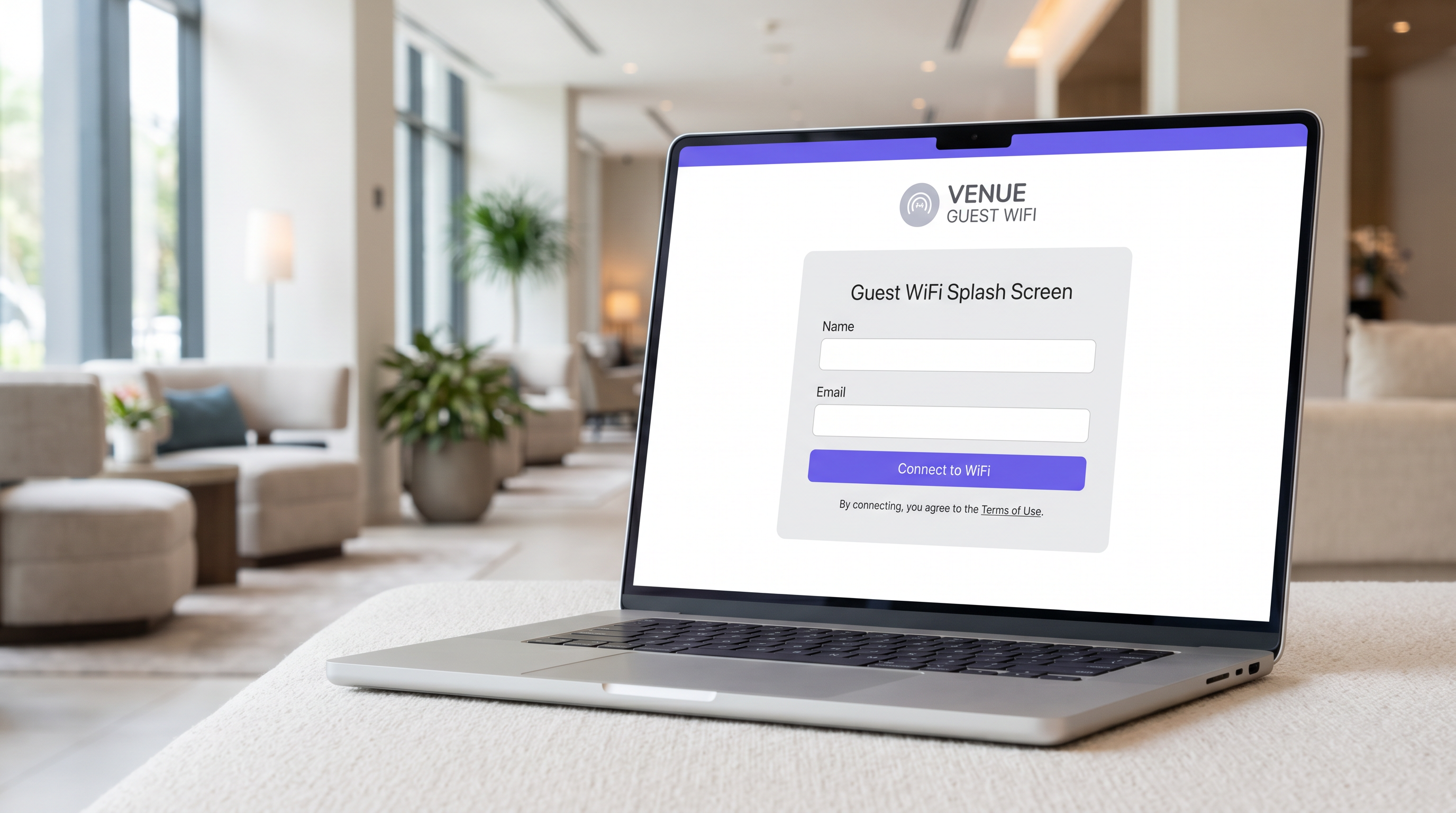
IT ম্যানেজার, নেটওয়ার্ক আর্কিটেক্ট এবং ভেন্যু অপারেশন ডিরেক্টরদের জন্য, Captive Portal হল এন্টারপ্রাইজ গেস্ট নেটওয়ার্কিং অবকাঠামোর একটি মৌলিক অংশ। মূলত, একটি Captive Portal হল একটি নেটওয়ার্ক অ্যাক্সেস কন্ট্রোল মেকানিজম যা একটি গেস্ট ডিভাইসের HTTP বা HTTPS ট্র্যাফিক আটকায় এবং এটিকে একটি ওয়েব-ভিত্তিক প্রমাণীকরণ পৃষ্ঠায় পুনঃনির্দেশিত করে বিস্তৃত ইন্টারনেটে অ্যাক্সেস দেওয়ার আগে। তবে, এটিকে কেবল একটি লগইন গেট হিসাবে বিবেচনা করা এর কৌশলগত মূল্যকে উপেক্ষা করে।
সঠিকভাবে প্রয়োগ করা হলে, একটি Captive Portal একটি অপারেশনাল খরচ—গেস্ট WiFi প্রদান—কে রূপান্তরিত করে একটি ফার্স্ট-পার্টি ডেটা ইঞ্জিনে যা পরিমাপযোগ্য ব্যবসায়িক ফলাফল চালিত করে। এই নির্দেশিকা Captive Portal আর্কিটেকচার, প্রমাণীকরণ পদ্ধতি, নেটওয়ার্ক সেগমেন্টেশন এবং সম্মতি প্রয়োজনীয়তা সম্পর্কে একটি ব্যাপক প্রযুক্তিগত রেফারেন্স প্রদান করে। এটি আপনাকে মৌলিক স্থাপনার বাইরে যেতে সাহায্য করার জন্য ডিজাইন করা হয়েছে এবং Purple-এর Guest WiFi -এর মতো প্ল্যাটফর্মগুলিকে কাজে লাগাতে যাচাইকৃত পরিচয় ডেটা ক্যাপচার করতে, PCI DSS এবং GDPR সম্মতি নিশ্চিত করতে, এবং খুচরা, আতিথেয়তা এবং বড় পাবলিক ভেন্যু জুড়ে নির্বিঘ্ন সংযোগ সরবরাহ করতে।
প্রযুক্তিগত গভীর বিশ্লেষণ
নেটওয়ার্ক আর্কিটেকচার এবং ট্র্যাফিক ইন্টারসেপশন
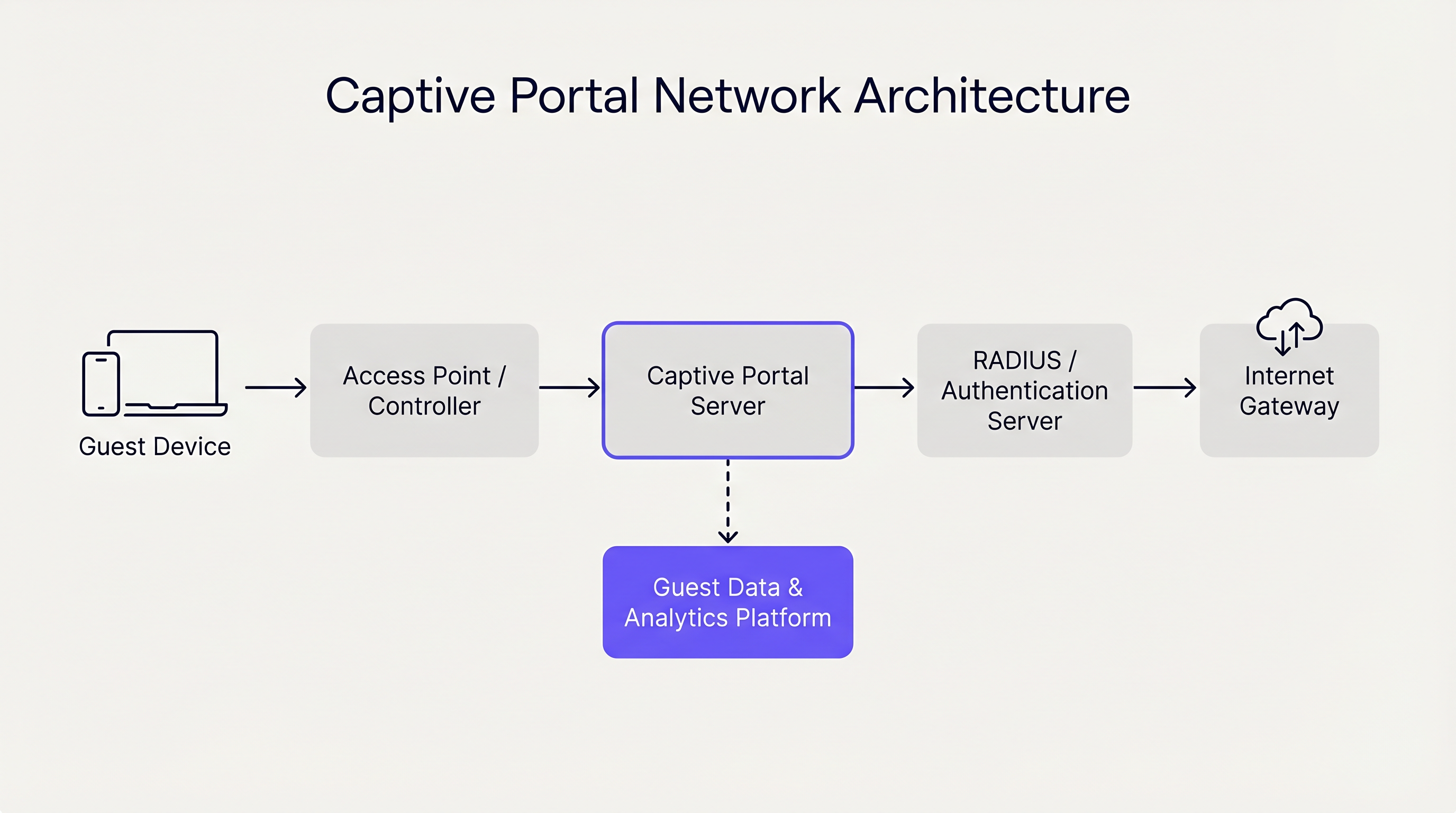
একটি Captive Portal প্রাথমিকভাবে OSI মডেলের Layer 2 এবং Layer 3-এ কাজ করে। যখন একটি গেস্ট ডিভাইস একটি অ্যাক্সেস পয়েন্ট (AP)-এর সাথে সংযুক্ত হয়, নেটওয়ার্ক কন্ট্রোলার DHCP এর মাধ্যমে এটিকে একটি IP ঠিকানা বরাদ্দ করে। গুরুত্বপূর্ণভাবে, এই ডিভাইসটি একটি সীমাবদ্ধ VLAN (Virtual Local Area Network)-এ স্থাপন করা হয় যার ইন্টারনেট গেটওয়েতে ডিফল্ট রাউটিং নেই।
কন্ট্রোলার বা একটি ডেডিকেটেড Captive Portal সার্ভার তখন দুটি প্রাথমিক পদ্ধতির মধ্যে একটি ব্যবহার করে ক্যাপটিভ অবস্থা প্রয়োগ করতে:
- DNS হাইজ্যাকিং: নেটওয়ার্ক গেস্ট ডিভাইস থেকে সমস্ত আউটবাউন্ড DNS ক্যোয়ারী আটকায়। অনুরোধ করা ডোমেইন নির্বিশেষে (যেমন,
example.com), DNS সার্ভার ক্যোয়ারীটিকে Captive Portal সার্ভারের IP ঠিকানায় সমাধান করে। - HTTP রিডাইরেকশন (স্বচ্ছ প্রক্সিইং): একটি ইনলাইন গেটওয়ে Layer 3 বা Layer 4-এ আউটবাউন্ড HTTP অনুরোধ আটকায়। গেটওয়ে একটি HTTP 302 Found রিডাইরেক্টের সাথে সাড়া দেয়, যা ডিভাইসের ব্রাউজারকে Captive Portal URL-এর দিকে নির্দেশ করে।
আধুনিক অপারেটিং সিস্টেম (iOS, Android, Windows, macOS) Captive Network Assistant (CNA) নামে পরিচিত একটি প্রক্রিয়া ব্যবহার করে এই প্রক্রিয়াটিকে সুগম করে। একটি নেটওয়ার্কের সাথে সংযুক্ত হওয়ার সাথে সাথে, OS একটি পরিচিত এন্ডপয়েন্টে (যেমন, captive.apple.com) একটি HTTP GET অনুরোধ পাঠায়। যদি প্রতিক্রিয়া প্রত্যাশিত সফল পেলোডের (উপরে বর্ণিত পুনঃনির্দেশ প্রক্রিয়াগুলির কারণে) থেকে ভিন্ন কিছু হয়, OS ক্যাপটিভ অবস্থা সনাক্ত করে এবং স্বয়ংক্রিয়ভাবে পোর্টাল পৃষ্ঠা প্রদর্শনের জন্য একটি হালকা, স্যান্ডবক্সড ব্রাউজার উইন্ডো চালু করে।
প্রমাণীকরণ পদ্ধতি এবং সুবিধা-অসুবিধা
প্রমাণীকরণ পদ্ধতির পছন্দ সরাসরি ব্যবহারকারীর ঘর্ষণ এবং ক্যাপচার করা ডেটার গুণমান উভয়কেই প্রভাবিত করে। ভেন্যু অপারেটরদের অবশ্যই নিরাপত্তা এবং বিপণন উদ্দেশ্যগুলির সাথে অ্যাক্সেসযোগ্যতার ভারসাম্য বজায় রাখতে হবে।
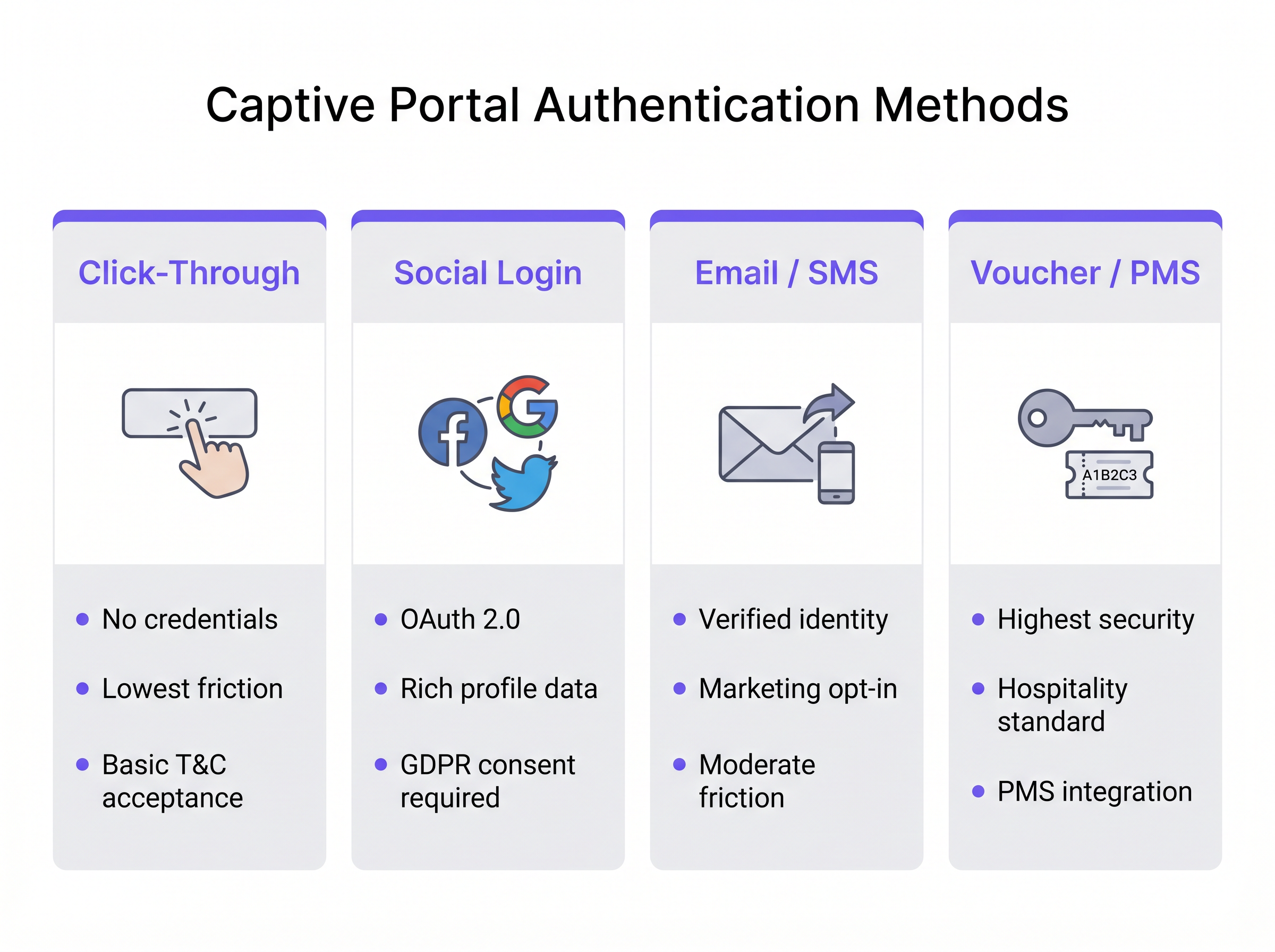
- ক্লিক-থ্রু: ব্যবহারকারী অ্যাক্সেস পেতে কেবল শর্তাবলী গ্রহণ করে। এই পদ্ধতিটি সর্বনিম্ন ঘর্ষণ প্রদান করে এবং Transport হাবের মতো উচ্চ-থ্রুপুট পরিবেশের জন্য আদর্শ। তবে, এটি কোনো যাচাইকৃত পরিচয় ডেটা প্রদান করে না।
- সোশ্যাল লগইন: ব্যবহারকারীরা তৃতীয় পক্ষের পরিচয় প্রদানকারী (যেমন, Facebook, Google) এর মাধ্যমে OAuth 2.0 ব্যবহার করে প্রমাণীকরণ করে। এটি সমৃদ্ধ জনসংখ্যাগত ডেটা সরবরাহ করে তবে কঠোর GDPR সম্মতি ব্যবস্থাপনার প্রয়োজন হয়।
- ইমেল / SMS যাচাইকরণ: ব্যবহারকারী একটি ইমেল ঠিকানা বা ফোন নম্বর প্রদান করে, যা একটি ওয়ান-টাইম পাসকোড (OTP) বা ম্যাজিক লিঙ্কের মাধ্যমে যাচাই করা হয়। এটি Retail পরিবেশের জন্য সর্বোত্তম পদ্ধতি, যা একটি যাচাইকৃত, ফার্স্ট-পার্টি যোগাযোগের রেকর্ড এবং বিপণন অপ্ট-ইনগুলির জন্য একটি স্পষ্ট পথ তৈরি করে।
- ভাউচার / PMS ইন্টিগ্রেশন: Hospitality -এর জন্য স্বর্ণমান। অতিথিরা Property Management System (PMS) এর মাধ্যমে তাদের রিজার্ভেশনের সাথে সংযুক্ত একটি অনন্য অ্যাক্সেস কোড পান। এটি উচ্চ নিরাপত্তা প্রদান করে এবং নেটওয়ার্ক ব্যবহারকে সরাসরি গেস্ট প্রোফাইলগুলির সাথে সংযুক্ত করে।
এছাড়াও, Purple-এর মতো এন্টারপ্রাইজ প্ল্যাটফর্মগুলি OpenRoaming-এর মতো নির্বিঘ্ন প্রমাণীকরণ ফ্রেমওয়ার্কগুলির জন্য একটি বিনামূল্যে পরিচয় প্রদানকারী হিসাবে কাজ করতে পারে, বিশেষ করে Connect লাইসেন্সের অধীনে, পুনরাবৃত্ত পোর্টাল লগইন ছাড়াই ঘর্ষণহীন, সুরক্ষিত অনবোর্ডিং সক্ষম করে।
বাস্তবায়ন নির্দেশিকা
একটি শক্তিশালী Captive Portal স্থাপন করার জন্য নেটওয়ার্ক এজ এবং কোরে সতর্ক পরিকল্পনার প্রয়োজন। একটি সুরক্ষিত এবং মাপযোগ্য বাস্তবায়নের জন্য এই বিক্রেতা-নিরপেক্ষ সুপারিশগুলি অনুসরণ করুন।
1. নেটওয়ার্ক সেগমেন্টেশন
সেগমেন্টেশন হল গেস্ট নেটওয়ার্ক নিরাপত্তার ভিত্তি। গেস্ট SSID অবশ্যই একটি ডেডিকেটেড VLAN-এর সাথে ম্যাপ করতে হবে যা কর্পোরেট, পয়েন্ট-অফ-সেল (POS), এবং IoT নেটওয়ার্ক থেকে সম্পূর্ণ বিচ্ছিন্ন।
- সুইচিং লেয়ার: সমস্ত অ্যাক্সেস সুইচে গেস্ট VLAN সংজ্ঞায়িত করুন এবং এটিকে কন্ট্রোলার বা গেটওয়েতে ট্রাঙ্ক করুন।
- ফায়ারওয়াল নিয়মাবলী: গেটওয়েতে কঠোর অ্যাক্সেস কন্ট্রোল তালিকা (ACLs) প্রয়োগ করুন। গেস্ট VLAN-এর জন্য ডিফল্ট নীতি অবশ্যই RFC 1918 প্রাইভেট IP স্পেসের (ইন্ট্রা-VLAN এবং ইন্টার-VLAN রাউটিং) জন্য
deny allহতে হবে, শুধুমাত্র ইন্টারনেটে আউটবাউন্ড ট্র্যাফিক (পোর্ট 80 এবং 443) এবং প্রয়োজনীয় পরিষেবাগুলি (DHCP, DNS) অনুমতি দেবে। - ক্লায়েন্ট আইসোলেশন: AP-গুলিতে Layer 2 ক্লায়েন্ট আইসোলেশন সক্ষম করুন গেস্ট ডিভাইসগুলিকে একে অপরের সাথে সরাসরি যোগাযোগ করা থেকে বিরত রাখতে, ক্ষতিকারক অভিনেতাদের দ্বারা পার্শ্বীয় চলাচলের ঝুঁকি হ্রাস করে।
2. DNS এবং DHCP আর্কিটেকচার
বড় স্থাপনাগুলিতে, যেমন স্টেডিয়াম বা এন্টারপ্রাইজ ক্যাম্পাসগুলিতে, আপনার DHCP স্কোপগুলি পিক কনকারেন্সির জন্য উপযুক্তভাবে আকারযুক্ত কিনা তা নিশ্চিত করুন। গেস্ট নেটওয়ার্কগুলিতে লিজের সময় কম হওয়া উচিত (যেমন, 30 থেকে 60 মিনিট) I প্রতিরোধ করতেP পুল নিঃশেষ।
DNS অবকাঠামোকে অবশ্যই হাইজ্যাকিং প্রক্রিয়াটি নির্ভরযোগ্যভাবে পরিচালনা করতে হবে। যদি একটি ক্লাউড-পরিচালিত পোর্টাল ব্যবহার করা হয়, তবে নিশ্চিত করুন যে স্থানীয় DNS সার্ভারগুলি অমীমাংসিত ক্যোয়ারীগুলি সঠিকভাবে ফরোয়ার্ড করে অথবা বিক্রেতার নির্দিষ্ট DNS কনফিগারেশন ব্যবহার করে যাতে সমস্ত ডিভাইসের প্রকার জুড়ে CNA ধারাবাহিকভাবে ট্রিগার হয়।
3. Walled Garden কনফিগারেশন
একটি "walled garden" হল IP ঠিকানা বা ডোমেনের একটি তালিকা যা অতিথি ডিভাইসগুলি প্রমাণীকরণের আগে অ্যাক্সেস করতে পারে। এটি সামাজিক লগইনের জন্য (OAuth প্রদানকারীর ডোমেনগুলিতে অ্যাক্সেসের অনুমতি দেওয়া) এবং যদি বাহ্যিকভাবে হোস্ট করা হয় তবে পোর্টাল পৃষ্ঠাটি প্রদর্শনের জন্য অত্যন্ত গুরুত্বপূর্ণ। অনুমোদিত ডোমেনগুলির মাধ্যমে ট্র্যাফিক টানেল করে ব্যবহারকারীদের পোর্টাল বাইপাস করা থেকে বিরত রাখতে walled garden-এর উপর কঠোর নিয়ন্ত্রণ বজায় রাখুন।
4. ব্যান্ডউইথ ব্যবস্থাপনা
সীমাহীন অতিথি অ্যাক্সেস দ্রুত ভেন্যুর WAN আপলিঙ্ককে পরিপূর্ণ করতে পারে, যা গুরুত্বপূর্ণ ব্যবসায়িক ক্রিয়াকলাপের কর্মক্ষমতা হ্রাস করে। প্রতি-ব্যবহারকারী এবং প্রতি-SSID রেট সীমিতকরণ প্রয়োগ করুন। একটি সাধারণ বেসলাইন হল প্রতি অতিথি ডিভাইসে 5 Mbps থেকে 20 Mbps, যা ওয়েব ব্রাউজিং এবং স্ট্যান্ডার্ড-ডেফিনিশন স্ট্রিমিংয়ের জন্য যথেষ্ট, যখন সামগ্রিক নেটওয়ার্ক স্বাস্থ্য রক্ষা করে। এটি বৃহত্তর অবকাঠামো কৌশলগুলির সাথে সামঞ্জস্যপূর্ণ, যেমন আধুনিক ব্যবসার জন্য কোর SD WAN সুবিধা , যেখানে ট্র্যাফিক শেপিং নিশ্চিত করে যে গুরুত্বপূর্ণ অ্যাপ্লিকেশনগুলি অগ্রাধিকার পায়।
সর্বোত্তম অনুশীলন
- HTTPS ইন্টারসেপশন পরিহার: পোর্টাল ট্রিগার করার জন্য সরাসরি HTTPS ট্র্যাফিক ইন্টারসেপ্ট করার চেষ্টা করবেন না। আধুনিক ব্রাউজারগুলি HTTP Strict Transport Security (HSTS) প্রয়োগ করে। যদি আপনি একটি HSTS-সক্ষম ডোমেনে একটি HTTPS অনুরোধ ইন্টারসেপ্ট করেন, তাহলে ব্রাউজার একটি গুরুতর সার্টিফিকেট ত্রুটি প্রদর্শন করবে, যা CNA প্রক্রিয়া বন্ধ করে দেবে। OS-এর নেটিভ HTTP প্রোবগুলির উপর নির্ভর করুন।
- রেসপনসিভ ডিজাইন: Captive Portal UI অবশ্যই রেসপনসিভ হতে হবে। অতিথি WiFi লগইনের 80% এর বেশি মোবাইল ডিভাইসে ঘটে। একটি পোর্টাল যা পিঞ্চিং এবং জুম করার প্রয়োজন হয়, তা পরিত্যাগ হার বাড়ায়।
- পরিষ্কার মূল্য প্রস্তাব: যদি ইমেল বা সামাজিক লগইন প্রয়োজন হয়, তবে স্পষ্টভাবে বলুন কেন আপনি ডেটা সংগ্রহ করছেন এবং ব্যবহারকারী বিনিময়ে কী পান (যেমন, "উচ্চ-গতির অ্যাক্সেস এবং এক্সক্লুসিভ ইন-স্টোর অফারগুলির জন্য সাইন ইন করুন")।
সমস্যা সমাধান ও ঝুঁকি প্রশমন
সাধারণ ব্যর্থতার মোড
- CNA ট্রিগার হয় না: এটি সাধারণত ভুল DNS কনফিগারেশন, একটি ভুলভাবে কনফিগার করা walled garden (যেমন, OS প্রোব এন্ডপয়েন্ট দুর্ঘটনাক্রমে হোয়াইটলিস্ট করা হয়েছে), অথবা AP HTTP অনুরোধ ইন্টারসেপ্ট করতে ব্যর্থ হওয়ার কারণে ঘটে। যাচাই করুন যে ক্লায়েন্ট DHCP এর মাধ্যমে সঠিক DNS সার্ভার পাচ্ছে এবং গেটওয়ে সক্রিয়ভাবে পোর্ট 80 ইন্টারসেপ্ট করছে।
- লগইনে সার্টিফিকেট ত্রুটি: যদি Captive Portal পৃষ্ঠাটি নিজেই HTTPS-এ হোস্ট করা হয় (যা হওয়া উচিত), তবে নিশ্চিত করুন যে SSL/TLS সার্টিফিকেট বৈধ, একটি বিশ্বস্ত পাবলিক সার্টিফিকেট অথরিটি দ্বারা জারি করা হয়েছে এবং সম্পূর্ণ সার্টিফিকেট চেইন পোর্টাল সার্ভার বা কন্ট্রোলারে ইনস্টল করা আছে।
- IP পুল নিঃশেষ: লক্ষণগুলির মধ্যে রয়েছে ক্লায়েন্টদের SSID-এর সাথে সংযোগ করা কিন্তু একটি IP ঠিকানা পেতে ব্যর্থ হওয়া। উচ্চতর ডিভাইস ঘনত্ব মিটমাট করার জন্য DHCP লিজের সময় কমান বা সাবনেট মাস্ক প্রসারিত করুন (যেমন, /24 থেকে /22)।
নিরাপত্তা এবং সম্মতি
- PCI DSS: খুচরা এবং আতিথেয়তার জন্য, পেমেন্ট কার্ড ইন্ডাস্ট্রি ডেটা সিকিউরিটি স্ট্যান্ডার্ড কার্ডহোল্ডার ডেটা এনভায়রনমেন্ট (CDE) এবং পাবলিক নেটওয়ার্কগুলির মধ্যে কঠোর বিচ্ছেদ বাধ্যতামূলক করে। ফায়ারওয়াল আইসোলেশন সহ একটি সঠিকভাবে সেগমেন্টেড গেস্ট VLAN বাধ্যতামূলক।
- GDPR এবং গোপনীয়তা: Captive Portal এর মাধ্যমে ব্যক্তিগত ডেটা সংগ্রহ GDPR প্রবিধানের আওতায় পড়ে। আপনাকে প্রক্রিয়াকরণের জন্য একটি বৈধ ভিত্তি স্থাপন করতে হবে (সাধারণত বিপণনের জন্য সম্মতি, অথবা নেটওয়ার্ক নিরাপত্তার জন্য বৈধ আগ্রহ)। পোর্টালটিকে একটি পরিষ্কার গোপনীয়তা নীতির সাথে লিঙ্ক করতে হবে এবং পূর্ব-টিক করা অপ্ট-ইন বক্সগুলি কঠোরভাবে নিষিদ্ধ। Purple-এর WiFi Analytics -এর মতো একটি প্ল্যাটফর্ম ব্যবহার করা নিশ্চিত করে যে এই সম্মতি প্রক্রিয়াগুলি অন্তর্নির্মিত এবং নিরীক্ষণযোগ্য।
ROI এবং ব্যবসায়িক প্রভাব
একটি মৌলিক Captive Portal থেকে একটি ইন্টেলিজেন্স প্ল্যাটফর্মে রূপান্তর নেটওয়ার্ককে একটি ব্যয় কেন্দ্র থেকে একটি রাজস্ব সক্ষমকারীতে স্থানান্তরিত করে।
- ফার্স্ট-পার্টি ডেটা অধিগ্রহণ: একটি কুকিলেস বিশ্বে, পোর্টালের মাধ্যমে সংগৃহীত যাচাইকৃত ইমেল এবং ফোন নম্বরগুলি CRM সমৃদ্ধকরণ এবং লক্ষ্যযুক্ত বিপণন প্রচারাভিযানের জন্য অত্যন্ত মূল্যবান সম্পদ।
- অপারেশনাল অ্যানালিটিক্স: প্রমাণীকরণ ছাড়াও, অবকাঠামো প্যাসিভ উপস্থিতি ডেটা ক্যাপচার করে। ভেন্যু অপারেটররা থাকার সময়, ফুটফল প্যাটার্ন এবং পুনরাবৃত্ত পরিদর্শক হার বিশ্লেষণ করতে পারে। উদাহরণস্বরূপ, স্বাস্থ্যসেবা সুবিধাগুলি রিয়েল-টাইম ভিজিটর ঘনত্বের উপর ভিত্তি করে ওয়েফাইন্ডিং এবং সম্পদ বরাদ্দ অপ্টিমাইজ করতে পারে।
- মুদ্রাকরণ: ভেন্যুগুলি স্পনসর করা স্প্ল্যাশ পৃষ্ঠাগুলির মাধ্যমে বা লগইন প্রক্রিয়ার সময় প্রদর্শিত লক্ষ্যযুক্ত প্রোগ্রাম্যাটিক বিজ্ঞাপনের মাধ্যমে সরাসরি পোর্টালকে নগদীকরণ করতে পারে।
Captive Portal-কে বৃহত্তর IT এবং বিপণন স্ট্যাকগুলির সাথে একত্রিত করার মাধ্যমে, সংস্থাগুলি বিনিয়োগের উপর পরিমাপযোগ্য রিটার্ন অর্জন করে, উন্নত গ্রাহক ব্যস্ততা এবং অপারেশনাল দক্ষতার মাধ্যমে অবকাঠামো ব্যয়কে ন্যায্যতা দেয়। সঠিক বিক্রেতা নির্বাচন সম্পর্কে আরও নির্দেশনার জন্য, আমাদের নির্দেশিকা দেখুন: Provedores de WiFi para Convidados: O que Procurar ao Escolher uma Plataforma de WiFi ।
পডকাস্ট ব্রিফিং
আমাদের সিনিয়র সলিউশনস আর্কিটেক্টের কাছ থেকে এই 10 মিনিটের ব্রিফিংয়ে Captive Portal-এর প্রযুক্তিগত স্থাপত্য এবং কৌশলগত মূল্য সম্পর্কে শুনুন।
মূল শব্দ ও সংজ্ঞা
Captive Portal
A network access control mechanism that intercepts a device's HTTP traffic and redirects it to a web page for authentication before granting internet access.
The fundamental technology used to secure and manage guest WiFi networks in commercial venues.
Captive Network Assistant (CNA)
A native OS feature (on iOS, Android, etc.) that probes for internet connectivity upon joining a network and automatically opens a mini-browser if it detects a captive portal redirect.
Ensures a seamless user experience by presenting the login screen immediately, rather than waiting for the user to open a browser.
Walled Garden
A restricted set of IP addresses or domains that unauthenticated users are permitted to access.
Necessary for allowing devices to reach third-party identity providers (like Facebook or Google) during the social login process.
VLAN (Virtual Local Area Network)
A logical subnetwork that groups a collection of devices on a single physical LAN, isolating their traffic.
Crucial for network segmentation, ensuring guest WiFi traffic is kept completely separate from corporate or POS traffic.
Client Isolation
A wireless network setting that prevents devices connected to the same AP from communicating directly with one another.
A critical security measure on public networks to prevent lateral movement and peer-to-peer attacks between guest devices.
HTTP 302 Redirect
A standard HTTP response status code indicating that the requested resource has been temporarily moved to a different URL.
The primary mechanism used by gateways to redirect a user's initial web request to the captive portal login page.
MAC Authentication Bypass (MAB)
A method of granting network access based on the device's MAC address, often used to re-authenticate returning visitors automatically.
Improves the user experience by allowing seamless reconnection for guests who have previously authenticated, within a defined retention period.
HSTS (HTTP Strict Transport Security)
A web security policy mechanism that helps protect websites against protocol downgrade attacks and cookie hijacking.
The reason why captive portals cannot intercept HTTPS traffic; doing so violates HSTS and results in browser security warnings.
কেস স্টাডিজ
A 200-room hotel needs to implement guest WiFi that ensures only paying guests have access, prevents bandwidth hogging, and complies with PCI DSS regarding the adjacent point-of-sale systems in the restaurant.
- Deploy a captive portal with PMS (Property Management System) integration. Guests authenticate using their room number and surname. 2. Configure a dedicated Guest VLAN (e.g., VLAN 50) across all APs and switches. 3. Implement firewall rules denying all traffic from VLAN 50 to the Corporate/POS VLAN (e.g., VLAN 10). 4. Apply a bandwidth policy limiting each authenticated device to 10 Mbps downstream/2 Mbps upstream. 5. Enable Layer 2 client isolation on the APs.
A national retail chain wants to offer free WiFi to shoppers to build their CRM database, but they are concerned about GDPR compliance and high abandonment rates at the login screen.
- Implement an Email/SMS verification captive portal. 2. Ensure the UI is mobile-responsive and loads in under 2 seconds. 3. Include a clear, unticked checkbox for marketing consent, separate from the Terms of Use acceptance. 4. Provide a clear value exchange on the splash page (e.g., 'Sign in for 10% off your purchase today'). 5. Integrate the portal platform via API directly into the corporate CRM.
দৃশ্যপট বিশ্লেষণ
Q1. A hospital IT director wants to implement a captive portal for patients and visitors. They require users to accept an acceptable use policy but do not want to manage passwords or collect personal data to avoid HIPAA/GDPR complications. Which authentication method should they deploy?
💡 ইঙ্গিত:Consider the method that offers the lowest friction and captures zero identity data.
প্রস্তাবিত পদ্ধতি দেখুন
Click-Through authentication. This method allows users to simply accept the Terms and Conditions to gain access. It satisfies the requirement for an acceptable use policy acknowledgment without collecting any personally identifiable information (PII), thereby minimizing compliance risks.
Q2. During a captive portal deployment at a stadium, users report that their phones show a 'Connection is not private' or certificate error instead of the login page when they try to browse to 'https://google.com'. What is the architectural cause of this issue?
💡 ইঙ্গিত:Think about how modern browsers handle secure connections and what happens when a gateway tries to intercept them.
প্রস্তাবিত পদ্ধতি দেখুন
The gateway is attempting to intercept HTTPS traffic. Because 'google.com' utilizes HSTS (HTTP Strict Transport Security), the browser expects a specific SSL certificate. When the gateway intercepts the request and serves the portal's certificate instead, the browser detects a mismatch and blocks the connection to prevent a man-in-the-middle attack. The solution is to rely on the OS's native CNA HTTP probes rather than intercepting user-initiated HTTPS requests.
Q3. A retail chain has deployed a captive portal that collects email addresses for marketing. However, the marketing team reports that 40% of the emails collected are fake (e.g., 'test@test.com'). How can the network architect adjust the portal configuration to improve data quality?
💡 ইঙ্গিত:How can the system prove the user actually owns the contact detail they provided before granting access?
প্রস্তাবিত পদ্ধতি দেখুন
Implement Email Verification via a One-Time Passcode (OTP) or magic link. The portal should place the user in a 'walled garden' state with limited access (e.g., only allowing access to their email provider) until they click the verification link or enter the OTP sent to the provided email address. Only after verification is full internet access granted.




