

Guest WiFi Providers: What to Look for When Choosing a WiFi Platform
This technical reference guide provides IT leaders, network architects, and venue operations directors with a definitive framework for evaluating and deploying enterprise guest WiFi platforms. It covers critical architecture standards (IEEE 802.1X, WPA3, GDPR, PCI DSS), integration requirements, and deployment best practices across hospitality, retail, and public-sector environments. The guide demonstrates how modern guest WiFi providers transform connectivity from a cost centre into a strategic data acquisition and revenue-generating asset.
🎧 Listen to this Guide
View Transcript

Executive Summary
For IT managers, network architects, and CTOs across hospitality, retail, and large public venues, selecting a guest WiFi provider is no longer just about offering basic internet access. Modern guest WiFi providers are foundational to enterprise data strategy, customer experience, and security compliance. The platform you choose will determine your ability to capture first-party data at scale, enforce regulatory compliance, and integrate with your existing CRM, marketing automation, and property management systems.
This technical reference guide provides a definitive framework for evaluating guest WiFi services. It moves beyond basic connectivity to examine critical integration points, data capture capabilities, and security architectures. Whether you are upgrading legacy infrastructure or deploying a greenfield solution across hundreds of locations, this guide outlines exactly what to look for when choosing a WiFi platform — covering everything from IEEE 802.1X and WPA3 standards to CRM integrations and ROI measurement, ensuring your deployment delivers measurable business impact while mitigating risk.
Technical Deep Dive: Architecture and Standards
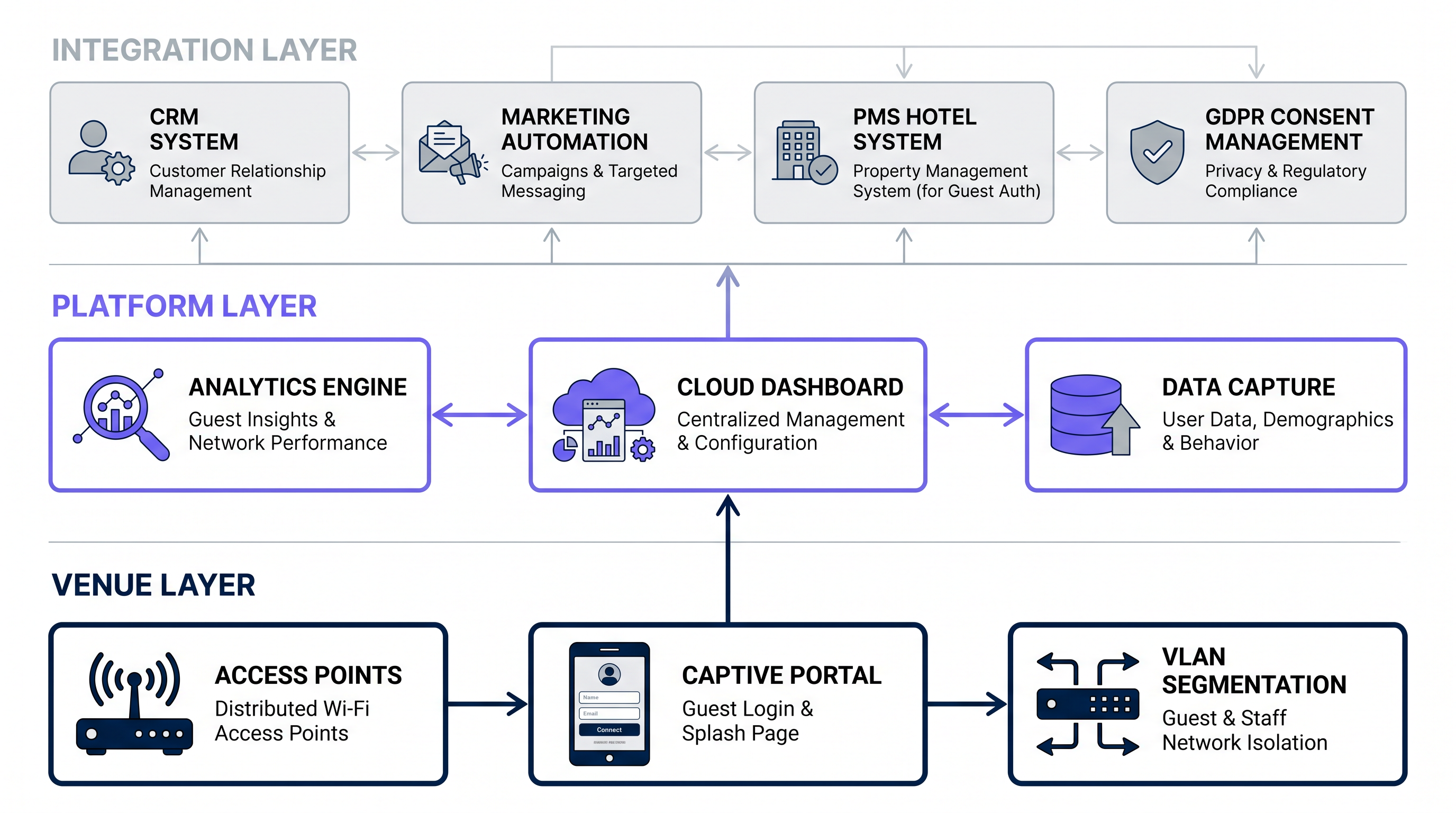
When evaluating a guest WiFi company, the underlying architecture and adherence to industry standards dictate the platform's scalability, security, and integration capabilities. A robust platform must operate seamlessly across three distinct layers: the Venue Layer (physical infrastructure), the Platform Layer (cloud intelligence), and the Integration Layer (enterprise connectivity).
Security and Authentication Standards
Security is paramount in any public or business WiFi deployment. Legacy open networks with shared pre-shared keys (PSKs) are unacceptable for enterprise environments due to data interception risks and the inability to attribute traffic to individual users.
Encryption and Access Control: Modern guest WiFi services must support robust encryption. While WPA2-Enterprise has been the standard, forward-looking deployments should mandate WPA3 support for enhanced cryptographic strength, particularly the Simultaneous Authentication of Equals (SAE) handshake, which eliminates the offline dictionary attack vulnerability present in WPA2. Furthermore, look for platforms supporting IEEE 802.1X for port-based Network Access Control (NAC), enabling secure, profile-based authentication where each user session is individually credentialed via a RADIUS server.
Profile-Based Authentication (Passpoint/Hotspot 2.0): The future of seamless secure WiFi relies on profile-based authentication. Solutions like OpenRoaming allow users to connect automatically and securely without repeatedly entering credentials, leveraging a global network of identity providers. Purple acts as a free identity provider for services like OpenRoaming under the Connect licence, facilitating automatic, secure authentication for users across tens of thousands of venues worldwide — eliminating captive portal friction entirely for enrolled users.
Compliance Frameworks: The platform must inherently support regulatory compliance. In Europe, strict adherence to GDPR is mandatory — covering data consent at the point of collection, data retention limits, the right to erasure, and lawful basis for processing. Globally, if the network handles any payment data (even indirectly via integrations), PCI DSS compliance for network segmentation and security is non-negotiable. Any guest WiFi provider operating across multiple jurisdictions should offer configurable consent management to adapt to local regulations.
Data Capture and Analytics Engine
The primary business driver for deploying enterprise-grade hospitality WiFi providers or public WiFi providers is data acquisition. The platform layer must include a sophisticated analytics engine capable of processing high-volume, real-time data streams from potentially thousands of concurrent users.
First-Party Data Collection: The captive portal is the primary data ingestion point. Look for platforms that offer fully customisable, responsive splash pages — see Comment créer une page de connexion WiFi invité or So erstellen Sie eine Guest WiFi Login Page for implementation walkthroughs. The system should capture demographic data, contact information, and explicit marketing consent seamlessly, with support for progressive profiling to reduce abandonment rates.
Location Analytics: Beyond login data, the platform should leverage access point (AP) telemetry — specifically RSSI (Received Signal Strength Indicator) readings from multiple APs — to provide spatial analytics. This includes footfall counting, dwell time analysis, zone-based heat mapping, and real-time occupancy monitoring. These capabilities transform the WiFi Analytics platform into an operational intelligence tool.
Throughput and Scalability: The analytics engine must handle high concurrency without latency degradation. Evaluate the provider's cloud architecture — is it built on scalable microservices capable of processing thousands of authentications per second during peak events, such as stadium half-time or a conference break? Look for SLA commitments on portal availability (99.9%+) and authentication response times.
Integration and API Capabilities
A guest WiFi platform is only as valuable as its ability to share data with your existing enterprise stack. Data silos are the enemy of ROI.
CRM and Marketing Automation: Bi-directional integration with CRM systems (Salesforce, HubSpot, Microsoft Dynamics) is critical. When a user connects to the Guest WiFi , their profile should instantly update in the CRM, triggering targeted marketing automation workflows — welcome emails, loyalty enrolment prompts, or personalised offers based on visit history.
Property Management Systems (PMS): For hospitality environments, PMS integration (Oracle OPERA, Mews, Agilysys) allows for tier-based bandwidth allocation — premium speeds for loyalty members — and automated authentication based on room number and surname validation, eliminating the need for separate WiFi passwords.
Webhooks and REST APIs: Ensure the provider offers comprehensive, well-documented RESTful APIs and webhooks for real-time event streaming into custom data lakes, BI tools (Power BI, Tableau), or data warehouses. The absence of a mature API offering is a significant red flag for enterprise deployments.
Implementation Guide: Deployment and Configuration
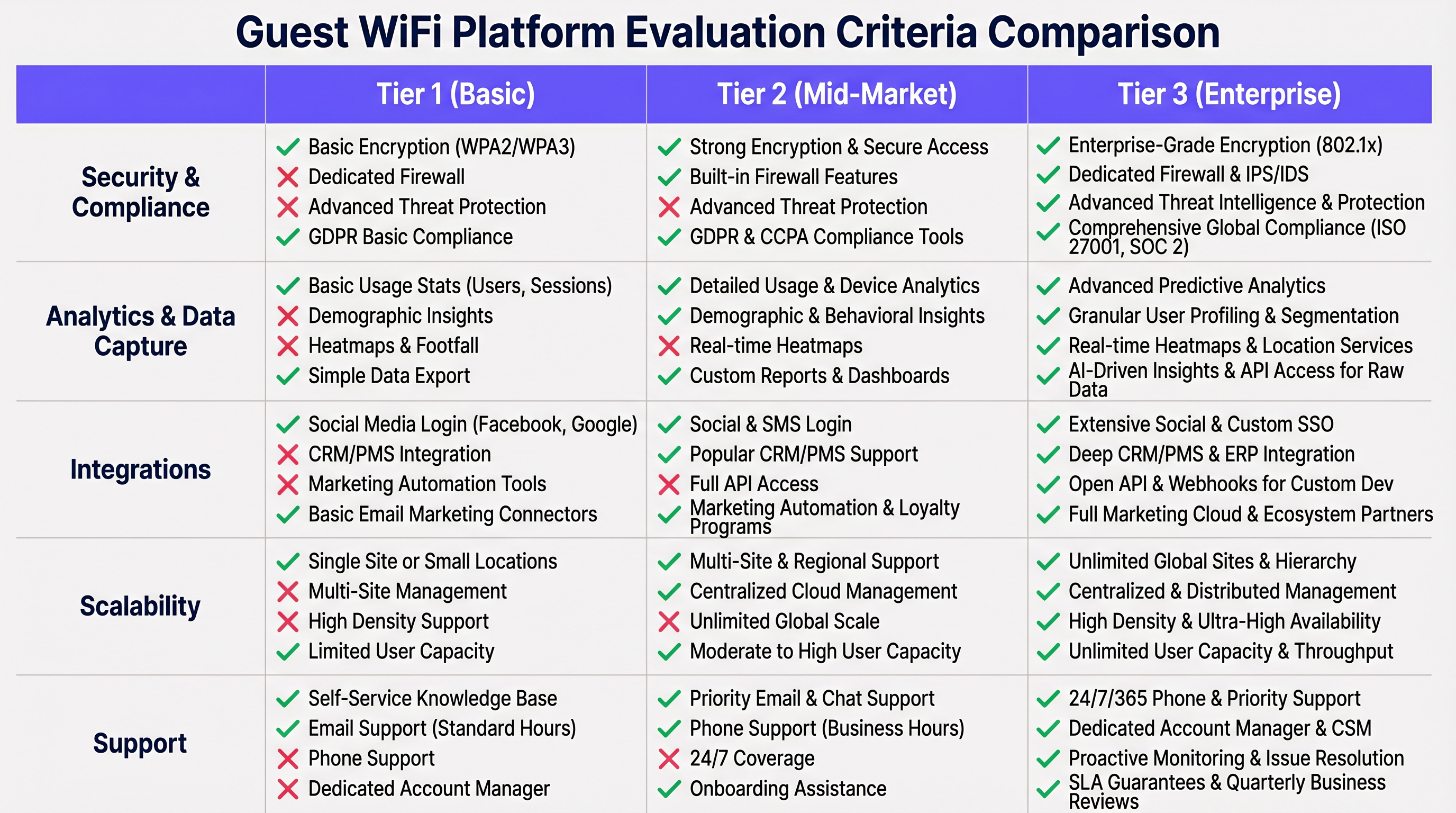
Deploying a unified guest WiFi solution across distributed environments requires meticulous planning. This section outlines a vendor-neutral deployment methodology applicable to hospitality, retail, and public-sector environments.
Phase 1: Network Segmentation and VLAN Design
Never mix guest traffic with corporate or operational data. Implement strict VLAN segmentation at the network edge.
- VLAN Isolation: Assign guest traffic to a dedicated VLAN (e.g., VLAN 100). Configure inter-VLAN routing rules on the core switch to explicitly deny any routing between the guest VLAN and corporate VLANs (POS, staff, management).
- Layer 2 Client Isolation: Enable client isolation on the APs to prevent guest devices from communicating directly with each other, mitigating lateral threat movement and peer-to-peer attacks.
- Bandwidth Throttling: Implement QoS policies to cap per-user bandwidth (e.g., 5 Mbps down / 2 Mbps up) to ensure fair usage and protect core business application performance.
Phase 2: Captive Portal Configuration
The captive portal is the user's first interaction with your brand and the primary data capture mechanism.
- Authentication Methods: Offer diverse login options to maximise conversion rates: Social Login (Google, Facebook), SMS OTP authentication, and standard email form fills. Each method has different data richness trade-offs.
- Progressive Profiling: Do not overwhelm users with long forms on their first visit. Use progressive profiling to ask for different data points on subsequent logins — building a rich profile over time without sacrificing the initial connection experience.
- Walled Garden Configuration: Carefully configure the pre-authentication access list to allow access to necessary CDNs, social login OAuth endpoints, and the provider's cloud controller before the user fully authenticates.
- SSL Certificates: Ensure the portal domain uses a valid, trusted SSL certificate. An invalid certificate will cause the Captive Network Assistant (CNA) on iOS and Android to display security warnings, dramatically increasing abandonment.
Phase 3: Hardware Agnosticism and Overlay Architecture
Avoid vendor lock-in at the hardware layer. The ideal guest WiFi platform should operate as a cloud overlay, compatible with major enterprise AP vendors (Cisco Meraki, Aruba Networks, Ruckus, Juniper Mist, Ubiquiti).
RADIUS Integration: The platform should integrate via standard RADIUS protocols (RFC 2865/2866) for authentication and accounting, ensuring compatibility with any 802.1X-capable access point.
Controller Compatibility: Verify the platform supports both cloud-managed and on-premises controller architectures, as many enterprise environments run hybrid deployments.
Best Practices for Enterprise Environments
Based on deployments across 80,000+ venues and nearly 2 million daily users, the following best practices ensure optimal performance and ROI across business wifi providers and public wifi providers alike.
Prioritise the User Experience: The login process must be fast. Target a time-to-connect of under 15 seconds from SSID association to full internet access. Complex authentication flows lead to high abandonment rates, directly reducing your data capture yield.
Leverage SD-WAN for Multi-Site Deployments: For distributed environments such as Retail chains, integrating guest WiFi with SD-WAN infrastructure optimises traffic routing, centralises security policy enforcement, and provides unified visibility across all locations. See The Core SD WAN Benefits for Modern Businesses for a detailed technical analysis of how SD-WAN complements guest WiFi architecture.
Implement Automated Data Cleansing: Ensure your platform automatically validates and scrubs email addresses, normalises phone number formats, and deduplicates records before pushing data to your CRM. Poor data quality compounds over time and undermines your marketing ROI.
Tailor the Experience by Industry Vertical: Different sectors have distinct requirements. In Hospitality , integrate with loyalty programmes to offer seamless onboarding for returning guests and tier-based service levels. In Healthcare , patient privacy is paramount — prioritise anonymised location analytics over PII capture, and ensure strict HIPAA and GDPR compliance for any data collected via the portal. In Transport hubs, focus on high-density AP deployment, fast roaming (802.11r), and Passpoint support for seamless connectivity across large, multi-zone environments.
Troubleshooting and Risk Mitigation
Even with robust architecture, operational issues arise. The following covers the most common failure modes encountered in enterprise guest WiFi deployments.
Captive Portal Not Appearing (CNA Failure): The Captive Network Assistant on iOS and Android relies on specific HTTP probe requests to detect a captive portal. If Apple's or Google's detection URLs are blocked, incorrectly routed, or return unexpected responses, the popup will not appear, and users will be unable to connect without knowing to manually navigate to a browser. Mitigation: Ensure your walled garden explicitly allows the known CNA probe destinations and that your portal returns the correct HTTP 302 redirect response.
IP Pool Exhaustion: In high-footfall venues, DHCP scopes can quickly exhaust as devices probe the network without completing authentication. Mitigation: Reduce DHCP lease times significantly on the guest VLAN — 30 to 60 minutes is appropriate for most public venues — to rapidly reclaim addresses from devices that have left the area.
Data Privacy Breaches: Mishandling PII carries severe legal and reputational consequences under GDPR (fines up to 4% of global annual turnover) and equivalent regulations. Mitigation: Implement strict Data Processing Agreements (DPAs) with your guest WiFi provider. Ensure the platform supports automated data anonymisation, configurable retention periods, and self-service deletion request workflows.
Authentication Latency Under Load: During peak concurrency events, RADIUS authentication requests can queue, causing perceived slowness at the portal. Mitigation: Ensure your provider's cloud infrastructure auto-scales RADIUS capacity, and consider deploying a local RADIUS proxy for latency-sensitive environments.
ROI and Business Impact
A modern guest WiFi deployment transitions the network from a cost centre to a revenue-generating and cost-reducing strategic asset. Measuring ROI requires tracking specific KPIs via a dedicated WiFi Analytics platform.
Customer Acquisition Cost Reduction: By capturing first-party data via the WiFi portal, venues build proprietary, permission-based marketing lists. This reduces reliance on expensive third-party advertising and cookie-dependent retargeting, which is increasingly constrained by browser privacy changes and regulatory pressure.
Increased Dwell Time and Revenue Per Visit: Targeted in-venue messaging — pushing a digital voucher to a user's device after 30 minutes of dwell time — directly correlates with increased basket size in retail environments and increased food and beverage spend in hospitality.
Retail Media Monetisation: Large venues can monetise their WiFi splash page real estate by serving targeted, contextually relevant advertisements or sponsorships, generating direct incremental revenue from the network infrastructure.
Operational Efficiency: Real-time location analytics can optimise staffing levels based on live footfall data, reduce queue lengths, and improve asset utilisation — delivering measurable OPEX reductions that compound over time.
By treating guest WiFi as a strategic data acquisition channel rather than a basic utility, IT leaders can deliver measurable, compounding value to the business — transforming an infrastructure cost into a competitive advantage.
Key Terms & Definitions
Captive Portal
A web page that a user of a public-access network is obliged to view and interact with before full internet access is granted. Typically delivered via an HTTP redirect when a new device associates with the SSID.
The captive portal is the primary user interface for guest WiFi and the critical ingestion point for first-party marketing data and terms of service acceptance. Its design directly impacts data capture rates.
Walled Garden
A restricted pre-authentication environment that controls which web resources a user can access before they have completed the captive portal login process.
IT teams must configure the walled garden to allow access to necessary services — social login OAuth APIs, the portal CDN, and the provider's cloud controller — while blocking general internet access. Misconfiguration is a common cause of portal failures.
IEEE 802.1X
An IEEE Standard for port-based Network Access Control (PNAC), providing an authentication mechanism to devices wishing to attach to a LAN or WLAN. Requires a supplicant (client), authenticator (AP/switch), and authentication server (RADIUS).
Essential for enterprise-grade security, allowing for individual user authentication rather than a shared password. Enables per-user policy enforcement, session logging, and dynamic VLAN assignment.
Layer 2 Client Isolation
A security feature on wireless access points that prevents wireless clients on the same SSID from communicating directly with each other at the data link layer.
Critical for public WiFi deployments to prevent lateral movement of threats — for example, stopping malware on one guest laptop from scanning or attacking other devices on the same network.
Passpoint (Hotspot 2.0)
A Wi-Fi Alliance standard (based on IEEE 802.11u) designed to streamline network access by enabling devices to automatically discover and authenticate to compatible networks using pre-provisioned credentials, without requiring captive portal interaction.
The emerging standard for enterprise guest WiFi, enabling seamless, secure roaming between cellular and WiFi networks. Providers like Purple are investing heavily in OpenRoaming, a Passpoint-based global roaming framework.
RADIUS (Remote Authentication Dial-In User Service)
A networking protocol (RFC 2865) that provides centralised Authentication, Authorization, and Accounting (AAA) management for users connecting to a network service.
The standard protocol used by wireless access points to communicate with the cloud guest WiFi platform to verify user credentials, assign VLANs, and apply bandwidth policies. RADIUS compatibility is the key enabler of hardware-agnostic deployments.
RSSI (Received Signal Strength Indicator)
A measurement of the power level of a received radio signal, expressed in dBm. Used by WiFi devices and infrastructure to estimate signal quality and approximate physical distance from an access point.
Used by WiFi analytics engines to triangulate the physical location of a device within a venue, enabling footfall tracking, zone-based dwell time analysis, and real-time heat mapping without requiring GPS.
Dwell Time
The length of time a visitor's device remains associated with the WiFi network within a specific physical location or defined zone within a venue.
A key operational and marketing metric. Used by operations teams to optimise staffing and queue management, and by marketing teams to trigger time-based promotional messages — for example, sending a discount offer after 30 minutes in a specific retail zone.
Progressive Profiling
A data collection strategy where user profile information is gathered incrementally across multiple interactions or visits, rather than all at once during the initial registration.
The recommended approach for captive portal data capture. Reduces initial friction (increasing connection rates) while building rich user profiles over time. Requires MAC address recognition or cookie-based return visitor identification.
VLAN (Virtual Local Area Network)
A logical subdivision of a physical network that groups devices together regardless of their physical location, creating separate broadcast domains at Layer 2.
The fundamental mechanism for isolating guest WiFi traffic from corporate networks. Every enterprise guest WiFi deployment must assign guest traffic to a dedicated VLAN to prevent cross-contamination with operational systems.
Case Studies
A 200-room hotel needs to upgrade its legacy guest WiFi. The current system uses a shared WPA2 password distributed at check-in, resulting in poor security, bandwidth abuse by non-guests, zero data capture, and no integration with their Oracle OPERA PMS. The IT team has a mixed hardware estate of Aruba and Cisco Meraki access points.
Step 1 — Platform Selection: Choose a hardware-agnostic guest WiFi platform that integrates via RADIUS with both Aruba and Cisco Meraki controllers. This preserves the existing hardware investment.
Step 2 — Network Architecture: Transition from the shared PSK to an open SSID with a captive portal. Create a dedicated guest VLAN (VLAN 100) with Layer 2 client isolation enabled. Configure QoS to cap guest bandwidth at 10 Mbps per device, with a separate policy for loyalty members.
Step 3 — PMS Integration: Configure the captive portal with a 'Room Number + Surname' authentication method. The WiFi platform queries Oracle OPERA via API in real-time to validate the guest. Only active in-house guests can authenticate.
Step 4 — Tiered Bandwidth: Implement policy-based routing. Standard guests receive 10 Mbps. Loyalty members (identified via PMS room type or loyalty flag) receive 25 Mbps automatically.
Step 5 — Data Capture: Enable progressive profiling on the portal. On first login, capture email and marketing consent. On subsequent stays, prompt for one additional preference (e.g., room type preference, communication channel).
Step 6 — CRM Integration: Configure bi-directional sync with the hotel's CRM to append WiFi engagement data to guest profiles, enabling post-stay email campaigns.
A national retail chain with 150 locations is experiencing high abandonment rates on their guest WiFi login page (estimated at 65%). They currently require a six-field form (Name, Email, Phone, Postcode, Age, Gender) before granting access. Their IT team wants to improve data capture volume without reducing data quality.
Step 1 — Audit the Abandonment Funnel: Use the WiFi platform's analytics to identify at which field users are abandoning. Typically, Phone Number and Age are the highest-friction fields.
Step 2 — Implement Progressive Profiling: Redesign the captive portal to a two-stage flow. First visit: require only Email Address (or Social Login via Google/Facebook) and Terms acceptance. This is a single interaction — the minimum viable ask.
Step 3 — Return Visit Profiling: When the platform recognises a returning device MAC address, present a personalised 'Welcome Back' screen that asks for one additional data point before granting access. Rotate through: Postcode (visit 2), Age range (visit 3), Gender (visit 4).
Step 4 — CRM Append Logic: Configure the integration so each new data point is appended to the existing user profile in the CRM, building a complete record over four visits rather than demanding it all upfront.
Step 5 — Measure Improvement: Track connection rate (target: increase from 35% to 70%+), email capture rate, and profile completeness score over a 90-day period.
Scenario Analysis
Q1. You are the network architect for a 60,000-seat stadium deploying guest WiFi for the first time. The marketing team wants to capture email addresses and push real-time promotional offers during the event. The operations team is concerned about network congestion during the 15-minute half-time break when the majority of attendees will simultaneously attempt to connect. What is your recommended architectural approach, and what specific configurations will you implement to handle the concurrency spike?
💡 Hint:Consider the bottleneck points: DHCP scope exhaustion, RADIUS authentication queue depth, and captive portal CDN capacity. Also consider whether OAuth-based social login is appropriate in this scenario.
Show Recommended Approach
Implement a lightweight captive portal with a simple email form fill rather than OAuth social login — OAuth requires external DNS resolution and multiple API handshakes, which adds latency and failure points under load. Reduce the guest VLAN DHCP lease time to 15-30 minutes to prevent IP pool exhaustion as users move through different zones. Ensure the WiFi platform's cloud infrastructure auto-scales RADIUS capacity (verify with the vendor that they support burst scaling). Deploy the captive portal via a globally distributed CDN to minimise portal load time. Pre-segment the stadium into zones (e.g., North Stand, South Stand, Concourse) with separate SSIDs or VLANs per zone, distributing the authentication load. Set per-user bandwidth caps (2-3 Mbps) to prevent any single user from saturating AP uplinks.
Q2. A healthcare provider wants to offer guest WiFi in their outpatient waiting rooms. They want to use the WiFi platform to measure patient wait times (via dwell time analytics) to improve operational efficiency. However, their legal team has confirmed they cannot collect any PII from patients on the network due to HIPAA and GDPR obligations. How do you configure the deployment to achieve the operational analytics goal without capturing PII?
💡 Hint:The analytics goal (dwell time) does not require authentication. Consider what data the platform needs to measure dwell time, and whether that data constitutes PII.
Show Recommended Approach
Deploy the WiFi platform primarily for its passive location analytics capability, not the captive portal. Configure the network with an open SSID that provides internet access without requiring authentication — eliminating any PII capture entirely. Enable the platform's passive device detection mode, which ingests RSSI telemetry from access points to track device presence and movement without requiring authentication. Configure the platform to apply MAC address hashing or anonymisation at the edge (on the AP or controller) before data is transmitted to the cloud, ensuring the stored data cannot be linked back to an individual. This allows accurate dwell time measurement per zone while remaining fully compliant. If a portal is required for terms acceptance, configure it as a single-click 'Accept Terms' with zero data fields and no marketing consent collection.
Q3. A retail client reports that their corporate point-of-sale (POS) terminals are intermittently losing network connectivity during peak shopping hours, coinciding with high guest WiFi usage. Both the guest and corporate SSIDs are broadcast from the same access points. The IT team suspects the guest WiFi is impacting POS performance. How do you diagnose and resolve this?
💡 Hint:Consider both Layer 2 (broadcast domain) and Layer 3 (bandwidth) causes. Also consider the AP radio resource management configuration.
Show Recommended Approach
The issue is likely a combination of insufficient network segmentation and resource contention at the AP level. Diagnosis steps: (1) Verify VLAN configuration — confirm guest and POS SSIDs are mapped to separate VLANs and that inter-VLAN routing is blocked at the firewall. (2) Check AP uplink utilisation — if the AP's wired uplink is saturated by guest traffic, POS traffic will be impacted regardless of VLAN segmentation. Resolution: (1) Implement strict per-user bandwidth throttling on the guest SSID (e.g., 2 Mbps per client) to cap total guest consumption. (2) Configure QoS DSCP marking on the POS VLAN to prioritise POS traffic over guest traffic at the AP and switch level. (3) Enable Layer 2 client isolation on the guest SSID to reduce broadcast domain chatter, which can consume AP processing resources. (4) Consider deploying dedicated APs for POS in high-density areas, physically separating the radio resources.




