

O que é um Captive Portal? O Guia Completo
Este guia técnico completo explica como os captive portals funcionam, sua arquitetura de rede subjacente e como os líderes de TI podem transformar o WiFi básico para convidados em um motor de dados primários seguro e compatível. Ele aborda métodos de autenticação, melhores práticas de segmentação e solução de problemas para implantações corporativas.
🎧 Ouça este Guia
Ver Transcrição
Resumo Executivo
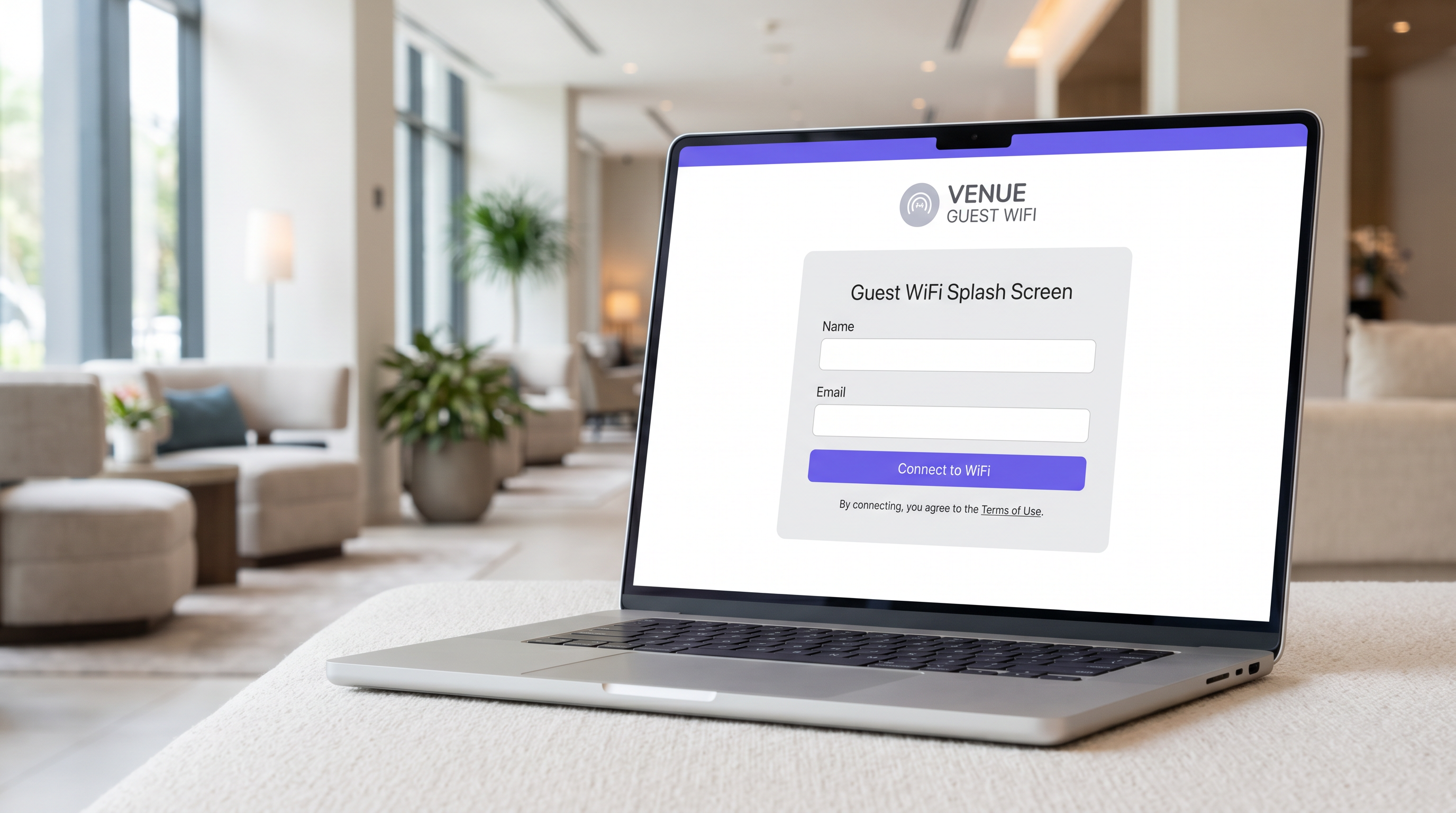
Para gerentes de TI, arquitetos de rede e diretores de operações de locais, o captive portal é uma peça fundamental da infraestrutura de rede corporativa para convidados. Em sua essência, um captive portal é um mecanismo de controle de acesso à rede que intercepta o tráfego HTTP ou HTTPS de um dispositivo convidado e o redireciona para uma página de autenticação baseada na web antes de conceder acesso à internet mais ampla. No entanto, tratá-lo meramente como um portão de login perde seu valor estratégico.
Quando implementado corretamente, um captive portal transforma um custo operacional — fornecer WiFi para convidados — em um motor de dados primários que impulsiona resultados de negócios mensuráveis. Este guia fornece uma referência técnica abrangente sobre arquitetura de captive portal, métodos de autenticação, segmentação de rede e requisitos de conformidade. Ele foi projetado para ajudá-lo a ir além das implantações básicas e aproveitar plataformas como o Guest WiFi da Purple para capturar dados de identidade verificados, garantir a conformidade com PCI DSS e GDPR, e oferecer conectividade contínua em varejo, hospitalidade e grandes locais públicos.
Análise Técnica Aprofundada
Arquitetura de Rede e Interceptação de Tráfego
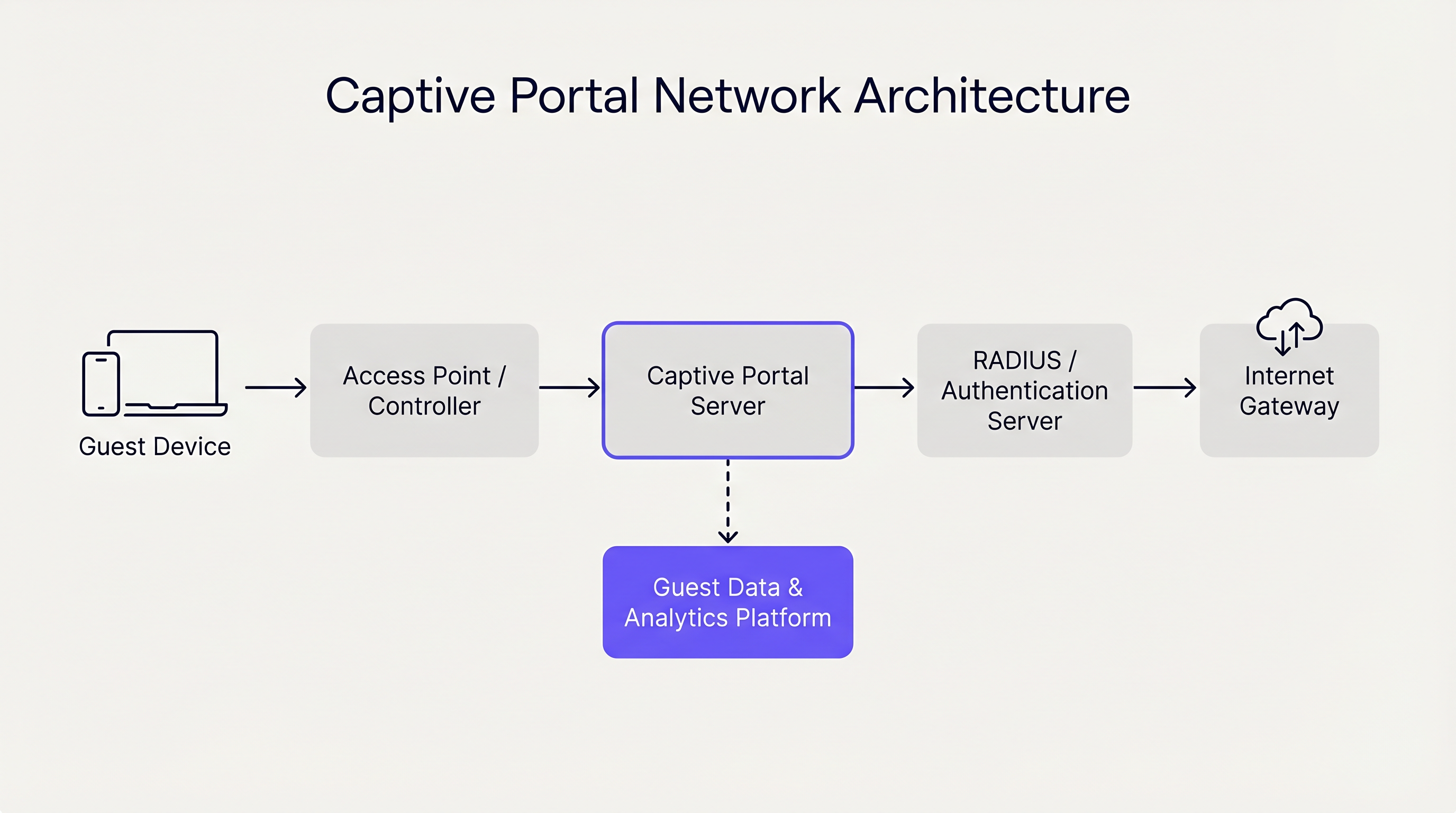
Um captive portal opera principalmente nas Camadas 2 e 3 do modelo OSI. Quando um dispositivo convidado se associa a um ponto de acesso (AP), o controlador de rede atribui a ele um endereço IP via DHCP. Crucialmente, este dispositivo é colocado em uma VLAN (Virtual Local Area Network) restrita que não possui roteamento padrão para o gateway da internet.
O controlador ou um servidor captive portal dedicado emprega então um de dois mecanismos primários para impor o estado cativo:
- Sequestro de DNS: A rede intercepta todas as consultas DNS de saída do dispositivo convidado. Independentemente do domínio solicitado (por exemplo,
example.com), o servidor DNS resolve a consulta para o endereço IP do servidor captive portal. - Redirecionamento HTTP (Proxy Transparente): Um gateway em linha intercepta as solicitações HTTP de saída nas Camadas 3 ou 4. O gateway responde com um redirecionamento HTTP 302 Found, apontando o navegador do dispositivo para a URL do captive portal.
Sistemas operacionais modernos (iOS, Android, Windows, macOS) simplificam este processo usando um mecanismo conhecido como Captive Network Assistant (CNA). Imediatamente após se associar a uma rede, o SO envia uma solicitação HTTP GET para um endpoint conhecido (por exemplo, captive.apple.com). Se a resposta for diferente da carga útil de sucesso esperada (devido aos mecanismos de redirecionamento descritos acima), o SO detecta o estado cativo e lança automaticamente uma janela de navegador leve e isolada para exibir a página do portal.
Métodos de Autenticação e Compromissos
A escolha do método de autenticação impacta diretamente tanto o atrito do usuário quanto a qualidade dos dados capturados. Os operadores de locais devem equilibrar a acessibilidade com os objetivos de segurança e marketing.
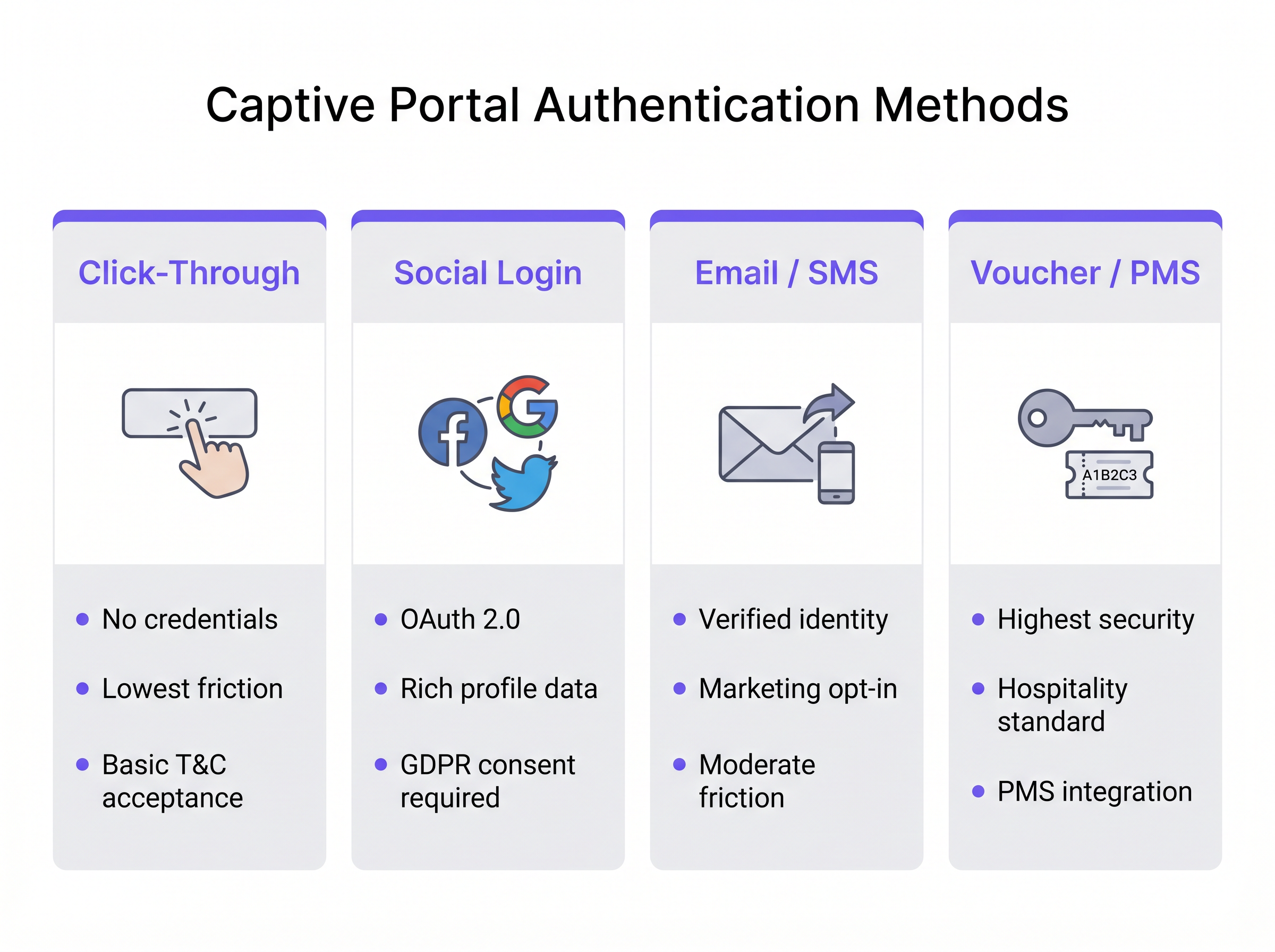
- Click-Through: O usuário simplesmente aceita os Termos e Condições para obter acesso. Este método oferece o menor atrito e é ideal para ambientes de alto rendimento, como hubs de Transporte . No entanto, ele não gera dados de identidade verificados.
- Login Social: Os usuários se autenticam usando OAuth 2.0 via provedores de identidade de terceiros (por exemplo, Facebook, Google). Isso fornece dados demográficos ricos, mas requer um gerenciamento rigoroso de consentimento GDPR.
- Verificação por E-mail / SMS: O usuário fornece um endereço de e-mail ou número de telefone, que é verificado via senha de uso único (OTP) ou link mágico. Esta é a abordagem ideal para ambientes de Varejo , gerando um registro de contato verificado e primário, e um caminho claro para opt-ins de marketing.
- Voucher / Integração PMS: O padrão ouro para Hospitalidade . Os hóspedes recebem um código de acesso exclusivo vinculado à sua reserva via Sistema de Gerenciamento de Propriedades (PMS). Isso oferece alta segurança e vincula o uso da rede diretamente aos perfis dos hóspedes.
Além disso, plataformas corporativas como a Purple podem atuar como um provedor de identidade gratuito para estruturas de autenticação contínuas, como o OpenRoaming, particularmente sob a licença Connect, permitindo um onboarding seguro e sem atrito, sem logins repetitivos no portal.
Guia de Implementação
A implantação de um captive portal robusto requer planejamento cuidadoso na borda e no núcleo da rede. Siga estas recomendações neutras em relação ao fornecedor para uma implementação segura e escalável.
1. Segmentação de Rede
A segmentação é a base da segurança da rede de convidados. O SSID do convidado deve mapear para uma VLAN dedicada que esteja completamente isolada das redes corporativas, de ponto de venda (POS) e IoT.
- Camada de Switching: Defina a VLAN de convidado em todos os switches de acesso e faça o trunking para o controlador ou gateway.
- Regras de Firewall: Implemente listas de controle de acesso (ACLs) rigorosas no gateway. A política padrão para a VLAN de convidado deve ser
deny allpara o espaço IP privado RFC 1918 (roteamento intra-VLAN e inter-VLAN), permitindo apenas tráfego de saída para a internet (portas 80 e 443) e serviços essenciais (DHCP, DNS). - Isolamento de Cliente: Habilite o isolamento de cliente da Camada 2 nos APs para evitar que os dispositivos convidados se comuniquem diretamente entre si, mitigando o risco de movimento lateral por atores maliciosos.
2. Arquitetura DNS e DHCP
Em grandes implantações, como estádios ou campi corporativos, garanta que seus escopos DHCP sejam dimensionados adequadamente para a concorrência de pico. Os tempos de concessão em redes de convidados devem ser curtos (por exemplo, 30 a 60 minutos) para evitar IEsgotamento do pool de IP.
A infraestrutura DNS deve lidar de forma confiável com o mecanismo de sequestro. Se estiver usando um portal gerenciado na nuvem, certifique-se de que os servidores DNS locais encaminhem corretamente as consultas não resolvidas ou use a configuração DNS especificada pelo fornecedor para garantir que o CNA seja acionado consistentemente em todos os tipos de dispositivos.
3. Configuração de Walled Garden
Um "walled garden" é uma lista de endereços IP ou domínios que os dispositivos convidados podem acessar antes de autenticar. Isso é crítico para o login social (permitindo acesso aos domínios do provedor OAuth) e para exibir a própria página do portal se hospedada externamente. Mantenha um controle rigoroso sobre o walled garden para evitar que os usuários ignorem o portal tunelando o tráfego através de domínios permitidos.
4. Gerenciamento de Largura de Banda
O acesso irrestrito de convidados pode rapidamente saturar o uplink WAN do local, degradando o desempenho para operações comerciais críticas. Implemente limitação de taxa por usuário e por SSID. Uma linha de base típica é de 5 Mbps a 20 Mbps por dispositivo convidado, o que é suficiente para navegação na web e streaming de definição padrão, protegendo a saúde geral da rede. Isso se alinha com estratégias de infraestrutura mais amplas, semelhantes a Os Principais Benefícios do SD WAN para Empresas Modernas , onde o traffic shaping garante que as aplicações críticas recebam prioridade.
Melhores Práticas
- Evitar Interceptação HTTPS: Não tente interceptar o tráfego HTTPS diretamente para acionar o portal. Navegadores modernos impõem HTTP Strict Transport Security (HSTS). Se você interceptar uma solicitação HTTPS para um domínio habilitado para HSTS, o navegador exibirá um erro grave de certificado, interrompendo o processo do CNA. Confie nas sondas HTTP nativas do sistema operacional.
- Design Responsivo: A interface do usuário do Captive Portal deve ser responsiva. Mais de 80% dos logins de WiFi de convidados ocorrem em dispositivos móveis. Um portal que exige "pinçar e ampliar" aumenta as taxas de abandono.
- Proposta de Valor Clara: Se exigir e-mail ou login social, declare claramente por que você está coletando os dados e o que o usuário recebe em troca (por exemplo, "Faça login para acesso de alta velocidade e ofertas exclusivas na loja").
Solução de Problemas e Mitigação de Riscos
Modos de Falha Comuns
- CNA Não Aciona: Isso geralmente é causado por configuração DNS incorreta, um walled garden mal configurado (por exemplo, o endpoint da sonda do sistema operacional é acidentalmente incluído na lista de permissões) ou o AP falhando ao interceptar a solicitação HTTP. Verifique se o cliente está recebendo o servidor DNS correto via DHCP e se o gateway está interceptando ativamente a porta 80.
- Erros de Certificado no Login: Se a própria página do Captive Portal estiver hospedada em HTTPS (o que deveria estar), certifique-se de que o certificado SSL/TLS seja válido, emitido por uma Autoridade Certificadora pública confiável e que toda a cadeia de certificados esteja instalada no servidor ou controlador do portal.
- Esgotamento do Pool de IP: Os sintomas incluem clientes conectando-se ao SSID, mas falhando em receber um endereço IP. Reduza os tempos de concessão de DHCP ou expanda a máscara de sub-rede (por exemplo, de /24 para /22) para acomodar maior densidade de dispositivos.
Segurança e Conformidade
- PCI DSS: Para varejo e hospitalidade, o Payment Card Industry Data Security Standard exige separação rigorosa entre o Cardholder Data Environment (CDE) e as redes públicas. Uma VLAN de convidado adequadamente segmentada com isolamento de firewall é obrigatória.
- GDPR e Privacidade: A coleta de dados pessoais por meio de um Captive Portal se enquadra nas regulamentações do GDPR. Você deve estabelecer uma base legal para o processamento (geralmente consentimento para marketing, ou interesse legítimo para segurança de rede). O portal deve ter um link para uma política de privacidade clara, e caixas de seleção pré-marcadas são estritamente proibidas. Usar uma plataforma como o WiFi Analytics da Purple garante que esses mecanismos de conformidade sejam integrados e auditáveis.
ROI e Impacto nos Negócios
A transição de um Captive Portal básico para uma plataforma de inteligência transforma a rede de um centro de custo em um facilitador de receita.
- Aquisição de Dados Primários: Em um mundo sem cookies, e-mails e números de telefone verificados coletados via portal são ativos altamente valiosos para enriquecimento de CRM e campanhas de marketing direcionadas.
- Análise Operacional: Além da autenticação, a infraestrutura captura dados de presença passiva. Os operadores de locais podem analisar tempos de permanência, padrões de fluxo de pessoas e taxas de visitantes recorrentes. Por exemplo, instalações de Saúde podem otimizar a orientação e a alocação de recursos com base na densidade de visitantes em tempo real.
- Monetização: Os locais podem monetizar o portal diretamente através de páginas de splash patrocinadas ou publicidade programática direcionada exibida durante o processo de login.
Ao integrar o Captive Portal com pilhas de TI e marketing mais amplas, as organizações alcançam um retorno mensurável sobre o investimento, justificando o gasto com infraestrutura por meio de maior engajamento do cliente e eficiência operacional. Para obter mais orientações sobre como selecionar o fornecedor certo, consulte nosso guia: Provedores de WiFi para Convidados: O que Procurar ao Escolher uma Plataforma de WiFi .
Podcast Briefing
Ouça nosso arquiteto de soluções sênior detalhar a arquitetura técnica e o valor estratégico dos Captive Portals neste briefing de 10 minutos.
Termos-Chave e Definições
Captive Portal
A network access control mechanism that intercepts a device's HTTP traffic and redirects it to a web page for authentication before granting internet access.
The fundamental technology used to secure and manage guest WiFi networks in commercial venues.
Captive Network Assistant (CNA)
A native OS feature (on iOS, Android, etc.) that probes for internet connectivity upon joining a network and automatically opens a mini-browser if it detects a captive portal redirect.
Ensures a seamless user experience by presenting the login screen immediately, rather than waiting for the user to open a browser.
Walled Garden
A restricted set of IP addresses or domains that unauthenticated users are permitted to access.
Necessary for allowing devices to reach third-party identity providers (like Facebook or Google) during the social login process.
VLAN (Virtual Local Area Network)
A logical subnetwork that groups a collection of devices on a single physical LAN, isolating their traffic.
Crucial for network segmentation, ensuring guest WiFi traffic is kept completely separate from corporate or POS traffic.
Client Isolation
A wireless network setting that prevents devices connected to the same AP from communicating directly with one another.
A critical security measure on public networks to prevent lateral movement and peer-to-peer attacks between guest devices.
HTTP 302 Redirect
A standard HTTP response status code indicating that the requested resource has been temporarily moved to a different URL.
The primary mechanism used by gateways to redirect a user's initial web request to the captive portal login page.
MAC Authentication Bypass (MAB)
A method of granting network access based on the device's MAC address, often used to re-authenticate returning visitors automatically.
Improves the user experience by allowing seamless reconnection for guests who have previously authenticated, within a defined retention period.
HSTS (HTTP Strict Transport Security)
A web security policy mechanism that helps protect websites against protocol downgrade attacks and cookie hijacking.
The reason why captive portals cannot intercept HTTPS traffic; doing so violates HSTS and results in browser security warnings.
Estudos de Caso
A 200-room hotel needs to implement guest WiFi that ensures only paying guests have access, prevents bandwidth hogging, and complies with PCI DSS regarding the adjacent point-of-sale systems in the restaurant.
- Deploy a captive portal with PMS (Property Management System) integration. Guests authenticate using their room number and surname. 2. Configure a dedicated Guest VLAN (e.g., VLAN 50) across all APs and switches. 3. Implement firewall rules denying all traffic from VLAN 50 to the Corporate/POS VLAN (e.g., VLAN 10). 4. Apply a bandwidth policy limiting each authenticated device to 10 Mbps downstream/2 Mbps upstream. 5. Enable Layer 2 client isolation on the APs.
A national retail chain wants to offer free WiFi to shoppers to build their CRM database, but they are concerned about GDPR compliance and high abandonment rates at the login screen.
- Implement an Email/SMS verification captive portal. 2. Ensure the UI is mobile-responsive and loads in under 2 seconds. 3. Include a clear, unticked checkbox for marketing consent, separate from the Terms of Use acceptance. 4. Provide a clear value exchange on the splash page (e.g., 'Sign in for 10% off your purchase today'). 5. Integrate the portal platform via API directly into the corporate CRM.
Análise de Cenário
Q1. A hospital IT director wants to implement a captive portal for patients and visitors. They require users to accept an acceptable use policy but do not want to manage passwords or collect personal data to avoid HIPAA/GDPR complications. Which authentication method should they deploy?
💡 Dica:Consider the method that offers the lowest friction and captures zero identity data.
Mostrar Abordagem Recomendada
Click-Through authentication. This method allows users to simply accept the Terms and Conditions to gain access. It satisfies the requirement for an acceptable use policy acknowledgment without collecting any personally identifiable information (PII), thereby minimizing compliance risks.
Q2. During a captive portal deployment at a stadium, users report that their phones show a 'Connection is not private' or certificate error instead of the login page when they try to browse to 'https://google.com'. What is the architectural cause of this issue?
💡 Dica:Think about how modern browsers handle secure connections and what happens when a gateway tries to intercept them.
Mostrar Abordagem Recomendada
The gateway is attempting to intercept HTTPS traffic. Because 'google.com' utilizes HSTS (HTTP Strict Transport Security), the browser expects a specific SSL certificate. When the gateway intercepts the request and serves the portal's certificate instead, the browser detects a mismatch and blocks the connection to prevent a man-in-the-middle attack. The solution is to rely on the OS's native CNA HTTP probes rather than intercepting user-initiated HTTPS requests.
Q3. A retail chain has deployed a captive portal that collects email addresses for marketing. However, the marketing team reports that 40% of the emails collected are fake (e.g., 'test@test.com'). How can the network architect adjust the portal configuration to improve data quality?
💡 Dica:How can the system prove the user actually owns the contact detail they provided before granting access?
Mostrar Abordagem Recomendada
Implement Email Verification via a One-Time Passcode (OTP) or magic link. The portal should place the user in a 'walled garden' state with limited access (e.g., only allowing access to their email provider) until they click the verification link or enter the OTP sent to the provided email address. Only after verification is full internet access granted.




