

Cos'è un Captive Portal? La Guida Completa
Questa guida tecnica completa spiega come funzionano i captive portal, la loro architettura di rete sottostante e come i leader IT possono trasformare il WiFi guest di base in un motore di dati di prima parte sicuro e conforme. Copre i metodi di autenticazione, le migliori pratiche di segmentazione e la risoluzione dei problemi per le implementazioni aziendali.
🎧 Ascolta questa guida
Visualizza trascrizione
Riepilogo Esecutivo
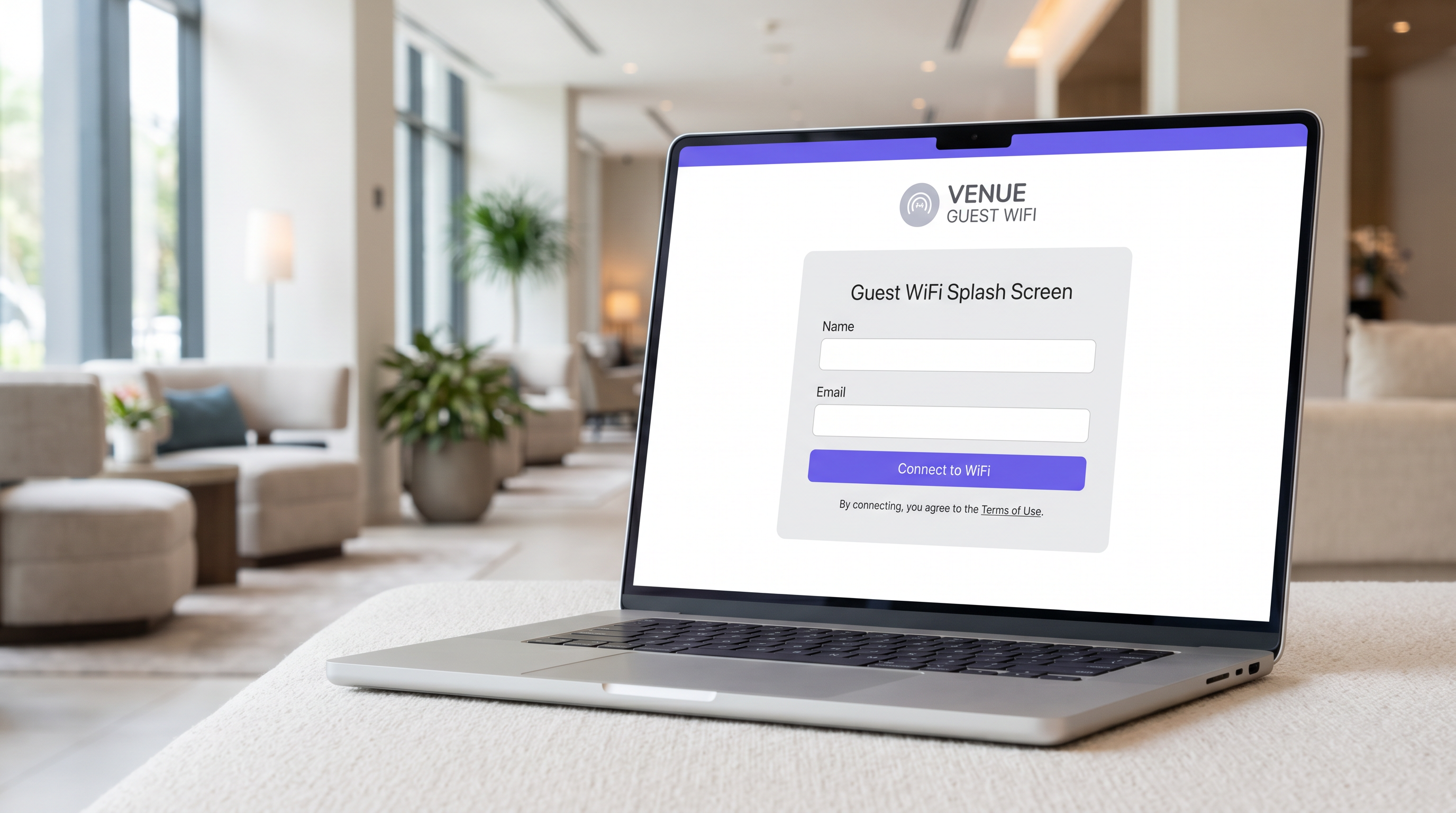
Per i responsabili IT, gli architetti di rete e i direttori delle operazioni delle sedi, il Captive Portal è un elemento fondamentale dell'infrastruttura di rete guest aziendale. Al suo interno, un Captive Portal è un meccanismo di controllo dell'accesso alla rete che intercetta il traffico HTTP o HTTPS di un dispositivo guest e lo reindirizza a una pagina di autenticazione basata sul web prima di concedere l'accesso a Internet. Tuttavia, trattarlo semplicemente come un "cancello di accesso" ne sottovaluta il valore strategico.
Se implementato correttamente, un Captive Portal trasforma un costo operativo — la fornitura di WiFi guest — in un motore di dati di prima parte che genera risultati di business misurabili. Questa guida fornisce un riferimento tecnico completo sull'architettura dei Captive Portal, i metodi di autenticazione, la segmentazione della rete e i requisiti di conformità. È progettata per aiutarti ad andare oltre le implementazioni di base e a sfruttare piattaforme come il Guest WiFi di Purple per acquisire dati di identità verificati, garantire la conformità PCI DSS e GDPR e fornire connettività senza interruzioni in ambienti retail, hospitality e grandi luoghi pubblici.
Approfondimento Tecnico
Architettura di Rete e Intercettazione del Traffico
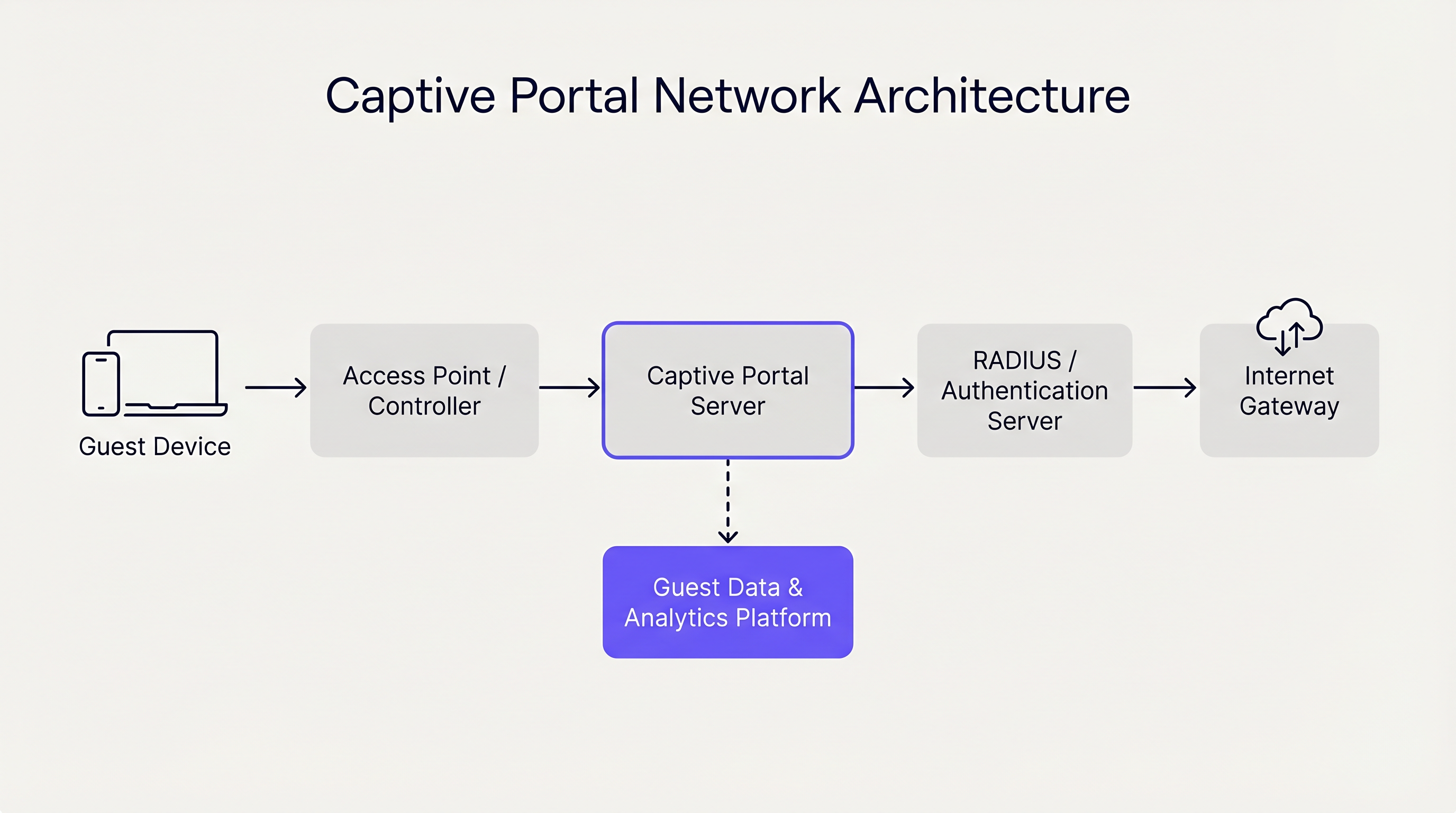
Un Captive Portal opera principalmente ai Livelli 2 e 3 del modello OSI. Quando un dispositivo guest si associa a un access point (AP), il controller di rete gli assegna un indirizzo IP tramite DHCP. Fondamentalmente, questo dispositivo viene inserito in una VLAN (Virtual Local Area Network) ristretta che non dispone di routing predefinito verso il gateway Internet.
Il controller o un server Captive Portal dedicato impiega quindi uno dei due meccanismi principali per imporre lo stato captive:
- DNS Hijacking: La rete intercetta tutte le query DNS in uscita dal dispositivo guest. Indipendentemente dal dominio richiesto (ad esempio,
example.com), il server DNS risolve la query all'indirizzo IP del server Captive Portal. - HTTP Redirection (Transparent Proxying): Un gateway inline intercetta le richieste HTTP in uscita al Livello 3 o Livello 4. Il gateway risponde con un reindirizzamento HTTP 302 Found, puntando il browser del dispositivo all'URL del Captive Portal.
I sistemi operativi moderni (iOS, Android, Windows, macOS) semplificano questo processo utilizzando un meccanismo noto come Captive Network Assistant (CNA). Immediatamente dopo l'associazione a una rete, il sistema operativo invia una richiesta HTTP GET a un endpoint noto (ad esempio, captive.apple.com). Se la risposta è diversa dal payload di successo atteso (a causa dei meccanismi di reindirizzamento descritti sopra), il sistema operativo rileva lo stato captive e avvia automaticamente una finestra del browser leggera e isolata per visualizzare la pagina del portale.
Metodi di Autenticazione e Compromessi
La scelta del metodo di autenticazione influisce direttamente sia sull'attrito per l'utente sia sulla qualità dei dati acquisiti. Gli operatori delle sedi devono bilanciare l'accessibilità con la sicurezza e gli obiettivi di marketing.
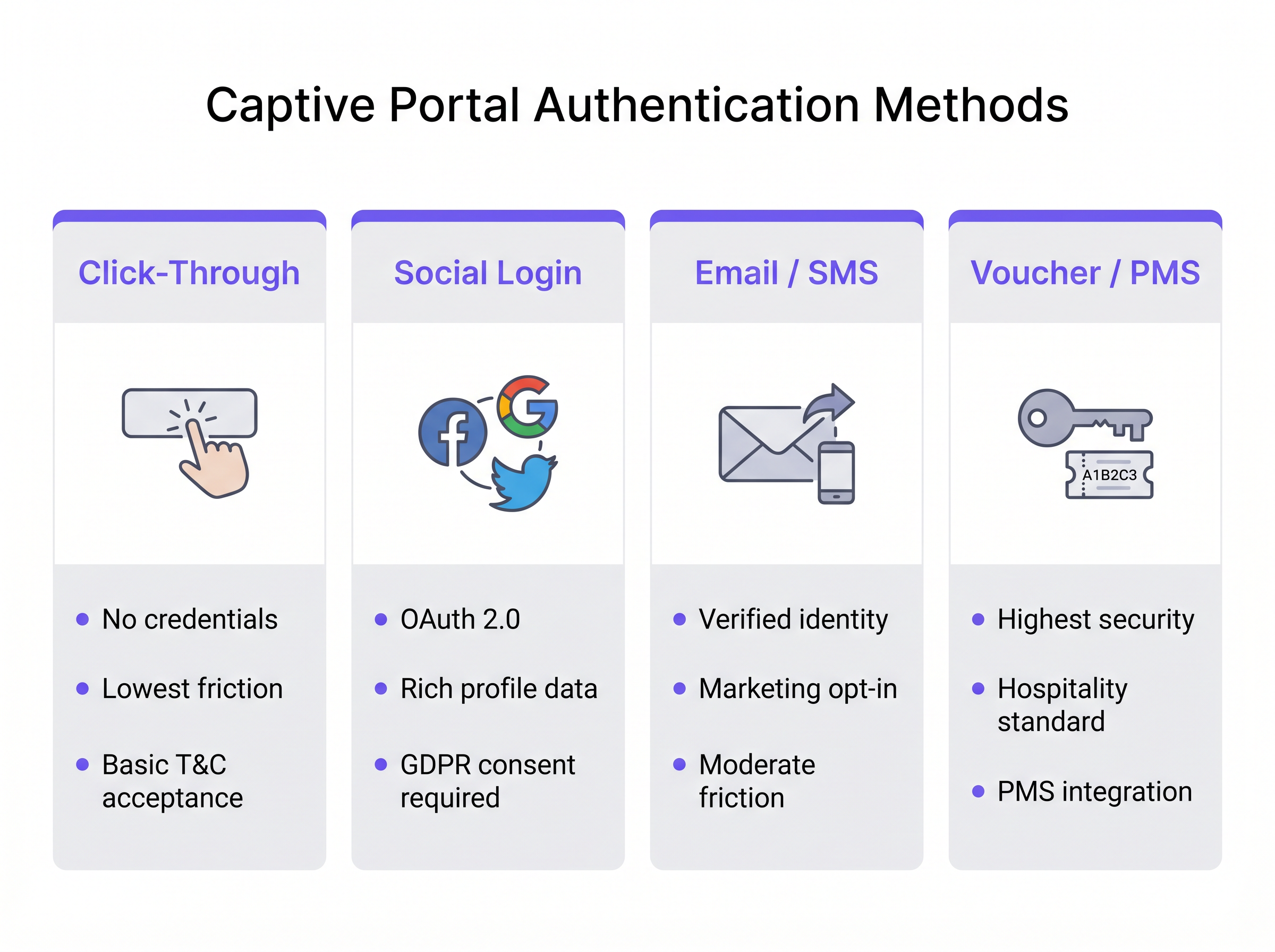
- Click-Through: L'utente accetta semplicemente i Termini e Condizioni per ottenere l'accesso. Questo metodo offre il minor attrito ed è ideale per ambienti ad alto traffico come gli hub di Transport . Tuttavia, non produce dati di identità verificati.
- Social Login: Gli utenti si autenticano utilizzando OAuth 2.0 tramite provider di identità di terze parti (ad esempio, Facebook, Google). Questo fornisce dati demografici ricchi ma richiede una rigorosa gestione del consenso GDPR.
- Email / SMS Verification: L'utente fornisce un indirizzo email o un numero di telefono, che viene verificato tramite una password monouso (OTP) o un link magico. Questo è l'approccio ottimale per gli ambienti Retail , producendo un record di contatto di prima parte verificato e un chiaro percorso per le iscrizioni di marketing.
- Voucher / PMS Integration: Lo standard d'oro per l' Hospitality . Gli ospiti ricevono un codice di accesso univoco collegato alla loro prenotazione tramite il Property Management System (PMS). Questo fornisce alta sicurezza e collega l'utilizzo della rete direttamente ai profili degli ospiti.
Inoltre, piattaforme aziendali come Purple possono fungere da provider di identità gratuito per framework di autenticazione senza soluzione di continuità come OpenRoaming, in particolare con la licenza Connect, consentendo un onboarding sicuro e senza attriti senza ripetuti accessi al portale.
Guida all'Implementazione
La distribuzione di un Captive Portal robusto richiede un'attenta pianificazione al bordo e al core della rete. Segui queste raccomandazioni indipendenti dal fornitore per un'implementazione sicura e scalabile.
1. Segmentazione della Rete
La segmentazione è la base della sicurezza della rete guest. L'SSID guest deve essere mappato a una VLAN dedicata completamente isolata dalle reti aziendali, POS (point-of-sale) e IoT.
- Switching Layer: Definisci la VLAN guest su tutti gli switch di accesso e collegala al controller o al gateway.
- Firewall Rules: Implementa liste di controllo degli accessi (ACL) rigorose al gateway. La policy predefinita per la VLAN guest deve essere
deny allper lo spazio IP privato RFC 1918 (routing intra-VLAN e inter-VLAN), consentendo solo il traffico in uscita verso Internet (porte 80 e 443) e i servizi essenziali (DHCP, DNS). - Client Isolation: Abilita l'isolamento client di Livello 2 sugli AP per impedire ai dispositivi guest di comunicare direttamente tra loro, mitigando il rischio di movimento laterale da parte di attori malevoli.
2. Architettura DNS e DHCP
In grandi implementazioni, come stadi o campus aziendali, assicurati che gli ambiti DHCP siano dimensionati in modo appropriato per la massima concorrenza. I tempi di lease sulle reti guest dovrebbero essere brevi (ad esempio, da 30 a 60 minuti) per prevenire IEsaurimento del pool IP.
L'infrastruttura DNS deve gestire in modo affidabile il meccanismo di hijacking. Se si utilizza un portale gestito in cloud, assicurarsi che i server DNS locali inoltrino correttamente le query irrisolte o utilizzare la configurazione DNS specificata dal fornitore per garantire che il CNA si attivi in modo coerente su tutti i tipi di dispositivi.
3. Configurazione del Walled Garden
Un "walled garden" è un elenco di indirizzi IP o domini a cui i dispositivi guest possono accedere prima dell'autenticazione. Questo è fondamentale per il social login (consentendo l'accesso ai domini del provider OAuth) e per la visualizzazione della pagina del portale stesso se ospitata esternamente. Mantenere uno stretto controllo sul walled garden per impedire agli utenti di aggirare il portale instradando il traffico attraverso i domini consentiti.
4. Gestione della Larghezza di Banda
L'accesso guest illimitato può saturare rapidamente l'uplink WAN della sede, degradando le prestazioni per le operazioni aziendali critiche. Implementare la limitazione della velocità per utente e per SSID. Una linea di base tipica è da 5 Mbps a 20 Mbps per dispositivo guest, sufficiente per la navigazione web e lo streaming a definizione standard, proteggendo al contempo la salute generale della rete. Questo si allinea con strategie infrastrutturali più ampie, simili a I Vantaggi Chiave dell'SD WAN per le Aziende Moderne , dove il traffic shaping garantisce che le applicazioni critiche ricevano priorità.
Migliori Pratiche
- Evitare l'Intercettazione HTTPS: Non tentare di intercettare il traffico HTTPS direttamente per attivare il portale. I browser moderni applicano l'HTTP Strict Transport Security (HSTS). Se si intercetta una richiesta HTTPS a un dominio abilitato HSTS, il browser visualizzerà un grave errore di certificato, bloccando il processo CNA. Affidarsi alle sonde HTTP native del sistema operativo.
- Design Responsive: L'interfaccia utente del captive portal deve essere responsive. Oltre l'80% degli accessi WiFi guest avviene su dispositivi mobili. Un portale che richiede il 'pinch-to-zoom' aumenta i tassi di abbandono.
- Proposta di Valore Chiara: Se si richiede l'email o il social login, indicare chiaramente perché si stanno raccogliendo i dati e cosa l'utente riceve in cambio (ad esempio, "Accedi per un accesso ad alta velocità e offerte esclusive in negozio").
Risoluzione dei Problemi e Mitigazione del Rischio
Modalità di Guasto Comuni
- Il CNA non si Attiva: Ciò è solitamente causato da una configurazione DNS errata, un walled garden configurato male (ad esempio, l'endpoint della sonda del sistema operativo è accidentalmente inserito nella whitelist) o l'AP che non riesce a intercettare la richiesta HTTP. Verificare che il client riceva il server DNS corretto tramite DHCP e che il gateway stia intercettando attivamente la porta 80.
- Errori di Certificato all'Accesso: Se la pagina del captive portal è ospitata su HTTPS (come dovrebbe essere), assicurarsi che il certificato SSL/TLS sia valido, emesso da un'Autorità di Certificazione pubblica fidata e che l'intera catena di certificati sia installata sul server o controller del portale.
- Esaurimento del Pool IP: I sintomi includono client che si connettono all'SSID ma non riescono a ricevere un indirizzo IP. Ridurre i tempi di lease DHCP o espandere la subnet mask (ad esempio, da /24 a /22) per accogliere una maggiore densità di dispositivi.
Sicurezza e Conformità
- PCI DSS: Per il commercio al dettaglio e l'ospitalità, lo standard Payment Card Industry Data Security (PCI DSS) impone una stretta separazione tra l'ambiente dei dati del titolare della carta (CDE) e le reti pubbliche. Una VLAN guest correttamente segmentata con isolamento tramite firewall è obbligatoria.
- GDPR e Privacy: La raccolta di dati personali tramite un captive portal rientra nelle normative GDPR. È necessario stabilire una base giuridica per il trattamento (solitamente il consenso per il marketing, o l'interesse legittimo per la sicurezza della rete). Il portale deve collegarsi a una chiara politica sulla privacy e le caselle di opt-in preselezionate sono severamente proibite. L'utilizzo di una piattaforma come WiFi Analytics di Purple garantisce che questi meccanismi di conformità siano integrati e verificabili.
ROI e Impatto sul Business
La transizione da un captive portal di base a una piattaforma di intelligence trasforma la rete da centro di costo a abilitatore di entrate.
- Acquisizione di Dati di Prima Parte: In un mondo senza cookie, email e numeri di telefono verificati raccolti tramite il portale sono risorse di grande valore per l'arricchimento del CRM e campagne di marketing mirate.
- Analisi Operativa: Oltre all'autenticazione, l'infrastruttura acquisisce dati di presenza passiva. Gli operatori delle sedi possono analizzare i tempi di permanenza, i modelli di afflusso e i tassi di visitatori ricorrenti. Ad esempio, le strutture Sanitarie possono ottimizzare l'orientamento e l'allocazione delle risorse in base alla densità dei visitatori in tempo reale.
- Monetizzazione: Le sedi possono monetizzare il portale direttamente tramite splash page sponsorizzate o pubblicità programmatica mirata visualizzata durante il processo di login.
Integrando il captive portal con stack IT e di marketing più ampi, le organizzazioni ottengono un ritorno sull'investimento misurabile, giustificando la spesa infrastrutturale attraverso un maggiore coinvolgimento dei clienti e un'efficienza operativa. Per ulteriori indicazioni sulla scelta del fornitore giusto, fare riferimento alla nostra guida: Provedores de WiFi para Convidados: O que Procurar ao Escolher uma Plataforma de WiFi .
Briefing Podcast
Ascolta il nostro architetto di soluzioni senior che analizza l'architettura tecnica e il valore strategico dei captive portal in questo briefing di 10 minuti.
Termini chiave e definizioni
Captive Portal
A network access control mechanism that intercepts a device's HTTP traffic and redirects it to a web page for authentication before granting internet access.
The fundamental technology used to secure and manage guest WiFi networks in commercial venues.
Captive Network Assistant (CNA)
A native OS feature (on iOS, Android, etc.) that probes for internet connectivity upon joining a network and automatically opens a mini-browser if it detects a captive portal redirect.
Ensures a seamless user experience by presenting the login screen immediately, rather than waiting for the user to open a browser.
Walled Garden
A restricted set of IP addresses or domains that unauthenticated users are permitted to access.
Necessary for allowing devices to reach third-party identity providers (like Facebook or Google) during the social login process.
VLAN (Virtual Local Area Network)
A logical subnetwork that groups a collection of devices on a single physical LAN, isolating their traffic.
Crucial for network segmentation, ensuring guest WiFi traffic is kept completely separate from corporate or POS traffic.
Client Isolation
A wireless network setting that prevents devices connected to the same AP from communicating directly with one another.
A critical security measure on public networks to prevent lateral movement and peer-to-peer attacks between guest devices.
HTTP 302 Redirect
A standard HTTP response status code indicating that the requested resource has been temporarily moved to a different URL.
The primary mechanism used by gateways to redirect a user's initial web request to the captive portal login page.
MAC Authentication Bypass (MAB)
A method of granting network access based on the device's MAC address, often used to re-authenticate returning visitors automatically.
Improves the user experience by allowing seamless reconnection for guests who have previously authenticated, within a defined retention period.
HSTS (HTTP Strict Transport Security)
A web security policy mechanism that helps protect websites against protocol downgrade attacks and cookie hijacking.
The reason why captive portals cannot intercept HTTPS traffic; doing so violates HSTS and results in browser security warnings.
Casi di studio
A 200-room hotel needs to implement guest WiFi that ensures only paying guests have access, prevents bandwidth hogging, and complies with PCI DSS regarding the adjacent point-of-sale systems in the restaurant.
- Deploy a captive portal with PMS (Property Management System) integration. Guests authenticate using their room number and surname. 2. Configure a dedicated Guest VLAN (e.g., VLAN 50) across all APs and switches. 3. Implement firewall rules denying all traffic from VLAN 50 to the Corporate/POS VLAN (e.g., VLAN 10). 4. Apply a bandwidth policy limiting each authenticated device to 10 Mbps downstream/2 Mbps upstream. 5. Enable Layer 2 client isolation on the APs.
A national retail chain wants to offer free WiFi to shoppers to build their CRM database, but they are concerned about GDPR compliance and high abandonment rates at the login screen.
- Implement an Email/SMS verification captive portal. 2. Ensure the UI is mobile-responsive and loads in under 2 seconds. 3. Include a clear, unticked checkbox for marketing consent, separate from the Terms of Use acceptance. 4. Provide a clear value exchange on the splash page (e.g., 'Sign in for 10% off your purchase today'). 5. Integrate the portal platform via API directly into the corporate CRM.
Analisi degli scenari
Q1. A hospital IT director wants to implement a captive portal for patients and visitors. They require users to accept an acceptable use policy but do not want to manage passwords or collect personal data to avoid HIPAA/GDPR complications. Which authentication method should they deploy?
💡 Suggerimento:Consider the method that offers the lowest friction and captures zero identity data.
Mostra l'approccio consigliato
Click-Through authentication. This method allows users to simply accept the Terms and Conditions to gain access. It satisfies the requirement for an acceptable use policy acknowledgment without collecting any personally identifiable information (PII), thereby minimizing compliance risks.
Q2. During a captive portal deployment at a stadium, users report that their phones show a 'Connection is not private' or certificate error instead of the login page when they try to browse to 'https://google.com'. What is the architectural cause of this issue?
💡 Suggerimento:Think about how modern browsers handle secure connections and what happens when a gateway tries to intercept them.
Mostra l'approccio consigliato
The gateway is attempting to intercept HTTPS traffic. Because 'google.com' utilizes HSTS (HTTP Strict Transport Security), the browser expects a specific SSL certificate. When the gateway intercepts the request and serves the portal's certificate instead, the browser detects a mismatch and blocks the connection to prevent a man-in-the-middle attack. The solution is to rely on the OS's native CNA HTTP probes rather than intercepting user-initiated HTTPS requests.
Q3. A retail chain has deployed a captive portal that collects email addresses for marketing. However, the marketing team reports that 40% of the emails collected are fake (e.g., 'test@test.com'). How can the network architect adjust the portal configuration to improve data quality?
💡 Suggerimento:How can the system prove the user actually owns the contact detail they provided before granting access?
Mostra l'approccio consigliato
Implement Email Verification via a One-Time Passcode (OTP) or magic link. The portal should place the user in a 'walled garden' state with limited access (e.g., only allowing access to their email provider) until they click the verification link or enter the OTP sent to the provided email address. Only after verification is full internet access granted.




