

Was ist ein Captive Portal? Der vollständige Leitfaden
Dieser vollständige technische Leitfaden erklärt, wie Captive Portals funktionieren, ihre zugrunde liegende Netzwerkarchitektur und wie IT-Verantwortliche einfaches Gast-WiFi in eine sichere, konforme First-Party-Daten-Engine verwandeln können. Er behandelt Authentifizierungsmethoden, Best Practices für die Segmentierung und Fehlerbehebung bei Unternehmensimplementierungen.
🎧 Diesen Leitfaden anhören
Transkript anzeigen
Zusammenfassung für Führungskräfte
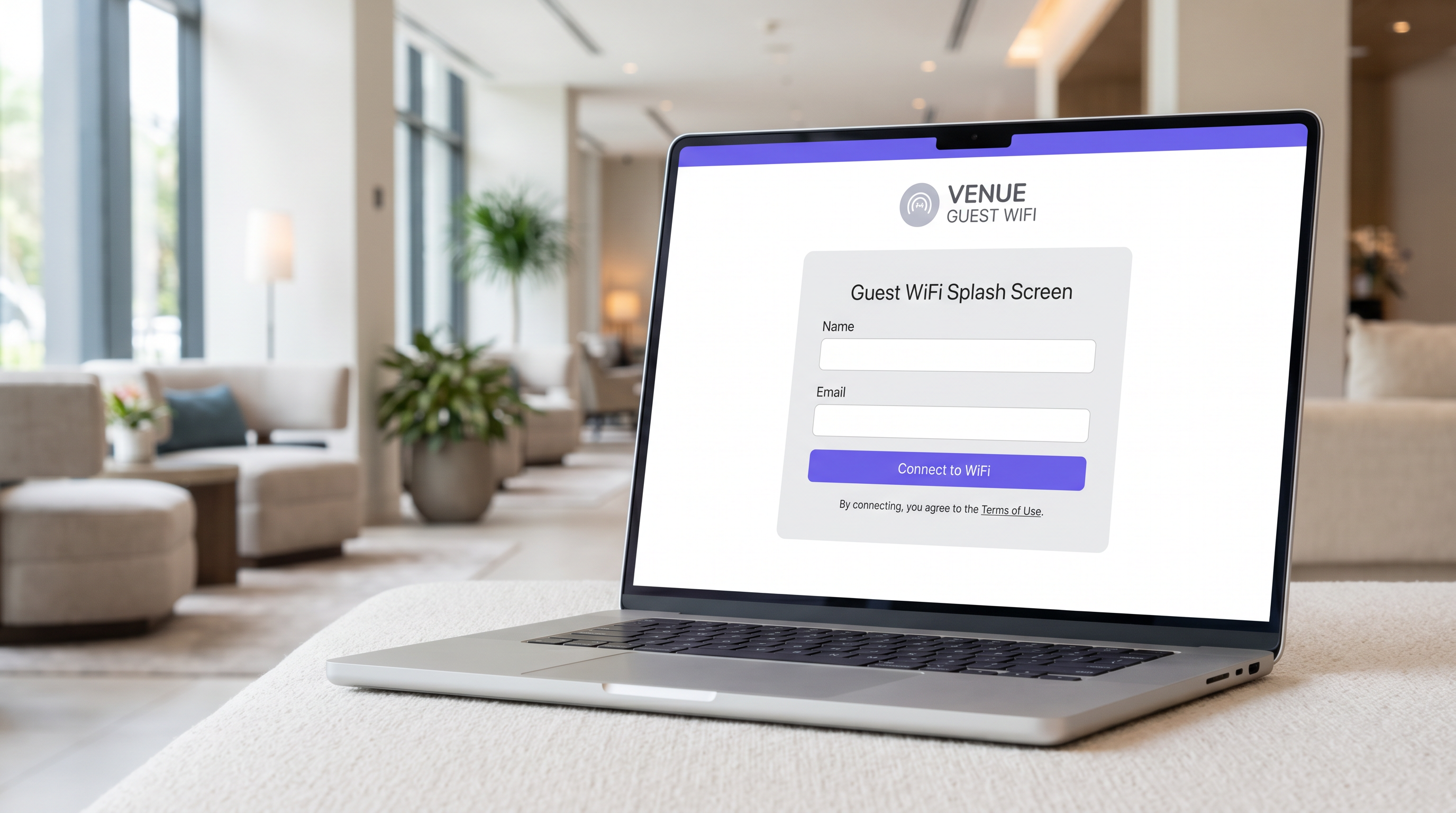
Für IT-Manager, Netzwerkarchitekten und Betriebsleiter von Veranstaltungsorten ist das Captive Portal ein grundlegender Bestandteil der Gastnetzwerkinfrastruktur von Unternehmen. Im Kern ist ein Captive Portal ein Netzwerkzugriffskontrollmechanismus, der den HTTP- oder HTTPS-Verkehr eines Gastgeräts abfängt und es auf eine webbasierte Authentifizierungsseite umleitet, bevor der Zugriff auf das breitere Internet gewährt wird. Es jedoch lediglich als Anmeldetor zu betrachten, verkennt seinen strategischen Wert.
Bei korrekter Implementierung verwandelt ein Captive Portal eine Betriebskostenposition – die Bereitstellung von Gast-WiFi – in eine First-Party-Daten-Engine, die messbare Geschäftsergebnisse liefert. Dieser Leitfaden bietet eine umfassende technische Referenz zur Captive Portal-Architektur, Authentifizierungsmethoden, Netzwerksegmentierung und Compliance-Anforderungen. Er wurde entwickelt, um Ihnen zu helfen, über grundlegende Implementierungen hinauszugehen und Plattformen wie Purple's Guest WiFi zu nutzen, um verifizierte Identitätsdaten zu erfassen, die PCI DSS- und GDPR-Konformität sicherzustellen und eine nahtlose Konnektivität in Einzelhandel, Gastgewerbe und großen öffentlichen Veranstaltungsorten zu bieten.
Technischer Deep-Dive
Netzwerkarchitektur und Verkehrsinterzeption
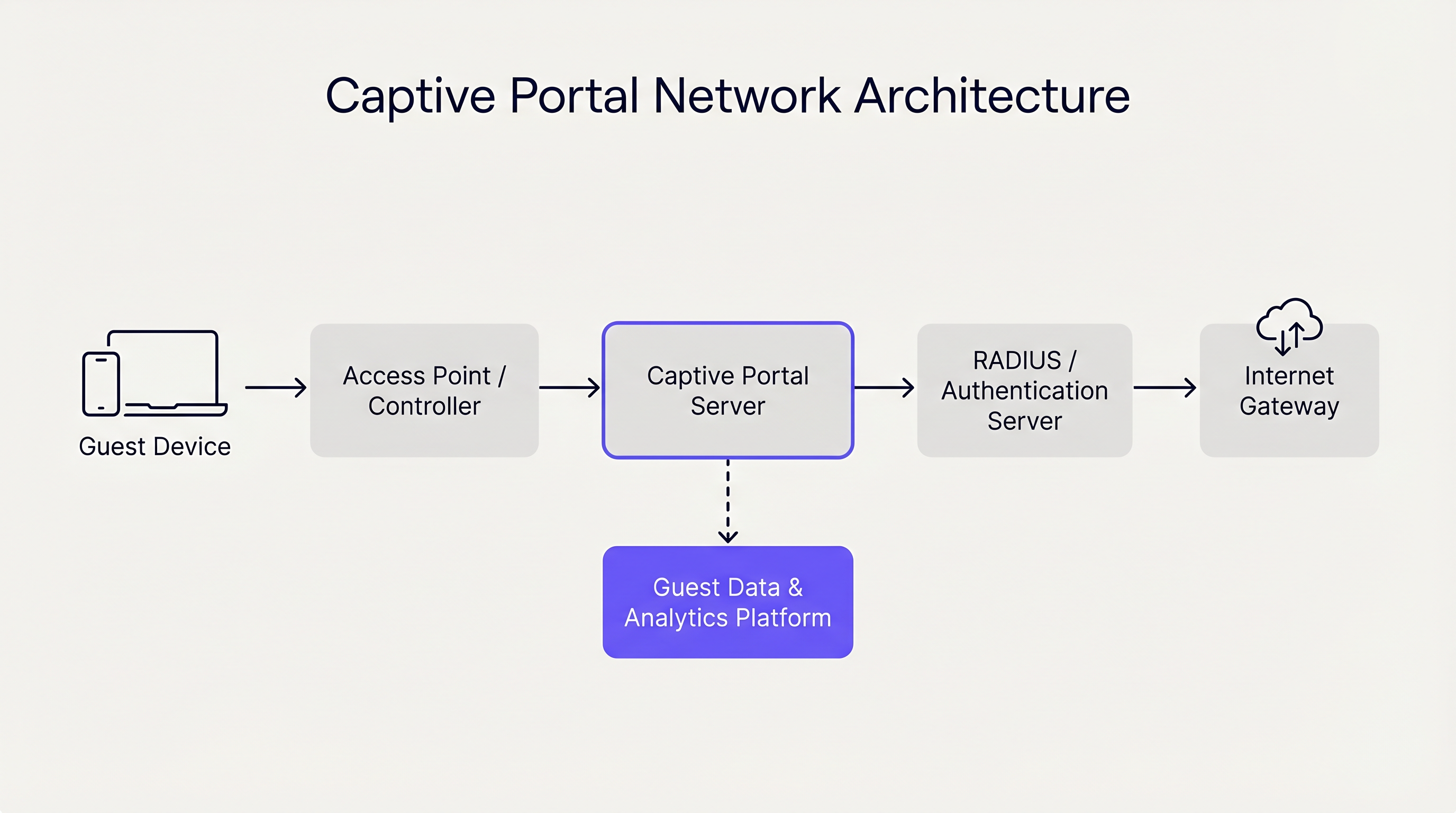
Ein Captive Portal arbeitet hauptsächlich auf Schicht 2 und Schicht 3 des OSI-Modells. Wenn sich ein Gastgerät mit einem Access Point (AP) verbindet, weist der Netzwerk-Controller ihm über DHCP eine IP-Adresse zu. Entscheidend ist, dass dieses Gerät in ein eingeschränktes VLAN (Virtual Local Area Network) platziert wird, dem die Standard-Routing-Funktion zum Internet-Gateway fehlt.
Der Controller oder ein dedizierter Captive Portal-Server verwendet dann einen von zwei primären Mechanismen, um den Captive-Zustand zu erzwingen:
- DNS-Hijacking: Das Netzwerk fängt alle ausgehenden DNS-Anfragen vom Gastgerät ab. Unabhängig von der angefragten Domain (z.B.
example.com) löst der DNS-Server die Anfrage auf die IP-Adresse des Captive Portal-Servers auf. - HTTP-Umleitung (Transparentes Proxying): Ein Inline-Gateway fängt ausgehende HTTP-Anfragen auf Schicht 3 oder Schicht 4 ab. Das Gateway antwortet mit einer HTTP 302 Found-Umleitung, die den Browser des Geräts auf die Captive Portal-URL verweist.
Moderne Betriebssysteme (iOS, Android, Windows, macOS) optimieren diesen Prozess mithilfe eines Mechanismus, der als Captive Network Assistant (CNA) bekannt ist. Unmittelbar nach der Verbindung mit einem Netzwerk sendet das Betriebssystem eine HTTP GET-Anfrage an einen bekannten Endpunkt (z.B. captive.apple.com). Wenn die Antwort etwas anderes als die erwartete Erfolgs-Payload ist (aufgrund der oben beschriebenen Umleitungsmechanismen), erkennt das Betriebssystem den Captive-Zustand und startet automatisch ein leichtgewichtiges, in einer Sandbox ausgeführtes Browserfenster, um die Portalseite anzuzeigen.
Authentifizierungsmethoden und Kompromisse
Die Wahl der Authentifizierungsmethode wirkt sich direkt auf die Benutzerfreundlichkeit und die Qualität der erfassten Daten aus. Betreiber von Veranstaltungsorten müssen Zugänglichkeit mit Sicherheits- und Marketingzielen in Einklang bringen.
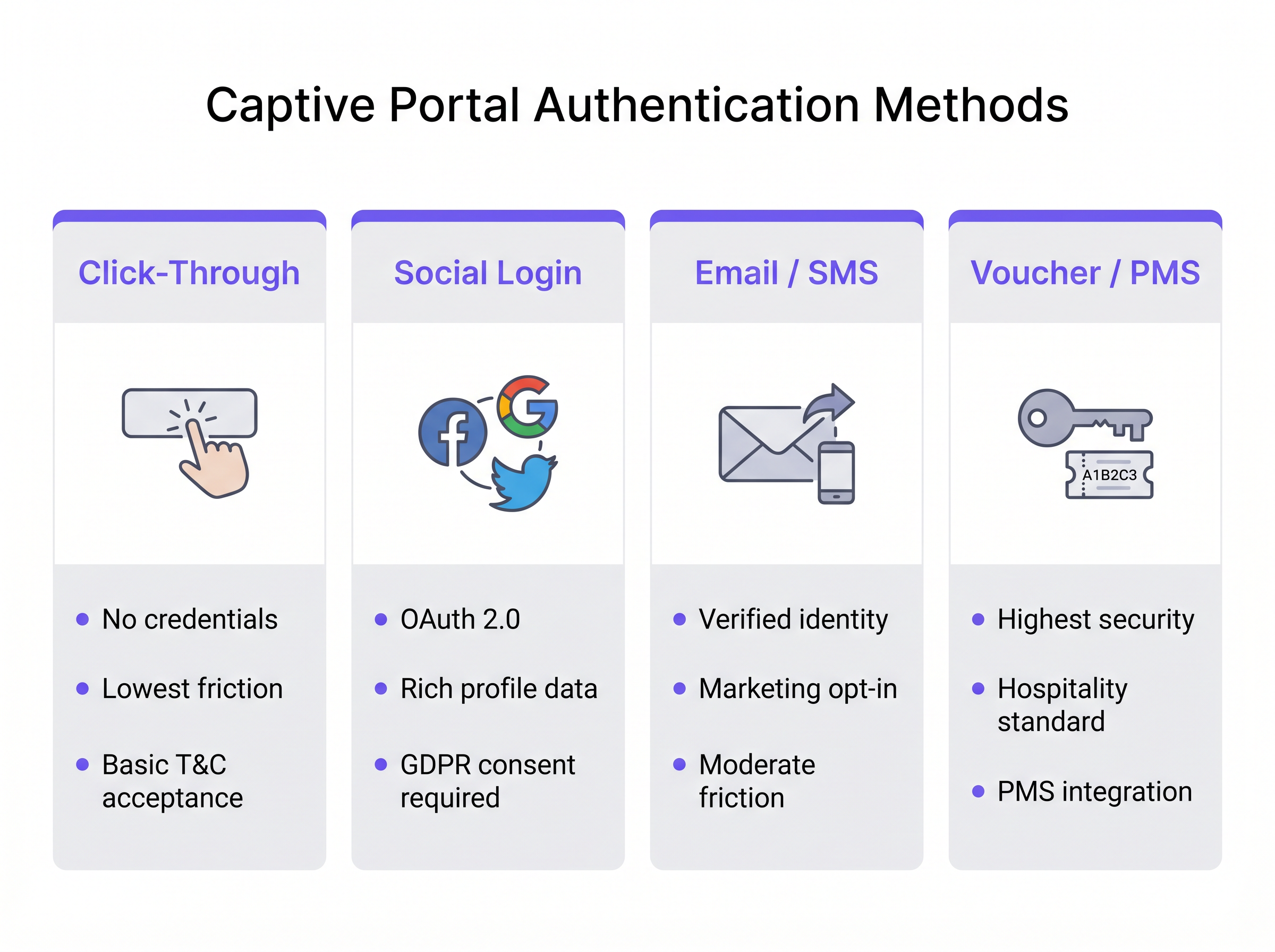
- Click-Through: Der Benutzer akzeptiert einfach die Allgemeinen Geschäftsbedingungen, um Zugang zu erhalten. Diese Methode bietet die geringste Reibung und ist ideal für Umgebungen mit hohem Durchsatz wie Transport -Hubs. Sie liefert jedoch keine verifizierten Identitätsdaten.
- Social Login: Benutzer authentifizieren sich über OAuth 2.0 mittels Drittanbieter-Identitätsprovider (z.B. Facebook, Google). Dies liefert umfangreiche demografische Daten, erfordert jedoch ein strenges GDPR-Einwilligungsmanagement.
- E-Mail-/SMS-Verifizierung: Der Benutzer gibt eine E-Mail-Adresse oder Telefonnummer an, die über einen Einmal-Passcode (OTP) oder Magic Link verifiziert wird. Dies ist der optimale Ansatz für Retail -Umgebungen, da er einen verifizierten First-Party-Kontaktdatensatz und einen klaren Weg für Marketing-Opt-ins liefert.
- Voucher-/PMS-Integration: Der Goldstandard für das Gastgewerbe . Gäste erhalten einen einzigartigen Zugangscode, der über das Property Management System (PMS) mit ihrer Reservierung verknüpft ist. Dies bietet hohe Sicherheit und verknüpft die Netzwerknutzung direkt mit den Gästeprofilen.
Darüber hinaus können Unternehmensplattformen wie Purple als kostenloser Identitätsprovider für nahtlose Authentifizierungsframeworks wie OpenRoaming fungieren, insbesondere unter der Connect-Lizenz, was ein reibungsloses, sicheres Onboarding ohne wiederholte Portal-Anmeldungen ermöglicht.
Implementierungsleitfaden
Die Bereitstellung eines robusten Captive Portals erfordert eine sorgfältige Planung am Netzwerkrand und im Kern. Befolgen Sie diese herstellerneutralen Empfehlungen für eine sichere und skalierbare Implementierung.
1. Netzwerksegmentierung
Segmentierung ist das Fundament der Sicherheit von Gastnetzwerken. Die Gast-SSID muss einem dedizierten VLAN zugeordnet werden, das vollständig von Unternehmens-, Point-of-Sale (POS)- und IoT-Netzwerken isoliert ist.
- Switching-Schicht: Definieren Sie das Gast-VLAN über alle Access Switches hinweg und trunkieren Sie es zum Controller oder Gateway.
- Firewall-Regeln: Implementieren Sie strenge Zugriffssteuerungslisten (ACLs) am Gateway. Die Standardrichtlinie für das Gast-VLAN muss
deny allfür den privaten IP-Bereich nach RFC 1918 (Intra-VLAN- und Inter-VLAN-Routing) sein, wobei nur ausgehender Datenverkehr ins Internet (Ports 80 und 443) und essentielle Dienste (DHCP, DNS) zugelassen werden. - Client-Isolation: Aktivieren Sie die Layer-2-Client-Isolation auf den APs, um zu verhindern, dass Gastgeräte direkt miteinander kommunizieren, und so das Risiko einer lateralen Bewegung durch böswillige Akteure zu mindern.
2. DNS- und DHCP-Architektur
Bei großen Implementierungen, wie Stadien oder Unternehmenscampi, stellen Sie sicher, dass Ihre DHCP-Bereiche für die Spitzenkonkurrenz angemessen dimensioniert sind. Lease-Zeiten in Gastnetzwerken sollten kurz sein (z.B. 30 bis 60 Minuten), um IP-Pool-Erschöpfung.
Die DNS-Infrastruktur muss den Hijacking-Mechanismus zuverlässig handhaben. Bei Verwendung eines Cloud-verwalteten Portals stellen Sie sicher, dass die lokalen DNS-Server unaufgelöste Anfragen korrekt weiterleiten oder verwenden Sie die vom Anbieter angegebene DNS-Konfiguration, um sicherzustellen, dass der CNA auf allen Gerätetypen konsistent ausgelöst wird.
3. Walled Garden Konfiguration
Ein „Walled Garden“ ist eine Liste von IP-Adressen oder Domains, auf die Gastgeräte vor der Authentifizierung zugreifen können. Dies ist entscheidend für den Social Login (ermöglicht den Zugriff auf die Domains des OAuth-Anbieters) und für die Anzeige der Portalseite selbst, wenn diese extern gehostet wird. Behalten Sie eine strenge Kontrolle über den Walled Garden, um zu verhindern, dass Benutzer das Portal umgehen, indem sie den Datenverkehr durch zugelassene Domains tunneln.
4. Bandbreitenmanagement
Uneingeschränkter Gastzugang kann den WAN-Uplink des Standorts schnell überlasten und die Leistung für kritische Geschäftsabläufe beeinträchtigen. Implementieren Sie eine Ratenbegrenzung pro Benutzer und pro SSID. Ein typischer Richtwert liegt bei 5 Mbit/s bis 20 Mbit/s pro Gastgerät, was für Web-Browsing und Streaming in Standardauflösung ausreicht und gleichzeitig die allgemeine Netzwerkleistung schützt. Dies steht im Einklang mit umfassenderen Infrastrukturstrategien, ähnlich wie bei Die wichtigsten SD-WAN-Vorteile für moderne Unternehmen , wo Traffic Shaping sicherstellt, dass kritische Anwendungen Priorität erhalten.
Best Practices
- Vermeidung von HTTPS-Abfangversuchen: Versuchen Sie nicht, HTTPS-Verkehr direkt abzufangen, um das Portal auszulösen. Moderne Browser erzwingen HTTP Strict Transport Security (HSTS). Wenn Sie eine HTTPS-Anfrage an eine HSTS-fähige Domain abfangen, zeigt der Browser einen schwerwiegenden Zertifikatsfehler an, der den CNA-Prozess stoppt. Verlassen Sie sich auf die nativen HTTP-Probes des Betriebssystems.
- Responsive Design: Die Benutzeroberfläche des Captive Portal muss responsiv sein. Über 80 % der Gast-WiFi-Logins erfolgen auf mobilen Geräten. Ein Portal, das Pinch-to-Zoom erfordert, erhöht die Abbruchraten.
- Klares Wertversprechen: Wenn E-Mail- oder Social Login erforderlich ist, geben Sie klar an, warum Sie die Daten sammeln und was der Benutzer im Gegenzug erhält (z. B. „Melden Sie sich für High-Speed-Zugang und exklusive In-Store-Angebote an“).
Fehlerbehebung & Risikominderung
Häufige Fehlerursachen
- CNA wird nicht ausgelöst: Dies wird in der Regel durch eine falsche DNS-Konfiguration, einen falsch konfigurierten Walled Garden (z. B. der OS-Probe-Endpunkt ist versehentlich auf der Whitelist) oder das Versagen des APs, die HTTP-Anfrage abzufangen, verursacht. Überprüfen Sie, ob der Client den korrekten DNS-Server über DHCP erhält und dass das Gateway Port 80 aktiv abfängt.
- Zertifikatsfehler beim Login: Wenn die Captive Portal-Seite selbst über HTTPS gehostet wird (was sie sollte), stellen Sie sicher, dass das SSL/TLS-Zertifikat gültig ist, von einer vertrauenswürdigen öffentlichen Zertifizierungsstelle ausgestellt wurde und dass die gesamte Zertifikatskette auf dem Portal-Server oder Controller installiert ist.
- IP-Pool-Erschöpfung: Symptome sind Clients, die sich mit der SSID verbinden, aber keine IP-Adresse erhalten. Reduzieren Sie die DHCP-Lease-Zeiten oder erweitern Sie die Subnetzmaske (z. B. von /24 auf /22), um eine höhere Gerätedichte zu ermöglichen.
Sicherheit und Compliance
- PCI DSS: Für den Einzelhandel und das Gastgewerbe schreibt der Payment Card Industry Data Security Standard eine strikte Trennung zwischen der Cardholder Data Environment (CDE) und öffentlichen Netzwerken vor. Ein ordnungsgemäß segmentiertes Gast-VLAN mit Firewall-Isolation ist obligatorisch.
- GDPR und Datenschutz: Die Erfassung personenbezogener Daten über ein Captive Portal fällt unter die GDPR-Bestimmungen. Sie müssen eine rechtmäßige Grundlage für die Verarbeitung schaffen (in der Regel Einwilligung für Marketing oder berechtigtes Interesse für die Netzwerksicherheit). Das Portal muss auf eine klare Datenschutzerklärung verlinken, und vorab angekreuzte Opt-in-Boxen sind strengstens verboten. Die Verwendung einer Plattform wie Purple's WiFi Analytics stellt sicher, dass diese Compliance-Mechanismen integriert und auditierbar sind.
ROI & Geschäftsauswirkungen
Der Übergang von einem einfachen Captive Portal zu einer intelligenten Plattform wandelt das Netzwerk von einem Kostenfaktor zu einem Umsatztreiber.
- Erfassung von First-Party-Daten: In einer cookielosen Welt sind verifizierte E-Mails und Telefonnummern, die über das Portal gesammelt werden, äußerst wertvolle Assets für die CRM-Anreicherung und gezielte Marketingkampagnen.
- Operative Analysen: Über die Authentifizierung hinaus erfasst die Infrastruktur passive Präsenzdaten. Betreiber von Veranstaltungsorten können Verweildauern, Besucherströme und Wiederholungsbesuchsraten analysieren. Zum Beispiel können Gesundheitseinrichtungen die Wegfindung und Ressourcenallokation basierend auf der Echtzeit-Besucherdichte optimieren.
- Monetarisierung: Veranstaltungsorte können das Portal direkt durch gesponserte Splash-Seiten oder gezielte programmatische Werbung monetarisieren, die während des Anmeldevorgangs angezeigt wird.
Durch die Integration des Captive Portal in umfassendere IT- und Marketing-Stacks erzielen Unternehmen einen messbaren Return on Investment, der die Infrastrukturausgaben durch verbesserte Kundenbindung und operative Effizienz rechtfertigt. Weitere Hinweise zur Auswahl des richtigen Anbieters finden Sie in unserem Leitfaden: Anbieter von Gast-WiFi: Worauf Sie bei der Auswahl einer WiFi-Plattform achten sollten .
Podcast-Briefing
Hören Sie, wie unser Senior Solutions Architect in diesem 10-minütigen Briefing die technische Architektur und den strategischen Wert von Captive Portals erläutert.
Schlüsselbegriffe & Definitionen
Captive Portal
A network access control mechanism that intercepts a device's HTTP traffic and redirects it to a web page for authentication before granting internet access.
The fundamental technology used to secure and manage guest WiFi networks in commercial venues.
Captive Network Assistant (CNA)
A native OS feature (on iOS, Android, etc.) that probes for internet connectivity upon joining a network and automatically opens a mini-browser if it detects a captive portal redirect.
Ensures a seamless user experience by presenting the login screen immediately, rather than waiting for the user to open a browser.
Walled Garden
A restricted set of IP addresses or domains that unauthenticated users are permitted to access.
Necessary for allowing devices to reach third-party identity providers (like Facebook or Google) during the social login process.
VLAN (Virtual Local Area Network)
A logical subnetwork that groups a collection of devices on a single physical LAN, isolating their traffic.
Crucial for network segmentation, ensuring guest WiFi traffic is kept completely separate from corporate or POS traffic.
Client Isolation
A wireless network setting that prevents devices connected to the same AP from communicating directly with one another.
A critical security measure on public networks to prevent lateral movement and peer-to-peer attacks between guest devices.
HTTP 302 Redirect
A standard HTTP response status code indicating that the requested resource has been temporarily moved to a different URL.
The primary mechanism used by gateways to redirect a user's initial web request to the captive portal login page.
MAC Authentication Bypass (MAB)
A method of granting network access based on the device's MAC address, often used to re-authenticate returning visitors automatically.
Improves the user experience by allowing seamless reconnection for guests who have previously authenticated, within a defined retention period.
HSTS (HTTP Strict Transport Security)
A web security policy mechanism that helps protect websites against protocol downgrade attacks and cookie hijacking.
The reason why captive portals cannot intercept HTTPS traffic; doing so violates HSTS and results in browser security warnings.
Fallstudien
A 200-room hotel needs to implement guest WiFi that ensures only paying guests have access, prevents bandwidth hogging, and complies with PCI DSS regarding the adjacent point-of-sale systems in the restaurant.
- Deploy a captive portal with PMS (Property Management System) integration. Guests authenticate using their room number and surname. 2. Configure a dedicated Guest VLAN (e.g., VLAN 50) across all APs and switches. 3. Implement firewall rules denying all traffic from VLAN 50 to the Corporate/POS VLAN (e.g., VLAN 10). 4. Apply a bandwidth policy limiting each authenticated device to 10 Mbps downstream/2 Mbps upstream. 5. Enable Layer 2 client isolation on the APs.
A national retail chain wants to offer free WiFi to shoppers to build their CRM database, but they are concerned about GDPR compliance and high abandonment rates at the login screen.
- Implement an Email/SMS verification captive portal. 2. Ensure the UI is mobile-responsive and loads in under 2 seconds. 3. Include a clear, unticked checkbox for marketing consent, separate from the Terms of Use acceptance. 4. Provide a clear value exchange on the splash page (e.g., 'Sign in for 10% off your purchase today'). 5. Integrate the portal platform via API directly into the corporate CRM.
Szenarioanalyse
Q1. A hospital IT director wants to implement a captive portal for patients and visitors. They require users to accept an acceptable use policy but do not want to manage passwords or collect personal data to avoid HIPAA/GDPR complications. Which authentication method should they deploy?
💡 Hinweis:Consider the method that offers the lowest friction and captures zero identity data.
Empfohlenen Ansatz anzeigen
Click-Through authentication. This method allows users to simply accept the Terms and Conditions to gain access. It satisfies the requirement for an acceptable use policy acknowledgment without collecting any personally identifiable information (PII), thereby minimizing compliance risks.
Q2. During a captive portal deployment at a stadium, users report that their phones show a 'Connection is not private' or certificate error instead of the login page when they try to browse to 'https://google.com'. What is the architectural cause of this issue?
💡 Hinweis:Think about how modern browsers handle secure connections and what happens when a gateway tries to intercept them.
Empfohlenen Ansatz anzeigen
The gateway is attempting to intercept HTTPS traffic. Because 'google.com' utilizes HSTS (HTTP Strict Transport Security), the browser expects a specific SSL certificate. When the gateway intercepts the request and serves the portal's certificate instead, the browser detects a mismatch and blocks the connection to prevent a man-in-the-middle attack. The solution is to rely on the OS's native CNA HTTP probes rather than intercepting user-initiated HTTPS requests.
Q3. A retail chain has deployed a captive portal that collects email addresses for marketing. However, the marketing team reports that 40% of the emails collected are fake (e.g., 'test@test.com'). How can the network architect adjust the portal configuration to improve data quality?
💡 Hinweis:How can the system prove the user actually owns the contact detail they provided before granting access?
Empfohlenen Ansatz anzeigen
Implement Email Verification via a One-Time Passcode (OTP) or magic link. The portal should place the user in a 'walled garden' state with limited access (e.g., only allowing access to their email provider) until they click the verification link or enter the OTP sent to the provided email address. Only after verification is full internet access granted.




