

What Is a Captive Portal? The Complete Guide
This complete technical guide explains how captive portals work, their underlying network architecture, and how IT leaders can transform basic guest WiFi into a secure, compliant first-party data engine. It covers authentication methods, segmentation best practices, and troubleshooting for enterprise deployments.
🎧 Listen to this Guide
View Transcript
Executive Summary
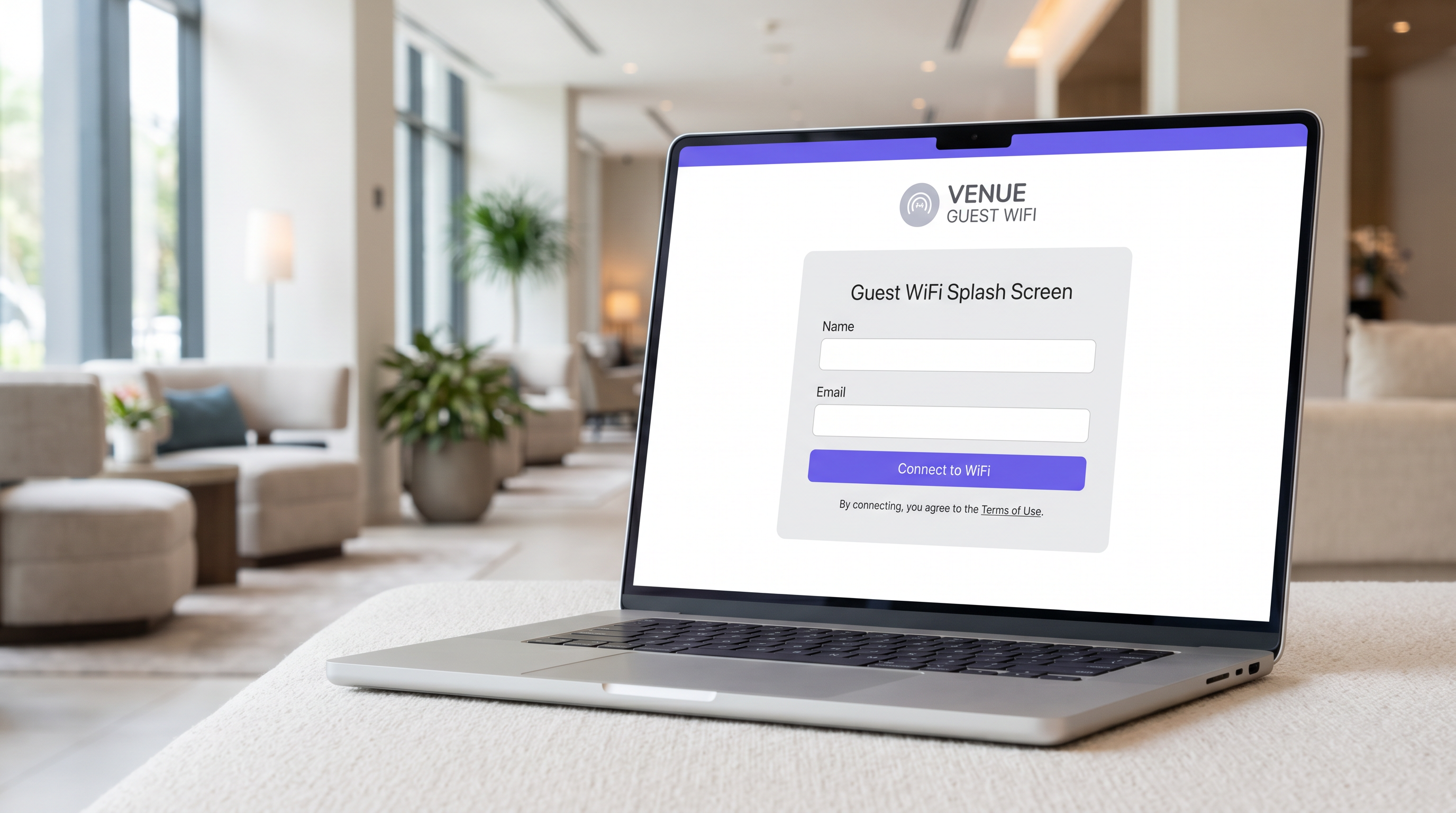
For IT managers, network architects, and venue operations directors, the captive portal is a foundational piece of enterprise guest networking infrastructure. At its core, a captive portal is a network access control mechanism that intercepts a guest device's HTTP or HTTPS traffic and redirects it to a web-based authentication page before granting access to the wider internet. However, treating it merely as a login gate misses its strategic value.
When implemented correctly, a captive portal transforms an operational cost—providing guest WiFi—into a first-party data engine that drives measurable business outcomes. This guide provides a comprehensive technical reference on captive portal architecture, authentication methods, network segmentation, and compliance requirements. It is designed to help you move beyond basic deployments and leverage platforms like Purple's Guest WiFi to capture verified identity data, ensure PCI DSS and GDPR compliance, and deliver seamless connectivity across retail, hospitality, and large public venues.
Technical Deep-Dive
Network Architecture and Traffic Interception
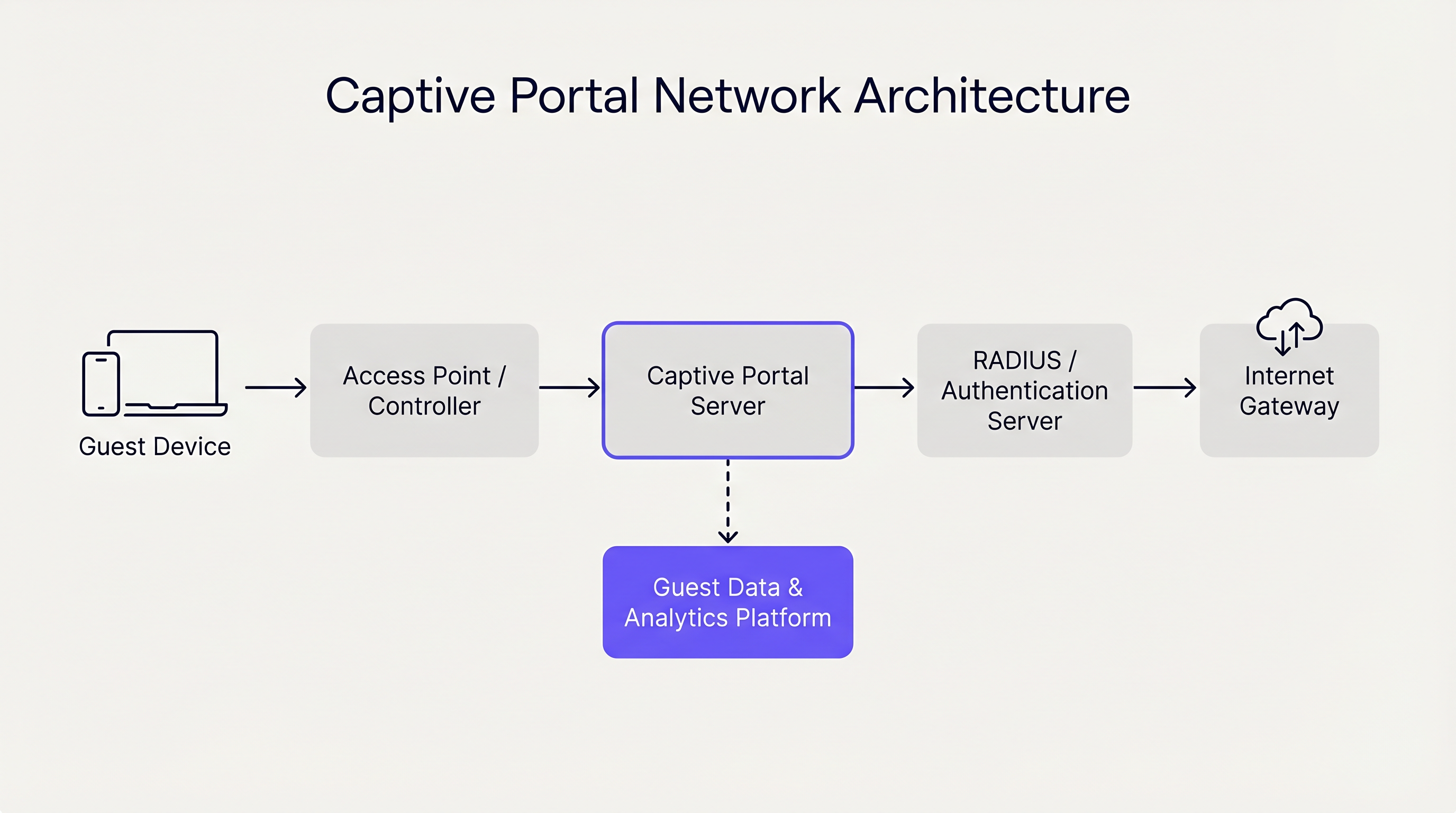
A captive portal operates primarily at Layer 2 and Layer 3 of the OSI model. When a guest device associates with an access point (AP), the network controller assigns it an IP address via DHCP. Crucially, this device is placed into a restricted VLAN (Virtual Local Area Network) that lacks default routing to the internet gateway.
The controller or a dedicated captive portal server then employs one of two primary mechanisms to enforce the captive state:
- DNS Hijacking: The network intercepts all outbound DNS queries from the guest device. Regardless of the domain requested (e.g.,
example.com), the DNS server resolves the query to the IP address of the captive portal server. - HTTP Redirection (Transparent Proxying): An inline gateway intercepts outbound HTTP requests at Layer 3 or Layer 4. The gateway responds with an HTTP 302 Found redirect, pointing the device's browser to the captive portal URL.
Modern operating systems (iOS, Android, Windows, macOS) streamline this process using a mechanism known as the Captive Network Assistant (CNA). Immediately upon associating with a network, the OS sends an HTTP GET request to a known endpoint (e.g., captive.apple.com). If the response is anything other than the expected success payload (due to the redirection mechanisms described above), the OS detects the captive state and automatically launches a lightweight, sandboxed browser window to display the portal page.
Authentication Methods and Trade-offs
The choice of authentication method directly impacts both user friction and the quality of data captured. Venue operators must balance accessibility with security and marketing objectives.
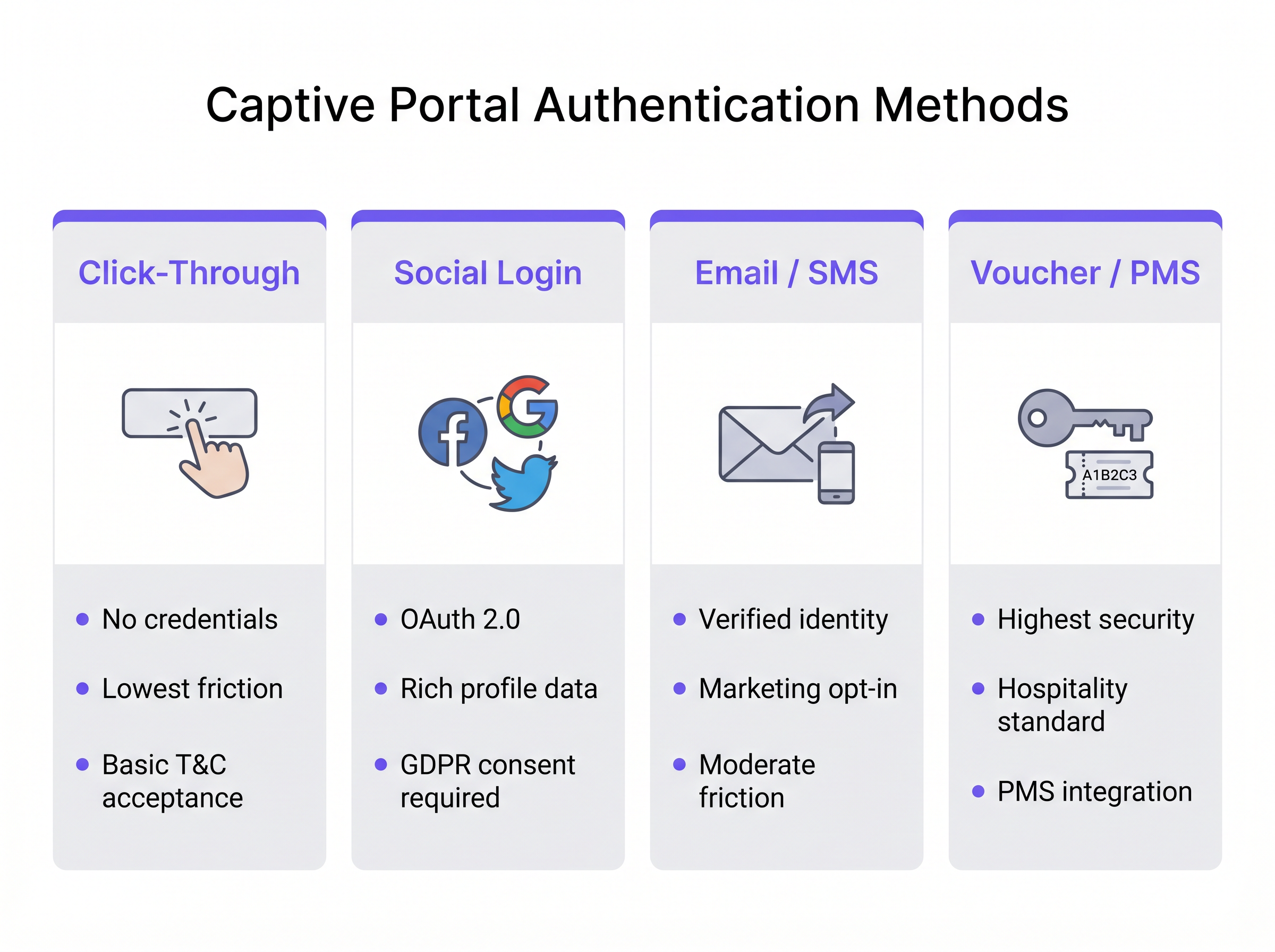
- Click-Through: The user simply accepts the Terms and Conditions to gain access. This method offers the lowest friction and is ideal for high-throughput environments like Transport hubs. However, it yields no verified identity data.
- Social Login: Users authenticate using OAuth 2.0 via third-party identity providers (e.g., Facebook, Google). This provides rich demographic data but requires rigorous GDPR consent management.
- Email / SMS Verification: The user provides an email address or phone number, which is verified via a one-time passcode (OTP) or magic link. This is the optimal approach for Retail environments, yielding a verified, first-party contact record and a clear pathway for marketing opt-ins.
- Voucher / PMS Integration: The gold standard for Hospitality . Guests receive a unique access code linked to their reservation via the Property Management System (PMS). This provides high security and ties network usage directly to guest profiles.
Furthermore, enterprise platforms like Purple can act as a free identity provider for seamless authentication frameworks such as OpenRoaming, particularly under the Connect license, enabling frictionless, secure onboarding without repetitive portal logins.
Implementation Guide
Deploying a robust captive portal requires careful planning at the network edge and core. Follow these vendor-neutral recommendations for a secure and scalable implementation.
1. Network Segmentation
Segmentation is the bedrock of guest network security. The guest SSID must map to a dedicated VLAN that is completely isolated from corporate, point-of-sale (POS), and IoT networks.
- Switching Layer: Define the guest VLAN across all access switches and trunk it to the controller or gateway.
- Firewall Rules: Implement strict access control lists (ACLs) at the gateway. The default policy for the guest VLAN must be
deny allfor RFC 1918 private IP space (intra-VLAN and inter-VLAN routing), allowing only outbound traffic to the internet (ports 80 and 443) and essential services (DHCP, DNS). - Client Isolation: Enable Layer 2 client isolation on the APs to prevent guest devices from communicating directly with one another, mitigating the risk of lateral movement by malicious actors.
2. DNS and DHCP Architecture
In large deployments, such as stadiums or enterprise campuses, ensure your DHCP scopes are sized appropriately for peak concurrency. Lease times on guest networks should be short (e.g., 30 to 60 minutes) to prevent IP pool exhaustion.
The DNS infrastructure must reliably handle the hijacking mechanism. If using a cloud-managed portal, ensure the local DNS servers correctly forward unresolved queries or use the vendor's specified DNS configuration to ensure the CNA triggers consistently across all device types.
3. Walled Garden Configuration
A "walled garden" is a list of IP addresses or domains that guest devices can access before authenticating. This is critical for social login (allowing access to the OAuth provider's domains) and for displaying the portal page itself if hosted externally. Maintain strict control over the walled garden to prevent users from bypassing the portal by tunneling traffic through allowed domains.
4. Bandwidth Management
Unrestricted guest access can quickly saturate the venue's WAN uplink, degrading performance for critical business operations. Implement per-user and per-SSID rate limiting. A typical baseline is 5 Mbps to 20 Mbps per guest device, which is sufficient for web browsing and standard-definition streaming while protecting the overall network health. This aligns with broader infrastructure strategies, similar to The Core SD WAN Benefits for Modern Businesses , where traffic shaping ensures critical applications receive priority.
Best Practices
- HTTPS Interception Avoidance: Do not attempt to intercept HTTPS traffic directly to trigger the portal. Modern browsers enforce HTTP Strict Transport Security (HSTS). If you intercept an HTTPS request to an HSTS-enabled domain, the browser will display a severe certificate error, halting the CNA process. Rely on the OS's native HTTP probes.
- Responsive Design: The captive portal UI must be responsive. Over 80% of guest WiFi logins occur on mobile devices. A portal that requires pinching and zooming increases abandonment rates.
- Clear Value Proposition: If requiring email or social login, clearly state why you are collecting the data and what the user receives in return (e.g., "Sign in for high-speed access and exclusive in-store offers").
Troubleshooting & Risk Mitigation
Common Failure Modes
- CNA Does Not Trigger: This is usually caused by incorrect DNS configuration, a misconfigured walled garden (e.g., the OS probe endpoint is accidentally whitelisted), or the AP failing to intercept the HTTP request. Verify that the client is receiving the correct DNS server via DHCP and that the gateway is actively intercepting port 80.
- Certificate Errors on Login: If the captive portal page itself is hosted on HTTPS (which it should be), ensure the SSL/TLS certificate is valid, issued by a trusted public Certificate Authority, and that the entire certificate chain is installed on the portal server or controller.
- IP Pool Exhaustion: Symptoms include clients connecting to the SSID but failing to receive an IP address. Reduce DHCP lease times or expand the subnet mask (e.g., from /24 to /22) to accommodate higher device density.
Security and Compliance
- PCI DSS: For retail and hospitality, the Payment Card Industry Data Security Standard mandates strict separation between the Cardholder Data Environment (CDE) and public networks. A properly segmented guest VLAN with firewall isolation is mandatory.
- GDPR and Privacy: Collecting personal data via a captive portal falls under GDPR regulations. You must establish a lawful basis for processing (usually consent for marketing, or legitimate interest for network security). The portal must link to a clear privacy policy, and pre-ticked opt-in boxes are strictly prohibited. Using a platform like Purple's WiFi Analytics ensures these compliance mechanisms are built-in and auditable.
ROI & Business Impact
The transition from a basic captive portal to an intelligence platform shifts the network from a cost center to a revenue enabler.
- First-Party Data Acquisition: In a cookieless world, verified emails and phone numbers collected via the portal are highly valuable assets for CRM enrichment and targeted marketing campaigns.
- Operational Analytics: Beyond authentication, the infrastructure captures passive presence data. Venue operators can analyze dwell times, footfall patterns, and repeat visitor rates. For instance, Healthcare facilities can optimize wayfinding and resource allocation based on real-time visitor density.
- Monetization: Venues can monetize the portal directly through sponsored splash pages or targeted programmatic advertising displayed during the login process.
By integrating the captive portal with broader IT and marketing stacks, organizations achieve a measurable return on investment, justifying the infrastructure expenditure through enhanced customer engagement and operational efficiency. For further guidance on selecting the right vendor, refer to our guide: Provedores de WiFi para Convidados: O que Procurar ao Escolher uma Plataforma de WiFi .
Podcast Briefing
Listen to our senior solutions architect break down the technical architecture and strategic value of captive portals in this 10-minute briefing.
Key Terms & Definitions
Captive Portal
A network access control mechanism that intercepts a device's HTTP traffic and redirects it to a web page for authentication before granting internet access.
The fundamental technology used to secure and manage guest WiFi networks in commercial venues.
Captive Network Assistant (CNA)
A native OS feature (on iOS, Android, etc.) that probes for internet connectivity upon joining a network and automatically opens a mini-browser if it detects a captive portal redirect.
Ensures a seamless user experience by presenting the login screen immediately, rather than waiting for the user to open a browser.
Walled Garden
A restricted set of IP addresses or domains that unauthenticated users are permitted to access.
Necessary for allowing devices to reach third-party identity providers (like Facebook or Google) during the social login process.
VLAN (Virtual Local Area Network)
A logical subnetwork that groups a collection of devices on a single physical LAN, isolating their traffic.
Crucial for network segmentation, ensuring guest WiFi traffic is kept completely separate from corporate or POS traffic.
Client Isolation
A wireless network setting that prevents devices connected to the same AP from communicating directly with one another.
A critical security measure on public networks to prevent lateral movement and peer-to-peer attacks between guest devices.
HTTP 302 Redirect
A standard HTTP response status code indicating that the requested resource has been temporarily moved to a different URL.
The primary mechanism used by gateways to redirect a user's initial web request to the captive portal login page.
MAC Authentication Bypass (MAB)
A method of granting network access based on the device's MAC address, often used to re-authenticate returning visitors automatically.
Improves the user experience by allowing seamless reconnection for guests who have previously authenticated, within a defined retention period.
HSTS (HTTP Strict Transport Security)
A web security policy mechanism that helps protect websites against protocol downgrade attacks and cookie hijacking.
The reason why captive portals cannot intercept HTTPS traffic; doing so violates HSTS and results in browser security warnings.
Case Studies
A 200-room hotel needs to implement guest WiFi that ensures only paying guests have access, prevents bandwidth hogging, and complies with PCI DSS regarding the adjacent point-of-sale systems in the restaurant.
- Deploy a captive portal with PMS (Property Management System) integration. Guests authenticate using their room number and surname. 2. Configure a dedicated Guest VLAN (e.g., VLAN 50) across all APs and switches. 3. Implement firewall rules denying all traffic from VLAN 50 to the Corporate/POS VLAN (e.g., VLAN 10). 4. Apply a bandwidth policy limiting each authenticated device to 10 Mbps downstream/2 Mbps upstream. 5. Enable Layer 2 client isolation on the APs.
A national retail chain wants to offer free WiFi to shoppers to build their CRM database, but they are concerned about GDPR compliance and high abandonment rates at the login screen.
- Implement an Email/SMS verification captive portal. 2. Ensure the UI is mobile-responsive and loads in under 2 seconds. 3. Include a clear, unticked checkbox for marketing consent, separate from the Terms of Use acceptance. 4. Provide a clear value exchange on the splash page (e.g., 'Sign in for 10% off your purchase today'). 5. Integrate the portal platform via API directly into the corporate CRM.
Scenario Analysis
Q1. A hospital IT director wants to implement a captive portal for patients and visitors. They require users to accept an acceptable use policy but do not want to manage passwords or collect personal data to avoid HIPAA/GDPR complications. Which authentication method should they deploy?
💡 Hint:Consider the method that offers the lowest friction and captures zero identity data.
Show Recommended Approach
Click-Through authentication. This method allows users to simply accept the Terms and Conditions to gain access. It satisfies the requirement for an acceptable use policy acknowledgment without collecting any personally identifiable information (PII), thereby minimizing compliance risks.
Q2. During a captive portal deployment at a stadium, users report that their phones show a 'Connection is not private' or certificate error instead of the login page when they try to browse to 'https://google.com'. What is the architectural cause of this issue?
💡 Hint:Think about how modern browsers handle secure connections and what happens when a gateway tries to intercept them.
Show Recommended Approach
The gateway is attempting to intercept HTTPS traffic. Because 'google.com' utilizes HSTS (HTTP Strict Transport Security), the browser expects a specific SSL certificate. When the gateway intercepts the request and serves the portal's certificate instead, the browser detects a mismatch and blocks the connection to prevent a man-in-the-middle attack. The solution is to rely on the OS's native CNA HTTP probes rather than intercepting user-initiated HTTPS requests.
Q3. A retail chain has deployed a captive portal that collects email addresses for marketing. However, the marketing team reports that 40% of the emails collected are fake (e.g., 'test@test.com'). How can the network architect adjust the portal configuration to improve data quality?
💡 Hint:How can the system prove the user actually owns the contact detail they provided before granting access?
Show Recommended Approach
Implement Email Verification via a One-Time Passcode (OTP) or magic link. The portal should place the user in a 'walled garden' state with limited access (e.g., only allowing access to their email provider) until they click the verification link or enter the OTP sent to the provided email address. Only after verification is full internet access granted.




