

¿Qué es un Captive Portal? La Guía Completa
Esta guía técnica completa explica cómo funcionan los captive portals, su arquitectura de red subyacente y cómo los líderes de TI pueden transformar el WiFi básico para invitados en un motor de datos de primera parte seguro y conforme. Cubre métodos de autenticación, mejores prácticas de segmentación y resolución de problemas para implementaciones empresariales.
🎧 Escucha esta guía
Ver transcripción
Resumen Ejecutivo
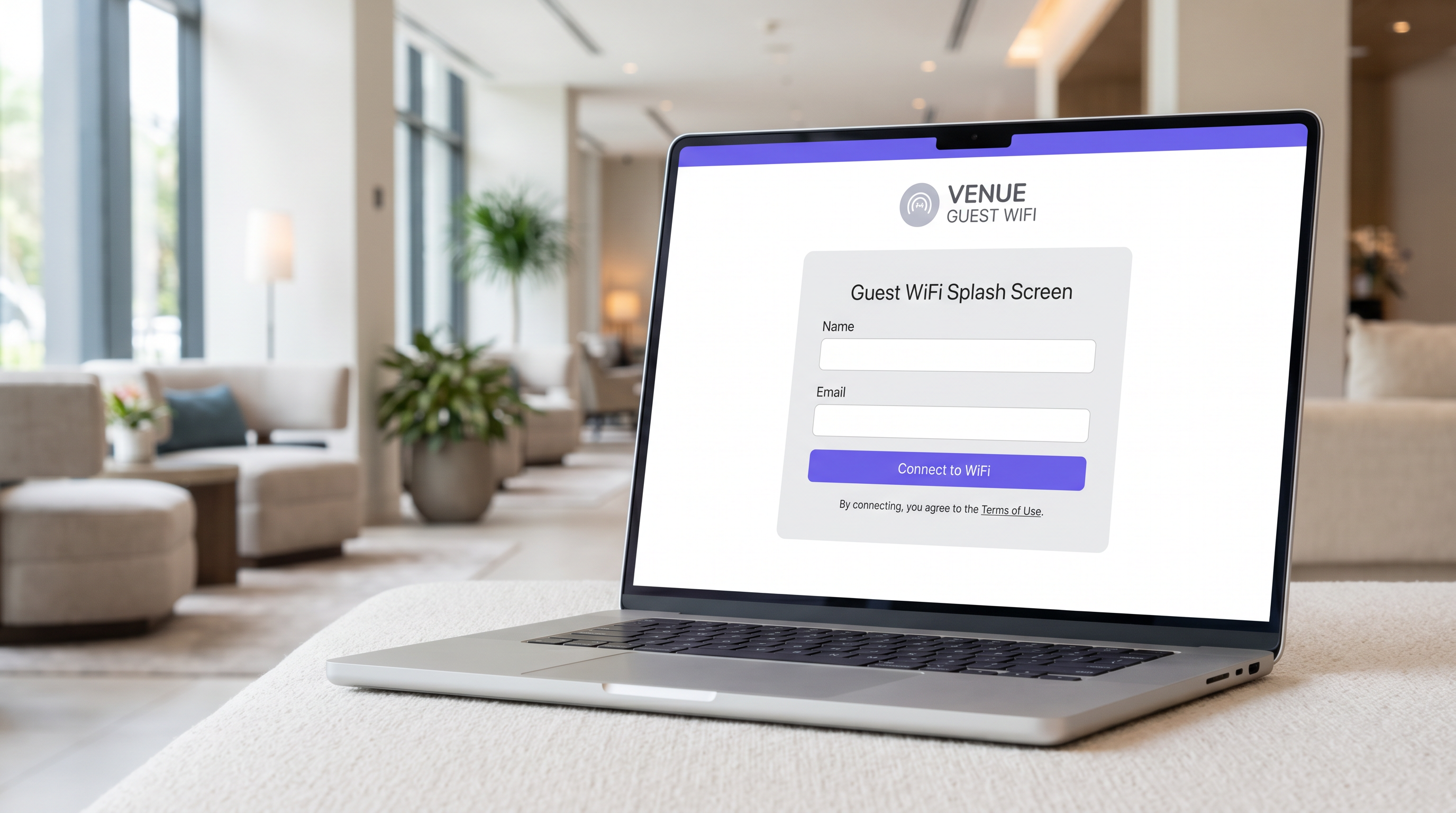
Para gerentes de TI, arquitectos de red y directores de operaciones de recintos, el captive portal es una pieza fundamental de la infraestructura de red para invitados empresariales. En su esencia, un captive portal es un mecanismo de control de acceso a la red que intercepta el tráfico HTTP o HTTPS de un dispositivo invitado y lo redirige a una página de autenticación basada en web antes de otorgar acceso a internet en general. Sin embargo, tratarlo simplemente como una puerta de inicio de sesión ignora su valor estratégico.
Cuando se implementa correctamente, un captive portal transforma un costo operativo —proporcionar WiFi para invitados— en un motor de datos de primera parte que impulsa resultados comerciales medibles. Esta guía proporciona una referencia técnica completa sobre la arquitectura de captive portal, métodos de autenticación, segmentación de red y requisitos de cumplimiento. Está diseñada para ayudarle a ir más allá de las implementaciones básicas y aprovechar plataformas como Guest WiFi de Purple para capturar datos de identidad verificados, garantizar el cumplimiento de PCI DSS y GDPR, y ofrecer conectividad sin interrupciones en entornos minoristas, hoteleros y grandes recintos públicos.
Análisis Técnico Detallado
Arquitectura de Red e Interceptación de Tráfico
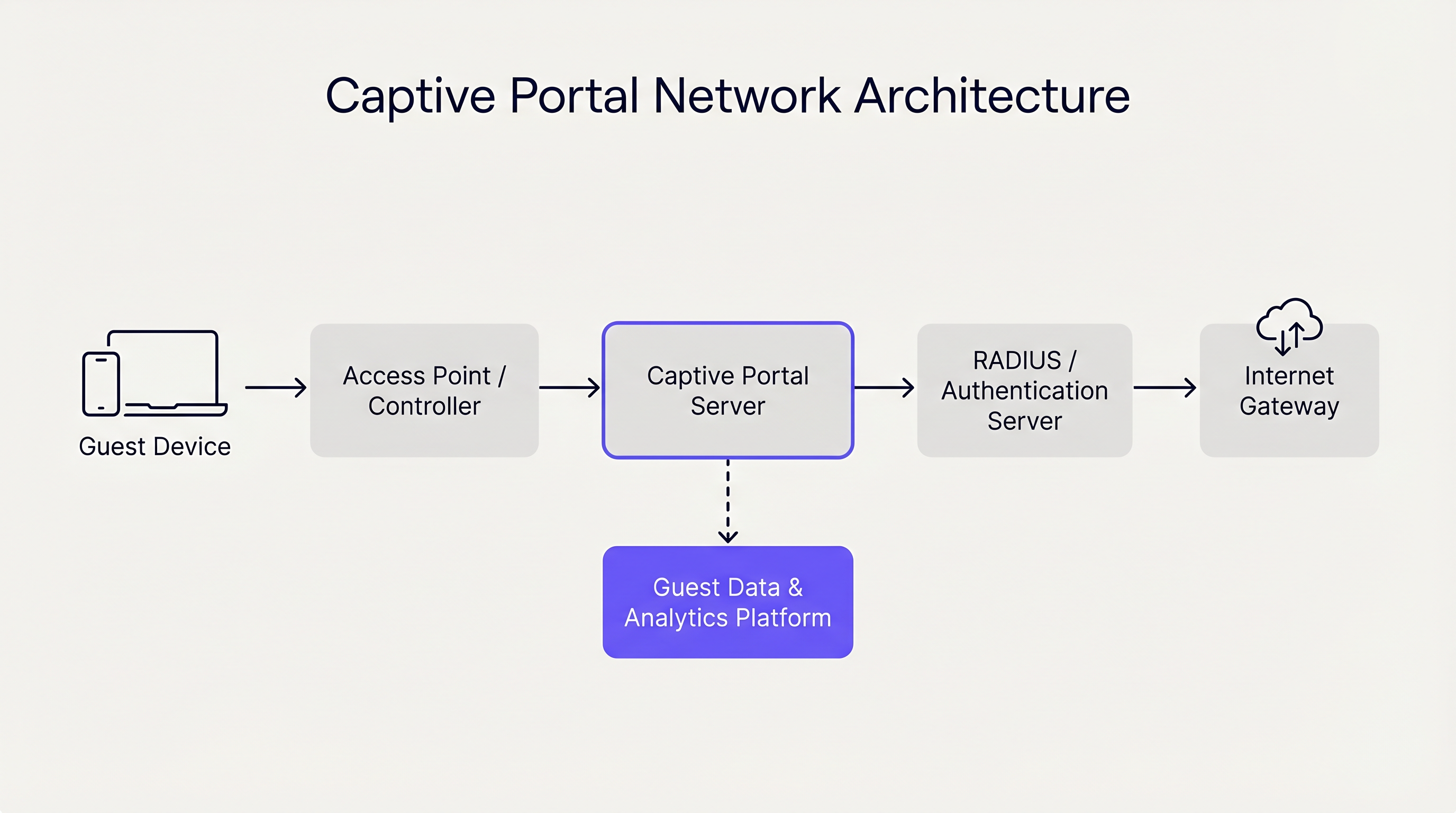
Un captive portal opera principalmente en las Capas 2 y 3 del modelo OSI. Cuando un dispositivo invitado se asocia con un punto de acceso (AP), el controlador de red le asigna una dirección IP a través de DHCP. Fundamentalmente, este dispositivo se coloca en una VLAN (Red de Área Local Virtual) restringida que carece de enrutamiento predeterminado hacia la puerta de enlace de internet.
El controlador o un servidor captive portal dedicado emplea entonces uno de dos mecanismos principales para aplicar el estado cautivo:
- Secuestro de DNS: La red intercepta todas las consultas DNS salientes del dispositivo invitado. Independientemente del dominio solicitado (p. ej.,
example.com), el servidor DNS resuelve la consulta a la dirección IP del servidor captive portal. - Redirección HTTP (Proxy Transparente): Una puerta de enlace en línea intercepta las solicitudes HTTP salientes en la Capa 3 o Capa 4. La puerta de enlace responde con una redirección HTTP 302 Found, dirigiendo el navegador del dispositivo a la URL del captive portal.
Los sistemas operativos modernos (iOS, Android, Windows, macOS) agilizan este proceso utilizando un mecanismo conocido como Asistente de Red Cautiva (CNA). Inmediatamente después de asociarse con una red, el SO envía una solicitud HTTP GET a un endpoint conocido (p. ej., captive.apple.com). Si la respuesta es diferente de la carga útil de éxito esperada (debido a los mecanismos de redirección descritos anteriormente), el SO detecta el estado cautivo y lanza automáticamente una ventana de navegador ligera y en modo sandbox para mostrar la página del portal.
Métodos de Autenticación y Compromisos
La elección del método de autenticación impacta directamente tanto la fricción del usuario como la calidad de los datos capturados. Los operadores de recintos deben equilibrar la accesibilidad con la seguridad y los objetivos de marketing.
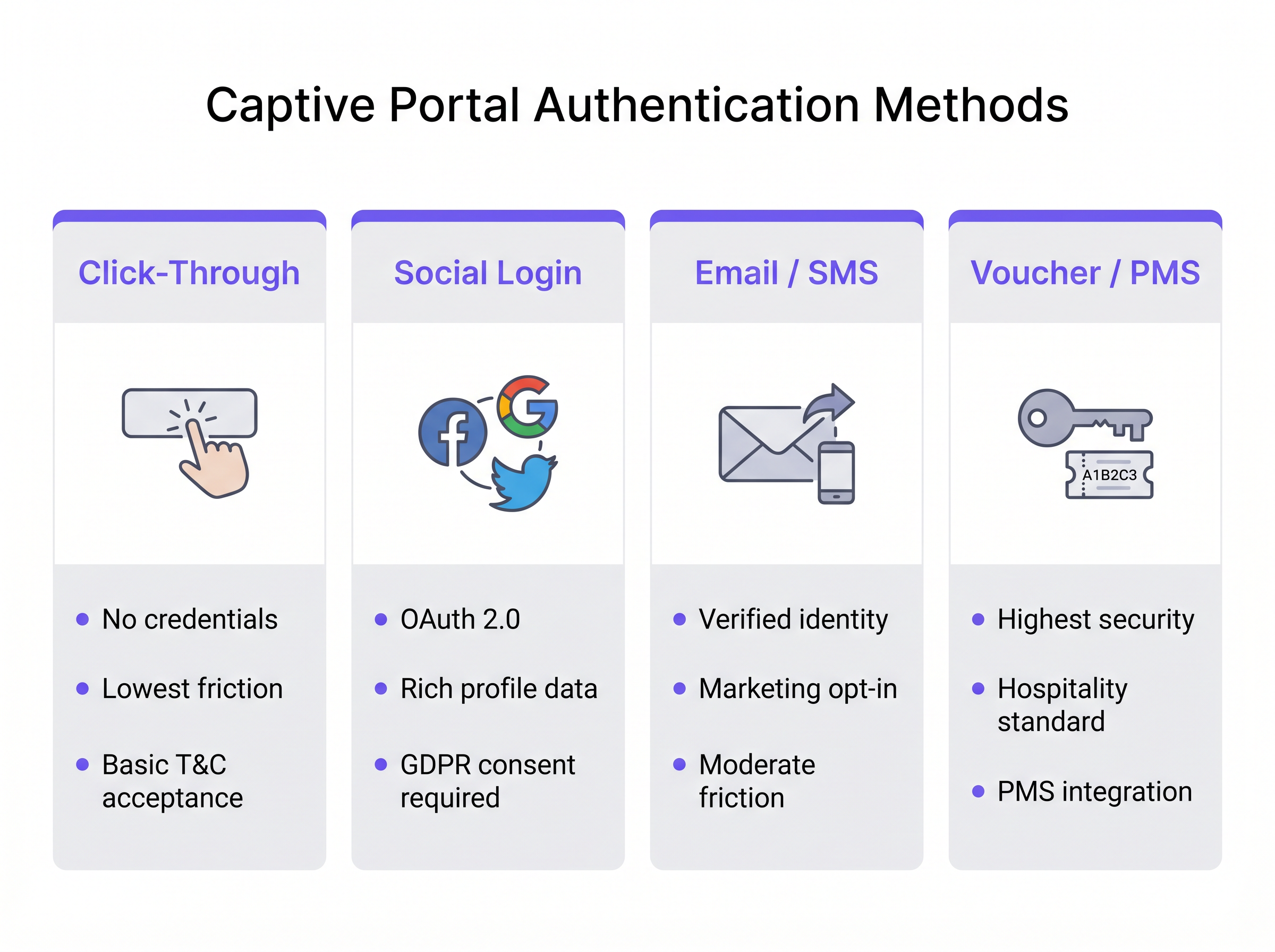
- Click-Through: El usuario simplemente acepta los Términos y Condiciones para obtener acceso. Este método ofrece la menor fricción y es ideal para entornos de alto rendimiento como centros de Transporte . Sin embargo, no produce datos de identidad verificados.
- Inicio de Sesión Social: Los usuarios se autentican utilizando OAuth 2.0 a través de proveedores de identidad de terceros (p. ej., Facebook, Google). Esto proporciona datos demográficos ricos, pero requiere una gestión rigurosa del consentimiento GDPR.
- Verificación por Correo Electrónico / SMS: El usuario proporciona una dirección de correo electrónico o número de teléfono, que se verifica mediante una contraseña de un solo uso (OTP) o un enlace mágico. Este es el enfoque óptimo para entornos de Venta Minorista , produciendo un registro de contacto verificado de primera parte y una vía clara para las suscripciones de marketing.
- Integración con Vales / PMS: El estándar de oro para la Hostelería . Los huéspedes reciben un código de acceso único vinculado a su reserva a través del Sistema de Gestión de Propiedades (PMS). Esto proporciona alta seguridad y vincula el uso de la red directamente a los perfiles de los huéspedes.
Además, plataformas empresariales como Purple pueden actuar como un proveedor de identidad gratuito para marcos de autenticación sin interrupciones como OpenRoaming, particularmente bajo la licencia Connect, permitiendo una incorporación segura y sin fricciones sin inicios de sesión repetitivos en el portal.
Guía de Implementación
La implementación de un captive portal robusto requiere una planificación cuidadosa en el borde y el núcleo de la red. Siga estas recomendaciones neutrales al proveedor para una implementación segura y escalable.
1. Segmentación de Red
La segmentación es la base de la seguridad de la red de invitados. El SSID de invitados debe mapearse a una VLAN dedicada que esté completamente aislada de las redes corporativas, de punto de venta (POS) y de IoT.
- Capa de Conmutación: Defina la VLAN de invitados en todos los switches de acceso y trúnquela al controlador o puerta de enlace.
- Reglas de Firewall: Implemente listas de control de acceso (ACLs) estrictas en la puerta de enlace. La política predeterminada para la VLAN de invitados debe ser
denegar todopara el espacio de IP privado RFC 1918 (enrutamiento intra-VLAN e inter-VLAN), permitiendo solo el tráfico saliente a internet (puertos 80 y 443) y servicios esenciales (DHCP, DNS). - Aislamiento de Cliente: Habilite el aislamiento de cliente de Capa 2 en los APs para evitar que los dispositivos invitados se comuniquen directamente entre sí, mitigando el riesgo de movimiento lateral por parte de actores maliciosos.
2. Arquitectura DNS y DHCP
En implementaciones grandes, como estadios o campus empresariales, asegúrese de que sus ámbitos DHCP tengan el tamaño adecuado para la concurrencia máxima. Los tiempos de concesión en las redes de invitados deben ser cortos (p. ej., de 30 a 60 minutos) para evitar IAgotamiento del pool de IP.
La infraestructura DNS debe manejar de forma fiable el mecanismo de secuestro. Si utiliza un portal gestionado en la nube, asegúrese de que los servidores DNS locales reenvíen correctamente las consultas no resueltas o utilice la configuración DNS especificada por el proveedor para garantizar que el CNA se active de forma consistente en todos los tipos de dispositivos.
3. Configuración del Walled Garden
Un "walled garden" es una lista de direcciones IP o dominios a los que los dispositivos de invitados pueden acceder antes de autenticarse. Esto es fundamental para el inicio de sesión social (permitiendo el acceso a los dominios del proveedor OAuth) y para mostrar la propia página del portal si está alojada externamente. Mantenga un control estricto sobre el walled garden para evitar que los usuarios eludan el portal tunelizando el tráfico a través de dominios permitidos.
4. Gestión del Ancho de Banda
El acceso ilimitado de invitados puede saturar rápidamente el enlace ascendente WAN del lugar, degradando el rendimiento de las operaciones comerciales críticas. Implemente la limitación de velocidad por usuario y por SSID. Una línea base típica es de 5 Mbps a 20 Mbps por dispositivo de invitado, lo cual es suficiente para la navegación web y la transmisión de definición estándar, al tiempo que protege la salud general de la red. Esto se alinea con estrategias de infraestructura más amplias, similar a Los beneficios clave de SD WAN para empresas modernas , donde la conformación del tráfico garantiza que las aplicaciones críticas reciban prioridad.
Mejores Prácticas
- Evitar la Interceptación HTTPS: No intente interceptar el tráfico HTTPS directamente para activar el portal. Los navegadores modernos aplican HTTP Strict Transport Security (HSTS). Si intercepta una solicitud HTTPS a un dominio habilitado para HSTS, el navegador mostrará un error de certificado grave, deteniendo el proceso de CNA. Confíe en las sondas HTTP nativas del sistema operativo.
- Diseño Responsivo: La interfaz de usuario del Captive Portal debe ser responsiva. Más del 80% de los inicios de sesión de WiFi de invitados ocurren en dispositivos móviles. Un portal que requiere pellizcar y hacer zoom aumenta las tasas de abandono.
- Propuesta de Valor Clara: Si requiere inicio de sesión por correo electrónico o social, indique claramente por qué está recopilando los datos y qué recibe el usuario a cambio (por ejemplo, "Inicie sesión para acceso de alta velocidad y ofertas exclusivas en la tienda").
Solución de Problemas y Mitigación de Riesgos
Modos de Falla Comunes
- El CNA no se activa: Esto suele ser causado por una configuración DNS incorrecta, un walled garden mal configurado (por ejemplo, el punto final de la sonda del sistema operativo está accidentalmente en la lista blanca), o el AP que no intercepta la solicitud HTTP. Verifique que el cliente esté recibiendo el servidor DNS correcto a través de DHCP y que el gateway esté interceptando activamente el puerto 80.
- Errores de Certificado al Iniciar Sesión: Si la propia página del Captive Portal está alojada en HTTPS (lo cual debería ser), asegúrese de que el certificado SSL/TLS sea válido, emitido por una Autoridad de Certificación pública de confianza, y que toda la cadena de certificados esté instalada en el servidor o controlador del portal.
- Agotamiento del Pool de IP: Los síntomas incluyen clientes que se conectan al SSID pero no logran recibir una dirección IP. Reduzca los tiempos de arrendamiento de DHCP o expanda la máscara de subred (por ejemplo, de /24 a /22) para acomodar una mayor densidad de dispositivos.
Seguridad y Cumplimiento
- PCI DSS: Para el comercio minorista y la hostelería, el Estándar de Seguridad de Datos de la Industria de Tarjetas de Pago (PCI DSS) exige una estricta separación entre el Entorno de Datos del Titular de la Tarjeta (CDE) y las redes públicas. Una VLAN de invitados correctamente segmentada con aislamiento de firewall es obligatoria.
- GDPR y Privacidad: La recopilación de datos personales a través de un Captive Portal está sujeta a las regulaciones de GDPR. Debe establecer una base legal para el procesamiento (generalmente consentimiento para marketing, o interés legítimo para la seguridad de la red). El portal debe enlazar a una política de privacidad clara, y las casillas de aceptación premarcadas están estrictamente prohibidas. El uso de una plataforma como WiFi Analytics de Purple garantiza que estos mecanismos de cumplimiento estén integrados y sean auditables.
ROI e Impacto Comercial
La transición de un Captive Portal básico a una plataforma de inteligencia transforma la red de un centro de costos a un habilitador de ingresos.
- Adquisición de Datos de Primera Parte: En un mundo sin cookies, los correos electrónicos y números de teléfono verificados recopilados a través del portal son activos de gran valor para el enriquecimiento del CRM y las campañas de marketing dirigidas.
- Análisis Operacional: Más allá de la autenticación, la infraestructura captura datos de presencia pasiva. Los operadores de locales pueden analizar los tiempos de permanencia, los patrones de afluencia y las tasas de visitantes recurrentes. Por ejemplo, las instalaciones de Atención Médica pueden optimizar la orientación y la asignación de recursos basándose en la densidad de visitantes en tiempo real.
- Monetización: Los locales pueden monetizar el portal directamente a través de páginas de bienvenida patrocinadas o publicidad programática dirigida mostrada durante el proceso de inicio de sesión.
Al integrar el Captive Portal con pilas de TI y marketing más amplias, las organizaciones logran un retorno de la inversión medible, justificando el gasto en infraestructura a través de una mayor participación del cliente y eficiencia operativa. Para obtener más orientación sobre cómo seleccionar el proveedor adecuado, consulte nuestra guía: Proveedores de WiFi para Invitados: Qué Buscar al Elegir una Plataforma de WiFi .
Resumen del Podcast
Escuche a nuestro arquitecto sénior de soluciones desglosar la arquitectura técnica y el valor estratégico de los Captive Portals en este resumen de 10 minutos.
Términos clave y definiciones
Captive Portal
A network access control mechanism that intercepts a device's HTTP traffic and redirects it to a web page for authentication before granting internet access.
The fundamental technology used to secure and manage guest WiFi networks in commercial venues.
Captive Network Assistant (CNA)
A native OS feature (on iOS, Android, etc.) that probes for internet connectivity upon joining a network and automatically opens a mini-browser if it detects a captive portal redirect.
Ensures a seamless user experience by presenting the login screen immediately, rather than waiting for the user to open a browser.
Walled Garden
A restricted set of IP addresses or domains that unauthenticated users are permitted to access.
Necessary for allowing devices to reach third-party identity providers (like Facebook or Google) during the social login process.
VLAN (Virtual Local Area Network)
A logical subnetwork that groups a collection of devices on a single physical LAN, isolating their traffic.
Crucial for network segmentation, ensuring guest WiFi traffic is kept completely separate from corporate or POS traffic.
Client Isolation
A wireless network setting that prevents devices connected to the same AP from communicating directly with one another.
A critical security measure on public networks to prevent lateral movement and peer-to-peer attacks between guest devices.
HTTP 302 Redirect
A standard HTTP response status code indicating that the requested resource has been temporarily moved to a different URL.
The primary mechanism used by gateways to redirect a user's initial web request to the captive portal login page.
MAC Authentication Bypass (MAB)
A method of granting network access based on the device's MAC address, often used to re-authenticate returning visitors automatically.
Improves the user experience by allowing seamless reconnection for guests who have previously authenticated, within a defined retention period.
HSTS (HTTP Strict Transport Security)
A web security policy mechanism that helps protect websites against protocol downgrade attacks and cookie hijacking.
The reason why captive portals cannot intercept HTTPS traffic; doing so violates HSTS and results in browser security warnings.
Casos de éxito
A 200-room hotel needs to implement guest WiFi that ensures only paying guests have access, prevents bandwidth hogging, and complies with PCI DSS regarding the adjacent point-of-sale systems in the restaurant.
- Deploy a captive portal with PMS (Property Management System) integration. Guests authenticate using their room number and surname. 2. Configure a dedicated Guest VLAN (e.g., VLAN 50) across all APs and switches. 3. Implement firewall rules denying all traffic from VLAN 50 to the Corporate/POS VLAN (e.g., VLAN 10). 4. Apply a bandwidth policy limiting each authenticated device to 10 Mbps downstream/2 Mbps upstream. 5. Enable Layer 2 client isolation on the APs.
A national retail chain wants to offer free WiFi to shoppers to build their CRM database, but they are concerned about GDPR compliance and high abandonment rates at the login screen.
- Implement an Email/SMS verification captive portal. 2. Ensure the UI is mobile-responsive and loads in under 2 seconds. 3. Include a clear, unticked checkbox for marketing consent, separate from the Terms of Use acceptance. 4. Provide a clear value exchange on the splash page (e.g., 'Sign in for 10% off your purchase today'). 5. Integrate the portal platform via API directly into the corporate CRM.
Análisis de escenarios
Q1. A hospital IT director wants to implement a captive portal for patients and visitors. They require users to accept an acceptable use policy but do not want to manage passwords or collect personal data to avoid HIPAA/GDPR complications. Which authentication method should they deploy?
💡 Sugerencia:Consider the method that offers the lowest friction and captures zero identity data.
Mostrar enfoque recomendado
Click-Through authentication. This method allows users to simply accept the Terms and Conditions to gain access. It satisfies the requirement for an acceptable use policy acknowledgment without collecting any personally identifiable information (PII), thereby minimizing compliance risks.
Q2. During a captive portal deployment at a stadium, users report that their phones show a 'Connection is not private' or certificate error instead of the login page when they try to browse to 'https://google.com'. What is the architectural cause of this issue?
💡 Sugerencia:Think about how modern browsers handle secure connections and what happens when a gateway tries to intercept them.
Mostrar enfoque recomendado
The gateway is attempting to intercept HTTPS traffic. Because 'google.com' utilizes HSTS (HTTP Strict Transport Security), the browser expects a specific SSL certificate. When the gateway intercepts the request and serves the portal's certificate instead, the browser detects a mismatch and blocks the connection to prevent a man-in-the-middle attack. The solution is to rely on the OS's native CNA HTTP probes rather than intercepting user-initiated HTTPS requests.
Q3. A retail chain has deployed a captive portal that collects email addresses for marketing. However, the marketing team reports that 40% of the emails collected are fake (e.g., 'test@test.com'). How can the network architect adjust the portal configuration to improve data quality?
💡 Sugerencia:How can the system prove the user actually owns the contact detail they provided before granting access?
Mostrar enfoque recomendado
Implement Email Verification via a One-Time Passcode (OTP) or magic link. The portal should place the user in a 'walled garden' state with limited access (e.g., only allowing access to their email provider) until they click the verification link or enter the OTP sent to the provided email address. Only after verification is full internet access granted.




