
কীভাবে Guest WiFi সেট আপ করবেন: একটি সুরক্ষিত এন্টারপ্রাইজ কনফিগারেশন গাইড
এই নির্ভরযোগ্য গাইডটি IT লিডার এবং নেটওয়ার্ক আর্কিটেক্টদের সুরক্ষিত এন্টারপ্রাইজ guest WiFi স্থাপনের জন্য একটি সুনির্দিষ্ট ব্লুপ্রিন্ট প্রদান করে। এটি কমপ্লায়েন্ট ফার্স্ট-পার্টি ডেটা সংগ্রহ করার সাথে সাথে অভ্যন্তরীণ সিস্টেমগুলিকে সুরক্ষিত রাখতে প্রয়োজনীয় আর্কিটেকচার, WPA3 মাইগ্রেশন, VLAN সেগমেন্টেশন এবং captive portal ইন্টিগ্রেশন কভার করে।
Video overview
এই গাইডটি শুনুন
পডকাস্ট ট্রান্সক্রিপ্ট দেখুন
আমাদের মূল সিরিজের অংশ: Guest WiFi গাইড →
কার্যনির্বাহী সংক্ষিপ্তসার (Executive Summary)
এন্টারপ্রাইজ পরিবেশের জন্য - তা একটি বড় বিশ্ববিদ্যালয় ক্যাম্পাস, একটি উচ্চ-ঘনত্বের স্টেডিয়াম, বা একটি বিস্তৃত রিটেইল চেইন হোক না কেন - গেস্ট WiFi অ্যাক্সেসের জন্য একটি Pre-Shared Key (PSK)-এর উপর নির্ভর করা একটি বড় নিরাপত্তা ঝুঁকি। একটিমাত্র ফাঁস হওয়া ক্রেডেন্সিয়াল সমগ্র নেটওয়ার্ককে ঝুঁকির মুখে ফেলে, এবং অ্যাক্সেস প্রত্যাহার করার জন্য সম্পূর্ণ ক্যাম্পাসের প্রতিটি ডিভাইসে পাসওয়ার্ড পরিবর্তন করতে হয়। WPA3 এনক্রিপশন এবং শক্তিশালী আইডেন্টিটি ম্যানেজমেন্ট সহ একটি নিরাপদ, বিভক্ত আর্কিটেকচার প্রয়োগ করলে এই সমস্যাটি সম্পূর্ণরূপে দূর হয়। প্রতিটি দর্শককে পৃথকভাবে প্রমাণীকরণ করা হয়, অ্যাক্সেস তাৎক্ষণিকভাবে প্রত্যাহার করা যেতে পারে এবং নেটওয়ার্ক বিভাজন গতিশীলভাবে কার্যকর করা হয়। এই গাইডটি আইটি ম্যানেজার এবং নেটওয়ার্ক স্থপতিদের নিরাপদ গেস্ট WiFi স্থাপনের জন্য একটি সুনির্দিষ্ট রোডম্যাপ প্রদান করে। আমরা আর্কিটেকচারাল আপস, WPA3-তে মাইগ্রেশন এবং ডিরেক্টরি পরিষেবাগুলির সাথে ইন্টিগ্রেশন কভার করি। আমরা আরও দেখাই যে কীভাবে একটি শক্তিশালী প্রমাণীকরণ স্তর গেস্ট WiFi সমাধানের সাথে সংহত হয়ে ভিজিটরদের নির্বিঘ্ন অ্যাক্সেস প্রদান করে, পাশাপাশি WiFi Analytics ক্যাপচার করে যা আপনার নেটওয়ার্ককে একটি বিজনেস ইন্টেলিজেন্স সম্পদে পরিণত করে।
প্রযুক্তিগত গভীর বিশ্লেষণ
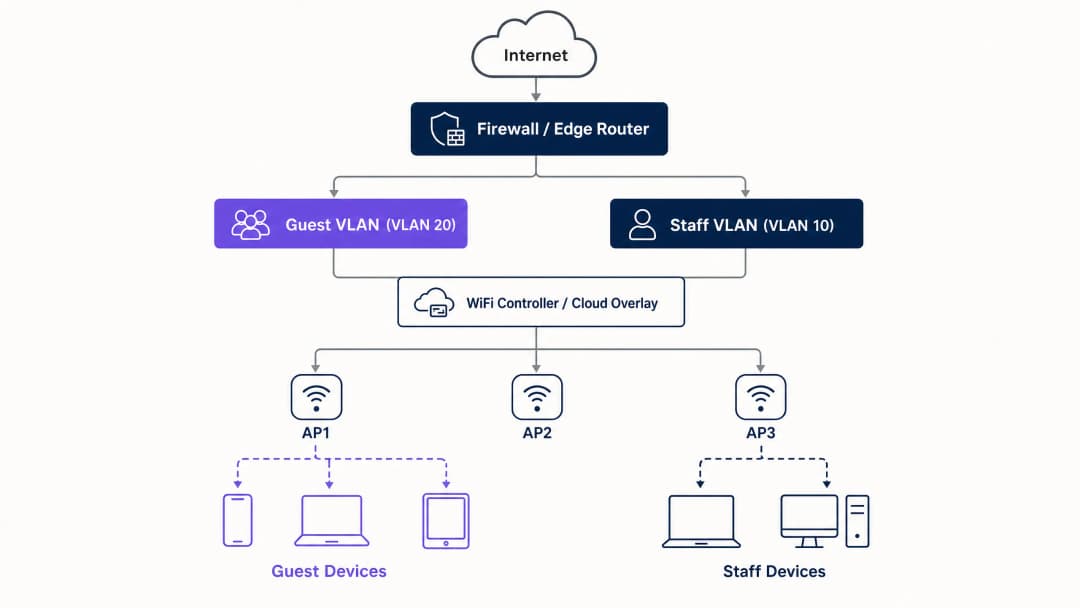
যেকোনো নিরাপদ গেস্ট WiFi স্থাপনের ভিত্তি হলো নেটওয়ার্ক বিভাজন। Captive Portal বা অ্যানালিটিক্স মূল্যায়ন করার আগে, আপনাকে অবশ্যই গেস্ট ট্রাফিক এবং অভ্যন্তরীণ সিস্টেমের মধ্যে কঠোর বিচ্ছিন্নতা স্থাপন করতে হবে। এর জন্য নিজস্ব Virtual Local Area Network (VLAN)-এর সাথে ম্যাপ করা একটি ডেডিকেটেড SSID প্রয়োজন, যেখানে ডিফল্টরূপে অভ্যন্তরীণ সাবনেটে অ্যাক্সেস অস্বীকার করে ফায়ারওয়াল নিয়মাবলী থাকে। গেস্ট নেটওয়ার্কটিকে একটি নিয়ন্ত্রিত বাহ্যিক অঞ্চল হিসাবে ভাবুন; দর্শকরা একটি পৃথক প্রবেশদ্বার পান এবং শুধুমাত্র ইন্টারনেটে অ্যাক্সেস পান।
নিরাপত্তা আর্কিটেকচারের বেসলাইন
প্রযুক্তিগত বেসলাইনের জন্য বেশ কয়েকটি অলঙ্ঘনীয় নিয়ন্ত্রণের প্রয়োজন:
- ডেডিকেটেড SSID: স্টাফ এবং অপারেশনাল নেটওয়ার্ক থেকে আলাদা একটি গেস্ট SSID তৈরি করুন।
- VLAN বিভাজন: গেস্ট ট্রাফিককে বিচ্ছিন্ন করতে ডেডিকেটেড VLAN-এ SSID ম্যাপ করুন।
- ক্লায়েন্ট আইসোলেশন (Client Isolation): গেস্ট ডিভাইসগুলিকে একে অপরের সাথে যোগাযোগ করা থেকে বিরত রাখতে ক্লায়েন্ট আইসোলেশন সক্ষম করুন, যা ল্যাটারাল মুভমেন্ট অ্যাটাক প্রতিরোধ করে।
- ফায়ারওয়াল নীতি (Firewall Policy): প্রাথমিক LAN এবং ম্যানেজমেন্ট ইন্টারফেসে অ্যাক্সেস ব্লক করুন।
- ডেডিকেটেড DHCP: একটি পৃথক DHCP স্কোপ ব্যবহার করুন এবং অভ্যন্তরীণ DNS রেকর্ডগুলি ফাঁস হওয়া প্রতিরোধ করুন।
WPA3 মাইগ্রেশনের প্রয়োজনীয়তা
যদি আপনি ২০২৬ সালে হার্ডওয়্যার ডেপ্লয় বা রিফ্রেশ করে থাকেন, তবে WPA3 অবশ্যই ডিফল্ট স্ট্যান্ডার্ড হতে হবে। WiFi Alliance জুলাই ২০২০ সালে সমস্ত নতুন ডিভাইসের জন্য WPA3 সার্টিফিকেশন বাধ্যতামূলক করেছে। Cisco Meraki, HPE Aruba, Ruckus, Juniper Mist, Ubiquiti, UniFi, Cambium, Extreme Networks এবং Fortinet-এর বেশিরভাগ এন্টারপ্রাইজ অ্যাক্সেস পয়েন্ট ফার্মওয়্যার আপডেটের মাধ্যমে WPA3 সমর্থন করে। WPA3 তিনটি অত্যন্ত গুরুত্বপূর্ণ অপারেশনাল উন্নতি নিয়ে আসে:
- Simultaneous Authentication of Equals (SAE): এটি দুর্বল WPA2 ফোর-ওয়ে হ্যান্ডশেককে প্রতিস্থাপন করে, যা অফলাইন ডিকশনারি অ্যাটাক দূর করে। কোনো আক্রমণকারী যদি অথেন্টিকেশন এক্সচেঞ্জ ক্যাপচারও করে, তবুও তারা সেশন কী বের করতে পারবে না।
- Forward Secrecy: এটি নিশ্চিত করে যে আজ যদি কোনো নেটওয়ার্ক পাসওয়ার্ড আপসও হয়ে যায়, তবুও ঐতিহাসিকভাবে রেকর্ড করা ট্র্যাফিক উন্মুক্ত হবে না। প্রতিটি সেশন একটি অনন্য ক্ষণস্থায়ী কী তৈরি করে।
- Opportunistic Wireless Encryption (OWE): পাসওয়ার্ডের প্রয়োজন ছাড়াই ওপেন নেটওয়ার্কে অটোমেটিক একটি এনক্রিপ্টেড সংযোগ স্থাপন করে। এটি ট্রানজিটে থাকা ডেটা সুরক্ষিত করে এবং সরাসরি GDPR কমপ্লায়েন্সের বাধ্যবাধকতাকে সমর্থন করে।
আপনার নির্দিষ্ট সেটআপ নিয়ে কোনো প্রশ্ন আছে?
আমাদের টিম ৮০,০০০ ভেন্যুতে ভেন্যু অপারেটর, IT ম্যানেজার এবং নেটওয়ার্ক ইঞ্জিনিয়ারদের সাথে কাজ করে। একটি ২০ মিনিটের কল বুক করুন এবং আপনার মতো অন্যরা কীভাবে এর সমাধান করেছেন তা আমরা আপনাকে দেখাব।
ইমপ্লিমেন্টেশন গাইড
সুরক্ষিত গেস্ট WiFi ডেপ্লয় করার জন্য একটি পর্যায়ক্রমিক পদ্ধতির প্রয়োজন: প্রথমে আর্কিটেকচার, তারপর অথেন্টিকেশন, এরপর পোর্টাল লেয়ার এবং সবশেষে অ্যানালিটিক্স।
ধাপ ১: নেটওয়ার্ক ফাউন্ডেশন কনফিগার করুন
যেকোনো SSID সক্রিয় করার আগে VLAN এবং ফায়ারওয়াল রুল কনফিগার করুন। নিশ্চিত করুন যে গেস্ট VLAN যেন ইন্টারনাল সাবনেটে ট্র্যাফিক রাউট করতে না পারে। আপনার অথেন্টিকেশন স্ট্র্যাটেজির ওপর ভিত্তি করে WPA3-Personal (SAE) বা OWE ইমপ্লিমেন্ট করুন। কন্ট্রোলারে ক্লায়েন্ট আইসোলেশন সক্রিয় রয়েছে কিনা তা নিশ্চিত করুন।
ধাপ ২: অথেন্টিকেশন লেয়ার ইমপ্লিমেন্ট করুন
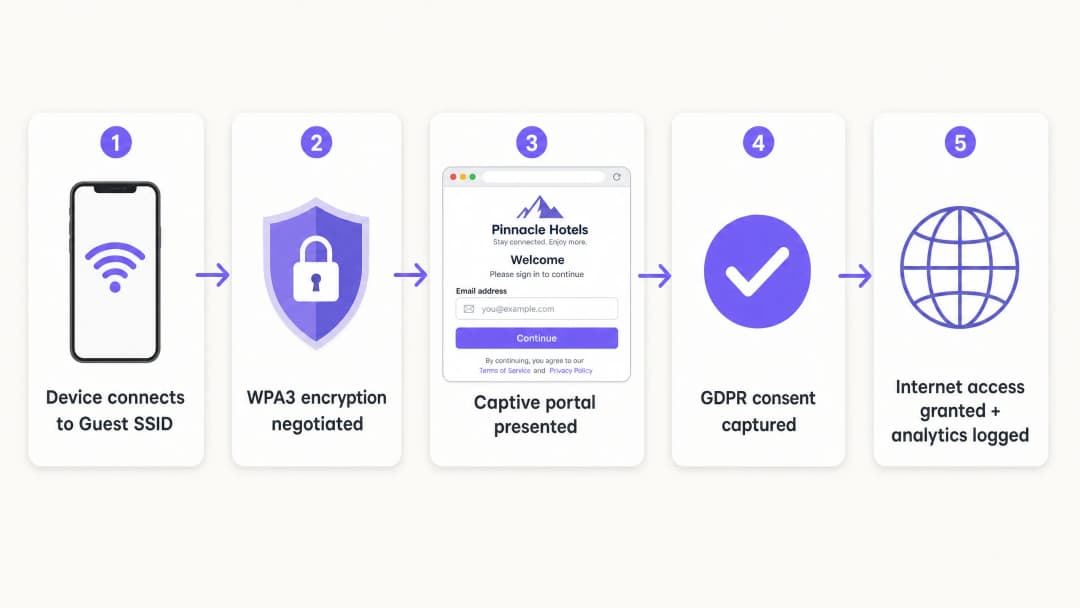
কর্মী এবং কর্পোরেট ডিভাইসের জন্য, 802.1X হলো স্ট্যান্ডার্ড। এর জন্য অ্যাক্সেস দেওয়ার আগে ডিভাইসগুলোকে একটি RADIUS সার্ভারের বিপরীতে অথেন্টিকেট করতে হয়। গেস্টদের জন্য, পরিচয় এবং সম্মতি ক্যাপচার করার প্রাথমিক মাধ্যম হিসেবে Captive Portal রয়ে গেছে।
ধাপ ৩: ক্লাউড ওভারলে ডেপ্লয় করুন
Purple একটি হার্ডওয়্যার-অজ্ঞেয়বাদী ক্লাউড ওভারলে হিসেবে কাজ করে। Captive Portal, সম্মতির প্রবাহ এবং অ্যানালিটিক্স পরিচালনা করতে এটি আপনার বিদ্যমান অবকাঠামোর সাথে সংহত হয়। ওভারলেটি আইডেন্টিটি লেয়ার ম্যানেজ করে এবং ফিজিক্যাল অ্যাক্সেস পয়েন্টগুলো রেডিও এবং VLAN পলিসি প্রয়োগ করে।
ধাপ ৪: যাচাই করুন এবং পরীক্ষা করুন
একটি ফিজিক্যাল ক্লায়েন্ট ডিভাইস থেকে ডেপ্লয়মেন্ট পরীক্ষা করুন। ইন্টারনাল রিসোর্স, প্রিন্টার এবং ম্যানেজমেন্ট ইন্টারফেস অ্যাক্সেস করার চেষ্টা করুন। ফেইল-ওপেন আচরণ যাচাই করুন: অথেন্টিকেশন সার্ভিস সাময়িকভাবে অনুপলব্ধ থাকলে গেস্টরা সংযোগ হারাবে নাকি পোর্টাল বাইপাস করবে তা স্পষ্টভাবে সিদ্ধান্ত নিন।
সর্বোত্তম অনুশীলনসমূহ
- কঠোর সার্টিফিকেট ভ্যালিডেশন প্রয়োগ করুন: PEAP-MSCHAPv2 ব্যবহারকারী 802.1X ডেপ্লয়মেন্টের জন্য, মোবাইল ডিভাইস ম্যানেজমেন্ট (MDM) বা গ্রুপ পলিসি অবজেক্ট (GPO) এর মাধ্যমে RADIUS সার্ভারের সার্টিফিকেট ভ্যালিডেট করতে ক্লায়েন্টদের কনফিগার করা উচিত। এটি রোগ অ্যাক্সেস পয়েন্ট আক্রমণ প্রতিরোধ করে।
- ডাইনামিক VLAN অ্যাসাইনমেন্ট ব্যবহার করুন: ডিরেক্টরি গ্রুপ মেম্বারশিপের উপর ভিত্তি করে ডাইনামিকভাবে VLAN অ্যাসাইন করার জন্য RADIUS সার্ভার কনফিগার করুন। এটি একটি একক SSID-কে স্টাফ, ঠিকাদার এবং IoT ডিভাইসগুলিকে নিরাপদে পরিষেবা দিতে সাহায্য করে।
- লেগ্যাসি ডিভাইসগুলিকে আলাদা করুন: যে ডিভাইসগুলি WPA3 সমর্থন করে না সেগুলিকে একটি ডেডিকেটেড WPA2 SSID-তে রাখা উচিত, যা একটি পৃথক VLAN-এ আলাদা করা থাকবে। লেগ্যাসি ডিভাইসের সামঞ্জস্যের জন্য মূল গেস্ট নেটওয়ার্কের নিরাপত্তার সাথে আপস করবেন না।
- শিল্পের মানদণ্ডের সাথে সামঞ্জস্যপূর্ণ করুন: পেমেন্ট ইনফ্রাস্ট্রাকচার থেকে গেস্ট ট্রাফিককে শারীরিকভাবে বা যৌক্তিকভাবে আলাদা করে ডেপ্লয়মেন্টটি যাতে PCI-DSS প্রয়োজনীয়তার সাথে সামঞ্জস্যপূর্ণ হয় তা নিশ্চিত করুন। এনক্রিপশনের জন্য OWE ব্যবহার করে এবং Captive Portal-এর মাধ্যমে স্পষ্ট সম্মতি গ্রহণ করে GDPR সম্মতি সমর্থন করুন।
সমস্যা সমাধান এবং ঝুঁকি হ্রাস
সবচেয়ে সাধারণ ডেপ্লয়মেন্ট ব্যর্থতা হার্ডওয়্যার সীমাবদ্ধতার চেয়ে বরং কনফিগারেশনের অসাবধানতার কারণে ঘটে।
- কসমেটিক সেপারেশন: স্টাফ নেটওয়ার্কের মতো একই ব্রডকাস্ট ডোমেনে একটি নতুন SSID কোনো নিরাপত্তা প্রদান করে না। VLAN ট্যাগিং এবং ফায়ারওয়াল নিয়মগুলি যাচাই করুন।
- ক্লায়েন্ট আইসোলেশন নিষ্ক্রিয় করা: ক্লায়েন্টদের আলাদা করতে ব্যর্থ হলে গেস্টদের উপর ল্যাটারাল অ্যাটাকের ঝুঁকি বাড়ে। এটি বিশেষ করে hospitality পরিবেশে বিপজ্জনক যেখানে গেস্টরা দীর্ঘ সময়ের জন্য নেটওয়ার্ক শেয়ার করেন।
- পরিকল্পনাহীন ফেল-ওপেন: যদি Captive Portal-এ পৌঁছানো না যায়, তবে নেটওয়ার্কটিকে অবশ্যই অনুমানযোগ্যভাবে ব্যর্থতা পরিচালনা করতে হবে। বেশিরভাগ পাবলিক ভেন্যুর জন্য, সংযোগ বজায় রাখতে ফেল-ওপেন পছন্দ করা হয়, তবে এটি একটি সচেতন কনফিগারেশন পছন্দ হওয়া উচিত, কোনো দুর্ঘটনা নয়।
ROI এবং ব্যবসায়িক প্রভাব
একটি সুরক্ষিত গেস্ট WiFi ডেপ্লয়মেন্ট একটি নেটওয়ার্ক খরচ কেন্দ্রকে একটি কৌশলগত সম্পদে পরিণত করে। শেয়ার করা পাসওয়ার্ডের পরিবর্তে একটি সম্মতিপূর্ণ Captive Portal ব্যবহার করে, ভেন্যুগুলি যাচাইকৃত ফার্স্ট-পার্টি ডেটা সংগ্রহ করতে পারে। Purple-এর প্ল্যাটফর্ম বার্ষিক ৪৪০ মিলিয়ন লগইন প্রসেস করে, যা মার্কেটিং অটোমেশনের জন্য পরিচ্ছন্ন কন্ট্যাক্ট লিস্ট প্রদান করে।
তাছাড়া, নিরাপদ অনবোর্ডিং আইটি সাপোর্ট ওভারহেড হ্রাস করে। Passpoint বা OpenRoaming প্রয়োগ করলে ফিরে আসা ভিজিটররা কোনো শব্দহীনভাবে সংযোগ করতে পারেন, যা পাসওয়ার্ড রিসেট অনুরোধের প্রয়োজনীয়তা দূর করে। retail অপারেটরদের জন্য, এই নির্বিঘ্ন সংযোগ অ্যাপ এনগেজমেন্ট এবং লয়্যালটি প্রোগ্রাম অংশগ্রহণকে ত্বরান্বিত করে, যা একটি পরিমাপযোগ্য রিটার্ন অন ইনভেস্টমেন্ট (ROI) প্রদান করে।
-
ব্রিফিং শুনুন
মূল সংজ্ঞাসমূহ
VLAN (Virtual Local Area Network)
একটি লজিক্যাল সাবনেটওয়ার্ক যা বিভিন্ন ফিজিক্যাল LAN থেকে ডিভাইসের একটি সংগ্রহকে গ্রুপ করে।
কর্পোরেট ডেটা থেকে guest WiFi ট্রাফিক আলাদা করতে ব্যবহৃত হয়, যা নিশ্চিত করে যে দর্শকরা অভ্যন্তরীণ সার্ভার বা পেমেন্ট সিস্টেম অ্যাক্সেস করতে পারবেন না।
WPA3
সর্বাধুনিক WiFi সিকিউরিটি সার্টিফিকেশন, যা Simultaneous Authentication of Equals (SAE) এবং Forward Secrecy প্রবর্তন করে।
অফলাইন ডিকশনারি অ্যাটাক প্রতিরোধ করতে এবং ঐতিহাসিক ট্রাফিক ডেটা সুরক্ষিত করতে আধুনিক এন্টারপ্রাইজ নেটওয়ার্কের জন্য অপরিহার্য।
OWE (Opportunistic Wireless Encryption)
একটি WPA3 ফিচার যা কোনো পাসওয়ার্ডের প্রয়োজন ছাড়াই ওপেন নেটওয়ার্কে ট্রাফিক স্বয়ংক্রিয়ভাবে এনক্রিপ্ট করে।
প্যাসিভ ইভসড্রপিং থেকে ট্রানজিটে থাকা গেস্ট ডেটা সুরক্ষিত রেখে নির্বিঘ্ন অ্যাক্সেস অফার করতে চাওয়া পাবলিক ভেন্যুগুলোর জন্য অত্যন্ত গুরুত্বপূর্ণ।
ক্লায়েন্ট আইসোলেশন
একটি ওয়্যারলেস কন্ট্রোলার সেটিং যা একই SSID-এর সাথে সংযুক্ত ডিভাইসগুলোকে একে অপরের সাথে সরাসরি যোগাযোগ করতে বাধা দেয়।
ক্ষতিগ্রস্ত ভিজিটর ডিভাইসগুলো যাতে অন্যান্য গেস্টদের ওপর পার্শ্ববর্তীভাবে আক্রমণ করতে না পারে তা বন্ধ করতে গেস্ট নেটওয়ার্কের জন্য বাধ্যতামূলক।
Captive Portal
একটি ওয়েব পেজ যা নেটওয়ার্কে অ্যাক্সেস দেওয়ার আগে ব্যবহারকারীদের অবশ্যই দেখতে হবে এবং ইন্টারঅ্যাক্ট করতে হবে।
একটি প্রাথমিক সিকিউরিটি সীমানার পরিবর্তে ফার্স্ট-পার্টি ডেটা সংগ্রহ করতে মার্কেটিং টিম দ্বারা এবং ব্যবহারের শর্তাবলী প্রয়োগ করতে IT দ্বারা ব্যবহৃত হয়।
IEEE 802.1X
পোর্ট-ভিত্তিক নেটওয়ার্ক অ্যাক্সেস কন্ট্রোল (PNAC)-এর জন্য একটি IEEE স্ট্যান্ডার্ড, যা একটি LAN বা WLAN-এর সাথে যুক্ত হতে চাওয়া ডিভাইসগুলোকে একটি প্রমাণীকরণ প্রক্রিয়া প্রদান করে।
একটি সেন্ট্রাল ডিরেক্টরির বিপরীতে নিরাপদে স্টাফ ডিভাইসগুলোকে প্রমাণীকরণ করার জন্য এন্টারপ্রাইজ স্ট্যান্ডার্ড।
RADIUS
রিমোট অথেনটিকেশন ডায়াল-ইন ইউজার সার্ভিস - একটি নেটওয়ার্কিং প্রোটোকল যা সেন্ট্রালাইজড অথেনটিকেশন, অথরাইজেশন এবং অ্যাকাউন্টিং (AAA) ম্যানেজমেন্ট প্রদান করে।
সার্ভার উপাদান যা একটি ডিরেক্টরির (যেমন Entra ID) বিপরীতে ব্যবহারকারীর শংসাপত্র যাচাই করে এবং অ্যাক্সেস পয়েন্টকে কোন VLAN বরাদ্দ করতে হবে তা জানায়।
Passpoint
Wi-Fi Alliance দ্বারা তৈরি একটি প্রোটোকল যা মোবাইল ডিভাইসকে স্বয়ংক্রিয়ভাবে সুরক্ষিত WiFi নেটওয়ার্কগুলি আবিষ্কার করতে এবং সেগুলির সাথে সংযুক্ত হতে সক্ষম করে।
ফিরে আসা গেস্টদের আবার কোনো captive portal-এর সাথে ইন্টারঅ্যাক্ট না করেই নীরবে এবং নিরাপদে সংযোগ করতে দেয়।
সমাধানকৃত উদাহরণসমূহ
একটি ২০০ কক্ষের হোটেলে বর্তমানে একটি একক WPA2 SSID ব্যবহার করা হয় যার শেয়ার্ড পাসওয়ার্ড প্রতি মাসে পরিবর্তন করা হয়। তাদের নেটওয়ার্ক সুরক্ষিত করতে হবে, প্রপার্টি ম্যানেজমেন্ট সিস্টেম থেকে গেস্ট ট্রাফিক আলাদা করতে হবে এবং কমপ্লায়েন্ট উপায়ে গেস্টদের ইমেল সংগ্রহ করতে হবে।
১. গেস্টদের জন্য VLAN ২০ এবং স্টাফদের জন্য VLAN ১০ তৈরি করুন। ২. VLAN ২০ থেকে VLAN ১০ এবং ম্যানেজমেন্ট সাবনেটে ট্রাফিক ব্লক করতে ফায়ারওয়াল নিয়ম কনফিগার করুন। ৩. WPA3 OWE (Opportunistic Wireless Encryption) ব্যবহার করে VLAN ২০-এর সাথে ম্যাপ করা একটি নতুন গেস্ট SSID স্থাপন করুন। ৪. গেস্ট SSID-এ ক্লায়েন্ট আইসোলেশন সক্ষম করুন। ৫. ইন্টারনেট অ্যাক্সেস দেওয়ার আগে ইমেল এবং GDPR সম্মতি সংগ্রহকারী একটি ব্র্যান্ডেড captive portal প্রদর্শন করতে Purple ক্লাউড ওভারলে ইন্টিগ্রেট করুন।
একটি বিশ্ববিদ্যালয় ক্যাম্পাসকে ১৫টি ভিন্ন SSID সম্প্রচার না করেই স্টাফদের ল্যাপটপ, শিক্ষার্থীদের BYOD ডিভাইস এবং হেডলেস IoT সেন্সর (স্মার্ট থার্মোস্ট্যাট) একটি বিস্তৃত এলাকা জুড়ে সাপোর্ট করতে হবে।
১. সমস্ত স্টাফ এবং শিক্ষার্থীদের জন্য একটি একক 802.1X-সক্ষম SSID স্থাপন করুন। ২. Microsoft Entra ID-এর বিপরীতে ব্যবহারকারীদের প্রমাণীকরণ করতে RADIUS সার্ভার কনফিগার করুন। ৩. ডায়নামিক VLAN অ্যাসাইনমেন্ট বাস্তবায়ন করুন: স্টাফরা প্রমাণীকৃত হয়ে VLAN ১০-এ প্রবেশ করবে; শিক্ষার্থীরা প্রমাণীকৃত হয়ে VLAN ৩০-এ প্রবেশ করবে। ৪. হেডলেস IoT ডিভাইসের জন্য বিশেষভাবে VLAN ৪০-এর সাথে ম্যাপ করা একটি পৃথক, লুকানো WPA2 SSID তৈরি করুন, যেখানে আউটবাউন্ড অ্যাক্সেস সীমিত করতে কঠোর ফায়ারওয়াল নিয়মের সাথে MAC Authentication Bypass (MAB) ব্যবহার করা হবে।
অনুশীলনী প্রশ্নসমূহ
Q1. একজন রিটেইল ডিরেক্টর আগামীকাল বিদ্যমান Meraki অ্যাক্সেস পয়েন্টগুলিতে কোনও পাসওয়ার্ড ছাড়াই কেবল একটি দ্বিতীয় SSID যুক্ত করে একটি নতুন 'Free Customer WiFi' নেটওয়ার্ক চালু করতে চান। IT ম্যানেজার হিসাবে আপনি কীভাবে প্রতিক্রিয়া জানাবেন?
ইঙ্গিত: শেয়ার্ড ইনফ্রাস্ট্রাকচারের উপর ওপেন অ্যাক্সেসের PCI-DSS প্রভাবগুলি বিবেচনা করুন।
মডেল উত্তর দেখুন
অনুরোধটি প্রত্যাখ্যান করুন। VLAN সেগমেন্টেশন ছাড়াই বিদ্যমান ব্রডকাস্ট ডোমেনে একটি ওপেন SSID যুক্ত করা রিটেইল পয়েন্ট অব সেল (POS) সিস্টেমকে পাবলিক ট্রাফিকের কাছে উন্মুক্ত করে, যা PCI-DSS লঙ্ঘন করে। SSID ব্রডকাস্ট করার আগে নেটওয়ার্কটিকে অবশ্যই একটি ডেডিকেটেড VLAN এবং ফায়ারওয়াল নিয়ম দিয়ে সেগমেন্ট করতে হবে।
Q2. একটি নেটওয়ার্ক অডিটের সময় আপনি আবিষ্কার করেন যে গেস্ট WiFi captive portal সঠিকভাবে কাজ করছে, কিন্তু ব্যবহারকারীরা ভেন্যুর মূল ফাইল সার্ভারের IP অ্যাড্রেস পিং করতে পারছেন। সবচেয়ে সম্ভাব্য কনফিগারেশন ব্যর্থতা কোনটি?
ইঙ্গিত: Captive Portal অথেন্টিকেশন পরিচালনা করে, রাউটিং নয়।
মডেল উত্তর দেখুন
গেস্ট VLAN-কে কর্পোরেট LAN থেকে পৃথককারী ফায়ারওয়াল পলিসি বা অ্যাক্সেস কন্ট্রোল লিস্ট (ACL) হয় অনুপস্থিত অথবা ভুলভাবে কনফিগার করা হয়েছে। captive portal কেবল ইন্টারনেট অ্যাক্সেস নিয়ন্ত্রণ করে; অন্তর্নিহিত নেটওয়ার্ক ইনফ্রাস্ট্রাকচারকে অবশ্যই রাউটিং সীমানা প্রয়োগ করতে হবে।
Q3. একটি ভেন্যু তার হার্ডওয়্যার পরিবর্তন করছে এবং WPA3 ব্যবহার করতে চায়, কিন্তু অপারেশনস টিম উদ্বিগ্ন যে পুরনো গেস্ট স্মার্টফোনগুলি সংযুক্ত হতে পারবে না। প্রস্তাবিত ডিপ্লয়মেন্ট কৌশল কী?
ইঙ্গিত: অস্থায়ীভাবে উভয় স্ট্যান্ডার্ড সমর্থন করার উপায় বিবেচনা করুন।
মডেল উত্তর দেখুন
WPA3 ট্রানজিশন মোড ডিপ্লয় করুন। এটি SSID-কে একই সাথে WPA3-সক্ষম ডিভাইস (SAE ব্যবহার করে) এবং লেগাসি ডিভাইস (WPA2 PSK ব্যবহার করে) সমর্থন করতে দেয়। ৬ - ১২ মাস ধরে লেগাসি ডিভাইসের অনুপাত পর্যবেক্ষণ করতে Purple-এর WiFi অ্যানালিটিক্স ব্যবহার করুন, এবং লেগাসি ডিভাইসের সংখ্যা একটি গ্রহণযোগ্য থ্রেশহোল্ডের নিচে নেমে গেলে কেবল WPA3-অনলি প্রয়োগ করুন।
এই সিরিজে পড়া চালিয়ে যান
আপনার ইন্টারনেট প্ল্যান আপগ্রেড না করেই কীভাবে ধীরগতির WiFi ঠিক করবেন
ISP ব্যান্ডউইথ না বাড়িয়েই এন্টারপ্রাইজ WiFi কার্যক্ষমতা অপ্টিমাইজ করার বিষয়ে IT ম্যানেজার এবং নেটওয়ার্ক আর্কিটেক্টদের জন্য একটি ব্যাপক প্রযুক্তিগত রেফারেন্স গাইড। এতে RF টিউনিং, ক্লায়েন্ট ডেনসিটি ম্যানেজমেন্ট, QoS বাস্তবায়ন এবং বাধাগুলি নির্ণয় ও সমাধান করতে কীভাবে WiFi অ্যানালিটিক্স ব্যবহার করা যায় তা কভার করা হয়েছে।
কীভাবে একটি ক্যাম্পাস WiFi নেটওয়ার্ক তৈরি করবেন: একটি বিশ্ববিদ্যালয় IT গাইড
এই প্রযুক্তিগত গাইডটি হাই-ডেন্সিটি ক্যাম্পাস WiFi নেটওয়ার্ক ডিজাইন এবং স্থাপনের জন্য একটি ব্যাপক ব্লুপ্রিন্ট প্রদান করে, যার মধ্যে অ্যাক্টিভ সাইট সার্ভে এবং অ্যাক্সেস পয়েন্ট প্লেসমেন্ট থেকে শুরু করে কন্ট্রোলার আর্কিটেকচার, সিমলেস রোমিং এবং নিরাপদ গেস্ট অনবোর্ডিং পর্যন্ত সবকিছু অন্তর্ভুক্ত রয়েছে। এটি বিশ্ববিদ্যালয় এবং বড় ভেন্যুর IT ম্যানেজার, নেটওয়ার্ক আর্কিটেক্ট এবং CTO-দের জন্য লেখা হয়েছে যাদের এই কোয়ার্টারে একটি ওয়্যারলেস ডিপ্লয়মেন্ট পরিকল্পনা এবং কার্যকর করার জন্য অ্যাকশনেবল নির্দেশিকা প্রয়োজন। এই গাইডটি ডিপ্লয়মেন্ট লাইফসাইকেলের মধ্যে প্রকৃত ইন্টিগ্রেশন পয়েন্টগুলোতে Purple-এর গেস্ট WiFi এবং অ্যানালিটিক্স প্ল্যাটফর্মকেও ম্যাপ করে।
Museum and Gallery WiFi: একটি সংযুক্ত ভিজিটর অভিজ্ঞতা তৈরি করা
এই নির্দেশিকাটি মিউজিয়াম এবং গ্যালারিতে হাই-ডেনসিটি WiFi স্থাপনের জন্য একটি ব্যাপক প্রযুক্তিগত ব্লুপ্রিন্ট প্রদান করে। এটি নেটওয়ার্ক আর্কিটেকচার, ভিজিটর এনগেজমেন্ট স্ট্র্যাটেজি এবং ROI এবং অপারেশনাল কার্যকারিতা বাড়াতে WiFi অ্যানালিটিক্স কীভাবে ব্যবহার করা যায় তা কভার করে।
আপনার নির্দিষ্ট সেটআপ নিয়ে কোনো প্রশ্ন আছে?
আমাদের টিম ৮০,০০০ ভেন্যুতে ভেন্যু অপারেটর, IT ম্যানেজার এবং নেটওয়ার্ক ইঞ্জিনিয়ারদের সাথে কাজ করে। একটি ২০ মিনিটের কল বুক করুন এবং আপনার মতো অন্যরা কীভাবে এর সমাধান করেছেন তা আমরা আপনাকে দেখাব।