
Cómo configurar el WiFi de invitados: una guía de configuración empresarial segura
Esta guía de referencia proporciona a los líderes de TI y arquitectos de red un plan definitivo para desplegar un WiFi de invitados empresarial seguro. Cubre la arquitectura esencial, la migración a WPA3, la segmentación de VLAN y la integración de Captive Portal para proteger los sistemas internos mientras se recopilan datos de primera mano de conformidad con la normativa.
Video overview
Escuchar esta guía
Ver transcripción del podcast
Parte de nuestra serie principal: Guía de WiFi de invitados →
Resumen Ejecutivo
Para entornos empresariales - ya sea un gran campus universitario, un estadio de alta densidad o una cadena minorista distribuida - confiar en una clave precompartida (PSK) para el acceso WiFi de invitados es un riesgo de seguridad de primer orden. Una sola credencial filtrada compromete toda la red, y revocar el acceso requiere cambiar la contraseña en cada dispositivo de todo el campus. Implementar una arquitectura segura y segmentada con cifrado WPA3 y una sólida gestión de identidades elimina por completo este problema. Cada visitante se autentica individualmente, el acceso se puede revocar al instante y la segmentación de red se aplica de forma dinámica. Esta guía proporciona a los responsables de TI y arquitectos de redes una hoja de ruta definitiva para desplegar un WiFi de invitados seguro. Analizamos las ventajas y desventajas de cada arquitectura, la migración a WPA3 y la integración con servicios de directorio. También mostramos cómo una sólida capa de autenticación se integra con las soluciones de WiFi de invitados para proporcionar a los visitantes un acceso sin fricciones, al tiempo que se recopilan WiFi Analytics que convierten su red en un activo de inteligencia empresarial.
Análisis Técnico Detallado
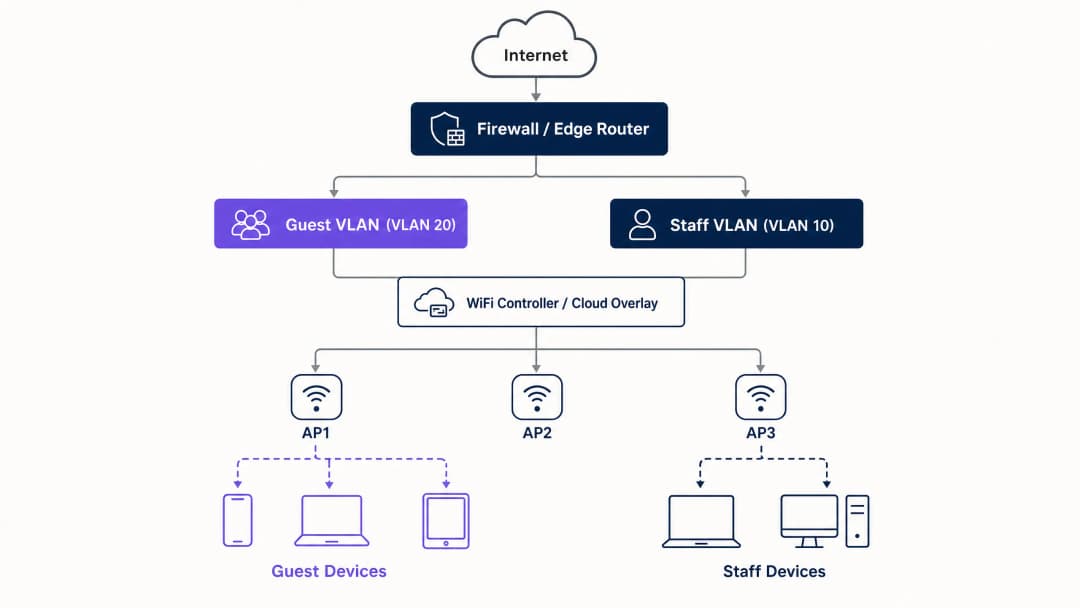
La base de cualquier despliegue seguro de WiFi de invitados es la segmentación de la red. Antes de evaluar los portales cautivos o la analítica, debe establecer un aislamiento estricto entre el tráfico de invitados y los sistemas internos. Esto requiere un SSID dedicado asignado a su propia Red de Área Local Virtual (VLAN), con reglas de firewall que denieguen el acceso a las subredes internas de forma predeterminada. Piense en la red de invitados como una zona externa controlada: los visitantes tienen una entrada independiente y solo obtienen acceso a internet.
Base de la Arquitectura de Seguridad
La base técnica requiere varios controles no negociables:
- SSID Dedicado: Cree un SSID de invitados independiente de las redes operativas y del personal.
- Segmentación de VLAN: Asigne el SSID a una VLAN dedicada para aislar el tráfico de invitados.
- Client Isolation: Habilite el aislamiento de clientes para evitar que los dispositivos de los invitados se comuniquen entre sí, mitigando los ataques de movimiento lateral.
- Política de Firewall: Bloquee el acceso a la LAN principal y a las interfaces de gestión.
- DHCP Dedicado: Utilice un rango de DHCP independiente y evite la filtración de registros de DNS internos.
Imperativo de Migración a WPA3
Si va a implementar o renovar hardware en 2026, WPA3 debe ser el estándar predeterminado. La WiFi Alliance exigió la certificación WPA3 para todos los dispositivos nuevos en julio de 2020. La mayoría de los puntos de acceso empresariales de Cisco Meraki, HPE Aruba, Ruckus, Juniper Mist, Ubiquiti UniFi, Cambium, Extreme y Fortinet admiten WPA3 mediante actualizaciones de firmware. WPA3 introduce tres mejoras operativas fundamentales:
- Simultaneous Authentication of Equals (SAE): sustituye al vulnerable handshake de cuatro vías de WPA2, eliminando los ataques de diccionario fuera de línea. Aunque un atacante capture el intercambio de autenticación, no podrá derivar la clave de sesión.
- Forward Secrecy: garantiza que, incluso si una contraseña de red se ve comprometida hoy, el tráfico registrado históricamente no quede expuesto. Cada sesión genera una clave efímera única.
- Opportunistic Wireless Encryption (OWE): establece automáticamente una conexión cifrada en redes abiertas sin necesidad de contraseña. Esto protege los datos en tránsito y respalda directamente las obligaciones de cumplimiento del GDPR.
¿Tiene preguntas sobre su configuración específica?
Nuestro equipo trabaja con operadores de recintos, responsables de TI e ingenieros de redes en 80 000 espacios. Reserve una llamada de 20 minutos y le mostraremos cómo lo han solucionado otros profesionales como usted.
Guía de implementación
La implementación de un WiFi de invitados seguro requiere un enfoque por fases: primero la arquitectura, luego la autenticación, seguida de la capa del portal y, por último, la analítica.
Paso 1: Configurar la base de la red
Configure las VLAN y las reglas de firewall antes de habilitar cualquier SSID. Verifique que la VLAN de invitados no pueda enrutar tráfico a las subredes internas. Implemente WPA3-Personal (SAE) o OWE según su estrategia de autenticación. Asegúrese de que el aislamiento de clientes esté activo en el controlador.
Paso 2: Implementar la capa de autenticación
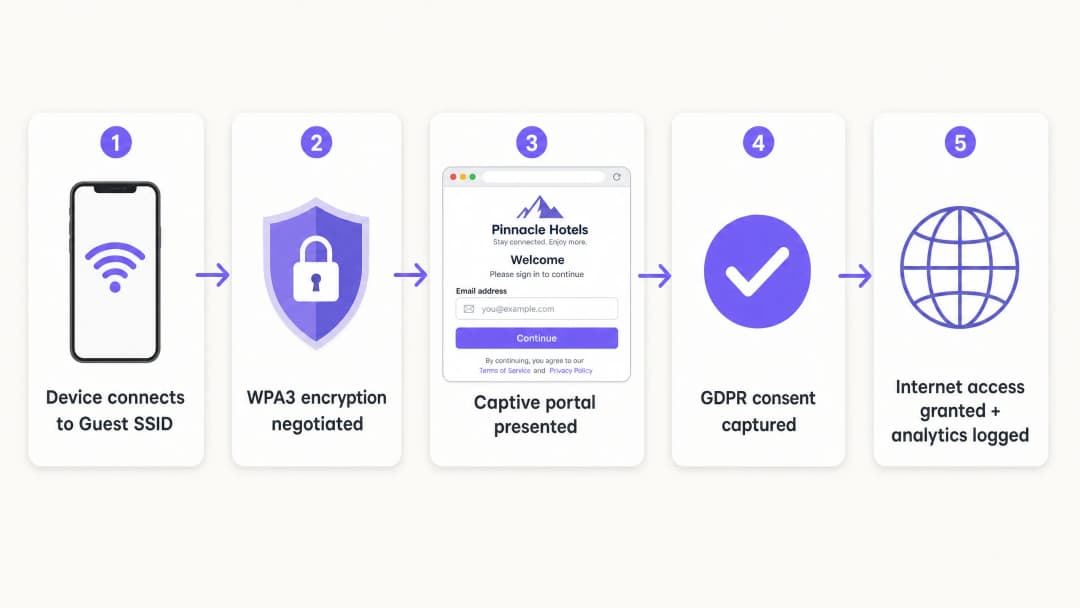
Para el personal y los dispositivos corporativos, el estándar es IEEE 802.1X. Esto requiere que los dispositivos se autentiquen contra un servidor RADIUS antes de que se conceda el acceso. Para los invitados, el Captive Portal sigue siendo el mecanismo principal para capturar la identidad y el consentimiento.
Paso 3: Desplegar la superposición en la nube
Purple funciona como una superposición en la nube independiente del hardware. Se integra con su infraestructura existente para gestionar el Captive Portal, el flujo de consentimiento y la analítica. La superposición gestiona la capa de identidad, mientras que los puntos de acceso físicos aplican las políticas de radio y VLAN.
Paso 4: Verificar y probar
Pruebe la implementación desde un dispositivo cliente físico. Intente acceder a recursos internos, impresoras e interfaces de gestión. Verifique el comportamiento de tolerancia a fallos en modo abierto: decida claramente si los invitados perderán la conectividad o eludirán el portal si el servicio de autenticación no está disponible temporalmente.
Buenas prácticas
- Exigir una validación estricta de certificados: para implementaciones 802.1X que utilicen PEAP-MSCHAPv2, los clientes deben configurarse para validar el certificado del servidor RADIUS a través de la gestión de dispositivos móviles (MDM) o las directivas de grupo (GPO). Esto evita ataques de puntos de acceso no autorizados.
- Utilice la asignación dinámica de VLAN: configure el servidor RADIUS para asignar dinámicamente VLANs en función de la pertenencia a grupos del directorio. Esto permite que un único SSID sirva de forma segura a empleados, contratistas y dispositivos IoT.
- Aísle los dispositivos heredados: los dispositivos que no admitan WPA3 deben colocarse en un SSID WPA2 dedicado, aislado en una VLAN independiente. No comprometa la seguridad de la red de invitados principal por cuestiones de compatibilidad con dispositivos heredados.
- Alinéese con los estándares del sector: asegúrese de que el despliegue cumple con los requisitos PCI-DSS aislando física o lógicamente el tráfico de invitados de la infraestructura de pagos. Fomente el cumplimiento de la GDPR utilizando OWE para el cifrado y capturando el consentimiento explícito a través del Captive Portal.
Resolución de problemas y mitigación de riesgos
Los fallos de despliegue más comunes se deben a descuidos en la configuración y no a limitaciones del hardware.
- Separación cosmética: un nuevo SSID en el mismo dominio de difusión que la red del personal no ofrece ninguna seguridad. Verifique el etiquetado de VLAN y las reglas de firewall.
- Aislamiento de clientes desactivado: no aislar a los clientes aumenta el riesgo de ataques laterales a los invitados. Esto es especialmente peligroso en entornos de hostelería donde los invitados comparten la red durante periodos prolongados.
- Apertura por fallo no planificada (Fail-Open): si el Captive Portal no está disponible, la red debe gestionar el fallo de forma predecible. En la mayoría de los espacios públicos, se prefiere la apertura por fallo para mantener la conectividad, pero esta debe ser una opción de configuración consciente, no un accidente.
ROI e impacto empresarial
Un despliegue seguro de WiFi para invitados convierte un centro de costes de red en un activo estratégico. Al sustituir las contraseñas compartidas por un Captive Portal conforme a la normativa, los establecimientos capturan datos de origen verificados. La plataforma de Purple procesa 440 millones de inicios de sesión al año, proporcionando listas de contactos limpias para la automatización del marketing.
Además, la incorporación segura de usuarios reduce los costes de soporte de TI. La implementación de Passpoint u OpenRoaming permite que los visitantes que regresan se conecten de forma silenciosa, eliminando las solicitudes de restablecimiento de contraseñas. Para los operadores de retail, esta conectividad fluida impulsa la interacción con las aplicaciones y la participación en programas de fidelización, ofreciendo un retorno de la inversión (ROI) medible.
-
Escuche el resumen
Definiciones clave
VLAN (Virtual Local Area Network)
Una subred lógica que agrupa una colección de dispositivos de diferentes redes LAN físicas.
Se utiliza para aislar el tráfico de WiFi de invitados de los datos corporativos, garantizando que los visitantes no puedan acceder a los servidores internos o a los sistemas de pago.
WPA3
La última certificación de seguridad WiFi, que introduce la autenticación simultánea de iguales (SAE) y Forward Secrecy (secreto perfecto hacia adelante).
Esencial para las redes empresariales modernas para evitar ataques de diccionario sin conexión y proteger los datos de tráfico históricos.
OWE (Opportunistic Wireless Encryption)
Una función de WPA3 que cifra automáticamente el tráfico en redes abiertas sin necesidad de introducir una contraseña.
Crucial para establecimientos públicos que desean ofrecer un acceso fluido y al mismo tiempo proteger los datos de los invitados en tránsito frente a la escucha pasiva.
Aislamiento de clientes
Un ajuste del controlador inalámbrico que evita que los dispositivos conectados al mismo SSID se comuniquen directamente entre sí.
Obligatorio para las redes de invitados para evitar que los dispositivos de visitantes comprometidos ataquen lateralmente a otros invitados.
Captive Portal
Una página web que los usuarios deben ver e interactuar con ella antes de que se les conceda acceso a la red.
Utilizado por los equipos de marketing para recopilar datos de primera mano y por el departamento de TI para hacer cumplir las condiciones de servicio, más que como una barrera de seguridad principal.
IEEE 802.1X
Un estándar IEEE para el control de acceso a redes basado en puertos (PNAC), que proporciona un mecanismo de autenticación a los dispositivos que desean conectarse a una red LAN o WLAN.
El estándar empresarial para autenticar los dispositivos del personal de forma segura contra un directorio central.
RADIUS
Remote Authentication Dial-In User Service; un protocolo de red que proporciona una gestión centralizada de autenticación, autorización y contabilidad (AAA).
El componente de servidor que comprueba las credenciales de los usuarios frente a un directorio (como Entra ID) y le indica al punto de acceso qué VLAN debe asignar.
Passpoint
Un protocolo desarrollado por la Wi-Fi Alliance que permite a los dispositivos móviles descubrir y conectarse automáticamente a redes WiFi seguras.
Permite a los invitados que regresan conectarse de forma silenciosa y segura sin tener que interactuar de nuevo con un Captive Portal.
Ejemplos prácticos
Un hotel de 200 habitaciones utiliza actualmente un único SSID WPA2 con una contraseña compartida que se cambia mensualmente. Necesitan proteger la red, aislar el tráfico de los invitados del sistema de gestión hotelera y recopilar los correos electrónicos de los huéspedes de conformidad con la normativa.
- Crear la VLAN 20 para invitados y la VLAN 10 para el personal.
- Configurar reglas de firewall para bloquear el tráfico desde la VLAN 20 hacia la VLAN 10 y la subred de gestión.
- Desplegar un nuevo SSID de invitados asignado a la VLAN 20, utilizando WPA3 OWE (Opportunistic Wireless Encryption).
- Habilitar el aislamiento de clientes en el SSID de invitados.
- Integrar la plataforma en la nube de Purple para presentar un Captive Portal personalizado con la marca que recopile el correo electrónico y el consentimiento de GDPR antes de otorgar acceso a internet.
Un campus universitario necesita dar soporte a portátiles del personal, dispositivos BYOD de estudiantes y sensores IoT sin interfaz de usuario (termostatos inteligentes) a lo largo de un amplio recinto sin emitir 15 SSIDs diferentes.
- Desplegar un único SSID habilitado para 802.1X para todo el personal y los estudiantes.
- Configurar el servidor RADIUS para autenticar a los usuarios contra Microsoft Entra ID.
- Implementar la asignación dinámica de VLAN: el personal se autentica y se le asigna la VLAN 10; los estudiantes se autentican y se les asigna la VLAN 30.
- Crear un SSID WPA2 oculto e independiente asignado a la VLAN 40 específicamente para los dispositivos IoT sin interfaz de usuario, utilizando la omisión de autenticación MAC (MAB) con reglas de firewall estrictas que limiten su acceso saliente.
Preguntas de práctica
Q1. Un director de retail quiere lanzar mañana una nueva red 'WiFi Gratuito para Clientes' simplemente añadiendo un segundo SSID sin contraseña a los puntos de acceso Meraki existentes. Como Director de TI, ¿cómo responde?
Sugerencia: Considere las implicaciones de PCI DSS de un acceso abierto en una infraestructura compartida.
Ver respuesta modelo
Rechazar la solicitud. Añadir un SSID abierto al dominio de difusión existente sin segmentación de VLAN expone los sistemas de Punto de Venta (POS) a tráfico público, violando la normativa PCI DSS. La red debe segmentarse primero con una VLAN dedicada y reglas de firewall antes de transmitir el SSID.
Q2. Durante una auditoría de red, descubre que el Captive Portal del WiFi de invitados funciona correctamente, pero los usuarios pueden hacer ping a la dirección IP del servidor de archivos principal de la sede. ¿Cuál es el fallo de configuración más probable?
Sugerencia: El Captive Portal gestiona la autenticación, no el enrutamiento.
Ver respuesta modelo
La política de firewall o la Lista de Control de Acceso (ACL) que separa la VLAN de invitados de la LAN corporativa falta o está mal configurada. El Captive Portal solo controla el acceso a internet; la infraestructura de red subyacente debe aplicar los límites de enrutamiento.
Q3. Una sede va a renovar su hardware y quiere utilizar WPA3, pero al equipo de operaciones le preocupa que los smartphones de invitados más antiguos no puedan conectarse. ¿Cuál es la estrategia de despliegue recomendada?
Sugerencia: Considere cómo dar soporte a ambos estándares de forma temporal.
Ver respuesta modelo
Desplegar el Modo de Transición WPA3. Esto permite que el SSID admita simultáneamente dispositivos compatibles con WPA3 (usando SAE) y dispositivos antiguos (usando WPA2 PSK). Utilice las herramientas de WiFi Analytics de Purple para monitorizar la proporción de dispositivos antiguos durante un periodo de 6 a 12 meses, y aplique la obligatoriedad de WPA3 exclusivo una vez que el número de dispositivos antiguos caiga por debajo de un umbral aceptable.
Continúe leyendo esta serie
Cómo solucionar una WiFi lenta sin actualizar su plan de internet
Una guía de referencia técnica exhaustiva para directores de TI y arquitectos de red sobre cómo optimizar el rendimiento de la WiFi corporativa sin aumentar el ancho de banda del ISP. Cubre el ajuste de RF, la gestión de la densidad de clientes, la implementación de QoS y cómo aprovechar la analítica de WiFi para diagnosticar y resolver cuellos de botella.
Cómo construir una red WiFi para campus: guía de TI para universidades
Esta guía técnica proporciona un modelo detallado para diseñar e implantar redes WiFi de alta densidad en campus, que abarca desde estudios de cobertura activos in situ y la ubicación de los puntos de acceso hasta la arquitectura del controlador, el roaming fluido y la incorporación segura de invitados. Está dirigida a responsables de TI, arquitectos de red y directores de tecnología (CTO) de universidades y grandes recintos que necesitan orientación práctica para planificar y ejecutar un despliegue inalámbrico este trimestre. La guía también asocia la plataforma de análisis y Guest WiFi de Purple con puntos de integración reales dentro del ciclo de vida del despliegue.
Museum and Gallery WiFi: Creando una Experiencia de Visitante Conectada
Esta guía proporciona un diseño técnico detallado para implementar WiFi de alta densidad en museos y galerías. Cubre la arquitectura de red, las estrategias de interacción con los visitantes y cómo aprovechar las analíticas de WiFi para impulsar el ROI y la eficiencia operativa.
¿Tiene preguntas sobre su configuración específica?
Nuestro equipo trabaja con operadores de recintos, responsables de TI e ingenieros de redes en 80 000 espacios. Reserve una llamada de 20 minutos y le mostraremos cómo lo han solucionado otros profesionales como usted.