
How to Set Up Guest WiFi: A Secure Enterprise Configuration Guide
This authoritative guide provides IT leaders and network architects with a definitive blueprint for deploying secure enterprise guest WiFi. It covers essential architecture, WPA3 migration, VLAN segmentation, and captive portal integration to protect internal systems while capturing compliant first-party data.
Video overview
Listen to this guide
View podcast transcript
Part of our core series: Guest WiFi Guide →
Executive Summary
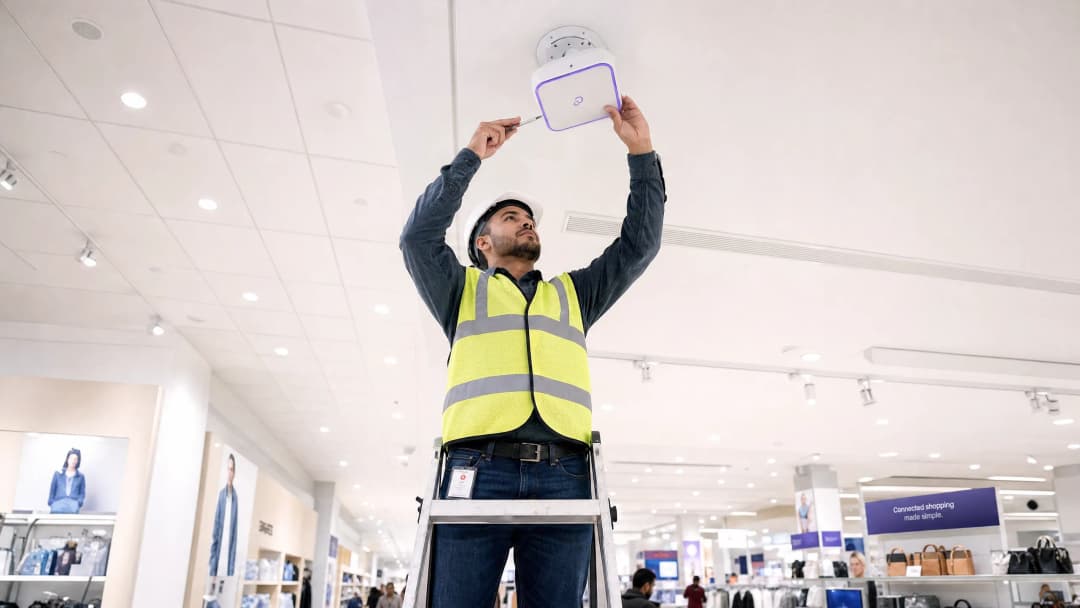
For enterprise environments - whether it is a large university campus, a high-density stadium, or a distributed retail chain - relying on a Pre-Shared Key (PSK) for guest WiFi access is a major security risk. A single leaked credential compromises the entire network, and revoking access requires changing the password on every device across the entire campus. Implementing a secure, segmented architecture with WPA3 encryption and robust identity management completely eliminates this problem. Each visitor is individually authenticated, access can be revoked instantly, and network segmentation is dynamically enforced. This guide provides IT managers and network architects with a definitive roadmap for deploying secure guest WiFi. We cover architectural trade-offs, migration to WPA3, and integration with directory services. We also show how a robust authentication layer integrates with guest WiFi solutions to provide visitors with seamless access, whilst capturing WiFi Analytics that turn your network into a business intelligence asset.
Technical Deep Dive
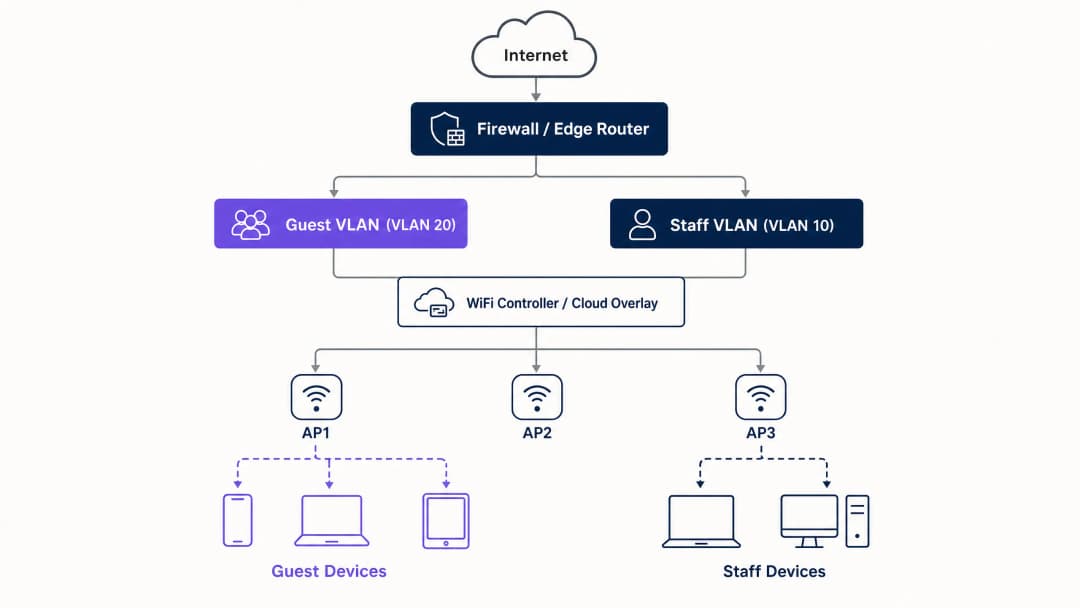
The foundation of any secure guest WiFi deployment is network segmentation. Before evaluating captive portals or analytics, you must establish strict isolation between guest traffic and internal systems. This requires a dedicated SSID mapped to its own Virtual Local Area Network (VLAN), with firewall rules denying access to internal subnets by default. Think of the guest network as a controlled external zone; visitors get a separate entrance and only gain access to the internet.
Security Architecture Baseline
The technical baseline requires several non-negotiable controls:
- Dedicated SSID: Create a guest SSID separate from staff and operational networks.
- VLAN Segmentation: Map the SSID to a dedicated VLAN to isolate guest traffic.
- Client Isolation: Enable client isolation to prevent guest devices from communicating with each other, mitigating lateral movement attacks.
- Firewall Policy: Block access to the primary LAN and management interfaces.
- Dedicated DHCP: Use a separate DHCP scope and prevent internal DNS records from leaking.
WPA3 Migration Imperative
If you are deploying or refreshing hardware in 2026, WPA3 must be the default standard. The WiFi Alliance mandated WPA3 certification for all new devices in July 2020. Most enterprise access points from Cisco Meraki, HPE Aruba, Ruckus, Juniper Mist, Ubiquiti UniFi, Cambium, Extreme, and Fortinet support WPA3 via firmware updates. WPA3 introduces three critical operational improvements:
- Simultaneous Authentication of Equals (SAE): This replaces the vulnerable WPA2 four-way handshake, eliminating offline dictionary attacks. Even if an attacker captures the authentication exchange, they cannot derive the session key.
- Forward Secrecy: This ensures that even if a network password is compromised today, historically recorded traffic is not exposed. Each session generates a unique ephemeral key.
- Opportunistic Wireless Encryption (OWE): Automatically establishes an encrypted connection on open networks without requiring a password. This protects data in transit and directly supports GDPR compliance obligations.
Got questions about your specific setup?
Our team works with venue operators, IT managers, and network engineers across 80,000 venues. Book a 20-minute call and we will show you how others like you solved it.
Implementation Guide
Deploying secure guest WiFi requires a phased approach: first architecture, then authentication, followed by the portal layer, and finally analytics.
Step 1: Configure the Network Foundation
Configure VLANs and firewall rules before enabling any SSID. Verify that the guest VLAN cannot route traffic to internal subnets. Implement WPA3-Personal (SAE) or OWE depending on your authentication strategy. Ensure client isolation is active on the controller.
Step 2: Implement the Authentication Layer
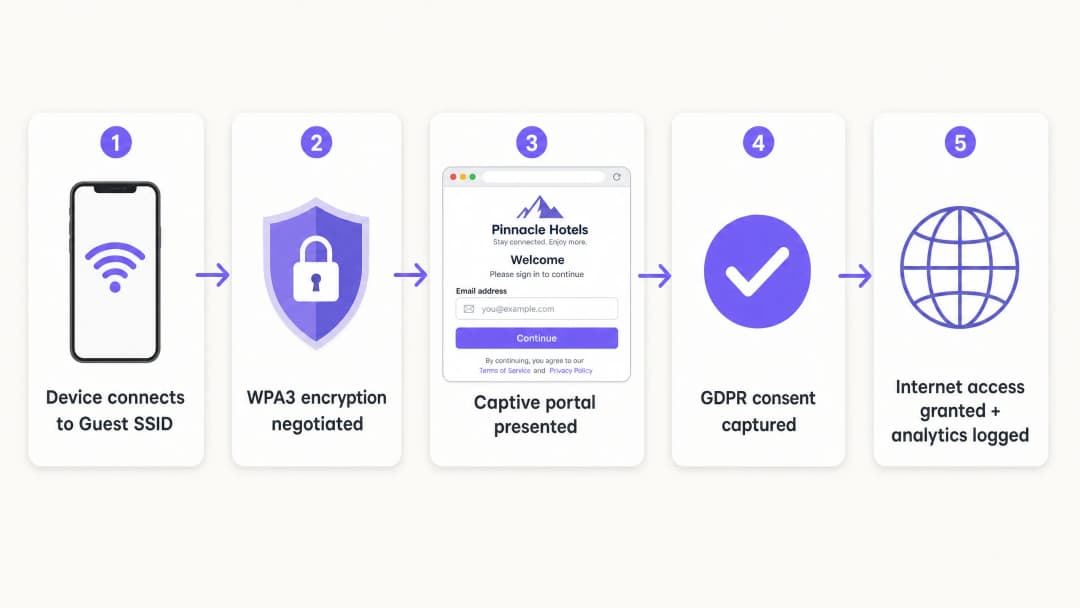
For staff and corporate devices, IEEE 802.1X is the standard. This requires devices to authenticate against a RADIUS server before access is granted. For guests, the captive portal remains the primary mechanism for capturing identity and consent.
Step 3: Deploy the Cloud Overlay
Purple operates as a hardware-agnostic cloud overlay. It integrates with your existing infrastructure to handle the captive portal, consent flow, and analytics. The overlay manages the identity layer whilst physical access points enforce radio and VLAN policies.
Step 4: Verify and Test
Test the deployment from a physical client device. Attempt to access internal resources, printers, and management interfaces. Verify fail-open behaviour: decide clearly whether guests will lose connectivity or bypass the portal if the authentication service is temporarily unavailable.
Best Practices
- Enforce Strict Certificate Validation: For 802.1X deployments using PEAP-MSCHAPv2, clients should be configured to validate the RADIUS server's certificate via Mobile Device Management (MDM) or Group Policy Objects (GPO). This prevents rogue access point attacks.
- Use Dynamic VLAN Assignment: Configure the RADIUS server to dynamically assign VLANs based on directory group membership. This allows a single SSID to securely serve staff, contractors, and IoT devices.
- Isolate Legacy Devices: Devices that do not support WPA3 should be placed on a dedicated WPA2 SSID, isolated on a separate VLAN. Do not compromise the security of the primary guest network for legacy device compatibility.
- Align with Industry Standards: Ensure the deployment aligns with PCI-DSS requirements by physically or logically isolating guest traffic from payment infrastructure. Support GDPR compliance by using OWE for encryption and capturing explicit consent through the captive portal.
Troubleshooting and Risk Mitigation
The most common deployment failures occur due to configuration oversights rather than hardware limitations.
- Cosmetic Separation: A new SSID on the same broadcast domain as the staff network provides no security. Verify VLAN tagging and firewall rules.
- Disabled Client Isolation: Failing to isolate clients increases the risk of lateral attacks on guests. This is particularly dangerous in hospitality environments where guests share the network for extended periods.
- Unplanned Fail-Open: If the captive portal is unreachable, the network must handle the failure predictably. For most public venues, fail-open is preferred to maintain connectivity, but this should be a conscious configuration choice, not an accident.
ROI and Business Impact
A secure guest WiFi deployment turns a network cost centre into a strategic asset. By replacing shared passwords with a compliant captive portal, venues capture verified first-party data. Purple's platform processes 440 million logins annually, providing clean contact lists for marketing automation.
Furthermore, secure onboarding reduces IT support overhead. Implementing Passpoint or OpenRoaming allows returning visitors to connect silently, eliminating password reset requests. For retail operators, this seamless connectivity drives app engagement and loyalty programme participation, delivering a measurable return on investment (ROI).
Listen to the Briefing
Key Definitions
VLAN (Virtual Local Area Network)
A logical subnetwork that groups a collection of devices from different physical LANs.
Used to isolate guest WiFi traffic from corporate data, ensuring visitors cannot access internal servers or payment systems.
WPA3
The latest WiFi security certification, introducing Simultaneous Authentication of Equals (SAE) and Forward Secrecy.
Essential for modern enterprise networks to prevent offline dictionary attacks and protect historical traffic data.
OWE (Opportunistic Wireless Encryption)
A WPA3 feature that automatically encrypts traffic on open networks without requiring a password.
Crucial for public venues wanting to offer frictionless access while protecting guest data in transit from passive eavesdropping.
Client Isolation
A wireless controller setting that prevents devices connected to the same SSID from communicating directly with each other.
Mandatory for guest networks to stop compromised visitor devices from attacking other guests laterally.
Captive Portal
A web page that users must view and interact with before access to the network is granted.
Used by marketing teams to capture first-party data and by IT to enforce terms of service, rather than as a primary security boundary.
IEEE 802.1X
An IEEE standard for port-based Network Access Control (PNAC), providing an authentication mechanism to devices wishing to attach to a LAN or WLAN.
The enterprise standard for authenticating staff devices securely against a central directory.
RADIUS
Remote Authentication Dial-In User Service; a networking protocol that provides centralised Authentication, Authorisation, and Accounting (AAA) management.
The server component that checks user credentials against a directory (like Entra ID) and tells the access point which VLAN to assign.
Passpoint
A protocol developed by the Wi-Fi Alliance that enables mobile devices to automatically discover and connect to secure WiFi networks.
Allows returning guests to connect silently and securely without interacting with a captive portal again.
Worked Examples
A 200-room hotel currently uses a single WPA2 SSID with a shared password changed monthly. They need to secure the network, isolate guest traffic from the property management system, and capture guest emails compliantly.
- Create VLAN 20 for guests and VLAN 10 for staff.
- Configure firewall rules to block traffic from VLAN 20 to VLAN 10 and the management subnet.
- Deploy a new Guest SSID mapped to VLAN 20, using WPA3 OWE (Opportunistic Wireless Encryption).
- Enable client isolation on the Guest SSID.
- Integrate the Purple cloud overlay to present a branded captive portal capturing email and GDPR consent before granting internet access.
A university campus needs to support staff laptops, student BYOD devices, and headless IoT sensors (smart thermostats) across a sprawling estate without broadcasting 15 different SSIDs.
- Deploy a single 802.1X-enabled SSID for all staff and students.
- Configure the RADIUS server to authenticate users against Microsoft Entra ID.
- Implement Dynamic VLAN Assignment: staff authenticate and drop onto VLAN 10; students authenticate and drop onto VLAN 30.
- Create a separate, hidden WPA2 SSID mapped to VLAN 40 specifically for the headless IoT devices, using MAC Authentication Bypass (MAB) with strict firewall rules limiting their outbound access.
Practice Questions
Q1. A retail director wants to launch a new 'Free Customer WiFi' network tomorrow by simply adding a second SSID with no password to the existing Meraki access points. As the IT Manager, how do you respond?
Hint: Consider the PCI DSS implications of open access on shared infrastructure.
View model answer
Reject the request. Adding an open SSID to the existing broadcast domain without VLAN segmentation exposes the retail Point of Sale (POS) systems to public traffic, violating PCI DSS. The network must first be segmented with a dedicated VLAN and firewall rules before the SSID is broadcast.
Q2. During a network audit, you discover that the Guest WiFi captive portal is functioning correctly, but users can ping the IP address of the venue's main file server. What is the most likely configuration failure?
Hint: The captive portal handles authentication, not routing.
View model answer
The firewall policy or Access Control List (ACL) separating the guest VLAN from the corporate LAN is either missing or misconfigured. The captive portal only controls internet access; the underlying network infrastructure must enforce the routing boundaries.
Q3. A venue is replacing its hardware and wants to use WPA3, but operations is concerned that older guest smartphones will not be able to connect. What is the recommended deployment strategy?
Hint: Consider how to support both standards temporarily.
View model answer
Deploy WPA3 Transition Mode. This allows the SSID to simultaneously support WPA3-capable devices (using SAE) and legacy devices (using WPA2 PSK). Use Purple's WiFi Analytics to monitor the ratio of legacy devices over 6-12 months, and enforce WPA3-only once the legacy count drops below an acceptable threshold.
Continue reading in this series
How to Fix Slow WiFi Without Upgrading Your Internet Plan
A comprehensive technical reference guide for IT managers and network architects on optimising enterprise WiFi performance without increasing ISP bandwidth. Covers RF tuning, client density management, QoS implementation, and how to leverage WiFi analytics to diagnose and resolve bottlenecks.
How to Build a Campus WiFi Network: A University IT Guide
This technical guide provides a comprehensive blueprint for designing and deploying high-density campus WiFi networks, covering everything from active site surveys and access point placement to controller architecture, seamless roaming, and secure guest onboarding. It is written for IT managers, network architects, and CTOs at universities and large venues who need actionable guidance to plan and execute a wireless deployment this quarter. The guide also maps Purple's Guest WiFi and analytics platform to real integration points within the deployment lifecycle.
Museum and Gallery WiFi: Creating a Connected Visitor Experience
This guide provides a comprehensive technical blueprint for deploying high-density WiFi in museums and galleries. It covers network architecture, visitor engagement strategies, and how to leverage WiFi analytics to drive ROI and operational efficiency.
Got questions about your specific setup?
Our team works with venue operators, IT managers, and network engineers across 80,000 venues. Book a 20-minute call and we will show you how others like you solved it.