
Einrichten von Guest WiFi: Ein Leitfaden für die sichere Enterprise Konfiguration
Dieser maßgebliche Leitfaden bietet IT-Leitern und Netzwerkarchitekten eine definitive Vorlage für die Bereitstellung von sicherem Enterprise Guest WiFi. Er behandelt die wesentliche Architektur, die WPA3 Migration, VLAN Segmentierung und Captive Portal Integration, um interne Systeme zu schützen und gleichzeitig DSGVO-konforme First-Party-Daten zu erfassen.
Video overview
Diesen Leitfaden anhören
Podcast-Transkript ansehen
Teil unserer Kernserie: Guest WiFi Leitfaden →
Management Summary
Für Enterprise-Umgebungen - ob es sich um einen großen Universitätscampus, ein Stadion mit hoher Dichte oder eine verteilte Einzelhandelskette handelt - stellt die Nutzung eines Pre-Shared Key (PSK) für den Gast-WiFi-Zugang ein erhebliches Sicherheitsrisiko dar. Ein einziger durchgesickerter Anmeldedatensatz gefährdet das gesamte Netzwerk, und das Entziehen des Zugriffs erfordert die Änderung des Passworts auf jedem Gerät auf dem gesamten Campus. Die Implementierung einer sicheren, segmentierten Architektur mit WPA3-Verschlüsselung und robustem Identitätsmanagement beseitigt dieses Problem vollständig. Jeder Besucher wird individuell authentifiziert, der Zugriff kann sofort entzogen werden, und die Netzwerksegmentierung wird dynamisch erzwungen. Dieser Leitfaden bietet IT-Managern und Netzwerkarchitekten einen definitiven Fahrplan für die Bereitstellung von sicherem Gast-WiFi. Wir behandeln architektonische Kompromisse, die Migration zu WPA3 und die Integration in Verzeichnisdienste. Wir zeigen auch, wie sich eine robuste Authentifizierungsebene in Gast-WiFi-Lösungen integrieren lässt, um Besuchern nahtlosen Zugriff zu ermöglichen und gleichzeitig WiFi Analytics zu erfassen, die Ihr Netzwerk in ein Business-Intelligence-Asset verwandeln.
Technische Detailanalyse
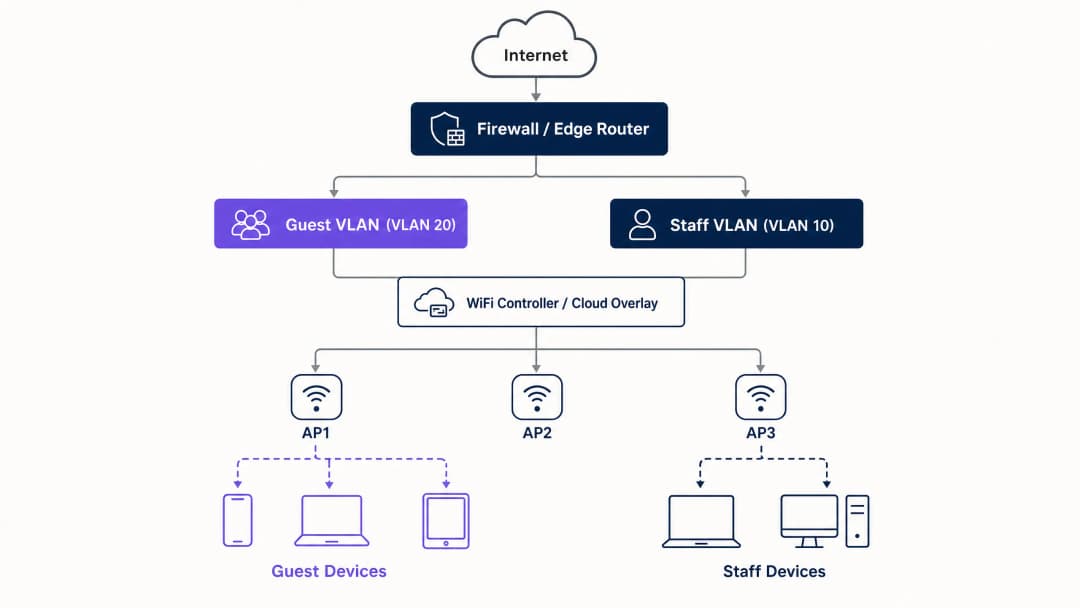
Das Fundament jeder sicheren Bereitstellung von Gast-WiFi ist die Netzwerksegmentierung. Bevor Sie Captive Portals oder Analysen evaluieren, müssen Sie eine strikte Isolierung zwischen dem Gast-Traffic und internen Systemen herstellen. Dies erfordert eine dedizierte SSID, die einem eigenen Virtual Local Area Network (VLAN) zugewiesen ist, mit Firewall-Regeln, die den Zugriff auf interne Subnetze standardmäßig blockieren. Betrachten Sie das Gastnetzwerk als eine kontrollierte externe Zone; Besucher erhalten einen separaten Eingang und haben ausschließlich Zugriff auf das Internet.
Sicherheitsarchitektur-Baseline
Die technische Baseline erfordert mehrere nicht verhandelbare Kontrollen:
- Dedizierte SSID: Erstellen Sie eine Gast-SSID, die von den Netzwerken für Mitarbeiter und den Betrieb getrennt ist.
- VLAN-Segmentierung: Ordnen Sie die SSID einem dedizierten VLAN zu, um den Gast-Traffic zu isolieren.
- Client-Isolierung: Aktivieren Sie die Client-Isolierung, um zu verhindern, dass Gastgeräte untereinander kommunizieren, was Angriffe durch laterale Bewegung eindämmt.
- Firewall-Richtlinie: Blockieren Sie den Zugriff auf das primäre LAN und die Verwaltungsschnittstellen.
- Dediziertes DHCP: Verwenden Sie einen separaten DHCP-Bereich und verhindern Sie das Durchsickern interner DNS-Einträge.
Die WPA3-Migrationsnotwendigkeit
Wenn Sie im Jahr 2026 Hardware bereitstellen oder aktualisieren, muss WPA3 der Standard sein. Die WiFi Alliance hat die WPA3-Zertifizierung für alle neuen Geräte im Juli 2020 zur Pflicht gemacht. Die meisten Enterprise Access Points von Cisco Meraki, HPE Aruba, Ruckus, Juniper Mist, Ubiquiti UniFi, Cambium, Extreme und Fortinet unterstützen WPA3 über Firmware-Updates. WPA3 führt drei entscheidende betriebliche Verbesserungen ein:
- Simultaneous Authentication of Equals (SAE): Dies ersetzt den anfälligen WPA2-Vier-Wege-Handshake und eliminiert Offline-Wörterbuchangriffe. Selbst wenn ein Angreifer den Authentifizierungsaustausch abfängt, kann er den Sitzungsschlüssel nicht ableiten.
- Forward Secrecy: Dies stellt sicher, dass selbst bei einer heutigen Kompromittierung des Netzwerkpassworts in der Vergangenheit aufgezeichneter Datenverkehr nicht offengelegt wird. Jede Sitzung generiert einen eindeutigen, flüchtigen Schlüssel.
- Opportunistic Wireless Encryption (OWE): Baut automatisch eine verschlüsselte Verbindung in offenen Netzwerken auf, ohne dass ein Passwort erforderlich ist. Dies schützt Daten bei der Übertragung und unterstützt direkt die Einhaltung der GDPR-Verpflichtungen.
Haben Sie Fragen zu Ihrem spezifischen Setup?
Unser Team arbeitet mit Standortbetreibern, IT-Managern und Netzwerktechnikern an über 80.000 Standorten zusammen. Buchen Sie ein 20-minütiges Gespräch und wir zeigen Ihnen, wie andere diese Herausforderungen gelöst haben.
Implementierungsleitfaden
Die Bereitstellung von sicherem Gäste-WiFi erfordert einen phasenweisen Ansatz: zuerst die Architektur, dann die Authentifizierung, gefolgt von der Portal-Ebene und schließlich den Analysen.
Schritt 1: Konfigurieren Sie das Netzwerkfundament
Konfigurieren Sie VLANs und Firewall-Regeln, bevor Sie eine SSID aktivieren. Überprüfen Sie, ob das Gäste-VLAN keinen Datenverkehr an interne Subnetze weiterleiten kann. Implementieren Sie WPA3-Personal (SAE) oder OWE, abhängig von Ihrer Authentifizierungsstrategie. Stellen Sie sicher, dass die Client-Isolierung auf dem Controller aktiv ist.
Schritt 2: Implementieren Sie die Authentifizierungsebene
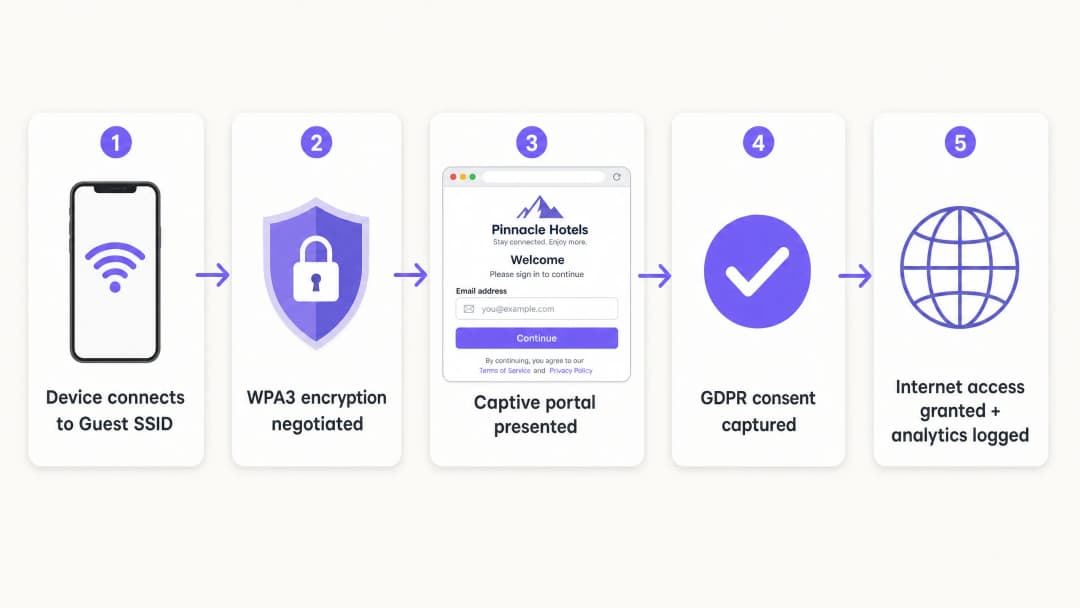
Für Mitarbeiter und Unternehmensgeräte ist IEEE 802.1X der Standard. Dies erfordert, dass sich Geräte an einem RADIUS-Server authentifizieren, bevor der Zugriff gewährt wird. Für Gäste bleibt das Captive Portal der primäre Mechanismus zur Erfassung von Identität und Einwilligung.
Schritt 3: Bereitstellung des Cloud-Overlays
Purple fungiert als hardwareunabhängiges Cloud-Overlay. Es lässt sich in Ihre bestehende Infrastruktur integrieren, um das Captive Portal, den Einwilligungsfluss und die Analysen zu verwalten. Das Overlay verwaltet die Identitätsebene, während physische Access Points die Funk- und VLAN-Richtlinien durchsetzen.
Schritt 4: Überprüfen und Testen
Testen Sie die Bereitstellung von einem physischen Client-Gerät aus. Versuchen Sie, auf interne Ressourcen, Drucker und Verwaltungsschnittstellen zuzugreifen. Überprüfen Sie das Fail-Open-Verhalten: Entscheiden Sie klar, ob Gäste die Verbindung verlieren oder das Portal umgehen, wenn der Authentifizierungsdienst vorübergehend nicht verfügbar ist.
Best Practices
- Erzwingen Sie eine strenge Zertifikatsvalidierung: Bei 802.1X-Bereitstellungen, die PEAP-MSCHAPv2 verwenden, sollten Clients so konfiguriert werden, dass sie das Zertifikat des RADIUS-Servers über Mobile Device Management (MDM) oder Gruppenrichtlinienobjekte (GPO) validieren. Dies verhindert Angriffe durch gefälschte Access Points.
- Dynamische VLAN-Zuweisung nutzen: Konfigurieren Sie den RADIUS-Server so, dass VLANs basierend auf der Verzeichnisgruppenmitgliedschaft dynamisch zugewiesen werden. Dadurch kann eine einzige SSID Mitarbeiter, Auftragnehmer und IoT-Geräte sicher bedienen.
- Legacy-Geräte isolieren: Geräte, die kein WPA3 unterstützen, sollten auf einer dedizierten WPA2-SSID platziert werden, die in einem separaten VLAN isoliert ist. Gehen Sie keine Kompromisse bei der Sicherheit des primären Gastnetzwerks ein, um die Kompatibilität mit Altsystemen zu gewährleisten.
- Einhaltung von Branchenstandards: Stellen Sie sicher, dass die Bereitstellung den PCI-DSS-Anforderungen entspricht, indem Sie den Gastdatenverkehr physisch oder logisch von der Zahlungsinfrastruktur isolieren. Unterstützen Sie die Einhaltung der GDPR, indem Sie OWE für die Verschlüsselung verwenden und die ausdrückliche Zustimmung über das Captive Portal erfassen.
Fehlerbehebung und Risikominderung
Die häufigsten Fehler bei der Bereitstellung sind auf Konfigurationsfehler und nicht auf Hardwareeinschränkungen zurückzuführen.
- Kosmetische Trennung: Eine neue SSID in derselben Broadcast-Domäne wie das Mitarbeiternetzwerk bietet keine Sicherheit. Überprüfen Sie das VLAN-Tagging und die Firewall-Regeln.
- Deaktivierte Client-Isolierung: Wenn die Client-Isolierung nicht aktiviert ist, erhöht sich das Risiko von lateralen Angriffen auf Gäste. Dies ist besonders gefährlich in Umgebungen des Gastgewerbes, in denen Gäste das Netzwerk über längere Zeiträume gemeinsam nutzen.
- Ungeplantes Fail-Open: Wenn das Captive Portal nicht erreichbar ist, muss das Netzwerk den Ausfall vorhersehbar handhaben. Für die meisten öffentlichen Veranstaltungsorte wird Fail-Open bevorzugt, um die Konnektivität aufrechtzuerhalten, aber dies sollte eine bewusste Konfigurationsentscheidung und kein Unfall sein.
ROI und geschäftliche Auswirkungen
Eine sichere Bereitstellung von Gast-WiFi verwandelt eine reine IT-Kostenstelle in ein strategisches Asset. Durch den Ersatz gemeinsam genutzter Passwörter durch ein konformes Captive Portal erfassen Veranstaltungsorte verifizierte First-Party-Daten. Die Plattform von Purple verarbeitet jährlich 440 Millionen Logins und liefert saubere Kontaktlisten für die Marketingautomatisierung.
Darüber hinaus reduziert ein sicheres Onboarding den IT-Supportaufwand. Die Implementierung von Passpoint oder OpenRoaming ermöglicht es wiederkehrenden Besuchern, sich im Hintergrund zu verbinden, wodurch Anfragen zur Passwortzurücksetzung entfallen. Für Einzelhandelsbetreiber fördert diese nahtlose Konnektivität die App-Nutzung und die Teilnahme an Treueprogrammen, was zu einem messbaren Return on Investment (ROI) führt.
-
Hören Sie sich das Briefing an
Schlüsseldefinitionen
VLAN (Virtual Local Area Network)
Ein logisches Subnetzwerk, das eine Gruppe von Geräten aus verschiedenen physischen LANs zusammenfasst.
Wird verwendet, um den Guest WiFi Datenverkehr von Unternehmensdaten zu isolieren, sodass Besucher nicht auf interne Server oder Zahlungssysteme zugreifen können.
WPA3
Die neueste WiFi Sicherheitszertifizierung, die Simultaneous Authentication of Equals (SAE) und Forward Secrecy einführt.
Unerlässlich für moderne Enterprise Netzwerke, um Offline-Wörterbuchangriffe zu verhindern und historische Verkehrsdaten zu schützen.
OWE (Opportunistic Wireless Encryption)
Eine WPA3 Funktion, die den Datenverkehr in offenen Netzwerken automatisch verschlüsselt, ohne dass ein Passwort erforderlich ist.
Entscheidend für öffentliche Veranstaltungsorte, die einen reibungslosen Zugang anbieten und gleichzeitig die Daten der Gäste bei der Übertragung vor passivem Abhören schützen möchten.
Client-Isolierung
Eine Einstellung des Wireless-Controllers, die verhindert, dass Geräte, die mit derselben SSID verbunden sind, direkt miteinander kommunizieren.
Zwingend erforderlich für Gästenetzwerke, um zu verhindern, dass kompromittierte Besuchergeräte andere Gäste lateral angreifen.
Captive Portal
Eine Webseite, die Benutzer anzeigen und mit der sie interagieren müssen, bevor ihnen Zugriff auf das Netzwerk gewährt wird.
Wird von Marketingteams zur Erfassung von First-Party-Daten und von der IT zur Durchsetzung von Nutzungsbedingungen verwendet, weniger als primäre Sicherheitsgrenze.
IEEE 802.1X
Ein IEEE-Standard für portbasierte Netzwerkzugriffskontrolle (PNAC), der einen Authentifizierungsmechanismus für Geräte bereitstellt, die eine Verbindung zu einem LAN oder WLAN herstellen möchten.
Der Enterprise Standard für die sichere Authentifizierung von Mitarbeitergeräten gegenüber einem zentralen Verzeichnis.
RADIUS
Remote Authentication Dial-In User Service; ein Netzwerkprotokoll, das eine zentralisierte Verwaltung von Authentifizierung, Autorisierung und Accounting (AAA) bietet.
Die Serverkomponente, die Benutzeranmeldedaten mit einem Verzeichnis (wie Entra ID) abgleicht und dem Access Point mitteilt, welches VLAN zugewiesen werden soll.
Passpoint
Ein von der Wi-Fi Alliance entwickeltes Protokoll, das es mobilen Geräten ermöglicht, sichere WiFi-Netzwerke automatisch zu erkennen und eine Verbindung zu ihnen herzustellen.
Ermöglicht wiederkehrenden Gästen, sich geräuschlos und sicher zu verbinden, ohne erneut mit einem Captive Portal interagieren zu müssen.
Ausgearbeitete Beispiele
Ein Hotel mit 200 Zimmern nutzt derzeit eine einzelne WPA2 SSID mit einem gemeinsamen Passwort, das monatlich geändert wird. Das Netzwerk muss gesichert, der Datenverkehr der Gäste vom Hotelmanagementsystem isoliert und die E-Mail-Adressen der Gäste rechtskonform erfasst werden.
- VLAN 20 für Gäste und VLAN 10 für Mitarbeiter erstellen.
- Firewall-Regeln konfigurieren, um den Datenverkehr von VLAN 20 zu VLAN 10 und zum Management-Subnetz zu blockieren.
- Eine neue Guest SSID bereitstellen, die VLAN 20 zugewiesen ist und WPA3 OWE (Opportunistic Wireless Encryption) verwendet.
- Client-Isolierung auf der Guest SSID aktivieren.
- Das Purple Cloud-Overlay integrieren, um ein gebrandetes Captive Portal anzuzeigen, das E-Mail-Adressen und die DSGVO-Einwilligung erfasst, bevor der Internetzugang gewährt wird.
Ein Universitätsgelände muss Laptops von Mitarbeitern, BYOD-Geräte von Studenten und bildschirmlos IoT-Sensoren (intelligente Thermostate) über ein weitläufiges Gelände hinweg unterstützen, ohne 15 verschiedene SSIDs auszustrahlen.
- Eine einzelne 802.1X-fähige SSID für alle Mitarbeiter und Studenten bereitstellen.
- Den RADIUS-Server so konfigurieren, dass Benutzer mit Microsoft Entra ID authentifiziert werden.
- Dynamische VLAN-Zuweisung implementieren: Mitarbeiter authentifizieren sich und werden VLAN 10 zugewiesen; Studenten authentifizieren sich und werden VLAN 30 zugewiesen.
- Eine separate, versteckte WPA2 SSID erstellen, die speziell für die bildschirmlosen IoT-Geräte VLAN 40 zugewiesen ist. Dabei wird MAC Authentication Bypass (MAB) mit strengen Firewall-Regeln verwendet, um deren ausgehenden Zugriff einzuschränken.
Übungsfragen
Q1. Ein Retail Director möchte morgen ein neues "Kostenloses Kunden-WiFi"-Netzwerk starten, indem er einfach eine zweite SSID ohne Passwort zu den bestehenden Meraki-Access-Points hinzufügt. Wie reagieren Sie als IT-Manager?
Hinweis: Berücksichtigen Sie die PCI-DSS-Auswirkungen eines offenen Zugangs auf einer gemeinsam genutzten Infrastruktur.
Musterlösung anzeigen
Lehnen Sie die Anfrage ab. Das Hinzufügen einer offenen SSID zur bestehenden Broadcast-Domäne ohne VLAN-Segmentierung setzt die Point-of-Sale (POS)-Systeme des Einzelhandels dem öffentlichen Datenverkehr aus, was gegen PCI-DSS verstößt. Das Netzwerk muss zuerst mit einem dedizierten VLAN und Firewall-Regeln segmentiert werden, bevor die SSID ausgestrahlt wird.
Q2. Bei einem Netzwerkaudit stellen Sie fest, dass das Captive Portal des Gäste-WiFi korrekt funktioniert, Benutzer jedoch die IP-Adresse des Hauptdateiservers des Standorts anpingen können. Was ist der wahrscheinlichste Konfigurationsfehler?
Hinweis: Das Captive Portal übernimmt die Authentifizierung, nicht das Routing.
Musterlösung anzeigen
Die Firewall-Richtlinie oder Access Control List (ACL), die das Gäste-VLAN vom Unternehmens-LAN trennt, fehlt oder ist falsch konfiguriert. Das Captive Portal steuert nur den Internetzugang; die zugrunde liegende Netzwerkinfrastruktur muss die Routing-Grenzen erzwingen.
Q3. Ein Standort tauscht seine Hardware aus und möchte WPA3 nutzen. Die Betriebsleitung ist jedoch besorgt, dass ältere Smartphones von Gästen keine Verbindung herstellen können. Was ist die empfohlene Bereitstellungsstrategie?
Hinweis: Überlegen Sie, wie Sie vorübergehend beide Standards unterstützen können.
Musterlösung anzeigen
Nutzen Sie den WPA3 Transition Mode. Dadurch kann die SSID gleichzeitig WPA3-fähige Geräte (mittels SAE) und ältere Geräte (mittels WPA2 PSK) unterstützen. Verwenden Sie die WiFi Analytics von Purple, um das Verhältnis älterer Geräte über 6 - 12 Monate hinweg zu überwachen, und erzwingen Sie den reinen WPA3-Modus, sobald die Anzahl älterer Geräte unter einen akzeptablen Schwellenwert fällt.
Weiterlesen in dieser Reihe
Wie Sie langsames WiFi beheben, ohne Ihren Internet-Tarif zu upgraden
Ein umfassender technischer Leitfaden für IT-Manager und Netzwerkarchitekten zur Optimierung der Enterprise-WiFi-Performance ohne Erhöhung der ISP-Bandbreite. Behandelt RF-Tuning, Client-Dichte-Management, QoS-Implementierung und die Nutzung von WiFi-Analysen zur Diagnose und Behebung von Engpässen.
Wie man ein Campus WiFi Netzwerk aufbaut: Ein Leitfaden für die Universitäts-IT
Dieser technische Leitfaden bietet eine umfassende Blaupause für das Design und die Bereitstellung von hochverdichteten Campus WiFi Netzwerken. Er deckt alles ab - von aktiven Standortbegehungen und der Platzierung von Access Points bis hin zur Controller-Architektur, nahtlosem Roaming und sicherem Gäste-Onboarding. Er wurde für IT-Manager, Netzwerkarchitekten und CTOs an Universitäten und großen Veranstaltungsorten geschrieben, die in diesem Quartal eine umsetzbare Anleitung zur Planung und Durchführung einer drahtlosen Bereitstellung benötigen. Der Leitfaden ordnet zudem die Guest WiFi und Analyse-Plattform von Purple den realen Integrationspunkten innerhalb des Bereitstellungs-Lebenszyklus zu.
Museums- und Galerie-WiFi: Ein vernetztes Besuchererlebnis schaffen
Dieser Leitfaden bietet ein umfassendes technisches Konzept für die Bereitstellung von High-Density-WiFi in Museen und Galerien. Er deckt die Netzwerkarchitektur, Strategien zur Besuchereinbindung und die Nutzung von WiFi-Analysen zur Steigerung des ROI und der betrieblichen Effizienz ab.
Haben Sie Fragen zu Ihrem spezifischen Setup?
Unser Team arbeitet mit Standortbetreibern, IT-Managern und Netzwerktechnikern an über 80.000 Standorten zusammen. Buchen Sie ein 20-minütiges Gespräch und wir zeigen Ihnen, wie andere diese Herausforderungen gelöst haben.