
Comment configurer un WiFi invité : un guide de configuration d'entreprise sécurisé
Ce guide de référence offre aux responsables informatiques et architectes réseau un modèle définitif pour déployer un WiFi invité d'entreprise sécurisé. Il couvre l'architecture essentielle, la migration WPA3, la segmentation VLAN et l'intégration de captive portal pour protéger les systèmes internes tout en collectant des données de premier niveau conformes.
Video overview
Écouter ce guide
Voir la transcription du podcast
Fait partie de notre série principale : Guide du WiFi invité →
Synthèse
Pour les environnements d'entreprise - qu'il s'agisse d'un grand campus universitaire, d'un stade à haute densité ou d'une chaîne de vente au détail distribuée - s'en remettre à une clé pré-partagée (PSK) pour l'accès WiFi invité est un risque de sécurité majeur. Un seul identifiant divulgué compromet l'ensemble du réseau, et la révocation de l'accès nécessite de changer le mot de passe sur chaque appareil de tout le campus. La mise en œuvre d'une architecture sécurisée et segmentée avec un chiffrement WPA3 et une gestion robuste de l'identité élimine complètement ce problème. Chaque visiteur est authentifié individuellement, l'accès peut être révoqué instantanément et la segmentation du réseau est appliquée de manière dynamique. Ce guide fournit aux responsables informatiques et aux architectes réseau une feuille de route définitive pour déployer un WiFi invité sécurisé. Nous couvrons les arbitrages architecturaux, la migration vers WPA3 et l'intégration avec les services d'annuaire. Nous montrons également comment une couche d'authentification robuste s'intègre aux solutions de WiFi invité pour offrir aux visiteurs un accès fluide, tout en capturant des données WiFi Analytics qui transforment votre réseau en un véritable atout d'intelligence d'affaires.
Analyse technique approfondie
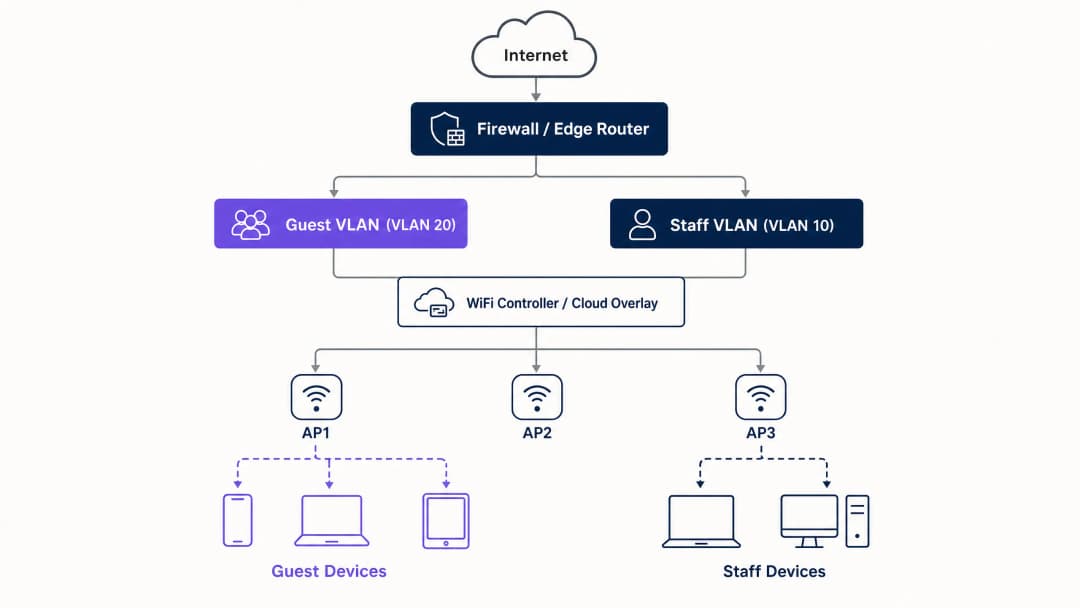
La base de tout déploiement WiFi invité sécurisé est la segmentation du réseau. Avant d'évaluer les portails captifs ou les analyses, vous devez établir une isolation stricte entre le trafic invité et les systèmes internes. Cela nécessite un SSID dédié mappé sur son propre réseau local virtuel (VLAN), avec des règles de pare-feu refusant par défaut l'accès aux sous-réseaux internes. Considérez le réseau invité comme une zone externe contrôlée ; les visiteurs bénéficient d'une entrée séparée et accèdent uniquement à Internet.
Base de l'architecture de sécurité
La base technique requiert plusieurs contrôles non négociables :
- SSID dédié : Créez un SSID invité distinct des réseaux du personnel et opérationnels.
- Segmentation VLAN : Mappez le SSID sur un VLAN dédié pour isoler le trafic invité.
- Isolation des clients : Activez l'isolation des clients pour empêcher les appareils des invités de communiquer entre eux, atténuant ainsi les attaques par mouvement latéral.
- Politique de pare-feu : Bloquez l'accès au LAN principal et aux interfaces de gestion.
- DHCP dédié : Utilisez une plage DHCP distincte et empêchez la fuite des enregistrements DNS internes.
L'impératif de la migration vers WPA3
Si vous déployez ou renouvelez du matériel en 2026, la norme par défaut doit être le WPA3. La WiFi Alliance a rendu la certification WPA3 obligatoire pour tous les nouveaux appareils en juillet 2020. La plupart des points d'accès d'entreprise de Cisco Meraki, HPE Aruba, Ruckus, Juniper Mist, Ubiquiti UniFi, Cambium, Extreme et Fortinet prennent en charge le WPA3 via des mises à jour de firmware. Le WPA3 apporte trois améliorations opérationnelles cruciales :
- Simultaneous Authentication of Equals (SAE) : Remplace la poignée de main en quatre étapes vulnérable du WPA2, éliminant ainsi les attaques par dictionnaire hors ligne. Même si un attaquant intercepte l'échange d'authentification, il ne peut pas en déduire la clé de session.
- Forward Secrecy : Garantit que même si un mot de passe réseau est compromis aujourd'hui, le trafic enregistré par le passé reste protégé. Chaque session génère une clé éphémère unique.
- Opportunistic Wireless Encryption (OWE) : Établit automatiquement une connexion chiffrée sur les réseaux ouverts sans nécessiter de mot de passe. Cela protège les données en transit et répond directement aux obligations de conformité GDPR.
Vous avez des questions sur votre configuration spécifique ?
Notre équipe collabore avec des exploitants de sites, des responsables informatiques et des ingénieurs réseau au sein de 80 000 sites. Réservez un appel de 20 minutes et nous vous montrerons comment d'autres professionnels comme vous ont résolu ce problème.
Guide d'implémentation
Le déploiement d'un WiFi invité sécurisé nécessite une approche progressive : d'abord l'architecture, puis l'authentification, suivie de la couche portail, et enfin les analyses.
Étape 1 : Configurer les bases du réseau
Configurez les VLAN et les règles de pare-feu avant d'activer tout SSID. Vérifiez que le VLAN invité ne peut pas acheminer de trafic vers les sous-réseaux internes. Implémentez le WPA3-Personal (SAE) ou l'OWE selon votre stratégie d'authentification. Assurez-vous que l'isolation des clients est active sur le contrôleur.
Étape 2 : Implémenter la couche d'authentification
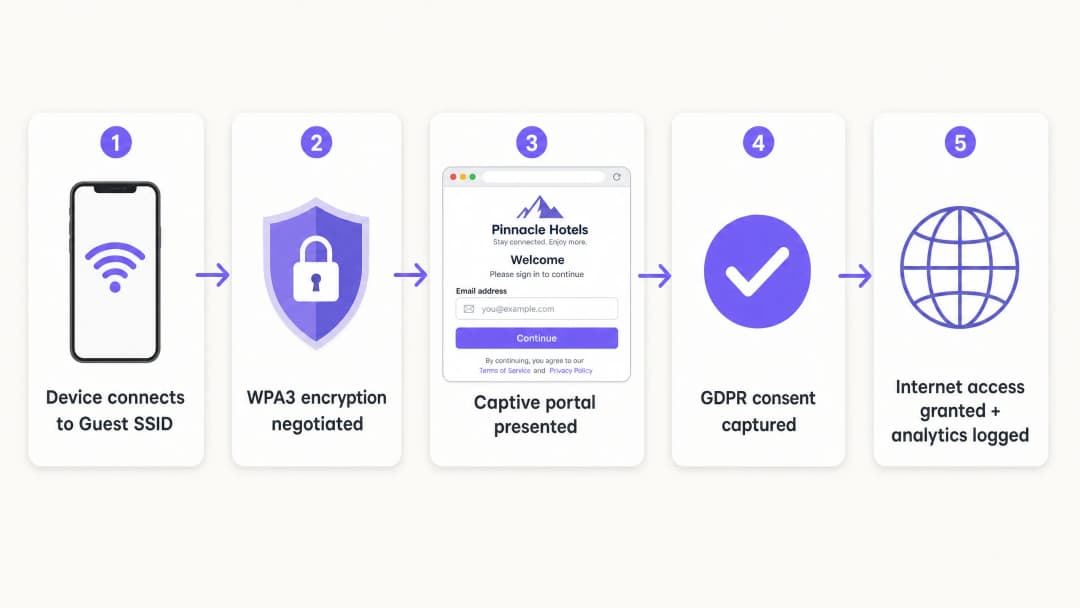
Pour le personnel et les appareils d'entreprise, la norme est l'IEEE 802.1X. Cela nécessite que les appareils s'authentifient auprès d'un serveur RADIUS avant que l'accès ne soit accordé. Pour les invités, le Captive Portal reste le mécanisme principal pour capturer l'identité et le consentement.
Étape 3 : Déployer la couche Cloud
Purple fonctionne comme une solution Cloud indépendante du matériel. Elle s'intègre à votre infrastructure existante pour gérer le Captive Portal, le flux de consentement et les analyses. Cette couche gère la partie identité tandis que les points d'accès physiques appliquent les politiques radio et de VLAN.
Étape 4 : Vérifier et tester
Testez le déploiement depuis un appareil client physique. Essayez d'accéder aux ressources internes, aux imprimantes et aux interfaces de gestion. Vérifiez le comportement en cas de panne : déterminez clairement si les invités doivent perdre la connexion ou contourner le portail si le service d'authentification est temporairement indisponible.
Bonnes pratiques
- Imposer une validation stricte des certificats : Pour les déploiements 802.1X utilisant PEAP-MSCHAPv2, les clients doivent être configurés pour valider le certificat du serveur RADIUS via une gestion des appareils mobiles (MDM) ou des objets de stratégie de groupe (GPO). Cela évite les attaques par point d'accès piraté.
- Utilisez l'attribution dynamique de VLAN : Configurez le serveur RADIUS pour attribuer dynamiquement les VLANs en fonction de l'appartenance aux groupes d'annuaire. Cela permet à un seul SSID de desservir en toute sécurité le personnel, les sous-traitants et les appareils IoT.
- Isolez les anciens appareils : Les appareils qui ne prennent pas en charge WPA3 doivent être placés sur un SSID WPA2 dédié, isolé sur un VLAN séparé. Ne compromettez pas la sécurité du réseau invité principal pour des raisons de compatibilité avec d'anciens appareils.
- Alignez-vous sur les normes de l'industrie : Assurez-vous que le déploiement est conforme aux exigences PCI-DSS en isolant physiquement ou logiquement le trafic invité de l'infrastructure de paiement. Soutenez la conformité au GDPR en utilisant OWE pour le chiffrement et en recueillant un consentement explicite via le Captive Portal.
Dépannage et atténuation des risques
Les échecs de déploiement les plus courants sont dus à des oublis de configuration plutôt qu'à des limites matérielles.
- Séparation cosmétique : Un nouveau SSID sur le même domaine de diffusion que le réseau du personnel n'offre aucune sécurité. Vérifiez le marquage VLAN et les règles de pare-feu.
- Isolation client désactivée : Le fait de ne pas isoler les clients augmente le risque d'attaques latérales sur les invités. Cela est particulièrement dangereux dans les environnements de l'hospitalité (Hôtellerie-Restauration) où les invités partagent le réseau pendant de longues périodes.
- Mode Fail-Open non planifié : Si le Captive Portal est inaccessible, le réseau doit gérer la panne de manière prévisible. Pour la plupart des lieux publics, le mode fail-open est préférable pour maintenir la connectivité, mais cela doit être un choix de configuration conscient, et non un accident.
ROI et impact commercial
Un déploiement de WiFi invité sécurisé transforme un centre de coûts réseau en un actif stratégique. En remplaçant les mots de passe partagés par un Captive Portal conforme, les établissements capturent des données de première main vérifiées. La plateforme de Purple traite 440 millions de connexions par an, fournissant des listes de contacts propres pour l'automatisation du marketing.
De plus, un accueil sécurisé réduit les frais de support informatique. La mise en œuvre de Passpoint ou OpenRoaming permet aux visiteurs récurrents de se connecter de manière transparente, éliminant ainsi les demandes de réinitialisation de mot de passe. Pour les opérateurs du commerce de détail, cette connectivité fluide favorise l'engagement envers les applications et la participation aux programmes de fidélité, offrant un retour sur investissement (ROI) mesurable.
-
Écouter le débriefing
Définitions clés
VLAN (Virtual Local Area Network)
Un sous-réseau logique qui regroupe un ensemble d'appareils provenant de différents LAN physiques.
Utilisé pour isoler le trafic WiFi invité des données de l'entreprise, garantissant que les visiteurs ne peuvent pas accéder aux serveurs internes ou aux systèmes de paiement.
WPA3
La dernière certification de sécurité WiFi, introduisant l'authentification simultanée d'égaux (SAE) et la confidentialité persistante (Forward Secrecy).
Indispensable pour les réseaux d'entreprise modernes afin de prévenir les attaques par dictionnaire hors ligne et de protéger l'historique des données de trafic.
OWE (Opportunistic Wireless Encryption)
Une fonctionnalité WPA3 qui chiffre automatiquement le trafic sur les réseaux ouverts sans nécessiter de mot de passe.
Crucial pour les espaces publics souhaitant offrir un accès fluide tout en protégeant les données des invités en transit contre l'écoute passive.
Isolation des clients
Un paramètre de contrôleur sans fil qui empêche les appareils connectés au même SSID de communiquer directement entre eux.
Obligatoire pour les réseaux invités afin d'empêcher les appareils compromis des visiteurs d'attaquer d'autres invités de manière latérale.
Captive Portal
Une page web que les utilisateurs doivent consulter et avec laquelle ils doivent interagir avant de se voir accorder l'accès au réseau.
Utilisé par les équipes marketing pour capturer des données de premier niveau et par l'informatique pour faire respecter les conditions d'utilisation, plutôt que comme une barrière de sécurité principale.
IEEE 802.1X
Une norme IEEE pour le contrôle d'accès réseau basé sur les ports (PNAC), fournissant un mécanisme d'authentification aux appareils souhaitant se connecter à un LAN ou un WLAN.
La norme d'entreprise pour authentifier de manière sécurisée les appareils du personnel par rapport à un annuaire centralisé.
RADIUS
Remote Authentication Dial-In User Service - un protocole réseau qui fournit une gestion centralisée de l'authentification, de l'autorisation et de la comptabilisation (AAA).
Le composant serveur qui vérifie les identifiants des utilisateurs par rapport à un annuaire (comme Entra ID) et indique au point d'accès quel VLAN attribuer.
Passpoint
Un protocole développé par la Wi-Fi Alliance qui permet aux appareils mobiles de découvrir et de se connecter automatiquement à des réseaux WiFi sécurisés.
Permet aux invités réguliers de se connecter de manière transparente et sécurisée sans avoir à interagir à nouveau avec un captive portal.
Exemples concrets
Un hôtel de 200 chambres utilise actuellement un seul SSID WPA2 avec un mot de passe partagé modifié mensuellement. Ils doivent sécuriser le réseau, isoler le trafic des invités du système de gestion de l'établissement et collecter les e-mails des clients en toute conformité.
- Créer le VLAN 20 pour les invités et le VLAN 10 pour le personnel.
- Configurer les règles de pare-feu pour bloquer le trafic du VLAN 20 vers le VLAN 10 et le sous-réseau d'administration.
- Déployer un nouveau SSID invité associé au VLAN 20, en utilisant WPA3 OWE (Opportunistic Wireless Encryption).
- Activer l'isolation des clients sur le SSID invité.
- Intégrer la surcouche cloud Purple pour afficher un captive portal personnalisé aux couleurs de la marque, capturant l'adresse e-mail et le consentement GDPR avant d'autoriser l'accès à internet.
Un campus universitaire doit prendre en charge les ordinateurs portables du personnel, les appareils personnels (BYOD) des étudiants et les capteurs IoT sans écran (thermostats intelligents) sur un vaste domaine sans diffuser 15 SSID différents.
- Déployer un seul SSID compatible 802.1X pour l'ensemble du personnel et des étudiants.
- Configurer le serveur RADIUS pour authentifier les utilisateurs auprès de Microsoft Entra ID.
- Implémenter l'attribution dynamique de VLAN : le personnel s'authentifie et accède au VLAN 10 ; les étudiants s'authentifient et accède au VLAN 30.
- Créer un SSID WPA2 masqué et distinct, associé au VLAN 40 spécifiquement pour les appareils IoT sans écran, en utilisant le contournement d'authentification MAC (MAB) avec des règles de pare-feu strictes limitant leur accès sortant.
Questions d'entraînement
Q1. Un directeur de magasin souhaite lancer un nouveau réseau "WiFi client gratuit" dès demain en ajoutant simplement un second SSID sans mot de passe sur les points d'accès Meraki existants. En tant que responsable informatique, comment réagissez-vous ?
Conseil : Prenez en compte les implications PCI DSS d'un accès ouvert sur une infrastructure partagée.
Voir la réponse type
Rejetez la demande. L'ajout d'un SSID ouvert au domaine de diffusion existant sans segmentation VLAN expose les systèmes de point de vente (POS) au trafic public, ce qui enfreint la norme PCI DSS. Le réseau doit d'abord être segmenté avec un VLAN dédié et des règles de pare-feu avant de diffuser le SSID.
Q2. Lors d'un audit de réseau, vous découvrez que le portail captif du WiFi invité fonctionne correctement, mais que les utilisateurs peuvent envoyer un ping à l'adresse IP du serveur de fichiers principal du site. Quelle est la défaillance de configuration la plus probable ?
Conseil : Le portail captif gère l'authentification, pas le routage.
Voir la réponse type
La politique de pare-feu ou la liste de contrôle d'accès (ACL) séparant le VLAN invité du LAN d'entreprise est absente ou mal configurée. Le portail captif contrôle uniquement l'accès internet ; l'infrastructure réseau sous-jacente doit appliquer les limites de routage.
Q3. Un site remplace son matériel et souhaite utiliser le WPA3, mais l'équipe opérationnelle craint que les anciens smartphones des invités ne puissent pas se connecter. Quelle est la stratégie de déploiement recommandée ?
Conseil : Réfléchissez à la manière de prendre en charge temporairement les deux normes.
Voir la réponse type
Déployez le mode de transition WPA3. Cela permet au SSID de prendre en charge simultanément les appareils compatibles WPA3 (via SAE) et les appareils hérités (via WPA2 PSK). Utilisez les outils de WiFi Analytics de Purple pour suivre la proportion d'anciens appareils sur une période de 6 à 12 mois, puis imposez le WPA3 seul dès que le volume d'appareils hérités passe sous un seuil acceptable.
Continuer la lecture de cette série
Comment résoudre les lenteurs de votre WiFi sans augmenter le débit de votre forfait Internet
Un guide de référence technique complet pour les responsables informatiques et les architectes réseau sur l'optimisation des performances WiFi d'entreprise sans augmenter la bande passante du FAI. Couvre le réglage RF, la gestion de la densité des clients, la mise en œuvre de la QoS et l'utilisation de l'analyse WiFi pour diagnostiquer et résoudre les goulots d'étranglement.
Comment concevoir un réseau WiFi de campus : Un guide informatique pour les universités
Ce guide technique fournit un plan complet pour concevoir et déployer des réseaux WiFi de campus à haute densité, couvrant tous les aspects, des études de site actives et de l'emplacement des points d'accès à l'architecture des contrôleurs, au roaming transparent et à l'authentification sécurisée des invités. Il est rédigé pour les responsables informatiques, les architectes réseau et les directeurs de la technologie des universités et des grands sites qui ont besoin de conseils pratiques pour planifier et exécuter un déploiement sans fil ce trimestre. Ce guide intègre également la plateforme de Guest WiFi et d'analyses de Purple aux points d'intégration réels du cycle de vie du déploiement.
WiFi pour musées et galeries : Créer une expérience visiteur connectée
Ce guide fournit un schéma technique complet pour le déploiement de WiFi haute densité dans les musées et les galeries. Il couvre l'architecture réseau, les stratégies d'engagement des visiteurs et la manière d'exploiter les analyses WiFi pour stimuler le ROI et l'efficacité opérationnelle.
Vous avez des questions sur votre configuration spécifique ?
Notre équipe collabore avec des exploitants de sites, des responsables informatiques et des ingénieurs réseau au sein de 80 000 sites. Réservez un appel de 20 minutes et nous vous montrerons comment d'autres professionnels comme vous ont résolu ce problème.