
গেস্ট ট্রাফিক থেকে পৃথক করা সুরক্ষিত স্টাফ WiFi নেটওয়ার্ক ডিজাইন করা
নেটওয়ার্ক আর্কিটেক্ট এবং IT লিডারদের জন্য একটি নির্ভরযোগ্য প্রযুক্তিগত রেফারেন্স গাইড যা সুরক্ষিত, উচ্চ-ক্ষমতাসম্পন্ন স্টাফ WiFi নেটওয়ার্ক ডিজাইন করার বিষয়ে বিস্তারিত আলোচনা করে। এটি কমপ্লায়েন্স ম্যান্ডেট (PCI-DSS, GDPR) সন্তুষ্ট করতে এবং ল্যাটারাল মুভমেন্টের সুরক্ষাজনিত ঝুঁকিগুলি দূর করতে VLAN, 802.1X অথেন্টিকেশন এবং WPA3-Enterprise ব্যবহার করে পাবলিক গেস্ট নেটওয়ার্ক থেকে অপারেশনাল ট্রাফিকের লজিক্যাল এবং ফিজিক্যাল সেগমেন্টেশনের বিস্তারিত বিবরণ দেয়।
Video overview
এই গাইডটি শুনুন
পডকাস্ট ট্রান্সক্রিপ্ট দেখুন
আমাদের মূল সিরিজের অংশ: Guest WiFi গাইড →
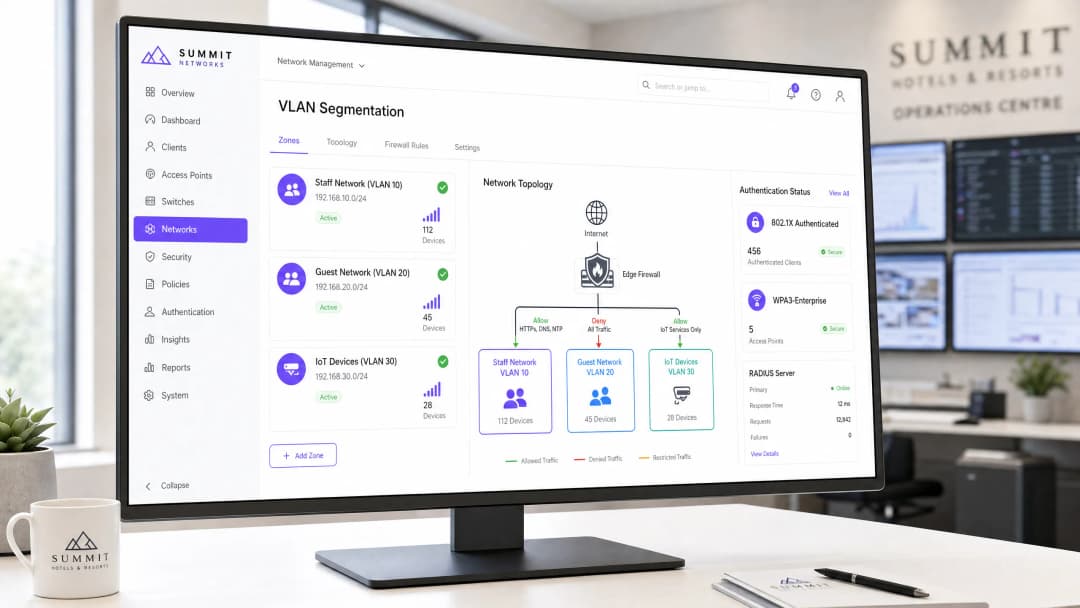
এন্টারপ্রাইজ, হসপিটালিটি, রিটেইল এবং হেলথকেয়ার ভেন্যুগুলোতে ওয়্যারলেস নেটওয়ার্কগুলোকে অবশ্যই দুটি পরস্পরবিরোধী গ্রুপকে সহায়তা করতে হবে: পাবলিক ভিজিটর যাদের কোনো বাধা ছাড়াই ইন্টারনেট অ্যাক্সেস প্রয়োজন এবং অভ্যন্তরীণ স্টাফ মেম্বার যারা সংবেদনশীল কর্পোরেট ডেটাবেস, পয়েন্ট-অফ-সেল (POS) সিস্টেম এবং অভ্যন্তরীণ অপারেশনাল টুলস অ্যাক্সেস করেন।
গেস্ট ডিভাইসগুলোকে কর্পোরেট হার্ডওয়্যারের সাথে যোগাযোগ করার অনুমতি দেওয়া বা গেস্ট ইন্টারনেট ট্রাফিককে আইসোলেট করতে ব্যর্থ হওয়া মারাত্মক নিরাপত্তা ঝুঁকি তৈরি করে, যার মধ্যে রয়েছে প্যাকেট ইন্টারসেপশন, ম্যালওয়্যার ছড়ানো এবং নিয়ন্ত্রক সম্মতি লঙ্ঘন (যেমন PCI-DSS 4.0 এবং GDPR)।
এই গাইডটিতে VLAN ট্যাগিং, 802.1X সার্টিফিকেট অথেন্টিকেশন, ফায়ারওয়াল অ্যাক্সেস কন্ট্রোল লিস্ট (ACLs) এবং Layer 2 ক্লায়েন্ট আইসোলেশনের মাধ্যমে স্টাফ এবং গেস্ট WiFi নেটওয়ার্কগুলোকে আলাদা করার জন্য এন্টারপ্রাইজ নেটওয়ার্ক ডিজাইন প্যাটার্নগুলো রূপরেখা দেওয়া হয়েছে।
সিকিউরিটি আর্কিটেকচার: কোর স্টাফ বনাম গেস্ট নেটওয়ার্ক সেগ্রিগেশন
এন্টারপ্রাইজ নেটওয়ার্ক সেগ্রিগেশন ফিজিক্যাল, ডেটা লিঙ্ক এবং নেটওয়ার্ক লেয়ারে ট্রাফিক আলাদা করার উপর নির্ভর করে:
| আর্কিটেকচারাল লেয়ার | গেস্ট WiFi নেটওয়ার্ক ডিজাইন | অভ্যন্তরীণ স্টাফ WiFi নেটওয়ার্ক ডিজাইন |
|---|---|---|
| অথেন্টিকেশন | SMS, ইমেল বা সোশ্যাল লগইন সহ Captive Portal | এন্টারপ্রাইজ সার্টিফিকেট বা SAML SSO সহ 802.1X EAP-TLS |
| VLAN অ্যাসাইনমেন্ট | আইসোলেটেড গেস্ট VLAN (যেমন VLAN 50) | এন্টারপ্রাইজ কর্পোরেট VLANs (যেমন ম্যানেজমেন্ট, স্টাফ, POS) |
| Layer 2 পলিসি | ক্লায়েন্ট আইসোলেশন সক্ষম (কোনো পিয়ার-টু-পিয়ার যোগাযোগ নেই) | প্রিন্টার, সার্ভার এবং কোলাবোরেশনের জন্য পিয়ার ডিসকভারি সক্ষম |
| রাউটিং ও ফায়ারওয়াল | ইন্টারনেটে সরাসরি আউটবাউন্ড NAT; RFC 1918 অভ্যন্তরীণ সাবনেট ব্লক করা | স্টেটফুল ফায়ারওয়াল নিয়মের মাধ্যমে অভ্যন্তরীণ সার্ভার, ERP এবং ডেটাবেসে অ্যাক্সেসের অনুমতি |
| DNS কনফিগারেশন | কন্টেন্ট-ফিল্টার করা পাবলিক DNS (প্রোটেক্টিভ DNS / CIPA কমপ্লায়েন্ট) | অভ্যন্তরীণ Active Directory / স্প্লিট-হরাইজন কর্পোরেট DNS |
১. VLAN ট্যাগিং এবং 802.1Q ট্রাঙ্কিং
ফ্ল্যাট সাবনেটে কখনোই গেস্ট এবং কর্পোরেট ট্রাফিক মিশ্রিত করবেন না। ওয়্যারলেস অ্যাক্সেস পয়েন্টগুলোকে অবশ্যই ম্যানেজড ডিস্ট্রিবিউশন সুইচে ব্যাক করার জন্য IEEE 802.1Q ট্রাঙ্ক ব্যবহার করে মাল্টি-SSID ট্যাগিং সমর্থন করতে হবে:
- কর্পোরেট SSID: কর্পোরেট VLAN-এ ম্যাপ করে। ডোমেন কন্ট্রোলার এবং বিজনেস অ্যাপ্লিকেশনগুলোতে পৌঁছানোর জন্য প্যাকেটগুলো অভ্যন্তরীণ ফায়ারওয়ালের মধ্য দিয়ে যায়।
- গেস্ট SSID: একটি আইসোলেটেড DMZ বা গেস্ট VLAN-এ ম্যাপ করে। ট্রাফিক সরাসরি একটি এজ ফায়ারওয়াল বা ডেডিকেটেড ইন্টারনেট গেটওয়েতে নির্দেশিত হয়, যা অভ্যন্তরীণ সার্ভার সাবনেটগুলোকে সম্পূর্ণভাবে বাইপাস করে।
২. বাধ্যতামূলক ফায়ারওয়াল অ্যাক্সেস কন্ট্রোল লিস্ট (ACLs)
গেস্ট নেটওয়ার্কের লেয়ার ৩ ডিফল্ট গেটওয়েতে, স্পষ্ট ইগ্রেস ফায়ারওয়াল নিয়ম প্রয়োগ করুন:
- RFC 1918 রেঞ্জ ড্রপ করুন: গেস্ট সাবনেট থেকে উদ্ভূত সমস্ত ট্রাফিক ব্লক করুন যা
10.0.0.0/8,172.16.0.0/12, এবং192.168.0.0/16কে টার্গেট করে। - ক্লাইন্ট আইসোলেশন প্রয়োগ করুন: ওয়্যারলেস অ্যাক্সেস পয়েন্ট ফার্মওয়্যারের মধ্যে গেস্ট SSID-এ লেয়ার 2 ক্লাইন্ট আইসোলেশন সক্রিয় করুন। এটি অ্যাড্রেস রেজোলিউশন প্রোটোকল (ARP) লুকআপ বন্ধ করে এবং গেস্ট ডিভাইসগুলোকে একই AP-র সাথে সংযুক্ত অন্য গেস্ট ডিভাইস স্ক্যান বা তাদের সাথে যোগাযোগ করা থেকে বিরত রাখে।
- DNS পোর্ট অ্যাক্সেস সীমাবদ্ধ করুন: আউটবাউন্ড UDP/TCP পোর্ট 53 এবং পোর্ট 853 ট্রাফিককে নির্ধারিত সুরক্ষামূলক DNS গেটওয়েতে রিডাইরেক্ট করে গেস্টদের কর্পোরেট কন্টেন্ট ফিল্টারিং এড়িয়ে যাওয়া রোধ করুন।
আপনার নির্দিষ্ট সেটআপ নিয়ে কোনো প্রশ্ন আছে?
আমাদের টিম ৮০,০০০ ভেন্যুতে ভেন্যু অপারেটর, IT ম্যানেজার এবং নেটওয়ার্ক ইঞ্জিনিয়ারদের সাথে কাজ করে। একটি ২০ মিনিটের কল বুক করুন এবং আপনার মতো অন্যরা কীভাবে এর সমাধান করেছেন তা আমরা আপনাকে দেখাব।
কর্মীদের প্রমাণীকরণ: শেয়ার করা পাসওয়ার্ড থেকে 802.1X EAP-TLS-এ স্থানান্তর
গেস্ট নেটওয়ার্কগুলো যেখানে অনবোর্ডিংয়ের সহজতাকে অগ্রাধিকার দেয়, সেখানে কর্মীদের নেটওয়ার্কগুলোর জন্য অবশ্যই পরিচয়-ভিত্তিক অ্যাক্সেস নিয়ন্ত্রণ প্রয়োগ করতে হবে। কর্মীদের জন্য একটি শেয়ার করা WPA2-PSK পাসওয়ার্ডের উপর নির্ভর করা কর্মীরা যখন কোম্পানি ছেড়ে চলে যায় তখন মারাত্মক অপারেশনাল দুর্বলতা তৈরি করে।
আধুনিক কর্মীদের ওয়্যারলেস ডিজাইন 802.1X EAP-TLS ব্যবহার করে:
- প্রতিটি কর্পোরেট ল্যাপটপ বা স্মার্টফোনে Microsoft Intune, Jamf, বা Kandji-র মতো মোবাইল ডিভাইস ম্যানেজমেন্ট (MDM) প্ল্যাটফর্মের মাধ্যমে পুশ করা একটি ক্রিপ্টোগ্রাফিক ডিভাইস সার্টিফিকেট দেওয়া থাকে।
- প্রমাণীকরণ একটি RADIUS সার্ভার (বা ক্লাউড RADIUS) এর বিপরীতে ঘটে।
- যদি কোনো কর্মচারীকে বরখাস্ত করা হয়, তবে Microsoft Entra ID বা Google Workspace-এ তাদের ডিরেক্টরি অ্যাকাউন্ট বাতিল করলে অন্য কোনো কর্মী সদস্যকে প্রভাবিত না করে রিয়েল টাইমে স্বয়ংক্রিয়ভাবে তাদের ওয়্যারলেস অ্যাক্সেস নিষ্ক্রিয় হয়ে যায়।
কমপ্লায়েন্স এবং অডিটিংয়ের বিবেচ্য বিষয়সমূহ
- PCI DSS 4.0 প্রয়োজনীয়তা 1.2: পেমেন্ট কার্ডের পরিবেশ (POS টার্মিনাল) অবশ্যই গেস্ট ওয়্যারলেস নেটওয়ার্ক থেকে সম্পূর্ণ আলাদা রাখতে হবে। ফায়ারওয়ালগুলোকে অবশ্যই কার্ডহোল্ডার ডেটা এনভায়রনমেন্ট (CDE) এবং গেস্ট ট্রাফিকের মধ্যে নন-রউটেবল সীমানা প্রয়োগ করতে হবে।
- GDPR / ডেটা সুরক্ষা: Captive Portal-এর মাধ্যমে সংগৃহীত গেস্ট রেজিস্ট্রেশন ডেটা অবশ্যই স্পষ্ট অপ্ট-ইন প্রক্রিয়া সহ কমপ্লায়েন্ট মার্কেটিং ডাটাবেসে সংরক্ষণ করতে হবে, যা অপারেশনাল স্টাফ লগ থেকে আলাদা থাকবে।
প্রায়শই জিজ্ঞাসিত প্রশ্নাবলী
কর্মীরা এবং গেস্টরা কি একই ফিজিক্যাল অ্যাক্সেস পয়েন্ট শেয়ার করতে পারেন?
হ্যাঁ। এন্টারপ্রাইজ অ্যাক্সেস পয়েন্টগুলো একটি একক রেডিও থেকে ব্রডকাস্ট করা একাধিক ভার্চুয়াল BSSID (SSID) সমর্থন করে। প্রতিটি SSID-কে তার নিজস্ব 802.1Q VLAN ট্যাগের সাথে ম্যাপ করা হয়, যা সম্পূর্ণ ক্রিপ্টোগ্রাফিক এবং লজিক্যাল পৃথকীকরণ বজায় রেখে নিরাপদে ফিজিক্যাল হার্ডওয়্যার শেয়ার করার অনুমতি দেয়।
গেস্ট ট্রাফিক ইতিমধ্যে একটি পৃথক VLAN-এ থাকলে ক্লাইন্ট আইসোলেশন কেন প্রয়োজন?
VLAN সেগমেন্টেশন গেস্ট নেটওয়ার্ককে অভ্যন্তরীণ কর্পোরেট নেটওয়ার্ক থেকে আলাদা করে। তবে, অ্যাক্সেস পয়েন্টে লেয়ার 2 ক্লাইন্ট আইসোলেশন না থাকলে, একটি সংক্রামিত গেস্ট ডিভাইস একই গেস্ট WiFi নেটওয়ার্কের সাথে সংযুক্ত অন্য কোনো ভিজিটর ডিভাইস স্ক্যান, প্রোব বা আক্রমণ করতে পারে। ক্লাইন্ট আইসোলেশন নিশ্চিত করে যে ভিজিটররা কেবল বাহ্যিক ইন্টারনেট গেটওয়ের সাথেই যোগাযোগ করতে পারে।
মূল সংজ্ঞাসমূহ
VLAN (Virtual Local Area Network)
একটি লজিক্যাল সাবনেটওয়ার্ক যা এক বা একাধিক ফিজিক্যাল লোকাল এরিয়া নেটওয়ার্কের ডিভাইসগুলির একটি সংগ্রহকে একসাথে গ্রুপ করে, তাদের ট্রাফিক ব্রডকাস্ট ডোমেনগুলিকে আইসোলেট করে।
একই ফিজিক্যাল সুইচ এবং অ্যাক্সেস পয়েন্টে থাকা কর্মীদের হার্ডওয়্যার থেকে গেস্ট ডিভাইসগুলিকে আলাদা করতে ব্যবহৃত হয়।
IEEE 802.1X
পোর্ট-ভিত্তিক নেটওয়ার্ক অ্যাক্সেস কন্ট্রোল (NAC) এর জন্য একটি IEEE স্ট্যান্ডার্ড যা LAN বা WLAN-এর সাথে সংযুক্ত হতে ইচ্ছুক ডিভাইসগুলির জন্য একটি প্রমাণীকরণ ব্যবস্থা প্রদান করে।
এন্টারপ্রাইজ কর্মী WiFi নেটওয়ার্কগুলিতে প্রতি-ব্যবহারকারী শংসাপত্র বা সার্টিফিকেট প্রমাণীকরণ প্রয়োগ করতে ব্যবহৃত স্ট্যান্ডার্ড প্রোটোকল।
RADIUS (Remote Authentication Dial-In User Service)
একটি নেটওয়ার্কিং প্রোটোকল যা একটি নেটওয়ার্ক পরিষেবা সংযোগ এবং ব্যবহারকারী ব্যবহারকারীদের জন্য কেন্দ্রীভূত প্রমাণীকরণ, অনুমোদন এবং অ্যাকাউন্টিং (AAA) ব্যবস্থাপনা প্রদান করে।
সার্ভার (যেমন, Microsoft NPS বা ক্লাউড RADIUS) যা নেটওয়ার্ক অ্যাক্সেসের অনুমতি দেওয়ার আগে Active Directory-এর বিপরীতে কর্মীদের শংসাপত্রগুলি যাচাই করে।
WPA3-Enterprise
এন্টারপ্রাইজ নেটওয়ার্কগুলির জন্য ওয়াই-ফাই সুরক্ষিত অ্যাক্সেস সুরক্ষার সর্বশেষ প্রজন্ম, যা ১৯২-বিট ক্রিপ্টোগ্রাফিক শক্তি এবং সুরক্ষিত ম্যানেজমেন্ট ফ্রেম বাধ্যতামূলক করে।
নতুন কর্মী নেটওয়ার্কগুলির জন্য প্রয়োজনীয় ওয়্যারলেস সুরক্ষা প্রোটোকল, যা অফলাইন ডিকশনারি অ্যাটাক এবং অননুমোদিত AP ডি-অথেনটিকেশন শোষণ প্রতিরোধ করে।
Client Isolation
ওয়্যারলেস অ্যাক্সেস পয়েন্টগুলির একটি সুরক্ষা সেটিং যা সংযুক্ত ওয়্যারলেস ক্লায়েন্টদের একে অপরের সাথে সরাসরি যোগাযোগ করতে বাধা দেয়।
গেস্ট ডিভাইসগুলির মধ্যে ল্যাটারাল অ্যাটাক এবং ম্যালওয়্যার ছড়ানো প্রতিরোধ করতে গেস্ট নেটওয়ার্কগুলিতে বাধ্যতামূলক কনফিগারেশন।
EAP-TLS (Extensible Authentication Protocol - Transport Layer Security)
একটি EAP প্রকার যা পাসওয়ার্ডের প্রয়োজনীয়তা দূর করে ক্লায়েন্ট এবং RADIUS সার্ভারের মধ্যে পারস্পরিক প্রমাণীকরণের জন্য ডিজিটাল সার্টিফিকেট ব্যবহার করে।
কর্পোরেট-পরিচালিত ডিভাইসগুলির জন্য সর্বোচ্চ-সুরক্ষার প্রমাণীকরণ পদ্ধতি, যা MDM প্ল্যাটফর্মের মাধ্যমে প্রয়োগ করা হয়।
WIPS (Wireless Intrusion Prevention System)
একটি সুরক্ষা ডিভাইস বা সফ্টওয়্যার ক্ষমতা যা অননুমোদিত অ্যাক্সেস পয়েন্টের উপস্থিতির জন্য রেডিও স্পেকট্রাম পর্যবেক্ষণ করে এবং স্বয়ংক্রিয়ভাবে প্রতিরোধমূলক ব্যবস্থা গ্রহণ করে।
রিটেল এবং হসপিটালিটি পরিবেশে অননুমোদিত AP বা 'ইভিল টুইন' আক্রমণ সনাক্ত এবং প্রশমিত করতে PCI DSS সম্মতির জন্য প্রয়োজনীয়।
Airtime Fairness
একটি ওয়্যারলেস শিডিউলিং ফিচার যা প্রতিটি ওয়্যারলেস ক্লায়েন্টকে সমান প্যাকেট কাউন্টের পরিবর্তে সমান ট্রান্সমিশন সময় (এয়ারটাইম) বরাদ্দ করে।
ধীর গতির, পুরোনো গেস্ট ডিভাইসগুলিকে ওয়্যারলেস চ্যানেলের ক্ষমতা গ্রাস করা এবং দ্রুত গতির কর্মী ডিভাইসগুলির কার্যক্ষমতা কমিয়ে দেওয়া থেকে বিরত রাখে।
সমাধানকৃত উদাহরণসমূহ
একটি ২৫০-রুমের বিলাসবহুল হোটেল যেখানে একটি সাধারণ, সেগমেন্টেশনবিহীন নেটওয়ার্ক চলছে, তারা একটি PCI DSS অডিটের জন্য প্রস্তুতি নিচ্ছে। হোটেলটি ফ্রন্ট-ডেস্ক চেক-ইনের জন্য মোবাইল ট্যাবলেট এবং অন-প্রেমিসেস একটি PMS সার্ভার ব্যবহার করে এবং বিনামূল্যে গেস্ট WiFi প্রদান করে। নেটওয়ার্ক আর্কিটেক্টের কীভাবে ওয়্যারলেস ইনফ্রাস্ট্রাকচারটি রিডিজাইন করা উচিত যাতে নিরাপত্তা এবং কমপ্লায়েন্স নিশ্চিত করা যায়?
১. শারীরিক ও লজিক্যাল সেগমেন্টেশন (Physical & Logical Segmentation): স্টাফদের জন্য VLAN ১০ (PMS এবং ট্যাবলেট), গেস্ট WiFi-এর জন্য VLAN ২০ এবং IoT-এর জন্য VLAN ৩০ (স্মার্ট টিভি, থার্মোস্ট্যাট) তৈরি করুন। AP-গুলির সাথে সংযুক্ত সুইচরোর্টগুলিকে 802.1Q ট্রাঙ্ক হিসেবে কনফিগার করুন। ২. অথেন্টিকেশন হার্ডেনিং (Authentication Hardening): স্টাফ নেটওয়ার্কে থাকা শেয়ার্ড WPA2-PSK-কে WPA3-Enterprise (802.1X) দ্বারা প্রতিস্থাপন করুন। NPS (RADIUS) এর মাধ্যমে হোটেলের Active Directory-র সাথে ওয়্যারলেস কন্ট্রোলারটি ইন্টিগ্রেট করুন। MDM-এর মাধ্যমে ফ্রন্ট-ডেস্ক ট্যাবলেটগুলিতে WPA3-Enterprise ক্রিডেনশিয়াল বা EAP-TLS সার্টিফিকেট প্রদান করুন। ৩. ফায়ারওয়াল অ্যাক্সেস কন্ট্রোল (Firewall Access Control): একটি স্টেটফুল ফায়ারওয়াল ডেপ্লয় করুন। HTTPS/SQL পোর্টের মাধ্যমে VLAN ১০-কে PMS সার্ভার IP-তে অ্যাক্সেস দেওয়ার জন্য রুলস লিখুন, কিন্তু VLAN ২০ (গেস্ট) থেকে VLAN ১০ এবং VLAN ৩০-এ সমস্ত ট্রাফিক ব্লক করুন। VLAN ২০-এ ক্লায়েন্ট আইসোলেশন (Client Isolation) সক্রিয় করুন। ৪. কমপ্লায়েন্স ভ্যালিডেশন (Compliance Validation): রগ AP মনিটর এবং অ্যালার্ট করতে ওয়্যারলেস কন্ট্রোলারে WIPS চালু করুন, যা PCI DSS প্রয়োজনীয়তা ১১.৪ পূরণ করে।
৫০টি স্টোর সহ একটি হাই-ডেনসিটি রিটেইল চেইন কাস্টমার অ্যানালিটিক্স ক্যাপচার করার জন্য গেস্ট WiFi ডেপ্লয় করতে চায়, পাশাপাশি এটিও নিশ্চিত করতে চায় যাতে স্টোরের অপারেশনাল হ্যান্ডহেল্ড স্ক্যানারগুলি (যা ইনভেন্টরি এবং স্টক ম্যানেজমেন্টের জন্য ব্যবহৃত হয়) পিক ট্রেডিং আওয়ারের সময় ওয়্যারলেস কনজেশন বা ড্রপআউটের শিকার না হয়। IT টিমের কীভাবে SSID এবং QoS আর্কিটেকচার ডিজাইন করা উচিত?
১. SSID সেপারেশন (SSID Separation): সমস্ত স্টোর জুড়ে দুটি SSID ডেপ্লয় করুন: Retail-Operations (VLAN ১০) এবং Guest-Free-WiFi (VLAN ২০)।
২. 802.1X অথেন্টিকেশন: WPA3-Enterprise ব্যবহার করে Retail-Operations সুরক্ষিত করুন। চেইনের MDM প্ল্যাটফর্মের মাধ্যমে পূর্বে প্রদান করা সার্টিফিকেট-ভিত্তিক EAP-TLS ব্যবহার করে হ্যান্ডহেল্ড স্ক্যানারগুলিকে অথেন্টিকেট করুন। Purple দ্বারা পরিচালিত একটি Captive Portal-এর অধীনে একটি ওপেন নেটওয়ার্ক সহ গেস্ট SSID কনফিগার করুন।
৩. কোয়ালিটি অফ সার্ভিস (QoS) এবং WMM: ওয়্যারলেস কন্ট্রোলারে Wi-Fi Multi-Media (WMM) সক্ষম করুন। Retail-Operations ট্রাফিককে ভিডিও (AC_VI) বা ভয়েস (AC_VO) অ্যাক্সেস ক্যাটাগরিতে ম্যাপ করুন, যাতে এটি গেস্ট ট্রাফিকের চেয়ে বেশি অগ্রাধিকার পায়। Guest-Free-WiFi-কে বেস্ট এফোর্ট (AC_BE)-এ ম্যাপ করুন।
৪. ব্যান্ডউইথ রেট লিমিটিং (Bandwidth Rate Limiting): WAN এজ ফায়ারওয়ালে একটি ট্রাফিক-শেপিং পলিসি কনফিগার করুন। প্রতিটি স্টোরে VLAN ১০-এর জন্য সর্বনিম্ন ১৫ Mbps সিমেট্রিক্যাল ব্যান্ডউইথ নিশ্চিত করুন। Purple Captive Portal প্ল্যাটফর্মে, VLAN ২০-এ গেস্ট ডিভাইসগুলির জন্য প্রতি ব্যবহারকারী ৩ Mbps ডাউনলোড এবং ১ Mbps আপলোড রেট লিমিট প্রয়োগ করুন।
একটি পৌর পাবলিক-সেক্টর কনফারেন্স সেন্টারে প্রায়শই ৫,০০০ পর্যন্ত সমসাময়িক গেস্ট ব্যবহারকারীর সাথে বড় ইভেন্টগুলি হোস্ট করা হয়। IT ডিরেক্টর লক্ষ্য করেছেন যে ইভেন্টগুলির সময়, একই ফিজিক্যাল নেটওয়ার্কের প্রশাসনিক কর্মীরা কর্পোরেট ভিডিও কল এবং ফাইল স্থানান্তরে গুরুতর লেটেন্সি অনুভব করেন। অতিরিক্ত ফিজিক্যাল ইন্টারনেট লাইন না কিনে এটি কীভাবে সমাধান করা যেতে পারে?
১. VLAN সেগমেন্টেশন: প্রশাসনিক কর্মীরা VLAN 100-এ এবং গেস্টরা VLAN 200-এ আছেন কিনা তা যাচাই করুন। ২. WAN-Edge ট্রাফিক শেপিং: প্রাথমিক ইন্টারনেট গেটওয়েতে (যেমন, একটি 1 Gbps সিমেট্রিক্যাল লিজড লাইন), একটি Class-Based Weighted Fair Queueing (CBWFQ) পলিসি কনফিগার করুন। ২০০ Mbps-এর গ্যারান্টিযুক্ত ব্যান্ডউইথ এবং রিয়েল-টাইম ভয়েস/ভিডিও ট্রাফিকের জন্য একটি প্রায়োরিটি কিউ সহ VLAN 100-এর জন্য একটি ক্লাস সংজ্ঞায়িত করুন। ৩. ডায়নামিক ব্যান্ডউইথ বরাদ্দকরণ: ফায়ারওয়ালে একটি পলিসি কনফিগার করুন যা অফিসের সময়গুলিতে VLAN 200 (গেস্ট)-এর জন্য বরাদ্দকৃত মোট ব্যান্ডউইথকে মোট WAN ক্ষমতার সর্বোচ্চ ৮০% (800 Mbps) পর্যন্ত ডায়নামিকভাবে সীমিত করে, যার ফলে ২০০ Mbps সবসময় কর্মীদের জন্য উপলব্ধ থাকে। ৪. ওয়্যারলেস Airtime Fairness: ওয়্যারলেস অ্যাক্সেস পয়েন্টগুলিতে Airtime Fairness সক্ষম করুন। এটি ধীর গতির পুরোনো গেস্ট ডিভাইসগুলিকে (যেমন, পুরোনো 802.11n স্মার্টফোন) ওয়্যারলেস চ্যানেলগুলি একচেটিয়াভাবে দখল করা এবং আধুনিক কর্মী ডিভাইসগুলির গতি কমিয়ে দেওয়া থেকে বিরত রাখে।
অনুশীলনী প্রশ্নসমূহ
Q1. একটি হোটেল গ্রুপ একটি নতুন স্টাফ WiFi নেটওয়ার্ক স্থাপন করছে। নেটওয়ার্ক আর্কিটেক্ট WPA2-Personal (PSK) ব্যবহার করার পরামর্শ দিচ্ছেন কারণ এটি স্টাফদের পক্ষে তাদের ডিভাইসে প্রবেশ করানো সহজ। একজন সিনিয়র টেকনিক্যাল কনটেন্ট স্ট্র্যাটেজিস্ট হিসেবে, এমন একটি ডিসিশন-ফোর্সিং সিনারিও অনুশীলন লিখুন যা দেখায় যে কেন এই পদ্ধতিটি একটি নিরাপত্তা ঝুঁকি এবং এর প্রস্তাবিত বিকল্পটি কী।
ইঙ্গিত: কোনো ক্ষুব্ধ কর্মচারী চাকরিচ্যুত হলে বা কোম্পানি ছেড়ে চলে গেলে কী ঘটবে তা বিবেচনা করুন।
মডেল উত্তর দেখুন
প্রস্তাবিত পদ্ধতি: WPA2-Personal (PSK) প্রস্তাবটি প্রত্যাখ্যান করুন এবং WPA3-Enterprise (802.1X) প্রমাণীকরণ বাধ্যতামূলক করুন।
যুক্তি: WPA2-PSK ব্যবহার করা একটি বিশাল নিরাপত্তা ঘাটতি তৈরি করে। কোনো স্টাফ মেম্বার কোম্পানি ছেড়ে চলে গেলেও তারা শেয়ার করা পাসওয়ার্ডটি জানতে পারে। নিরাপত্তা বজায় রাখতে, IT টিমকে হোটেলের প্রতিটি স্টাফ ডিভাইসে (ল্যাপটপ, PMS ট্যাবলেট, VoIP ফোন) পাসওয়ার্ড পরিবর্তন করতে হবে। বাস্তবে, এই অপারেশনাল ওভারহেড এতটাই বেশি যে পাসওয়ার্ডগুলি খুব কমই পরিবর্তন করা হয়, যা প্রাক্তন কর্মচারীদের দ্বারা অননুমোদিত অ্যাক্সেসের জন্য নেটওয়ার্কটিকে ঝুঁকিপূর্ণ করে তোলে।
802.1X সহ WPA3-Enterprise স্থাপন করার মাধ্যমে, প্রতিটি কর্মচারী তাদের নিজস্ব কর্পোরেট ডিরেক্টরি ক্রেডেনশিয়াল (যেমন, Active Directory) ব্যবহার করে প্রমাণীকরণ করেন। যখন কোনো কর্মচারীকে অফবোর্ড করা হয়, তখন Active Directory-তে তাদের অ্যাকাউন্ট নিষ্ক্রিয় করা হয় এবং অন্য কোনো স্টাফ ডিভাইসকে প্রভাবিত না করেই তাদের নেটওয়ার্ক অ্যাক্সেস তাত্ক্ষণিকভাবে এবং স্বয়ংক্রিয়ভাবে বাতিল করা হয়।
Q2. একটি রিটেইল চেইনের নেটওয়ার্ক অডিটের সময়, অডিটর লক্ষ্য করেন যে গেস্ট WiFi নেটওয়ার্ক এবং POS পেমেন্ট টার্মিনালগুলি আলাদা IP সাবনেটে রয়েছে তবে কোনও ACL কনফিগার না করেই একই ফিজিক্যাল Layer 3 সুইচের সাথে সংযুক্ত রয়েছে। IT ম্যানেজার যুক্তি দেন যে যেহেতু তারা আলাদা সাবনেটে রয়েছে, তাই তারা সুরক্ষিত। PCI DSS প্রয়োজনীয়তার বিপরীতে এই সেটআপটি মূল্যায়ন করার জন্য একটি সিনারিও-ভিত্তিক অনুশীলন তৈরি করুন।
ইঙ্গিত: একটি Layer 3 সুইচে ডিফল্টভাবে কি একটি IP সাবনেট সীমানা ট্রাফিক ব্লক করে?
মডেল উত্তর দেখুন
প্রস্তাবিত পদ্ধতি: বর্তমান সেটআপটি নিয়ম মেনে তৈরি করা হয়নি এবং এটি অত্যন্ত অসুরক্ষিত। IT টিমকে অবশ্যই POS নেটওয়ার্ককে গেস্ট নেটওয়ার্ক থেকে আলাদা করতে কঠোর VLAN সেগমেন্টেশন এবং স্টেটফুল ফায়ারওয়াল নিয়ম প্রয়োগ করতে হবে।
যুক্তি: IP সাবনেট শুধুমাত্র লজিক্যাল গ্রুপিং নির্ধারণ করে; এগুলো কোনো নিরাপত্তা সীমানা প্রয়োগ করে না। একটি স্ট্যান্ডার্ড Layer 3 সুইচে, সাবনেটগুলির মধ্যে রাউটিং ডিফল্টরূপে সক্ষম থাকে। এর অর্থ হল গেস্ট সাবনেটের যেকোনো ডিভাইস সুইচের গেটওয়ে IP-তে প্যাকেট পাঠিয়ে সরাসরি POS সাবনেটে ট্রাফিক রাউট করতে পারে। গেস্ট WiFi-এ থাকা কোনো আক্রমণকারী সহজেই স্ক্যান করতে পারে, খুঁজে বের করতে পারে এবং POS পেমেন্ট টার্মিনালের দুর্বলতাগুলিকে কাজে লাগানোর চেষ্টা করতে পারে, যা PCI DSS প্রয়োজনীয়তা 1.3 লঙ্ঘন করে।
এটি প্রতিকার করার জন্য, POS টার্মিনালগুলিকে একটি ডেডিকেটেড VLAN (যেমন, VLAN 40) এবং গেস্ট WiFi-কে VLAN 20-এ রাখতে হবে। এই VLAN-গুলির মধ্যে একটি স্টেটফুল ফায়ারওয়াল থাকতে হবে, যাতে VLAN 20 (গেস্ট) থেকে উদ্ভূত এবং VLAN 40 (POS)-এর উদ্দেশ্যে পাঠানো সমস্ত ট্রাফিক প্রত্যাখ্যান (DENY) করার জন্য একটি স্পষ্ট নিয়ম কনফিগার করা থাকে। অতিরিক্তভাবে, গেস্ট নেটওয়ার্কের মধ্যেই ল্যাটারাল অ্যাটাক প্রতিরোধ করতে গেস্ট SSID-এ Client Isolation সক্ষম করতে হবে।
Q3. একটি কনফারেন্স সেন্টার ৩,০০০ জন অংশগ্রহণকারীর সাথে একটি বড় টেক সামিট আয়োজন করছে। একই ইন্টারনেট সংযোগ শেয়ারকারী প্রশাসনিক কর্মীরা রিপোর্ট করছেন যে নেটওয়ার্কের চরম ধীরগতির কারণে তারা তাদের ক্লাউড-ভিত্তিক টিকেটিং সিস্টেম অ্যাক্সেস করতে পারছেন না বা স্পষ্ট VoIP কল করতে পারছেন না। ফিজিক্যাল ইন্টারনেট ব্যান্ডউইথ আপগ্রেড না করে এই সমস্যার সমাধানের জন্য কীভাবে একটি ট্রাফিক ম্যানেজমেন্ট কৌশল ডিজাইন করা যায় তা ব্যাখ্যা করুন।
ইঙ্গিত: ওভার-দ্য-এয়ার চ্যানেল কনজেশন এবং WAN-লিঙ্ক স্যাচুরেশন সম্পর্কে চিন্তা করুন।
মডেল উত্তর দেখুন
সুপারিশকৃত পদ্ধতি: একটি বহু-স্তর বিশিষ্ট ট্রাফিক ম্যানেজমেন্ট কৌশল প্রয়োগ করুন যা ওয়্যারলেস-স্তরের QoS, WAN-edge ব্যান্ডউইথ রিজার্ভেশন এবং ব্যবহারকারী প্রতি রেট লিমিটিং একত্রিত করে।
যুক্তি: ধীরগতি দুটি সংকীর্ণতার কারণে ঘটে: ওভার-দি-এয়ার চ্যানেল কনজেশন (RF স্যাচুরেশন) এবং WAN-লিঙ্ক স্যাচুরেশন। ফিজিক্যাল লাইন আপগ্রেড না করেই এটি সমাধান করতে: ১. WAN ব্যান্ডউইথ রিজার্ভেশন: এজ ফায়ারওয়ালে, Class-Based Weighted Fair Queueing (CBWFQ) কনফিগার করুন। শুধুমাত্র স্টাফ VLAN (VLAN 10) এর জন্য একটি ন্যূনতম গ্যারান্টিযুক্ত ১৫০ Mbps সিমেট্রিকাল ব্যান্ডউইথ পুল সংরক্ষণ করুন, যাতে এটি কখনই গেস্ট ট্রাফিকের দ্বারা বাধাগ্রস্ত না হতে পারে। ২. ব্যবহারকারী প্রতি রেট লিমিটিং: Captive Portal প্ল্যাটফর্মে (যেমন, Purple), একটি ট্রাফিক-শেপিং প্রোফাইল কনফিগার করুন যা প্রতিটি গেস্ট কানেকশনকে সর্বোচ্চ ৩ Mbps ডাউনলোড এবং ১ Mbps আপলোডে সীমাবদ্ধ করে। এটি অল্প সংখ্যক উচ্চ-ব্যান্ডউইথ গেস্ট ব্যবহারকারীকে (যেমন, 4K ভিডিও স্ট্রিমিং করা) WAN লিঙ্ক স্যাচুরেট করা থেকে বাধা দেবে। ৩. ওয়্যারলেস কোয়ালিটি অফ সার্ভিস (QoS): অ্যাক্সেস পয়েন্টগুলিতে Wi-Fi Multi-Media (WMM) সক্ষম করুন। স্টাফ VoIP এবংটিকেটিং ট্রাফিককে উচ্চ-অগ্রাধিকার কিউতে (AC_VO এবং AC_VI) ম্যাপ করুন, এবং সমস্ত গেস্ট ট্রাফিককে Best Effort (AC_BE) বা Background (AC_BK) কিউতে ম্যাপ করুন। ৪. Airtime Fairness: সমস্ত AP-তে Airtime Fairness চালু করুন যাতে ধীরগতির লেগ্যাসি ডিভাইসগুলি ওয়্যারলেস চ্যানেল ট্রান্সমিশন টাইম অপচয় না করে, যা স্টাফদের দ্রুত ডিভাইসগুলির জন্য চ্যানেলের ক্ষমতা বজায় রাখবে।
এই সিরিজে পড়া চালিয়ে যান
স্টাফ WiFi কীভাবে আপনাকে ISO/IEC 27001 মেনে চলতে সাহায্য করে: আপনার ওয়্যারলেস নেটওয়ার্কে Annex A কন্ট্রোলস ম্যাপিং
আপনি সিদ্ধান্ত নিতে সক্ষম হবেন যে আপনার স্টাফ WiFi ১২টি ISO/IEC 27001:2022 Annex A কন্ট্রোলস (A.5.15, A.8.5 এবং A.8.22 সহ) প্রমাণ করতে পারে কিনা। আপনি একটি শেয়ার্ড WPA2-PSK কী-কে IEEE 802.1X এবং ডাইনামিক VLANs দ্বারা প্রতিস্থাপন করতেও সক্ষম হবেন। সবশেষে, আপনি RADIUS লগ, সেগ্রিগেশন টেস্ট এবং সাপ্লায়ার রেকর্ড সংগ্রহ করতে পারবেন যা একজন অডিটর স্টেজ ২-এ গ্রহণ করেন।
Cisco Meraki, HPE Aruba এবং Ruckus-এ DFS রাডার ইভেন্ট: চ্যানেল পরিবর্তনের জন্য একটি ডায়াগনস্টিকস চেকলিস্ট
Cisco Meraki, HPE Aruba বা Ruckus-এ আপনার 5GHz বিভ্রাটের কারণ কোনো DFS রাডার ইভেন্ট ছিল কিনা তা বের করুন। প্রকৃত রাডার এবং ফলস পজিটিভ ও প্ল্যানার মুভমেন্টের মধ্যে পার্থক্য বুঝুন। তারপর আপনার ভেন্যুর জন্য প্রয়োজনীয় ধারণক্ষমতা না কমিয়েই কোন AP-গুলিতে কোন চ্যানেলগুলি বাদ দিতে হবে তা নির্ধারণ করুন।
যখন Cisco Meraki WiFi 6-এর এন্ড-অফ-সেল চলে আসবে, তখন WiFi 6 থেকে WiFi 7 অ্যাক্সেস পয়েন্ট রিফ্রেশ করার পরিকল্পনা
এই টেকনিক্যাল রেফারেন্সটি মাল্টি-সাইট অপারেটরদের ৩১ ডিসেম্বর ২০২৬-এর শেষ অর্ডার তারিখের আগে একটি Cisco Meraki WiFi 6 থেকে WiFi 7 রিফ্রেশ করার সিদ্ধান্ত নেওয়ার ফ্রেমওয়ার্ক প্রদান করে। এটি প্রতিটি অ্যাক্সেস পয়েন্ট পরিবর্তনের সময় Purple অথেন্টিকেশন এবং লোকেশন-অ্যানালিটিক্স ধারাবাহিকতা সুরক্ষিত করতে Meraki Dashboard যাচাইকরণের সাথে এস্টেট এবং ব্যাকহল পরিকল্পনার সমন্বয় করে।
আপনার নির্দিষ্ট সেটআপ নিয়ে কোনো প্রশ্ন আছে?
আমাদের টিম ৮০,০০০ ভেন্যুতে ভেন্যু অপারেটর, IT ম্যানেজার এবং নেটওয়ার্ক ইঞ্জিনিয়ারদের সাথে কাজ করে। একটি ২০ মিনিটের কল বুক করুন এবং আপনার মতো অন্যরা কীভাবে এর সমাধান করেছেন তা আমরা আপনাকে দেখাব।