
কর্পোরেট WiFi-এ VoIP এবং ভিডিও কলের জন্য রোমিং অপ্টিমাইজেশন
এই গাইডটি IT ম্যানেজার, নেটওয়ার্ক আর্কিটেক্ট এবং CTO-দের কর্পোরেট স্টাফ নেটওয়ার্কে নির্বিঘ্ন VoIP এবং ভিডিও কল সমর্থন করার জন্য WiFi রোমিং অপ্টিমাইজ করার একটি বিস্তৃত, ভেন্ডর-নিরপেক্ষ ব্লুপ্রিন্ট প্রদান করে। এতে ৫০ms-এর কম হ্যান্ডঅফ লেটেন্সি অর্জনের জন্য প্রয়োজনীয় IEEE 802.11k/r/v প্রোটোকল স্ট্যাক, WMM QoS কনফিগারেশন, RF সেল ডিজাইন এবং এন্ড-টু-এন্ড তারযুক্ত QoS ম্যাপিং কভার করা হয়েছে। হোটেল, রিটেইল, চিকিৎসা এবং বড় ভেন্যু পরিবেশের জন্য প্রযোজ্য এই রেফারেন্সে বাস্তব-জগতের বাস্তবায়ন পরিস্থিতি, ট্রাবলশুটিং ফ্রেমওয়ার্ক এবং একটি পরিমাপযোগ্য ROI বিশ্লেষণ অন্তর্ভুক্ত রয়েছে।
এই গাইডটি শুনুন
পডকাস্ট ট্রান্সক্রিপ্ট দেখুন
আমাদের মূল সিরিজের অংশ: WiFi RF Engineering Guide →

এক্সিকিউটিভ সামারি
আধুনিক এন্টারপ্রাইজ কর্মক্ষেত্রে, Microsoft Teams, Zoom এবং Cisco Webex-এর মতো রিয়েল-টাইম যোগাযোগ সরঞ্জামগুলি সাধারণ অ্যাপ থেকে অত্যন্ত গুরুত্বপূর্ণ ব্যবসায়িক পরিকাঠামোতে পরিণত হয়েছে। তবে, কর্মীরা যখন কোনো বড় পরিবেশে চলাচল করেন—যেমন হোটেলের লবি, বহুতল চিকিৎসা কেন্দ্র, বিশাল রিটেইল স্টোর বা স্টেডিয়ামের প্রেস রুম—তখন নির্বিঘ্ন ভয়েস বা ভিডিও কল বজায় রাখা এখনও একটি বড়技术গত চ্যালেঞ্জ। রিয়েল-টাইম প্রোটোকল (RTP) স্ট্রিমগুলি লেটেন্সি, জিটার এবং প্যাকেট লসের প্রতি অত্যন্ত সংবেদনশীল। একটি দুর্বলভাবে অপ্টিমাইজ করা রোমিং ইভেন্টের কারণে অডিও কেটে যেতে পারে, স্ক্রিন ফ্রিজ হতে পারে বা কল সম্পূর্ণ বিচ্ছিন্ন হতে পারে, যা সরাসরি ব্যবসায়িক দক্ষতা এবং গ্রাহক সন্তুষ্টির ওপর প্রভাব ফেলে।
এই টেকনিক্যাল রেফারেন্স গাইডটি নেটওয়ার্ক আর্কিটেক্ট, IT ম্যানেজার এবং CTO-দের জন্য কর্পোরেট স্টাফ WiFi নেটওয়ার্কে ওয়্যারলেস রোমিং অপ্টিমাইজ করার একটি নির্ভরযোগ্য ব্লুপ্রিন্ট প্রদান করে। 802.11k, 802.11r, এবং 802.11v-এর মতো IEEE স্ট্যান্ডার্ডগুলি ব্যবহার করে, একটি শক্তিশালী সার্ভিস কোয়ালিটি (QoS) ফ্রেমওয়ার্ক এবং সঠিক রেডিও ফ্রিকোয়েন্সি (RF) সেল ডিজাইনের সমন্বয়ে, এন্টারপ্রাইজগুলি রোমিং হ্যান্ডওভার লেটেন্সি কয়েকশ মিলিসেকেন্ড থেকে কমিয়ে ৫০ms-এর নিচে নিয়ে আসতে পারে। আপনি হোটেল, রিটেইল, চিকিৎসা নাকি পরিবহন হাবে ওয়্যারলেস পরিকাঠামো স্থাপন করছেন, এই গাইডে এন্টারপ্রাইজ-গ্রেড ভয়েস এবং ভিডিও পারফরম্যান্স নিশ্চিত করার জন্য প্রয়োজনীয় ব্যবহারিক এবং ভেন্ডর-নিরপেক্ষ কনফিগারেশনের রূপরেখা দেওয়া হয়েছে।
টেকনিক্যাল ডিপ ডাইভ
রোমিংয়ের ফিজিক্স: কেন কল ড্রপ হয়
রোমিং অপ্টিমাইজেশন বুঝতে হলে প্রথমে ওয়্যারলেস হ্যান্ডওভারের প্রক্রিয়াটি বুঝতে হবে। রোমিং সম্পূর্ণভাবে ক্লায়েন্ট ডিভাইসের সিদ্ধান্তের ওপর নির্ভর করে; ওয়্যারলেস ক্লায়েন্ট设备গুলি ক্রমাগত তাদের রিসিভড সিগন্যাল স্ট্রেন্থ ইন্ডিকেটর (RSSI) পর্যবেক্ষণ করে এবং কখন একটি শক্তিশালী অ্যাক্সেস পয়েন্ট (AP) খুঁজে বের করে সেখানে স্থানান্তরিত হতে হবে তা সিদ্ধান্ত নেয়। একটি স্ট্যান্ডার্ড রোমিং প্রক্রিয়া তিনটি ভিন্ন ধাপে গঠিত হয়: স্ক্যানিং (আবিষ্কার), অথেন্টিকেশন এবং অ্যাসোসিয়েশন।
একটি অপ্টিমাইজ না করা নেটওয়ার্কে, স্ক্যানিং এবং 802.1X অথেন্টিকেশন ধাপে ৪০০ms থেকে ১২০০ms-এর বেশি সময় লাগতে পারে। স্ট্যান্ডার্ড ওয়েব ব্রাউজিং বা ফাইল ডাউনলোডের জন্য এই সামান্য লেটেন্সি টের পাওয়া যায় না। তবে, ভয়েস ওভার IP (VoIP) এবং রিয়েল-টাইম ভিডিওর জন্য এটি অত্যন্ত ক্ষতিকর। স্ট্যান্ডার্ড ভয়েস কোডেকগুলি প্রতি ২০ms-এ একটি করে RTP প্যাকেট পাঠায়। ৫০ms-এর বেশি যেকোনো হ্যান্ডওভার অডিওতে স্পষ্ট বিরতি তৈরি করে; ১৫০ms অতিক্রম করলে কল কেটে কেটে আসে; এবং ৩০০ms-এর বেশি হলে বেশিরভাগ সফটফোন ক্লায়েন্ট সেশনটি সম্পূর্ণভাবে বন্ধ করে দেয়।
| মেট্রিক | VoIP লক্ষ্য | ভিডিও লক্ষ্য | অপ্টিমাইজ না করা রোমিংয়ের প্রভাব |
|---|---|---|---|
| ওয়ান-ওয়ে লেটেন্সি | < 150 ms | < 200 ms | স্পষ্ট অডিও বিরতি, কলের মান হ্রাস |
| জিটার | < 10 ms | < 30 ms | প্যাকেট বাফার খালি হয়ে যাওয়া, রোবটের মতো আওয়াজ |
| প্যাকেট লস | < 1.0% | < 2.0% | অডিও ড্রপ, ভিডিও ফ্রিজ |
| হ্যান্ডওভার লেটেন্সি | < 50 ms | < 100 ms | হ্যান্ডওভার > 300ms হলে কল সম্পূর্ণ বিচ্ছিন্ন হয় |
রোমিং অপ্টিমাইজেশনের তিন স্তম্ভ: 802.11k, 802.11r এবং 802.11v
এই ব্যবধান দূর করতে, modern এন্টারপ্রাইজ নেটওয়ার্কগুলি রোমিংয়ের স্ক্যানিং, অথেন্টিকেশন এবং সিলেকশন ধাপগুলিকে সহজ করতে তিনটি পরিপূরক IEEE স্ট্যান্ডার্ড ব্যবহার করে।
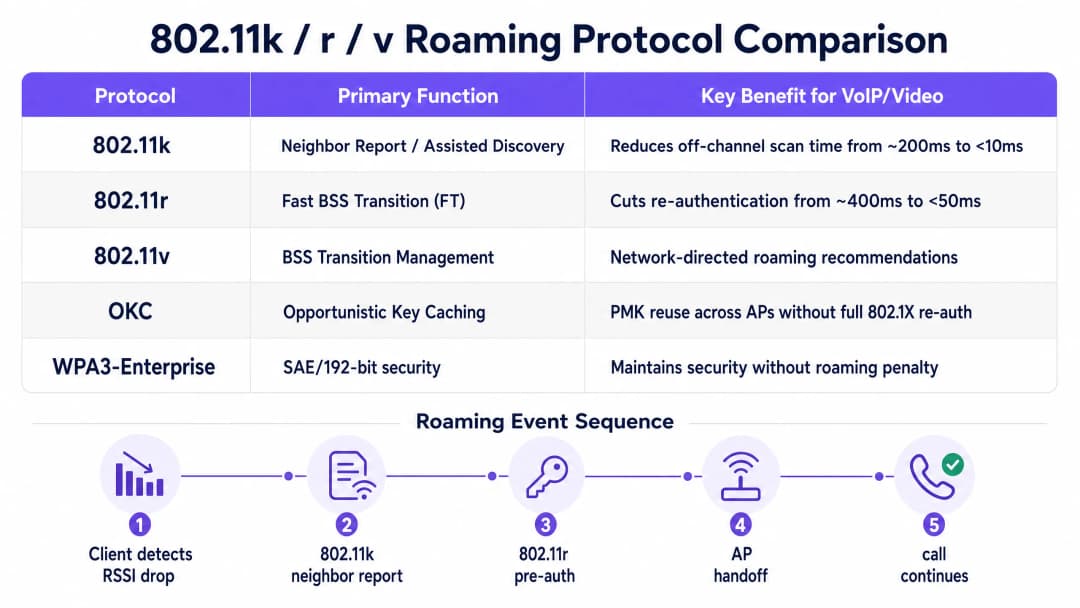
IEEE 802.11k: অ্যাসিস্টেড রোমিং অফ-চ্যানেল স্ক্যানিংয়ের প্রয়োজনীয়তা দূর করে। এটি ছাড়া, ক্লায়েন্টকে সাময়িকভাবে তার সক্রিয় চ্যানেল ছেড়ে প্রতিটি বিকল্প চ্যানেলে টিউন করতে হয়, প্রোব রিকোয়েস্ট পাঠাতে হয় এবং প্রতিক্রিয়ার জন্য অপেক্ষা করতে হয়—এই প্রক্রিয়ায় ২০০ms বা তার বেশি সময় লাগতে পারে。802.11k-এর মাধ্যমে, ক্লায়েন্ট তার বর্তমানে সংযুক্ত AP-এর কাছে একটি নেইবার রিপোর্টের অনুরোধ করে, যা আশেপাশের AP এবং তাদের অপারেটিং চ্যানেলগুলির একটি তালিকা প্রদান করে। এর ফলে ক্লায়েন্ট শুধুমাত্র সেই নির্দিষ্ট চ্যানেলগুলি স্ক্যান করে, যা আবিষ্কারের সময়কে ১০ms-এর নিচে নামিয়ে আনে。
IEEE 802.11r: ফাস্ট BSS ট্রানজিশন (FT) অথেন্টিকেশনের জটিলতা দূর করে। একটি সুরক্ষিত এন্টারপ্রাইজ পরিবেশে যেখানে 802.1X/EAP অথেন্টিকেশন ব্যবহৃত হয়, সেখানে প্রতিবার রোমিংয়ের সময় একটি সম্পূর্ণ RADIUS ইন্টারঅ্যাকশন শুরু হয়—তারযুক্ত নেটওয়ার্ক জুড়ে একাধিক রাউন্ড-ট্রিপের কারণে ৪০০ms或তার বেশি সময় লাগতে পারে। 802.11r প্রি-অথেন্টিকেশনের ধারণা প্রবর্তন করে: রোমিং হওয়ার আগেই ক্লায়েন্ট এবং ওয়্যার列স পরিকাঠামো পেয়ারওয়াইজ মাস্টার কি (PMK) সিকিউরিটি অ্যাসোসিয়েশন নিয়ে আলোচনা করে এবং তা ক্যাশ করে রাখে। FT দুটি মোডে কাজ করে—ওভার-দ্য-এয়ার (Over-the-Air, যেখানে ক্লায়েন্ট সরাসরি টার্গেট AP-এর সাথে আলোচনা করে) এবং ওভার-দ্য-ডিএস (Over-the-DS, যা তারযুক্ত ব্যাকবোনের মাধ্যমে বর্তমান AP হয়ে ফরওয়ার্ড করা হয়)। যেকোনো মোডেই এটি রি-অথেন্টিকেশন ধাপটিকে একটি একক লোকাল ৪-ওয়ে হ্যান্ডশেকে নামিয়ে আনে, যাতে ৫০ms-এরও কম সময় লাগে。
IEEE 802.11v: BSS ট্রানজিশন ম্যানেজমেন্ট (BTM) নেটওয়ার্ক কন্ট্রোল লেয়ারকে ক্লায়েন্টের রোমিং সিদ্ধান্তের ওপর সক্রিয়ভাবে প্রভাব ফেলতে সাহায্য করে। BTM-এর মাধ্যমে, AP ক্লায়েন্টকে অ্যাক্টিভ বা প্যাসিভ ট্রানজিশন ম্যানেজমেন্ট ফ্রেম পাঠাতে পারে, যা নেটওয়ার্কের তথ্য (যেমন AP ক্লায়েন্ট লোড, চ্যানেল ইউটিলাইজেশন বা ক্লায়েন্টের বর্তমান RSSI) এর ওপর ভিত্তি করে নির্দিষ্ট টার্গেট AP-এর সুপারিশ করে। এটি 'স্টিকি ক্লায়েন্ট' সমস্যা সমাধানের প্রধান উপায়, যেখানে ডিভাইসগুলি কাছাকাছি এবং শক্তিশালী সিগন্যাল থাকা সত্ত্বেও দুর্বল ও দূরের AP-এর সাথে সংযুক্ত থাকে。
সার্ভিস কোয়ালিটি (QoS) এবং WMM ম্যাপিং
ফাস্ট রোমিং প্রোটোকল চালু করা কেবল অর্ধেক কাজ সম্পন্ন করে। যদি গেস্ট ট্রাফিক, ফাইল ডাউনলোড বা সিস্টেম আপเดটের কারণে ওয়্যারলেস চ্যানেল জ্যাম থাকে, তবে রিয়েল-টাইম ভয়েস এবং ভিডিও প্যাকেটগুলি এখনও কিউ লেটেন্সির শিকার হতে পারে। এটি প্রতিরোধ করতে, IEEE 802.11e-ভিত্তিক WiFi মাল্টিমিডিয়া (WMM) প্রয়োগ করতে হবে এবং তারযুক্ত ও ওয়্যারলেস পরিকাঠামোর之间 এন্ড-টু-এন্ড ম্যাপিং করতে হবে。
WMM ট্রাফিককে চারটি ভিন্ন অ্যাক্সেস ক্যাটাগরিতে (AC) ভাগ করে অগ্রাধিকার দেয়, যা নিশ্চিত করে যে উচ্চ-优先级的 কিউগুলি ওয়্যারলেস মিডিয়ামে আরও ঘন ঘন অ্যাক্সেস পায়。
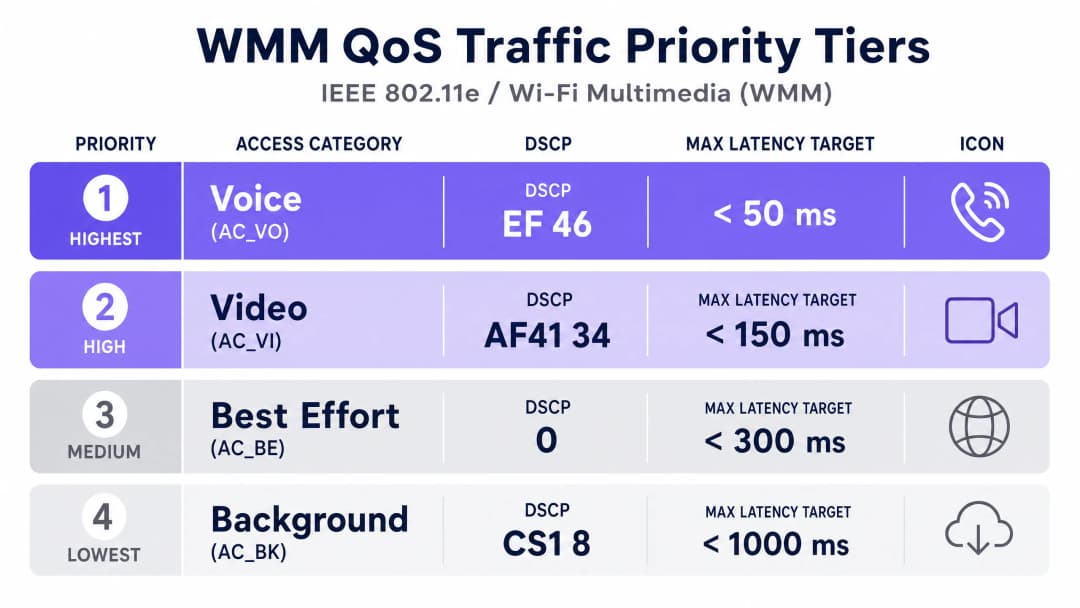
| WMM অ্যাক্সেস ক্যাটাগরি | প্রস্তাবিত DSCP | প্রস্তাবিত CoS/PCP | সাধারণ অ্যাপ্লিকেশন |
|---|---|---|---|
| AC_VO (ভয়েস) | EF (46) | 6 | VoIP (SIP/RTP), Teams Voice, Jabber |
| AC_VI (ভিডিও) | AF41 (34) | 5 | Zoom, Teams Video, IP ভিডিও |
| AC_BE (বেস্ট এফোর্ট) | 0 | 0 | ওয়েব ব্রাউজিং, ইমেল, সাধারণ স্টাফ ট্রাফিক |
| AC_BK (ব্যাকগ্রাউন্ড) | CS1 (8) | 1 | বড় ফাইল ট্রান্সফার, অ্যাপ আপডেট |
গুরুত্বপূর্ণ设计নোট: QoS এন্ড-টু-এন্ড কাজ করার জন্য, তারযুক্ত নেটওয়ার্ক পরিকাঠামোকে অবশ্যই ওয়্যারলেস অ্যাক্সেস点 (AP) থেকে আসা DSCP মার্কিং ট্রাস্ট করার জন্য কনফিগার করতে হবে। যদি মধ্যবর্তী সুইচ বা রাউটারগুলি DSCP ট্রাস্ট না করে, তবে তারা মার্কিংগুলি মুছে ফেলবে এবং সেগুলিকে বেস্ট এফোর্ট (0) হিসেবে পুনরায় লিখবে, যা এন্ড-টু-এন্ড অগ্রাধিকার প্রক্রিয়াকে নষ্ট করে দেবে。
আপনার নির্দিষ্ট সেটআপ নিয়ে কোনো প্রশ্ন আছে?
আমাদের টিম ৮০,০০০ ভেন্যুতে ভেন্যু অপারেটর, IT ম্যানেজার এবং নেটওয়ার্ক ইঞ্জিনিয়ারদের সাথে কাজ করে। একটি ২০ মিনিটের কল বুক করুন এবং আপনার মতো অন্যরা কীভাবে এর সমাধান করেছেন তা আমরা আপনাকে দেখাব।
ইমপ্লিমেন্টেশন গাইড

ধাপ ১: RF সেল ডিজাইন এবং সিগন্যাল থ্রেশহোল্ড
এন্টারপ্রাইজ ওয়্যারলেস স্থাপনার একটি সাধারণ ভুল হলো কেবল কভারেজের জন্য ডিজাইন করা, ক্যাপাসিটি এবং ভয়েস ডেনসিটির জন্য নয়। ভয়েস-গ্রেড ওয়্যারলেস নেটওয়ার্কের মূল প্রয়োজনীয়তা হলো 5 GHz ব্যান্ডে ফ্লোর প্ল্যানের সমস্ত স্থানে ন্যূনতম সিগন্যাল স্ট্রেন্থ -67 dBm নিশ্চিত করা, যা ২৫ dB বা তার বেশি সিগন্যাল-টু-নয়েজ রেশিও (SNR) প্রদান করে। AP স্থাপনের পরিকল্পনা এমনভাবে করুন যাতে সংলগ্ন সেলগুলি প্রায় ২০% ওভারল্যাপ করে, যা নিশ্চিত করে যে ক্লায়েন্ট তার বর্তমান সংযোগ রোমিং থ্রেশহোল্ডের নিচে নামার আগেই টার্গেট AP সনাক্ত করতে এবং তার সাথে প্রি-অথেন্টিকেট করতে পারে。
অসম পাওয়ার কনফিগারেশন এড়িয়ে চলুন। মোবাইল ক্লায়েন্ট ডিভাইসগুলি সাধারণত ১২ থেকে ১৫ dBm পাওয়ারে ট্রান্সমিট করে। যদি AP-এর ব্রডকাস্ট পাওয়ার ২০ dBm হয়, তবে ক্লায়েন্ট AP-এর প্যাকেটগুলি গ্রহণ করতে পারে, কিন্তু AP ক্লায়েন্টের দুর্বল রিটার্ন সিগন্যাল ডিকোড করতে পারে না, যার ফলে ওয়ান-ওয়ে অডিও和রোমিং ব্যর্থতা ঘটে। ক্লায়েন্টের ক্ষমতার সাথে মেলাতে 5 GHz AP-এর ট্রান্সমিট পাওয়ার ১৪ থেকে ১৭ dBm-এর মধ্যে সীমাবদ্ধ রাখুন。
ধাপ ২: SSID কনফিগারেশন এবং সিকিউরিটি পলিসি
আপনার কর্পোরেট স্টাফ ট্রাফিককে গেস্ট ট্রাফিক থেকে আলাদা রাখুন। পাবলিক ট্রাফিক পরিচালনা করতে এবং ফার্স্ট-পার্টি ডেটা সংগ্রহ করতে WiFi Analytics-এর সাথে যুক্ত Guest WiFi-এর মতো একটি ক্যাপティブ পোর্টাল সমাধান ব্যবহার করে আপনার গেস্ট নেটওয়ার্ককে একটি আইসোলেটেড VLAN-এ ম্যাপ করুন। আপনার অভ্যন্তরীণ কর্মীদের একটি সুরক্ষিত ডেডিকেটেড VLAN-এ ম্যাপ করুন。
স্টাফ SSID সুরক্ষিত করতে একটি সেন্ট্রাল RADIUS সার্ভার দ্বারা সমর্থিত WPA3-Enterprise (অথবা WPA2/WPA3 ট্রানজিশন মোড) ব্যবহার করুন। ক্লাউড-ভিত্তিক RADIUS অথেন্টিকেশন স্থাপনের বিস্তারিত নির্দেশাবলীর জন্য, কীভাবে Cloud RADIUS দিয়ে 802.1X অথেন্টিকেশন বাস্তবায়ন করবেন দেখুন। এই SSID-এ 802.11k, 802.11r (Over-the-Air FT), এবং 802.11v BTM চালু করুন। লেগাসি ডেটা রেট (802.11b রেট: ১, ২, ৫.৫, ১১ Mbps) নিষ্ক্রিয় করুন এবং মিনিমাম বিটরেট ১২ Mbps বা তার বেশি সেট করুন। এটি ক্লায়েন্টকে কম গতিতে দূরের AP-এর সাথে লেগে থাকার পরিবর্তে সক্রিয়ভাবে রোমিং করতে বাধ্য করে。
ধাপ ৩: তারযুক্ত পরিকাঠামো এবং QoS ম্যাপিং
রিয়েল-টাইম ট্রাফিককে ডেডিকেটেড VLAN-এ ভাগ করুন (যেমন, ভয়েসের জন্য VLAN 10, ভিডিওর জন্য VLAN 20)। ওয়্যারলেস অ্যাক্সেস পয়েন্টের সাথে সংযুক্ত সমস্ত সুইচ পোর্টকে DSCP মার্কিং ট্রাস্ট করার জন্য কনফিগার করুন। Cisco Catalyst সুইচে, এটি সাধারণত AP-মুখী ইন্টারফেসে qos trust dscp হিসেবে কনফিগার করা হয়। আপনার WAN এজে রাউটার এবং ফায়ারওয়ালে, DSCP 46 (EF) ট্রাফিককে একটি স্ট্রিক্ট প্রায়োরিটি কিউতে (Strict Priority Queue) রাখার জন্য ইগ্রেস কিউয়িং পলিসি কনফিগার করুন, যা রিয়েল-টাইম ভয়েসের জন্য মোট WAN ব্যান্ডউইথের ৩০% পর্যন্ত বরাদ্দ করে, যাতে ট্রাফিকের পিক আওয়ারে ব্যান্ডউইথ শেষ না হয়ে যায়。
এন্টারপ্রাইজ-গ্রেড AP স্থাপনের কৌশল এবং হার্ডওয়্যার নির্বাচনের একটি বিস্তৃত ওভারভিউয়ের জন্য, Cisco Wireless APs: 2026 Guide to Products & Deployment বিস্তারিত ভেন্ডর-নির্দিষ্ট গাইড প্রদান করে। আপনার রোমিং আর্কিটেকচারের পরিপূরক নেটওয়ার্ক অ্যাক্সেস কন্ট্রোল পলিসির জন্য, 10 Best Network Access Control (NAC) Solutions for 2026 দেখুন。
বেস্ট প্র্যাকটিস
ঘন নেটওয়ার্ক পরিবেশে, নন-ওভারল্যাপিং চ্যানেলের সংখ্যা সর্বাধিক করতে এবং কো-চ্যানেল ইন্টারফারেন্স দূর করতে ২০ MHz চ্যানেল উইডথ ব্যবহার করে একটি মাল্টি-চ্যানেল আর্কিটেকচার স্থাপন করুন। 5 GHz ব্যান্ডে, এটি ইইউ-তে ২৫টি পর্যন্ত নন-ওভারল্যাপিং চ্যানেল প্রদান করে, যা সংলগ্ন AP-গুলির মধ্যে ইন্টারফারেন্স উল্লেখযোগ্যভাবে হ্রাস করে。
যদিও 802.11r হলো ফাস্ট রোমিংয়ের গোল্ড স্ট্যান্ডার্ড, কিছু লেগাসি এন্টারপ্রাইজ ক্লায়েন্ট—বিশেষ করে পুরানো বারকোড স্ক্যানার, DECT হ্যান্ডসেট বা এমবেডেড IoT ডিভাইস—এটি সমর্থন করে না। একটি ব্যাকআপ মেকানিজম হিসেবে অপরচুনিস্টিক কি ক্যাশিং (OKC) চালু করুন। OKC ক্লায়েন্ট এবং AP-কে একটি সম্পূর্ণ 802.1X রি-অথেন্টিকেশন ছাড়াই একাধিক AP-এর মধ্যে পূর্বে তৈরি করা PMK পুনরায় ব্যবহার করার অনুমতি দেয়, যা প্রোটোকল স্তরে কোনো পরিবর্তন ছাড়াই নন-802.11r ক্লায়েন্টদের জন্য ফাস্ট রোমিং প্রদান করে。
পুরো ফ্লোর প্ল্যান জুড়ে সেকেন্ডারি কভারেজ (দ্বিতীয় সেরা AP থেকে সিগন্যাল) -72 dBm বা তার বেশি কিনা তা যাচাই করতে Ekahau বা AirMagnet-এর মতো এন্টারপ্রাইজ-গ্রেড সার্ভে টুল ব্যবহার করে নিয়মিত অ্যাক্টিভ সাইট সার্ভে করুন। এটি ওয়্যারলেস পরিবেশ নির্বিঘ্ন রোমিং সমর্থন করার সবচেয়ে নির্ভরযোগ্য সূচক。
জटिल বহুতল ভবন বিশিষ্ট শিক্ষা এবং পাবলিক সেক্টর পরিবেশের জন্য, WiFi in Schools: The 2026 Administrator & IT Guide-এ বর্ণিত নীতিগুলি একটি বিস্তৃত ক্যাম্পাস পরিবেশে রোমিং পরিচালনার জন্য অতিরিক্ত তথ্য প্রদান করে。
ট্রাবলশুটিং এবং ঝুঁকি প্রশমন
স্টিকি ক্লায়েন্ট সমস্যা
সবচেয়ে সাধারণ রোমিং ব্যর্থতার ধরন হলো স্টিকি ক্লায়েন্ট: কাছাকাছি একটি শক্তিশালী AP থাকা সত্ত্বেও ডিভাইসটি দূরে থাকা একটি দুর্বল সিগন্যালের AP-এর সাথে সংযুক্ত থাকে। এটি সাধারণত AP-এর অতিরিক্ত ট্রান্সমিট পাওয়ার (যা দূরের AP-কে কার্যকর মনে করায়) বা লেগাসি কম ডেটা রেটের উপস্থিতির (যা ক্লায়েন্টকে রোমিং করার পরিবর্তে অত্যন্ত কম থ্রুপুটে সংযুক্ত থাকতে দেয়) কারণে ঘটে। এর সমাধান তিনটি ধাপে করা যায়: 5 GHz ট্রান্সমিট পাওয়ার কমিয়ে ১৪ dBm-এ আনা, মিনিমাম বিটরেট ১২ Mbps বা ২৪ Mbps-এ উন্নীত করা এবং 802.11v BTM চালু করা নিশ্চিত করে একটি সক্রিয় RSSI স্টিয়ারিং থ্রেশহোল্ড সেট করা (যখন ক্লায়েন্টের RSSI -৭৫ dBm-এর নিচে নেমে যায় তখন স্টিয়ারিং শুরু করা)।
VoIP কলে ওয়ান-ওয়ে অডিও
ওয়ান-ওয়ে অডিও—অর্থাৎ এক পক্ষ শুনতে পাচ্ছে কিন্তু অন্য পক্ষ শুনতে পাচ্ছে না—হলো ট্রান্সমিট পাওয়ারের অসঙ্গতির একটি সাধারণ লক্ষণ। AP উচ্চ পাওয়ারে (যেমন ২৩ dBm) ব্রডকাস্ট করে, কিন্তু মোবাইল ক্লায়েন্ট কম পাওয়ারে (যেমন ১২ dBm) ট্রান্সmit করে। AP-এর প্যাকেটগুলি ক্লায়েন্টের কাছে পৌঁছায়, কিন্তু ক্লায়েন্টের প্যাকেটগুলি এতই দুর্বল হয় যে AP তা ডিকোড করতে পারে না। এর সমাধান সহজ: নেটওয়ার্কের সবচেয়ে দুর্বল ক্লায়েন্ট ডিভাইসের সর্বোচ্চ ক্ষমতার সাথে মেলাতে AP-এর ট্রান্সমিট পাওয়ার কমিয়ে দিন。
802.11r সামঞ্জস্যতা সমস্যা
某些传统设备无法解析信标帧中的 802.11r 快速过渡信息元素 (IE),导致它们完全拒绝该 SSID。解决方案是维护一个禁用 802.11r 的专用传统 SSID,利用标准 WPA2-PSK 结合 OKC 进行快速漫游。VoIP ক্লায়েন্ট চালানো আধুনিক স্টাফ ডিভাইসগুলিকে WPA3-Enterprise 和 802.11r 启用的独立专用 SSID 迁移。
ROI 与业务影响
বাস্তব কেস স্টাডি ১: একটি ৪৫০-রুমের কনফারেন্স হোটেল
একটি ৪৫০-রুম এবং ১২টি কনফারেন্স সুইট বিশিষ্ট বড় কনফারেন্স হোটেল তাদের ব্যাঙ্কোয়েট এবং ইভেন্ট টিমের জন্য একটি রোমিং-অপ্টিমাইজড স্টাফ WiFi নেটওয়ার্ক স্থাপন করেছে, যারা রুমের সাজসজ্জা সমন্বয় করতে এবং রান্নাঘরের সাথে যোগাযোগ করতে মোবাইল VoIP হ্যান্ডসেটের ওপর নির্ভর করে। অপ্টিমাইজেশনের আগে, কর্মীরা কনফারেন্স উইং এবং সার্ভিস করিডোরের মধ্যে চলাচলের সময় ঘনঘন কল ড্রপের অভিযোগ করেছিলেন, যার ফলে সমন্বয়ে বিলম্ব এবং গ্রাহকদের অসন্তুষ্টি তৈরি হতো。
স্থাপনার কাজের মধ্যে ছিল ৩৮个吸顶式 AP-এর অবস্থান পরিবর্তন করা যাতে সমস্ত সেলের প্রান্তে -67 dBm কভারেজ নিশ্চিত করা যায়, স্টাফ SSID-এ 802.11k/r/v চালু করা এবং DSCP EF マーク সহ একটি ডেডিকেটেড ভয়ে斯 VLAN কনফিগার করা। স্থাপনের পরের পরিমাপে দেখা গেছে যে রোমিং হ্যান্ডওভার লেটেন্সি গড়ে ৬৮০ms থেকে কমে ৪২ms-এ নেমে এসেছে। প্রথম মাসের মধ্যে, কল ড্রপ সংক্রান্ত IT সাপোর্ট টিকিটের সংখ্যা ৬৩% কমে গেছে। অপারেশনস ম্যানেজার জানিয়েছেন যে ইভেন্ট সমন্বয়ের গতি উল্লেখযোগ্যভাবে বৃদ্ধি পেয়েছে এবং প্রতি ইভেন্টে রুম রেডি করার সময় গড়ে ৮ মিনিট কমেছে。
বাস্তব কেস স্টাডি ২: মাল্টি-স্টোর রিটেইল চেইন (১২০টি স্টোর)
১২০টি স্টোর বিশিষ্ট একটি জাতীয় রিটেইল চেইন তাদের স্টোরে হ্যান্ডহেল্ড বারকোড স্ক্যানার এবং মোবাইল POS টার্মিনাল স্থাপন করেছে, যার সবকটিই একটি শেয়ার্ড এন্টারপ্রাইজ WiFi নেটওয়ার্কের ওপর নির্ভর করে। বিদ্যমান নেটওয়ার্কটি কেবল কভারেজের কথা মাথায় রেখে ডিজাইন করা হয়েছিল, কোনো QoS পলিসি ছিল না এবং AP-গুলি সর্বোচ্চ ট্রান্সমিট পাওয়ারে চলছিল। এর ফলে, কর্মীরা যখন আইলগুলির মধ্যে চলাচল করতেন, তখন স্ক্যানারগুলি প্রায়শই লেনদেনের মাঝপথে সংযোগ হারিয়ে ফেলত, যার ফলে POS টাইমআউট হতো এবং ম্যানুয়াল রি-অথেন্টিকেশনের প্রয়োজন হতো。
সমাধান প্রকল্পের মধ্যে ছিল প্রেডিক্টিভ প্ল্যানিং সফটওয়্যার ব্যবহার করে একটি সম্পূর্ণ RF রি-ডিজائن করা, ১২ Mbps ন্যূনতম বিটরেট প্রয়োগ করা, লেগাসি স্ক্যানারগুলির জন্য OKC ব্যাকআপ সহ 802.11r চালু করা এবং ইনভেন্টরি ম্যানেজমেন্ট অ্যাপ্লিকেশন ট্রাফিকের জন্য DSCP AF41 মার্কিং স্থাপন করা। ১২০টি স্টোরে এটি চালুর পর, লেনদেন টাইমআউটের হার ৭৮% কমে গেছে এবং রি-অথেন্টিকেশন লেটেন্সি দূর হওয়ার কারণে আনুমানিক উৎপাদনশীলতা বৃদ্ধি পেয়েছে প্রতি স্টোরে প্রতি সপ্তাহে প্রায় ১৪ কর্মঘণ্টা—যা বড় আকারের অপারেশনে একটি উল্লেখযোগ্য খরচ সাশ্রয়。
সাফল্য পরিমাপ: কী পারফরম্যান্স ইন্ডিকেটর (KPI)
您的漫游优化部署效果验证,请使用您的无线网络管理平台监控以下 KPI:
| KPI | বেসলাইন (অপ্টিমাইজ না করা) | লক্ষ্য (অপ্টিমাইজ করা) | পরিমাপের পদ্ধতি |
|---|---|---|---|
| রোমিং হ্যান্ডওভার লেটেন্সি | 400 – 1200 ms | < 50 ms | WLAN 控制器漫游事件日志 |
| VoIP MOS স্কোর | < 3.5 (খারাপ) | > 3.9 (ভালো) | ソフトフォン診断(Teams、Jabber) |
| প্যাকেট লস | 3 – 8% | < 0.5% | WLAN 控制器单客户端统计 |
| জিটার | 20 – 50 ms | < 10 ms | WLAN 控制器单客户端统计 |
| IT সাপোর্ট টিকিট (WiFi) | বেসলাইন সংখ্যা | ৪০% থেকে ৬৫% হ্রাস | ITSM 平台(ServiceNow、Jira) |
একটি শক্তিশালী, স্ট্যান্ডার্ড-ভিত্তিক রোমিং আর্কিটেকচার তৈরি করার মাধ্যমে, এন্টারপ্রাইজ IT টিমগুলি রিঅ্যাক্টিভ ট্রাবলশুটিং থেকে প্রোঅ্যাক্টিভ ক্যাপাসিটি ম্যানেজমেন্টে স্থানান্তরিত হতে পারে, যা নিশ্চিত করে যে ওয়্যারলেস নেটওয়ার্কটি সর্বদা ব্যবসায়িক বৃদ্ধির সহায়ক হবে, কোনো বাধা নয়。
মূল সংজ্ঞাসমূহ
IEEE 802.11r (Fast BSS Transition / FT)
802.11 স্ট্যান্ডার্ডের একটি IEEE সংশোধনী যা রোমিং ইভেন্ট ঘটার আগে একটি ক্লায়েন্ট এবং একটি টার্গেট AP-এর মধ্যে প্রি-অথেন্টিকেশন সক্ষম করে। AP গ্রুপ জুড়ে পেয়ারওয়াইজ মাস্টার কি (PMK) ক্যাশ করার মাধ্যমে, 802.11r রোমিংয়ের সময় একটি সম্পূর্ণ RADIUS এক্সচেঞ্জের প্রয়োজনীয়তা দূর করে, যা হ্যান্ডঅফ লেটেন্সি ৪০০ms+ থেকে কমিয়ে ৫০ms-এর নিচে নিয়ে আসে।
IT টিমগুলি VoIP বা ভিডিওর জন্য এন্টারপ্রাইজ WLAN কনফিগার করার সময় এটির মুখোমুখি হয়। এটি WLAN কন্ট্রোলারে প্রতি-SSID ভিত্তিতে চালু করতে হবে এবং এর জন্য মোবিলিটি গ্রুপের সমস্ত AP-কে একই PMK সিকিউরিটি অ্যাসোসিয়েশন (PMKSA) ক্যাশ শেয়ার করতে হবে।
IEEE 802.11k (Neighbour Reports / Assisted Roaming)
একটি IEEE সংশোধনী যা একটি ওয়্যারলেস ক্লায়েন্টকে তার বর্তমানে সংযুক্ত AP থেকে একটি নেইবার রিপোর্টের অনুরোধ করার অনুমতি দেয়। রিপোর্টে সংলগ্ন AP, তাদের BSSID, অপারেটিং চ্যানেল এবং সিগন্যালের বৈশিষ্ট্যগুলির একটি তালিকা থাকে, যা ক্লায়েন্টকে একটি সম্পূর্ণ অফ-চ্যানেল স্ক্যান করার পরিবর্তে কেবল প্রাসঙ্গিক চ্যানেলগুলি স্ক্যান করার অনুমতি দেয়।
বেশিরভাগ এন্টারপ্রাইজ WLAN প্ল্যাটফর্মে (Cisco, Aruba, Juniper Mist) ডিফল্টরূপে চালু থাকে। IT টিমগুলির যাচাই করা উচিত যে এটি সক্রিয় আছে এবং নেইবার রিপোর্টটি সঠিকভাবে পূর্ণ হচ্ছে কিনা, বিশেষ করে DFS চ্যানেল বা উচ্চ AP ঘনত্বযুক্ত পরিবেশে।
IEEE 802.11v (BSS Transition Management / BTM)
একটি IEEE সংশোধনী যা নেটওয়ার্ক পরিকাঠামোকে BSS ট্রানজিশন ম্যানেজমেন্ট ফ্রেমের মাধ্যমে একটি ওয়্যারলেস ক্লায়েন্টকে রোমিংয়ের সুপারিশ পাঠানোর অনুমতি দেয়। AP লোড, সিগন্যালের মান বা নেটওয়ার্ক পলিসির ওপর ভিত্তি করে নির্দিষ্ট টার্গেট AP-এর পরামর্শ দিতে পারে। ক্লায়েন্টরা এই সুপারিশগুলি গ্রহণ বা উপেক্ষা করতে স্বাধীন।
স্টিকি ক্লায়েন্টদের বিরুদ্ধে লড়াই করার প্রাথমিক হাতিয়ার। IT টিমগুলি WLAN কন্ট্রোলারে BTM থ্রেশহোল্ড (যেমন, RSSI -৭৫ dBm-এর নিচে নেমে গেলে ক্লায়েন্টদের স্টিয়ার করা) কনফিগার করে। মনে রাখবেন যে কিছু ক্লায়েন্ট ডিভাইস, বিশেষ করে পুরানো Android এবং Windows ডিভাইস, BTM ফ্রেমগুলি উপেক্ষা করতে পারে।
WMM (WiFi Multimedia) / IEEE 802.11e
IEEE 802.11e-এর ওপর ভিত্তি করে একটি WiFi অ্যালায়েন্স সার্টিফিকেশন যা বিভিন্ন কনটেনশন প্যারামিটার সহ চারটি ওয়্যারলেস অ্যাক্সেস ক্যাটাগরি (AC_VO, AC_VI, AC_BE, AC_BK) সংজ্ঞায়িত করে। উচ্চ-অগ্রাধিকারের কিউগুলির ব্যাকঅফ ইন্টারভাল কম থাকে, যা তাদের ওয়্যারলেস মিডিয়ামে পরিসংখ্যানগতভাবে আরও ঘন ঘন অ্যাক্সেস দেয়।
WMM বেশিরভাগ এন্টারপ্রাইজ AP-তে ডিফল্টরূপে চালু থাকে তবে কার্যকর হওয়ার জন্য এটিকে এন্ড-টু-এন্ড DSCP মার্কিং এবং তারযুক্ত QoS পলিসির সাথে যুক্ত করতে হবে। তারযুক্ত দিকে DSCP ট্রাস্ট ছাড়া, WMM ওয়্যারলেস সেগমেন্টের বাইরে কোনো সুবিধা প্রদান করে না।
DSCP (Differentiated Services Code Point)
IP প্যাকেট হেডারের একটি ৬-বিট ফিল্ড (ToS/DSCP বাইটের অংশ) যা লেয়ার ৩-এ নেটওয়ার্ক ট্রাফিককে শ্রেণিবদ্ধ এবং অগ্রাধিকার দিতে ব্যবহৃত হয়। DSCP EF (এক্সপেডিটেড ফরওয়ার্ডিং, মান ৪৬) হলো VoIP ট্রাফিকের জন্য স্ট্যান্ডার্ড মার্কিং; DSCP AF41 (অ্যাসুরড ফরওয়ার্ডিং, মান ৩৪) ভিডিও কনফারেন্সিংয়ের জন্য ব্যবহৃত হয়।
IT টিমগুলিকে অবশ্যই সোর্সে (সফটফোন ক্লায়েন্ট, IP ফোন বা WLAN কন্ট্রোলার) DSCP মার্কিং কনফিগার করতে হবে এবং নিশ্চিত করতে হবে যে সমস্ত মধ্যবর্তী সুইচ এবং রাউটারে DSCP ট্রাস্ট চালু আছে। ট্রাস্ট ছাড়া, প্রথম আনট্রাস্টেড হপ-এ DSCP মানগুলি ০ (বেস্ট এফোর্ট) এ ওভাররাইট হয়ে যায়।
RSSI (Received Signal Strength Indicator)
একটি রিসিভড রেডিও সিগন্যালের পাওয়ার লেভেলের পরিমাপ, যা dBm (১ মিলিওয়াটের সাপেক্ষে ডেসিবেল) এ প্রকাশ করা হয়। এন্টারপ্রাইজ WiFi-এ, RSSI হলো ক্লায়েন্ট ডিভাইসগুলির দ্বারা রোমিং শুরু করার সময় নির্ধারণের জন্য ব্যবহৃত প্রাথমিক মেট্রিক। ভয়েস অ্যাপ্লিকেশনের জন্য একটি সাধারণ রোমিং থ্রেশহোল্ড হলো -৭০ থেকে -৭৫ dBm।
IT টিমগুলি কভারেজ ডিজাইন যাচাই করতে WLAN কন্ট্রোলার ড্যাশবোর্ড এবং সাইট সার্ভে টুল থেকে RSSI ডেটা ব্যবহার করে। ভয়েস-গ্রেড কভারেজের জন্য গুরুত্বপূর্ণ থ্রেশহোল্ড হলো -67 dBm; এই স্তরের নিচে, SNR ২৫ dB-এর নিচে নেমে যায় এবং প্যাকেট এরর রেট উল্লেখযোগ্যভাবে বৃদ্ধি পায়।
OKC (Opportunistic Key Caching)
একটি ভেন্ডর-মালিকানাধীন ফাস্ট রোমিং মেকানিজম (IEEE 802.11标准ে সংজ্ঞায়িত নয়) যা একটি ওয়্যারলেস ক্লায়েন্টকে একটি নতুন AP-তে রোমিং করার সময় পূর্বে তৈরি করা পেয়ারওয়াইজ মাস্টার কি (PMK) পুনরায় ব্যবহার করার অনুমতি দেয়, যা একটি সম্পূর্ণ 802.1X RADIUS রি-অথেন্টিকেশন এড়িয়ে যায়। OKC-এর জন্য WLAN কন্ট্রোলারকে মোবিলিটি গ্রুপের সমস্ত AP-তে PMK বিতরণ করতে হয়।
OKC হলো লেগাসি ডিভাইসগুলির জন্য প্রস্তাবিত ফাস্ট-রোমিং ব্যাকআপ যা 802.11r সমর্থন করে না। এটি প্রায় ১০০-২০০ms-এর রোমিং লেটেন্সি প্রদান করে - যা 802.11r-এর ৫০ms-এর কম গতির চেয়ে ধীর, তবে একটি সম্পূর্ণ RADIUS এক্সচেঞ্জের চেয়ে উল্লেখযোগ্যভাবে দ্রুত। সর্বোত্তম পারফরম্যান্সের জন্য 802.11k-এর পাশাপাশি লেগাসি SSID-গুলিতে OKC চালু করুন।
Sticky Client
একটি ওয়্যারলেস ক্লায়েন্ট ডিভাইস যা কাছাকাছি, শক্তিশালী AP উপলব্ধ থাকা সত্ত্বেও তার আসল AP-এর সাথে সংযুক্ত থাকে। স্টিকি ক্লায়েন্ট সাধারণত AP-এর উচ্চ ট্রান্সমিট পাওয়ার (যা দূরের AP-কে কার্যকর মনে করায়), লেগাসি কম ডেটা রেটের উপস্থিতি বা ক্লায়েন্ট ডিভাইস দ্বারা 802.11v BTM স্টিয়ারিং সুপারিশ উপেক্ষা করার কারণে ঘটে।
এন্টারপ্রাইজ পরিবেশে VoIP-এর মান কমে যাওয়ার সবচেয়ে সাধারণ কারণ হলো স্টিকি ক্লায়েন্ট। IT টিমগুলি WLAN কন্ট্রোলারে ক্লায়েন্ট RSSI ডেটার সাথে ডিভাইসের ফিজিক্যাল লোকেশনের তুলনা করে স্টিকি ক্লায়েন্ট সনাক্ত করে। এর সমাধানের মধ্যে রয়েছে AP ট্রান্সমিট পাওয়ার কমানো, মিনিমাম বিটরেট বাড়ানো এবং সক্রিয় 802.11v BTM থ্রেশহোল্ড চালু করা।
MOS (Mean Opinion Score)
একটি ভয়েস কলের অনুভূত মান মূল্যায়নের জন্য একটি স্ট্যান্ডার্ডাইজড মেট্রিক, যা ১ (সবচেয়ে খারাপ) থেকে ৫ (সবচেয়ে ভালো) স্কেলে স্কোর করা হয়。৪.০-এর উপরে একটি MOS স্কোর চমৎকার বলে মনে করা হয়; ৩.৫–৪.০ গ্রহণযোগ্য; ৩.৫-এর নিচে বেশিরভাগ ব্যবহারকারীর কাছে খারাপ বলে মনে হয়। MOS লেটেন্সি, জিটার এবং প্যাকেট লসের পরিমাপ থেকে E-মডেল অ্যালগরিদম (ITU-T G.107) ব্যবহার করে গণনা করা হয়।
IT টিমগুলি এন্টারপ্রাইজ WiFi নেটওয়ার্কে VoIP-এর মান যাচাই করার জন্য প্রাথমিক KPI হিসেবে MOS স্কোর ব্যবহার করে। বেশিরভাগ এন্টারপ্রাইজ সফটফোন ক্লায়েন্টে (Microsoft Teams, Cisco Jabber) বিল্ট-ইন কল কোয়ালিটি ডায়াগনস্টিকস অন্তর্ভুক্ত থাকে যা MOS স্কোর রিপোর্ট করে, যা এটিকে একটি ব্যবহারিক বাস্তব-জগতের পরিমাপের হাতিয়ার করে তোলে।
সমাধানকৃত উদাহরণসমূহ
একটি ৪৫০-রুমের কনফারেন্স হোটেল তার ব্যাঙ্কোয়েট এবং ইভেন্ট টিমের জন্য মোবাইল VoIP হ্যান্ডসেট স্থাপন করছে। কর্মীরা প্রায়শই কনফারেন্স সুইট, সার্ভিস করিডোর এবং রান্নাঘরের মধ্যে চলাচল করেন। বিদ্যমান WiFi নেটওয়ার্কটি WPA2-PSK ব্যবহার করে এবং AP-গুলি সর্বোচ্চ ট্রান্সমিট পাওয়ারে চলছে। কর্মীরা প্রতিবার জোনের মধ্যে চলাচলের সময় কল ড্রপের কথা জানান। নেটওয়ার্ক আর্কিটেক্টের কীভাবে এই সমাধান করা উচিত?
এই সমাধানের জন্য একটি চার-ধাপের পদ্ধতির প্রয়োজন। ধাপ ১ হলো RF রি-ডিজাইন: একটি অ্যাক্টিভ সাইট সার্ভে পরিচালনা করুন এবং 5 GHz ব্যান্ডে সমস্ত সেলের প্রান্তে ন্যূনতম -67 dBm সিগন্যাল অর্জনের জন্য AP-গুলির অবস্থান পরিবর্তন করুন বা নতুন AP যোগ করুন, যেখানে সংলগ্ন AP-গুলির মধ্যে ২০% সেল ওভারল্যাপ থাকবে। VoIP হ্যান্ডসেটের ট্রান্সমিট ক্ষমতার (সাধারণত ১২-১৫ dBm) সাথে মেলাতে 5 GHz রেডিওতে AP ট্রান্সমিট পাওয়ার কমিয়ে ১৪-১৭ dBm করুন। ধাপ ২ হলো SSID এবং সিকিউরিটি মাইগ্রেশন: একটি ক্লাউড RADIUS সার্ভার দ্বারা সমর্থিত WPA2/WPA3-Enterprise দিয়ে সুরক্ষিত একটি ডেডিকেটেড 'Staff-Voice' SSID তৈরি করুন। 802.11k (নেইবার রিপোর্ট), 802.11r (ওভার-দ্য-এয়ার ফাস্ট BSS ট্রানজিশন), এবং 802.11v BTM চালু করুন। মিনিমাম বিটরেট ১২ Mbps সেট করুন এবং সমস্ত লেগাসি 802.11b রেট নিষ্ক্রিয় করুন। ধাপ ৩ হলো QoS কনফিগারেশন: একটি ডেডিকেটেড ভয়েস VLAN (যেমন, VLAN 10) তৈরি করুন এবং VoIP হ্যান্ডসেট সাবনেটকে এই VLAN-এ ম্যাপ করুন। সমস্ত SIP/RTP ট্রাফিকের জন্য DSCP EF (46) মার্কিং কনফিগার করুন। AP-এর সাথে সংযুক্ত সমস্ত সুইচ পোর্টে DSCP ট্রাস্ট চালু করুন। DSCP 46 ট্রাফিকের জন্য WAN এজে একটি স্ট্রিক্ট প্রায়োরিটি কিউ (Strict Priority Queue) কনফিগার করুন। ধাপ ৪ হলো ভ্যালিডেশন: হ্যান্ডঅফ লেটেন্সি ক্রমাগত ৫০ms-এর নিচে রয়েছে কিনা তা নিশ্চিত করতে WLAN কন্ট্রোলারের রোমিং ইভেন্ট লগ ব্যবহার করুন। ৩.৯-এর উপরে MOS স্কোর এবং ১০ms-এর নিচে জিটার যাচাই করতে একটি সফটফোন ডায়াগনস্টিক চালান (অথবা Ekahau Sidekick-এর মতো একটি ডেডিকেটেডツール ব্যবহার করুন)।
একটি জাতীয় রিটেইল চেইন ১২০টি স্টোর জুড়ে একটি নতুন ইনভেন্টরি ম্যানেজমেন্ট সিস্টেম চালু করছে। সিস্টেমটি হ্যান্ডহেল্ড Android স্ক্যানার ব্যবহার করে যা WiFi-এর মাধ্যমে একটি ক্লাউড-ভিত্তিক WMS-এর সাথে যোগাযোগ করে। IT টিম আবিষ্কার করেছে যে কিছু স্ক্যানার পুরানো ফার্মওয়্যারে চলছে যা IEEE 802.11r সমর্থন করে না। সিকিউরিটি বা পারফরম্যান্সের সাথে আপস না করে আধুনিক এবং লেগাসি উভয় ডিভাইসকে সমর্থন করার জন্য নেটওয়ার্ক আর্কিটেক্টের কীভাবে রোমিং কৌশল ডিজাইন করা উচিত?
সমাধানটি হলো একটি ডুয়াল-SSID আর্কিটেকচার। SSID 1 ('Staff-Modern') WPA3-Enterprise, 802.11k চালু, 802.11r (FT) চালু, 802.11v BTM চালু এবং ১২ Mbps-এর মিনিমাম বিটরেট সহ কনফিগার করা হয়েছে。এই SSID-টি সমস্ত আধুনিক Android স্ক্যানার (802.11r সমর্থনকারী ফার্মওয়্যার সংস্করণ), মোবাইল POS টার্মিনাল এবং স্টাফ স্মার্টফোন দ্বারা ব্যবহৃত হয়। SSID 2 ('Staff-Legacy') WPA2-Enterprise, 802.11k চালু, 802.11r নিষ্ক্রিয়, OKC (অপরচুনিস্টিক কি ক্যাশিং) চালু এবং ১২ Mbps-এর মিনিমাম বিটরেট সহ কনফিগার করা হয়েছে। এই SSID-টি একচেটিয়াভাবে সেই লেগাসি স্ক্যানারগুলি দ্বারা ব্যবহৃত হয় যা 802.11r FT ইনফরমেশন এলিমেন্ট পার্স করতে পারে না। উভয় SSID একই ভয়েস/ডেটা VLAN-এ ম্যাপ করে এবং WMS অ্যাপ্লিকেশন ট্রাফিকের জন্য অভিন্ন DSCP AF41 মার্কিং প্রয়োগ করে। কোন ডিভাইস কোন SSID-এ অথেন্টিকেট করতে পারবে তা প্রয়োগ করতে RADIUS সার্ভার ডিভাইস সার্টিফিকেট বা MAC-ভিত্তিক পলিসি ব্যবহার করে। তারযুক্ত পরিকাঠামো কনফিগারেশন (DSCP ট্রাস্ট, VLAN সেগমেন্টেশন) উভয় SSID-এর জন্য অভিন্ন।
একটি বড় কনফারেন্স সেন্টার ৩,০০০ জন দর্শকের উপস্থিতিতে একটি বড় ইভেন্টের আয়োজন করছে। ভেন্যুর IT টিম চিন্তিত যে উচ্চ-ঘনত্বের গেস্ট WiFi ট্রাফিক ইভেন্টের AV টিমের ব্যবহৃত লাইভ ভিডিও স্ট্রিমিংয়ের মান কমিয়ে দেবে, যারা কর্পোরেট WiFi নেটওয়ার্কের মাধ্যমে 4K ভিডিও ফিড ট্রান্সমিট করছে। নেটওয়ার্ক আর্কিটেক্টের কীভাবে AV ট্রাফিক আলাদা এবং সুরক্ষিত করা উচিত?
সমাধানটির জন্য কঠোর ট্রাফিক আইসোলেশন এবং QoS প্রয়োগের প্রয়োজন। ধাপ ১: AV টিমকে একটি আইসোলেটেড VLAN (যেমন, VLAN 20)-এ ম্যাপ করা একটি ডেডিকেটেড 'AV-Production' SSID-এ আলাদা করুন। এই SSID-টি কেবল 5 GHz হওয়া উচিত, সাথে WPA2/WPA3-Enterprise অথেন্টিকেশন থাকতে হবে। ধাপ ২: AV VLAN থেকে উৎপন্ন সমস্ত ট্রাফিকের জন্য DSCP AF41 (34) মার্কিং কনফিগার করুন। WLAN কন্ট্রোলারে, একটি ট্রাফিক শেপিং রুল তৈরি করুন যা AV VLAN-কে WMM AC_VI (ভিডিও) অ্যাক্সেস ক্যাটাগরিতে ম্যাপ করে। ধাপ ৩: গেস্ট WiFi SSID-এ প্রতি-SSID ব্যান্ডউইথ রিজার্ভেশন প্রয়োগ করুন যাতে পৃথক ক্লায়েন্ট থ্রুপুট সীমাবদ্ধ করা যায়, যা কোনো একক গেস্ট ডিভাইসকে শেয়ার্ড ওয়্যারলেস মিডিয়াম জ্যাম করা থেকে বিরত রাখে। ধাপ ৪: ভেন্যুটি যদি একটি শেয়ার্ড আপলিঙ্ক ব্যবহার করে, তবে AV VLAN ট্রাফিকের জন্য ন্যূনতম ১৫০ Mbps ব্যান্ডউইথ বরাদ্দ নিশ্চিত করতে WAN এজে একটি ওয়েটেড ফেয়ার কিউ (WFQ) বা হায়ারার্কিক্যাল QoS (HQoS) পলিসি কনফিগার করুন। ধাপ ৫: দুটি নেটওয়ার্কের মধ্যে কো-চ্যানেল ইন্টারফারেন্স দূর করতে গেস্ট WiFi AP থেকে আলাদা নন-ওভারল্যাপিং চ্যানেলে AV টিমের অ্যাক্সেস পয়েন্টগুলি স্থাপন করুন।
অনুশীলনী প্রশ্নসমূহ
Q1. আপনার প্রতিষ্ঠান এইমাত্র একটি ৬-তলা অফিস ভবন জুড়ে একটি নতুন ক্লাউড-ভিত্তিক ইউনিফাইড কমিউনিকেশন প্ল্যাটফর্ম (Microsoft Teams Phone) স্থাপন করেছে। ভবনটিতে একটি বিদ্যমান WiFi নেটওয়ার্ক রয়েছে যাতে ৪৮টি AP সর্বোচ্চ ট্রান্সমিট পাওয়ারে WPA2-PSK চালাচ্ছে। ৩য় এবং ৪র্থ তলার কর্মীরা মিটিং রুমের মধ্যে চলাচলের সময় কল ড্রপের কথা জানাচ্ছেন। WLAN কন্ট্রোলার লগগুলি দেখায় যে রোমিং হ্যান্ডঅফ সময় গড়ে ৮২০ms। অগ্রাধিকারের ভিত্তিতে আপনি কোন তিনটি সবচেয়ে প্রভাবশালী পরিবর্তন করবেন?
ইঙ্গিত: একটি রোমিং ইভেন্টের তিনটি ধাপ বিবেচনা করুন: আবিষ্কার, অথেন্টিকেশন এবং অ্যাসোসিয়েশন। WPA2-PSK কনফিগারেশন বিবেচনা করে, ৮২০ms লেটেন্সি কোন ধাপে ঘটার সম্ভাবনা সবচেয়ে বেশি?
মডেল উত্তর দেখুন
অগ্রাধিকার ১: স্টাফ SSID-কে WPA2-PSK থেকে 802.1X অথেন্টিকেশন সহ WPA2/WPA3-Enterprise-এ স্থানান্তরিত করুন এবং IEEE 802.11r (ফাস্ট BSS ট্রানজিশন) চালু করুন। WPA2-PSK-এর ক্ষেত্রে, ৮২০ms লেটেন্সি সম্ভবত রি-অ্যাসোসিয়েশনের সময় সম্পূর্ণ ৪-ওয়ে হ্যান্ডশেকে ঘটছে। 802.11r-এর মাধ্যমে, PMK AP জুড়ে প্রি-ক্যাশড থাকে, যা এটিকে ৫০ms-এর নিচে নামিয়ে আনে। অগ্রাধিকার ২: অফ-চ্যানেল স্ক্যানিংয়ের সময় দূর করতে IEEE 802.11k (নেইবার রিপোর্ট) চালু করুন। এটি আবিষ্কারের ধাপটিকে ~২০০ms থেকে কমিয়ে ১০ms-এর নিচে নিয়ে আসে। অগ্রাধিকার ৩: 5 GHz রেডিওতে AP ট্রান্সমিট পাওয়ার সর্বোচ্চ থেকে কমিয়ে ১৪-১৭ dBm করুন। বর্তমান সর্বোচ্চ পাওয়ার সেটিং সম্ভবত স্টিকি ক্লায়েন্ট আচরণের কারণ হচ্ছে, যেখানে ৩য় এবং ৪র্থ তলার ডিভাইসগুলি নিকটতম AP-তে রোমিং করার পরিবর্তে অন্যান্য তলার AP-এর সাথে লেগে থাকছে। অতিরিক্তভাবে, সক্রিয় রোমিং বাধ্য করতে মিনিমাম বিটরেট ১২ Mbps সেট করুন। নোট: PSK থেকে 802.1X-এ স্থানান্তরের জন্য একটি RADIUS সার্ভার (ক্লাউড-ভিত্তিক বিকল্প উপলব্ধ) স্থাপন করা এবং ডিভাইস সার্টিফিকেট বা ব্যবহারকারীর ক্রেডেনশিয়াল কনফিগার করা প্রয়োজন।
Q2. একটি হেলথকেয়ার ট্রাস্ট একটি ২০০-শয্যার হাসপাতালের ওয়ার্ড জুড়ে WiFi-সংযুক্ত পরিধানযোগ্য প্যানিক বোতাম এবং মোবাইল VoIP হ্যান্ডসেট ব্যবহার করে এমন একটি নার্স কল সিস্টেম স্থাপন করছে। নেটওয়ার্কটিকে অবশ্যই প্যানিক বোতাম IoT ডিভাইস (লেগাসি ফার্মওয়্যারে চলছে, কোনো 802.11r সমর্থন নেই) and আধুনিক iOS-ভিত্তিক VoIP হ্যান্ডসেট উভয়কেই সমর্থন করতে হবে। ট্রাস্টের সিকিউরিটি টিমের সমস্ত ডিভাইসে WPA2-Enterprise প্রয়োজন। আপনি কীভাবে SSID আর্কিটেকচার ডিজাইন করবেন?
ইঙ্গিত: লেগাসি IoT ডিভাইস এবং আধুনিক VoIP হ্যান্ডসেট উভয়কেই পরিষেবা দেয় এমন একটি শেয়ার্ড SSID-এ 802.11r চালু করার সামঞ্জস্যতার প্রভাবগুলি বিবেচনা করুন। ঝুঁকিটি কী এবং স্ট্যান্ডার্ড সমাধান কী?
মডেল উত্তর দেখুন
একটি ডুয়াল-SSID আর্কিটেকচার ডিজাইন করুন। SSID 1 ('Clinical-Voice'): WPA2/WPA3-Enterprise, 802.11k চালু, 802.11r (FT) চালু, 802.11v BTM চালু, কেবল 5 GHz, মিনিমাম বিটরেট ১২ Mbps। এই SSID-টি একচেটিয়াভাবে iOS VoIP হ্যান্ডসেট দ্বারা ব্যবহৃত হয়। SSID 2 ('Clinical-IoT'): WPA2-Enterprise, 802.11k চালু, 802.11r নিষ্ক্রিয়, OKC চালু, ডুয়াল-ব্যান্ড (2.4 GHz এবং 5 GHz), মিনিমাম বিটরেট ৬ Mbps। এই SSID-টি লেগাসি প্যানিক বোতাম ডিভাইস দ্বারা ব্যবহৃত হয়। উভয় SSID একই ভয়েস VLAN (VLAN 10)-এ ম্যাপ করে এবং DSCP EF (46) মার্কিং প্রয়োগ করে। লেগাসি ডিভাইসগুলি যাতে 802.11r-সক্ষম SSID-এ অথেন্টিকেট করতে না পারে তা নিশ্চিত করতে RADIUS সার্ভার MAC ঠিকানা ফিল্টারিং বা ডিভাইস সার্টিফিকেট ব্যবহার করে ডিভাইস-ভিত্তিক পলিসি প্রয়োগ করে। এই ডিজাইনটি নিশ্চিত করে যে লেগাসি ডিভাইসগুলি 802.11r FT IE পার্সিং ব্যর্থতার ঝুঁকি ছাড়াই OKC-এর মাধ্যমে ফাস্ট রোমিং পাবে, অন্যদিকে আধুনিক VoIP হ্যান্ডসেটগুলি সম্পূর্ণ 802.11r ৫০ms-এর কম হ্যান্ডঅফের সুবিধা পাবে।
Q3. একটি বড় কনফারেন্স সেন্টার ২,৫০০ জন দর্শকের উপস্থিতিতে একটি ২-দিনের প্রযুক্তি সম্মেলনের আয়োজন করছে। ভেন্যুর বিদ্যমান গেস্ট WiFi নেটওয়ার্কটি AV প্রোডাকশন টিমের ভিডিও স্ট্রিমিং নেটওয়ার্কের মতো একই 5 GHz চ্যানেল ব্যবহার করে。প্রথম সকালের সেশনের সময়, AV টিম তাদের 4K ভিডিও ফিডে মারাত্মক ভিডিও স্টুটরিং এবং ফ্রেম ড্রপের কথা জানায়। WLAN কন্ট্রোলার 5 GHz ব্যান্ডে ৮৫% চ্যানেল ইউটিলাইজেশন দেখাচ্ছে। এর মূল কারণ কী এবং তাৎক্ষণিক সমাধান কী?
ইঙ্গিত: ৮৫% চ্যানেল ইউটিলাইজেশন মানে ওয়্যারলেস মিডিয়ামটি অত্যন্ত জ্যামযুক্ত। QoS পলিসিগুলি ফিজিক্যাল-লেয়ারের দ্বন্দ্ব সমাধান করতে পারে কিনা এবং সঠিক আর্কিটেকচারাল সমাধান কী তা বিবেচনা করুন।
মডেল উত্তর দেখুন
মূল কারণ: AV প্রোডাকশন AP এবং গেস্ট WiFi AP একই 5 GHz চ্যানেলে কাজ করছে। ৮৫% চ্যানেল ইউটিলাইজেশনে, ওয়্যারলেস মিডিয়ামটি অত্যন্ত জ্যামযুক্ত। এমনকি WMM QoS AV ভিডিও ট্রাফিককে অগ্রাধিকার দিলেও, ফিজিক্যাল-লেয়ারের দ্বন্দ্বের অর্থ হলো সমস্ত ডিভাইস - অগ্রাধিকার নির্বিশেষে - একই এয়ারটাইমের জন্য প্রতিযোগিতা করছে। QoS কোন প্যাকেটগুলি আগে স্থানান্তরিত হবে তা অগ্রাধিকার দিতে পারে, তবে এটি অতিরিক্ত এয়ারটাইম তৈরি করতে পারে না। তাৎক্ষণিক সমাধান: (১) AV প্রোডাকশন AP দ্বারা ব্যবহৃত নির্দিষ্ট চ্যানেলগুলি সনাক্ত করুন এবং একই ফিজিক্যাল এলাকার গেস্ট WiFi AP-গুলিকে নন-ওভারল্যাপিং চ্যানেল ব্যবহার করার জন্য পুনরায় কনফিগার করুন। 5 GHz ব্যান্ডে, উপলব্ধ চ্যানেলের সংখ্যা সর্বাধিক করতে ২০ MHz চ্যানেল উইডথ ব্যবহার করুন (ইইউ-তে ২৫টি পর্যন্ত)। (২) যদি চ্যানেল সেপারেশন অবিলম্বে সম্ভব না হয়, তবে গেস্ট ডিভাইসগুলির দ্বারা ব্যবহৃত মোট এয়ারটাইম কমাতে গেস্ট WiFi SSID-এ একটি প্রতি-ক্লায়েন্ট ব্যান্ডউইথ ক্যাপ (যেমন, প্রতি ক্লায়েন্টে ৫ Mbps) প্রয়োগ করুন। (৩) দীর্ঘমেয়াদী: গেস্ট WiFi নেটওয়ার্ক থেকে আলাদা ডেডিকেটেড ফিজিক্যাল পরিকাঠামোতে AV প্রোডাকশন AP স্থাপন করুন এবং কো-চ্যানেল ইন্টারফারেন্স সম্পূর্ণরূপে দূর করতে AV প্রোডাকশন ট্রাফিকের জন্য 6 GHz (WiFi 6E) ব্যবহার করার কথা বিবেচনা করুন।
এই সিরিজে পড়া চালিয়ে যান
WiFi Roaming-এর সমস্যাগুলো চিহ্নিত করার জন্য একটি ধাপে ধাপে নির্দেশিকা
এই বিস্তারিত নির্দেশিকাটি এন্টারপ্রাইজ IT লিডার এবং নেটওয়ার্ক আর্কিটেক্টদের WiFi roaming-এর সমস্যাগুলো চিহ্নিত এবং সমাধান করার জন্য একটি নির্ভরযোগ্য, ধাপে ধাপে পদ্ধতি প্রদান করে। IEEE 802.11k/v/r স্ট্যান্ডার্ডের প্রযুক্তিগত বিশ্লেষণকে বাস্তব জীবনের কেস স্টাডি এবং প্যাকেট-লেভেল বিশ্লেষণের সাথে যুক্ত করে, এই রেফারেন্সটি টিমগুলোকে 'sticky client' সমস্যা দূর করতে এবং নিরবচ্ছিন্ন মোবাইল কানেক্টিভিটি প্রদান করতে সক্ষম করে। এটি RF সাইট সার্ভে এবং কন্ট্রোলার কনফিগারেশন অডিট থেকে শুরু করে ওভার-দ্য-এয়ার প্যাকেট ক্যাপচার অ্যানালাইসিস এবং সমাধান-পরবর্তী যাচাইকরণ পর্যন্ত সম্পূর্ণ ডায়াগনস্টিক ওয়ার্কফ্লো কভার করে।
অপ্টিমাল চ্যানেল প্ল্যানিংয়ের জন্য RSSI এবং সিগন্যালের ক্ষমতা বোঝা
এই নির্দেশিকাটি অপ্টিমাল চ্যানেল প্ল্যানিংয়ের জন্য RSSI, সিগন্যাল-টু-নয়েজ রেশিও (SNR), এবং RF প্রোপাগেশন নীতিগুলির একটি বিস্তৃত প্রযুক্তিগত বিশ্লেষণ প্রদান করে। এটি IT ম্যানেজার, নেটওয়ার্ক আর্কিটেক্ট এবং ভেন্যু অপারেশন ডিরেক্টরদের কো-চ্যানেল এবং অ্যাডজাসেন্ট চ্যানেল ইন্টারফারেন্স হ্রাস করার, AP প্লেসমেন্ট অপ্টিমাইজ করার এবং হসপিটালিটি, রিটেইল এবং পাবলিক-সেক্টর পরিবেশে পরিমাপযোগ্য ব্যবসায়িক প্রভাবের জন্য অ্যানালিটিক্স ব্যবহার করার কার্যকর কৌশল প্রদান করে।
20MHz বনাম 40MHz বনাম 80MHz: আপনার কোন Channel Width ব্যবহার করা উচিত?
এই নির্দেশিকাটি হসপিটালিটি, রিটেইল, ইভেন্ট এবং পাবলিক-সেক্টর পরিবেশে এন্টারপ্রাইজ ডেপ্লয়মেন্ট জুড়ে সঠিক WiFi channel width - 20MHz, 40MHz, বা 80MHz - নির্বাচন করার বিষয়ে IT ম্যানেজার, নেটওয়ার্ক আর্কিটেক্ট এবং ভেন্যু অপারেশনস ডিরেক্টরদের জন্য একটি সুনির্দিষ্ট, ভেন্ডর-নিরপেক্ষ প্রযুক্তিগত রেফারেন্স প্রদান করে। এটি অন্তর্নিহিত IEEE 802.11 মেকানিক্স, বাস্তব-বিশ্বের ধারণক্ষমতার আপস এবং ধাপে ধাপে ডেপ্লয়মেন্ট নির্দেশিকা কভার করে যাতে দলগুলিকে এই কোয়ার্টারে সঠিক সিদ্ধান্ত নিতে সহায়তা করা যায়। ওয়্যারলেস LAN ডিজাইনে channel width নির্বাচন করা অন্যতম সবচেয়ে গুরুত্বপূর্ণ সিদ্ধান্ত, যা থ্রুপুট, ইন্টারফেয়ারেন্স, ক্লায়েন্ট ডেনসিটি সাপোর্ট এবং গেস্ট-ফেসিং পরিষেবাগুলির নির্ভরযোগ্যতাকে সরাসরি প্রভাবিত করে।
আপনার নির্দিষ্ট সেটআপ নিয়ে কোনো প্রশ্ন আছে?
আমাদের টিম ৮০,০০০ ভেন্যুতে ভেন্যু অপারেটর, IT ম্যানেজার এবং নেটওয়ার্ক ইঞ্জিনিয়ারদের সাথে কাজ করে। একটি ২০ মিনিটের কল বুক করুন এবং আপনার মতো অন্যরা কীভাবে এর সমাধান করেছেন তা আমরা আপনাকে দেখাব।