
Optimización del roaming para VoIP y videollamadas en redes WiFi corporativas
Esta guía proporciona a directores de TI, arquitectos de redes y CTO una hoja de ruta completa e independiente del proveedor para optimizar el roaming WiFi y ofrecer soporte a videollamadas y VoIP fluidas en redes de personal corporativo. Cubre la pila de protocolos IEEE 802.11k/r/v, la configuración de QoS de WMM, el diseño de celdas de RF y el mapeo de QoS cableado de extremo a extremo necesario para lograr una latencia de transferencia inferior a 50 ms. Aplicable a los sectores de hostelería, retail, sanidad y grandes recintos, esta referencia incluye escenarios de implementación reales, marcos de resolución de problemas y un análisis de ROI medible.
Escuchar esta guía
Ver transcripción del podcast
Parte de nuestra serie principal: WiFi RF Engineering Guide →

Resumen Ejecutivo
En el entorno de trabajo empresarial moderno, las herramientas de comunicación en tiempo real como Microsoft Teams, Zoom y Cisco Webex han pasado de ser aplicaciones de conveniencia a convertirse en infraestructuras empresariales de misión crítica. Sin embargo, cuando el personal corporativo se desplaza por entornos de gran tamaño (vestíbulos de hoteles, instalaciones sanitarias de varias plantas, amplias superficies comerciales o salas de prensa de estadios), mantener una llamada de voz o vídeo sin interrupciones sigue siendo un desafío técnico importante. Las transmisiones de Protocolo en Tiempo Real (RTP) son extremadamente sensibles a la latencia, el jitter y la pérdida de paquetes. Un único evento de roaming mal optimizado puede provocar cortes de audio, vídeo congelado o la finalización completa de la llamada, lo que afecta directamente a la eficiencia operativa y a la satisfacción del cliente.
Esta guía de referencia técnica proporciona a los arquitectos de red, directores de TI y directores de tecnología una estrategia autorizada para optimizar el roaming inalámbrico en las redes WiFi para empleados de la empresa. Al aprovechar los estándares IEEE como 802.11k, 802.11r y 802.11v, combinados con un sólido marco de Calidad de Servicio (QoS) y un diseño de celdas de radiofrecuencia (RF) adecuado, las organizaciones pueden reducir la latencia de traspaso en roaming de cientos de milisegundos al umbral óptimo de menos de 50 ms. Ya sea que se implemente una infraestructura inalámbrica en los sectores de hostelería, comercio minorista, sanidad o centros de transporte, esta guía describe la configuración práctica y neutra respecto al proveedor necesaria para garantizar un rendimiento de voz y vídeo de nivel empresarial.
Análisis Técnico Detallado
La física del roaming: Por qué se cortan las llamadas
Para comprender la optimización del roaming, primero se deben entender los mecanismos de un traspaso inalámbrico. El roaming es una decisión que depende enteramente del cliente; el dispositivo cliente inalámbrico monitoriza continuamente su Indicador de Fuerza de la Señal Recibida (RSSI) y decide cuándo buscar y realizar la transición a un punto de acceso (AP) con una señal más fuerte. El proceso de roaming estándar consta de tres fases distintas: escaneo (descubrimiento), autenticación y asociación.
En una red no optimizada, las fases de escaneo y autenticación 802.1X pueden tardar de 400 a más de 1200 milisegundos. Para la navegación web estándar o las descargas de archivos, este retraso de menos de un segundo es imperceptible. Sin embargo, para la Voz sobre IP (VoIP) y el vídeo en tiempo real, es catastrófico. Los códecs de voz estándar envían un paquete RTP cada 20 milisegundos. Cualquier traspaso que supere los 50 milisegundos introduce un vacío de audio perceptible; más allá de los 150 milisegundos, la llamada empieza a entrecortarse; y por encima de los 300 milisegundos, la mayoría de los clientes de softphone finalizarán la sesión por completo.
| Métrica | Objetivo de VoIP | Objetivo de vídeo | Impacto de la itinerancia no optimizada |
|---|---|---|---|
| Latencia unidireccional | < 150 ms | < 200 ms | Vacíos de audio perceptibles, degradación de la calidad de la llamada |
| Fluctuación (jitter) | < 10 ms | < 30 ms | Agotamiento del búfer de paquetes, audio con sonido robótico |
| Pérdida de paquetes | < 1,0% | < 2,0% | Cortes de audio, vídeo congelado |
| Latencia de traspaso | < 50 ms | < 100 ms | Los traspasos > 300 ms provocan la finalización completa de la llamada |
El trío de optimización de itinerancia: 802.11k, 802.11r y 802.11v
Para solventar este problema, las redes empresariales modernas despliegan tres estándares IEEE complementarios que agilizan las fases de escaneo, autenticación y selección de la itinerancia.
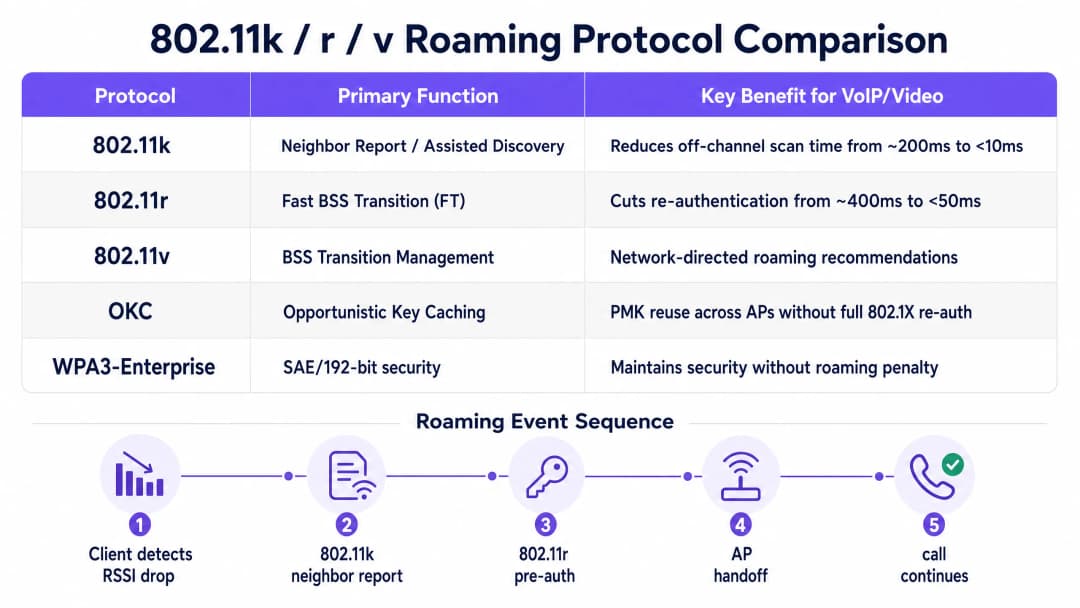
IEEE 802.11k: Itinerancia asistida elimina la necesidad de realizar escaneos fuera de canal. Sin este estándar, un cliente debe abandonar temporalmente su canal activo, sintonizar cada canal candidato, enviar solicitudes de sondeo (probe requests) y esperar las respuestas, un proceso que puede consumir 200 milisegundos o más. Con 802.11k, el cliente solicita un informe de vecinos a su AP asociado actualmente, el cual devuelve una lista seleccionada de AP cercanos y sus canales de funcionamiento. De este modo, el cliente solo escanea esos canales específicos, lo que reduce el tiempo de detección a menos de 10 milisegundos.
IEEE 802.11r: Transición rápida de BSS (FT) aborda el cuello de botella de la autenticación. En entornos empresariales seguros que utilizan autenticación 802.1X/EAP, cada cambio de AP activa un intercambio RADIUS completo: múltiples viajes de ida y vuelta a través de la red por cable que pueden tardar 400 milisegundos o más. El estándar 802.11r introduce el concepto de preautenticación: el cliente y la infraestructura inalámbrica negocian y almacenan en caché las asociaciones de seguridad de la clave maestra por pares (PMK, por sus siglas en inglés) antes de que se produzca la itinerancia. El método FT funciona en dos modos: Over-the-Air (el cliente negocia directamente con el AP de destino) y Over-the-DS (se reenvía a través del AP actual a través de la red troncal por cable). En cualquiera de los dos modos, la fase de reautenticación se reduce a un único protocolo de enlace de 4 vías (4-way handshake) local que tarda menos de 50 milisegundos. IEEE 802.11v: BSS Transition Management (BTM) permite que la capa de control de red influya activamente en las decisiones de roaming del cliente. A través de BTM, un AP puede enviar tramas de gestión de transición solicitadas o no solicitadas a un cliente, recomendando un AP de destino específico basado en la inteligencia del lado de la red, como la carga de clientes del AP, la utilización del canal o el RSSI actual del cliente. Este es el mecanismo principal para abordar el fenómeno del "cliente pegajoso", donde un dispositivo permanece conectado a un AP débil y lejano incluso cuando hay un AP más cercano con una señal más fuerte disponible.
-
Calidad de Servicio (QoS) y Mapeo WMM
Habilitar los protocolos de roaming rápido es solo la mitad de la batalla. Si el canal inalámbrico está congestionado con tráfico de invitados, descargas de archivos o actualizaciones del sistema, los paquetes de voz y video en tiempo real seguirán sufriendo retrasos en las colas. Para evitar esto, se debe imponer y mapear Wi-Fi Multimedia (WMM), basado en IEEE 802.11e, de extremo a extremo en toda la infraestructura cableada e inalámbrica.
WMM prioriza el tráfico dividiéndolo en cuatro Categorías de Acceso (AC) con diferentes parámetros de contención, garantizando que las colas de mayor prioridad obtengan un acceso más frecuente al medio inalámbrico.
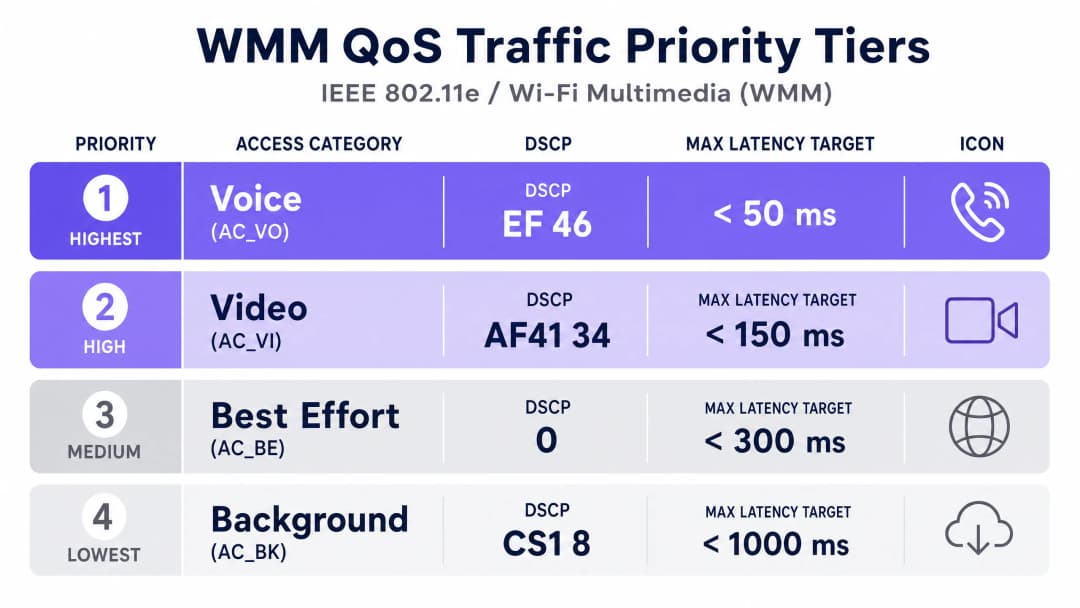
| Categoría de Acceso WMM | DSCP Recomendado | CoS/PCP Recomendado | Aplicaciones Típicas |
|---|---|---|---|
| AC_VO (Voice) | EF (46) | 6 | VoIP (SIP/RTP), Teams Voice, Jabber |
| AC_VI (Video) | AF41 (34) | 5 | Zoom, Teams Video, video IP |
| AC_BE (Best Effort) | 0 | 0 | Navegación web, correo electrónico, tráfico general del personal |
| AC_BK (Background) | CS1 (8) | 1 | Transferencias de archivos grandes, actualizaciones de aplicaciones |
Nota crítica de diseño: Para que QoS funcione de extremo a extremo, la infraestructura de red cableada debe configurarse para confiar en las marcas DSCP que se originan en los puntos de acceso inalámbricos. Si los switches o routers intermedios no confían en DSCP, eliminarán las marcas y las reescribirán como Best Effort (0), rompiendo la priorización de extremo a extremo.
-
¿Tiene preguntas sobre su configuración específica?
Nuestro equipo trabaja con operadores de recintos, responsables de TI e ingenieros de redes en 80 000 espacios. Reserve una llamada de 20 minutos y le mostraremos cómo lo han solucionado otros profesionales como usted.
Guía de Implementación

Paso 1: Diseño de Celdas RF y Umbrales de Señal
Un error común en los despliegues inalámbricos empresariales es diseñar solo para la cobertura en lugar de para la capacidad y la densidad de voz. El requisito fundamental para una red inalámbrica de nivel de voz es una fuerza de señal mínima de -67 dBm en todas las ubicaciones del plano de planta en la banda de 5 GHz, ofreciendo una Relación Señal/Ruido (SNR) de 25 dB o superior. Planifique la ubicación de los AP para que las celdas adyacentes se solapen aproximadamente un 20%, garantizando que un cliente pueda detectar y preautenticarse con un AP de destino antes de que su conexión actual se degrade por debajo del umbral de roaming.
Evite configuraciones de potencia asimétricas. Los dispositivos cliente móviles suelen transmitir a 12 o 15 dBm. Si un AP emite a 20 dBm, el cliente puede recibir los paquetes del AP, pero el AP no puede decodificar la débil señal de retorno del cliente, lo que provoca audio unidireccional y fallos en el roaming. Limite la potencia de transmisión de los AP de 5 GHz entre 14 y 17 dBm para adaptarse a las capacidades de los clientes.
Paso 2: Configuración del SSID y política de seguridad
Segregue el tráfico del personal corporativo del tráfico de invitados. Utilice una solución de Captive Portal como Guest WiFi combinada con WiFi Analytics para asociar su red de invitados a una VLAN aislada, gestionando el tráfico público y capturando datos de primera mano. Asocie a su personal interno a una VLAN segura y dedicada.
Proteja el SSID del personal con WPA3-Enterprise (o modo de transición WPA2/WPA3) respaldado por un servidor RADIUS central. Para obtener instrucciones detalladas sobre el despliegue de la autenticación RADIUS basada en la nube, consulte How to implement 802.1X authentication with Cloud RADIUS. Habilite 802.11k, 802.11r (Over-the-Air FT) y 802.11v BTM en este SSID. Desactive las tasas de datos heredadas (tasas de 802.11b: 1, 2, 5.5, 11 Mbps) y establezca la tasa de bits mínima en 12 Mbps o superior. Esto obliga a los clientes a realizar un roaming proactivo en lugar de aferrarse a AP lejanos a bajas velocidades.
Paso 3: Infraestructura cableada y mapeo de QoS
Segmente el tráfico en tiempo real en VLAN dedicadas (por ejemplo, VLAN 10 para voz y VLAN 20 para vídeo). Configure todos los puertos de switch conectados a un punto de acceso inalámbrico para que confíen en el marcado DSCP. En los switches Cisco Catalyst, esto se configura normalmente como qos trust dscp en la interfaz orientada al AP. En sus routers de borde WAN y firewalls, configure políticas de cola de salida que ubiquen el tráfico DSCP 46 (EF) en una cola de prioridad estricta (Strict Priority Queue), asignando hasta el 30% del ancho de banda total de la WAN para la voz en tiempo real para evitar la saturación del ancho de banda durante los picos de tráfico.
Para obtener una visión global de la estrategia de despliegue de AP de nivel empresarial y la selección de hardware, Cisco Wireless APs: 2026 Guide to Products & Deployment proporciona una guía detallada específica del fabricante. Para conocer las estrategias de control de acceso a la red que complementan su arquitectura de roaming, consulte 10 Best Network Access Control (NAC) Solutions for 2026.
Buenas prácticas
En entornos de red densos, despliegue una arquitectura multicanal utilizando anchos de canal de 20 MHz para maximizar el número de canales no superpuestos y eliminar la interferencia de canal compartido (co-channel interference). En la banda de 5 GHz, esto proporciona hasta 25 canales no superpuestos en la UE, lo que reduce significativamente la interferencia entre AP adyacentes.
Aunque 802.11r es el estándar de oro para el roaming rápido, algunos dispositivos de clientes heredados - especialmente los escáneres de códigos de barras más antiguos, los terminales DECT o los dispositivos IoT integrados - no lo admiten. Habilite Opportunistic Key Caching (OKC) como mecanismo de respaldo. OKC permite a los clientes y AP reutilizar una PMK generada previamente a través de múltiples AP sin una reautenticación 802.1X completa, proporcionando un roaming rápido para clientes que no son 802.11r sin cambios a nivel de protocolo.
Realice estudios de cobertura activos periódicos utilizando herramientas de nivel empresarial (como Ekahau o AirMagnet) para validar que la cobertura secundaria (la señal del segundo mejor AP) alcance -72 dBm o mejor en todo el plano de la planta. Este es el indicador más fiable de que el entorno físico de RF admite un roaming sin interrupciones.
Para entornos educativos y del sector público con despliegues complejos de varios edificios, los principios descritos en WiFi in Schools: The 2026 Administrator & IT Guide proporcionan un contexto adicional para gestionar el roaming en entornos de campus distribuidos.
Troubleshooting and Risk Mitigation
El fenómeno del "cliente pegajoso"
El modo de fallo de roaming más común es el cliente pegajoso: un dispositivo que permanece conectado a un AP lejano y débil incluso cuando hay un AP más fuerte cerca. Esto suele deberse a una potencia de transmisión excesiva del AP (lo que hace que el AP lejano parezca viable) o a la presencia de tasas de datos bajas heredadas (lo que permite al cliente permanecer conectado con un rendimiento extremadamente bajo en lugar de realizar el roaming). La mitigación es triple: reduzca la potencia de transmisión de 5 GHz a 14 dBm, aumente la tasa de bits mínima (Minimum Bitrate) a 12 Mbps o 24 Mbps, y asegúrese de que 802.11v BTM esté habilitado con un umbral de dirección RSSI agresivo (inicie la dirección cuando el RSSI del cliente caiga por debajo de -75 dBm).
Audio unidireccional en llamadas VoIP
El audio unidireccional - donde una parte puede oír pero no ser escuchada - es el síntoma clásico de la asimetría de la potencia de transmisión. El AP emite a alta potencia (por ejemplo, 23 dBm) mientras que el cliente móvil transmite a baja potencia (por ejemplo, 12 dBm). Los paquetes del AP llegan al cliente, pero los paquetes del cliente son demasiado débiles para que el AP los decodifique. La solución es sencilla: reduzca la potencia de transmisión del AP para que coincida con la capacidad máxima del dispositivo cliente más débil de la red.
Fallos de compatibilidad con 802.11r
Ciertos dispositivos heredados no pueden analizar los elementos de información (IE) de transición rápida de 802.11r en las tramas de baliza (beacon frames), lo que hace que rechacen el SSID por completo. La solución es mantener un SSID heredado dedicado con 802.11r deshabilitado, utilizando WPA2-PSK estándar combinado con OKC para un roaming rápido. Los dispositivos modernos del personal que ejecutan clientes VoIP deben migrarse a un SSID independiente y dedicado con WPA3-Enterprise y 802.11r habilitados.
ROI and Business Impact
Caso de estudio real 1: Hotel de conferencias de 450 habitaciones
Un gran hotel de conferencias con 450 habitaciones y 12 salas de reuniones implementó una red WiFi para el personal optimizada para itinerancia para dar soporte a su equipo de banquetes y eventos, que dependía de terminales VoIP móviles para coordinar la preparación de las salas y comunicarse con la cocina. Antes de la optimización, el personal informaba de frecuentes caídas de llamadas al desplazarse entre el ala de conferencias y los pasillos de servicio, lo que provocaba retrasos en la coordinación y quejas de los clientes.
La implementación implicó reposicionar 38 AP de techo para lograr una cobertura de -67 dBm en todos los extremos de las celdas, habilitar 802.11k/r/v en el SSID del personal y configurar una VLAN de voz dedicada con marcado DSCP EF. Las mediciones posteriores a la implementación mostraron que la latencia de transferencia por itinerancia se redujo de una media de 680 milisegundos a 42 milisegundos. En el primer mes, los tickets de soporte de TI relacionados con llamadas caídas disminuyeron un 63%. El director de operaciones informó de una notable mejora en la velocidad de coordinación de eventos, con tiempos de preparación de salas reducidos en una media de 8 minutos por evento.
Caso de estudio real 2: Cadena minorista multisitio (120 tiendas)
Una cadena minorista nacional con 120 tiendas implementó escáneres de códigos de barras portátiles y terminales POS móviles en todas sus tiendas, todos los cuales dependían de una red WiFi corporativa compartida. La red existente se había diseñado únicamente para dar cobertura, sin políticas de QoS y con los AP funcionando a la máxima potencia de transmisión. Como resultado, los escáneres perdían la conectividad con frecuencia a mitad de la transacción cuando el personal se desplazaba entre los pasillos, lo que provocaba tiempos de espera agotados en el POS y requería una reautenticación manual.
El proyecto de remediación implicó un rediseño de RF completo utilizando software de planificación predictiva, imponiendo una tasa de bits mínima de 12 Mbps, habilitando 802.11r con fallback OKC para escáneres heredados y desplegando marcado DSCP AF41 para el tráfico de la aplicación de gestión de inventario. En el despliegue de las 120 tiendas, las tasas de tiempo de espera agotado de las transacciones disminuyeron un 78%, y la ganancia de productividad estimada al eliminar los retrasos por reautenticación fue de aproximadamente 14 horas de personal por tienda a la semana, un ahorro de costes sustancial a escala.
Medición del éxito: Indicadores clave de rendimiento
Para validar su implementación de optimización de itinerancia, supervise los siguientes KPI utilizando su plataforma de gestión de redes inalámbricas:
| KPI | Línea base (no optimizada) | Objetivo (optimizado) | Método de medición |
|---|---|---|---|
| Latencia de transferencia por itinerancia | 400 – 1200 ms | < 50 ms | Registros de eventos de itinerancia del controlador WLAN |
| Puntuación VoIP MOS | < 3,5 (deficiente) | > 3,9 (buena) | Diagnósticos de softphone (Teams, Jabber) |
| Pérdida de paquetes | 3 – 8% | < 0,5% | Estadísticas por cliente del controlador WLAN |
| Fluctuación (Jitter) | 20 – 50 ms | < 10 ms | Estadísticas por cliente del controlador WLAN |
| Tickets de soporte de TI (WiFi) | Volumen de línea base | Reducción del 40% al 65% | Plataforma ITSM (ServiceNow, Jira) |
Al establecer una arquitectura de roaming robusta y basada en estándares, los equipos de TI de las empresas pasan de la resolución reactiva de problemas a la gestión proactiva de la capacidad, lo que garantiza que la red inalámbrica siga siendo un acelerador para el crecimiento empresarial en lugar de un cuello de botella.
Definiciones clave
IEEE 802.11r (Transición rápida de BSS / FT)
Una enmienda de IEEE al estándar 802.11 que permite la autenticación previa entre un cliente y un AP de destino antes de que ocurra el evento de roaming. Al almacenar en caché la clave maestra por pares (PMK) en todo el grupo de AP, 802.11r elimina la necesidad de un intercambio RADIUS completo durante un roam, reduciendo la latencia de traspaso de más de 400 ms a menos de 50 ms.
Los equipos de TI se encuentran con esto al configurar redes WLAN corporativas para VoIP o vídeo. Debe habilitarse para cada SSID en el controlador WLAN y requiere que todos los puntos de acceso del grupo de movilidad compartan la misma caché de asociación de seguridad PMK (PMKSA).
IEEE 802.11k (Informes de vecinos / Roaming asistido)
Una enmienda de IEEE que permite a un cliente inalámbrico solicitar un Informe de vecinos a su AP asociado actualmente. El informe contiene una lista de AP adyacentes, sus BSSID, canales de funcionamiento y características de la señal, lo que permite al cliente escanear solo los canales relevantes en lugar de realizar un escaneo completo fuera de canal.
Habilitado de forma predeterminada en la mayoría de las plataformas WLAN empresariales (Cisco, Aruba, Juniper Mist). Los equipos de TI deben verificar que esté activo y que el informe de vecinos se esté completando correctamente, particularmente en entornos con canales DFS o alta densidad de AP.
IEEE 802.11v (Gestión de transición BSS / BTM)
Una enmienda de IEEE que permite a la infraestructura de red enviar recomendaciones de roaming a un cliente inalámbrico a través de tramas de Gestión de transición BSS. El AP puede sugerir AP de destino específicos en función de la carga, la calidad de la señal o la política de red. Los clientes son libres de aceptar o ignorar estas recomendaciones.
La herramienta principal para combatir a los sticky clients. Los equipos de TI configuran los umbrales de BTM (por ejemplo, dirigir a los clientes cuando el RSSI cae por debajo de -75 dBm) en el controlador WLAN. Tenga en cuenta que algunos dispositivos cliente, en particular los dispositivos Android y Windows más antiguos, pueden ignorar las tramas BTM.
WMM (WiFi Multimedia) / IEEE 802.11e
Una certificación de WiFi Alliance basada en IEEE 802.11e que define cuatro Categorías de acceso inalámbrico (AC_VO, AC_VI, AC_BE, AC_BK) con diferentes parámetros de contienda. Las colas de mayor prioridad tienen intervalos de espera más cortos, lo que les brinda estadísticamente un acceso más frecuente al medio inalámbrico.
WMM está habilitado de forma predeterminada en la mayoría de los AP empresariales, pero debe emparejarse con el marcado DSCP de extremo a extremo y las políticas de QoS por cable para ser eficaz. Sin la confianza de DSCP en el lado cableado, WMM no proporciona ningún beneficio más allá del segmento inalámbrico.
DSCP (Punto de código de servicios diferenciados)
Un campo de 6 bits en la cabecera del paquete IP (parte del byte ToS/DSCP) utilizado para clasificar y priorizar el tráfico de red en la Capa 3. DSCP EF (Expedited Forwarding, valor 46) es el marcado estándar para el tráfico VoIP; DSCP AF41 (Assured Forwarding, valor 34) se utiliza para videoconferencias.
Los equipos de TI deben configurar el marcado DSCP en el origen (cliente de softphone, teléfono IP o controlador WLAN) y asegurarse de que la confianza de DSCP esté habilitada en todos los switches y routers intermedios. Sin confianza, los valores de DSCP se sobrescriben a 0 (Best Effort) en el primer salto no confiable.
RSSI (Indicador de fuerza de señal recibida)
Una medida del nivel de potencia de una señal de radio recibida, expresada en dBm (decibelios relativos a 1 milivatio). En el WiFi empresarial, el RSSI es la métrica principal utilizada por los dispositivos cliente para determinar cuándo iniciar un roam. Un umbral de roaming típico para aplicaciones de voz es de -70 a -75 dBm.
Los equipos de TI utilizan los datos de RSSI de los paneles del controlador WLAN y las herramientas de estudio de cobertura para validar el diseño de la misma. El umbral crítico para la cobertura de calidad de voz es de -67 dBm; por debajo de este nivel, la SNR cae por debajo de 25 dB y las tasas de error de paquetes aumentan significativamente.
OKC (Almacenamiento en caché de claves oportunistas)
Un mecanismo de roaming rápido propiedad del proveedor (no definido en el estándar IEEE 802.11) que permite a un cliente inalámbrico reutilizar una clave maestra por pares (PMK) generada previamente al realizar roaming a un nuevo AP, evitando una reautenticación RADIUS 802.1X completa. OKC requiere que el controlador WLAN distribuya la PMK a todos los AP del grupo de movilidad.
OKC es la alternativa de roaming rápido recomendada para dispositivos heredados que no admiten 802.11r. Proporciona una latencia de roaming de aproximadamente 100 - 200 ms - más lenta que los menos de 50 ms de 802.11r, pero significativamente más rápida que un intercambio RADIUS completo. Habilite OKC en SSIDs heredados junto con 802.11k para un rendimiento óptimo.
Sticky Client
Un dispositivo cliente inalámbrico que permanece asociado a su AP original incluso cuando hay otro AP más cercano y con mejor señal disponible. Los sticky clients suelen estar causados por una alta potencia de transmisión del AP (lo que hace que el AP lejano parezca viable), la presencia de tasas de datos bajas heredadas o un dispositivo cliente que ignora las recomendaciones de redireccionamiento BTM 802.11v.
Los sticky clients son la causa más común del deterioro de la calidad VoIP en entornos empresariales. Los equipos de TI diagnostican los sticky clients correlacionando los datos de RSSI del cliente en el controlador WLAN con la ubicación física del dispositivo. La mitigación consiste en reducir la potencia de transmisión del AP, aumentar las tasas de bits mínimas y habilitar umbrales BTM 802.11v agresivos.
MOS (Mean Opinion Score)
Una métrica estandarizada para evaluar la calidad percibida de una llamada de voz, puntuada en una escala del 1 (peor) al 5 (mejor). Una puntuación MOS superior a 4.0 se considera excelente; de 3.5 a 4.0 es aceptable; por debajo de 3.5 se considera deficiente por la mayoría de los usuarios. El MOS se calcula a partir de mediciones de latencia, jitter y pérdida de paquetes utilizando el algoritmo del modelo E (ITU-T G.107).
Los equipos de TI utilizan las puntuaciones MOS como el KPI principal para validar la calidad de VoIP en redes WiFi empresariales. La mayoría de los clientes de softphone empresariales (Microsoft Teams, Cisco Jabber) incluyen diagnósticos de calidad de llamada integrados que reportan puntuaciones MOS, lo que los convierte en una herramienta de medición práctica en el mundo real.
Ejemplos prácticos
Un hotel de conferencias de 450 habitaciones está desplegando terminales VoIP móviles para su equipo de banquetes y eventos. El personal se desplaza con frecuencia entre las salas de conferencias, los pasillos de servicio y la cocina. La red WiFi existente utiliza WPA2-PSK con AP que funcionan a la máxima potencia de transmisión. El personal informa de caídas de llamadas cada vez que se desplaza entre zonas. ¿Cómo debería abordar esta solución el arquitecto de red?
La solución requiere un enfoque de cuatro fases. La Fase 1 es un rediseño de RF: realizar un estudio de cobertura activo y reposicionar o añadir AP para lograr una señal mínima de -67 dBm en todos los límites de celda en la banda de 5 GHz, con un solapamiento de celda del 20% entre AP adyacentes. Reducir la potencia de transmisión del AP a 14-17 dBm en la radio de 5 GHz para que coincida con la capacidad de transmisión del terminal VoIP (normalmente de 12-15 dBm). La Fase 2 es la migración de SSID y seguridad: crear un SSID 'Staff-Voice' dedicado y protegido con WPA2/WPA3-Enterprise respaldado por un servidor RADIUS en la nube. Habilitar 802.11k (informes de vecinos), 802.11r (transición rápida de BSS Over-the-Air) y la gestión de transición de BSS 802.11v. Establecer la tasa de bits mínima en 12 Mbps y desactivar todas las tasas heredadas de 802.11b. La Fase 3 es la configuración de QoS: crear una VLAN de voz dedicada (por ejemplo, VLAN 10) y mapear la subred del terminal VoIP a esta VLAN. Configurar el marcado DSCP EF (46) para todo el tráfico SIP/RTP. Habilitar DSCP trust en todos los puertos de switch conectados a los AP. Configurar una cola de prioridad estricta en el borde WAN para el tráfico DSCP 46. La Fase 4 es la validación: utilizar los registros de eventos de roaming de la controladora WLAN para confirmar que la latencia de transferencia es sistemáticamente inferior a 50 ms. Ejecutar un diagnóstico de softphone (o utilizar una herramienta dedicada como Ekahau Sidekick) para validar puntuaciones MOS superiores a 3,9 y un jitter inferior a 10 ms.
Una cadena de retail nacional está implementando un nuevo sistema de gestión de inventario en 120 tiendas. El sistema utiliza escáneres Android portátiles que se comunican con un WMS basado en la nube a través de WiFi. El equipo de TI ha descubierto que algunos de los escáneres ejecutan un firmware antiguo que no es compatible con IEEE 802.11r. ¿Cómo debería diseñar el arquitecto de red la estrategia de roaming para dar soporte tanto a los dispositivos modernos como a los heredados sin comprometer la seguridad ni el rendimiento?
La solución es una arquitectura de SSID doble. El SSID 1 ('Staff-Modern') se configura con WPA3-Enterprise, 802.11k habilitado, 802.11r (FT) habilitado, 802.11v BTM habilitado y una velocidad de bits mínima de 12 Mbps. Este SSID lo utilizan todos los escáneres Android modernos (con versión de firmware compatible con 802.11r), los terminales de punto de venta móviles y los smartphones del personal. El SSID 2 ('Staff-Legacy') se configura con WPA2-Enterprise, 802.11k habilitado, 802.11r deshabilitado, OKC (Opportunistic Key Caching) habilitado y una velocidad de bits mínima de 12 Mbps. Este SSID se utiliza exclusivamente para escáneres antiguos que no pueden analizar los elementos de información FT de 802.11r. Ambos SSID se asocian a la misma VLAN de voz y datos y aplican un marcado idéntico DSCP AF41 para el tráfico de la aplicación WMS. El servidor RADIUS utiliza certificados de dispositivo o directivas basadas en direcciones MAC para imponer qué dispositivos pueden autenticarse en cada SSID. La configuración de la infraestructura cableada (confianza DSCP, segmentación de VLAN) es idéntica para ambos SSID.
Un gran centro de conferencias acoge un evento importante del sector con 3000 asistentes. Al equipo de TI del centro le preocupa que el tráfico de alta densidad del WiFi de invitados degrade la calidad de la transmisión de vídeo en directo que utiliza el equipo audiovisual del evento, que transmite señales de vídeo 4K a través de la red WiFi corporativa. ¿Cómo debería el arquitecto de red aislar y proteger el tráfico audiovisual?
La solución requiere un aislamiento estricto del tráfico y la aplicación de políticas de QoS. Paso 1: Separar el equipo audiovisual en un SSID exclusivo 'AV-Production' asociado a una VLAN aislada (por ejemplo, VLAN 20). Este SSID debe ser de 5 GHz únicamente, con autenticación WPA2/WPA3-Enterprise. Paso 2: Configurar el marcado DSCP AF41 (34) para todo el tráfico que proceda de la VLAN audiovisual. En el controlador WLAN, crear una regla de modelado de tráfico que asocie la VLAN audiovisual a la categoría de acceso WMM AC_VI (Vídeo). Paso 3: Aplicar una reserva de ancho de banda por SSID en el SSID de WiFi de invitados para limitar el rendimiento de los clientes individuales, evitando que un único dispositivo de invitado sature el medio inalámbrico compartido. Paso 4: Si el centro utiliza un enlace ascendente compartido, configurar una política de cola justa ponderada (WFQ) o de QoS jerárquica (HQoS) en el extremo de la WAN para garantizar una asignación de ancho de banda mínima de 150 Mbps para el tráfico de la VLAN audiovisual. Paso 5: Implementar los puntos de acceso del equipo audiovisual en canales independientes que no se superpongan con los puntos de acceso de la red WiFi de invitados para eliminar la interferencia de canal compartido entre las dos redes.
Preguntas de práctica
Q1. Su organización acaba de implementar una nueva plataforma de comunicaciones unificadas en la nube (Microsoft Teams Phone) en un edificio de oficinas de 6 plantas. El edificio cuenta con una red WiFi existente con 48 AP que ejecutan WPA2-PSK a la máxima potencia de transmisión. El personal de las plantas 3 y 4 informa de llamadas caídas al moverse entre salas de reuniones. Los registros del controlador WLAN muestran tiempos de handoff de roaming que promedian los 820 ms. ¿Cuáles son los tres cambios de mayor impacto que realizaría, por orden de prioridad?
Sugerencia: Considere las tres fases de un evento de roaming: descubrimiento, autenticación y asociación. ¿En qué fase es más probable que se produzca la latencia de 820 ms, dada la configuración WPA2-PSK?
Ver respuesta modelo
Prioridad 1: Migrar el SSID del personal de WPA2-PSK a WPA2/WPA3-Enterprise con autenticación 802.1X y habilitar IEEE 802.11r (Fast BSS Transition). Con WPA2-PSK, es probable que la latencia de 820 ms se produzca en el handshake completo de 4 vías durante la reasociación. Con 802.11r, la PMK se almacena previamente en caché en los AP, lo que reduce esto a menos de 50 ms. Prioridad 2: Habilitar IEEE 802.11k (Neighbour Reports) para eliminar el tiempo de escaneo fuera de canal. Esto reduce la fase de descubrimiento de ~200 ms a menos de 10 ms. Prioridad 3: Reducir la potencia de transmisión del AP en la radio de 5 GHz de la máxima a 14 - 17 dBm. La configuración de potencia máxima actual probablemente esté causando un comportamiento de sticky client, donde los dispositivos de las plantas 3 y 4 se aferran a los AP de otras plantas en lugar de hacer roaming al AP más cercano. Adicionalmente, establezca la tasa de bits mínima en 12 Mbps para forzar un roaming agresivo. Nota: La migración de PSK a 802.1X requiere implementar un servidor RADIUS (hay opciones basadas en la nube disponibles) y configurar certificados de dispositivo o credenciales de usuario.
Q2. Un consorcio sanitario está implementando un sistema de llamada a enfermería que utiliza botones de pánico portátiles conectados a WiFi y terminales VoIP móviles en una sala de hospital de 200 camas. La red debe admitir tanto los dispositivos IoT de botón de pánico (que ejecutan firmware heredado, sin soporte 802.11r) como los terminales VoIP modernos basados en iOS. El equipo de seguridad del consorcio requiere WPA2-Enterprise en todos los dispositivos. ¿Cómo diseñaría la arquitectura del SSID?
Sugerencia: Considere las implicaciones de compatibilidad de habilitar 802.11r en un SSID compartido que sirve tanto a dispositivos IoT heredados como a terminales VoIP modernos. ¿Cuál es el riesgo y cuál es la mitigación estándar?
Ver respuesta modelo
Diseña una arquitectura de SSID doble. SSID 1 ('Clinical-Voice'): WPA2/WPA3-Enterprise, 802.11k habilitado, 802.11r (FT) habilitado, 802.11v BTM habilitado, solo 5 GHz, tasa de bits mínima de 12 Mbps. Este SSID se utiliza exclusivamente para terminales VoIP iOS. SSID 2 ('Clinical-IoT'): WPA2-Enterprise, 802.11k habilitado, 802.11r deshabilitado, OKC habilitado, doble banda (2.4 GHz y 5 GHz), tasa de bits mínima de 6 Mbps. Este SSID se utiliza para dispositivos de botón de pánico heredados. Ambos SSIDs se asignan a la misma VLAN de voz (VLAN 10) y aplican el marcado DSCP EF (46). El servidor RADIUS aplica políticas basadas en el dispositivo mediante filtrado de direcciones MAC o certificados de dispositivo para garantizar que los dispositivos heredados no puedan autenticarse en el SSID habilitado para 802.11r. Este diseño garantiza que los dispositivos heredados disfruten de una itinerancia rápida a través de OKC sin riesgo de fallos en el análisis de FT IE de 802.11r, mientras que los terminales VoIP modernos se benefician de transferencias completas 802.11r en menos de 50 ms.
Q3. Un gran centro de conferencias alberga una cumbre tecnológica de 2 días con 2,500 asistentes. La red WiFi de invitados existente en el recinto utiliza los mismos canales de 5 GHz que la red de transmisión de vídeo del equipo de producción audiovisual. Durante la sesión de la primera mañana, el equipo de producción audiovisual informa de graves tirones de vídeo y pérdida de fotogramas en sus emisiones de vídeo 4K. El controlador WLAN muestra una utilización del canal del 85% en la banda de 5 GHz. ¿Cuál es la causa original y cuál es la solución inmediata?
Sugerencia: Una utilización del canal del 85% significa que el medio inalámbrico está muy congestionado. Considera si las políticas de QoS pueden resolver la congestión en la capa física y cuál es la solución arquitectónica correcta.
Ver respuesta modelo
Causa original: Los APs de producción audiovisual y los APs de la WiFi de invitados funcionan en los mismos canales de 5 GHz. Con una utilización del canal del 85%, el medio inalámbrico está muy congestionado. Incluso con WMM QoS priorizando el tráfico de vídeo audiovisual, la congestión en la capa física significa que todos los dispositivos - independientemente de su prioridad - compiten por el mismo tiempo de uso. QoS puede priorizar qué paquetes se transmiten primero, pero no puede crear tiempo de uso adicional. Solución inmediata: (1) Identificar los canales específicos utilizados por los APs de producción audiovisual y reconfigurar los APs de la WiFi de invitados en la misma zona física para que utilicen canales que no se superpongan. En la banda de 5 GHz, utiliza anchos de canal de 20 MHz para maximizar el número de canales disponibles (hasta 25 en la UE). (2) Si la separación de canales no es posible de inmediato, implementa un límite de ancho de banda por cliente en el SSID de la WiFi de invitados (por ejemplo, 5 Mbps por cliente) para reducir el tiempo total de uso consumido por los dispositivos de los invitados. (3) A largo plazo: despliega los APs de producción audiovisual en una infraestructura física dedicada, aislada de la red WiFi de invitados, y considera el uso de 6 GHz (WiFi 6E) para el tráfico de producción audiovisual para eliminar por completo la interferencia de canal compartido.
Continúe leyendo esta serie
Guía paso a paso para diagnosticar problemas de roaming de WiFi
Esta guía completa proporciona a los líderes de TI de nivel empresarial y arquitectos de red una metodología autorizada y paso a paso para diagnosticar y resolver problemas de roaming de WiFi. Al combinar análisis técnicos profundos de los estándares IEEE 802.11k/v/r con casos de estudio reales y análisis a nivel de paquetes, esta referencia capacita a los equipos para eliminar el problema del "sticky client" y ofrecer una conectividad móvil fluida. Cubre todo el flujo de trabajo de diagnóstico, desde estudios de cobertura de RF y auditorías de configuración de controladoras hasta análisis de captura de paquetes por el aire (OTA) y validación posterior a la resolución.
Cómo comprender el RSSI y la potencia de señal para una planificación óptima de canales
Esta guía proporciona un análisis técnico profundo y exhaustivo sobre el RSSI, la relación señal/ruido (SNR) y los principios de propagación de RF para una planificación de canales óptima. Ofrece a los responsables de TI, arquitectos de red y directores de operaciones de recintos estrategias prácticas para mitigar la interferencia de canal adyacente y de cocanal, optimizar la ubicación de los AP y aprovechar la analítica para lograr un impacto empresarial cuantificable en entornos de hostelería, retail y sector público.
20MHz vs 40MHz vs 80MHz: ¿Qué ancho de canal debería utilizar?
Esta guía proporciona una referencia técnica definitiva e independiente del fabricante para responsables de TI, arquitectos de redes y directores de operaciones de instalaciones sobre cómo seleccionar el ancho de canal de WiFi correcto (20MHz, 40MHz u 80MHz) en despliegues empresariales de hostelería, comercio minorista, eventos y entornos del sector público. Abarca la mecánica subyacente de IEEE 802.11, las compensaciones de capacidad en el mundo real y una guía de despliegue paso a paso para ayudar a los equipos a tomar la decisión correcta este trimestre. Comprender la selección del ancho de canal es una de las decisiones de mayor repercusión en cualquier diseño de LAN inalámbrica, ya que afecta directamente al rendimiento, las interferencias, la compatibilidad con la densidad de clientes y la fiabilidad de los servicios de cara a los clientes.
¿Tiene preguntas sobre su configuración específica?
Nuestro equipo trabaja con operadores de recintos, responsables de TI e ingenieros de redes en 80 000 espacios. Reserve una llamada de 20 minutos y le mostraremos cómo lo han solucionado otros profesionales como usted.