
Corporate WiFi पर VoIP और वीडियो कॉल के लिए Roaming अनुकूलन
यह गाइड IT मैनेजरों, नेटवर्क आर्किटेक्ट्स और CTOs को कॉर्पोरेट स्टाफ नेटवर्क पर निर्बाध VoIP और वीडियो कॉल का समर्थन करने के लिए WiFi roaming को अनुकूलित करने के लिए एक व्यापक, वेंडर-तटस्थ खाका प्रदान करती है। इसमें IEEE 802.11k/r/v प्रोटोकॉल स्टैक, WMM QoS कॉन्फ़िगरेशन, RF सेल डिज़ाइन और सब-50ms हैंडऑफ़ लेटेंसी प्राप्त करने के लिए आवश्यक एंड-टू-एंड वायर्ड QoS मैपिंग शामिल है। हॉस्पिटैलिटी, रिटेल, हेल्थकेयर और बड़े-स्थल वाले वातावरण में लागू, इस संदर्भ गाइड में वास्तविक दुनिया के कार्यान्वयन परिदृश्य, समस्या निवारण फ्रेमवर्क और एक मापने योग्य ROI विश्लेषण शामिल हैं।
इस गाइड को सुनें
पॉडकास्ट ट्रांसक्रिप्ट देखें
हमारी मुख्य श्रृंखला का हिस्सा: WiFi RF Engineering Guide →

कार्यकारी सारांश (Executive Summary)
आधुनिक एंटरप्राइज वर्कस्पेस में, Microsoft Teams, Zoom और Cisco Webex जैसे रीयल-टाइम कम्युनिकेशन्स टूल्स केवल सुविधा वाले ऐप्स नहीं रह गए हैं, बल्कि बिजनेस-क्रिटिकल इंफ्रास्ट्रक्चर बन चुके हैं। फिर भी जब कॉर्पोरेट स्टाफ बड़े परिसरों - जैसे होटल लॉबी, बहुमंजिला हेल्थकेयर सुविधाओं, बड़े रिटेल स्टोर्स या स्टेडियम प्रेस रूम - में घूमते हैं, तो एक सहज वॉयस या वीडियो कॉल बनाए रखना एक बड़ी तकनीकी चुनौती बनी हुई है। रीयल-टाइम प्रोटोकॉल (RTP) स्ट्रीम्स लेटेंसी, जिटर और पैकेट लॉस के प्रति बेहद संवेदनशील होते हैं। एक भी खराब तरीके से ऑप्टिमाइज्ड रोमिंग इवेंट ऑडियो में रुकावट, वीडियो फ्रीज या पूरी तरह से कॉल कटने का कारण बन सकता है, जिससे सीधे तौर पर ऑपरेशनल एफिशिएंसी और ग्राहक संतुष्टि प्रभावित होती है।
यह टेक्निकल रेफरेंस गाइड नेटवर्क आर्किटेक्ट्स, IT मैनेजर्स और CTOs को कॉर्पोरेट स्टाफ WiFi नेटवर्क पर वायरलेस रोमिंग को ऑप्टिमाइज करने के लिए एक विश्वसनीय ब्लूप्रिंट प्रदान करती है। 802.11k, 802.11r और 802.11v जैसे IEEE मानकों का लाभ उठाकर, और इसे एक मजबूत क्वालिटी ऑफ सर्विस (QoS) फ्रेमवर्क और बेहतरीन रेडियो फ्रीक्वेंसी (RF) सेल डिजाइन के साथ जोड़कर, संगठन रोमिंग हैंडऑफ लेटेंसी को सैकड़ों मिलीसेकंड से घटाकर 50ms से कम के सहज स्तर पर ला सकते हैं। चाहे हॉस्पिटैलिटी, रिटेल, हेल्थकेयर या ट्रांसपोर्ट हब में वायरलेस इंफ्रास्ट्रक्चर को तैनात करना हो, यह गाइड एंटरप्राइज-ग्रेड वॉयस और वीडियो परफॉर्मेंस सुनिश्चित करने के लिए जरूरी प्रैक्टिकल और वेंडर-न्यूट्रल कॉन्फ़िगरेशन को रेखांकित करती है।
टेक्निकल डीप-डाइव
रोमिंग का भौतिक विज्ञान: कॉल क्यों कटती हैं
रोमिंग ऑप्टिमाइजेशन को समझने के लिए, पहले वायरलेस हैंडऑफ की मैकेनिक्स को समझना होगा। रोमिंग पूरी तरह से क्लाइंट-साइड का निर्णय है; वायरलेस क्लाइंट डिवाइस लगातार अपने रिसीव्ड सिग्नल स्ट्रेंथ इंडिकेटर (RSSI) की निगरानी करता है और यह तय करता है कि कब एक मजबूत सिग्नल वाले एक्सेस पॉइंट (AP) को खोजना है और उस पर स्विच करना है। स्टैंडर्ड रोमिंग प्रक्रिया में तीन अलग-अलग चरण होते हैं: स्कैनिंग (डिस्कवरी), ऑथेंटिकेशन और एसोसिएशन।
एक गैर-अनुकूलित (unoptimised) नेटवर्क पर, स्कैनिंग और 802.1X ऑथेंटिकेशन चरणों में 400 मिलीसेकंड से लेकर 1200 मिलीसेकंड से अधिक का समय लग सकता है। सामान्य वेब ब्राउज़िंग या फ़ाइल डाउनलोड के लिए, यह एक सेकंड से भी कम का विलंब अदृश्य रहता है। हालाँकि, वॉइस ओवर आईपी (VoIP) और रीयल-टाइम वीडियो के लिए, यह विनाशकारी है। मानक वॉइस कोडेक्स हर 20 मिलीसेकंड में एक RTP पैकेट भेजते हैं। 50 मिलीसेकंड से अधिक का कोई भी हैंडऑफ़ एक ध्यान देने योग्य ऑडियो अंतर पैदा करता है; 150 मिलीसेकंड से आगे जाने पर, कॉल कटने लगती है; और 300 मिलीसेकंड से अधिक होने पर, अधिकांश सॉफ्टफ़ोन क्लाइंट सत्र को पूरी तरह से समाप्त कर देंगे।
| मीट्रिक | VoIP लक्ष्य | वीडियो लक्ष्य | गैर-अनुकूलित रोमिंग का प्रभाव |
|---|---|---|---|
| एकतरफा विलंबता (One-way latency) | < 150 ms | < 200 ms | ध्यान देने योग्य ऑडियो अंतर, खराब कॉल गुणवत्ता |
| जिटर (Jitter) | < 10 ms | < 30 ms | पैकेट बफ़र का समाप्त होना, रोबोट जैसी आवाज़ |
| पैकेट हानि (Packet loss) | < 1.0% | < 2.0% | ऑडियो ड्रॉपआउट, फ़्रीज़ हुआ वीडियो |
| हैंडऑफ़ विलंबता (Handoff latency) | < 50 ms | < 100 ms | > 300ms के हैंडऑफ़ के कारण कॉल पूरी तरह समाप्त हो जाती है |
-
रोमिंग ऑप्टिमाइज़ेशन तिकड़ी: 802.11k, 802.11r और 802.11v
इस अंतर को पाटने के लिए, आधुनिक एंटरप्राइज़ नेटवर्क तीन पूरक IEEE मानकों को तैनात करते हैं जो रोमिंग के स्कैनिंग, ऑथेंटिकेशन और चयन चरणों को सुव्यवस्थित करते हैं।
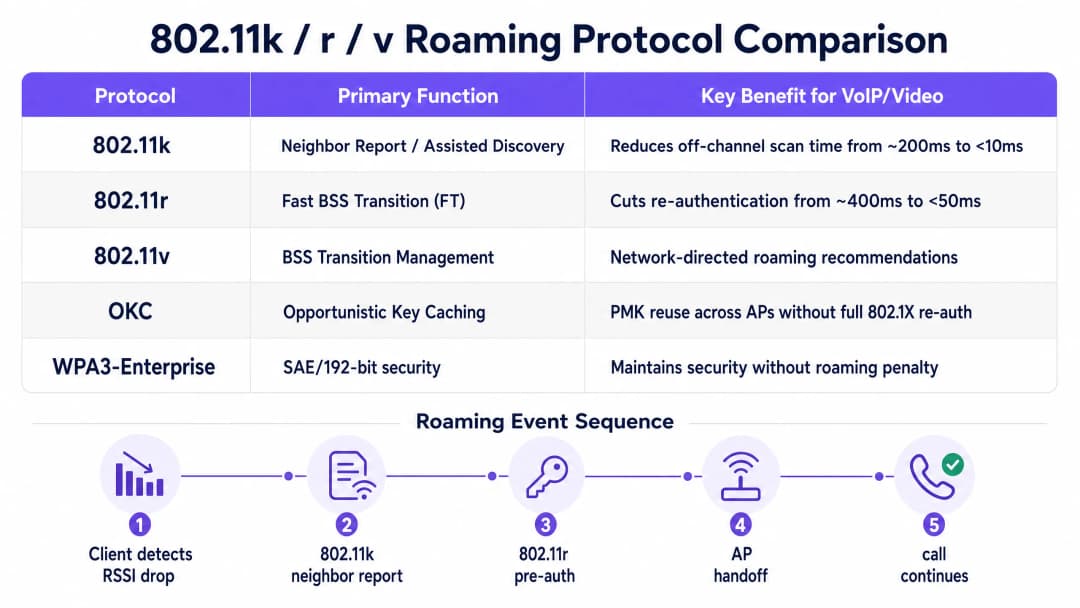
IEEE 802.11k: Assisted Roaming ऑफ-चैनल स्कैनिंग की आवश्यकता को समाप्त करता है। इसके बिना, एक क्लाइंट को अस्थायी रूप से अपने सक्रिय चैनल को छोड़ना होगा, प्रत्येक संभावित चैनल पर जाना होगा, जांच अनुरोध भेजने होंगे और प्रतिक्रियाओं की प्रतीक्षा करनी होगी - एक ऐसी प्रक्रिया जिसमें 200 मिलीसेकंड या उससे अधिक का समय लग सकता है। 802.11k के साथ, क्लाइंट अपने वर्तमान में जुड़े AP से एक नेबर रिपोर्ट का अनुरोध करता है, जो पास के AP और उनके ऑपरेटिंग चैनलों की एक क्यूरेटेड सूची देता है। इसके बाद क्लाइंट केवल उन्हीं विशिष्ट चैनलों को स्कैन करता है, जिससे खोज का समय घटकर 10 मिलीसेकंड से भी कम हो जाता है।
IEEE 802.11r: Fast BSS Transition (FT) ऑथेंटिकेशन की बाधा को दूर करता है। 802.1X/EAP ऑथेंटिकेशन का उपयोग करने वाले सुरक्षित एंटरप्राइज़ वातावरण में, प्रत्येक रोम एक पूर्ण RADIUS एक्सचेंज को ट्रिगर करता है - वायर्ड नेटवर्क पर कई राउंड ट्रिप जिसमें 400 मिलीसेकंड या उससे अधिक का समय लग सकता है। 802.11r प्री-ऑथेंटिकेशन की अवधारणा को पेश करता है: रोम होने से पहले क्लाइंट और वायरलेस इन्फ्रास्ट्रक्चर पेयरवाइज़ मास्टर की (PMK) सुरक्षा एसोसिएशनों पर बातचीत और कैश करते हैं। FT दो मोड में काम करता है - ओवर-द-एयर (क्लाइंट सीधे लक्षित AP के साथ बातचीत करता है) और ओवर-द-DS (वायर्ड बैकबोन के माध्यम से वर्तमान AP के जरिए भेजा जाता है)। किसी भी मोड में, री-ऑथेंटिकेशन चरण घटकर एक सिंगल लोकल 4-वे हैंडशेक में बदल जाता है जिसमें 50 मिलीसेकंड से भी कम का समय लगता है। IEEE 802.11v: BSS Transition Management (BTM) नेटवर्क नियंत्रण परत को क्लाइंट रोमिंग निर्णयों को सक्रिय रूप से प्रभावित करने की अनुमति देता है। BTM के माध्यम से, एक AP किसी क्लाइंट को अनुरोधित या अवांछित संक्रमण प्रबंधन फ्रेम भेज सकता है, जो AP क्लाइंट लोड, चैनल उपयोग, या क्लाइंट के वर्तमान RSSI जैसे नेटवर्क-साइड इंटेलिजेंस के आधार पर एक विशिष्ट लक्षित AP की सिफारिश करता है। यह "sticky client" घटना को संबोधित करने का प्राथमिक तंत्र है, जहां एक डिवाइस कमजोर, दूर के AP से जुड़ा रहता है, भले ही मजबूत सिग्नल वाला एक नजदीकी AP उपलब्ध हो।
Quality of Service (QoS) और WMM मैपिंग
फास्ट रोमिंग प्रोटोकॉल को सक्षम करना केवल आधी लड़ाई है। यदि वायरलेस चैनल गेस्ट ट्रैफिक, फ़ाइल डाउनलोड या सिस्टम अपडेट से भरा हुआ है, तो वास्तविक समय के वॉयस और वीडियो पैकेट को अभी भी कतार में देरी का सामना करना पड़ेगा। इसे रोकने के लिए, IEEE 802.11e पर आधारित Wi-Fi Multimedia (WMM) को लागू किया जाना चाहिए और वायर्ड और WiFi इन्फ्रास्ट्रक्चर में एंड-टू-एंड मैप किया जाना चाहिए।
WMM विभिन्न विवाद मापदंडों के साथ ट्रैफिक को चार एक्सेस श्रेणियों (ACs) में विभाजित करके प्राथमिकता देता है, जिससे यह सुनिश्चित होता है कि उच्च-प्राथमिकता वाली कतारों को वायरलेस माध्यम तक अधिक बार पहुंच प्राप्त हो।
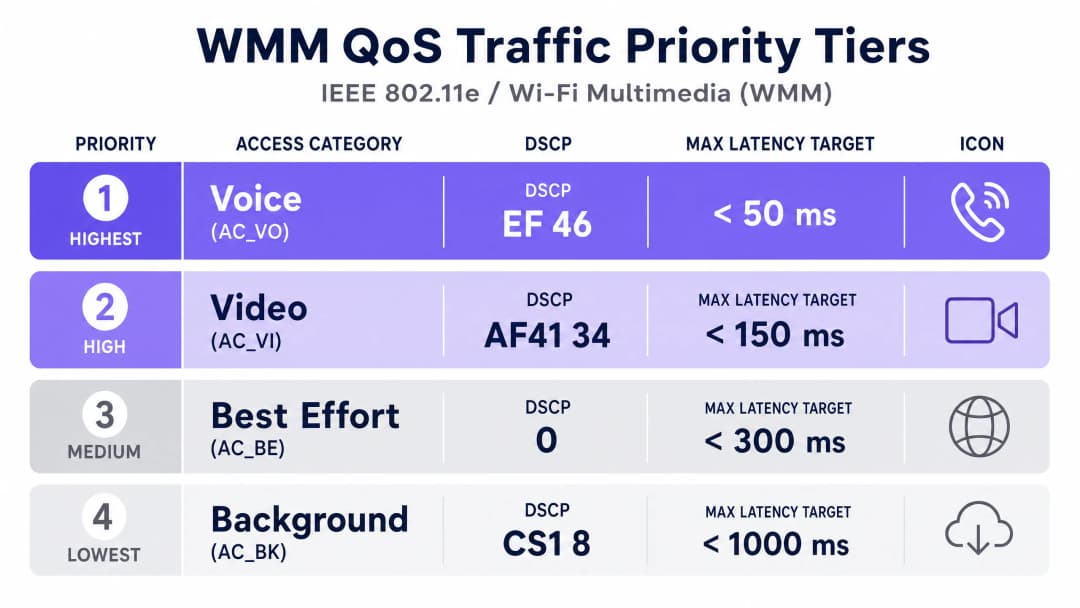
| WMM एक्सेस श्रेणी | अनुशंसित DSCP | अनुशंसित CoS/PCP | विशिष्ट अनुप्रयोग |
|---|---|---|---|
| AC_VO (Voice) | EF (46) | 6 | VoIP (SIP/RTP), Teams Voice, Jabber |
| AC_VI (Video) | AF41 (34) | 5 | Zoom, Teams Video, IP वीडियो |
| AC_BE (Best Effort) | 0 | 0 | वेब ब्राउज़िंग, ईमेल, सामान्य कर्मचारी ट्रैफिक |
| AC_BK (Background) | CS1 (8) | 1 | बड़े फ़ाइल स्थानांतरण, एप्लिकेशन अपडेट |
महत्वपूर्ण डिज़ाइन नोट: QoS के एंड-टू-एंड कार्य करने के लिए, वायर्ड नेटवर्क इन्फ्रास्ट्रक्चर को वायरलेस एक्सेस पॉइंट्स से उत्पन्न होने वाले DSCP चिह्नों पर भरोसा करने के लिए कॉन्फ़िगर किया जाना चाहिए। यदि मध्यवर्ती स्विच या राउटर DSCP पर भरोसा नहीं करते हैं, तो वे चिह्नों को हटा देंगे और उन्हें Best Effort (0) के रूप में फिर से लिखेंगे, जिससे एंड-टू-एंड प्राथमिकता टूट जाएगी।
अपने विशिष्ट सेटअप को लेकर कोई सवाल हैं?
हमारी टीम 80,000 से अधिक वेन्यू में वेन्यू ऑपरेटरों, IT मैनेजरों और नेटवर्क इंजीनियरों के साथ काम करती है। 20 मिनट का कॉल बुक करें और हम आपको दिखाएंगे कि आपके जैसे अन्य लोगों ने इसे कैसे हल किया।
कार्यान्वयन गाइड

चरण 1: RF सेल डिज़ाइन और सिग्नल थ्रेशोल्ड
एंटरप्राइज वायरलेस परिनियोजन में एक आम गलती केवल कवरेज के लिए डिज़ाइन करना है, न कि क्षमता और वॉयस डेंसिटी के लिए। वॉयस-ग्रेड WiFi नेटवर्क के लिए बुनियादी आवश्यकता 5 GHz बैंड पर फर्श योजना के सभी स्थानों पर न्यूनतम सिग्नल शक्ति -67 dBm है, जो 25 dB या उससे अधिक का सिग्नल-टू-नॉइज़ अनुपात (SNR) प्रदान करती है। AP प्लेसमेंट की योजना इस तरह बनाएं कि आस-पास के सेल लगभग 20% ओवरलैप हों, जिससे यह सुनिश्चित हो सके कि एक क्लाइंट लक्षित AP के साथ पहचान कर सके और प्री-ऑथेंटिकेट कर सके, इससे पहले कि उसका वर्तमान कनेक्शन रोमिंग थ्रेशोल्ड से नीचे गिर जाए।
असममित पावर कॉन्फ़िगरेशन से बचें। मोबाइल क्लाइंट डिवाइस आमतौर पर 12 से 15 dBm पर ट्रांसमिट करते हैं। यदि कोई AP 20 dBm पर ब्रॉडकास्ट करता है, तो क्लाइंट AP के पैकेट प्राप्त कर सकता है, लेकिन AP क्लाइंट के कमजोर रिटर्न सिग्नल को डीकोड नहीं कर सकता है, जिसके परिणामस्वरूप एकतरफा ऑडियो और रोमिंग विफल हो जाती है। क्लाइंट की क्षमताओं से मेल खाने के लिए 5 GHz AP ट्रांसमिट पावर को 14 से 17 dBm पर सीमित करें।
चरण 2: SSID कॉन्फ़िगरेशन और सुरक्षा नीति
अपने कॉर्पोरेट स्टाफ ट्रैफ़िक को गेस्ट ट्रैफ़िक से अलग करें। अपने गेस्ट नेटवर्क को एक अलग VLAN में मैप करने, सार्वजनिक ट्रैफ़िक को प्रबंधित करने और फर्स्ट-पार्टी डेटा कैप्चर करने के लिए Guest WiFi और WiFi Analytics के संयोजन वाले एक कैप्टिव पोर्टल समाधान का उपयोग करें। अपने आंतरिक कर्मचारियों को एक सुरक्षित, समर्पित VLAN पर मैप करें।
एक केंद्रीय RADIUS सर्वर द्वारा समर्थित WPA3-Enterprise (या WPA2/WPA3 ट्रांज़िशन मोड) के साथ स्टाफ SSID को सुरक्षित करें। क्लाउड-आधारित RADIUS प्रमाणीकरण को तैनात करने के बारे में विस्तृत निर्देशों के लिए, How to implement 802.1X authentication with Cloud RADIUS देखें। इस SSID पर 802.11k, 802.11r (ओवर-द-एयर FT) और 802.11v BTM सक्षम करें। लीगेसी डेटा दरों (802.11b दरें: 1, 2, 5.5, 11 Mbps) को अक्षम करें और न्यूनतम बिटरेट 12 Mbps या उससे अधिक पर सेट करें। यह क्लाइंट्स को कम गति पर दूर के APs से चिपके रहने के बजाय सक्रिय रूप से रोम करने के लिए मजबूर करता है।
चरण 3: वायर्ड इन्फ्रास्ट्रक्चर और QoS मैपिंग
रीयल-टाइम ट्रैफ़िक को समर्पित VLANs में विभाजित करें (उदाहरण के लिए, वॉयस के लिए VLAN 10 और वीडियो के लिए VLAN 20)। DSCP मार्किंग पर भरोसा करने के लिए वायरलेस एक्सेस पॉइंट से जुड़े प्रत्येक स्विच पोर्ट को कॉन्फ़िगर करें। Cisco Catalyst स्विच पर, यह आमतौर पर AP-फेसिंग इंटरफ़ेस पर qos trust dscp के रूप में कॉन्फ़िगर किया जाता है। अपने WAN एज राउटर्स और फ़ायरवॉल पर, इग्रेस कतार नीतियों को कॉन्फ़िगर करें जो DSCP 46 (EF) ट्रैफ़िक को एक स्ट्रिक्ट प्रायोरिटी कतार में रखती हैं, जिससे पीक ट्रैफ़िक के दौरान बैंडविड्थ की कमी को रोकने के लिए रीयल-टाइम वॉयस के लिए कुल WAN बैंडविड्थ का 30% तक आवंटित किया जा सके।
एंटरप्राइज-ग्रेड AP परिनियोजन रणनीति और हार्डवेयर चयन के व्यापक अवलोकन के लिए, Cisco Wireless APs: 2026 Guide to Products & Deployment विस्तृत वेंडर-विशिष्ट मार्गदर्शन प्रदान करता है। आपकी रोमिंग आर्किटेक्चर के पूरक नेटवर्क एक्सेस कंट्रोल रणनीतियों के लिए, 10 Best Network Access Control (NAC) Solutions for 2026 देखें।
-
सर्वोत्तम प्रथाएं
सघन नेटवर्क वातावरण में, गैर-अतिव्यापी चैनलों की संख्या को अधिकतम करने और सह-चैनल हस्तक्षेप को समाप्त करने के लिए 20 MHz चैनल चौड़ाई का उपयोग करके एक बहु-चैनल आर्किटेक्चर तैनात करें। 5 GHz बैंड पर, यह EU में 25 तक गैर-अतिव्यापी चैनल प्रदान करता है, जिससे आसन्न APs के बीच हस्तक्षेप काफी कम हो जाता है।जबकि 802.11r तेज़ रोमिंग के लिए गोल्ड स्टैंडर्ड है, कुछ लेगेसी एंटरप्राइज़ क्लाइंट्स - विशेष रूप से पुराने बारकोड स्कैनर, DECT हैंडसेट या एम्बेडेड IoT डिवाइसेस - इसका समर्थन नहीं करते हैं। फ़ॉलबैक मैकेनिज्म के रूप में Opportunistic Key Caching (OKC) को सक्षम करें। OKC क्लाइंट्स और APs को बिना किसी पूर्ण 802.1X री-ऑथेंटिकेशन के कई APs में पहले से जेनरेट किए गए PMK का पुनः उपयोग करने की अनुमति देता है, जिससे प्रोटोकॉल-स्तरीय परिवर्तनों के बिना गैर-802.11r क्लाइंट्स के लिए तेज़ रोमिंग मिलती है।
एंटरप्राइज़-ग्रेड सर्वे टूल्स (जैसे कि Ekahau या AirMagnet) का उपयोग करके नियमित सक्रिय साइट सर्वेक्षण करें ताकि यह सत्यापित किया जा सके कि सेकेंडरी कवरेज (दूसरे सबसे अच्छे AP से सिग्नल) पूरे फ्लोर प्लान में -72 dBm या उससे बेहतर तक पहुंचता है। यह सबसे विश्वसनीय संकेतक है कि भौतिक RF वातावरण निर्बाध रोमिंग का समर्थन करता है।
जटिल बहु-भवन परिनियोजन वाले शिक्षा और सार्वजनिक-क्षेत्र के वातावरण के लिए, WiFi in Schools: The 2026 Administrator & IT Guide में उल्लिखित सिद्धांत वितरित कैंपस वातावरण में रोमिंग के प्रबंधन के लिए अतिरिक्त संदर्भ प्रदान करते हैं।
समस्या निवारण और जोखिम न्यूनीकरण
स्टिकी क्लाइंट घटना (The Sticky Client Phenomenon)
सबसे आम रोमिंग विफलता मोड स्टिकी क्लाइंट है: एक डिवाइस जो दूर के, कमजोर AP से जुड़ा रहता है, भले ही एक मजबूत AP पास में हो। यह आमतौर पर अत्यधिक AP ट्रांसमिट पावर (जिससे दूर का AP व्यवहार्य प्रतीत होता है) या लेगेसी लो डेटा दरों की उपस्थिति (जिससे क्लाइंट रोमिंग करने के बजाय बेहद कम थ्रूपुट पर जुड़ा रहता है) के कारण होता है। न्यूनीकरण तीन गुना है: 5 GHz ट्रांसमिट पावर को घटाकर 14 dBm करें, मिनिमम बिटरेट को बढ़ाकर 12 Mbps या 24 Mbps करें, और आक्रामक RSSI स्टीयरिंग थ्रेशोल्ड के साथ 802.11v BTM सक्षम होना सुनिश्चित करें (जब क्लाइंट RSSI -75 dBm से नीचे गिर जाए तो स्टीयरिंग शुरू करें)।
VoIP कॉल पर वन-वे ऑडियो
वन-वे ऑडियो - जहां एक पक्ष सुन सकता है लेकिन उसे सुना नहीं जा सकता - ट्रांसमिट पावर विषमता का क्लासिक लक्षण है। AP उच्च शक्ति (उदाहरण के लिए, 23 dBm) पर ब्रॉडकास्ट करता है जबकि मोबाइल क्लाइंट कम शक्ति (उदाहरण के लिए, 12 dBm) पर ट्रांसमिट करता है। AP के पैकेट क्लाइंट तक पहुंचते हैं, लेकिन क्लाइंट के पैकेट AP के लिए डिकोड करने के लिए बहुत कमजोर होते हैं। इसका समाधान सरल है: नेटवर्क पर सबसे कमजोर क्लाइंट डिवाइस की अधिकतम क्षमता से मेल खाने के लिए AP ट्रांसमिट पावर को कम करें।
802.11r अनुकूलता विफलताएं
कुछ लेगेसी डिवाइसेस बीकन फ्रेम में 802.11r फास्ट ट्रांजिशन इंफॉर्मेशन एलिमेंट्स (IEs) को पार्स नहीं कर सकते हैं, जिससे वे SSID को पूरी तरह से अस्वीकार कर देते हैं। इसका समाधान यह है कि तेज़ रोमिंग के लिए OKC के साथ मानक WPA2-PSK का उपयोग करके, 802.11r अक्षम के साथ एक समर्पित लेगेसी SSID बनाए रखें। VoIP क्लाइंट चलाने वाले आधुनिक स्टाफ डिवाइसेस को WPA3-Enterprise और 802.11r सक्षम के साथ एक अलग, समर्पित SSID पर माइग्रेट किया जाना चाहिए।
ROI और व्यावसायिक प्रभाव
वास्तविक दुनिया केस स्टडी 1: 450-कमरों का कॉन्फ्रेंस होटल
450 कमरों और 12 मीटिंग सुइट्स वाले एक बड़े कॉन्फ्रेंस होटल ने अपनी बैंक्वेटिंग और इवेंट टीम की सहायता के लिए एक रोमिंग-ऑप्टिमाइज्ड स्टाफ WiFi नेटवर्क तैनात किया, जो कमरे की सेटिंग को व्यवस्थित करने और रसोई के साथ संवाद करने के लिए मोबाइल VoIP हैंडसेट पर निर्भर थी। ऑप्टिमाइज़ेशन से पहले, स्टाफ ने कॉन्फ्रेंस विंग और सर्विस कॉरिडोर के बीच आवाजाही के दौरान अक्सर कॉल ड्रॉप होने की सूचना दी थी, जिससे समन्वय में देरी और क्लाइंट की शिकायतें हो रही थीं।
इस तैनाती में सेल के सभी किनारों पर -67 dBm कवरेज प्राप्त करने के लिए 38 सीलिंग-माउंटेड APs को फिर से स्थापित करना, स्टाफ SSID पर 802.11k/r/v को सक्षम करना और DSCP EF मार्किंग के साथ एक समर्पित वॉयस VLAN को कॉन्फ़िगर करना शामिल था। तैनाती के बाद के मापों से पता चला कि रोमिंग हैंडऑफ लेटेंसी औसतन 680 मिलीसेकंड से घटकर 42 मिलीसेकंड हो गई। पहले महीने के भीतर, कॉल ड्रॉप से संबंधित IT सपोर्ट टिकटों में 63% की गिरावट आई। ऑपरेशंस मैनेजर ने इवेंट समन्वय की गति में उल्लेखनीय सुधार दर्ज किया, जिससे प्रति इवेंट कमरे का टर्नअराउंड समय औसतन 8 मिनट कम हो गया।
रियल-वर्ल्ड केस स्टडी 2: मल्टी-साइट रिटेल चेन (120 स्टोर)
120 स्टोरों वाली एक राष्ट्रीय रिटेल चेन ने अपने शॉप फ्लोर पर हैंडहेल्ड बारकोड स्कैनर और मोबाइल POS टर्मिनलों को तैनात किया, जो सभी एक साझा कॉर्पोरेट WiFi नेटवर्क पर निर्भर थे। मौजूदा नेटवर्क को केवल कवरेज के लिए डिज़ाइन किया गया था, जिसमें कोई QoS पॉलिसी नहीं थी और APs अधिकतम ट्रांसमिट पावर पर चल रहे थे। परिणामस्वरूप, जब कर्मचारी गलियारों के बीच जाते थे, तो स्कैनर अक्सर ट्रांजैक्शन के बीच में ही कनेक्टिविटी खो देते थे, जिससे POS टाइमआउट हो जाता था और मैन्युअल रूप से पुनः ऑथेंटिकेशन करना पड़ता था।
इस समाधान परियोजना में प्रेडिक्टिव प्लानिंग सॉफ्टवेयर का उपयोग करके एक संपूर्ण RF रीडिज़ाइन शामिल था, जिसमें 12 Mbps न्यूनतम बिटरेट लागू करना, लीगेसी स्कैनर्स के लिए OKC फ़ॉलबैक के साथ 802.11r को सक्षम करना और इन्वेंट्री मैनेजमेंट एप्लिकेशन ट्रैफ़िक के लिए DSCP AF41 मार्किंग को तैनात करना शामिल था। 120-स्टोर रोलआउट के दौरान, ट्रांजैक्शन टाइमआउट दरों में 78% की गिरावट आई, और पुनः ऑथेंटिकेशन की देरी को समाप्त करने से होने वाला अनुमानित उत्पादकता लाभ प्रति स्टोर प्रति सप्ताह लगभग 14 स्टाफ-घंटे था - जो बड़े पैमाने पर एक महत्वपूर्ण लागत बचत है।
सफलता को मापना: मुख्य प्रदर्शन संकेतक (KPIs)
अपने रोमिंग ऑप्टिमाइज़ेशन डिप्लॉयमेंट को प्रमाणित करने के लिए, अपने वायरलेस नेटवर्क मैनेजमेंट प्लेटफॉर्म का उपयोग करके निम्नलिखित KPIs की निगरानी करें:
| KPI | बेसलाइन (अन-ऑप्टिमाइज्ड) | टारगेट (ऑप्टिमाइज्ड) | माप पद्धति |
|---|---|---|---|
| रोमिंग हैंडऑफ लेटेंसी | 400 - 1200 ms | < 50 ms | WLAN कंट्रोलर रोमिंग इवेंट लॉग्स |
| VoIP MOS स्कोर | < 3.5 (खराब) | > 3.9 (अच्छा) | सॉफ्टफ़ोन डायग्नोस्टिक्स (Teams, Jabber) |
| पैकेट लॉस | 3 - 8% | < 0.5% | WLAN कंट्रोलर प्रति-क्लाइंट सांख्यिकी |
| जिटर | 20 - 50 ms | < 10 ms | WLAN कंट्रोलर प्रति-क्लाइंट सांख्यिकी |
| IT सपोर्ट टिकट (WiFi) | बेसलाइन वॉल्यूम | 40% से 65% तक कमी | ITSM प्लेटफॉर्म (ServiceNow, Jira) |
एक मजबूत, मानकों पर आधारित रोमिंग आर्किटेक्चर स्थापित करके, एंटरप्राइज IT टीमें प्रतिक्रियाशील समस्या निवारण से सक्रिय क्षमता प्रबंधन की ओर बढ़ती हैं, जिससे यह सुनिश्चित होता है कि वायरलेस नेटवर्क बाधा बनने के बजाय व्यावसायिक विकास के लिए एक उत्प्रेरक बना रहे।
मुख्य परिभाषाएं
IEEE 802.11r (फ़ास्ट BSS ट्रांज़िशन / FT)
802.11 मानक का एक IEEE संशोधन जो रोमिंग घटना होने से पहले एक क्लाइंट और एक लक्षित AP के बीच प्री-ऑथेंटिकेशन को सक्षम बनाता है। AP समूह में पेयरवाइज मास्टर की (PMK) को कैश करके, 802.11r एक रोम के दौरान पूर्ण RADIUS एक्सचेंज की आवश्यकता को समाप्त करता है, जिससे हैंडऑफ लेटेंसी 400ms+ से घटकर 50ms से कम हो जाती है।
IT टीमों को इसका सामना तब करना पड़ता है जब वे VoIP या वीडियो के लिए एंटरप्राइज़ WLANs को कॉन्फ़िगर करती हैं। इसे WLAN कंट्रोलर पर प्रति-SSID के आधार पर सक्षम किया जाना चाहिए और इसके लिए आवश्यक है कि मोबिलिटी ग्रुप के सभी APs समान PMK सुरक्षा एसोसिएशन (PMKSA) कैश साझा करें।
IEEE 802.11k (पड़ोसी रिपोर्ट / असिस्टेड रोमिंग)
एक IEEE संशोधन जो एक वायरलेस क्लाइंट को अपने वर्तमान में जुड़े AP से पड़ोसी रिपोर्ट का अनुरोध करने की अनुमति देता है। रिपोर्ट में आसन्न AP, उनके BSSID, ऑपरेटिंग चैनल और सिग्नल विशेषताओं की एक सूची होती है, जिससे क्लाइंट को पूर्ण ऑफ-चैनल स्कैन करने के बजाय केवल प्रासंगिक चैनलों को स्कैन करने की अनुमति मिलती है।
अधिकांश एंटरप्राइज़ WLAN प्लेटफॉर्म (Cisco, Aruba, Juniper Mist) पर डिफ़ॉल्ट रूप से सक्षम है। IT टीमों को यह सत्यापित करना चाहिए कि यह सक्रिय है और पड़ोसी रिपोर्ट सही ढंग से भरी जा रही है, विशेष रूप से DFS चैनलों या उच्च AP घनत्व वाले वातावरण में।
IEEE 802.11v (BSS ट्रांजिशन मैनेजमेंट / BTM)
एक IEEE संशोधन जो नेटवर्क इंफ्रास्ट्रक्चर को BSS ट्रांजिशन मैनेजमेंट फ़्रेम के माध्यम से वायरलेस क्लाइंट को रोमिंग सिफारिशें भेजने की अनुमति देता है। AP लोड, सिग्नल की गुणवत्ता, या नेटवर्क नीति के आधार पर विशिष्ट लक्षित AP का सुझाव दे सकता है। क्लाइंट इन सिफारिशों को स्वीकार या अनदेखा करने के लिए स्वतंत्र हैं।
स्टिकी क्लाइंट्स से निपटने का प्राथमिक उपकरण। IT टीमें WLAN कंट्रोलर पर BTM थ्रेशोल्ड कॉन्फ़िगर करती हैं (जैसे, जब RSSI -75 dBm से नीचे गिरता है तो क्लाइंट्स को स्टीयर करना)। ध्यान दें कि कुछ क्लाइंट डिवाइस, विशेष रूप से पुराने Android और Windows डिवाइस, BTM फ़्रेम को अनदेखा कर सकते हैं।
WMM (WiFi मल्टीमीडिया) / IEEE 802.11e
IEEE 802.11e पर आधारित एक WiFi एलायंस सर्टिफिकेशन जो विभिन्न विवाद मापदंडों के साथ चार वायरलेस एक्सेस श्रेणियों (AC_VO, AC_VI, AC_BE, AC_BK) को परिभाषित करता है। उच्च-प्राथमिकता वाले कतारों में कम बैकऑफ अंतराल होते हैं, जो उन्हें सांख्यिकीय रूप से वायरलेस माध्यम तक अधिक बार पहुंचने की अनुमति देते हैं।
WMM अधिकांश एंटरप्राइज़ AP पर डिफ़ॉल्ट रूप से सक्षम है, लेकिन प्रभावी होने के लिए इसे एंड-टू-एंड DSCP मार्किंग और वायर्ड QoS नीतियों के साथ जोड़ा जाना चाहिए। वायर्ड साइड पर DSCP ट्रस्ट के बिना, WMM वायरलेस सेगमेंट से आगे कोई लाभ प्रदान नहीं करता है।
DSCP (डिफरेंशिएटेड सर्विसेज कोड पॉइंट)
IP पैकेट हेडर (ToS/DSCP बाइट का हिस्सा) में एक 6-बिट फ़ील्ड जिसका उपयोग लेयर 3 पर नेटवर्क ट्रैफ़िक को वर्गीकृत और प्राथमिकता देने के लिए किया जाता है। DSCP EF (एक्स्पेडाइटेड फॉरवर्डिंग, मान 46) VoIP ट्रैफ़िक के लिए मानक मार्किंग है; DSCP AF41 (एश्योर्ड फॉरवर्डिंग, मान 34) का उपयोग वीडियो कॉन्फ्रेंसिंग के लिए किया जाता है।
IT टीमों को स्रोत (सॉफ्टफोन क्लाइंट, IP फोन, या WLAN कंट्रोलर) पर DSCP मार्किंग कॉन्फ़िगर करनी होगी और यह सुनिश्चित करना होगा कि सभी मध्यवर्ती स्विच और राउटर पर DSCP ट्रस्ट सक्षम है। ट्रस्ट के बिना, पहले अविश्वसनीय हॉप पर DSCP मानों को ओवरराइट करके 0 (बेस्ट एफर्ट) कर दिया जाता है।
RSSI (रिसीव्ड सिग्नल स्ट्रेंथ इंडिकेटर)
एक प्राप्त रेडियो सिग्नल के पावर स्तर का माप, जिसे dBm (1 मिलीवाट के सापेक्ष डेसिबल) में व्यक्त किया जाता है। एंटरप्राइज़ WiFi में, RSSI प्राथमिक मीट्रिक है जिसका उपयोग क्लाइंट डिवाइसों द्वारा यह निर्धारित करने के लिए किया जाता है कि रोम कब शुरू करना है। वॉयस एप्लिकेशन के लिए एक सामान्य रोमिंग थ्रेशोल्ड -70 से -75 dBm है।
IT टीमें कवरेज डिज़ाइन को मान्य करने के लिए WLAN कंट्रोलर डैशबोर्ड और साइट सर्वे टूल से RSSI डेटा का उपयोग करती हैं। वॉयस-ग्रेड कवरेज के लिए महत्वपूर्ण थ्रेशोल्ड -67 dBm है; इस स्तर से नीचे, SNR 25 dB से नीचे गिर जाता है और पैकेट त्रुटि दर काफी बढ़ जाती है।
OKC (अपॉर्चुनिस्टिक की कैशिंग)
एक वेंडर-प्रोपराइटी फास्ट रोमिंग मैकेनिज्म (IEEE 802.11 मानक में परिभाषित नहीं) जो एक वायरलेस क्लाइंट को एक नए AP पर रोमिंग करते समय पहले से जनरेट किए गए पेयरवाइज मास्टर की (PMK) का पुन: उपयोग करने की अनुमति देता है, जिससे एक पूर्ण 802.1X RADIUS री-ऑथेंटिकेशन से बचा जा सकता है। OKC के लिए WLAN कंट्रोलर को मोबिलिटी ग्रुप के सभी AP को PMK वितरित करने की आवश्यकता होती है।
OKC उन लीगेसी उपकरणों के लिए अनुशंसित फास्ट-रोमिंग फॉलबैक है जो 802.11r का समर्थन नहीं करते हैं। यह लगभग 100 - 200ms की रोमिंग लेटेंसी प्रदान करता है - जो 802.11r के 50ms से कम की तुलना में धीमी है, लेकिन पूर्ण RADIUS एक्सचेंज की तुलना में काफी तेज है। इष्टतम प्रदर्शन के लिए 802.11k के साथ लीगेसी SSID पर OKC सक्षम करें।
स्टिकी क्लाइंट
एक वायरलेस क्लाइंट डिवाइस जो अपने मूल AP से जुड़ा रहता है, भले ही एक नजदीकी, मजबूत AP उपलब्ध हो। Sticky clients आमतौर पर उच्च AP transmit power (जिससे दूर का AP भी व्यावहारिक प्रतीत होता है), लेगेसी कम डेटा दरों की उपस्थिति, या एक क्लाइंट डिवाइस के कारण होते हैं जो 802.11v BTM स्टीयरिंग सिफारिशों को अनदेखा करता है।
एंटरप्राइज परिवेशों में degraded VoIP गुणवत्ता का सबसे आम कारण sticky clients होते हैं। IT टीमें WLAN controller में क्लाइंट RSSI डेटा को डिवाइस के भौतिक स्थान के साथ सहसंबंधित (correlate) करके sticky clients का निदान करती हैं। इसके समाधान में AP transmit power को कम करना, न्यूनतम bitrates बढ़ाना और आक्रामक 802.11v BTM थ्रेशोल्ड को सक्षम करना शामिल है।
MOS (Mean Opinion Score)
वॉयस कॉल की कथित गुणवत्ता का मूल्यांकन करने के लिए एक मानकीकृत मीट्रिक, जिसे 1 (सबसे खराब) से 5 (सबसे अच्छा) के पैमाने पर स्कोर किया जाता है। 4.0 से ऊपर का MOS स्कोर उत्कृष्ट माना जाता है; 3.5 - 4.0 स्वीकार्य है; 3.5 से नीचे को अधिकांश उपयोगकर्ताओं द्वारा खराब माना जाता है। MOS की गणना E-model एल्गोरिथ्म (ITU-T G.107) का उपयोग करके लेटेंसी, जिटर और पैकेट लॉस के माप से की जाती है।
IT टीमें एंटरप्राइज WiFi नेटवर्क पर VoIP गुणवत्ता को सत्यापित करने के लिए प्राथमिक KPI के रूप में MOS स्कोर का उपयोग करती हैं। अधिकांश एंटरप्राइज सॉफ्टफ़ोन क्लाइंट्स (Microsoft Teams, Cisco Jabber) में अंतर्निहित कॉल गुणवत्ता निदान शामिल होते हैं जो MOS स्कोर की रिपोर्ट करते हैं, जिससे यह एक व्यावहारिक वास्तविक-विश्व माप उपकरण बन जाता है।
हल किए गए उदाहरण
एक 450 कमरों वाला कॉन्फ्रेंस होटल अपनी बैंक्वेटिंग और इवेंट्स टीम के लिए मोबाइल VoIP हैंडसेट तैनात कर रहा है। कर्मचारी अक्सर कॉन्फ्रेंस सुइट्स, सर्विस कॉरिडोर और किचन के बीच घूमते रहते हैं। मौजूदा WiFi नेटवर्क अधिकतम ट्रांसमिट पावर पर चलने वाले APs के साथ WPA2-PSK का उपयोग करता है। कर्मचारी जब भी ज़ोन के बीच जाते हैं, कॉल ड्रॉप होने की रिपोर्ट करते हैं। नेटवर्क आर्किटेक्ट को इस सुधार के लिए क्या दृष्टिकोण अपनाना चाहिए?
सुधार के लिए चार चरणों वाले दृष्टिकोण की आवश्यकता है। चरण 1 एक RF रीडिज़ाइन है: एक सक्रिय साइट सर्वेक्षण करें और 5 GHz बैंड पर सभी सेल किनारों पर न्यूनतम -67 dBm सिग्नल प्राप्त करने के लिए APs को पुनर्स्थापित करें या जोड़ें, जिसमें आसन्न APs के बीच 20% सेल ओवरलैप हो। VoIP हैंडसेट की ट्रांसमिट क्षमता (आमतौर पर 12-15 dBm) से मेल खाने के लिए 5 GHz रेडियो पर AP ट्रांसमिट पावर को घटाकर 14-17 dBm करें। चरण 2 SSID और सुरक्षा माइग्रेशन है: क्लाउड RADIUS सर्वर द्वारा समर्थित WPA2/WPA3-Enterprise के साथ सुरक्षित एक समर्पित 'Staff-Voice' SSID बनाएं। 802.11k (पड़ोसी रिपोर्ट), 802.11r (ओवर-द-एयर फास्ट BSS ट्रांज़िशन), और 802.11v BSS ट्रांज़िशन मैनेजमेंट सक्षम करें। न्यूनतम बिटरेट को 12 Mbps पर सेट करें और सभी लीगेसी 802.11b दरों को अक्षम करें। चरण 3 QoS कॉन्फ़िगरेशन है: एक समर्पित Voice VLAN (जैसे, VLAN 10) बनाएं और इस VLAN में VoIP हैंडसेट सबनेट को मैप करें। सभी SIP/RTP ट्रैफ़िक के लिए DSCP EF (46) मार्किंग कॉन्फ़िगर करें। APs से जुड़े सभी स्विच पोर्ट पर DSCP ट्रस्ट सक्षम करें। DSCP 46 ट्रैफ़िक के लिए WAN एज पर एक स्ट्रिक्ट प्रायोरिटी क्यू कॉन्फ़िगर करें। चरण 4 सत्यापन है: यह पुष्टि करने के लिए कि हैंडऑफ़ लेटेंसी लगातार 50ms से कम है, WLAN कंट्रोलर के रोमिंग इवेंट लॉग का उपयोग करें। 3.9 से ऊपर के MOS स्कोर और 10ms से कम जिटर को मान्य करने के लिए एक सॉफ्टफ़ोन डायग्नोस्टिक चलाएं (या एकाहाउ साइडकिक जैसे समर्पित टूल का उपयोग करें)।
एक राष्ट्रीय रिटेल चेन 120 स्टोरों में एक नया इन्वेंट्री प्रबंधन सिस्टम रोल आउट कर रही है। यह सिस्टम हैंडहेल्ड Android स्कैनर का उपयोग करता है जो WiFi पर क्लाउड-आधारित WMS के साथ संचार करते हैं। IT टीम ने पाया है कि कुछ स्कैनर पुराने फ़र्मवेयर पर चल रहे हैं जो IEEE 802.11r का समर्थन नहीं करते हैं। सुरक्षा या प्रदर्शन से समझौता किए बिना आधुनिक और लीगेसी दोनों उपकरणों का समर्थन करने के लिए नेटवर्क आर्किटेक्ट को रोमिंग रणनीति को कैसे डिज़ाइन करना चाहिए?
इसका समाधान एक ड्युअल-SSID आर्किटेक्चर है। SSID 1 ('Staff-Modern') को WPA3-Enterprise, 802.11k सक्षम, 802.11r (FT) सक्षम, 802.11v BTM सक्षम, और 12 Mbps की न्यूनतम बिटरेट के साथ कॉन्फ़िगर किया गया है। इस SSID का उपयोग सभी आधुनिक Android स्कैनर्स (802.11r को सपोर्ट करने वाले फ़र्मवेयर संस्करण), मोबाइल POS टर्मिनल्स और स्टाफ़ के स्मार्टफ़ोन द्वारा किया जाता है। SSID 2 ('Staff-Legacy') को WPA2-Enterprise, 802.11k सक्षम, 802.11r अक्षम, OKC (Opportunistic Key Caching) सक्षम, और 12 Mbps की न्यूनतम बिटरेट के साथ कॉन्फ़िगर किया गया है। इस SSID का उपयोग विशेष रूप से उन पुराने स्कैनर्स द्वारा किया जाता है जो 802.11r FT Information Elements को पार्स नहीं कर सकते हैं। दोनों SSIDs एक ही वॉयस/डेटा VLAN से मैप होते हैं और WMS एप्लीकेशन ट्रैफ़िक के लिए समान DSCP AF41 मार्किंग लागू करते हैं। RADIUS सर्वर डिवाइस सर्टिफ़िकेट या MAC-आधारित पॉलिसी का उपयोग यह लागू करने के लिए करता है कि कौन से डिवाइस किस SSID पर प्रमाणित हो सकते हैं। वायर्ड इन्फ्रास्ट्रक्चर कॉन्फ़िगरेशन (DSCP ट्रस्ट, VLAN सेगमेंटेशन) दोनों SSIDs के लिए समान है।
एक बड़ा सम्मेलन केंद्र 3,000 सहभागियों के साथ एक बड़े उद्योग कार्यक्रम की मेजबानी कर रहा है। आयोजन स्थल की IT टीम चिंतित है कि उच्च-घनत्व वाले अतिथि WiFi ट्रैफ़िक से इवेंट की AV टीम द्वारा उपयोग किए जा रहे लाइव वीडियो स्ट्रीमिंग की गुणवत्ता खराब हो जाएगी, जो कॉर्पोरेट WiFi नेटवर्क पर 4K वीडियो फीड प्रसारित कर रहे हैं। नेटवर्क आर्किटेक्ट को AV ट्रैफ़िक को कैसे अलग और सुरक्षित रखना चाहिए?
इस समाधान के लिए कड़े ट्रैफ़िक आइसोलेशन और QoS प्रवर्तन की आवश्यकता होती है। चरण 1: AV टीम को एक अलग VLAN (जैसे, VLAN 20) पर मैप किए गए समर्पित 'AV-Production' SSID पर अलग करें। यह SSID केवल 5 GHz होना चाहिए, जिसमें WPA2/WPA3-Enterprise प्रमाणीकरण हो। चरण 2: AV VLAN से उत्पन्न होने वाले सभी ट्रैफ़िक के लिए DSCP AF41 (34) मार्किंग कॉन्फ़िगर करें। WLAN कंट्रोलर पर, एक ट्रैफ़िक शेपिंग नियम बनाएं जो AV VLAN को WMM AC_VI (वीडियो) एक्सेस श्रेणी में मैप करे। चरण 3: व्यक्तिगत क्लाइंट थ्रूपुट को सीमित करने के लिए अतिथि WiFi SSID पर प्रति-SSID बैंडविड्थ रिज़र्वेशन लागू करें, जिससे कोई भी एकल अतिथि डिवाइस साझा वायरलेस माध्यम को संतृप्त न कर सके। चरण 4: यदि आयोजन स्थल साझा अपलिंक का उपयोग करता है, तो AV VLAN ट्रैफ़िक के लिए न्यूनतम 150 Mbps बैंडविड्थ आवंटन की गारंटी देने के लिए WAN एज पर एक Weighted Fair Queue (WFQ) या Hierarchical QoS (HQoS) पॉलिसी कॉन्फ़िगर करें। चरण 5: दोनों नेटवर्क के बीच को-चैनल हस्तक्षेप को समाप्त करने के लिए अतिथि WiFi APs से अलग नॉन-ओवरलैपिंग चैनलों पर AV टीम के एक्सेस पॉइंट्स को तैनात करें।
अभ्यास प्रश्न
Q1. आपके संगठन ने अभी-अभी एक 6-मंजिला कार्यालय भवन में एक नया क्लाउड-आधारित एकीकृत संचार मंच (Microsoft Teams Phone) तैनात किया है। भवन में एक मौजूदा WiFi नेटवर्क है जिसमें 48 APs अधिकतम transmit power पर WPA2-PSK चला रहे हैं। तीसरी और चौथी मंजिल के कर्मचारी मीटिंग रूम के बीच चलते समय कॉल ड्रॉप होने की रिपोर्ट कर रहे हैं। WLAN controller लॉग्स औसतन 820ms का रोमिंग हैंडऑफ़ समय दिखाते हैं। प्राथमिकता के क्रम में, आप कौन से तीन सबसे प्रभावशाली बदलाव करेंगे?
संकेत: रोमिंग इवेंट के तीन चरणों पर विचार करें: खोज (discovery), प्रमाणीकरण (authentication), और एसोसिएशन। WPA2-PSK कॉन्फ़िगरेशन को देखते हुए, 820ms लेटेंसी किस चरण में होने की सबसे अधिक संभावना है?
मॉडल उत्तर देखें
प्राथमिकता 1: स्टाफ SSID को WPA2-PSK से WPA2/WPA3-Enterprise में 802.1X प्रमाणीकरण के साथ माइग्रेट करें, और IEEE 802.11r (Fast BSS Transition) को सक्षम करें। WPA2-PSK के साथ, 820ms लेटेंसी पुन: एसोसिएशन के दौरान पूर्ण 4-वे हैंडशेक में होने की संभावना है। 802.11r के साथ, PMK को APs में पहले से कैश किया जाता है, जिससे यह घटकर 50ms से कम हो जाता है। प्राथमिकता 2: ऑफ-चैनल स्कैनिंग समय को समाप्त करने के लिए IEEE 802.11k (Neighbour Reports) को सक्षम करें। यह खोज चरण को ~200ms से घटाकर 10ms से कम कर देता है। प्राथमिकता 3: 5 GHz रेडियो पर AP transmit power को अधिकतम से घटाकर 14 - 17 dBm करें। वर्तमान अधिकतम पावर सेटिंग संभवतः sticky client व्यवहार का कारण बन रही है, जहां तीसरी और चौथी मंजिल के उपकरण निकटतम AP पर रोमिंग करने के बजाय अन्य मंजिलों के APs से चिपके रहते हैं। इसके अतिरिक्त, आक्रामक रोमिंग को मजबूर करने के लिए Minimum Bitrate को 12 Mbps पर सेट करें। नोट: PSK से 802.1X पर माइग्रेट करने के लिए एक RADIUS सर्वर (क्लाउड-आधारित विकल्प उपलब्ध हैं) को तैनात करने और डिवाइस प्रमाणपत्र या उपयोगकर्ता क्रेडेंशियल कॉन्फ़िगर करने की आवश्यकता होती है।
Q2. एक स्वास्थ्य सेवा ट्रस्ट 200 बिस्तरों वाले अस्पताल के वार्ड में एक नर्स कॉल सिस्टम तैनात कर रहा है जो WiFi-कनेक्टेड पहनने योग्य पैनिक बटन और मोबाइल VoIP हैंडसेट का उपयोग करता है। नेटवर्क को पैनिक बटन IoT उपकरणों (लेगेसी फर्मवेयर चलाने वाले, कोई 802.11r समर्थन नहीं) और आधुनिक iOS-आधारित VoIP हैंडसेट दोनों का समर्थन करना चाहिए। ट्रस्ट की सुरक्षा टीम को सभी उपकरणों पर WPA2-Enterprise की आवश्यकता है। आप SSID आर्किटेक्चर को कैसे डिज़ाइन करते हैं?
संकेत: एक साझा SSID पर 802.11r को सक्षम करने के अनुकूलता प्रभावों पर विचार करें जो लेगेसी IoT उपकरणों और आधुनिक VoIP हैंडसेट दोनों को सेवा प्रदान करता है। इसमें क्या जोखिम है, और मानक समाधान क्या है?
मॉडल उत्तर देखें
एक dual-SSID आर्किटेक्चर डिज़ाइन करें। SSID 1 ('Clinical-Voice'): WPA2/WPA3-Enterprise, 802.11k सक्षम, 802.11r (FT) सक्षम, 802.11v BTM सक्षम, केवल 5 GHz, न्यूनतम बिटरेट 12 Mbps। यह SSID विशेष रूप से iOS VoIP हैंडसेट द्वारा उपयोग किया जाता है। SSID 2 ('Clinical-IoT'): WPA2-Enterprise, 802.11k सक्षम, 802.11r अक्षम, OKC सक्षम, डुअल-बैंड (2.4 GHz और 5 GHz), न्यूनतम बिटरेट 6 Mbps। यह SSID लेगेसी पैनिक बटन डिवाइस द्वारा उपयोग किया जाता है। दोनों SSID एक ही Voice VLAN (VLAN 10) से मैप होते हैं और DSCP EF (46) मार्किंग लागू करते हैं। RADIUS सर्वर MAC एड्रेस फ़िल्टरिंग या डिवाइस सर्टिफिकेट का उपयोग करके डिवाइस-आधारित नीति लागू करता है ताकि यह सुनिश्चित हो सके कि लेगेसी डिवाइस 802.11r-सक्षम SSID पर प्रमाणित न हो सकें। यह डिज़ाइन सुनिश्चित करता है कि लेगेसी डिवाइसों को 802.11r FT IE पार्सिंग विफलताओं के जोखिम के बिना OKC के माध्यम से तेज़ रोमिंग मिले, जबकि आधुनिक VoIP हैंडसेट को पूर्ण 802.11r sub-50ms हैंडऑफ़ का लाभ मिले।
Q3. एक बड़ा कॉन्फ्रेंस सेंटर 2,500 उपस्थित लोगों के साथ 2-दिवसीय प्रौद्योगिकी शिखर सम्मेलन की मेजबानी कर रहा है। स्थल का मौजूदा गेस्ट WiFi नेटवर्क उसी 5 GHz चैनल का उपयोग करता है जिसका उपयोग AV प्रोडक्शन टीम का वीडियो स्ट्रीमिंग नेटवर्क करता है। पहले सुबह के सत्र के दौरान, AV टीम ने अपने 4K वीडियो फीड पर गंभीर वीडियो रुकने (stuttering) और फ्रेम ड्रॉप होने की रिपोर्ट की। WLAN कंट्रोलर 5 GHz बैंड पर 85% चैनल उपयोग दिखाता है। इसका मूल कारण क्या है, और तत्काल समाधान क्या है?
संकेत: 85% का चैनल उपयोग (channel utilisation) का अर्थ है कि वायरलेस माध्यम पर अत्यधिक दबाव (contended) है। विचार करें कि क्या QoS नीतियां फिजिकल-लेयर के दबाव को हल कर सकती हैं, और सही आर्किटेक्चरल समाधान क्या है।
मॉडल उत्तर देखें
मूल कारण: AV प्रोडक्शन APs और गेस्ट WiFi APs एक ही 5 GHz चैनल पर काम कर रहे हैं। 85% चैनल उपयोग पर, वायरलेस माध्यम पर अत्यधिक दबाव है। AV वीडियो ट्रैफ़िक को प्राथमिकता देने वाले WMM QoS के बावजूद, फिजिकल-लेयर के दबाव का मतलब है कि सभी डिवाइस - प्राथमिकता की परवाह किए बिना - एक ही एयरटाइम के लिए प्रतिस्पर्धा कर रहे हैं। QoS यह प्राथमिकता दे सकता है कि कौन से पैकेट पहले ट्रांसमिट किए जाएं, लेकिन यह अतिरिक्त एयरटाइम नहीं बना सकता। तत्काल समाधान: (1) AV प्रोडक्शन APs द्वारा उपयोग किए जाने वाले विशिष्ट चैनलों की पहचान करें और उसी भौतिक क्षेत्र में गेस्ट WiFi APs को नॉन-ओवरलैपिंग चैनलों का उपयोग करने के लिए रीकॉन्फ़िगर करें। 5 GHz बैंड में, उपलब्ध चैनलों की संख्या (यूरोप में 25 तक) को अधिकतम करने के लिए 20 MHz चैनल चौड़ाई का उपयोग करें। (2) यदि चैनल पृथक्करण तुरंत संभव नहीं है, तो गेस्ट WiFi SSID पर प्रति-क्लाइंट बैंडविड्थ सीमा (जैसे, 5 Mbps प्रति क्लाइंट) लागू करें ताकि गेस्ट डिवाइसों द्वारा खपत होने वाले कुल एयरटाइम को कम किया जा सके। (3) दीर्घकालिक समाधान: AV प्रोडक्शन APs को समर्पित भौतिक बुनियादी ढांचे (physical infrastructure) पर तैनात करें, जो गेस्ट WiFi नेटवर्क से अलग हो, और को-चैनल व्यवधान को पूरी तरह से समाप्त करने के लिए AV प्रोडक्शन ट्रैफ़िक के लिए 6 GHz (WiFi 6E) का उपयोग करने पर विचार करें।
इस श्रृंखला में आगे पढ़ें
WiFi Roaming समस्याओं के निदान के लिए एक चरण-दर-चरण मार्गदर्शिका
यह व्यापक मार्गदर्शिका उद्यम IT लीडरों और नेटवर्क आर्किटेक्ट्स को WiFi roaming समस्याओं के निदान और समाधान के लिए एक आधिकारिक, चरण-दर-चरण कार्यप्रणाली प्रदान करती है। IEEE 802.11k/v/r मानकों के तकनीकी गहन अध्ययन को वास्तविक दुनिया के केस स्टडीज और पैकेट-स्तरीय विश्लेषण के साथ जोड़कर, यह संदर्भ टीमों को 'sticky client' समस्या को समाप्त करने और निर्बाध मोबाइल कनेक्टिविटी प्रदान करने के लिए सक्षम बनाता है। इसमें RF साइट सर्वेक्षण और नियंत्रक कॉन्फ़िगरेशन ऑडिट से लेकर ओवर-द-एयर पैकेट कैप्चर विश्लेषण और समाधान के बाद के सत्यापन तक का पूरा नैदानिक वर्कफ़्लो शामिल है।
सर्वोत्तम चैनल प्लानिंग के लिए RSSI और सिग्नल की ताकत को समझना
यह गाइड सर्वोत्तम चैनल प्लानिंग के लिए RSSI, सिग्नल-टू-नॉइज रेशियो (SNR), और RF प्रोपेगेशन सिद्धांतों की व्यापक तकनीकी जानकारी प्रदान करती है। यह IT प्रबंधकों, नेटवर्क आर्किटेक्ट्स और वेन्यू ऑपरेशंस डायरेक्टरों को को-चैनल और एडजसेंट चैनल इंटरफेरेंस को कम करने, AP प्लेसमेंट को अनुकूलित करने, और हॉस्पिटैलिटी, रिटेल एवं सार्वजनिक क्षेत्र के वातावरण में मापने योग्य व्यावसायिक प्रभाव के लिए एनालिटिक्स का लाभ उठाने की व्यावहारिक रणनीतियों से लैस करती है।
20MHz बनाम 40MHz बनाम 80MHz: आपको किस चैनल चौड़ाई का उपयोग करना चाहिए?
यह गाइड IT प्रबंधकों, नेटवर्क आर्किटेक्ट्स और वेन्यू ऑपरेशंस निदेशकों के लिए हॉस्पिटैलिटी, रिटेल, इवेंट्स और सार्वजनिक क्षेत्र के वातावरण में एंटरप्राइज डिप्लॉयमेंट में सही WiFi चैनल चौड़ाई - 20MHz, 40MHz, या 80MHz - चुनने पर एक निश्चित, वेंडर-न्यूट्रल तकनीकी संदर्भ प्रदान करती है। इसमें बुनियादी IEEE 802.11 मैकेनिक्स, वास्तविक दुनिया की क्षमता के समझौता और स्टेप-बाय-स्टेप डिप्लॉयमेंट मार्गदर्शन शामिल है ताकि टीमों को इस तिमाही में सही निर्णय लेने में मदद मिल सके। किसी भी वायरलेस LAN डिज़ाइन में चैनल चौड़ाई का चयन सबसे अधिक प्रभाव डालने वाले निर्णयों में से एक है, जो सीधे थ्रूपुट, हस्तक्षेप, क्लाइंट डेंसिटी सपोर्ट और गेस्ट-फेसिंग सेवाओं की विश्वसनीयता को प्रभावित करता है।
अपने विशिष्ट सेटअप को लेकर कोई सवाल हैं?
हमारी टीम 80,000 से अधिक वेन्यू में वेन्यू ऑपरेटरों, IT मैनेजरों और नेटवर्क इंजीनियरों के साथ काम करती है। 20 मिनट का कॉल बुक करें और हम आपको दिखाएंगे कि आपके जैसे अन्य लोगों ने इसे कैसे हल किया।