
গেস্ট WiFi-এর জন্য DNS ফিল্টারিং: ম্যালওয়্যার এবং অনুপযুক্ত কন্টেন্ট ব্লক করা
এই গাইডটি IT ম্যানেজার, নেটওয়ার্ক আর্কিটেক্ট এবং ভেন্যু অপারেশন ডিরেক্টরদের গেস্ট WiFi নেটওয়ার্কগুলিতে DNS ফিল্টারিং ডেপ্লয় করার জন্য একটি সুনির্দিষ্ট প্রযুক্তিগত রেফারেন্স প্রদান করে। এটি DNS-লেভেল থ্রেট ব্লকিংয়ের আর্কিটেকচার, শীর্ষস্থানীয় ক্লাউড DNS পরিষেবাগুলির একটি ভেন্ডর তুলনা, ধাপে ধাপে ইমপ্লিমেন্টেশন গাইডেন্স এবং হসপিটালিটি ও রিটেইল পরিবেশ থেকে বাস্তব-বিশ্বের কেস স্টাডি কভার করে। পাবলিক-ফেসিং নেটওয়ার্কগুলিতে ম্যালওয়্যার, ফিশিং এবং অনুপযুক্ত কন্টেন্টের বিরুদ্ধে DNS ফিল্টারিং হলো সবচেয়ে সাশ্রয়ী প্রথম সারির প্রতিরক্ষা, এবং এই গাইডটি টিমগুলিকে আত্মবিশ্বাসের সাথে এবং PCI DSS, GDPR এবং HIPAA প্রয়োজনীয়তা মেনে এটি ডেপ্লয় করতে প্রস্তুত করে।
এই গাইডটি শুনুন
পডকাস্ট ট্রান্সক্রিপ্ট দেখুন

কার্যনির্বাহী সারাংশ
গেস্ট WiFi-এর জন্য DNS ফিল্টারিং এখন আর কোনো ঐচ্ছিক নিরাপত্তা ব্যবস্থা নয় — পাবলিক-ফেসিং নেটওয়ার্ক পরিচালনা করে এমন যেকোনো ভেন্যুর জন্য এটি একটি বেসলাইন কন্ট্রোল। যখন কোনো হোটেল, স্টেডিয়াম, রিটেইল চেইন বা কনফারেন্স সেন্টার গেস্ট WiFi অফার করে, তখন এর ইনফ্রাস্ট্রাকচারের মধ্য দিয়ে যাওয়া ট্রাফিকের দায়ভার তাদের ওপরই বর্তায়। DNS-লেভেল ফিল্টারিং ছাড়া, সেই নেটওয়ার্কটি ম্যালওয়্যার কলব্যাক, ফিশিং সেশন এবং অনুপযুক্ত কন্টেন্টের জন্য একটি উন্মুক্ত মাধ্যম হয়ে ওঠে, যা প্রতিষ্ঠানটিকে নিয়ন্ত্রক দায়বদ্ধতা, সুনামের ঝুঁকি এবং সম্ভাব্য নেটওয়ার্ক কম্প্রোমাইজের মুখে ফেলে।
এই গাইডটি প্রযুক্তিগত স্তরে DNS ফিল্টারিং কীভাবে কাজ করে তা ব্যাখ্যা করে, ভেন্যু অপারেটরদের জন্য উপলব্ধ শীর্ষস্থানীয় ক্লাউড DNS পরিষেবাগুলির তুলনা করে এবং একটি কাঠামোগত বাস্তবায়ন রোডম্যাপ প্রদান করে। এটি এনফোর্সমেন্টের গুরুত্বপূর্ণ প্রয়োজনীয়তা — হার্ডকোডেড DNS কোয়েরি ইন্টারসেপ্ট করা — যা বেশিরভাগ ডেপ্লয়মেন্টে উপেক্ষা করা হয়, তা নিয়ে আলোচনা করে এবং ফলস পজিটিভ ম্যানেজমেন্ট, কমপ্লায়েন্স অ্যালাইনমেন্ট এবং এনক্রিপ্ট করা DNS প্রোটোকলের উদীয়মান চ্যালেঞ্জগুলি কভার করে। Purple গ্রাহকরা তাদের Guest WiFi ইনফ্রাস্ট্রাকচারের ওপর সরাসরি DNS ফিল্টারিং লেয়ার যুক্ত করতে পারেন, যার ফলে নিরাপত্তা এবং WiFi Analytics ডেটার সাথে থ্রেট ইভেন্টগুলিকে কোরিলেট করার ভিজিবিলিটি উভয়ই পাওয়া যায়।
টেকনিক্যাল ডিপ-ডাইভ
DNS ফিল্টারিং কীভাবে কাজ করে
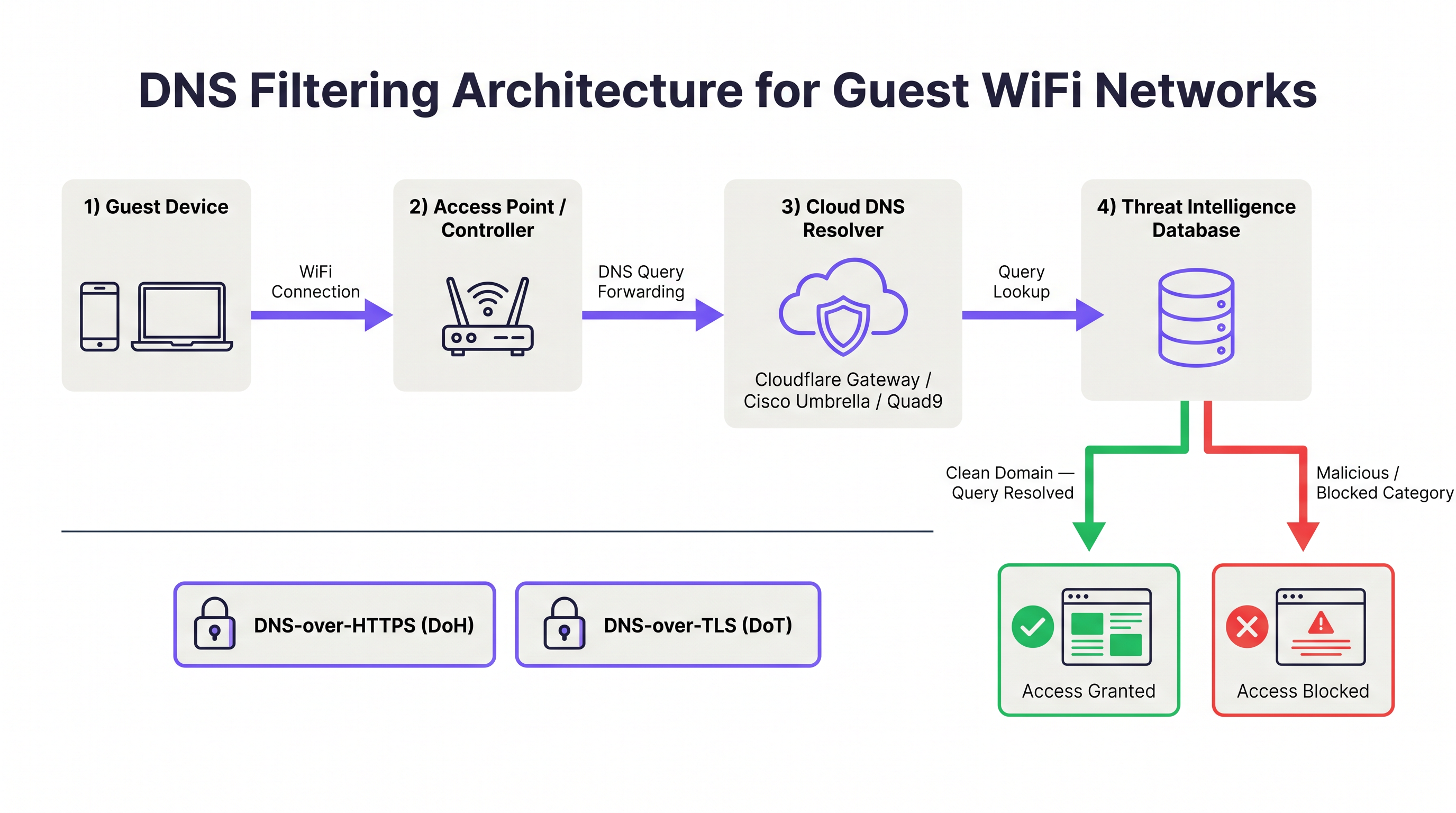
ডোমেইন নেম সিস্টেম (DNS) হলো ইন্টারনেটের মৌলিক রেজোলিউশন লেয়ার। প্রতিবার যখন কোনো ডিভাইস কোনো ওয়েব রিসোর্সের সাথে কানেক্ট করার চেষ্টা করে, তখন এটি প্রথমে ডোমেইন নেমটিকে একটি IP অ্যাড্রেসে রূপান্তর করার জন্য একটি DNS কোয়েরি ইস্যু করে। DNS ফিল্টারিং এই রেজোলিউশন প্রক্রিয়াটিকে ইন্টারসেপ্ট করে এবং রেসপন্স ফেরত দেওয়ার আগে একটি থ্রেট ইন্টেলিজেন্স ডেটাবেসের বিপরীতে রিকোয়েস্ট করা ডোমেইনটিকে মূল্যায়ন করে। যদি ডোমেইনটিকে ক্ষতিকারক হিসেবে শ্রেণীবদ্ধ করা হয় — যেমন ম্যালওয়্যার হোস্টিং, ফিশিং সাইট হিসেবে কাজ করা, বা বটনেট কমান্ড-অ্যান্ড-কন্ট্রোল (C2) এন্ডপয়েন্ট হিসেবে কাজ করা — তাহলে রিভলভার একটি নন-রাউটেবল অ্যাড্রেস ফেরত দেয় বা ক্লায়েন্টকে একটি ব্লক পেজে রিডাইরেক্ট করে। ক্ষতিকারক হোস্টের সাথে TCP/IP কানেকশন কখনোই প্রতিষ্ঠিত হয় না。
এই আর্কিটেকচার প্যাকেট-ইন্সপেকশন ফায়ারওয়ালের তুলনায় একটি মৌলিক দক্ষতার সুবিধা প্রদান করে। একটি কানেকশন শুরু হওয়ার পরেই ফায়ারওয়ালকে ডেটা ইন্সপেক্ট করতে হয়; কিন্তু DNS ফিল্টারিং কানেকশন শুরু হতেই দেয় না। গেস্ট WiFi পরিবেশের জন্য যেখানে শত শত অবিশ্বস্ত ডিভাইস একই সাথে সক্রিয় থাকতে পারে, এই আপস্ট্রিম ইন্টারসেপশন নেটওয়ার্ক পেরিমিটারে পৌঁছানো ক্ষতিকারক ট্রাফিকের পরিমাণ নাটকীয়ভাবে হ্রাস করে।
DNS ফিল্টারিং কী ব্লক করতে পারে এবং কী পারে না
স্টেকহোল্ডারদের সাথে সঠিক প্রত্যাশা সেট করার জন্য DNS ফিল্টারিংয়ের পরিধি বোঝা অপরিহার্য।
| থ্রেট ক্যাটাগরি | DNS ফিল্টারিংয়ের কার্যকারিতা | নোট |
|---|---|---|
| ম্যালওয়্যার ডিস্ট্রিবিউশন ডোমেইন | উচ্চ | ক্ষতিকারক পেলোড ডাউনলোড ব্লক করে |
| ফিশিং সাইট | উচ্চ | ক্রেডেনশিয়াল হারভেস্টিং পেজ ব্লক করে |
| বটনেট C2 কমিউনিকেশন | উচ্চ | ডিভাইসে আগে থেকেই থাকা ম্যালওয়্যার ব্যাহত করে |
| র্যানসমওয়্যার স্টেজিং সার্ভার | উচ্চ | পেলোড পুনরুদ্ধার এবং কী এক্সচেঞ্জ প্রতিরোধ করে |
| অ্যাডাল্ট / অনুপযুক্ত কন্টেন্ট | উচ্চ | ক্যাটাগরি-ভিত্তিক ফিল্টারিং |
| ক্রিপ্টোমাইনিং পুল | উচ্চ | ডোমেইন-ভিত্তিক পুল কানেকশন ব্লক করে |
| IP-ভিত্তিক থ্রেট (ডোমেইন ছাড়া) | নেই | ফায়ারওয়াল বা IPS প্রয়োজন |
| HTTPS-এ এনক্রিপ্ট করা পেলোড | নেই | TLS ইন্সপেকশন প্রয়োজন |
| VPN-টানেলড ট্রাফিক | নেই | ফায়ারওয়ালে VPN ব্লকিং প্রয়োজন |
| ল্যাটারাল মুভমেন্ট (LAN) | নেই | নেটওয়ার্ক সেগমেন্টেশন প্রয়োজন |
DNS ফিল্টারিং কোনো সম্পূর্ণ নিরাপত্তা সমাধান নয়। এটি ডিফেন্স-ইন-ডেপথ আর্কিটেকচারের একটি লেয়ার মাত্র। ব্যাপক গেস্ট WiFi নিরাপত্তার জন্য, এটিকে VLAN সেগমেন্টেশন, Captive Portal অথেনটিকেশন, সেশন টাইমআউট কন্ট্রোল (দেখুন Guest WiFi Session Timeouts: Balancing UX and Security ), এবং যেখানে প্রয়োজন সেখানে TLS ইন্সপেকশনের পাশাপাশি রাখা উচিত।
ক্লাউড DNS ফিল্টারিং: আর্কিটেকচার এবং সার্ভিস তুলনা
ক্লাউড DNS ফিল্টারিং পরিষেবাগুলি গ্লোবাল অ্যানিকাস্ট নেটওয়ার্ক পরিচালনা করে, যার অর্থ হলো DNS কোয়েরিগুলি নিকটতম ডেটা সেন্টারে রাউট করা হয়, যা ল্যাটেন্সি কমিয়ে দেয়। ভেন্যু অপারেটরদের জন্য প্রাসঙ্গিক চারটি প্রধান পরিষেবা হলো Cloudflare Gateway, Cisco Umbrella, Quad9 এবং NextDNS।
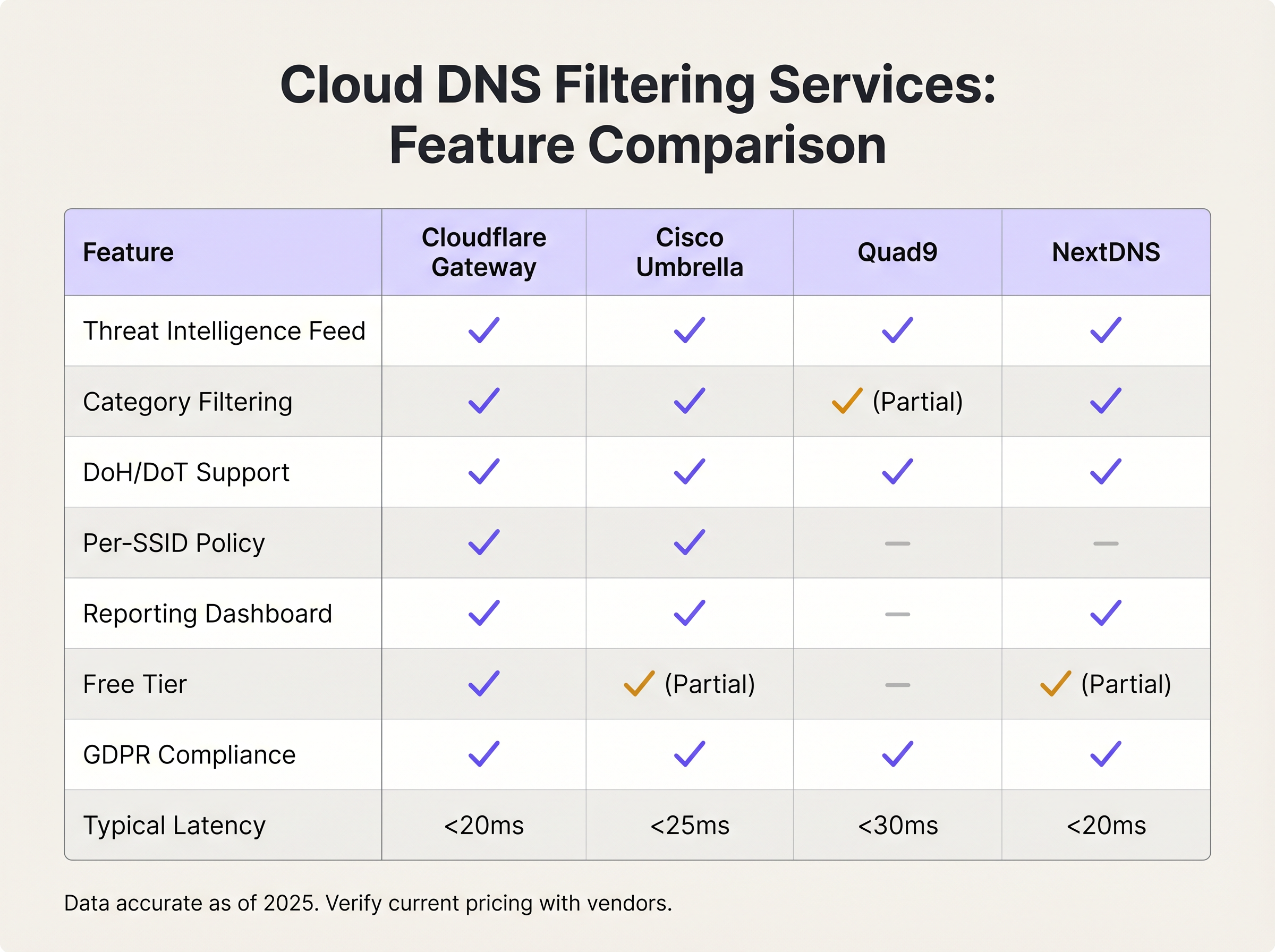
Cloudflare Gateway (Cloudflare Zero Trust প্ল্যাটফর্মের অংশ) বিশ্বব্যাপী 20ms-এর কম রেজোলিউশন ল্যাটেন্সি, গ্র্যানুলার ক্যাটাগরি ফিল্টারিং, প্রতি-লোকেশন পলিসি এনফোর্সমেন্ট এবং একটি GDPR-কমপ্লায়েন্ট ডেটা প্রসেসিং এগ্রিমেন্ট অফার করে। এর ফ্রি টিয়ার বেসিক থ্রেট ব্লকিং সমর্থন করে; পেইড টিয়ারগুলি পলিসি অটোমেশনের জন্য অ্যাডভান্সড ক্যাটাগরি ফিল্টারিং, লগিং এবং API অ্যাক্সেস যুক্ত করে।
Cisco Umbrella হলো বিদ্যমান Cisco ইনফ্রাস্ট্রাকচার থাকা সংস্থাগুলির জন্য এন্টারপ্রাইজ স্ট্যান্ডার্ড। এটি সবচেয়ে ব্যাপক থ্রেট ইন্টেলিজেন্স ফিড প্রদান করে — যা অন্যতম বৃহত্তম কমার্শিয়াল থ্রেট রিসার্চ সংস্থা Cisco Talos দ্বারা পরিচালিত — এবং প্রতি-SSID পলিসি এনফোর্সমেন্ট সমর্থন করে, যা একাধিক SSID (স্টাফ, গেস্ট, IoT) পরিচালনা করা ভেন্যুগুলির জন্য অত্যন্ত গুরুত্বপূর্ণ। Umbrella Meraki অ্যাক্সেস পয়েন্ট সহ Cisco-এর বৃহত্তর সিকিউরিটি পোর্টফোলিওর সাথে একীভূত হয়, যা Meraki-ভিত্তিক নেটওয়ার্কগুলির জন্য ডেপ্লয়মেন্ট সহজ করে।
Quad9 (সুইস অলাভজনক সংস্থা Quad9 Foundation দ্বারা পরিচালিত) কন্টেন্ট ক্যাটাগরাইজেশনের পরিবর্তে একচেটিয়াভাবে সিকিউরিটি ফিল্টারিংয়ের ওপর ফোকাস করে। এটি 20টিরও বেশি পার্টনারের থ্রেট ইন্টেলিজেন্স ব্যবহার করে ক্ষতিকারক ডোমেইন ব্লক করে, ব্যক্তিগতভাবে শনাক্তযোগ্য তথ্য লগ করে না এবং এটি ব্যবহার করা সম্পূর্ণ ফ্রি। কঠোর ডেটা সার্বভৌমত্বের প্রয়োজনীয়তা বা সীমিত বাজেট থাকা সংস্থাগুলির জন্য এটি একটি চমৎকার পছন্দ, যদিও এতে কমার্শিয়াল বিকল্পগুলির মতো ক্যাটাগরি ফিল্টারিং এবং রিপোর্টিং ক্ষমতার অভাব রয়েছে।
NextDNS একটি বিস্তৃত ক্যাটাগরি ফিল্টারিং লাইব্রেরি, প্রতি-ডিভাইস প্রোফাইল এবং বিস্তারিত কোয়েরি লগিং সহ একটি অত্যন্ত কনফিগারযোগ্য ক্লাউড DNS পরিষেবা অফার করে। এর প্রাইসিং মডেল — যা মাসিক কোয়েরি ভলিউমের ওপর ভিত্তি করে — এটিকে ছোট থেকে মাঝারি ডেপ্লয়মেন্টের জন্য সাশ্রয়ী করে তোলে। এটি নেটিভভাবে DNS-over-HTTPS এবং DNS-over-TLS সমর্থন করে।
সেল্ফ-হোস্টেড DNS ফিল্টারিং: কখন এটি উপযুক্ত
সেল্ফ-হোস্টেড সলিউশন — সাধারণত কমার্শিয়াল ব্লকলিস্ট সহ Pi-hole, অথবা Response Policy Zones (RPZ) সহ একটি BIND ইমপ্লিমেন্টেশন — সম্পূর্ণ ডেটা সার্বভৌমত্ব এবং পলিসি কন্ট্রোল প্রদান করে। এগুলি DNS কোয়েরি ডেটার আশেপাশে কঠোর নিয়ন্ত্রক প্রয়োজনীয়তা থাকা সংস্থাগুলির জন্য, বা অপারেশনাল ওভারহেড পরিচালনা করতে সক্ষম বিদ্যমান ইনফ্রাস্ট্রাকচার টিম থাকা সংস্থাগুলির জন্য উপযুক্ত। এর ট্রেড-অফটি উল্লেখযোগ্য: সেল্ফ-হোস্টেড সলিউশনগুলির জন্য হাই-অ্যাভেইলেবিলিটি ডেপ্লয়মেন্ট (অ্যাক্টিভ-প্যাসিভ বা অ্যাক্টিভ-অ্যাক্টিভ কনফিগারেশন — HA প্যাটার্নের সমান্তরাল আলোচনার জন্য RADIUS সার্ভার হাই অ্যাভেইলেবিলিটি: Active-Active বনাম Active-Passive দেখুন), ম্যানুয়াল থ্রেট ফিড আপডেট এবং অভ্যন্তরীণ মনিটরিং প্রয়োজন। বেশিরভাগ ভেন্যু অপারেটরের জন্য, এর অপারেশনাল খরচ সুবিধার চেয়ে বেশি।
এনক্রিপ্ট করা DNS: DoH এবং DoT বিবেচনা
DNS-over-HTTPS (DoH) এবং DNS-over-TLS (DoT) DNS কোয়েরি এনক্রিপ্ট করে, যা অবিশ্বস্ত নেটওয়ার্কগুলিতে ব্যবহারকারীর গোপনীয়তা রক্ষা করে। তবে, এগুলি DNS ফিল্টারিংয়ের জন্য একটি বাইপাস ভেক্টরও তৈরি করে। একটি পাবলিক DoH রিভলভার (যেমন https://cloudflare-dns.com/dns-query) ব্যবহার করার জন্য কনফিগার করা একটি ডিভাইস পোর্ট 443-এ HTTPS ট্রাফিকের মধ্যে তার DNS কোয়েরিগুলিকে এনক্রিপ্ট করবে, যা প্রথাগত পোর্ট 53 ইন্টারসেপশনকে অকার্যকর করে তোলে।
মিটিগেশন স্ট্র্যাটেজির দুটি উপাদান রয়েছে। প্রথমত, পরিচিত পাবলিক DoH রিভলভার এন্ডপয়েন্টগুলিতে আউটবাউন্ড কানেকশন ব্লক করার জন্য আপনার ফায়ারওয়াল বা ওয়্যারলেস কন্ট্রোলার কনফিগার করুন। Cloudflare, Google এবং অন্যান্য প্রোভাইডাররা তাদের DoH এন্ডপয়েন্ট IP রেঞ্জ প্রকাশ করে। দ্বিতীয়ত, নিশ্চিত করুন যে আপনার নির্বাচিত DNS ফিল্টারিং পরিষেবা নেটিভভাবে DoH এবং DoT সমর্থন করে, যাতে এনক্রিপ্ট করা DNS ব্যবহার করার জন্য কনফিগার করা ডিভাইসগুলিকে পাবলিক রিভলভারের পরিবর্তে আপনার সুরক্ষিত রিভলভারে নির্দেশিত করা যায়। Cisco Umbrella এবং Cloudflare Gateway উভয়ই এই কনফিগারেশন সমর্থন করে।
ইমপ্লিমেন্টেশন গাইড
ধাপ ১: আপনার DNS ফিল্টারিং পরিষেবা নির্বাচন করুন
নির্বাচনের মানদণ্ড তিনটি বিষয়ের ওপর ভিত্তি করে হওয়া উচিত: স্কেল, পলিসি গ্র্যানুলারিটি এবং কমপ্লায়েন্সের প্রয়োজনীয়তা। নিম্নলিখিত ফ্রেমওয়ার্কটি বেশিরভাগ ভেন্যু ডেপ্লয়মেন্টের ক্ষেত্রে প্রযোজ্য।
| ডেপ্লয়মেন্ট স্কেল | প্রস্তাবিত পরিষেবা | যৌক্তিকতা |
|---|---|---|
| < ১০০ কনকারেন্ট ব্যবহারকারী | Cloudflare Gateway (ফ্রি) অথবা Quad9 | শূন্য খরচ, পর্যাপ্ত থ্রেট ব্লকিং |
| ১০০–৫০০ কনকারেন্ট ব্যবহারকারী | NextDNS (পেইড) অথবা Cloudflare Gateway | ক্যাটাগরি ফিল্টারিং, রিপোর্টিং ড্যাশবোর্ড |
| ৫০০+ কনকারেন্ট ব্যবহারকারী, সিঙ্গেল সাইট | Cisco Umbrella Essentials | প্রতি-SSID পলিসি, এন্টারপ্রাইজ SLA |
| মাল্টি-সাইট এন্টারপ্রাইজ | Cisco Umbrella Advantage অথবা Cloudflare Gateway Enterprise | সেন্ট্রালাইজড পলিসি ম্যানেজমেন্ট, API অটোমেশন |
| হেলথকেয়ার / নিয়ন্ত্রিত পরিবেশ | Cisco Umbrella অথবা সেল্ফ-হোস্টেড RPZ | ডেটা সার্বভৌমত্ব, HIPAA অডিট লগিং |
ধাপ ২: গেস্ট SSID-এ DHCP কনফিগার করুন
আপনার ওয়্যারলেস কন্ট্রোলার বা অ্যাক্সেস পয়েন্ট ম্যানেজমেন্ট ইন্টারফেসে নেভিগেট করুন এবং DNS ফিল্টারিং পরিষেবার রিভলভার IP অ্যাড্রেসগুলি অ্যাসাইন করার জন্য গেস্ট SSID-এর DHCP স্কোপ কনফিগার করুন। ডিফল্ট আপস্ট্রিম ISP DNS সার্ভারগুলি ব্যবহার করবেন না। Cloudflare Gateway-এর জন্য, আপনার Zero Trust ড্যাশবোর্ডে দেওয়া রিভলভার IP-গুলি ব্যবহার করুন। Cisco Umbrella-এর জন্য, Umbrella রিভলভার IP-গুলি (লেগ্যাসি ডেপ্লয়মেন্টের জন্য 208.67.222.222 এবং 208.67.220.220; আধুনিক ডেপ্লয়মেন্টের জন্য ভার্চুয়াল অ্যাপ্লায়েন্স IP) ব্যবহার করুন।
Purple-পরিচালিত নেটওয়ার্কগুলির জন্য, এই কনফিগারেশনটি কন্ট্রোলার লেভেলে প্রয়োগ করা হয়, যা গেস্ট SSID-এর সমস্ত অ্যাক্সেস পয়েন্ট জুড়ে সামঞ্জস্যপূর্ণ পলিসি এনফোর্সমেন্ট নিশ্চিত করে。
ধাপ ৩: নেটওয়ার্ক এজে DNS ইন্টারসেপশন এনফোর্স করুন
এটি সবচেয়ে বেশি উপেক্ষা করা ধাপ। UDP পোর্ট 53 এবং TCP পোর্ট 53-এ সমস্ত আউটবাউন্ড ট্রাফিক ইন্টারসেপ্ট করতে এবং এটিকে আপনার DNS ফিল্টারিং রিভলভারে রিডাইরেক্ট করতে আপনার ফায়ারওয়াল বা ওয়্যারলেস কন্ট্রোলার কনফিগার করুন। এটি হার্ডকোডেড DNS সেটিংস সহ ডিভাইসগুলিকে ফিল্টার বাইপাস করা থেকে বাধা দেয়। Cisco Meraki-তে, এটি একটি ট্রাফিক শেপিং রুলের মাধ্যমে প্রয়োগ করা হয়। Fortinet FortiGate-এ, একটি DNS প্রক্সি পলিসি ব্যবহার করুন। pfSense বা OPNsense-এ, একটি NAT রিডাইরেক্ট রুল কনফিগার করুন।
অতিরিক্তভাবে, এনক্রিপ্ট করা DNS বাইপাস প্রতিরোধ করতে পোর্ট 443-এ পরিচিত পাবলিক DoH রিভলভার এন্ডপয়েন্টগুলিতে আউটবাউন্ড কানেকশন ব্লক করুন। DoH রিভলভার IP রেঞ্জগুলির একটি নিয়মিত আপডেট করা তালিকা বজায় রাখুন।
ধাপ ৪: আপনার ফিল্টারিং পলিসি সংজ্ঞায়িত করুন
সিকিউরিটি বেসলাইন দিয়ে শুরু করুন — ভেন্যুর ধরন নির্বিশেষে যে ক্যাটাগরিগুলি সর্বজনীনভাবে ব্লক করা উচিত:
- ম্যালওয়্যার ডিস্ট্রিবিউশন
- ফিশিং এবং ক্রেডেনশিয়াল হারভেস্টিং
- বটনেট কমান্ড-অ্যান্ড-কন্ট্রোল
- র্যানসমওয়্যার স্টেজিং
- ক্রিপ্টোমাইনিং
তারপর আপনার গ্রহণযোগ্য ব্যবহার নীতির ওপর ভিত্তি করে ভেন্যু-নির্দিষ্ট কন্টেন্ট ক্যাটাগরি প্রয়োগ করুন:
| ভেন্যুর ধরন | ব্লক করার জন্য প্রস্তাবিত অতিরিক্ত ক্যাটাগরি |
|---|---|
| ফ্যামিলি রিটেইল / শপিং সেন্টার | অ্যাডাল্ট কন্টেন্ট, জুয়া, চরমপন্থী কন্টেন্ট |
| হোটেল (গেস্ট নেটওয়ার্ক) | শিশু যৌন নির্যাতন সামগ্রী (বাধ্যতামূলক), চরমপন্থী কন্টেন্ট |
| স্টেডিয়াম / ইভেন্ট ভেন্যু | অ্যাডাল্ট কন্টেন্ট, চরমপন্থী কন্টেন্ট, অবৈধ স্ট্রিমিং |
| কনফারেন্স সেন্টার | পিয়ার-টু-পিয়ার ফাইল শেয়ারিং, অ্যানোনিমাইজিং প্রক্সি |
| হেলথকেয়ার ফ্যাসিলিটি | অ্যাডাল্ট কন্টেন্ট, জুয়া, সোশ্যাল মিডিয়া (ঐচ্ছিক) |
| পাবলিক সেক্টর / লাইব্রেরি | অ্যাডাল্ট কন্টেন্ট, চরমপন্থী কন্টেন্ট, জুয়া |
ধাপ ৫: টেস্ট এবং ভ্যালিডেট করুন
লাইভ হওয়ার আগে, গেস্ট SSID-এ একটি টেস্ট ডিভাইস ব্যবহার করে কনফিগারেশনটি ভ্যালিডেট করুন। একটি পরিচিত টেস্ট ম্যালওয়্যার ডোমেইন অ্যাক্সেস করার চেষ্টা করুন (বেশিরভাগ DNS ফিল্টারিং পরিষেবা এই উদ্দেশ্যে টেস্ট ডোমেইন প্রদান করে)। নিশ্চিত করুন যে ব্লক পেজটি প্রদর্শিত হচ্ছে। একটি হার্ডকোডেড DNS সার্ভার (যেমন, nslookup google.com 8.8.8.8) ব্যবহার করার চেষ্টা করুন এবং নিশ্চিত করুন যে কোয়েরিটি ইন্টারসেপ্ট এবং রিডাইরেক্ট করা হয়েছে। একটি পাবলিক DoH রিভলভার ব্যবহার করার জন্য একটি ব্রাউজার কনফিগার করে DoH বাইপাস পরীক্ষা করুন এবং নিশ্চিত করুন যে কানেকশনটি ব্লক করা হয়েছে।
ধাপ ৬: মনিটর, টিউন এবং রিপোর্ট করুন
প্রথম চার সপ্তাহের জন্য প্রতিদিন DNS ফিল্টারিং ড্যাশবোর্ড পর্যালোচনা করুন। ট্র্যাক করার জন্য মূল মেট্রিক্সের মধ্যে রয়েছে মোট কোয়েরি, ক্যাটাগরি অনুযায়ী ব্লক করা কোয়েরি, শীর্ষ ব্লক করা ডোমেইন এবং ব্যবহারকারীদের কাছ থেকে ফলস পজিটিভ রিপোর্ট। একটি হোয়াইটলিস্ট রিভিউ প্রক্রিয়া স্থাপন করুন — হোয়াইটলিস্টে যোগ করা যেকোনো ডোমেইন একটি ব্যবসায়িক যৌক্তিকতার সাথে ডকুমেন্টেড হওয়া উচিত এবং ত্রৈমাসিক পর্যালোচনা করা উচিত। CISO বা IT ডিরেক্টরের জন্য মাসিক রিপোর্টের সময়সূচী নির্ধারণ করুন যা থ্রেট ভলিউম এবং ক্যাটাগরি ব্রেকডাউন দেখায়।
বেস্ট প্র্যাকটিস
গেস্ট এবং কর্পোরেট DNS পলিসি সেগমেন্ট করুন। গেস্ট এবং স্টাফ SSID-এ কখনোই একই DNS ফিল্টারিং পলিসি প্রয়োগ করবেন না। গেস্ট নেটওয়ার্কগুলির জন্য কঠোর কন্টেন্ট ফিল্টারিং প্রয়োজন; স্টাফ নেটওয়ার্কগুলির এমন ক্যাটাগরিগুলিতে অ্যাক্সেসের প্রয়োজন হতে পারে যা পাবলিক ব্যবহারকারীদের জন্য অনুপযুক্ত। Cisco Umbrella এবং Cloudflare Gateway উভয়ই প্রতি-লোকেশন বা প্রতি-নেটওয়ার্ক পলিসি সমর্থন করে।
আপনার DNS ফিল্টারিং কনফিগারেশনের সাথে আপনার গ্রহণযোগ্য ব্যবহার নীতি (AUP) অ্যালাইন করুন। আপনার Captive Portal-এর টার্মস অফ সার্ভিসে প্রদর্শিত ফিল্টারিং পলিসিটি অবশ্যই সঠিকভাবে প্রতিফলিত করবে যে কী ব্লক করা হয়েছে। মিসঅ্যালাইনমেন্ট আইনি ঝুঁকি তৈরি করে। AUP যাতে স্পষ্টভাবে DNS-লেভেল কন্টেন্ট ফিল্টারিং উল্লেখ করে তা নিশ্চিত করতে আপনার লিগ্যাল টিমের সাথে কাজ করুন। Purple-এর Guest WiFi Captive Portal এই উদ্দেশ্যে কাস্টমাইজযোগ্য AUP টেক্সট সমর্থন করে।
রিডান্ড্যান্ট DNS রিভলভার ইমপ্লিমেন্ট করুন। আপনার DHCP স্কোপে দুটি রিভলভার IP অ্যাড্রেস কনফিগার করুন — একটি প্রাইমারি এবং একটি সেকেন্ডারি। ক্লাউড DNS পরিষেবাগুলি রিডান্ড্যান্সির জন্য একাধিক রিভলভার এন্ডপয়েন্ট প্রদান করে। DNS রেজোলিউশনে একটি সিঙ্গেল পয়েন্ট অফ ফেইলিওর পুরো গেস্ট নেটওয়ার্ককে অকার্যকর করে তুলবে।
আপনার ডেটা রিটেনশন পলিসি মেনে DNS কোয়েরি লগ করুন। DNS কোয়েরি লগগুলি সিকিউরিটি ইনভেস্টিগেশনের জন্য মূল্যবান কিন্তু যদি সেগুলিকে কোনো ব্যক্তির সাথে লিঙ্ক করা যায় তবে GDPR-এর অধীনে ব্যক্তিগত ডেটা হিসেবে বিবেচিত হতে পারে। নিশ্চিত করুন যে আপনার DNS ফিল্টারিং পরিষেবার ডেটা প্রসেসিং এগ্রিমেন্ট আপনার GDPR বাধ্যবাধকতার সাথে সামঞ্জস্যপূর্ণ, এবং সেই অনুযায়ী লগ রিটেনশন পিরিয়ড কনফিগার করুন।
DNS পলিসির সামঞ্জস্যের জন্য আপনার SD-WAN আর্কিটেকচার পর্যালোচনা করুন। মাল্টি-সাইট ডেপ্লয়মেন্টের জন্য, সমস্ত সাইট জুড়ে DNS ফিল্টারিং পলিসি ধারাবাহিকভাবে প্রয়োগ করা আবশ্যক। SD-WAN প্ল্যাটফর্মগুলি DNS পলিসি ম্যানেজমেন্টকে সেন্ট্রালাইজ করতে পারে — এন্টারপ্রাইজ নেটওয়ার্ক ম্যানেজমেন্টে SD-WAN-এর ভূমিকা সম্পর্কে আরও বিস্তৃত আলোচনার জন্য The Core SD WAN Benefits for Modern Businesses দেখুন।
রিটেইল অ্যানালিটিক্সের সাথে ইন্টারপ্লে বিবেচনা করুন। Retail পরিবেশে, DNS ফিল্টারিং লগগুলি অস্বাভাবিক ডিভাইস আচরণের প্যাটার্ন শনাক্ত করতে WiFi Analytics ডেটার পরিপূরক হতে পারে। অস্বাভাবিকভাবে উচ্চ ভলিউমের ব্লক করা DNS কোয়েরি তৈরি করা একটি ডিভাইস একটি কম্প্রোমাইজড ডিভাইস নির্দেশ করতে পারে যার তদন্ত প্রয়োজন।
ট্রাবলশুটিং এবং রিস্ক মিটিগেশন
সাধারণ ফেইলিওর মোড
হার্ডকোডেড রিভলভারের মাধ্যমে DNS বাইপাস। লক্ষণ: DNS ফিল্টারিং লগগুলি কানেক্টেড ডিভাইসের সংখ্যার তুলনায় কম কোয়েরি ভলিউম দেখায়। মূল কারণ: ডিভাইসগুলি হার্ডকোডেড DNS সার্ভার ব্যবহার করছে যা DHCP-অ্যাসাইন করা রিভলভারগুলিকে বাইপাস করে। সমাধান: পোর্ট 53 ইন্টারসেপশন ইমপ্লিমেন্ট করুন এবং ফায়ারওয়ালে রিডাইরেক্ট করুন।
ফলস পজিটিভ বৈধ পরিষেবাগুলিকে ব্লক করছে। লক্ষণ: নির্দিষ্ট ওয়েবসাইটগুলি অ্যাক্সেসযোগ্য না হওয়া সম্পর্কে ব্যবহারকারীর অভিযোগ। মূল কারণ: DNS ফিল্টারিং পরিষেবা একটি বৈধ ডোমেইনকে ভুলভাবে ক্যাটাগরাইজ করেছে। সমাধান: পরিষেবার লুকআপ টুলে ডোমেইনের ক্যাটাগরাইজেশন চেক করুন, একটি রিক্যাটাগরাইজেশন রিকোয়েস্ট সাবমিট করুন এবং সংশোধনের অপেক্ষায় ডোমেইনটিকে হোয়াইটলিস্টে যুক্ত করুন।
DoH বাইপাস। লক্ষণ: পোর্ট 53 ইন্টারসেপশন থাকা সত্ত্বেও নির্দিষ্ট ডিভাইসগুলি ফিল্টারিং বাইপাস করছে বলে মনে হচ্ছে। মূল কারণ: ডিভাইসটি একটি পাবলিক রিভলভারে DNS-over-HTTPS ব্যবহার করছে। সমাধান: ফায়ারওয়ালে পরিচিত DoH রিভলভার IP রেঞ্জগুলিতে আউটবাউন্ড কানেকশন ব্লক করুন।
DNSSEC ভ্যালিডেশন ফেইলিওর। লক্ষণ: নির্দিষ্ট ডোমেইনগুলি SERVFAIL রেসপন্স ফেরত দেয়। মূল কারণ: DNS ফিল্টারিং পরিষেবা DNSSEC ভ্যালিডেশন করছে এবং ডোমেইনের DNSSEC রেকর্ডগুলি ভুলভাবে কনফিগার করা হয়েছে। সমাধান: একটি অনলাইন DNSSEC অ্যানালাইজার ব্যবহার করে ডোমেইনের DNSSEC কনফিগারেশন যাচাই করুন; যদি ডোমেইনটি বৈধ হয়, তবে এটিকে হোয়াইটলিস্টে যুক্ত করুন।
উচ্চ DNS ল্যাটেন্সির কারণে পেজ লোড ধীর হওয়া। লক্ষণ: পর্যাপ্ত ব্যান্ডউইথ থাকা সত্ত্বেও ব্যবহারকারীরা ধীর ব্রাউজিংয়ের রিপোর্ট করে। মূল কারণ: DNS ফিল্টারিং রিভলভারটি ভৌগলিকভাবে দূরে অবস্থিত বা লোডের সম্মুখীন হচ্ছে। সমাধান: অ্যানিকাস্ট রাউটিং সঠিকভাবে কাজ করছে কিনা তা যাচাই করুন; আপনার ভেন্যুর কাছাকাছি ডেটা সেন্টার আছে এমন একটি রিভলভারে স্যুইচ করার কথা বিবেচনা করুন।
রিস্ক মিটিগেশন ফ্রেমওয়ার্ক
নিম্নলিখিত রিস্ক রেজিস্টারটি DNS ফিল্টারিং ডেপ্লয়মেন্টের সাথে যুক্ত প্রাথমিক ঝুঁকি এবং তাদের মিটিগেশনগুলিকে সারসংক্ষেপ করে।
| ঝুঁকি | সম্ভাবনা | প্রভাব | মিটিগেশন |
|---|---|---|---|
| হার্ডকোডেড রিভলভারের মাধ্যমে DNS বাইপাস | উচ্চ | উচ্চ | পোর্ট 53 ইন্টারসেপশন এবং রিডাইরেক্ট |
| ফলস পজিটিভ বিজনেস-ক্রিটিকাল পরিষেবাগুলিকে ব্লক করছে | মাঝারি | উচ্চ | হোয়াইটলিস্ট প্রক্রিয়া, প্রি-ডেপ্লয়মেন্ট টেস্টিং |
| সিঙ্গেল রিভলভার ফেইলিওরের কারণে নেটওয়ার্ক আউটেজ | মাঝারি | উচ্চ | রিডান্ড্যান্ট রিভলভার কনফিগারেশন |
| DoH বাইপাস ফিল্টার এড়িয়ে যাচ্ছে | মাঝারি | মাঝারি | ফায়ারওয়ালে পরিচিত DoH এন্ডপয়েন্ট ব্লক করুন |
| অতিরিক্ত DNS লগিংয়ের মাধ্যমে GDPR নন-কমপ্লায়েন্স | নিম্ন | উচ্চ | ডেটা রিটেনশন পলিসি, DPA রিভিউ |
| থ্রেট ইন্টেলিজেন্স ফিড স্টেলনেস (সেল্ফ-হোস্টেড) | নিম্ন | উচ্চ | অটোমেটেড ফিড আপডেট, ক্লাউড পরিষেবা পছন্দনীয় |
ROI এবং বিজনেস ইমপ্যাক্ট
DNS ফিল্টারিংয়ের ভ্যালু কোয়ান্টিফাই করা
গেস্ট WiFi-এ DNS ফিল্টারিংয়ের রিটার্ন অন ইনভেস্টমেন্ট তিনটি বিষয়ের ওপর নির্ভর করে: ইনসিডেন্ট কস্ট এড়ানো, কমপ্লায়েন্স কস্ট কমানো এবং অপারেশনাল দক্ষতা।
ইনসিডেন্ট কস্ট এড়ানো হলো সবচেয়ে উল্লেখযোগ্য ড্রাইভার। গেস্ট নেটওয়ার্ক থেকে উদ্ভূত একটি একক ম্যালওয়্যার ইনসিডেন্ট — যার ফলে একটি ISP অ্যাবিউজ নোটিশ, একটি নিয়ন্ত্রক তদন্ত, বা সুনামের ক্ষতি হতে পারে — রেমিডিয়েশন, আইনি ফি এবং হারানো ব্যবসার ক্ষেত্রে হাজার হাজার পাউন্ড খরচ হতে পারে। বেশিরভাগ ভেন্যু ডেপ্লয়মেন্টের জন্য ক্লাউড DNS ফিল্টারিং পরিষেবাগুলির খরচ প্রতি মাসে শূন্য থেকে কয়েকশ পাউন্ডের মধ্যে হয়। এর কস্ট-বেনিফিট রেশিও অত্যন্ত আকর্ষণীয়।
নিয়ন্ত্রক ফ্রেমওয়ার্কগুলি কঠোর হওয়ার সাথে সাথে কমপ্লায়েন্স কস্ট কমানো ক্রমশ প্রাসঙ্গিক হয়ে উঠছে। PCI DSS v4.0, GDPR এবং UK-এর Online Safety Act সবই নেটওয়ার্ক মনিটরিং এবং কন্টেন্ট কন্ট্রোলের আশেপাশে বাধ্যবাধকতা তৈরি করে। DNS ফিল্টারিং প্রোঅ্যাক্টিভ সিকিউরিটি কন্ট্রোলের ডকুমেন্টেড প্রমাণ প্রদান করে, যা কমপ্লায়েন্স অডিটের পরিধি এবং খরচ কমিয়ে দেয়।
অপারেশনাল দক্ষতা একটি কম সুস্পষ্ট কিন্তু বাস্তব সুবিধা। DNS ফিল্টারিং আপনার ফায়ারওয়াল এবং সিকিউরিটি মনিটরিং ইনফ্রাস্ট্রাকচারে পৌঁছানো ক্ষতিকারক ট্রাফিকের পরিমাণ হ্রাস করে, অ্যালার্ট ফ্যাটিগ এবং ফলস অ্যালার্ম তদন্তের অপারেশনাল ওভারহেড কমিয়ে দেয়।
প্রত্যাশিত ফলাফল
Hospitality , Retail , Healthcare এবং Transport পরিবেশ জুড়ে ডেপ্লয়মেন্টের ওপর ভিত্তি করে, গেস্ট WiFi-এ DNS ফিল্টারিং ডেপ্লয় করা সংস্থাগুলি 90 দিনের মধ্যে নিম্নলিখিত ফলাফলগুলি আশা করতে পারে:
| মেট্রিক | সাধারণ ফলাফল |
|---|---|
| প্রতিদিন ব্লক করা ক্ষতিকারক ডোমেইন রিকোয়েস্ট (প্রতি ১০০ ডিভাইসে) | ৫০–২০০ |
| ISP অ্যাবিউজ নোটিশ হ্রাস | ৮০–১০০% |
| গেস্ট নেটওয়ার্ক সিকিউরিটি ইনসিডেন্ট হ্রাস | ৬০–৮০% |
| কম্প্রোমাইজড ডিভাইস শনাক্ত করার সময় (DNS অ্যানোমালির মাধ্যমে) | < ২৪ ঘণ্টা |
| কমপ্লায়েন্স অডিট ফাইন্ডিং হ্রাস | ২০–৪০% |
যেসব ভেন্যু ইতিমধ্যেই Purple-এর Guest WiFi প্ল্যাটফর্ম পরিচালনা করছে, তাদের জন্য DNS ফিল্টারিং ইন্টিগ্রেশনে কোনো অতিরিক্ত হার্ডওয়্যার এবং ন্যূনতম কনফিগারেশন সময়ের প্রয়োজন হয় — সাধারণত সিঙ্গেল-সাইট ডেপ্লয়মেন্টের জন্য দুই থেকে চার ঘণ্টা, যা প্রতি-সাইট পলিসি কাস্টমাইজেশন সহ একটি মাল্টি-সাইট এন্টারপ্রাইজ রোলআউটের জন্য এক থেকে দুই দিন পর্যন্ত স্কেল করে।
মূল সংজ্ঞাসমূহ
DNS ফিল্টারিং
একটি সিকিউরিটি কন্ট্রোল যা DNS কোয়েরিগুলিকে ইন্টারসেপ্ট করে এবং ক্ষতিকারক বা পলিসি-লঙ্ঘনকারী হিসেবে শ্রেণীবদ্ধ ডোমেইনগুলির রেজোলিউশন ব্লক করে, ক্লায়েন্ট ডিভাইসটিকে টার্গেট হোস্টের সাথে কানেকশন স্থাপন করতে বাধা দেয়।
IT টিমের গেস্ট WiFi সিকিউরিটি কন্ট্রোল মূল্যায়ন করার সময় এর সম্মুখীন হয়। এটি পাবলিক-ফেসিং নেটওয়ার্কগুলিতে ম্যালওয়্যার, ফিশিং এবং অনুপযুক্ত কন্টেন্টের বিরুদ্ধে সবচেয়ে সাশ্রয়ী প্রথম স্তরের প্রতিরক্ষা।
অ্যানিকাস্ট নেটওয়ার্ক
একটি রাউটিং পদ্ধতি যেখানে একাধিক সার্ভার একই IP অ্যাড্রেস শেয়ার করে এবং নেটওয়ার্ক টপোলজির ওপর ভিত্তি করে ক্লায়েন্ট কোয়েরিগুলি স্বয়ংক্রিয়ভাবে নিকটতম সার্ভারে রাউট করা হয়। বিশ্বব্যাপী কোয়েরি ল্যাটেন্সি কমানোর জন্য ক্লাউড DNS প্রোভাইডাররা এটি ব্যবহার করে।
ক্লাউড DNS ফিল্টারিং পরিষেবাগুলি মূল্যায়ন করার সময় প্রাসঙ্গিক। অ্যানিকাস্ট নিশ্চিত করে যে ম্যানচেস্টারের একটি ভেন্যু থেকে আসা DNS কোয়েরিগুলি একটি US ডেটা সেন্টারের পরিবর্তে একটি UK ডেটা সেন্টার দ্বারা সমাধান করা হয়, যা ল্যাটেন্সিকে 20ms-এর নিচে রাখে।
রেসপন্স পলিসি জোন (RPZ)
একটি DNS এক্সটেনশন যা একটি রিভলভারকে স্থানীয়ভাবে সংজ্ঞায়িত পলিসি জোনের ওপর ভিত্তি করে স্ট্যান্ডার্ড DNS রেসপন্স ওভাররাইড করার অনুমতি দেয়। নির্দিষ্ট ডোমেইনের জন্য কোয়েরি ব্লক বা রিডাইরেক্ট করতে সেল্ফ-হোস্টেড DNS ফিল্টারিং ইমপ্লিমেন্টেশনে ব্যবহৃত হয়।
BIND বা Unbound ব্যবহার করে সেল্ফ-হোস্টেড DNS ফিল্টারিং ডেপ্লয়মেন্টে দেখা যায়। RPZ একটি কমার্শিয়াল ক্লাউড পরিষেবার প্রয়োজন ছাড়াই DNS রেসপন্সের ওপর সূক্ষ্ম নিয়ন্ত্রণ প্রদান করে।
DNS-over-HTTPS (DoH)
একটি প্রোটোকল যা পোর্ট 443-এ HTTPS ট্রাফিকের মধ্যে DNS কোয়েরিগুলিকে এনক্রিপ্ট করে, যা কোয়েরির গোপনীয়তা রক্ষা করে কিন্তু পোর্ট 53 ইন্টারসেপশনের ওপর নির্ভরশীল DNS ফিল্টারিং সিস্টেমগুলির জন্য একটি সম্ভাব্য বাইপাস ভেক্টরও তৈরি করে।
ব্রাউজার এবং অপারেটিং সিস্টেমগুলি ডিফল্টরূপে DoH গ্রহণ করার কারণে এটি ক্রমশ প্রাসঙ্গিক হয়ে উঠছে। গেস্ট নেটওয়ার্কগুলিতে DNS ফিল্টারিং ডেপ্লয় করার সময় IT টিমগুলিকে অবশ্যই DoH বাইপাসের বিষয়টি বিবেচনা করতে হবে।
DNS-over-TLS (DoT)
একটি প্রোটোকল যা পোর্ট 853-এ TLS ব্যবহার করে DNS কোয়েরিগুলিকে এনক্রিপ্ট করে, যা DoH-এর মতো গোপনীয়তা সুবিধা প্রদান করে তবে একটি ডেডিকেটেড পোর্ট ব্যবহার করে যা নেটওয়ার্ক এজে শনাক্ত করা এবং পরিচালনা করা সহজ।
কনজিউমার ডিভাইসগুলিতে DoH-এর তুলনায় কম ব্যবহৃত হয় তবে এন্টারপ্রাইজ পরিবেশে প্রাসঙ্গিক। পোর্ট 853-এ DoT ট্রাফিক DoH-এর চেয়ে আরও সহজভাবে ফায়ারওয়ালে ব্লক বা রিডাইরেক্ট করা যেতে পারে।
থ্রেট ইন্টেলিজেন্স ফিড
পরিচিত ক্ষতিকারক ডোমেইন, IP অ্যাড্রেস এবং URL-গুলির একটি ক্রমাগত আপডেট হওয়া ডেটাবেস, যা সিকিউরিটি গবেষকদের দ্বারা রক্ষণাবেক্ষণ করা হয় এবং রিয়েল টাইমে থ্রেটগুলিকে শ্রেণীবদ্ধ এবং ব্লক করতে DNS ফিল্টারিং পরিষেবাগুলি দ্বারা ব্যবহৃত হয়।
থ্রেট ইন্টেলিজেন্স ফিডের গুণমান এবং সতেজতা হলো DNS ফিল্টারিং পরিষেবাগুলির মধ্যে প্রাথমিক পার্থক্যকারী। Cisco Talos-এর মতো ক্লাউড প্রোভাইডাররা ফিডের নির্ভুলতা বজায় রাখতে প্রতিদিন বিলিয়ন বিলিয়ন কোয়েরি প্রসেস করে।
বটনেট কমান্ড-অ্যান্ড-কন্ট্রোল (C2)
একটি সার্ভার বা ডোমেইন যা ম্যালওয়্যার অপারেটরদের দ্বারা কম্প্রোমাইজড ডিভাইসগুলিতে (বট) নির্দেশ জারি করতে এবং এক্সফিল্ট্রেটেড ডেটা গ্রহণ করতে ব্যবহৃত হয়। DNS ফিল্টারিং C2 ডোমেইন রেজোলিউশন ব্লক করে, যা গেস্ট ডিভাইসে আগে থেকেই ইনস্টল থাকা ম্যালওয়্যারকে ব্যাহত করে।
গেস্ট WiFi নিরাপত্তার জন্য অত্যন্ত গুরুত্বপূর্ণ কারণ নেটওয়ার্কে কানেক্ট করার আগেই একটি গেস্ট ডিভাইস সংক্রমিত হতে পারে। DNS ফিল্টারিং ম্যালওয়্যারটিকে তার অপারেটরদের সাথে যোগাযোগ করতে বাধা দেয়, যা ক্ষতির পরিমাণ সীমিত করে।
DNSSEC (DNS সিকিউরিটি এক্সটেনশন)
IETF স্পেসিফিকেশনের একটি স্যুট যা DNS রেসপন্সে ক্রিপ্টোগ্রাফিক সিগনেচার যোগ করে, যা রিভলভারগুলিকে যাচাই করার অনুমতি দেয় যে ট্রানজিটের সময় রেসপন্সগুলির সাথে কোনো টেম্পারিং করা হয়নি। এটি DNS ফিল্টারিং থেকে আলাদা তবে পরিপূরক।
DNS ফিল্টারিং ডেপ্লয় করার সময় IT টিমগুলি DNSSEC ভ্যালিডেশন ফেইলিওরের সম্মুখীন হতে পারে যদি ফিল্টারিং পরিষেবা DNSSEC ভ্যালিডেশন করে এবং কোনো ডোমেইনের রেকর্ড ভুলভাবে কনফিগার করা থাকে। DNSSEC এবং DNS ফিল্টারিংয়ের মধ্যে পার্থক্য বোঝা ডায়াগনস্টিক বিভ্রান্তি প্রতিরোধ করে।
গ্রহণযোগ্য ব্যবহার নীতি (AUP)
একটি আনুষ্ঠানিক পলিসি ডকুমেন্ট যা কোনো নেটওয়ার্ক বা কম্পিউটিং রিসোর্সের অনুমোদিত এবং নিষিদ্ধ ব্যবহারগুলিকে সংজ্ঞায়িত করে। গেস্ট WiFi-এর জন্য, AUP সাধারণত Captive Portal-এ উপস্থাপন করা হয় এবং এটি অবশ্যই কার্যকর থাকা DNS ফিল্টারিং ক্যাটাগরিগুলিকে সঠিকভাবে প্রতিফলিত করবে।
GDPR এবং UK Online Safety Act-এর অধীনে একটি ডিফেন্সিবল পজিশন প্রতিষ্ঠা করতে লিগ্যাল টিমগুলির AUP-তে স্পষ্টভাবে DNS-লেভেল কন্টেন্ট ফিল্টারিং উল্লেখ করা প্রয়োজন। AUP এবং প্রকৃত ফিল্টারিং পলিসির মধ্যে মিসঅ্যালাইনমেন্ট আইনি ঝুঁকি তৈরি করে।
প্রতি-SSID পলিসি
একটি DNS ফিল্টারিং কনফিগারেশন ক্ষমতা যা বিভিন্ন ওয়্যারলেস নেটওয়ার্ক নামে (SSID) বিভিন্ন ফিল্টারিং পলিসি প্রয়োগ করার অনুমতি দেয় — উদাহরণস্বরূপ, গেস্ট SSID-এ একটি কঠোর কন্টেন্ট পলিসি এবং স্টাফ SSID-এ একটি শুধুমাত্র-সিকিউরিটি পলিসি।
একাধিক SSID পরিচালনা করা ভেন্যুগুলির জন্য অপরিহার্য। প্রতি-SSID পলিসি সমর্থন ছাড়া, একই ফিল্টারিং নিয়ম সমস্ত নেটওয়ার্কে প্রযোজ্য হয়, যা স্টাফদের অ্যাক্সেসকে অতিরিক্ত সীমাবদ্ধ করে বা গেস্ট অ্যাক্সেসকে কম সুরক্ষিত করে।
সমাধানকৃত উদাহরণসমূহ
UK জুড়ে ১২টি প্রপার্টি পরিচালনা করা একটি ৩৫০-রুমের হোটেল গ্রুপ গেস্ট ডিভাইস থেকে উদ্ভূত ম্যালওয়্যার ট্রাফিক সম্পর্কে ISP অ্যাবিউজ নোটিশ পাচ্ছে। তাদের গেস্ট WiFi Purple-এর মাধ্যমে পরিচালিত হয়। তাদের ৩০ দিনের মধ্যে সমস্ত প্রপার্টি জুড়ে DNS ফিল্টারিং ডেপ্লয় করতে হবে, যাতে গেস্টদের ন্যূনতম ব্যাঘাত ঘটে এবং কোনো অতিরিক্ত অন-সাইট হার্ডওয়্যার না লাগে।
প্রস্তাবিত পদ্ধতি হলো ক্লাউড DNS ফিল্টারিং পরিষেবা হিসেবে Cloudflare Gateway (Zero Trust) ডেপ্লয় করা, যা সমস্ত ১২টি প্রপার্টি জুড়ে গেস্ট SSID-এর জন্য ওয়্যারলেস কন্ট্রোলার লেভেলে কনফিগার করা হবে।
সপ্তাহ ১ — সার্ভিস কনফিগারেশন: একটি Cloudflare Zero Trust অ্যাকাউন্ট তৈরি করুন এবং সিকিউরিটি বেসলাইন (ম্যালওয়্যার, ফিশিং, বটনেট C2, র্যানসমওয়্যার) এনাবল করে একটি DNS ফিল্টারিং পলিসি কনফিগার করুন। হোটেলের গ্রহণযোগ্য ব্যবহারের ক্যাটাগরিগুলি যোগ করুন: অ্যাডাল্ট কন্টেন্ট এবং চরমপন্থী উপাদান। হোটেলের লোগো এবং কোনো সাইট ভুলভাবে ব্লক করা হয়েছে বলে মনে করা গেস্টদের জন্য একটি কন্ট্যাক্ট নম্বর সহ একটি ব্র্যান্ডেড ব্লক পেজ প্রদর্শন করার জন্য পলিসিটি কনফিগার করুন।
সপ্তাহ ২ — নেটওয়ার্ক কনফিগারেশন: প্রতিটি প্রপার্টির জন্য, ওয়্যারলেস কন্ট্রোলার ম্যানেজমেন্ট ইন্টারফেস অ্যাক্সেস করুন এবং Cloudflare Gateway-এর রিভলভার IP-গুলি অ্যাসাইন করার জন্য গেস্ট SSID-এর DHCP স্কোপ আপডেট করুন। আউটবাউন্ড পোর্ট 53 ট্রাফিক ইন্টারসেপ্ট করতে এবং Cloudflare রিভলভারে রিডাইরেক্ট করতে প্রতিটি প্রপার্টিতে ফায়ারওয়াল কনফিগার করুন। সঠিক লোকেশন পলিসির সাথে কোয়েরিগুলিকে যুক্ত করতে Cloudflare Zero Trust ড্যাশবোর্ডে প্রতিটি প্রপার্টির ইগ্রেস IP রেজিস্টার করুন।
সপ্তাহ ৩ — টেস্টিং এবং ভ্যালিডেশন: দুটি পাইলট প্রপার্টিতে, গেস্ট SSID-এর সাথে একটি টেস্ট ডিভাইস কানেক্ট করুন এবং ভ্যালিডেট করুন: (a) ক্ষতিকারক টেস্ট ডোমেইন ব্লক করা হয়েছে, (b) হার্ডকোডেড DNS কোয়েরি ইন্টারসেপ্ট করা হয়েছে, (c) বৈধ হোটেল পরিষেবাগুলি (বুকিং ইঞ্জিন, স্ট্রিমিং পরিষেবা) অ্যাক্সেসযোগ্য। ফলস পজিটিভের জন্য Cloudflare ড্যাশবোর্ড পর্যালোচনা করুন এবং প্রয়োজন অনুযায়ী হোয়াইটলিস্ট করুন।
সপ্তাহ ৪ — ফুল রোলআউট এবং মনিটরিং: বাকি ১০টি প্রপার্টিতে রোল আউট করুন। Cloudflare ড্যাশবোর্ড থেকে গ্রুপ IT ডিরেক্টরের কাছে সাপ্তাহিক ইমেইল রিপোর্ট কনফিগার করুন। প্রতিটি প্রপার্টিতে একজন নির্ধারিত কন্ট্যাক্টের সাথে একটি হোয়াইটলিস্ট রিভিউ প্রক্রিয়া স্থাপন করুন।
প্রত্যাশিত ফলাফল: ৩০ দিনের মধ্যে ISP অ্যাবিউজ নোটিশ বন্ধ হয়ে যায়। ড্যাশবোর্ড এস্টেট জুড়ে প্রতিদিন গড়ে ৩৪০টি ব্লক করা ক্ষতিকারক রিকোয়েস্ট প্রকাশ করে। একটি প্রপার্টি অস্বাভাবিকভাবে উচ্চ ব্লক করা রিকোয়েস্ট ভলিউম দেখায়, যা একটি কনফারেন্স রুমে একটি কম্প্রোমাইজড IoT ডিভাইসে ট্রেস করা হয়, যেটিকে আইসোলেট এবং রেমিডিয়েট করা হয়।
ইউরোপ জুড়ে ২০০টি স্টোর থাকা একটি রিটেইল চেইন তাদের ইন-স্টোর গেস্ট WiFi-এ দুটি সমস্যার সম্মুখীন হচ্ছে: গেস্টরা অ্যাডাল্ট কন্টেন্ট এবং ভিডিও স্ট্রিমিং পরিষেবা অ্যাক্সেস করছে, যার ফলে সুনামের ঝুঁকি এবং নেটওয়ার্ক কনজেশন তৈরি হচ্ছে। IT ডিরেক্টরের এমন একটি সলিউশন প্রয়োজন যা সমস্ত স্টোর জুড়ে ধারাবাহিকভাবে কন্টেন্ট ফিল্টারিং এনফোর্স করে, বিদ্যমান Cisco Meraki ইনফ্রাস্ট্রাকচারের সাথে একীভূত হয় এবং GDPR এবং UK Online Safety Act-এর সাথে কমপ্লায়েন্সের ডকুমেন্টেড প্রমাণ প্রদান করে।
Meraki-Umbrella ইন্টিগ্রেশনের মাধ্যমে বিদ্যমান Meraki ইনফ্রাস্ট্রাকচারের সাথে একীভূত করে Cisco Umbrella Advantage ডেপ্লয় করুন।
ফেজ ১ — পলিসি ডিজাইন: দুটি DNS ফিল্টারিং পলিসি সংজ্ঞায়িত করুন: (a) গেস্ট SSID পলিসি — সিকিউরিটি বেসলাইনের সাথে অ্যাডাল্ট কন্টেন্ট, ভিডিও স্ট্রিমিং, পিয়ার-টু-পিয়ার ফাইল শেয়ারিং এবং অ্যানোনিমাইজিং প্রক্সি ব্লক করা; (b) স্টাফ SSID পলিসি — শুধুমাত্র সিকিউরিটি বেসলাইন। Captive Portal AUP আপডেট করে স্পষ্টভাবে DNS-লেভেল কন্টেন্ট ফিল্টারিং উল্লেখ করতে লিগ্যাল টিমের সাথে কাজ করুন।
ফেজ ২ — Meraki ইন্টিগ্রেশন: Cisco Umbrella ড্যাশবোর্ডে, Meraki ইন্টিগ্রেশন এনাবল করুন এবং Umbrella সংস্থাকে Meraki ড্যাশবোর্ডের সাথে লিঙ্ক করুন। ২০০-স্টোর এস্টেট জুড়ে সমস্ত গেস্ট নেটওয়ার্ক SSID-তে গেস্ট SSID পলিসি অ্যাসাইন করুন। Meraki ইন্টিগ্রেশন স্বয়ংক্রিয়ভাবে Umbrella রিভলভারগুলিতে DNS ফরোয়ার্ডিং কনফিগার করে — প্রতি স্টোরে কোনো ম্যানুয়াল DHCP কনফিগারেশনের প্রয়োজন নেই।
ফেজ ৩ — এনফোর্সমেন্ট: একটি ট্রাফিক শেপিং রুল ব্যবহার করে নন-Umbrella রিভলভারগুলিতে আউটবাউন্ড পোর্ট 53 ট্রাফিক ব্লক করতে Meraki কনফিগার করুন। পরিচিত পাবলিক রিভলভারগুলিতে DoH ট্রাফিক ইন্সপেক্ট এবং ব্লক করতে Umbrella-এর ইন্টেলিজেন্ট প্রক্সি এনাবল করুন।
ফেজ ৪ — কমপ্লায়েন্স ডকুমেন্টেশন: মাসিক ভিত্তিতে Umbrella-এর পলিসি কনফিগারেশন এবং অডিট লগ এক্সপোর্ট করুন। কন্টেন্ট ফিল্টারিং কন্ট্রোলের প্রমাণ হিসেবে এগুলিকে সংস্থার ISMS (Information Security Management System)-এ সংরক্ষণ করুন। নিশ্চিত করুন যে Umbrella-এর ডেটা প্রসেসিং এগ্রিমেন্ট স্বাক্ষরিত হয়েছে এবং DPO-এর কাছে ফাইল করা হয়েছে।
প্রত্যাশিত ফলাফল: ভিডিও স্ট্রিমিং ব্লক হওয়ার কারণে গেস্ট নেটওয়ার্ক ইউটিলাইজেশন ৩৫% কমে যায়। ডেপ্লয়মেন্টের পর ১২ মাসে শূন্য অ্যাডাল্ট কন্টেন্ট ইনসিডেন্ট রিপোর্ট করা হয়েছে। কমপ্লায়েন্স অডিট নিশ্চিত করে যে ডকুমেন্টেড ফিল্টারিং কন্ট্রোলগুলি Online Safety Act-এর বাধ্যবাধকতা পূরণ করে।
অনুশীলনী প্রশ্নসমূহ
Q1. একজন কনফারেন্স সেন্টার অপারেটর তিনটি SSID চালায়: 'Guest-Public' (সমস্ত অংশগ্রহণকারীদের জন্য উন্মুক্ত), 'Exhibitor-WiFi' (কার্ড পেমেন্ট প্রসেস করা ট্রেড শো এক্সিবিটরদের জন্য), এবং 'Staff-Internal' (ভেন্যু কর্মীদের জন্য)। তারা DNS ফিল্টারিং ডেপ্লয় করতে চায়। তাদের ফিল্টারিং পলিসিগুলি কীভাবে গঠন করা উচিত এবং Exhibitor SSID-এর ক্ষেত্রে কোন কমপ্লায়েন্স বিবেচনাগুলি প্রযোজ্য?
ইঙ্গিত: প্রতিটি SSID-এর জন্য বিভিন্ন রিস্ক প্রোফাইল এবং নিয়ন্ত্রক প্রয়োজনীয়তা বিবেচনা করুন। PCI DSS এমন যেকোনো নেটওয়ার্কে প্রযোজ্য যেখানে কার্ড ডেটা উপস্থিত বা সংলগ্ন থাকতে পারে।
মডেল উত্তর দেখুন
তিনটি স্বতন্ত্র পলিসি প্রয়োজন। Guest-Public: সম্পূর্ণ সিকিউরিটি বেসলাইন (ম্যালওয়্যার, ফিশিং, C2, র্যানসমওয়্যার) এবং একটি পেশাদার পরিবেশের জন্য উপযুক্ত কন্টেন্ট ক্যাটাগরি (অ্যাডাল্ট কন্টেন্ট, চরমপন্থী উপাদান, অ্যানোনিমাইজিং প্রক্সি)। Exhibitor-WiFi: শুধুমাত্র সিকিউরিটি বেসলাইন — এমন কোনো কন্টেন্ট ফিল্টারিং প্রয়োগ করবেন না যা বৈধ ব্যবসায়িক টুল ব্লক করতে পারে। সমালোচনামূলকভাবে, যেহেতু এই SSID-টি কার্ড পেমেন্ট প্রসেস করা এক্সিবিটরদের দ্বারা ব্যবহৃত হয়, তাই PCI DSS v4.0 প্রযোজ্য। SSID-টিকে অবশ্যই একটি পৃথক VLAN-এ থাকতে হবে যার সাথে কার্ডহোল্ডার ডেটা এনভায়রনমেন্টের কোনো পথ নেই, এবং অডিট ট্রেইলের অংশ হিসেবে DNS ফিল্টারিং লগগুলি কমপক্ষে ১২ মাসের জন্য সংরক্ষণ করতে হবে। এর PCI DSS কমপ্লায়েন্স রিপোর্টিং ফিচারের সাথে Cisco Umbrella ডেপ্লয় করার কথা বিবেচনা করুন। Staff-Internal: শুধুমাত্র সিকিউরিটি বেসলাইন, সাথে এমন স্টাফদের জন্য একটি ডকুমেন্টেড এক্সেপশন প্রক্রিয়া যাদের এমন ক্যাটাগরিগুলিতে অ্যাক্সেস প্রয়োজন যা অন্যথায় ব্লক করা হতে পারে। Exhibitor SSID-এর জন্য মূল কমপ্লায়েন্স বিবেচনা হলো যে PCI DSS Requirement 6.4 পাবলিক-ফেসিং ওয়েব অ্যাপ্লিকেশনগুলির সুরক্ষা বাধ্যতামূলক করে, এবং Requirement 10.2 অডিট লগ রিটেনশন বাধ্যতামূলক করে — DNS ফিল্টারিং লগগুলি এই প্রয়োজনীয়তার অংশ পূরণ করে।
Q2. একজন হোটেল IT ম্যানেজার গেস্ট SSID-এ Cloudflare Gateway ডেপ্লয় করেন। দুই সপ্তাহ পর, ড্যাশবোর্ড দেখায় যে কানেক্টেড ডিভাইসের সংখ্যার ওপর ভিত্তি করে প্রত্যাশিত পরিমাণের চেয়ে DNS কোয়েরি ভলিউম ৪০% কম। এর সবচেয়ে সম্ভাব্য কারণ কী এবং IT ম্যানেজারের কীভাবে এটি তদন্ত ও সমাধান করা উচিত?
ইঙ্গিত: কী কারণে DNS কোয়েরিগুলি ক্লাউড রিভলভারকে সম্পূর্ণভাবে বাইপাস করতে পারে তা নিয়ে ভাবুন। ডিভাইস-লেভেল এবং নেটওয়ার্ক-লেভেল উভয় বাইপাস ভেক্টর বিবেচনা করুন।
মডেল উত্তর দেখুন
সবচেয়ে সম্ভাব্য কারণ হলো গেস্ট ডিভাইসগুলির একটি উল্লেখযোগ্য অংশ DHCP-অ্যাসাইন করা Cloudflare Gateway রিভলভারের পরিবর্তে হার্ডকোডেড DNS রিভলভার (যেমন 8.8.8.8 বা 1.1.1.1) ব্যবহার করছে। এটি নির্দেশ করে যে ফায়ারওয়ালে পোর্ট 53 ইন্টারসেপশন রুল কনফিগার করা হয়নি, বা সঠিকভাবে কাজ করছে না। তদন্তের ধাপ: (১) ফায়ারওয়ালে, গেস্ট VLAN থেকে আউটবাউন্ড UDP/TCP পোর্ট 53 ট্রাফিকের জন্য কোনো NAT রিডাইরেক্ট রুল আছে কিনা তা চেক করুন। (২) গেস্ট SSID-এ থাকা একটি টেস্ট ডিভাইস থেকে, 'nslookup google.com 8.8.8.8' রান করুন — যদি এটি ইন্টারসেপ্ট হওয়ার পরিবর্তে কোনো ফলাফল ফেরত দেয়, তবে ফায়ারওয়াল রুলটি অনুপস্থিত বা ভুলভাবে কনফিগার করা হয়েছে। (৩) নন-Cloudflare IP অ্যাড্রেসগুলিতে আউটবাউন্ড পোর্ট 53 ট্রাফিকের জন্য ফায়ারওয়াল লগগুলি চেক করুন। সমাধান: গেস্ট VLAN থেকে সমস্ত আউটবাউন্ড পোর্ট 53 ট্রাফিক ইন্টারসেপ্ট করতে এবং সেগুলিকে Cloudflare Gateway রিভলভার IP-গুলিতে রিডাইরেক্ট করতে ফায়ারওয়াল কনফিগার করুন। এটি ইমপ্লিমেন্ট করার পর, কোয়েরি ভলিউম স্বাভাবিক হওয়া উচিত। অতিরিক্তভাবে, কোনো ডিভাইস DoH ব্যবহার করছে কিনা তা চেক করুন — পোর্ট 53 ইন্টারসেপশনের পরেও যদি কোয়েরি ভলিউম কম থাকে, তবে DoH বাইপাস একটি গৌণ কারণ হতে পারে।
Q3. একটি রিটেইল চেইনের IT ডিরেক্টর ২০০টি স্টোরের জন্য DNS ফিল্টারিং মূল্যায়ন করছেন। সিকিউরিটি টিম এর Talos থ্রেট ইন্টেলিজেন্সের জন্য Cisco Umbrella চায়; ফাইন্যান্স টিম খরচ কমানোর জন্য একটি ফ্রি সলিউশনের জন্য চাপ দিচ্ছে। স্টোরগুলি Cisco Meraki অ্যাক্সেস পয়েন্ট ব্যবহার করে। IT ডিরেক্টরের কীভাবে ROI যুক্তি উপস্থাপন করা উচিত এবং প্রস্তাবিত সলিউশন কী?
ইঙ্গিত: শুধুমাত্র লাইসেন্সিং খরচ নয়, টোটাল কস্ট অফ ওনারশিপ বিবেচনা করুন। স্কেলে একটি ফ্রি সলিউশনের অপারেশনাল ওভারহেড এবং নেটিভ ইনফ্রাস্ট্রাকচার ইন্টিগ্রেশনের ভ্যালু ফ্যাক্টর ইন করুন।
মডেল উত্তর দেখুন
IT ডিরেক্টরের তিনটি কস্ট ক্যাটাগরির চারপাশে ROI যুক্তি উপস্থাপন করা উচিত: (১) ইনসিডেন্ট কস্ট এড়ানো — একটি স্টোরে একটি একক ম্যালওয়্যার ইনসিডেন্ট, যার ফলে একটি ISP অ্যাবিউজ নোটিশ, নিয়ন্ত্রক তদন্ত, বা POS সিস্টেম কম্প্রোমাইজ হতে পারে, রেমিডিয়েশন এবং আইনি ফিতে £২০,০০০–£১০০,০০০ খরচ হতে পারে। ২০০টি স্টোরে, DNS ফিল্টারিং ছাড়া ১% বার্ষিক ইনসিডেন্ট রেটও একটি উল্লেখযোগ্য প্রত্যাশিত খরচের প্রতিনিধিত্ব করে। (২) অপারেশনাল কস্ট — Pi-hole-এর মতো একটি ফ্রি সলিউশনের জন্য ২০০টি স্টোরে ডেপ্লয়মেন্ট এবং মেইনটেন্যান্স প্রয়োজন হবে, যার কোনো সেন্ট্রালাইজড ম্যানেজমেন্ট নেই। প্রতি স্টোরে প্রতি ত্রৈমাসিকে ১ ঘণ্টা IT সময় ধরলে, এটি বার্ষিক ৮০০ ঘণ্টা হয় — যা সম্ভবত Cisco Umbrella-এর লাইসেন্সিং খরচকে ছাড়িয়ে যায়। (৩) ইন্টিগ্রেশন ভ্যালু — Cisco Umbrella-এর নেটিভ Meraki ইন্টিগ্রেশন প্রতি-স্টোর DHCP কনফিগারেশন দূর করে, ডেপ্লয়মেন্টের সময় সপ্তাহ থেকে দিনে কমিয়ে আনে এবং সেন্ট্রালাইজড পলিসি ম্যানেজমেন্ট প্রদান করে। প্রস্তাবিত সলিউশন হলো Cisco Umbrella Essentials বা Advantage, যা Meraki-এর সাথে একীভূত। খরচ নিয়ে ফাইন্যান্স টিমের উদ্বেগ বৈধ, তবে তুলনাটি অবশ্যই টোটাল কস্ট অফ ওনারশিপ হতে হবে, শুধুমাত্র লাইসেন্সিং খরচ নয়। Meraki-Umbrella ইন্টিগ্রেশন হলো নির্ণায়ক ফ্যাক্টর: এটি ২০০-স্টোর ডেপ্লয়মেন্টকে এমনভাবে অপারেশনালভাবে সম্ভব করে তোলে যা এই স্কেলে কোনো ফ্রি সলিউশন মেলাতে পারে না।
এই সিরিজে পড়া চালিয়ে যান
স্টাফ WiFi শর্তাবলী: আইনি এবং কমপ্লায়েন্সের প্রয়োজনীয় বিষয়সমূহ
এই নির্দেশিকাটি এন্টারপ্রাইজ ভেন্যুগুলোর জন্য স্টাফ WiFi শর্তাবলী খসড়া এবং প্রয়োগ করার আইনি ও প্রযুক্তিগত প্রয়োজনীয় বিষয়গুলো কভার করে। এতে একটি গ্রহণযোগ্য ব্যবহার নীতি (AUP)-তে কী অন্তর্ভুক্ত করতে হবে, কীভাবে GDPR এবং PCI DSS-এর প্রয়োজনীয়তাগুলো পূরণ করতে হবে এবং কর্পোরেট সম্পদ সুরক্ষায় কীভাবে আইডেন্টিটি-ভিত্তিক প্রমাণীকরণ এবং নেটওয়ার্ক সেগমেন্টেশন স্থাপন করতে হবে তা বিস্তারিতভাবে আলোচনা করা হয়েছে। হোটেল, রিটেইল চেইন, স্টেডিয়াম এবং পাবলিক সেক্টর প্রতিষ্ঠানের IT ম্যানেজার, HR টিম এবং অপারেশন ডিরেক্টররা এই ত্রৈমাসিকে বাস্তবায়নযোগ্য কার্যকরী নির্দেশনা পাবেন।
Wi-Fi সিকিউরিটির ভবিষ্যৎ: এআই-চালিত NAC এবং থ্রেট ডিটেকশন
এই প্রামাণিক গাইডটি লিগ্যাসি WPA2 থেকে এআই-চালিত Network Access Control (NAC) এবং থ্রেট ডিটেকশন পর্যন্ত এন্টারপ্রাইজ Wi-Fi সিকিউরিটির বিবর্তন নিয়ে আলোচনা করে। আইটি লিডারদের জন্য ডিজাইন করা এই গাইডটি Purple-এর আইডেন্টিটি-ভিত্তিক নেটওয়ার্কগুলো ব্যবহার করে রিটেইল, হসপিটালিটি এবং স্টেডিয়ামের মতো হাই-ডেনসিটি এনভায়রনমেন্ট সুরক্ষিত করার জন্য কার্যকর ডিপ্লয়মেন্ট কৌশল প্রদান করে।
NAC এবং MPSK-এর মাধ্যমে IoT ডিভাইসের নিরাপত্তা পরিচালনা
এই টেকনিক্যাল গাইডে বিস্তারিত আলোচনা করা হয়েছে কীভাবে এন্টারপ্রাইজ ভেন্যুগুলো মাল্টিপল প্রি-শেয়ারড কি (MPSK) আর্কিটেকচার এবং নেটওয়ার্ক অ্যাক্সেস কন্ট্রোল (NAC) ব্যবহার করে হেডলেস IoT ডিভাইসগুলোকে সুরক্ষিত করতে পারে। এটি স্কেলেবিলিটির সাথে আপস না করে মাইক্রো-সেগমেন্টেশন অর্জন, সিকিউরিটি ব্লাস্ট রেডিয়াস নিয়ন্ত্রণ এবং কমপ্লায়েন্স বজায় রাখার জন্য কার্যকর ইমপ্লিমেন্টেশন পদক্ষেপ প্রদান করে।