
2.4GHz vs 5GHz en la Empresa: Cuándo Usar Cuál
Una guía de referencia técnica completa para directores de TI y arquitectos de red sobre la optimización de WLANs empresariales. Detalla las características físicas de las bandas de 2.4GHz y 5GHz, las mejores prácticas para la segmentación de SSID y cómo configurar la dirección de banda (band steering) para maximizar el rendimiento mientras se soportan dispositivos heredados.
Escucha esta guía
Ver transcripción del podcast

Resumen Ejecutivo
Para recintos empresariales —desde estadios de alta densidad hasta amplios espacios comerciales— la elección entre 2.4GHz y 5GHz ya no es una simple dicotomía. Es una decisión estratégica que impacta directamente la eficiencia operativa, la experiencia del huésped y los resultados finales. Esta guía proporciona inteligencia accionable para directores de TI y arquitectos de red sobre cuándo implementar cada banda, cómo configurar la dirección de banda (band steering) de manera efectiva y las implicaciones reales de estas elecciones.
La física fundamental permanece inalterada: 2.4GHz ofrece una penetración y alcance superiores a costa de la capacidad y congestión del canal, mientras que 5GHz proporciona un rendimiento masivo y disponibilidad de canales, pero sufre de una atenuación rápida. En implementaciones modernas, el éxito depende de una coexistencia inteligente. Al aprovechar ambas bandas con SSIDs diseñados específicamente y una dirección de banda (band steering) precisa, las organizaciones pueden soportar dispositivos IoT heredados mientras entregan velocidades gigabit a hardware de consumo moderno.
Este documento de referencia describe la arquitectura técnica, las mejores prácticas de implementación y las estrategias de mitigación de riesgos necesarias para optimizar su WLAN tanto para operaciones corporativas como para la monetización de Guest WiFi .
Análisis Técnico Profundo: Física, Canales y Capacidad
Comprender las diferencias fundamentales entre ambas bandas es esencial para diseñar una arquitectura de red robusta.
La Banda de 2.4GHz: El Caballo de Batalla de la Penetración
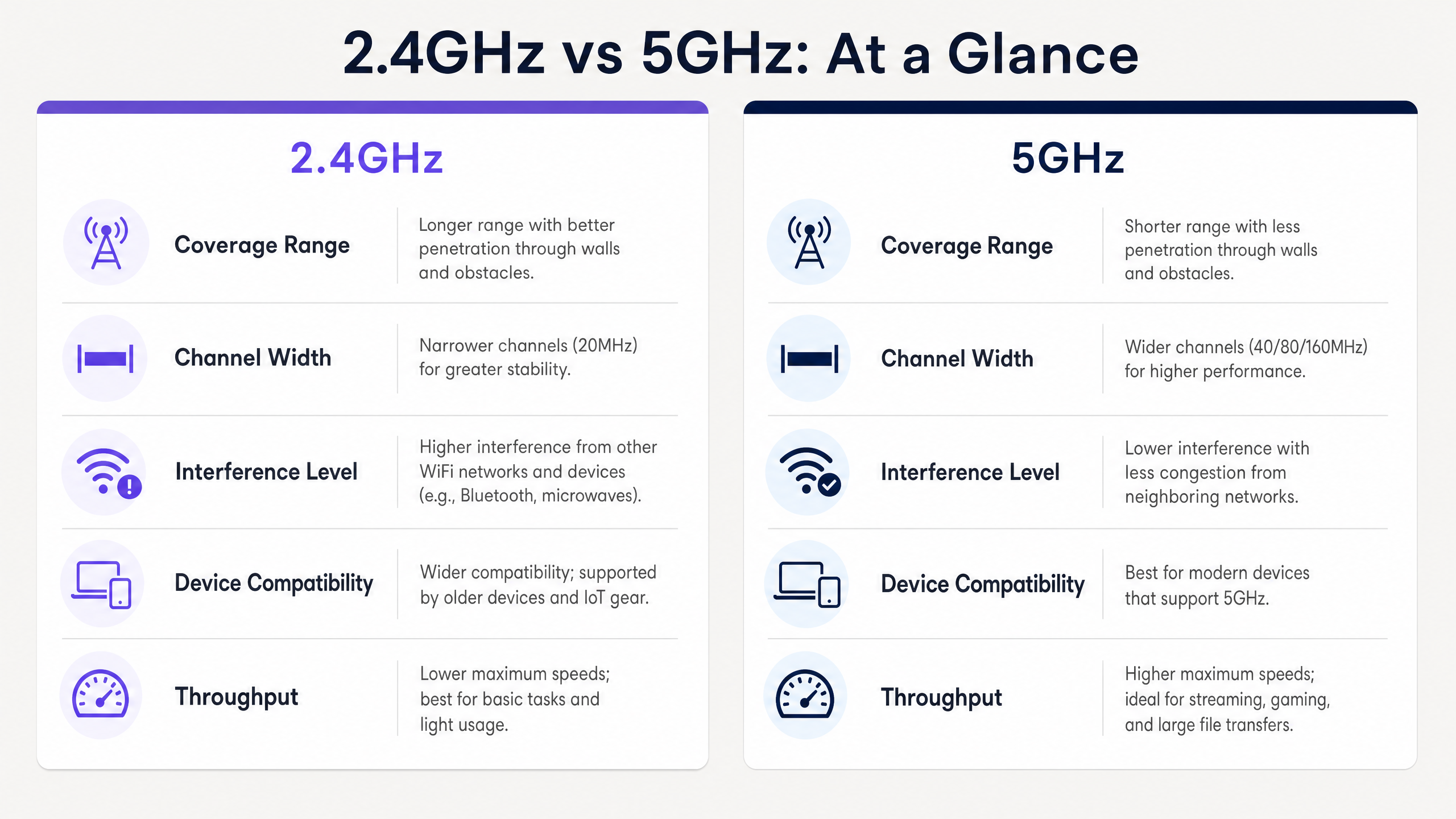
Operando a una frecuencia más baja, la banda de 2.4GHz presenta longitudes de onda más largas que penetran fácilmente obstáculos físicos como paredes de concreto, estanterías de acero y huecos de elevadores. Esto la hace ideal para entornos de Hospitalidad con paredes internas gruesas o amplios espacios de almacén.
Sin embargo, el espectro de 2.4GHz está severamente limitado por su arquitectura de canales. En la mayoría de los dominios regulatorios, solo hay tres canales de 20MHz no superpuestos (Canales 1, 6 y 11). Esta escasez conduce a una interferencia significativa de co-canal (CCI) y de canal adyacente (ACI), especialmente en entornos densos donde redes vecinas, dispositivos Bluetooth e incluso microondas compiten por el tiempo de aire.
La Banda de 5GHz: La Autopista de Alta Capacidad
Por el contrario, la banda de 5GHz opera a una frecuencia más alta, lo que resulta en longitudes de onda más cortas. Si bien esto reduce su capacidad para penetrar barreras físicas, ofrece una vasta extensión de espectro disponible. Dependiendo del dominio regulatorio y el uso de canales de Selección Dinámica de Frecuencia (DFS), se puede acceder hasta a 25 canales de 20MHz no superpuestos.
Esta abundancia permite la unión de canales (ancho de 40MHz, 80MHz o incluso 160MHz), lo que habilita el alto rendimiento requerido para aplicaciones modernas. Bajo IEEE 802.11ac (Wi-Fi 5) y 802.11ax (Wi-Fi 6), las redes de 5GHz pueden ofrecer velocidades gigabit, convirtiéndola en la banda preferida para entornos de alta densidad como centros de conferencias y centros de Transporte .
Guía de Implementación: Coexistencia Inteligente
La implementación de una WLAN empresarial moderna requiere un enfoque matizado para la asignación de bandas. El objetivo es descargar dispositivos capaces a la banda de 5GHz mientras se preserva la banda de 2.4GHz para los dispositivos que realmente la necesitan.
1. Segmentación de SSID
La estrategia más efectiva para gestionar poblaciones de dispositivos mixtas es la segmentación de SSID. Cree SSIDs dedicados para diferentes casos de uso:
- SSID Operacional (Solo 2.4GHz): Reservado para hardware heredado, sensores IoT, escáneres de códigos de barras y terminales EPOS. Esto asegura un tiempo de aire limpio para herramientas operacionales críticas.
- SSID de Invitados/Corporativo (Doble Banda o 5GHz Primario): Diseñado para smartphones, tablets y laptops modernos. Este SSID debe aprovechar la dirección de banda (band steering) para empujar a los clientes capaces a 5GHz.
2. Configuración de la Dirección de Banda (Band Steering)
La dirección de banda (band steering) es el mecanismo mediante el cual la infraestructura inalámbrica anima a los clientes de doble banda a asociarse con la radio de 5GHz.
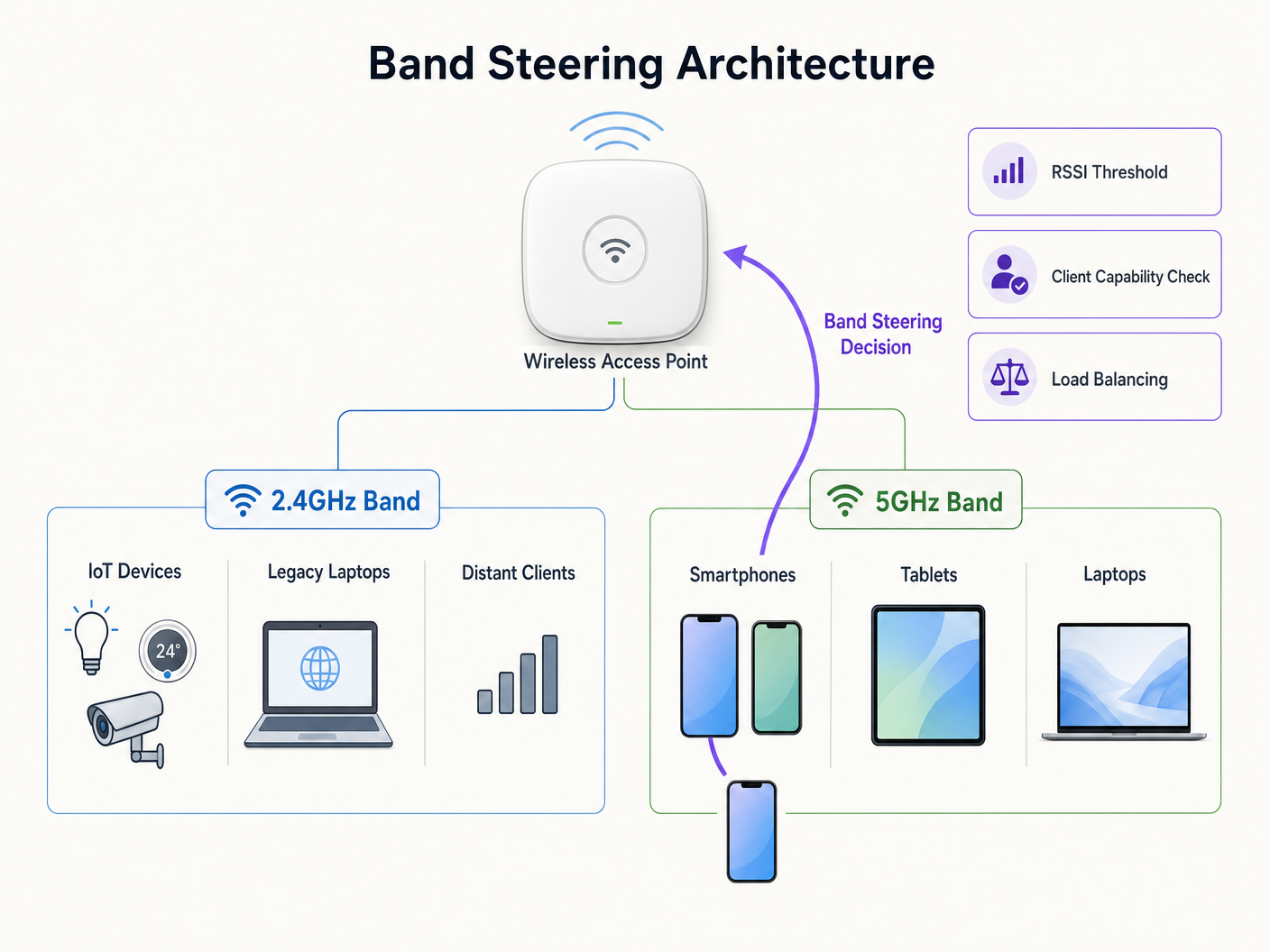
Al configurar la dirección de banda (band steering), considere los siguientes parámetros:
- Supresión de Respuesta de Sonda: El AP ignora las solicitudes de sonda en la banda de 2.4GHz de clientes que sabe que son capaces de 5GHz, forzándolos a asociarse en 5GHz.
- Umbrales RSSI: Implemente umbrales estrictos de Indicador de Fuerza de Señal Recibida (RSSI). Si la señal de 5GHz de un cliente cae por debajo de cierto nivel (ej., -72 dBm), el AP debe permitir que el cliente regrese a 2.4GHz de manera gradual para evitar caídas de conexión.
3. Validación del Diseño de RF
La dirección de banda (band steering) no es una panacea para un diseño de red deficiente. Si su cobertura de 5GHz tiene brechas, una dirección de banda (band steering) agresiva resultará en desconexiones frecuentes y una mala experiencia de usuario. Siempre valide su diseño de RF con un estudio de sitio exhaustivo antes de habilitar las funciones de dirección.
Mejores Prácticas y Consideraciones de Seguridad
Optimización del Ancho de Canal
Si bien los canales de 80MHz ofrecen un rendimiento teórico impresionante, consumen cuatro canales estándar de 20MHz, aumentando la probabilidad de CCI en implementaciones de alta densidad. Para la mayoría de los entornos empresariales, estandarizar en anchos de canal de 40MHz en la banda de 5GHz proporciona el equilibrio óptimo entre rendimiento y disponibilidad de canales.
Seguridad y Cumplimiento
La naturaleza congestionada de la banda de 2.4GHz la hace más susceptible a ciertos tipos de interferencia y ataques de desautenticación. Para mantener una postura de seguridad sólida, especialmente para entornos sujetos a PCI DSS o GDPR:
- Implemente WPA3 con Protected Management Frames (PMF) en todos los SSIDs corporativos.
- Asegure una estricta segregación de VLAN entre el tráfico de invitados y las redes corporativas/de pago.
- Audite regularmentesu entorno en busca de APs no autorizados, que son más frecuentes en la banda de 2.4GHz, de fácil acceso.
Para obtener más información sobre cómo gestionar los datos de la red de forma segura, consulte nuestra guía sobre El costo oculto de los datos de telemetría en las WLAN corporativas (también disponible en francés: Le coût caché des données de télémétrie sur les WLAN d'entreprise ).
Solución de problemas y mitigación de riesgos
Cuando surgen problemas, a menudo se manifiestan como caídas de conectividad o bajo rendimiento. Aquí se presentan los modos de falla comunes y cómo mitigarlos:
- Clientes pegajosos: Dispositivos que se aferran a una señal débil de 2.4GHz incluso cuando hay una señal fuerte de 5GHz disponible. Mitigación: Ajuste sus umbrales de RSSI y habilite 802.11k/v/r (Fast BSS Transition) para ayudar en las decisiones de roaming del cliente.
- Interferencia de canales DFS: Los sistemas de radar pueden obligar a los APs a desocupar los canales DFS, interrumpiendo la conectividad. Mitigación: Monitoree los registros del controlador en busca de eventos DFS. Si son frecuentes, excluya los canales afectados de su plan de asignación dinámica de canales.
- Fallos de conectividad IoT: Muchos dispositivos inteligentes carecen de radios de 5GHz y tienen dificultades con la autenticación compleja. Mitigación: Asegúrese de que su SSID IoT dedicado opere estrictamente en 2.4GHz y utilice métodos de autenticación más simples (por ejemplo, WPA2-PSK o MAC Authentication Bypass) mientras mantiene un estricto aislamiento de red.
ROI e impacto empresarial
Optimizar su estrategia de banda impacta directamente en los resultados de su organización. Una red bien ajustada reduce los tickets de soporte, aumenta la eficiencia operativa del personal que utiliza dispositivos móviles y mejora la experiencia del huésped.
Cuando se integra con WiFi Analytics , una implementación robusta de 5GHz proporciona los datos de ubicación de alta fidelidad necesarios para iniciativas de marketing avanzadas. Como se ha visto en desarrollos recientes, como la forma en que un asistente de Wi-Fi habilita el acceso sin contraseña en 2026 , la conectividad fluida es la base para impulsar la inclusión digital y maximizar el valor de su espacio físico. Además, características como el Modo de mapas sin conexión dependen de conexiones iniciales estables para descargar los activos necesarios, lo que subraya la importancia de un entorno RF confiable.
Escuche nuestro completo resumen de podcast a continuación para profundizar en estas estrategias:
Definiciones clave
Band Steering
A network infrastructure feature that detects dual-band capable clients and actively encourages them to connect to the less congested 5GHz band rather than the 2.4GHz band.
Crucial for optimizing airtime utilization in environments with a mix of modern smartphones and legacy IoT devices.
Co-Channel Interference (CCI)
Interference that occurs when two or more access points operate on the exact same frequency channel, forcing them to share the available airtime.
A primary cause of slow network performance on the 2.4GHz band due to the limited number of non-overlapping channels.
Dynamic Frequency Selection (DFS)
A mechanism that allows Wi-Fi networks to use 5GHz channels typically reserved for radar systems, provided the AP can detect radar pulses and automatically switch to a different channel.
Unlocks additional 5GHz channels for enterprise use, but requires careful planning to avoid sudden channel changes that disconnect clients.
RSSI (Received Signal Strength Indicator)
A measurement of the power level being received by the antenna, typically expressed in negative decibels (dBm). Closer to zero is stronger.
Used by network administrators to set thresholds for roaming and band steering decisions (e.g., steering clients to 2.4GHz when 5GHz RSSI drops below -75 dBm).
SSID Segmentation
The practice of broadcasting different network names (SSIDs) for different user groups or device types, often tied to specific frequency bands or security policies.
Essential for isolating vulnerable IoT devices on 2.4GHz from high-speed corporate traffic on 5GHz.
Attenuation
The gradual loss of signal strength as radio waves travel through space or pass through physical objects like walls and floors.
Explains why 5GHz signals require denser AP placement compared to 2.4GHz signals in environments with heavy structural interference.
Spatial Stream
Multiple independent data signals transmitted simultaneously over different antennas using MIMO (Multiple Input, Multiple Output) technology to increase throughput.
Determines the maximum potential speed of a connection; modern 5GHz clients often support 2x2 or 3x3 spatial streams for gigabit performance.
Protected Management Frames (PMF)
A security standard (mandatory in WPA3) that encrypts the management frames used to control Wi-Fi connections, preventing deauthentication attacks.
Critical for securing the easily accessible 2.4GHz band against malicious actors attempting to disrupt network operations.
Ejemplos resueltos
A 200-room hotel is experiencing poor guest WiFi performance in the lobby during peak check-in times, while in-room connectivity remains stable. The current configuration uses a single dual-band SSID across the entire property.
Implement a dual-strategy approach. First, enable band steering on the guest SSID with a strict RSSI threshold (-70 dBm) to force modern smartphones and laptops in the dense lobby area onto the high-capacity 5GHz band. Second, reduce the 2.4GHz transmit power on the lobby APs to shrink the cell size and reduce co-channel interference. Finally, ensure 5GHz channel widths are set to 40MHz to maximize available non-overlapping channels in the high-density space.
A large [Retail](/industries/retail) chain is rolling out new 2.4GHz-only wireless barcode scanners for inventory management. Simultaneously, they want to offer high-speed Guest WiFi to shoppers. How should the network be configured to prevent the consumer devices from degrading scanner performance?
Deploy SSID segmentation. Create a dedicated 'Ops-Inventory' SSID broadcast only on the 2.4GHz radio, utilizing WPA3-Personal or 802.1X for security, and assign it to a restricted VLAN. Create a separate 'Guest-WiFi' SSID broadcast on both bands, but with aggressive band steering enabled to push consumer devices to 5GHz. Apply Quality of Service (QoS) policies prioritizing traffic from the operational VLAN.
Preguntas de práctica
Q1. You are deploying a new WLAN in a large, open-plan warehouse. The primary devices are legacy 802.11b/g barcode scanners used by forklift operators. There are very few modern devices in the space. Which band strategy should you prioritize?
Sugerencia: Consider the capabilities of the primary client devices and the physical environment.
Ver respuesta modelo
Prioritize a robust 2.4GHz design. Since the legacy scanners only support 2.4GHz, a 5GHz-focused design would be useless for operations. Ensure AP placement provides adequate 2.4GHz coverage and carefully manage channel planning (using only channels 1, 6, and 11) to minimize co-channel interference in the open space.
Q2. During a busy conference, attendees are complaining of slow WiFi speeds, despite showing full signal strength on their devices. A packet capture reveals heavy utilization on channels 1, 6, and 11, but channels 36-48 are relatively quiet. What is the most likely configuration issue?
Sugerencia: Think about why modern devices might be congregating on the congested channels instead of the available ones.
Ver respuesta modelo
Band steering is likely disabled or configured incorrectly. The devices are defaulting to the 2.4GHz band (channels 1, 6, 11) because it often presents a stronger initial signal, leading to congestion. Enabling band steering would force the capable modern devices onto the quiet 5GHz channels (36-48), alleviating the congestion and improving speeds.
Q3. A hospital IT team wants to implement 80MHz channel widths on their 5GHz network to support high-resolution medical imaging transfers. However, they operate in a high-density environment with many APs deployed close together. What is the primary risk of this approach?
Sugerencia: Consider the relationship between channel width and the number of available non-overlapping channels.
Ver respuesta modelo
The primary risk is a massive increase in Co-Channel Interference (CCI). Using 80MHz channels consumes four standard 20MHz channels per AP. In a high-density deployment, this drastically reduces the number of non-overlapping channels available, meaning neighboring APs will likely end up on the same frequency, causing interference that degrades overall network performance rather than improving it.